
ARCGIS PRO DSK GraphicsLayer创建文本要素
一、判断GraphicsLayer层【地块注记】是否存在,如果不存在则新建、如果存在则删除所有要素
Dim GraphicsLayer = pmap.GetLayersAsFlattenedList().OfType(Of ArcGIS.Desktop.Mapping.GraphicsLayer).FirstOrDefault() '获取当前map对象中的GetLayer图层
Await QueuedTask.Run(Sub()If GraphicsLayer Is Nothing = True Then'创建 GraphicsLayerIf pmap.MapType <> MapType.Map Then Exit Sub       ' Not 2DDim gl_param = New GraphicsLayerCreationParamsgl_param.Name = "地块注记"'默认情况下会添加到目录的顶部GraphicsLayer = LayerFactory.Instance.CreateLayer(Of ArcGIS.Desktop.Mapping.GraphicsLayer)(gl_param, pmap)Else'全选文本Dim zj_zdmane As String = ""zj_zdmane = "地块注记"Dim elements = GraphicsLayer.GetElementsAsFlattenedList().Where(Function(gele As GraphicElement) gele.Name.StartsWith(zj_zdmane)) ’获取GetLayer图层中定义的元素(本例为text)'删除选择textGraphicsLayer.SelectElements(elements)GraphicsLayer.RemoveElements(GraphicsLayer.GetSelectedElements())End IfMapView.Active.Redraw(True)  '视图刷新End Sub)
二、CreateTextGraphicElement 方法
GraphicElement CreateTextGraphicElement(
IElementContainer elementContainer,
TextType textType,
Geometry geometry,
CIMTextSymbol textSymbol,
string text,
string elementName,
bool select, 【可选】
ElementInfo elementInfo 【可选】
)
textType:要创建的文本图形的类型
| 成员 | 描述 |
| CircleParagraph | 圆文本 |
| EllipseParagraph | 椭圆文本 |
| None | None- 默认 |
| PointText | 点文本 |
| PolygonParagraph | 多边形文本 |
| RectangleParagraph | 矩形文本 |
| SplinedText | 沿直线或曲线样条的文本 |
三、检查应用程序中是否有特定字体可用于 Pro 会话。 必须在 MCT 上调用此方法。IsFontAvailable 方法 (SymbolFactory)
public bool IsFontAvailable(
string fontName,
string fontStyle,
FontType fontType,
List<CIMFontVariation> fontVariationSettings
)
fontName:字体簇的名称。
fontStyle :字体样式的名称。
fontType:字体类型。
fontVariationSettings:要应用的任何字体变体设置。可以为 null。
返回值:一个布尔值,表示字体是否可用。例如:
Dim BOOT=SymbolFactory.Instance.IsFontAvailable("Arial", "Bold", FontType.Unspecified, null)四、创建文本
1、创建简单的文本符号(Creates a simple text symbol)创建一个大小为8.5、字体系列为“Corbel”、字体样式为“Regular”的简单黑色文本符号。
Await QueuedTask.Run(Sub()pmap = MapView.Active.Map ‘获取激活的map对象Dim GraphicsLayer = pmap.GetLayersAsFlattenedList().OfType(Of ArcGIS.Desktop.Mapping.GraphicsLayer).FirstOrDefault() ‘获取的GraphicsLayer对象Dim TextSymbol =SymbolFactory.Instance.ConstructTextSymbol(ColorFactory.Instance.BlackRGB, 8.5, "Corbel", "Regular")'文本的偏移量TextSymbol.OffsetX = 0.5TextSymbol.OffsetY = 0.5Dim Location As MapPoint = MapPointBuilderEx.CreateMapPoint(PX,PY)Dim text As String = "Forest Grove"Dim polyTxtElm As GraphicElement = ElementFactory.Instance.CreateTextGraphicElement(GraphicsLayer, TextType.PointText, Location, TextSymbol, text, "地块注记")End Sub)
效果:

2、创建创建带有光晕环的文本符号(Creates a text symbol with a halo)
Await QueuedTask.Run(Sub()pmap = MapView.Active.Map ‘获取激活的map对象Dim GraphicsLayer = pmap.GetLayersAsFlattenedList().OfType(Of ArcGIS.Desktop.Mapping.GraphicsLayer).FirstOrDefault() ‘获取的GraphicsLayer对象Dim haloPoly = SymbolFactory.Instance.ConstructPolygonSymbol(ColorFactory.Instance.RedRGB, SimpleFillStyle.Solid)Dim TextSymbol = SymbolFactory.Instance.ConstructTextSymbol(haloPoly, 10, "Arial", "Bold")'文本的偏移量TextSymbol.OffsetX = 0.5TextSymbol.OffsetY = 0.5Dim Location As MapPoint = MapPointBuilderEx.CreateMapPoint(PX,PY)Dim text As String = "Portland"Dim polyTxtElm As GraphicElement = ElementFactory.Instance.CreateTextGraphicElement(GraphicsLayer, TextType.PointText, Location, TextSymbol, text, "地块注记")End Sub)
效果:

3、创建简单的牵引文本符号(Creates a text symbol with a halo)
Await QueuedTask.Run(Sub()pmap = MapView.Active.Map ‘获取激活的map对象Dim GraphicsLayer = pmap.GetLayersAsFlattenedList().OfType(Of ArcGIS.Desktop.Mapping.GraphicsLayer).FirstOrDefault() ‘获取的GraphicsLayer对象Dim textSymbol = SymbolFactory.Instance.ConstructTextSymbol(ColorFactory.Instance.BlackRGB, 10, "Verdana", "Regular")Dim lineCalloutSymbol = new CIMSimpleLineCallout()Dim lineSymbol = SymbolFactory.Instance.ConstructLineSymbol(ColorFactory.Instance.BlackRGB, 1, SimpleLineStyle.DashDotDot)lineCalloutSymbol.LineSymbol = lineSymbol'文本的偏移量TextSymbol.OffsetX = 10TextSymbol.OffsetY = 10textSymbol.Callout = lineCalloutSymbolDim Location As MapPoint = MapPointBuilderEx.CreateMapPoint(PX,PY)Dim text As String = "Forest Grove"Dim polyTxtElm As GraphicElement = ElementFactory.Instance.CreateTextGraphicElement(GraphicsLayer, TextType.PointText, Location, TextSymbol, text, "地块注记")End Sub)效果:

4、创建圆角矩形的牵引文本框符号(Creates a balloon callout text symbol)
Await QueuedTask.Run(Sub()pmap = MapView.Active.Map ‘获取激活的map对象Dim GraphicsLayer = pmap.GetLayersAsFlattenedList().OfType(Of ArcGIS.Desktop.Mapping.GraphicsLayer).FirstOrDefault() ‘获取的GraphicsLayer对象Dim Location As MapPoint = MapPointBuilderEx.CreateMapPoint(PX,PY)Dim textSymbol = SymbolFactory.Instance.ConstructTextSymbol(ColorFactory.Instance.WhiteRGB, 11, "Corbel", "Regular")Dim balloonCallout = new CIMBalloonCallout()BalloonCallout.BalloonStyle = BalloonCalloutStyle.RoundedRectangleDim polySymbol = SymbolFactory.Instance.ConstructPolygonSymbol(ColorFactory.Instance.BlackRGB, SimpleFillStyle.Solid)BalloonCallout.BackgroundSymbol = polySymbolBalloonCallout.Margin = new CIMTextMarginWith BalloonCallout.Margin.Left = 5.Right = 5.Bottom = 5.Top = 5End WithTextSymbol.Callout = balloonCalloutDim text As String = "Forest Grove"Dim polyTxtElm As GraphicElement = ElementFactory.Instance.CreateTextGraphicElement(GraphicsLayer, TextType.RectangleParagraph, Location, TextSymbol, text, "地块注记")End Sub)效果:

5、创建点符号的文本符号(Creates a point callout text symbol)
Await QueuedTask.Run(Sub()pmap = MapView.Active.Map ‘获取激活的map对象Dim GraphicsLayer = pmap.GetLayersAsFlattenedList().OfType(Of ArcGIS.Desktop.Mapping.GraphicsLayer).FirstOrDefault() ‘获取的GraphicsLayer对象Dim textSymbol = SymbolFactory.Instance.ConstructTextSymbol(ColorFactory.Instance.WhiteRGB, 6, "Tahoma", "Bold")Dim shieldCalloutSymbol = new CIMPointSymbolCallout()Dim symbolStyleItem = GetPointSymbol("ArcGIS 2D", "Shield 1") ShieldCalloutSymbol.PointSymbol = symbolStyleItem.Symbol as CIMPointSymbolShieldCalloutSymbol.PointSymbol.SetSize(18.0)TextSymbol.Callout = shieldCalloutSymbolDim Location As MapPoint = MapPointBuilderEx.CreateMapPoint(PX,PY)Dim text As String = "I5"Dim polyTxtElm As GraphicElement = ElementFactory.Instance.CreateTextGraphicElement(GraphicsLayer, TextType.PointText, Location, TextSymbol, text, "地块注记")End Sub)效果:

6、创建设置矩形背景色的牵引文本框符号(Creates a background callout text symbol)
Await QueuedTask.Run(Sub()pmap = MapView.Active.Map ‘获取激活的map对象Dim GraphicsLayer = pmap.GetLayersAsFlattenedList().OfType(Of ArcGIS.Desktop.Mapping.GraphicsLayer).FirstOrDefault() ‘获取的GraphicsLayer对象Dim Location As MapPoint = MapPointBuilderEx.CreateMapPoint(PX,PY)Dim textSymbol = SymbolFactory.Instance.ConstructTextSymbol(ColorFactory.Instance.BlackRGB, 8, "Tahoma", "Bold")Dim backgroundCalloutSymbol = new CIMBackgroundCallout()Dim lineSymbol = SymbolFactory.Instance.ConstructLineSymbol(ColorFactory.Instance.BlackRGB, 1, SimpleLineStyle.DashDotDot)Dim aquaBackground = ColorFactory.Instance.CreateRGBColor(190, 255, 232, 100)Dim polySymbol = SymbolFactory.Instance.ConstructPolygonSymbol(aquaBackground, SimpleFillStyle.Solid)BackgroundCalloutSymbol.LeaderLineSymbol = lineSymbolTextSymbol.OffsetX = 10TextSymbol.OffsetY = 10BackgroundCalloutSymbol.BackgroundSymbol = polySymbolDim accentSymbol = SymbolFactory.Instance.ConstructLineSymbol(ColorFactory.Instance.BlackRGB, 2, SimpleLineStyle.Solid)BackgroundCalloutSymbol.AccentBarSymbol = accentSymbolBackgroundCalloutSymbol.Margin = new CIMTextMarginWith BalloonCallout.Margin.Left = 5.Right = 5.Bottom = 5.Top = 5End WithTextSymbol.Callout = backgroundCalloutSymbolDim text As String = "Forest Grove"Dim polyTxtElm As GraphicElement = ElementFactory.Instance.CreateTextGraphicElement(GraphicsLayer,TextType.RectangleParagraph, poly, TextSymbol, text, "地块注记")End Sub)效果:

相关文章:
ARCGIS PRO DSK GraphicsLayer创建文本要素
一、判断GraphicsLayer层【地块注记】是否存在,如果不存在则新建、如果存在则删除所有要素 Dim GraphicsLayer pmap.GetLayersAsFlattenedList().OfType(Of ArcGIS.Desktop.Mapping.GraphicsLayer).FirstOrDefault() 获取当前map对象中的GetLayer图层 Await Queue…...

看板项目之vue代码分析
目录: Q1、vue项目怎么实现的输入localhost:8080就能自动跳到index页面Q2、组合饼状图如何实现Q3、vue项目如何实现环境的切换Q4、vue怎么实现vue里面去调用js文件里面的函数 Q1、vue项目怎么实现的输入localhost:8080就能自动跳到index页面 …...
ai_dead)
lua 游戏架构 之 游戏 AI (七)ai_dead
定义一个名为ai_dead的类,继承自ai_base类。这个类用于处理游戏中AI在死亡状态下的行为逻辑。以下是对代码的具体解释: 1. **引入基类**: - 使用require函数引入ai_base类,作为基础类。 2. **定义ai_dead类**: …...

前端开发知识(一)-html
1.前端开发需掌握的内容: 2.前端开发的三剑客:html、css、javascript Vue可以简化JavaScpript流程。 Element(饿了么开发的) :前端组件库。 Ngix:前端服务器。 3.前端开发工具:vscode 1)按…...

身份证如何查验真伪?C#身份证二要素、三要素接口集成
身份证不仅是我们的身份证明,更是社会生活中的“通行证”,现在人们的衣食住行都离不开身份证。但对于提供服务的平台而言,如何对用户提供的身份信息进行真伪核验便成为了一大难题。别担心,今天小编为服务平台带来了身份证二要素、…...

C++ | Leetcode C++题解之第290题单词规律
题目: 题解: class Solution { public:bool wordPattern(string pattern, string str) {unordered_map<string, char> str2ch;unordered_map<char, string> ch2str;int m str.length();int i 0;for (auto ch : pattern) {if (i > m) {…...

Pytorch使用教学7-张量的广播
PyTorch中的张量具有和NumPy相同的广播特性,允许不同形状的张量之间进行计算。 广播的实质特性,其实是低维向量映射到高维之后,相同位置再进行相加。我们重点要学会的就是低维向量如何向高维向量进行映射。 相同形状的张量计算 虽然我们觉…...

生成式AI:对话系统(Chat)与自主代理(Agent)的和谐共舞
生成式AI:对话与行动的和谐共舞 我们正站在一个令人激动的时代门槛上——生成式AI技术飞速发展,带来了无限的可能性。一个关键问题浮现:AI的未来是对话系统(Chat)的天下,还是自主代理(Agent&am…...
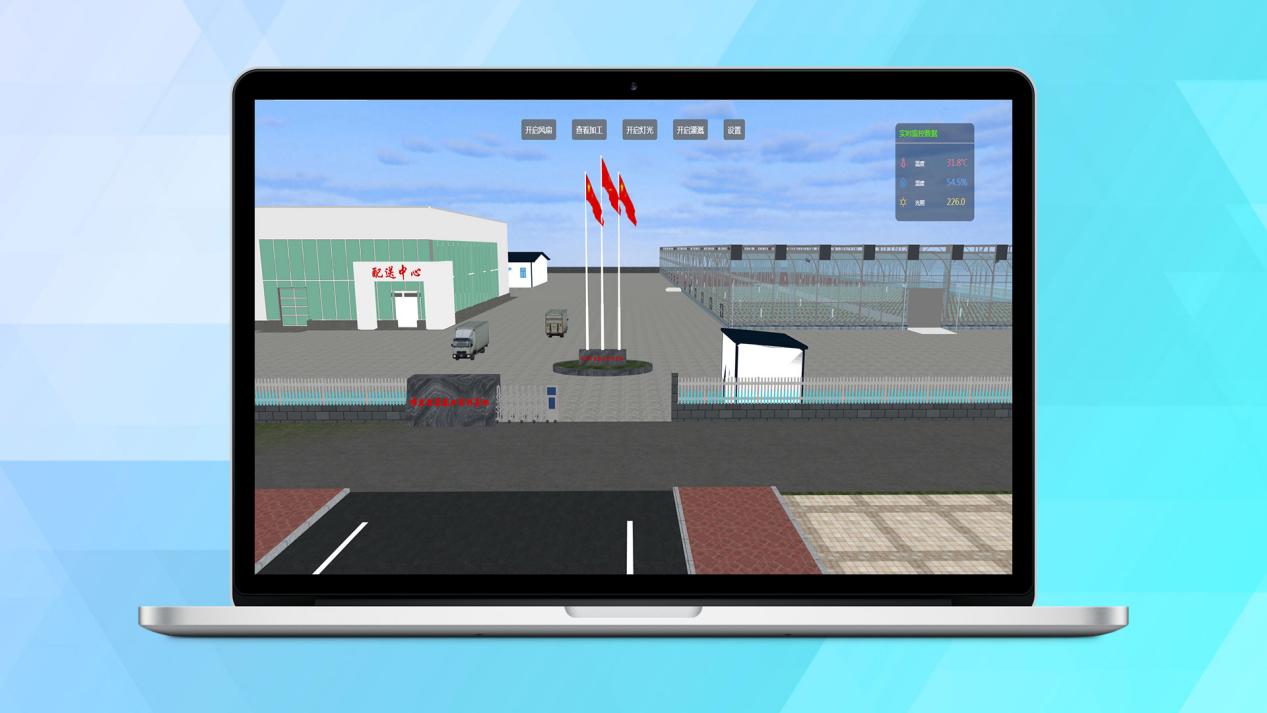
唯众物联网(IOT)全功能综合实训教学解决方案
一、引言 在信息技术日新月异的今天,物联网(IoT)作为推动数字化转型的关键力量,其触角已延伸至我们生活的方方面面,深刻地重塑了工作模式、生活习惯乃至社会结构的每一个角落。面对这一前所未有的变革浪潮,…...

24证券从业考试报名『个人信息表』填写模板❗
24证券从业考试报名『个人信息表』填写模板❗ 1️⃣居住城市、通讯地址:写自己现居住的地址就可以。 2️⃣学历:需要注意的是学历填写的是考生已经取得的学历,在校大学生已经不具有报名资格,选择大专以上,或者是高中学…...

深度学习系列70:模型部署torchserve
1. 流程说明 ts文件夹下, 从launcher.py进入,执行jar文件。 入口为model_server.py的start()函数。内容包含: 读取args,创建pid文件 找到java,启动model-server.jar程序,同时读取log-config文件ÿ…...
算法日记day 20(中序后序遍历序列构造二叉树|最大、合并、搜索二叉树)
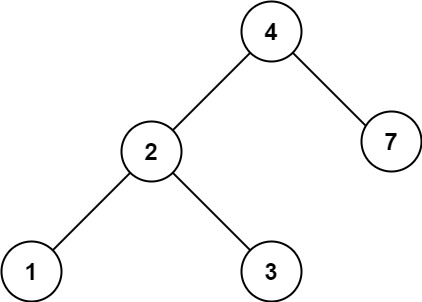
一、中序后序序列构造二叉树 题目: 给定两个整数数组 inorder 和 postorder ,其中 inorder 是二叉树的中序遍历, postorder 是同一棵树的后序遍历,请你构造并返回这颗 二叉树 。 示例 1: 输入:inorder [9,3,15,20,…...

【科研】# Taylor Francis 论文 LaTeX template模版 及 Word模版
【科研写论文】系列 文章目录 【科研写论文】系列前言一、Word 模板(附下载网址):二、LaTeX 版本方法1:直接网页端打开(附网址)方法2:直接下载到本地电脑上编辑下载地址说明及注意事项 前言 给…...

Linux网络配置及常见命令!
vim /etc/sysconfig/network-scripsts/ifcfg-ens33(图形界面配置网络) Xshell rz:上传(从Windows到Linux) sz:下载:(从Linux到Windows)(后接文件手工输入)…...
linux之shell脚本实战
💝💝💝欢迎来到我的博客,很高兴能够在这里和您见面!希望您在这里可以感受到一份轻松愉快的氛围,不仅可以获得有趣的内容和知识,也可以畅所欲言、分享您的想法和见解。 推荐:Linux运维老纪的首页…...

文件上传漏洞(ctfshow web151-161)
Web151 F12修改源代码 exts后面png改为php 这样就可以上传php的文件了 Web152: 考点:后端不能单一校验 就是要传图片格式,抓个包传个png的图片 然后bp抓包修改php后缀解析 然后放包 Web153-web156 在php代码中可以使用“{}”代替“[]” …...

小猪佩奇.js
闲着没事 使用js 画一个小猪佩奇把 <!DOCTYPE html> <html lang"en"><head><meta charset"UTF-8"><meta name"viewport" content"widthdevice-width, initial-scale1.0"><title>Document</tit…...
人工智能AI合集:Ollama部署对话语言大模型-网页访问
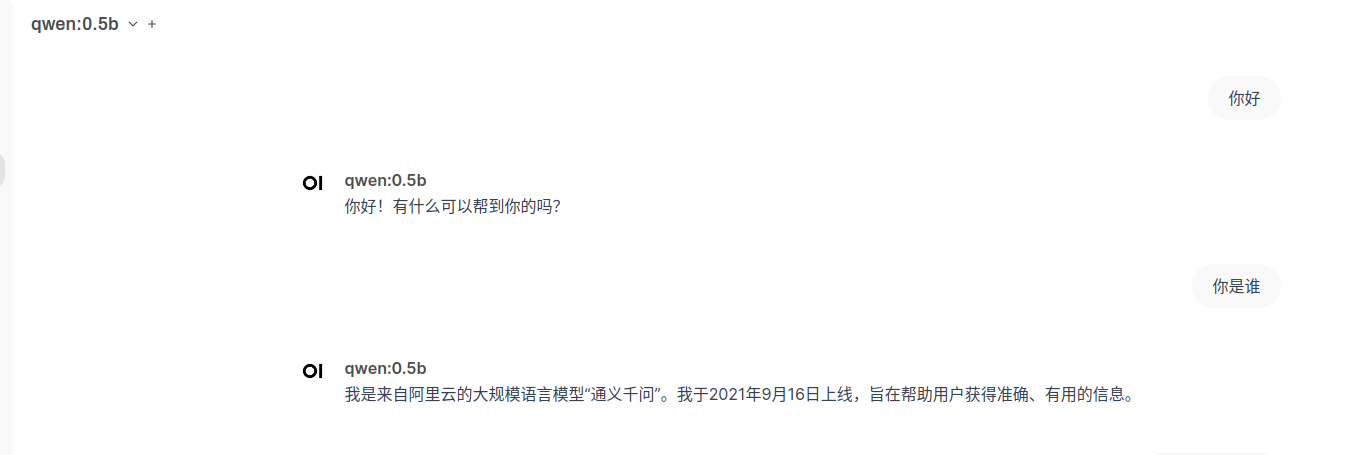
目录 🍅点击这里查看所有博文 随着人工智能技术的飞速发展,AI已经不再是遥不可及的高科技概念,而是逐渐融入到我们的日常生活中。从智能手机的语音助手到家庭中的智能音箱,再到工业自动化和医疗诊断,AI的应用无处不在…...

CentOS搭建Apache服务器
安装对应的软件包 [roothds ~]# yum install httpd mod_ssl -y 查看防火墙的状态和selinux [roothds ~]# systemctl status firewalld [roothds ~]# cat /etc/selinux/config 若未关闭,则关闭防火墙和selinux [roothds ~]# systemctl stop firewalld [roothds ~]# …...

CDGA|数据治理:安全如何贯穿数据供给、流通、使用全过程
随着信息技术的飞速发展,数据已经成为企业运营、社会管理和经济发展的核心要素。然而,数据在带来巨大价值的同时,也伴随着诸多安全风险。因此,数据治理的重要性日益凸显,它不仅仅是对数据的简单管理,更是确…...
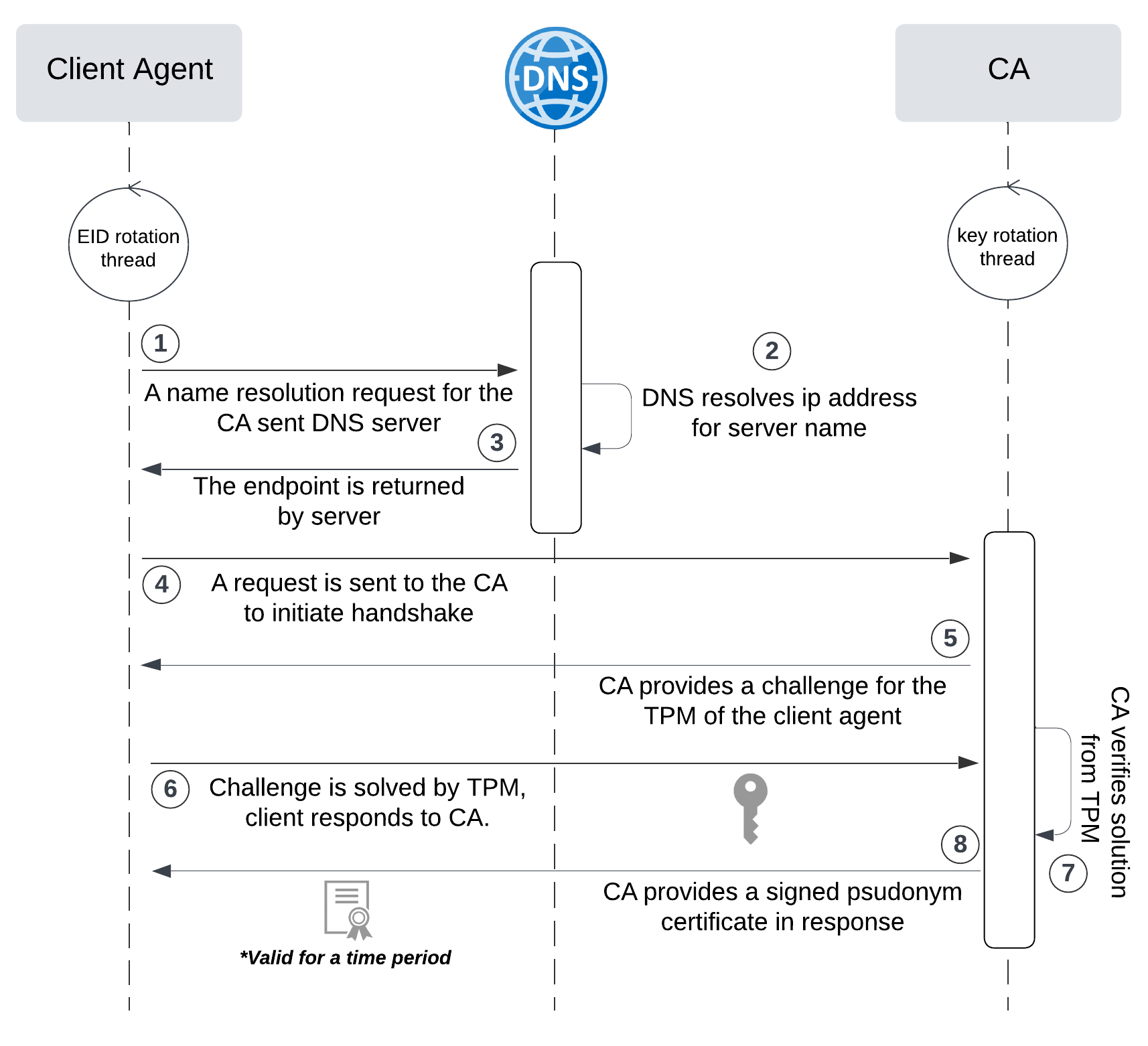
网络六边形受到攻击
大家读完觉得有帮助记得关注和点赞!!! 抽象 现代智能交通系统 (ITS) 的一个关键要求是能够以安全、可靠和匿名的方式从互联车辆和移动设备收集地理参考数据。Nexagon 协议建立在 IETF 定位器/ID 分离协议 (…...

vscode里如何用git
打开vs终端执行如下: 1 初始化 Git 仓库(如果尚未初始化) git init 2 添加文件到 Git 仓库 git add . 3 使用 git commit 命令来提交你的更改。确保在提交时加上一个有用的消息。 git commit -m "备注信息" 4 …...

从零实现富文本编辑器#5-编辑器选区模型的状态结构表达
先前我们总结了浏览器选区模型的交互策略,并且实现了基本的选区操作,还调研了自绘选区的实现。那么相对的,我们还需要设计编辑器的选区表达,也可以称为模型选区。编辑器中应用变更时的操作范围,就是以模型选区为基准来…...
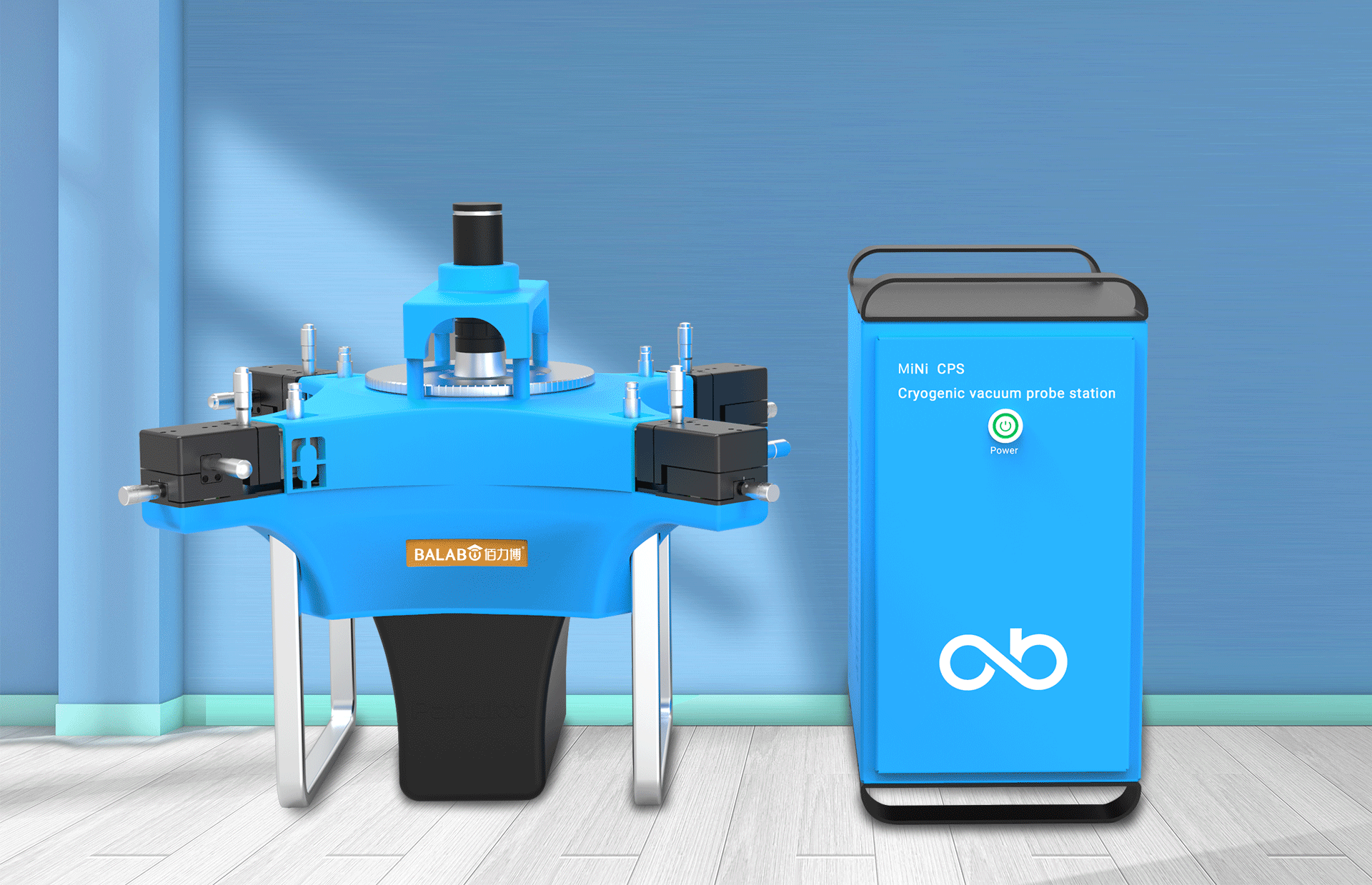
佰力博科技与您探讨热释电测量的几种方法
热释电的测量主要涉及热释电系数的测定,这是表征热释电材料性能的重要参数。热释电系数的测量方法主要包括静态法、动态法和积分电荷法。其中,积分电荷法最为常用,其原理是通过测量在电容器上积累的热释电电荷,从而确定热释电系数…...
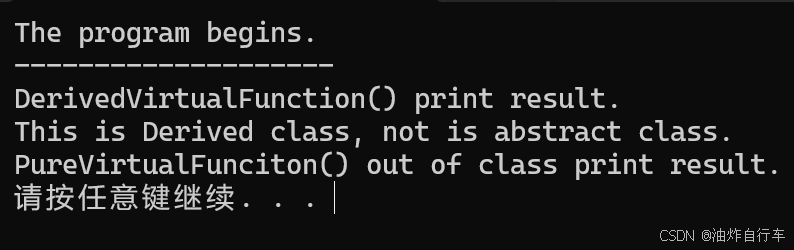
【C++】纯虚函数类外可以写实现吗?
1. 答案 先说答案,可以。 2.代码测试 .h头文件 #include <iostream> #include <string>// 抽象基类 class AbstractBase { public:AbstractBase() default;virtual ~AbstractBase() default; // 默认析构函数public:virtual int PureVirtualFunct…...
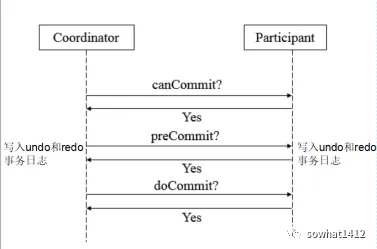
解析两阶段提交与三阶段提交的核心差异及MySQL实现方案
引言 在分布式系统的事务处理中,如何保障跨节点数据操作的一致性始终是核心挑战。经典的两阶段提交协议(2PC)通过准备阶段与提交阶段的协调机制,以同步决策模式确保事务原子性。其改进版本三阶段提交协议(3PC…...
uni-app学习笔记三十五--扩展组件的安装和使用
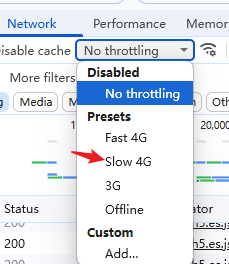
由于内置组件不能满足日常开发需要,uniapp官方也提供了众多的扩展组件供我们使用。由于不是内置组件,需要安装才能使用。 一、安装扩展插件 安装方法: 1.访问uniapp官方文档组件部分:组件使用的入门教程 | uni-app官网 点击左侧…...
Android屏幕刷新率与FPS(Frames Per Second) 120hz
Android屏幕刷新率与FPS(Frames Per Second) 120hz 屏幕刷新率是屏幕每秒钟刷新显示内容的次数,单位是赫兹(Hz)。 60Hz 屏幕:每秒刷新 60 次,每次刷新间隔约 16.67ms 90Hz 屏幕:每秒刷新 90 次,…...
高保真组件库:开关
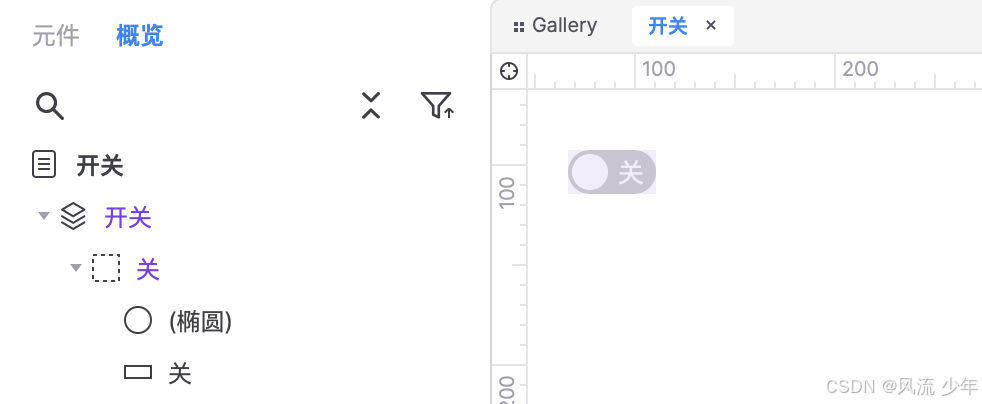
一:制作关状态 拖入一个矩形作为关闭的底色:44 x 22,填充灰色CCCCCC,圆角23,边框宽度0,文本为”关“,右对齐,边距2,2,6,2,文本颜色白色FFFFFF。 拖拽一个椭圆,尺寸18 x 18,边框为0。3. 全选转为动态面板状态1命名为”关“。 二:制作开状态 复制关状态并命名为”开…...
关于 ffmpeg设置摄像头报错“Could not set video options” 的解决方法
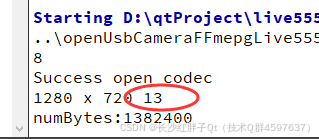
若该文为原创文章,转载请注明原文出处 本文章博客地址:https://hpzwl.blog.csdn.net/article/details/148515355 长沙红胖子Qt(长沙创微智科)博文大全:开发技术集合(包含Qt实用技术、树莓派、三维、OpenCV…...