
Spring Boot 实现不同项目之间的远程
Spring Boot 实现不同项目之间的远程调用
在分布式系统中,通常需要多个微服务之间进行通信。在 Spring Boot 中,实现远程调用的方式有很多,常见的方法包括使用 REST API、gRPC、以及 Spring Cloud Feign 等。本篇博客将详细介绍如何在不同的 Spring Boot 项目之间实现远程调用,并通过代码实例演示具体的实现步骤。
目录
- Spring Boot 实现不同项目之间的远程调用
- 1. 远程调用的基本概念
- 常见的远程调用方式:
- 2. 使用 REST API 进行远程调用
- 示例项目结构:
- `service-a` 项目:
- 1. 创建 Spring Boot 项目
- 2. 定义 REST 控制器
- 3. 启动应用
- `service-b` 项目:
- 1. 创建 Spring Boot 项目
- 2. 创建 REST 客户端
- 3. 创建控制器
- 4. 配置 `RestTemplate` Bean
- 5. 启动应用
- 3. 使用 gRPC 进行远程调用
- 示例项目结构:
- `service-a-grpc` 项目:
- 1. 创建 gRPC 服务定义文件(hello.proto)
- 2. 生成代码
- 3. 实现 gRPC 服务
- 4. 启动 gRPC 服务器
- `service-b-grpc` 项目:
- 1. 创建 gRPC 客户端
- 4. 使用 Spring Cloud OpenFeign 进行远程调用
- 示例项目结构:
- `service-a-feign` 项目:
- 1. 创建 Spring Boot 项目
- 2. 定义 REST 控制器
- 3. 启动应用
- `service-b-feign` 项目:
- 1. 创建 Spring Boot 项目
- 2. 定义 Feign 客户端接口
- 3. 创建控制器
- 4. 启动应用
- 5. 常见问题与解决方案
- 网络延迟
- 服务不可用
- 数据格式不匹配
- 6. 总结
1. 远程调用的基本概念
远程调用是指在分布式系统中,一个服务调用另一个服务提供的方法。远程调用的方式多种多样,主要取决于系统的架构和需求。
常见的远程调用方式:
- REST API:基于 HTTP 协议,通过 URL 访问资源,使用广泛且简单易用。
- gRPC:基于 HTTP/2 协议,使用 Protocol Buffers 作为序列化格式,性能高,支持多种语言。
- Spring Cloud OpenFeign:声明式 HTTP 客户端,简化了 REST API 的调用。
2. 使用 REST API 进行远程调用
REST API 是一种基于 HTTP 协议的调用方式,适用于大多数分布式系统。通过定义统一的接口,客户端可以通过 HTTP 请求调用远程服务。
示例项目结构:
service-a:提供 REST API 的服务service-b:调用service-a提供的 REST API 的服务
service-a 项目:
1. 创建 Spring Boot 项目
使用 Spring Initializr 创建一个新的 Spring Boot 项目,添加 Spring Web 依赖。
2. 定义 REST 控制器
package com.example.servicea.controller;import org.springframework.web.bind.annotation.GetMapping;
import org.springframework.web.bind.annotation.PathVariable;
import org.springframework.web.bind.annotation.RestController;@RestController
public class HelloController {@GetMapping("/hello/{name}")public String sayHello(@PathVariable String name) {return "Hello, " + name + "!";}
}
3. 启动应用
package com.example.servicea;import org.springframework.boot.SpringApplication;
import org.springframework.boot.autoconfigure.SpringBootApplication;@SpringBootApplication
public class ServiceAApplication {public static void main(String[] args) {SpringApplication.run(ServiceAApplication.class, args);}
}
service-b 项目:
1. 创建 Spring Boot 项目
使用 Spring Initializr 创建一个新的 Spring Boot 项目,添加 Spring Web 和 Spring Boot Starter Web 依赖。
2. 创建 REST 客户端
使用 RestTemplate 进行远程调用。
package com.example.serviceb.client;import org.springframework.beans.factory.annotation.Autowired;
import org.springframework.stereotype.Service;
import org.springframework.web.client.RestTemplate;@Service
public class HelloClient {@Autowiredprivate RestTemplate restTemplate;public String getHelloMessage(String name) {String url = "http://localhost:8080/hello/" + name;return restTemplate.getForObject(url, String.class);}
}
3. 创建控制器
package com.example.serviceb.controller;import com.example.serviceb.client.HelloClient;
import org.springframework.beans.factory.annotation.Autowired;
import org.springframework.web.bind.annotation.GetMapping;
import org.springframework.web.bind.annotation.PathVariable;
import org.springframework.web.bind.annotation.RestController;@RestController
public class HelloController {@Autowiredprivate HelloClient helloClient;@GetMapping("/getHello/{name}")public String getHello(@PathVariable String name) {return helloClient.getHelloMessage(name);}
}
4. 配置 RestTemplate Bean
package com.example.serviceb.config;import org.springframework.context.annotation.Bean;
import org.springframework.context.annotation.Configuration;
import org.springframework.web.client.RestTemplate;@Configuration
public class AppConfig {@Beanpublic RestTemplate restTemplate() {return new RestTemplate();}
}
5. 启动应用
package com.example.serviceb;import org.springframework.boot.SpringApplication;
import org.springframework.boot.autoconfigure.SpringBootApplication;@SpringBootApplication
public class ServiceBApplication {public static void main(String[] args) {SpringApplication.run(ServiceBApplication.class, args);}
}
3. 使用 gRPC 进行远程调用
gRPC 是一个高性能、开源的 RPC 框架,适用于低延迟和高吞吐量的通信场景。
示例项目结构:
service-a-grpc:提供 gRPC 服务service-b-grpc:调用service-a-grpc提供的 gRPC 服务
service-a-grpc 项目:
1. 创建 gRPC 服务定义文件(hello.proto)
syntax = "proto3";option java_package = "com.example.grpc";
option java_outer_classname = "HelloProto";service HelloService {rpc SayHello (HelloRequest) returns (HelloResponse);
}message HelloRequest {string name = 1;
}message HelloResponse {string message = 1;
}
2. 生成代码
使用 protoc 编译 .proto 文件生成 Java 代码。
3. 实现 gRPC 服务
package com.example.grpc.server;import com.example.grpc.HelloRequest;
import com.example.grpc.HelloResponse;
import com.example.grpc.HelloServiceGrpc;
import io.grpc.stub.StreamObserver;public class HelloServiceImpl extends HelloServiceGrpc.HelloServiceImplBase {@Overridepublic void sayHello(HelloRequest request, StreamObserver<HelloResponse> responseObserver) {String greeting = "Hello, " + request.getName() + "!";HelloResponse response = HelloResponse.newBuilder().setMessage(greeting).build();responseObserver.onNext(response);responseObserver.onCompleted();}
}
4. 启动 gRPC 服务器
package com.example.grpc.server;import io.grpc.Server;
import io.grpc.ServerBuilder;public class GrpcServer {public static void main(String[] args) throws Exception {Server server = ServerBuilder.forPort(8081).addService(new HelloServiceImpl()).build().start();System.out.println("gRPC Server started");server.awaitTermination();}
}
service-b-grpc 项目:
1. 创建 gRPC 客户端
package com.example.grpc.client;import com.example.grpc.HelloRequest;
import com.example.grpc.HelloResponse;
import com.example.grpc.HelloServiceGrpc;
import io.grpc.ManagedChannel;
import io.grpc.ManagedChannelBuilder;public class GrpcClient {public static void main(String[] args) {ManagedChannel channel = ManagedChannelBuilder.forAddress("localhost", 8081).usePlaintext().build();HelloServiceGrpc.HelloServiceBlockingStub stub = HelloServiceGrpc.newBlockingStub(channel);HelloRequest request = HelloRequest.newBuilder().setName("World").build();HelloResponse response = stub.sayHello(request);System.out.println("Response: " + response.getMessage());channel.shutdown();}
}
4. 使用 Spring Cloud OpenFeign 进行远程调用
Spring Cloud OpenFeign 是一个声明式 HTTP 客户端,它可以简化 REST API 的调用。
示例项目结构:
service-a-feign:提供 REST API 的服务service-b-feign:调用service-a-feign提供的 REST API 的服务
service-a-feign 项目:
1. 创建 Spring Boot 项目
使用 Spring Initializr 创建一个新的 Spring Boot 项目,添加 Spring Web 依赖。
2. 定义 REST 控制器
package com.example.serviceafeign.controller;import org.springframework.web.bind.annotation.GetMapping;
import org.springframework.web.bind.annotation.PathVariable;
import org.springframework.web.bind.annotation.RestController;@RestController
public class HelloController {@GetMapping("/hello/{name}")public String sayHello(@PathVariable String name) {return "Hello, " + name + "!";}
}
3. 启动应用
package com.example.serviceafeign;import org.springframework.boot.SpringApplication;
import org.springframework.boot.autoconfigure.SpringBootApplication;@SpringBootApplication
public class ServiceAFeignApplication {public static void main(String[] args) {SpringApplication.run(ServiceAFeignApplication.class, args);}
}
service-b-feign 项目:
1. 创建 Spring Boot 项目
使用 Spring Initializr 创建一个新的 Spring Boot 项目,添加 Spring Web 和 Spring Cloud OpenFeign 依赖。
2. 定义 Feign 客户端接口
package com.example.servicebfeign.client;import org.springframework.cloud.openfeign.FeignClient;
import org.springframework.web.bind.annotation.GetMapping;
import org.springframework.web.bind.annotation.PathVariable;@FeignClient(name = "hello-service", url = "http://localhost:8080")
public interface HelloClient {@GetMapping("/hello/{name}")String sayHello(@PathVariable("name") String name);
}
3. 创建控制器
package com.example.servicebfeign.controller;import com.example.servicebfeign.client.HelloClient;
import org.springframework.beans.factory.annotation.Autowired;
import org.springframework.web.bind.annotation.GetMapping;
import org.springframework.web.bind.annotation.PathVariable;
import org.springframework.web.bind.annotation.RestController;@RestController
public class HelloController {@Autowiredprivate HelloClient helloClient;@GetMapping("/getHello/{name}")public String getHello(@PathVariable String name) {return helloClient.sayHello(name);}
}
4. 启动应用
package com.example.servicebfeign;import org.springframework.boot.SpringApplication;
import org.springframework.boot.autoconfigure.SpringBootApplication;
import org.springframework.cloud.openfeign.EnableFeignClients;@SpringBootApplication
@EnableFeignClients
public class ServiceBFeignApplication {public static void main(String[] args) {SpringApplication.run(ServiceBFeignApplication.class, args);}
}
5. 常见问题与解决方案
在进行远程调用时,可能会遇到一些常见问题,如网络延迟、服务不可用、数据格式不匹配等。以下是一些常见问题及其解决方案:
网络延迟
问题:网络延迟可能导致远程调用耗时较长,影响系统性能。
解决方案:
- 使用异步调用或多线程处理。
- 优化网络配置,减少延迟。
- 使用本地缓存减少远程调用次数。
服务不可用
问题:远程服务不可用可能导致调用失败,影响系统稳定性。
解决方案:
- 实现重试机制,自动重试失败的调用。
- 使用熔断器(如 Spring Cloud Hystrix)保护系统。
- 实现服务发现机制,动态选择可用服务。
数据格式不匹配
问题:客户端和服务器端的数据格式不匹配可能导致序列化/反序列化错误。
解决方案:
- 确保客户端和服务器端使用相同的数据格式和协议版本。
- 使用一致的数据序列化库(如 Protocol Buffers 或 Jackson)。
6. 总结
在本篇博客中,我们详细介绍了如何在不同的 Spring Boot 项目之间实现远程调用,包括使用 REST API、gRPC 和 Spring Cloud OpenFeign 的具体实现方法。通过这些示例代码,相信你已经掌握了基本的实现步骤和注意事项。在实际项目中,根据具体需求选择合适的远程调用方式,可以大大提高系统的性能和可靠性。
希望这篇博客对你有所帮助,如果你有任何问题或建议,欢迎在下方留言讨论。
相关文章:

Spring Boot 实现不同项目之间的远程
Spring Boot 实现不同项目之间的远程调用 在分布式系统中,通常需要多个微服务之间进行通信。在 Spring Boot 中,实现远程调用的方式有很多,常见的方法包括使用 REST API、gRPC、以及 Spring Cloud Feign 等。本篇博客将详细介绍如何在不同的…...

【VS2019安装+QT配置】
【VS2019安装QT配置】 1. 前言2. 下载visual studio20193. visual studio2019安装4. 环境配置4.1 系统环境变量配置4.2 qt插件开发 5. Visual Studio导入QT项目6. 总结 1. 前言 前期安装了qt,发现creator编辑器并不好用,一点都不时髦。在李大师的指导下&…...

敏感信息泄露wp
1.右键查看网页源代码 2.前台JS绕过,ctrlU绕过JS查看源码 3.开发者工具,网络,查看协议 4.后台地址在robots,拼接目录/robots.txt 5.用dirsearch扫描,看到index.phps,phps中有源码,拼接目录,下载index.phps …...

首屏性能优化
* 减少HTTP请求 * 合并css 和 JS 文件, * 图片精灵:将多个小图标合并成一张图片,通过CSS定位显示所需部分 * 内联小型资源:对于一些小的CSS和js代码,直接内联到HTML中 * 优化资源加载 * 延迟加载:对非关…...

HVV | .NET 攻防工具库,值得您拥有!
01阅读须知 此文所提供的信息只为网络安全人员对自己所负责的网站、服务器等(包括但不限于)进行检测或维护参考,未经授权请勿利用文章中的技术资料对任何计算机系统进行入侵操作。利用此文所提供的信息而造成的直接或间接后果和损失…...

angular入门基础教程(九)依赖注入(DI)
依赖注入 Angular 中的依赖注入(DI)是框架最强大的特性之一。可以将依赖注入视为 Angular 在运行时为你的应用 提供所需资源的能力。依赖项可以是服务或其他资源。 使用服务的一种方式是作为与数据和 API 交互的方式。为了使服务可重用,应该…...

小学生也能听得懂的大模型 - Transformer 1
参考 [小学生也能听得懂的大模型 Transformer 1]...
听说它可以让代码更优雅
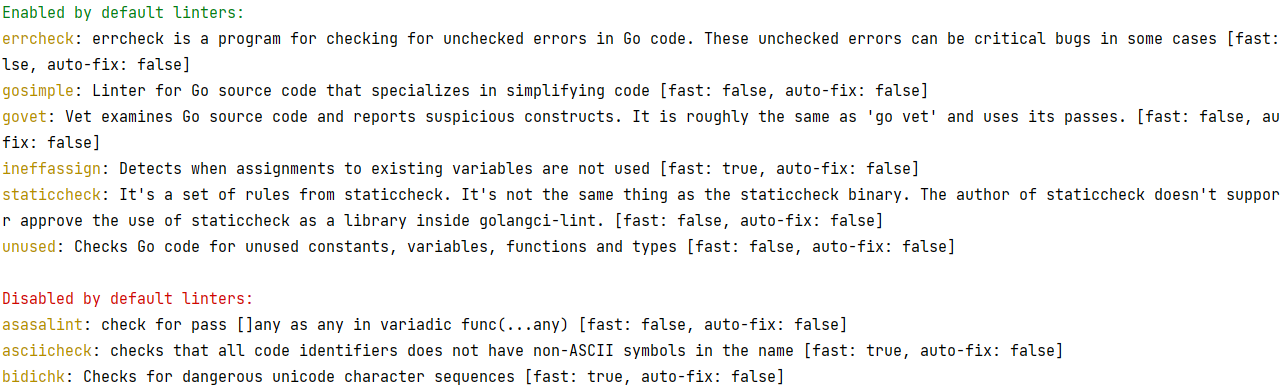
一提到静态代码检查工具这个词应该比较好理解,所谓静态代码检查工具就是检查静态代码的工具,完美~ 言归正传,相信很多程序员朋友都听说过静态代码检查工具这个概念,它可能是我们IDE里的某一个插件,可能是计算机中的一…...
自写ApiTools工具,功能参考Postman和ApiPost
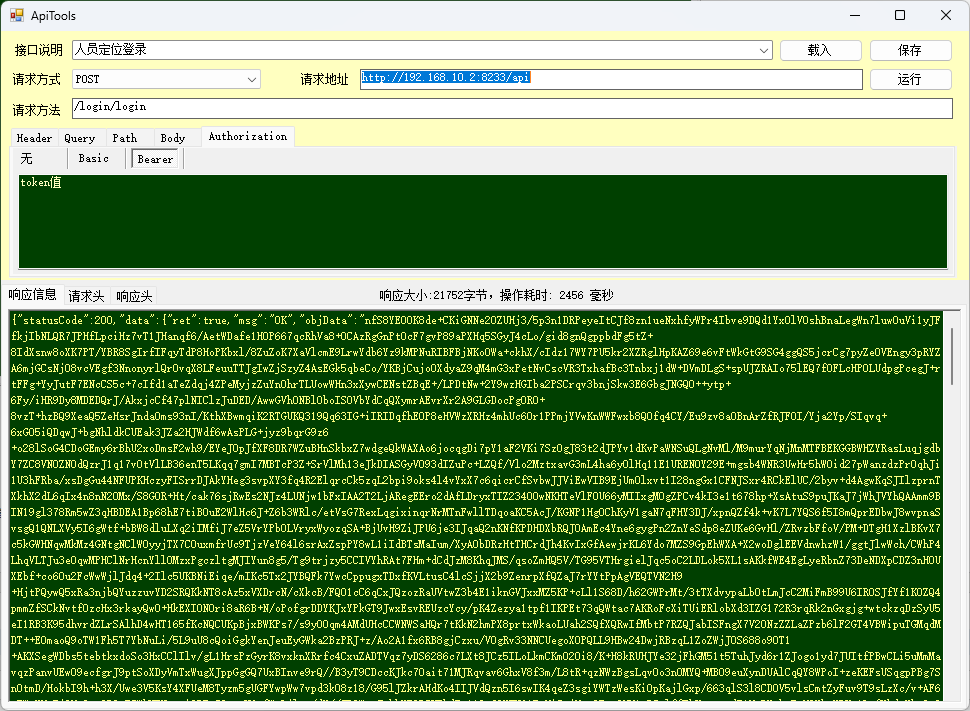
近日在使用ApiPost的时候,发现新版本8和7不兼容,也就是说8不支持离线操作,而7可以。 我想说,我就是因为不想登录使用才从Postman换到ApiPost的。 众所周知,postman时国外软件,登录经常性抽风,…...

《深入浅出WPF》学习笔记一.解析WPF程序
《深入浅出WPF》学习笔记一.解析WPF程序 visual studio帮助我们做了那些事情 引用文件 输出文件类型 按照最原始的方式,我们需要手动打开编译器命令行,使用命令引用类库将代码编译成目标文件。 visual studio会根据我们选择的项目模板,自动…...

Scrapy框架中,如何有效地管理和维护爬虫的日志记录?
在Scrapy框架中,日志记录是监控爬虫行为和调试问题的重要手段。合理地管理和维护爬虫的日志记录,可以帮助开发者更好地了解爬虫的运行状态,并及时发现和解决问题。以下是一些有效管理和维护Scrapy爬虫日志记录的技巧: 1. 配置日志…...

Laravel Sanctum:简化无状态API认证的新纪元
Laravel Sanctum:简化无状态API认证的新纪元 在现代Web应用中,API的安全认证是一个核心需求。Laravel Sanctum是一个轻量级的认证解决方案,专为Laravel开发的单页应用(SPA)、移动应用和API而生。它提供了一种简单而灵…...

OCC BRepOffsetAPI_ThruSections使用
目录 一、BRepOffsetAPI_ThruSections简介 二、功能与特点 三、应用场景 四、示例 一、BRepOffsetAPI_ThruSections简介 在Open CASCADE Technology (OCCT) 中,BRepOffsetAPI_ThruSections 类是用来通过放样生成一个实体或者一个面壳(Shell)。当使用这个类时,isSolid 参…...
vs Selenium中的Webelement. findElement())
driver. findElement()vs Selenium中的Webelement. findElement()
Selenium是一个开源工具,可以自动化Web浏览器并帮助测试Web应用程序。它是Web应用程序测试中使用最广泛的工具之一。在Selenium中,两种常用的查找Web元素的方法是driver.findElement和WebElement.findElement。本文将讨论它们之间的差异。 findElement() 方法声明 WebEl…...

jquery图片懒加载
HTML、 <div><img class"lazyload" alt"" width"1000" data-original"/skin/default/images/BB2.jpg" src"默认图片地址"/><img class"lazyload" alt"" width"1000" data-…...

【端口】-
端口总体上分为硬件端口和软件端口 硬件端口:路由器或者交换机上的硬件端口,硬件端口是不同硬件设备进行交互的接口 软件端口:应用层的各种协议进程与运输实体进行层间交互的一种地址...

【研发日记】Matlab/Simulink技能解锁(十一)——Stateflow中的en、du、ex应用对比
文章目录 前言 项目背景 en类型 du类型 ex类型 组合类型 分析和应用 总结 参考资料 前言 见《【研发日记】Matlab/Simulink技能解锁(六)——六种Simulink模型架构》 见《【研发日记】Matlab/Simulink技能解锁(七)——两种复数移相算法》 见《【研发日记】Matlab/Simul…...

《学会 SpringMVC 系列 · 剖析篇(上)》
📢 大家好,我是 【战神刘玉栋】,有10多年的研发经验,致力于前后端技术栈的知识沉淀和传播。 💗 🌻 CSDN入驻不久,希望大家多多支持,后续会继续提升文章质量,绝不滥竽充数…...
【Vulnhub系列】Vulnhub_SecureCode1靶场渗透(原创)
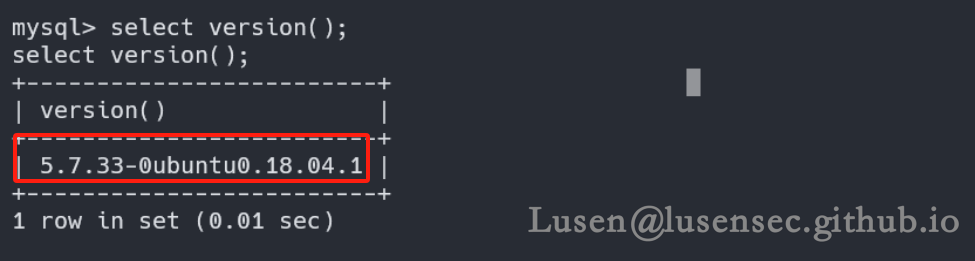
【Vulnhub系列靶场】Vulnhub_SecureCode1靶场渗透 原文转载已经过授权 原文链接:Lusen的小窝 - 学无止尽,不进则退 (lusensec.github.io) 一、环境配置 1、从百度网盘下载对应靶机的.ova镜像 2、在VM中选择【打开】该.ova 3、选择存储路径࿰…...

【C语言】结构体详解 -《探索C语言的 “小宇宙” 》
目录 C语言结构体(struct)详解结构体概览表1. 结构体的基本概念1.1 结构体定义1.2 结构体变量声明 2. 结构体成员的访问2.1 使用点运算符(.)访问成员输出 2.2 使用箭头运算符(->)访问成员输出 3. 结构体…...

线程同步:确保多线程程序的安全与高效!
全文目录: 开篇语前序前言第一部分:线程同步的概念与问题1.1 线程同步的概念1.2 线程同步的问题1.3 线程同步的解决方案 第二部分:synchronized关键字的使用2.1 使用 synchronized修饰方法2.2 使用 synchronized修饰代码块 第三部分ÿ…...

Qt Widget类解析与代码注释
#include "widget.h" #include "ui_widget.h"Widget::Widget(QWidget *parent): QWidget(parent), ui(new Ui::Widget) {ui->setupUi(this); }Widget::~Widget() {delete ui; }//解释这串代码,写上注释 当然可以!这段代码是 Qt …...

汽车生产虚拟实训中的技能提升与生产优化
在制造业蓬勃发展的大背景下,虚拟教学实训宛如一颗璀璨的新星,正发挥着不可或缺且日益凸显的关键作用,源源不断地为企业的稳健前行与创新发展注入磅礴强大的动力。就以汽车制造企业这一极具代表性的行业主体为例,汽车生产线上各类…...

2021-03-15 iview一些问题
1.iview 在使用tree组件时,发现没有set类的方法,只有get,那么要改变tree值,只能遍历treeData,递归修改treeData的checked,发现无法更改,原因在于check模式下,子元素的勾选状态跟父节…...

Nginx server_name 配置说明
Nginx 是一个高性能的反向代理和负载均衡服务器,其核心配置之一是 server 块中的 server_name 指令。server_name 决定了 Nginx 如何根据客户端请求的 Host 头匹配对应的虚拟主机(Virtual Host)。 1. 简介 Nginx 使用 server_name 指令来确定…...
视频字幕质量评估的大规模细粒度基准
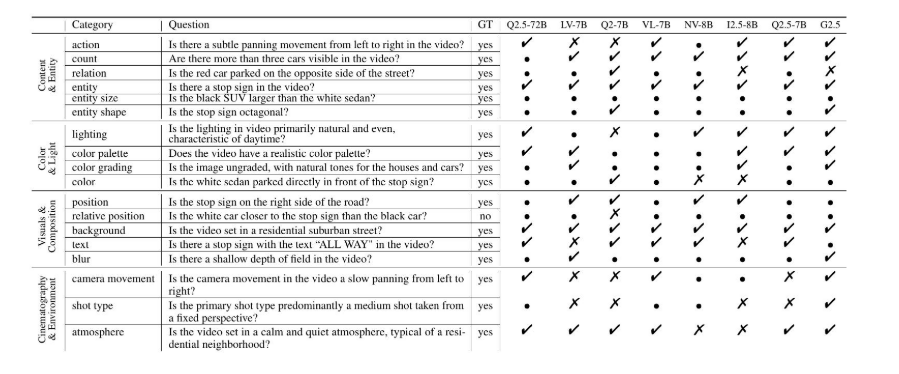
大家读完觉得有帮助记得关注和点赞!!! 摘要 视频字幕在文本到视频生成任务中起着至关重要的作用,因为它们的质量直接影响所生成视频的语义连贯性和视觉保真度。尽管大型视觉-语言模型(VLMs)在字幕生成方面…...
多模态大语言模型arxiv论文略读(108)
CROME: Cross-Modal Adapters for Efficient Multimodal LLM ➡️ 论文标题:CROME: Cross-Modal Adapters for Efficient Multimodal LLM ➡️ 论文作者:Sayna Ebrahimi, Sercan O. Arik, Tejas Nama, Tomas Pfister ➡️ 研究机构: Google Cloud AI Re…...

站群服务器的应用场景都有哪些?
站群服务器主要是为了多个网站的托管和管理所设计的,可以通过集中管理和高效资源的分配,来支持多个独立的网站同时运行,让每一个网站都可以分配到独立的IP地址,避免出现IP关联的风险,用户还可以通过控制面板进行管理功…...
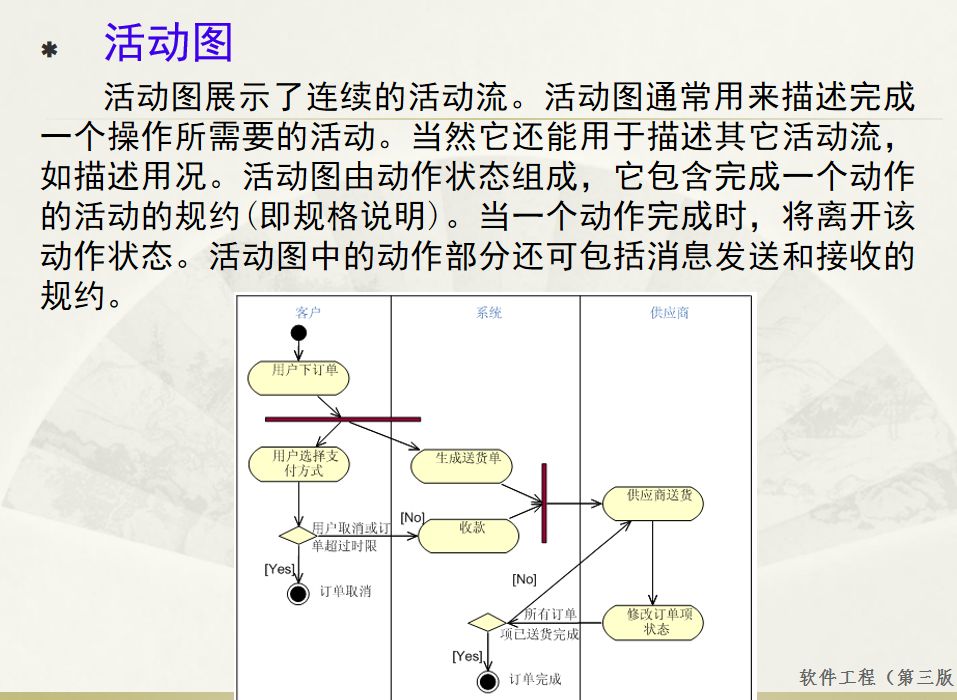
软件工程 期末复习
瀑布模型:计划 螺旋模型:风险低 原型模型: 用户反馈 喷泉模型:代码复用 高内聚 低耦合:模块内部功能紧密 模块之间依赖程度小 高内聚:指的是一个模块内部的功能应该紧密相关。换句话说,一个模块应当只实现单一的功能…...
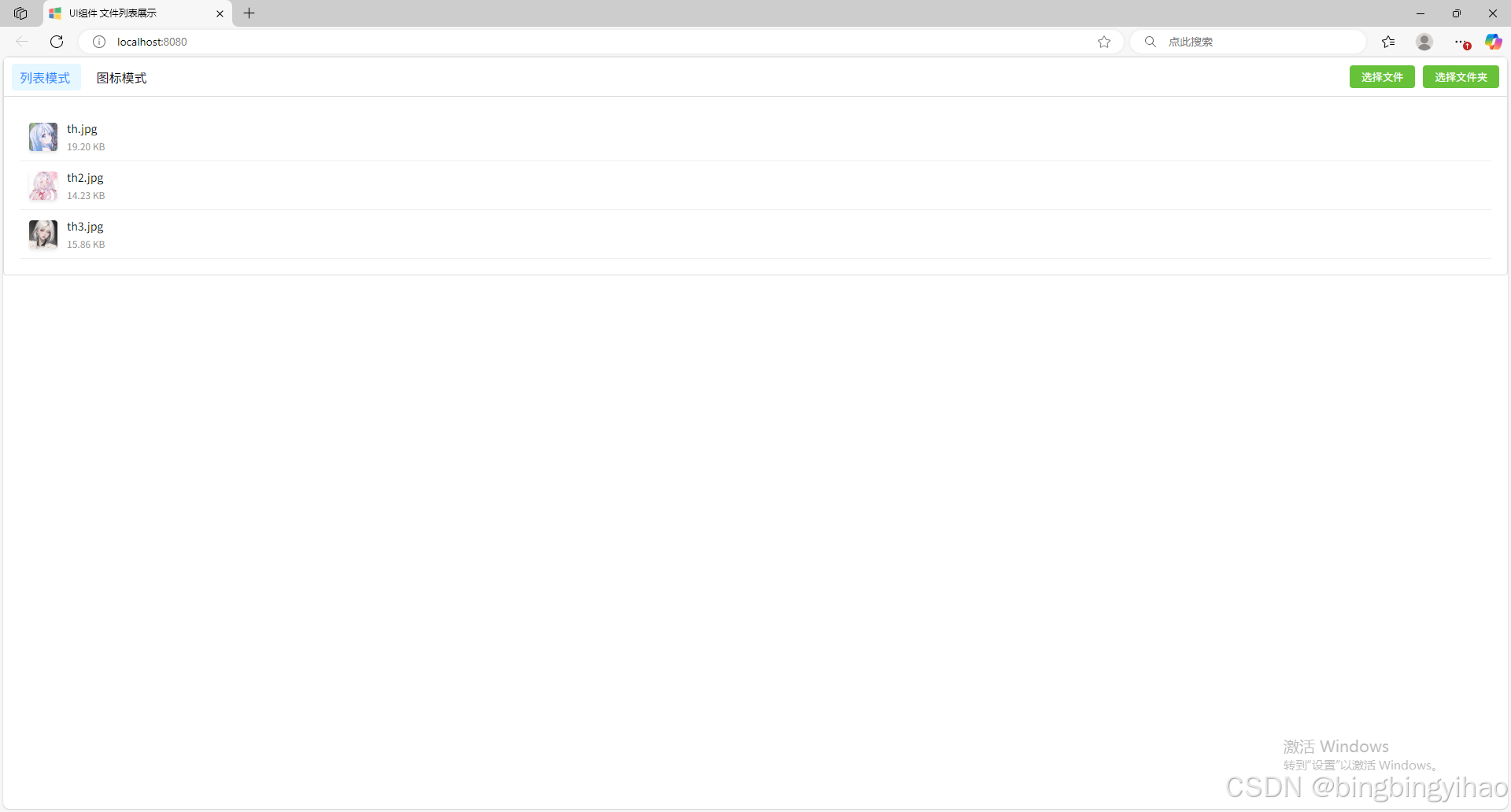
ui框架-文件列表展示
ui框架-文件列表展示 介绍 UI框架的文件列表展示组件,可以展示文件夹,支持列表展示和图标展示模式。组件提供了丰富的功能和可配置选项,适用于文件管理、文件上传等场景。 功能特性 支持列表模式和网格模式的切换展示支持文件和文件夹的层…...