
Service服务在Android中的使用
目录
一,Service简介
二,Service的两种启动方式
1,非绑定式启动Service
2,绑定式启动Service
三,Service的生命周期
1,非绑定式Service的生命周期
2,绑定式Service的生命周期
四,前台Service
1,前台Service的创建
2,前台Service的结束
一,Service简介
Service服务,是指执行指定系统功能的程序,例程或进程,以便支持其他程序,并且运行期间用户不可见的一种活动机制,例如:后台播放音乐,后台下载等;
Service和Activity同属于一个级别,不同于子线程,service是运行在主线程中的,因此不能进行耗时操作;

二,Service的两种启动方式
(1)非绑定式启动(startService):
- 服务开启后与启动者没有任何关系,service的生命周期独立于启动者,启动者退出,service仍会运行;
- 启动者无法调用service中的方法;
(2)绑定式启动(bindService)
- 启动者(Activity)会和service绑定在一起,两者的生命周期会同步,当启动者退出时,service会跟着被销毁;
- 启动者可以调用service中的方法;
1,非绑定式启动Service
(1) 创建一个类继承Service类,并重写一系列方法:
public class MyService extends Service {@Nullable@Overridepublic IBinder onBind(Intent intent) {Log.i("MyService", "onBind: ");return null;}@Overridepublic void onCreate() {Log.i("MyService", "onCreate: ");super.onCreate();}@Overridepublic int onStartCommand(Intent intent, int flags, int startId) {Log.i("MyService", "onStartCommand: ");return super.onStartCommand(intent, flags, startId);}@Overridepublic void onDestroy() {Log.i("MyService", "onDestroy: ");super.onDestroy();}
}
(2)在Manifest文件中注册指定Service:

(3)调用startService(Intent intent)方法启动Service:
private void startMyService() {Intent intent = new Intent(this, MyService.class);startService(intent);
}
2,绑定式启动Service
(1)前两步与非绑定式启动一致,创建Service子类并注册Service:
public class MyBindService extends Service {private final String TAG = "MyBindService";@Nullable@Overridepublic IBinder onBind(Intent intent) {Log.i(TAG, "onBind: ");return new MyBinder(this);}@Overridepublic void onCreate() {Log.i(TAG, "onCreate: ");super.onCreate();}@Overridepublic int onStartCommand(Intent intent, int flags, int startId) {Log.i(TAG, "onStartCommand: ");return super.onStartCommand(intent, flags, startId);}@Overridepublic void onDestroy() {Log.i(TAG, "onDestroy: ");super.onDestroy();}@Overridepublic boolean onUnbind(Intent intent) {Log.i(TAG, "onUnbind: ");return super.onUnbind(intent);}
}(2)绑定式启动Service需要调用bindService()方法,这个方法需要三个参数:
private void startBindService() {Intent intent = new Intent(this, MyBindService.class);isBound = bindService(intent, connection, BIND_AUTO_CREATE);
}Intent:表示启动意图,也就是想要启动的Service;
connection:相当于启动者(Activity)和Service之间的连接,通过一系列的回调函数来监听访问者和Service的连接情况;
int flag:绑定时是否自动创建Service,这里选择自动创建BIND_AUTO_CREATE;
除了Intent和flag外,我们还需创建一个connection,这里通过匿名内部类的形式创建,并重写两个回调方法。这里onServiceConnected方法中有一个IBinder类型的service,这个service起到了中间人的作用,通过这个service,启动者(Activity)就可以调用Service中的方法:
private ServiceConnection connection = new ServiceConnection() {//创建连接时回调@Overridepublic void onServiceConnected(ComponentName name, IBinder service) {//这里 IBinder类型的service 就是我们要绑定的那个service//通过这个service,Activity就可以调用MyBindService.MyBinder中的方法}//断开连接时回调@Overridepublic void onServiceDisconnected(ComponentName name) {Log.i(TAG, "onServiceDisconnected: ");}
};
那么这个service是从哪来的呢?
在我们创建的Service子类中,我们重写了一个onBind的方法,返回的正好是一个IBinder类型的值,这个返回值也就是会传给上面service的值。
@Override
public IBinder onBind(Intent intent) {Log.i(TAG, "onBind: ");return new MyBinder(this);
}
所以我们可以在Service子类中创建一个类继承自Binder(Binder实现了IBinder接口),这样Activity通过connection中的service就可以调用MyBinder类中的方法;
进一步,通过构造方法,我们可以将Service传给MyBinder,这样在MyBinder中就可以调用我们Service中的方法,又因为Activity可以调用MyBinder中的方法,所以我们就实现了Activity调用Service的方法,这也就是为什么绑定式启动Service,启动者(Activity)可以调用Service中的方法;
@Override
public IBinder onBind(Intent intent) {Log.i(TAG, "onBind: ");return new MyBinder(this);
}public void Test(){//Log.i(TAG, "Test: MyBindService的Test方法被调用");
}public class MyBinder extends Binder{private MyBindService myBindService;public MyBinder(){}public MyBinder(MyBindService bindService){this.myBindService = bindService;}public void Test(){//Log.i(TAG, "Test: MyBinder的Test方法被调用");//这样MyBinder就可以调用MyBindService中的方法//MyBinder作为一个中间人 Activity调用MyBinder的方法 -> MyBinder再调用Service的方法myBindService.Test();}
}
绑定式启动Service的全部流程代码:
Activity:
public class MainActivity extends AppCompatActivity {private final String TAG = "MainActivity";private Boolean isBound = false;private ActivityMainBinding binding;@Overrideprotected void onCreate(Bundle savedInstanceState) {super.onCreate(savedInstanceState);binding = ActivityMainBinding.inflate(getLayoutInflater());setContentView(binding.getRoot());setLinsteners();}private void setLinsteners() {binding.btnStartBindService.setOnClickListener(new View.OnClickListener() {@Overridepublic void onClick(View v) {startBindService();}});}private void startBindService() {Intent intent = new Intent(this, MyBindService.class);isBound = bindService(intent, connection, BIND_AUTO_CREATE);}private MyBindService.MyBinder myBindService;private ServiceConnection connection = new ServiceConnection() {//创建连接时回调@Overridepublic void onServiceConnected(ComponentName name, IBinder service) {//这里 IBinder类型的service 就是我们要绑定的那个service//通过这个service,Activity就可以调用MyBindService.MyBinder中的方法myBindService = (MyBindService.MyBinder)service;myBindService.Test();}//断开连接时回调@Overridepublic void onServiceDisconnected(ComponentName name) {Log.i(TAG, "onServiceDisconnected: ");//Intent intent = new Intent(MainActivity.this, MyBindService.class);//stopService(intent);}};
}Service:
public class MyBindService extends Service {private final String TAG = "MyBindService";@Nullable@Overridepublic IBinder onBind(Intent intent) {Log.i(TAG, "onBind: ");return new MyBinder(this);}public void Test(){//Log.i(TAG, "Test: MyBindService的Test方法被调用");}public class MyBinder extends Binder{private MyBindService myBindService;public MyBinder(){}public MyBinder(MyBindService bindService){this.myBindService = bindService;}public void Test(){//Log.i(TAG, "Test: MyBinder的Test方法被调用");//这样MyBinder就可以调用MyBindService中的方法//MyBinder作为一个中间人 Activity调用MyBinder的方法 -> MyBinder再调用Service的方法myBindService.Test();}}@Overridepublic void onCreate() {Log.i(TAG, "onCreate: ");super.onCreate();}@Overridepublic int onStartCommand(Intent intent, int flags, int startId) {Log.i(TAG, "onStartCommand: ");return super.onStartCommand(intent, flags, startId);}@Overridepublic void onDestroy() {Log.i(TAG, "onDestroy: ");super.onDestroy();}@Overridepublic boolean onUnbind(Intent intent) {Log.i(TAG, "onUnbind: ");return super.onUnbind(intent);}}三,Service的生命周期
1,非绑定式Service的生命周期
启动阶段:启动者(Activity)调用startService
- onCreate():Service被创建时调用,整个生命周期中只会被调用一次;
onStartCommand():每次调用startService时,该方法会被调用,该方法接收Intent参数,从而可以执行一些命令;
结束阶段:启动者调用stopService()方法或Service内部调用stopSelf()方法;
- onDestroy():Service销毁时调用,与onCreate一样,整个生命周期中只会被调用一次;
2,绑定式Service的生命周期
启动阶段:启动者(Activity)调用bindService
- onCreate():Service被创建时调用,整个生命周期中只会被调用一次;
- onBind():在首次绑定时会被调用一次,同样整个生命周期中只会被调用一次;
结束阶段:当启动者销毁或unBindService方法时,启动者会和Service解除绑定,当没有任何绑定者时,Service会被销毁;
- onUnbind():解除绑定时调用,可多次调用;
- onDestroy():Service销毁时调用,整个生命周期中只会被调用一次;

四,前台Service
前台Service,即可以与用户进行交互的运行在前台的Service,优先级相比于其他两种运行在后台的Service要高,最常见的应用就是通知栏前台控制音乐播放;

1,前台Service的创建
在正常的Service中调用startForeground() 方法即可将正常服务提升为前台服务,startForeground()方法需要接收一个通知对象,因为前台Service必须在通知栏中进行通知;
public class MyForeGroundService extends Service {private final String TAG = "MyForeGroundService";@Nullable@Overridepublic IBinder onBind(Intent intent) {Log.i(TAG, "onBind: ");return null;}@Overridepublic void onCreate() {super.onCreate();Log.i(TAG, "onCreate: ");//创建一个通知NotificationManager notificationManager = (NotificationManager) getApplication().getSystemService(Context.NOTIFICATION_SERVICE);NotificationChannel channel = new NotificationChannel("channel_id","channel_name",notificationManager.IMPORTANCE_HIGH);notificationManager.createNotificationChannel(channel);Notification.Builder builder = new Notification.Builder(this,"channel_id");Notification notification = builder.build();//将服务提升为前台服务startForeground(1, notification);}@Overridepublic int onStartCommand(Intent intent, int flags, int startId) {Log.i(TAG, "onStartCommand: ");return super.onStartCommand(intent, flags, startId);}@Overridepublic void onDestroy() {Log.i(TAG, "onDestroy: ");super.onDestroy();}}2,前台Service的结束
前台Service的结束有两种含义:
(1)结束Service本身:通过启动者调用stopService方法或Service内部调用stopSelf方法正常结束Service,Service结束后,通知也会随之移除;
(2)前台Service降级为后台Service:通过Service内部调用stopForeground(true)方法将Service退出后台状态,此时Service不会被销毁,当内存不足时,Service可能会被回收。参数true表示移除通知;
前台Service创建和结束的全部流程代码:
Activity:
public class MainActivity extends AppCompatActivity {private final String TAG = "MainActivity";private Boolean isBound = false;private ActivityMainBinding binding;@Overrideprotected void onCreate(Bundle savedInstanceState) {super.onCreate(savedInstanceState);binding = ActivityMainBinding.inflate(getLayoutInflater());setContentView(binding.getRoot());setLinsteners();}private void setLinsteners() {//创建前台Servicebinding.btnStartForeGroundService.setOnClickListener(new View.OnClickListener() {@Overridepublic void onClick(View v) {Intent intent = new Intent(MainActivity.this, MyForeGroundService.class);startService(intent);}});//移除前台Servicebinding.btnStopForeGroundService.setOnClickListener(new View.OnClickListener() {@Overridepublic void onClick(View v) {Intent intent = new Intent(MainActivity.this, MyForeGroundService.class);intent.putExtra("key_stop", "stopForeGround");startService(intent);}});}}Service:
public class MyForeGroundService extends Service {private final String TAG = "MyForeGroundService";@Nullable@Overridepublic IBinder onBind(Intent intent) {Log.i(TAG, "onBind: ");return null;}@Overridepublic void onCreate() {super.onCreate();Log.i(TAG, "onCreate: ");//创建一个通知NotificationManager notificationManager = (NotificationManager) getApplication().getSystemService(Context.NOTIFICATION_SERVICE);NotificationChannel channel = new NotificationChannel("channel_id","channel_name",notificationManager.IMPORTANCE_HIGH);notificationManager.createNotificationChannel(channel);Notification.Builder builder = new Notification.Builder(this,"channel_id");Notification notification = builder.build();//将服务提升为前台服务startForeground(1, notification);}@Overridepublic int onStartCommand(Intent intent, int flags, int startId) {Log.i(TAG, "onStartCommand: ");String keyStop = intent.getStringExtra("key_stop");if(TextUtils.equals(keyStop, "stopForeGround")){stopForeground(true);//true表示移除通知}return super.onStartCommand(intent, flags, startId);}@Overridepublic void onDestroy() {Log.i(TAG, "onDestroy: ");super.onDestroy();}}相关文章:
Service服务在Android中的使用
目录 一,Service简介 二,Service的两种启动方式 1,非绑定式启动Service 2,绑定式启动Service 三,Service的生命周期 1,非绑定式Service的生命周期 2,绑定式Service的生命周期 四…...

浅谈C语言位段
1、位段的定义 百度百科中是这样解释位段的: 位段,C语言允许在一个结构体中以位为单位来指定其成员所占内存长度,这种以位为单位的成员称为“位段”或称“位域”( bit field) 。利用位段能够用较少的位数存储数据。 以下,我们均在VS2022的…...

arcgisserver登陆信息不正确
密码明明对,但是登录提示登录信息不正确 Arcgis server 9.3.1 无法登录ArcGIS Manager 提示Incorrect Login Information 操作系统windows 2008 x64server 解决办法: 关闭window防火墙解决。 如果防火墙已经关闭: 通过修改用户口令后就可以重…...

KOLA: CAREFULLY BENCHMARKING WORLD KNOWLEDGE OF LARGE LANGUAGE MODELS
文章目录 题目摘要简介KOLA 基准实验评估结论和未来工作道德声明 题目 KOLA:仔细对大型语言模型的世界知识进行基准测试 论文地址:https://arxiv.org/abs/2306.09296 项目地址:https://github.com/ranahaani/GNews 摘要 大型语言模型 (LLM) 的卓越性能要求评估方法…...

Robot Operating System——机器人关节的角度、速度和力矩
大纲 应用场景定义字段解释 案例 sensor_msgs::msg::JointState 是 ROS (Robot Operating System) 中的一个消息类型,用于表示机器人关节的状态信息。它通常用于传输和处理机器人关节的角度、速度和力矩等信息。 应用场景 机器人控制 关节控制:在机器人…...

一分钟掌握java9新特性
try-with-resources语句 /** * 在处理必须关闭的资源时,使用try-with-resources语句替代try-finally语句。 生成的代码更简洁,更清晰,并且生成的异常更有用 * java9 之前写法 */ public static String readFile1(String fileName){ tr…...

89. UE5 RPG 实现伤害 冷却 消耗技能描述
在上一篇文章里,我们能够通过富文本显示多种格式的文字,并显示技能描述。在这一篇文章里,我们继续优化技能描述,将技能说需要显示的内容显示出来。 实现火球术的基础描述 首先,我们现实现火球术的基础描述࿰…...

el-tree树状控件,定位到选中的节点的位置
效果图 在el-tree 控件加 :render-content"renderContent" 在掉接口的方法中 实际有用的是setTimeout 方法和this.$refs.xxxxxx.setCheckedKeys([industrycodeList]) if(res.data.swindustrylist.length>0){res.data.swindustrylist.forEach(item > {industry…...

YOLO目标检测的单目(多目标测距),使用相机光学模型,支持目标检测模型训练,可输出目标位置和距离信息并可视化
本项目旨在开发一个基于YOLO的目标检测系统,该系统不仅能检测图像中的多个目标,还能利用单目摄像头的图像估计每个目标与摄像头之间的相对距离。系统的核心组成部分包括目标检测、距离估计、模型训练以及结果可视化。 主要功能 目标检测:使用…...

unity简易lua文件迁移工具
一. 了解商业游戏的Lua热更新开发方式 市面上的3种结合Lua热更新的开发方式 1.纯Lua开发(所有的游戏主要逻辑都用Lua实现) 好处:机动性强;坏处:代码效率略差 2.半C#,半Lua开发(核心逻辑C#开发…...

Elasticsearch中的自动补全功能详解与实践
简介 自动补全是现代搜索引擎中的一项重要功能,它能够根据用户的输入提供实时的建议,提高用户体验。Elasticsearch提供了Completion Suggester查询来实现这一功能。本文将详细介绍Elasticsearch中的自动补全功能,并提供详细的配置和查询示例…...

前端如何使用Nginx代理dist网页,代理websocket,代理后端
本文将指导您如何配置Nginx以代理前后端分离的项目,并特别说明了对WebSocket的代理设置。通过本教程,您将能够实现一次性配置,进而使项目能够在任意局域网服务器上部署,并可通过IP地址或域名访问服务。 笔者建议 先速览本文了解大…...
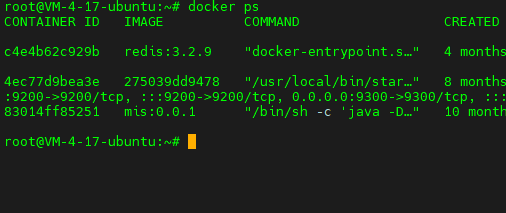
Cannot connect to the Docker daemon at unix:///var/run/docker.sock. 问题解决
问题描述 原来我的服务器docker服务运行正常,但在某次尝试用时, 根据系统的错误提示执行了snap install docker指令之后, 再执行docker ps命令则提示Cannot connect to the Docker daemon at unix:///var/run/docker.sock. Is the docker daemon running…...

零基础学习Redis(2) -- Redis安装与配置
Redis官方是并不支持Windows系统的,并且现在绝大部分公司都是使用的Linux,所以我们在Linux上进行安装,这里我使用的是Ubuntu 1. 安装步骤 1. 首先使用工具连接到我们的云服务器,然后输入apt指令搜索redis相关的软件包࿱…...

UniApp第一天
一、官网介绍 1.1、 SDK SDK是"Software Development Kit"的缩写,中文意思是“软件开发工具包”。SDK通常是由软件开发者为其他开发者提供的一个软件工具集合,用于帮助开发者快速开发、测试和部署软件应用。SDK通常包含了一系列的开发工具、库…...

TLE4966-3G带方向检测功能的高灵敏度汽车霍尔开关
TLE4966-3G是一款集成电路双霍尔效应传感器,专为使用旋转极轮的高精度应用而设计。通过片上有源补偿电路和斩波器技术实现精确的磁切换点和高温稳定性。 该传感器在Q2提供速度输出,其状态(高或低)与磁场值相对应。对于超过阈值BO…...

Github 2024-08-14 C开源项目日报Top10
根据Github Trendings的统计,今日(2024-08-14统计)共有10个项目上榜。根据开发语言中项目的数量,汇总情况如下: 开发语言项目数量C项目10Objective-C项目1PHP项目1Python项目1PHP:流行的Web开发脚本语言 创建周期:4710 天开发语言:C, PHP协议类型:OtherStar数量:37340 …...

飞桨Paddle API index_add 详解
index_add paddle.index_add(x, index, axis, value, nameNone)[源代码] 沿着指定轴 axis 将 index 中指定位置的 x 与 value 相加,并写入到结果 Tensor 中的对应位置。这里 index 是一个 1-D Tensor。除 axis 轴外,返回的 Tensor 其余维度大小和输入 …...

后端代码练习1——加法计算器
1. 需求 输入两个整数,点击 “点击相加” 按钮,显示计算结果。 2.准备工作 创建Spring Boot项目,引入Spring Web依赖,把前端代码放入static目录下。 2.1 前端代码 <!DOCTYPE html> <html lang"en"> <h…...

观察者模式和MQ是什么关系
观察者模式(Observer Pattern)和MQ(Message Queue,消息队列)之间的关系主要体现在它们所实现的功能和机制上的相似性,尽管它们在技术实现和应用场景上有所不同。 观察者模式 观察者模式是一种行为型设计模…...

2024三星固件下载完整指南:跨平台开源工具Bifrost使用教程
2024三星固件下载完整指南:跨平台开源工具Bifrost使用教程 【免费下载链接】Bifrost Cross-platform tool for downloading Samsung mobile device firmware. 项目地址: https://gitcode.com/gh_mirrors/sa/Bifrost 三星固件下载、三星刷机工具、Bifrost开源…...

观察Taotoken在流量高峰时段的请求成功率和路由表现
🚀 告别海外账号与网络限制!稳定直连全球优质大模型,限时半价接入中。 👉 点击领取海量免费额度 观察Taotoken在流量高峰时段的请求成功率和路由表现 在构建依赖大模型能力的应用时,服务的稳定性是开发者关心的核心问…...

Anthropic Zero Layer:大模型推理栈的原子化归一
1. 项目概述:这不是一次普通更新,而是一次架构级“蒸发” “Anthropic Just Shipped the Layer That’s Already Going to Zero”——这个标题乍看像科技媒体的夸张头条,但作为连续跟踪Claude模型演进三年、亲手部署过从Haiku到Sonnet再到Opu…...

Adobe-GenP 3.0:解锁Adobe全家桶专业功能的简易指南
Adobe-GenP 3.0:解锁Adobe全家桶专业功能的简易指南 【免费下载链接】Adobe-GenP Adobe CC 2019/2020/2021/2022/2023 GenP Universal Patch 3.0 项目地址: https://gitcode.com/gh_mirrors/ad/Adobe-GenP 还在为Adobe Creative Cloud的高昂订阅费用而烦恼吗…...

Meet Composer:基于控制原语的分层可控文生图架构
1. 项目概述:Meet Composer不是又一个“画图玩具”,而是控制力重构的起点最近在整理一批国产多模态模型的技术简报时,Meet Composer这个名字反复跳出来——不是因为它的宣传声量最大,而是因为它在技术文档里反复强调一个被多数人忽…...
)
从炼丹炉到生产线:在Linux服务器上为Stable Diffusion部署配置PyTorch环境(驱动+CUDA+Anaconda实战)
从炼丹炉到生产线:Linux服务器部署PyTorch环境全流程指南 引言:为什么需要专业化的AI开发环境? 在AI模型开发领域,我们常常把训练模型比作"炼丹"——需要精准控制各种"火候"参数。而要让这个"炼丹炉&quo…...

NTC与PTC热敏电阻选型实战:从原理到电路设计的深度解析
1. 项目概述:一次关于温度传感器选型的深度复盘在嵌入式系统、家电控制、电池管理乃至工业自动化领域,温度测量是基础得不能再基础,却又至关重要的一环。选对传感器,项目就成功了一半;选错,后续的校准、补偿…...

深度学习 标注 训练一体化解决方案 | 深度学习AI平台
标注 & 训练一体化解决方案 | 深度学习AI平台|自研【核心功能】1、训练任务:支持目标检测、语义分割、图像分类、旋转目标、实例分割五类任务 2、可视化训练 一键开启模型训练实时查看训练进度和效果过漏检数据自动保存实时查看模型在测试图像上的可…...
)
告别Keil4编译报错!手把手教你为STC89C52RC单片机配置头文件路径(保姆级教程)
从零解决Keil4头文件报错:STC89C52RC开发环境配置全指南 当你第一次打开Keil4准备为STC89C52RC单片机编写程序时,满心期待地点下编译按钮,却看到屏幕上跳出"Cannot open source file REG52.H"的红色错误提示——这种挫败感我太熟悉…...

不跨界,现有的地盘就会被别人用跨界的方式蚕食掉
微软这么多员工养着,有时也不得不多个行业发展,就像是美团一样,不得不电商也做起来和京东抢生意。阿里也同时多个行业做着,影视,外卖,生鲜。否则纯电商做不下去就完了。就像是华为一样本来可以卖AI服务器&a…...