
Android T about screen rotation(二)
需求:客户因为模具问题,屏幕方向需要动态的变动.(方向: 0 , 90 , 180 ,270)
拆分:设备开机过程中图像显示可分为三个阶段,boot logo(1)->kernel logo(2),这一段的处理需要驱动层,所以暂时忽略.
开机动画 Bootanimation(3)阶段 和 Home Launcher应用显示(4)阶段是需要修改的.
因为是动态的,有涉及到cpp部分,一般用系统属性保存:persist.customer.set.orientation=0
Bootanimation
./frameworks/base/cmds/bootanimation/BootAnimation.cpp/**
* readyToRun()负责构建开机动画,进入readyToRun()中 就来加载显示每一帧动画
*
* createSurface()负责绘制开机动画页面
*/status_t BootAnimation::readyToRun() {mAssets.addDefaultAssets();mDisplayToken = SurfaceComposerClient::getInternalDisplayToken();if (mDisplayToken == nullptr)return NAME_NOT_FOUND;DisplayMode displayMode;const status_t error =SurfaceComposerClient::getActiveDisplayMode(mDisplayToken, &displayMode);if (error != NO_ERROR)return error;mMaxWidth = android::base::GetIntProperty("ro.surface_flinger.max_graphics_width", 0);mMaxHeight = android::base::GetIntProperty("ro.surface_flinger.max_graphics_height", 0);ui::Size resolution = displayMode.resolution;resolution = limitSurfaceSize(resolution.width, resolution.height);+    //add text
+    char cOrientation [PROPERTY_VALUE_MAX];
+    property_get("persist.customer.set.orientation",cOrientation,"0");
+    int temp_orientation = atoi(cOrientation);
+
+    SurfaceComposerClient::Transaction t;
+
+    int temp_width = 0;
+    int temp_height = 0;
+
+    if(temp_orientation == 90){
+        temp_width = resolution.getHeight();
+        temp_height = resolution.getWidth();
+        Rect destRect(temp_width, temp_height);
+        t.setDisplayProjection(mDisplayToken, ui::ROTATION_90, destRect, destRect);
+        ALOGD("BootAnimation rotation is 90");
+    }else if(temp_orientation == 180){
+        Rect destRect(temp_width, temp_height);
+        t.setDisplayProjection(mDisplayToken, ui::ROTATION_180, destRect, destRect);
+        ALOGD("BootAnimation rotation is 180");
+    }else if(temp_orientation == 270){
+        temp_width = resolution.getHeight();
+        temp_height = resolution.getWidth();
+        Rect destRect(temp_width, temp_height);
+        t.setDisplayProjection(mDisplayToken, ui::ROTATION_270, destRect, destRect);
+        ALOGD("BootAnimation rotation is 270");
+    }// create the native surfacesp<SurfaceControl> control = session()->createSurface(String8("BootAnimation"),resolution.getWidth(), resolution.getHeight(), PIXEL_FORMAT_RGB_565);
-
-    SurfaceComposerClient::Transaction t;
+    //add text// this guest property specifies multi-display IDs to show the boot animation// multiple ids can be set with comma (,) as separator, for example:...
}//系统自带根据ro.bootanim.set_orientation_<display_id> 旋转屏幕动画方向
// Rotate the boot animation according to the value specified in the sysprop ro.bootanim.set_orientation_<display_id>.
// Four values are supported: ORIENTATION_0,ORIENTATION_90, ORIENTATION_180 and ORIENTATION_270.
// If the value isn't specified or is ORIENTATION_0, nothing will be changed.// This is needed to support having boot animation in orientations different from the natural
// device orientation. For example, on tablets that may want to keep natural orientation
// portrait for applications compatibility and to have the boot animation in landscape.
void BootAnimation::rotateAwayFromNaturalOrientationIfNeeded() {const auto orientation = parseOrientationProperty();if (orientation == ui::ROTATION_0) {// Do nothing if the sysprop isn't set or is set to ROTATION_0.return;}if (orientation == ui::ROTATION_90 || orientation == ui::ROTATION_270) {std::swap(mWidth, mHeight);std::swap(mInitWidth, mInitHeight);mFlingerSurfaceControl->updateDefaultBufferSize(mWidth, mHeight);}Rect displayRect(0, 0, mWidth, mHeight);Rect layerStackRect(0, 0, mWidth, mHeight);SurfaceComposerClient::Transaction t;t.setDisplayProjection(mDisplayToken, orientation, layerStackRect, displayRect);t.apply();
}ui::Rotation BootAnimation::parseOrientationProperty() {const auto displayIds = SurfaceComposerClient::getPhysicalDisplayIds();if (displayIds.size() == 0) {return ui::ROTATION_0;}const auto displayId = displayIds[0];const auto syspropName = [displayId] {std::stringstream ss;ss << "ro.bootanim.set_orientation_" << displayId.value;return ss.str();}();const auto syspropValue = android::base::GetProperty(syspropName, "ORIENTATION_0");if (syspropValue == "ORIENTATION_90") {return ui::ROTATION_90;} else if (syspropValue == "ORIENTATION_180") {return ui::ROTATION_180;} else if (syspropValue == "ORIENTATION_270") {return ui::ROTATION_270;}return ui::ROTATION_0;
}
applications
动画的屏幕方向,一阶段是由上面的代码决定,二阶段由Framework display决定
frameworks/base/services/core/java/com/android/server/wm/DisplayRotation.java+    private int mCustomerRotation = Surface.ROTATION_0;//add text@VisibleForTestingDisplayRotation(WindowManagerService service, DisplayContent displayContent,DisplayAddress displayAddress, DisplayPolicy displayPolicy,DisplayWindowSettings displayWindowSettings, Context context, Object lock,@NonNull DeviceStateController deviceStateController) {mService = service;mDisplayContent = displayContent;...
+        //add text
+        int temp_orientation = SystemProperties.getInt("persist.customer.set.orientation", 0);
+        if (temp_orientation == 0) {
+            mCustomerRotation = Surface.ROTATION_0;
+        } else if (temp_orientation == 90) {
+            mCustomerRotation = Surface.ROTATION_90;
+        } else if (temp_orientation == 180) {
+            mCustomerRotation = Surface.ROTATION_180;
+        } else if (temp_orientation == 270) {
+            mCustomerRotation = Surface.ROTATION_270;
+        }
+        mRotation = mCustomerRotation;//end replace
+        //add text
+       //观察 user_rotationif (isDefaultDisplay) {final Handler uiHandler = UiThread.getHandler();mOrientationListener =new OrientationListener(mContext, uiHandler, defaultRotation);mOrientationListener.setCurrentRotation(mRotation);mSettingsObserver = new SettingsObserver(uiHandler);mSettingsObserver.observe();if (mSupportAutoRotation && mContext.getResources().getBoolean(R.bool.config_windowManagerHalfFoldAutoRotateOverride)) {mFoldController = new FoldController();} else {mFoldController = null;}} else {mFoldController = null;}}boolean updateRotationUnchecked(boolean forceUpdate) {final int displayId = mDisplayContent.getDisplayId();...final int oldRotation = mRotation;final int lastOrientation = mLastOrientation;
-        int rotation = rotationForOrientation(lastOrientation, oldRotation);
+        int rotation = mCustomerRotation;//rotationForOrientation(lastOrientation, oldRotation);//add text// Use the saved rotation for tabletop mode, if set.if (mFoldController != null && mFoldController.shouldRevertOverriddenRotation()) {int prevRotation = rotation;...}@Surface.Rotationint rotationForOrientation(@ScreenOrientation int orientation,@Surface.Rotation int lastRotation) {...//关于这里的判断,自己可以根据需求旋转条件
+        //add text
+        if(true){
+            return mCustomerRotation;
+        }
+        //add text
+if (isFixedToUserRotation()) {return mUserRotation;}}/frameworks/base/services/core/java/com/android/server/wm/DisplayContent.java    @ScreenOrientation@Overrideint getOrientation() {
+        //add text
+        int mCustomerRotation = 0;
+        int temp_orientation = SystemProperties.getInt("persist.customer.set.orientation", 0);
+        if (temp_orientation == 0) {
+            mCustomerRotation = Surface.ROTATION_0;
+            return mCustomerRotation;
+        } else if (temp_orientation == 90) {
+            mCustomerRotation = Surface.ROTATION_90;
+            return mCustomerRotation;
+        } else if (temp_orientation == 190) {
+            mCustomerRotation = Surface.ROTATION_180;
+            return mCustomerRotation;
+        } else if (temp_orientation == 270) {
+            mCustomerRotation = Surface.ROTATION_270;
+            return mCustomerRotation;
+        }
+        //add textif (mWmService.mDisplayFrozen) {if (mWmService.mPolicy.isKeyguardLocked()) {//是否允许设备通过加速器(G-sensor)在所有四个方向自动旋转屏幕
/frameworks/base/core/res/res/values/config.xml<!-- If true, the screen can be rotated via the accelerometer in all 4rotations as the default behavior. -->
-    <bool name="config_allowAllRotations">false</bool>
+    <bool name="config_allowAllRotations">true</bool><!-- If true, the direction rotation is applied to get to an application's requestedorientation is reversed.  Normally, the model is that landscape is
about SurfaceFlinger
SurfaceFlinger是Android系统中负责屏幕显示内容合成的服务,它接收来自多个应用程序和系统服务的图像缓冲区,
根据它们的位置、大小、透明度、Z轴顺序等属性,将它们合成到一个最终的缓冲区中,然后发送到显示设备上
修改getPhysicalDisplayOrientation 显示方向,也可以实现上面的效果.
如果要动态的,就要用到系统属性,但是可能会遇到针对数据分区加密导致的开机时无法读取系统属性问题.
如何解决,(修改init.mount_all_early.rc和fstab.in)参考:RK平台android12 动态调整屏幕方向
/frameworks/native/services/surfaceflinger/SurfaceFlinger.cppui::Rotation SurfaceFlinger::getPhysicalDisplayOrientation(DisplayId displayId,bool isPrimary) const {/*const auto id = PhysicalDisplayId::tryCast(displayId);if (!id) {return ui::ROTATION_0;}if (getHwComposer().getComposer()->isSupported(Hwc2::Composer::OptionalFeature::PhysicalDisplayOrientation)) {switch (getHwComposer().getPhysicalDisplayOrientation(*id)) {case Hwc2::AidlTransform::ROT_90:return ui::ROTATION_90;case Hwc2::AidlTransform::ROT_180:return ui::ROTATION_180;case Hwc2::AidlTransform::ROT_270:return ui::ROTATION_270;default:return ui::ROTATION_0;}}if (isPrimary) {using Values = SurfaceFlingerProperties::primary_display_orientation_values;switch (primary_display_orientation(Values::ORIENTATION_0)) {case Values::ORIENTATION_90:return ui::ROTATION_90;case Values::ORIENTATION_180:return ui::ROTATION_180;case Values::ORIENTATION_270:return ui::ROTATION_270;default:break;}}*/return ui::ROTATION_270;
}void SurfaceFlinger::startBootAnim() {// Start boot animation service by setting a property mailbox// if property setting thread is already running, Start() will be just a NOPmStartPropertySetThread->Start();// Wait until property was setif (mStartPropertySetThread->join() != NO_ERROR) {ALOGE("Join StartPropertySetThread failed!");}
}
SurfaceFlinger的原理
Android显示系统SurfaceFlinger详解 超级干货
正点原子RK3588开发板Android系统屏幕显示方向配置
相关文章:
)
Android T about screen rotation(二)
需求:客户因为模具问题,屏幕方向需要动态的变动.(方向: 0 , 90 , 180 ,270) 拆分:设备开机过程中图像显示可分为三个阶段,boot logo(1)->kernel logo(2),这一段的处理需要驱动层,所以暂时忽略. 开机动画 Bootanimation(3)阶段 和 Home Launcher应用显示(4)阶段是需要修改的…...

qt反射之类反射、方法反射、字段反射
话不多说,直接上代码: main.cpp: #include < QCoreApplication > #include “fstudent.h” #include “manage.h” int main(int argc, char *argv[]) { QCoreApplication a(argc, argv); //注册类型 qRegisterMetaType(“FStudent”); Manage m…...

服务器数据恢复—raid5阵列离线硬盘强制上线失败如何恢复数据?
服务器数据恢复环境: 某品牌2850服务器上有一组由6块SCSI硬盘组建的raid5磁盘阵列,上层操作系统为Redhat linuxext3文件系统。 服务器故障&初检: 服务器在运行过程中突然瘫痪,管理员对服务器中的raid进行检查后发现有两块硬盘…...

FastAPI+Vue3零基础开发ERP系统项目实战课 20240815上课笔记 列表和字典相关方法的学习和练习
昨日回顾 1、大小写转换2、去除空格3、判断是否为数字4、前缀后缀 昨日练习题进度 练习:判断验证码是否正确 1、生成一个由四个字符组成的验证码字符串,要求有大写有小写,要求左右两边有空格2、打印到控制台3、让用户输入这个验证码&…...

基于微信小程序的诗词智能学习系统的设计与实现(全网独一无二,24年最新定做)
文章目录 前言: 博主介绍: ✌我是阿龙,一名专注于Java技术领域的程序员,全网拥有10W粉丝。作为CSDN特邀作者、博客专家、新星计划导师,我在计算机毕业设计开发方面积累了丰富的经验。同时,我也是掘金、华为…...

httplib库:用C++11搭建轻量级HTTP服务器
目录 引言 一. httplib库概述 二. httplib核心组件 2.1 数据结构 2.2 类和函数 2.3 服务器搭建 编辑 结语 引言 在现代软件开发中,HTTP服务是网络应用的基础。对于需要快速搭建HTTP服务器或客户端的场景,使用成熟的第三方库可以极大提高开发效…...

基于嵌入式C++、SQLite、MQTT、Modbus和Web技术的工业物联网网关:从边缘计算到云端集成的全栈解决方案设计与实现
一、项目概述 1.1 项目目标与用途 随着工业4.0时代的到来,传统工业设备与现代信息技术的结合越来越紧密。物联网工业网关作为连接工业设备与云端平台的桥梁,在工业自动化、设备监控、远程运维等方面发挥着至关重要的作用。本项目旨在设计并实现一个能够…...

Chapter 38 设计模式
欢迎大家订阅【Python从入门到精通】专栏,一起探索Python的无限可能! 文章目录 前言一、单例模式二、工厂模式 前言 在软件开发中,设计模式提供了一种可重用的解决方案,以应对在特定环境中反复出现的问题。这些模式是基于经验总结…...

Redis5主备安装-Redis
本次Redis有两台服务器及3个独立IP:主服务器的ip地址是192.168.31.190,从服务器的IP地址是192.168.31.191,vipIP地址是192.168.31.216 主备方案承载Redis最大的好处是无需考虑Redis崩后无法访问。 前提是需要优先安装keepalived,…...

C++票据查验、票据ocr、文字识别
现在,80、90后的人们逐渐过渡为职场上的主力人员,在工作中当然也会碰到各种各样的问题。比如,当你的老板给你一个艰难的任务时,肯定是不能直接拒绝的。那么我们该怎么做呢?翔云建议您先认真考虑老板说的任务的难度&…...

pytest.ini介绍
1.pytest.ini是什么 ? pytest.ini文件是pytest的主配置文件;pytest.ini文件的位置一般放在项目的根目录下,不能随便放,也不能更改名字。在pytest.ini文件中都是存放的一些配置选项 ,这些选项都可以通过pytest -h查看到…...

Vue项目打包成桌面应用
Vue项目打包成桌面应用 一、使用 NW.js 打包 NW.js基于Chromium和Node.js。它允许您直接从浏览器调用Node.js代码和模块,并在应用程序中使用Web技术。此外,您可以轻松地将web应用程序打包为本机应用程序。 NW官网...

DEFAULT_JOURNAL_IOPRIO
/* * 这些是 CFQ(完全公平排队)实现的 I/O 优先级组。 RT 是实时类,它总是能获得优质服务。 BE 是尽力而为的调度类,是任何进程的默认类别。 IDLE 是空闲调度类,只有在没有其他人使用磁盘时才会被服务。 */ /* *…...

【阿卡迈防护分析】Vueling航空Akamai破盾实战
文章目录 1. 写在前面2. 风控分析3. 破盾实战 【🏠作者主页】:吴秋霖 【💼作者介绍】:擅长爬虫与JS加密逆向分析!Python领域优质创作者、CSDN博客专家、阿里云博客专家、华为云享专家。一路走来长期坚守并致力于Python…...
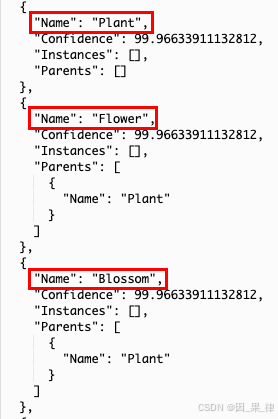
使用AWS Lambda轻松开启Amazon Rekognition之旅
这是本系列文章的第一篇,旨在通过动手实践,帮助大家学习亚马逊云科技的生成式AI相关技能。通过这些文章,大家将掌握如何利用亚马逊云科技的各类服务来应用AI技术。 那么让我们开始今天的内容吧! 介绍 什么是Amazon Rekognition&…...

如何获取VS Code扩展的版本更新信息
获取VS Code 扩展的版本更新的需求 因为企业内部有架设私有扩展管理器的要求,但是对于一些官方市场的插件,希望可以自动获取这些扩展的更新并上传至私有扩展管理器。于是就有了本篇介绍的需求: 通过API的方式获取VS Code 扩展的更新。 关于…...

Python开源项目周排行 2024年第13周
#2024年第13周2024年8月5日1roop一款基于深度学习框架TensorFlow和Keras开发的单图换脸工具包,提供了丰富的功能和简洁易用的界面,使得用户可以轻松实现单图换脸操作。支持多张人脸替换成同一个人脸,勾选多人脸模式即可 人脸替换 高清修复自…...

day04--js的综合案例
1.1 商品全选 需求:商品全选 1. 全选 :点击全选按钮,所有复选框都被选中 2. 全不选 :点击全不选按钮,所有复选框都被取消选中 3. 反选 : 点击反选按钮,所有复选框状态取反 <!DOCTYPE html> <html lang"en">…...

【产品经理】定价策略
年初的时候,尝试自己独立运营了一个美团店铺,最终没有继续做下去了,原因是利润率太低,平台和骑手把利润拿走太多了,根本没有钱赚,烧钱搞流量更是深不见底。 不过也学到了很多东西,比如选品策略…...

webrtc学习笔记3
Nodejs实战 对于我们WebRTC项目而言,nodejs主要是实现信令服务器的功能,客户端和服务器端的交互我们选择websocket作为通信协议,所以以websocket的使用为主。 web客户端 websocket WebSocket 是 HTML5 开始提供的一种在单个 TCP 连接上进行…...

19c补丁后oracle属主变化,导致不能识别磁盘组
补丁后服务器重启,数据库再次无法启动 ORA01017: invalid username/password; logon denied Oracle 19c 在打上 19.23 或以上补丁版本后,存在与用户组权限相关的问题。具体表现为,Oracle 实例的运行用户(oracle)和集…...
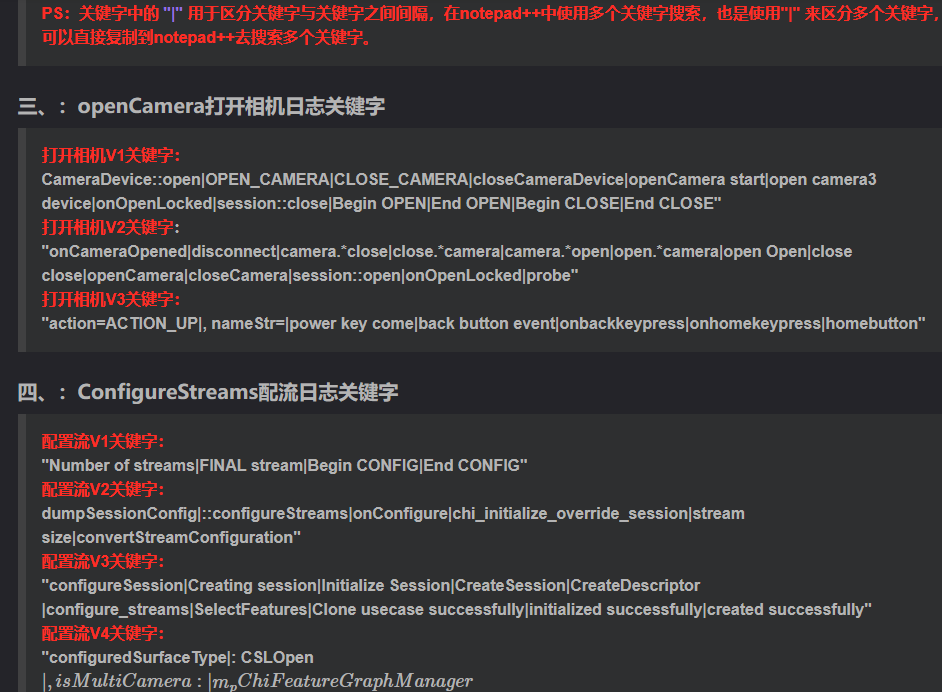
相机Camera日志实例分析之二:相机Camx【专业模式开启直方图拍照】单帧流程日志详解
【关注我,后续持续新增专题博文,谢谢!!!】 上一篇我们讲了: 这一篇我们开始讲: 目录 一、场景操作步骤 二、日志基础关键字分级如下 三、场景日志如下: 一、场景操作步骤 操作步…...

JVM垃圾回收机制全解析
Java虚拟机(JVM)中的垃圾收集器(Garbage Collector,简称GC)是用于自动管理内存的机制。它负责识别和清除不再被程序使用的对象,从而释放内存空间,避免内存泄漏和内存溢出等问题。垃圾收集器在Ja…...
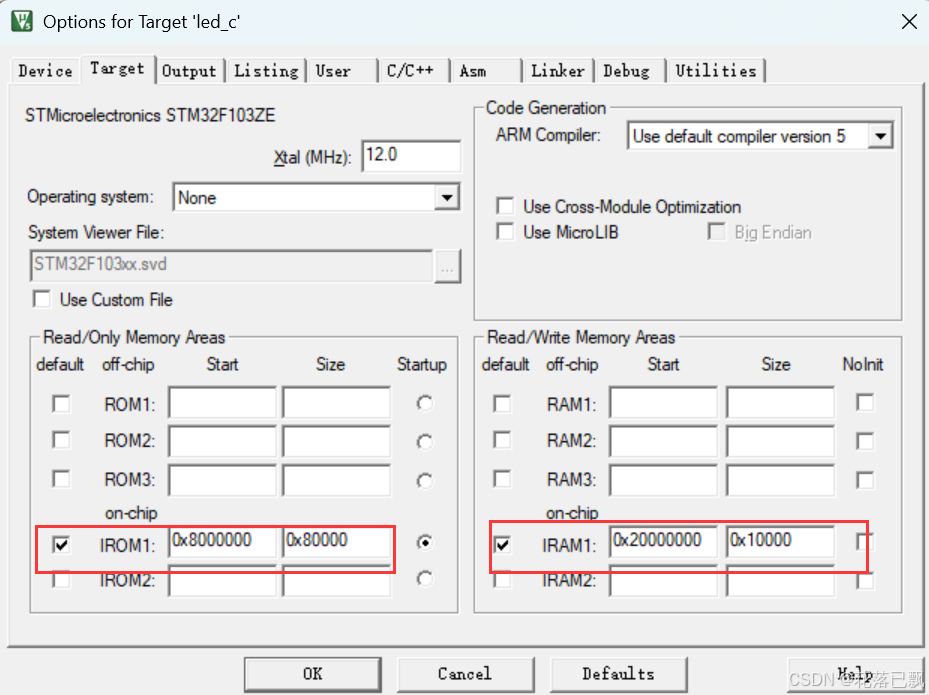
Keil 中设置 STM32 Flash 和 RAM 地址详解
文章目录 Keil 中设置 STM32 Flash 和 RAM 地址详解一、Flash 和 RAM 配置界面(Target 选项卡)1. IROM1(用于配置 Flash)2. IRAM1(用于配置 RAM)二、链接器设置界面(Linker 选项卡)1. 勾选“Use Memory Layout from Target Dialog”2. 查看链接器参数(如果没有勾选上面…...
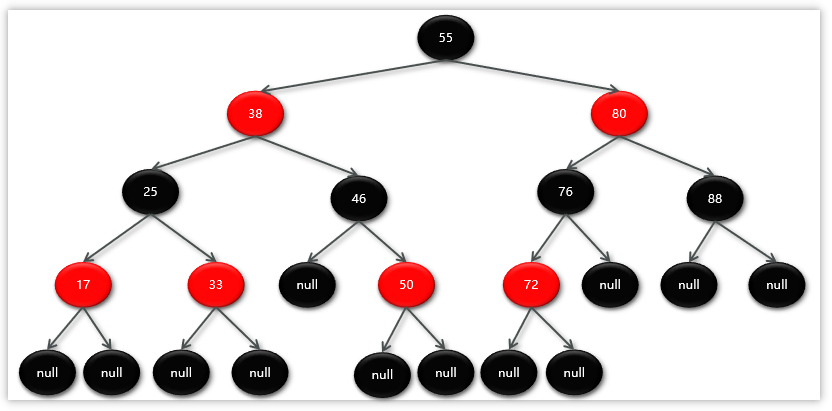
Map相关知识
数据结构 二叉树 二叉树,顾名思义,每个节点最多有两个“叉”,也就是两个子节点,分别是左子 节点和右子节点。不过,二叉树并不要求每个节点都有两个子节点,有的节点只 有左子节点,有的节点只有…...

Spring Cloud Gateway 中自定义验证码接口返回 404 的排查与解决
Spring Cloud Gateway 中自定义验证码接口返回 404 的排查与解决 问题背景 在一个基于 Spring Cloud Gateway WebFlux 构建的微服务项目中,新增了一个本地验证码接口 /code,使用函数式路由(RouterFunction)和 Hutool 的 Circle…...

【Java学习笔记】BigInteger 和 BigDecimal 类
BigInteger 和 BigDecimal 类 二者共有的常见方法 方法功能add加subtract减multiply乘divide除 注意点:传参类型必须是类对象 一、BigInteger 1. 作用:适合保存比较大的整型数 2. 使用说明 创建BigInteger对象 传入字符串 3. 代码示例 import j…...

视觉slam十四讲实践部分记录——ch2、ch3
ch2 一、使用g++编译.cpp为可执行文件并运行(P30) g++ helloSLAM.cpp ./a.out运行 二、使用cmake编译 mkdir build cd build cmake .. makeCMakeCache.txt 文件仍然指向旧的目录。这表明在源代码目录中可能还存在旧的 CMakeCache.txt 文件,或者在构建过程中仍然引用了旧的路…...
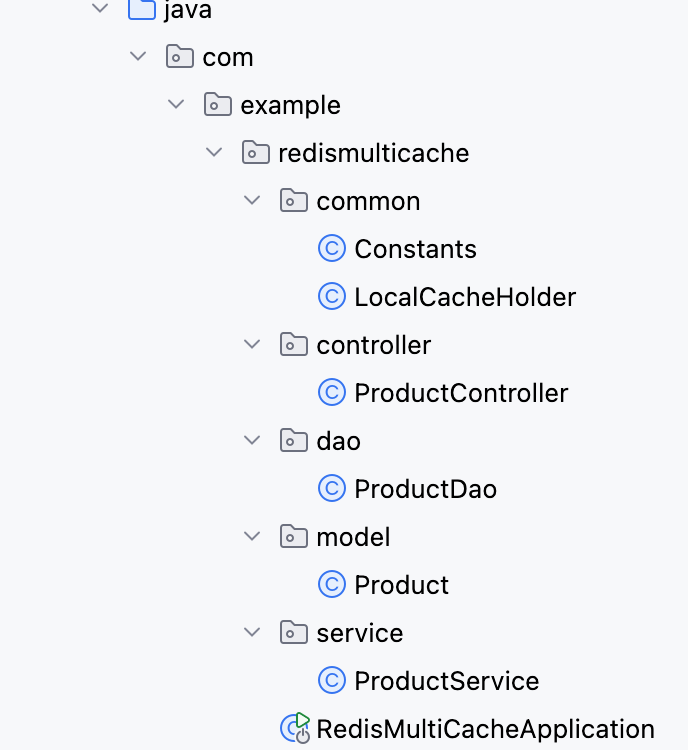
【Redis】笔记|第8节|大厂高并发缓存架构实战与优化
缓存架构 代码结构 代码详情 功能点: 多级缓存,先查本地缓存,再查Redis,最后才查数据库热点数据重建逻辑使用分布式锁,二次查询更新缓存采用读写锁提升性能采用Redis的发布订阅机制通知所有实例更新本地缓存适用读多…...
Razor编程中@Html的方法使用大全
文章目录 1. 基础HTML辅助方法1.1 Html.ActionLink()1.2 Html.RouteLink()1.3 Html.Display() / Html.DisplayFor()1.4 Html.Editor() / Html.EditorFor()1.5 Html.Label() / Html.LabelFor()1.6 Html.TextBox() / Html.TextBoxFor() 2. 表单相关辅助方法2.1 Html.BeginForm() …...