
patroni+etcd开启SSL认证(三个节点证书一致 使用openssl命令)
瀚高数据库
目录
环境
文档用途
详细信息
环境
系统平台:Linux x86-64 Red Hat Enterprise Linux 7
版本:14
文档用途
本文主要介绍Patroni架构中如何开启etcd的ssl证书认证。
详细信息
一、前提说明
patroni版本:3.0.2
etcd版本:3.5.7
数据库版本:14.4
OS版本:redhat7.7
二、自签名CA证书及私钥
1、私钥生成
[root@patroni8 ssl]# openssl genrsa -out ca-key.pem 2048
Generating RSA private key, 2048 bit long modulus
.....................................+++
.............................+++
e is 65537 (0x10001)
2、自签名证书生成
填写以下内容,其余的回车跳过
Country Name (2 letter code) [XX]:CN
State or Province Name (full name) []:SD
Locality Name (eg, city) [Default City]:JN
Common Name (eg, your name or your server’s hostname) []:etcd
[root@patroni8 ssl]# openssl req -new -x509 -key ca-key.pem -out ca.pem -days 365
You are about to be asked to enter information that will be incorporated
into your certificate request.
What you are about to enter is what is called a Distinguished Name or a DN.
There are quite a few fields but you can leave some blank
For some fields there will be a default value,
If you enter '.', the field will be left blank.
-----
Country Name (2 letter code) [XX]:CN
State or Province Name (full name) []:SD
Locality Name (eg, city) [Default City]:JN
Organization Name (eg, company) [Default Company Ltd]:
Organizational Unit Name (eg, section) []:
Common Name (eg, your name or your server's hostname) []:etcd
Email Address []:
[root@patroni8 ssl]# ls
ca-key.pem  ca.pem
3、etcd私钥生成
[root@patroni8 ssl]# openssl genrsa -out server-key.pem 2048
Generating RSA private key, 2048 bit long modulus
.....+++
...............+++
e is 65537 (0x10001)
4、编辑配置文件,生成etcd证书
[root@patroni8 ssl]# vi openssl.cnf
[req]
distinguished_name = req_distinguished_name
req_extensions = v3_req
prompt = no
[req_distinguished_name]
C = CN
ST = SD
L = JN
CN = etcd
[v3_req]
subjectAltName = @alt_names
[alt_names]
IP.1 = 192.168.11.16
IP.2 = 192.168.11.17
IP.3 = 192.168.11.18
5、生成etcd证书
[root@patroni8 ssl]# openssl req -new -key server-key.pem -out server.csr -subj "/CN=etcd-server" -config openssl.cnf
[root@patroni8 ssl]# ls
ca-key.pem  ca.pem  openssl.cnf  server.csr  server-key.pem
[root@patroni8 ssl]# openssl x509 -req -in server.csr -CA ca.pem -CAkey ca-key.pem -CAcreateserial -out server.pem -days 365 -extensi                       ons v3_req -extfile openssl.cnf
Signature ok
subject=/C=CN/ST=SD/L=JN/CN=etcd
Getting CA Private Key
[root@patroni8 ssl]# ls
ca-key.pem  ca.pem  ca.srl  openssl.cnf  server.csr  server-key.pem  server.pem
[root@patroni8 ssl]# ls -lrth
total 28K
-rw-r--r--. 1 root root 1.7K May 15 11:20 ca-key.pem
-rw-r--r--. 1 root root 1.3K May 15 11:28 ca.pem
-rw-r--r--. 1 root root 1.7K May 15 11:29 server-key.pem
-rw-r--r--. 1 root root  255 May 15 11:33 openssl.cnf
-rw-r--r--. 1 root root 1001 May 15 11:33 server.csr
-rw-r--r--. 1 root root   17 May 15 11:34 ca.srl
-rw-r--r--. 1 root root 1.2K May 15 11:34 server.pem
6、将私钥证书复制到其他节点
[root@patroni8 ssl]# scp ca-key.pem ca.pem server.pem server-key.pem root@192.168.11.17:/opt/etcd/ssl
[root@patroni8 ssl]# scp ca-key.pem ca.pem server.pem server-key.pem root@192.168.11.16:/opt/etcd/ssl
7、修改各节点etcd配置文件,将http换为https
编辑/opt/etcd/etcd.yaml文件
debug: false
name: etcd03
data-dir: /opt/etcd/data
initial-advertise-peer-urls: https://192.168.11.18:2380
listen-peer-urls: https://192.168.11.18:2380
advertise-client-urls: https://192.168.11.18:2379
listen-client-urls: https://192.168.11.18:2379,https://127.0.0.1:2379
initial-cluster-token: etcd-cluster
initial-cluster: etcd01=https://192.168.11.16:2380,etcd02=https://192.168.11.17:2380,etcd03=https://192.168.11.18:2380
initial-cluster-state: newclient-transport-security:cert-file: /opt/etcd/ssl/server.pemkey-file: /opt/etcd/ssl/server-key.pemclient-cert-auth: truetrusted-ca-file: /opt/etcd/ssl/ca.pemauto_tls: truepeer-transport-security:cert-file: /opt/etcd/ssl/server.pemkey-file: /opt/etcd/ssl/server-key.pemclient-cert-auth: truetrusted-ca-file: /opt/etcd/ssl/ca.pemauto_tls: trueenable-v2: true
8、各节点开启etcd并验证tls通信,注意,无法使用环境变量,如果环境变量冲突,注释掉对应的环境变量。
[root@patroni8 ssl]# systemctl start etcd
验证etcd开启tls
[root@patroni6 etcd]#  etcdctl --endpoints=https://192.168.11.16:2379,https://192.168.11.17:2379,https://192.168.11.18:2379 --cacert=/opt/etcd/ssl/ca.pem --cert=/opt/etcd/ssl/server.pem --key=/opt/etcd/ssl/server-key.pem endpoint health
https://192.168.11.18:2379 is healthy: successfully committed proposal: took = 12.05254ms
https://192.168.11.16:2379 is healthy: successfully committed proposal: took = 12.007163ms
https://192.168.11.17:2379 is healthy: successfully committed proposal: took = 12.344144ms[root@patroni6 patroni]# ETCDCTL_API=2 etcdctl --endpoints=https://192.168.11.16:2379,https://192.168.11.17:2379,https://192.168.11.1                       8:2379 --ca-file=/opt/etcd/ssl/ca.pem --cert-file=/opt/etcd/ssl/server.pem --key-file=/opt/etcd/ssl/server-key.pem cluster-health
member 421aadb231b71fa1 is healthy: got healthy result from https://192.168.11.17:2379
member 61a0b36ccbf8f9bf is healthy: got healthy result from https://192.168.11.18:2379
member 910f6ce438f0d4dd is healthy: got healthy result from https://192.168.11.16:2379
cluster is healthy
三、patroni配置ssl
1、配置patroni文件中的etcd部分
etcd:#配置etcd所有节点的访问IP及端口hosts: 192.168.11.16:2379,192.168.11.17:2379,192.168.11.18:2379protocol: httpscert: /opt/etcd/ssl/server.pemkey: /opt/etcd/ssl/server-key.pemcacert: /opt/etcd/ssl/ca.pem
#  username: root
#  password: 123456
2、启动patroni
systemctl start patroni
四、注意事项
1、如果报错是CA是自签名的不可信,需要将证书添加到可信存储中,每个节点都执行
cp ca.pem /etc/pki/ca-trust/source/anchors/update-ca-trust
相关文章:
)
patroni+etcd开启SSL认证(三个节点证书一致 使用openssl命令)
瀚高数据库 目录 环境 文档用途 详细信息 环境 系统平台:Linux x86-64 Red Hat Enterprise Linux 7 版本:14 文档用途 本文主要介绍Patroni架构中如何开启etcd的ssl证书认证。 详细信息 一、前提说明 patroni版本:3.0.2 etcd版本&#x…...

Eureka入门指南:微服务注册与发现的基础概念
Eureka入门指南:微服务注册与发现的基础概念 引言 随着微服务架构的普及,微服务之间的高效通信和管理成为了开发和运维的核心挑战之一。为了解决服务发现和管理问题,Netflix推出了Eureka,一个功能强大的服务注册和发现工具。Eur…...

Linux:动态库和静态库
静态库与动态库 A:静态库(.a):程序在编译链接的时候把库的代码链接到可执行文件中。程序运行的时候将不再需要静态库。 B:动态库(.so):程序在运行的时候才去链接动态库的代码&#…...

8.13网络编程
笔记 多点通信 一、套接字属性 套接字属性的获取和设置 #include <sys/types.h> /* See NOTES */#include <sys/socket.h>int getsockopt(int sockfd, int level, int optname,void *optval, socklen_t *optlen);int setsockopt(int sockfd, int level…...

蚂蚁AL1 15.6T 创新科技的新典范
● 哈希率:算力达到15.6T(相当于15600G),即每秒能够进行15.6万亿次哈希计算,在同类产品中算力较为出色,能提高WA掘效率。 ● 功耗:功耗为3510W,虽然数值看似不低,但结合其…...

2024年【汽车驾驶员(技师)】考试报名及汽车驾驶员(技师)试题及解析
题库来源:安全生产模拟考试一点通公众号小程序 汽车驾驶员(技师)考试报名参考答案及汽车驾驶员(技师)考试试题解析是安全生产模拟考试一点通题库老师及汽车驾驶员(技师)操作证已考过的学员汇总…...

2024年【甘肃省安全员C证】报名考试及甘肃省安全员C证考试总结
题库来源:安全生产模拟考试一点通公众号小程序 甘肃省安全员C证报名考试参考答案及甘肃省安全员C证考试试题解析是安全生产模拟考试一点通题库老师及甘肃省安全员C证操作证已考过的学员汇总,相对有效帮助甘肃省安全员C证考试总结学员顺利通过考试。 1、…...

RabbitMQ 双机系统偶尔丢失消息问题排查
实话说起来,这个问题,实际是一个非常低级的错误导致的,算不得什么高深的技术问题。但是在排查的过程中,却是费了好大的功夫,死了不少脑细胞。所以也值得记录一下,算作给大家提个醒,或许可以帮大…...

Python 环境搭建指南 超详细
Python是由荷兰⼈吉多范罗苏姆(Guido von Rossum,后⾯都称呼他为Guido)发明的⼀种编程语言 1. 1989年圣诞节:Guido开始写Python语⾔的编译器。2. 1991年2⽉:第⼀个Python解释器诞⽣,它是⽤C语⾔实现的&…...

使用三菱PLC源码进行PLC读取写入操作
安装 MX Component 。 我的安装地址在: 打开 utl 文件夹下的 Communication Settings Utility 执行。 配置PLC 添加当前需要配置的PLC 注意 logical station Namber 就是程序里需要对接的逻辑站点编号 5.配置选择对应的COM操作选择对应的cpu型型号,…...

使用Nvm切换nodeJs高版本之后,使用npm install一闪而过
先说现象,最近又有几个项目接手,其中有一个使用NVM切换至高版本node后,出现如下症状; 没有任何提示,然后翻看文件目录,node_modules目录没有创建,同时在全局 npm config set prefix 设置的目录下 多了一个 pgn的快捷,指向项目目录。 使用百度或者chart-gtp,搜索到的答案…...

【Kubernetes】k8s集群安全机制
目录 一.认证 1.k8s集群内的三种认证方式 2.k8s集群内的认证说明 2.1.需要被认证的访问类型 2.2.安全性说明 2.3.证书颁发的方式 2.4.kubeconfig 2.5.Service Account 2.6.Secret 与 SA 的关系 二.鉴权 1.鉴权的方式 2.RBAC的角色与角色绑定 2.1.RBAC的角色 2.2…...

嵌入式学习---DAY24:进程--二
一、exec函数族----启动一个新程序 用fork创建子进程后执行的是和父进程相同的程序(但有可能执行不同的代码分支), 子进程往往要调用一种exec函数以执行另一个程序。当进程调用一种exec函数时,该进程的 用户空间代码和数据完全被…...

Diffusion Model相关论文解析之(二)DENOISING DIFFUSION IMPLICIT MODELS
目录 1、摘要2、创新点3、主要公式4、自己的理解,对错不确定 1、摘要 Denoising Diffusion Implicit Models (DDIM)是一种扩散模型的改进版本,旨在加速采样过程并提高采样速度。DDIM通过引入非马尔可夫扩散过程,相对于传统的去噪扩散概率…...

【STM32嵌入式系统设计与开发拓展】——14_定时器之输入捕获
参考哔站:链接: 铁头山羊 一、微控制器的高级定时与控制功能集合 1、时基单元 2、输入捕获 3、输出比较 4、从模式控制器 5、高级定时器的输出控制 二、问题集合 1、什么是定时器 定时器是一种专门负责定时功能的片上外设GPI0AFI0EXTIUSART RCC I2C) 2、定时器…...

docker swarm如何让两个副本分别跑在两台不同的主机上
虽然 docker swarm 支持自动扩容部署,但是为了服务的稳定性、可靠性,有的时候甲方巴巴会要求一定要服务分散部署在不同的服务器上。 使用默认的部署方式,虽然副本为 N,但是部署的 N 个服务可能落在同一台服务器上。 在 Docker Swa…...

GPT助手的训练流程四个主要阶段( GPT Assistant training pipeline )
GPT助手的训练流程四个主要阶段( GPT Assistant training pipeline ) flyfish 四个阶段 预训练(pre-training) 监督微调(supervised fine tuning, SFT) 奖励建模(reward modeling)…...

网络如何发送一个数据包
网络如何发送一个数据包 网络消息发送就是点一点屏幕。 骚瑞,这一点都不好笑。(小品就是我的本质惹) 之前我就是会被这个问题搞的不安宁。是怎么知道对方的IP地址的呢?怎么知道对方的MAC呢?世界上计算机有那么多&…...

【Harmony OS 4.0】向上滑动加载案例
// 自定义class类对象类型 class Article {public id: numberpublic title: stringpublic content: stringconstructor(id: number, title: string, content: string) {this.id idthis.title titlethis.content content} }// 子组件 Component struct ArticleComponent {Pro…...

SQL基础教程(八)SQL高级处理
※食用指南:文章内容为《SQL基础教程》系列学习笔记,该书对新手入门非常友好,循序渐进,浅显易懂,本人主要用来补全学习MySQL中未涉及的部分,便于刷题和做项目。 官方电子书:《SQL基础教程》第2…...
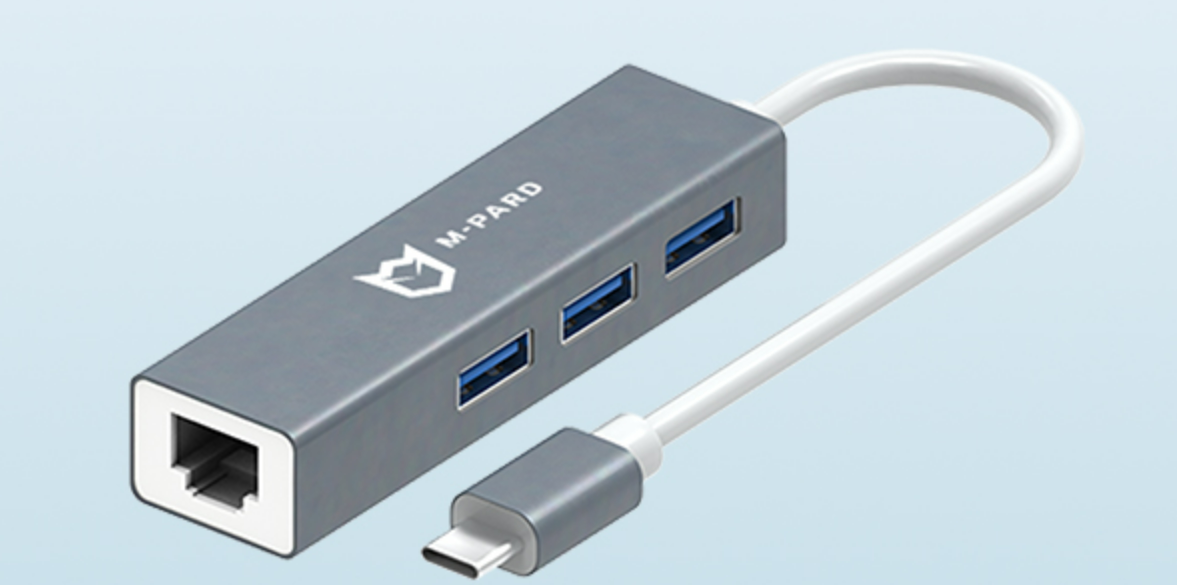
铭豹扩展坞 USB转网口 突然无法识别解决方法
当 USB 转网口扩展坞在一台笔记本上无法识别,但在其他电脑上正常工作时,问题通常出在笔记本自身或其与扩展坞的兼容性上。以下是系统化的定位思路和排查步骤,帮助你快速找到故障原因: 背景: 一个M-pard(铭豹)扩展坞的网卡突然无法识别了,扩展出来的三个USB接口正常。…...
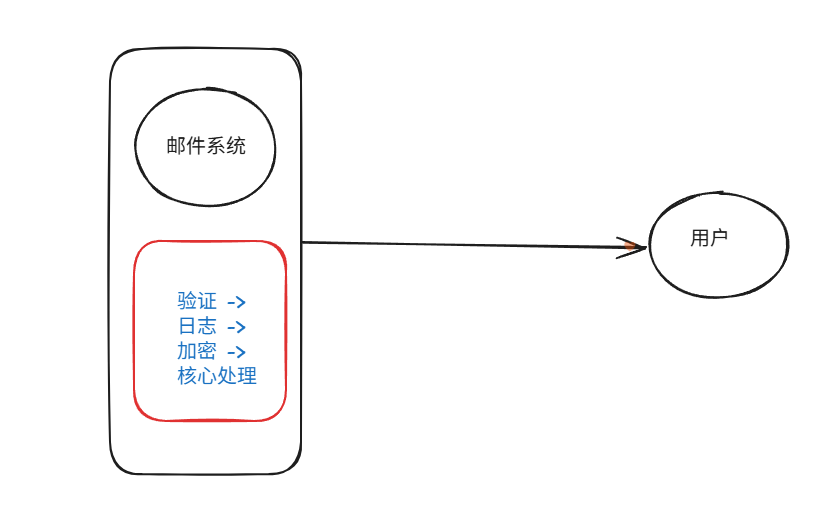
装饰模式(Decorator Pattern)重构java邮件发奖系统实战
前言 现在我们有个如下的需求,设计一个邮件发奖的小系统, 需求 1.数据验证 → 2. 敏感信息加密 → 3. 日志记录 → 4. 实际发送邮件 装饰器模式(Decorator Pattern)允许向一个现有的对象添加新的功能,同时又不改变其…...
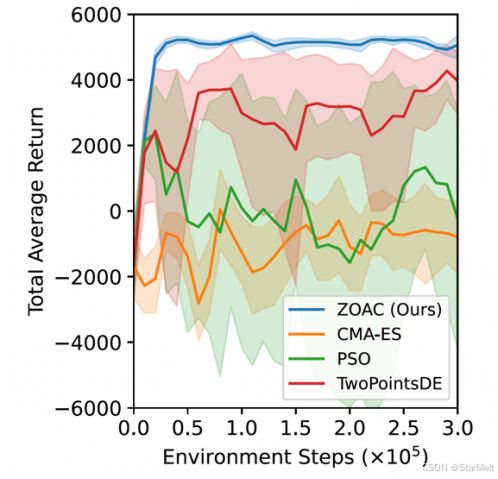
突破不可导策略的训练难题:零阶优化与强化学习的深度嵌合
强化学习(Reinforcement Learning, RL)是工业领域智能控制的重要方法。它的基本原理是将最优控制问题建模为马尔可夫决策过程,然后使用强化学习的Actor-Critic机制(中文译作“知行互动”机制),逐步迭代求解…...
-----深度优先搜索(DFS)实现)
c++ 面试题(1)-----深度优先搜索(DFS)实现
操作系统:ubuntu22.04 IDE:Visual Studio Code 编程语言:C11 题目描述 地上有一个 m 行 n 列的方格,从坐标 [0,0] 起始。一个机器人可以从某一格移动到上下左右四个格子,但不能进入行坐标和列坐标的数位之和大于 k 的格子。 例…...

vue3 字体颜色设置的多种方式
在Vue 3中设置字体颜色可以通过多种方式实现,这取决于你是想在组件内部直接设置,还是在CSS/SCSS/LESS等样式文件中定义。以下是几种常见的方法: 1. 内联样式 你可以直接在模板中使用style绑定来设置字体颜色。 <template><div :s…...

SpringBoot+uniapp 的 Champion 俱乐部微信小程序设计与实现,论文初版实现
摘要 本论文旨在设计并实现基于 SpringBoot 和 uniapp 的 Champion 俱乐部微信小程序,以满足俱乐部线上活动推广、会员管理、社交互动等需求。通过 SpringBoot 搭建后端服务,提供稳定高效的数据处理与业务逻辑支持;利用 uniapp 实现跨平台前…...

三体问题详解
从物理学角度,三体问题之所以不稳定,是因为三个天体在万有引力作用下相互作用,形成一个非线性耦合系统。我们可以从牛顿经典力学出发,列出具体的运动方程,并说明为何这个系统本质上是混沌的,无法得到一般解…...
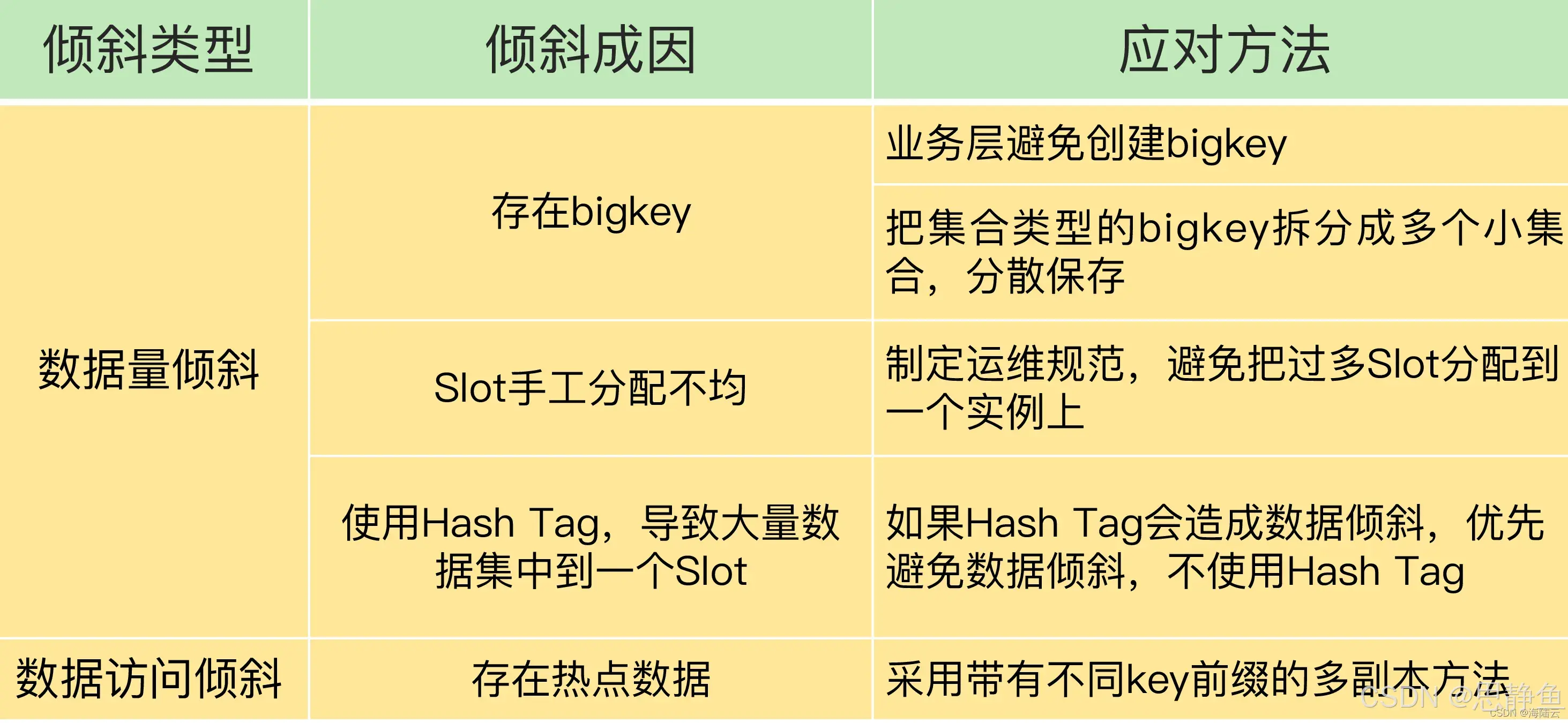
Redis数据倾斜问题解决
Redis 数据倾斜问题解析与解决方案 什么是 Redis 数据倾斜 Redis 数据倾斜指的是在 Redis 集群中,部分节点存储的数据量或访问量远高于其他节点,导致这些节点负载过高,影响整体性能。 数据倾斜的主要表现 部分节点内存使用率远高于其他节…...

学习STC51单片机32(芯片为STC89C52RCRC)OLED显示屏2
每日一言 今天的每一份坚持,都是在为未来积攒底气。 案例:OLED显示一个A 这边观察到一个点,怎么雪花了就是都是乱七八糟的占满了屏幕。。 解释 : 如果代码里信号切换太快(比如 SDA 刚变,SCL 立刻变&#…...
push [特殊字符] present
push 🆚 present 前言present和dismiss特点代码演示 push和pop特点代码演示 前言 在 iOS 开发中,push 和 present 是两种不同的视图控制器切换方式,它们有着显著的区别。 present和dismiss 特点 在当前控制器上方新建视图层级需要手动调用…...