
植物明星大乱斗15
能帮到你的话,就给个赞吧 😘
文章目录
- player.h
- player.cpp
- particle.h
- particle.cpp
player.h
#pragma once
#include <graphics.h>
#include "vector2.h"
#include "animation.h"
#include "playerID.h"
#include "platform.h"
#include "bullet.h"
#include "particle.h"extern bool isDebug;extern Atlas atlasRunEffect;
extern Atlas atlasJumpEffect;
extern Atlas atlasLandEffect;extern std::vector<Bullet*> bullets;
extern std::vector<Platform> platforms;class Player {
public:Player();
public:virtual void receiveInput(const ExMessage& msg);virtual void update(int time);virtual void render();void setId(const PlayerID& id);void setPosition(float x, float y);
public:const Vector2& getPosition() const;const Vector2& getSize() const;
public:
//攻击virtual void onAttack() = 0;virtual void onAttackEx() = 0;
protected://无敌void makeInvulnerable();public:const int getHp() const;const int getMp() const;protected:virtual void onRun(float distance);			//奔跑virtual void onJump();						//跳跃virtual void onLand();						//落地void moveAndCollide(int time);				//重力和碰撞protected:const float runVelocity = 0.55;				//奔跑速度const float jumpVelocity = -0.85;			//跳跃速度const float gravity = 1.6e-3f;				//重力加速度Vector2 velocity;							//玩家速度PlayerID id = P1;//HP MPint hp = 100, mp = 0;//攻击bool isCanAttck = true;Timer timerAttckCd;int attackCd = 500;bool isAttackingEx = false;//无敌IMAGE imgSketch;bool isInvulnerable = false;bool isShowSketchFram = false;				//当前帧是否应该显示剪影Timer timerInvulnerable;					//玩家无敌Timer timerInvulnerableBlink;				//闪烁切换//粒子特效std::vector<Particle> particles;Timer timerRunEffectGeneration;				//玩家跑动粒子发射器Timer timerDieEffectGeneration;				//玩家死亡粒子发射器//按键信息bool isLeftKeyDown = false;bool isRightKeyDown = false;//移动信息Vector2 position;							//玩家位置Vector2 size;								//碰撞尺寸bool isFacingRight = true;					//玩家朝向——(根据按键决定)//渲染数据Animation animationIdleLeft;Animation animationIdleRight;Animation animationRunLeft;Animation animationRunRight;Animation animationAttackExLeft;Animation animationAttackExRight;Animation animationJumpEffect;				//跳跃动画Animation animationLandEffect;				//落地bool isJumpEffectVisible = false;			//跳跃可见bool isLandEffectVisible = false;			//落地可见Vector2 positionJumpEffect;Vector2 positionLandEffect;Animation* currentAni = nullptr;};
player.cpp
#include "player.h"Player::Player() {currentAni = &animationIdleRight;timerAttckCd.setCallback([&] {isCanAttck = true;});timerAttckCd.setTimer(attackCd);timerAttckCd.setIsOneShot(true);//无敌定时器timerInvulnerable.setCallback([&] {isInvulnerable = false;});timerInvulnerable.setTimer(750);timerInvulnerable.setIsOneShot(true);//无敌动画切换timerInvulnerableBlink.setCallback([&] {isShowSketchFram = !isShowSketchFram;});timerInvulnerableBlink.setTimer(75);//粒子发射timerRunEffectGeneration.setTimer(75);timerRunEffectGeneration.setCallback([&] {Vector2 particlePosition;auto frame = atlasRunEffect.getImage(0);//粒子位于玩家水平中央particlePosition.x = position.x + (size.x - frame->getwidth()) / 2;//玩家脚底particlePosition.y = position.y + size.y - frame->getheight();particles.emplace_back(particlePosition, &atlasRunEffect, 45);});timerDieEffectGeneration.setTimer(35);timerDieEffectGeneration.setCallback([&] {Vector2 particlePosition;auto frame = atlasRunEffect.getImage(0);//粒子位于玩家水平中央particlePosition.x = position.x + (size.x - frame->getwidth()) / 2;//玩家脚底particlePosition.y = position.y + size.y - frame->getheight();particles.emplace_back(particlePosition, &atlasRunEffect, 150);});//跳跃和落地animationJumpEffect.setAtlas(&atlasJumpEffect);animationJumpEffect.setInterval(25);animationJumpEffect.setIsLoop(false);animationJumpEffect.setCallback([&] {isJumpEffectVisible = false;});animationLandEffect.setAtlas(&atlasLandEffect);animationLandEffect.setInterval(50);animationLandEffect.setIsLoop(false);animationLandEffect.setCallback([&] {isLandEffectVisible = false;});}void Player::setId(const PlayerID& id){this->id = id;
}void Player::setPosition(float x, float y){position.x = x, position.y = y;
}const Vector2& Player::getPosition() const{return position;
}const Vector2& Player::getSize() const{return size;
}void Player::makeInvulnerable(){isInvulnerable = true;timerInvulnerable.reStart();
}const int Player::getHp() const{return hp;
}const int Player::getMp() const{return mp;
}void Player::onRun(float distance){if (isAttackingEx)return;position.x += distance;timerRunEffectGeneration.resume();
}void Player::onJump(){if (velocity.y || isAttackingEx)return;//仅需更改速度即可//位置在moveAndCollide修改velocity.y += jumpVelocity;//跳跃isJumpEffectVisible = true;animationJumpEffect.reset();auto frame = animationJumpEffect.getFrame();//jump位于玩家中央positionJumpEffect.x = position.x + (size.x - frame->getwidth()) / 2;positionJumpEffect.y = position.y + size.x - frame->getheight();}void Player::onLand(){//落地isLandEffectVisible = true;animationLandEffect.reset();auto frame = animationLandEffect.getFrame();//jump位于玩家中央positionLandEffect.x = position.x + (size.x - frame->getwidth()) / 2;positionLandEffect.y = position.y + size.x - frame->getheight();
}void Player::moveAndCollide(int time){auto lastVelocityY = velocity.y;velocity.y += gravity * time;position += velocity * time;//碰撞检测//玩家与平台if (velocity.y) {for (const auto& platform : platforms) {const auto& shape = platform.shape;bool isCollideX = max(position.x + size.x, shape.right) - min(position.x, shape.left) <= shape.right - shape.left + size.x;bool isCollideY = shape.y >= position.y && shape.y <= position.y + size.y;//对玩家坐标进行修正if (isCollideX && isCollideY) {//判断上一帧玩家是否在平台之上auto deltaY = velocity.y * time;auto lastY = position.y + size.y - deltaY;if (lastY <= shape.y) {position.y = shape.y - size.y;//平台上速度为0velocity.y = 0;if (lastVelocityY)onLand();break;}}}}//玩家与子弹if (!isInvulnerable) {for (const auto& bullet : bullets) {if (!bullet->getValid() || bullet->getCollideTarget() != id)continue;if (bullet->checkCollision(position, size)) {makeInvulnerable();bullet->onCollide();bullet->setValid(false);hp -= bullet->getDamage();}}}}void Player::receiveInput(const ExMessage& msg){switch (msg.message){case WM_KEYDOWN:switch (id){case P1:switch (msg.vkcode){//'A'case 0x41:isLeftKeyDown = true;break;//'D'case 0x44:isRightKeyDown = true;break;//'W'case 0x57:onJump();break;//'J'case 0x4a:if (isCanAttck) {onAttack();isCanAttck = !isCanAttck;timerAttckCd.reStart();								}break;//'K'case 0x4b:if (mp >= 100) {onAttackEx();mp = 0;}break;default:break;}break;case P2:switch (msg.vkcode) {//<case VK_LEFT:isLeftKeyDown = true;break;//>case VK_RIGHT:isRightKeyDown = true;break;//'↑'case VK_UP:onJump();break;//'1'case 0x6e:if (isCanAttck) {onAttack();isCanAttck = !isCanAttck;timerAttckCd.reStart();}break;//'2'case 0x62:if (mp >= 100) {onAttackEx();mp = 0;}break;default:break;}break;default:break;}break;case WM_KEYUP:switch (id) {case P1:switch (msg.vkcode) {//'A'case 0x41:isLeftKeyDown = false;break;//'D'case 0x44:isRightKeyDown = false;break;default:break;}break;case P2:switch (msg.vkcode) {//<case VK_LEFT:isLeftKeyDown = false;break;//>case VK_RIGHT:isRightKeyDown = false;break;default:break;}break;default:break;}break;default:break;}}void Player::update(int time){//direction:——玩家是否按键: 0——没有按键int direction = isRightKeyDown - isLeftKeyDown;//按键if (direction) {//特殊攻击时不允许转向if(!isAttackingEx)isFacingRight = direction > 0;	//根据按键判断当前朝向//根据当前朝向 选择 动画currentAni = isFacingRight ? &animationRunRight : &animationRunLeft;//水平方向移动auto distance = direction * runVelocity * time;onRun(distance);}else {currentAni = isFacingRight ? &animationIdleRight : &animationIdleLeft;timerRunEffectGeneration.pause();}if (isAttackingEx)currentAni = isFacingRight ? &animationAttackExRight : &animationAttackExLeft;//更新动画currentAni->update(time);animationJumpEffect.update(time);animationLandEffect.update(time);//更新定时器timerAttckCd.update(time);timerInvulnerable.update(time);timerInvulnerableBlink.update(time);//粒子//生成粒子timerRunEffectGeneration.update(time);if (hp <= 0)timerDieEffectGeneration.update(time);//更新粒子particles.erase(std::remove_if(particles.begin(), particles.end(), [](const Particle& particle) {return !particle.checkIsValid();}), particles.end());for (auto& particle : particles)particle.update(time);//剪影if (isShowSketchFram)sketchImage(currentAni->getFrame(), &imgSketch);//重力模拟 和 碰撞检测moveAndCollide(time);
}void Player::render(){if (isJumpEffectVisible)animationJumpEffect.render(positionJumpEffect.x, positionJumpEffect.y);if (isLandEffectVisible)animationLandEffect.render(positionLandEffect.x, positionLandEffect.y);//让粒子渲染在玩家身后for (const Particle& particle : particles)particle.render();if (hp > 0 && isInvulnerable && isShowSketchFram)putImageAlpha(position.x, position.y, &imgSketch);elsecurrentAni->render(position.x, position.y);if (isDebug) {setlinecolor(RGB(0, 125, 255));rectangle(position.x, position.y, position.x + size.x, position.y + size.y);}
}
particle.h
#pragma once#include "atlas.h"
#include "vector2.h"
#include "util.h"class Particle {public:Particle() = default;Particle(const Vector2& position, Atlas* atlas, int lifeSpan) :position(position), lifeSpan(lifeSpan),atlas(atlas) {}public:
//设置void setPosition(const Vector2& position);void setAtlas(Atlas* atlas);void setLifeSpan(int lifeSpan);//检测bool checkIsValid() const;//更新void update(int deltaT);
//渲染void render() const;private://物理Vector2 position;bool isValid = true;						//粒子是否有效//渲染int timer = 0;								//计时器int lifeSpan = 0;							//单帧持续时间int index = 0;								//当前帧Atlas* atlas = nullptr;
};
particle.cpp
#include "particle.h"void Particle::setPosition(const Vector2& position){this->position = position;
}void Particle::setAtlas(Atlas* atlas){this->atlas = atlas;
}void Particle::setLifeSpan(int lifeSpan){this->lifeSpan = lifeSpan;
}bool Particle::checkIsValid() const{return isValid;
}void Particle::update(int deltaT){timer += deltaT;if (timer >= lifeSpan) {timer = 0;index++;//粒子在播完动画后消失if (index == atlas->getSize()) {index = atlas->getSize() - 1;isValid = false;}}
}void Particle::render() const{putImageAlpha(position.x, position.y, atlas->getImage(index));
}
相关文章:

植物明星大乱斗15
能帮到你的话,就给个赞吧 😘 文章目录 player.hplayer.cppparticle.hparticle.cpp player.h #pragma once #include <graphics.h> #include "vector2.h" #include "animation.h" #include "playerID.h" #include &…...

go-zero(三) 数据库操作
go-zero 数据库操作 在本篇文章中,我们将实现一个用户注册和登录的服务。我们将为此构建一个简单而高效的 API,包括请求参数和响应参数的定义。 一、Mysql连接 1. 创建数据库和表 在 MySQL 中创建名为 test_zero的数据库,并创建user 表 …...

SQL面试题——间隔连续问题
间隔连续问题 某游戏公司记录的用户每日登录数据如下 +----+----------+ | id| date| +----+----------+ |1001|2021-12-12| |1001|2021-12-13| |1001|2021-12-14| |1001|2021-12-16| |1001|2021-12-19| |1001|2021-12-20| |1002|2021-12-12| |1002|2021-12-16| |1002|…...

vim配置 --> 在创建的普通用户下
在目录/etc/ 下面,有个名为vimrc 的文件,这是系统中公共的vim配置文件对所有用户都有效 我们现在创建一个普通用户 dm 创建好以后,我们退出重新链接 再切换到普通用户下 再输入密码(是不显示的,输入完后,…...

(计算机毕设)基于SpringBoot+Vue的房屋租赁系统的设计与实现
博主可接毕设设计!!! 各种毕业设计源码只要是你有的题目我这里都有源码 摘 要 社会的发展和科学技术的进步,互联网技术越来越受欢迎。网络计算机的生活方式逐渐受到广大人民群众的喜爱,也逐渐进入了每个用户的使用。互…...

【含开题报告+文档+PPT+源码】基于SpringBoot的医院药房管理系统
开题报告 在科技迅速发展的今天,各行各业都在积极寻求与现代技术的融合,以提升自身的运营效率和竞争力。医疗行业作为关乎国计民生的关键领域,其信息化建设的步伐尤为迅速。医院药房作为医疗体系中的核心环节,其管理效率和服务质…...
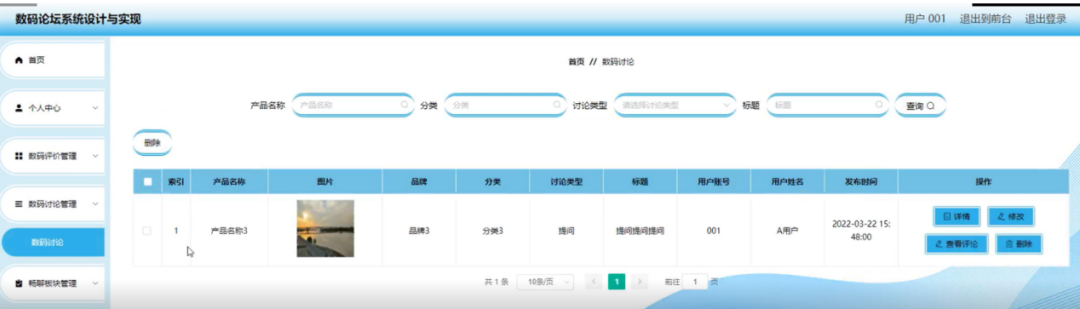
基于SpringBoot的“数码论坛系统设计与实现”的设计与实现(源码+数据库+文档+PPT)
基于SpringBoot的“数码论坛系统设计与实现”的设计与实现(源码数据库文档PPT) 开发语言:Java 数据库:MySQL 技术:SpringBoot 工具:IDEA/Ecilpse、Navicat、Maven 系统展示 系统总体结构图 系统首页界面图 数码板…...

Linux-第2集-打包压缩 zip、tar WindowsLinux互传
欢迎来到Linux第2集,这一集我会非常详细的说明如何在Linux上进行打包压缩操作,以及解压解包 还有最最重要的压缩包的网络传输 毕竟打包压缩不是目的,把文件最终传到指定位置才是目的 由于打包压缩分开讲没有意义,并且它们俩本来…...

项目进度计划表:详细的甘特图的制作步骤
甘特图(Gantt chart),又称为横道图、条状图(Bar chart),是一种用于管理时间和任务活动的工具。 甘特图由亨利劳伦斯甘特(Henry Laurence Gantt)发明,是一种通过条状图来…...

Cargo Rust 的包管理器
Cargo->Rust 的包管理器 Cargi简介Cargo 的主要功能1. 创建项目2. 管理依赖3. 构建项目4. 运行项目5. 测试代码6. 检查代码7. 生成文档8. 发布和分享包 Cargo 的核心文件1. Cargo.toml2. Cargo.lock **Cargo 的生态系统** 常用命令总结Hello, Cargo! 示例 Cargi简介 Cargo …...

【Rust 编程语言工具】rustup-init.exe 安装与使用指南
rustup-init.exe 是用于安装和管理 Rust 编程语言工具链的 Windows 可执行文件。Rust 是一种系统级编程语言,旨在提供安全、并发和高性能的功能。rustup-init.exe 是官方提供的安装器,用于将 Rust 安装到 Windows 操作系统中,并配置相关环境。…...

集群聊天服务器(12)nginx负载均衡器
目录 负载均衡器nginx负载均衡器优势 如何解决集群聊天服务器跨服务器通信问题?nginx的TCP负载均衡配置nginx配置 负载均衡器 目前最多只能支持2w台客户机进行同时聊天 所以要引入集群,多服务器。 但是客户连哪一台服务器呢?客户并不知道哪一…...

数据挖掘英语及概念
分类 classify 上涨或跌 回归 regression 描述具体数值 分类模型评估 1.混淆(误差)矩阵 confusion matrix 2.ROC曲线 receiver operating characteristic curve 接收者操作特征曲线 3.AUC面积 area under curve ROC曲线下与坐标轴围成的面积&#x…...

springboot第82集:消息队列kafka,kafka-map
官网下载链接:https://kafka.[apache].org/downloads 我下载的是[Scala]2.12 - kafka_2.12-3.1.0.tgz kafka只需要解压下载的压缩包就行了,我这里解压的路径是D:\kafka_2.12-3.1.0,kafka的运行需要依赖zookeeper,当前版本已经内置…...

sql server查看当前正在执行的sql
#统计某类sql执行次数,并按总体cpu消耗时间降序排序 with a as ( select er.session_id,db_name(er.database_id) as DBNAME,sy.last_batch AS 最后执行时间, er.cpu_time ,er.total_elapsed_time/1000 as sum_elapsed_time_s, CAST(csql.text AS varchar(8000)) A…...

STM32设计学生宿舍监测控制系统-分享
目录 前言 一、本设计主要实现哪些很“开门”功能? 二、电路设计原理图 电路图采用Altium Designer进行设计: 三、实物设计图 四、程序源代码设计 五、获取资料内容 前言 本项目旨在利用STM32单片机为核心,结合传感器技术、无线通信技…...

HAproxy 详解
一、基本概念 1.1 什么是 HAproxy? HAproxy(High Availability Proxy)是一个开源的高性能负载均衡器和反向代理服务器,它主要用于在网络上分发流量,以提高网站或应用程序的可用性和性能。HAproxy 可以处理大量的并发…...

间接采购管理:主要挑战与实战策略
间接采购支出会悄然消耗掉企业的现金流,即使是管理完善的公司也难以避免。这是因为间接支出不直接关联特定客户、产品或项目,使采购人员难以跟踪。但正确管理间接支出能为企业带来显著收益——前提是要有合适的工具。本文将分享管理间接支出的关键信息与…...

2411rust,正与整128
原文 长期以来,Rust在x86-32和x86-64架构上128位整数的对齐与C语言不一致.最近已解决此问题,但该修复带来了一些值得注意的效果. 作为用户,除非如下,否则不用担心: 1,假设i128/u128对齐,而不是用align_of 2,忽略improper_ctypes*检查,并在FFI中使用这些类. 除x86-32和x86-64…...

将 HTML 转换为 JSX:JSX 和 JSX 规则
JSX 是 JavaScript 的语法扩展。您可以在 JavaScript 文件中编写 HTML 格式。 它基于 Web、Html、Css 和 JavaScript。Web 开发人员将页面内容分别编写为 Html 文件,将设计编写为 Css 文件,将逻辑编写为 JavaScript 文件。 须知 : JSX 是一个…...

XCTF-web-easyupload
试了试php,php7,pht,phtml等,都没有用 尝试.user.ini 抓包修改将.user.ini修改为jpg图片 在上传一个123.jpg 用蚁剑连接,得到flag...

React hook之useRef
React useRef 详解 useRef 是 React 提供的一个 Hook,用于在函数组件中创建可变的引用对象。它在 React 开发中有多种重要用途,下面我将全面详细地介绍它的特性和用法。 基本概念 1. 创建 ref const refContainer useRef(initialValue);initialValu…...
MongoDB学习和应用(高效的非关系型数据库)
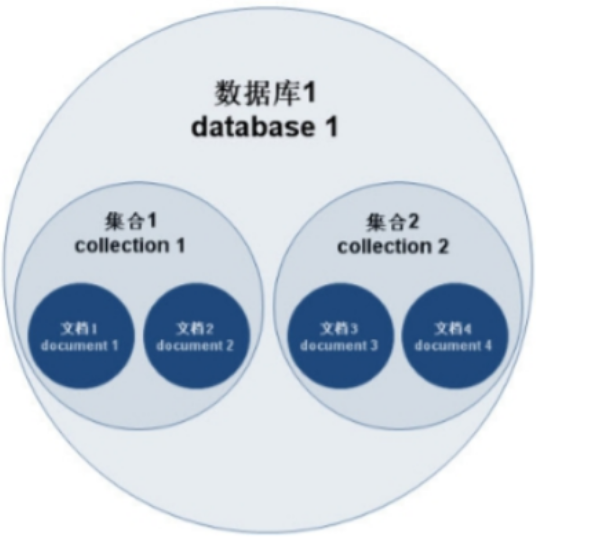
一丶 MongoDB简介 对于社交类软件的功能,我们需要对它的功能特点进行分析: 数据量会随着用户数增大而增大读多写少价值较低非好友看不到其动态信息地理位置的查询… 针对以上特点进行分析各大存储工具: mysql:关系型数据库&am…...

前端倒计时误差!
提示:记录工作中遇到的需求及解决办法 文章目录 前言一、误差从何而来?二、五大解决方案1. 动态校准法(基础版)2. Web Worker 计时3. 服务器时间同步4. Performance API 高精度计时5. 页面可见性API优化三、生产环境最佳实践四、终极解决方案架构前言 前几天听说公司某个项…...
NXP S32K146 T-Box 携手 SD NAND(贴片式TF卡):驱动汽车智能革新的黄金组合
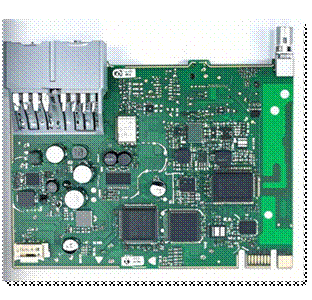
在汽车智能化的汹涌浪潮中,车辆不再仅仅是传统的交通工具,而是逐步演变为高度智能的移动终端。这一转变的核心支撑,来自于车内关键技术的深度融合与协同创新。车载远程信息处理盒(T-Box)方案:NXP S32K146 与…...
抽象类和接口(全)
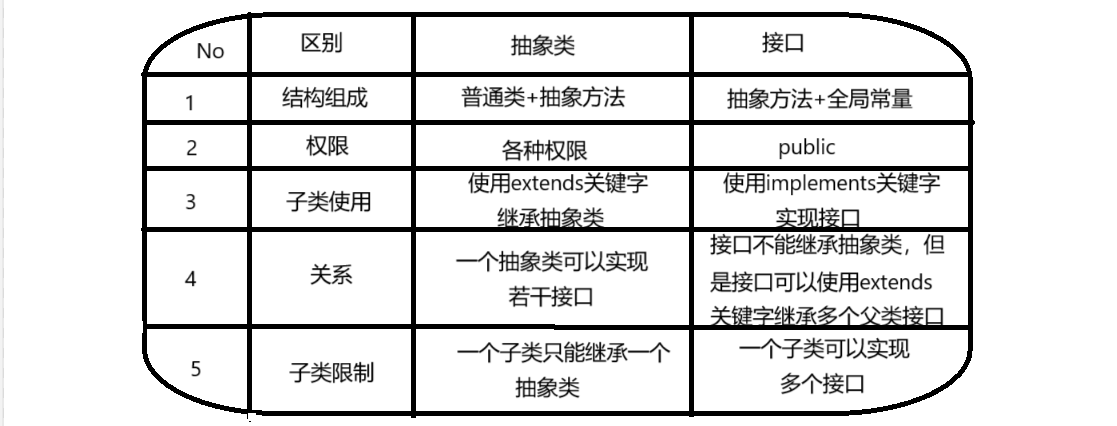
一、抽象类 1.概念:如果⼀个类中没有包含⾜够的信息来描绘⼀个具体的对象,这样的类就是抽象类。 像是没有实际⼯作的⽅法,我们可以把它设计成⼀个抽象⽅法,包含抽象⽅法的类我们称为抽象类。 2.语法 在Java中,⼀个类如果被 abs…...

git: early EOF
macOS报错: Initialized empty Git repository in /usr/local/Homebrew/Library/Taps/homebrew/homebrew-core/.git/ remote: Enumerating objects: 2691797, done. remote: Counting objects: 100% (1760/1760), done. remote: Compressing objects: 100% (636/636…...
基础)
6个月Python学习计划 Day 16 - 面向对象编程(OOP)基础
第三周 Day 3 🎯 今日目标 理解类(class)和对象(object)的关系学会定义类的属性、方法和构造函数(init)掌握对象的创建与使用初识封装、继承和多态的基本概念(预告) &a…...

Python网页自动化Selenium中文文档
1. 安装 1.1. 安装 Selenium Python bindings 提供了一个简单的API,让你使用Selenium WebDriver来编写功能/校验测试。 通过Selenium Python的API,你可以非常直观的使用Selenium WebDriver的所有功能。 Selenium Python bindings 使用非常简洁方便的A…...

webpack面试题
面试题:webpack介绍和简单使用 一、webpack(模块化打包工具)1. webpack是把项目当作一个整体,通过给定的一个主文件,webpack将从这个主文件开始找到你项目当中的所有依赖文件,使用loaders来处理它们&#x…...