
Android车机DIY开发之软件篇(九) NXP AutomotiveOS编译
Android车机DIY开发之软件篇(十一) NXP AutomotiveOS编译
Google 在汽车上也提供了用于汽车的 Google 汽车服务(GAS,Google Automotive Service),包含有 Google 地图、应用市场、Google 汽车助理等等。Google 汽车服务同样没有开源,而是以软件包的形式提供给制造商。 目前国内汽车搭载的 Android 系统都是在标准的 Android Automotive OS 基础上对架构重新进行了定制及应用的本地化适配。
SystemUI 位置 /frameworks/base/packages/SystemUI
CarSystemUI 位置 packages/apps/Car/SystemUI
CarLuncher 位置packages/apps/Car/Launcher
CarServices 位置packages/services/Car/service
CarAPI 位置packages/Car/car-lib car-support-lib
编译镜像文件位置 device/generic/car/XXX.mk
Android Studio for Platform
1. 下载地址
nxp下载地址
解压automotive-14.0.0_2.1.0.tar.gz 到 ~/.
2.在HOME执行
sudo rm -rf /usr/bin/python
sudo ln -s /usr/bin/python2 /usr/bin/python
git config --global user.name “赵川”
git config --global user.email"zc1508890767@gmail.com"
sudo apt-get install libqt5x11extras5
sudo dpkg -i nekoray-3.26-2023-12-09-debian-x64.deb
设置代理
git config --global http.proxy http://127.0.0.1:2081
git config --global https.proxy https://127.0.0.1:2081
浏览器登录https://android.googlesource.com/new-password,并用gmail帐号登录;
按网页上指示运行
谷歌镜像
mkdir ~/bin
curl https://storage.googleapis.com/git-repo-downloads/repo > ~/bin/repo
chmod a+x ~/bin/repo
export PATH=${PATH}:~/bin
source ~/imx-automotive-14.0.0_2.1.0/imx_android_setup.sh
mkdir ~/bin
curl https://mirrors.tuna.tsinghua.edu.cn/git/git-repo > ~/bin/repo
chmod a+x ~/bin/repo
export PATH=${PATH}:~/bin
export REPO_URL='https://mirrors.tuna.tsinghua.edu.cn/git/git-repo/'
source ~/imx-automotive-12.0.0_1.1/imx_android_setup.sh
基于清华大学镜像服务器,修改 android_build/.repo/manifests/ 目录下 .xml 文件,如下所示:
fetch="https://android.googlesource.com/"改为fetch="https://aosp.tuna.tsinghua.edu.cn"review="https://android-review.googlesource.com/"/>  <defaultrevision="refs/tags/android-14.0.0.2.1.0"  上面这条命令会执行很长时间~~~~~~   下载A内核交叉编译工具链
[下载网页](https://developer.arm.com/downloads/-/arm-gnu-toolchain-downloads/12-3-rel1)
AArch32   arm-gnu-toolchain-12.3.rel1-x86_64-arm-none-eabi.tar.xz
AArch64   arm-gnu-toolchain-12.3.rel1-x86_64-aarch64-none-linux-gnu.tar.xz
AArch32 :```bash
sudo tar -xvJf arm-gnu-toolchain-12.3.rel1-x86_64-arm-none-eabi.tar.xz -C /opt
export AARCH32_GCC_CROSS_COMPILE=/opt/arm-gnu-toolchain-12.3.rel1-x86_64-arm-none-eabi/bin/arm-none-eabi-
```
AArch64:```bash
sudo tar -xvJf arm-gnu-toolchain-12.3.rel1-x86_64-aarch64-none-linuxgnu.tar.xz -C /opt
export AARCH64_GCC_CROSS_COMPILE=/opt/arm-gnu-toolchain-12.3.rel1-x86_64-
aarch64-none-linux-gnu/bin/aarch64-none-linux-gnu-
```
运行:
```bash
sudo git clone -b main-kernel-build-2024 --single-branch --depth 1 https://
android.googlesource.com/platform/prebuilts/clang/host/linux-x86 /opt/
prebuilt-android-clang
cd /opt/prebuilt-android-clang
sudo git fetch origin 3bd47139ac0e3593d4707ac0eeb2d45aa7411b67
sudo git checkout 3bd47139ac0e3593d4707ac0eeb2d45aa7411b67
export CLANG_PATH=/opt/prebuilt-android-clang
export LIBCLANG_PATH=/opt/prebuilt-android-clang/clang-r510928/lib
``````bash
sudo git clone -b main-kernel-build-2024 --single-branch --depth 1 https://
android.googlesource.com/kernel/prebuilts/build-tools /opt/prebuilt-androidkernel-build-tools
cd /opt/prebuilt-android-kernel-build-tools
sudo git fetch origin ae85d23af20f61220b114fc3f7bb6f77cc140365
sudo git checkout ae85d23af20f61220b114fc3f7bb6f77cc140365
export PATH=/opt/prebuilt-android-kernel-build-tools/linux-x86/bin:$PATH
```
/etc/profile下载Arm Cortex-M4内核交叉编译工具链
[下载网页](https://developer.arm.com/downloads/-/gnu-rm)```bash
sudo tar -jxvf gcc-arm-none-eabi-7-2018-q2-update-linux.tar.bz2 -C /opt
export ARMGCC_DIR=/opt/gcc-arm-none-eabi-7-2018-q2-update
``````bash
wget https://github.com/Kitware/CMake/releases/download/v3.13.2/
cmake-3.13.2.tar.gz
tar -xzvf cmake-3.13.2.tar.gz; cd cmake-3.13.2;
sudo ./bootstrap
sudo make
sudo make install
```## 3.编译source build/envsetup.sh
lunch1. aosp_arm-eng2. aosp_arm64-eng3. aosp_barbet-userdebug4. aosp_bluejay-userdebug5. aosp_bluejay_car-userdebug6. aosp_bramble-userdebug7. aosp_bramble_car-userdebug8. aosp_car_arm-userdebug9. aosp_car_arm64-userdebug10. aosp_car_x86-userdebug11. aosp_car_x86_64-userdebug12. aosp_cf_arm64_auto-userdebug13. aosp_cf_arm64_phone-userdebug14. aosp_cf_x86_64_foldable-userdebug15. aosp_cf_x86_64_pc-userdebug16. aosp_cf_x86_64_phone-userdebug17. aosp_cf_x86_64_tv-userdebug18. aosp_cf_x86_auto-userdebug19. aosp_cf_x86_phone-userdebug20. aosp_cf_x86_tv-userdebug21. aosp_cheetah-userdebug22. aosp_cloudripper-userdebug23. aosp_coral-userdebug24. aosp_coral_car-userdebug25. aosp_flame-userdebug26. aosp_flame_car-userdebug27. aosp_oriole-userdebug28. aosp_oriole_car-userdebug29. aosp_panther-userdebug30. aosp_raven-userdebug31. aosp_raven_car-userdebug32. aosp_ravenclaw-userdebug33. aosp_redfin-userdebug34. aosp_redfin_car-userdebug35. aosp_redfin_vf-userdebug36. aosp_slider-userdebug37. aosp_sunfish-userdebug38. aosp_sunfish_car-userdebug39. aosp_trout_arm64-userdebug40. aosp_trout_x86-userdebug41. aosp_whitefin-userdebug42. aosp_x86-eng43. aosp_x86_64-eng44. arm_krait-eng45. arm_v7_v8-eng46. armv8-eng47. armv8_cortex_a55-eng48. armv8_kryo385-eng49. beagle_x15-userdebug50. beagle_x15_auto-userdebug51. car_ui_portrait-userdebug52. car_x86_64-userdebug53. db845c-userdebug54. evk_6sl-user55. evk_6sl-userdebug56. evk_7ulp-user57. evk_7ulp-userdebug58. evk_7ulp_revb-user59. evk_7ulp_revb-userdebug60. evk_8mm-user61. evk_8mm-userdebug62. evk_8mn-user63. evk_8mn-userdebug64. evk_8mp-user65. evk_8mp-userdebug66. evk_8mq-user67. evk_8mq-userdebug68. evk_8ulp-user69. evk_8ulp-userdebug70. evk_93-user71. evk_93-userdebug72. gsi_car_arm64-userdebug73. gsi_car_x86_64-userdebug74. hikey-userdebug75. hikey64_only-userdebug76. hikey960-userdebug77. hikey960_tv-userdebug78. hikey_tv-userdebug79. mek_8q-user80. mek_8q-userdebug81. mek_8q_car-user82. mek_8q_car-userdebug83. mek_8q_car2-user84. mek_8q_car2-userdebug85. poplar-eng86. poplar-user87. poplar-userdebug88. qemu_trusty_arm64-userdebug89. rb5-userdebug90. sabreauto_6q-user91. sabreauto_6q-userdebug92. sabresd_6dq-user93. sabresd_6dq-userdebug94. sabresd_6dq_car-user95. sabresd_6dq_car-userdebug96. sabresd_6sx-user97. sabresd_6sx-userdebug98. sabresd_7d-user99. sabresd_7d-userdebug100. sdk_car_arm-userdebug101. sdk_car_arm64-userdebug102. sdk_car_portrait_x86_64-userdebug103. sdk_car_x86-userdebug104. sdk_car_x86_64-userdebug105. sdk_pc_x86_64-userdebug106. silvermont-eng107. uml-userdebug108. watch_8ulp-user109. watch_8ulp-userdebug110. yukawa-userdebug111. yukawa_sei510-userdebug./imx-make.sh -j4 2>&1 | tee build-log.txt编译选项
| mek_8q_car-trunk_staginguserdebug | i.MX 8QuadXPlus/8QuadMax MEK Board with the EVSfunction enabled on the Arm Cortex-M4 CPU   core|
|--|--|
| mek_8q_car2-trunk_staginguserdebug | i.MX 8QuadMax/8QuadXPlus MEK Board with the EVS function enabled on the Arm Cortex-A CPU cores (Power mode switch demo is running on the Cortex-M4 core in thisconfiguration) |
|--|--|
|  |   |
相关文章:
 NXP AutomotiveOS编译)
Android车机DIY开发之软件篇(九) NXP AutomotiveOS编译
Android车机DIY开发之软件篇(十一) NXP AutomotiveOS编译 Google 在汽车上也提供了用于汽车的 Google 汽车服务(GAS,Google Automotive Service),包含有 Google 地图、应用市场、Google 汽车助理等等。Google 汽车服务同样没有开…...

嵌入式工程师必学(143):模拟信号链基础
概述: 我们每天使用的许多电子设备,以及我们赖以生存的电子设备,如果不使用电子工程师设计的实际输入信号,就无法运行。 模拟信号链由四个主要元件组成:传感器、放大器、滤波器和模数转换器 (ADC)。这些传感器用于检测、调节模拟信号并将其转换为适合由微控制器或其他数…...

《LLM大语言模型深度探索与实践:构建智能应用的新范式,融合代理与数据库的高级整合》
文章目录 Langchain的定义Langchain的组成三个核心组件实现整个核心组成部分 为什么要使用LangchainLangchain的底层原理Langchain实战操作LangSmithLangChain调用LLM安装openAI库-国内镜像源代码运行结果小结 使用Langchain的提示模板部署Langchain程序安装langserve代码请求格…...
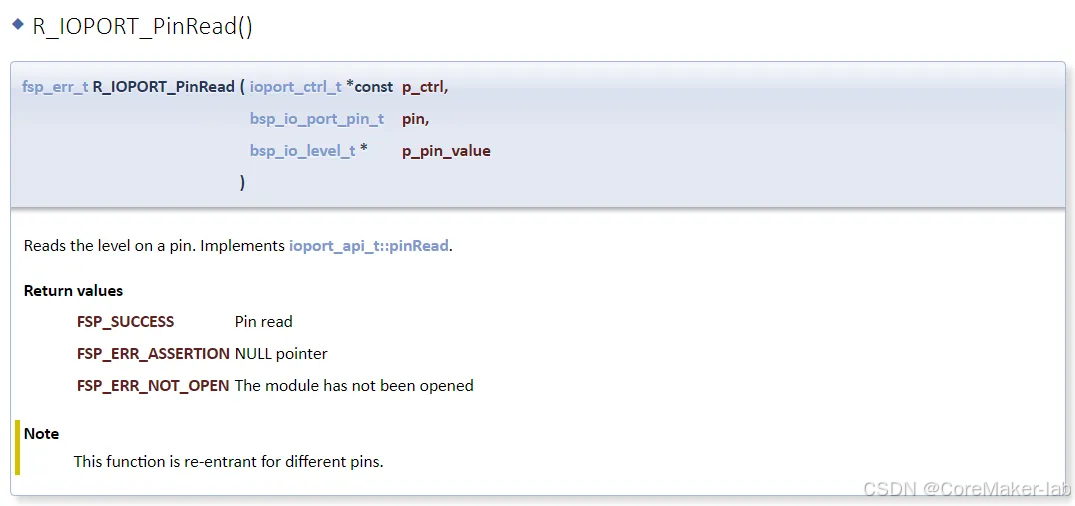
e2studio开发RA2E1(5)----GPIO输入检测
e2studio开发RA2E1.5--GPIO输入检测 概述视频教学样品申请硬件准备参考程序源码下载新建工程工程模板保存工程路径芯片配置工程模板选择时钟设置GPIO口配置按键口配置按键口&Led配置R_IOPORT_PortRead()函数原型R_IOPORT_PinRead()函数原型代码 概述 本篇文章主要介绍如何…...

Spring @Lazy:延迟初始化,为应用减负
在Spring框架中,Lazy注解的作用非常直观,它就是用来告诉Spring容器:“嘿,这个Bean嘛,先别急着创建和初始化,等到真正需要用到的时候再弄吧!” 默认情况下,Spring容器在启动时会立即创…...

将OneDrive上的文件定期备份到移动硬盘
背景: 我在oneDrive上存了很多文件,分布在多个文件夹中,也有套了好几层文件夹的情况。我希望每隔一段时间,将oneDrive上的所有文件向移动硬盘上拷贝一份,但是我只想将距离上一次向移动硬盘拷贝的文件相比,发…...

从0开始,来看看怎么去linux排查Java程序故障
一,前提准备 最基本前提:你需要有liunx环境,如果没有请参考其它文献在自己得到local建立一个虚拟机去进行测试。 有了虚拟机之后,你还需要安装jdk和配置环境变量 1. 安装JDK(以OpenJDK 17为例) 下载JDK…...

DeepSeek-V3:开源多模态大模型的突破与未来
目录 引言 一、DeepSeek-V3 的概述 1.1 什么是 DeepSeek-V3? 1.2 DeepSeek-V3 的定位 二、DeepSeek-V3 的核心特性 2.1 多模态能力 2.2 开源与可扩展性 2.3 高性能与高效训练 2.4 多语言支持 2.5 安全与伦理 三、DeepSeek-V3 的技术架构 3.1 模型架构 3…...

Deep Sleep 96小时:一场没有硝烟的科技保卫战
2025年1月28日凌晨3点,当大多数人还沉浸在梦乡时,一场没有硝烟的战争悄然打响。代号“Deep Sleep”的服务器突遭海量数据洪流冲击,警报声响彻机房,一场针对中国关键信息基础设施的网络攻击来势汹汹! 面对美国发起的这场…...

Redis地理散列GeoHash
GeoHash是一种用于地理位置编码的算法,将二维的地理坐标(纬度和经度)转换为一维的字符串表示,从而实现对地理位置的高效存储和查询。Redis作为一个内存数据库,提供了对GeoHash的支持,使得地理位置相关的数据…...

JAVA安全—反射机制攻击链类对象成员变量方法构造方法
前言 还是JAVA安全,哎,真的讲不完,太多啦。 今天主要是讲一下JAVA中的反射机制,因为反序列化的利用基本都是要用到这个反射机制,还有一些攻击链条的构造,也会用到,所以就讲一下。 什么是反射…...

专业学习|一文了解并实操自适应大邻域搜索(讲解代码)
一、自适应大邻域搜索概念介绍 自适应大邻域搜索(Adaptive Large Neighborhood Search,ALNS)是一种用于解决组合优化问题的元启发式算法。以下是关于它的详细介绍: -自适应大领域搜索的核心思想是:破坏解、修复解、动…...

9. k8s二进制集群之kube-controller-manager部署
同样在部署主机上创建证书请求文件(为之后的证书生成做准备)根据上面的证书文件创建证书(结果会在当前目录下产生kube-controller-manager证书)创建kube-controller-manager服务配置文件创建kube-controller-manager服务启动文件同步kube-controller-manager证书到对应mast…...

轮转数组-三次逆置
题目 给定一个整数数组 nums,将数组中的元素向右轮转 k 个位置,其中 k 是非负数。 void rotate(int* nums, int numsSize, int k){}示例: 输入: nums [1,2,3,4,5,6,7], k 3 输出: [5,6,7,1,2,3,4] 解释: 向右轮转 1 步: [7,1,2,3,4,5,6] …...

3 卷积神经网络CNN
1 Image Classification (Neuron Version) – 1.1 Observation 1 1.2 Observation 2 如果不同的receptive field需要相同功能的neuron,可以使这些neuron共享参数 1.3 Benefit of Convolutional Layer 2 Image Classification (Filter Version) 不用担心filter大小…...

穷举vs暴搜vs深搜vs回溯vs剪枝系列一>黄金矿工
目录 决策树:代码设计代码: 决策树: 代码设计 代码: class Solution {boolean[][] vis;int ret,m,n;public int getMaximumGold(int[][] grid) {m grid.length;n grid[0].length;vis new boolean[m][n]; for(int i 0; i <…...

java基础1(黑马)
一、初识Java 1.Java背景知识 1)Java是美国SUN公司在1995年推出的一门计算机高级编程语言。 2)Java早期名称为OAK,后来才改为Java。 3)Java之父:詹姆斯高斯林。 4)2009年,SUN公司被Oracle公…...

ES6 对象扩展:对象简写,对象属性 表达式,扩展运算符 ...,Object.assign,Object.is,用法和应用场景
1. 对象属性简写 1.1 基本语法 // 传统写法 const name John; const age 25; const user {name: name,age: age };// ES6 简写语法 const user {name,age };1.2 实际应用场景 // 1. 函数返回对象 function createUser(name, age, email) {return {name,age,email}; }// …...

2025 持续防范 GitHub 投毒,通过 Sharp4SuoExplorer 分析 Visual Studio 隐藏文件
在2024年底的网络安全事件中,某提权工具被发现植入后门,攻击者利用 .suo 文件作为隐蔽的攻击方式。由于 .suo 文件是 Visual Studio 项目的隐藏配置文件,通常不为安全研究人员所关注,因此为攻击者提供了潜在的攻击渠道。 初步调查…...

PCB走线宽度与过流能力参考
我们PCB走线,线宽与允许通过电流的大小是什么样的?几个因素 1、允许的温升:如果能够允许的铜线升高的温度越高,那么允许通过的电流自然也就越高 2、走线的线宽:线越宽 ,导线横截面积越大,电阻…...

web vue 项目 Docker化部署
Web 项目 Docker 化部署详细教程 目录 Web 项目 Docker 化部署概述Dockerfile 详解 构建阶段生产阶段 构建和运行 Docker 镜像 1. Web 项目 Docker 化部署概述 Docker 化部署的主要步骤分为以下几个阶段: 构建阶段(Build Stage):…...

Linux链表操作全解析
Linux C语言链表深度解析与实战技巧 一、链表基础概念与内核链表优势1.1 为什么使用链表?1.2 Linux 内核链表与用户态链表的区别 二、内核链表结构与宏解析常用宏/函数 三、内核链表的优点四、用户态链表示例五、双向循环链表在内核中的实现优势5.1 插入效率5.2 安全…...

ES6从入门到精通:前言
ES6简介 ES6(ECMAScript 2015)是JavaScript语言的重大更新,引入了许多新特性,包括语法糖、新数据类型、模块化支持等,显著提升了开发效率和代码可维护性。 核心知识点概览 变量声明 let 和 const 取代 var…...

模型参数、模型存储精度、参数与显存
模型参数量衡量单位 M:百万(Million) B:十亿(Billion) 1 B 1000 M 1B 1000M 1B1000M 参数存储精度 模型参数是固定的,但是一个参数所表示多少字节不一定,需要看这个参数以什么…...

【Java学习笔记】Arrays类
Arrays 类 1. 导入包:import java.util.Arrays 2. 常用方法一览表 方法描述Arrays.toString()返回数组的字符串形式Arrays.sort()排序(自然排序和定制排序)Arrays.binarySearch()通过二分搜索法进行查找(前提:数组是…...
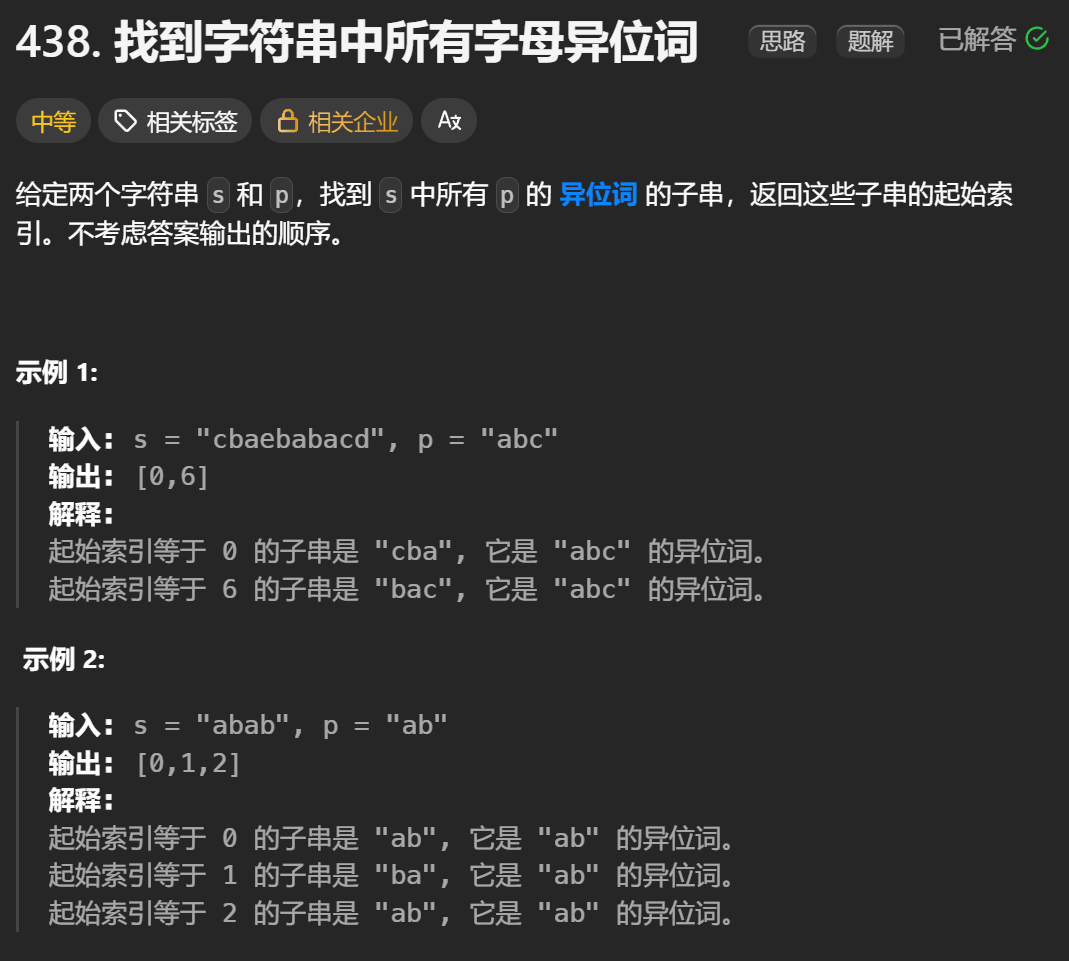
12.找到字符串中所有字母异位词
🧠 题目解析 题目描述: 给定两个字符串 s 和 p,找出 s 中所有 p 的字母异位词的起始索引。 返回的答案以数组形式表示。 字母异位词定义: 若两个字符串包含的字符种类和出现次数完全相同,顺序无所谓,则互为…...
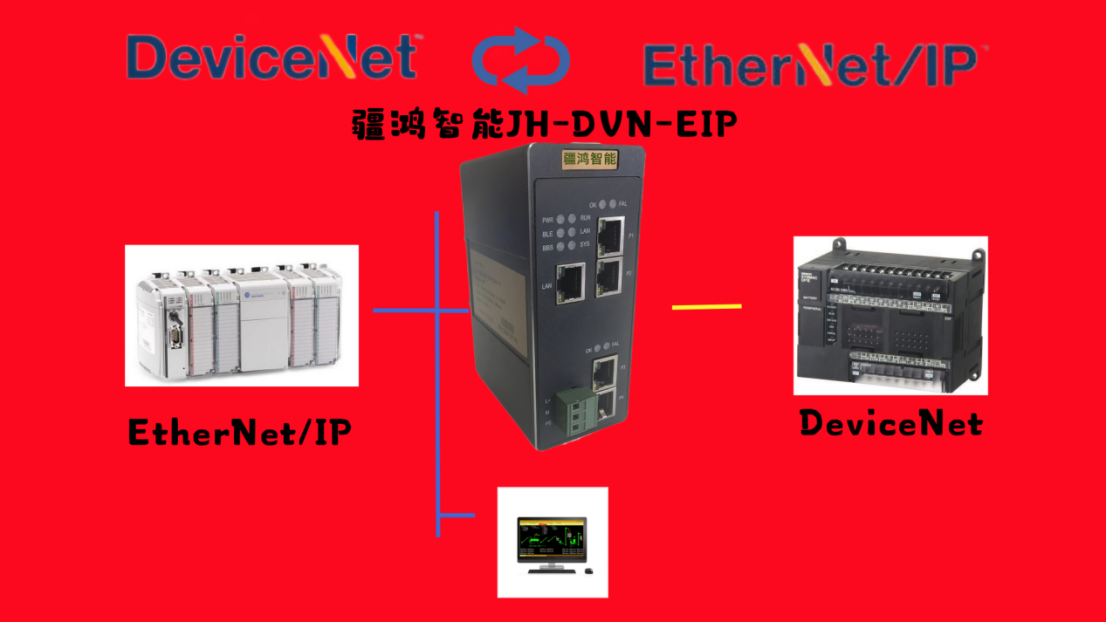
EtherNet/IP转DeviceNet协议网关详解
一,设备主要功能 疆鸿智能JH-DVN-EIP本产品是自主研发的一款EtherNet/IP从站功能的通讯网关。该产品主要功能是连接DeviceNet总线和EtherNet/IP网络,本网关连接到EtherNet/IP总线中做为从站使用,连接到DeviceNet总线中做为从站使用。 在自动…...

【学习笔记】深入理解Java虚拟机学习笔记——第4章 虚拟机性能监控,故障处理工具
第2章 虚拟机性能监控,故障处理工具 4.1 概述 略 4.2 基础故障处理工具 4.2.1 jps:虚拟机进程状况工具 命令:jps [options] [hostid] 功能:本地虚拟机进程显示进程ID(与ps相同),可同时显示主类&#x…...
)
是否存在路径(FIFOBB算法)
题目描述 一个具有 n 个顶点e条边的无向图,该图顶点的编号依次为0到n-1且不存在顶点与自身相连的边。请使用FIFOBB算法编写程序,确定是否存在从顶点 source到顶点 destination的路径。 输入 第一行两个整数,分别表示n 和 e 的值(1…...

力扣-35.搜索插入位置
题目描述 给定一个排序数组和一个目标值,在数组中找到目标值,并返回其索引。如果目标值不存在于数组中,返回它将会被按顺序插入的位置。 请必须使用时间复杂度为 O(log n) 的算法。 class Solution {public int searchInsert(int[] nums, …...