
自然语言处理从入门到应用——LangChain:记忆(Memory)-[聊天消息记录]
分类目录:《自然语言处理从入门到应用》总目录
Cassandra聊天消息记录
Cassandra是一种分布式数据库,非常适合存储大量数据,是存储聊天消息历史的良好选择,因为它易于扩展,能够处理大量写入操作。
# List of contact points to try connecting to Cassandra cluster.
contact_points = ["cassandra"]from langchain.memory import CassandraChatMessageHistorymessage_history = CassandraChatMessageHistory(contact_points=contact_points, session_id="test-session"
)message_history.add_user_message("hi!")message_history.add_ai_message("whats up?")
message_history.messages
[HumanMessage(content='hi!', additional_kwargs={}, example=False),
AIMessage(content='whats up?', additional_kwargs={}, example=False)]
DynamoDB聊天消息记录
首先确保我们已经正确配置了AWS CLI,并再确保我们已经安装了boto3。接下来,创建我们将存储消息 DynamoDB表:
import boto3# Get the service resource.
dynamodb = boto3.resource('dynamodb')# Create the DynamoDB table.
table = dynamodb.create_table(TableName='SessionTable',KeySchema=[{'AttributeName': 'SessionId','KeyType': 'HASH'}],AttributeDefinitions=[{'AttributeName': 'SessionId','AttributeType': 'S'}],BillingMode='PAY_PER_REQUEST',
)# Wait until the table exists.
table.meta.client.get_waiter('table_exists').wait(TableName='SessionTable')# Print out some data about the table.
print(table.item_count)
输出:
0
DynamoDBChatMessageHistory
from langchain.memory.chat_message_histories import DynamoDBChatMessageHistoryhistory = DynamoDBChatMessageHistory(table_name="SessionTable", session_id="0")
history.add_user_message("hi!")
history.add_ai_message("whats up?")
history.messages
输出:
[HumanMessage(content='hi!', additional_kwargs={}, example=False),
AIMessage(content='whats up?', additional_kwargs={}, example=False)]
使用自定义端点URL的DynamoDBChatMessageHistory
有时候在连接到AWS端点时指定URL非常有用,比如在本地使用Localstack进行开发。对于这种情况,我们可以通过构造函数中的endpoint_url参数来指定URL。
from langchain.memory.chat_message_histories import DynamoDBChatMessageHistoryhistory = DynamoDBChatMessageHistory(table_name="SessionTable", session_id="0", endpoint_url="http://localhost.localstack.cloud:4566")
Agent with DynamoDB Memory
from langchain.agents import Tool
from langchain.memory import ConversationBufferMemory
from langchain.chat_models import ChatOpenAI
from langchain.agents import initialize_agent
from langchain.agents import AgentType
from langchain.utilities import PythonREPL
from getpass import getpassmessage_history = DynamoDBChatMessageHistory(table_name="SessionTable", session_id="1")
memory = ConversationBufferMemory(memory_key="chat_history", chat_memory=message_history, return_messages=True)
python_repl = PythonREPL()# You can create the tool to pass to an agent
tools = [Tool(name="python_repl",description="A Python shell. Use this to execute python commands. Input should be a valid python command. If you want to see the output of a value, you should print it out with `print(...)`.",func=python_repl.run
)]
llm=ChatOpenAI(temperature=0)
agent_chain = initialize_agent(tools, llm, agent=AgentType.CHAT_CONVERSATIONAL_REACT_DESCRIPTION, verbose=True, memory=memory)
agent_chain.run(input="Hello!")
日志输出:
> Entering new AgentExecutor chain...
{"action": "Final Answer","action_input": "Hello! How can I assist you today?"
}> Finished chain.
输出:
'Hello! How can I assist you today?'
输入:
agent_chain.run(input="Who owns Twitter?")
日志输出:
> Entering new AgentExecutor chain...
{"action": "python_repl","action_input": "import requests\nfrom bs4 import BeautifulSoup\n\nurl = 'https://en.wikipedia.org/wiki/Twitter'\nresponse = requests.get(url)\nsoup = BeautifulSoup(response.content, 'html.parser')\nowner = soup.find('th', text='Owner').find_next_sibling('td').text.strip()\nprint(owner)"
}
Observation: X Corp. (2023–present)Twitter, Inc. (2006–2023)Thought:{"action": "Final Answer","action_input": "X Corp. (2023–present)Twitter, Inc. (2006–2023)"
}> Finished chain.
输出:
'X Corp. (2023–present)Twitter, Inc. (2006–2023)'
输入:
agent_chain.run(input="My name is Bob.")
日志输出:
> Entering new AgentExecutor chain...
{"action": "Final Answer","action_input": "Hello Bob! How can I assist you today?"
}> Finished chain.
输出:
'Hello Bob! How can I assist you today?'
输入:
agent_chain.run(input="Who am I?")
日志输出:
> Entering new AgentExecutor chain...
{"action": "Final Answer","action_input": "Your name is Bob."
}> Finished chain.
输出:
'Your name is Bob.'
Momento聊天消息记录
本节介绍如何使用Momento Cache来存储聊天消息记录,我们会使用MomentoChatMessageHistory类。需要注意的是,默认情况下,如果不存在具有给定名称的缓存,我们将创建一个新的缓存。我们需要获得一个Momento授权令牌才能使用这个类。这可以直接通过将其传递给momento.CacheClient实例化,作为MomentoChatMessageHistory.from_client_params的命名参数auth_token,或者可以将其设置为环境变量MOMENTO_AUTH_TOKEN。
from datetime import timedelta
from langchain.memory import MomentoChatMessageHistorysession_id = "foo"
cache_name = "langchain"
ttl = timedelta(days=1)
history = MomentoChatMessageHistory.from_client_params(session_id, cache_name,ttl,
)history.add_user_message("hi!")history.add_ai_message("whats up?")
history.messages
输出:
[HumanMessage(content='hi!', additional_kwargs={}, example=False),
AIMessage(content='whats up?', additional_kwargs={}, example=False)]
MongoDB聊天消息记录
本节介绍如何使用MongoDB存储聊天消息记录。MongoDB是一个开放源代码的跨平台文档导向数据库程序。它被归类为NoSQL数据库程序,使用类似JSON的文档,并且支持可选的模式。MongoDB由MongoDB Inc.开发,并在服务器端公共许可证(SSPL)下许可。
# Provide the connection string to connect to the MongoDB database
connection_string = "mongodb://mongo_user:password123@mongo:27017"
from langchain.memory import MongoDBChatMessageHistorymessage_history = MongoDBChatMessageHistory(connection_string=connection_string, session_id="test-session")message_history.add_user_message("hi!")message_history.add_ai_message("whats up?")
message_history.messages
输出:
[HumanMessage(content='hi!', additional_kwargs={}, example=False),
AIMessage(content='whats up?', additional_kwargs={}, example=False)]
Postgres聊天消息历史记录
本节介绍了如何使用 Postgres 来存储聊天消息历史记录。
from langchain.memory import PostgresChatMessageHistoryhistory = PostgresChatMessageHistory(connection_string="postgresql://postgres:mypassword@localhost/chat_history", session_id="foo")history.add_user_message("hi!")history.add_ai_message("whats up?")
history.messages
Redis聊天消息历史记录
本节介绍了如何使用Redis来存储聊天消息历史记录。
from langchain.memory import RedisChatMessageHistoryhistory = RedisChatMessageHistory("foo")history.add_user_message("hi!")
history.add_ai_message("whats up?")
history.messages
输出:
[AIMessage(content='whats up?', additional_kwargs={}),
HumanMessage(content='hi!', additional_kwargs={})]
参考文献:
[1] LangChain官方网站:https://www.langchain.com/
[2] LangChain 🦜️🔗 中文网,跟着LangChain一起学LLM/GPT开发:https://www.langchain.com.cn/
[3] LangChain中文网 - LangChain 是一个用于开发由语言模型驱动的应用程序的框架:http://www.cnlangchain.com/
相关文章:
-[聊天消息记录])
自然语言处理从入门到应用——LangChain:记忆(Memory)-[聊天消息记录]
分类目录:《自然语言处理从入门到应用》总目录 Cassandra聊天消息记录 Cassandra是一种分布式数据库,非常适合存储大量数据,是存储聊天消息历史的良好选择,因为它易于扩展,能够处理大量写入操作。 # List of contact…...

Python web实战之细说 Django 的单元测试
关键词: Python Web 开发、Django、单元测试、测试驱动开发、TDD、测试框架、持续集成、自动化测试 大家好,今天,我将带领大家进入 Python Web 开发的新世界,深入探讨 Django 的单元测试。通过本文的实战案例和详细讲解ÿ…...

pytorch 42 C#使用onnxruntime部署内置nms的yolov8模型
在进行目标检测部署时,通常需要自行编码实现对模型预测结果的解码及与预测结果的nms操作。所幸现在的各种部署框架对算子的支持更为灵活,可以在模型内实现预测结果的解码,但仍然需要自行编码实现对预测结果的nms操作。其实在onnx opset===11版本以后,其已支持将nms操作嵌入…...
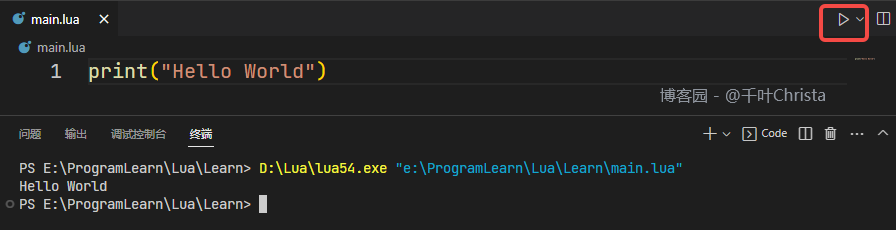
【Lua】(一)VSCode 搭建 Lua 开发环境
前言 最近在找工作,基本所有的岗位都会问到 Lua(甚至拼 UI 的都要求会 Lua),咱能怎么办呢,咱也只能学啊…… 工欲善其事,必先利其器。第一步,先来把环境配置好吧! 当前适用版本&a…...

react-vite-antd环境下新建项目
vite 创建一个react项目 1. 安装vite并创建一个react项目1. 我使用的 yarn安装,基本配置项目名字, 框架react ,js2. cd vite-react进入项目目录安装node包并启动项目 2. 安装引入Ant Design引入依赖(我用的yarn,没有安装的也可以使…...
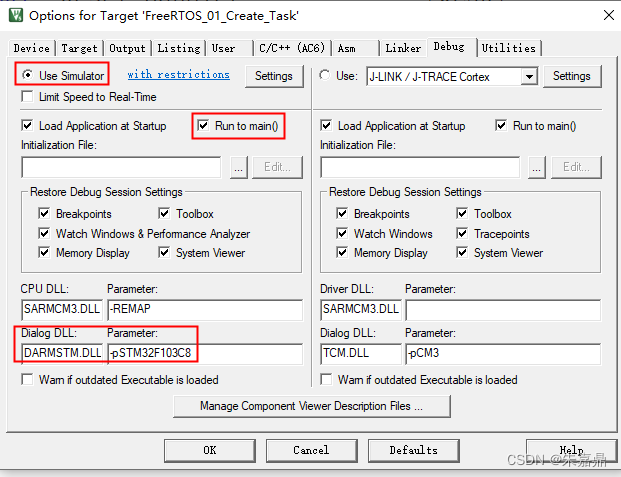
KeilMDk软仿真设置_STM32F03C8
1、KeilMDK软仿真的价值 (1)在没有硬件的情况下进行程序的编写调试。 (2)避免频繁的下载程序,延长单片机Flash寿命。 2、软仿真配置。 (1)打开Keil工程。 (2)点击“Options for Target ***”,如下图所示。 (3)点击“Debug”。 (4)进行如下配置。 U…...

mysql的隐式连接和显式连接的区别
隐式连接(Implicit Join)和显式连接(Explicit Join)是 SQL 查询中用于联结多个表的两种不同语法方式。它们的区别主要体现在语法的书写风格和可读性上。 隐式连接: 隐式连接使用逗号 , 将多个表名放在 FROM 子句中&am…...
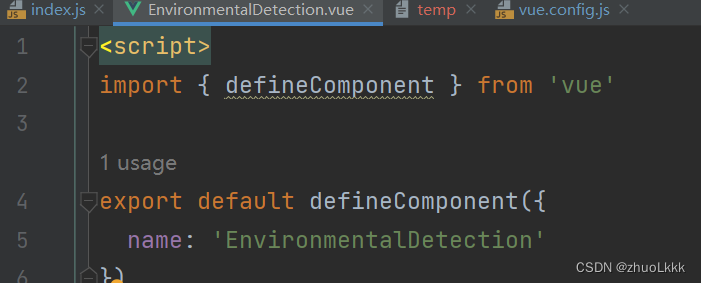
vue-element-admin新增view后点击侧边栏加载慢问题
按照官网文档新增view 新增之后点击显示一直在加载中 解决方案:删除script中这段代码...
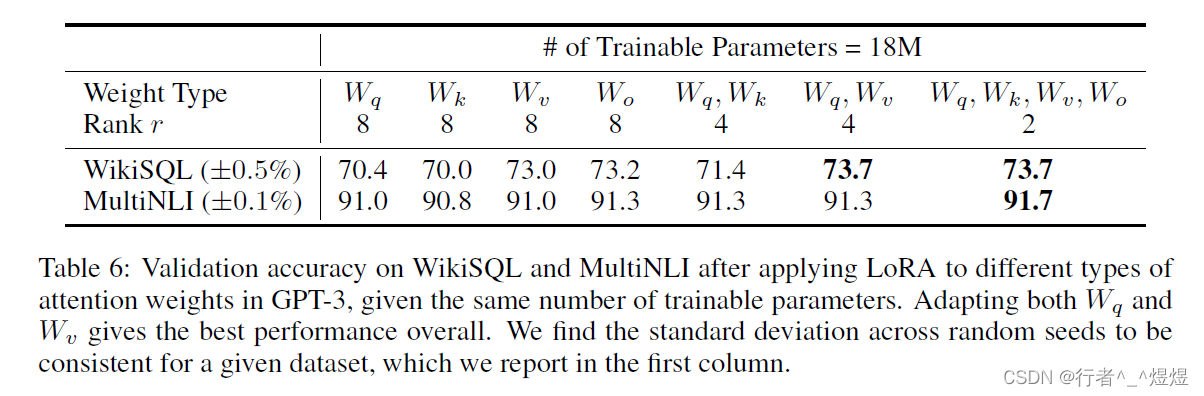
论文《LoRA: Low-Rank Adaptation of Large Language Models》阅读
论文《LoRA: Low-Rank Adaptation of Large Language Models》阅读 BackgroundIntroducitonProblem StatementMethodology Δ W \Delta W ΔW 的选择 W W W的选择 总结 今天带来的是由微软Edward Hu等人完成并发表在ICLR 2022上的论文《LoRA: Low-Rank Adaptation of Large Lan…...
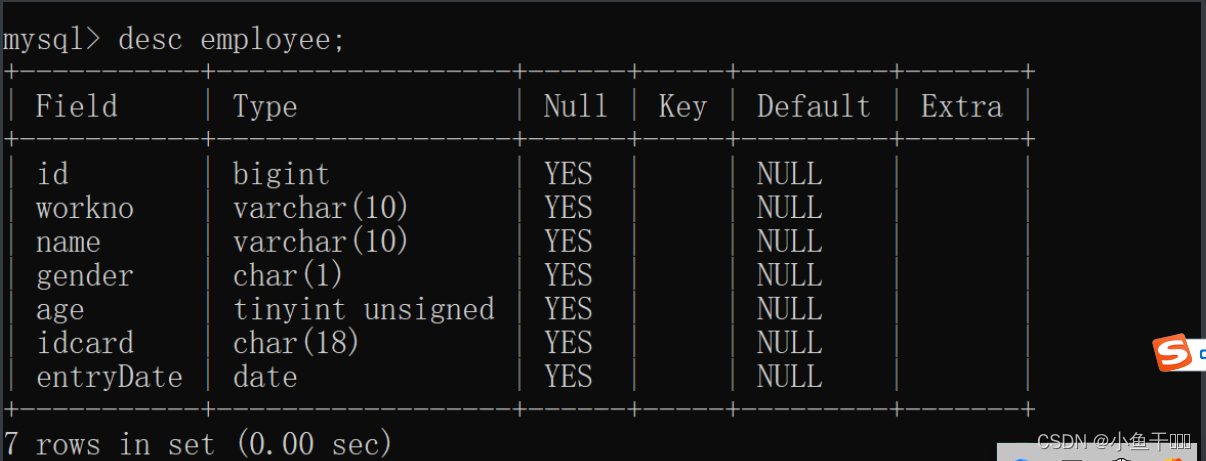
MySQL数据类型篇
数值类型 类型有符号(SIGNED)取值范围无符号(UNSIGNED)取值范围大小描述TINYINT(-128,127)(0,255)1byte小整数值SMALLINT(-32768,32767)(0,65535)2bytes大整数值INT/INTEGER(-2147483648,2147483647)(0,429…...
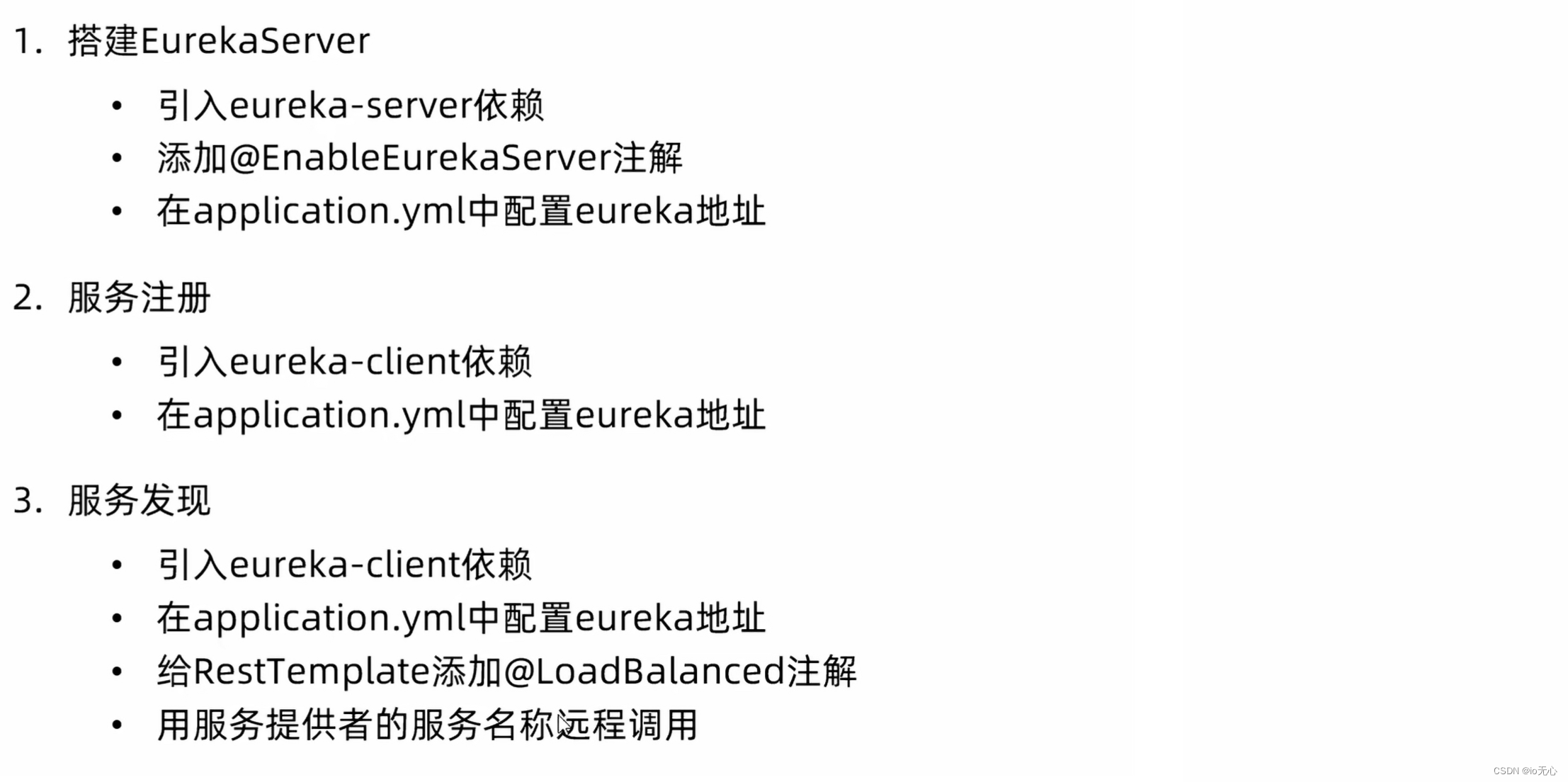
Eureka注册中心
全部流程 注册服务中心 添加maven依赖 <!--引用注册中心--> <dependency><groupId>org.springframework.cloud</groupId><artifactId>spring-cloud-starter-netflix-eureka-server</artifactId> </dependency> 配置Eureka 因为自…...

代码随想录算法训练营第53天|动态规划part14
8.19周六 1143.最长公共子序列 1035.不相交的线 53. 最大子序和 动态规划 详细布置 1143.最长公共子序列 题目:两个字符串,问最长的公共子序列多长(不连续) 题解: 1、dp[i][j]:长度为[0, i - 1]的字…...
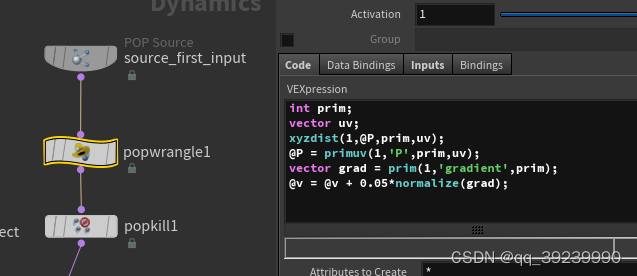
houdini xyzdist primuv 实现按路径走
2. meause distance v 0; add popforce...

Asrock-Z690-PG-Reptide i5-13600kf电脑 Hackintosh 黑苹果引导文件
硬件配置(需要下载请百度搜索:黑果魏叔) 硬件型号驱动情况主板 Asrock Z690 PG Reptide 处理器i5-13600kf RaptorLake (Undervolted)已驱动内存2x16Gb DDR4 3600 ADATA XPG已驱动硬盘1Tb Netac NV7000 NVME M2 (PCI-e 4.0)已驱动显卡Radeon …...
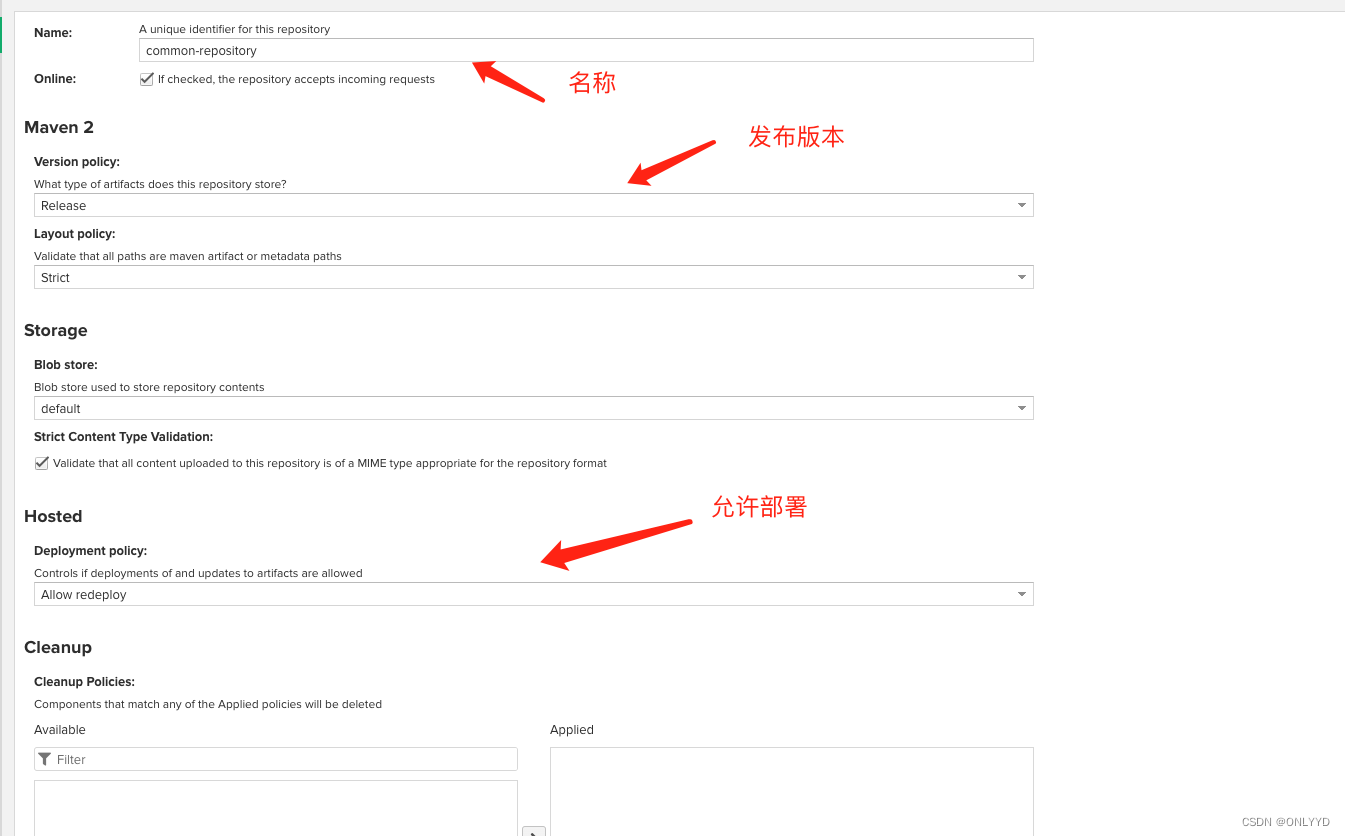
linux 搭建 nexus maven私服
目录 环境: 下载 访问百度网盘链接 官网下载 部署 : 进入目录,创建文件夹,进入文件夹 将安装包放入nexus文件夹,并解压编辑 启动 nexus,并查看状态.编辑 更改 nexus 端口为7020,并重新启动,访问虚拟机7020…...

MySQL中按月统计并逐月累加统计值的几种写法
有时候,我们可能有这样的场景,需要将销量按月统计,并且按月逐月累加。写惯了GROUP BY,按月统计倒是小case,但是逐月累加实现起来,要稍微麻烦一点。下面就整理几种写法,以备不时之需。 本月第一天 -- 本月第一天 SELE…...
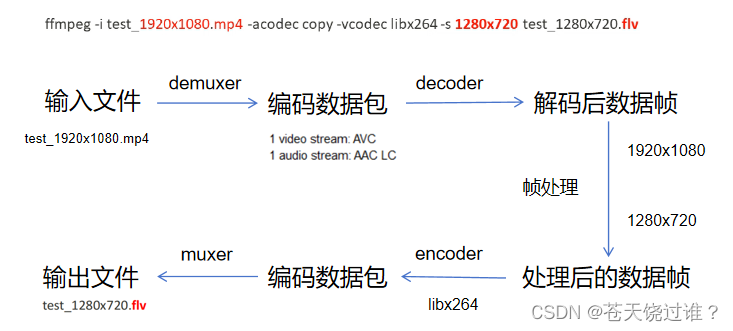
音视频 FFmpeg音视频处理流程
ffmpeg -i test_1920x1080.mp4 -acodec copy -vcodec libx264 -s 1280x720 test_1280x720.flv推荐一个零声学院项目课,个人觉得老师讲得不错,分享给大家: 零声白金学习卡(含基础架构/高性能存储/golang云原生/音视频/Linux内核&am…...

Linux网络编程:多进程 多线程_并发服务器
文章目录: 一:wrap常用函数封装 wrap.h wrap.c server.c client.c 二:多进程process并发服务器 实现思路 server.c服务器 client.c客户端 三:多线程thread并发服务器 实现思路 server.c服务器 client.c客户端 一&am…...
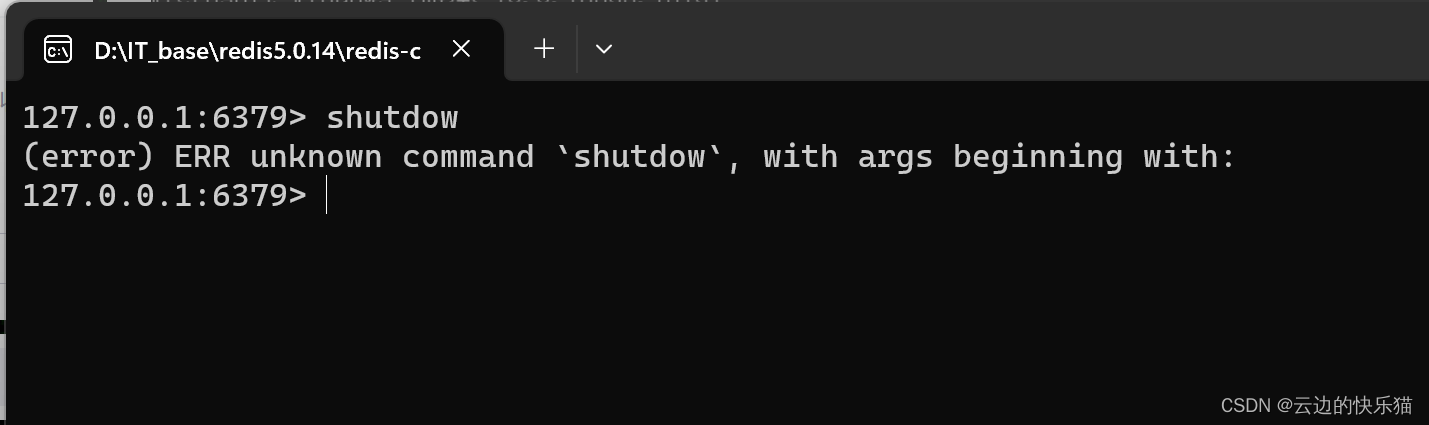
解决:(error) ERR unknown command shutdow,with args beginning with
目录 一、遇到问题 二、出现问题的原因 三、解决办法 一、遇到问题 要解决连接redis闪退的问题,按照许多的方式去进行都没有成功,在尝试使用了以下的命名去尝试时候,发现了这个问题。 二、出现问题的原因 这是一个粗心大意导致的错误&am…...

《TCP IP网络编程》第十八章
第 18 章 多线程服务器端的实现 18.1 理解线程的概念 线程背景: 第 10 章介绍了多进程服务端的实现方法。多进程模型与 select 和 epoll 相比的确有自身的优点,但同时也有问题。如前所述,创建(复制)进程的工作本身会…...

从零实现富文本编辑器#5-编辑器选区模型的状态结构表达
先前我们总结了浏览器选区模型的交互策略,并且实现了基本的选区操作,还调研了自绘选区的实现。那么相对的,我们还需要设计编辑器的选区表达,也可以称为模型选区。编辑器中应用变更时的操作范围,就是以模型选区为基准来…...

在rocky linux 9.5上在线安装 docker
前面是指南,后面是日志 sudo dnf config-manager --add-repo https://download.docker.com/linux/centos/docker-ce.repo sudo dnf install docker-ce docker-ce-cli containerd.io -y docker version sudo systemctl start docker sudo systemctl status docker …...
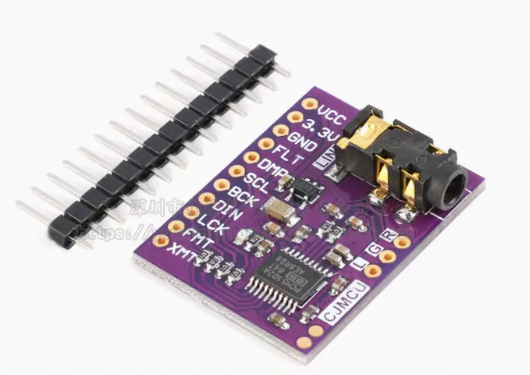
ESP32 I2S音频总线学习笔记(四): INMP441采集音频并实时播放
简介 前面两期文章我们介绍了I2S的读取和写入,一个是通过INMP441麦克风模块采集音频,一个是通过PCM5102A模块播放音频,那如果我们将两者结合起来,将麦克风采集到的音频通过PCM5102A播放,是不是就可以做一个扩音器了呢…...
)
python爬虫:Newspaper3k 的详细使用(好用的新闻网站文章抓取和解析的Python库)
更多内容请见: 爬虫和逆向教程-专栏介绍和目录 文章目录 一、Newspaper3k 概述1.1 Newspaper3k 介绍1.2 主要功能1.3 典型应用场景1.4 安装二、基本用法2.2 提取单篇文章的内容2.2 处理多篇文档三、高级选项3.1 自定义配置3.2 分析文章情感四、实战案例4.1 构建新闻摘要聚合器…...
高危文件识别的常用算法:原理、应用与企业场景
高危文件识别的常用算法:原理、应用与企业场景 高危文件识别旨在检测可能导致安全威胁的文件,如包含恶意代码、敏感数据或欺诈内容的文档,在企业协同办公环境中(如Teams、Google Workspace)尤为重要。结合大模型技术&…...

3403. 从盒子中找出字典序最大的字符串 I
3403. 从盒子中找出字典序最大的字符串 I 题目链接:3403. 从盒子中找出字典序最大的字符串 I 代码如下: class Solution { public:string answerString(string word, int numFriends) {if (numFriends 1) {return word;}string res;for (int i 0;i &…...
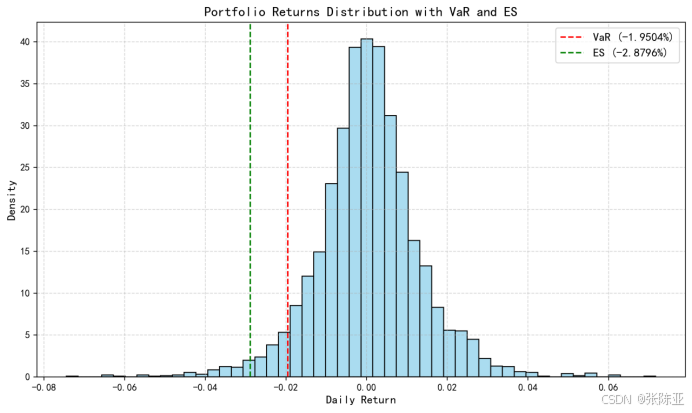
Python基于历史模拟方法实现投资组合风险管理的VaR与ES模型项目实战
说明:这是一个机器学习实战项目(附带数据代码文档),如需数据代码文档可以直接到文章最后关注获取。 1.项目背景 在金融市场日益复杂和波动加剧的背景下,风险管理成为金融机构和个人投资者关注的核心议题之一。VaR&…...

【笔记】WSL 中 Rust 安装与测试完整记录
#工作记录 WSL 中 Rust 安装与测试完整记录 1. 运行环境 系统:Ubuntu 24.04 LTS (WSL2)架构:x86_64 (GNU/Linux)Rust 版本:rustc 1.87.0 (2025-05-09)Cargo 版本:cargo 1.87.0 (2025-05-06) 2. 安装 Rust 2.1 使用 Rust 官方安…...
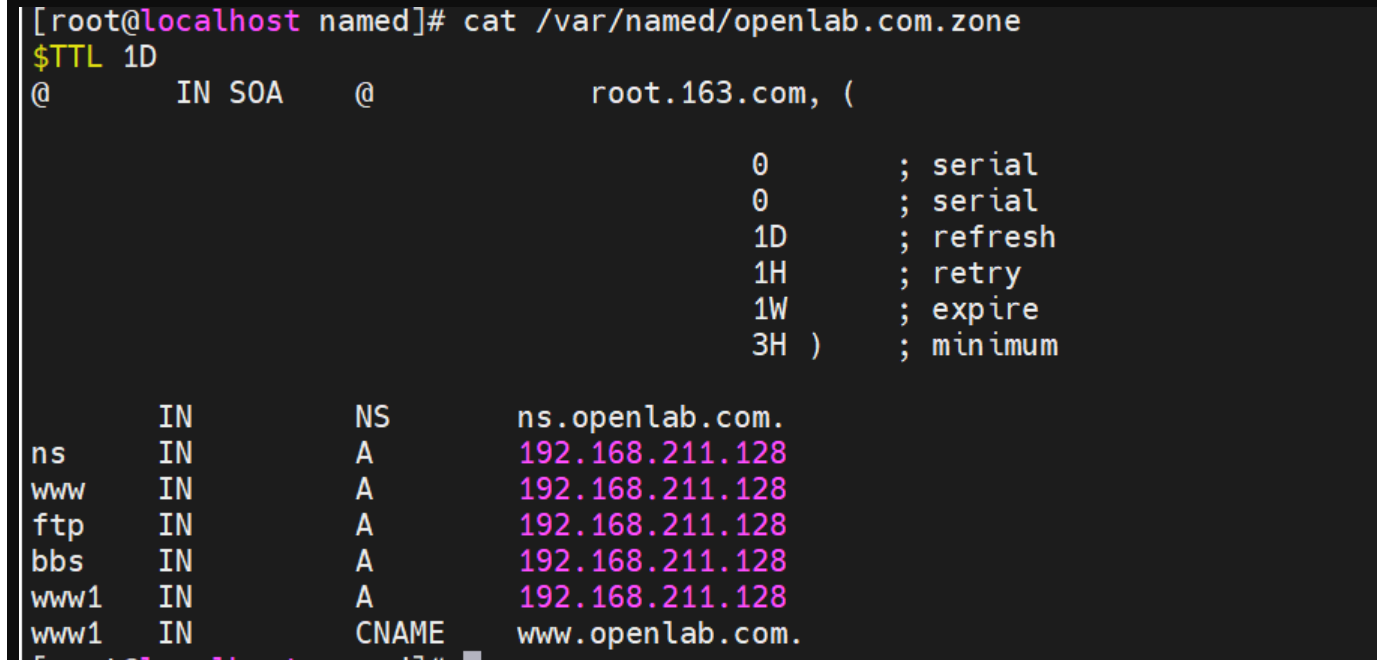
搭建DNS域名解析服务器(正向解析资源文件)
正向解析资源文件 1)准备工作 服务端及客户端都关闭安全软件 [rootlocalhost ~]# systemctl stop firewalld [rootlocalhost ~]# setenforce 0 2)服务端安装软件:bind 1.配置yum源 [rootlocalhost ~]# cat /etc/yum.repos.d/base.repo [Base…...

django blank 与 null的区别
1.blank blank控制表单验证时是否允许字段为空 2.null null控制数据库层面是否为空 但是,要注意以下几点: Django的表单验证与null无关:null参数控制的是数据库层面字段是否可以为NULL,而blank参数控制的是Django表单验证时字…...