
从零开始学习 Java:简单易懂的入门指南之JDK8时间相关类(十八)
JDK8时间相关类
- JDK8时间相关类
- 1.1 ZoneId 时区
- 1.2 Instant 时间戳
- 1.3 ZoneDateTime 带时区的时间
- 1.4DateTimeFormatter 用于时间的格式化和解析
- 1.5LocalDate 年、月、日
- 1.6 LocalTime 时、分、秒
- 1.7 LocalDateTime 年、月、日、时、分、秒
- 1.8 Duration 时间间隔(秒,纳,秒)
- 1.9 Period 时间间隔(年,月,日)
- 1.10 ChronoUnit 时间间隔(所有单位)
JDK8时间相关类
| JDK8时间类类名 | 作用 |
|---|---|
| ZoneId | 时区 |
| Instant | 时间戳 |
| ZoneDateTime | 带时区的时间 |
| DateTimeFormatter | 用于时间的格式化和解析 |
| LocalDate | 年、月、日 |
| LocalTime | 时、分、秒 |
| LocalDateTime | 年、月、日、时、分、秒 |
| Duration | 时间间隔(秒,纳,秒) |
| Period | 时间间隔(年,月,日) |
| ChronoUnit | 时间间隔(所有单位) |
1.1 ZoneId 时区
/*static Set<string> getAvailableZoneIds() 获取Java中支持的所有时区static ZoneId systemDefault() 获取系统默认时区static Zoneld of(string zoneld) 获取一个指定时区*///1.获取所有的时区名称
Set<String> zoneIds = ZoneId.getAvailableZoneIds();
System.out.println(zoneIds.size());//600
System.out.println(zoneIds);// Asia/Shanghai//2.获取当前系统的默认时区
ZoneId zoneId = ZoneId.systemDefault();
System.out.println(zoneId);//Asia/Shanghai//3.获取指定的时区
ZoneId zoneId1 = ZoneId.of("Asia/Pontianak");
System.out.println(zoneId1);//Asia/Pontianak
1.2 Instant 时间戳
/*static Instant now() 获取当前时间的Instant对象(标准时间)static Instant ofXxxx(long epochMilli) 根据(秒/毫秒/纳秒)获取Instant对象ZonedDateTime atZone(ZoneIdzone) 指定时区boolean isxxx(Instant otherInstant) 判断系列的方法Instant minusXxx(long millisToSubtract) 减少时间系列的方法Instant plusXxx(long millisToSubtract) 增加时间系列的方法*/
//1.获取当前时间的Instant对象(标准时间)
Instant now = Instant.now();
System.out.println(now);//2.根据(秒/毫秒/纳秒)获取Instant对象
Instant instant1 = Instant.ofEpochMilli(0L);
System.out.println(instant1);//1970-01-01T00:00:00zInstant instant2 = Instant.ofEpochSecond(1L);
System.out.println(instant2);//1970-01-01T00:00:01ZInstant instant3 = Instant.ofEpochSecond(1L, 1000000000L);
System.out.println(instant3);//1970-01-01T00:00:027//3. 指定时区
ZonedDateTime time = Instant.now().atZone(ZoneId.of("Asia/Shanghai"));
System.out.println(time);//4.isXxx 判断
Instant instant4=Instant.ofEpochMilli(0L);
Instant instant5 =Instant.ofEpochMilli(1000L);//5.用于时间的判断
//isBefore:判断调用者代表的时间是否在参数表示时间的前面
boolean result1=instant4.isBefore(instant5);
System.out.println(result1);//true//isAfter:判断调用者代表的时间是否在参数表示时间的后面
boolean result2 = instant4.isAfter(instant5);
System.out.println(result2);//false//6.Instant minusXxx(long millisToSubtract) 减少时间系列的方法
Instant instant6 =Instant.ofEpochMilli(3000L);
System.out.println(instant6);//1970-01-01T00:00:03ZInstant instant7 =instant6.minusSeconds(1);
System.out.println(instant7);//1970-01-01T00:00:02Z
1.3 ZoneDateTime 带时区的时间
/*static ZonedDateTime now() 获取当前时间的ZonedDateTime对象static ZonedDateTime ofXxxx(。。。) 获取指定时间的ZonedDateTime对象ZonedDateTime withXxx(时间) 修改时间系列的方法ZonedDateTime minusXxx(时间) 减少时间系列的方法ZonedDateTime plusXxx(时间) 增加时间系列的方法*/
//1.获取当前时间对象(带时区)
ZonedDateTime now = ZonedDateTime.now();
System.out.println(now);//2.获取指定的时间对象(带时区)1/年月日时分秒纳秒方式指定
ZonedDateTime time1 = ZonedDateTime.of(2023, 10, 1,11, 12, 12, 0, ZoneId.of("Asia/Shanghai"));
System.out.println(time1);//通过Instant + 时区的方式指定获取时间对象
Instant instant = Instant.ofEpochMilli(0L);
ZoneId zoneId = ZoneId.of("Asia/Shanghai");
ZonedDateTime time2 = ZonedDateTime.ofInstant(instant, zoneId);
System.out.println(time2);//3.withXxx 修改时间系列的方法
ZonedDateTime time3 = time2.withYear(2000);
System.out.println(time3);//4. 减少时间
ZonedDateTime time4 = time3.minusYears(1);
System.out.println(time4);//5.增加时间
ZonedDateTime time5 = time4.plusYears(1);
System.out.println(time5);
1.4DateTimeFormatter 用于时间的格式化和解析
/*static DateTimeFormatter ofPattern(格式) 获取格式对象String format(时间对象) 按照指定方式格式化*/
//获取时间对象
ZonedDateTime time = Instant.now().atZone(ZoneId.of("Asia/Shanghai"));// 解析/格式化器
DateTimeFormatter dtf1=DateTimeFormatter.ofPattern("yyyy-MM-dd HH:mm;ss EE a");
// 格式化
System.out.println(dtf1.format(time));
1.5LocalDate 年、月、日
//1.获取当前时间的日历对象(包含 年月日)
LocalDate nowDate = LocalDate.now();
//System.out.println("今天的日期:" + nowDate);
//2.获取指定的时间的日历对象
LocalDate ldDate = LocalDate.of(2023, 1, 1);
System.out.println("指定日期:" + ldDate);System.out.println("=============================");//3.get系列方法获取日历中的每一个属性值//获取年
int year = ldDate.getYear();
System.out.println("year: " + year);
//获取月//方式一:
Month m = ldDate.getMonth();
System.out.println(m);
System.out.println(m.getValue());//方式二:
int month = ldDate.getMonthValue();
System.out.println("month: " + month);//获取日
int day = ldDate.getDayOfMonth();
System.out.println("day:" + day);//获取一年的第几天
int dayofYear = ldDate.getDayOfYear();
System.out.println("dayOfYear:" + dayofYear);//获取星期
DayOfWeek dayOfWeek = ldDate.getDayOfWeek();
System.out.println(dayOfWeek);
System.out.println(dayOfWeek.getValue());//is开头的方法表示判断
System.out.println(ldDate.isBefore(ldDate));
System.out.println(ldDate.isAfter(ldDate));//with开头的方法表示修改,只能修改年月日
LocalDate withLocalDate = ldDate.withYear(2000);
System.out.println(withLocalDate);//minus开头的方法表示减少,只能减少年月日
LocalDate minusLocalDate = ldDate.minusYears(1);
System.out.println(minusLocalDate);//plus开头的方法表示增加,只能增加年月日
LocalDate plusLocalDate = ldDate.plusDays(1);
System.out.println(plusLocalDate);//-------------
// 判断今天是否是你的生日
LocalDate birDate = LocalDate.of(2000, 1, 1);
LocalDate nowDate1 = LocalDate.now();MonthDay birMd = MonthDay.of(birDate.getMonthValue(), birDate.getDayOfMonth());
MonthDay nowMd = MonthDay.from(nowDate1);System.out.println("今天是你的生日吗? " + birMd.equals(nowMd));//今天是你的生日吗?
1.6 LocalTime 时、分、秒
// 获取本地时间的日历对象。(包含 时分秒)
LocalTime nowTime = LocalTime.now();
System.out.println("今天的时间:" + nowTime);int hour = nowTime.getHour();//时
System.out.println("hour: " + hour);int minute = nowTime.getMinute();//分
System.out.println("minute: " + minute);int second = nowTime.getSecond();//秒
System.out.println("second:" + second);int nano = nowTime.getNano();//纳秒
System.out.println("nano:" + nano);
System.out.println("------------------------------------");
System.out.println(LocalTime.of(8, 20));//时分
System.out.println(LocalTime.of(8, 20, 30));//时分秒
System.out.println(LocalTime.of(8, 20, 30, 150));//时分秒纳秒
LocalTime mTime = LocalTime.of(8, 20, 30, 150);//is系列的方法
System.out.println(nowTime.isBefore(mTime));
System.out.println(nowTime.isAfter(mTime));//with系列的方法,只能修改时、分、秒
System.out.println(nowTime.withHour(10));//plus系列的方法,只能修改时、分、秒
System.out.println(nowTime.plusHours(10));
1.7 LocalDateTime 年、月、日、时、分、秒
// 当前时间的的日历对象(包含年月日时分秒)
LocalDateTime nowDateTime = LocalDateTime.now();System.out.println("今天是:" + nowDateTime);//今天是:
System.out.println(nowDateTime.getYear());//年
System.out.println(nowDateTime.getMonthValue());//月
System.out.println(nowDateTime.getDayOfMonth());//日
System.out.println(nowDateTime.getHour());//时
System.out.println(nowDateTime.getMinute());//分
System.out.println(nowDateTime.getSecond());//秒
System.out.println(nowDateTime.getNano());//纳秒
// 日:当年的第几天
System.out.println("dayofYear:" + nowDateTime.getDayOfYear());
//星期
System.out.println(nowDateTime.getDayOfWeek());
System.out.println(nowDateTime.getDayOfWeek().getValue());
//月份
System.out.println(nowDateTime.getMonth());
System.out.println(nowDateTime.getMonth().getValue());LocalDate ld = nowDateTime.toLocalDate();
System.out.println(ld);LocalTime lt = nowDateTime.toLocalTime();
System.out.println(lt.getHour());
System.out.println(lt.getMinute());
System.out.println(lt.getSecond());
1.8 Duration 时间间隔(秒,纳,秒)
// 本地日期时间对象。
LocalDateTime today = LocalDateTime.now();
System.out.println(today);// 出生的日期时间对象
LocalDateTime birthDate = LocalDateTime.of(2000, 1, 1, 0, 0, 0);
System.out.println(birthDate);Duration duration = Duration.between(birthDate, today);//第二个参数减第一个参数
System.out.println("相差的时间间隔对象:" + duration);System.out.println("============================================");
System.out.println(duration.toDays());//两个时间差的天数
System.out.println(duration.toHours());//两个时间差的小时数
System.out.println(duration.toMinutes());//两个时间差的分钟数
System.out.println(duration.toMillis());//两个时间差的毫秒数
System.out.println(duration.toNanos());//两个时间差的纳秒数
1.9 Period 时间间隔(年,月,日)
// 当前本地 年月日
LocalDate today = LocalDate.now();
System.out.println(today);// 生日的 年月日
LocalDate birthDate = LocalDate.of(2000, 1, 1);
System.out.println(birthDate);Period period = Period.between(birthDate, today);//第二个参数减第一个参数System.out.println("相差的时间间隔对象:" + period);
System.out.println(period.getYears());
System.out.println(period.getMonths());
System.out.println(period.getDays());System.out.println(period.toTotalMonths());
1.10 ChronoUnit 时间间隔(所有单位)
// 当前时间
LocalDateTime today = LocalDateTime.now();
System.out.println(today);
// 生日时间
LocalDateTime birthDate = LocalDateTime.of(2000, 1, 1,0, 0, 0);
System.out.println(birthDate);System.out.println("相差的年数:" + ChronoUnit.YEARS.between(birthDate, today));
System.out.println("相差的月数:" + ChronoUnit.MONTHS.between(birthDate, today));
System.out.println("相差的周数:" + ChronoUnit.WEEKS.between(birthDate, today));
System.out.println("相差的天数:" + ChronoUnit.DAYS.between(birthDate, today));
System.out.println("相差的时数:" + ChronoUnit.HOURS.between(birthDate, today));
System.out.println("相差的分数:" + ChronoUnit.MINUTES.between(birthDate, today));
System.out.println("相差的秒数:" + ChronoUnit.SECONDS.between(birthDate, today));
System.out.println("相差的毫秒数:" + ChronoUnit.MILLIS.between(birthDate, today));
System.out.println("相差的微秒数:" + ChronoUnit.MICROS.between(birthDate, today));
System.out.println("相差的纳秒数:" + ChronoUnit.NANOS.between(birthDate, today));
System.out.println("相差的半天数:" + ChronoUnit.HALF_DAYS.between(birthDate, today));
System.out.println("相差的十年数:" + ChronoUnit.DECADES.between(birthDate, today));
System.out.println("相差的世纪(百年)数:" + ChronoUnit.CENTURIES.between(birthDate, today));
System.out.println("相差的千年数:" + ChronoUnit.MILLENNIA.between(birthDate, today));
System.out.println("相差的纪元数:" + ChronoUnit.ERAS.between(birthDate, today));
后记
👉👉💕💕美好的一天,到此结束,下次继续努力!欲知后续,请看下回分解,写作不易,感谢大家的支持!! 🌹🌹🌹
相关文章:
)
从零开始学习 Java:简单易懂的入门指南之JDK8时间相关类(十八)
JDK8时间相关类 JDK8时间相关类1.1 ZoneId 时区1.2 Instant 时间戳1.3 ZoneDateTime 带时区的时间1.4DateTimeFormatter 用于时间的格式化和解析1.5LocalDate 年、月、日1.6 LocalTime 时、分、秒1.7 LocalDateTime 年、月、日、时、分、秒1.8 Duration 时间间隔(秒…...
)
Spring Boot实践八--用户管理系统(下)
step3:多线程task 首先,实现两个UserService和AsyncUserService两个服务接口: 接口: package com.example.demospringboot.service;public interface UserService {void checkUserStatus(); }package com.example.demospringbo…...
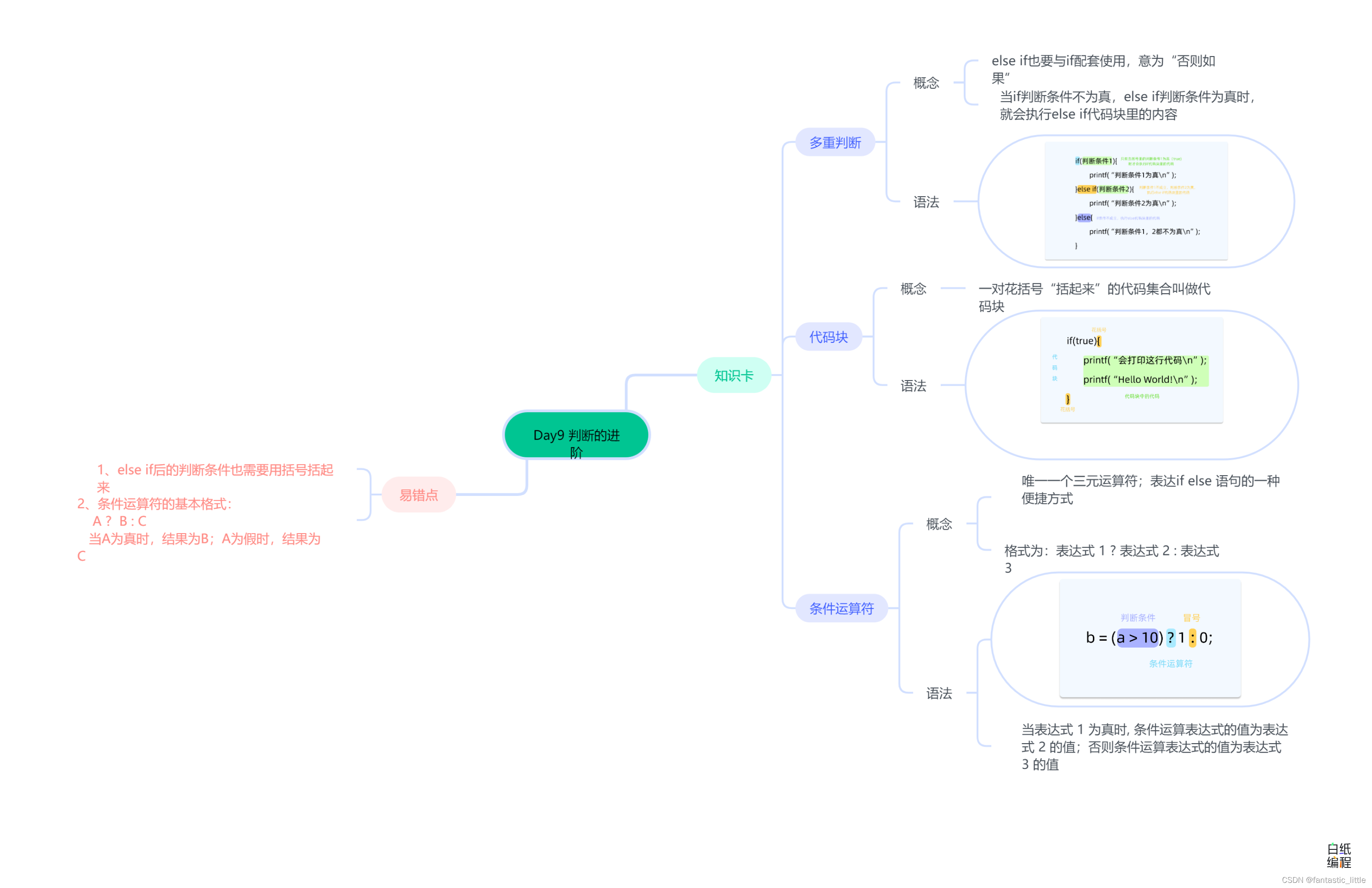
C语言入门 Day_10 判断的进阶
目录 前言 1.多重判断 2.代码块 3.条件运算符 3.易错点 4.思维导图 前言 if和else能够处理两种不同的情况,如果(if)满足条件,我们就执行这几行代码;否则(else)的话,我们就执行…...
)
机器学习基础13-基于集成算法优化模型(基于印第安糖尿病 Pima Indians数据集)
有时提升一个模型的准确度很困难。如果你曾纠结于类似的问题,那 我相信你会同意我的看法。你会尝试所有曾学习过的策略和算法,但模型正确率并没有改善。这时你会觉得无助和困顿,这也是 90%的数据科学家开始放弃的时候。不过,这才是…...

Rancher部署k8s集群
Rancher部署 Rancher是一个开源的企业级容器管理平台。通过Rancher,企业再也不必自己使用一系列的开源软件去从头搭建容器服务平台。Rancher提供了在生产环境中使用的管理Docker和Kubernetes的全栈化容器部署与管理平台。 首先所有节点部署docker 安装docker 安…...

前端油猴脚本开发小技巧笔记
调试模式下,单击选中某dom代码,控制台里可以用$0访问到该dom对象。 $0.__vue___ 可以访问到该dom对应的vue对象。 jquery 对象 a,a[0]是对应的原生dom对象,$(原生对象) 得到对应的 jquery 对象。 jquery 选择器,加空格是匹配下…...

软考高级系统架构设计师系列之:搭建论文写作的万能模版
软考高级系统架构设计师系列之:搭建论文写作的万能模版 一、选择合适的模版二、论文摘要模版1.论文摘要模版一2.论文摘要模版二3.论文摘要模版三4.论文摘要模版四三、项目背景四、正文写作五、论文结尾六、论文万能模版一、选择合适的模版 选择中、大型商业项目,一般金额在2…...
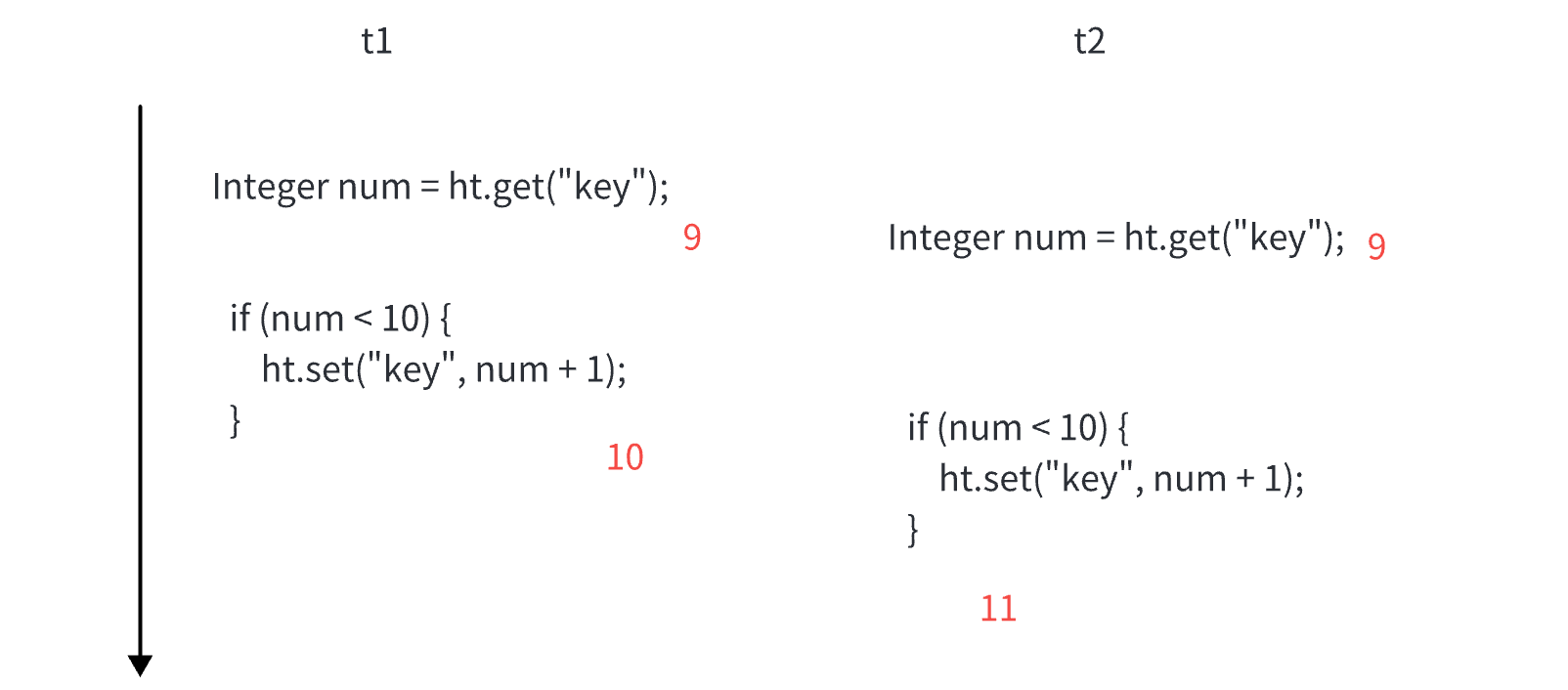
多线程常见面试题
常见的锁策略 这里讨论的锁策略,不仅仅局限于 Java 乐观锁 vs 悲观锁 锁冲突: 两个线程尝试获取一把锁,一个线程能获取成功,另一个线程阻塞等待。 乐观锁: 预该场景中,不太会出现锁冲突的情况。后续做的工作会更少。 悲观锁: 预测该场景,非常容易出现锁冲突。后…...
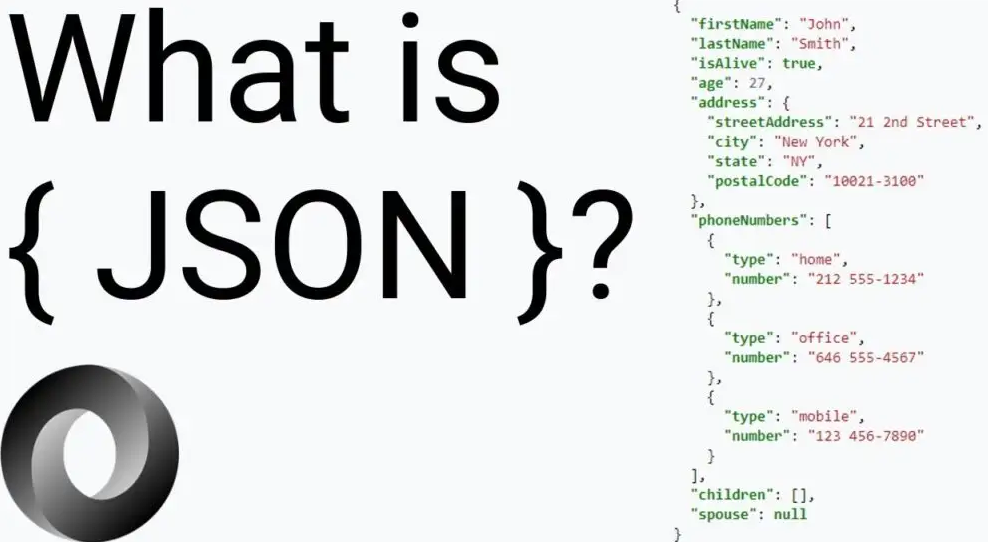
Java接收json参数
JSON 并不是唯一能够实现在互联网中传输数据的方式,除此之外还有一种 XML 格式。JSON 和 XML 能够执行许多相同的任务,那么我们为什么要使用 JSON,而不是 XML 呢? 之所以使用 JSON,最主要的原因是 JavaScript。众所周知…...

赤峰100吨每天医院污水处理设备产品特点
赤峰100吨每天医院污水处理设备产品特点 设备调试要求: 1、要清洗水池内所有的赃物、杂物。 2、对水泵及空压机等需要润滑部位进行加油滑。 3、通电源,启动水泵,检查转向是否与箭头所标方向一致。用水动控制启动空压机,检查空压机…...

nodejs+vue+elementui健身房教练预约管理系统nt5mp
运用新技术,构建了以vue.js为基础的私人健身和教练预约管理信息化管理体系。根据需求分析结果进行了系统的设计,并将其划分为管理员,教练和用户三种角色:主要功能包括首页,个人中心,用户管理,教…...
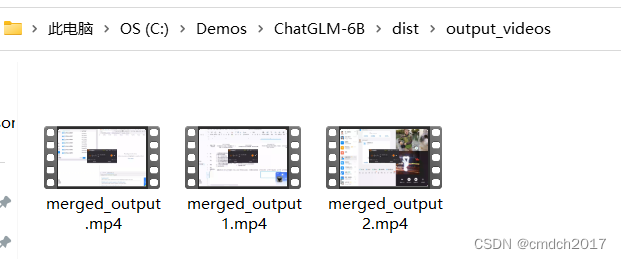
视频分割合并工具说明
使用说明书:视频分割合并工具 欢迎使用视频生成工具!本工具旨在帮助您将视频文件按照指定的规则分割并合并,以生成您所需的视频。 本程序还自带提高分辨率1920:1080,以及增加10db声音的功能 软件下载地址 https://github.com/c…...

2023java面试深入探析Nginx的处理流程
推荐阅读 AI文本 OCR识别最佳实践 AI Gamma一键生成PPT工具直达链接 玩转cloud Studio 在线编码神器 玩转 GPU AI绘画、AI讲话、翻译,GPU点亮AI想象空间 资源分享 史上最全文档AI绘画stablediffusion资料分享 「java、python面试题」来自UC网盘app分享,打开手…...
Java的锁大全
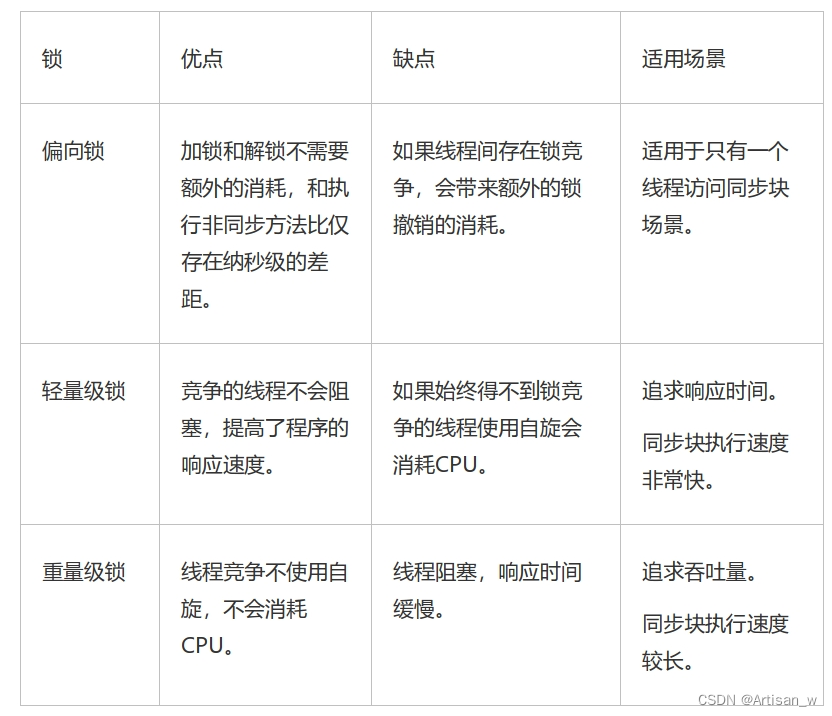
Java的锁 各种锁的类型 乐观锁 VS 悲观锁 乐观锁与悲观锁是一种广义上的概念,体现了看待线程同步的不同角度。在Java和数据库中都有此概念对应的实际应用。 先说概念。对于同一个数据的并发操作,悲观锁认为自己在使用数据的时候一定有别的线程来修改数…...
Leetcode80. 删除有序数组中的重复项 II
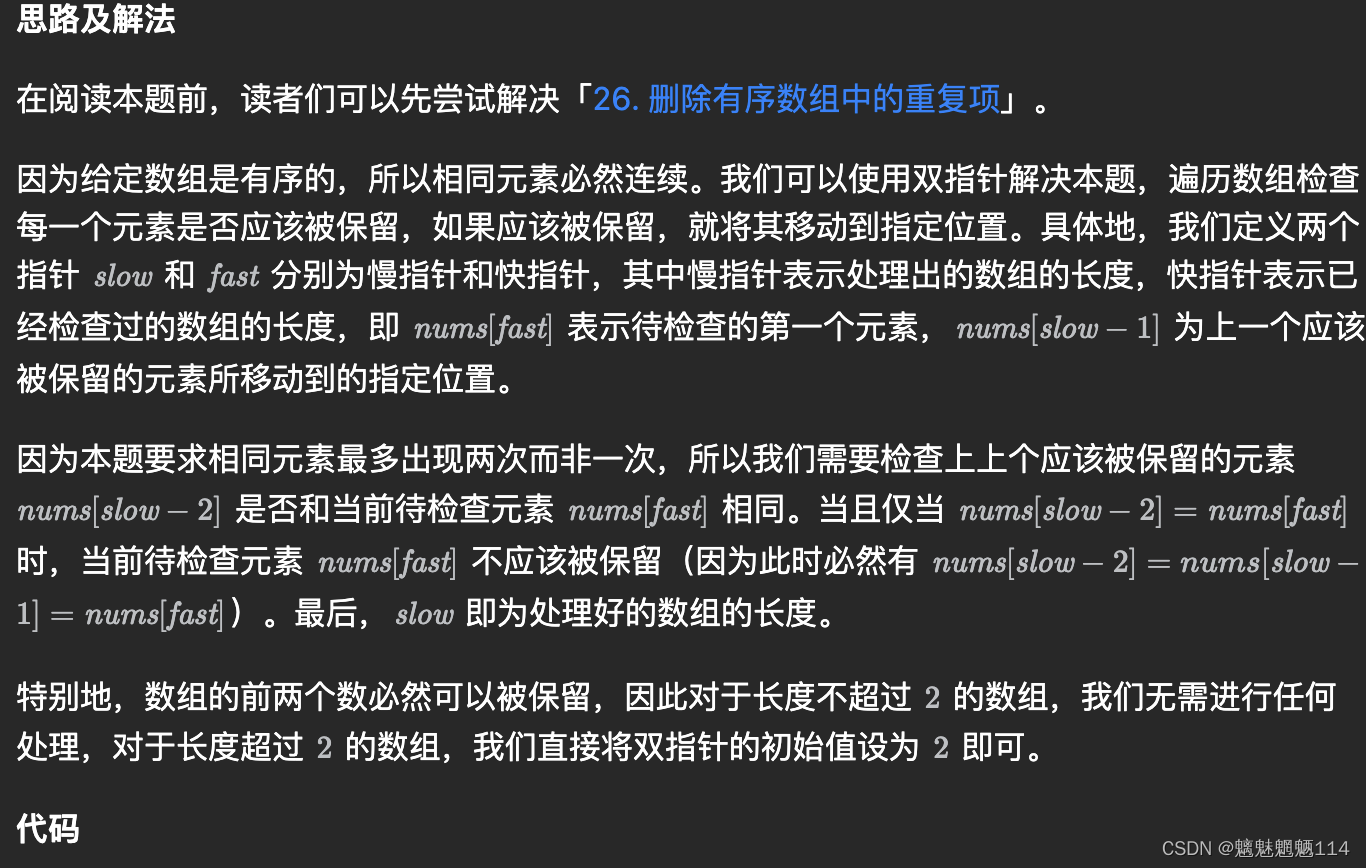
给你一个有序数组 nums ,请你 原地 删除重复出现的元素,使得出现次数超过两次的元素只出现两次 ,返回删除后数组的新长度。 不要使用额外的数组空间,你必须在 原地 修改输入数组 并在使用 O(1) 额外空间的条件下完成。 class Solu…...
电脑显示“Operating System not found”该怎么办?
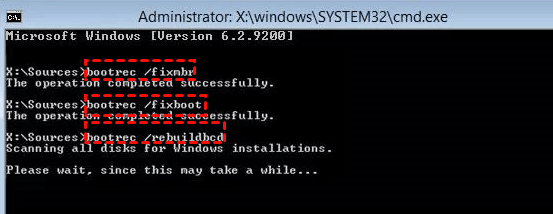
“Operating System not found”是一种常见的电脑错误提示,这类错误会导致你无法成功启动Windows。那么电脑显示“Operating System not found”该怎么办呢? 方法1. 检查硬盘 首先,您可以测试硬盘是否存在问题。为此,您可以采取以…...
简析SCTP开发指南
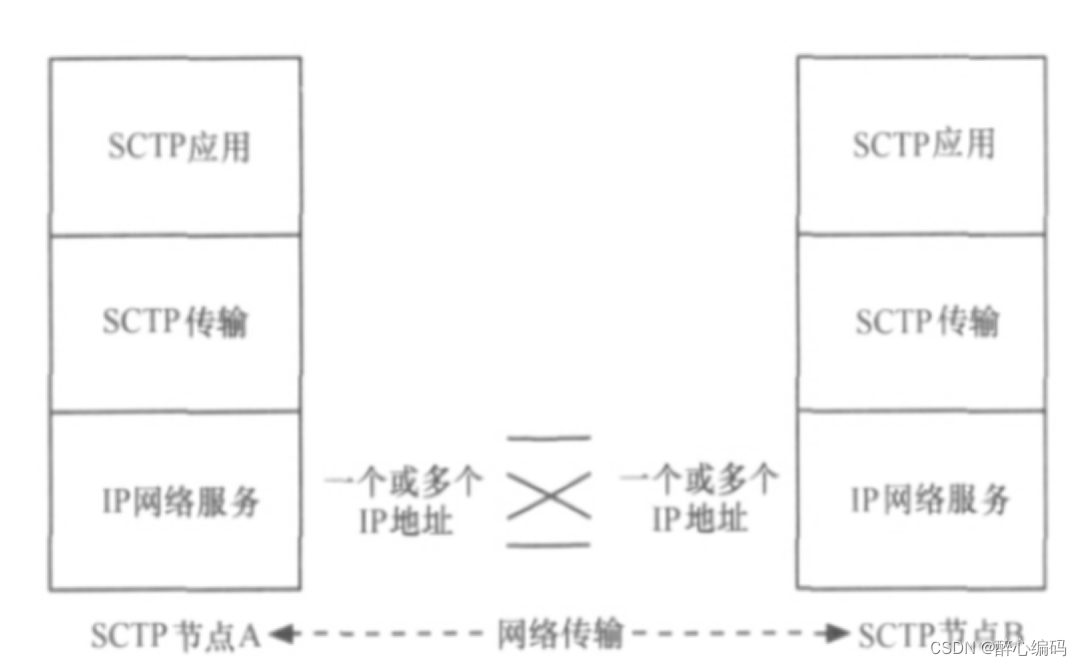
目录 前言一、SCTP基本概念二、SCTP开发步骤1. **环境配置**:2. **建立Socket**:3. **绑定和监听**:4. **接收和发送数据**:5. **关闭连接**: 三、 C语言实现SCTP3.1SCTP客户端代码:3.2 SCTP服务器端代码&a…...
把Android手机变成电脑摄像头
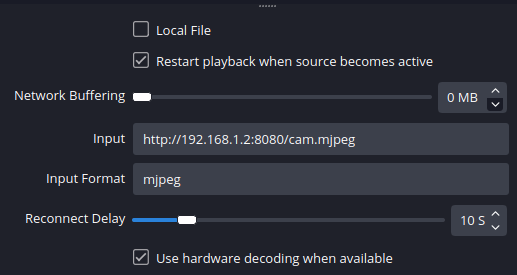
一、使用 DroidCam 使用 DroidCam,你可以将手机作为电脑摄像头和麦克风。一则省钱,二则可以在紧急情况下使用,比如要在电脑端参加一个紧急会议,但电脑却没有摄像头和麦克风。 DroidCam 的安卓端分为免费的 DroidCam 版和收费的 …...

Linux线程篇(中)
有了之前对线程的初步了解我们学习了什么是线程,线程的原理及其控制。这篇文章将继续讲解关于线程的内容以及重要的知识点。 线程的优缺点: 线程的缺点 在这里我们来谈一谈线程健壮性: 首先我们先思考一个问题,如果一个线程出现…...
深度学习优化入门:Momentum、RMSProp 和 Adam
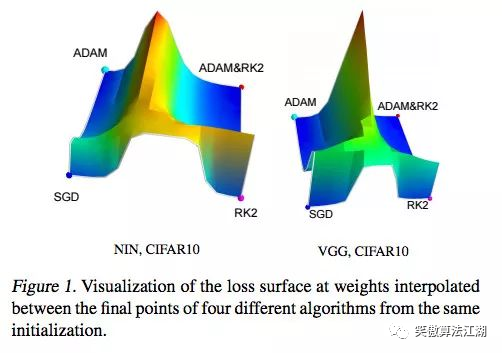
目录 深度学习优化入门:Momentum、RMSProp 和 Adam 病态曲率 1牛顿法 2 Momentum:动量 3Adam 深度学习优化入门:Momentum、RMSProp 和 Adam 本文,我们讨论一个困扰神经网络训练的问题,病态曲率。 虽然局部极小值和鞍点会阻碍…...

基于Arduino与应变片传感器的高精度厨房电子秤DIY全攻略
1. 项目概述:用Arduino打造一台高精度厨房电子秤作为一个喜欢在厨房里折腾的硬件爱好者,我经常遇到需要精确称量食材的场合。市面上的电子秤要么精度不够,要么价格不菲,要么功能单一。于是,我萌生了自己动手做一台的想…...

[智能体-69]:重新认知MCP:协议不生产智能,只是AI全域交互的标准化基石
MCP只是提供了大模型、编排调度、外部工具能够进行结构化交流的标准,而整个系统的智能主要依赖编排调度,与外部软件系统的交互取决于外部工具,包括外部语音交互、视觉交互、数字化交互。当下MCP(Model Context Protocol࿰…...

3步解锁网易云音乐NCM加密:让音乐真正属于你
3步解锁网易云音乐NCM加密:让音乐真正属于你 【免费下载链接】ncmdump 项目地址: https://gitcode.com/gh_mirrors/ncmd/ncmdump 还在为下载的网易云音乐只能在特定客户端播放而烦恼吗?当你精心收藏的歌曲被NCM格式"锁"在单一平台时&a…...
)
保姆级避坑指南:在Ubuntu 22.04上搞定ROS2 Humble、PX4与Gazebo的联合仿真(附Empy版本降级)
保姆级避坑指南:Ubuntu 22.04下ROS2 Humble与PX4联合仿真的21个关键陷阱当你在Ubuntu 22.04上第一次尝试搭建ROS2 Humble、PX4与Gazebo的联合仿真环境时,可能会遇到比预期更多的挑战。这不是一个简单的"复制粘贴命令就能完成"的任务——版本冲…...

淘宝淘金币自动化脚本终极指南:如何每天节省25分钟实现智能任务管理
淘宝淘金币自动化脚本终极指南:如何每天节省25分钟实现智能任务管理 【免费下载链接】taojinbi 淘宝淘金币自动执行脚本,包含蚂蚁森林收取能量,芭芭农场全任务,解放你的双手 项目地址: https://gitcode.com/gh_mirrors/ta/taoji…...

Performance-Fish:让你的《环世界》后期游戏帧率提升400%的终极优化方案
Performance-Fish:让你的《环世界》后期游戏帧率提升400%的终极优化方案 【免费下载链接】Performance-Fish Performance Mod for RimWorld 项目地址: https://gitcode.com/gh_mirrors/pe/Performance-Fish 你是否曾在《环世界》游戏后期,面对庞大…...

我们公司全员把 Cursor 换成了自研的 全开源AtomCode
【引子】这是一篇实录——一位 CTO 用 28 天,用 Claude GLM 双模型调度,造出了一个让全公司放弃 Cursor 的工具。然后我意识到我们正在经历的事情,比"换工具"大得多。【读者承诺】接下来 15 分钟,你会拿到三件东西:一个真实案例(28 天 1,146 commits 是怎么做出来的…...

yuzu模拟器完整指南:在电脑上畅玩Switch游戏的终极解决方案
yuzu模拟器完整指南:在电脑上畅玩Switch游戏的终极解决方案 【免费下载链接】yuzu 任天堂 Switch 模拟器 项目地址: https://gitcode.com/GitHub_Trending/yu/yuzu 想在电脑上体验任天堂Switch游戏的魅力吗?yuzu模拟器正是你寻找的完美答案。作为…...

XZ1018,100V,40A,NMOS 封装:TO252
封装:TO252类型:NVDS:100V VGS: 20V ID:40ARDS(ON):10V <14mΩRDS(ON):4.5V <19mΩ型号: XZ1018 封装:TO252类型…...

中小企无需重型数据中台:轻量化数据体系搭建完整方案
过去几年,“数据中台”一度成为企业数字化的标配热词。大量中小企业盲目跟风搭建重型数据中台,投入高额成本、耗费数月甚至数年周期,最终落地效果极差:功能冗余、运维复杂、使用率低、投入产出比失衡。大量项目最终沦为“摆设式中…...