
详解Redis之Lettuce实战

摘要
是 Redis 的一款高级 Java 客户端,已成为 SpringBoot 2.0 版本默认的 redis 客户端。Lettuce 后起之秀,不仅功能丰富,提供了很多新的功能特性,比如异步操作、响应式编程等,还解决了 Jedis 中线程不安全的问题。
Lettuce
<dependency><groupId>io.lettuce</groupId><artifactId>lettuce-core</artifactId><version>6.2.5.RELEASE</version></dependency>同步操作
基本上 Jedis 支持的同步命令操作,Lettuce 都支持。
Lettuce 的 api 操作如下!
public class LettuceUtil {public static void main(String[] args) {RedisURI redisUri = RedisURI.builder().withHost("127.0.0.1").withPort(6379).withPassword("111111").withTimeout(Duration.of(10, ChronoUnit.SECONDS)).build();RedisClient redisClient = RedisClient.create(redisUri);StatefulRedisConnection<String, String> connection = redisClient.connect();//获取同步操作命令工具RedisCommands<String, String> commands = connection.sync();System.out.println("清空数据:"+commands.flushdb());System.out.println("判断某个键是否存在:"+commands.exists("username"));System.out.println("新增<'username','xmr'>的键值对:"+commands.set("username", "xmr"));System.out.println("新增<'password','password'>的键值对:"+commands.set("password", "123"));System.out.println("获取<'password'>键的值:"+commands.get("password"));System.out.println("系统中所有的键如下:" + commands.keys("*"));System.out.println("删除键password:"+commands.del("password"));System.out.println("判断键password是否存在:"+commands.exists("password"));System.out.println("设置键username的过期时间为5s:"+commands.expire("username", 5L));System.out.println("查看键username的剩余生存时间:"+commands.ttl("username"));System.out.println("移除键username的生存时间:"+commands.persist("username"));System.out.println("查看键username的剩余生存时间:"+commands.ttl("username"));System.out.println("查看键username所存储的值的类型:"+commands.type("username"));connection.close();redisClient.shutdown();}
}
异步操作
Lettuce 还支持异步操作,将上面的操作改成异步处理,结果如下!
public class LettuceUtil {public static void main(String[] args) throws Exception {RedisURI redisUri = RedisURI.builder().withHost("127.0.0.1").withPort(6379).withPassword("111111").withTimeout(Duration.of(10, ChronoUnit.SECONDS)).build();RedisClient redisClient = RedisClient.create(redisUri);StatefulRedisConnection<String, String> connection = redisClient.connect();//获取异步操作命令工具RedisAsyncCommands<String, String> commands = connection.async();System.out.println("清空数据:"+commands.flushdb().get());System.out.println("判断某个键是否存在:"+commands.exists("username").get());System.out.println("新增<'username','xmr'>的键值对:"+commands.set("username", "xmr").get());System.out.println("新增<'password','password'>的键值对:"+commands.set("password", "123").get());System.out.println("获取<'password'>键的值:"+commands.get("password").get());System.out.println("系统中所有的键如下:" + commands.keys("*").get());System.out.println("删除键password:"+commands.del("password").get());System.out.println("判断键password是否存在:"+commands.exists("password").get());System.out.println("设置键username的过期时间为5s:"+commands.expire("username", 5L).get());System.out.println("查看键username的剩余生存时间:"+commands.ttl("username").get());System.out.println("移除键username的生存时间:"+commands.persist("username").get());System.out.println("查看键username的剩余生存时间:"+commands.ttl("username").get());System.out.println("查看键username所存储的值的类型:"+commands.type("username").get());connection.close();redisClient.shutdown();}
}
响应式编程
Lettuce 除了支持异步编程以外,还支持响应式编程,Lettuce 引入的响应式编程框架是Project Reactor,如果没有响应式编程经验可以先自行了解一下,访问地址https://projectreactor.io/。
响应式编程使用案例如下:
public class LettuceUtil {public static void main(String[] args) throws Exception {RedisURI redisUri = RedisURI.builder().withHost("127.0.0.1").withPort(6379).withPassword("111111").withTimeout(Duration.of(10, ChronoUnit.SECONDS)).build();RedisClient redisClient = RedisClient.create(redisUri);StatefulRedisConnection<String, String> connection = redisClient.connect();//获取响应式API操作命令工具RedisReactiveCommands<String, String> commands = connection.reactive();Mono<String> setc = commands.set("name", "mayun");System.out.println(setc.block());Mono<String> getc = commands.get("name");getc.subscribe(System.out::println);Flux<String> keys = commands.keys("*");keys.subscribe(System.out::println);//开启一个事务,先把count设置为1,再将count自增1commands.multi().doOnSuccess(r -> {commands.set("count", "1").doOnNext(value -> System.out.println("count1:" +  value)).subscribe();commands.incr("count").doOnNext(value -> System.out.println("count2:" +  value)).subscribe();}).flatMap(s -> commands.exec()).doOnNext(transactionResult -> System.out.println("transactionResult:" + transactionResult.wasDiscarded())).subscribe();Thread.sleep(1000 * 5);connection.close();redisClient.shutdown();}
}
发布和订阅
Lettuce 还支持 redis 的消息发布和订阅,具体实现案例如下:
public class LettuceUtil {public static void main(String[] args) throws Exception {RedisURI redisUri = RedisURI.builder().withHost("127.0.0.1").withPort(6379).withPassword("111111").withTimeout(Duration.of(10, ChronoUnit.SECONDS)).build();RedisClient redisClient = RedisClient.create(redisUri);//获取发布订阅操作命令工具StatefulRedisPubSubConnection<String, String> pubsubConn = redisClient.connectPubSub();pubsubConn.addListener(new RedisPubSubListener<String, String>() {@Overridepublic void unsubscribed(String channel, long count) {System.out.println("[unsubscribed]" + channel);}@Overridepublic void subscribed(String channel, long count) {System.out.println("[subscribed]" + channel);}@Overridepublic void punsubscribed(String pattern, long count) {System.out.println("[punsubscribed]" + pattern);}@Overridepublic void psubscribed(String pattern, long count) {System.out.println("[psubscribed]" + pattern);}@Overridepublic void message(String pattern, String channel, String message) {System.out.println("[message]" + pattern + " -> " + channel + " -> " + message);}@Overridepublic void message(String channel, String message) {System.out.println("[message]" + channel + " -> " + message);}});RedisPubSubAsyncCommands<String, String> pubsubCmd = pubsubConn.async();pubsubCmd.psubscribe("CH");pubsubCmd.psubscribe("CH2");pubsubCmd.unsubscribe("CH");Thread.sleep(100 * 5);pubsubConn.close();redisClient.shutdown();}
}
客户端资源与参数配置
Lettuce 客户端的通信框架集成了 Netty 的非阻塞 IO 操作,客户端资源的设置与 Lettuce 的性能、并发和事件处理紧密相关,如果不是特别熟悉客户端参数配置,不建议在没有经验的前提下凭直觉修改默认值,保持默认配置就行。
非集群环境下,具体的配置案例如下:
public class LettuceUtil {public static void main(String[] args) throws Exception {ClientResources resources = DefaultClientResources.builder().ioThreadPoolSize(4) //I/O线程数.computationThreadPoolSize(4) //任务线程数.build();RedisURI redisUri = RedisURI.builder().withHost("127.0.0.1").withPort(6379).withPassword("111111").withTimeout(Duration.of(10, ChronoUnit.SECONDS)).build();ClientOptions options = ClientOptions.builder().autoReconnect(true)//是否自动重连.pingBeforeActivateConnection(true)//连接激活之前是否执行PING命令.build();RedisClient client = RedisClient.create(resources, redisUri);client.setOptions(options);StatefulRedisConnection<String, String> connection = client.connect();RedisCommands<String, String> commands = connection.sync();commands.set("name", "xxxx");System.out.println(commands.get("name"));connection.close();client.shutdown();resources.shutdown();}
}
集群环境下,具体的配置案例如下:
public class LettuceMain {public static void main(String[] args) throws Exception {ClientResources resources = DefaultClientResources.builder().ioThreadPoolSize(4) //I/O线程数.computationThreadPoolSize(4) //任务线程数.build();RedisURI redisUri = RedisURI.builder().withHost("192.168.221.11").withPort(6379).withPassword("111111").withTimeout(Duration.of(10, ChronoUnit.SECONDS)).build();ClusterClientOptions options = ClusterClientOptions.builder().autoReconnect(true)//是否自动重连.pingBeforeActivateConnection(true)//连接激活之前是否执行PING命令.validateClusterNodeMembership(true)//是否校验集群节点的成员关系.build();RedisClusterClient client = RedisClusterClient.create(resources, redisUri);client.setOptions(options);StatefulRedisClusterConnection<String, String> connection = client.connect();RedisAdvancedClusterCommands<String, String> commands = connection.sync();commands.set("name", "goodss");System.out.println(commands.get("name"));connection.close();client.shutdown();resources.shutdown();}
}
线程池配置
Lettuce 连接设计的时候,就是线程安全的,所以一个连接可以被多个线程共享,同时 lettuce 连接默认是自动重连的,使用单连接基本可以满足业务需求,大多数情况下不需要配置连接池,多连接并不会给操作带来性能上的提升。
但在某些特殊场景下,比如事物操作,使用连接池会是一个比较好的方案,那么如何配置线程池呢?
public class LettuceUtil {public static void main(String[] args) throws Exception {RedisURI redisUri = RedisURI.builder().withHost("192.168.221.11").withPort(6379).withPassword("111111").withTimeout(Duration.of(10, ChronoUnit.SECONDS)).build();RedisClient client = RedisClient.create(redisUri);//连接池配置GenericObjectPoolConfig poolConfig = new GenericObjectPoolConfig();poolConfig.setMaxIdle(2);GenericObjectPool<StatefulRedisConnection<String, String>> pool = ConnectionPoolSupport.createGenericObjectPool(client::connect, poolConfig);StatefulRedisConnection<String, String> connection = pool.borrowObject();RedisCommands<String, String> commands = connection.sync();commands.set("name", "llkd");System.out.println(commands.get("name"));connection.close();pool.close();client.shutdown();}
}
主从模式配置
redis 一般采用主从复制模式,搭建高可用的架构,简单的说就一个主节点,多个从节点,自动从主节点同步最新数据。
Lettuce 支持自动发现主从模式下的节点信息,然后保存到本地,具体配置如下:
public class LettuceUtil {public static void main(String[] args) throws Exception {//这里只需要配置一个节点的连接信息,不一定需要是主节点的信息,从节点也可以;可以自动发现主从节点RedisURI uri = RedisURI.builder().withHost("192.168.221.11").withPort(6379).withPassword("123456").build();RedisClient client = RedisClient.create(uri);StatefulRedisMasterReplicaConnection<String, String> connection = MasterReplica.connect(client, StringCodec.UTF8, uri);//从节点读取数据connection.setReadFrom(ReadFrom.REPLICA);RedisCommands<String, String> commands = connection.sync();commands.set("name", "张飞");System.out.println(commands.get("name"));connection.close();client.shutdown();}
}
当然我们也可以手动指定集群节点来加载,具体配置如下:
public class LettuceMain {public static void main(String[] args) throws Exception {//集群节点List<RedisURI> uris = new ArrayList();uris.add(RedisURI.builder().withHost("192.168.221.14").withPort(7000).withPassword("123456").build());uris.add(RedisURI.builder().withHost("192.168.221.15").withPort(7000).withPassword("123456").build());uris.add(RedisURI.builder().withHost("192.168.221.16").withPort(7001).withPassword("123456").build());RedisClient client = RedisClient.create();StatefulRedisMasterReplicaConnection<String, String> connection = MasterReplica.connect(client, StringCodec.UTF8, uris);//从节点读取数据connection.setReadFrom(ReadFrom.REPLICA);RedisCommands<String, String> commands = connection.sync();commands.set("name", "张飞");System.out.println(commands.get("name"));connection.close();client.shutdown();}
}
哨兵模式配置
哨兵模式,也是 redis 实现服务高可用的一大亮点,具体配置实现如下:
public class LettuceUtil {public static void main(String[] args) throws Exception {//集群节点List<RedisURI> uris = new ArrayList();uris.add(RedisURI.builder().withHost("192.168.221.11").withPort(7000).withPassword("123456").build());uris.add(RedisURI.builder().withHost("192.168.221.12").withPort(7000).withPassword("123456").build());uris.add(RedisURI.builder().withHost("192.168.221.13").withPort(7000).withPassword("123456").build());RedisClient client = RedisClient.create();StatefulRedisMasterReplicaConnection<String, String> connection = MasterReplica.connect(client, StringCodec.UTF8, uris);//从节点读取数据connection.setReadFrom(ReadFrom.REPLICA);RedisCommands<String, String> commands = connection.sync();commands.set("name", "dddown");System.out.println(commands.get("name"));connection.close();client.shutdown();}
}
Cluster 集群模式配置
Cluster 集群模式,是之后推出的一种高可用的架构模型,主要是采用分片方式来存储数据,具体配置如下:
public class LettuceUtil {public static void main(String[] args) throws Exception {Set<RedisURI> uris = new HashSet<>();uris.add(RedisURI.builder().withHost("192.168.221.11").withPort(7000).withPassword("123456").build());uris.add(RedisURI.builder().withHost("192.168.221.12").withPort(7000).withPassword("123456").build());uris.add(RedisURI.builder().withHost("192.168.221.13").withPort(7000).withPassword("123456").build());uris.add(RedisURI.builder().withHost("192.168.221.14").withPort(7000).withPassword("123456").build());uris.add(RedisURI.builder().withHost("192.168.221.15").withPort(7000).withPassword("123456").build());uris.add(RedisURI.builder().withHost("192.168.221.16").withPort(7001).withPassword("123456").build());RedisClusterClient client = RedisClusterClient.create(uris);StatefulRedisClusterConnection<String, String> connection = client.connect();RedisAdvancedClusterCommands<String, String> commands = connection.sync();commands.set("name", "uuup");System.out.println(commands.get("name"));//选择从节点,只读NodeSelection<String, String> replicas = commands.replicas();NodeSelectionCommands<String, String> nodeSelectionCommands = replicas.commands();Executions<List<String>> keys = nodeSelectionCommands.keys("*");keys.forEach(key -> System.out.println(key));connection.close();client.shutdown();}
}
小结
Lettuce 作为 Jedis 客户端,功能更加强大,不仅解决了线程安全的问题,还支持异步和响应式编程,支持集群,Sentinel,管道和编码器等等功能。
相关文章:
详解Redis之Lettuce实战
摘要 是 Redis 的一款高级 Java 客户端,已成为 SpringBoot 2.0 版本默认的 redis 客户端。Lettuce 后起之秀,不仅功能丰富,提供了很多新的功能特性,比如异步操作、响应式编程等,还解决了 Jedis 中线程不安全的问题。 …...

【3】单着色器文件读取
Basic.shader文件,可以发现顶点着色器和片段着色器是写在一个文件里的,这里我们将他们读取出来,而不是上一篇使用string的方式。 #shader vertex #version 330 corelayout(location 0) in vec4 position;void main() {gl_Position positio…...
祝贺埃文科技入选河南省工业企业数据安全技术支撑单位
近日,河南省工业信息安全产业发展联盟公布了河南省工业信息安全应急服务支撑单位和河南省工业企业数据安全技术支撑单位遴选结果,最终评选出19家单位作为第一届河南省工业信息安全应急服务支撑单位和河南省工业企业数据安全技术支撑单位。 埃文科技凭借自身技术优势…...

Chinese-LLaMA-Alpaca-2模型的测评
训练生成效果评测 Fastchat Chatbot Arena推出了模型在线对战平台,可浏览和评测模型回复质量。对战平台提供了胜率、Elo评分等评测指标,并且可以查看两两模型的对战胜率等结果。生成回复具有随机性,受解码超参、随机种子等因素影响ÿ…...
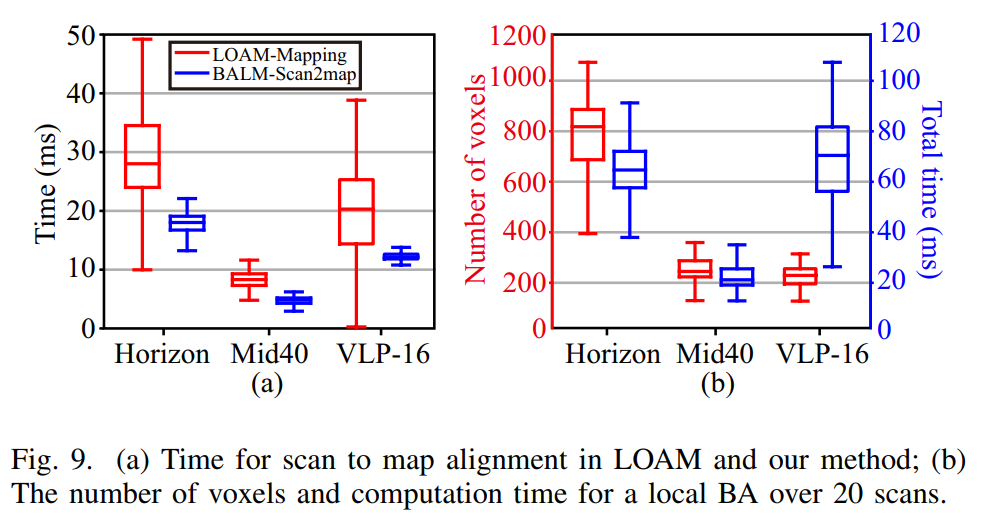
SLAM论文详解(5) — Bundle_Adjustment_LM(BALM)论文详解
目录 1 摘要 2 相关工作 3 BA公式和导数 A. 直接BA公式 B. 导数 C. 二阶近似 4 自适应体素化 5. 将BALM结合进LOAM 6. 实验 7. 算法应用场景解析 1 摘要 Bundle Adjustment是一种用于同时估计三维结构和传感器运动运动的优化算法。在视觉SLAM,三维重建等…...

C语言对单链表所有操作与一些相关面试题
目录 单链表的特性 单链表的所有操作 定义一个单链表 创建一个链表头 插入数据(头插法) 插入数据(尾插法) 查找节点 修改数据节点 删除节点 打印数据 销毁链表 翻转链表 打印链表长度 冒泡排序 快排 堆排 查找倒数第K个节点(双指针法) …...

高防服务器如何抵御大规模攻击
高防服务器如何抵御大规模攻击?高防服务器是一种专门设计用于抵御大规模攻击的服务器,具备出色的安全性和可靠性。在当今互联网时代,网络安全问题日益严重,DDOS攻击(分布式拒绝服务攻击)等高强度攻击已成为…...

Go 接口和多态
在讲解具体的接口之前,先看如下问题。 使用面向对象的方式,设计一个加减的计算器 代码如下: package mainimport "fmt"//父类,这是结构体 type Operate struct {num1 intnum2 int }//加法子类,这是结构体…...

Git忽略文件的几种方法,以及.gitignore文件的忽略规则
目录 .gitignore文件Git忽略规则以及优先级.gitignore文件忽略规则常用匹配示例: 有三种方法可以实现忽略Git中不想提交的文件。1、在Git项目中定义 .gitignore 文件(优先级最高,推荐!)2、在Git项目的设置中指定排除文…...
C语言——指针进阶(2)
继续上次的指针,想起来还有指针的内容还没有更新完,今天来补上之前的内容,上次我们讲了函数指针,并且使用它来实现一些功能,今天我们就讲一讲函数指针数组等内容,废话不多说,我们开始今天的学习…...

【汇编中的寄存器分类与不同寄存器的用途】
汇编中的寄存器分类与不同寄存器的用途 寄存器分类 在计算机体系结构中,8086CPU,寄存器可以分为以下几类: 1. 通用寄存器: 通用寄存器是用于存储数据和执行算术运算的寄存器。在 x86 架构中,这些通用寄存器通常包括…...
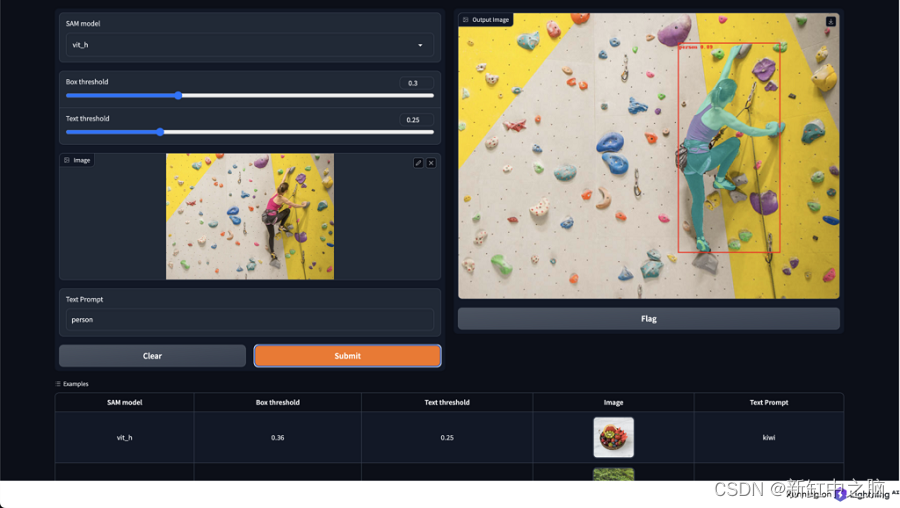
基于文本提示的图像目标检测与分割实践
近年来,计算机视觉取得了显着的进步,特别是在图像分割和目标检测任务方面。 最近值得注意的突破之一是分段任意模型(SAM),这是一种多功能深度学习模型,旨在有效地从图像和输入提示中预测对象掩模。 通过利用…...
【4-5章】Spark编程基础(Python版)
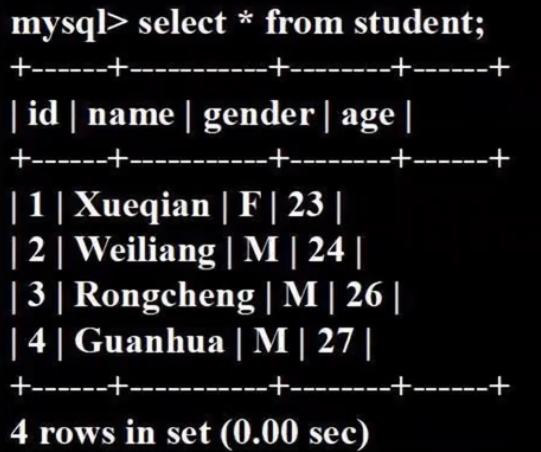
课程资源:(林子雨)Spark编程基础(Python版)_哔哩哔哩_bilibili 第4章 RDD编程(21节) Spark生态系统: Spark Core:底层核心(RDD编程是针对这个)Spark SQL:…...
04 卷积神经网络搭建
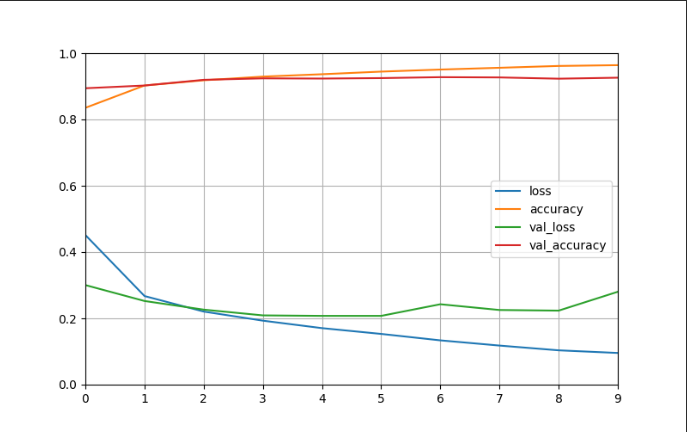
一、数据集 MNIST数据集是从NIST的两个手写数字数据集:Special Database 3 和Special Database 1中分别取出部分图像,并经过一些图像处理后得到的[参考]。 MNIST数据集共有70000张图像,其中训练集60000张,测试集10000张。所有图…...

【hadoop运维】running beyond physical memory limits:正确配置yarn中的mapreduce内存
文章目录 一. 问题描述二. 问题分析与解决1. container内存监控1.1. 虚拟内存判断1.2. 物理内存判断 2. 正确配置mapReduce内存2.1. 配置map和reduce进程的物理内存:2.2. Map 和Reduce 进程的JVM 堆大小 3. 小结 一. 问题描述 在hadoop3.0.3集群上执行hive3.1.2的任…...
)
数据结构--6.5二叉排序树(插入,查找和删除)
目录 一、创建 二、插入 三、删除 二叉排序树(Binary Sort Tree)又称为二叉查找树,它或者是一棵空树,或者是具有下列性质的二叉树: ——若它的左子树不为空,则左子树上所有结点的值均小于它的根结构的值…...
无需公网IP,在家SSH远程连接公司内网服务器「cpolar内网穿透」
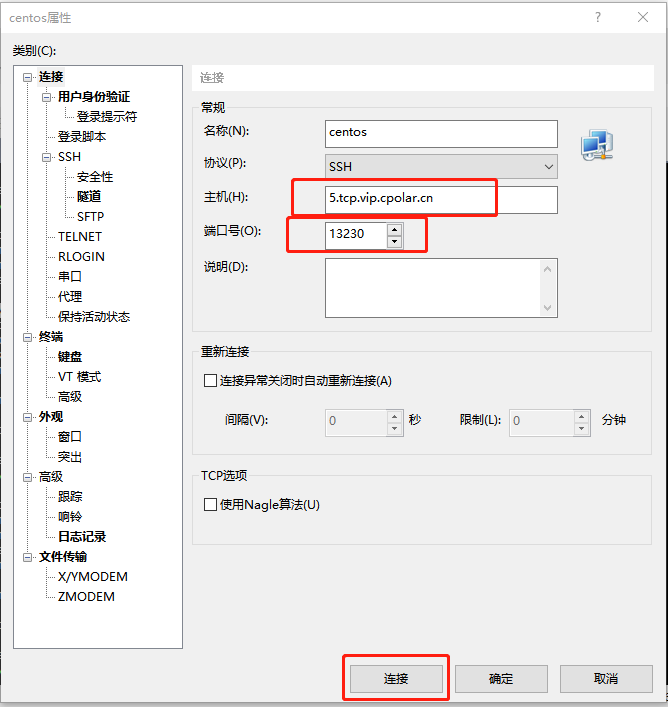
文章目录 1. Linux CentOS安装cpolar2. 创建TCP隧道3. 随机地址公网远程连接4. 固定TCP地址5. 使用固定公网TCP地址SSH远程 本次教程我们来实现如何在外公网环境下,SSH远程连接家里/公司的Linux CentOS服务器,无需公网IP,也不需要设置路由器。…...

Java工具类
一、org.apache.commons.io.IOUtils closeQuietly() toString() copy() toByteArray() write() toInputStream() readLines() copyLarge() lineIterator() readFully() 二、org.apache.commons.io.FileUtils deleteDirectory() readFileToString() de…...

makefile之使用函数wildcard和patsubst
Makefile之调用函数 调用makefile机制实现的一些函数 $(function arguments) : function是函数名,arguments是该函数的参数 参数和函数名用空格或Tab分隔,如果有多个参数,之间用逗号隔开. wildcard函数:让通配符在makefile文件中使用有效果 $(wildcard pattern) 输入只有一个参…...

算法通关村第十八关——排列问题
LeetCode46.给定一个没有重复数字的序列,返回其所有可能的全排列。例如: 输入:[1,2,3] 输出:[[1,2,3],[1,3,2],[2,1,3],[2,3,1],[3,1,2],[3,2,1]] 元素1在[1,2]中已经使…...

LangFlow零代码AI应用搭建:5分钟可视化构建智能问答机器人
LangFlow零代码AI应用搭建:5分钟可视化构建智能问答机器人 1. LangFlow简介:零代码AI应用构建利器 LangFlow是一款革命性的可视化AI应用构建工具,它让不懂编程的用户也能轻松搭建智能问答机器人。想象一下,你只需要像搭积木一样…...

04. Web可访问性最佳实践:让每个用户都能平等访问
04. Web可访问性最佳实践:让每个用户都能平等访问 引言 Web 可访问性是前端开发的重要组成部分,它确保所有用户,包括残障人士,都能平等地访问和使用网站。作为一名把代码当散文写的 UI 匠人,我始终认为:好…...

传统信号处理与AI结合:FUTURE POLICE模型前端预处理技术详解
传统信号处理与AI结合:FUTURE POLICE模型前端预处理技术详解 最近在做一个语音相关的AI项目,发现直接把麦克风录到的原始音频丢给模型,效果总是不太理想。背景的键盘声、远处的谈话声,甚至是空调的嗡嗡声,都会让模型的…...

深度解析Cassandra:分布式数据库的王者之路
深度解析Cassandra:分布式数据库的王者之路一篇让你彻底搞懂Cassandra的适用场景、优势劣势与应用实践前言 在大数据时代,传统的关系型数据库已经无法满足所有场景的需求。随着互联网应用的爆发式增长,高可用性、线性扩展、海量数据存储成为了…...

NetCoreServer高级特性揭秘:自定义协议、会话管理和扩展机制
NetCoreServer高级特性揭秘:自定义协议、会话管理和扩展机制 【免费下载链接】NetCoreServer Ultra fast and low latency asynchronous socket server & client C# .NET Core library with support TCP, SSL, UDP, HTTP, HTTPS, WebSocket protocols and 10K c…...

中科蓝讯AB565X蓝牙耳机通话电流音、回声、杂音?手把手教你用PC工具调通它
中科蓝讯AB565X蓝牙耳机通话问题全解析:从硬件排查到参数调优实战指南 当你手握一款基于中科蓝讯AB565X芯片的蓝牙耳机样机,却在通话测试中遭遇电流音、回声和杂音时,那种挫败感我深有体会。作为深耕音频调试领域多年的工程师,我经…...

探索机器学习之深度网络模型CNN
机器学习 深度网络模型CNN 代码报告数据 报告内容:1 常用深度网络模型介绍 2 原理介绍(CNN,VGG-16, LSTM) 3 具体案例及代码分析 3.1 天气识别3.2 识别海贼王草帽一伙3.3 股票预测 4 结果展示 5 出现的问题和解决办法 6 心得体会 …...

Wave-U-Net:革新音频分离技术的端到端深度学习解决方案
Wave-U-Net:革新音频分离技术的端到端深度学习解决方案 【免费下载链接】Wave-U-Net Implementation of the Wave-U-Net for audio source separation 项目地址: https://gitcode.com/gh_mirrors/wa/Wave-U-Net 在数字音频处理领域,从混合音频中精…...
)
当BFD不可用时:用华为NQA+静态路由实现低成本链路监测(含ICMP测试例详解)
华为NQA静态路由:低成本链路监测的实战指南 在传统企业网络中,静态路由因其配置简单、资源消耗低的特点,常被用于小型网络或边缘设备互联。但静态路由最大的痛点在于缺乏自动检测机制——当链路出现故障时,管理员往往要等到用户投…...

PCB板验证
铺铜完成是PCB设计中的一个重要里程碑,但还不是终点。在发送给板厂生产之前,还需要完成一系列关键的验证、优化和文件输出工作。简单来说,铺铜之后的标准流程是:设计验证(DRC/DFM) → 必要分析(…...