
jira搜索search issue条目rest实用脚本
官方文档链接地址:
The Jira Cloud platform REST API
实用json请求脚本如下:
{"fields": ["summary","status"],"jql": "project = abc AND summary ~ '【%s】【coverity】' AND component=Coverity","maxResults": 1000,"startAt": 0
}
jql字段就是表达式,类似于sql语句里的where条件设定语句,多个条件用“AND”连接
代码示例如下:
public static void searchIssueXTKFDT() throws UnirestException {JsonNodeFactory jnf = JsonNodeFactory.instance;ObjectNode payload = jnf.objectNode();{ArrayNode fields = payload.putArray("fields");fields.add("summary");fields.add("status");//fields.add("assignee");payload.put("jql", "project = TEST");payload.put("maxResults", 100);payload.put("startAt", 0);}// Connect Jackson ObjectMapper to UnirestUnirest.setObjectMapper(new ObjectMapper() {private com.fasterxml.jackson.databind.ObjectMapper jacksonObjectMapper= new com.fasterxml.jackson.databind.ObjectMapper();public <T> T readValue(String value, Class<T> valueType) {try {return jacksonObjectMapper.readValue(value, valueType);} catch (IOException e) {throw new RuntimeException(e);}}public String writeValue(Object value) {println("writeValue=====" + value);try {return jacksonObjectMapper.writeValueAsString(value);} catch (JsonProcessingException e) {throw new RuntimeException(e);}}});//"https://your-domain.atlassian.net/rest/api/2/search"HttpResponse<JsonNode> response = Unirest.post("https://devops-jira.example.com/rest/api/2/search").basicAuth("USER", "TOKEN").header("Accept", "application/json").header("Content-Type", "application/json").body(payload).asJson();JsonNode body = response.getBody();JSONObject json = body.getObject();JSONArray array = json.getJSONArray("issues");int length = array.length();System.out.println("length = " + length);ArrayList<String> status = new ArrayList<>();for (int i = 0; i < length; i ++){JSONObject object = array.getJSONObject(i);String key = object.getString("key");String id = object.getJSONObject("fields").getJSONObject("status").getString("id");status.add(key + "=" + id);}System.out.println("status = " + status);System.out.println(body);}返回结果如下:
{"expand": "schema,names","total": 8,"maxResults": 100,"issues": [{"expand": "operations,versionedRepresentations,editmeta,changelog,renderedFields","self": "https://devops-jira.example.com/rest/api/2/issue/867674","id": "867674","fields": {"summary": "a test of the crash Main order flow broken","status": {"name": "等待验证","self": "https://devops-jira.example.com/rest/api/2/status/11601","description": "","iconUrl": "https://devops-jira.example.com/images/icons/statuses/generic.png","id": "11601","statusCategory": {"colorName": "yellow","name": "In Progress","self": "https://devops-jira.example.com/rest/api/2/statuscategory/4","id": 4,"key": "indeterminate"}}},"key": "TEST-10"},{"expand": "operations,versionedRepresentations,editmeta,changelog,renderedFields","self": "https://devops-jira.example.com/rest/api/2/issue/861855","id": "861855","fields": {"summary": "fawtwa4twa这是一个测试","status": {"name": "取消","self": "https://devops-jira.example.com/rest/api/2/status/10124","description": "","iconUrl": "https://devops-jira.example.com/images/icons/statuses/generic.png","id": "10124","statusCategory": {"colorName": "green","name": "Done","self": "https://devops-jira.example.com/rest/api/2/statuscategory/3","id": 3,"key": "done"}}},"key": "TEST-9"},{"expand": "operations,versionedRepresentations,editmeta,changelog,renderedFields","self": "https://devops-jira.example.com/rest/api/2/issue/861924","id": "861924","fields": {"summary": "a test of the crash Main order flow broken","status": {"name": "激活","self": "https://devops-jira.example.com/rest/api/2/status/10354","description": "新发现的缺陷","iconUrl": "https://devops-jira.example.com/images/icons/statuses/generic.png","id": "10354","statusCategory": {"colorName": "blue-gray","name": "To Do","self": "https://devops-jira.example.com/rest/api/2/statuscategory/2","id": 2,"key": "new"}}},"key": "TEST-8"},{"expand": "operations,versionedRepresentations,editmeta,changelog,renderedFields","self": "https://devops-jira.example.com/rest/api/2/issue/861835","id": "861835","fields": {"summary": "wewrwr","status": {"name": "重新打开","self": "https://devops-jira.example.com/rest/api/2/status/10359","description": "问题未彻底修复","iconUrl": "https://devops-jira.example.com/images/icons/statuses/generic.png","id": "10359","statusCategory": {"colorName": "yellow","name": "In Progress","self": "https://devops-jira.example.com/rest/api/2/statuscategory/4","id": 4,"key": "indeterminate"}}},"key": "TEST-7"},{"expand": "operations,versionedRepresentations,editmeta,changelog,renderedFields","self": "https://devops-jira.example.com/rest/api/2/issue/861664","id": "861664","fields": {"summary": "a test of the crash Main order flow broken","status": {"name": "需求规划","self": "https://devops-jira.example.com/rest/api/2/status/10500","description": "","iconUrl": "https://devops-jira.example.com/images/icons/statuses/generic.png","id": "10500","statusCategory": {"colorName": "blue-gray","name": "To Do","self": "https://devops-jira.example.com/rest/api/2/statuscategory/2","id": 2,"key": "new"}}},"key": "TEST-6"},{"expand": "operations,versionedRepresentations,editmeta,changelog,renderedFields","self": "https://devops-jira.example.com/rest/api/2/issue/861719","id": "861719","fields": {"summary": "a test of the crash Main order flow broken","status": {"name": "需求规划","self": "https://devops-jira.example.com/rest/api/2/status/10500","description": "","iconUrl": "https://devops-jira.example.com/images/icons/statuses/generic.png","id": "10500","statusCategory": {"colorName": "blue-gray","name": "To Do","self": "https://devops-jira.example.com/rest/api/2/statuscategory/2","id": 2,"key": "new"}}},"key": "TEST-5"},{"expand": "operations,versionedRepresentations,editmeta,changelog,renderedFields","self": "https://devops-jira.example.com/rest/api/2/issue/861243","id": "861243","fields": {"summary": "这是一个测试","status": {"name": "需求规划","self": "https://devops-jira.example.com/rest/api/2/status/10500","description": "","iconUrl": "https://devops-jira.example.com/images/icons/statuses/generic.png","id": "10500","statusCategory": {"colorName": "blue-gray","name": "To Do","self": "https://devops-jira.example.com/rest/api/2/statuscategory/2","id": 2,"key": "new"}}},"key": "TEST-2"},{"expand": "operations,versionedRepresentations,editmeta,changelog,renderedFields","self": "https://devops-jira.example.com/rest/api/2/issue/860777","id": "860777","fields": {"summary": "testtesttest","status": {"name": "开发处理中","self": "https://devops-jira.example.com/rest/api/2/status/10355","description": "","iconUrl": "https://devops-jira.example.com/images/icons/statuses/generic.png","id": "10355","statusCategory": {"colorName": "yellow","name": "In Progress","self": "https://devops-jira.example.com/rest/api/2/statuscategory/4","id": 4,"key": "indeterminate"}}},"key": "TEST-1"}],"startAt": 0
}
在此做个笔记
相关文章:

jira搜索search issue条目rest实用脚本
官方文档链接地址: The Jira Cloud platform REST API 实用json请求脚本如下: {"fields": ["summary","status"],"jql": "project abc AND summary ~ 【%s】【coverity】 AND componentCoverity"…...

《C++ primer plus》精炼(OOP部分)——对象和类(5)
“学习是照亮心灵的火炬,它永不熄灭,永不止息。” 文章目录 类的自动和强制类型转换原始类型转换为自定义类型将自定义类型转换为原始类型 类的自动和强制类型转换 原始类型转换为自定义类型 可以用一个参数的构造函数来实现,例如ÿ…...

钉钉旧版服务端SDK支持异步方法的升级改造
最近项目中需要对接钉钉,有些钉钉 API 的访问需要使用旧版服务端 SDK 才能搞定,但是这个 SDK 使用的还是 .NET Framework 2.0 框架,不能跨平台部署,也不支持 async\await 的异步操作方法,Nuget 上也有其它用户改造的 .…...
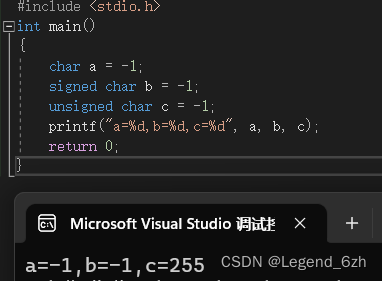
【C语言】【数据存储】用%d打印char类型数据,猜结果是啥
题目代码如下: #include <stdio.h> int main() {char a -1;signed char b-1;unsigned char c-1;printf("a%d,b%d,c%d",a,b,c);return 0; }解题关键: 1.二进制存储:原码,反码,补码 互换 2.截断 3.整型…...
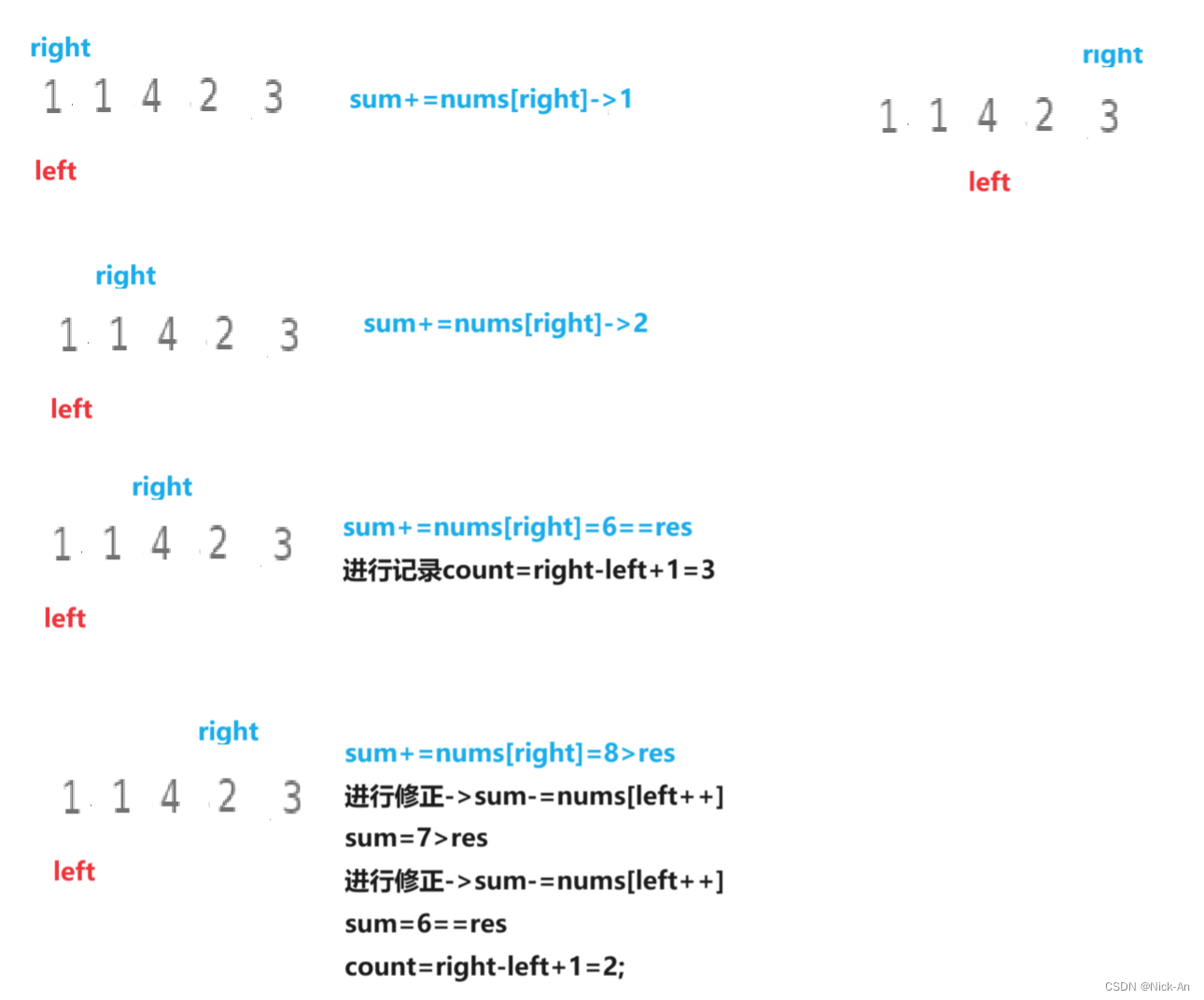
算法——双指针
1658. 将 x 减到 0 的最小操作数 - 力扣(LeetCode) 这道题的重点是,如何用最小的操作数,来使其x变为0——也可以看作是用最少的数据个数,来求和得到x。 ——但是我们可以知道,由于数据是从两端向中间取的…...
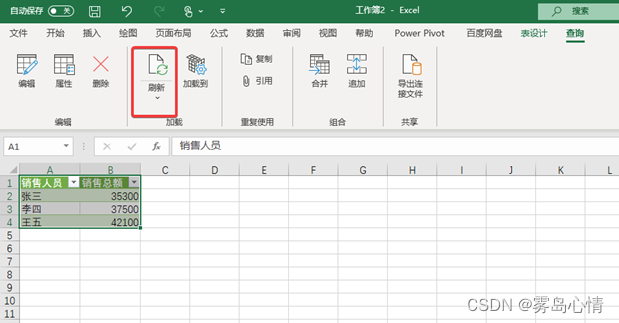
【PowerQuery】Excel的PowerQuery按需刷新
将数据通过PowerQuery 导入进来后,这里将进行数据分组运算,最终的数据计算结果将保存在Excel 表格中,图为销售统计结果。 在Excel中,如果我们希望进行销售统计的手动更新可以使用几种不同的方法来进行刷新: 刷新单一数据连接如果仅仅需要刷新单一数据连接的话我们可以通过…...

Django REST Farmowork初探
1.简介 Django REST framework (简称:DRF)是一个强大而灵活的 Web API 工具。 遵循RESTFullAPI风格,功能完善,可快速开发API平台。 官网文档:https://www.django-rest-framework.org 2. framwork的安装 …...

【flink进阶】-- Flink kubernetes operator 版本升级
目录 1、检查当前 flink kubernetes operator 版本 2、停止生产上正在运行的 flink job 3、升级 CRD...
Linux Ubuntu20.04深度学习环境快速配置命令记录
一、驱动安装 1、更新系统包 sudo apt-get updatesudo apt-get upgrade 2、安装显卡驱动 使用apt方式安装驱动,多数情况不容易成功, 使用一下方法更佳: 1.查看合适显卡的驱动版本 ubuntu-drivers devices NVIDIA GeForce 驱动程序 - …...
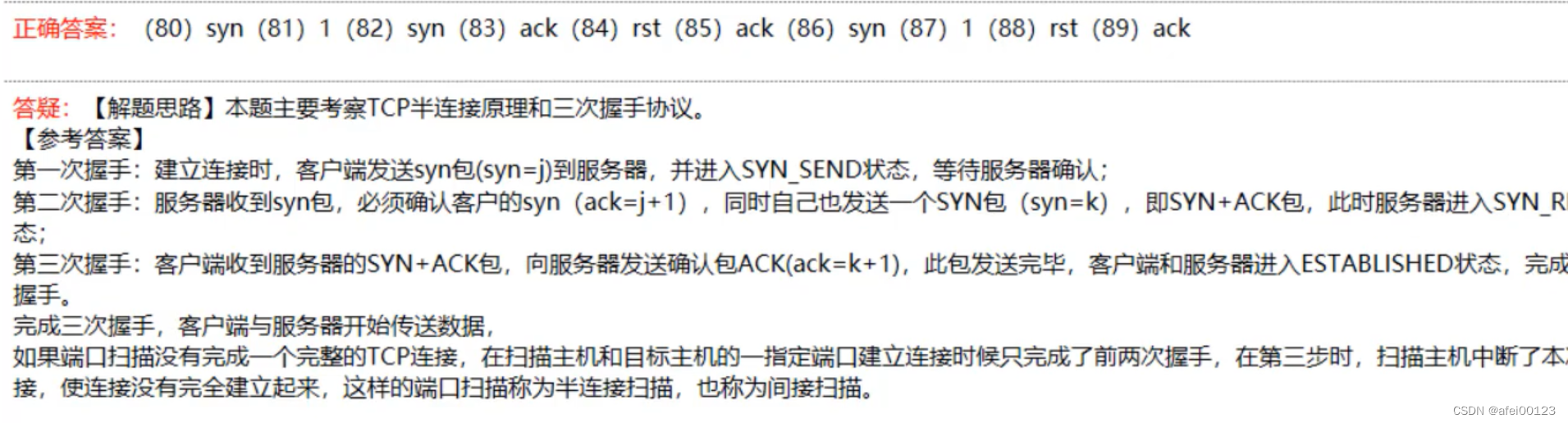
信息安全三级真题一
目录 一、单选题 二、填空题 三、综合题 一、单选题 二、填空题 三、综合题 知法懂法,请各位网络安全从业者遵守《网络安全法》、《个人信息保护法》 业%$务*$&联&#系 XHU3ZjUxXHU3ZWRjXHU4ZmQwXHU3ZWY0XHU2ZTE3XHU5MDBmXHU1NmUyXHU5NjFmXHUyMDBiXHU2M…...

RK3568-tftp更新设备树和内核nfs挂载文件系统
1. 注意:需要设备树和内核按以下修改才能支持tftp和nfs。 1.1 修改设备树: diff --git a/arch/arm64/boot/dts/rockchip/OK3568-C-linux.dts b/arch/arm64/boot/dts/rockchip/OK3568-C-linux.dts index 178b4d831..34cb57ffd 100644 --- a/arch/arm64/boot/dts/rockchip/OK…...
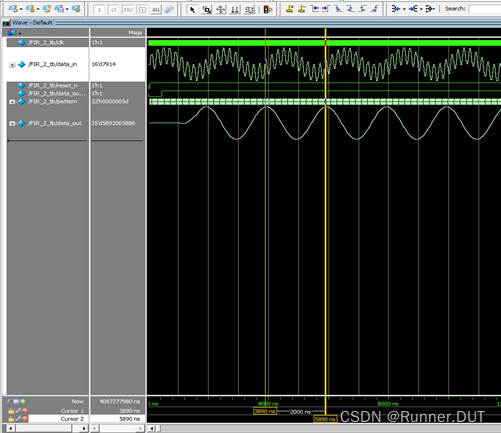
FIR滤波器简述及FPGA仿真验证
数字滤波器的设计,本项目做的数字滤波器准确来说是FIR滤波器。 FIR滤波器(有限冲激响应滤波器),与另一种基本类型的数字滤波器——IIR滤波器(无限冲击响应滤波器)相对应,其实就是将所输入的信号…...
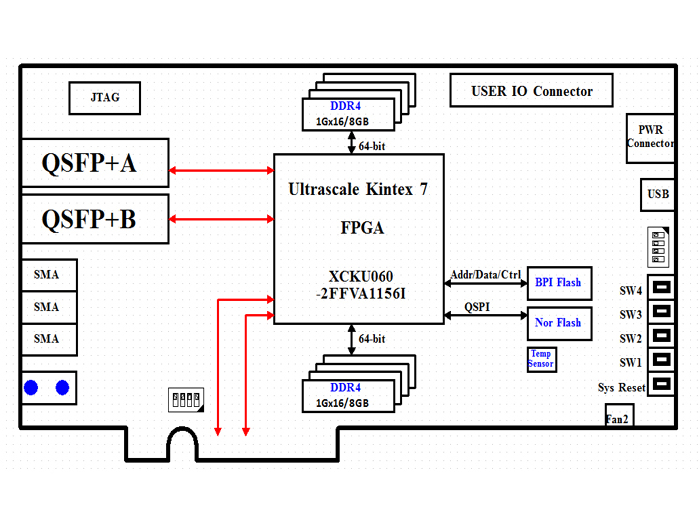
高速信号处理板资料保存:383-基于kintex UltraScale XCKU060的双路QSFP+光纤PCIe 卡设计原理图
基于kintex UltraScale XCKU060的双路QSFP光纤PCIe 卡 一、板卡概述 本板卡系我司自主研发,基于Xilinx UltraScale Kintex系列FPGA XCKU060-FFVA1156-2-I架构,支持PCIE Gen3 x8模式的高速信号处理板卡,搭配两路40G QSFP接口…...
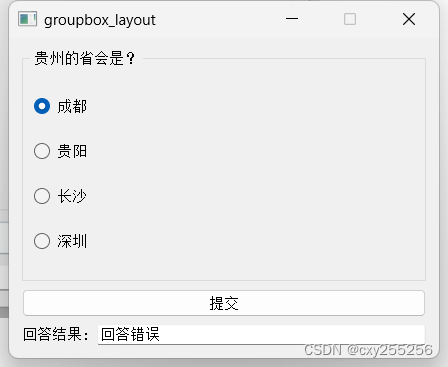
QT:使用分组框、单选按钮、普通按钮、标签、行编辑器、垂直分布、水平分布做一个小项目
widget.h #ifndef WIDGET_H #define WIDGET_H#include <QWidget> #include <QRadioButton> //单选按钮 #include <QGroupBox> //分组框 #include <QHBoxLayout> //水平布局 #include <QVBoxLayout> //垂直布局 #include <QPushButton>…...

封装微信小程序隐私信息授权
隐私 代码 html (modal 组件再后面封装有提供) <modal isShow"{{show}}"><view class"privacy-auth-dialog"><view class"title">温馨提示</view><view class"content"><vi…...
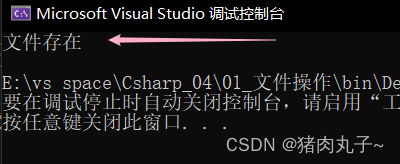
【C#】FileInfo类 对文件进行操作
提示:使用FileInfo类时,要引用System.IO命名空间。 using System.IO; FileInfo类 生成文件删除文件移动文件复制文件获取文件名判断文件是否存在属性列表其它常用方法 生成文件 Create():在指定路径上创建文件。 FileInfo myFile new FileIn…...

python中的字符串也是可迭代对象吗?
python中的字符串也是可迭代对象吗? ━━━━━━━━━━━━━━━━━━━━━━ 是的,Python中的字符串是可迭代对象。这意味着你可以像处理列表或元组那样处理字符串。例如,你可以使用for循环遍历字符串中的每个字符,或…...

C++ 图像线特征提取【HoughLinesP算法】
目录 一、函数介绍二、实现步骤三、代码示例一、函数介绍 HoughLinesP:是一种基于Hough变换的直线检测算法。它可以识别图像中的直线,并返回它们的端点坐标。其函数接口如下: cv::HoughLinesP( InputArray src, // 输入图像,必须 8-bit 的灰度图像 OutputArray…...

Stable Diffusion WebUI内存不够爆CUDA Out of memory怎么办?
在我们运行SD的时候,我们经常会爆CUDA Out of memory。 我们应该怎么办呢? 这是因为我们的显存或者内存不够了。 如果你是用cpu来跑图的则表示内存不够,这个时候就需要换个大点的内存了。 如果你是用gpu来跑图的就说明你显存不够用咯,这时候咋办呢? 下面我将一一述说…...
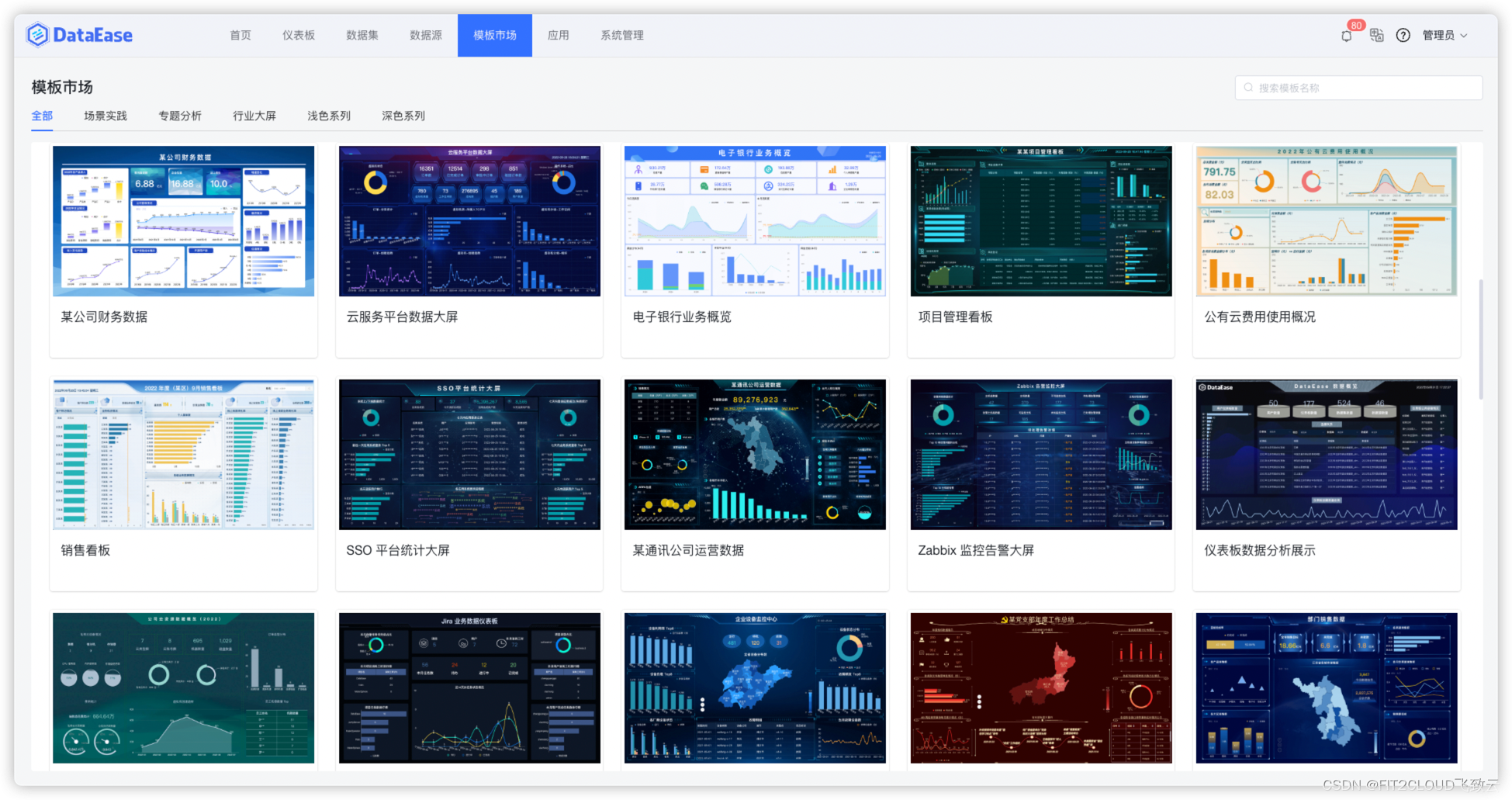
模板学堂|数据可视化仪表板大屏设计流程梳理
DataEase开源数据可视化分析平台于2022年6月正式发布模板市场(https://dataease.io/templates/)。模板市场旨在为DataEase用户提供专业、美观、拿来即用的仪表板模板,方便用户根据自身的业务需求和使用场景选择对应的仪表板模板&a…...

DeepSeek-OCR 技术解析:基于视觉压缩的端到端文档理解新范式
1. DeepSeek-OCR:重新定义文档理解的下一代技术 第一次接触DeepSeek-OCR时,我正被一个复杂的多栏报纸数字化项目困扰。传统OCR工具在处理这种复杂版面时,要么丢失栏目分隔信息,要么混淆文字顺序。直到尝试了DeepSeek-OCR的Gundam动…...

Heritrix3与Trough集成:实现高效内容分发的完整流程
Heritrix3与Trough集成:实现高效内容分发的完整流程 【免费下载链接】heritrix3 Heritrix is the Internet Archives open-source, extensible, web-scale, archival-quality web crawler project. 项目地址: https://gitcode.com/gh_mirrors/he/heritrix3 …...

轴,V带轮,斜齿轮,丝杠零件图CAD图纸
轴作为机械系统中的核心传动部件,承担着传递扭矩与支撑旋转的重要功能。其设计需综合考虑材料强度、刚度及热处理工艺,以确保在复杂载荷下保持稳定运行。典型结构包含阶梯轴、空心轴等类型,通过优化轴肩定位与键槽布局,可有效提升…...
)
华为ENSP实战:手把手教你搭建住宅小区网络拓扑(附完整配置脚本)
华为ENSP实战:从零构建智能小区网络的全栈解决方案 当清晨第一缕阳光透过窗帘洒进房间,现代人睁开眼的第一件事往往是拿起手机查看消息——这种习以为常的场景背后,是无数个日夜运行的住宅小区网络在默默支撑。作为网络工程师,我…...

mPLUG-Owl3-2B在教育、工作、生活中的10个实用场景分享
mPLUG-Owl3-2B在教育、工作、生活中的10个实用场景分享 1. 引言:多模态AI如何改变我们的日常 想象一下,当你随手拍下一张植物照片,AI不仅能告诉你它的学名,还能详细解释它的生长习性和养护要点;当你面对一份复杂的工…...

成长规划师 - OpenClaw助力个人发展
每周进步1%,一年后你会比现在优秀37倍你有没有过这样的感觉: 一周忙忙碌碌,周五回顾时却想不起做了什么重要的事?年初立下的flag,到了年底发现一个都没实现?羡慕别人技能满满,自己却不知道从哪里…...
)
【限时开放】CPython核心团队亲授:2026 Python原生AOT编译接入Checklist(含12个预编译hook校验点)
第一章:Python原生AOT编译方案2026的演进背景与核心价值近年来,Python在云原生、边缘计算与实时系统场景中的部署瓶颈日益凸显:CPython解释器的启动延迟、内存开销及运行时JIT缺失,严重制约了其在低延迟服务、嵌入式Python模块和安…...

完整指南:在浏览器中创建惊艳WebGL流体模拟效果的5个关键技巧
完整指南:在浏览器中创建惊艳WebGL流体模拟效果的5个关键技巧 【免费下载链接】WebGL-Fluid-Simulation Play with fluids in your browser (works even on mobile) 项目地址: https://gitcode.com/gh_mirrors/web/WebGL-Fluid-Simulation 想要在浏览器中体验…...

Qwen-Image-2512-Pixel-Art-LoRA 模型v1.0 传统艺术数字化:将油画、素描转化为像素风数字藏品
Qwen-Image-2512-Pixel-Art-LoRA 模型v1.0:当古典艺术遇见像素方块 最近在数字艺术圈里,有个话题挺有意思:怎么把那些挂在博物馆里的古典油画、素描,变成年轻人也爱玩的像素风数字藏品?听起来像是把交响乐改编成8-bit…...
)
RAGAS 0.2.4 + Ollama本地大模型:手把手教你生成高质量RAG测试数据集(含踩坑实录)
RAGAS 0.2.4与Ollama本地大模型实战:构建高可靠性RAG测试数据集的深度指南 当我们需要评估一个检索增强生成(RAG)系统的性能时,高质量的测试数据集是关键。然而,依赖云端大模型服务不仅成本高昂,还可能面临…...