
Spring整合RabbitMQ
一、步骤
生产者
消费者
二、代码
生产者工程
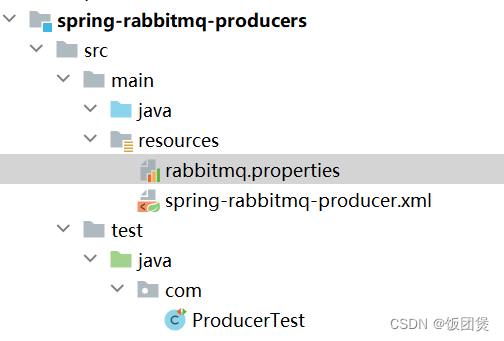
1.在生产者工程和消费者工程中都导入如下依赖
<dependencies><dependency><groupId>org.springframework</groupId><artifactId>spring-context</artifactId><version>5.1.7.RELEASE</version></dependency><dependency><groupId>org.springframework.amqp</groupId><artifactId>spring-rabbit</artifactId><version>2.1.8.RELEASE</version></dependency><dependency><groupId>junit</groupId><artifactId>junit</artifactId><version>4.12</version></dependency><dependency><groupId>org.springframework</groupId><artifactId>spring-test</artifactId><version>5.1.7.RELEASE</version></dependency>
</dependencies>
<build><plugins><plugin><groupId>org.apache.maven.plugins</groupId><artifactId>maven-compiler-plugin</artifactId><version>3.8.0</version><configuration><source>1.8</source><target>1.8</target></configuration></plugin></plugins>
</build>
2.生产者和消费者 导入配置文件 rabbitmq.properties
rabbitmq.host=43.143.246.208
rabbitmq.port=5672
rabbitmq.username=root
rabbitmq.password=root
rabbitmq.virtual-host=/itcast
3.生产者核心配置文件 spring-rabbitmq-producer.xml
<?xml version="1.0" encoding="UTF-8"?>
<beans xmlns="http://www.springframework.org/schema/beans"xmlns:xsi="http://www.w3.org/2001/XMLSchema-instance"xmlns:context="http://www.springframework.org/schema/context"xmlns:rabbit="http://www.springframework.org/schema/rabbit"xsi:schemaLocation="http://www.springframework.org/schema/beanshttp://www.springframework.org/schema/beans/spring-beans.xsdhttp://www.springframework.org/schema/contexthttps://www.springframework.org/schema/context/spring-context.xsdhttp://www.springframework.org/schema/rabbithttp://www.springframework.org/schema/rabbit/spring-rabbit.xsd"><!--加载配置文件--><context:property-placeholder location="classpath:rabbitmq.properties"/><!-- 定义rabbitmq connectionFactory --><rabbit:connection-factory id="connectionFactory" host="${rabbitmq.host}"port="${rabbitmq.port}"username="${rabbitmq.username}"password="${rabbitmq.password}"virtual-host="${rabbitmq.virtual-host}"/><!--定义管理交换机、队列--><rabbit:admin connection-factory="connectionFactory"/><!--定义持久化队列,不存在则自动创建;不绑定到交换机则绑定到默认交换机默认交换机类型为direct,名字为:"",路由键为队列的名称--><rabbit:queue id="spring_queue" name="spring_queue" auto-declare="true"/><!-- ~~~~~~~~~~~~~~~~~~~~~~~~~~~~广播;所有队列都能收到消息~~~~~~~~~~~~~~~~~~~~~~~~~~~~ --><!--定义广播交换机中的持久化队列,不存在则自动创建--><rabbit:queue id="spring_fanout_queue_1" name="spring_fanout_queue_1" auto-declare="true"/><!--定义广播交换机中的持久化队列,不存在则自动创建--><rabbit:queue id="spring_fanout_queue_2" name="spring_fanout_queue_2" auto-declare="true"/><!--定义广播类型交换机;并绑定上述两个队列--><rabbit:fanout-exchange id="spring_fanout_exchange" name="spring_fanout_exchange" auto-declare="true"><rabbit:bindings><rabbit:binding queue="spring_fanout_queue_1"/><rabbit:binding queue="spring_fanout_queue_2"/></rabbit:bindings></rabbit:fanout-exchange><!-- ~~~~~~~~~~~~~~~~~~~~~~~~~~~~通配符;*匹配一个单词,#匹配多个单词 ~~~~~~~~~~~~~~~~~~~~~~~~~~~~ --><!--定义广播交换机中的持久化队列,不存在则自动创建--><rabbit:queue id="spring_topic_queue_star" name="spring_topic_queue_star" auto-declare="true"/><!--定义广播交换机中的持久化队列,不存在则自动创建--><rabbit:queue id="spring_topic_queue_well" name="spring_topic_queue_well" auto-declare="true"/><!--定义广播交换机中的持久化队列,不存在则自动创建--><rabbit:queue id="spring_topic_queue_well2" name="spring_topic_queue_well2" auto-declare="true"/><rabbit:topic-exchange id="spring_topic_exchange" name="spring_topic_exchange" auto-declare="true"><rabbit:bindings><rabbit:binding pattern="root.*" queue="spring_topic_queue_star"/><rabbit:binding pattern="root.#" queue="spring_topic_queue_well"/><rabbit:binding pattern="itcast.#" queue="spring_topic_queue_well2"/></rabbit:bindings></rabbit:topic-exchange><!--定义rabbitTemplate对象操作可以在代码中方便发送消息--><rabbit:template id="rabbitTemplate" connection-factory="connectionFactory"/>
</beans>
4.测试类 ProducerTest
@RunWith(SpringJUnit4ClassRunner.class)
@ContextConfiguration(locations = "classpath:spring-rabbitmq-producer.xml")
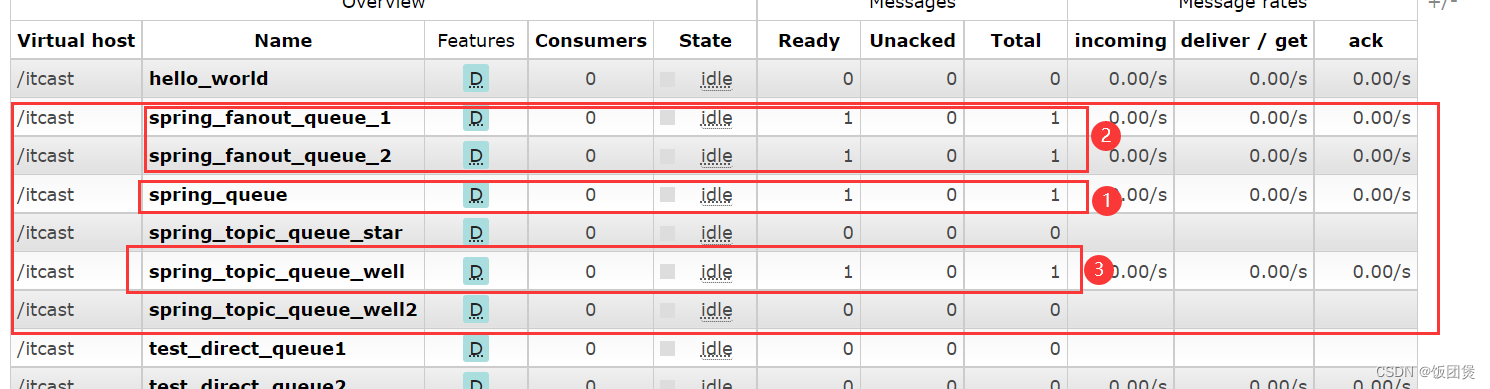
public class ProducerTest {//1.注入 RabbitTemplate@Autowiredprivate RabbitTemplate rabbitTemplate;@Testpublic void testHelloWorld(){//2.发送消息rabbitTemplate.convertAndSend("spring_queue","hello world spring....");}/*** 发送fanout消息*/@Testpublic void testFanout(){//2.发送消息rabbitTemplate.convertAndSend("spring_fanout_exchange","","spring fanout....");}/*** 发送topic消息*/@Testpublic void testTopic(){//2.发送消息rabbitTemplate.convertAndSend("spring_topic_exchange","root.hehe.haha","spring topic....");}
}
5.运行结果
消费者工程
1、2同上述1、2
3、消费者核心配置文件
<?xml version="1.0" encoding="UTF-8"?>
<beans xmlns="http://www.springframework.org/schema/beans"xmlns:xsi="http://www.w3.org/2001/XMLSchema-instance"xmlns:context="http://www.springframework.org/schema/context"xmlns:rabbit="http://www.springframework.org/schema/rabbit"xsi:schemaLocation="http://www.springframework.org/schema/beanshttp://www.springframework.org/schema/beans/spring-beans.xsdhttp://www.springframework.org/schema/contexthttps://www.springframework.org/schema/context/spring-context.xsdhttp://www.springframework.org/schema/rabbithttp://www.springframework.org/schema/rabbit/spring-rabbit.xsd"><!--加载配置文件--><context:property-placeholder location="classpath:rabbitmq.properties"/><!-- 定义rabbitmq connectionFactory --><rabbit:connection-factory id="connectionFactory" host="${rabbitmq.host}"port="${rabbitmq.port}"username="${rabbitmq.username}"password="${rabbitmq.password}"virtual-host="${rabbitmq.virtual-host}"/><!-- 定义SpringQueueListener --><bean id="springQueueListener" class="com.rabbitmq.listener.SpringQueueListener"/>
<!--    <bean id="fanoutListener1" class="com.rabbitmq.listener.FanoutListener1"/>-->
<!--    <bean id="fanoutListener2" class="com.rabbitmq.listener.FanoutListener2"/>-->
<!--    <bean id="topicListenerStar" class="com.rabbitmq.listener.TopicListenerStar"/>-->
<!--    <bean id="topicListenerWell" class="com.rabbitmq.listener.TopicListenerWell"/>-->
<!--    <bean id="topicListenerWell2" class="com.rabbitmq.listener.TopicListenerWell2"/>--><rabbit:listener-container connection-factory="connectionFactory" auto-declare="true"><!-- 定义SpringQueueListener 监听哪个队列--><rabbit:listener ref="springQueueListener" queue-names="spring_queue"/>
<!--        <rabbit:listener ref="fanoutListener1" queue-names="spring_fanout_queue_1"/>-->
<!--        <rabbit:listener ref="fanoutListener2" queue-names="spring_fanout_queue_2"/>-->
<!--        <rabbit:listener ref="topicListenerStar" queue-names="spring_topic_queue_star"/>-->
<!--        <rabbit:listener ref="topicListenerWell" queue-names="spring_topic_queue_well"/>-->
<!--        <rabbit:listener ref="topicListenerWell2" queue-names="spring_topic_queue_well2"/>--></rabbit:listener-container>
</beans>
4.类 SpringQueueListener
public class SpringQueueListener implements MessageListener {@Overridepublic void onMessage(Message message) {//打印消息System.out.println(new String(message.getBody()));}
}
5.测试
@RunWith(SpringJUnit4ClassRunner.class)
@ContextConfiguration(locations = "classpath:spring-rabbitmq-comsumer.xml")
public class ConsumerTest {@Testpublic void test1(){boolean flag = true;while (true){}}}
相关文章:
Spring整合RabbitMQ
一、步骤 生产者 ① 创建生产者工程 ② 添加依赖 ③ 配置整合 ④ 编写代码发送消息 消费者 ① 创建消费者工程 ② 添加依赖 ③ 配置整合 ④ 编写消息监听器 二、代码 生产者工程 1.在生产者工程和消费者工程中都导入如下依赖 <dependencies><dependency&g…...

MySQL——事务和视图
2023.9.17 本章开始介绍TCL语言(Transaction Control Language 事务控制语言)。 事务 事务的概念:一个或一组sql语句组成一个执行单元,这个执行单元要么全部执行,要么全部不执行。 事务的特性:ÿ…...
做好制造项目管理的5个技巧
制造过程通常由不同的要素组成,如采购材料、与供应商合作、优化生产线效率等。制造商还需要处理库存、物流和分销。 为了确保制造项目在预算范围内按时完成,并且不遗漏任何环节,企业必须建立项目管理流程,以帮助改善组织流程和效…...
JavaScript中While循环
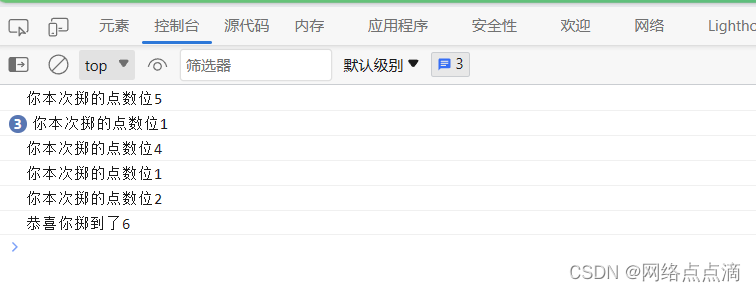
JavaScript中处理For循环,还有一种循环while循环; ● 例如我们之前写了一个模拟举重次数的For循环,如下所示 for (let rep 1; rep < 10; rep) {console.log(举重${rep}次); }● 我们也可以使用while循环去实现这种功能 let rep 1; whi…...

python经典百题之乒乓球比赛
题目: 两个乒乓球队进行比赛,各出三人。甲队为a,b,c三人,乙队为x,y,z三人。已抽签决定比赛名单。有人向队员打听比赛的名单。a说他不和x比,c说他不和x,z比,请编程序找出三队赛手的名单。第一种方式: 思路…...

【C++ Exceptions】Catch exceptions by reference!
catch exceptions 写一个catch子句时必须指明异常对象是如何传递到这个子句来的,三种方式: by pointerby valueby reference 接下来比较它们使用时会出现的问题,以说明最好的选择是by reference。 catch by pointer 无需复制对象&#x…...

高斯公式证明
高斯公式: 若空间闭区域 Ω \Omega Ω 由光滑的闭曲面 Σ \Sigma Σ 围成,则 ∫ ∫ ∫ Ω ( ∂ P ∂ x ∂ Q ∂ y ∂ R ∂ z ) d v ∮ ∮ Σ P d y d z Q d z d x R d x d y \int \int \int _{\Omega}(\frac{\partial P}{\partial x} \frac{\p…...

速卖通获得aliexpress商品详情 API 返回值说明
item_get-获得aliexpress商品详情 aliexpress.item_get 进入测试 公共参数 名称类型必须描述keyString是调用key(必须以GET方式拼接在URL中)secretString是调用密钥api_nameString是API接口名称(包括在请求地址中)[item_search…...

c++语法-模板
模板 模板是C中一种强大的特性,允许你编写通用的代码,以便在不同数据类型上重复使用。模板分为函数模板和类模板,它们都是在编译时生成具体代码的蓝图。 函数模板 函数模板是一种定义通用函数的方式,可以在不同数据类型上使用相…...
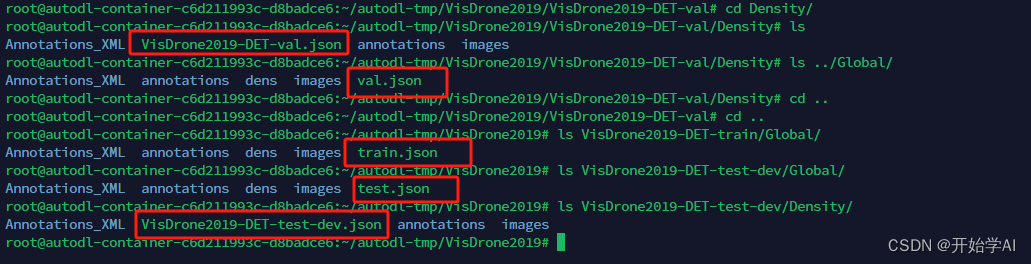
DMNet复现(一)之数据准备篇:Density map guided object detection in aerial image
一、生成密度图 密度图标签生成 采用以下代码,生成训练集密度图gt: import cv2 import glob import h5py import scipy import pickle import numpy as np from PIL import Image from itertools import islice from tqdm import tqdm from matplotli…...

k8s相关命令-命名空间
k8s相关命令目录 文章目录 前言一、创建命名空间二、删除命名空间三、查看命名空间列表四、查看命名空间列表五、查看特定命名空间下所有资源六、删除特定命名空间下所有资源 前言 记录k8s命名空间的相关操作命令 一、创建命名空间 kubectl create namespace <namespace&g…...

CG Magic分享同一场景里下,VR渲染器和CR渲染器哪个好?
渲染操作时,VR渲染器和CR渲染器的对比成为常见问题了。这个问题很多人都会问。 今天CG Magic小编通过一个真实的项目,就是同一场景下来比较一下VR渲染器和CR渲染器的区别。 以下图为例是用来测试的场景当年的最终图。采用了当年的一个伊丽莎白大街152号的…...
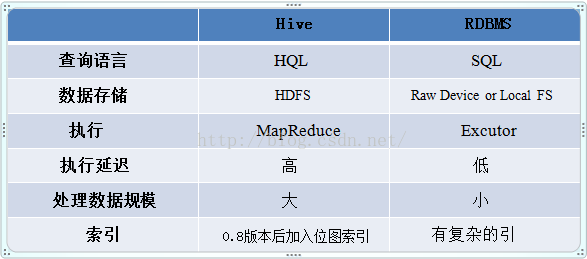
Hive工作原理
Hive 工作原理详解-阿里云开发者社区 Hive的服务端组件 1. Driver组件:该组件包括:Compiler、Optimizer、Executor,它可以将Hive的编译、解析、优化转化为MapReduce任务提交给Hadoop1中的JobTracker或者是Hadoop2中的SourceManager来进行实际的执行相应…...

vue 使用this.$set设置对象属性值时,不更新试图
vue 使用this.$set设置对象属性值时,不更新试图。 后来发现是因为若对象中存在该属性时,只更新值,不添加响应监测。 //vue/src/core/observer/index.js 源码片段/*** Set a property on an object. Adds the new property and* triggers ch…...
uniapp视频播放功能
UniApp提供了多种视频播放组件,包括视频播放器(video)、多媒体组件(media)、WebView(内置Video标签)等。其中,video和media组件是最常用的。 video组件 video组件是基于HTML5 vide…...

Java面向对象七大原则以及设计模式单例模式和工厂模式简单工厂模式
面向对象的七大原则(OOP) 1,开闭原则: 对扩展开发,对修改关闭 2.里氏替换原则: 继承必须确保超类所拥有的子类的性质在子类中仍然成立 3.依赖倒置原则: 面向接口编程,不要面向实现编程&am…...

Linux 遍历目录(cd 命令)
Linux 遍历目录(cd 命令) 文章目录 Linux 遍历目录(cd 命令)一、cd 命令二、绝对文件路径三、相对文件路径 一、cd 命令 在 Linux 文件系统上,可以使用 cd 命令将 shell 会话切换到另一个目录。cd 命令的格式也很简单…...
整合Nginx实现反向代理
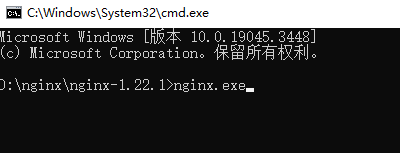
针对后端启动多个服务,接口需要统一请求路径时,可以使用nginx进行请求地址反向代理。 1.下载: nginx 2.下载完成后解压,找到配置文件nginx.conf(在解压文件的conf目录中),在http中增加以下示例代码&#x…...

Linux:IP转INT详解
一、IP地址介绍 IP地址(Internet Protocol Address)是指互联网协议地址,是所有连接到网络设备的唯一标识符。IP地址由32位二进制数表示,通常以四段十进制数(每个数值范围为0-255)表示,例如192.1…...
43.MQ—RabbitMQ
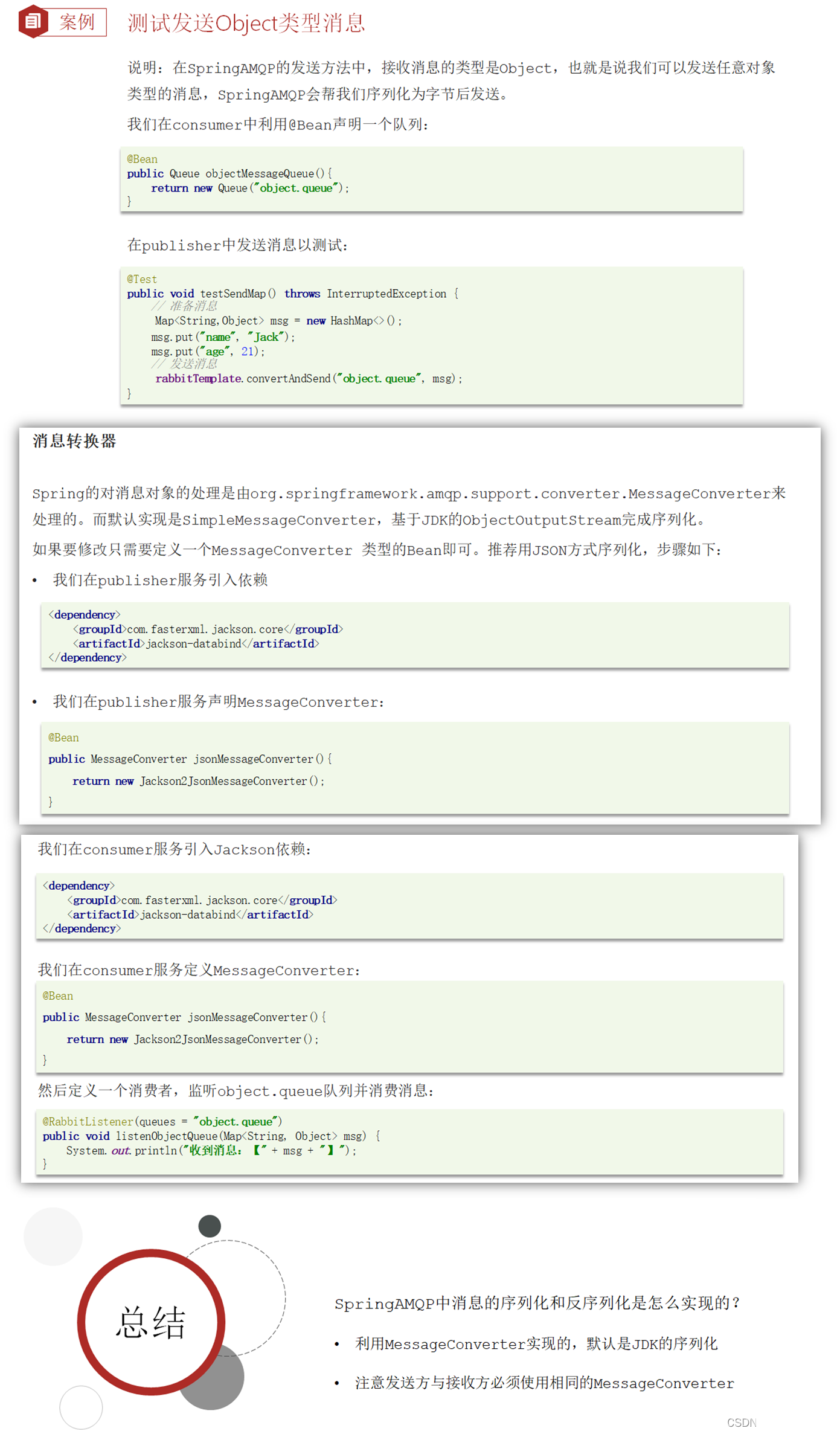
目录 一、MQ—RabbitMQ。 (1)同步调用与异步调用。 (1.1)同步调用。 (1.2)异步调用。 (2)MQ之间的区别。 (3)RabbitMQ学习。 (3.1…...

Golang 面试经典题:map 的 key 可以是什么类型?哪些不可以?
Golang 面试经典题:map 的 key 可以是什么类型?哪些不可以? 在 Golang 的面试中,map 类型的使用是一个常见的考点,其中对 key 类型的合法性 是一道常被提及的基础却很容易被忽视的问题。本文将带你深入理解 Golang 中…...

STM32+rt-thread判断是否联网
一、根据NETDEV_FLAG_INTERNET_UP位判断 static bool is_conncected(void) {struct netdev *dev RT_NULL;dev netdev_get_first_by_flags(NETDEV_FLAG_INTERNET_UP);if (dev RT_NULL){printf("wait netdev internet up...");return false;}else{printf("loc…...

条件运算符
C中的三目运算符(也称条件运算符,英文:ternary operator)是一种简洁的条件选择语句,语法如下: 条件表达式 ? 表达式1 : 表达式2• 如果“条件表达式”为true,则整个表达式的结果为“表达式1”…...
SpringTask-03.入门案例
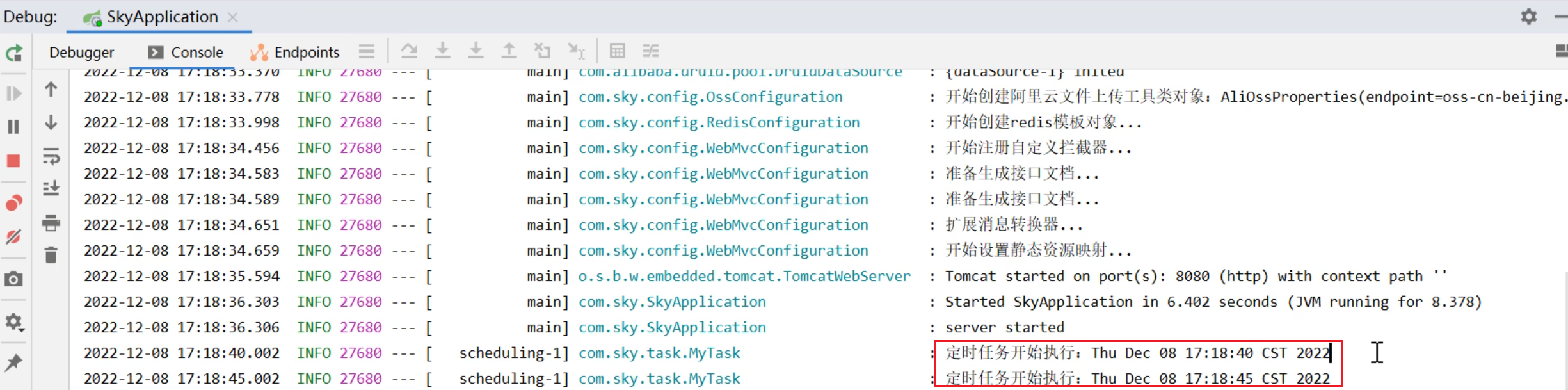
一.入门案例 启动类: package com.sky;import lombok.extern.slf4j.Slf4j; import org.springframework.boot.SpringApplication; import org.springframework.boot.autoconfigure.SpringBootApplication; import org.springframework.cache.annotation.EnableCach…...
vue3+vite项目中使用.env文件环境变量方法
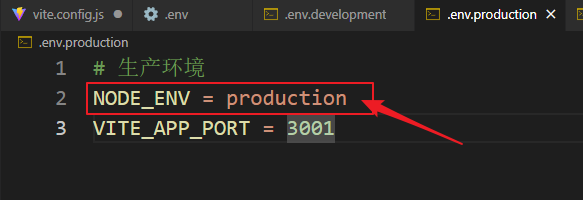
vue3vite项目中使用.env文件环境变量方法 .env文件作用命名规则常用的配置项示例使用方法注意事项在vite.config.js文件中读取环境变量方法 .env文件作用 .env 文件用于定义环境变量,这些变量可以在项目中通过 import.meta.env 进行访问。Vite 会自动加载这些环境变…...

Android Bitmap治理全解析:从加载优化到泄漏防控的全生命周期管理
引言 Bitmap(位图)是Android应用内存占用的“头号杀手”。一张1080P(1920x1080)的图片以ARGB_8888格式加载时,内存占用高达8MB(192010804字节)。据统计,超过60%的应用OOM崩溃与Bitm…...
的原因分类及对应排查方案)
JVM暂停(Stop-The-World,STW)的原因分类及对应排查方案
JVM暂停(Stop-The-World,STW)的完整原因分类及对应排查方案,结合JVM运行机制和常见故障场景整理而成: 一、GC相关暂停 1. 安全点(Safepoint)阻塞 现象:JVM暂停但无GC日志,日志显示No GCs detected。原因:JVM等待所有线程进入安全点(如…...
)
Typeerror: cannot read properties of undefined (reading ‘XXX‘)
最近需要在离线机器上运行软件,所以得把软件用docker打包起来,大部分功能都没问题,出了一个奇怪的事情。同样的代码,在本机上用vscode可以运行起来,但是打包之后在docker里出现了问题。使用的是dialog组件,…...
JVM 内存结构 详解
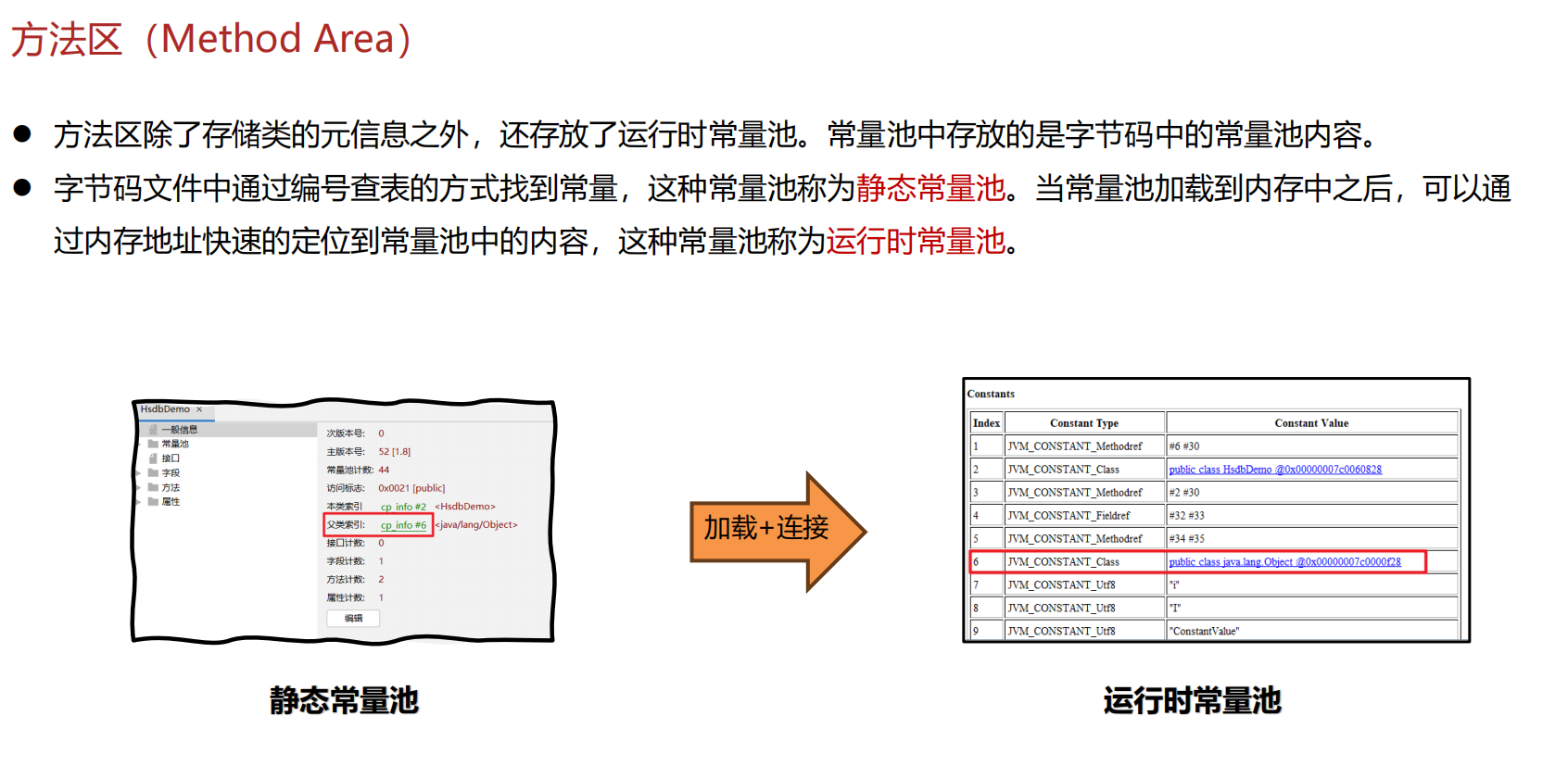
内存结构 运行时数据区: Java虚拟机在运行Java程序过程中管理的内存区域。 程序计数器: 线程私有,程序控制流的指示器,分支、循环、跳转、异常处理、线程恢复等基础功能都依赖这个计数器完成。 每个线程都有一个程序计数…...
STM32HAL库USART源代码解析及应用
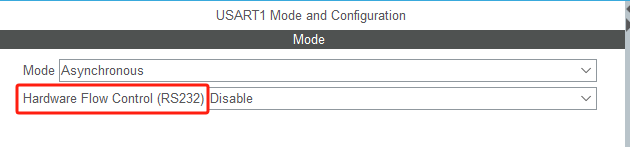
STM32HAL库USART源代码解析 前言STM32CubeIDE配置串口USART和UART的选择使用模式参数设置GPIO配置DMA配置中断配置硬件流控制使能生成代码解析和使用方法串口初始化__UART_HandleTypeDef结构体浅析HAL库代码实际使用方法使用轮询方式发送使用轮询方式接收使用中断方式发送使用中…...