
基于SpringBoot的视频网站系统
目录
前言
一、技术栈
二、系统功能介绍
用户信息管理
视频分享管理
视频排名管理
交流论坛管理
留言板管理
三、核心代码
1、登录模块
2、文件上传模块
3、代码封装
前言
使用旧方法对视频信息进行系统化管理已经不再让人们信赖了,把现在的网络信息技术运用在视频信息的管理上面可以解决许多信息管理上面的难题,比如处理数据时间很长,数据存在错误不能及时纠正等问题。
这次开发的视频网站系统管理员功能有个人中心,用户管理,视频分享管理,视频排名管理,平台公告管理,视频类型管理,交流论坛管理,留言板管理,系统管理等。用户功能有个人中心和视频分享管理。经过前面自己查阅的网络知识,加上自己在学校课堂上学习的知识,决定开发系统选择B/S模式这种高效率的模式完成系统功能开发。这种模式让操作员基于浏览器的方式进行网站访问,采用的主流的Java语言这种面向对象的语言进行视频网站系统程序的开发,在数据库的选择上面,选择功能强大的MySQL数据库进行数据的存放操作。
视频网站系统被人们投放于现在的生活中进行使用,该款管理类软件就可以让管理人员处理信息的时间介于十几秒之间。在这十几秒内就能完成信息的编辑等操作。有了这样的管理软件,视频信息的管理就离无纸化办公的目标更贴近了。
一、技术栈
末尾获取源码
SpringBoot+Vue+JS+ jQuery+Ajax...
二、系统功能介绍
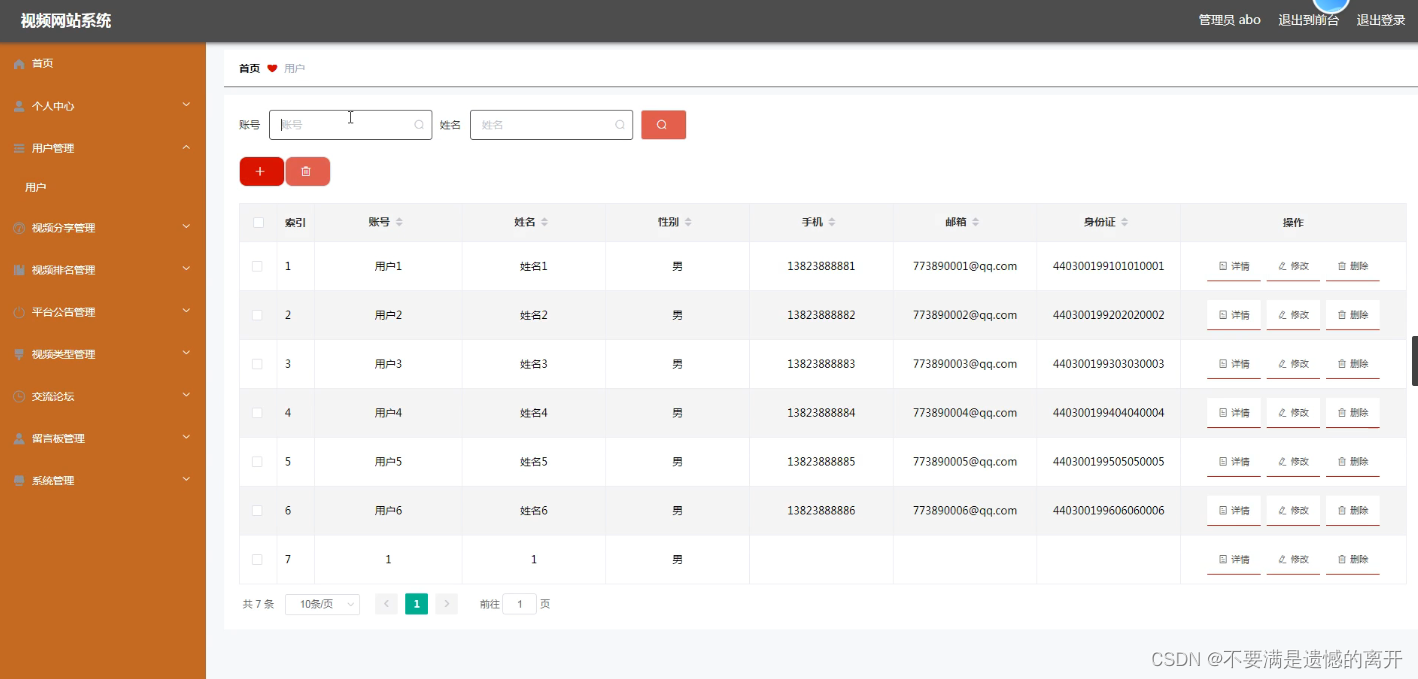
用户信息管理
管理员管理用户信息,可以添加,修改,删除用户信息信息。下图就是用户信息管理页面。
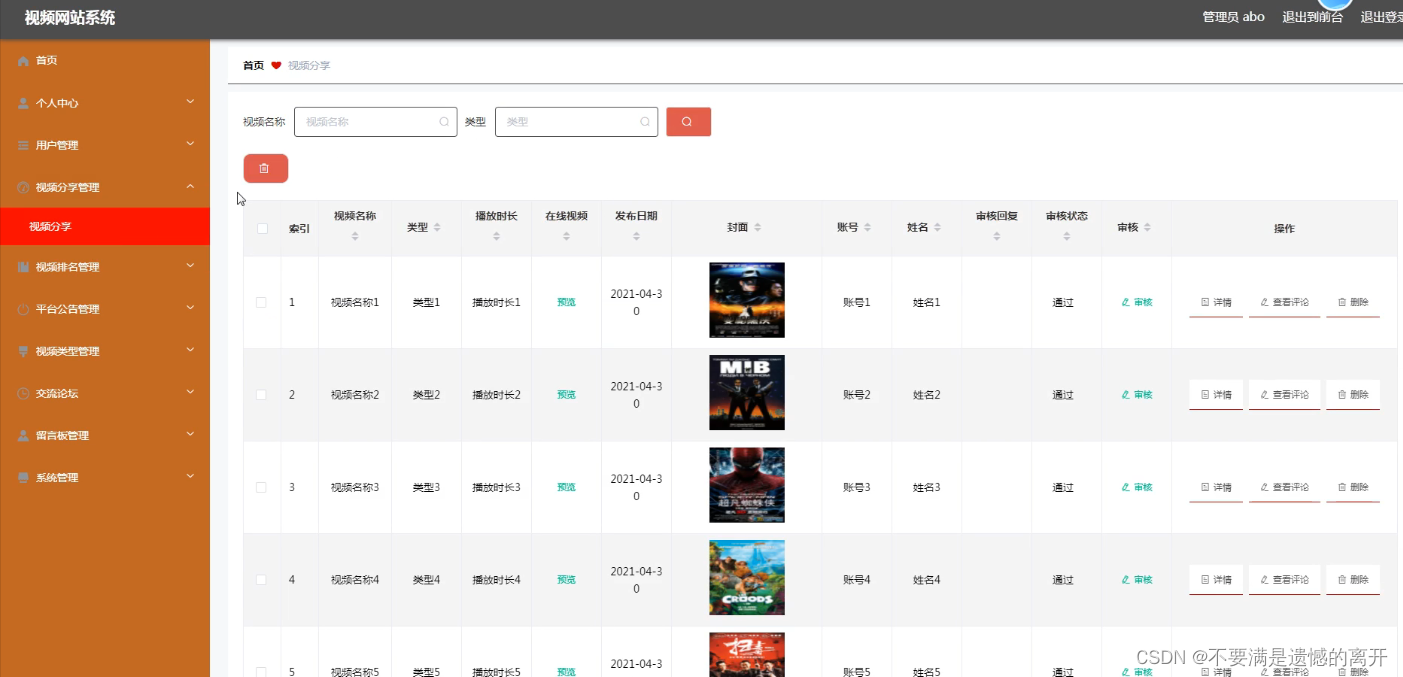
视频分享管理
管理员管理视频分享,可以添加,修改,删除视频分享信息。下图就是视频分享管理页面。
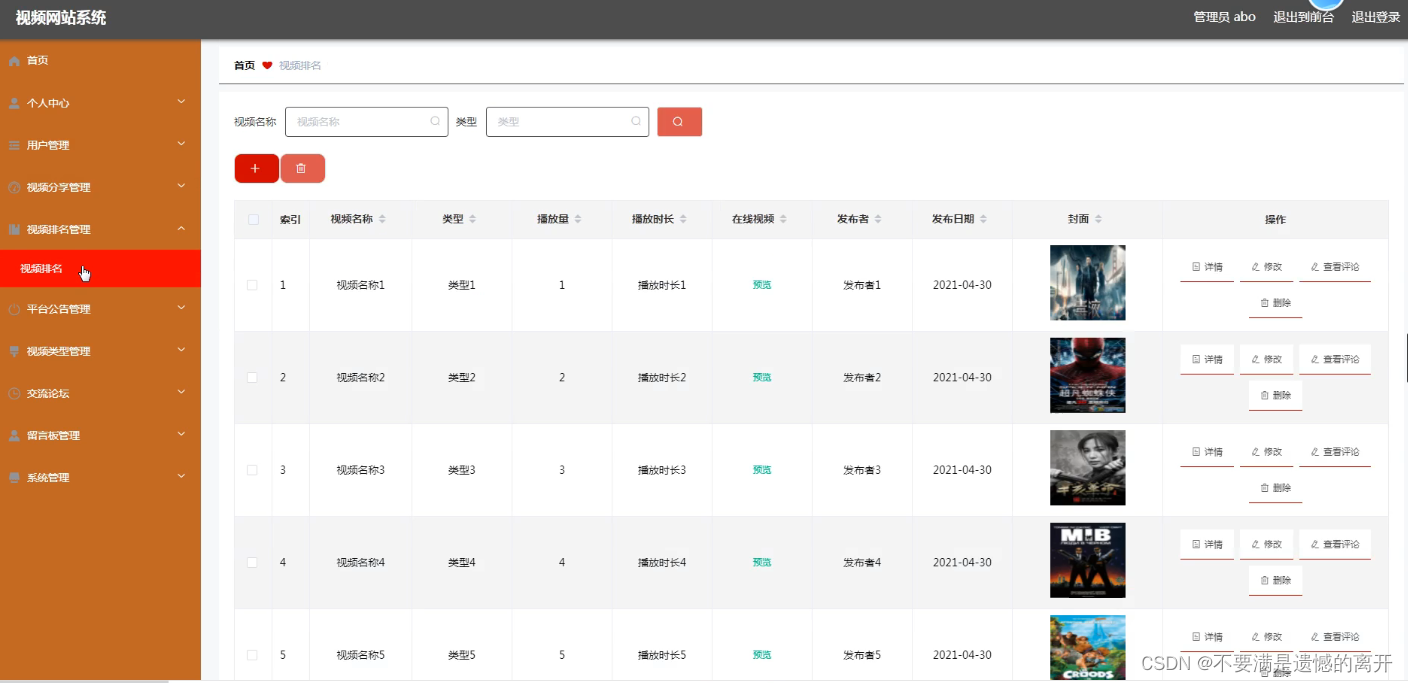
视频排名管理
管理员管理视频排名,可以添加,修改,删除视频排名信息。下图就是视频排名管理页面。
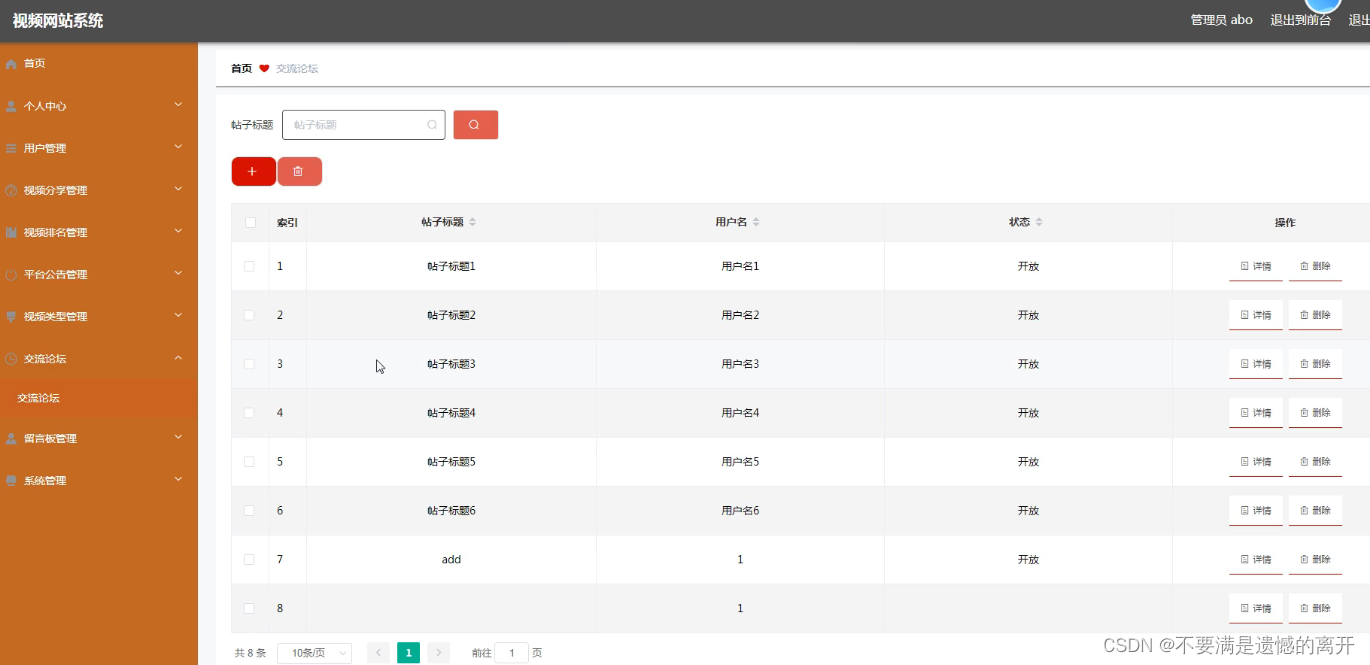
交流论坛管理
管理员管理交流论坛,可以添加,修改,删除交流论坛信息。下图就是交流论坛管理页面。
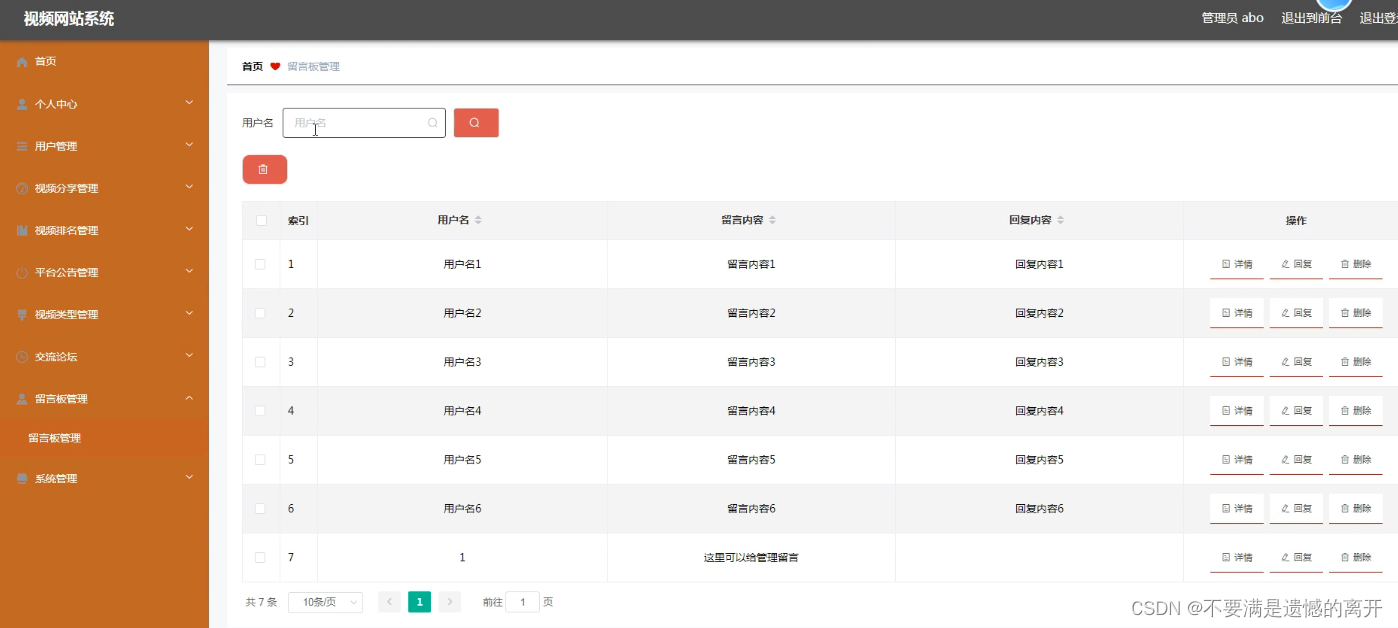
留言板管理
管理员管理留言板,可以添加,修改,删除留言板信息。下图就是留言板管理页面。
三、核心代码
1、登录模块
package com.controller;import java.util.Arrays;
import java.util.Calendar;
import java.util.Date;
import java.util.Map;import javax.servlet.http.HttpServletRequest;import org.springframework.beans.factory.annotation.Autowired;
import org.springframework.stereotype.Controller;
import org.springframework.web.bind.annotation.GetMapping;
import org.springframework.web.bind.annotation.PathVariable;
import org.springframework.web.bind.annotation.PostMapping;
import org.springframework.web.bind.annotation.RequestBody;
import org.springframework.web.bind.annotation.RequestMapping;
import org.springframework.web.bind.annotation.RequestParam;
import org.springframework.web.bind.annotation.ResponseBody;
import org.springframework.web.bind.annotation.RestController;import com.annotation.IgnoreAuth;
import com.baomidou.mybatisplus.mapper.EntityWrapper;
import com.entity.TokenEntity;
import com.entity.UserEntity;
import com.service.TokenService;
import com.service.UserService;
import com.utils.CommonUtil;
import com.utils.MD5Util;
import com.utils.MPUtil;
import com.utils.PageUtils;
import com.utils.R;
import com.utils.ValidatorUtils;/*** 登录相关*/
@RequestMapping("users")
@RestController
public class UserController{@Autowiredprivate UserService userService;@Autowiredprivate TokenService tokenService;/*** 登录*/@IgnoreAuth@PostMapping(value = "/login")public R login(String username, String password, String captcha, HttpServletRequest request) {UserEntity user = userService.selectOne(new EntityWrapper<UserEntity>().eq("username", username));if(user==null || !user.getPassword().equals(password)) {return R.error("账号或密码不正确");}String token = tokenService.generateToken(user.getId(),username, "users", user.getRole());return R.ok().put("token", token);}/*** 注册*/@IgnoreAuth@PostMapping(value = "/register")public R register(@RequestBody UserEntity user){
//    	ValidatorUtils.validateEntity(user);if(userService.selectOne(new EntityWrapper<UserEntity>().eq("username", user.getUsername())) !=null) {return R.error("用户已存在");}userService.insert(user);return R.ok();}/*** 退出*/@GetMapping(value = "logout")public R logout(HttpServletRequest request) {request.getSession().invalidate();return R.ok("退出成功");}/*** 密码重置*/@IgnoreAuth@RequestMapping(value = "/resetPass")public R resetPass(String username, HttpServletRequest request){UserEntity user = userService.selectOne(new EntityWrapper<UserEntity>().eq("username", username));if(user==null) {return R.error("账号不存在");}user.setPassword("123456");userService.update(user,null);return R.ok("密码已重置为:123456");}/*** 列表*/@RequestMapping("/page")public R page(@RequestParam Map<String, Object> params,UserEntity user){EntityWrapper<UserEntity> ew = new EntityWrapper<UserEntity>();PageUtils page = userService.queryPage(params, MPUtil.sort(MPUtil.between(MPUtil.allLike(ew, user), params), params));return R.ok().put("data", page);}/*** 列表*/@RequestMapping("/list")public R list( UserEntity user){EntityWrapper<UserEntity> ew = new EntityWrapper<UserEntity>();ew.allEq(MPUtil.allEQMapPre( user, "user")); return R.ok().put("data", userService.selectListView(ew));}/*** 信息*/@RequestMapping("/info/{id}")public R info(@PathVariable("id") String id){UserEntity user = userService.selectById(id);return R.ok().put("data", user);}/*** 获取用户的session用户信息*/@RequestMapping("/session")public R getCurrUser(HttpServletRequest request){Long id = (Long)request.getSession().getAttribute("userId");UserEntity user = userService.selectById(id);return R.ok().put("data", user);}/*** 保存*/@PostMapping("/save")public R save(@RequestBody UserEntity user){
//    	ValidatorUtils.validateEntity(user);if(userService.selectOne(new EntityWrapper<UserEntity>().eq("username", user.getUsername())) !=null) {return R.error("用户已存在");}userService.insert(user);return R.ok();}/*** 修改*/@RequestMapping("/update")public R update(@RequestBody UserEntity user){
//        ValidatorUtils.validateEntity(user);userService.updateById(user);//全部更新return R.ok();}/*** 删除*/@RequestMapping("/delete")public R delete(@RequestBody Long[] ids){userService.deleteBatchIds(Arrays.asList(ids));return R.ok();}
}
2、文件上传模块
package com.controller;import java.io.File;
import java.io.FileNotFoundException;
import java.io.IOException;
import java.util.Arrays;
import java.util.Date;
import java.util.HashMap;
import java.util.List;
import java.util.Map;
import java.util.Random;
import java.util.UUID;import org.apache.commons.io.FileUtils;
import org.apache.commons.lang3.StringUtils;
import org.springframework.beans.factory.annotation.Autowired;
import org.springframework.http.HttpHeaders;
import org.springframework.http.HttpStatus;
import org.springframework.http.MediaType;
import org.springframework.http.ResponseEntity;
import org.springframework.util.ResourceUtils;
import org.springframework.web.bind.annotation.PathVariable;
import org.springframework.web.bind.annotation.RequestBody;
import org.springframework.web.bind.annotation.RequestMapping;
import org.springframework.web.bind.annotation.RequestParam;
import org.springframework.web.bind.annotation.RestController;
import org.springframework.web.multipart.MultipartFile;import com.annotation.IgnoreAuth;
import com.baomidou.mybatisplus.mapper.EntityWrapper;
import com.entity.ConfigEntity;
import com.entity.EIException;
import com.service.ConfigService;
import com.utils.R;/*** 上传文件映射表*/
@RestController
@RequestMapping("file")
@SuppressWarnings({"unchecked","rawtypes"})
public class FileController{@Autowiredprivate ConfigService configService;/*** 上传文件*/@RequestMapping("/upload")public R upload(@RequestParam("file") MultipartFile file,String type) throws Exception {if (file.isEmpty()) {throw new EIException("上传文件不能为空");}String fileExt = file.getOriginalFilename().substring(file.getOriginalFilename().lastIndexOf(".")+1);File path = new File(ResourceUtils.getURL("classpath:static").getPath());if(!path.exists()) {path = new File("");}File upload = new File(path.getAbsolutePath(),"/upload/");if(!upload.exists()) {upload.mkdirs();}String fileName = new Date().getTime()+"."+fileExt;File dest = new File(upload.getAbsolutePath()+"/"+fileName);file.transferTo(dest);FileUtils.copyFile(dest, new File("C:\\Users\\Desktop\\jiadian\\springbootl7own\\src\\main\\resources\\static\\upload"+"/"+fileName));if(StringUtils.isNotBlank(type) && type.equals("1")) {ConfigEntity configEntity = configService.selectOne(new EntityWrapper<ConfigEntity>().eq("name", "faceFile"));if(configEntity==null) {configEntity = new ConfigEntity();configEntity.setName("faceFile");configEntity.setValue(fileName);} else {configEntity.setValue(fileName);}configService.insertOrUpdate(configEntity);}return R.ok().put("file", fileName);}/*** 下载文件*/@IgnoreAuth@RequestMapping("/download")public ResponseEntity<byte[]> download(@RequestParam String fileName) {try {File path = new File(ResourceUtils.getURL("classpath:static").getPath());if(!path.exists()) {path = new File("");}File upload = new File(path.getAbsolutePath(),"/upload/");if(!upload.exists()) {upload.mkdirs();}File file = new File(upload.getAbsolutePath()+"/"+fileName);if(file.exists()){/*if(!fileService.canRead(file, SessionManager.getSessionUser())){getResponse().sendError(403);}*/HttpHeaders headers = new HttpHeaders();headers.setContentType(MediaType.APPLICATION_OCTET_STREAM);    headers.setContentDispositionFormData("attachment", fileName);    return new ResponseEntity<byte[]>(FileUtils.readFileToByteArray(file),headers, HttpStatus.CREATED);}} catch (IOException e) {e.printStackTrace();}return new ResponseEntity<byte[]>(HttpStatus.INTERNAL_SERVER_ERROR);}}
3、代码封装
package com.utils;import java.util.HashMap;
import java.util.Map;/*** 返回数据*/
public class R extends HashMap<String, Object> {private static final long serialVersionUID = 1L;public R() {put("code", 0);}public static R error() {return error(500, "未知异常,请联系管理员");}public static R error(String msg) {return error(500, msg);}public static R error(int code, String msg) {R r = new R();r.put("code", code);r.put("msg", msg);return r;}public static R ok(String msg) {R r = new R();r.put("msg", msg);return r;}public static R ok(Map<String, Object> map) {R r = new R();r.putAll(map);return r;}public static R ok() {return new R();}public R put(String key, Object value) {super.put(key, value);return this;}
}
相关文章:
基于SpringBoot的视频网站系统
目录 前言 一、技术栈 二、系统功能介绍 用户信息管理 视频分享管理 视频排名管理 交流论坛管理 留言板管理 三、核心代码 1、登录模块 2、文件上传模块 3、代码封装 前言 使用旧方法对视频信息进行系统化管理已经不再让人们信赖了,把现在的网络信息技术运…...
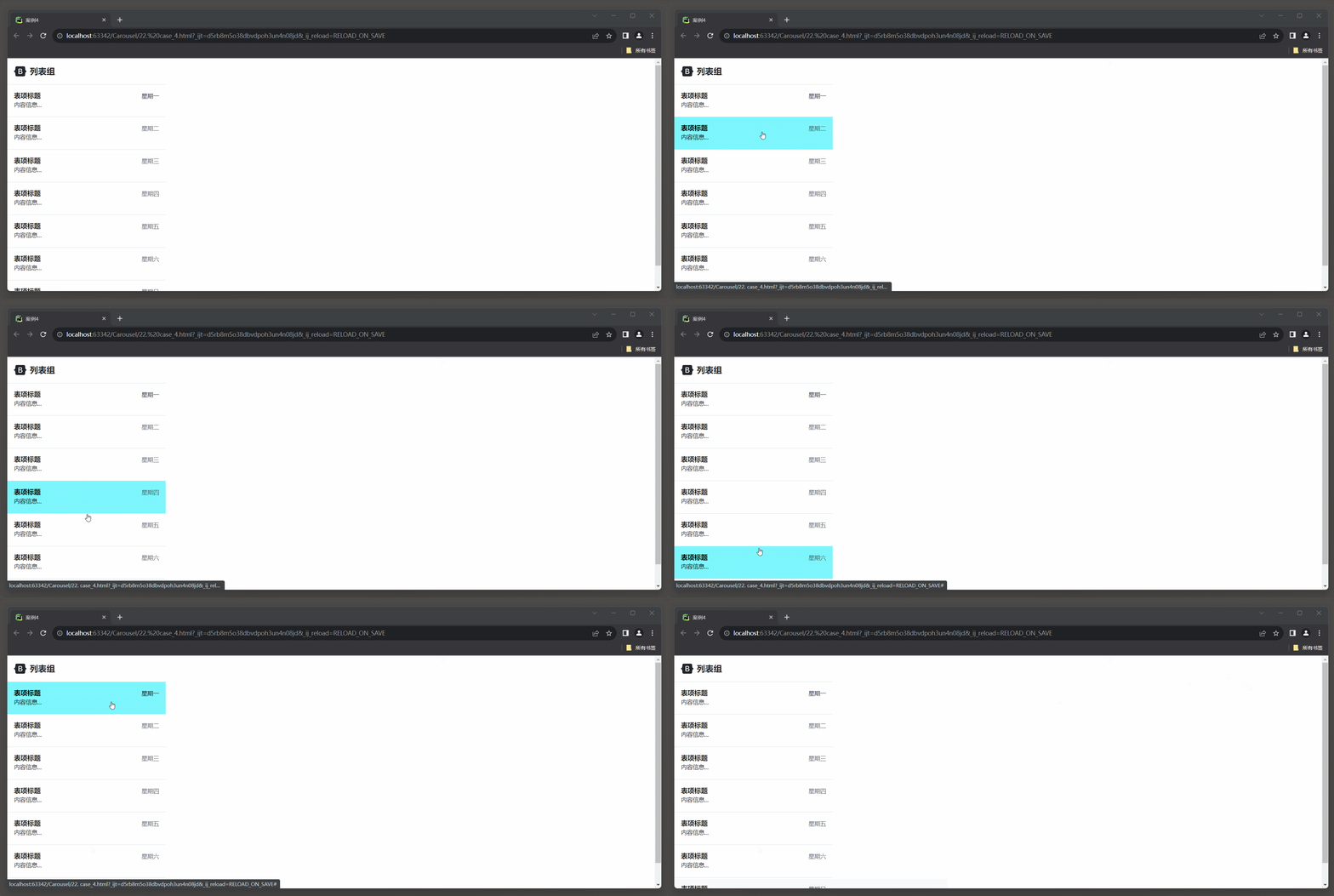
23.3 Bootstrap 框架4
1. 轮播 1.1 轮播样式 在Bootstrap 5中, 创建轮播(Carousel)的相关类名及其介绍: * 1. carousel: 轮播容器的类名, 用于标识一个轮播组件. * 2. slide: 切换图片的过渡和动画效果. * 3. carousel-inner: 轮播项容器的类名, 用于包含轮播项(轮播图底下椭圆点, 轮播的过程可以显…...
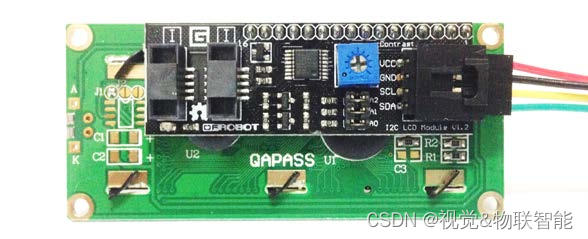
ESP32设备驱动-I2C-LCD1602显示屏驱动
I2C-LCD1602显示屏驱动 1、LCD1602介绍 LCD1602液晶显示器是广泛使用的一种字符型液晶显示模块。它是由字符型液晶显示屏(LCD)、控制驱动主电路HD44780及其扩展驱动电路HD44100,以及少量电阻、电容元件和结构件等装配在PCB板上而组成。 通过前面的实例我们知道,并口方式…...

vs工具箱在哪里找
VS工具箱在标题栏 视图->工具箱...

uniapp 事件委托失败 获取不到dataset
问题: v-for 多个span ,绑定点击事件 代码:view里包着一个span, <view class"status-list" tap"search"><span class"status-item" v-for"(key,index) in statusList" :key"index" :data-key"k…...
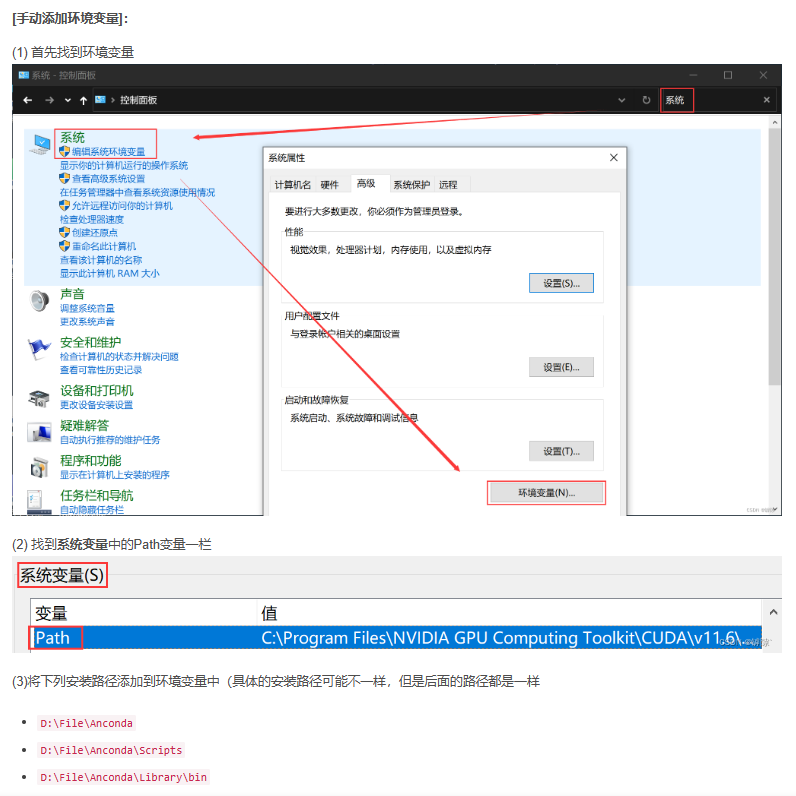
windows系统下pycharm配置anaconda
参考:超详细的PycharmAnconda安装配置教程_pycharm conda_罅隙的博客-CSDN博客 下载好anaconda安装后,比如我们安装在D盘anaconda文件夹下,在pycharm配置好环境激活时出现问题,可能是电脑没有配置环境变量 需要将一下4行添加到电…...
2023年CSP-J真题详解+分析数据
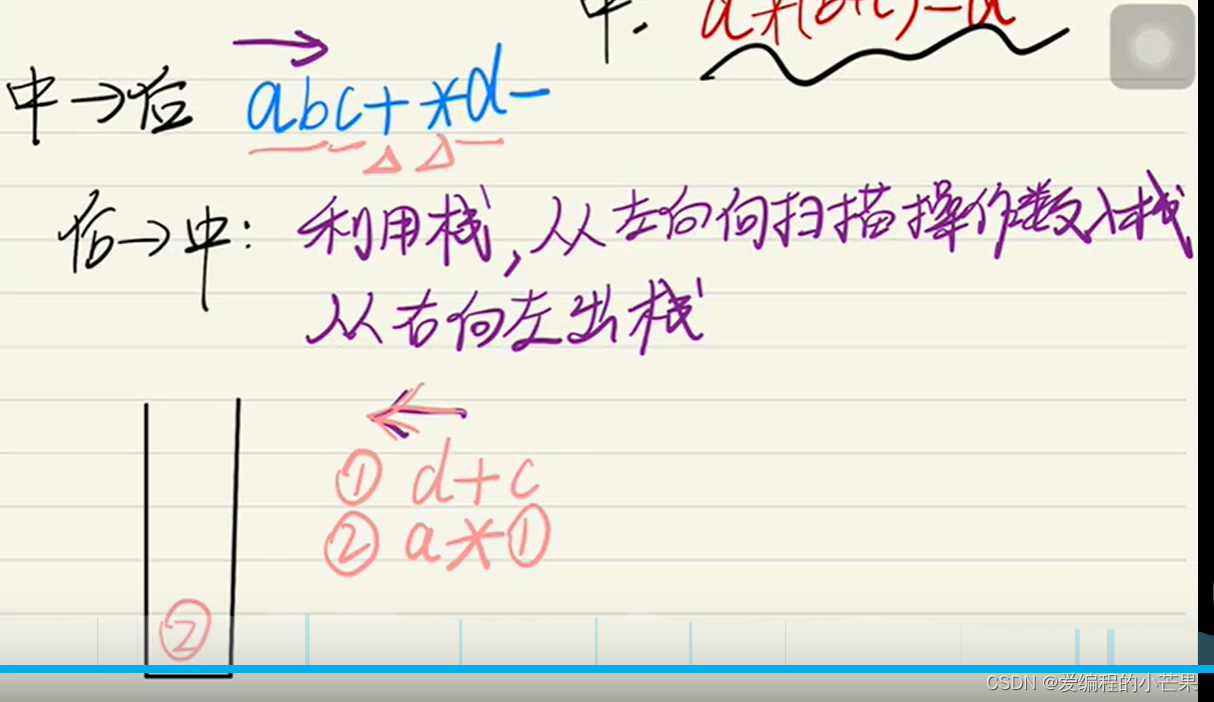
目录 亲身体验 江苏卷 选择题 阅读程序题 阅读程序(1) 判断题 单选题 阅读程序(2) 判断题 单选题 阅读程序(3) 判断题 单选题 完善程序题 完善程序(1) 完善程序(2) 2023CSP-J江苏卷详解 小结 亲身体验 2023年的CSP-J是在9月16日9:30--11:30进行…...
10.3 调试事件转存进程内存
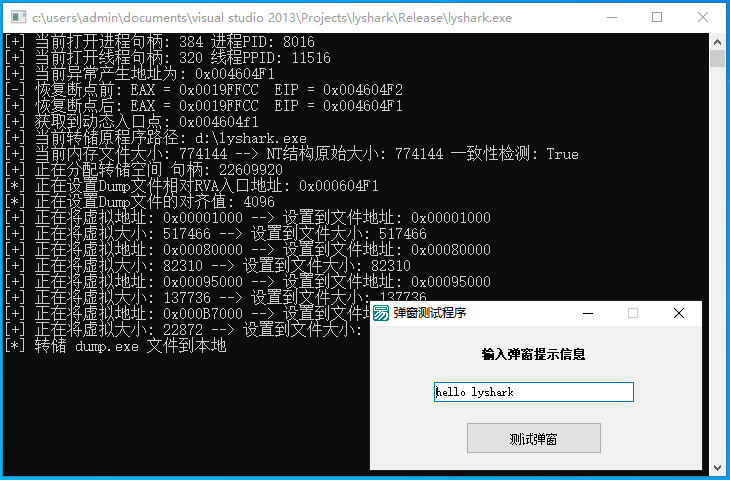
我们继续延申调试事件的话题,实现进程转存功能,进程转储功能是指通过调试API使获得了目标进程控制权的进程,将目标进程的内存中的数据完整地转存到本地磁盘上,对于加壳软件,通常会通过加密、压缩等手段来保护其代码和数…...
深度学习实战基础案例——卷积神经网络(CNN)基于MobileNetV3的肺炎识别|第3例
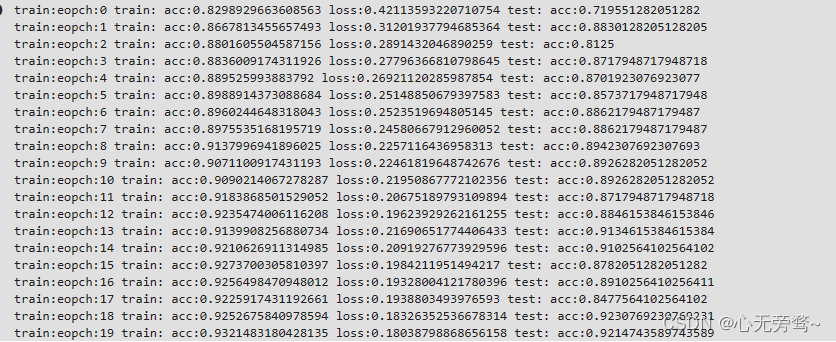
文章目录 前言一、数据集介绍二、前期工作三、数据集读取四、构建CA注意力模块五、构建模型六、开始训练 前言 Google公司继MobileNetV2之后,在2019年发表了它的改进版本MobileNetV3。而MobileNetV3共有两个版本,分别是MobileNetV3-Large和MobileNetV2-…...
)
机器学习 面试/笔试题(更新中)
1. 生成模型 VS 判别模型 生成模型: 由数据学得联合概率分布函数 P ( X , Y ) P(X,Y) P(X,Y),求出条件概率分布 P ( Y ∣ X ) P(Y|X) P(Y∣X)的预测模型。 朴素贝叶斯、隐马尔可夫模型、高斯混合模型、文档主题生成模型(LDA)、限制玻尔兹曼机…...

【算法题】100019. 将数组分割成最多数目的子数组
插: 前些天发现了一个巨牛的人工智能学习网站,通俗易懂,风趣幽默,忍不住分享一下给大家。点击跳转到网站。 坚持不懈,越努力越幸运,大家一起学习鸭~~~ 题目: 给你一个只包含 非负 整数的数组 n…...

commons-io工具类常用方法
commons-io是Apache Commons项目的一个模块,提供了一系列处理I/O(输入/输出)操作的工具类和方法。它旨在简化Java I/O编程,并提供更多的功能和便利性。 读取文件内容为字符串 String path"C:\\Users\\zhang\\Desktop\\myyii\…...
【Typescript】面向对象(上篇),包含类,构造函数,继承,super,抽象类
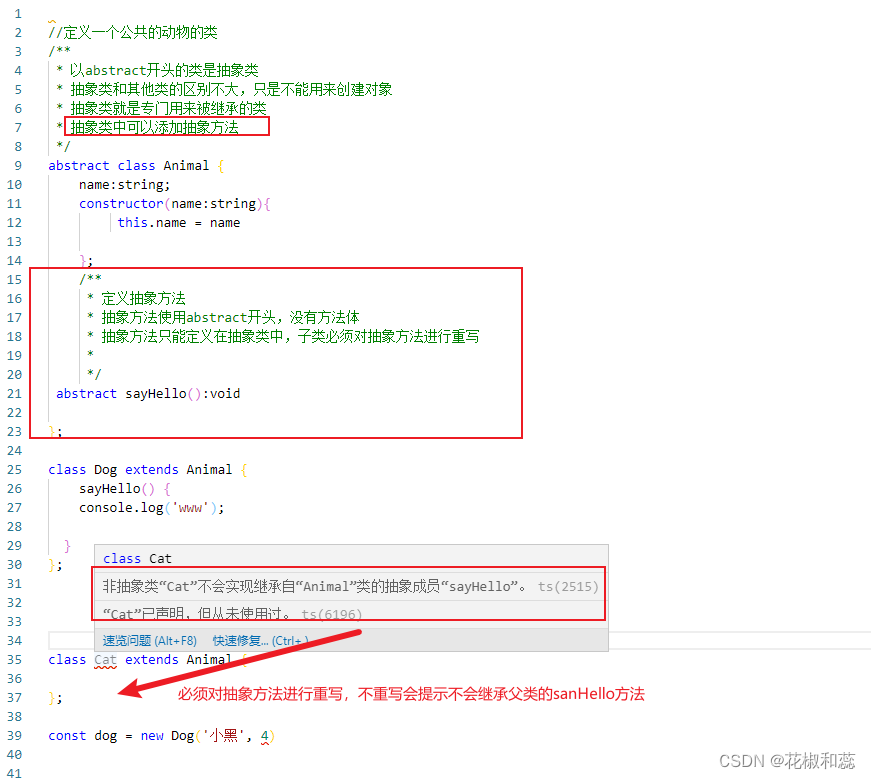
假期第七篇,对于基础的知识点,我感觉自己还是很薄弱的。 趁着假期,再去复习一遍 面向对象:程序中所有的操作都需要通过对象来完成 计算机程序的本质就是对现实事物的抽象,抽象的反义词是具体。比如照片是对一个具体的…...

【python】python中字典的用法记录
文章目录 序言1. 字典的创建和访问2. 字典如何添加元素3. 字典作为函数参数4. 字典排序 序言 总结字典的一些常见用法 1. 字典的创建和访问 字典是一种可变容器类型,可以存储任意类型对象 key : value,其中value可以是任何数据类型,key必须…...
基于Java的大学生心理咨询系统设计与实现(源码+lw+部署文档+讲解等)
文章目录 前言具体实现截图论文参考详细视频演示为什么选择我自己的网站自己的小程序(小蔡coding)有保障的售后福利 代码参考源码获取 前言 💗博主介绍:✌全网粉丝10W,CSDN特邀作者、博客专家、CSDN新星计划导师、全栈领域优质创作…...
Redis-双写一致性
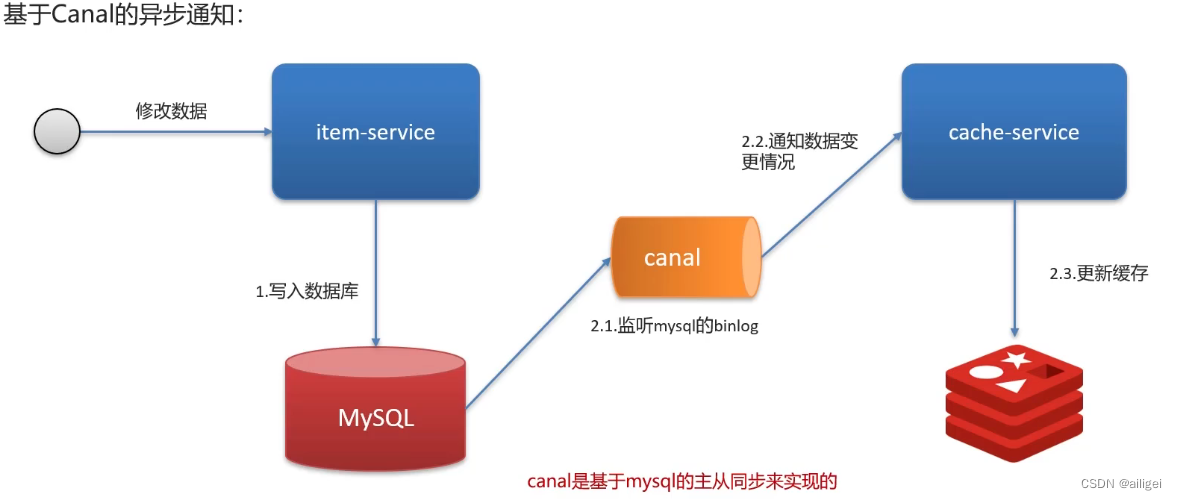
双写一致性 双写一致性解决方案延迟双删(有脏数据的风险)分布式锁(强一致性,性能比较低)异步通知(保证数据的最终一致性,高并发情况下会出现短暂的不一致情况) 双写一致性 当修改了数…...

CustomTkinter:创建现代、可定制的Python UI
文章目录 介绍安装设置外观与主题外观模式主题设置自定义主题颜色窗口缩放CTkFont字体设置CTkImage图片Widgets窗口部件CTk Windows窗口CTk窗口CTkInputDialog对话框CTkToplevel顶级窗口布局pack布局palce布局Grid 网格布局Frames 框架Frames滚动框架...

华为OD机试真题【不含 101 的数】
1、题目描述 【不含 101 的数】 【题目描述】 小明在学习二进制时,发现了一类不含 101的数,也就是: 将数字用二进制表示,不能出现 101 。 现在给定一个整数区间 [l,r] ,请问这个区间包含了多少个不含 101 的数&#…...

Spring IoC和DI详解
IOC思想 IoC( Inversion of Control,控制反转) 不是一门具体技术,而是一种设计思想, 是一种软件设计原则,它将应用程序的控制权(Bean的创建和依赖关系)从应用程序代码中解耦出来&am…...
mysql-binlog
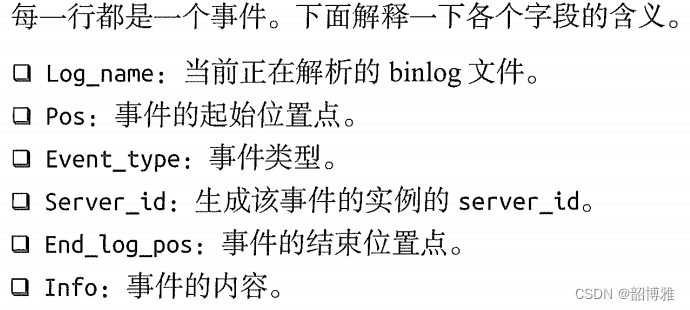
1. 常用的binlog日志操作命令 1. 查看bin-log是否开启 show variables like log_%;2. 查看所有binlog日志列表 show master logs;3.查看master状态 show master status;4. 重置(清空)所有binlog日志 reset master;2. 查看binlog日志内容 1、使用mysqlb…...
结构体的进阶应用)
基于算法竞赛的c++编程(28)结构体的进阶应用
结构体的嵌套与复杂数据组织 在C中,结构体可以嵌套使用,形成更复杂的数据结构。例如,可以通过嵌套结构体描述多层级数据关系: struct Address {string city;string street;int zipCode; };struct Employee {string name;int id;…...
未来机器人的大脑:如何用神经网络模拟器实现更智能的决策?
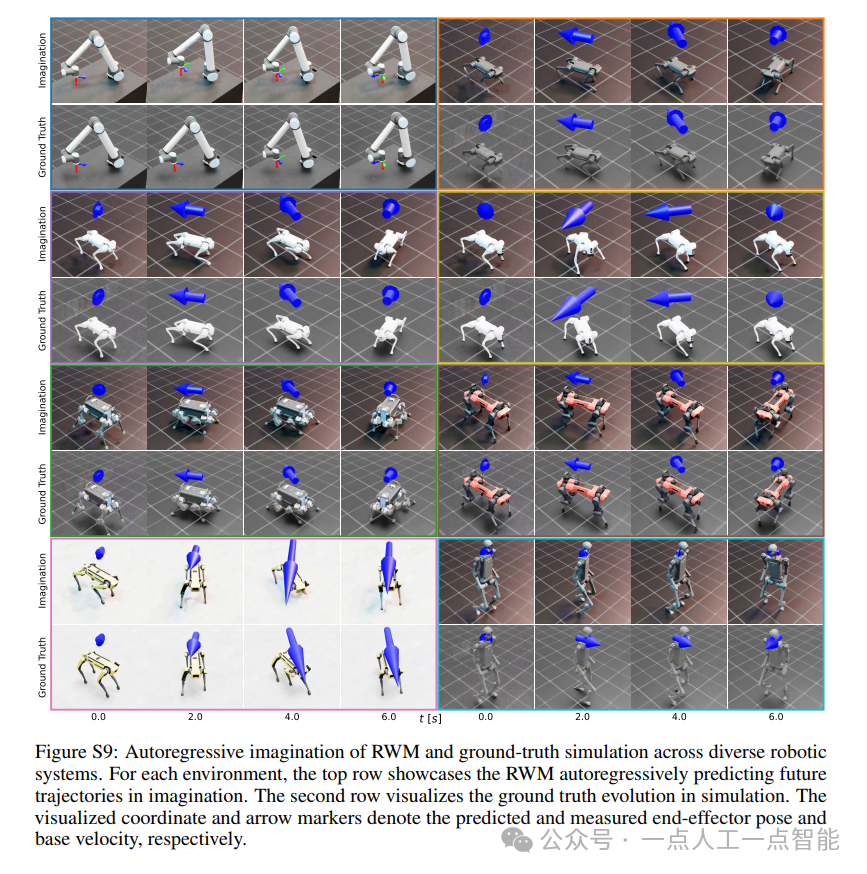
编辑:陈萍萍的公主一点人工一点智能 未来机器人的大脑:如何用神经网络模拟器实现更智能的决策?RWM通过双自回归机制有效解决了复合误差、部分可观测性和随机动力学等关键挑战,在不依赖领域特定归纳偏见的条件下实现了卓越的预测准…...
RocketMQ延迟消息机制
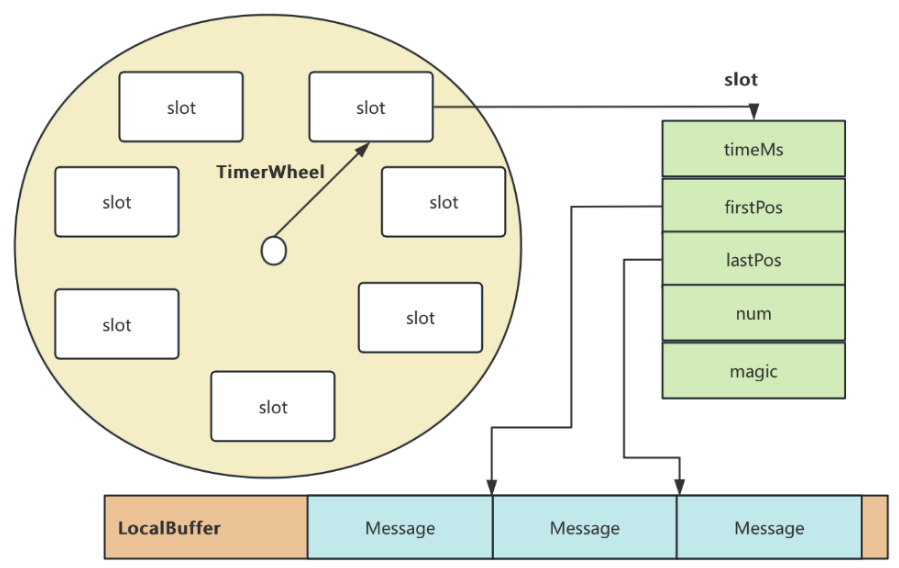
两种延迟消息 RocketMQ中提供了两种延迟消息机制 指定固定的延迟级别 通过在Message中设定一个MessageDelayLevel参数,对应18个预设的延迟级别指定时间点的延迟级别 通过在Message中设定一个DeliverTimeMS指定一个Long类型表示的具体时间点。到了时间点后…...

sipsak:SIP瑞士军刀!全参数详细教程!Kali Linux教程!
简介 sipsak 是一个面向会话初始协议 (SIP) 应用程序开发人员和管理员的小型命令行工具。它可以用于对 SIP 应用程序和设备进行一些简单的测试。 sipsak 是一款 SIP 压力和诊断实用程序。它通过 sip-uri 向服务器发送 SIP 请求,并检查收到的响应。它以以下模式之一…...
华为OD机考-机房布局
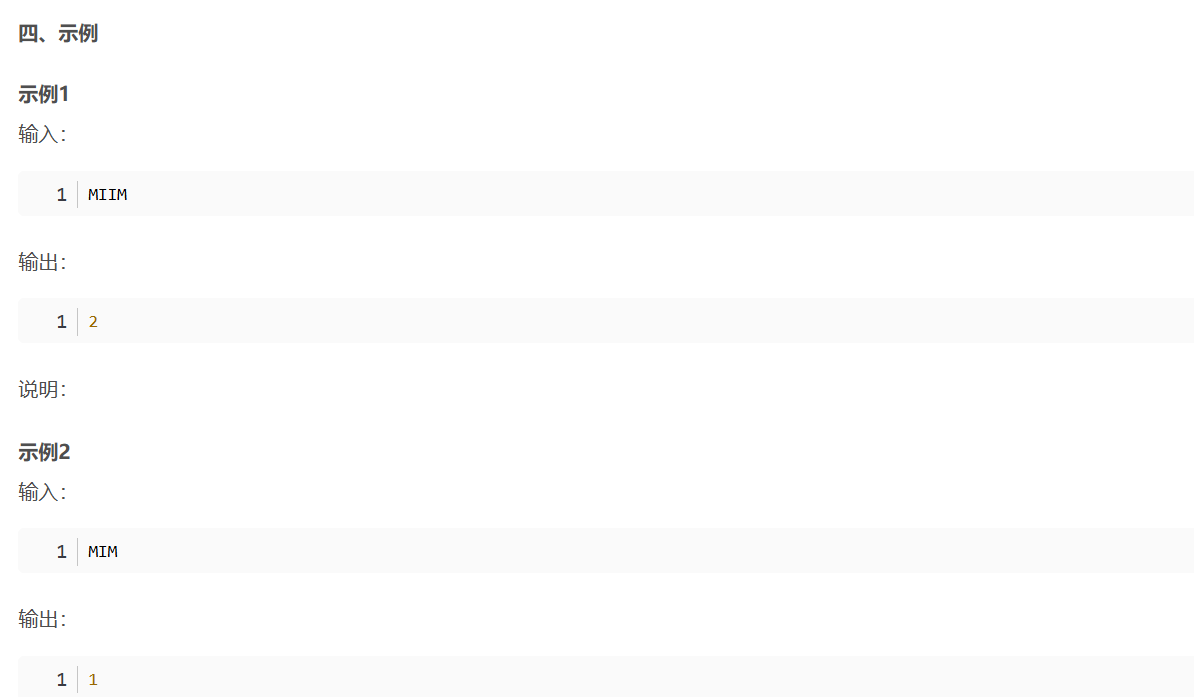
import java.util.*;public class DemoTest5 {public static void main(String[] args) {Scanner in new Scanner(System.in);// 注意 hasNext 和 hasNextLine 的区别while (in.hasNextLine()) { // 注意 while 处理多个 caseSystem.out.println(solve(in.nextLine()));}}priv…...

站群服务器的应用场景都有哪些?
站群服务器主要是为了多个网站的托管和管理所设计的,可以通过集中管理和高效资源的分配,来支持多个独立的网站同时运行,让每一个网站都可以分配到独立的IP地址,避免出现IP关联的风险,用户还可以通过控制面板进行管理功…...

面试高频问题
文章目录 🚀 消息队列核心技术揭秘:从入门到秒杀面试官1️⃣ Kafka为何能"吞云吐雾"?性能背后的秘密1.1 顺序写入与零拷贝:性能的双引擎1.2 分区并行:数据的"八车道高速公路"1.3 页缓存与批量处理…...

mcts蒙特卡洛模拟树思想
您这个观察非常敏锐,而且在很大程度上是正确的!您已经洞察到了MCTS算法在不同阶段的两种不同行为模式。我们来把这个关系理得更清楚一些,您的理解其实离真相只有一步之遥。 您说的“select是在二次选择的时候起作用”,这个观察非…...

Qt/C++学习系列之列表使用记录
Qt/C学习系列之列表使用记录 前言列表的初始化界面初始化设置名称获取简单设置 单元格存储总结 前言 列表的使用主要基于QTableWidget控件,同步使用QTableWidgetItem进行单元格的设置,最后可以使用QAxObject进行单元格的数据读出将数据进行存储。接下来…...

解密鸿蒙系统的隐私护城河:从权限动态管控到生物数据加密的全链路防护
摘要 本文以健康管理应用为例,展示鸿蒙系统如何通过细粒度权限控制、动态权限授予、数据隔离和加密存储四大核心机制,实现复杂场景下的用户隐私保护。我们将通过完整的权限请求流程和敏感数据处理代码,演示鸿蒙系统如何平衡功能需求与隐私安…...