
elasticsearch|大数据|kibana的安装(https+密码)
前言:
kibana是比较好安装的,但https+密码就比较麻烦一些了,下面将就如何安装一个可在生产使用的kibana做一个简单的讲述
一,
kibana版本和下载地址
这里我想还是强调一下,kibana的版本需要和elasticsearch的版本一致,小版本都不能差,否则,kibana将不能正确连接到elasticsearch
本例我使用的是elasticsearch-6.3.2版本,因此,下载的kibana版本也是6.3.2
官方下载地址:
Kibana 6.3.2 | Elastic
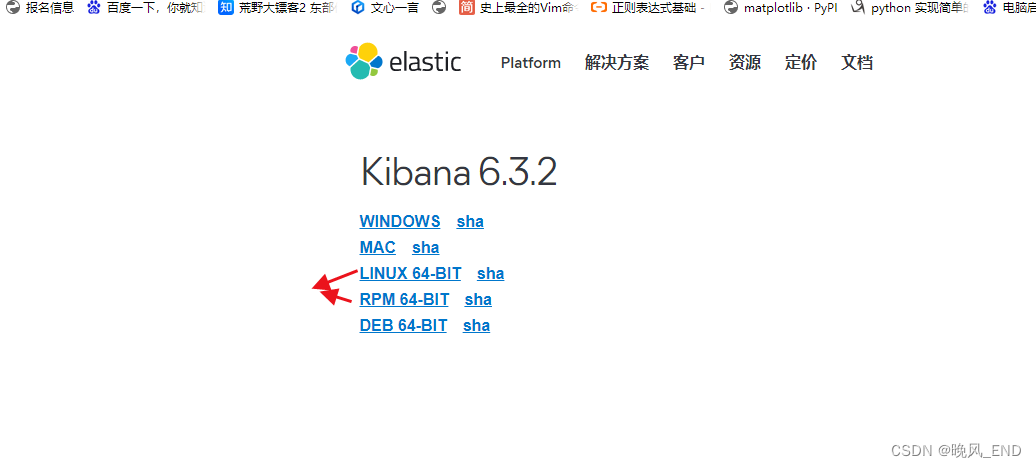
两个版本二进制和rpm基本没有什么区别,想折腾点就二进制了,不想太麻烦rpm即可,看自己的需求啦。
不过要吐槽一下,官网下载比较慢,即使科学上网仍然很慢,因此,是需要一点耐心了
下载完毕后,没什么好说的,扔到服务器上就可以了
二,
elasticsearch的证书
kibana是安装在192.168.123.15上面的
[root@node4 ~]# cat instances.yml
instances:- name: "node-1"dns: ['192.168.123.11']- name: "node-2"dns: ['192.168.123.12']- name: "node-3"dns: ['192.168.123.13']    - name: 'node-4'dns: ['192.168.123.14']- name: 'node-5'dns: ['192.168.123.15']
执行以下命令生成证书包:
###注:生成的证书格式是pem的,可以直接使用,无需任何转换(哪个服务器都可以,随便找个服务器就可以了)
/data/es/bin/x-pack/certutil cert ca --pem --in instances.yml --out /root/certs.zip
解压上面在root根目录下生成的证书包
在15服务器上,证书放置在此目录下:
[root@centos5 kibana]# ls -al ca.crt node-5.crt node-5.key
-rw-r--r-- 1 root root 1200 Dec 15 23:07 ca.crt
-rw-r--r-- 1 root root 1180 Dec 15 23:07 node-5.crt
-rw-r--r-- 1 root root 1679 Dec 15 23:07 node-5.key
kibana的配置文件:
[root@centos5 kibana]# cat config/kibana.yml
# Kibana is served by a back end server. This setting specifies the port to use.
server.port: 15666# Specifies the address to which the Kibana server will bind. IP addresses and host names are both valid values.
# The default is 'localhost', which usually means remote machines will not be able to connect.
# To allow connections from remote users, set this parameter to a non-loopback address.
server.host: 192.168.123.15# Enables you to specify a path to mount Kibana at if you are running behind a proxy.
# Use the `server.rewriteBasePath` setting to tell Kibana if it should remove the basePath
# from requests it receives, and to prevent a deprecation warning at startup.
# This setting cannot end in a slash.
#server.basePath: ""# Specifies whether Kibana should rewrite requests that are prefixed with
# `server.basePath` or require that they are rewritten by your reverse proxy.
# This setting was effectively always `false` before Kibana 6.3 and will
# default to `true` starting in Kibana 7.0.
#server.rewriteBasePath: false# The maximum payload size in bytes for incoming server requests.
#server.maxPayloadBytes: 1048576# The Kibana server's name.  This is used for display purposes.
server.name: mykibana# The URL of the Elasticsearch instance to use for all your queries.
elasticsearch.url: https://192.168.123.11:19200# When this setting's value is true Kibana uses the hostname specified in the server.host
# setting. When the value of this setting is false, Kibana uses the hostname of the host
# that connects to this Kibana instance.
#elasticsearch.preserveHost: true# Kibana uses an index in Elasticsearch to store saved searches, visualizations and
# dashboards. Kibana creates a new index if the index doesn't already exist.
#kibana.index: ".kibana"# The default application to load.
#kibana.defaultAppId: "home"# If your Elasticsearch is protected with basic authentication, these settings provide
# the username and password that the Kibana server uses to perform maintenance on the Kibana
# index at startup. Your Kibana users still need to authenticate with Elasticsearch, which
# is proxied through the Kibana server.
elasticsearch.username: elastic
elasticsearch.password: "123456"# Enables SSL and paths to the PEM-format SSL certificate and SSL key files, respectively.
# These settings enable SSL for outgoing requests from the Kibana server to the browser.
server.ssl.enabled: true
server.ssl.certificate: /opt/kibana/node-5.crt
server.ssl.key: /opt/kibana/node-5.key# Optional settings that provide the paths to the PEM-format SSL certificate and key files.
# These files validate that your Elasticsearch backend uses the same key files.
#elasticsearch.ssl.certificate: /path/to/your/client.crt
#elasticsearch.ssl.key: /path/to/your/client.key# Optional setting that enables you to specify a path to the PEM file for the certificate
# authority for your Elasticsearch instance.
elasticsearch.ssl.certificateAuthorities: [ "/opt/kibana/ca.crt" ]# To disregard the validity of SSL certificates, change this setting's value to 'none'.
elasticsearch.ssl.verificationMode: certificate# Time in milliseconds to wait for Elasticsearch to respond to pings. Defaults to the value of
# the elasticsearch.requestTimeout setting.
#elasticsearch.pingTimeout: 1500# Time in milliseconds to wait for responses from the back end or Elasticsearch. This value
# must be a positive integer.
#elasticsearch.requestTimeout: 30000# List of Kibana client-side headers to send to Elasticsearch. To send *no* client-side
# headers, set this value to [] (an empty list).
#elasticsearch.requestHeadersWhitelist: [ authorization ]# Header names and values that are sent to Elasticsearch. Any custom headers cannot be overwritten
# by client-side headers, regardless of the elasticsearch.requestHeadersWhitelist configuration.
#elasticsearch.customHeaders: {}# Time in milliseconds for Elasticsearch to wait for responses from shards. Set to 0 to disable.
#elasticsearch.shardTimeout: 30000# Time in milliseconds to wait for Elasticsearch at Kibana startup before retrying.
#elasticsearch.startupTimeout: 5000# Logs queries sent to Elasticsearch. Requires logging.verbose set to true.
#elasticsearch.logQueries: false# Specifies the path where Kibana creates the process ID file.
#pid.file: /var/run/kibana.pid# Enables you specify a file where Kibana stores log output.
logging.dest: /var/log/kibana/kibana.log# Set the value of this setting to true to suppress all logging output.
#logging.silent: false# Set the value of this setting to true to suppress all logging output other than error messages.
#logging.quiet: false# Set the value of this setting to true to log all events, including system usage information
# and all requests.
#logging.verbose: false# Set the interval in milliseconds to sample system and process performance
# metrics. Minimum is 100ms. Defaults to 5000.
#ops.interval: 5000# The default locale. This locale can be used in certain circumstances to substitute any missing
# translations.
i18n.defaultLocale: "zh-CN"
根据配置文件,创建目录:
mkdir /var/log/kibana三,
启动kibana
/opt/kibana/bin/kibana此时是前台启动,直接看日志:
[root@centos5 kibana]# tail -n 10  /var/log/kibana/kibana.log
{"type":"log","@timestamp":"2023-12-15T23:48:48Z","tags":["status","plugin:searchprofiler@6.3.2","info"],"pid":1572,"state":"green","message":"Status changed from red to green - Ready","prevState":"red","prevMsg":"This version of Kibana requires Elasticsearch v6.3.2 on all nodes. I found the following incompatible nodes in your cluster: v6.2.4 @ 192.168.123.14:19200 (192.168.123.14), v6.2.4 @ 192.168.123.13:19200 (192.168.123.13), v6.2.4 @ 192.168.123.12:19200 (192.168.123.12), v6.2.4 @ 192.168.123.11:19200 (192.168.123.11)"}
{"type":"log","@timestamp":"2023-12-15T23:48:48Z","tags":["status","plugin:ml@6.3.2","info"],"pid":1572,"state":"green","message":"Status changed from red to green - Ready","prevState":"red","prevMsg":"This version of Kibana requires Elasticsearch v6.3.2 on all nodes. I found the following incompatible nodes in your cluster: v6.2.4 @ 192.168.123.14:19200 (192.168.123.14), v6.2.4 @ 192.168.123.13:19200 (192.168.123.13), v6.2.4 @ 192.168.123.12:19200 (192.168.123.12), v6.2.4 @ 192.168.123.11:19200 (192.168.123.11)"}
{"type":"log","@timestamp":"2023-12-15T23:48:48Z","tags":["status","plugin:tilemap@6.3.2","info"],"pid":1572,"state":"green","message":"Status changed from red to green - Ready","prevState":"red","prevMsg":"This version of Kibana requires Elasticsearch v6.3.2 on all nodes. I found the following incompatible nodes in your cluster: v6.2.4 @ 192.168.123.14:19200 (192.168.123.14), v6.2.4 @ 192.168.123.13:19200 (192.168.123.13), v6.2.4 @ 192.168.123.12:19200 (192.168.123.12), v6.2.4 @ 192.168.123.11:19200 (192.168.123.11)"}
{"type":"log","@timestamp":"2023-12-15T23:48:48Z","tags":["status","plugin:watcher@6.3.2","info"],"pid":1572,"state":"green","message":"Status changed from red to green - Ready","prevState":"red","prevMsg":"This version of Kibana requires Elasticsearch v6.3.2 on all nodes. I found the following incompatible nodes in your cluster: v6.2.4 @ 192.168.123.14:19200 (192.168.123.14), v6.2.4 @ 192.168.123.13:19200 (192.168.123.13), v6.2.4 @ 192.168.123.12:19200 (192.168.123.12), v6.2.4 @ 192.168.123.11:19200 (192.168.123.11)"}
{"type":"log","@timestamp":"2023-12-15T23:48:48Z","tags":["status","plugin:index_management@6.3.2","info"],"pid":1572,"state":"green","message":"Status changed from red to green - Ready","prevState":"red","prevMsg":"This version of Kibana requires Elasticsearch v6.3.2 on all nodes. I found the following incompatible nodes in your cluster: v6.2.4 @ 192.168.123.14:19200 (192.168.123.14), v6.2.4 @ 192.168.123.13:19200 (192.168.123.13), v6.2.4 @ 192.168.123.12:19200 (192.168.123.12), v6.2.4 @ 192.168.123.11:19200 (192.168.123.11)"}
{"type":"log","@timestamp":"2023-12-15T23:48:48Z","tags":["status","plugin:graph@6.3.2","info"],"pid":1572,"state":"green","message":"Status changed from red to green - Ready","prevState":"red","prevMsg":"This version of Kibana requires Elasticsearch v6.3.2 on all nodes. I found the following incompatible nodes in your cluster: v6.2.4 @ 192.168.123.14:19200 (192.168.123.14), v6.2.4 @ 192.168.123.13:19200 (192.168.123.13), v6.2.4 @ 192.168.123.12:19200 (192.168.123.12), v6.2.4 @ 192.168.123.11:19200 (192.168.123.11)"}
{"type":"log","@timestamp":"2023-12-15T23:48:48Z","tags":["status","plugin:security@6.3.2","info"],"pid":1572,"state":"green","message":"Status changed from red to green - Ready","prevState":"red","prevMsg":"This version of Kibana requires Elasticsearch v6.3.2 on all nodes. I found the following incompatible nodes in your cluster: v6.2.4 @ 192.168.123.14:19200 (192.168.123.14), v6.2.4 @ 192.168.123.13:19200 (192.168.123.13), v6.2.4 @ 192.168.123.12:19200 (192.168.123.12), v6.2.4 @ 192.168.123.11:19200 (192.168.123.11)"}
{"type":"log","@timestamp":"2023-12-15T23:48:48Z","tags":["status","plugin:grokdebugger@6.3.2","info"],"pid":1572,"state":"green","message":"Status changed from red to green - Ready","prevState":"red","prevMsg":"This version of Kibana requires Elasticsearch v6.3.2 on all nodes. I found the following incompatible nodes in your cluster: v6.2.4 @ 192.168.123.14:19200 (192.168.123.14), v6.2.4 @ 192.168.123.13:19200 (192.168.123.13), v6.2.4 @ 192.168.123.12:19200 (192.168.123.12), v6.2.4 @ 192.168.123.11:19200 (192.168.123.11)"}
{"type":"log","@timestamp":"2023-12-15T23:48:48Z","tags":["status","plugin:logstash@6.3.2","info"],"pid":1572,"state":"green","message":"Status changed from red to green - Ready","prevState":"red","prevMsg":"This version of Kibana requires Elasticsearch v6.3.2 on all nodes. I found the following incompatible nodes in your cluster: v6.2.4 @ 192.168.123.14:19200 (192.168.123.14), v6.2.4 @ 192.168.123.13:19200 (192.168.123.13), v6.2.4 @ 192.168.123.12:19200 (192.168.123.12), v6.2.4 @ 192.168.123.11:19200 (192.168.123.11)"}
{"type":"log","@timestamp":"2023-12-15T23:48:48Z","tags":["status","plugin:reporting@6.3.2","info"],"pid":1572,"state":"green","message":"Status changed from red to green - Ready","prevState":"red","prevMsg":"This version of Kibana requires Elasticsearch v6.3.2 on all nodes. I found the following incompatible nodes in your cluster: v6.2.4 @ 192.168.123.14:19200 (192.168.123.14), v6.2.4 @ 192.168.123.13:19200 (192.168.123.13), v6.2.4 @ 192.168.123.12:19200 (192.168.123.12), v6.2.4 @ 192.168.123.11:19200 (192.168.123.11)"}

未完待续!!!
相关文章:
elasticsearch|大数据|kibana的安装(https+密码)
前言: kibana是比较好安装的,但https密码就比较麻烦一些了,下面将就如何安装一个可在生产使用的kibana做一个简单的讲述 一, kibana版本和下载地址 这里我想还是强调一下,kibana的版本需要和elasticsearch的版本一…...
vue javascript tree 层级数据处理
层级数据是有父子关系的数组,示例: const treeData [{id: 1b7e8e98cb1d4a1f81e4fe2dfd9a8458,name: 层级1,parentId: null,children: [{id: 0d45dd5bb4c14d64a3ab0b738add4b24,name: 层级1-1,parentId: 1b7e8e98cb1d4a1f81e4fe2dfd9a8458,children: [{…...
WPF仿网易云搭建笔记(4):信息流控制之消息订阅
文章目录 专栏和Gitee仓库前言消息订阅最简单的案例简单用例父组件订阅子组件回调 结果 消息订阅机制消息token是A还是B?传递消息的载体。双重token重复订阅问题 结论 专栏和Gitee仓库 WPF仿网易云 Gitee仓库 WPF仿网易云 CSDN博客专栏 前言 上一篇文章中,我们简单…...
持续集成交付CICD:GitLabCI操作Harbor仓库
目录 一、实验 1.GitLabCI操作Harbor仓库 二、问题 1.gitlab-runner连接docker daemon报错 一、实验 1.GitLabCI操作Harbor仓库 (1)修改GitLabCI共享库代码并提交到mater CI.yaml .pipelineInit:tags:- buildstage: .prevariables:GIT_CHECKOUT: …...
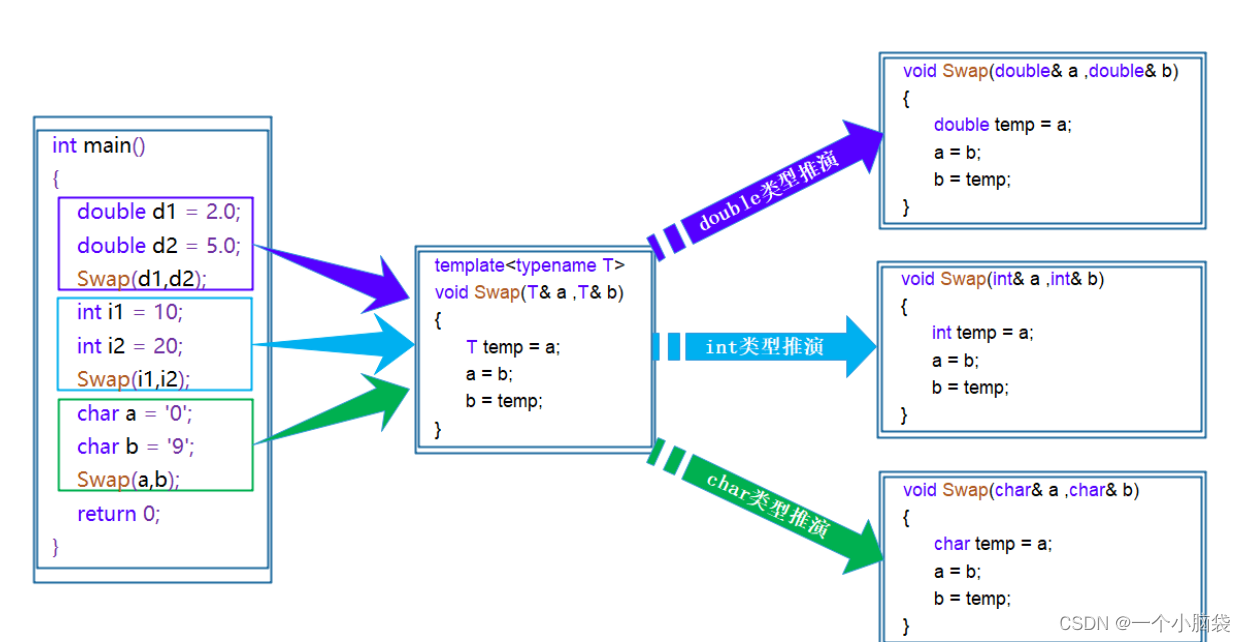
[C++]——学习模板
了解模板——初阶 前言:一、模板1.1 什么是模板1.2 模板的概念1.3 模板可以做什么1.4 泛型模板 二、函数模板2.1 函数模板概念和格式2.2 函数模板原理2.3 函数模板实例化2.3.1 隐式实例化2.3.2 显式实例化 2.4 模板参数的匹配原则2.5 函数模板声明定义分离 三、类模…...
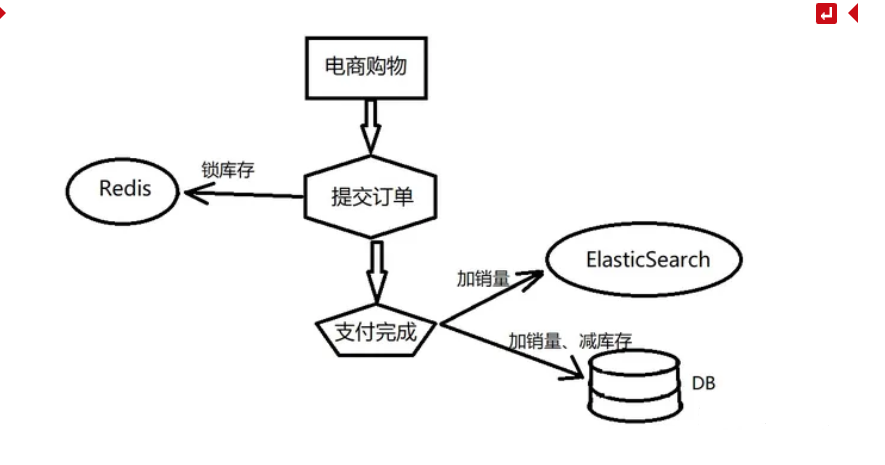
大数据技术14:FlinkCDC数据变更捕获
前言:Flink CDC是Flink社区开发的flink-cdc-connectors 组件,这是⼀个可以直接从 MySQL、PostgreSQL 等数据库直接读取全量数据和增量变更数据的 source 组件。 https://github.com/ververica/flink-cdc-connectors 一、CDC 概述 CDC 的全称是 Change …...

SpringDataRedis 基本使用
1.1 简介 1.1.1 概述 Spring Data 中有一个成员 Spring Data Redis,他提供了 RedisTemplate 可以在 Spring 应用中更简便的访问 Redis 以及异常处理及序列化,支持发布订阅等操作。 1.2 RedisTemplate 常见 API RedisTemplate 针对 jedis 客户端中大…...

蓝牙物联网智慧工厂解决方案
蓝牙物联网智慧工厂解决方案是一种针对工厂管理的智能化解决方案,通过蓝牙、物联网、大数据、人工智能等技术,实现工厂人员的定位、物资的定位管理、车间的智慧巡检、智慧安防以及数据的可视化等功能。 蓝牙物联网智慧工厂解决方案构成: 人员…...

html的学习笔记
开发工具:vscode 文字标签 h1:一级标题,h2:二级标题h6 p:段落标签 hr:分隔线 br:换行 strong/b:文字加粗 ins/u:下划线 em/i:倾斜 del/s:删除线 媒体标签 图片…...
)
每日一道算法题 8(2023-12-16)
题目描述 给定一个仅包含0和1的n*n二维矩阵 请计算二维矩阵的最大值 计算规则如下 每行元素按下标顺序组成一个二进制数(下标越大约排在低位), 二进制数的值就是该行的值,矩阵各行之和为矩阵的值 允许通过向左或向右整体循环移动每个元素来改变元素在行…...

Unity项目优化案例二
本文地址:https://blog.csdn.net/t163361/article/details/135024136 针对工作中遇到的优化问题,记录一下,给大家优化自己的项目提供一些思路。 公司产品最近正给国内某大型赛事做支撑服务暴露出不少问题。 使用环境 Unity 2021.3.0f1 cpu…...
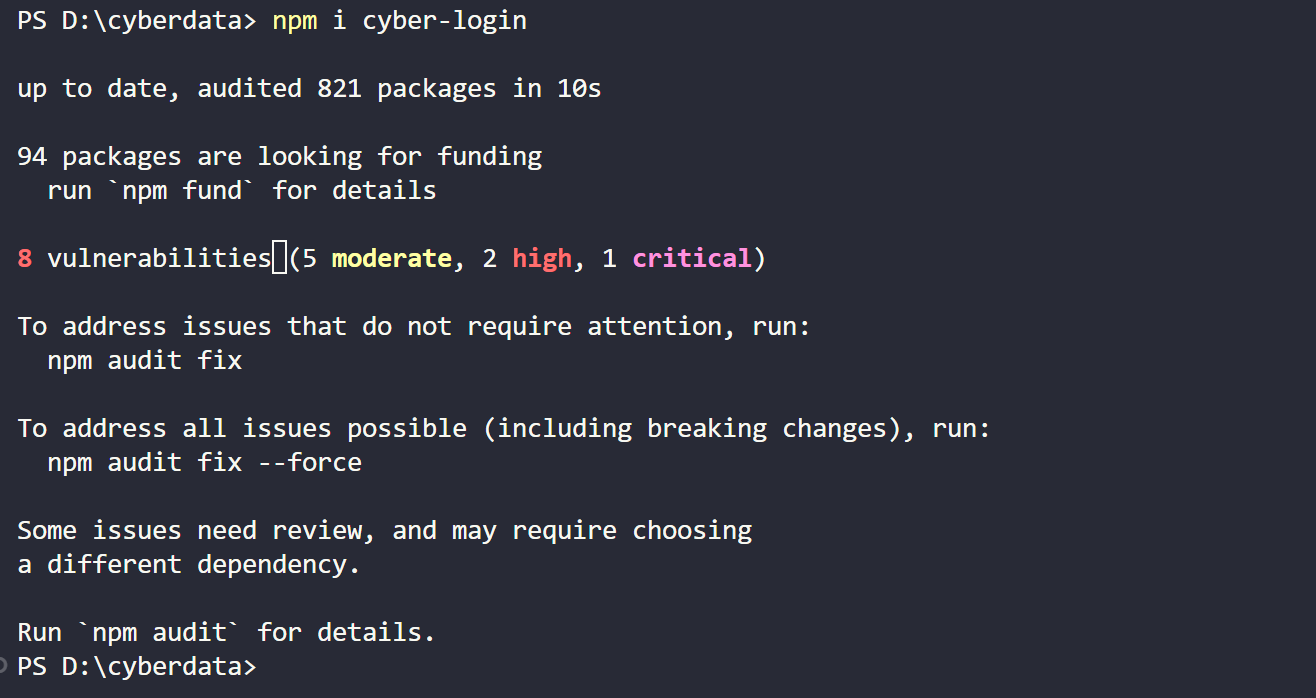
如何发布自定义 npm 组件包
准备工作 1. 注册 npm 账号 还没有 npm 账号?去官网注册: https://www.npmjs.com 需要记住用户名、密码、邮箱,后面需要用到。 2. 查看本地 npm 镜像,如果不是默认的,需要改回来 npm config get registry重置镜像路…...

iOS_给View的部分区域截图 snapshot for view
文章目录 1.将整个view截图返回image:2.截取view的部分区域,返回image:3.旧方法:4.Tips参考: 1.将整个view截图返回image: 这些 api 已被废弃,所以需要判断 iOS 版本 写两套代码: R…...

计算机网络——数据链路层-可靠传输的实现机制:回退N帧协议GBN(无差错情况、累积确认、有差错情况、发送窗口尺寸)
目录 回退N帧协议GBN 介绍 无差错情况 累积确认 有差错情况 发送窗口尺寸 小结 练习 解析 示意图 上篇中所介绍的停止-等待协议的信道利用率很低;若出现超时重传,则信道利用率更低。 如果发送方在收到接收方的确认分组之前可以连续发送多个数…...
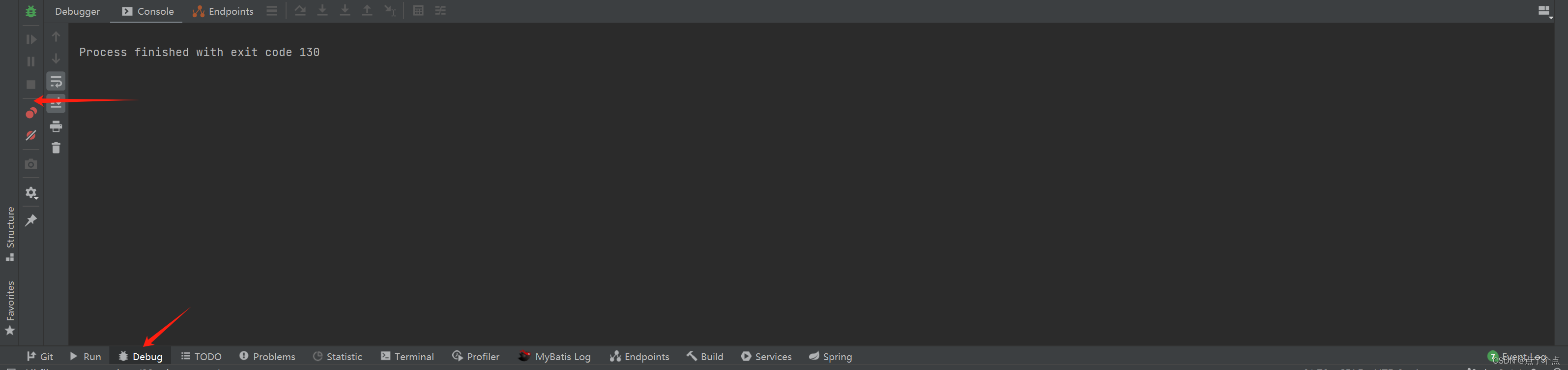
IDEA debug窗口左边工具栏隐藏与显示
今天在debug排查代码的时候一不小心点到哪里,结果变成这样 我们可以这样恢复,右键Debug 点击show Toolbar...
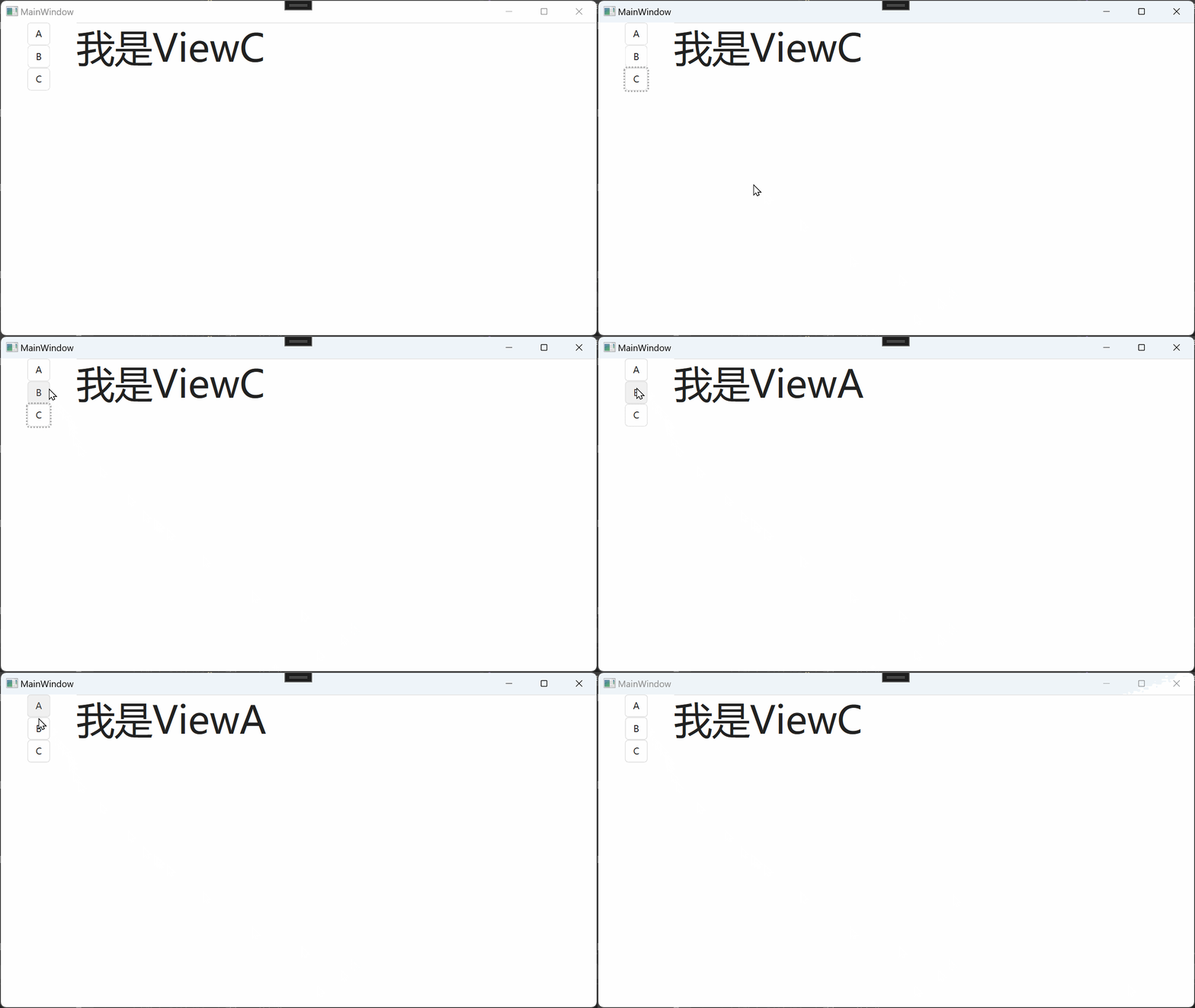
WPF 基于TableControl的页面切换
文章目录 前言其它项目的UserControl切换TableControl添加按钮,隐去TableItem的Header 结论 前言 我想用WPF简单实现一个按钮视图切换的效果,但是我发现别人的实现效果非常的麻烦。 其它项目的UserControl切换 我网上找了个开源的项目,他是…...

Lua 元表,元方法
元表与元方法的概念 Lua中每个值都可具有元表。元表是普通的Lua表,定义了原始值在某些特定操作下 的行为。 例如,当table作为加法的操作数时,Lua检查其“元表”中的“__add”字段是否有 个函数。如果有,Lua调用它执行加法。我们称“元表”中的“键(如__add)”为事件(event),称…...

C# WPF上位机开发(利用tcp/ip网络访问plc)
【 声明:版权所有,欢迎转载,请勿用于商业用途。 联系信箱:feixiaoxing 163.com】 c# wpf如果是用来开发非标上位机的,那么和plc的通信肯定是少不了的。而且,大部分plc都支持modbus协议,所以这个…...
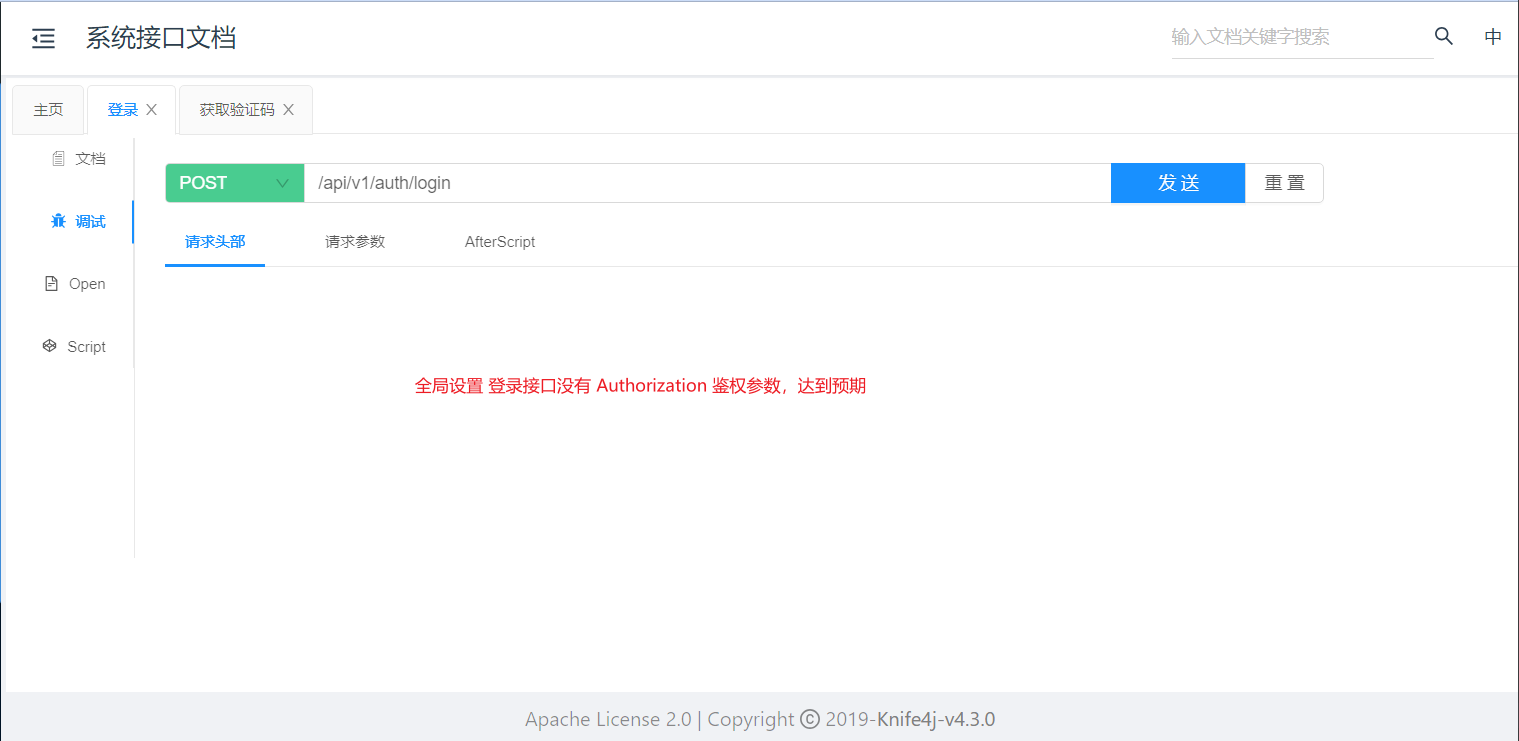
Knife4j 接口文档如何设置 Authorization 鉴权参数?
🚀 作者主页: 有来技术 🔥 开源项目: youlai-mall 🍃 vue3-element-admin 🍃 youlai-boot 🌺 仓库主页: Gitee 💫 Github 💫 GitCode 💖 欢迎点赞…...
CentOS 防火墙管理及使用的redis基本常用命令
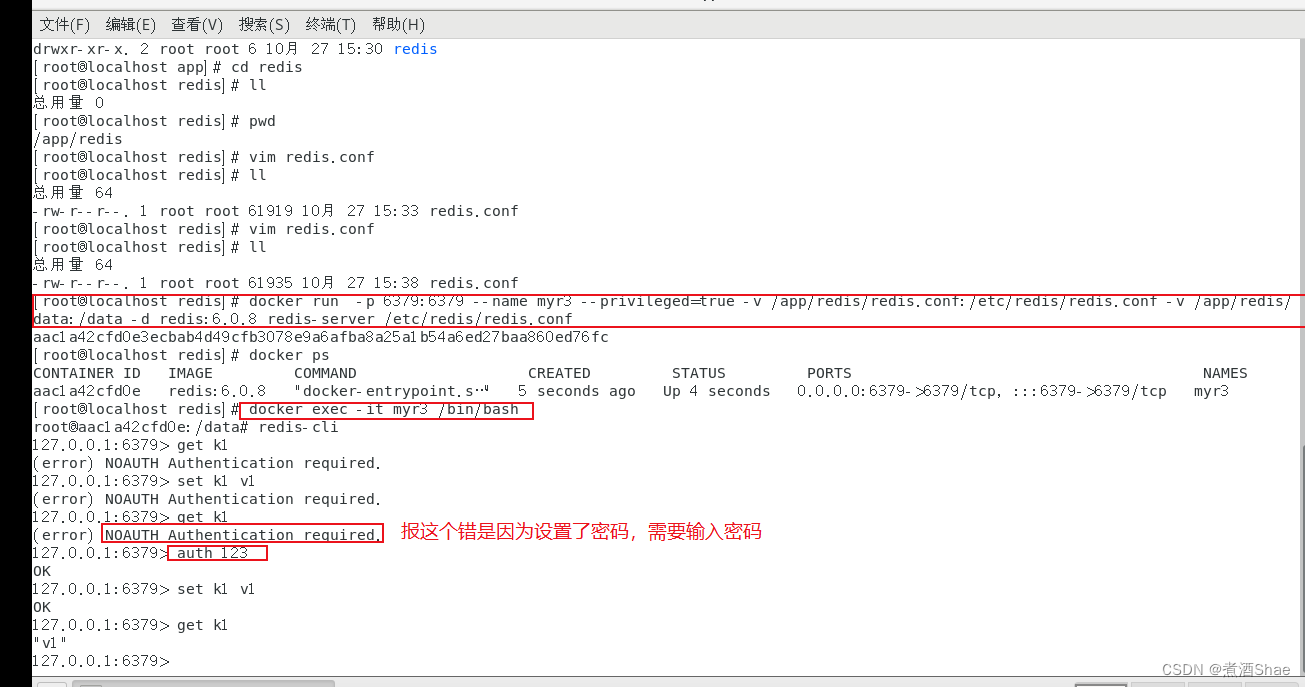
文章目录 防火墙管理使用systemctl管理防火墙启动、关闭使用firewalld-cmd配置访问防火墙策略firewalld配置文件修改限制来源IP docker使用 redis 防火墙管理 需要关闭防火墙或者开启对应端口 使用systemctl管理防火墙启动、关闭 启动防火墙: systemctl start fi…...
树莓派超全系列教程文档--(61)树莓派摄像头高级使用方法
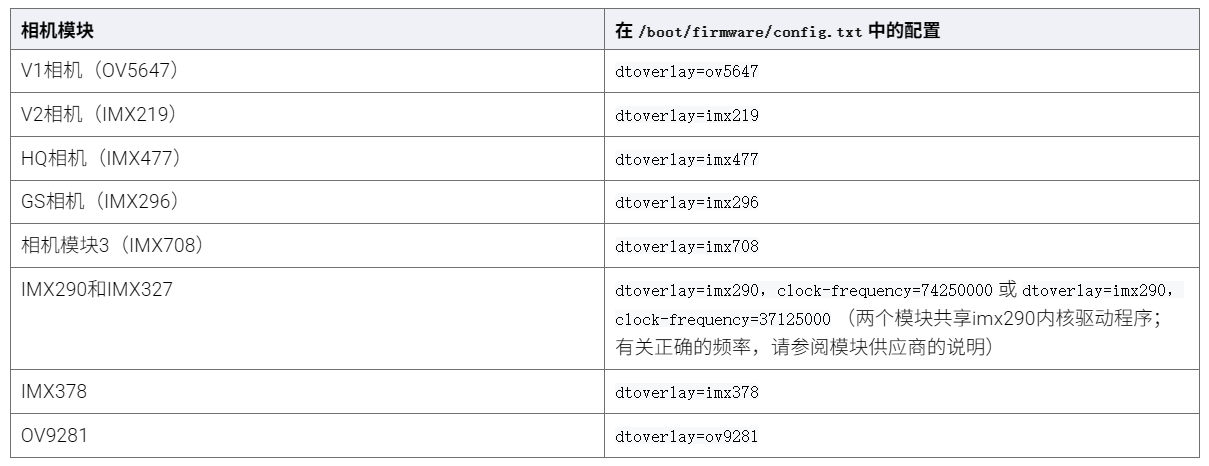
树莓派摄像头高级使用方法 配置通过调谐文件来调整相机行为 使用多个摄像头安装 libcam 和 rpicam-apps依赖关系开发包 文章来源: http://raspberry.dns8844.cn/documentation 原文网址 配置 大多数用例自动工作,无需更改相机配置。但是,一…...
)
rknn优化教程(二)
文章目录 1. 前述2. 三方库的封装2.1 xrepo中的库2.2 xrepo之外的库2.2.1 opencv2.2.2 rknnrt2.2.3 spdlog 3. rknn_engine库 1. 前述 OK,开始写第二篇的内容了。这篇博客主要能写一下: 如何给一些三方库按照xmake方式进行封装,供调用如何按…...

java调用dll出现unsatisfiedLinkError以及JNA和JNI的区别
UnsatisfiedLinkError 在对接硬件设备中,我们会遇到使用 java 调用 dll文件 的情况,此时大概率出现UnsatisfiedLinkError链接错误,原因可能有如下几种 类名错误包名错误方法名参数错误使用 JNI 协议调用,结果 dll 未实现 JNI 协…...

Nginx server_name 配置说明
Nginx 是一个高性能的反向代理和负载均衡服务器,其核心配置之一是 server 块中的 server_name 指令。server_name 决定了 Nginx 如何根据客户端请求的 Host 头匹配对应的虚拟主机(Virtual Host)。 1. 简介 Nginx 使用 server_name 指令来确定…...

Reasoning over Uncertain Text by Generative Large Language Models
https://ojs.aaai.org/index.php/AAAI/article/view/34674/36829https://ojs.aaai.org/index.php/AAAI/article/view/34674/36829 1. 概述 文本中的不确定性在许多语境中传达,从日常对话到特定领域的文档(例如医学文档)(Heritage 2013;Landmark、Gulbrandsen 和 Svenevei…...

解读《网络安全法》最新修订,把握网络安全新趋势
《网络安全法》自2017年施行以来,在维护网络空间安全方面发挥了重要作用。但随着网络环境的日益复杂,网络攻击、数据泄露等事件频发,现行法律已难以完全适应新的风险挑战。 2025年3月28日,国家网信办会同相关部门起草了《网络安全…...

解决:Android studio 编译后报错\app\src\main\cpp\CMakeLists.txt‘ to exist
现象: android studio报错: [CXX1409] D:\GitLab\xxxxx\app.cxx\Debug\3f3w4y1i\arm64-v8a\android_gradle_build.json : expected buildFiles file ‘D:\GitLab\xxxxx\app\src\main\cpp\CMakeLists.txt’ to exist 解决: 不要动CMakeLists.…...
恶补电源:1.电桥
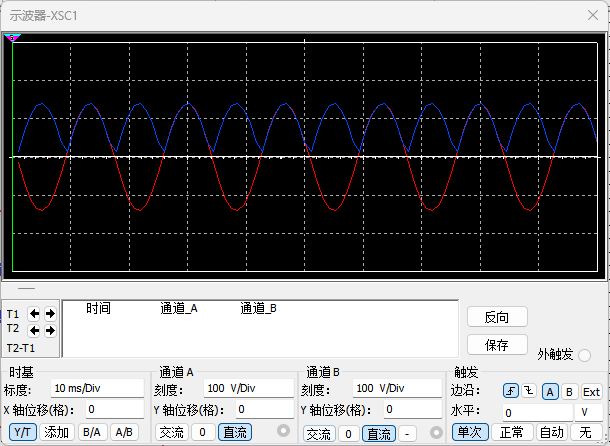
一、元器件的选择 搜索并选择电桥,再multisim中选择FWB,就有各种型号的电桥: 电桥是用来干嘛的呢? 它是一个由四个二极管搭成的“桥梁”形状的电路,用来把交流电(AC)变成直流电(DC)。…...
聚六亚甲基单胍盐酸盐市场深度解析:现状、挑战与机遇
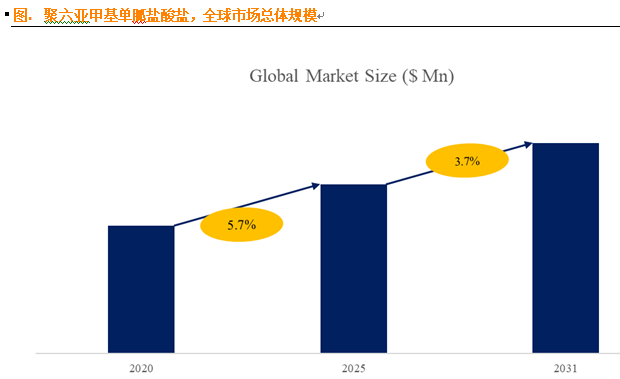
根据 QYResearch 发布的市场报告显示,全球市场规模预计在 2031 年达到 9848 万美元,2025 - 2031 年期间年复合增长率(CAGR)为 3.7%。在竞争格局上,市场集中度较高,2024 年全球前十强厂商占据约 74.0% 的市场…...

CppCon 2015 学习:REFLECTION TECHNIQUES IN C++
关于 Reflection(反射) 这个概念,总结一下: Reflection(反射)是什么? 反射是对类型的自我检查能力(Introspection) 可以查看类的成员变量、成员函数等信息。反射允许枚…...