
ClickHouse(19)ClickHouse集成Hive表引擎详细解析
文章目录
- Hive集成表引擎
- 创建表
- 使用示例
- 如何使用HDFS文件系统的本地缓存
- 查询 ORC 输入格式的Hive 表
- 在 Hive 中建表
- 在 ClickHouse 中建表
- 查询 Parquest 输入格式的Hive 表
- 在 Hive 中建表
- 在 ClickHouse 中建表
- 查询文本输入格式的Hive表
- 在Hive 中建表
- 在 ClickHouse 中建表
- 资料分享
- 参考文章
Hive集成表引擎
Hive引擎允许对HDFS Hive表执行 SELECT 查询。目前它支持如下输入格式:
-文本:只支持简单的标量列类型,除了 Binary
-
ORC:支持简单的标量列类型,除了
char; 只支持array这样的复杂类型 -
Parquet:支持所有简单标量列类型;只支持
array这样的复杂类型
创建表
CREATE TABLE [IF NOT EXISTS] [db.]table_name [ON CLUSTER cluster]
(name1 [type1] [ALIAS expr1],name2 [type2] [ALIAS expr2],...
) ENGINE = Hive('thrift://host:port', 'database', 'table');
PARTITION BY expr
表的结构可以与原来的Hive表结构有所不同:
- 列名应该与原来的Hive表相同,但你可以使用这些列中的一些,并以任何顺序,你也可以使用一些从其他列计算的别名列。
- 列类型与原Hive表的列类型保持一致。
- “Partition by expression”应与原Hive表保持一致,“Partition by expression”中的列应在表结构中。
引擎参数
-
thrift://host:port— Hive Metastore 地址 -
database— 远程数据库名. -
table— 远程数据表名.
使用示例
如何使用HDFS文件系统的本地缓存
我们强烈建议您为远程文件系统启用本地缓存。基准测试显示,如果使用缓存,它的速度会快两倍。
在使用缓存之前,请将其添加到 config.xml
<local_cache_for_remote_fs><enable>true</enable><root_dir>local_cache</root_dir><limit_size>559096952</limit_size><bytes_read_before_flush>1048576</bytes_read_before_flush>
</local_cache_for_remote_fs>
- enable: 开启后,ClickHouse将为HDFS (远程文件系统)维护本地缓存。
- root_dir: 必需的。用于存储远程文件系统的本地缓存文件的根目录。
- limit_size: 必需的。本地缓存文件的最大大小(单位为字节)。
- bytes_read_before_flush: 从远程文件系统下载文件时,刷新到本地文件系统前的控制字节数。缺省值为1MB。
当ClickHouse为远程文件系统启用了本地缓存时,用户仍然可以选择不使用缓存,并在查询中设置 use_local_cache_for_remote_storage = 0, use_local_cache_for_remote_storage 默认为 1。
查询 ORC 输入格式的Hive 表
在 Hive 中建表
hive > CREATE TABLE `test`.`test_orc`(`f_tinyint` tinyint, `f_smallint` smallint, `f_int` int, `f_integer` int, `f_bigint` bigint, `f_float` float, `f_double` double, `f_decimal` decimal(10,0), `f_timestamp` timestamp, `f_date` date, `f_string` string, `f_varchar` varchar(100), `f_bool` boolean, `f_binary` binary, `f_array_int` array<int>, `f_array_string` array<string>, `f_array_float` array<float>, `f_array_array_int` array<array<int>>, `f_array_array_string` array<array<string>>, `f_array_array_float` array<array<float>>)
PARTITIONED BY ( `day` string)
ROW FORMAT SERDE 'org.apache.hadoop.hive.ql.io.orc.OrcSerde'
STORED AS INPUTFORMAT 'org.apache.hadoop.hive.ql.io.orc.OrcInputFormat'
OUTPUTFORMAT 'org.apache.hadoop.hive.ql.io.orc.OrcOutputFormat'
LOCATION'hdfs://testcluster/data/hive/test.db/test_orc'OK
Time taken: 0.51 secondshive > insert into test.test_orc partition(day='2021-09-18') select 1, 2, 3, 4, 5, 6.11, 7.22, 8.333, current_timestamp(), current_date(), 'hello world', 'hello world', 'hello world', true, 'hello world', array(1, 2, 3), array('hello world', 'hello world'), array(float(1.1), float(1.2)), array(array(1, 2), array(3, 4)), array(array('a', 'b'), array('c', 'd')), array(array(float(1.11), float(2.22)), array(float(3.33), float(4.44)));
OK
Time taken: 36.025 secondshive > select * from test.test_orc;
OK
1   2   3   4   5   6.11    7.22    8   2021-11-05 12:38:16.314 2021-11-05  hello world hello world hello world                                                                                             true    hello world [1,2,3] ["hello world","hello world"]   [1.1,1.2]   [[1,2],[3,4]]   [["a","b"],["c","d"]]   [[1.11,2.22],[3.33,4.44]]   2021-09-18
Time taken: 0.295 seconds, Fetched: 1 row(s)
在 ClickHouse 中建表
ClickHouse中的表,从上面创建的Hive表中获取数据:
CREATE TABLE test.test_orc
(`f_tinyint` Int8,`f_smallint` Int16,`f_int` Int32,`f_integer` Int32,`f_bigint` Int64,`f_float` Float32,`f_double` Float64,`f_decimal` Float64,`f_timestamp` DateTime,`f_date` Date,`f_string` String,`f_varchar` String,`f_bool` Bool,`f_binary` String,`f_array_int` Array(Int32),`f_array_string` Array(String),`f_array_float` Array(Float32),`f_array_array_int` Array(Array(Int32)),`f_array_array_string` Array(Array(String)),`f_array_array_float` Array(Array(Float32)),`day` String
)
ENGINE = Hive('thrift://localhost:9083', 'test', 'test_orc')
PARTITION BY day
SELECT * FROM test.test_orc settings input_format_orc_allow_missing_columns = 1\G
SELECT *
FROM test.test_orc
SETTINGS input_format_orc_allow_missing_columns = 1Query id: c3eaffdc-78ab-43cd-96a4-4acc5b480658Row 1:
──────
f_tinyint:            1
f_smallint:           2
f_int:                3
f_integer:            4
f_bigint:             5
f_float:              6.11
f_double:             7.22
f_decimal:            8
f_timestamp:          2021-12-04 04:00:44
f_date:               2021-12-03
f_string:             hello world
f_varchar:            hello world
f_bool:               true
f_binary:             hello world
f_array_int:          [1,2,3]
f_array_string:       ['hello world','hello world']
f_array_float:        [1.1,1.2]
f_array_array_int:    [[1,2],[3,4]]
f_array_array_string: [['a','b'],['c','d']]
f_array_array_float:  [[1.11,2.22],[3.33,4.44]]
day:                  2021-09-181 rows in set. Elapsed: 0.078 sec.
查询 Parquest 输入格式的Hive 表
在 Hive 中建表
hive >
CREATE TABLE `test`.`test_parquet`(`f_tinyint` tinyint, `f_smallint` smallint, `f_int` int, `f_integer` int, `f_bigint` bigint, `f_float` float, `f_double` double, `f_decimal` decimal(10,0), `f_timestamp` timestamp, `f_date` date, `f_string` string, `f_varchar` varchar(100), `f_char` char(100), `f_bool` boolean, `f_binary` binary, `f_array_int` array<int>, `f_array_string` array<string>, `f_array_float` array<float>, `f_array_array_int` array<array<int>>, `f_array_array_string` array<array<string>>, `f_array_array_float` array<array<float>>)
PARTITIONED BY ( `day` string)
ROW FORMAT SERDE 'org.apache.hadoop.hive.ql.io.parquet.serde.ParquetHiveSerDe'
STORED AS INPUTFORMAT 'org.apache.hadoop.hive.ql.io.parquet.MapredParquetInputFormat'
OUTPUTFORMAT 'org.apache.hadoop.hive.ql.io.parquet.MapredParquetOutputFormat'
LOCATION'hdfs://testcluster/data/hive/test.db/test_parquet'
OK
Time taken: 0.51 secondshive >  insert into test.test_parquet partition(day='2021-09-18') select 1, 2, 3, 4, 5, 6.11, 7.22, 8.333, current_timestamp(), current_date(), 'hello world', 'hello world', 'hello world', true, 'hello world', array(1, 2, 3), array('hello world', 'hello world'), array(float(1.1), float(1.2)), array(array(1, 2), array(3, 4)), array(array('a', 'b'), array('c', 'd')), array(array(float(1.11), float(2.22)), array(float(3.33), float(4.44)));
OK
Time taken: 36.025 secondshive > select * from test.test_parquet;
OK
1   2   3   4   5   6.11    7.22    8   2021-12-14 17:54:56.743 2021-12-14  hello world hello world hello world                                                                                             true    hello world [1,2,3] ["hello world","hello world"]   [1.1,1.2]   [[1,2],[3,4]]   [["a","b"],["c","d"]]   [[1.11,2.22],[3.33,4.44]]   2021-09-18
Time taken: 0.766 seconds, Fetched: 1 row(s)
在 ClickHouse 中建表
ClickHouse 中的表, 从上面创建的Hive表中获取数据:
CREATE TABLE test.test_parquet
(`f_tinyint` Int8,`f_smallint` Int16,`f_int` Int32,`f_integer` Int32,`f_bigint` Int64,`f_float` Float32,`f_double` Float64,`f_decimal` Float64,`f_timestamp` DateTime,`f_date` Date,`f_string` String,`f_varchar` String,`f_char` String,`f_bool` Bool,`f_binary` String,`f_array_int` Array(Int32),`f_array_string` Array(String),`f_array_float` Array(Float32),`f_array_array_int` Array(Array(Int32)),`f_array_array_string` Array(Array(String)),`f_array_array_float` Array(Array(Float32)),`day` String
)
ENGINE = Hive('thrift://localhost:9083', 'test', 'test_parquet')
PARTITION BY day
SELECT * FROM test.test_parquet settings input_format_parquet_allow_missing_columns = 1\G
SELECT *
FROM test_parquet
SETTINGS input_format_parquet_allow_missing_columns = 1Query id: 4e35cf02-c7b2-430d-9b81-16f438e5fca9Row 1:
──────
f_tinyint:            1
f_smallint:           2
f_int:                3
f_integer:            4
f_bigint:             5
f_float:              6.11
f_double:             7.22
f_decimal:            8
f_timestamp:          2021-12-14 17:54:56
f_date:               2021-12-14
f_string:             hello world
f_varchar:            hello world
f_char:               hello world
f_bool:               true
f_binary:             hello world
f_array_int:          [1,2,3]
f_array_string:       ['hello world','hello world']
f_array_float:        [1.1,1.2]
f_array_array_int:    [[1,2],[3,4]]
f_array_array_string: [['a','b'],['c','d']]
f_array_array_float:  [[1.11,2.22],[3.33,4.44]]
day:                  2021-09-181 rows in set. Elapsed: 0.357 sec.
查询文本输入格式的Hive表
在Hive 中建表
hive >
CREATE TABLE `test`.`test_text`(`f_tinyint` tinyint, `f_smallint` smallint, `f_int` int, `f_integer` int, `f_bigint` bigint, `f_float` float, `f_double` double, `f_decimal` decimal(10,0), `f_timestamp` timestamp, `f_date` date, `f_string` string, `f_varchar` varchar(100), `f_char` char(100), `f_bool` boolean, `f_binary` binary, `f_array_int` array<int>, `f_array_string` array<string>, `f_array_float` array<float>, `f_array_array_int` array<array<int>>, `f_array_array_string` array<array<string>>, `f_array_array_float` array<array<float>>)
PARTITIONED BY ( `day` string)
ROW FORMAT SERDE 'org.apache.hadoop.hive.serde2.lazy.LazySimpleSerDe'
STORED AS INPUTFORMAT 'org.apache.hadoop.mapred.TextInputFormat'
OUTPUTFORMAT 'org.apache.hadoop.hive.ql.io.HiveIgnoreKeyTextOutputFormat'
LOCATION'hdfs://testcluster/data/hive/test.db/test_text'
Time taken: 0.1 seconds, Fetched: 34 row(s)hive >  insert into test.test_text partition(day='2021-09-18') select 1, 2, 3, 4, 5, 6.11, 7.22, 8.333, current_timestamp(), current_date(), 'hello world', 'hello world', 'hello world', true, 'hello world', array(1, 2, 3), array('hello world', 'hello world'), array(float(1.1), float(1.2)), array(array(1, 2), array(3, 4)), array(array('a', 'b'), array('c', 'd')), array(array(float(1.11), float(2.22)), array(float(3.33), float(4.44)));
OK
Time taken: 36.025 secondshive > select * from test.test_text;
OK
1   2   3   4   5   6.11    7.22    8   2021-12-14 18:11:17.239 2021-12-14  hello world hello world hello world                                                                                             true    hello world [1,2,3] ["hello world","hello world"]   [1.1,1.2]   [[1,2],[3,4]]   [["a","b"],["c","d"]]   [[1.11,2.22],[3.33,4.44]]   2021-09-18
Time taken: 0.624 seconds, Fetched: 1 row(s)
在 ClickHouse 中建表
ClickHouse中的表, 从上面创建的Hive表中获取数据:
CREATE TABLE test.test_text
(`f_tinyint` Int8,`f_smallint` Int16,`f_int` Int32,`f_integer` Int32,`f_bigint` Int64,`f_float` Float32,`f_double` Float64,`f_decimal` Float64,`f_timestamp` DateTime,`f_date` Date,`f_string` String,`f_varchar` String,`f_char` String,`f_bool` Bool,`day` String
)
ENGINE = Hive('thrift://localhost:9083', 'test', 'test_text')
PARTITION BY day
SELECT * FROM test.test_text settings input_format_skip_unknown_fields = 1, input_format_with_names_use_header = 1, date_time_input_format = 'best_effort'\G
SELECT *
FROM test.test_text
SETTINGS input_format_skip_unknown_fields = 1, input_format_with_names_use_header = 1, date_time_input_format = 'best_effort'Query id: 55b79d35-56de-45b9-8be6-57282fbf1f44Row 1:
──────
f_tinyint:   1
f_smallint:  2
f_int:       3
f_integer:   4
f_bigint:    5
f_float:     6.11
f_double:    7.22
f_decimal:   8
f_timestamp: 2021-12-14 18:11:17
f_date:      2021-12-14
f_string:    hello world
f_varchar:   hello world
f_char:      hello world
f_bool:      true
day:         2021-09-18
资料分享
ClickHouse经典中文文档分享
参考文章
- ClickHouse(01)什么是ClickHouse,ClickHouse适用于什么场景
- ClickHouse(02)ClickHouse架构设计介绍概述与ClickHouse数据分片设计
- ClickHouse(03)ClickHouse怎么安装和部署
- ClickHouse(04)如何搭建ClickHouse集群
- ClickHouse(05)ClickHouse数据类型详解
- ClickHouse(06)ClickHouse建表语句DDL详细解析
- ClickHouse(07)ClickHouse数据库引擎解析
- ClickHouse(08)ClickHouse表引擎概况
- ClickHouse(09)ClickHouse合并树MergeTree家族表引擎之MergeTree详细解析
- ClickHouse(10)ClickHouse合并树MergeTree家族表引擎之ReplacingMergeTree详细解析
- ClickHouse(11)ClickHouse合并树MergeTree家族表引擎之SummingMergeTree详细解析
- ClickHouse(12)ClickHouse合并树MergeTree家族表引擎之AggregatingMergeTree详细解析
- ClickHouse(13)ClickHouse合并树MergeTree家族表引擎之CollapsingMergeTree详细解析
- ClickHouse(14)ClickHouse合并树MergeTree家族表引擎之VersionedCollapsingMergeTree详细解析
- ClickHouse(15)ClickHouse合并树MergeTree家族表引擎之GraphiteMergeTree详细解析
- ClickHouse(16)ClickHouse日志引擎Log详细解析
- ClickHouse(17)ClickHouse集成JDBC表引擎详细解析
- ClickHouse(18)ClickHouse集成ODBC表引擎详细解析
相关文章:
ClickHouse集成Hive表引擎详细解析)
ClickHouse(19)ClickHouse集成Hive表引擎详细解析
文章目录 Hive集成表引擎创建表使用示例如何使用HDFS文件系统的本地缓存查询 ORC 输入格式的Hive 表在 Hive 中建表在 ClickHouse 中建表 查询 Parquest 输入格式的Hive 表在 Hive 中建表在 ClickHouse 中建表 查询文本输入格式的Hive表在Hive 中建表在 ClickHouse 中建表 资料…...

用C求斐波那契数列-----(C每日一编程)
斐波那契数列: 斐波那契数列是指这样一个数列:1,1,2,3,5,8,13,21,34,55,89……这个数列从第3项开始 ,每一项都等于前两项之和。 递推…...
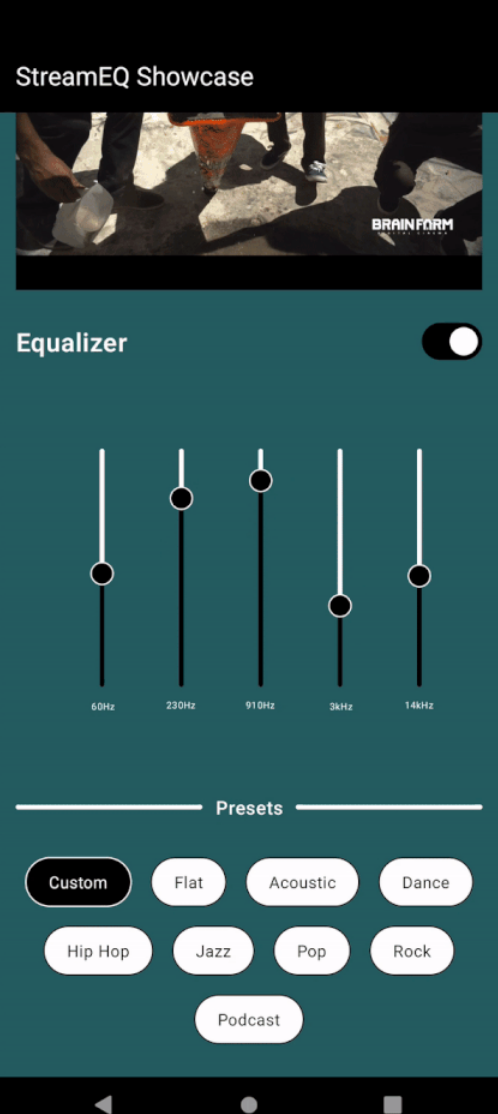
在Jetpack Compose中使用ExoPlayer实现直播流和音频均衡器
在Jetpack Compose中使用ExoPlayer实现直播流和音频均衡器 背景 ExoPlayer与Media3的能力结合,为Android应用程序播放多媒体内容提供了强大的解决方案。在本教程中,我们将介绍如何设置带有Media3的ExoPlayer来支持使用M3U8 URL进行直播流。此外&#x…...

持续集成交付CICD:Jira 远程触发 Jenkins 实现更新 GitLab 分支
目录 一、实验 1.环境 2.GitLab 查看项目 3.Jira新建模块 4. Jira 通过Webhook 触发Jenkins流水线 3.Jira 远程触发 Jenkins 实现更新 GitLab 分支 二、问题 1.Jira 配置网络钩子失败 2. Jira 远程触发Jenkins 报错 一、实验 1.环境 (1)主机 …...

基于SSM的面向TCP_IP的网络互联实验平台
文章目录 项目介绍主要功能截图:部分代码展示设计总结项目获取方式🍅 作者主页:超级无敌暴龙战士塔塔开 🍅 简介:Java领域优质创作者🏆、 简历模板、学习资料、面试题库【关注我,都给你】 🍅文末获取源码联系🍅 项目介绍 基于SSM的面向TCP和IP的网络互联实验平台…...
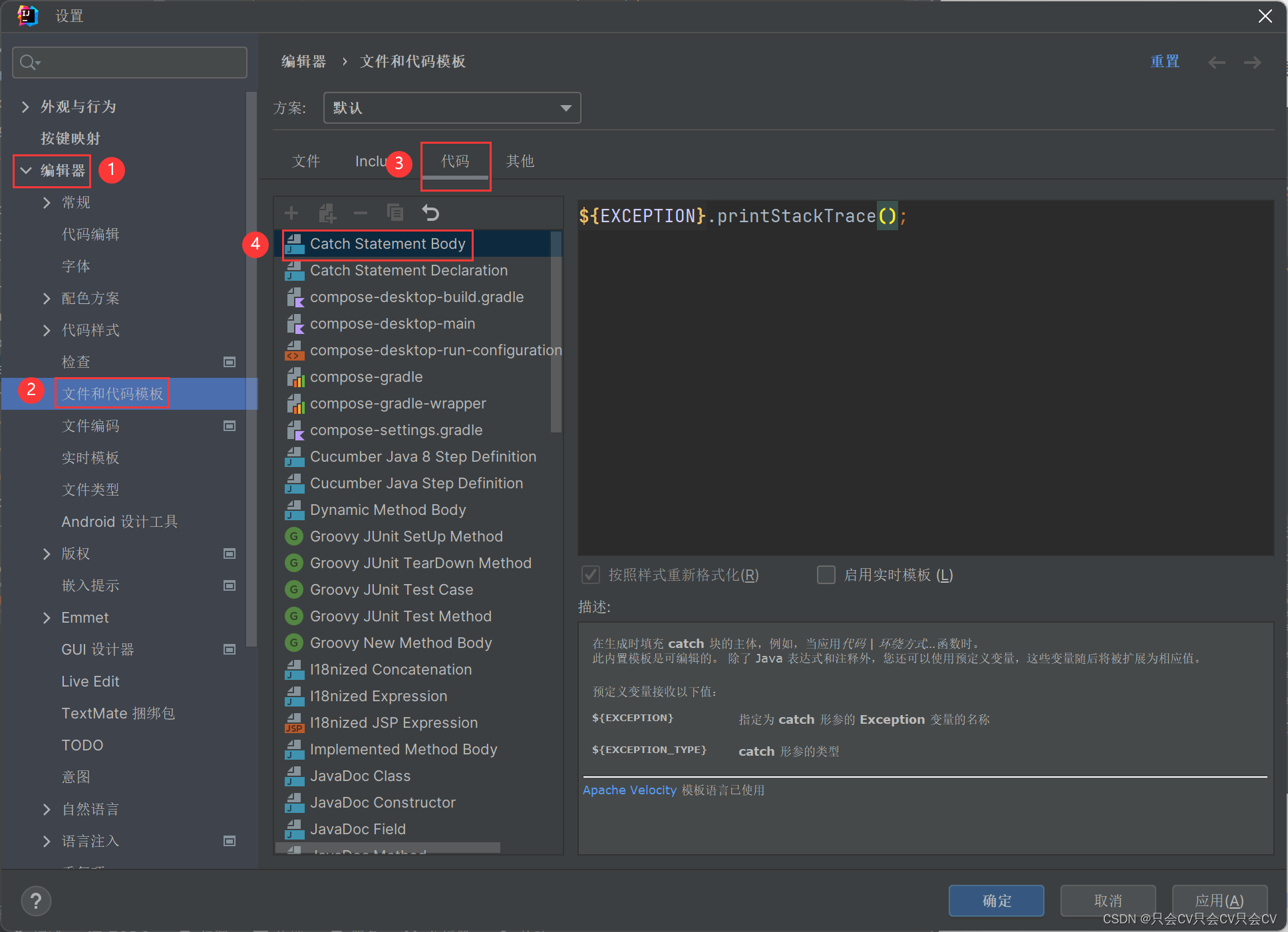
【IDEA】try-catch自动生成中修改catch的内容
编辑器 --> 文件和代码模板 --> 代码 --> Catch Statement Body...

2024 十大AI预测
每周跟踪AI热点新闻动向和震撼发展 想要探索生成式人工智能的前沿进展吗?订阅我们的简报,深入解析最新的技术突破、实际应用案例和未来的趋势。与全球数同行一同,从行业内部的深度分析和实用指南中受益。不要错过这个机会,成为AI领…...
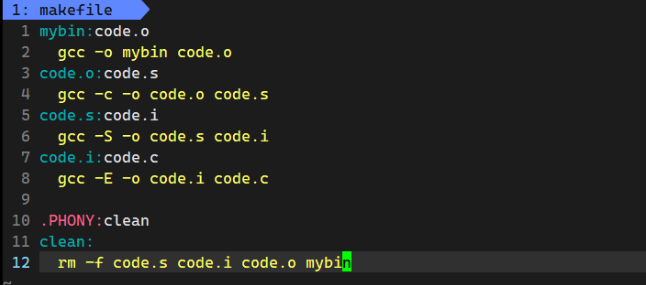
【Linux基础开发工具】gcc/g++使用make/Makefile
目录 前言 gcc/g的使用 1. 语言的发展 1.1 语言和编译器自举的过程 1.2 程序翻译的过程: 2. 动静态库的理解 Linux项目自动化构建工具-make/makefile 1. 快速上手使用 2. makefile/make执行顺序的理解 前言 了解完vim编辑器的使用,接下来就可以尝…...

Windows Nginx版本升级
记录windows系统上nginx版本从1.22.1直接升级到1.25.3,全程一步到位! nginx官网: https://nginx.org/ C:\Windows\system32>cd C:\nginx# 查看当前nginx版本C:\nginx>nginx -v nginx version: nginx/1.22.1# 停止nginx服务C:\nginx>net stop ng…...
kubernetes集群 应用实践 kafka部署
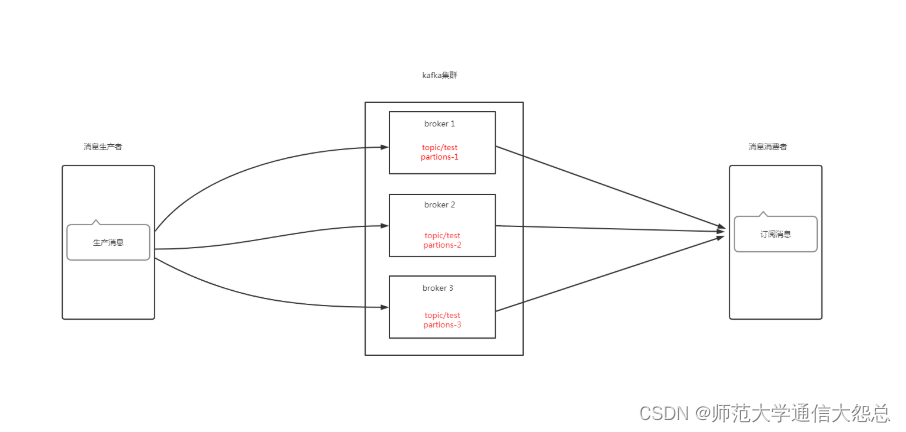
kubernetes集群 应用实践 kafka部署 零.1、环境说明 零.2、kafka架构说明 zookeeper在kafka集群中的作用 一、Broker注册 二、Topic注册 三、Topic Partition选主 四、生产者负载均衡 五、消费者负载均衡 一、持久化存储资源准备 1.1 创建共享目录 [rootnfsserver ~]# mkdir -…...
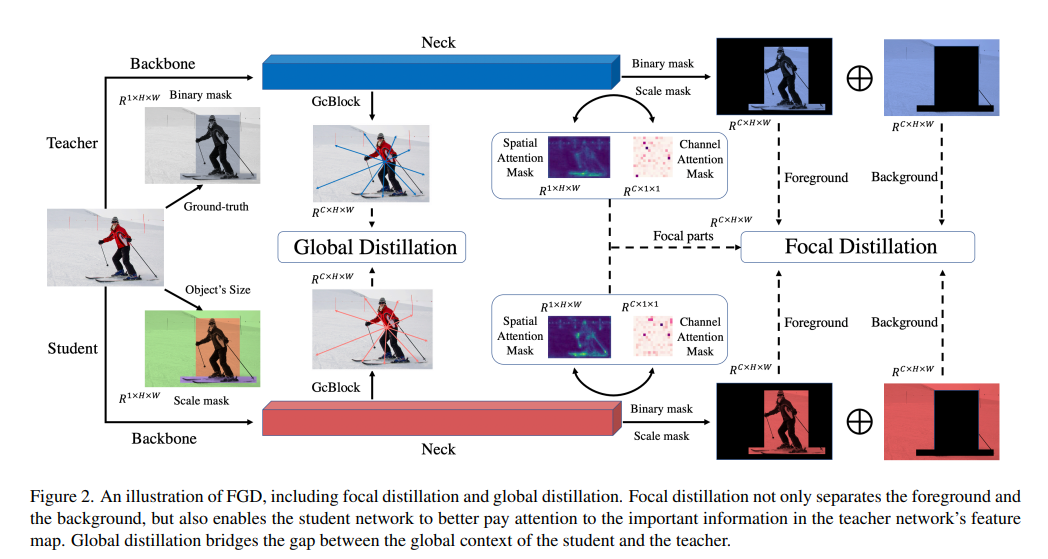
Featured Based知识蒸馏及代码(3): Focal and Global Knowledge (FGD)
文章目录 1. 摘要2. Focal and Global 蒸馏的原理2.1 常规的feature based蒸馏算法2.2 Focal Distillation2.3 Global Distillation2.4 total loss3. 实验完整代码论文: htt...
CentOs 安装MySQL
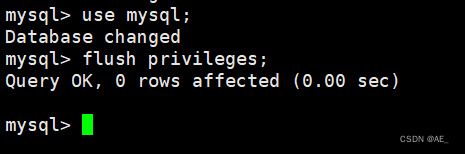
1、拉取安装包 wget --no-check-certificate dev.mysql.com/get/mysql-community-release-el6-5.noarch.rpm 成功拉取 2、安装 yum install mysql-community-release-el6-5.noarch.rpm 过程中可能需要你同意一些东西,y 即可 然后稍微检查一下 yum repolist enabled…...

基于Java (spring-boot)的在线考试管理系统
一、项目介绍 系统功能说明 1、系统共有管理员、老师、学生三个角色,管理员拥有系统最高权限。 2、老师拥有考试管理、题库管理、成绩管理、学生管理四个模块。 3、学生可以参与考试、查看成绩、试题练习、留言等功能 二、作品包含 三、项目技术 后端语言&…...
5. 结构型模式 - 外观模式
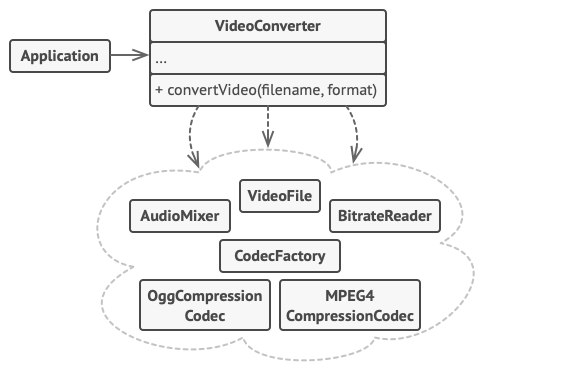
亦称: Facade 意图 外观模式是一种结构型设计模式, 能为程序库、 框架或其他复杂类提供一个简单的接口 问题 假设你必须在代码中使用某个复杂的库或框架中的众多对象。 正常情况下, 你需要负责所有对象的初始化工作、 管理其依赖关系并按正确…...
微服务之配置中心与服务跟踪
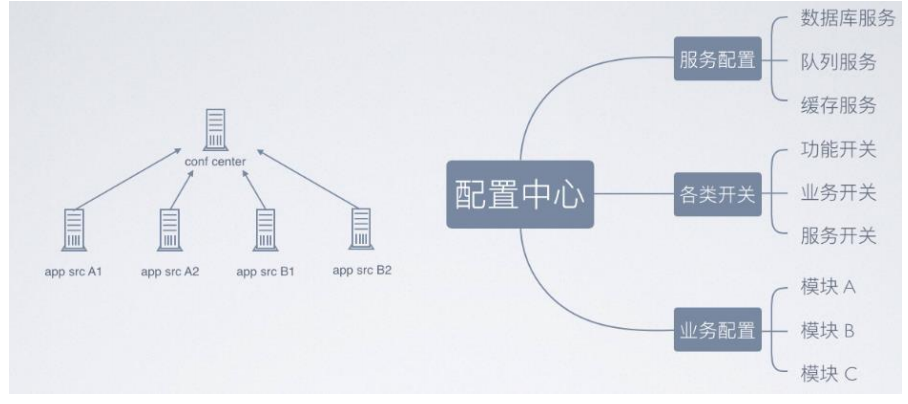
zookeeper 配置中心 实现的架构图如下所示,采取数据加载到内存方式解决高效获取的问题,借助 zookeeper 的节点监听机制来实现实时感知。 配置中心数据分类 事件调度(kafka) 消息服务和事件的统一调度,常用用 kafka …...

链表 典型习题
160 相交链表:遍历,统计是否出现过 /*** Definition for singly-linked list.* struct ListNode {* int val;* ListNode *next;* ListNode(int x) : val(x), next(NULL) {}* };*/ class Solution { public:ListNode *getIntersectionNode(L…...
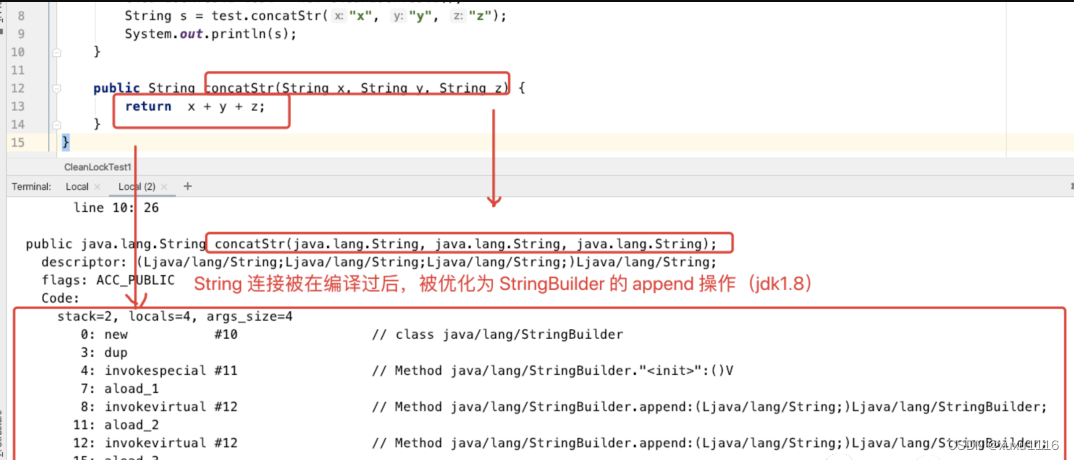
面试题:JVM 对锁都进行了哪些优化?
文章目录 锁优化自旋锁和自适应自旋锁消除锁粗化逃逸分析方法逃逸线程逃逸通过逃逸分析,编译器对代码的优化 锁优化 jvm 在加锁的过程中,会采用自旋、自适应、锁消除、锁粗化等优化手段来提升代码执行效率。 自旋锁和自适应自旋 现在大多的处理器都是…...
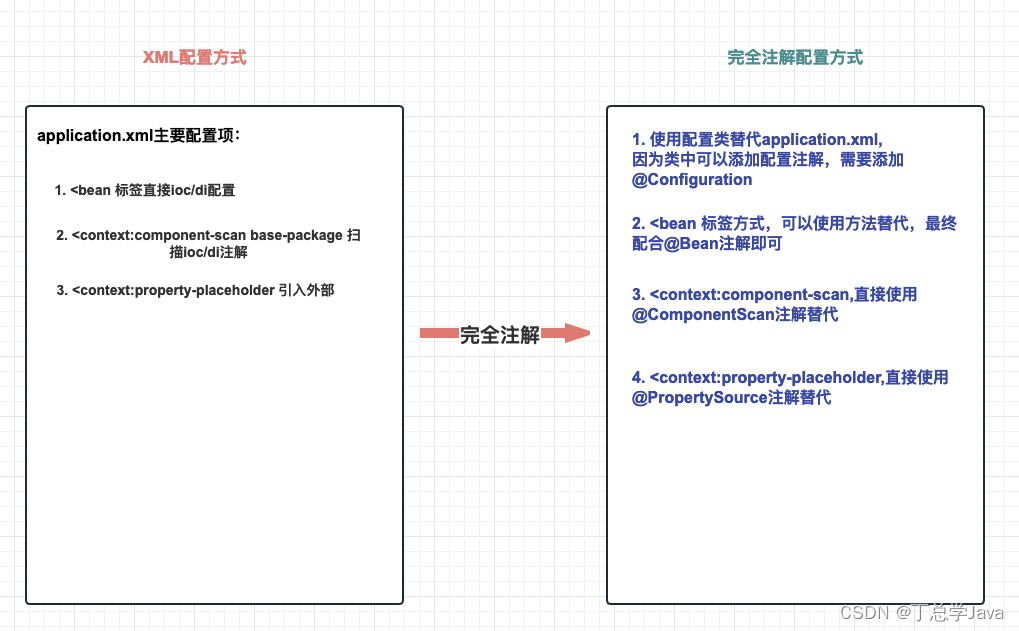
SSM整合实战(Spring、SpringMVC、MyBatis)
五、SSM整合实战 目录 一、SSM整合理解 1. 什么是SSM整合?2. SSM整合核心理解五连问! 2.1 SSM整合涉及几个IoC容器?2.2 每个IoC容器盛放哪些组件?2.3 IoC容器之间是什么关系?2.4 需要几个配置文件和对应IoC容器关系&…...

QT调用外部exe及无终端弹窗的解决方案、并实现进程输出信息获取
博主使用QT调用外部exe程序,外部exe程序有printf输出,起初使用的是C语言中的system()方法,但在笔记本上有概率出现终端窗口一闪而过的情况,后修改了调用方案。 1. QT调用外部exe 使用QT中的QProcess方法 #include <QProcess…...
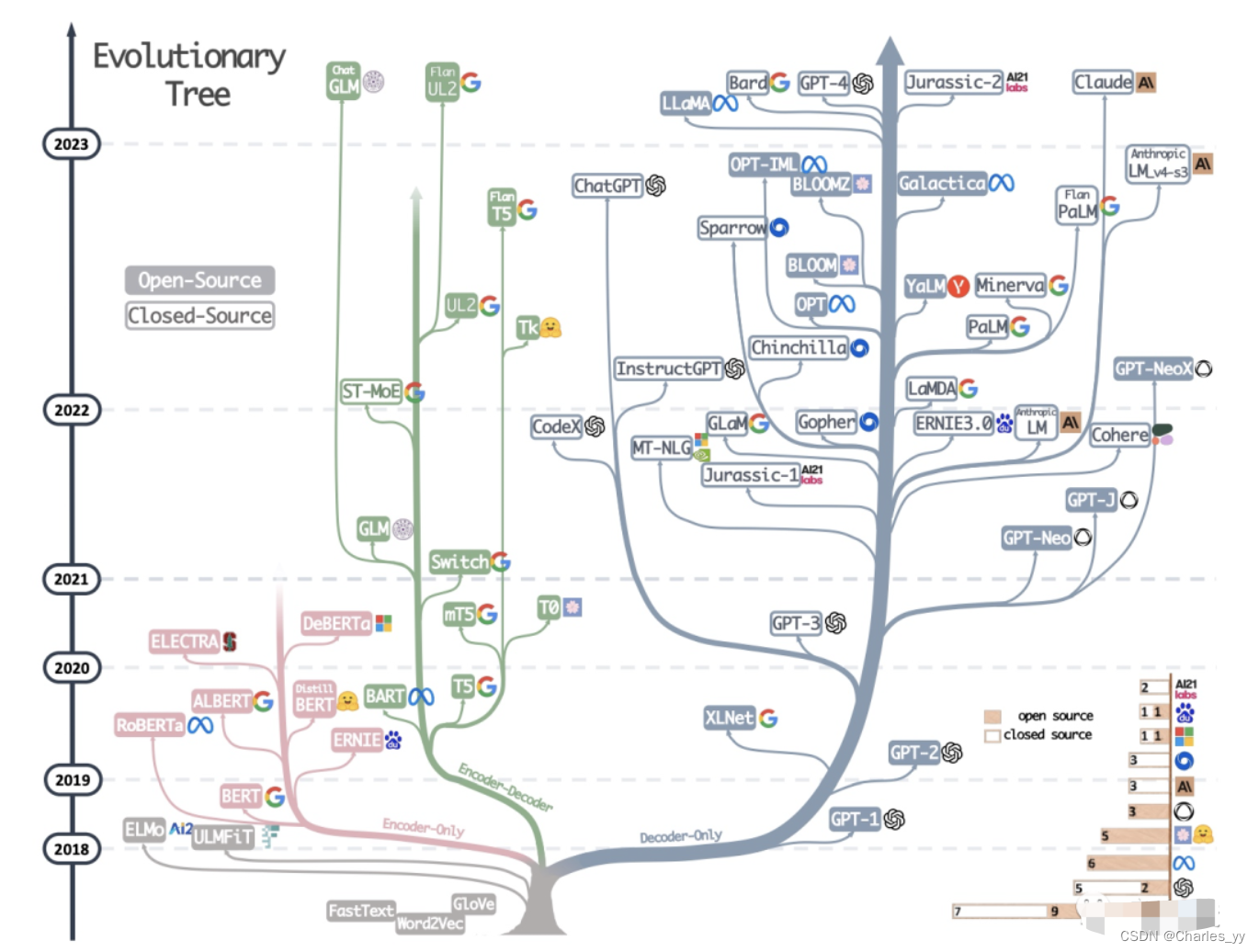
大语言模型的三种主要架构 Decoder-Only、Encoder-Only、Encoder-Decoder
现代大型语言模型(LLM)的演变进化树,如下图: https://arxiv.org/pdf/2304.13712.pdf 基于 Transformer 模型以非灰色显示: decoder-only 模型在蓝色分支, encoder-only 模型在粉色分支, encod…...
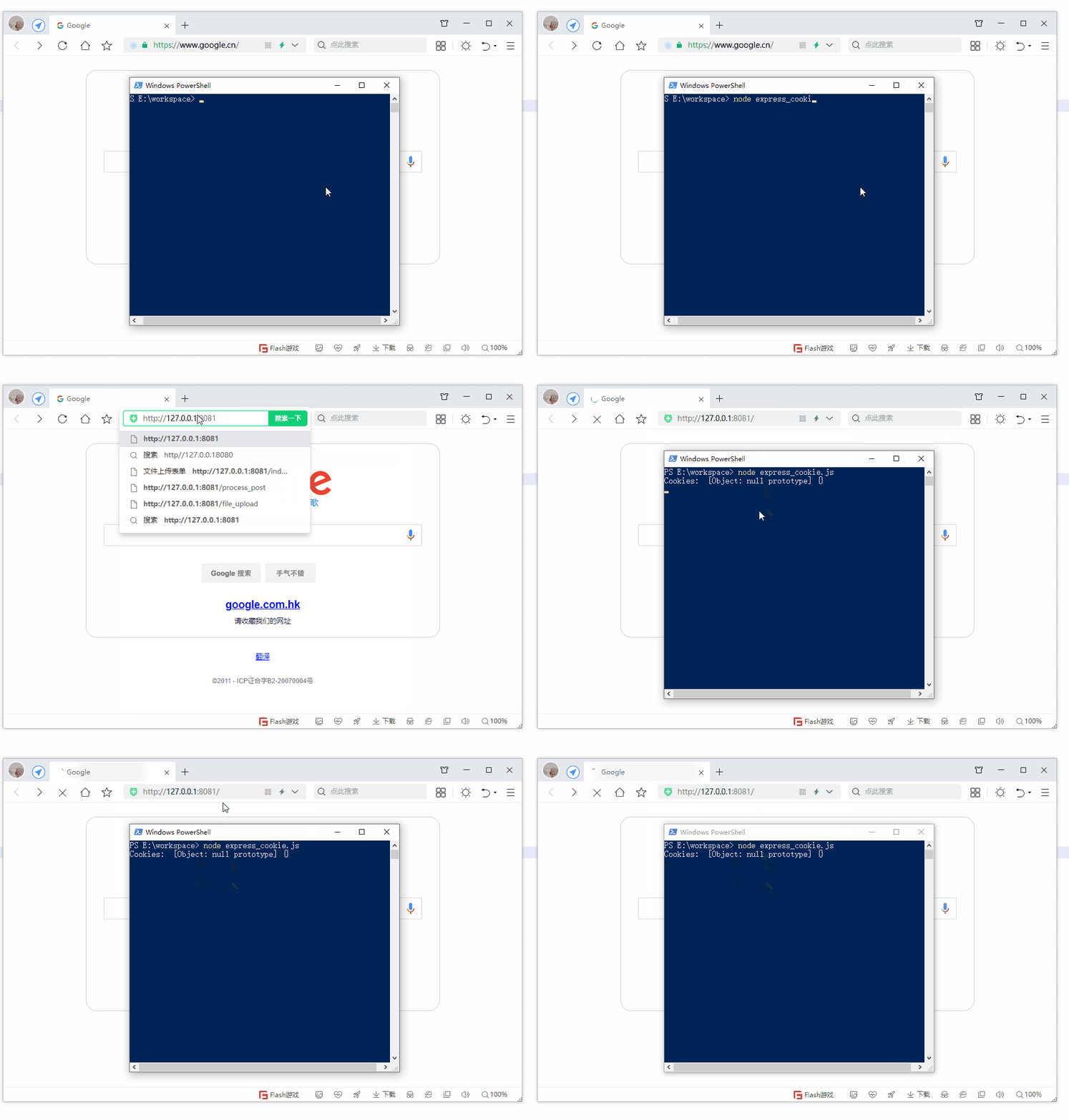
第19节 Node.js Express 框架
Express 是一个为Node.js设计的web开发框架,它基于nodejs平台。 Express 简介 Express是一个简洁而灵活的node.js Web应用框架, 提供了一系列强大特性帮助你创建各种Web应用,和丰富的HTTP工具。 使用Express可以快速地搭建一个完整功能的网站。 Expre…...
:OpenBCI_GUI:从环境搭建到数据可视化(下))
脑机新手指南(八):OpenBCI_GUI:从环境搭建到数据可视化(下)
一、数据处理与分析实战 (一)实时滤波与参数调整 基础滤波操作 60Hz 工频滤波:勾选界面右侧 “60Hz” 复选框,可有效抑制电网干扰(适用于北美地区,欧洲用户可调整为 50Hz)。 平滑处理&…...
基于距离变化能量开销动态调整的WSN低功耗拓扑控制开销算法matlab仿真
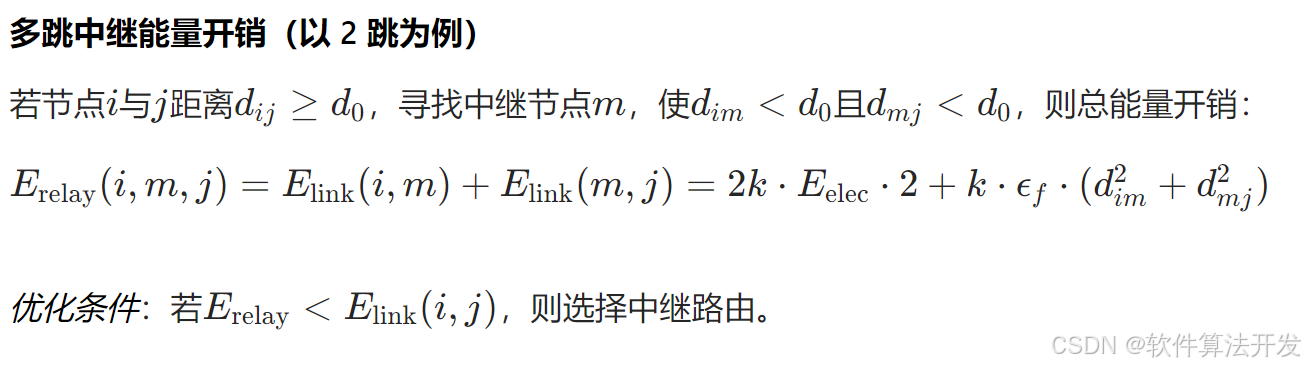
目录 1.程序功能描述 2.测试软件版本以及运行结果展示 3.核心程序 4.算法仿真参数 5.算法理论概述 6.参考文献 7.完整程序 1.程序功能描述 通过动态调整节点通信的能量开销,平衡网络负载,延长WSN生命周期。具体通过建立基于距离的能量消耗模型&am…...
智慧工地云平台源码,基于微服务架构+Java+Spring Cloud +UniApp +MySql
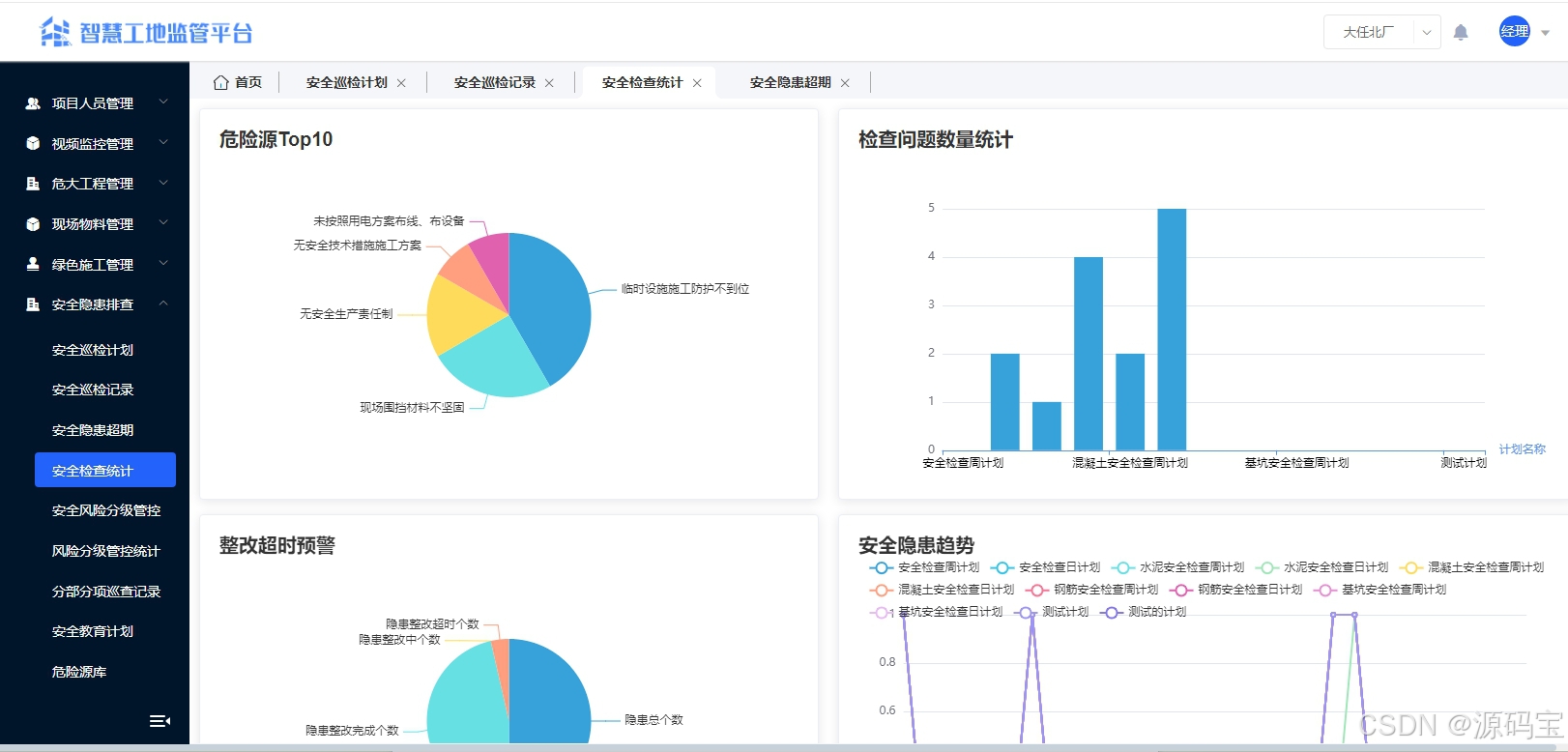
智慧工地管理云平台系统,智慧工地全套源码,java版智慧工地源码,支持PC端、大屏端、移动端。 智慧工地聚焦建筑行业的市场需求,提供“平台网络终端”的整体解决方案,提供劳务管理、视频管理、智能监测、绿色施工、安全管…...
MMaDA: Multimodal Large Diffusion Language Models
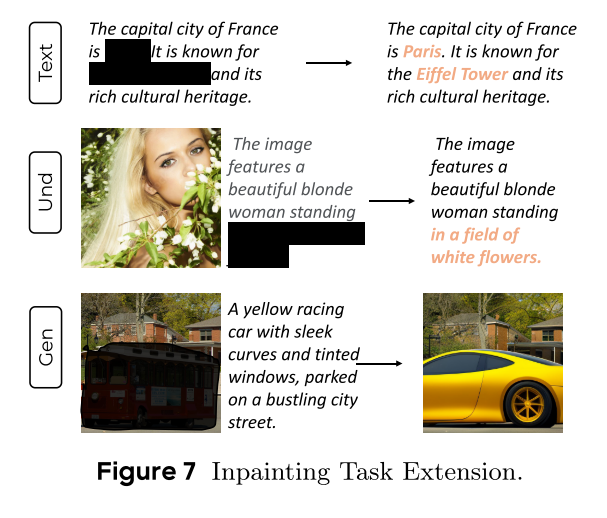
CODE : https://github.com/Gen-Verse/MMaDA Abstract 我们介绍了一种新型的多模态扩散基础模型MMaDA,它被设计用于在文本推理、多模态理解和文本到图像生成等不同领域实现卓越的性能。该方法的特点是三个关键创新:(i) MMaDA采用统一的扩散架构…...

工程地质软件市场:发展现状、趋势与策略建议
一、引言 在工程建设领域,准确把握地质条件是确保项目顺利推进和安全运营的关键。工程地质软件作为处理、分析、模拟和展示工程地质数据的重要工具,正发挥着日益重要的作用。它凭借强大的数据处理能力、三维建模功能、空间分析工具和可视化展示手段&…...
基础光照(Basic Lighting))
C++.OpenGL (10/64)基础光照(Basic Lighting)
基础光照(Basic Lighting) 冯氏光照模型(Phong Lighting Model) #mermaid-svg-GLdskXwWINxNGHso {font-family:"trebuchet ms",verdana,arial,sans-serif;font-size:16px;fill:#333;}#mermaid-svg-GLdskXwWINxNGHso .error-icon{fill:#552222;}#mermaid-svg-GLd…...
GC1808高性能24位立体声音频ADC芯片解析
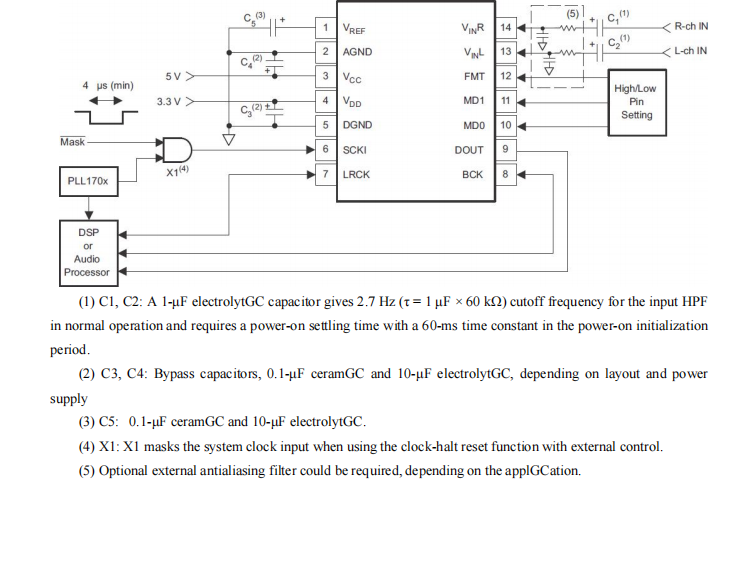
1. 芯片概述 GC1808是一款24位立体声音频模数转换器(ADC),支持8kHz~96kHz采样率,集成Δ-Σ调制器、数字抗混叠滤波器和高通滤波器,适用于高保真音频采集场景。 2. 核心特性 高精度:24位分辨率,…...

站群服务器的应用场景都有哪些?
站群服务器主要是为了多个网站的托管和管理所设计的,可以通过集中管理和高效资源的分配,来支持多个独立的网站同时运行,让每一个网站都可以分配到独立的IP地址,避免出现IP关联的风险,用户还可以通过控制面板进行管理功…...
详细解析)
Caliper 负载(Workload)详细解析
Caliper 负载(Workload)详细解析 负载(Workload)是 Caliper 性能测试的核心部分,它定义了测试期间要执行的具体合约调用行为和交易模式。下面我将全面深入地讲解负载的各个方面。 一、负载模块基本结构 一个典型的负载模块(如 workload.js)包含以下基本结构: use strict;/…...