
深入浅出理解TensorFlow的padding填充算法
一、参考资料
notes_on_padding_2
二、TensorFlow的padding算法
本文以TensorFlow v2.14.0版本为例,介绍TensorFlow的padding算法。
tf.nn.conv2d
# https://github.com/tensorflow/tensorflow/blob/v2.14.0/tensorflow/python/ops/nn_ops.py#L2257-L2361padding: Either the `string` `"SAME"` or `"VALID"` indicating the type ofpadding algorithm to use, or a list indicating the explicit paddings atthe start and end of each dimension. See[here](https://www.tensorflow.org/api_docs/python/tf/nn#notes_on_padding_2)for more information. When explicit padding is used and data_format is`"NHWC"`, this should be in the form `[[0, 0], [pad_top, pad_bottom],[pad_left, pad_right], [0, 0]]`. When explicit padding used anddata_format is `"NCHW"`, this should be in the form `[[0, 0], [0, 0],[pad_top, pad_bottom], [pad_left, pad_right]]`.
1. 引言
tf.nn.conv2d and tf.nn.max_pool2d 函数都有padding参数,在执行函数之前,都需要进行填充padding(零元素)操作。padding参数可以是 VALID 和 SAME, VALID 表示no-padding不填充,SAME表示需要padding。
对于convolutions,用零元素填充;对于pools,填充值可以忽略,例如max_pool,其滑动窗口会忽略填充值。
2. VALID padding
padding='VALID' 表示不填充,这种情况下,输出的尺寸一般小于输入的尺寸。
对于 conv2d,它的输出尺寸为:
out_height = ceil((in_height - filter_height + 1) / stride_height)
out_width  = ceil((in_width - filter_width + 1) / stride_width)
其中,filter_height and filter_width 表示滤波器fillter的尺寸。
3. SAME padding
padding='SAME' 可以对空间的各个维度进行padding。对于 conv2d,它的输出尺寸为:
out_height = ceil(in_height / stride_height)
out_width  = ceil(in_width / stride_width)
重要说明:如果不关注padding的内部实现机制,该结论可以直接使用。
对于每个维度方向的padding,可以表示为:
if (in_height % strides[1] == 0):pad_along_height = max(filter_height - stride_height, 0)
else:pad_along_height = max(filter_height - (in_height % stride_height), 0)
if (in_width % strides[2] == 0):pad_along_width = max(filter_width - stride_width, 0)
else:pad_along_width = max(filter_width - (in_width % stride_width), 0)
最终,对于 top, bottom, left and right 各维度的padding为:
pad_top = pad_along_height // 2
pad_bottom = pad_along_height - pad_top
pad_left = pad_along_width // 2
pad_right = pad_along_width - pad_left
其中,the division by 2 表示两侧(top vs bottom, right vs left)的padding,而 the bottom and right sides 两侧需要填充剩余的padding。例如,when pad_along_height is 5, we pad 2 pixels at the top and 3 pixels at the bottom. 注意:该种padding方式与其他的深度学习框架(例如,PyTorch and Caffe)不同,其他的深度学习框架需要明确padding的数量,且在两侧padding相同的数量。
Note that this is different from existing libraries such as PyTorch and Caffe, which explicitly specify the number of padded pixels and always pad the same number of pixels on both sides.
3.1 代码示例
in_height = 5
filter_height = 3
stride_height = 2in_width = 2
filter_width = 2
stride_width = 1inp = tf.ones((2, in_height, in_width, 2))
filter = tf.ones((filter_height, filter_width, 2, 2))
strides = [stride_height, stride_width]
output = tf.nn.conv2d(inp, filter, strides, padding='SAME')
output.shape[1]  # output_height: ceil(5 / 2)=3output.shape[2] # output_width: ceil(2 / 1)=2
3.2 计算padding尺寸
已知条件:
(in_height, in_width)=(5, 2)
(filter_height, filter_width)=(3, 2)
(strides[1], strides[2])=(2, 1)
先计算Height方向的padding,可得:
in_height % strides[1] = 5%2 = 1
则满足以下公式:
pad_along_height = max(filter_height - (in_height % stride_height), 0)
代入公式,可得:
pad_along_height = max(3-(5%2), 0)=max(3-1, 0)=2
pad_top = pad_along_height // 2 = 2 // 2 = 1
pad_bottom = pad_along_height - pad_top = 2-1 = 1
由此可知,在 top 方向填充1,在 bottom 方向填充1。
再计算 Width 方向的padding,可得:
in_width % strides[2] = 2%1 = 0
则满足以下公式:
pad_along_width = max(filter_width - stride_width, 0)
代入公式,可得:
pad_along_heght = max(2-1, 0) = 1
pad_left = pad_along_width // 2 = 1 // 2 = 0
pad_right = pad_along_width - pad_left = 1-0 = 1
由此可知,在 left 方向不填充,在 right 方向填充1。
综上所述,填充的示意图如下:
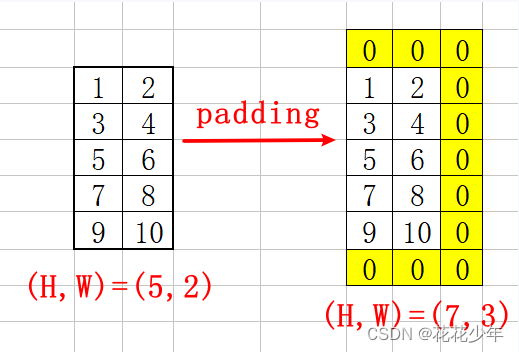
填充之后,输入尺寸由(5,2) 扩充为 (7,3)。
3.3 计算output尺寸
标准卷积输出尺寸的计算公式:
o = i + 2 p − k s + 1 i = size of input o = size of output p = p a d d i n g k = size of kernel s = s t r i d e s ( 1 ) o=\frac{i+2p-k}s+1 \quad \begin{array}{l} \\i=\textit{size of input}\\o=\textit{size of output}\\p=padding\\k=\textit{size of kernel}\\s=strides\end{array}\quad (1) o=si+2p−k+1i=size of inputo=size of outputp=paddingk=size of kernels=strides(1)
计算Height方向的输出尺寸,可得:
o u t _ h e i g h t = i n _ h e i g h t + ( p a d _ t o p + p a d _ b o t t o m ) − f i l t e r _ h e i g h t s t r i d e s [ 1 ] + 1 ( 2 ) out\_height=\frac{in\_height+(pad\_top+pad\_bottom)-filter\_height}{strides[1]}+1\quad (2) out_height=strides[1]in_height+(pad_top+pad_bottom)−filter_height+1(2)
将已知条件代入上述 公式 ( 2 ) 公式(2) 公式(2) 中,可得:
o u t _ h e i g h t = 5 + ( 1 + 1 ) − 3 2 + 1 = 3 out\_height=\frac{5+(1+1)-3}{2}+1=3 out_height=25+(1+1)−3+1=3
计算Width方向的输出尺寸,可得:
o u t _ w i d t h = i n _ w i d t h + ( p a d _ l e f t + p a d _ r i g h t ) − f i l t e r _ w i d t h s t r i d e s [ 2 ] + 1 ( 3 ) out\_width=\frac{in\_width+(pad\_left+pad\_right)-filter\_width}{strides[2]}+1\quad (3) out_width=strides[2]in_width+(pad_left+pad_right)−filter_width+1(3)
将已知条件代入上述 公式 ( 3 ) 公式(3) 公式(3) 中,可得:
o u t _ w i d t h = 2 + ( 0 + 1 ) − 2 1 + 1 = 2 out\_width=\frac{2+(0+1)-2}{1}+1=2 out_width=12+(0+1)−2+1=2
综上所述,输出尺寸为(3, 2),与代码验证的结果一致。
4. Explicit padding
在TensorFlow中,也可以指定padding的数量。但需要注意的是,padding 参数为 list 类型,而不是Tensor,且该参数的格式与 tf.pad 相同。
对于 conv2d,当 data_format='NHWC',padding 的参数格式为 [[0, 0], [pad_top, pad_bottom], [pad_left, pad_right], [0, 0]] ,第一个 [[0, 0]] 表示 batch维度上no-padding不填充,最后一个 [[0, 0]] 表示 channel 维度上no-padding不填充。
For example, in the 2D case, the list is in the format
[[0, 0], [pad_top, pad_bottom], [pad_left, pad_right], [0, 0]]whendata_formatis its default value of'NHWC'. The two[0, 0]pairs indicate the batch and channel dimensions have no padding, which is required, as only spatial dimensions can have padding.
4.1 代码示例
inp = tf.ones((1, 3, 3, 1))
filter = tf.ones((2, 2, 1, 1))
strides = [1, 1]
padding = [[0, 0], [1, 2], [0, 1], [0, 0]]
output = tf.nn.conv2d(inp, filter, strides, padding=padding)
tuple(output.shape)  # (1, 5, 3, 1)# Equivalently, tf.pad can be used, since convolutions pad with zeros.
inp = tf.pad(inp, padding)
# 'VALID' means to use no padding in conv2d (we already padded inp)
output2 = tf.nn.conv2d(inp, filter, strides, padding='VALID')
tf.debugging.assert_equal(output, output2)
4.2 计算padding尺寸
已知条件:
(in_height, in_width)=(3, 3)
(filter_height, filter_width)=(2, 2)
(strides[1], strides[2])=(1, 1)
(pad_top, pad_bottom)=(1, 2)
(pad_left, pad_right)=(0, 1)
从已知条件中可以看出,在 top 方向填充1,在 bottom 方向填充2。在 left 方向不填充,在 right 方向填充1。
综上所述,填充的示意图如下:
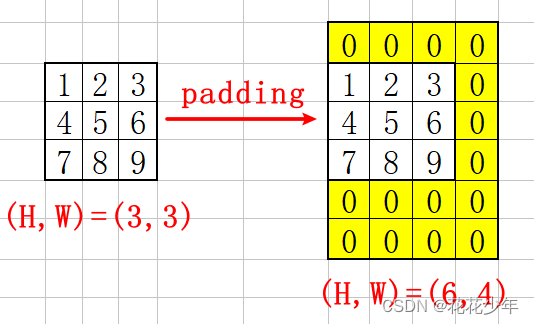
填充之后,输入尺寸由(3,3) 扩充为 (6,4)。
4.3 计算output尺寸
将已知条件代入上述 公式 ( 2 ) 公式(2) 公式(2) 中,可得:
o u t _ h e i g h t = 3 + ( 1 + 2 ) − 2 1 + 1 = 5 out\_height=\frac{3+(1+2)-2}{1}+1=5 out_height=13+(1+2)−2+1=5
将已知条件代入上述 公式 ( 3 ) 公式(3) 公式(3) 中,可得:
o u t _ w i d t h = 3 + ( 0 + 1 ) − 2 1 + 1 = 3 out\_width=\frac{3+(0+1)-2}{1}+1=3 out_width=13+(0+1)−2+1=3
综上所述,输出尺寸为(5, 3),与代码验证的结果一致。
5. 区分卷积层和池化层中的padding
卷积层与池化层中的padding不一样。对于卷积层,以零元素进行padding,再与kernel相乘(卷积操作)。对于池化层,没有相乘的过程。例如,对于一个4x4的 average pooling,其padding对最终结果没有影响。
5.1 代码示例
x_in = np.array([[[[2], [2]],[[1], [1]],[[1], [1]]]])
kernel_in = np.array([  # simulate the avg_pool with conv2d[ [[0.25]], [[0.25]] ],[ [[0.25]], [[0.25]] ]])
x = tf.constant(x_in, dtype=tf.float32)
kernel = tf.constant(kernel_in, dtype=tf.float32)
conv_out = tf.nn.conv2d(x, kernel, strides=[1, 1, 1, 1], padding='SAME')
pool_out = tf.nn.avg_pool(x, [2, 2], strides=[1, 1, 1, 1], padding='SAME')
print(conv_out.shape, pool_out.shape)
# (1, 3, 2, 1) (1, 3, 2, 1)
tf.reshape(conv_out, [3, 2]).numpy()  # conv2d takes account of padding
"""
array([[1.5, 0.75],[1., 0.5],[0.5, 0.25]], dtype=float32)
"""tf.reshape(pool_out, [3, 2]).numpy()  # avg_pool excludes padding
"""
array([[1.5, 1.5],[1., 1.],[1., 1.0]], dtype=float32)
"""
5.2 计算padding尺寸
已知条件:
(in_height, in_width)=(3, 2)
(filter_height, filter_width)=(2, 2)
(strides[1], strides[2])=(1, 1)
先计算Height方向的padding,可得:
in_height % strides[1] = 3%1 = 0
则满足以下公式:
pad_along_height = max(filter_height - stride_height, 0)
代入公式,可得:
pad_along_height = max(2-1, 0) = 1
pad_top = pad_along_height // 2 = 1 // 2 = 0
pad_bottom = pad_along_height - pad_top = 1-0 = 1
由此可知,在 top 方向填充0,在 bottom 方向填充1。
再计算 Width 方向的padding,可得:
in_width % strides[2] = 2%1 = 0
则满足以下公式:
pad_along_width = max(filter_width - stride_width, 0)
代入公式,可得:
pad_along_heght = max(2-1, 0) = 1
pad_left = pad_along_width // 2 = 1 // 2 = 0
pad_right = pad_along_width - pad_left = 1-0 = 1
由此可知,在 left 方向不填充,在 right 方向填充1。
综上所述,填充的示意图如下:
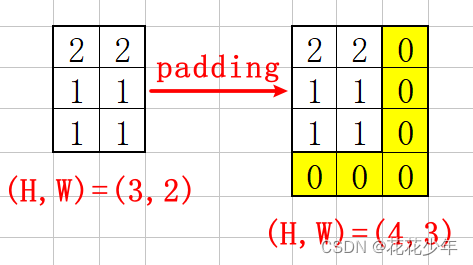
填充之后,输入尺寸由(3,2) 扩充为 (4,3)。
5.3 计算output尺寸
将已知条件代入上述 公式 ( 2 ) 公式(2) 公式(2) 中,可得:
o u t _ h e i g h t = 3 + ( 0 + 1 ) − 2 1 + 1 = 3 out\_height=\frac{3+(0+1)-2}{1}+1=3 out_height=13+(0+1)−2+1=3
将已知条件代入上述 公式 ( 3 ) 公式(3) 公式(3) 中,可得:
o u t _ w i d t h = 2 + ( 0 + 1 ) − 2 1 + 1 = 2 out\_width=\frac{2+(0+1)-2}{1}+1=2 out_width=12+(0+1)−2+1=2
综上所述,输出尺寸为(3, 2),与代码验证的结果一致。
5.4 计算卷积操作的结果
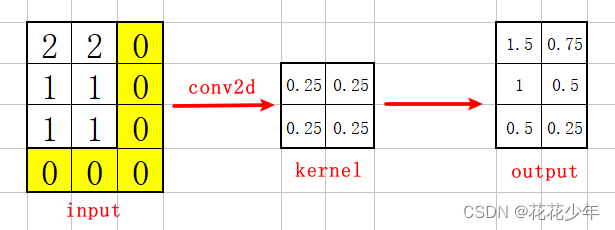
5.5 计算池化操作的结果
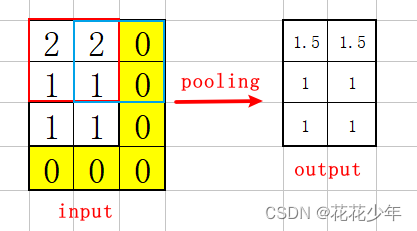
相关文章:
深入浅出理解TensorFlow的padding填充算法
一、参考资料 notes_on_padding_2 二、TensorFlow的padding算法 本文以TensorFlow v2.14.0版本为例,介绍TensorFlow的padding算法。 tf.nn.conv2d # https://github.com/tensorflow/tensorflow/blob/v2.14.0/tensorflow/python/ops/nn_ops.py#L2257-L2361paddi…...
TDD-LTE 附着流程和去附着流程
目录 1. 附着流程 1.1. 正常附着流程 2. 异常附着流程 2.1 RRC建立失败 2.2 核心网拒绝 2.3 eNodeB未收到初始化上下文建立请求 2.4 RRC重配置请求丢失 2. 去附着流程 2.1 非关机去附着流程 2.1.1 连接态非关机去附着 2.1.2 空闲态非关机去附着 2.2 关机去附着流程 …...
[Angular] 笔记 23:Renderer2 - ElementRef 的生产版本
chatgpt: Renderer2 简介 在 Angular 中,Renderer2 是一个服务,用于处理 DOM 操作的抽象层。它提供了一种安全的方式来操作 DOM,同时与平台无关,有助于维护应用程序的跨浏览器兼容性和安全性。 Renderer2 的作用是在 Angular 组…...
WEB:探索开源OFD.js技术应用
1、简述 OFD.js 是一个由开源社区维护的 JavaScript 库,专注于在浏览器中渲染和处理 OFD 文件。OFD 作为一种开放式的文档格式,被广泛应用于电子政务、电子合同等领域。OFD.js 的出现为开发者提供了一个强大的工具,使得在前端实现 OFD 文件的…...

平方根,又叫二次方根,表示为〔√ ̄〕
正在加载中... 平方根,又叫二次方根,表示为〔√ ̄〕,如: 平方根,又叫二次方根,表示为〔√ ̄〕,如:数学语言为:√ ̄164。语言描述为&…...

Springer Latex正文参考文献样式改为数字
用过爱斯唯尔的latex,正文参考文献都是数字,第一次用Springer Latex的参考文献竟然是authoryear,如下: 将这种样式变回序号样式: (1)使用这个documentclass(此为双栏) …...

六、typescript泛型使用
1.identity函数,这个函数会返回任何传入它的值,可以看作是echo命令 function identity(arg:number):number {return arg }或 使用any类型会导致这个函数可以接收任何类型的参数,这样会丢失一些信息,传入与返回类型应该是相同的 有…...

【快慢指针】26.删除有序数组中的重复项
题目 法1:快慢指针 基础解法,必须掌握!!! class Solution {public int removeDuplicates(int[] nums) {if (nums.length < 2) {return nums.length;}int slow 0, fast 1;while (fast < nums.length) {if (n…...
>)
爬虫工作量由小到大的思维转变---<第三十一章 Scrapy Redis 初启动/conn说明书)>
前言: 重点在读connection.py的源码,这个组件主要是用来连接的; 因为连接都无法做到,后面想更改点自定义就白扯了; 正文: 翻译版的connection.py源码: import sys import six from scrapy.utils.misc import load_object from . import defaults# 快捷方式映射 设置名称 -&…...

2023年山东省职业院校技能大赛高职组“软件测试”赛项-单元测试报告答案
任务四 单元测试 目录 任务四 单元测试 题目1: 题目2: 题目3:<...
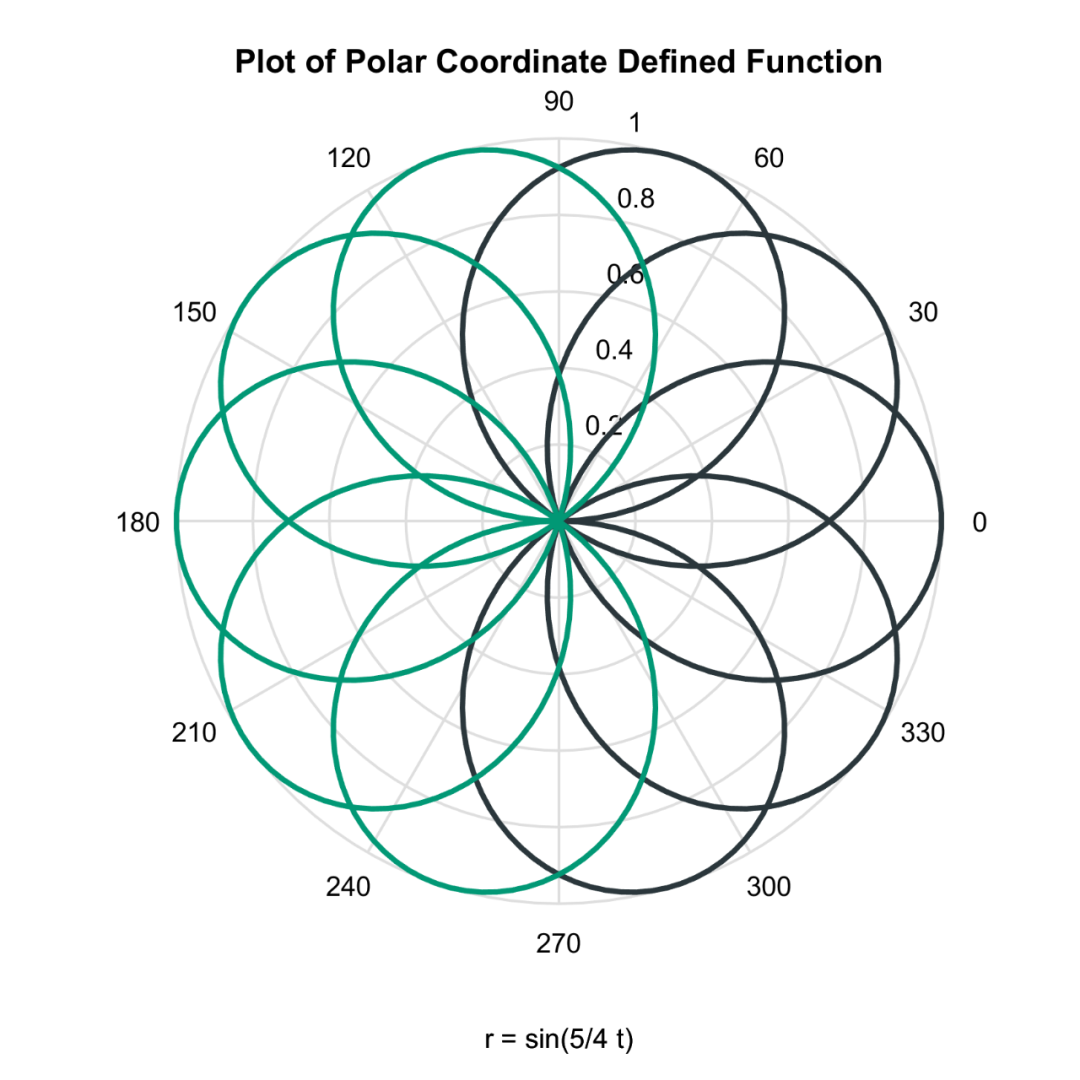
Matlab论文插图绘制模板第133期—函数极坐标折线图
在之前的文章中,分享了Matlab函数折线图的绘制模板: 函数三维折线图: 函数网格曲面图: 函数曲面图: 函数等高线图: 函数等高线填充图: 进一步,再来分享一下函数极坐标折线图。 先来…...

如何用 GPT 去分析Excel数据
背景 需要尝试分析 Excel 的内容,每月都需要进行相关的分析,固定化流程,因此尝试制作固化的脚本,方便后续的分析。 执行步骤 帮我写一段 python 代码,我需要区分一个.xlsx的数据。格式示例如下: ”这块自…...

力扣labuladong一刷day51天单调栈应用
力扣labuladong一刷day51天单调栈应用 一、239. 滑动窗口最大值 题目链接:https://leetcode.cn/problems/sliding-window-maximum/ 思路:滑动窗口最大值,既要维护加入的时间顺序,又要 class Solution {public int[] maxSliding…...

单片机相关知识点
在STM32上运行FreeRTOS,十分简练的小文章FreeRTOS(STM32CubeMX)_cubemx freertos-CSDN博客...
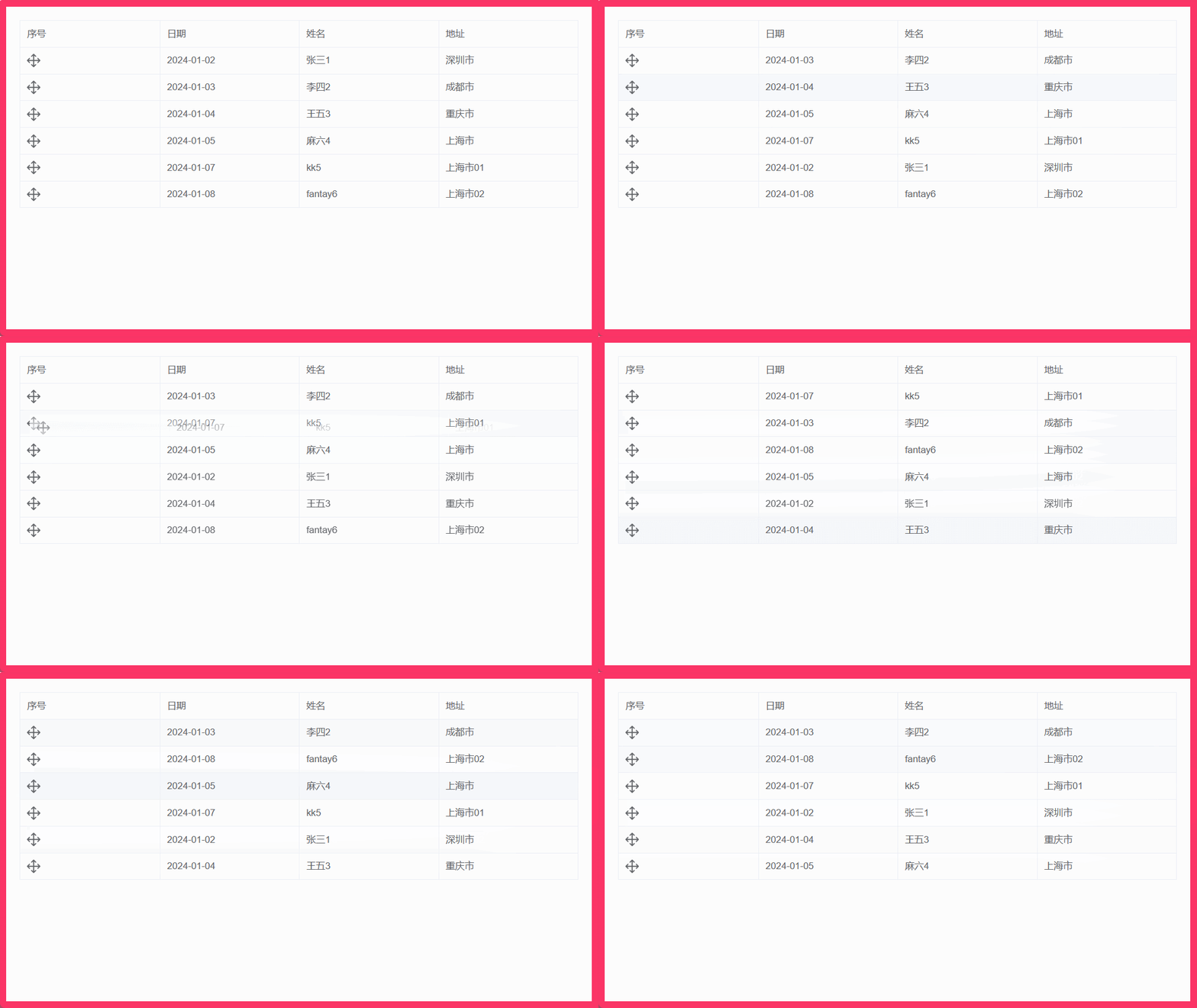
009:vue结合el-table实现表格行拖拽排序(基于sortablejs)
文章目录 1. 实现效果2. 安装 sortablejs 插件3. 完整组件代码4. 注意点 1. 实现效果 2. 安装 sortablejs 插件 sortablejs 更多用法 cnpm i --save sortablejs3. 完整组件代码 <template><div class"home"><div class"body"><el-ta…...
C语言KR圣经笔记 5.3指针和数组 5.4地址运算
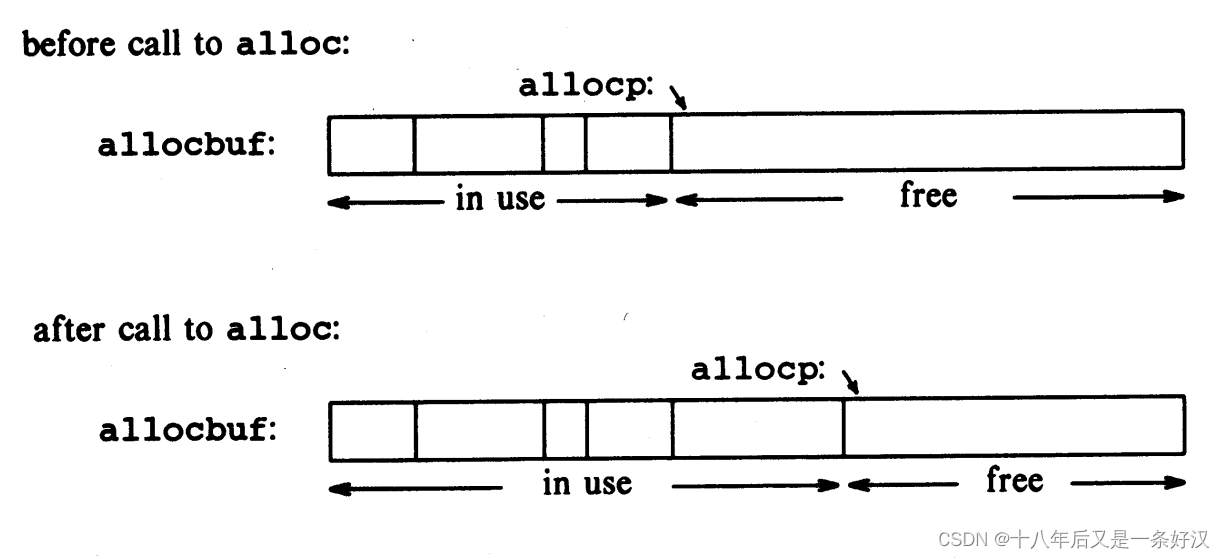
5.3 指针和数组 在 C 语言中,指针和数组有着非常强的关联,强到应当把两者同时拿出来讨论。任何可以通过数组下标来做到的操作,也都能用指针来做到。而指针的版本通常会更快,但至少对初学者来说会更难理解。 如下声明 int a[10]…...
设计模式:简单工厂模式、工厂方法模式、抽象工厂模式
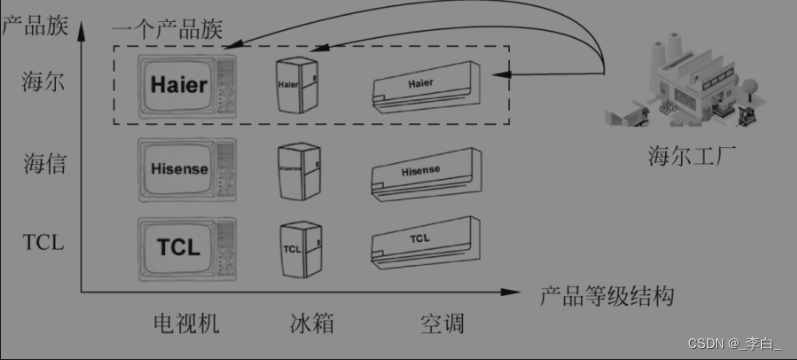
简单工厂模式、工厂方法模式、抽象工厂模式 1. 为什么需要工厂模式?2. 简单工厂模式2.1. 定义2.2. 代码实现2.3. 优点2.4. 缺点2.5. 适用场景 3. 工厂方法模式3.1. 有了简单工厂模式为什么还需要有工厂方法模式?3.2. 定义3.3. 代码实现3.4. 主要优点3.5.…...

Could not load library libcudnn_cnn_infer.so.8
报错: Could not load library libcudnn_cnn_infer.so.8. Error: /root/miniconda3/lib/python3.10/site-packages/torch/lib/libcudnn_cnn_infer.so.8: undefined symbol: _ZNK10cask_cudnn14BaseKernelInfo18minorCCVCompatibleENS_8SafeEnumINS_47ComputeCapa…...
ELement UI时间控件el-date-picker误差8小时解决办法
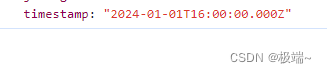
一、问题描述: 在项目中引用了elementui中的date-picker组件,选中的时间跟实际相差八小时,且格式不是自己想要的格式 <el-date-pickertype"date"placeholder"选择日期"format"yyyy/M/d"v-model"form…...

Linux日志论转
系统日志、审计日志、诊断日志 日志系统rsyslog 日志管理基础: rsyslog 日志管理 logrotate日志轮转常见的日志文件 #tail -f /var/log/messages #动态查看日志文件的尾部,系统主日志文件#tail -f /var/log/secure #记录认证、安全的日志…...

内存分配函数malloc kmalloc vmalloc
内存分配函数malloc kmalloc vmalloc malloc实现步骤: 1)请求大小调整:首先,malloc 需要调整用户请求的大小,以适应内部数据结构(例如,可能需要存储额外的元数据)。通常,这包括对齐调整,确保分配的内存地址满足特定硬件要求(如对齐到8字节或16字节边界)。 2)空闲…...

Ubuntu系统下交叉编译openssl
一、参考资料 OpenSSL&&libcurl库的交叉编译 - hesetone - 博客园 二、准备工作 1. 编译环境 宿主机:Ubuntu 20.04.6 LTSHost:ARM32位交叉编译器:arm-linux-gnueabihf-gcc-11.1.0 2. 设置交叉编译工具链 在交叉编译之前&#x…...
转转集团旗下首家二手多品类循环仓店“超级转转”开业
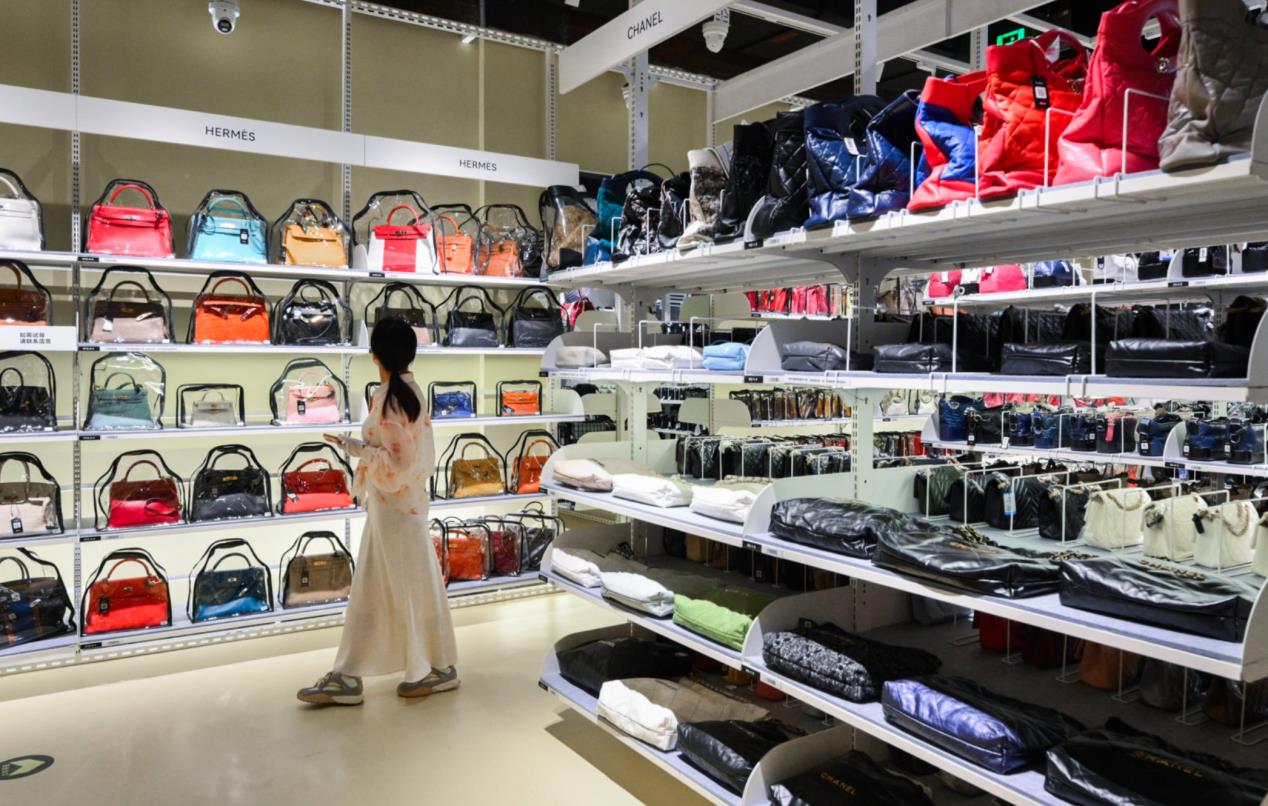
6月9日,国内领先的循环经济企业转转集团旗下首家二手多品类循环仓店“超级转转”正式开业。 转转集团创始人兼CEO黄炜、转转循环时尚发起人朱珠、转转集团COO兼红布林CEO胡伟琨、王府井集团副总裁祝捷等出席了开业剪彩仪式。 据「TMT星球」了解,“超级…...
如何在看板中有效管理突发紧急任务
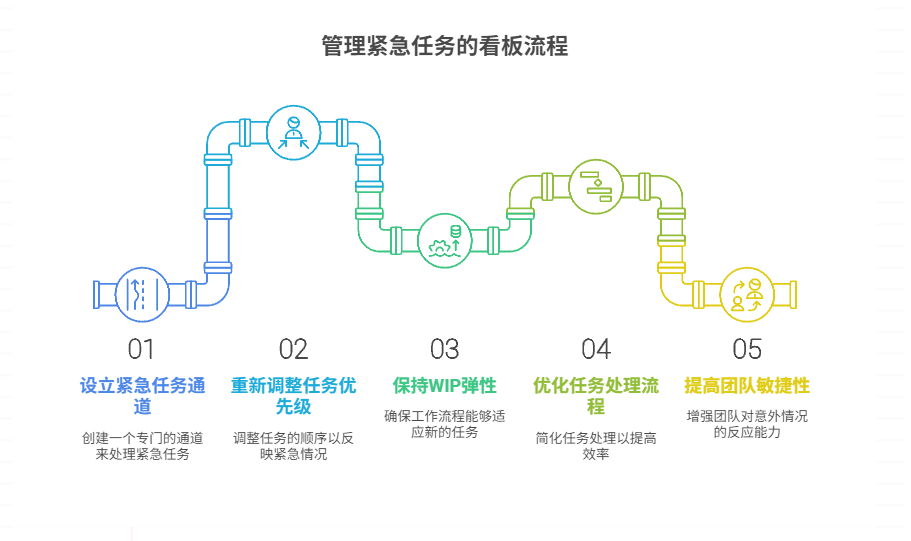
在看板中有效管理突发紧急任务需要:设立专门的紧急任务通道、重新调整任务优先级、保持适度的WIP(Work-in-Progress)弹性、优化任务处理流程、提高团队应对突发情况的敏捷性。其中,设立专门的紧急任务通道尤为重要,这能…...
1.3 VSCode安装与环境配置
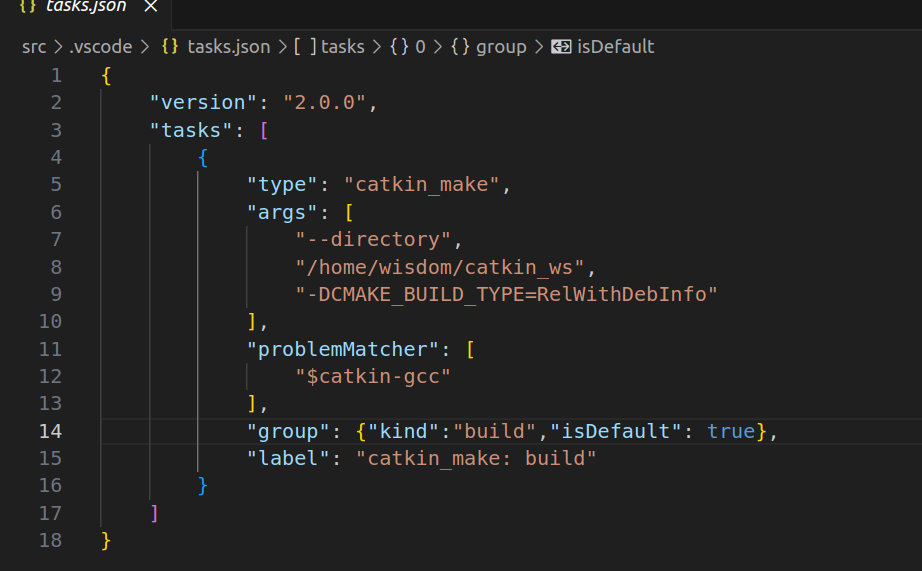
进入网址Visual Studio Code - Code Editing. Redefined下载.deb文件,然后打开终端,进入下载文件夹,键入命令 sudo dpkg -i code_1.100.3-1748872405_amd64.deb 在终端键入命令code即启动vscode 需要安装插件列表 1.Chinese简化 2.ros …...
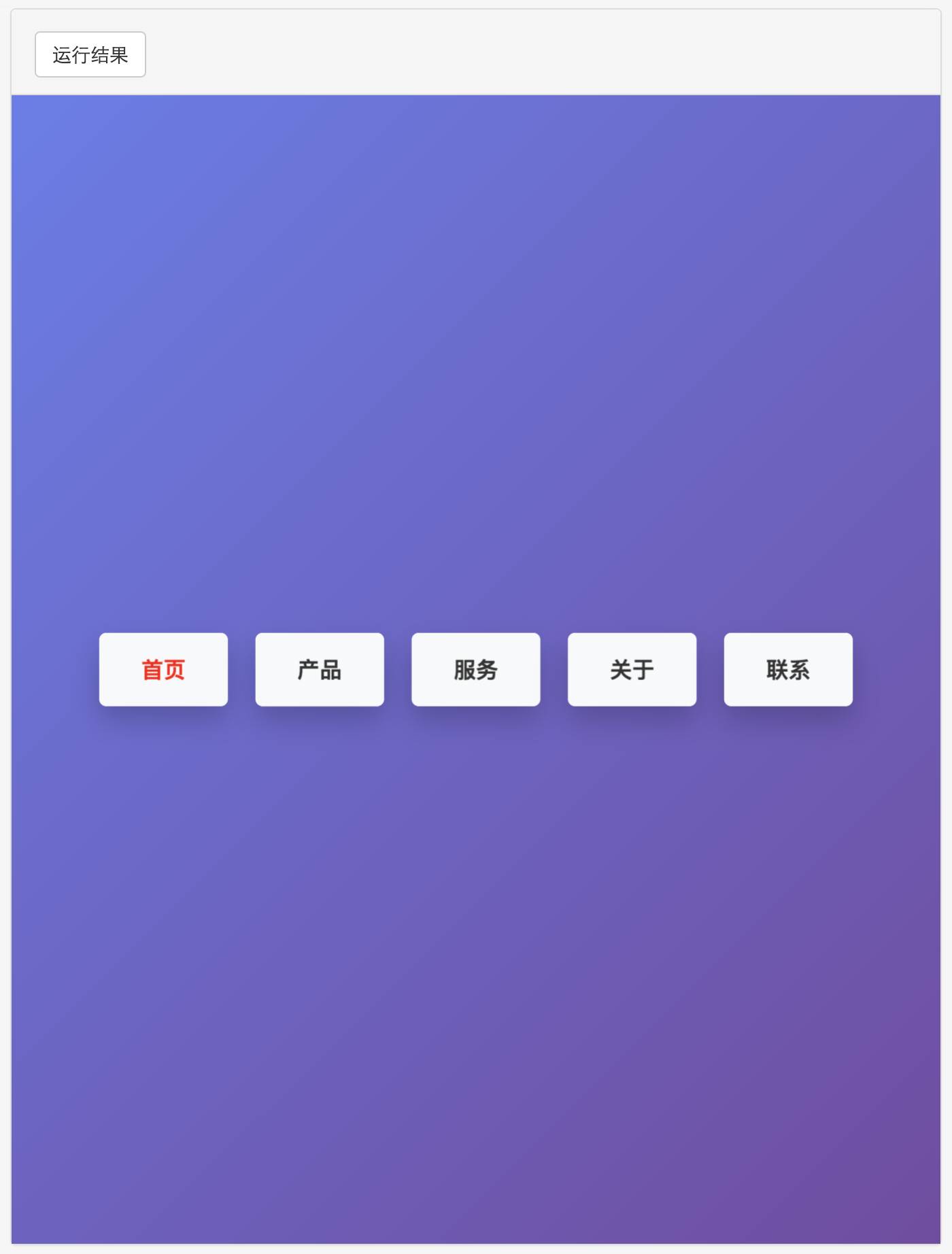
多种风格导航菜单 HTML 实现(附源码)
下面我将为您展示 6 种不同风格的导航菜单实现,每种都包含完整 HTML、CSS 和 JavaScript 代码。 1. 简约水平导航栏 <!DOCTYPE html> <html lang"zh-CN"> <head><meta charset"UTF-8"><meta name"viewport&qu…...
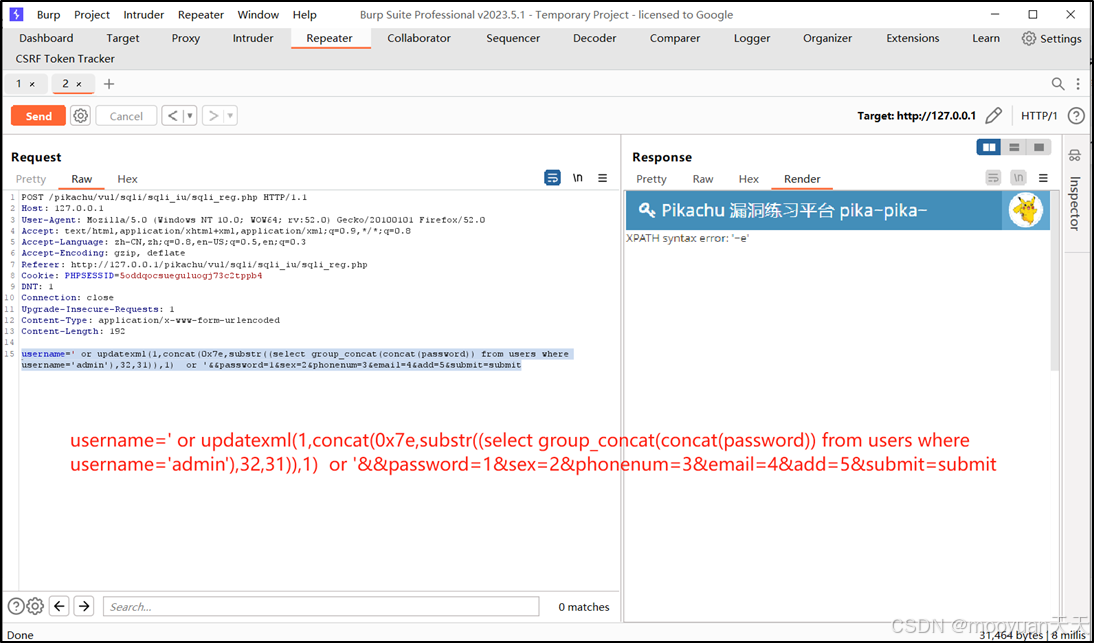
pikachu靶场通关笔记22-1 SQL注入05-1-insert注入(报错法)
目录 一、SQL注入 二、insert注入 三、报错型注入 四、updatexml函数 五、源码审计 六、insert渗透实战 1、渗透准备 2、获取数据库名database 3、获取表名table 4、获取列名column 5、获取字段 本系列为通过《pikachu靶场通关笔记》的SQL注入关卡(共10关࿰…...

【7色560页】职场可视化逻辑图高级数据分析PPT模版
7种色调职场工作汇报PPT,橙蓝、黑红、红蓝、蓝橙灰、浅蓝、浅绿、深蓝七种色调模版 【7色560页】职场可视化逻辑图高级数据分析PPT模版:职场可视化逻辑图分析PPT模版https://pan.quark.cn/s/78aeabbd92d1...

怎么让Comfyui导出的图像不包含工作流信息,
为了数据安全,让Comfyui导出的图像不包含工作流信息,导出的图像就不会拖到comfyui中加载出来工作流。 ComfyUI的目录下node.py 直接移除 pnginfo(推荐) 在 save_images 方法中,删除或注释掉所有与 metadata …...

前端中slice和splic的区别
1. slice slice 用于从数组中提取一部分元素,返回一个新的数组。 特点: 不修改原数组:slice 不会改变原数组,而是返回一个新的数组。提取数组的部分:slice 会根据指定的开始索引和结束索引提取数组的一部分。不包含…...