
Unity 工具 之 Azure 微软连续语音识别ASR的简单整理
Unity 工具 之 Azure 微软连续语音识别ASR的简单整理
目录
Unity 工具 之 Azure 微软连续语音识别ASR的简单整理
一、简单介绍
二、实现原理
三、注意实现
四、实现步骤
五、关键脚本
一、简单介绍
Unity 工具类,自己整理的一些游戏开发可能用到的模块,单独独立使用,方便游戏开发。
本节介绍,这里在使用微软的Azure 进行语音合成的两个方法的做简单整理,这里简单说明,如果你有更好的方法,欢迎留言交流。
官网注册:
面向学生的 Azure - 免费帐户额度 | Microsoft Azure
官网技术文档网址:
技术文档 | Microsoft Learn
官网的TTS:
语音转文本快速入门 - 语音服务 - Azure AI services | Microsoft Learn
Azure Unity SDK 包官网:
安装语音 SDK - Azure Cognitive Services | Microsoft Learn
SDK具体链接:
https://aka.ms/csspeech/unitypackage
二、实现原理
1、官网申请得到语音识别对应的 SPEECH_KEY 和 SPEECH_REGION
2、因为语音识别需要用到麦克风,移动端需要申请麦克风权限
3、开启语音识别,监听语音识别对应事件,即可获取到识别结果
三、注意实现
1、注意如果有卡顿什么的,注意主子线程切换,可能可以适当解决你的卡顿现象
2、注意电脑端(例如windows)运行可以不申请麦克风权限,但是移动端(例如Android)运行要申请麦克风权限,不然无法开启识别成功,可能会报错:Exception with an error code: 0x15
<uses-permission android:name="android.permission.RECORD_AUDIO"/>System.ApplicationException: Exception with an error code: 0x15 at Microsoft.CognitiveServices.Speech.Internal.SpxExceptionThrower.ThrowIfFail (System.IntPtr hr) [0x00000] in <00000000000000000000000000000000>:0 at Microsoft.CognitiveServices.Speech.Recognizer.StartContinuousRecognition () [0x00000] in <00000000000000000000000000000000>:0 at Microsoft.CognitiveServices.Speech.Recognizer.DoAsyncRecognitionAction (System.Action recoImplAction) [0x00000] in <00000000000000000000000000000000>:0 at System.Threading.Tasks.Task.Execute () [0x00000] in <00000000000000000000000000000000>:0 at System.Threading.ExecutionContext.RunInternal (System.Threading.ExecutionContext executionContext, System.Threading.ContextCallback callback, System.Object state, System.Boolean preserveSyncCtx) [0x00000] in <00000000000000000000000000000000>:0 at System.Threading.Tasks.Task.ExecuteWithThreadLocal (System.Threading.Tasks.Task& currentTaskSlot) [0x00000] in
四、实现步骤
1、下载好SDK 导入

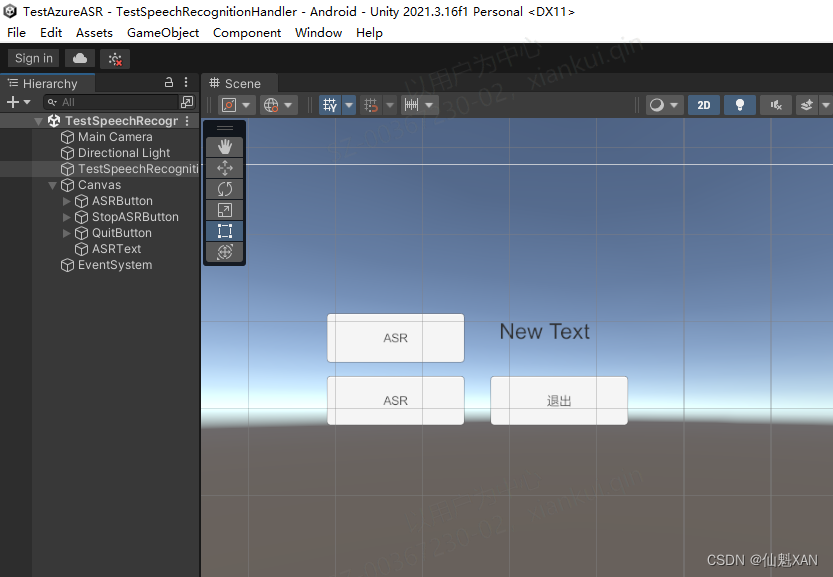
2、简单的搭建场景
3、编写对应脚本,测试语音识别功能

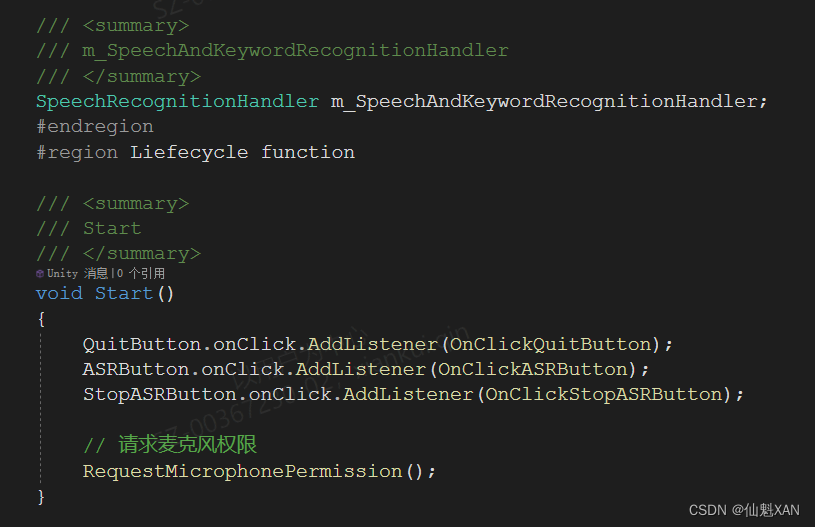
4、把测试脚本添加到场景中,并赋值

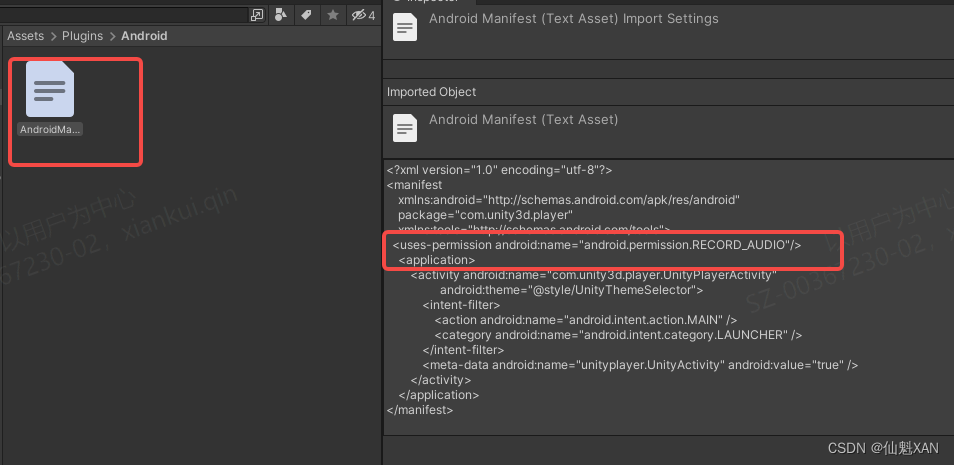
5、如果移动端,例如 Android 端,勾选如下,添加麦克风权限
<uses-permission android:name="android.permission.RECORD_AUDIO"/>
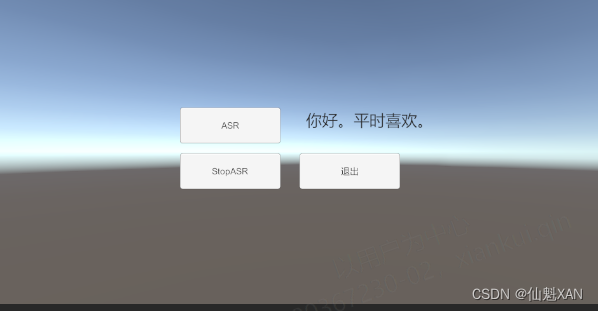
5、运行,点击对应按钮,开始识别,Console 中可以看到识别结果
五、关键脚本
1、TestSpeechRecognitionHandler
using UnityEngine;
using UnityEngine.Android;
using UnityEngine.UI;public class TestSpeechRecognitionHandler : MonoBehaviour
{#region Data/// <summary>/// 按钮,文本/// </summary>public Button QuitButton;public Button ASRButton;public Button StopASRButton;public Text ASRText;/// <summary>/// m_SpeechAndKeywordRecognitionHandler/// </summary>SpeechRecognitionHandler m_SpeechAndKeywordRecognitionHandler;#endregion#region Liefecycle function/// <summary>/// Start/// </summary>void Start(){QuitButton.onClick.AddListener(OnClickQuitButton);ASRButton.onClick.AddListener(OnClickASRButton);StopASRButton.onClick.AddListener(OnClickStopASRButton);// 请求麦克风权限RequestMicrophonePermission();}/// <summary>/// 应用退出/// </summary>async void OnApplicationQuit() {await m_SpeechAndKeywordRecognitionHandler.StopContinuousRecognizer();}#endregion#region Private function/// <summary>/// RequestMicrophonePermission/// </summary>void RequestMicrophonePermission(){// 检查当前平台是否为 Androidif (Application.platform == RuntimePlatform.Android){// 检查是否已经授予麦克风权限if (!Permission.HasUserAuthorizedPermission(Permission.Microphone)){// 如果没有权限,请求用户授权Permission.RequestUserPermission(Permission.Microphone);}}else{// 在其他平台上,可以执行其他平台特定的逻辑Debug.LogWarning("Microphone permission is not needed on this platform.");}SpeechInitialized();}/// <summary>/// SpeechInitialized/// </summary>private void SpeechInitialized() {ASRText.text = "";m_SpeechAndKeywordRecognitionHandler = new SpeechRecognitionHandler();m_SpeechAndKeywordRecognitionHandler.onRecognizingAction = (str) => { Debug.Log("onRecognizingAction: " + str); };m_SpeechAndKeywordRecognitionHandler.onRecognizedSpeechAction = (str) => { Loom.QueueOnMainThread(() => ASRText.text += str);  Debug.Log("onRecognizedSpeechAction: " + str); };m_SpeechAndKeywordRecognitionHandler.onErrorAction = (str) => { Debug.Log("onErrorAction: " + str); };m_SpeechAndKeywordRecognitionHandler.Initialized();}/// <summary>/// OnClickQuitButton/// </summary>private void OnClickQuitButton() {
#if UNITY_EDITORUnityEditor.EditorApplication.isPlaying = false;#elseApplication.Quit();
#endif }/// <summary>/// OnClickASRButton/// </summary>private void OnClickASRButton() {m_SpeechAndKeywordRecognitionHandler.StartContinuousRecognizer();}/// <summary>/// OnClickStopASRButton/// </summary>private async void OnClickStopASRButton(){await m_SpeechAndKeywordRecognitionHandler.StopContinuousRecognizer();}#endregion
}
2、SpeechRecognitionHandler
using UnityEngine;
using Microsoft.CognitiveServices.Speech;
using Microsoft.CognitiveServices.Speech.Audio;
using System;
using Task = System.Threading.Tasks.Task;/// <summary>
/// 语音识别转文本和关键词识别
/// </summary>
public class SpeechRecognitionHandler
{#region Data/// <summary>/// /// </summary>const string TAG = "[SpeechAndKeywordRecognitionHandler] ";/// <summary>/// 识别配置/// </summary>private SpeechConfig m_SpeechConfig;/// <summary>/// 音频配置/// </summary>private AudioConfig m_AudioConfig;/// <summary>/// 语音识别/// </summary>private SpeechRecognizer m_SpeechRecognizer;/// <summary>/// LLM 大模型配置/// </summary>private ASRConfig m_ASRConfig;/// <summary>/// 识别的事件/// </summary>public Action<string> onRecognizingAction;public Action<string> onRecognizedSpeechAction;public Action<string> onErrorAction;public Action<string> onSessionStoppedAction;#endregion#region Public function/// <summary>/// 初始化/// </summary>/// <returns></returns>public async void Initialized(){m_ASRConfig = new ASRConfig();Debug.Log(TAG + "m_LLMConfig.AZURE_SPEECH_RECOGNITION_LANGUAGE " + m_ASRConfig.AZURE_SPEECH_RECOGNITION_LANGUAGE);Debug.Log(TAG + "m_LLMConfig.AZURE_SPEECH_REGION " + m_ASRConfig.AZURE_SPEECH_REGION);m_SpeechConfig = SpeechConfig.FromSubscription(m_ASRConfig.AZURE_SPEECH_KEY, m_ASRConfig.AZURE_SPEECH_REGION);m_SpeechConfig.SpeechRecognitionLanguage = m_ASRConfig.AZURE_SPEECH_RECOGNITION_LANGUAGE;m_AudioConfig = AudioConfig.FromDefaultMicrophoneInput();Debug.Log(TAG + " Initialized 2 ====");// 根据自己需要处理(不需要也行)await Task.Delay(100);}#endregion#region Private function/// <summary>/// 设置识别回调事件/// </summary>private void SetRecoginzeCallback(){Debug.Log(TAG + " SetRecoginzeCallback == ");if (m_SpeechRecognizer != null){m_SpeechRecognizer.Recognizing += OnRecognizing;m_SpeechRecognizer.Recognized += OnRecognized;m_SpeechRecognizer.Canceled += OnCanceled;m_SpeechRecognizer.SessionStopped += OnSessionStopped;Debug.Log(TAG+" SetRecoginzeCallback OK ");}}#endregion#region Callback/// <summary>/// 正在识别/// </summary>/// <param name="s"></param>/// <param name="e"></param>private void OnRecognizing(object s, SpeechRecognitionEventArgs e){Debug.Log(TAG + "RecognizingSpeech:" + e.Result.Text + " :[e.Result.Reason]:" + e.Result.Reason);if (e.Result.Reason == ResultReason.RecognizingSpeech ){Debug.Log(TAG + " Trigger onRecognizingAction is null :" + onRecognizingAction == null);onRecognizingAction?.Invoke(e.Result.Text);}}/// <summary>/// 识别结束/// </summary>/// <param name="s"></param>/// <param name="e"></param>private void OnRecognized(object s, SpeechRecognitionEventArgs e){Debug.Log(TAG + "RecognizedSpeech:" + e.Result.Text + " :[e.Result.Reason]:" + e.Result.Reason);if (e.Result.Reason == ResultReason.RecognizedSpeech ){bool tmp = onRecognizedSpeechAction == null;Debug.Log(TAG + " Trigger onRecognizedSpeechAction is null :" + tmp);onRecognizedSpeechAction?.Invoke(e.Result.Text);}}/// <summary>/// 识别取消/// </summary>/// <param name="s"></param>/// <param name="e"></param>private void OnCanceled(object s, SpeechRecognitionCanceledEventArgs e){Debug.LogFormat(TAG+"Canceled: Reason={0}", e.Reason );if (e.Reason == CancellationReason.Error){onErrorAction?.Invoke(e.ErrorDetails);}}/// <summary>/// 会话结束/// </summary>/// <param name="s"></param>/// <param name="e"></param>private void OnSessionStopped(object s, SessionEventArgs e){Debug.Log(TAG+"Session stopped event." );onSessionStoppedAction?.Invoke("Session stopped event.");}#endregion#region 连续语音识别转文本/// <summary>/// 开启连续语音识别转文本/// </summary>public void StartContinuousRecognizer(){Debug.LogWarning(TAG + "StartContinuousRecognizer");try{// 转到异步中(根据自己需要处理)Loom.RunAsync(async () => {try{if (m_SpeechRecognizer != null){m_SpeechRecognizer.Dispose();m_SpeechRecognizer = null;}if (m_SpeechRecognizer == null){m_SpeechRecognizer = new SpeechRecognizer(m_SpeechConfig, m_AudioConfig);SetRecoginzeCallback();}await m_SpeechRecognizer.StartContinuousRecognitionAsync().ConfigureAwait(false);Loom.QueueOnMainThread(() => {Debug.LogWarning(TAG + "StartContinuousRecognizer QueueOnMainThread ok");});Debug.LogWarning(TAG + "StartContinuousRecognizer RunAsync ok");}catch (Exception e){Loom.QueueOnMainThread(() =>{Debug.LogError(TAG + " StartContinuousRecognizer 0 " + e);});}});}catch (Exception e){Debug.LogError(TAG + " StartContinuousRecognizer 1 " + e);}}/// <summary>/// 结束连续语音识别转文本/// </summary>public async Task StopContinuousRecognizer(){try{if (m_SpeechRecognizer != null){await m_SpeechRecognizer.StopContinuousRecognitionAsync().ConfigureAwait(false);//m_SpeechRecognizer.Dispose();//m_SpeechRecognizer = null;Debug.LogWarning(TAG + " StopContinuousRecognizer");}}catch (Exception e){Debug.LogError(TAG + " StopContinuousRecognizer Exception : " + e);}}#endregion}
3、ASRConfig
public class ASRConfig
{#region Azure ASR/// <summary>/// AZURE_SPEECH_KEY/// </summary>public virtual string AZURE_SPEECH_KEY { get; } = @"098dc5aa21a14758a347dcac36d7eb66";/// <summary>/// AZURE_SPEECH_REGION/// </summary>public virtual string AZURE_SPEECH_REGION { get; } = @"eastasia";/// <summary>/// AZURE_SPEECH_RECOGNITION_LANGUAGE/// </summary>public virtual string AZURE_SPEECH_RECOGNITION_LANGUAGE { get; } = @"zh-CN";#endregion
}
相关文章:
Unity 工具 之 Azure 微软连续语音识别ASR的简单整理
Unity 工具 之 Azure 微软连续语音识别ASR的简单整理 目录 Unity 工具 之 Azure 微软连续语音识别ASR的简单整理 一、简单介绍 二、实现原理 三、注意实现 四、实现步骤 五、关键脚本 一、简单介绍 Unity 工具类,自己整理的一些游戏开发可能用到的模块&#x…...

MLP-Mixer: An all-MLP Architecture for Vision
Abstract 在计算机视觉领域,卷积神经网络(CNNs)是首选的模型。最近,基于注意力机制的网络,如Vision Transformer,也变得流行起来。在这篇论文中,我们展示了卷积和注意力虽然都足以实现良好的性能,但它们两者都不是必需的。我们提出了MLP-Mixer,这是一种仅基于多层感知…...

redis前缀匹配数据迁移数据
背景: 阿里云的dts不支持前缀匹配迁移。 调研发现RedisShake可以前缀匹配迁移。 https://github.com/tair-opensource/RedisShake proxy 代理模式 阿里云的redis cluster 默认是proxy 代理模式, 不支持增量迁移。 如果要支持增量迁移需要开启 redis clu…...
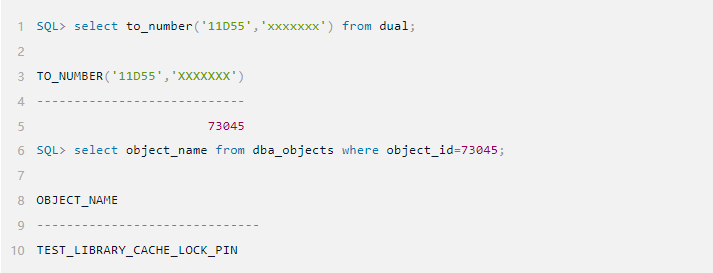
云贝教育 |【技术文章】存储对象的LIBRARY CACHE LOCK/PIN实验(一)
注: 本文为云贝教育 刘峰 原创,请尊重知识产权,转发请注明出处,不接受任何抄袭、演绎和未经注明出处的转载。 实验环境 操作系统:Red Hat Enterprise Linux release 8.8 (Ootpa) 数据库:oracle Version 19.3.0.0.0 …...

C# 快速模指数运算 快速求余运算
此方法解决这样一个问题,就是a^b mod m 的余数是多少。 如果直接计算a^b,方次很大的时候,会溢出,而且时间很长。 当然指数很小的时候直接用自带的Math函数就行,如果指数很大的时候,可以用以下的方法。 原…...

Chisel入门初步0
注:以下所有配置在Ubuntu22.04笔记本中运行 chisel模板构建 复制项目模板文件 git clone https://github.com/schoeberl/chisel-examples.git安装vscode插件Metals 打开顶层目录,并设置为项目文件夹 打开终端输入 tree -L 3 # 查看三层目录结构得到…...
)
MySQL 8.0中移除的功能(一)
以下项目已经过时并在MySQL 8.0中被删除。如果有替代方案,请务必更新应用程序以使用这些替代方案。 对于在MySQL 8.0中被删除的功能,如果从MySQL 5.7源复制到MySQL 8.0副本时,可能会导致语句失败,或者在源和副本上产生不同的效果…...

可抓取性和可索引性:它们是什么以及如何影响搜索引擎优化
什么是可抓取性? 网页的可抓取性是指搜索引擎(如谷歌)发现网页的难易程度。 谷歌发现网页的过程称为爬行。它使用称为网络爬虫(也称为机器人或蜘蛛)的计算机程序。这些程序会跟踪网页之间的链接,以发现新…...
Django教程第4章 | Web开发实战-三种验证码实现
系列:Django学习教程 验证码的存在是为了防止系统被暴力破解攻击,几乎每个系统都有验证码。下面将介绍三种生成验证码方式。 您可以根据你自己的需要进行学习。 手动生成验证码 安装绘图依赖,利用的是画图模块 PIL 以及随机模块 random 在后…...

深度探讨 Golang 中并发发送 HTTP 请求的最佳技术
💂 个人网站:【 海拥】【神级代码资源网站】【办公神器】🤟 基于Web端打造的:👉轻量化工具创作平台💅 想寻找共同学习交流的小伙伴,请点击【全栈技术交流群】 在 Golang 领域,并发发送 HTTP 请求…...
)
VUE指令(二)
vue会根据不同的指令,针对不同的标签实现不同的功能。指令是带有 v- 前缀的特殊标签属性。指令的职责是,当表达式的值改变时,将其产生的连带影响,响应式地作用于 DOM。 8、v-for:基于数据循环,多次渲染整个…...
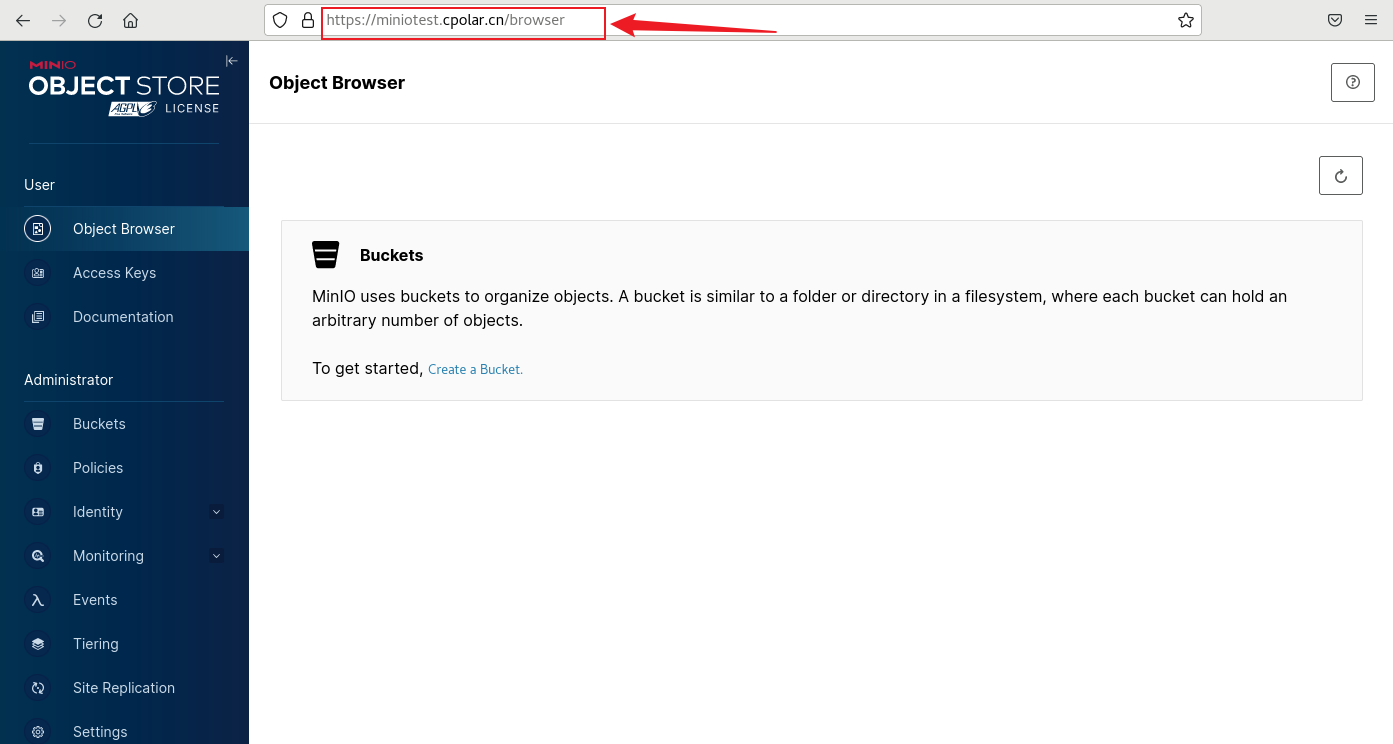
开源对象存储服务器MinIO本地部署并结合内网穿透实现远程访问管理界面
文章目录 前言1. Docker 部署MinIO2. 本地访问MinIO3. Linux安装Cpolar4. 配置MinIO公网地址5. 远程访问MinIO管理界面6. 固定MinIO公网地址 前言 MinIO是一个开源的对象存储服务器,可以在各种环境中运行,例如本地、Docker容器、Kubernetes集群等。它兼…...
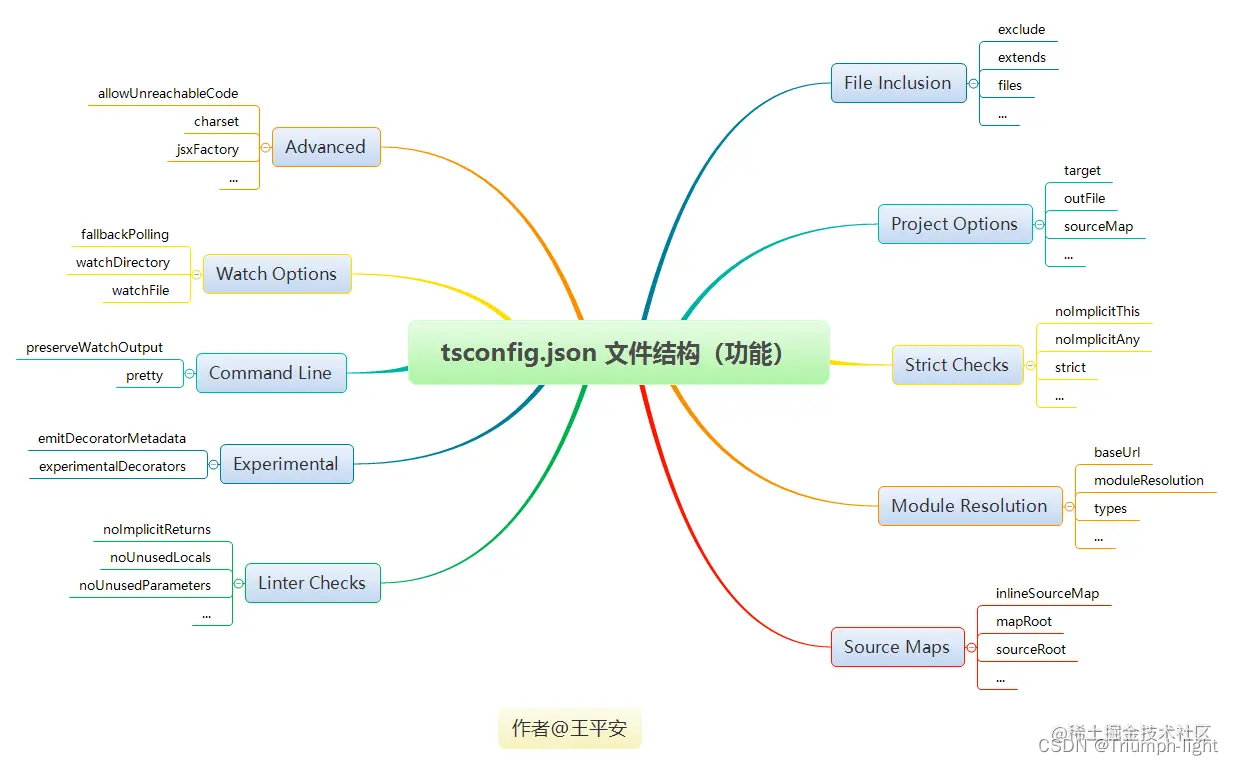
【TypeScript】tsconfig.json文件到底是干啥的?作用是什么?
参考学习博文: 掌握tsconfig.json 一、tsconfig.json简介 1、tsconfig.json是什么? TypeScript 使用 tsconfig.json 文件作为其配置文件,当一个目录中存在 tsconfig.json 文件,则认为该目录为 TypeScript 项目的根目录。 通常…...

wagtail的数据模型和渲染
文章目录 前言页面数据模型数据库字段部分搜索部分编辑面板基础面板结构化面板父页面/子页面类型规则页面URLs自定义页面模型的URL模式获取页面实例的URL 模板渲染为页面模型添加模板模板上下文自定义模板上下文更改模板动态选择模板Ajax 模板 内联模型在多个页面类型之间重用内…...
OpenHarmony4.0适配LVDS屏幕驱动
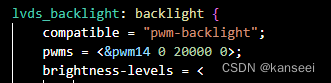
1.概述 手头有一块RK3568的开发板OK3568-C,但是还没有适配OpenHarmony,用的还是LVDS屏幕,但是官方和网上好像还没有OpenHarmony4.0的LVDS屏幕驱动的通用实现,所以决定尝试了一下适配该开发板,完成LVDS屏幕驱动的适配&…...

【playwright】新一代自动化测试神器playwright+python系列课程01-playwright驱动浏览器
Playwright驱动浏览器 安装 Playwright 时,Playwright默认自动安装了三种浏览器(Chromium、Firefox 和 WebKit)。我们可以驱动这三种浏览器中的任意一种。 使用with上下文管理器 启动chromium浏览器 python # # author: 测试-老姜 交流…...
POSIX API与网络协议栈
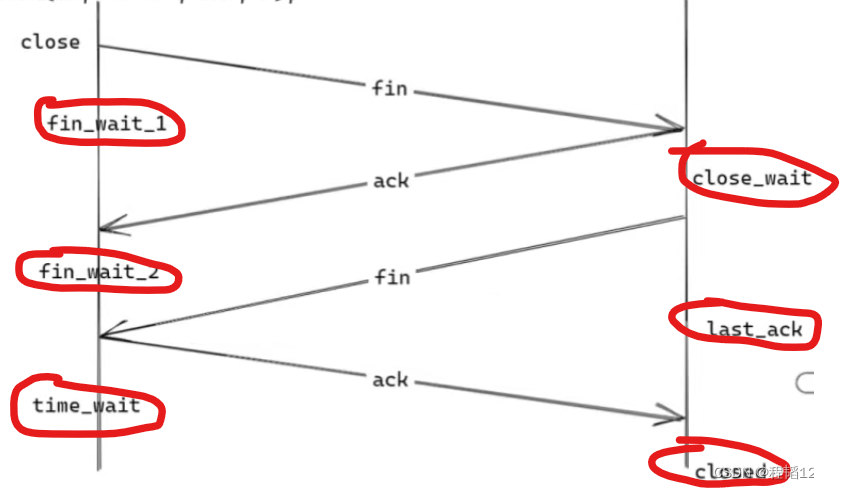
本文介绍linux中与tcp网络通信相关的POSIX API,在每次调用的时候,网络协议栈会进行的操作与记录。 POSIX API Posix API,提供了统一的接口,使程序能得以在不同的系统上运行。简单来说不同的操作系统进行同一个活动,比…...

互联网加竞赛 基于卷积神经网络的乳腺癌分类 深度学习 医学图像
文章目录 1 前言2 前言3 数据集3.1 良性样本3.2 病变样本 4 开发环境5 代码实现5.1 实现流程5.2 部分代码实现5.2.1 导入库5.2.2 图像加载5.2.3 标记5.2.4 分组5.2.5 构建模型训练 6 分析指标6.1 精度,召回率和F1度量6.2 混淆矩阵 7 结果和结论8 最后 1 前言 &…...
腾讯云 IPv6 解决方案
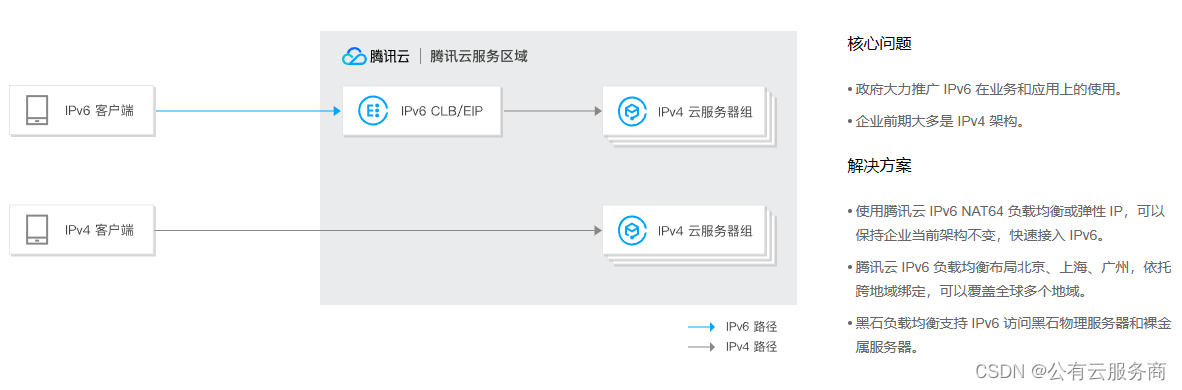
产品矩阵全覆盖 腾讯云全线产品 All in IPv6;云服务器、私有网络、负载均衡、内容分发、域名解析、DDoS 高防等都已支持 IPv6。 全球 IPv6 基础设施 腾讯云在全球开放25个地理区域,运营53个可用区;目前已有多个地域提供 IPv6 接入能力。 …...
Appium 自动化测试
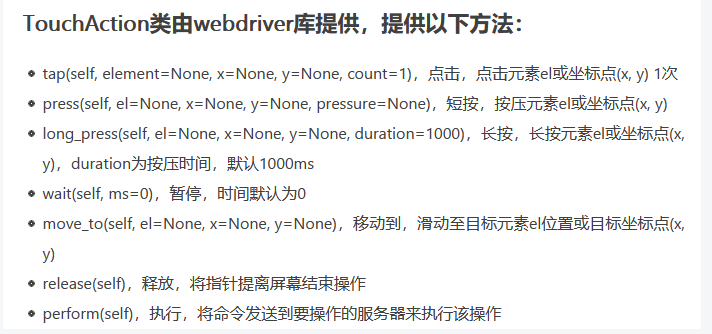
1.Appium介绍 1,appium是开源的移动端自动化测试框架; 2,appium可以测试原生的、混合的、以及移动端的web项目; 3,appium可以测试ios,android应用(当然了,还有firefoxos)…...

终极指南:如何用Codebox实现10+编程语言的智能开发与自动运行
终极指南:如何用Codebox实现10编程语言的智能开发与自动运行 【免费下载链接】codebox Open source cloud & desktop IDE 项目地址: https://gitcode.com/gh_mirrors/co/codebox Codebox是一款功能强大的开源云与桌面IDE,支持Java、Python、N…...

C#比较两个二进制文件的差异 C#如何实现一个二进制diff工具
FileStream逐字节比对是最直接的文件一致性判断方式:先比长度,再用缓冲区读取并逐字节比对,遇差异立即退出;需注意offset计算、大文件long类型、Dispose释放及避免文本编码干扰。用 FileStream 逐字节比对是最直接的方式如果只是判…...

DeepBlueCLI高级配置:自定义正则表达式与安全名单优化
DeepBlueCLI高级配置:自定义正则表达式与安全名单优化 【免费下载链接】DeepBlueCLI 项目地址: https://gitcode.com/gh_mirrors/de/DeepBlueCLI DeepBlueCLI是一款功能强大的事件日志分析工具,能够帮助安全分析师快速识别系统中的可疑活动。通过…...

终极指南:如何用UnrealPakViewer深度解析UE4 Pak文件结构
终极指南:如何用UnrealPakViewer深度解析UE4 Pak文件结构 【免费下载链接】UnrealPakViewer 查看 UE4 Pak 文件的图形化工具,支持 UE4 pak/ucas 文件 项目地址: https://gitcode.com/gh_mirrors/un/UnrealPakViewer UnrealPakViewer是一款专为虚幻…...

NVIDIA Profile Inspector 2.4.0.1:解锁NVIDIA显卡隐藏性能的终极指南
NVIDIA Profile Inspector 2.4.0.1:解锁NVIDIA显卡隐藏性能的终极指南 【免费下载链接】nvidiaProfileInspector 项目地址: https://gitcode.com/gh_mirrors/nv/nvidiaProfileInspector 你是否曾经觉得NVIDIA显卡的控制面板功能太有限?是否想要更…...

从响应头到恶意请求:手把手教你三种手工识别WAF的‘土方法’,比工具更隐蔽
从响应头到恶意请求:手工识别WAF的三种隐蔽技巧 在Web安全测试中,了解目标网站是否部署了WAF(Web应用防火墙)是至关重要的一步。与依赖自动化工具不同,手工识别方法更加隐蔽,特别适合在环境受限或需要保持低…...

5分钟本地提取视频字幕:Video-subtitle-extractor完全指南
5分钟本地提取视频字幕:Video-subtitle-extractor完全指南 【免费下载链接】video-subtitle-extractor 视频硬字幕提取,生成srt文件。无需申请第三方API,本地实现文本识别。基于深度学习的视频字幕提取框架,包含字幕区域检测、字幕…...

SAP硬件选择详解:服务器、存储与网络的全面解析
硬件作为SAP系统的基石,涵盖了服务器、磁盘存储系统以及网络设备等多个组件。硬件包括服务器、存储、网络设备,共同构建SAP架构。这些硬件组件必须协同工作,才能构建出高效稳定的SAP基础架构。选择硬件提供商的重要性不容忽视。选择提供商要考…...

告别手动配IP:在FreeRTOS+STM32F4上为LwIP添加NetBIOS主机名功能全记录
基于FreeRTOS与LwIP的嵌入式设备网络标识优化实践 办公室里同时调试五台STM32设备时,每次都要通过串口日志查看动态分配的IP地址,这种低效的调试方式让我决定彻底改变现状。本文将分享如何通过NetBIOS协议实现设备主机名访问,让ping my_devic…...

mysql如何给已有数据表添加索引_使用CREATE INDEX提升查询速度
MySQL建索引需严格校验语法、字段与表名;优先用ALTER TABLE ADD INDEX;复合索引顺序须匹配查询条件;避免冗余索引;大表操作选低峰期;唯一索引承载约束语义;建索引后需ANALYZE TABLE更新统计信息。CREATE IN…...