
Java 获取和修改期日与时间的各种操作方法
LocalDateTime获取当地日期和时间
import java.time.LocalDateTime;
/*LocalDateTime.now() 获取当前时间*/
public class LocalDateTimeDemo {public static void main(String[] args) {LocalDateTime time1 = LocalDateTime.now();System.out.println(time1);//2024-06-01T13:20:41.336609500System.out.println(time1.getDayOfYear());System.out.println(time1.getDayOfMonth());System.out.println(time1.getHour());System.out.println(time1.getMinute());System.out.println(time1.getSecond());System.out.println(time1.getNano());//纳秒System.out.println(time1.getYear());System.out.println(time1.getMonthValue());System.out.println(time1.getDayOfWeek());//SATURDAY}
}
DateTimeFormatter对日期和时间自定义想要的格式
import java.time.ZoneId;
import java.time.ZonedDateTime;
import java.time.format.DateTimeFormatter;public class DateTimeFormatterDemo {public static void main(String[] args) {/*static DateTimeFormatter ofPattern(格式) 获取格式对象String format(时间对象) 按照指定方式格式化*/// 获取格式对象ZonedDateTime time = ZonedDateTime.now(ZoneId.of("Europe/Berlin"));System.out.println(time);//2024-05-31T18:15:21.535714300+02:00[Europe/Berlin]// 自定义格式DateTimeFormatter form= DateTimeFormatter.ofPattern("yyyy年MM月dd日hh时mm分ss秒 星期e");System.out.println(form.format(time));//2024年05月31日06时20分54秒 星期5}
}
两个日期之间各种单位的差值
ChronoUnit获取两个日期和时间各种换算单位之间的总时差
import java.time.LocalDate;
import java.time.LocalDateTime;
import java.time.temporal.ChronoUnit;public class ToolsChronoUnitDemo {public static void main(String[] args) {// 当前年月日LocalDateTime today = LocalDateTime.now();System.out.println(today);//2024-06-01T14:06:52.387788300// 出生年月日LocalDateTime BornDate = LocalDateTime.of(2004, 6, 14,0,0,0,0);System.out.println(BornDate);//2004-06-14T00:00System.out.println("相差的总年数:" + ChronoUnit.YEARS.between(BornDate,today));System.out.println("相差的总月数:" + ChronoUnit.MONTHS.between(BornDate,today));System.out.println("相差的总周数:" + ChronoUnit.WEEKS.between(BornDate,today));System.out.println("相差的总天数:" + ChronoUnit.DAYS.between(BornDate,today));System.out.println("相差的总时数:" + ChronoUnit.HOURS.between(BornDate,today));System.out.println("相差的总分数:" + ChronoUnit.MINUTES.between(BornDate,today));System.out.println("相差的总秒数:" + ChronoUnit.SECONDS.between(BornDate,today));System.out.println("相差的总毫秒数:" + ChronoUnit.MILLIS.between(BornDate,today));System.out.println("相差的总微秒数:" + ChronoUnit.MICROS.between(BornDate,today));System.out.println("相差的总纳秒数:" + ChronoUnit.NANOS.between(BornDate,today));System.out.println("相差的总半天数:" + ChronoUnit.HALF_DAYS.between(BornDate,today));System.out.println("相差的总十年数:" + ChronoUnit.DECADES.between(BornDate,today));System.out.println("相差的总世纪(百年)数:" + ChronoUnit.CENTURIES.between(BornDate,today));System.out.println("相差的总千年数:" + ChronoUnit.MILLENNIA.between(BornDate,today));System.out.println("相差的总纪元数:" + ChronoUnit.ERAS.between(BornDate,today));}
}
Period获取两个日期一年内的月份和天数之间的间隔
import java.time.LocalDate;
import java.time.Period;
public class ToolsDatePeriodDemo {public static void main(String[] args) {// 当前年月日LocalDate today = LocalDate.now();System.out.println(today);// 出生年月日LocalDate BornDate = LocalDate.of(2004, 6, 14);Period period = Period.between(BornDate, today);// 出生时间到今天的间隔时间System.out.println(period);//P19Y11M18DSystem.out.println(period.getYears());// 相差的年数System.out.println(period.getMonths());// 相差的月数System.out.println(period.getDays());// 相差的天数System.out.println(period.toTotalMonths());// 相差的总月数}
}
Duration获取两个日期和时间之间相差的总天数和各种单位的总时间数
import java.time.Duration;
import java.time.LocalDateTime;
import java.time.Period;public class ToolsDurationDemo {public static void main(String[] args) {// 本地日期时间对象。LocalDateTime today = LocalDateTime.now();System.out.println(today);// 出生的日期时间对象LocalDateTime BornDate = LocalDateTime.of(2004, 6, 14, 0, 0, 0);System.out.println(BornDate);Duration duration = Duration.between(BornDate, today);// 出生时间到今天的间隔时间System.out.println(duration);//PT175021H57M48.8411209SSystem.out.println(duration.toDays());// 相差的总天数System.out.println(duration.toHours());// 相差的总小时数System.out.println(duration.toMinutes());// 相差的总分钟数System.out.println(duration.toSeconds());// 相差的总秒数System.out.println(duration.toMillis());// 相差的总毫秒数System.out.println(duration.toNanos());// 相差总纳秒数}
}
获取时间和时区,对时间的值进行各种操作
Instant对时间进行增加,减少和差异判断
import java.time.Instant;
import java.time.ZoneId;
import java.time.ZonedDateTime;public class InstentDemo {public static void main(String[] args) {/*static Instant now()                    获取当前时间的Instant对象(标准时间)static Instant ofXxxx(long epochMilli)  根据(秒/毫秒/纳秒)获取Instant对象ZonedDateTime atZone(ZoneIdzone)        指定时区boolean isxxx(Instant otherInstant)     判断时间差异的方法Instant minusXxx(long millisToSubtract) 减少时间的方法,需要放到一个新对象中Instant plusXxx(long millisToSubtract)  增加时间的方法,需要放到一个新对象中*///  1.获取当前时间的对象Instant now = Instant.now();System.out.println(now);//标准时间,比北京时间少8个小时//  2.根据(秒/毫秒/纳秒)获取Instant对象Instant now2 = Instant.ofEpochSecond(67L);System.out.println(now2);//1970-01-01T00:01:07ZInstant now4 = Instant.ofEpochMilli(6000L);// 6000毫秒System.out.println(now4);//1970-01-01T00:00:06ZInstant now3 = Instant.ofEpochSecond(67L,1000000000L);System.out.println(now3);//1970-01-01T00:01:08Z  67秒加 (10亿纳秒=1秒)//  3.指定时区的时间ZonedDateTime localTime = Instant.now().atZone(ZoneId.of("Asia/Shanghai"));System.out.println(localTime);// 上海时区//  4.判断时间差异boolean result1 = now2.isBefore(now3);//now2的时间在now3的前面System.out.println(result1);//trueboolean result2 = now2.isAfter(now3);//now2的时间在now3的后面System.out.println(result2);//false//  5.减少时间Instant result3 = now2.minusSeconds(7);// 减少了7秒System.out.println(result3);//1970-01-01T00:01:00Z//  6.增加时间Instant result4 = now2.plusSeconds(53);//增加了53秒System.out.println(result4);//1970-01-01T00:02:00Z}
}
ZonedDateTime对时间的值进行修改和增加,减少
import java.time.ZoneId;
import java.time.ZonedDateTime;
public class ZoneDateTimeDemo {public static void main(String[] args) {/*static ZonedDateTime now()         获取当前时间(带当地的时区)static ZonedDateTime ofXxxx(。。。) 获取自己输入的时间的对象ZonedDateTime withXxx(时间)         修改时间的各种方法ZonedDateTime minusXxx(时间)        减少时间的各种方法ZonedDateTime plusXxx(时间)         增加时间的各种方法*/// 1.获取当前时间(带当地的时区)ZonedDateTime time1 = ZonedDateTime.now();System.out.println(time1);//2024-05-31T23:52:57.247911600+08:00[Asia/Shanghai]// 2.获取指定时间的对象(年月日时分秒纳秒的方式指定,带时区)ZonedDateTime time2 = ZonedDateTime.of(2024,5,31,23,57,11,11, ZoneId.of("Asia/Shanghai"));System.out.println(time2);//2024-05-31T23:57:11.000000011+08:00[Asia/Shanghai]// 3.修改时间的各种方法 withXxxxZonedDateTime time3 = time2.withHour(6);System.out.println(time3);//2024-05-31T06:57:11.000000011+08:00[Asia/Shanghai]ZonedDateTime time4 = time2.withYear(2025);System.out.println(time4);//2025-05-31T23:57:11.000000011+08:00[Asia/Shanghai]// 4. 减少时间的各种方法 minusXxxxZonedDateTime time5 = time2.minusDays(6);System.out.println(time5);//2024-05-25T23:57:11.000000011+08:00[Asia/Shanghai]ZonedDateTime time6 = time2.minusHours(6);System.out.println(time6);//2024-05-31T17:57:11.000000011+08:00[Asia/Shanghai]// 5.增加时间的各种方法 plusXxxxZonedDateTime time7 = time2.plusDays(6);System.out.println(time7);//2024-06-06T23:57:11.000000011+08:00[Asia/Shanghai]ZonedDateTime time8 = time2.plusMonths(6);System.out.println(time8);//2024-06-06T23:57:11.000000011+08:00[Asia/Shanghai]}
}
ZoneId获取Java支持的所有时区的地区名称
import java.util.Set;
import java.time.ZoneId;
public class ZoneIdDemo {public static void main(String[] args) {/*static set<String>getAvailableZoneIds() 获取Java中支持的所有时区static ZoneId systemDefault()           获取系统默认时区static ZoneId of(String zoneId)         获取一个指定时区*/// 1.获取所有的时区名称Set<String> zoneIds = ZoneId.getAvailableZoneIds();System.out.println(zoneIds.size());//603System.out.println(zoneIds);// 2.获取系统默认时间ZoneId id = ZoneId.systemDefault();System.out.println(id);//Asia/Shanghai// 3.获取指定的时区ZoneId id2 = ZoneId.of("Europe/Berlin");System.out.println(id2);//Europe/Berlin}
}
相关文章:

Java 获取和修改期日与时间的各种操作方法
LocalDateTime获取当地日期和时间 import java.time.LocalDateTime; /*LocalDateTime.now() 获取当前时间*/ public class LocalDateTimeDemo {public static void main(String[] args) {LocalDateTime time1 LocalDateTime.now();System.out.println(time1);//2024-06-01T13…...

【ubuntu20】--- 定时同步文件
在编程的艺术世界里,代码和灵感需要寻找到最佳的交融点,才能打造出令人为之惊叹的作品。而在这座秋知叶i博客的殿堂里,我们将共同追寻这种完美结合,为未来的世界留下属于我们的独特印记。 【Linux命令】--- 多核压缩命令大全&…...
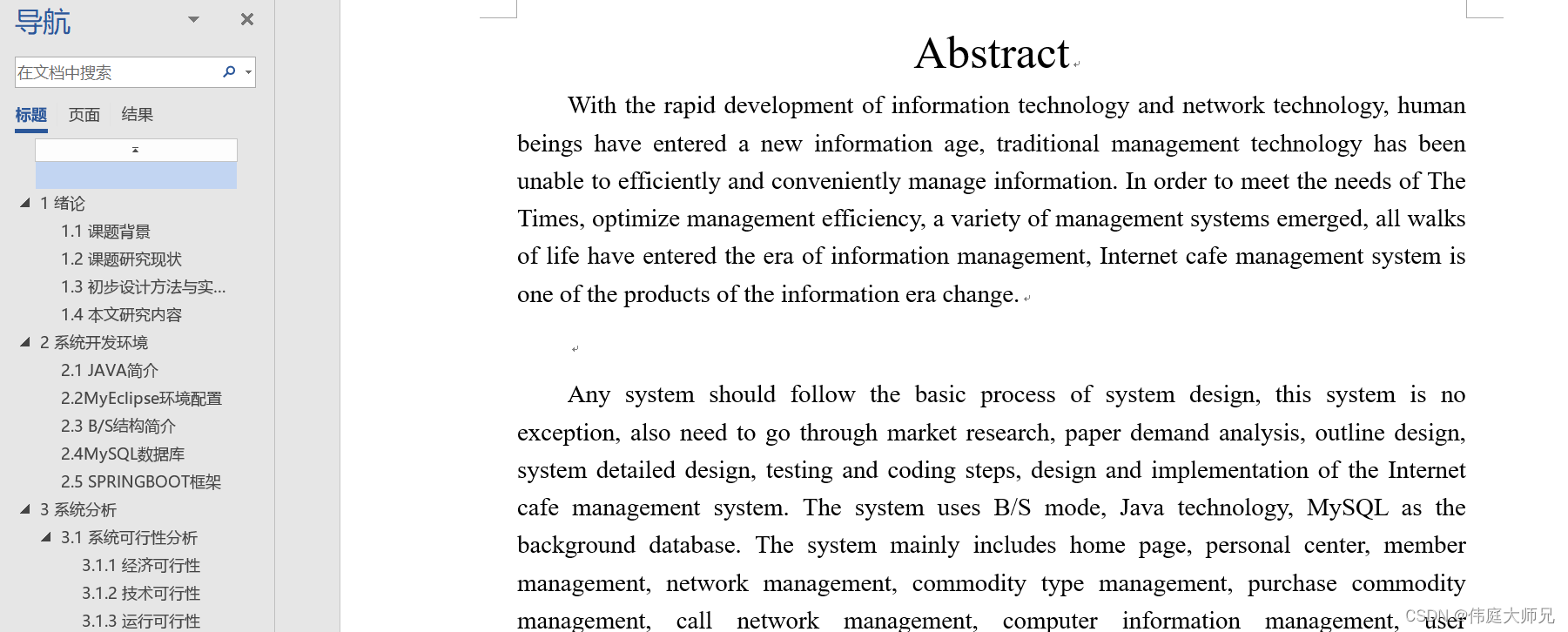
网吧|基于SprinBoot+vue的网吧管理系统(源码+数据库+文档)
网吧管理系统 目录 基于SprinBootvue的网吧管理系统 一、前言 二、系统设计 三、系统功能设计 1 管理员功能模块 2 网管功能模块 3 会员功能模块 四、数据库设计 五、核心代码 六、论文参考 七、最新计算机毕设选题推荐 八、源码获取: 博主介绍&#…...

[C/C++] -- Libcurl开发
libcurl 是一个功能强大的 C 语言库,用于实现各种网络传输协议的客户端功能。它是 Curl 工具的核心,并提供了一个简单、灵活、高效的 API,允许开发人员在他们的应用程序中轻松地执行网络操作。 以下是 libcurl 的一些主要特点和功能…...
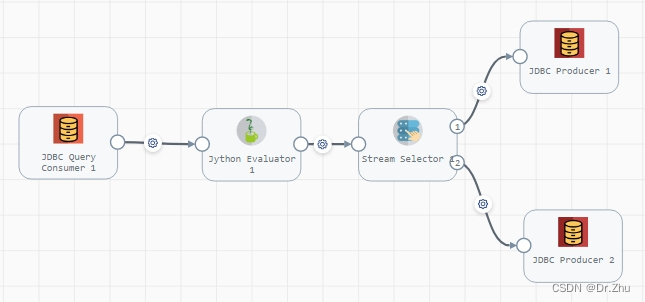
Streamsets-JDBC模式使用更新时间字段数据同步
StreamSets的开源地址:https://github.com/streamsets/datacollector-oss Streamsets官网地址:https://streamsets.com/ Streamsets文档地址:https://docs.streamsets.com/portal/datacollector/3.16.x/help/index.html 我又来写Streamsets了…...
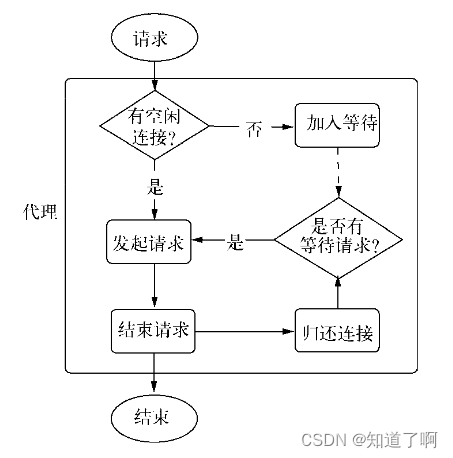
Nodejs-- 网络编程
网络编程 构建tcp服务 TCP tcp全名为传输控制协议。再osi模型中属于传输层协议。 tcp是面向连接的协议,在传输之前需要形成三次握手形成会话 只有会话形成了,服务端和客户端才能想发送数据,在创建会话的过程中,服务端和客户…...
context 举例 - Form 表单)
React@16.x(14)context 举例 - Form 表单
目录 1,目标2,实现2.1,index.js2.2,context.js2.2,Form.Input2.3,Form.Button 3,使用 1,目标 上篇文章说到,context 上下文一般用于第3方组件库,因为使用场景…...

十几款基于ChatGPT的免费神器,每个都是王炸!
十几款基于ChatGPT的免费神器,每个都是王炸! 1、ChatGPT ChatGPT非常强大,但注册需要魔法和国外的手机号,大部分人都没法使用。还好有一些基于API开发的体验版,我收集了一些可以直接使用的站点分享给大家,…...

devicemotion 或者 deviceorientation在window.addEventListener 事件中不生效,没有输出内容
问题:devicemotion 或者 deviceorientation 在window.addEventListener 事件中不生效,没有输出内容 原因: 1、必须在Https协议下才可使用 2、必须用户手动点击click事件中调用 ,进行权限申请 源码: <!DOCTYPE h…...

java单元测试如何断言异常
在junit单元测试中,我们可以使用 org.junit.Assert.assertThrows 包下的 assertThrows() 方法 这个方法返回了一个泛型的异常 public static <T extends Throwable> assertThrows(Class<T> expectedType, Executable executable) 假设我们有以下…...

C语言| n的阶乘相加
逻辑性较强,建议记住。 分析思路: 假如n4:m m * i; sum sum m; 1)当i1时,m1, sum1。 2)当i2时,m12, sum112。 3)当i3时,m123, sum112123。 4)当i4时&…...

cwiseMax、cwiseMin函数
一、cwiseMax含义 cwiseMax是Eigen库中的一个函数,用于求两个矩阵或向量的逐元素最大值。它的作用类似于std::max函数,但是可以同时处理多个元素,且支持矩阵和向量。 举例: 例如,对于两个向量a和b,cwiseMax…...
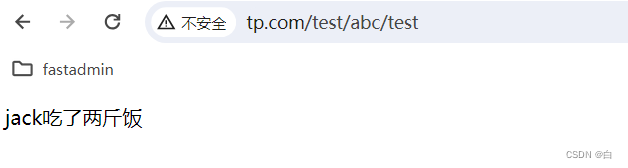
【thinkphp问题栏】tp5.1重写URL,取消路径上的index.php
在Apache运行thinkphp5.1时,发现系统默认生成的.htaccess不生效。 首先先查看怎么修改伪静态 1、修改Apache的配置文件 在Apache的安装目录下,打开config/httpd.conf。 搜索rewrite.so,将前面的#删掉,表示开启URL重写功能 2、…...

缓冲字符流
BufferedReader/BufferedWriter增加了缓存机制,大大提高了读写文本文件的效率。 字符输入缓冲流 BufferedReader是针对字符输入流的缓冲流对象,提供了更方便的按行读取的方法:readLine();在使用字符流读取文本文件时,我们可以使…...
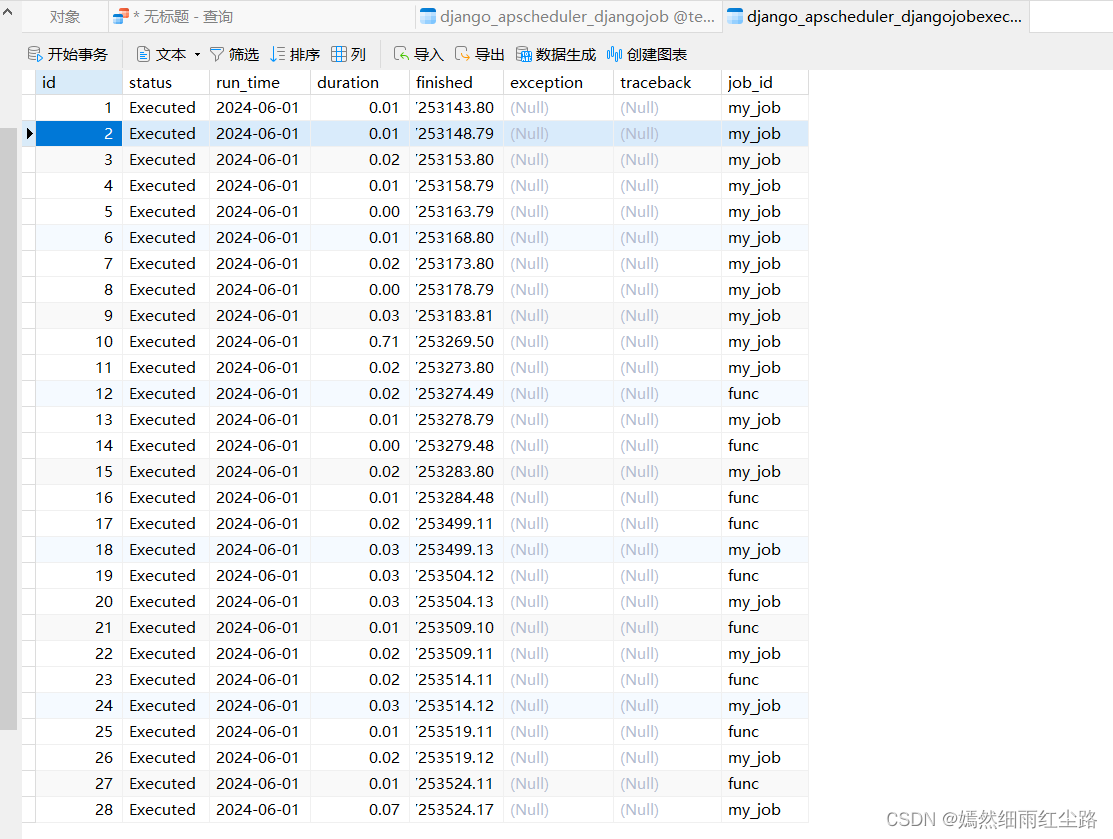
Django中使用Celery和APScheduler实现定时任务
在之前的文章我们已经学习了Celery和APScheduler的基本使用,下面让我们来了解一下如何在Django中使用Celery和APScheduler Celery 1.前提工作 python 3.7 pip install celery pip install eventlet #5.0版本以下 pip install importlib-metadata4.8.3(…...

Kivy.uix.textinput
一个小小的输入框,纵上下数页文档已不能全不概括,当去源码慢慢寻找,才知道其中作用,才能运用灵活。 Text Input — Kivy 2.3.0 documentation # -*- encoding: utf-8 -*-Text Input .. versionadded:: 1.0.4.. image:: images/te…...

基于IoTDB 平台的学习和研究
Apache IoTDB(物联网数据库)是一个针对物联网领域的高性能原生数据库,适用于数据管理和分析,并可在边缘计算和云端部署。由于它轻量级的架构、高性能和丰富的功能集,以及与Apache Hadoop、Spark和Flink的深度集成&…...

nessus plugins目录为空的问题
想要避免这种问题,可以将nessus服务设置为手动,并且先停止nessus服务。 批处理脚本: 下面的/~/Nessus/plugin_feed_info.inc替换成你配置好的 plugin_feed_info.inc 所在的路径 service nessusd stop; cp /~/Nessus/plugin_feed_info.inc …...
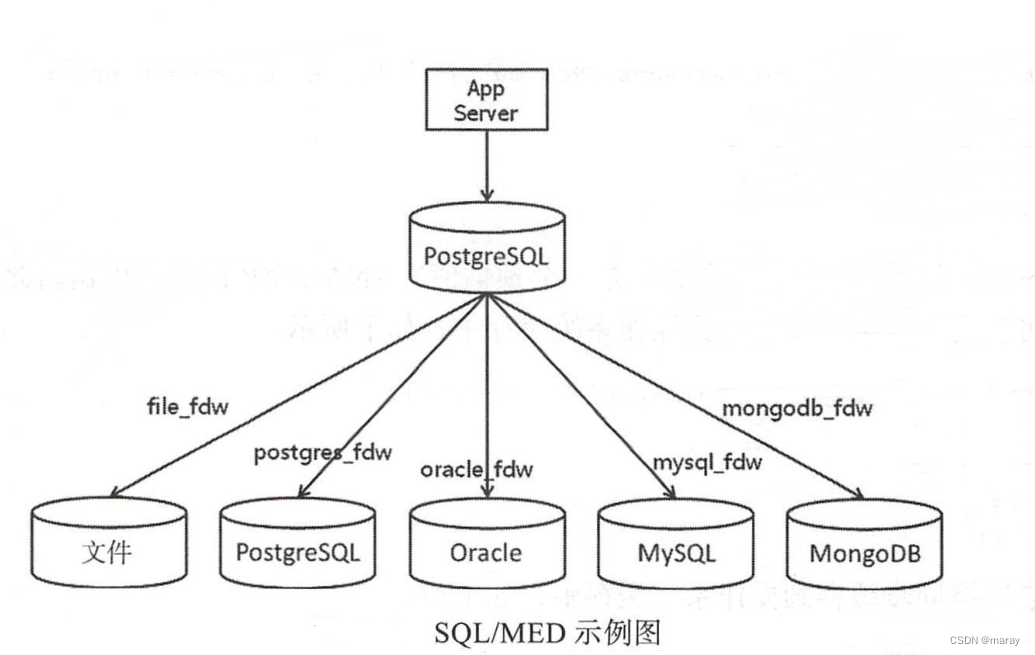
FDW(Foreign Data Wrapper)
在上一篇博客里,最末尾提到了 FDW。pg 实现了数百个 fdw 插件,用于访问外部数据。 FDW 到底是什么呢? 标准 FDW(Foreign Data Wrapper)遵循了 SQL/MED 标准,标准全称:ISO/IEC 9075-9 Managem…...

Flutter开发指南
Flutter开发指南(Android 开发角度) 与Android 的对比 1.Android 的View 与Flutter 的对应关系: a.在android 中,view 是屏幕显示的基础,比如 button,文本,列表,输入框都是 view。…...

Linux应用开发之网络套接字编程(实例篇)
服务端与客户端单连接 服务端代码 #include <sys/socket.h> #include <sys/types.h> #include <netinet/in.h> #include <stdio.h> #include <stdlib.h> #include <string.h> #include <arpa/inet.h> #include <pthread.h> …...

conda相比python好处
Conda 作为 Python 的环境和包管理工具,相比原生 Python 生态(如 pip 虚拟环境)有许多独特优势,尤其在多项目管理、依赖处理和跨平台兼容性等方面表现更优。以下是 Conda 的核心好处: 一、一站式环境管理:…...
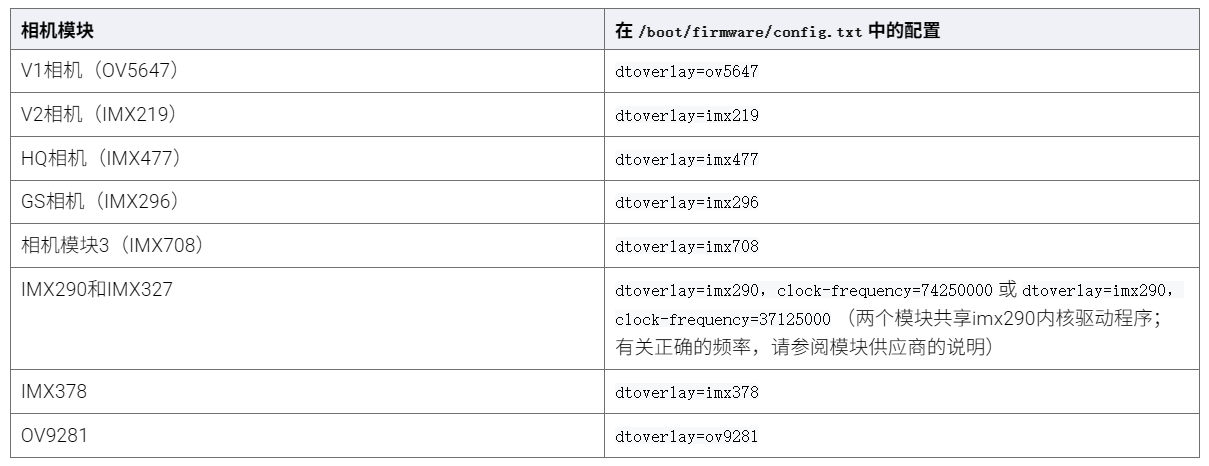
树莓派超全系列教程文档--(61)树莓派摄像头高级使用方法
树莓派摄像头高级使用方法 配置通过调谐文件来调整相机行为 使用多个摄像头安装 libcam 和 rpicam-apps依赖关系开发包 文章来源: http://raspberry.dns8844.cn/documentation 原文网址 配置 大多数用例自动工作,无需更改相机配置。但是,一…...

Matlab | matlab常用命令总结
常用命令 一、 基础操作与环境二、 矩阵与数组操作(核心)三、 绘图与可视化四、 编程与控制流五、 符号计算 (Symbolic Math Toolbox)六、 文件与数据 I/O七、 常用函数类别重要提示这是一份 MATLAB 常用命令和功能的总结,涵盖了基础操作、矩阵运算、绘图、编程和文件处理等…...

C# SqlSugar:依赖注入与仓储模式实践
C# SqlSugar:依赖注入与仓储模式实践 在 C# 的应用开发中,数据库操作是必不可少的环节。为了让数据访问层更加简洁、高效且易于维护,许多开发者会选择成熟的 ORM(对象关系映射)框架,SqlSugar 就是其中备受…...
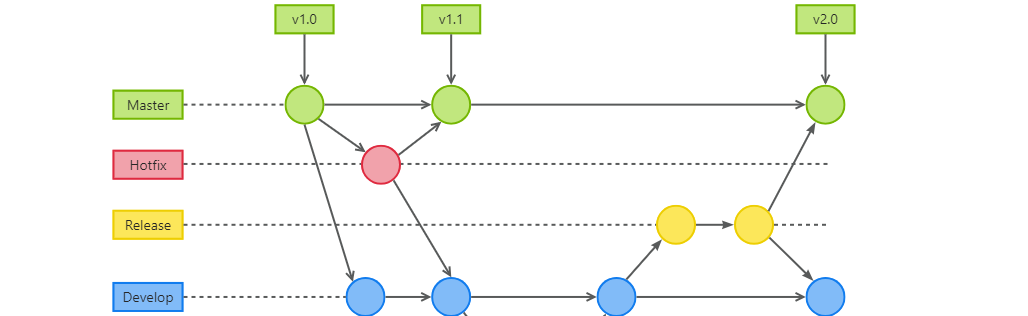
GitFlow 工作模式(详解)
今天再学项目的过程中遇到使用gitflow模式管理代码,因此进行学习并且发布关于gitflow的一些思考 Git与GitFlow模式 我们在写代码的时候通常会进行网上保存,无论是github还是gittee,都是一种基于git去保存代码的形式,这样保存代码…...

探索Selenium:自动化测试的神奇钥匙
目录 一、Selenium 是什么1.1 定义与概念1.2 发展历程1.3 功能概述 二、Selenium 工作原理剖析2.1 架构组成2.2 工作流程2.3 通信机制 三、Selenium 的优势3.1 跨浏览器与平台支持3.2 丰富的语言支持3.3 强大的社区支持 四、Selenium 的应用场景4.1 Web 应用自动化测试4.2 数据…...
的打车小程序)
基于鸿蒙(HarmonyOS5)的打车小程序
1. 开发环境准备 安装DevEco Studio (鸿蒙官方IDE)配置HarmonyOS SDK申请开发者账号和必要的API密钥 2. 项目结构设计 ├── entry │ ├── src │ │ ├── main │ │ │ ├── ets │ │ │ │ ├── pages │ │ │ │ │ ├── H…...

如何通过git命令查看项目连接的仓库地址?
要通过 Git 命令查看项目连接的仓库地址,您可以使用以下几种方法: 1. 查看所有远程仓库地址 使用 git remote -v 命令,它会显示项目中配置的所有远程仓库及其对应的 URL: git remote -v输出示例: origin https://…...

GeoServer发布PostgreSQL图层后WFS查询无主键字段
在使用 GeoServer(版本 2.22.2) 发布 PostgreSQL(PostGIS)中的表为地图服务时,常常会遇到一个小问题: WFS 查询中,主键字段(如 id)莫名其妙地消失了! 即使你在…...