
PostgreSQL源码分析——口令认证
认证机制
对于数据库系统来说,其作为服务端,接受来自客户端的请求。对此,必须有对客户端的认证机制,只有通过身份认证的客户端才可以访问数据库资源,防止非法用户连接数据库。PostgreSQL支持认证方法有很多:
typedef enum UserAuth
{uaReject,uaImplicitReject,			/* Not a user-visible option */uaTrust,uaIdent,uaPassword,uaMD5,uaSCRAM,uaGSS,uaSSPI,uaPAM,uaBSD,uaLDAP,uaCert,uaRADIUS,uaPeer
#define USER_AUTH_LAST uaPeer	/* Must be last value of this enum */
} UserAuth;
对此,我们仅分析常用的口令认证方式。目前PostgreSQL支持MD5、SCRAM-SHA-256对密码哈希和身份验证支持,建议使用SCRAM-SHA-256,相较MD5安全性更高。不同的基于口令的认证方法的可用性取决于用户的口令在服务器上是如何被加密(或者更准确地说是哈希)的。这由设置口令时的配置参数password_encryption控制。可用值为scham-sha-256、md5。
host all all 0.0.0.0/0 scham-sha-256
口令认证并不是简单的客户端告诉服务端密码,服务端比对成功就可以了。而是要设计一个客户端和服务器协商身份验证机制,避免密码明文存储等等问题。对此,PostgreSQL引入SCRAM身份验证机制(RFC5802、RFC7677)
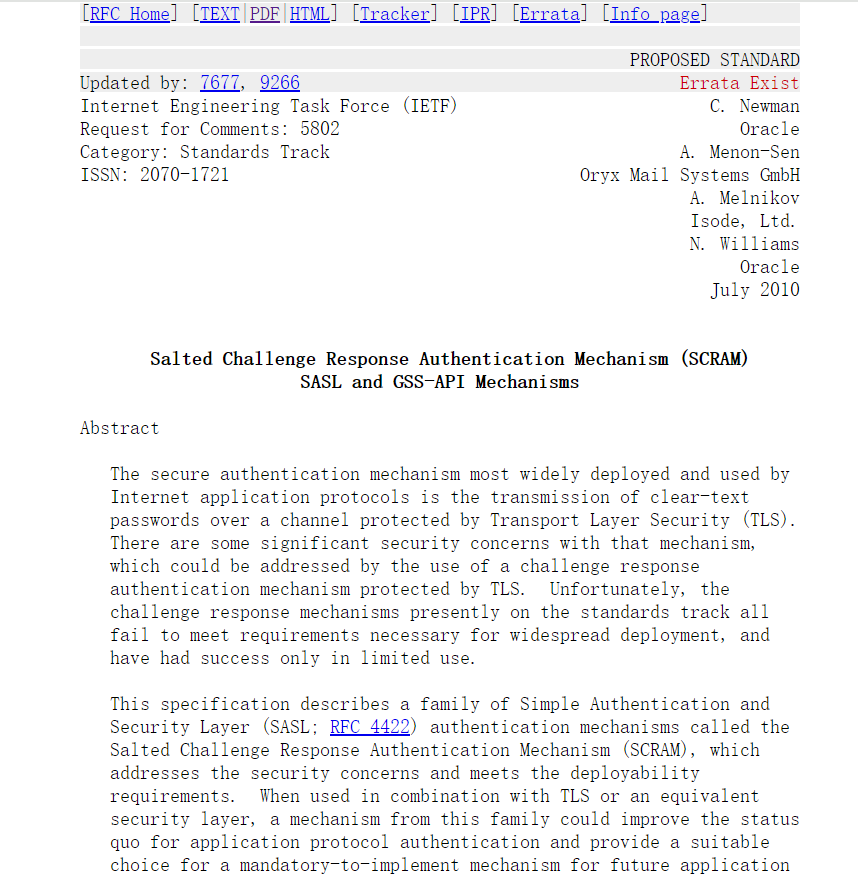
也就是说,后面的口令认证方法中,遵循的是如上的口令认证协议。
参考文档:53.3.1. SCRAM-SHA-256认证
源码分析
这里只分析口令认证的情况。 口令认证分为明文口令认证和加密口令认证。明文口令认证要求客户端提供一个未加密的口令进行认证,安全性较差,已经被禁止使用。加密口令认证要求客户端提供一个经过SCRAM-SHA-256加密的口令进行认证,该口令在传送过程中使用了结合salt的单向哈希加密,增强了安全性。口令都存储在pg_authid系统表中,可通过CREATE USER test WITH PASSWORD '******';等命令进行设置。
客户端
以psql客户端为例,当客户端发出连接请求后,分析口令认证的过程。
main
--> parse_psql_options(argc, argv, &options);// 连接数据库,中间会有认证这块,有不同的认证方法,这里列的是口令认证方式的流程
--> do {// 输入host、port、user、password、dbname等信息PQconnectdbParams(keywords, values, true);--> PQconnectStartParams(keywords, values, expand_dbname);--> makeEmptyPGconn();--> conninfo_array_parse(keywords, values, &conn->errorMessage, true, expand_dbname);--> fillPGconn(conn, connOptions)--> connectDBStart(conn)--> PQconnectPoll(conn)    // 尝试建立TCP连接--> socket(addr_cur->ai_family, SOCK_STREAM, 0);--> connect(conn->sock, addr_cur->ai_addr, addr_cur->ai_addrlen)--> connectDBComplete(conn);// 认证这块与数据库服务端交互以及状态很多,这里没有全部列出。--> PQconnectPoll(conn);--> pqReadData(conn);--> pqsecure_read(conn, conn->inBuffer + conn->inEnd, conn->inBufSize - conn->inEnd);--> pqsecure_raw_read(conn, ptr, len);--> recv(conn->sock, ptr, len, 0);--> pg_fe_sendauth(areq, msgLength, conn);--> pg_SASL_init(conn, payloadlen)--> conn->sasl->init(conn,password,selected_mechanism);--> pg_saslprep(password, &prep_password);--> conn->sasl->exchange(conn->sasl_state, NULL, -1, &initialresponse, &initialresponselen, &done, &success);--> build_client_first_message(state);--> pg_strong_random(raw_nonce, SCRAM_RAW_NONCE_LEN)PQconnectionNeedsPassword(pset.db)     // 是否需要密码,如果需要,等待用户数据密码}// 进入主循环,等待用户输入命令,执行命令
--> MainLoop(stdin);  --> psql_scan_create(&psqlscan_callbacks);--> while (successResult == EXIT_SUCCESS){// 等待用户输入命令gets_interactive(get_prompt(prompt_status, cond_stack), query_buf);SendQuery(query_buf->data); // 把用户输入的SQL命令发送到数据库服务--> ExecQueryAndProcessResults(query, &elapsed_msec, &svpt_gone, false, NULL, NULL) > 0);--> PQsendQuery(pset.db, query);    // 通过libpq与数据库交互--> PQgetResult(pset.db);}
服务端
服务端相关流程:
main()
--> PostmasterMain(argc, argv);--> InitProcessGlobals();   // set MyProcPid, MyStartTime[stamp], random seeds--> pg_prng_strong_seed(&pg_global_prng_state)--> srandom(pg_prng_uint32(&pg_global_prng_state));--> InitializeGUCOptions();--> ProcessConfigFile(PGC_POSTMASTER);--> ProcessConfigFileInternal(context, true, elevel);--> ParseConfigFp(fp, abs_path, depth, elevel, head_p, tail_p);--> load_hba()  // 读pg_hba.conf--> parse_hba_line(tok_line, LOG)   // 解析pg_hba.conf中的每条记录,解析到HbaLine的链表结构中--> load_ident()--> ServerLoop();--> BackendStartup(port);--> InitPostmasterChild();--> BackendInitialize(port);--> pq_init();--> RegisterTimeout(STARTUP_PACKET_TIMEOUT, StartupPacketTimeoutHandler);--> enable_timeout_after(STARTUP_PACKET_TIMEOUT, AuthenticationTimeout * 1000);--> ProcessStartupPacket(port, false, false);   // Read a client's startup packet--> pq_startmsgread();--> pq_getbytes((char *) &len, 1)--> InitProcess();--> BackendRun(port);--> PostgresMain(port->database_name, port->user_name);--> BaseInit();// 在接收用户SQL请求前进行认证--> InitPostgres(dbname, InvalidOid, username, InvalidOid,!am_walsender, false, NULL);--> PerformAuthentication(MyProcPort);--> enable_timeout_after(STATEMENT_TIMEOUT, AuthenticationTimeout * 1000);--> ClientAuthentication(port);--> hba_getauthmethod(port);--> check_hba(port);// 根据不同的认证方法进行认证--> switch (port->hba->auth_method){		case uaTrust:status = STATUS_OK;break;case uaMD5:case uaSCRAM:// 口令认证status = CheckPWChallengeAuth(port, &logdetail);--> break;// ...}--> if (status == STATUS_OK)sendAuthRequest(port, AUTH_REQ_OK, NULL, 0);elseauth_failed(port, status, logdetail);--> disable_timeout(STATEMENT_TIMEOUT, false);--> initialize_acl();// 认证通过后才能接受用户的SQL请求--> for (;;){// ...exec_simple_query(query_string);}
每次客户端发起连接时,postgres主进程都会fork一个子进程:
static int BackendStartup(Port *port)
{// ...pid = fork_process();if (pid == 0)				/* child */{free(bn);/* Detangle from postmaster */InitPostmasterChild();/* Close the postmaster's sockets */ClosePostmasterPorts(false);/* Perform additional initialization and collect startup packet */BackendInitialize(port);/** Create a per-backend PGPROC struct in shared memory. We must do* this before we can use LWLocks. In the !EXEC_BACKEND case (here)* this could be delayed a bit further, but EXEC_BACKEND needs to do* stuff with LWLocks before PostgresMain(), so we do it here as well* for symmetry.*/InitProcess();  /* And run the backend */BackendRun(port);  // }
}
每个子进程在接收用户的SQL请求前,需要先进行认证。主要实现在ClientAuthentication函数中,通过认证才能继续进行下一步。
/** Client authentication starts here.  If there is an error, this* function does not return and the backend process is terminated. */
void ClientAuthentication(Port *port)
{int			status = STATUS_ERROR;const char *logdetail = NULL;hba_getauthmethod(port);/** This is the first point where we have access to the hba record for the* current connection, so perform any verifications based on the hba* options field that should be done *before* the authentication here. */if (port->hba->clientcert != clientCertOff){/* If we haven't loaded a root certificate store, fail */if (!secure_loaded_verify_locations())ereport(FATAL,(errcode(ERRCODE_CONFIG_FILE_ERROR),errmsg("client certificates can only be checked if a root certificate store is available")));/* If we loaded a root certificate store, and if a certificate is* present on the client, then it has been verified against our root* certificate store, and the connection would have been aborted* already if it didn't verify ok. */if (!port->peer_cert_valid)ereport(FATAL,(errcode(ERRCODE_INVALID_AUTHORIZATION_SPECIFICATION), errmsg("connection requires a valid client certificate")));}// 根据不同的认证方法,进行不同的处理switch (port->hba->auth_method){// ...case uaMD5:case uaSCRAM:status = CheckPWChallengeAuth(port, &logdetail);break;case uaPassword:status = CheckPasswordAuth(port, &logdetail);break;case uaTrust:status = STATUS_OK;break;}if ((status == STATUS_OK && port->hba->clientcert == clientCertFull)|| port->hba->auth_method == uaCert){/** Make sure we only check the certificate if we use the cert method* or verify-full option.*/
#ifdef USE_SSLstatus = CheckCertAuth(port);
#elseAssert(false);
#endif}if (ClientAuthentication_hook)(*ClientAuthentication_hook) (port, status);if (status == STATUS_OK)sendAuthRequest(port, AUTH_REQ_OK, NULL, 0);elseauth_failed(port, status, logdetail);
}
对于口令认证,具体实现为CheckPWChallengeAuth函数。
/* MD5 and SCRAM authentication. */
static int CheckPWChallengeAuth(Port *port, const char **logdetail)
{int			auth_result;char	   *shadow_pass;PasswordType pwtype;/* First look up the user's password. */ // 查找pg_authid系统表中的用户密码shadow_pass = get_role_password(port->user_name, logdetail);if (!shadow_pass)pwtype = Password_encryption;elsepwtype = get_password_type(shadow_pass);/* If 'md5' authentication is allowed, decide whether to perform 'md5' or* 'scram-sha-256' authentication based on the type of password the user* has.  If it's an MD5 hash, we must do MD5 authentication, and if it's a* SCRAM secret, we must do SCRAM authentication.** If MD5 authentication is not allowed, always use SCRAM.  If the user* had an MD5 password, CheckSASLAuth() with the SCRAM mechanism will fail. */if (port->hba->auth_method == uaMD5 && pwtype == PASSWORD_TYPE_MD5)auth_result = CheckMD5Auth(port, shadow_pass, logdetail);elseauth_result = CheckSASLAuth(&pg_be_scram_mech, port, shadow_pass,logdetail);if (shadow_pass)pfree(shadow_pass);/* If get_role_password() returned error, return error, even if the authentication succeeded. */if (!shadow_pass){Assert(auth_result != STATUS_OK);return STATUS_ERROR;}if (auth_result == STATUS_OK)set_authn_id(port, port->user_name);return auth_result;
}int CheckSASLAuth(const pg_be_sasl_mech *mech, Port *port, char *shadow_pass, const char **logdetail)
{StringInfoData sasl_mechs;int			mtype;StringInfoData buf;void	   *opaq = NULL;char	   *output = NULL;int			outputlen = 0;const char *input;int			inputlen;int			result;bool		initial;/** Send the SASL authentication request to user.  It includes the list of* authentication mechanisms that are supported.*/initStringInfo(&sasl_mechs);mech->get_mechanisms(port, &sasl_mechs);/* Put another '\0' to mark that list is finished. */appendStringInfoChar(&sasl_mechs, '\0');sendAuthRequest(port, AUTH_REQ_SASL, sasl_mechs.data, sasl_mechs.len);pfree(sasl_mechs.data);/** Loop through SASL message exchange.  This exchange can consist of* multiple messages sent in both directions.  First message is always* from the client.  All messages from client to server are password* packets (type 'p').*/initial = true;do{pq_startmsgread();mtype = pq_getbyte();if (mtype != 'p'){/* Only log error if client didn't disconnect. */if (mtype != EOF){ereport(ERROR,(errcode(ERRCODE_PROTOCOL_VIOLATION), errmsg("expected SASL response, got message type %d",mtype)));}elsereturn STATUS_EOF;}/* Get the actual SASL message */initStringInfo(&buf);if (pq_getmessage(&buf, PG_MAX_SASL_MESSAGE_LENGTH)){/* EOF - pq_getmessage already logged error */pfree(buf.data);return STATUS_ERROR;}elog(DEBUG4, "processing received SASL response of length %d", buf.len);/* The first SASLInitialResponse message is different from the others.* It indicates which SASL mechanism the client selected, and contains* an optional Initial Client Response payload.  The subsequent* SASLResponse messages contain just the SASL payload. */if (initial){const char *selected_mech;selected_mech = pq_getmsgrawstring(&buf);/** Initialize the status tracker for message exchanges.** If the user doesn't exist, or doesn't have a valid password, or* it's expired, we still go through the motions of SASL* authentication, but tell the authentication method that the* authentication is "doomed". That is, it's going to fail, no matter what.** This is because we don't want to reveal to an attacker what* usernames are valid, nor which users have a valid password. */opaq = mech->init(port, selected_mech, shadow_pass);inputlen = pq_getmsgint(&buf, 4);if (inputlen == -1)input = NULL;elseinput = pq_getmsgbytes(&buf, inputlen);initial = false;}else{inputlen = buf.len;input = pq_getmsgbytes(&buf, buf.len);}pq_getmsgend(&buf);/* Hand the incoming message to the mechanism implementation. */result = mech->exchange(opaq, input, inputlen,&output, &outputlen,logdetail);/* input buffer no longer used */pfree(buf.data);if (output){/*PG_SASL_EXCHANGE_FAILURE with some output is forbidden by SASL.Make sure here that the mechanism used got that right. */if (result == PG_SASL_EXCHANGE_FAILURE)elog(ERROR, "output message found after SASL exchange failure");/* Negotiation generated data to be sent to the client. */elog(DEBUG4, "sending SASL challenge of length %d", outputlen);if (result == PG_SASL_EXCHANGE_SUCCESS)sendAuthRequest(port, AUTH_REQ_SASL_FIN, output, outputlen);elsesendAuthRequest(port, AUTH_REQ_SASL_CONT, output, outputlen);pfree(output);}} while (result == PG_SASL_EXCHANGE_CONTINUE);/* Oops, Something bad happened */if (result != PG_SASL_EXCHANGE_SUCCESS){return STATUS_ERROR;}return STATUS_OK;
}
相关文章:
PostgreSQL源码分析——口令认证
认证机制 对于数据库系统来说,其作为服务端,接受来自客户端的请求。对此,必须有对客户端的认证机制,只有通过身份认证的客户端才可以访问数据库资源,防止非法用户连接数据库。PostgreSQL支持认证方法有很多࿱…...
)
Stability-AI(图片生成视频)
1.项目地址 GitHub - Stability-AI/generative-models: Generative Models by Stability AI 2.模型地址 魔搭社区 3.克隆项目后,按照教程安装 conda create --name Stability python3.10 conda activate Stability pip3 install -r requirements/pt2.txt py…...

Linux机器通过Docker-Compose安装Jenkins发送Allure报告
目录 一、安装Docker 二、安装Docker Compose 三、准备测试用例 四、配置docker-compose.yml 五、启动Jenkins 六、配置Jenkins和Allure插件 七、创建含pytest的Jenkins任务 八、项目结果通知 1.通过企业微信通知 2.通过邮件通知 九、配置域名DNS解析 最近小编接到一…...

基于Gunicorn+Flask+Docker模型高并发部署
关于猫头虎 大家好,我是猫头虎,别名猫头虎博主,擅长的技术领域包括云原生、前端、后端、运维和AI。我的博客主要分享技术教程、bug解决思路、开发工具教程、前沿科技资讯、产品评测图文、产品使用体验图文、产品优点推广文稿、产品横测对比文…...
解析--基于TypeResolver实现将类型变量替换为实际类型)
java:类型变量(TypeVariable)解析--基于TypeResolver实现将类型变量替换为实际类型
上一篇博客《java:类型变量(TypeVariable)解析–获取泛型类(Generic Class)所有的类型变量(TypeVariable)的实际映射类型》中介绍如何如何正确解析泛型类的类型变量(TypeVariable),获取对应的实际类型。 有了类型变量(TypeVariable)–实际类型的映射,我们…...
ru俄罗斯域名如何申请SSL证书?
我们日常看到的都是com这种国际域名比较普遍,尤其是主流网站,主要原因考虑的其通用性,那么对于地方性的域名大家很少看到,比如俄罗斯国家域名.ru大家还是有些陌生的,但要说中国.CN域名那你就很熟悉了。 有用户在申请过…...

python实现购物车的功能
模拟购物车,准备一个列表 goodList [{name:笔记本电脑,price:8000}, {name:鼠标, price:100}] 5个函数 1.加入购物车 2.收藏商品 3.去结算 4.删除购物车商品 5.清空购物车 购物车 cartList [] 收藏列表 collectSet {笔记本电脑,鼠标} 数据示例 去结算计算出总价…...
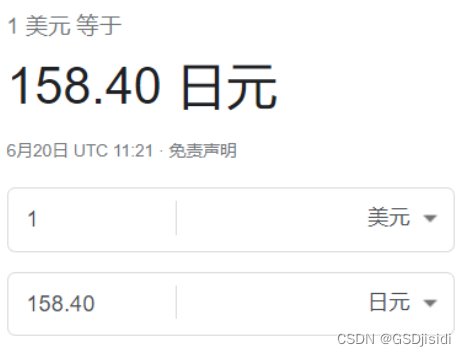
日元预计明年开始上涨
被称为“日元先生”的前大藏省(现财务省)财务官榊原英资预测,美元兑日元汇率将在今年底或2025年初逐步升至130。他认为,通缩时代已经过去,通货膨胀即将来临。 《日本经济新闻》6月5日报道,日本财务省于5月3…...

8、PHP 实现二进制中1的个数、数值的整数次方
题目: 二进制中1的个数 描述: 输入一个整数,输出该数二进制表示中1的个数。其中负数用补码表示。 <?phpfunction NumberOf1($n) {$count 0;if($n < 0){$n $n & 0x7FFFFFFF;$count;}while($n ! 0){$count;$n $n & ($n - 1…...

linux git凭证管理
linux git 凭证管理 解决命令行git登录github的问题,支持两步验证 同样适用于Azure Devops, Bitbucket 官网: https://github.com/git-ecosystem/git-credential-manager https://github.com/git-ecosystem/git-credential-manager/blob/release/docs/…...

WIC 图像处理初体验——读取像素的值
先放上运行结果: 可以发现红绿蓝是从后往前的。 必须以C方式编译代码! #define _CRT_SECURE_NO_WARNINGS #include <stdio.h> #include <wincodec.h>int main(void) {CoInitialize(nullptr);IWICImagingFactory* fac;CoCreateInstance(CLS…...
,并获取message里面的内容)
使用Server-Sent Events (SSE),并获取message里面的内容
什么是Server-Sent Events (SSE)? Server-Sent Events (SSE)是一种服务器推送技术,允许服务器向客户端(浏览器)发送实时消息。与WebSocket不同,SSE是单向通信,只能从服务器到客户端。SSE在HTML5中作为标准实现&#…...

LabVIEW项目管理中如何平衡成本、时间和质量
在LabVIEW项目管理中,平衡成本、时间和质量是实现项目成功的关键。通过制定详细的项目计划、合理分配资源、严格控制进度、进行质量保证和灵活应对变化,项目管理者可以有效地协调这三者的关系,确保项目按时、按质、按预算完成。 1. 制定详细…...

如何检查 Kubernetes 网络配置
简介 Kubernetes 是一个容器编排系统,可以管理集群中的容器化应用程序。在集群中保持所有容器之间的网络连接需要一些高级网络技术。在本文中,我们将简要介绍一些工具和技术,用于检查这种网络设置。 如果您正在调试连接问题,调查…...

如何将网站封装成App:小猪APP分发助你实现
你有没有想过,将你的网站变成一个App会是什么样子?想象一下,用户只需点击一下图标,就能立刻访问你的内容,而不是在浏览器中输入网址。这不仅提升了用户体验,还能增加用户粘性。这一切都可以通过将网站封装成…...

探索C嘎嘎的奇妙世界:第十六关---STL(vector的练习)
1.只出现一次的数字 我们可以使用异或运算来解决这个问题: 异或运算有一个重要的性质:两个相同的数进行异或运算结果为 0,任何数与 0 异或结果为其本身。对于数组中的元素,依次进行异或运算,出现两次的元素异…...

最新扣子(Coze)实战案例:扣子卡片的制作及使用,完全免费教程
🧙♂️ 大家好,我是斜杠君,手把手教你搭建扣子AI应用。 📜 本教程是《AI应用开发系列教程之扣子(Coze)实战教程》,完全免费学习。 👀 关注斜杠君,可获取完整版教程。👍Ἷ…...
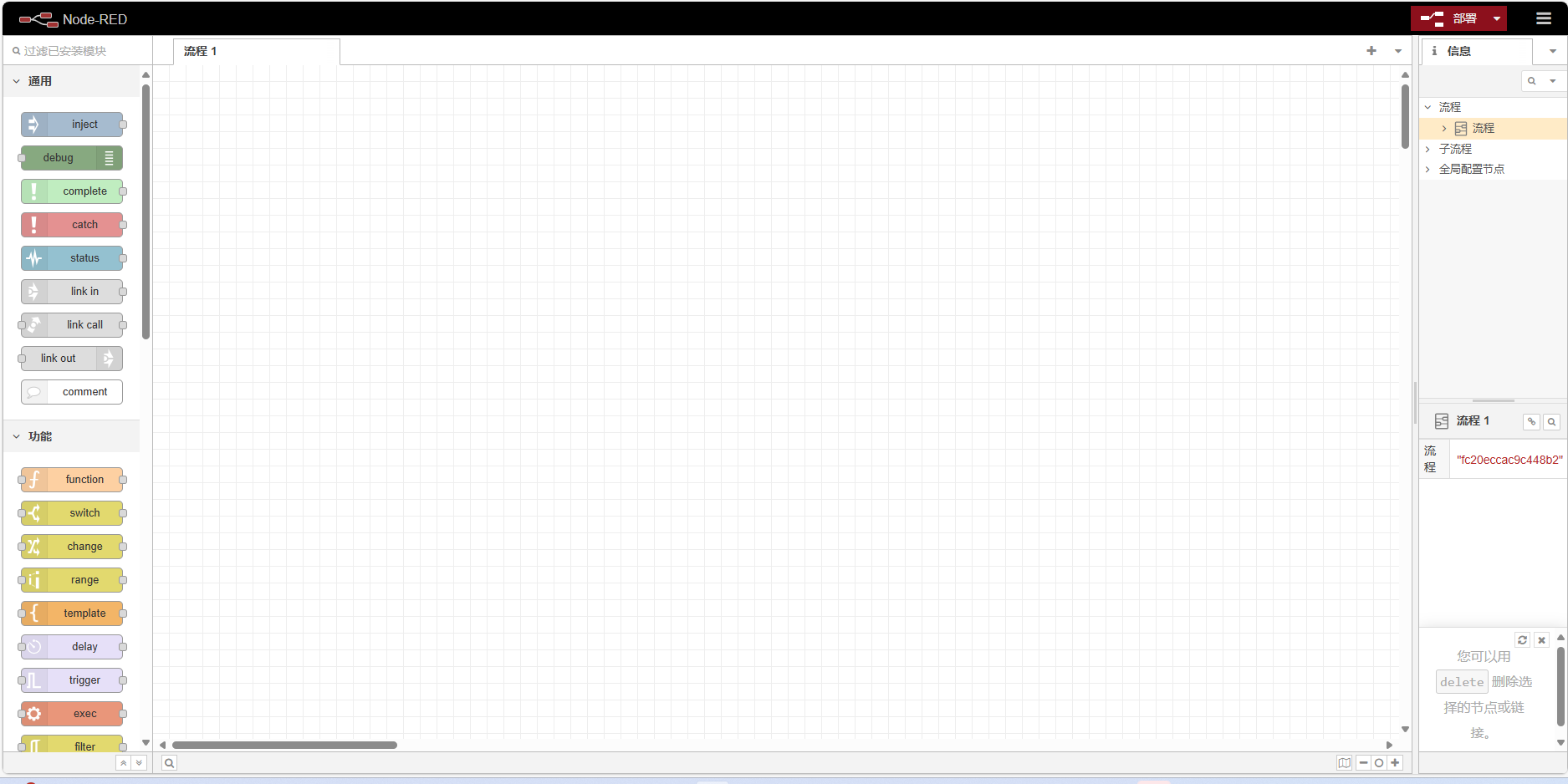
Node-red win11安装
文章目录 前言一、安装node.js和npm二、安装Node-red三、 运行Node-red 前言 Node-RED 是一种编程工具,用于以新颖有趣的方式将硬件设备、API 和在线服务连接在一起。 它提供了一个基于浏览器的编辑器,只需单击一下即可将调色板中的各种节点轻松连接在…...

永久更改R包的安装目录
要永久更改 R 包的安装目录,可以通过设置 R 配置文件来实现。以下是步骤说明: 1. 查找和修改 R 配置文件 R 有几个配置文件用于保存用户和系统的设置: 用户级配置文件:通常位于 ~/.Rprofile系统级配置文件:通常位于…...
)
Webrtc支持FFMPEG硬解码之NVIDA(二)
一、前言 此系列文章分分为三篇, Webrtc支持FFMPEG硬解码之Intel(一)-CSDN博客 Webrtc支持FFMPEG硬解码之NVIDA(二)-CSDN博客 Webrtc支持FFMPEG硬解码之解码实现-CSDN博客 AMD硬解目前还没找到可用解码器,欢迎留言交流 二、环境 Windows平台 VS2019 Cmake 三、下…...

从怀疑到真香!2026我日常办公离不开的这款在线文字转换器太好用了
刚入职那半年我踩过太多坑:一周三次新人培训,怕漏记知识点全程录音,下课手动整理1小时录音要熬3小时,知识点散得根本没法复习;部门周会做完记录,散会就要我出整理好的纪要,赶工赶得饭都吃不上&a…...

告别手写UI!用NXP GUI Guider拖拽设计LVGL界面,5分钟搞定音乐播放器Demo
嵌入式UI开发革命:5分钟用GUI Guider构建LVGL音乐播放器在嵌入式系统开发中,用户界面(UI)设计曾长期是工程师的痛点——既要考虑资源受限的硬件环境,又要实现流畅美观的交互体验。传统手动编写UI代码的方式不仅效率低下,调试过程更…...

[智能体-81]:工程化智能体 = 模型做脑力拆解 + 框架做流程落地。前者是决策者,后者是管理者,tools/function call是内部员工;mcp server是外部资源;
一、全角色人设 & 对应技术组件角色定位对应技术模块核心职责决策者(脑力大脑)大模型 LLM理解目标、任务拆解、逻辑判断、分支决策、内容生成,负责 “想方案、定步骤”管理者(流程总管)智能体编排框架(…...

rk35xx 通过recovery升级问题
Firefly 的 recovery 库是一个核心组件,它构建了一个独立的微型 Linux 系统,专门用于在设备主系统之外执行高可靠性的固件升级。简单来说,它的工作流程是:主系统通过命令触发,将升级指令写入特定分区并重启;…...

基于ESP32与MQTT的家庭环境监测系统:从传感器选型到数据可视化实战
1. 项目概述与核心价值最近几年,我身边越来越多的朋友开始关注家里的空气质量、温湿度这些看不见摸不着,但又实实在在影响生活舒适度和健康的环境指标。从新装修的房子担心甲醛,到有老人小孩的家庭在意PM2.5和二氧化碳浓度,再到南…...

HDI 高密度互连板阶数的深度理解
一、概述高密度互连板(High Density Interconnector, HDI)是通过激光微孔技术和逐层积层工艺实现高密度布线的印制电路板。其阶数划分是行业内统一的技术标准,核心依据为独立积层压合次数与配套激光盲孔制程次数,而非单面层数或钻…...

XML 服务器
XML 服务器 引言 XML(可扩展标记语言)服务器在现代互联网技术中扮演着至关重要的角色。它为数据的传输和处理提供了灵活且高效的方式。本文将深入探讨XML服务器的概念、工作原理、应用场景及其在软件开发中的重要性。 什么是XML服务器? XML服务器是一种用于存储、处理和…...

Godot4 2D游戏开发避坑指南:TileMap绘制、节点顺序与相机设置的三个常见问题
Godot4 2D游戏开发避坑指南:TileMap绘制、节点顺序与相机设置的三个常见问题当你第一次用Godot4完成一个2D场景搭建时,那种成就感往往会被几个突如其来的bug瞬间击碎——角色神秘消失、背景纹丝不动、屏幕边缘出现诡异黑边。这些问题看似简单,…...

Qri高级功能:如何使用JSON Schema验证和描述数据集结构
Qri高级功能:如何使用JSON Schema验证和描述数据集结构 【免费下载链接】qri youre invited to a data party! 项目地址: https://gitcode.com/gh_mirrors/qr/qri Qri是一个强大的开源数据协作工具,它提供了丰富的功能来帮助用户管理、共享和验证…...

终极指南:用D2DX让《暗黑破坏神2》在现代电脑上焕发新生
终极指南:用D2DX让《暗黑破坏神2》在现代电脑上焕发新生 【免费下载链接】d2dx D2DX is a complete solution to make Diablo II run well on modern PCs, with high fps and better resolutions. 项目地址: https://gitcode.com/gh_mirrors/d2/d2dx 还在为经…...