
FW SystemUI Keyguard解析(二)
文章目录
- CTS之Keyguard Menu事件处理
CTS之Keyguard Menu事件处理
事件触发点:
NotificationShadeWindowViewController.dispatchKeyEvent
设置setInteractionEventHandler回调之后通过NotificationShadeWindowView 触发
调用到return mService.onMenuPressed();
public class NotificationShadeWindowViewController {public void setupExpandedStatusBar() {mView.setInteractionEventHandler(new NotificationShadeWindowView.InteractionEventHandler() {//省略代码@Overridepublic boolean dispatchKeyEvent(KeyEvent event) {boolean down = event.getAction() == KeyEvent.ACTION_DOWN;switch (event.getKeyCode()) {case KeyEvent.KEYCODE_BACK:if (!down) {mService.onBackPressed();}return true;case KeyEvent.KEYCODE_MENU:if (!down) {return mService.onMenuPressed();//☆☆☆☆}break;case KeyEvent.KEYCODE_SPACE:if (!down) {return mService.onSpacePressed();}break;case KeyEvent.KEYCODE_VOLUME_DOWN:case KeyEvent.KEYCODE_VOLUME_UP:if (mStatusBarStateController.isDozing()) {MediaSessionLegacyHelper.getHelper(mView.getContext()).sendVolumeKeyEvent(event, AudioManager.USE_DEFAULT_STREAM_TYPE, true);return true;}break;}return false;}});}
}public class NotificationShadeWindowView extends FrameLayout {@Overridepublic boolean dispatchKeyEvent(KeyEvent event) {if (mInteractionEventHandler.interceptMediaKey(event)) {return true;}if (super.dispatchKeyEvent(event)) {return true;}return mInteractionEventHandler.dispatchKeyEvent(event);//☆☆☆☆}
}
以上通过接口会调用到
StatusBar类中去
public class StatusBar{public boolean onMenuPressed() {if (shouldUnlockOnMenuPressed()) {mShadeController.animateCollapsePanels(CommandQueue.FLAG_EXCLUDE_RECENTS_PANEL /* flags */, true /* force */);//☆☆☆☆return true;}return false;}}public class ShadeControllerImpl implements ShadeController {@Overridepublic void animateCollapsePanels(int flags, boolean force) {animateCollapsePanels(flags, force, false /* delayed */, 1.0f /* speedUpFactor */);//☆☆☆☆}@Overridepublic void animateCollapsePanels(int flags, boolean force, boolean delayed,float speedUpFactor) {if (!force && mStatusBarStateController.getState() != StatusBarState.SHADE) {runPostCollapseRunnables();return;}if (SPEW) {Log.d(TAG, "animateCollapse():"+ " mExpandedVisible=" + getStatusBar().isExpandedVisible()+ " flags=" + flags);}if ((flags & CommandQueue.FLAG_EXCLUDE_RECENTS_PANEL) == 0) {getStatusBar().postHideRecentApps();}// TODO(b/62444020): remove when this bug is fixedLog.v(TAG, "NotificationShadeWindow: " + getNotificationShadeWindowView()+ " canPanelBeCollapsed(): "+ getNotificationPanelViewController().canPanelBeCollapsed());if (getNotificationShadeWindowView() != null&& getNotificationPanelViewController().canPanelBeCollapsed()) {// release focus immediately to kick off focus change transitionmNotificationShadeWindowController.setNotificationShadeFocusable(false);getStatusBar().getNotificationShadeWindowViewController().cancelExpandHelper();getStatusBarView().collapsePanel(true /* animate */, delayed, speedUpFactor);//☆☆☆☆} else {mBubbleControllerLazy.get().collapseStack();}}}public abstract class PanelBar extends FrameLayout {public void collapsePanel(boolean animate, boolean delayed, float speedUpFactor) {boolean waiting = false;PanelViewController pv = mPanel;if (animate && !pv.isFullyCollapsed()) {pv.collapse(delayed, speedUpFactor);waiting = true;} else {pv.resetViews(false /* animate */);pv.setExpandedFraction(0); // just in casepv.cancelPeek();}if (DEBUG) LOG("collapsePanel: animate=%s waiting=%s", animate, waiting);if (!waiting && mState != STATE_CLOSED) {// it's possible that nothing animated, so we replicate the termination// conditions of panelExpansionChanged herego(STATE_CLOSED);onPanelCollapsed();//☆☆☆☆}}
}public class PhoneStatusBarView extends PanelBar {private Runnable mHideExpandedRunnable = new Runnable() {@Overridepublic void run() {if (mPanelFraction == 0.0f) {mBar.makeExpandedInvisible();//☆☆☆☆}}};@Overridepublic void onPanelCollapsed() {super.onPanelCollapsed();// Close the status bar in the next frame so we can show the end of the animation.post(mHideExpandedRunnable);//☆☆☆☆mIsFullyOpenedPanel = false;}
}public class StatusBar extends SystemUI {void makeExpandedInvisible() {if (SPEW) Log.d(TAG, "makeExpandedInvisible: mExpandedVisible=" + mExpandedVisible+ " mExpandedVisible=" + mExpandedVisible);if (!mExpandedVisible || mNotificationShadeWindowView == null) {return;}// Ensure the panel is fully collapsed (just in case; bug 6765842, 7260868)mStatusBarView.collapsePanel(/*animate=*/ false, false /* delayed*/,1.0f /* speedUpFactor */);mNotificationPanelViewController.closeQs();mExpandedVisible = false;visibilityChanged(false);// Update the visibility of notification shade and status bar window.mNotificationShadeWindowController.setPanelVisible(false);mStatusBarWindowController.setForceStatusBarVisible(false);// Close any guts that might be visiblemGutsManager.closeAndSaveGuts(true /* removeLeavebehind */, true /* force */,true /* removeControls */, -1 /* x */, -1 /* y */, true /* resetMenu */);mShadeController.runPostCollapseRunnables();setInteracting(StatusBarManager.WINDOW_STATUS_BAR, false);if (!mNotificationActivityStarter.isCollapsingToShowActivityOverLockscreen()) {showBouncerIfKeyguard();//☆☆☆☆} else if (DEBUG) {Log.d(TAG, "Not showing bouncer due to activity showing over lockscreen");}mCommandQueue.recomputeDisableFlags(mDisplayId,mNotificationPanelViewController.hideStatusBarIconsWhenExpanded() /* animate */);// Trimming will happen later if Keyguard is showing - doing it here might cause a jank in// the bouncer appear animation.if (!mStatusBarKeyguardViewManager.isShowing()) {WindowManagerGlobal.getInstance().trimMemory(ComponentCallbacks2.TRIM_MEMORY_UI_HIDDEN);}}private void showBouncerIfKeyguard() {if ((mState == StatusBarState.KEYGUARD || mState == StatusBarState.SHADE_LOCKED)&& !mKeyguardViewMediator.isHiding()) {mStatusBarKeyguardViewManager.showBouncer(true /* scrimmed */); //☆☆☆☆}}}public class StatusBarKeyguardViewManager {public void showBouncer(boolean scrimmed) {if (mShowing && !mBouncer.isShowing()) {mBouncer.show(false /* resetSecuritySelection */, scrimmed);//☆☆☆☆}updateStates();}
}public class KeyguardBouncer {private final Runnable mShowRunnable = new Runnable() {@Overridepublic void run() {mRoot.setVisibility(View.VISIBLE);showPromptReason(mBouncerPromptReason);final CharSequence customMessage = mCallback.consumeCustomMessage();if (customMessage != null) {mKeyguardView.showErrorMessage(customMessage);}// We might still be collapsed and the view didn't have time to layout yet or still// be small, let's wait on the predraw to do the animation in that case.if (mKeyguardView.getHeight() != 0 && mKeyguardView.getHeight() != mStatusBarHeight) {mKeyguardView.startAppearAnimation();} else {mKeyguardView.getViewTreeObserver().addOnPreDrawListener(new ViewTreeObserver.OnPreDrawListener() {@Overridepublic boolean onPreDraw() {mKeyguardView.getViewTreeObserver().removeOnPreDrawListener(this);mKeyguardView.startAppearAnimation();//☆☆☆☆return true;}});mKeyguardView.requestLayout();}mShowingSoon = false;if (mExpansion == EXPANSION_VISIBLE) {mKeyguardView.onResume();mKeyguardView.resetSecurityContainer();showPromptReason(mBouncerPromptReason);}SysUiStatsLog.write(SysUiStatsLog.KEYGUARD_BOUNCER_STATE_CHANGED,SysUiStatsLog.KEYGUARD_BOUNCER_STATE_CHANGED__STATE__SHOWN);}};public void show(boolean resetSecuritySelection, boolean isScrimmed) {final int keyguardUserId = KeyguardUpdateMonitor.getCurrentUser();if (keyguardUserId == UserHandle.USER_SYSTEM && UserManager.isSplitSystemUser()) {// In split system user mode, we never unlock system user.return;}ensureView();mIsScrimmed = isScrimmed;// On the keyguard, we want to show the bouncer when the user drags up, but it's// not correct to end the falsing session. We still need to verify if those touches// are valid.// Later, at the end of the animation, when the bouncer is at the top of the screen,// onFullyShown() will be called and FalsingManager will stop recording touches.if (isScrimmed) {setExpansion(EXPANSION_VISIBLE);}if (resetSecuritySelection) {// showPrimarySecurityScreen() updates the current security method. This is needed in// case we are already showing and the current security method changed.showPrimarySecurityScreen();}if (mRoot.getVisibility() == View.VISIBLE || mShowingSoon) {return;}final int activeUserId = KeyguardUpdateMonitor.getCurrentUser();final boolean isSystemUser =UserManager.isSplitSystemUser() && activeUserId == UserHandle.USER_SYSTEM;final boolean allowDismissKeyguard = !isSystemUser && activeUserId == keyguardUserId;// If allowed, try to dismiss the Keyguard. If no security auth (password/pin/pattern) is// set, this will dismiss the whole Keyguard. Otherwise, show the bouncer.if (allowDismissKeyguard && mKeyguardView.dismiss(activeUserId)) {return;}// This condition may indicate an error on Android, so log it.if (!allowDismissKeyguard) {Log.w(TAG, "User can't dismiss keyguard: " + activeUserId + " != " + keyguardUserId);}mShowingSoon = true;// Split up the work over multiple frames.DejankUtils.removeCallbacks(mResetRunnable);if (mKeyguardStateController.isFaceAuthEnabled() && !needsFullscreenBouncer()&& !mKeyguardUpdateMonitor.userNeedsStrongAuth()&& !mKeyguardBypassController.getBypassEnabled()) {mHandler.postDelayed(mShowRunnable, BOUNCER_FACE_DELAY);//☆☆☆☆} else {DejankUtils.postAfterTraversal(mShowRunnable);//☆☆☆☆}mCallback.onBouncerVisiblityChanged(true /* shown */);mExpansionCallback.onStartingToShow();}
}public class KeyguardHostView extends FrameLayout implements SecurityCallback {public void startAppearAnimation() {mSecurityContainer.startAppearAnimation();//☆☆☆☆}
}public class KeyguardSecurityContainer extends FrameLayout implements KeyguardSecurityView {public void startAppearAnimation() {if (mCurrentSecuritySelection != SecurityMode.None) {getSecurityView(mCurrentSecuritySelection).startAppearAnimation();//☆☆☆☆}}
}public class KeyguardPINView extends KeyguardPinBasedInputView {@Overridepublic void startAppearAnimation() {enableClipping(false);setAlpha(1f);//☆☆☆☆setTranslationY(mAppearAnimationUtils.getStartTranslation());AppearAnimationUtils.startTranslationYAnimation(this, 0 /* delay */, 500 /* duration */,0, mAppearAnimationUtils.getInterpolator());mAppearAnimationUtils.startAnimation2d(mViews,new Runnable() {@Overridepublic void run() {enableClipping(true);}});}}
相关文章:
)
FW SystemUI Keyguard解析(二)
文章目录 CTS之Keyguard Menu事件处理 CTS之Keyguard Menu事件处理 事件触发点: NotificationShadeWindowViewController.dispatchKeyEvent 设置setInteractionEventHandler回调之后通过NotificationShadeWindowView 触发 调用到return mService.onMenuPressed(); public cla…...
MySQL之备份与恢复(二)
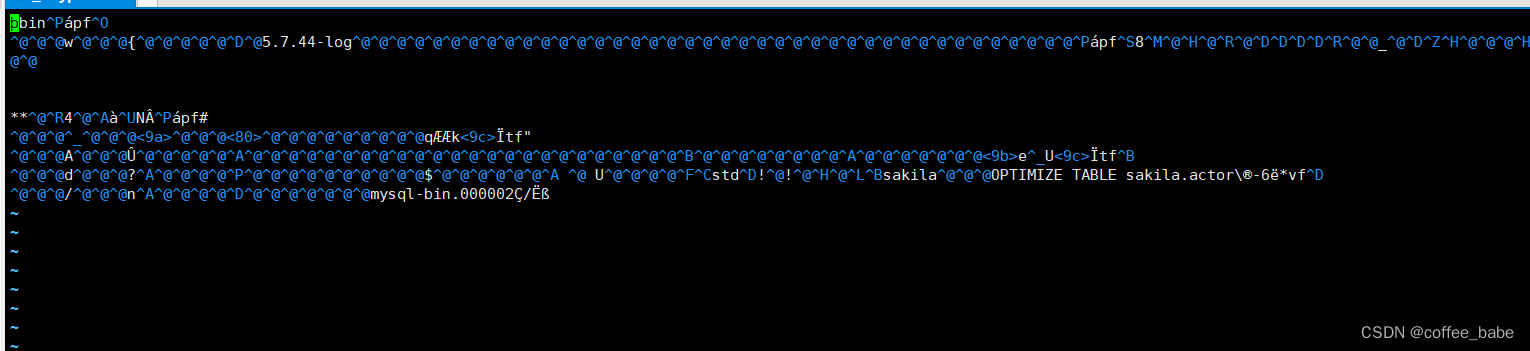
备份与恢复 定义恢复需求 如果一切正常,那么永远也不需要考虑恢复。但是,一旦需要恢复,只有世界上最好的备份系统是没用的,还需要一个强大的恢复系统。 不幸的是,让备份系统平滑工作比构造良好的恢复过程和工具更容易…...
MySQL:保护数据库
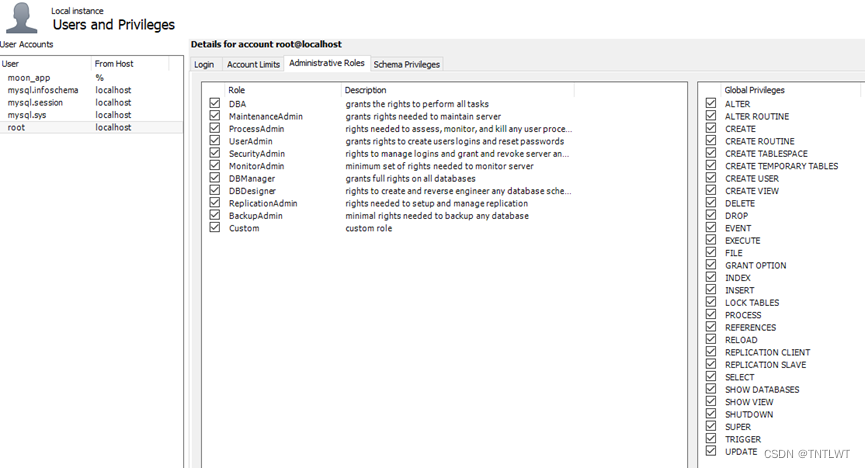
保护数据库 1. 用户1.1 创建用户1.2 查看用户1.3 删除用户1.4 修改密码 2. 权限2.1 授予权限2.2 查看权限2.3 撤销权限 之前都是介绍本地数据库而你自己就是数据库的唯一用户,所以不必考虑安全问题。但实际业务中数据库大多放在服务器里,你必须妥善处理好…...

不是大厂云用不起,而是五洛云更有性价比
明月代维的一个客户的大厂云境外云服务器再有几天就到期了,续费提醒那是提前一周准时到来,但是看到客户发来的续费价格截图,我是真的没忍住。这不就是在杀熟吗?就这配置续费竟然如此昂贵?说实话这个客户的服务器代维是…...
C++初学者指南-3.自定义类型(第一部分)-异常
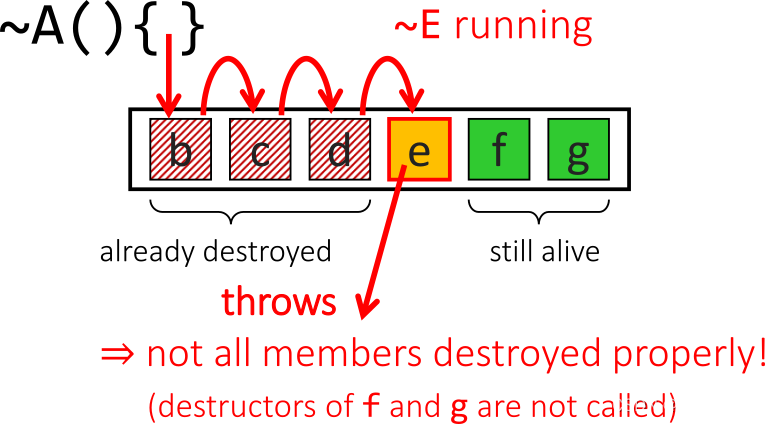
C初学者指南-3.自定义类型(第一部分)-异常 文章目录 C初学者指南-3.自定义类型(第一部分)-异常简介什么是异常?第一个示例用途:报告违反规则的行为异常的替代方案标准库异常处理 问题和保证资源泄露使用 RAII 避免内存泄漏!析构函数:不要让异…...
学会python——用python编写一个电子时钟(python实例十七)
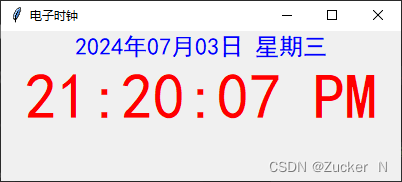
目录 1.认识Python 2.环境与工具 2.1 python环境 2.2 Visual Studio Code编译 3.电子时钟程序 3.1 代码构思 3.2代码实例 3.3运行结果 4.总结 1.认识Python Python 是一个高层次的结合了解释性、编译性、互动性和面向对象的脚本语言。 Python 的设计具有很强的可读性…...

elementui中@click短时间内多次触发,@click重复点击,做不允许重复点击处理
click快速点击,发生多次触发 2.代码示例: //html<el-button :loading"submitLoading" type"primary" click"submitForm">确 定</el-button>data() {return {submitLoading:false,}}//方法/** 提交按钮 */sub…...

助力游戏实现应用内运营闭环,融云游戏社交方案升级!
通信能力在所有应用场景都是必备组件,这源于社交属性带给应用的增长神话。 在游戏场景,玩家从少数核心向大众用户泛化扩展的过程,就是游戏深度融合社交能力的过程。 从单机到联机,游戏乐趣的升级 1996 年,游戏界顶流…...
守护创新之魂:源代码防泄漏的终极策略
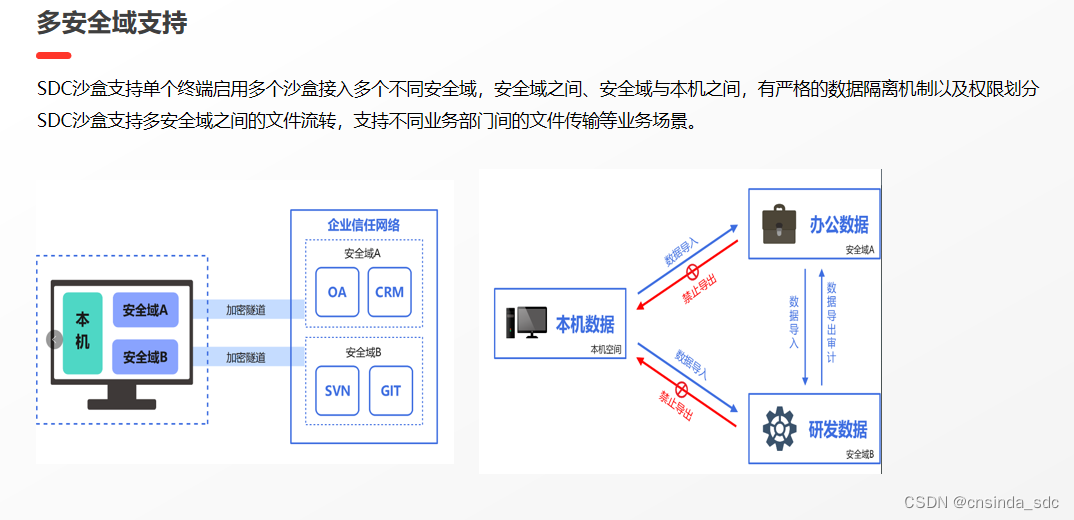
在信息化快速发展的今天,企业的核心机密数据,尤其是源代码,成为了企业竞争力的关键所在。然而,源代码的泄露风险也随之增加,给企业的安全和发展带来了巨大威胁。在这样的背景下,SDC沙盒作为一种创新的源代码…...
Halcon 基于分水岭的目标分割
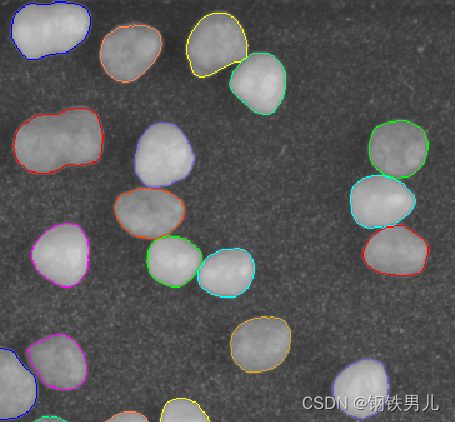
一 分水岭 1 分水岭介绍 传统的分水岭分割方法,是一种基于拓扑理论的数学形态学的分割方法,其基本思想是把图像看作是地质学上的拓扑地貌,图像中每一像素的灰度值表示该点的海拔高度,每一个局部极小值及其周边区域称为集水盆地&…...

PHP 面向对象编程(OOP)入门指南
面向对象编程(Object-Oriented Programming,简称OOP)是一种编程范式,通过使用对象来设计和组织代码。PHP作为一种广泛使用的服务器端脚本语言,支持面向对象编程。本文将介绍PHP面向对象编程的基本概念和用法࿰…...

Django学习第三天
python manage.py runserver 使用以上的命令启动项目 实现新建用户数据功能 views.py文件代码 from django.shortcuts import render, redirect from app01 import models# Create your views here. def depart_list(request):""" 部门列表 ""&qu…...
Vue3实现点击按钮实现文字变色
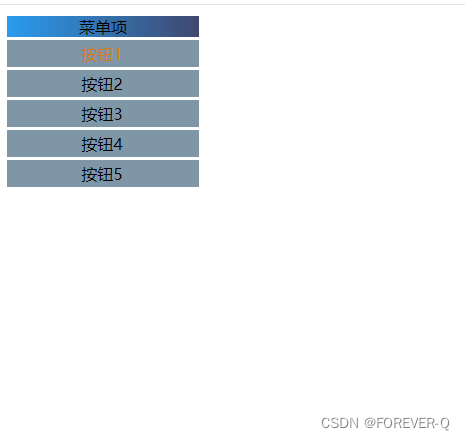
1.动态样式实现 1.1核心代码解释: class"power-station-perspective-item-text": 为这个 span 元素添加了一个 CSS 类,以便对其样式进行定义。 click"clickItem(item.id)": 这是一个 Vue 事件绑定。当用户点…...

深入理解Vue生命周期钩子函数
深入理解Vue生命周期钩子函数 Vue.js 是一款流行的前端框架,通过其强大的响应式数据绑定和组件化的开发方式,使得前端开发变得更加简单和高效。在Vue应用中,每个组件都有其生命周期,这些生命周期钩子函数允许开发者在不同阶段执行…...

Linux-gdb
目录 1.-g 生成含有debug信息的可执行文件 2.gdb开始以及gdb中的常用执行指令 3.断点的本质用法 4.快速跳出函数体 5.其他 1.-g 生成含有debug信息的可执行文件 2.gdb开始以及gdb中的常用执行指令 3.断点的本质用法 断点的本质是帮助我们缩小出问题的范围 比如,…...
)
Oracle分析表和索引(analyze)
分析表 analyze table tablename compute statistics; 分析索引 analyze index indexname compute statistics; 该语句生成的统计信息会更新user_tables这个视图的统计信息,分析的结果被Oracle用于基于成本的优化生成更好的查询计划 对于使用CBO(Cost-Base Optimization)很有好…...

MyBatis踩坑记录-多表关联字段相同,字段数据覆盖问题
MyBatis踩坑记录-多表关联字段相同,字段数据覆盖问题 1. 背景描述2. 实体记录3. 错误映射3.1 造成的影响 4. 解决办法4.1 修改映射文件 5. 修复后的效果5.1 返回的数据5.2 正确展示 7. end ~ 1. 背景描述 现有一下业务,单个任务下可能会有多个子任务&am…...
昇思25天学习打卡营第6天|数据变换 Transforms
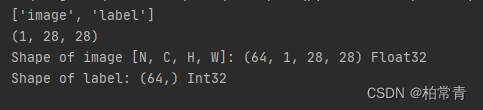
学习目标:熟练掌握数据变换操作 熟悉mindspore.dataset.transforms接口 实践掌握常用变换 昇思大模型平台学习心得记录: 一、关于mindspore.dataset.transforms 1.1 变换 mindspore.dataset.transforms.Compose将多个数据增强操作组合使用。 mindspo…...

在线JSON可视化工具--改进
先前发布了JSON格式化可视化在线工具,提供图形化界面显示结构关系功能,并提供JSON快速格式化、JSON压缩、快捷复制、下载导出、对存在语法错误的地方能明确显示,而且还支持全屏,极大扩大视野区域。 在线JSON格式化可视化工具 但…...
探讨命令模式及其应用
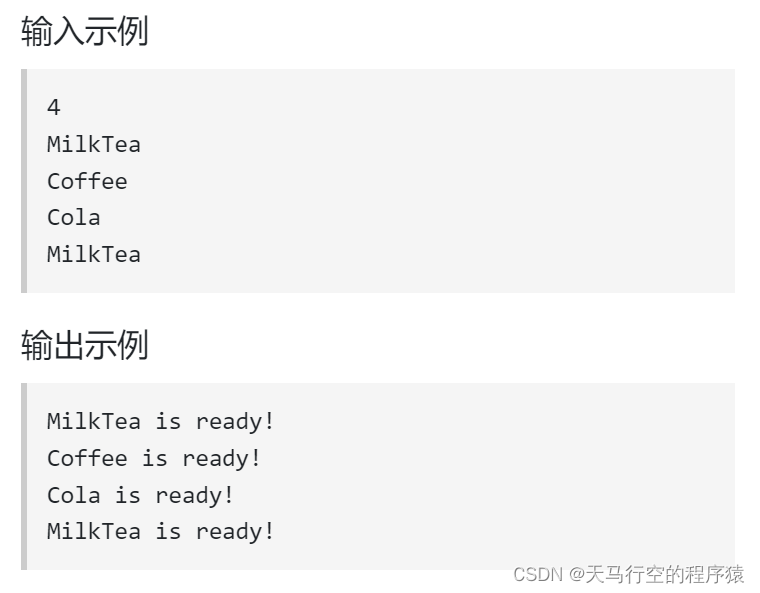
目录 命令模式命令模式结构命令模式适用场景命令模式优缺点练手题目题目描述输入描述输出描述题解 命令模式 命令模式是一种行为设计模式, 它可将请求转换为一个包含与请求相关的所有信息的独立对象。 该转换让你能根据不同的请求将方法参数化、 延迟请求执行或将其…...

Linux 文件类型,目录与路径,文件与目录管理
文件类型 后面的字符表示文件类型标志 普通文件:-(纯文本文件,二进制文件,数据格式文件) 如文本文件、图片、程序文件等。 目录文件:d(directory) 用来存放其他文件或子目录。 设备…...

CVPR 2025 MIMO: 支持视觉指代和像素grounding 的医学视觉语言模型
CVPR 2025 | MIMO:支持视觉指代和像素对齐的医学视觉语言模型 论文信息 标题:MIMO: A medical vision language model with visual referring multimodal input and pixel grounding multimodal output作者:Yanyuan Chen, Dexuan Xu, Yu Hu…...
CMake基础:构建流程详解
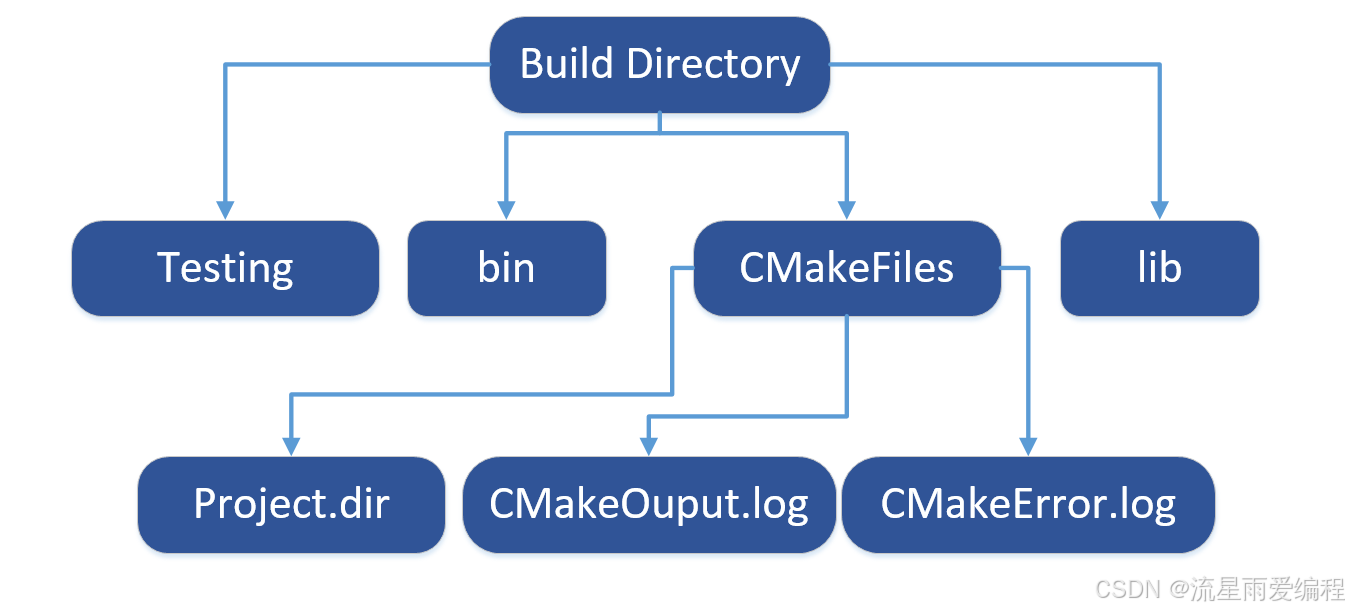
目录 1.CMake构建过程的基本流程 2.CMake构建的具体步骤 2.1.创建构建目录 2.2.使用 CMake 生成构建文件 2.3.编译和构建 2.4.清理构建文件 2.5.重新配置和构建 3.跨平台构建示例 4.工具链与交叉编译 5.CMake构建后的项目结构解析 5.1.CMake构建后的目录结构 5.2.构…...

论文浅尝 | 基于判别指令微调生成式大语言模型的知识图谱补全方法(ISWC2024)
笔记整理:刘治强,浙江大学硕士生,研究方向为知识图谱表示学习,大语言模型 论文链接:http://arxiv.org/abs/2407.16127 发表会议:ISWC 2024 1. 动机 传统的知识图谱补全(KGC)模型通过…...

【HTML-16】深入理解HTML中的块元素与行内元素
HTML元素根据其显示特性可以分为两大类:块元素(Block-level Elements)和行内元素(Inline Elements)。理解这两者的区别对于构建良好的网页布局至关重要。本文将全面解析这两种元素的特性、区别以及实际应用场景。 1. 块元素(Block-level Elements) 1.1 基本特性 …...

爬虫基础学习day2
# 爬虫设计领域 工商:企查查、天眼查短视频:抖音、快手、西瓜 ---> 飞瓜电商:京东、淘宝、聚美优品、亚马逊 ---> 分析店铺经营决策标题、排名航空:抓取所有航空公司价格 ---> 去哪儿自媒体:采集自媒体数据进…...

Swagger和OpenApi的前世今生
Swagger与OpenAPI的关系演进是API标准化进程中的重要篇章,二者共同塑造了现代RESTful API的开发范式。 本期就扒一扒其技术演进的关键节点与核心逻辑: 🔄 一、起源与初创期:Swagger的诞生(2010-2014) 核心…...
)
是否存在路径(FIFOBB算法)
题目描述 一个具有 n 个顶点e条边的无向图,该图顶点的编号依次为0到n-1且不存在顶点与自身相连的边。请使用FIFOBB算法编写程序,确定是否存在从顶点 source到顶点 destination的路径。 输入 第一行两个整数,分别表示n 和 e 的值(1…...
Qemu arm操作系统开发环境
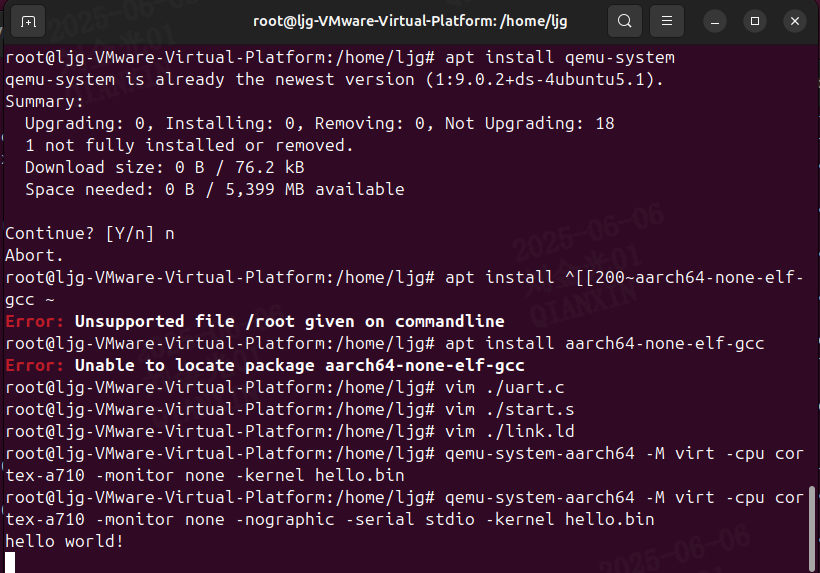
使用qemu虚拟arm硬件比较合适。 步骤如下: 安装qemu apt install qemu-system安装aarch64-none-elf-gcc 需要手动下载,下载地址:https://developer.arm.com/-/media/Files/downloads/gnu/13.2.rel1/binrel/arm-gnu-toolchain-13.2.rel1-x…...

全面解析数据库:从基础概念到前沿应用
在数字化时代,数据已成为企业和社会发展的核心资产,而数据库作为存储、管理和处理数据的关键工具,在各个领域发挥着举足轻重的作用。从电商平台的商品信息管理,到社交网络的用户数据存储,再到金融行业的交易记录处理&a…...