
Ubuntu24.04安装mysql-server小计,解决mysql_secure_installation时不能重置密码的问题
Ubuntu24.04安装mysql-server小计,解决mysql_secure_installation时不能重置密码的问题
为什么要写这往篇文章?
一般情况下,我安装mysql都用源码编译,以此方便安装更多自定义插件,但这次只需要安装一台开发机,无需太多要求。机器上安装的是ubuntu24.04,本着省时省力的想法,用官方的apt安装。结果,,,,很久没有搞定重设密码问题。绕了一圈,终究搞定了,但花的时间也不少,因此,写个备忘录,以便后需。
安装
- apt仓库方式安装
sudo apt update
sudo apt install mysql-server -y
sudo systemctl status mysql
sudo systemctl start mysql
2.设置账号
sudo mysql_secure_installation
按照提示完成以下步骤:
- 设置root用户密码
- 移除匿名用户
- 禁止root远程登录
- 移除测试数据库并重新加载权限表
执行过程需要输入 Y N Y Y,根据情况自行选择
root@fred-4:/home/fred-4# sudo mysql_secure_installationSecuring the MySQL server deployment.Connecting to MySQL using a blank password.
The 'validate_password' component is installed on the server.
The subsequent steps will run with the existing configuration
of the component.Skipping password set for root as authentication with auth_socket is used by default.
If you would like to use password authentication instead, this can be done with the "ALTER_USER" command.
See https://dev.mysql.com/doc/refman/8.0/en/alter-user.html#alter-user-password-management for more information.By default, a MySQL installation has an anonymous user,
allowing anyone to log into MySQL without having to have
a user account created for them. This is intended only for
testing, and to make the installation go a bit smoother.
You should remove them before moving into a production
environment.Remove anonymous users? (Press y|Y for Yes, any other key for No) : Y
Success.Normally, root should only be allowed to connect from
'localhost'. This ensures that someone cannot guess at
the root password from the network.Disallow root login remotely? (Press y|Y for Yes, any other key for No) : N... skipping.
By default, MySQL comes with a database named 'test' that
anyone can access. This is also intended only for testing,
and should be removed before moving into a production
environment.Remove test database and access to it? (Press y|Y for Yes, any other key for No) : Y- Dropping test database...
Success.- Removing privileges on test database...
Success.Reloading the privilege tables will ensure that all changes
made so far will take effect immediately.Reload privilege tables now? (Press y|Y for Yes, any other key for No) : Y
Success.All done!
注意:Skipping password set for root as authentication with auth_socket is used by default. 密码设置已被跳过。
By default, a MySQL installation has an anonymous user,
allowing anyone to log into MySQL without having to have
a user account created for them.
设置了匿名用户。。
那该怎么登录呢?
就是不要输登录用户直接进入:
$ mysql
ERROR 1045 (28000): Access denied for user 'my-ubuntu-user'@'localhost' (using password: NO)
完犊子,明明只输入了mysql ,执行的却是mysql -u ‘my-ubuntu-user’@‘localhost’
咋办?继续看吧
匿名登录方法
进入超级用户环境,再进mysql
$ sudo su
$ mysql
Welcome to the MySQL monitor.  Commands end with ; or \g.
Your MySQL connection id is 10
Server version: 8.0.37-0ubuntu0.24.04.1 (Ubuntu)Copyright (c) 2000, 2024, Oracle and/or its affiliates.Oracle is a registered trademark of Oracle Corporation and/or its
affiliates. Other names may be trademarks of their respective
owners.Type 'help;' or '\h' for help. Type '\c' to clear the current input statement.mysql>
OK,搞定
进去了,接下来要改密码
修改密码
mysql> select user, plugin,host from mysql.user;
+------------------+-----------------------+-----------+
| user             | plugin                | host      |
+------------------+-----------------------+-----------+
| root             | auth_socket           | localhost |
+------------------+-----------------------+-----------+
5 rows in set (0.00 sec)
plugin auth_socket 要换掉
换成下面的
mysql> select user, plugin,host from mysql.user;
+------------------+-----------------------+-----------+
| user             | plugin                | host      |
+------------------+-----------------------+-----------+
| root             | mysql_native_password | localhost |
+------------------+-----------------------+-----------+
5 rows in set (0.00 sec)
mysql> ALTER USER 'root'@'%' IDENTIFIED WITH mysql_native_password BY '123456';
ERROR 1819 (HY000): Your password does not satisfy the current policy requirements
服了吧,报错了,这是密码强度不够
SHOW VARIABLES LIKE 'validate_password%';
+-------------------------------------------------+--------+
| Variable_name                                   | Value  |
+-------------------------------------------------+--------+
| validate_password.changed_characters_percentage | 0      |
| validate_password.check_user_name               | ON     |
| validate_password.dictionary_file               |        |
| validate_password.length                        | 8      |
| validate_password.mixed_case_count              | 1      |
| validate_password.number_count                  | 1      |
| validate_password.policy                        | MEDIUM |
| validate_password.special_char_count            | 1      |
+-------------------------------------------------+--------+
validate_password.policy由于是内部测试机,这项改低一点,不然以前的项目都得改
mysql> set global validate_password.policy=0;
Query OK, 0 rows affected (0.00 sec)
mysql>  set global validate_password.length=6;
Query OK, 0 rows affected (0.00 sec)
现在可以改简单密码了
mysql> ALTER USER 'root'@'%' IDENTIFIED WITH mysql_native_password BY '123456';
Query OK, 0 rows affected (0.08 sec)
mysql> FLUSH PRIVILEGES;
Query OK, 0 rows affected (0.03 sec)
查看plugin
mysql> select user, plugin,host from mysql.user;
+------------------+-----------------------+-----------+
| user             | plugin                | host      |
+------------------+-----------------------+-----------+
| root             | mysql_native_password | localhost |
+------------------+-----------------------+-----------+
5 rows in set (0.00 sec)
搞定了
接下来可以exit退出超级用户登录了
mysql -u root -p
Enter password:
Welcome to the MySQL monitor.  Commands end with ; or \g.
Your MySQL connection id is 8
Server version: 8.0.37-0ubuntu0.24.04.1 (Ubuntu)Copyright (c) 2000, 2024, Oracle and/or its affiliates.Oracle is a registered trademark of Oracle Corporation and/or its
affiliates. Other names may be trademarks of their respective
owners.Type 'help;' or '\h' for help. Type '\c' to clear the current input statement.mysql> show databases;
+--------------------+
| Database           |
+--------------------+
| information_schema |
| mysql              |
| performance_schema |
| sys                |
+--------------------+
4 rows in set (0.03 sec)
其它配置
$ sudo nano /etc/mysql/my.cnf
如下配置安需修改
GNU nano 7.2                                                    /etc/mysql/my.cnf
#
# The MySQL database server configuration file.
#
# You can copy this to one of:
# - "/etc/mysql/my.cnf" to set global options,
# - "~/.my.cnf" to set user-specific options.
#
# One can use all long options that the program supports.
# Run program with --help to get a list of available options and with
# --print-defaults to see which it would actually understand and use.
#
# For explanations see
# http://dev.mysql.com/doc/mysql/en/server-system-variables.html#
# * IMPORTANT: Additional settings that can override those from this file!
#   The files must end with '.cnf', otherwise they'll be ignored.
#
!includedir /etc/mysql/conf.d/
!includedir /etc/mysql/mysql.conf.d/
[mysqld]
bind-address = 0.0.0.0
mysqlx-bind-address = 0.0.0.0
port = 3307
mysqlx_port = 33070
default_authentication_plugin = mysql_native_password
重启,自启
sudo systemctl restart mysqlsudo systemctl enable mysql
修改root用户,允许远程登录
mysql> update mysql.user set host = '%' where user='root' and host='localhost';
mysql> FLUSH PRIVILEGES;
新建用户
mysql> set global validate_password.policy=0;
mysql> set global validate_password.length=6;mysql> create user 'my'@'%' identified by '123456';
mysql> grant all privileges on *.* to 'my'@'%' with grant option;
回收权限
mysql> REVOKE privileges ON *.* FROM 'my'@'%';
1227 - Access denied; you need (at least one of) the SYSTEM_USER privilege(s) for this operation
root用户没有SYSTEM_USER权限。
mysql> grant SYSTEM_USER on *.*  to 'root';
mysql> flush privileges;
删除用户
mysql> DROP USER 'my'@'%';
相关文章:

Ubuntu24.04安装mysql-server小计,解决mysql_secure_installation时不能重置密码的问题
Ubuntu24.04安装mysql-server小计,解决mysql_secure_installation时不能重置密码的问题 为什么要写这往篇文章? 一般情况下,我安装mysql都用源码编译,以此方便安装更多自定义插件,但这次只需要安装一台开发机&#x…...

unity3d:TabView,UGUI多标签页组件,TreeView树状展开菜单
概述 1.最外层DataForm为空壳编辑数据用。可以有多个DataForm,例如福利DataForm,抽奖DataForm 2.Menu层为左边栏层,每个DataForm可以使用不同样式的MenuForm预制体 3.DataForm中使用ReorderList,可排列配置 4.有定位功能…...
)
go语言map底层及扩容机制原理详解(下)
前言 上文对Go map的底层数据结构有所了解,并对其扩容机制的步骤进行简略的描述。本文将会详细地去解释Go map扩容机制的详细原理。 1. 触发扩容操作 在go语言中,当我们插入一个元素到hmap时,会有以下两种情况: 若元素存在&…...

网络协议二 : 使用Cisco Packet Traceer工具模拟网络环境,集线器,网桥,交换机,路由器,IP,同一网段
1. 安装 Cisco Packet Tracer baidu 网盘地址,感谢大神分享 安装,破解,中文化,都有说明,建议使用7.x的那个版本,感觉比8.x的翻译要完整一点 https://pan.baidu.com/s/18iWBOfhJJRhqgQqdNQcfMQ?pwddcch#…...

Aria2 任意文件写入漏洞
目录 Aria2介绍漏洞描述漏洞复现 Aria2介绍 Aria2是一个在命令行下运行,多协议,多来源下载工具(HTTP / HTTPS,FTP,BitTorrent,Metalink),内建XML-RPC用户界面。Aria提供RPC服务器&a…...

成为git砖家(4): git status 命令简介
1. untracked 和 tracked 状态 Remember that each file in your working directory can be in one of two states: tracked or untracked. Tracked files are files that were in the last snapshot, as well as any newly staged files; they can be unmodified, modified, o…...

2-48 基于matlab的EM算法聚类可视化程序
基于matlab的EM算法聚类可视化程序,通过期望最大化算法(EM)优化类别间距,使得类别间距最大、类内间距最小。输出聚类前后结果及收敛曲线。程序已调通,可直接运行。 2-48 期望最大化算法(EM) 聚类…...

k8s 使用技巧
文章目录 kubectlkubectl 自动补全kubectl 上下文和配置打印当前使用 API 调用过程生成yaml模板强制删除 Pod(即使处于Terminating) kubectl kubectl 自动补全 source < (kubectl completion bash) # setup autocomplete in bash, bash-completion …...

学习笔记-系统框图传递函数公式推导
目录 *待了解 现代控制理论和自动控制理论区别 自动控制系统的组成 信号流图 1、系统框图 1.1、信号线、分支点、相加点 1.2、系统各环节间的连接 1.3、 相加点和分支点的等效移动(比较点、引出点) 2、反馈连接公式推导 2.1、前向通路传递函数…...

C++ - 基于多设计模式下的同步异步⽇志系统
1.项目介绍 项⽬介绍 本项⽬主要实现⼀个⽇志系统, 其主要⽀持以下功能: • ⽀持多级别⽇志消息 • ⽀持同步⽇志和异步⽇志 • ⽀持可靠写⼊⽇志到控制台、⽂件以及滚动⽂件中 • ⽀持多线程程序并发写⽇志 • ⽀持扩展不同的⽇志落地⽬标地 2.开发环境 • Cent…...

git 相关内容
...

ElasticSearch(es)倒排索引
目录 一、ElasticSearch 二、倒排索引 1. 正向索引 2. 倒排索引 具体细节 1. 文档分析 2. 索引构建 3. 索引存储 4. 词条编码 5. 索引优化 6. 查询处理 示例 总结 3. 正向和倒排 三、总结 倒排索引的基本概念 为什么倒排索引快 一、ElasticSearch Elasticsear…...

【自然语言处理】概论(一):自然语言处理概要
1.1 概论:(一)自然语言处理概要 知识点 自然语言的定义:人类交流使用的,包括口语和书面语的信息交流方式。AI的终极目标:使计算机具备理解(听、读)和生成(说、写&#…...

flask 开始
# 导入flask类 from flask import Flask,request,render_template # 使用flask类来创建一个app对象 # __name__ 代表当前app.py 这个模块 app Flask(__name__) # 创建一个路由和视图函数的映射 url http://127.0.0.1:5000/ app.route("/") def hello_word():return …...

仕考网:公务员可以报考军队文职吗?
公务员可以报考军队文职考试,但是需要满足前提条件。 对于已经与国家、地方的用人单位建立劳动关系的社会人才,在获得当前用人单位的许可后才可以申请报考。 在面试过程中,考生必须出示一份由其用人单位出具的且加盖公章的同意报考证明。一…...

Java整理22
1、动态sql 多条件查询 .xml配置文件中sql语句书写<select id"getEmpByCondition",resultType"Emp">select * from t_emp where <if test"empName ! null and empName! ">empName#{empName}</if><if test"age ! nul…...

leetcode 408周赛 3234. 统计 1 显著的字符串的数量
3234. 统计 1 显著的字符串的数量 题目描述 给你一个二进制字符串 s。 请你统计并返回其中 1 显著 的子字符串的数量。 如果字符串中 1 的数量 大于或等于 0 的数量的 平方,则认为该字符串是一个 1 显著 的字符串 。 思路 一个很显然的思路是,我们…...

容器对比虚拟机有哪些不足?
引言 在当今的云计算和微服务架构中,容器技术已成为不可或缺的一部分。它以其轻量级、高效和快速部署的特性,赢得了广大开发者和运维人员的青睐。然而,正如任何技术都有其两面性,容器技术也不例外。本文将对容器技术在安全性、隔离…...

C# 归并排序
栏目总目录 概念 归并排序是一种分而治之的排序算法。它将一个大数组分成两个小数组,递归地对这两个小数组进行排序,然后将排序好的小数组合并成一个有序的大数组。这个过程一直递归进行,直到数组被拆分成只有一个元素的数组(自然…...

【请求代理】springboot单机服务基于过滤器Filter实现第三方服务器接口请求代理功能
springboot单机服务基于过滤器Filter实现第三方服务器接口请求代理功能 一、前言二、解决思路三、基于gateway实现四、基于过滤器Filter实现五、问题总结 **注:本文源码获取或者更多资料,关注公众号:技术闲人**一、前言 在项目开发时会遇到w…...

FFmpeg 低延迟同屏方案
引言 在实时互动需求激增的当下,无论是在线教育中的师生同屏演示、远程办公的屏幕共享协作,还是游戏直播的画面实时传输,低延迟同屏已成为保障用户体验的核心指标。FFmpeg 作为一款功能强大的多媒体框架,凭借其灵活的编解码、数据…...

鸿蒙中用HarmonyOS SDK应用服务 HarmonyOS5开发一个医院查看报告小程序
一、开发环境准备 工具安装: 下载安装DevEco Studio 4.0(支持HarmonyOS 5)配置HarmonyOS SDK 5.0确保Node.js版本≥14 项目初始化: ohpm init harmony/hospital-report-app 二、核心功能模块实现 1. 报告列表…...

Modbus RTU与Modbus TCP详解指南
目录 1. Modbus协议基础 1.1 什么是Modbus? 1.2 Modbus协议历史 1.3 Modbus协议族 1.4 Modbus通信模型 🎭 主从架构 🔄 请求响应模式 2. Modbus RTU详解 2.1 RTU是什么? 2.2 RTU物理层 🔌 连接方式 ⚡ 通信参数 2.3 RTU数据帧格式 📦 帧结构详解 🔍…...
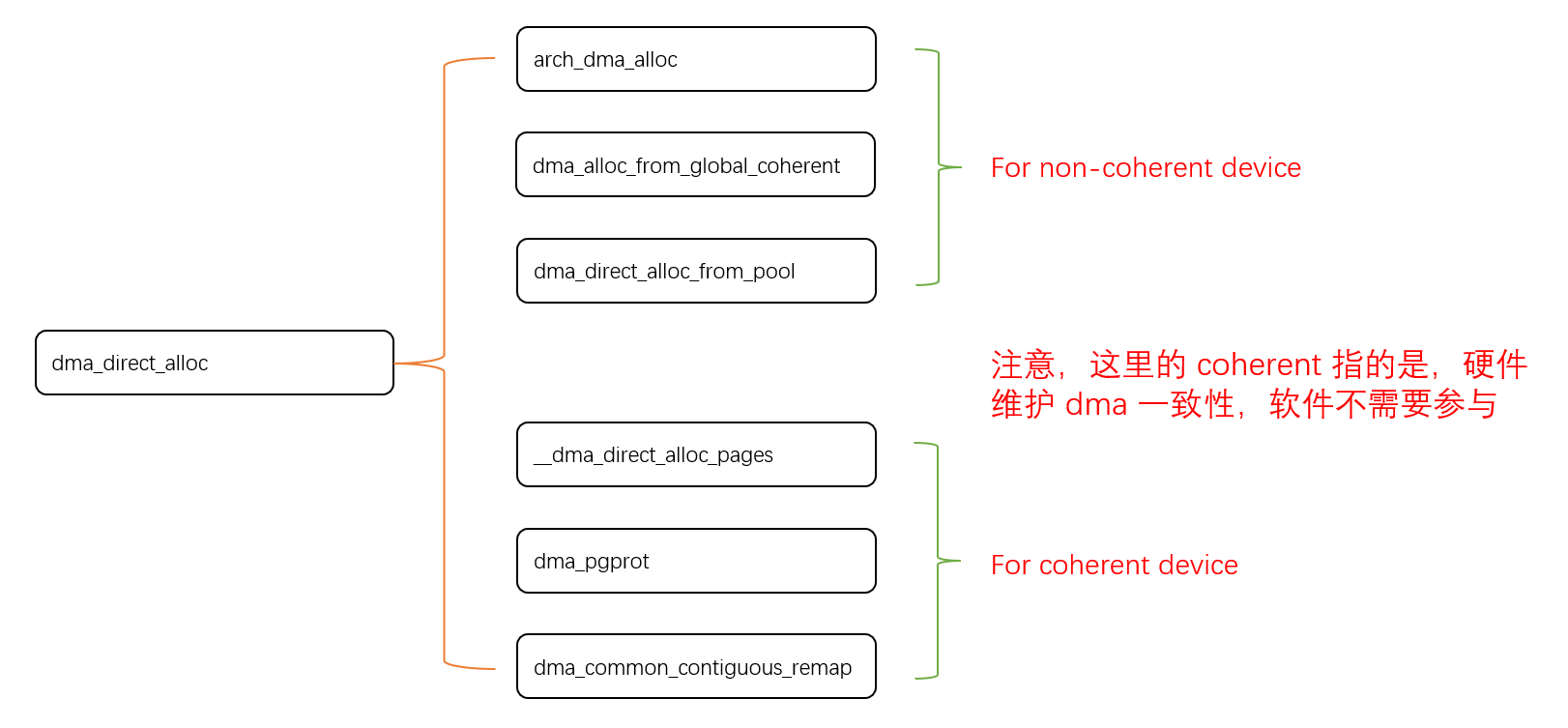
Linux 下 DMA 内存映射浅析
序 系统 I/O 设备驱动程序通常调用其特定子系统的接口为 DMA 分配内存,但最终会调到 DMA 子系统的dma_alloc_coherent()/dma_alloc_attrs() 等接口。 关于 dma_alloc_coherent 接口详细的代码讲解、调用流程,可以参考这篇文章,我觉得写的非常…...
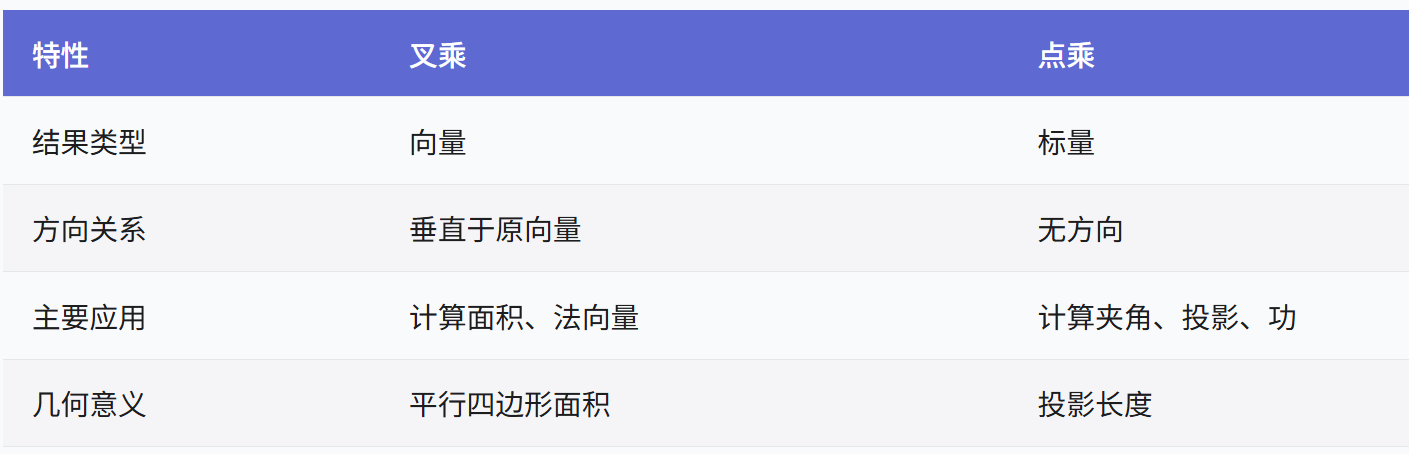
向量几何的二元性:叉乘模长与内积投影的深层联系
在数学与物理的空间世界中,向量运算构成了理解几何结构的基石。叉乘(外积)与点积(内积)作为向量代数的两大支柱,表面上呈现出截然不同的几何意义与代数形式,却在深层次上揭示了向量间相互作用的…...

Docker 镜像上传到 AWS ECR:从构建到推送的全流程
一、在 EC2 实例中安装 Docker(适用于 Amazon Linux 2) 步骤 1:连接到 EC2 实例 ssh -i your-key.pem ec2-useryour-ec2-public-ip步骤 2:安装 Docker sudo yum update -y sudo amazon-linux-extras enable docker sudo yum in…...

MySQL用户远程访问权限设置
mysql相关指令 一. MySQL给用户添加远程访问权限1. 创建或者修改用户权限方法一:创建用户并授予远程访问权限方法二:修改现有用户的访问限制方法三:授予特定数据库的特定权限 2. 修改 MySQL 配置文件3. 安全最佳实践4. 测试远程连接5. 撤销权…...

Amazon RDS on AWS Outposts:解锁本地化云数据库的混合云新体验
在混合云架构成为企业数字化转型标配的今天,如何在本地数据中心享受云数据库的强大能力,同时满足数据本地化、低延迟访问的严苛需求?Amazon RDS on AWS Outposts 给出了完美答案——将AWS完全托管的云数据库服务无缝延伸至您的机房࿰…...

jieba实现和用RNN实现中文分词的区别
Jieba 分词和基于 RNN 的分词在技术路线、实现机制、性能特点上有显著差异,以下是核心对比: 1. 技术路线对比 维度Jieba 分词RNN 神经网络分词范式传统 NLP(规则 统计)深度学习(端到端学习)核心依赖词典…...
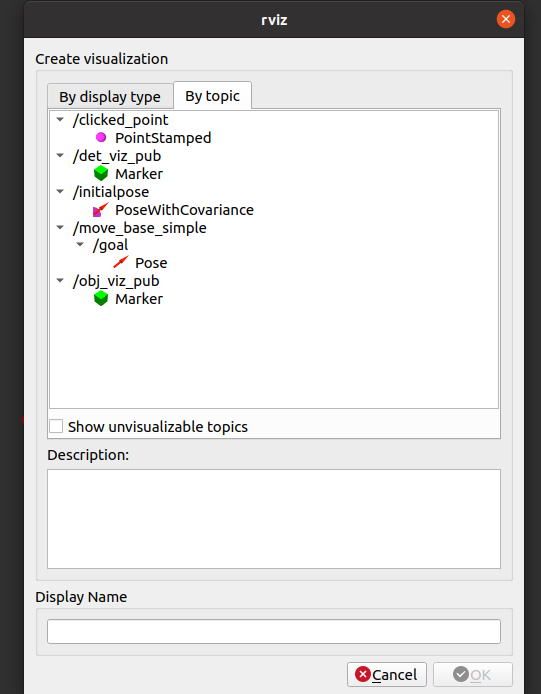
大陆4D毫米波雷达ARS548调试
本文介绍了大陆ARS548毫米波雷达的调试与测试流程,主要包括以下内容: 设备参数:最大检测距离301m(可调93-1514m),支持gPTP时间同步。 接线调试: Windows需使用USB-RJ45转换器 Linux可直接连接网…...