
基于SpringBoot实现SpringMvc上传下载功能实现
SpringMvc上传下载功能实现
1.创建新的项目
1)项目信息填写
- Spring Initializr (单击选中)
- Name(填写项目名字)
- Language(选择开发语言)
- Type(选择工具Maven)
- Group()
- JDK(jdk选择17 )
- Next(下一步)

2)选择所用的包
- Springboot (选择SpringBoot版本)
- 输入(web)
- 选择Spring Web
- 选择Thymeleaf
- create

3)创建controller包

4)创建DownLoadController类
package com.xiji.springdemo01.controller;import org.springframework.stereotype.Controller;
import org.springframework.web.bind.annotation.RequestMapping;
import org.springframework.web.bind.annotation.ResponseBody;@Controller
public class DownLoadController {@RequestMapping("/")public String index(){return "index";}}
5)创建UpLoadController类
package com.xiji.springdemo01.controller;import org.springframework.stereotype.Controller;
import org.springframework.web.bind.annotation.RequestMapping;
import org.springframework.web.bind.annotation.ResponseBody;/*** 文件上传功能*/
@Controller
public class UpLoadController {@RequestMapping("/up")public String uploadPage(){return "upload";}
}

在resources文件的static创建img文件夹===》导入图片

打开templates文件夹
6)创建index.html
<!DOCTYPE html>
<html lang="zh">
<head><meta charset="UTF-8"><title>精美主页面</title><style>/* styles.css */body {font-family: Arial, sans-serif;margin: 0;padding: 0;background-color: #f4f4f4;}header {background-color: #333;color: white;padding: 10px 0;text-align: center;}nav ul {list-style-type: none;padding: 0;}nav ul li {display: inline;margin-right: 10px;}nav ul li a {color: white;text-decoration: none;}main {padding: 20px;background-color: white;margin: 20px;}section {margin-bottom: 20px;}footer {background-color: #333;color: white;text-align: center;padding: 10px 0;position: fixed;width: 100%;bottom: 0;}</style>
</head>
<body>
<header><nav><ul><li><a href="#home">首页</a></li><li><a href="#services">服务</a></li><li><a href="#about">关于我们</a></li><li><a href="#contact">联系我们</a></li></ul></nav>
</header>
<main><di style="width: 200px;height: 200px;"> <a th:href="@{/download}">文件下载</a></di></main>
<footer><p>版权所有 © 2023 我们的公司</p>
</footer>
</body>
</html>
注:<a th:href="@{/download}">文件下载</a> 这个路径对应的是后端的下载接口

7)创建upload.html
<!DOCTYPE html>
<html lang="zh-CN" >
<head><meta charset="UTF-8"><meta name="viewport" content="width=device-width, initial-scale=1.0"><title>文件上传</title><link rel="stylesheet" href="https://cdn.jsdelivr.net/npm/bootstrap@5.3.0/dist/css/bootstrap.min.css"><style>body {font-family: 'Arial', sans-serif;background-color: #f4f4f9;margin: 0;padding: 0;}.container {max-width: 600px;margin: 50px auto;padding: 20px;background-color: #fff;border-radius: 10px;box-shadow: 0 0 10px rgba(0, 0, 0, 0.1);}h1 {text-align: center;color: #333;}.form-group {margin-bottom: 20px;}.btn-primary {width: 100%;}.custom-file-input ~ .custom-file-label {background-color: #e9ecef;border-color: #ced4da;}.custom-file-input:focus ~ .custom-file-label {border-color: #80bdff;box-shadow: 0 0 0 0.2rem rgba(0, 123, 255, 0.25);}</style>
</head>
<body>
<div class="container"><h1>文件上传</h1><form id="uploadForm" method="post" action="http://127.0.0.1:8080/upload" enctype="multipart/form-data"><div class="form-group"><label for="fileInput">选择文件:</label><input type="file" class="form-control-file" id="fileInput" name="fileInput"></div><button type="submit" class="btn btn-primary">上传文件</button></form>
</div><script src="https://cdn.jsdelivr.net/npm/bootstrap@5.3.0/dist/js/bootstrap.bundle.min.js"></script>
<script></script>
</body>
</html>j
注:<input type="file" class="form-control-file" id="fileInput" name="fileInput">
name值与接口值一致

解释
- form 元素创建了一个表单,其属性包括:
- id 设置为 "uploadForm",可以在JavaScript中引用此表单。
- method 设置为 "post",表示数据将通过POST方法提交到服务器。
- action 指定了接收上传文件的服务器端脚本地址。
- enctype 设置为 "multipart/form-data",这是必须的,因为它允许表单发送二进制文件数据(如图片或文档)。
- input 类型为 "file",允许用户从本地文件系统选择一个或多个文件进行上传。
- 最后,一个带有类 "btn btn-primary" 的按钮用于提交表单。
2.实现上传功能
1)关键代码
/*** 通过MultipartFile实现上传*/
@RequestMapping("/upload")
@ResponseBody
public String upload(MultipartFile fileInput) throws IOException {PathMatchingResourcePatternResolver resolver = new PathMatchingResourcePatternResolver();//获取上传文件夹的路径资源Resource resource = resolver.getResource("classpath:static/img/"); //获取文件夹真实路径String path = resource.getFile().getPath();//路径拼接String filePath = path + File.separator + fileInput.getOriginalFilename();//通过transferTo()方法返回给前端fileInput.transferTo(new File(filePath));return "上传成功";}
2)详情解释
- 注解说明:
- @RequestMapping("/upload"): 定义了处理 HTTP 请求的 URL 映射。
- @ResponseBody: 表示该方法返回的内容将直接作为 HTTP 响应体返回给客户端。
- 接收上传文件:
- MultipartFile fileInput: 用于接收上传的文件。
- 获取文件夹路径:
- PathMatchingResourcePatternResolver resolver: 用于解析文件资源路径。
- resolver.getResource("classpath:static/img/"): 获取指定路径下的文件夹资源。
- String path = resource.getFile().getPath();: 获取文件夹的真实路径。
- 拼接文件路径:
- String filePath = path + File.separator + fileInput.getOriginalFilename();: 拼接完整的文件路径。
- 保存文件:
- fileInput.transferTo(new File(filePath));: 将上传的文件保存到指定路径。
- 返回结果:
- return "上传成功";: 返回上传成功的消息。
3)功能测试
打开 http://127.0.0.1:8080/up
http://127.0.0.1:8080/up

任选一张图片


打开idea ===> target ==> classes ===> static ==> img ==>看到已经成功上传到服务器

可以看到已经上传成功了
3.文件下载功能实现
1)关键代码
/**** 通过PathMatchingResourcePatternResolver + ResponseEntity 下载文件*/
@RequestMapping("/download")
@ResponseBody
public ResponseEntity<byte[]> download() throws IOException {//获取文件地址 PathMatchingResourcePatternResolver resolver = new PathMatchingResourcePatternResolver();Resource resource = resolver.getResource("static/img/1.png"); // 1.png修改为你导入的图片名称//获取文件File file = resource.getFile(); //获取文件流FileInputStream fileInputStream = new FileInputStream(file);//创建每次读取的字节数为文件本身大小byte[] bytes = new byte[fileInputStream.available()];//相当于把文件流 输入到 bytes 字节数组中fileInputStream.read(bytes);//设置下载方式HttpHeaders httpHeaders = new HttpHeaders();httpHeaders.add("Content-Disposition", "attachment; filename=" + file.getName());//状态码设置HttpStatus ok = HttpStatus.OK;//创建ResponseEntity返回给前端ResponseEntity<byte[]> responseEntity = new ResponseEntity<>(bytes, httpHeaders, ok);return responseEntity;
}
2)详细解释
- 注解说明:
- @RequestMapping("/download"): 定义了处理 HTTP 请求的 URL 映射。
- @ResponseBody: 表示该方法返回的内容将直接作为 HTTP 响应体返回给客户端。
- 文件资源解析:
- PathMatchingResourcePatternResolver: 用于解析文件资源路径。
- getResource("static/img/1.png"): 获取指定路径下的文件资源。
- 文件对象获取:
- File file = resource.getFile();: 将资源转换为 File 对象。
- 设置响应头:
- HttpHeaders httpHeaders: 创建响应头对象。
- httpHeaders.add("Content-Disposition", "attachment; filename=" + file.getName()): 设置响应头,指定文件以附件形式下载,并设置文件名。
- 状态码设置:
- HttpStatus ok = HttpStatus.OK: 设置 HTTP 状态码为 200 OK。
- 读取文件内容:
- FileInputStream fileInputStream = new FileInputStream(file);: 创建文件输入流。
- byte[] bytes = new byte[fileInputStream.available()];: 创建字节数组。
- fileInputStream.read(bytes);: 读取文件内容到字节数组中。
- 创建响应实体:
- ResponseEntity<byte[]> responseEntity = new ResponseEntity<>(bytes, httpHeaders, ok);:
- 创建 ResponseEntity 对象,包含文件内容、响应头和状态码。
- 返回响应:
- return responseEntity;: 返回响应实体。
3)功能测试
打开网址 打开网址打开网址 http://127.0.0.1:8080/打开网址


可以看到我们已经下载成功了
4.附:
1)完整的DownLoadController 类代码
package com.xiji.springdemo01.controller;import org.springframework.core.io.Resource;
import org.springframework.core.io.support.PathMatchingResourcePatternResolver;
import org.springframework.http.HttpHeaders;
import org.springframework.http.HttpStatus;
import org.springframework.http.ResponseEntity;
import org.springframework.stereotype.Controller;
import org.springframework.web.bind.annotation.RequestMapping;
import org.springframework.web.bind.annotation.ResponseBody;import java.io.File;
import java.io.FileInputStream;
import java.io.IOException;@Controller
public class DownLoadController {/**** 通过PathMatchingResourcePatternResolver + ResponseEntity 下载文件*/@RequestMapping("/download")@ResponseBodypublic ResponseEntity<byte[]> download() throws IOException {//获取文件地址PathMatchingResourcePatternResolver resolver = new PathMatchingResourcePatternResolver();Resource resource = resolver.getResource("static/img/1.png");//获取文件File file = resource.getFile();//获取文件流FileInputStream fileInputStream = new FileInputStream(file);//创建每次读取的字节数为文件本身大小byte[] bytes = new byte[fileInputStream.available()];//相当于把文件流 输入到  bytes 字节数组中fileInputStream.read(bytes);//设置下载方式HttpHeaders httpHeaders = new HttpHeaders();httpHeaders.add("Content-Disposition", "attachment; filename=" + file.getName());//状态码设置HttpStatus ok = HttpStatus.OK;ResponseEntity<byte[]> responseEntity = new ResponseEntity<>(bytes, httpHeaders, ok);return responseEntity;}@RequestMapping("/")public String index(){return "index";}}
2)完整的UpLoadController 代码
package com.xiji.springdemo01.controller;import org.springframework.context.support.ClassPathXmlApplicationContext;
import org.springframework.core.io.Resource;
import org.springframework.core.io.support.PathMatchingResourcePatternResolver;
import org.springframework.stereotype.Controller;
import org.springframework.web.bind.annotation.RequestMapping;
import org.springframework.web.bind.annotation.ResponseBody;
import org.springframework.web.multipart.MultipartFile;import java.io.File;
import java.io.IOException;/*** 文件上传功能*/
@Controller
public class UpLoadController {/*** 通过MultipartFile实现上传*/@RequestMapping("/upload")@ResponseBodypublic String upload(MultipartFile fileInput) throws IOException {PathMatchingResourcePatternResolver resolver = new PathMatchingResourcePatternResolver();Resource resource = resolver.getResource("classpath:static/img/");String path = resource.getFile().getPath();//路径拼接String filePath = path + File.separator + fileInput.getOriginalFilename();fileInput.transferTo(new File(filePath));return "上传成功";}@RequestMapping("/up")public String uploadPage(){return "upload";}
}
相关文章:

基于SpringBoot实现SpringMvc上传下载功能实现
SpringMvc上传下载功能实现 1.创建新的项目 1)项目信息填写 Spring Initializr (单击选中)Name(填写项目名字)Language(选择开发语言)Type(选择工具Maven)Group()JDK(jdk选择17 &…...

vue 控制组件是否显示
在Vue中,控制组件的显示通常使用v-if、v-else-if、v-else或v-show指令。 1.v-if:条件性地渲染元素,如果条件为假,元素甚至不会被渲染到DOM中。 <template><div><MyComponent v-if"showMyComponent" /&…...

生产部门不给力?精益化生产管理咨询公司为您出谋划策
问题背景 近年来,许多企业的生产部门面临着各种挑战和困难。生产效率低下、产品质量不稳定、生产成本过高等问题频频出现,给企业的发展带来了困扰。面对这一现状,许多企业开始寻求专业的管理咨询公司的帮助,以期能够通过精益生产…...

HTML+CSS - 网页布局之网格布局
1. dispaly设置 display是 CSS 中用于设置元素的显示方式的属性。它决定了元素如何被渲染到页面上。不同的display值会改变元素的显示行为,包括布局、排版以及对其他元素的影响。 其中网格容器是最常用的几种方式之一,在文档中创建类似于网格的效果&…...

基于51单片机的16X16点阵显示屏proteus仿真
地址: https://pan.baidu.com/s/1JQ225NSKweqf1Zlad_f1Mw 提取码:1234 仿真图: 芯片/模块的特点: AT89C52/AT89C51简介: AT89C52/AT89C51是一款经典的8位单片机,是意法半导体(STMicroelectro…...

【目标检测数据集】厨房常见的水果蔬菜调味料数据集4910张39类VOC+YOLO格式
数据集格式:Pascal VOC格式YOLO格式(不包含分割路径的txt文件,仅仅包含jpg图片以及对应的VOC格式xml文件和yolo格式txt文件) 图片数量(jpg文件个数):4910 标注数量(xml文件个数):4910 标注数量(txt文件个数):4910 标注…...

在Python中统计字符串中每个字符出现的次数
在Python中统计字符串中每个字符出现的次数 在Python编程中,处理字符串是一个常见的任务。统计字符串中每个字符出现的次数不仅能考察候选人的编程能力,还能展示他们对Python内置数据结构和算法的理解。本文将详细介绍如何编写一个函数来统计字符串中每个字符出现的次数,并…...

关于 vue/cli 脚手架实现项目编译运行的源码解析
1.vue项目运行命令解析 在日常开发中,vue 项目通过vue-cli-service脚手架包将项目运行起来,常用的命令例如: npm run serve npm run build 上述执行命令实际一般对应为项目中 package.json 文件的 scripts属性中编写的脚本命令,在…...

C++笔记---继承(上)
1. 继承的简单介绍 1.1 继承的概念 继承(inheritance)机制是面向对象程序设计使代码可以复用的最重要的手段,它允许我们在保持原有类特性的基础上进行扩展,增加方法(成员函数)和属性(成员变量),这样产生新的类,称派生类。 继承呈…...

气膜体育馆:为学校打造智能化运动空间—轻空间
随着教育体制的逐步升级,学校在提升学生综合素质方面的需求日益增长,特别是在体育场地方面。气膜体育馆作为一种新型的运动空间形式,正在迅速成为学校体育设施的优选方案。凭借其快速搭建、节能环保等优势,气膜馆在全国各地的校园…...

JVM 调优篇5 jvm性能监控
一 jvm性能监控 1.1 概述 性能诊断是软件工程师在日常工作中需要经常面对和解决的问题,在用户体验至上的今天,解决好应用的性能问题能带来非常大的收益。 体会1:使用数据说明问题,使用知识分析问题,使用工具处理问…...

一. Unity实现虚拟摇杆及屏幕自适应功能
手游里面很多类型的游戏都需要用到遥感功能,例如王者荣耀,和平精英等,之前的摇杆功能都是用类似于Easy Touch的插件进行开发的,今天不借助任何插件来实现虚拟摇杆的功能。 一般虚拟摇杆的组成都是由轮盘和遥感的点组成,…...

【达梦数据库】mysql 和达梦 tinyint 与 bit 返回值类型差异
测试环境 mysql5.7.44 达梦2024Q2季度版 前言 在mysql 中存在 tinyint(1)的用法来实现存储0 1 作为boolean的标识列;但是在达梦并不允许使用 tinyint(1)来定义列,只能使用 tinyint 即 取值范围为ÿ…...

VUE工程中axios基本使用
安装axios npm install axios -s在main.js中引入 import http from axios Vue.prototype.$http = http将其绑定在VUE的prototype属性中 vue工程目录下,新建config文件夹,在config文件夹下新建index.js export default {...

跨服务器执行PowerShell脚本
本机和远程机都要执行 Enable-PSRemoting -Force 远程端关闭公用网络 Get-NetConnectionProfile Set-NetConnectionProfile -Name "未识别的网络" -NetworkCategory Private 本机和远程机都要执行 winrm quickconfig 将远程机ip加入信任列表 cd WSMan::localhost\…...

linux_L2_linux删除文件
linux 删除文件 在Linux下删除文件有多种实现方法,以下是其中几种常见的方法: 方法一:使用rm命令删除单个文件 rm 文件路径例如,删除当前目录下的文件file.txt: rm file.txtQuestion :当你在Linux系统中使用rm命令删…...
系统架构设计师 - 项目管理
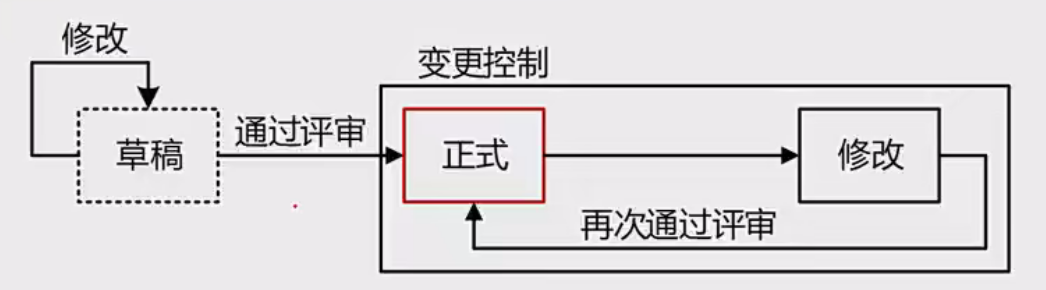
项目管理 项目管理(1-3分,案例分析 25分)立项管理 ★盈亏平衡分析 范围管理 ★★时间管理 ★★★★概述前导图法 PDM(单代号网络图)箭线图法 ADM(双代号网络图) 了解关键路径法总时差自由时差 甘特图 成本管理 ★挣值管理概述指数计算 软件质…...

Spring Boot基础
项目创建 项目启动 请求响应 RestController 1.返回值处理 RestController:这个注解结合了Controller和ResponseBody的功能。它默认将所有处理请求的方法的返回值直接作为响应体内容返回,主要用于构建RESTful API。返回的数据格式通常是JSON或XML&…...

C语言 | Leetcode C语言题解之第402题移掉K位数字
题目: 题解: char* removeKdigits(char* num, int k) {int n strlen(num), top 0;char* stk malloc(sizeof(char) * (n 1));for (int i 0; i < n; i) {while (top > 0 && stk[top] > num[i] && k) {top--, k--;}stk[top]…...

使用Visual Studio Code配置C/C++开发环境的全面指南
目录 引言 一、准备工作 1. 安装Visual Studio Code 2. 安装C/C编译器 3. 配置环境变量(仅Windows用户) 二、在VS Code中安装C/C扩展 三、创建您的第一个C/C项目 1. 创建项目文件夹 2. 打开项目文件夹 3. 创建源文件 四、配置任务(…...
遍历 Map 类型集合的方法汇总
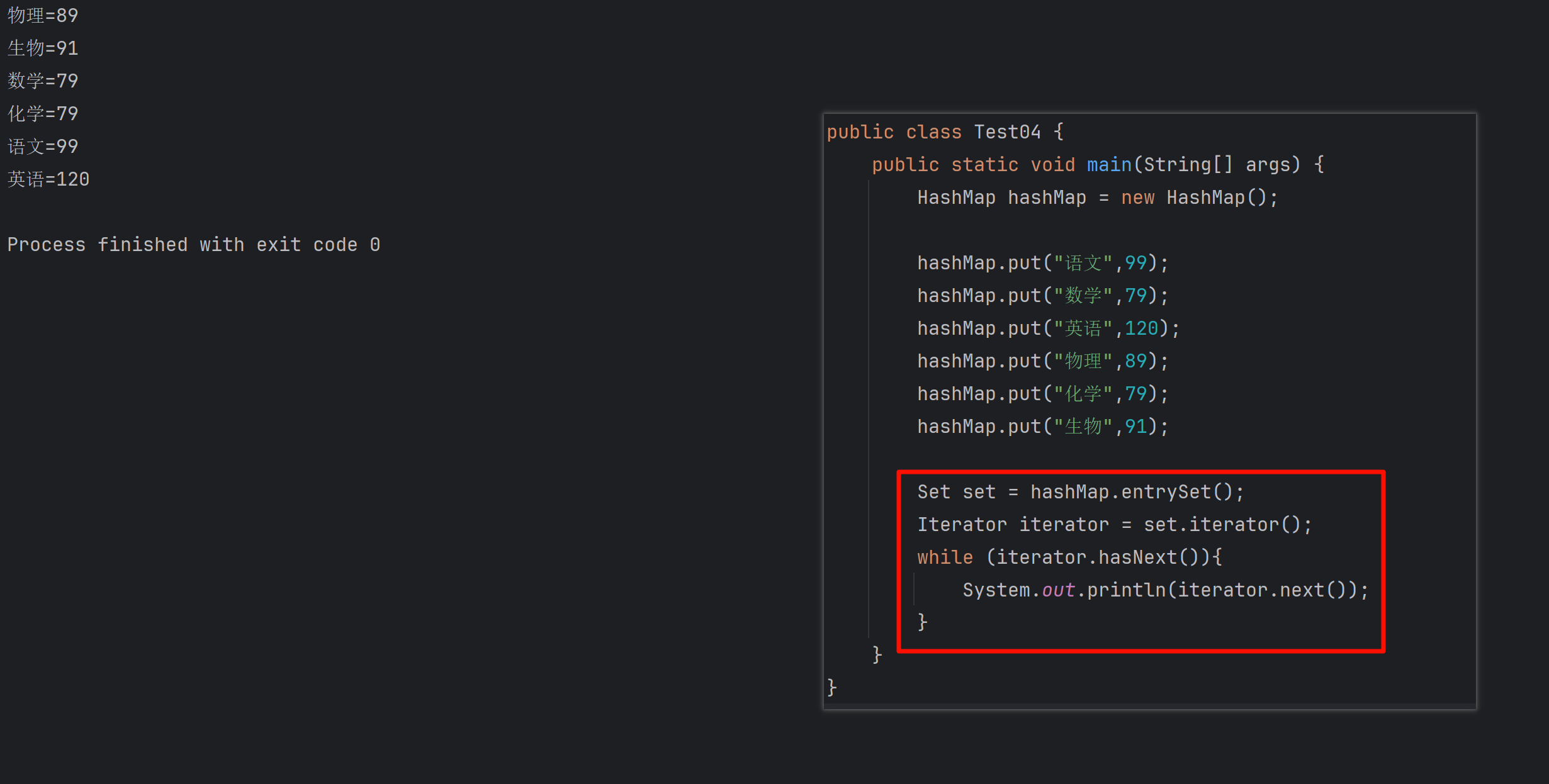
1 方法一 先用方法 keySet() 获取集合中的所有键。再通过 gey(key) 方法用对应键获取值 import java.util.HashMap; import java.util.Set;public class Test {public static void main(String[] args) {HashMap hashMap new HashMap();hashMap.put("语文",99);has…...
大数据零基础学习day1之环境准备和大数据初步理解
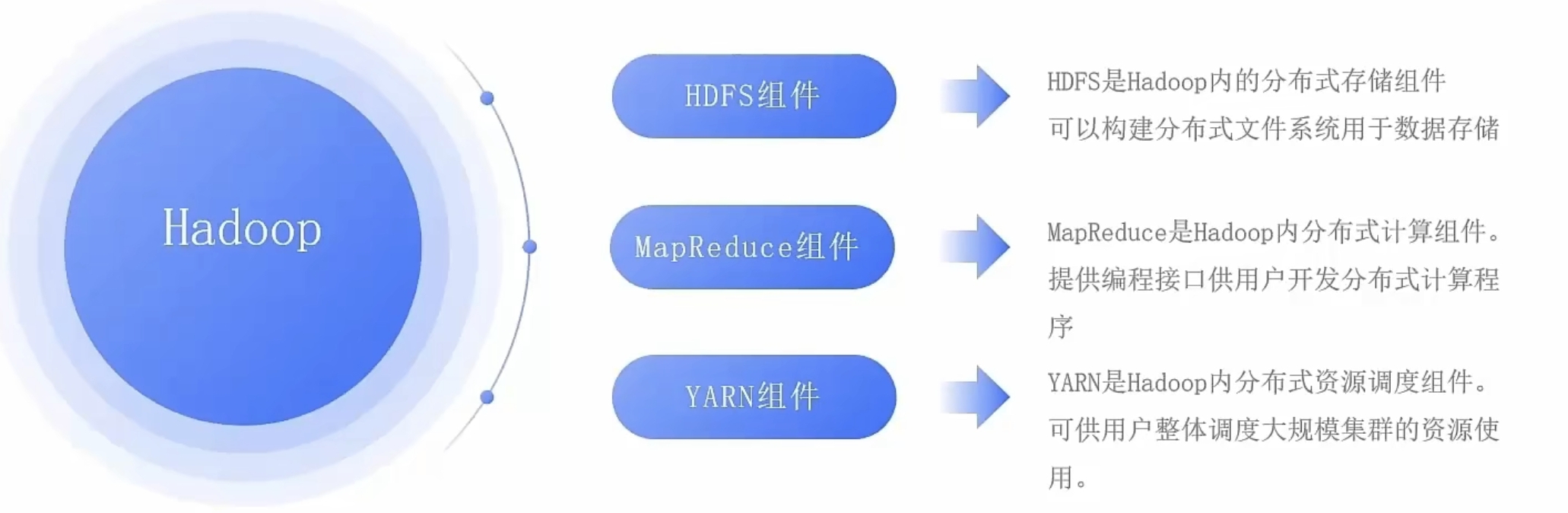
学习大数据会使用到多台Linux服务器。 一、环境准备 1、VMware 基于VMware构建Linux虚拟机 是大数据从业者或者IT从业者的必备技能之一也是成本低廉的方案 所以VMware虚拟机方案是必须要学习的。 (1)设置网关 打开VMware虚拟机,点击编辑…...

1688商品列表API与其他数据源的对接思路
将1688商品列表API与其他数据源对接时,需结合业务场景设计数据流转链路,重点关注数据格式兼容性、接口调用频率控制及数据一致性维护。以下是具体对接思路及关键技术点: 一、核心对接场景与目标 商品数据同步 场景:将1688商品信息…...

macOS多出来了:Google云端硬盘、YouTube、表格、幻灯片、Gmail、Google文档等应用
文章目录 问题现象问题原因解决办法 问题现象 macOS启动台(Launchpad)多出来了:Google云端硬盘、YouTube、表格、幻灯片、Gmail、Google文档等应用。 问题原因 很明显,都是Google家的办公全家桶。这些应用并不是通过独立安装的…...

C++ 基础特性深度解析
目录 引言 一、命名空间(namespace) C 中的命名空间 与 C 语言的对比 二、缺省参数 C 中的缺省参数 与 C 语言的对比 三、引用(reference) C 中的引用 与 C 语言的对比 四、inline(内联函数…...

Linux云原生安全:零信任架构与机密计算
Linux云原生安全:零信任架构与机密计算 构建坚不可摧的云原生防御体系 引言:云原生安全的范式革命 随着云原生技术的普及,安全边界正在从传统的网络边界向工作负载内部转移。Gartner预测,到2025年,零信任架构将成为超…...
Module Federation 和 Native Federation 的比较
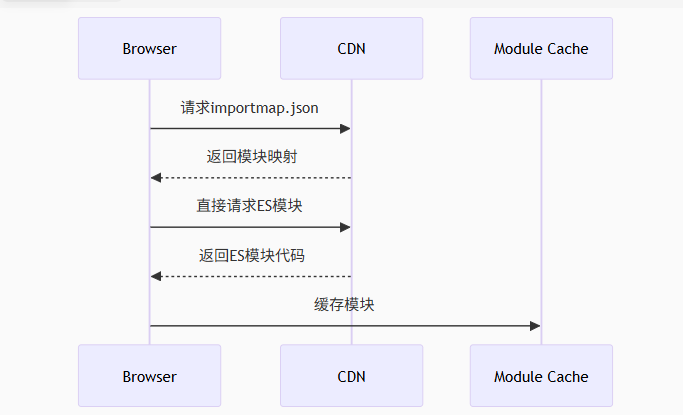
前言 Module Federation 是 Webpack 5 引入的微前端架构方案,允许不同独立构建的应用在运行时动态共享模块。 Native Federation 是 Angular 官方基于 Module Federation 理念实现的专为 Angular 优化的微前端方案。 概念解析 Module Federation (模块联邦) Modul…...

【C语言练习】080. 使用C语言实现简单的数据库操作
080. 使用C语言实现简单的数据库操作 080. 使用C语言实现简单的数据库操作使用原生APIODBC接口第三方库ORM框架文件模拟1. 安装SQLite2. 示例代码:使用SQLite创建数据库、表和插入数据3. 编译和运行4. 示例运行输出:5. 注意事项6. 总结080. 使用C语言实现简单的数据库操作 在…...

华硕a豆14 Air香氛版,美学与科技的馨香融合
在快节奏的现代生活中,我们渴望一个能激发创想、愉悦感官的工作与生活伙伴,它不仅是冰冷的科技工具,更能触动我们内心深处的细腻情感。正是在这样的期许下,华硕a豆14 Air香氛版翩然而至,它以一种前所未有的方式&#x…...

在QWebEngineView上实现鼠标、触摸等事件捕获的解决方案
这个问题我看其他博主也写了,要么要会员、要么写的乱七八糟。这里我整理一下,把问题说清楚并且给出代码,拿去用就行,照着葫芦画瓢。 问题 在继承QWebEngineView后,重写mousePressEvent或event函数无法捕获鼠标按下事…...