
Android 利用OSMdroid开发GIS
1、地址
Github地址:https://gitee.com/mirrors/osmdroid
Git地址:
GitCode - 全球开发者的开源社区,开源代码托管平台
Git下载包地址:Releases · osmdroid/osmdroid · GitHub


- 新建项目
osmdroid在线:
(1)添加依赖


(2)布局文件activity_main.xml
<?xml version="1.0" encoding="utf-8"?>
<RelativeLayout xmlns:android="http://schemas.android.com/apk/res/android"xmlns:tools="http://schemas.android.com/tools"android:layout_width="match_parent"android:layout_height="match_parent"tools:context=".MainActivity"android:orientation="vertical"><org.osmdroid.views.MapViewandroid:id="@+id/mapView"android:layout_width="match_parent"android:layout_height="match_parent"/><Buttonandroid:id="@+id/btnLocation"android:layout_width="wrap_content"android:layout_height="wrap_content"android:text="定位"android:layout_margin="10dp"android:layout_alignParentTop="true"/></RelativeLayout>
(3)代码MainActivity.java
package com.chy.osmdroid;import androidx.appcompat.app.AppCompatActivity;
import android.Manifest;
import android.annotation.SuppressLint;
import android.content.Context;
import android.location.Location;
import android.location.LocationListener;
import android.location.LocationManager;
import android.os.Bundle;
import android.view.View;
import android.widget.Button;
import android.widget.Toast;
import com.chy.layers.LayerTileSources;
import com.chy.permission.PermissionUtils;
import org.osmdroid.api.IMapController;
import org.osmdroid.util.GeoPoint;
import org.osmdroid.views.CustomZoomButtonsController;
import org.osmdroid.views.MapView;public class MainActivity extends AppCompatActivity {private static final int REQUEST_PERMISSION_CODE = 0;// 权限所用// 动态申请权限private String[] permissions = {Manifest.permission.INTERNET,// 网络权限Manifest.permission.ACCESS_COARSE_LOCATION,// 精细定位Manifest.permission.ACCESS_FINE_LOCATION,// 粗定位Manifest.permission.ACCESS_WIFI_STATE,// 定位权限Manifest.permission.ACCESS_NETWORK_STATE,Manifest.permission.WRITE_EXTERNAL_STORAGE};private MapView mapView;private LocationManager locationManager;// 定位管理器private Button btnLocation;// 定位按钮private boolean isLocation = false;@Overrideprotected void onCreate(Bundle savedInstanceState) {super.onCreate(savedInstanceState);setContentView(R.layout.activity_main);getPermission();// 获取权限initControls();}/*** 权限* */private void getPermission(){if (PermissionUtils.hasPermissions(MainActivity.this, permissions)) {initMap();// 调用初始化地图} else {PermissionUtils.requestPermissions(MainActivity.this, REQUEST_PERMISSION_CODE, permissions);Toast.makeText(getApplicationContext(), "地图加载失败!", Toast.LENGTH_SHORT).show();}}// 地图初始化private void initMap(){// 获取mapView实例mapView = findViewById(R.id.mapView);// 加载在线地图mapView.setTileSource(LayerTileSources.AutoNaviVector);// 设置最小缩放比例mapView.setMinZoomLevel(3.0);// 设置最大缩放比例mapView.setMaxZoomLevel(18.0);IMapController mapController = mapView.getController();// 设置地图初始级别mapController.setZoom(11.0);// 设置初始中心点GeoPoint centerPoint = new GeoPoint(43.90, 125.33);mapController.setCenter(centerPoint);//启用缩放及滑动手势//mapView.setBuiltInZoomControls(true);// 废弃得方法,被下面方法所替代mapView.getZoomController().setVisibility(CustomZoomButtonsController.Visibility.NEVER);mapView.setMultiTouchControls(true);}// 控件初始化private void initControls(){btnLocation = findViewById(R.id.btnLocation);// 点击事件btnLocation.setOnClickListener(new View.OnClickListener() {@SuppressLint("MissingPermission")@Overridepublic void onClick(View v) {//创建位置管理器实例locationManager = (LocationManager) getSystemService(Context.LOCATION_SERVICE);if (!isLocation){// 注册位置监听器locationManager.requestLocationUpdates(LocationManager.GPS_PROVIDER, 0, 0, locationListener);isLocation = !isLocation;}else {// 停止位置更新locationManager.removeUpdates(locationListener);isLocation = !isLocation;Toast.makeText(getApplicationContext(),"停止位置更新",Toast.LENGTH_SHORT).show();}}});}/*** 定位监听* */LocationListener locationListener = new LocationListener() {@Overridepublic void onLocationChanged(Location location) {// 处理位置变化double latitude = location.getLatitude();double longitude = location.getLongitude();Toast.makeText(getApplicationContext(),"lat:"+latitude+"lon:"+longitude,Toast.LENGTH_SHORT).show();// 在地图上显示当前位置// ...}@Overridepublic void onStatusChanged(String provider, int status, Bundle extras) {Toast.makeText(getApplicationContext(),"onStatusChanged",Toast.LENGTH_SHORT).show();}@Overridepublic void onProviderEnabled(String provider) {Toast.makeText(getApplicationContext(),"onProviderEnabled",Toast.LENGTH_SHORT).show();}@Overridepublic void onProviderDisabled(String provider) {Toast.makeText(getApplicationContext(),"onProviderDisabled",Toast.LENGTH_SHORT).show();}};@Overrideprotected void onDestroy() {super.onDestroy();// 停止位置更新if (locationManager != null){locationManager.removeUpdates(locationListener);}}
}
(4)代码LayerTileSources.java
package com.chy.layers;import android.util.Log;import org.osmdroid.tileprovider.tilesource.OnlineTileSourceBase;
import org.osmdroid.tileprovider.tilesource.TileSourceFactory;
import org.osmdroid.tileprovider.tilesource.XYTileSource;
import org.osmdroid.util.MapTileIndex;/*** 谷歌、高德等瓦片地图** @author jiang zhu on 2019/10/18*/
public class LayerTileSources extends TileSourceFactory {//谷歌卫星混合public static final OnlineTileSourceBase GoogleHybrid = new XYTileSource("Google-Hybrid",0, 19, 512, ".png", new String[]{"http://mt0.google.cn","http://mt1.google.cn","http://mt2.google.cn","http://mt3.google.cn",}) {@Overridepublic String getTileURLString(long pMapTileIndex) {Log.d("url", getBaseUrl() + "/vt/lyrs=y&scale=2&hl=zh-CN&gl=CN&src=app&x=" + MapTileIndex.getX(pMapTileIndex) + "&y=" + MapTileIndex.getY(pMapTileIndex) + "&z=" + MapTileIndex.getZoom(pMapTileIndex));return getBaseUrl() + "/vt/lyrs=y&scale=2&hl=zh-CN&gl=CN&src=app&x=" + MapTileIndex.getX(pMapTileIndex) + "&y=" + MapTileIndex.getY(pMapTileIndex) + "&z=" + MapTileIndex.getZoom(pMapTileIndex);}};//谷歌卫星public static final OnlineTileSourceBase GoogleSat = new XYTileSource("Google-Sat",0, 19, 512, ".png", new String[]{"http://mt0.google.cn","http://mt1.google.cn","http://mt2.google.cn","http://mt3.google.cn",}) {@Overridepublic String getTileURLString(long pMapTileIndex) {return getBaseUrl() + "/vt/lyrs=s&scale=2&hl=zh-CN&gl=CN&src=app&x=" + MapTileIndex.getX(pMapTileIndex) + "&y=" + MapTileIndex.getY(pMapTileIndex) + "&z=" + MapTileIndex.getZoom(pMapTileIndex);}};//谷歌地图public static final OnlineTileSourceBase GoogleRoads = new XYTileSource("Google-Roads",0, 18, 512, ".png", new String[]{"http://mt0.google.cn","http://mt1.google.cn","http://mt2.google.cn","http://mt3.google.cn",}) {@Overridepublic String getTileURLString(long pMapTileIndex) {return getBaseUrl() + "/vt/lyrs=m&scale=2&hl=zh-CN&gl=CN&src=app&x=" + MapTileIndex.getX(pMapTileIndex) + "&y=" + MapTileIndex.getY(pMapTileIndex) + "&z=" + MapTileIndex.getZoom(pMapTileIndex);}};//谷歌地形public static final OnlineTileSourceBase GoogleTerrain = new XYTileSource("Google-Terrain",0, 16, 512, ".png", new String[]{"http://mt0.google.cn","http://mt1.google.cn","http://mt2.google.cn","http://mt3.google.cn",}) {@Overridepublic String getTileURLString(long pMapTileIndex) {return getBaseUrl() + "/vt/lyrs=t&scale=2&hl=zh-CN&gl=CN&src=app&x=" + MapTileIndex.getX(pMapTileIndex) + "&y=" + MapTileIndex.getY(pMapTileIndex) + "&z=" + MapTileIndex.getZoom(pMapTileIndex);}};//谷歌地形带标注public static final OnlineTileSourceBase GoogleTerrainHybrid = new XYTileSource("Google-Terrain-Hybrid",0, 16, 512, ".png", new String[]{"http://mt0.google.cn","http://mt1.google.cn","http://mt2.google.cn","http://mt3.google.cn",}) {@Overridepublic String getTileURLString(long pMapTileIndex) {return getBaseUrl() + "/vt/lyrs=p&scale=2&hl=zh-CN&gl=CN&src=app&x=" + MapTileIndex.getX(pMapTileIndex) + "&y=" + MapTileIndex.getY(pMapTileIndex) + "&z=" + MapTileIndex.getZoom(pMapTileIndex);}};//高德地图public static final OnlineTileSourceBase AutoNaviVector = new XYTileSource("AutoNavi-Vector",0, 20, 256, ".png", new String[]{"https://wprd01.is.autonavi.com/appmaptile?","https://wprd02.is.autonavi.com/appmaptile?","https://wprd03.is.autonavi.com/appmaptile?","https://wprd04.is.autonavi.com/appmaptile?",}) {@Overridepublic String getTileURLString(long pMapTileIndex) {return getBaseUrl() + "x=" + MapTileIndex.getX(pMapTileIndex) + "&y=" + MapTileIndex.getY(pMapTileIndex) + "&z="+ MapTileIndex.getZoom(pMapTileIndex) + "&lang=zh_cn&size=1&scl=1&style=7<ype=7";}};}
(5)权限代码
AndroidManifest.xml权限代码
<uses-permission android:name="android.permission.INTERNET" /><uses-permission android:name="android.permission.ACCESS_COARSE_LOCATION"/><uses-permission android:name="android.permission.ACCESS_FINE_LOCATION" /><uses-permission android:name="android.permission.ACCESS_WIFI_STATE" /><uses-permission android:name="android.permission.ACCESS_NETWORK_STATE" /><uses-permission android:name="android.permission.WRITE_EXTERNAL_STORAGE" />
PermissionUtils.java 代码
package com.chy.permission;import android.app.Activity;
import android.app.AlertDialog;
import android.content.Context;
import android.content.DialogInterface;
import android.content.Intent;
import android.content.pm.PackageManager;
import android.net.Uri;
import android.os.Build;
import android.provider.Settings;import androidx.annotation.NonNull;
import androidx.annotation.Size;
import androidx.core.app.ActivityCompat;
import androidx.core.content.ContextCompat;import java.util.ArrayList;
import java.util.List;/*** 动态申请权限工具类* Created by xiaoyehai on 2018/4/25 0025.*/
public class PermissionUtils {public static final int GOTO_SEETING_CODE = 152;/*** 判断是否有权限** @param context* @param perms* @return*/public static boolean hasPermissions(@NonNull Context context, @Size(min = 1) @NonNull String... perms) {if (Build.VERSION.SDK_INT < Build.VERSION_CODES.M) {return true;}if (context == null) {throw new IllegalArgumentException("Can't check permissions for null context");}for (String perm : perms) {if (ContextCompat.checkSelfPermission(context, perm) != PackageManager.PERMISSION_GRANTED) {return false;}}return true;}/*** 申请权限*/public static void requestPermissions(@NonNull Activity activity, int requestCode, String[] permissions) {List<String> permissionList = new ArrayList<>();for (String permission : permissions) {if (ContextCompat.checkSelfPermission(activity, permission) != PackageManager.PERMISSION_GRANTED) {permissionList.add(permission);}}String[] permissionsArray = permissionList.toArray(new String[permissionList.size()]);//将List转为数组if (permissionList.isEmpty()) {//不可能为空} else {ActivityCompat.requestPermissions(activity, permissionsArray, requestCode);//返回结果onRequestPermissionsResult}}/*** 申请权限的回调** @param requestCode  请求权限时传入的请求码,用于区别是哪一次请求的* @param permissions  所请求的所有权限的数组* @param grantResults 权限授予结果,和 permissions 数组参数中的权限一一对应,元素值为两种情况,如下:*                     授予: PackageManager.PERMISSION_GRANTED*                     拒绝: PackageManager.PERMISSION_DENIED*/public static void onRequestPermissionsResult(int requestCode, @NonNull String[] permissions,@NonNull int[] grantResults, @NonNull PermissionCallbacks callBack) {//授予的权限。List<String> granted = new ArrayList<>();//拒绝的权限List<String> denied = new ArrayList<>();for (int i = 0; i < permissions.length; i++) {String perm = permissions[i];if (grantResults[i] == PackageManager.PERMISSION_GRANTED) {granted.add(perm);} else {denied.add(perm);}}if (null != callBack) {if (denied.isEmpty()) {callBack.onPermissionsAllGranted(requestCode, granted, denied.isEmpty());}if (!denied.isEmpty()) {callBack.onPermissionsDenied(requestCode, denied);}}}/*** 用户是否拒绝权限,并检查“不要提醒”。** @param activity* @param perms* @return*/public static boolean somePermissionPermanentlyDenied(Activity activity, @NonNull List<String> perms) {for (String deniedPermission : perms) {if (permissionPermanentlyDenied(activity, deniedPermission)) {return true;}}return false;}public static boolean permissionPermanentlyDenied(Activity activity, @NonNull String perms) {if (!ActivityCompat.shouldShowRequestPermissionRationale(activity, perms)) {return true;}return false;}public static void showDialogGoToAppSettting(final Activity activity) {AlertDialog dialog = new AlertDialog.Builder(activity).setMessage("去设置界面开启权限").setPositiveButton("确定", new DialogInterface.OnClickListener() {public void onClick(DialogInterface dialog, int which) {// 跳转到应用设置界面goToAppSetting(activity);}}).setCancelable(false).show();}/*** 跳转到应用设置界面*/public static void goToAppSetting(Activity activity) {Intent intent = new Intent();intent.setAction(Settings.ACTION_APPLICATION_DETAILS_SETTINGS);Uri uri = Uri.fromParts("package", activity.getPackageName(), null);intent.setData(uri);activity.startActivityForResult(intent, GOTO_SEETING_CODE);}public static void showPermissionReason(final int requestCode, final Activity activity, final String[] permission, String s) {AlertDialog dialog = new AlertDialog.Builder(activity).setMessage(s).setPositiveButton("确定", new DialogInterface.OnClickListener() {public void onClick(DialogInterface dialog, int which) {requestPermissions(activity, requestCode, permission);}}).setCancelable(false).show();}public interface PermissionCallbacks {/*** @param isAllGranted 是否全部同意*/void onPermissionsAllGranted(int requestCode, List<String> perms, boolean isAllGranted);/***/void onPermissionsDenied(int requestCode, List<String> perms);}
}
(6)加载离线地图
// 加载离线地图OSMDroid支持多种地图文件格式,如MBTiles、SQLiteDatabase、ZIP文件等String strFilepath = Environment.getExternalStorageDirectory().getPath() +"/osmdroid/xian.mbtiles"; // 在 此处替换自己的资源File exitFile = new File(strFilepath);String fileName = "xian.mbtiles";if (!exitFile.exists() && !fileName.contains(".")) {mapView.setTileSource(org.osmdroid.tileprovider.tilesource.TileSourceFactory.MAPNIK);} else {fileName = fileName.substring(fileName.lastIndexOf(".") + 1);if (fileName.length() == 0)return;/**** extensionMap.put("zip", ZipFileArchive.class);if(VERSION.SDK_INT >= 10) {extensionMap.put("sqlite", DatabaseFileArchive.class);extensionMap.put("mbtiles", MBTilesFileArchive.class);extensionMap.put("gemf", GEMFFileArchive.class);}这里加载上面四种地图格式*/if (ArchiveFileFactory.isFileExtensionRegistered(fileName)) {try {OfflineTileProvider tileProvider = new OfflineTileProvider(newSimpleRegisterReceiver(getApplicationContext()),new File[]{exitFile});mapView.setTileProvider(tileProvider);String source = "";IArchiveFile[] archives = tileProvider.getArchives();if (archives.length > 0) {Set<String> tileSources = archives[0].getTileSources();if (!tileSources.isEmpty()) {source = tileSources.iterator().next();mapView.setTileSource(FileBasedTileSource.getSource(source));} else {mapView.setTileSource(org.osmdroid.tileprovider.tilesource.TileSourceFactory.DEFAULT_TILE_SOURCE);}} elsemapView.setTileSource(org.osmdroid.tileprovider.tilesource.TileSourceFactory.DEFAULT_TILE_SOURCE);} catch (Exception ex) {ex.printStackTrace();}}相关文章:
Android 利用OSMdroid开发GIS
1、地址 Github地址:https://gitee.com/mirrors/osmdroid Git地址: GitCode - 全球开发者的开源社区,开源代码托管平台 Git下载包地址:Releases osmdroid/osmdroid GitHub 新建项目 osmdroid在线: (1)…...

一文上手skywalking【上】
一、skywalking预览 1.1 skywalking 概述 Apache SkyWalking, 适用于分布式系统的应用程序性能监控工具,专为微服务、云原生和基于容器的 (Kubernetes) 架构而设计。官方地址: https://skywalking.apache.org/ 适用于分布式系统的应用程…...

【JavaScript】JQuery基础知识及应用
一、JQuery的导入方法 https://editor.csdn.net/md/?articleId132214798 二、JQuery介绍 JQuery(JQ):JS的一个类库(方法库:包含了大量的、有助于项目开发的属性和方法) 第一代版本1.xx.xx: 1.11.3 兼容所有浏览器的࿰…...

初始爬虫9
1.元素定位后的操作 “find_element“仅仅能够获取元素,不能够直接获取其中的数据,如果需要获取数据需要使用以下方法”。下面列出了两个方法: 获取文本 element.text 通过定位获取的标签对象的 text 属性,获取文本内容 获取属性…...

从细胞到临床:表观组学分析技术在精准医疗中的角色
中国科学院等科研院所的顶尖人才发起,专注于多组学、互作组、生物医学等领域的研究与服务。在Nature等国际知名期刊发表多篇论文,提供实验整体打包、免费SCI论文润色等四大优势服务。在表观组学分析技术方面,提供DAP-seq、ATAC-seq、H3K4me3 …...

带你0到1之QT编程:二十、QT与MySQL喜结连理,构建数据库应用开发
此为QT编程的第二十谈!关注我,带你快速学习QT编程的学习路线! 每一篇的技术点都是很很重要!很重要!很重要!但不冗余! 我们通常采取总-分-总和生活化的讲解方式来阐述一个知识点! …...

梯度下降法及其性能评估
梯度下降法 梯度下降法是一种一阶迭代优化算法,用于寻找函数的局部最小值。在机器学习中,它通常用来最小化损失函数(也称为成本函数或误差函数),以提高模型对数据的拟合程度。梯度下降法的基本思想是沿着目标函数当前…...
906. 超级回文数
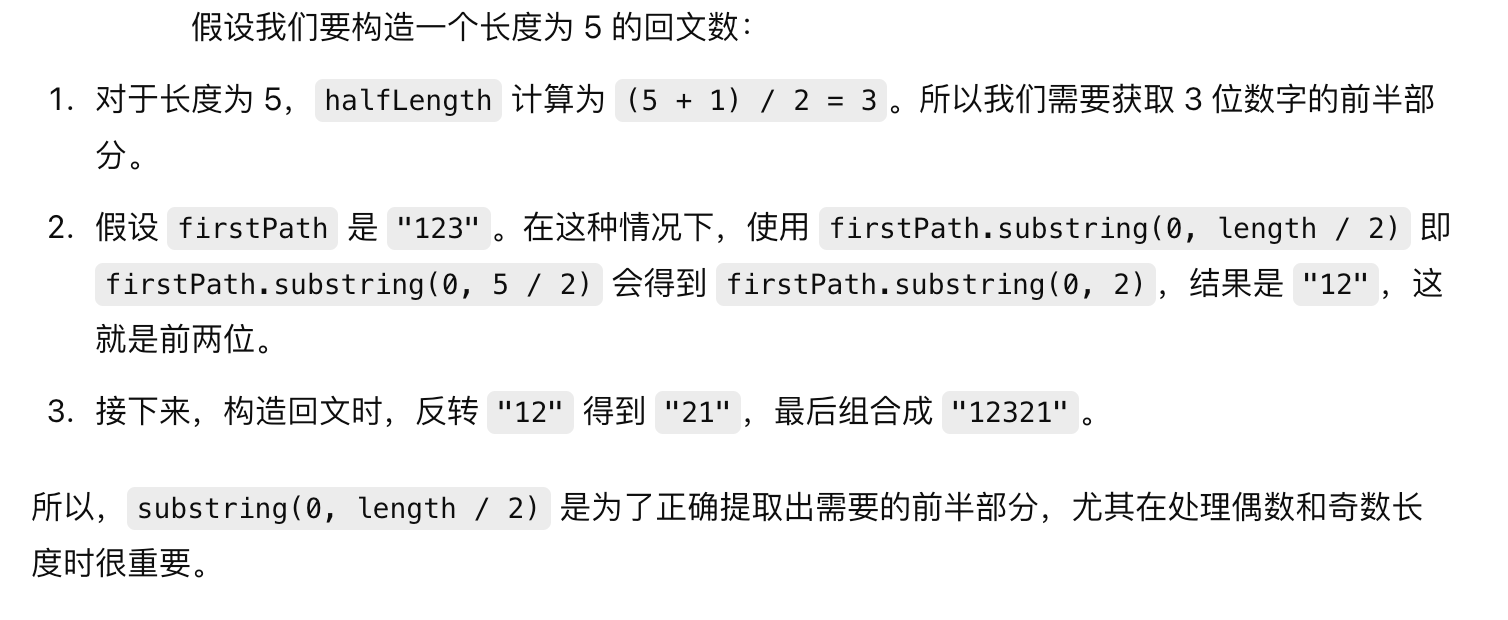
1. 题目 906. 超级回文数 2. 解题思路 题目意思很简单,在给定范围中找到所有满足,它本身是回文,且它的平方也是回文的数字个数。 这题需要注意题目给定的范围,后面很有用: 因为回文范围是有限的,那么我…...

代码随想录算法训练营||二叉树
前/中/后序遍历 递归方式 参考文章 题目 思路:其实递归方式的前中后序遍历的方式都差不多,区别是在父节点的遍历时间。 前序代码 class Solution {public List<Integer> preorderTraversal(TreeNode root) {List<Integer> result new…...

线上报名小程序怎么做
在这个数字化、智能化的时代,信息技术的发展正以前所未有的速度改变着我们的生活。无论是学习、工作还是娱乐,互联网都成为了我们不可或缺的一部分。而在线上报名这一领域,小程序的出现更是为广大用户带来了前所未有的便捷与高效。今天&#…...

【测试岗】手撕代码 - 零钱兑换
322. 零钱兑换 题目描述 给你一个整数数组 coins ,表示不同面额的硬币;以及一个整数 amount ,表示总金额。 计算并返回可以凑成总金额所需的 最少的硬币个数 。如果没有任何一种硬币组合能组成总金额,返回 -1 。 你可以认为每种…...

菱形继承的类对父类的初始化、组合、多态、多态的原理等的介绍
文章目录 前言一、菱形继承的类对父类的初始化二、组合三、 多态1. 构成多态2. 虚函数3. 虚函数的重写4. 虚函数重写的两个例外1. 协变2. 析构函数的重写 5. C11 final 和 override1. final2. override 6. 设计不想被继承的类7. 重载、覆盖(重写)、 隐藏…...

React Native 在 build 的时候如果出现 `babel.config.js` 配置文件的错误
React Native 在 build 的时候如果出现以下错误, 就是 babel.config.js 配置文件的错误. Showing Recent Issues node:internal/process/promises:289triggerUncaughtException(err, true /* fromPromise */);^Error: .plugins[0][1] must be an object, false, or undefineda…...

【Linux】包管理器、vim详解及简单配置
🚀个人主页:小羊 🚀所属专栏:Linux 很荣幸您能阅读我的文章,诚请评论指点,欢迎欢迎 ~ 目录 前言一、包管理器1.1 apt1.2 yum 二、Linux编辑器——vim2.1 vim的三种模式2.2 vim普通模式常用命令2.2.1 移动…...

AVL树实现
1.AVL的概念 1.AVL树属于二叉搜索树的一种,但它不同与普通的二叉搜索树还具有以下的性质: 每一个根的左右子树的高度差的绝对值不超过1。AVL树是通过高度差去控制平衡的,所以又称作为平衡二叉搜索树。 2.AVL树实现我们引入了一个平衡因子的概…...

初始MYSQL数据库(6)—— 事务
找往期文章包括但不限于本期文章中不懂的知识点: 个人主页:我要学编程(ಥ_ಥ)-CSDN博客 所属专栏: MYSQL 目录 事务的概念 事务的ACID特性 使用事务 查看支持事务的存储引擎 事务的语法 保存点 自动/手动提交事务 事务的隔离性和…...

0基础学习PyTorch——GPU上训练和推理
大纲 创建设备训练推理总结 在《Windows Subsystem for Linux——支持cuda能力》一文中,我们让开发环境支持cuda能力。现在我们要基于《0基础学习PyTorch——时尚分类(Fashion MNIST)训练和推理》,将代码修改成支持cuda的训练和推…...
这款免费工具让你的电脑焕然一新,专业人士都在用
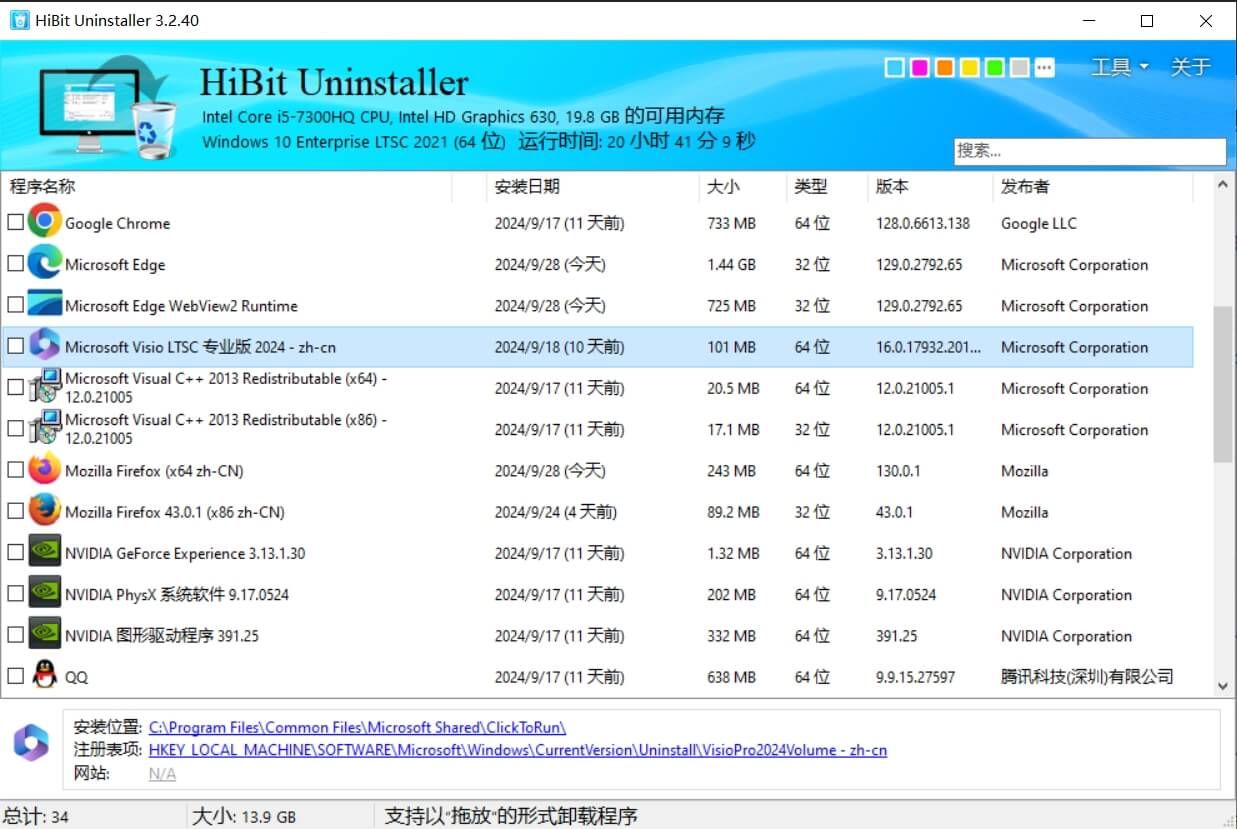
HiBit Uninstaller 采用单一可执行文件的形式,无需复杂的安装过程,用户可以即刻开始使用。这种便捷性使其成为临时使用或紧急情况下的理想选择。尽管体积小巧,但其功能却异常强大,几乎不会对系统性能造成任何负面影响。 这款工具的一大亮点是其多样化的功能。它不仅能够常规卸…...

Java高级Day52-BasicDAO
138.BasicDao 基本说明: DAO:data access object 数据访问对象 这样的通用类,称为 BasicDao,是专门和数据库交互的,即完成对数据库(表)的crud操作 在BasicDao 基础上,实现一张表对应一个Dao,…...

【OceanBase 诊断调优】—— SQL 诊断宝典
视频 OceanBase 数据库 SQL 诊断和优化:https://www.oceanbase.com/video/5900015OB Cloud 云数据库 SQL 诊断与调优的应用实践:https://www.oceanbase.com/video/9000971SQL 优化:https://www.oceanbase.com/video/9000889阅读和管理SQL执行…...
wordpress后台更新后 前端没变化的解决方法
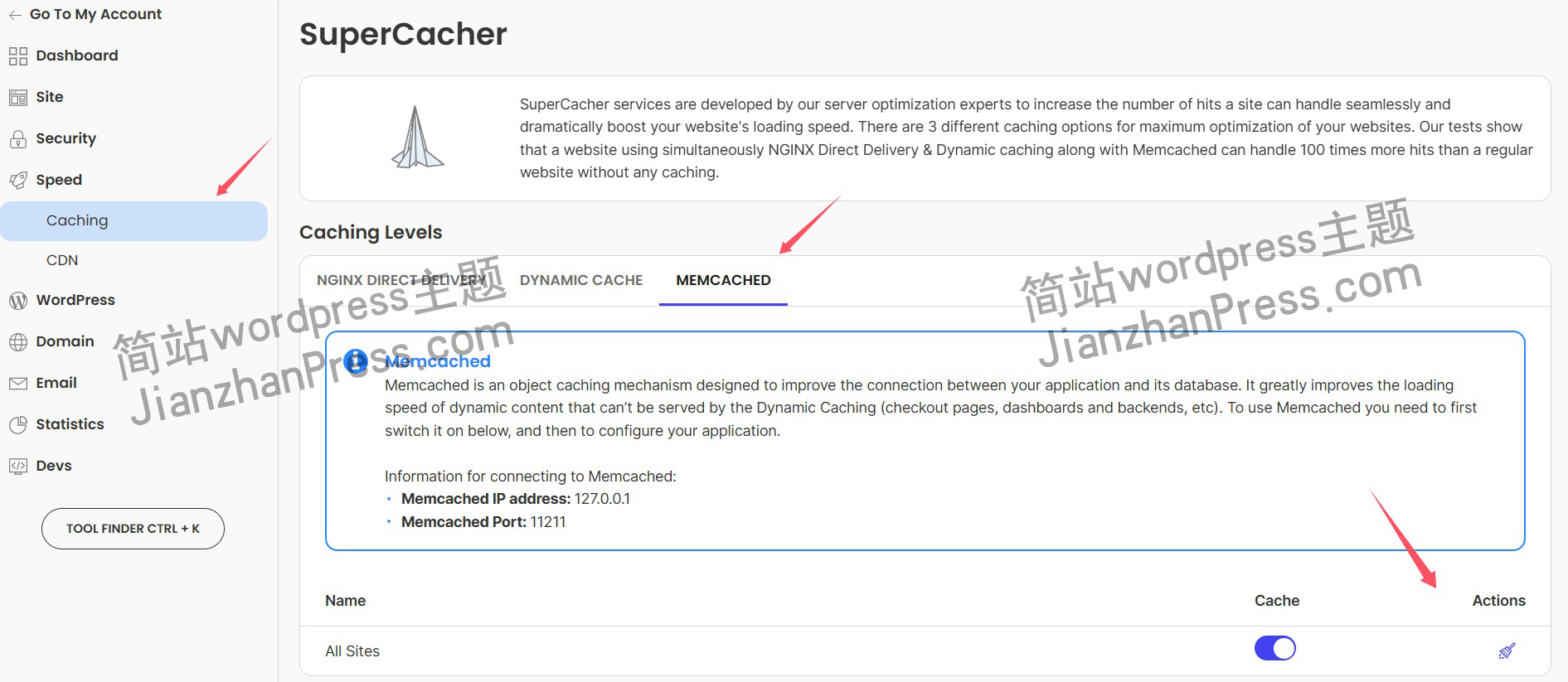
使用siteground主机的wordpress网站,会出现更新了网站内容和修改了php模板文件、js文件、css文件、图片文件后,网站没有变化的情况。 不熟悉siteground主机的新手,遇到这个问题,就很抓狂,明明是哪都没操作错误&#x…...
springboot 百货中心供应链管理系统小程序
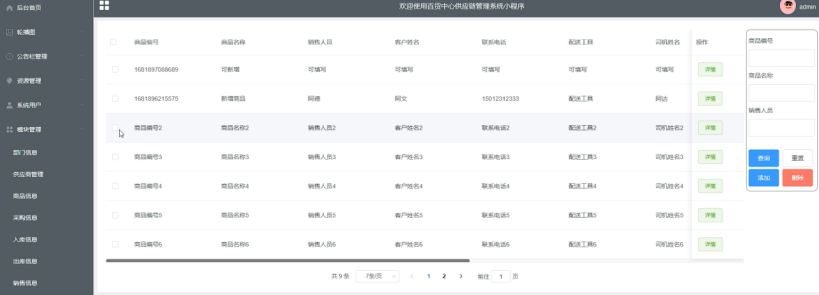
一、前言 随着我国经济迅速发展,人们对手机的需求越来越大,各种手机软件也都在被广泛应用,但是对于手机进行数据信息管理,对于手机的各种软件也是备受用户的喜爱,百货中心供应链管理系统被用户普遍使用,为方…...

ubuntu搭建nfs服务centos挂载访问
在Ubuntu上设置NFS服务器 在Ubuntu上,你可以使用apt包管理器来安装NFS服务器。打开终端并运行: sudo apt update sudo apt install nfs-kernel-server创建共享目录 创建一个目录用于共享,例如/shared: sudo mkdir /shared sud…...
1.3 VSCode安装与环境配置
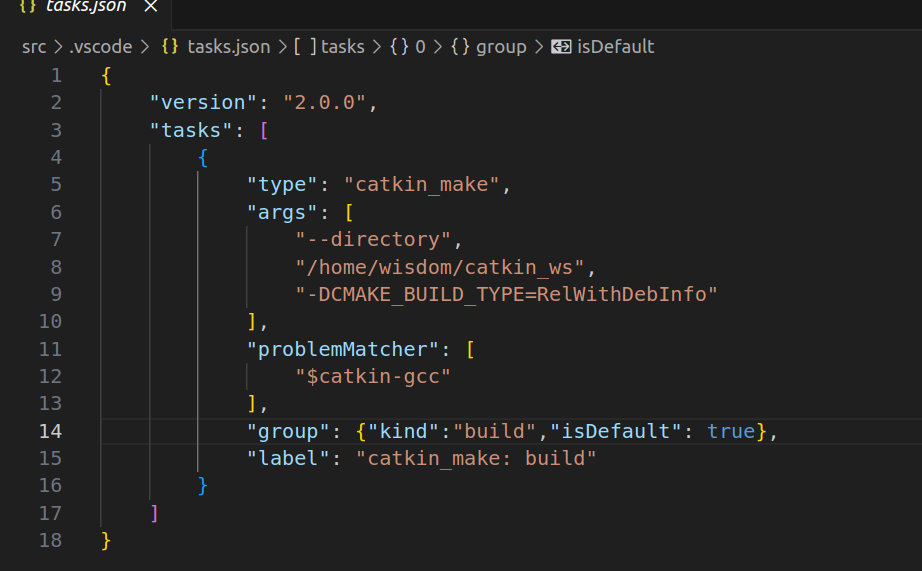
进入网址Visual Studio Code - Code Editing. Redefined下载.deb文件,然后打开终端,进入下载文件夹,键入命令 sudo dpkg -i code_1.100.3-1748872405_amd64.deb 在终端键入命令code即启动vscode 需要安装插件列表 1.Chinese简化 2.ros …...

【论文笔记】若干矿井粉尘检测算法概述
总的来说,传统机器学习、传统机器学习与深度学习的结合、LSTM等算法所需要的数据集来源于矿井传感器测量的粉尘浓度,通过建立回归模型来预测未来矿井的粉尘浓度。传统机器学习算法性能易受数据中极端值的影响。YOLO等计算机视觉算法所需要的数据集来源于…...
c#开发AI模型对话
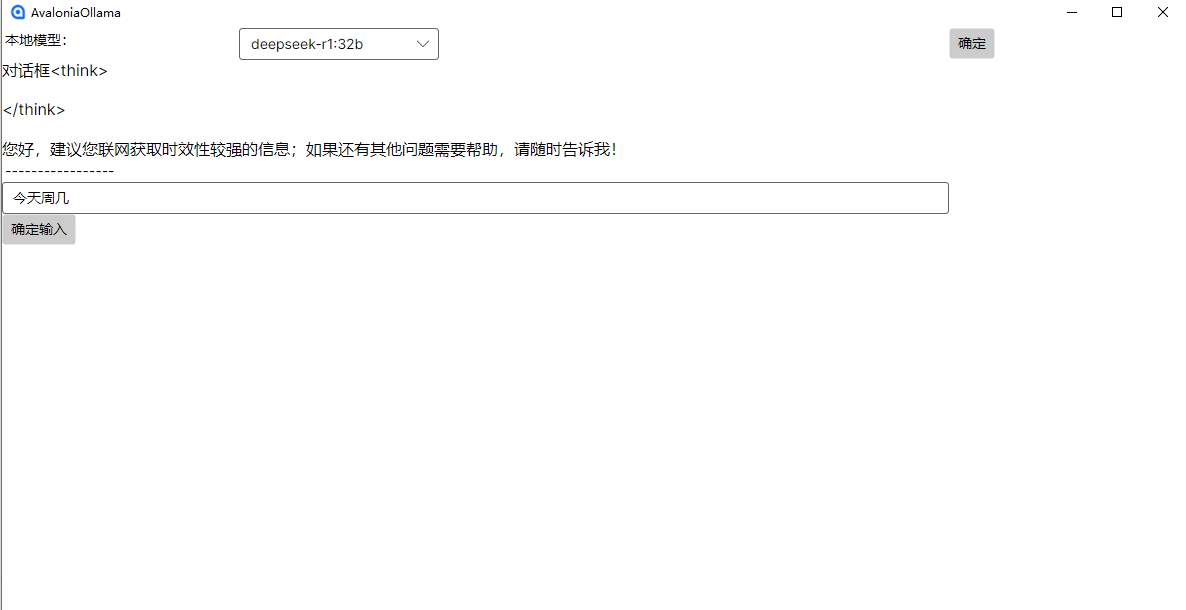
AI模型 前面已经介绍了一般AI模型本地部署,直接调用现成的模型数据。这里主要讲述讲接口集成到我们自己的程序中使用方式。 微软提供了ML.NET来开发和使用AI模型,但是目前国内可能使用不多,至少实践例子很少看见。开发训练模型就不介绍了&am…...
)
Angular微前端架构:Module Federation + ngx-build-plus (Webpack)
以下是一个完整的 Angular 微前端示例,其中使用的是 Module Federation 和 npx-build-plus 实现了主应用(Shell)与子应用(Remote)的集成。 🛠️ 项目结构 angular-mf/ ├── shell-app/ # 主应用&…...

SiFli 52把Imagie图片,Font字体资源放在指定位置,编译成指定img.bin和font.bin的问题
分区配置 (ptab.json) img 属性介绍: img 属性指定分区存放的 image 名称,指定的 image 名称必须是当前工程生成的 binary 。 如果 binary 有多个文件,则以 proj_name:binary_name 格式指定文件名, proj_name 为工程 名&…...
在Mathematica中实现Newton-Raphson迭代的收敛时间算法(一般三次多项式)
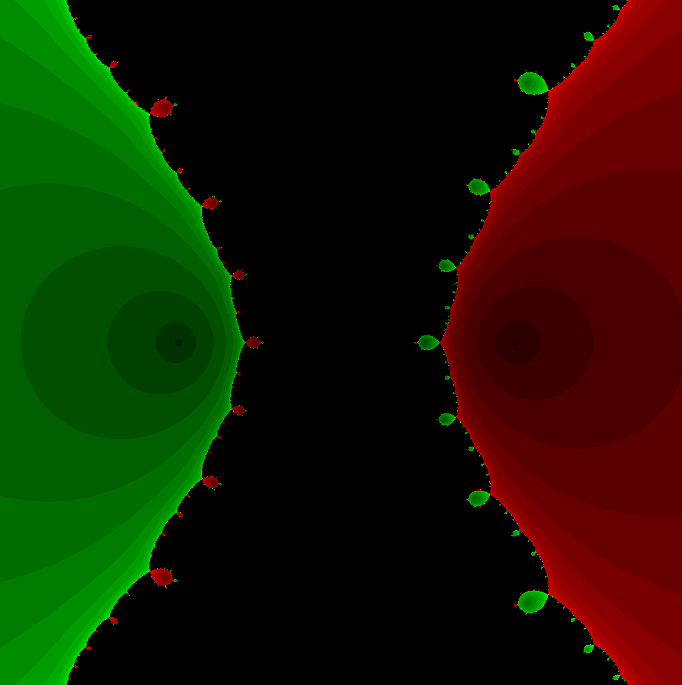
考察一般的三次多项式,以r为参数: p[z_, r_] : z^3 (r - 1) z - r; roots[r_] : z /. Solve[p[z, r] 0, z]; 此多项式的根为: 尽管看起来这个多项式是特殊的,其实一般的三次多项式都是可以通过线性变换化为这个形式…...

08. C#入门系列【类的基本概念】:开启编程世界的奇妙冒险
C#入门系列【类的基本概念】:开启编程世界的奇妙冒险 嘿,各位编程小白探险家!欢迎来到 C# 的奇幻大陆!今天咱们要深入探索这片大陆上至关重要的 “建筑”—— 类!别害怕,跟着我,保准让你轻松搞…...