
vue使用 jsplumb 生成流程图
1、安装jsPlumb:
npm install jsplumb2、 在使用的 .vue 文件中引入
import { jsPlumb } from "jsplumb";简单示例:
注意:注意看 id 为"item-3"和"item-9"那条数据的连线配置
其中有几个小图片,可以用自己的本地图片代替(图标大小的)
<template><div id="wrapper"><div class="line-wrap" v-if="flowChartData1.length == 2"><div :id="flowChartData1[1].id" class="state-item">{{ flowChartData1[1].lable }}</div></div><div class="line-wrap"><div v-for="(item, index) in flowChartData" :key="index" :id="item.id" :class="item.nodeName == 'start' || item.nodeName == 'end' || item.nodeName == 'summary' ? 'state-item-img' : 'state-item'"><img v-if="item.nodeName == 'start'" class="imgs" src="../assets/img/start.png" alt="" /><img v-else-if="item.nodeName == 'summary'" class="imgs" src="../assets/img/cent.png" alt="" /><img v-else-if="item.nodeName == 'end'" class="imgs" src="../assets/img/end.png" alt="" /><div v-else>{{ item.lable }}</div></div></div><div class="line-wrap" v-if="flowChartData1.length > 0 && flowChartData1.length < 3"><div :id="flowChartData1[0].id" class="state-item">{{ flowChartData1[0].lable }}</div></div></div>
</template>
<script>
import { jsPlumb } from "jsplumb";
export default {name: "LiuChengTu",data() {return {// 一行数据的// flowChartData: [//   { id: "item-0", lable: "", nodeName: "start", connectId: [{source: "item-0", target: "item-1"}] }, // 开始//   { id: "item-1", lable: "改革处-经办人-发起", nodeName: "", connectId: [{source: "item-1", target: "item-2"}] },//   { id: "item-2", lable: "承办部门-改革联系人填报/分发", nodeName: "", connectId: [{source: "item-2", target: "item-3"}] },//   { id: "item-3", lable: "", nodeName: "summary", connectId: [{source: "item-3", target: "item-4"}] }, // 汇总/分发//   { id: "item-4", lable: "承办部门-部门主任-审批", nodeName: "", connectId: [{source: "item-4", target: "item-5"}] },//   { id: "item-5", lable: "改革处-经办人-合规性审查", nodeName: "", connectId: [{source: "item-5", target: "item-6"}] },//   { id: "item-6", lable: "改革处-处领导-合规性审查", nodeName: "", connectId: [{source: "item-6", target: "item-7"}] },//   { id: "item-7", lable: "", nodeName: "summary", connectId: [{source: "item-7", target: "item-8"}] }, // 汇总/分发//   { id: "item-8", lable: "", nodeName: "end", connectId: [] }, // 结束// ],// 两行数据的// flowChartData: [//   { id: "item-0", lable: "", nodeName: "start", connectId: [{source: "item-0", target: "item-1"}] }, // 开始//   { id: "item-1", lable: "改革处-经办人-发起", nodeName: "", connectId: [{source: "item-1", target: "item-2"}] },//   { id: "item-2", lable: "承办部门-改革联系人填报/分发", nodeName: "", connectId: [{source: "item-2", target: "item-3"}] },//   { id: "item-3", lable: "", nodeName: "summary", connectId: [{source: "item-3", target: "item-4"}, {source: "item-3", target: "item-9"}] }, // 汇总/分发//   { id: "item-4", lable: "承办部门-部门主任-审批", nodeName: "", connectId: [{source: "item-4", target: "item-5"}] },//   { id: "item-5", lable: "改革处-经办人-合规性审查", nodeName: "", connectId: [{source: "item-5", target: "item-6"}] },//   { id: "item-6", lable: "改革处-处领导-合规性审查", nodeName: "", connectId: [{source: "item-6", target: "item-7"}] },//   { id: "item-7", lable: "", nodeName: "summary", connectId: [{source: "item-7", target: "item-8"}] }, // 汇总/分发//   { id: "item-8", lable: "", nodeName: "end", connectId: [] }, // 结束//   { id: "item-9", lable: "改革处-经办人-接收待阅", nodeName: "handleOut", connectId: [{source: "item-9", target: "item-7"}] }, // 第二行数据// ],// 三行数据的flowChartData: [{ id: "item-0", lable: "", nodeName: "start", connectId: [{source: "item-0", target: "item-1"}] }, // 开始{ id: "item-1", lable: "改革处-经办人-发起", nodeName: "", connectId: [{source: "item-1", target: "item-2"}] },{ id: "item-2", lable: "承办部门-改革联系人填报/分发", nodeName: "", connectId: [{source: "item-2", target: "item-3"}] },{ id: "item-3", lable: "", nodeName: "summary", connectId: [{source: "item-3", target: "item-4"}, {source: "item-3", target: "item-9"}, {source: "item-3", target: "item-10"}] }, // 汇总/分发{ id: "item-4", lable: "承办部门-部门主任-审批", nodeName: "", connectId: [{source: "item-4", target: "item-5"}] },{ id: "item-5", lable: "改革处-经办人-合规性审查", nodeName: "", connectId: [{source: "item-5", target: "item-6"}] },{ id: "item-6", lable: "改革处-处领导-合规性审查", nodeName: "", connectId: [{source: "item-6", target: "item-7"}] },{ id: "item-7", lable: "", nodeName: "summary", connectId: [{source: "item-7", target: "item-8"}] }, // 汇总/分发{ id: "item-8", lable: "", nodeName: "end", connectId: [] }, // 结束{ id: "item-9", lable: "改革处-经办人-接收待阅", nodeName: "handleOut", connectId: [{source: "item-9", target: "item-7"}] }, // 第二行数据{ id: "item-10", lable: "改革处-经办人-接收待阅123", nodeName: "handleOut", connectId: [{source: "item-10", target: "item-7"}] }, // 第二行数据],flowChartData1: []};},mounted() {this.initJsPlumb();},methods: {initJsPlumb() {let jsPlumbConnectList = [];let listData = [];let fenfaData = [];// 处理数据this.flowChartData.forEach(ele=>{if(ele.connectId.length == 1) {if(ele.nodeName == "handleOut") {fenfaData.push(ele);}else {listData.push(ele);let plumbInsInfo = {source: ele.connectId[0].source,target: ele.connectId[0].target,anchor: ["Left","Right","Top","Bottom",[0.3, 0, 0, -1],[0.7, 0, 0, -1],[0.3, 1, 0, 1],[0.7, 1, 0, 1],],connector: ["Flowchart",{ cornerRadius: 5, alwaysRespectStubs: true, stub: 5 },],endpoint: "Blank",overlays: [["Arrow", { width: 8, length: 8, location: 1 }]], // overlay// 添加样式paintStyle: { stroke: "#909399", strokeWidth: 2 }, // connector}jsPlumbConnectList.push(plumbInsInfo)}}else if(ele.connectId.length == 1){if(ele.nodeName == "handleOut") {fenfaData.push(ele);}else {listData.push(ele);ele.connectId.forEach((itemInfo,index)=>{if(index == 0) {let plumbInsInfo = {source: itemInfo.source,target: itemInfo.target,anchor: ["Left","Right","Top","Bottom",[0.3, 0, 0, -1],[0.7, 0, 0, -1],[0.3, 1, 0, 1],[0.7, 1, 0, 1],],connector: ["Flowchart",{ cornerRadius: 5, alwaysRespectStubs: true, stub: 5 },],endpoint: "Blank",overlays: [["Arrow", { width: 8, length: 8, location: 1 }]], // overlay// 添加样式paintStyle: { stroke: "#909399", strokeWidth: 2 }, // connector}jsPlumbConnectList.push(plumbInsInfo)}else {let plumbInsInfo = {source: itemInfo.source,target: itemInfo.target,anchor: ["Bottom", "Left"],connector: ["Flowchart",{ cornerRadius: 5, alwaysRespectStubs: true, stub: 5 },],endpoint: "Blank",overlays: [["Arrow", { width: 8, length: 8, location: 1 }]], // overlay// 添加样式paintStyle: { stroke: "#909399", strokeWidth: 2 }, // connector}jsPlumbConnectList.push(plumbInsInfo)}})}}else {if(ele.nodeName == "handleOut") {fenfaData.push(ele);}else {listData.push(ele);ele.connectId.forEach((itemInfo,index)=>{if(index == 0) {let plumbInsInfo = {source: itemInfo.source,target: itemInfo.target,anchor: ["Left","Right","Top","Bottom",[0.3, 0, 0, -1],[0.7, 0, 0, -1],[0.3, 1, 0, 1],[0.7, 1, 0, 1],],connector: ["Flowchart",{ cornerRadius: 5, alwaysRespectStubs: true, stub: 5 },],endpoint: "Blank",overlays: [["Arrow", { width: 8, length: 8, location: 1 }]], // overlay// 添加样式paintStyle: { stroke: "#909399", strokeWidth: 2 }, // connector}jsPlumbConnectList.push(plumbInsInfo)}else if(index == 1) {let plumbInsInfo = {source: itemInfo.source,target: itemInfo.target,anchor: ["Bottom", "Left"],connector: ["Flowchart",{ cornerRadius: 5, alwaysRespectStubs: true, stub: 5 },],endpoint: "Blank",overlays: [["Arrow", { width: 8, length: 8, location: 1 }]], // overlay// 添加样式paintStyle: { stroke: "#909399", strokeWidth: 2 }, // connector}jsPlumbConnectList.push(plumbInsInfo)}else {let plumbInsInfo = {source: itemInfo.source,target: itemInfo.target,anchor: ["Top", "Left"],connector: ["Flowchart",{ cornerRadius: 5, alwaysRespectStubs: true, stub: 5 },],endpoint: "Blank",overlays: [["Arrow", { width: 8, length: 8, location: 1 }]], // overlay// 添加样式paintStyle: { stroke: "#909399", strokeWidth: 2 }, // connector}jsPlumbConnectList.push(plumbInsInfo)}})}}})this.flowChartData = listData;this.flowChartData1 = fenfaData;if(this.flowChartData1.length > 0) {this.flowChartData1.forEach((ele, index)=>{if(index==0) {let plumbInsInfo = {source: ele.connectId[0].source,target: ele.connectId[0].target,anchor: ["Right", "Bottom"],connector: ["Flowchart",{ cornerRadius: 5, alwaysRespectStubs: true, stub: 5 },],endpoint: "Blank",overlays: [["Arrow", { width: 8, length: 8, location: 1 }]], // overlay// 添加样式paintStyle: { stroke: "#909399", strokeWidth: 2 }, // connector}jsPlumbConnectList.push(plumbInsInfo)}else {let plumbInsInfo = {source: ele.connectId[0].source,target: ele.connectId[0].target,anchor: ["Right", "Top"],connector: ["Flowchart",{ cornerRadius: 5, alwaysRespectStubs: true, stub: 5 },],endpoint: "Blank",overlays: [["Arrow", { width: 8, length: 8, location: 1 }]], // overlay// 添加样式paintStyle: { stroke: "#909399", strokeWidth: 2 }, // connector}jsPlumbConnectList.push(plumbInsInfo)}})}setTimeout(() => {let plumbIns = jsPlumb.getInstance();plumbIns.ready(function () {jsPlumbConnectList.forEach(ele=>{plumbIns.connect(ele);})})}, 500);return;// let plumbIns = jsPlumb.getInstance();plumbIns.ready(function () {plumbIns.connect({// 对应上述基本概念source: "item-0",target: "item-1",anchor: ["Left","Right","Top","Bottom",[0.3, 0, 0, -1],[0.7, 0, 0, -1],[0.3, 1, 0, 1],[0.7, 1, 0, 1],],connector: ["Flowchart",{ cornerRadius: 5, alwaysRespectStubs: true, stub: 5 },],endpoint: "Blank",overlays: [["Arrow", { width: 8, length: 8, location: 1 }]], // overlay// 添加样式paintStyle: { stroke: "#909399", strokeWidth: 2 }, // connector// endpointStyle: { fill: '#909399', outlineStroke: '#606266', outlineWidth: 1 } // endpoint});plumbIns.connect({// 对应上述基本概念source: "item-1",target: "item-2",anchor: ["Left","Right","Top","Bottom",[0.3, 0, 0, -1],[0.7, 0, 0, -1],[0.3, 1, 0, 1],[0.7, 1, 0, 1],],connector: ["Flowchart",{ cornerRadius: 5, alwaysRespectStubs: true, stub: 5 },],endpoint: "Blank",overlays: [["Arrow", { width: 8, length: 8, location: 1 }]], // overlay// 添加样式paintStyle: { stroke: "#909399", strokeWidth: 2 }, // connector// endpointStyle: { fill: '#909399', outlineStroke: '#606266', outlineWidth: 1 } // endpoint});plumbIns.connect({// 对应上述基本概念source: "item-2",target: "item-3",anchor: ["Left","Right","Top","Bottom",[0.3, 0, 0, -1],[0.7, 0, 0, -1],[0.3, 1, 0, 1],[0.7, 1, 0, 1],],connector: ["Flowchart",{ cornerRadius: 5, alwaysRespectStubs: true, stub: 5 },],endpoint: "Blank",overlays: [["Arrow", { width: 8, length: 8, location: 1 }]], // overlay// 添加样式paintStyle: { stroke: "#909399", strokeWidth: 2 }, // connector// endpointStyle: { fill: '#909399', outlineStroke: '#606266', outlineWidth: 1 } // endpoint});plumbIns.connect({// 对应上述基本概念source: "item-3",target: "item-4",anchor: ["Left","Right","Top","Bottom",[0.3, 0, 0, -1],[0.7, 0, 0, -1],[0.3, 1, 0, 1],[0.7, 1, 0, 1],],connector: ["Flowchart",{ cornerRadius: 5, alwaysRespectStubs: true, stub: 5 },],endpoint: "Blank",overlays: [["Arrow", { width: 8, length: 8, location: 1 }]], // overlay// 添加样式paintStyle: { stroke: "#909399", strokeWidth: 2 }, // connector// endpointStyle: { fill: '#909399', outlineStroke: '#606266', outlineWidth: 1 } // endpoint});plumbIns.connect({// 对应上述基本概念source: "item-4",target: "item-5",anchor: ["Left","Right","Top","Bottom",[0.3, 0, 0, -1],[0.7, 0, 0, -1],[0.3, 1, 0, 1],[0.7, 1, 0, 1],],connector: ["Flowchart",{ cornerRadius: 5, alwaysRespectStubs: true, stub: 5 },],endpoint: "Blank",overlays: [["Arrow", { width: 8, length: 8, location: 1 }]], // overlay// 添加样式paintStyle: { stroke: "#909399", strokeWidth: 2 }, // connector// endpointStyle: { fill: '#909399', outlineStroke: '#606266', outlineWidth: 1 } // endpoint});plumbIns.connect({// 对应上述基本概念source: "item-5",target: "item-6",anchor: ["Left","Right","Top","Bottom",[0.3, 0, 0, -1],[0.7, 0, 0, -1],[0.3, 1, 0, 1],[0.7, 1, 0, 1],],connector: ["Flowchart",{ cornerRadius: 5, alwaysRespectStubs: true, stub: 5 },],endpoint: "Blank",overlays: [["Arrow", { width: 8, length: 8, location: 1 }]], // overlay// 添加样式paintStyle: { stroke: "#909399", strokeWidth: 2 }, // connector// endpointStyle: { fill: '#909399', outlineStroke: '#606266', outlineWidth: 1 } // endpoint});plumbIns.connect({// 对应上述基本概念source: "item-6",target: "item-7",anchor: ["Left","Right","Top","Bottom",[0.3, 0, 0, -1],[0.7, 0, 0, -1],[0.3, 1, 0, 1],[0.7, 1, 0, 1],],connector: ["Flowchart",{ cornerRadius: 5, alwaysRespectStubs: true, stub: 5 },],endpoint: "Blank",overlays: [["Arrow", { width: 8, length: 8, location: 1 }]], // overlay// 添加样式paintStyle: { stroke: "#909399", strokeWidth: 2 }, // connector// endpointStyle: { fill: '#909399', outlineStroke: '#606266', outlineWidth: 1 } // endpoint});plumbIns.connect({// 对应上述基本概念source: "item-7",target: "item-8",anchor: ["Left","Right","Top","Bottom",[0.3, 0, 0, -1],[0.7, 0, 0, -1],[0.3, 1, 0, 1],[0.7, 1, 0, 1],],connector: ["Flowchart",{ cornerRadius: 5, alwaysRespectStubs: true, stub: 5 },],endpoint: "Blank",overlays: [["Arrow", { width: 8, length: 8, location: 1 }]], // overlay// 添加样式paintStyle: { stroke: "#909399", strokeWidth: 2 }, // connector// endpointStyle: { fill: '#909399', outlineStroke: '#606266', outlineWidth: 1 } // endpoint});plumbIns.connect({// 对应上述基本概念source: "item-3",target: "item-9",anchor: ["Bottom", "Left"],connector: ["Flowchart",{ cornerRadius: 5, alwaysRespectStubs: true, stub: 5 },],endpoint: "Blank",overlays: [["Arrow", { width: 8, length: 8, location: 1 }]], // overlay// 添加样式paintStyle: { stroke: "#909399", strokeWidth: 2 }, // connector// endpointStyle: { fill: '#909399', outlineStroke: '#606266', outlineWidth: 1 } // endpoint});plumbIns.connect({// 对应上述基本概念source: "item-9",target: "item-7",anchor: ["Right", "Bottom"],connector: ["Flowchart",{ cornerRadius: 5, alwaysRespectStubs: true, stub: 5 },],endpoint: "Blank",overlays: [["Arrow", { width: 8, length: 8, location: 1 }]], // overlay// 添加样式paintStyle: { stroke: "#909399", strokeWidth: 2 }, // connector// endpointStyle: { fill: '#909399', outlineStroke: '#606266', outlineWidth: 1 } // endpoint});});},},
};
</script>
<style lang="scss" scoped>
#wrapper {background: radial-gradient(ellipse at top left,rgba(255, 255, 255, 1) 40%,rgba(229, 229, 229, 0.9) 100%);padding: 60px 80px;
}
.state-item-img {width: 50px;height: 50px;color: #606266;border: 2px solid rgba(0, 0, 0, 0);text-align: center;line-height: 30px;font-family: sans-serif;border-radius: 4px;margin-right: 56px;font-size: 14px;.imgs {width: 50px;height: 50px;}
}
.state-item {width: 120px;height: 100px;color: #606266;background: #f6f6f6;border: 2px solid rgba(0, 0, 0, 0.05);text-align: center;line-height: 30px;font-family: sans-serif;border-radius: 4px;margin-right: 60px;font-size: 14px;padding: 5px 10px;display: flex;align-items: center;
}
.line-wrap {display: flex;margin-bottom: 100px;justify-content: center;align-items: center;
}
</style>
相关文章:

vue使用 jsplumb 生成流程图
1、安装jsPlumb: npm install jsplumb 2、 在使用的 .vue 文件中引入 import { jsPlumb } from "jsplumb"; 简单示例: 注意:注意看 id 为"item-3"和"item-9"那条数据的连线配置 其中有几个小图片&#x…...

攻坚金融关键业务系统,OceanBase亮相2024金融科技大会
10月15-16日,第六届中新数字金融应用博览会与2024金融科技大会(简称“金博会”)在苏州工业园区联合举办。此次大会融合了国家级重要金融科技资源——“中国金融科技大会”,围绕“赋能金融高质量发展,金融科技创新前行”…...

《纳瓦尔宝典:财富和幸福指南》读书随笔
最近在罗胖的得到听书中听到一本书,感觉很有启发,书的名字叫《纳瓦尔宝典》,从书名上看给人的感觉应该财富知识类、鸡汤爆棚哪类。纳瓦尔,这个名字之前确实没有听说过,用一句话介绍一下,一个印度裔的硅谷中…...
C++ | STL | 侯捷 | 学习笔记
C | STL | 侯捷 | 学习笔记 文章目录 C | STL | 侯捷 | 学习笔记1 STL概述1.1 头文件名称1.2 STL基础介绍1.3 typename 2 OOP vs. GP3 容器3.1 容器结构分类3.2 序列式容器3.2.1 array测试深度探索 3.2.2 vector测试深度探索 3.2.3 list测试深度探索 3.2.4 forward_list测试深度…...

C函数基础
C语言中的函数教程 在C语言中,函数是一段组织好的、可重复使用的、用于执行特定任务的代码。函数可以提高代码的模块化和可重用性。以下是关于C语言中函数的详细教程。 1. 函数的定义与声明 1.1 函数定义 函数定义包括函数头和函数体。函数头包括函数返回类型、…...

html和css实现页面
任务4 html文件 任务5 htm文件 css文件 任务6 html文件 css文件 任务7 html文件 css文件...
——移植工程分享)
Github_以太网开源项目verilog-ethernet代码阅读与移植(八)——移植工程分享
实验背景 第六篇计划是写项目中各个模块的实现和约束文件的编写,有的小伙伴有裁剪工程的需要,就先分享一个半成品以供参考,由于笔者水平有限,错误肯定会有,望批评指正。 实验内容 移植工程共享 实验步骤 工程一部…...

【大模型实战篇】大模型分词算法BPE(Byte-Pair Encoding tokenization)及代码示例
词元化是针对自然语言处理任务的数据预处理中一个重要步骤,目的是将原始文本切分成模型可以识别和处理的词元序列。在大模型训练任务中,就是作为大模型的输入。传统的自然语言处理方法,如基于条件随机场的序列标注,主要采用基于词…...
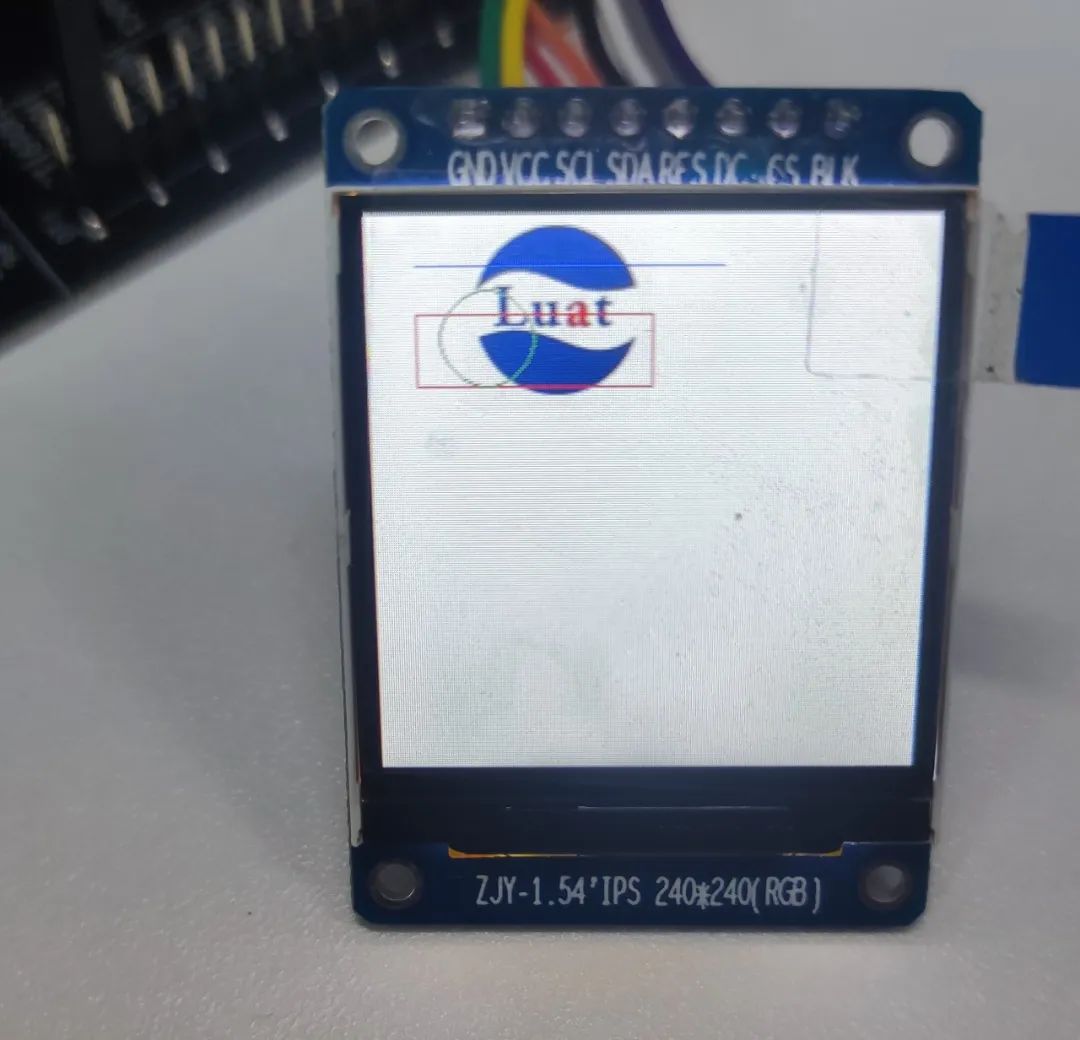
低功耗4G模组LCD应用示例超全教程!不会的小伙伴看这篇就够了!
希望大家通过本文的介绍,学会LCD显示屏与Air780E开发板结合使用的方法。利用LCD显示屏,你可以为你的项目增加丰富的显示内容,提升用户体验。记住,实践出真知,赶快动手尝试吧!相信这篇教程对你有所帮助~ 本文…...

Java while语句练习 C语言的函数递归
1. /* public static void main(String[] args) {int[] arr {25, 24, 12, 98, 36, 45};int max arr[0];//不能写0for (int i 1; i < arr.length; i) {if (arr[i] > max) {max arr[i];}}System.out.println(max);}*//*public static void main(String[] args) {doubl…...

illustrator免费插件 截图识别文字插件 textOCR
随手可得的截图识别文字插件 textOCR,识别出来的文字可直接输入到illustrator的当前文档中: 执行条件 1、需截图软件支持,推荐笔记截图工具 2、截好图片直接拖入面板即可完成识别 ****后期可完成实现在illustrator选择图片对象完成文字识别。…...
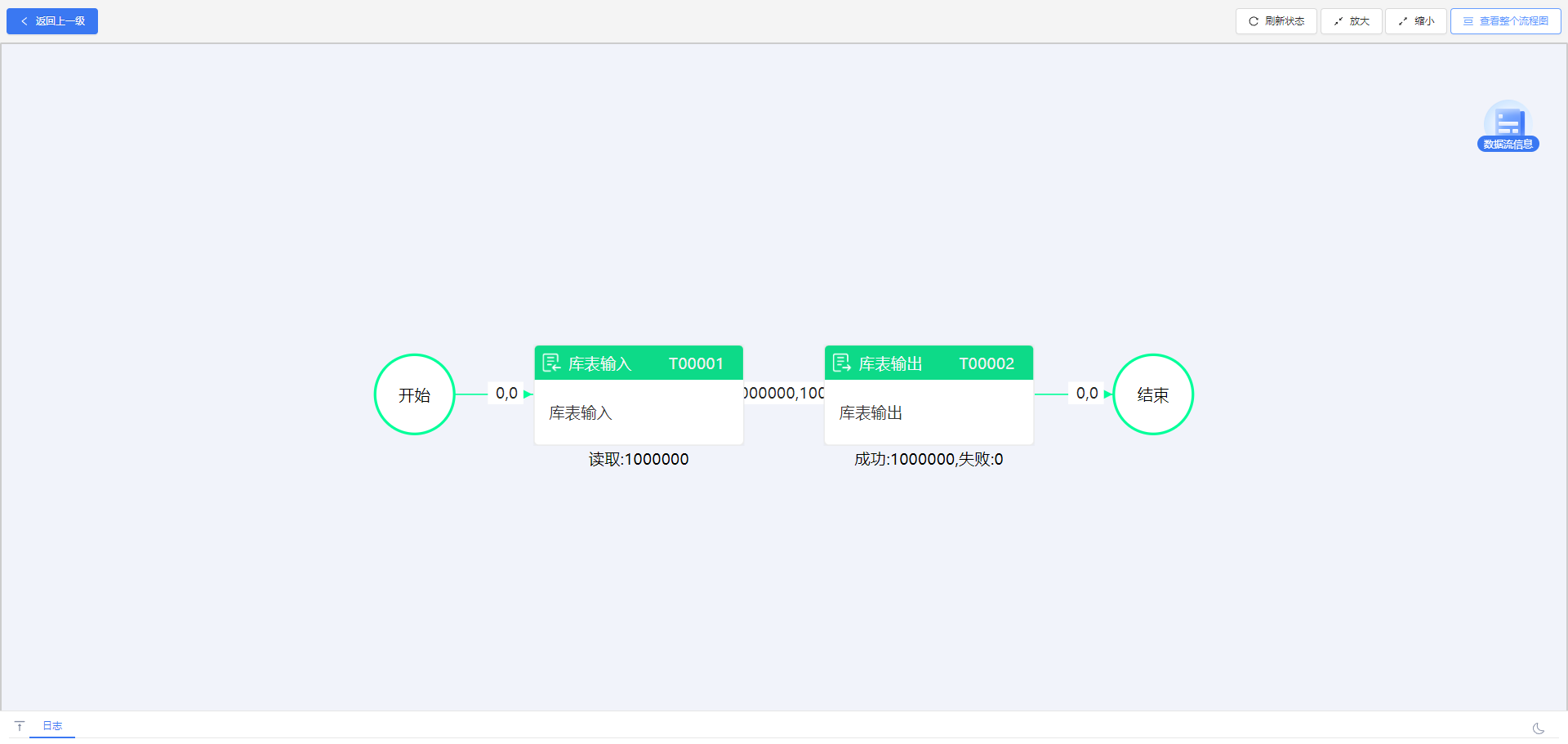
提升数据管理效率:ETLCloud与达梦数据库的完美集成
达梦数据库的核心优势在于其强大的数据处理能力和高可用性设计。它采用先进的并行处理技术,支持大规模的数据操作,同时具备出色的事务处理能力和数据安全保障。此外,达梦数据库还提供了丰富的功能模块,如数据备份、恢复、监控等&a…...

头歌——人工智能(搜索策略)
文章目录 第1关:搜索策略第2关:盲目搜索第3关:启发式搜索 - 扫地机器人最短路径搜索第4关:搜索算法应用 - 四皇后问题 第1关:搜索策略 什么是搜索技术 人类的思维过程可以看作是一个搜索过程。从小学到现在࿰…...

gorm.io/sharding改造:赋能单表,灵活支持多分表策略(下)
背景 分表组件改造的背景,我在这篇文章《gorm.io/sharding改造:赋能单表,灵活支持多分表策略(上)》中已经做了详细的介绍——这个组件不支持单表多个分表策略,为了突破这个限制做的改造。 在上一篇文章中&…...

域渗透AD渗透攻击利用 MS14-068漏洞利用过程 以及域渗透中票据是什么 如何利用
目录 wmi协议远程执行 ptt票据传递使用 命令传递方式 明文口令传递 hash口令传递 票据分类 kerberos认证的简述流程 PTT攻击的过程 MS14-068 漏洞 执行过程 wmi协议远程执行 wmi服务是比smb服务高级一些的,在日志中是找不到痕迹的,但是这个主…...

C++进阶-->继承(inheritance)
1. 继承的概念及定义 1.1 继承的概念 继承(inheritance)机制是面向对象程序设计使代码可以复用的最重要手段,他允许我们在保证原有类的特性基础上还进行扩展,通过继承产生的类叫做派生类(子类),被继承的类叫做基类&a…...

可视化项目 gis 资源复用思路(cesium)
文章目录 可视化项目 gis 资源复用思路底图、模型替换思路具体操作 可视化项目 gis 资源复用思路 背景: A项目的底图、模型 是现在在做的 B项目所需要的,现在要把 B项目的底图之类的替换成 A系统的 底图、模型替换思路 观察可访问系统的 gis 相关网络请…...

SQL实战测试
SQL实战测试 (请写下 SQL 查询语句,不需要展示结果) 表 a DateSalesCustomerRevenue2019/1/1张三A102019/1/5张三A18 1. **用一条 ** SQL 语句写出每个月,每个销售有多少个客户收入多少 输出结果表头为“月”,“销…...

Java 基础教学:基础语法-变量与常量
变量 变量是程序设计中的基本概念,它用于存储信息,这些信息可以在程序执行过程中被读取和修改。 变量的声明 在Java中,声明变量需要指定变量的数据类型以及变量的名称。数据类型定义了变量可以存储的数据种类(例如整数、浮点数…...

vue3使用element-plus手动更改url后is-active和菜单的focus颜色不同步问题
在实习,给了个需求做个新的ui界面,遇到了一个非常烦人的问题 如下,手动修改url时,is-active和focus颜色不同步 虽然可以直接让el-menu-item:focus为白色能解决这个问题,但是我就是想要有颜色哈哈哈,有些执…...

KubeSphere 容器平台高可用:环境搭建与可视化操作指南
Linux_k8s篇 欢迎来到Linux的世界,看笔记好好学多敲多打,每个人都是大神! 题目:KubeSphere 容器平台高可用:环境搭建与可视化操作指南 版本号: 1.0,0 作者: 老王要学习 日期: 2025.06.05 适用环境: Ubuntu22 文档说…...

TDengine 快速体验(Docker 镜像方式)
简介 TDengine 可以通过安装包、Docker 镜像 及云服务快速体验 TDengine 的功能,本节首先介绍如何通过 Docker 快速体验 TDengine,然后介绍如何在 Docker 环境下体验 TDengine 的写入和查询功能。如果你不熟悉 Docker,请使用 安装包的方式快…...
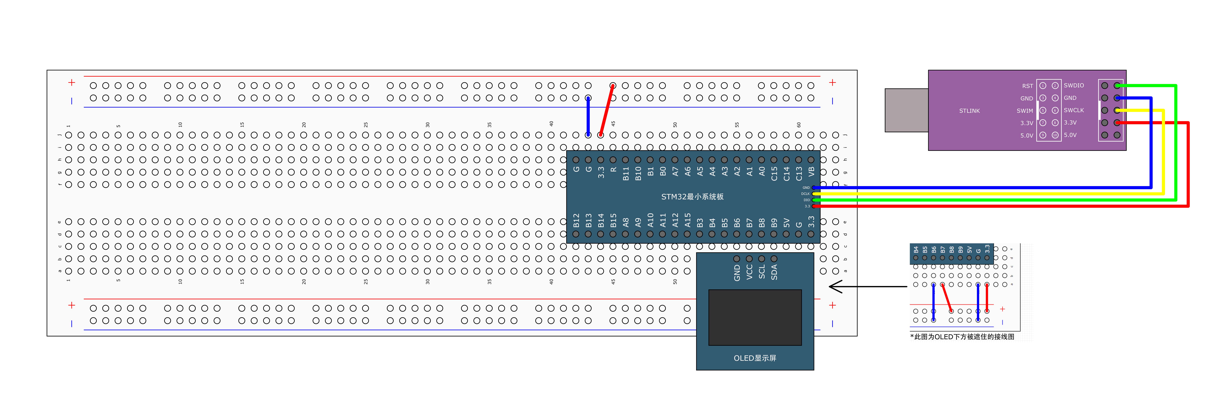
STM32标准库-DMA直接存储器存取
文章目录 一、DMA1.1简介1.2存储器映像1.3DMA框图1.4DMA基本结构1.5DMA请求1.6数据宽度与对齐1.7数据转运DMA1.8ADC扫描模式DMA 二、数据转运DMA2.1接线图2.2代码2.3相关API 一、DMA 1.1简介 DMA(Direct Memory Access)直接存储器存取 DMA可以提供外设…...
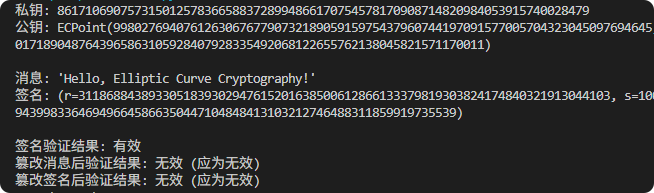
现代密码学 | 椭圆曲线密码学—附py代码
Elliptic Curve Cryptography 椭圆曲线密码学(ECC)是一种基于有限域上椭圆曲线数学特性的公钥加密技术。其核心原理涉及椭圆曲线的代数性质、离散对数问题以及有限域上的运算。 椭圆曲线密码学是多种数字签名算法的基础,例如椭圆曲线数字签…...

什么是EULA和DPA
文章目录 EULA(End User License Agreement)DPA(Data Protection Agreement)一、定义与背景二、核心内容三、法律效力与责任四、实际应用与意义 EULA(End User License Agreement) 定义: EULA即…...

土地利用/土地覆盖遥感解译与基于CLUE模型未来变化情景预测;从基础到高级,涵盖ArcGIS数据处理、ENVI遥感解译与CLUE模型情景模拟等
🔍 土地利用/土地覆盖数据是生态、环境和气象等诸多领域模型的关键输入参数。通过遥感影像解译技术,可以精准获取历史或当前任何一个区域的土地利用/土地覆盖情况。这些数据不仅能够用于评估区域生态环境的变化趋势,还能有效评价重大生态工程…...

【python异步多线程】异步多线程爬虫代码示例
claude生成的python多线程、异步代码示例,模拟20个网页的爬取,每个网页假设要0.5-2秒完成。 代码 Python多线程爬虫教程 核心概念 多线程:允许程序同时执行多个任务,提高IO密集型任务(如网络请求)的效率…...

Android15默认授权浮窗权限
我们经常有那种需求,客户需要定制的apk集成在ROM中,并且默认授予其【显示在其他应用的上层】权限,也就是我们常说的浮窗权限,那么我们就可以通过以下方法在wms、ams等系统服务的systemReady()方法中调用即可实现预置应用默认授权浮…...

【Java学习笔记】BigInteger 和 BigDecimal 类
BigInteger 和 BigDecimal 类 二者共有的常见方法 方法功能add加subtract减multiply乘divide除 注意点:传参类型必须是类对象 一、BigInteger 1. 作用:适合保存比较大的整型数 2. 使用说明 创建BigInteger对象 传入字符串 3. 代码示例 import j…...

视觉slam十四讲实践部分记录——ch2、ch3
ch2 一、使用g++编译.cpp为可执行文件并运行(P30) g++ helloSLAM.cpp ./a.out运行 二、使用cmake编译 mkdir build cd build cmake .. makeCMakeCache.txt 文件仍然指向旧的目录。这表明在源代码目录中可能还存在旧的 CMakeCache.txt 文件,或者在构建过程中仍然引用了旧的路…...