
antd table 自定义表头过滤表格内容
注意:该功能只能过滤可一次性返回全部数据的表格,通过接口分页查询的请自主按照需求改动哈~
实现步骤:
1.在要过滤的列表表头增加过滤图标,点击图标显示浮窗
2.浮窗内显示整列可选选项,通过勾选单选或者全选、搜索框来过滤表格内容
效果如下:

 表格页面index.vue:
<template><div><a-table :columns="column" :data-source="data" @change="change"><template v-for="(col, index) in column"><span :slot="col.slots.title" v-if="col.filterable" :key="index"><!--  --><popover-filter:ref="'popover_' + col.slots.title":key="col.dataIndex":label="col.dataIndex":field="col.dataIndex":shoppingType="0":filters="col.filtersList"@filter="handleFilterTable"/><span slot-scope="text, record">{{ text }}{{ record }}</span></span></template></a-table></div>
</template>
<script>
import PopoverFilter from "./popover-filter.vue";
export default {components: {PopoverFilter},data() {return {column: [],data: [],filters: {},allData: []};},mounted() {const columns = [{title: "序号",dataIndex: "id",customRender: (text, row, index) => {return index + 1;},width: 86},{//title: "Name",dataIndex: "name",width: "20%",slots: { title: "name" },filterable: true,onFilter: function(value, record) {console.log("value", value);return record.name.indexOf(value) != -1;}},{//title: "Gender",dataIndex: "gender",filters: [],width: "20%",filterable: true,slots: { title: "gender" }},{title: "Email",dataIndex: "email"}];this.column = columns;this.data = [{ name: "jone ke", gender: "Male", email: "23293238@qq.com" },{ name: "meary", gender: "Male1", email: "23293238@qq.com" },{ name: "lu xi", gender: "Doke", email: "23293238@qq.com" },{ name: "jiner", gender: "Doke1", email: "23293238@qq.com" },{ name: "geng", gender: "Doke1", email: "23293238@qq.com" }];this.allData = [...this.data];//要显示过滤的列,dataIndexlet filterList = ["name", "gender"];this.column.forEach(item => {if (filterList.includes(item.dataIndex)) {//获取每列所有数据,去除重复项item.filtersList = [...new Set(this.data.map(e => e[item.dataIndex]))];}});//console.log("this.column", this.column);},methods: {change(a, b, c) {console.log(a);console.log(b);console.log(c);},handleFilterTable(checkedList, field, label) {console.log(checkedList, field, label);this.filters[field] = checkedList;this.data = [...this.allData];Object.keys(this.filters).forEach(e => {this.data = this.data.filter(i =>this.filters[e].length > 0 ? this.filters[e].includes(i[e]) : true);});},changeFilter(checkedList, field) {console.log(checkedList, field);//this.filterInfo[this.typeValue][field] = checkedList;}}
};
</script>
<style lang="less" scoped></style>
浮窗组件popover-filter.vue:
<template><div class="filter-column"><!-- visible=true面板显示时或者有勾选项时icon图标高亮 --><divclass="popover-title":class="{ 'popover-title-active': visible || this.selected.length }"><span>{{ label }}</span><span class="caret-wrapper"><i class="sort-caret ascending"></i><i class="sort-caret descending"></i></span><a-popoveroverlayClassName="popover"width="190"ref="filter"popper-class="m-popper"v-model="visible"trigger="click":overlayStyle="{ width: '200px' }"><span class="filter-icon" @click.stop="handleClick"></span><template slot="content"><a-inputplaceholder="请输入关键词"suffix-icon="a-icon-search"size="small"@input="handleFilter($event)"v-model="keyWord"><a-icon slot="prefix" type="search" /></a-input><div class="popover-filter" v-loading="loading"><a-checkbox:indeterminate="indeterminate":checked="checkAll"@change="handleCheckAllSource">全选{{ filters.length ? `(${filters.length})` : "" }}</a-checkbox><a-checkbox-groupv-model="checkedValue"class="popover-checkbox-group"@change="handleCheck"><a-checkboxv-for="item in filterOptions":key="item":value="item"><span>{{ item }}</span></a-checkbox></a-checkbox-group></div><div class="popover-btn-group"><a-buttontype="text"size="small"class="popover-btn popover-btn-reset":class="{ 'popover-btn-active': checkedValue.length > 0 }"@click="handleReset">重置</a-button><a-buttontype="primary"size="small"class="popover-btn"@click="handleSearch">确定</a-button></div></template></a-popover></div></div>
</template><script>
export default {components: {},props: {label: {type: String,default: ""},field: {type: String,default: ""},shoppingType: {type: Number,default: 0},filters: {type: Array,default: () => []}},data() {return {// 是否显示筛选框showFilter: false,interval: null,keyWord: "",loading: false,// 当前选择项checkedValue: [],selected: [],// 选择项列表options: [],filterOptions: [],checkAll: false,indeterminate: false,visible: false};},watch: {showFilter: {handler(val) {if (val) {this.getList();} else {this.keyWord = "";}}}},created() {},mounted() {this.options = this.filters;this.filterOptions = [...this.options];},methods: {handleClick() {//this.filterOptions = [...this.options];//this.$emit("click");this.visible = !this.visible;if (this.visible) {//面板显示时回显勾选this.checkedValue = [...this.selected];//显示全部勾选项this.getList();//清空搜索框this.keyWord = "";//判断全选勾选框状态this.checkAll = this.checkedValue.length === this.filterOptions.length;this.indeterminate =this.checkedValue.length > 0 &&this.checkedValue.length < this.filterOptions.length;}},handleFilter() {if (this.interval) {clearTimeout(this.interval);}this.interval = setTimeout(() => {this.filterOptions = this.options.filter(ele =>ele.toLowerCase().includes(this.keyWord.trim().toLowerCase()));console.log("搜索");clearTimeout(this.interval);this.interval = null;}, 1000);},getList() {// this.loading = true;// const params = {// 	shoppingType: this.shoppingType,// 	fieldStr: this.field,// };// this.axios// 	.post(`${this.$baseUrl}/mds/web/shopping/getCartSelect`, params)// 	.then((res) => {// 		this.loading = false;// 		if (res.data.code == "200") {// 			console.log("来源", res);// 			this.options = res.data.data || [];// 			this.filterOptions = [...this.options];// 			this.selected = this.selected.filter(ele => this.options.includes(ele));// 			this.checkedValue = [...this.selected];// 			this.$emit('changeFilter', this.checkedValue, this.field);// 		}// 	})// 	.catch((res) => {// 		this.loading = false;// 	});this.filterOptions = [...this.options];},handleCheck(val) {console.log("val", val, this.checkedValue);const count = val.length;this.checkAll = count === this.filterOptions.length;this.indeterminate = count > 0 && count < this.filterOptions.length;},handleCheckAllSource() {if (this.checkedValue.length == this.filterOptions.length) {this.checkedValue = [];this.checkAll = false;} else {this.checkedValue = this.filterOptions;this.checkAll = true;}},handleReset() {this.checkedValue = [];this.checkAll = false;this.indeterminate = false;this.keyWord = "";this.filterOptions = [...this.options];/* this.$refs.filter.doClose();this.$emit("filter", this.checkedValue, this.field); */},handleSearch() {this.selected = [...this.checkedValue];this.visible = false;this.$emit("filter", this.checkedValue, this.field, this.label);},close() {this.$refs.filter.doClose();}}
};
</script>
<style lang="less" scoped>
.filter-column {.caret-wrapper {width: 10px;margin: 0 2px 0 8px;.sort-caret {left: 0;}}.popover-title::after {display: none;}.filter-icon {width: 22px;height: 22px;display: inline-block;background: url("../../assets/filter-default.svg") 50% no-repeat;position: absolute;top: 50%;transform: translateY(-50%);margin-left: 4px;cursor: pointer;&:hover {background: url("../../assets/filter.svg") 50% no-repeat;background-color: #d3dbea;border-radius: 2px;}}.popover-title-active .filter-icon {background: url("../../assets/filter.svg") 50% no-repeat !important;background-color: #d3dbea !important;border-radius: 2px;}
}
</style>
<style>
.popover .ant-popover-inner-content {padding: 12px;
}
.popover-filter {margin: 8px -12px;padding: 4px 12px;border-top: 1px solid #dee2ed;border-bottom: 1px solid #dee2ed;max-height: 200px;overflow-y: auto;
}
.popover-filter .ant-checkbox-wrapper {margin-left: 0;width: 100%;margin-bottom: 4px;
}
.popover-filter .popover-checkbox-group .ant-checkbox-wrapper {margin-left: 0;width: 100%;margin-bottom: 4px;
}
.popover-btn-group {display: flex;justify-content: space-between;
}
</style>
相关文章:
antd table 自定义表头过滤表格内容
注意:该功能只能过滤可一次性返回全部数据的表格,通过接口分页查询的请自主按照需求改动哈~ 实现步骤: 1.在要过滤的列表表头增加过滤图标,点击图标显示浮窗 2.浮窗内显示整列可选选项,通过勾选单选或者全选、搜索框来…...

Elasticsearch实战:从搜索到数据分析的全面应用指南
Elasticsearch(简称 ES)是一个强大的分布式搜索引擎和分析工具,它能够快速处理海量数据,并提供全文检索、结构化搜索、数据分析等功能。在现代系统中,它不仅是搜索的核心组件,也是数据分析的有力工具。 本文…...

BEPUphysicsint定点数3D物理引擎介绍
原文:BEPUphysicsint定点数3D物理引擎介绍 - 哔哩哔哩 帧同步的游戏中如果用物理引擎,为了保证不同设备上的结果一致,需要采用定点数来计算迭代游戏过程中的物理运算。也就是我们通常说的定点数物理引擎(确定性物理引擎)。本系列教程给大家详细的讲解如…...

宠物领养平台构建:SpringBoot技术路线图
摘 要 如今社会上各行各业,都在用属于自己专用的软件来进行工作,互联网发展到这个时候,人们已经发现离不开了互联网。互联网的发展,离不开一些新的技术,而新技术的产生往往是为了解决现有问题而产生的。针对于宠物领养…...

解决Flink读取kafka主题数据无报错无数据打印的重大发现(问题已解决)
亦菲、彦祖们,今天使用idea开发的时候,运行flink程序(读取kafka主题数据)的时候,发现操作台什么数据都没有只有满屏红色日志输出,关键干嘛?一点报错都没有,一开始我觉得应该执行程序…...
)
python自动化测开面试题汇总(持续更新)
介绍他们测某云,底层是linux可以挂多个磁盘,有现有的接口,用python实现热插拔,查看它的功能,项目目前用到的是python,linux和虚拟云,结合你之前的项目介绍下三者(3min之内) 列表判断是否有重复元素 求1-9的…...
1-1 Gerrit实用指南
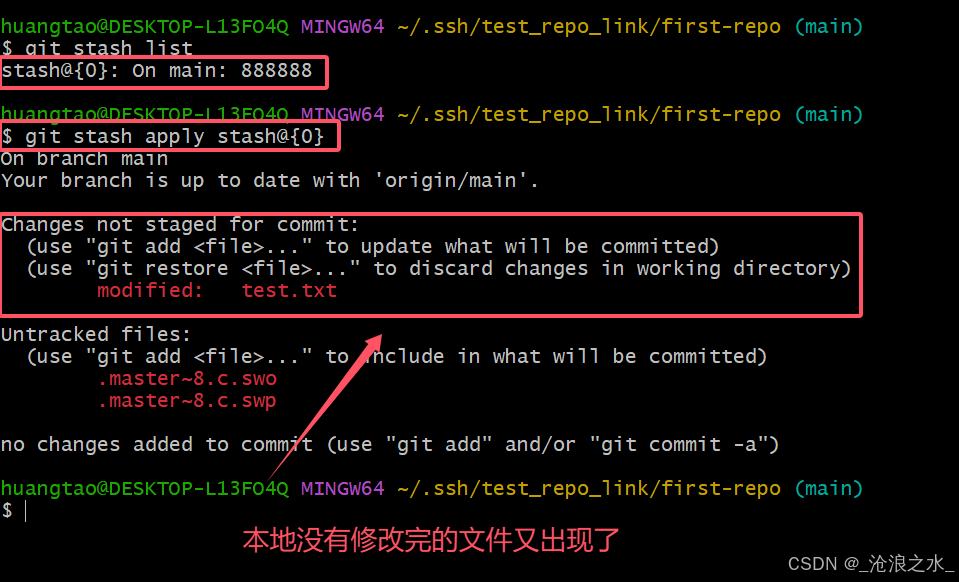
注:学习gerrit需要拥有git相关知识,如果没有学习过git请先回顾git相关知识点 黑马程序员git教程 一小时学会git git参考博客 git 实操博客 1.0 定义 Gerrit 是一个基于 Web 的代码审查系统,它使用 Git 作为底层版本控制系统。Gerrit 的主要功…...

docker如何安装redis
第一步 如果未指定redis,则安装的是最新版的 docker pull redis 创建一个目录 mkdir /usr/local/docker/redis 然后直接可以下载redis,这是方式确实不怎么好,应该找在官网上找对应的redis配置文件 wget http://download.redis.io/redis-stab…...

省级新质生产力数据(蔡湘杰版本)2012-2022年
测算方式:参考《当代经济管理》蔡湘杰(2024)老师研究的做法,本文以劳动者、劳动对象和劳动资料为准则层,从新质生产力“量的积累、质的提升、新的拓展”三维目标出发,构建新质生产力综合评价指标体系&#…...

【游资悟道】-作手新一悟道心法
作手新一经典语录节选: 乔帮主传完整版:做股票5年,炼成18式,成为A股低吸大神!从小白到大神,散户炒股的六个过程,不看不知道自己水平 围着主线做,多研究龙头,研究涨停&am…...
)
Diffusion中的Unet (DIMP)
针对UNet2DConditionModel模型 查看Unet的源码,得知Unet的down,mid,up blocks的类型分别是: down_block_types: Tuple[str] ("CrossAttnDownBlock2D","CrossAttnDownBlock2D","CrossAttnDownBlock2D","DownBlock2…...
”已有主体)
编译以前项目更改在x64下面时报错:函数“PVOID GetCurrentFiber(void)”已有主体
win32下面编译成功,但是x64报错 1>GetWord.c 1>md5.c 这两个文件无法编译 1>C:\Program Files (x86)\Windows Kits\10\Include\10.0.22000.0\um\winnt.h(24125,1): error C2084: 函数“PVOID GetCurrentFiber(void)”已有主体 1>C:\Program Files (x…...

【AIGC】大模型面试高频考点-数据清洗篇
【AIGC】大模型面试高频考点-数据清洗篇 (一)常用文本清洗方法1.去除无用的符号2.去除表情符号3.文本只保留汉字4.中文繁体、简体转换5.删除 HTML 标签和特殊字符6.标记化7.小写8.停用词删除9.词干提取和词形还原10.处理缺失数据11.删除重复文本12.处理嘈…...

当测试时间与测试资源有限时,你会如何优化测试策略?
1.优先级排序:根据项目的需求和紧急程度进行优先级排序,将测试用例用例划分优先级,合理安排测试资源 和时间。这样能够保障在有限的时间内测试到最关键的功能 2.提前介入测试:在开发过程中提前进行测试,可以迅速发现问…...

基于R语言森林生态系统结构、功能与稳定性分析与可视化
在生态学研究中,森林生态系统的结构、功能与稳定性是核心研究内容之一。这些方面不仅关系到森林动态变化和物种多样性,还直接影响森林提供的生态服务功能及其应对环境变化的能力。森林生态系统的结构主要包括物种组成、树种多样性、树木的空间分布与密度…...

如何使用 Python 实现插件式架构
使用 Python 实现插件式架构可以通过动态加载和调用模块或类,构建一个易于扩展和维护的系统。以下是实现插件式架构的步骤和核心思想。 1. 插件式架构核心概念 主程序:负责加载、管理插件,并调用插件的功能。插件:独立的模块或类…...

【北京迅为】iTOP-4412全能版使用手册-第二十章 搭建和测试NFS服务器
iTOP-4412全能版采用四核Cortex-A9,主频为1.4GHz-1.6GHz,配备S5M8767 电源管理,集成USB HUB,选用高品质板对板连接器稳定可靠,大厂生产,做工精良。接口一应俱全,开发更简单,搭载全网通4G、支持WIFI、蓝牙、…...

【纯原生js】原生实现h5落地页面中的单选组件按钮及功能
h5端的按钮系统自带的一般都很丑,需要我们进行二次美化,比如单选按钮复选框之类的,那怎么对其进行html和css的改造? 实现效果 实现代码 <section id"tags"><h2>给景区添加标题</h2><label><…...

深入浅出:开发者如何快速上手Web3生态系统
Web3作为互联网的未来发展方向,正在逐步改变传统互联网架构,推动去中心化技术的发展。对于开发者而言,Web3代表着一个充满机遇与挑战的新领域,学习和掌握Web3的基本技术和工具,将为未来的项目开发提供强大的支持。那么…...

通过深度点图表示的隐式场实现肺树结构的高效解剖标注文献速递-生成式模型与transformer在医学影像中的应用
Title 题目 Efficient anatomical labeling of pulmonary tree structures via deeppoint-graph representation-based implicit fields 通过深度点图表示的隐式场实现肺树结构的高效解剖标注 01 文献速递介绍 近年来,肺部疾病(Decramer等ÿ…...
RocketMQ延迟消息机制
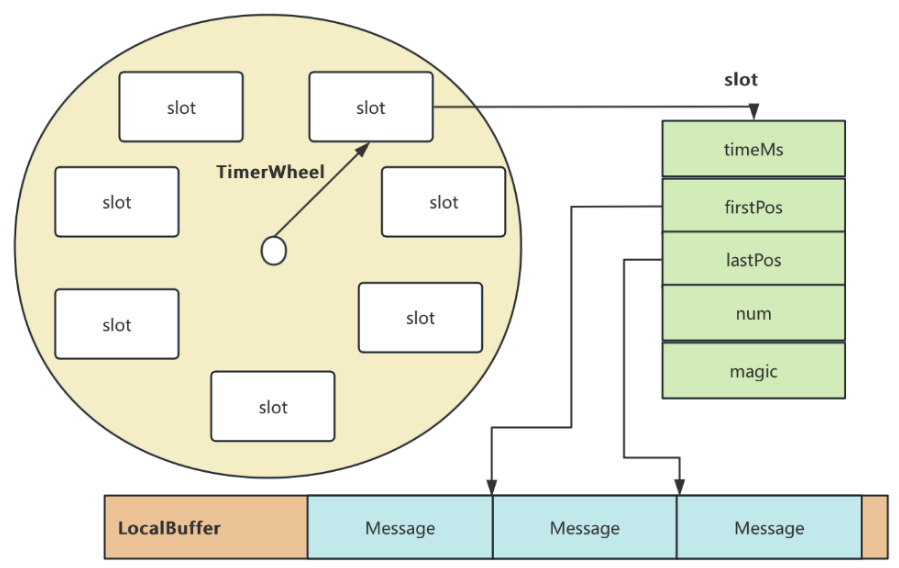
两种延迟消息 RocketMQ中提供了两种延迟消息机制 指定固定的延迟级别 通过在Message中设定一个MessageDelayLevel参数,对应18个预设的延迟级别指定时间点的延迟级别 通过在Message中设定一个DeliverTimeMS指定一个Long类型表示的具体时间点。到了时间点后…...
最新SpringBoot+SpringCloud+Nacos微服务框架分享
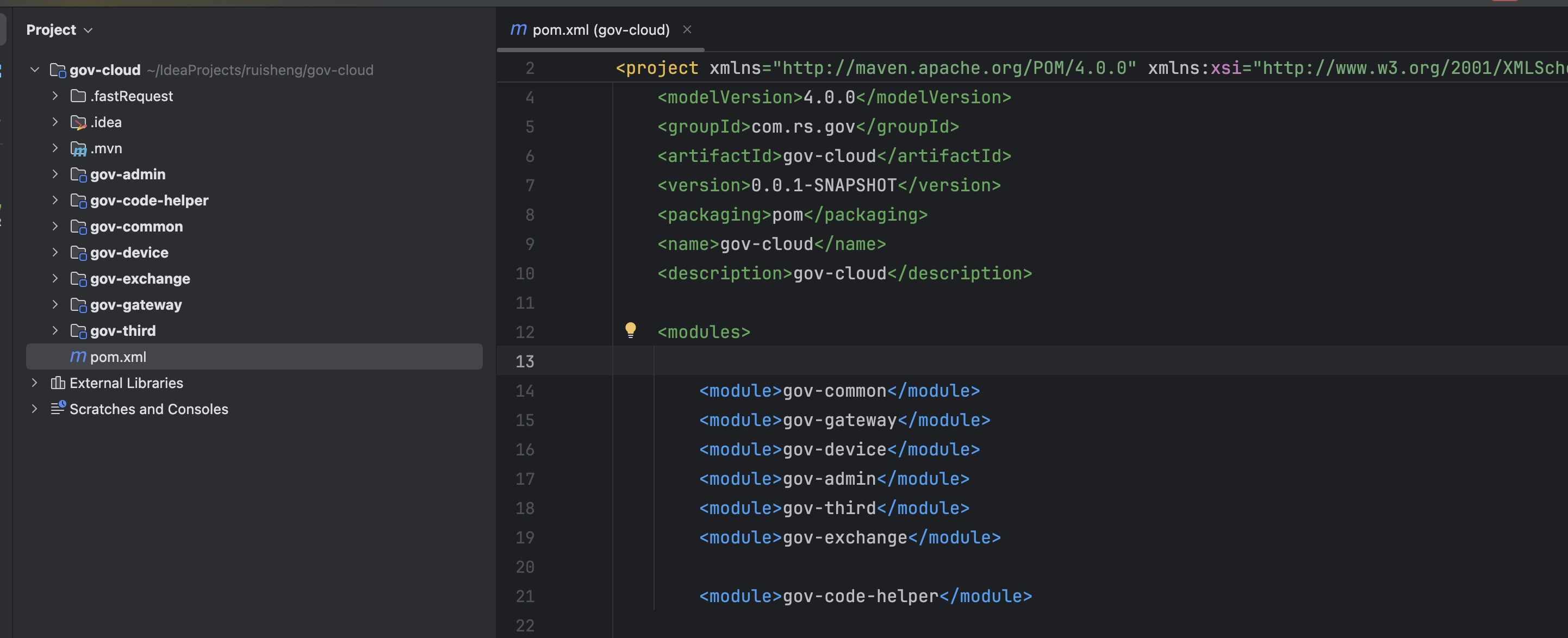
文章目录 前言一、服务规划二、架构核心1.cloud的pom2.gateway的异常handler3.gateway的filter4、admin的pom5、admin的登录核心 三、code-helper分享总结 前言 最近有个活蛮赶的,根据Excel列的需求预估的工时直接打骨折,不要问我为什么,主要…...

C++中string流知识详解和示例
一、概览与类体系 C 提供三种基于内存字符串的流,定义在 <sstream> 中: std::istringstream:输入流,从已有字符串中读取并解析。std::ostringstream:输出流,向内部缓冲区写入内容,最终取…...

Rust 异步编程
Rust 异步编程 引言 Rust 是一种系统编程语言,以其高性能、安全性以及零成本抽象而著称。在多核处理器成为主流的今天,异步编程成为了一种提高应用性能、优化资源利用的有效手段。本文将深入探讨 Rust 异步编程的核心概念、常用库以及最佳实践。 异步编程基础 什么是异步…...
c#开发AI模型对话
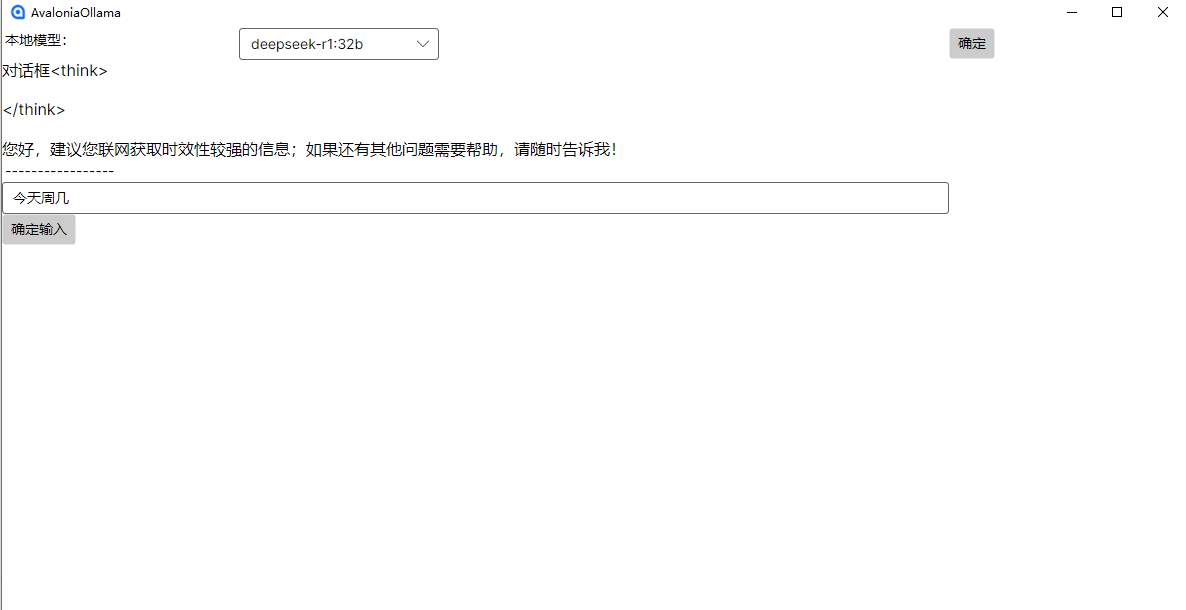
AI模型 前面已经介绍了一般AI模型本地部署,直接调用现成的模型数据。这里主要讲述讲接口集成到我们自己的程序中使用方式。 微软提供了ML.NET来开发和使用AI模型,但是目前国内可能使用不多,至少实践例子很少看见。开发训练模型就不介绍了&am…...

Java面试专项一-准备篇
一、企业简历筛选规则 一般企业的简历筛选流程:首先由HR先筛选一部分简历后,在将简历给到对应的项目负责人后再进行下一步的操作。 HR如何筛选简历 例如:Boss直聘(招聘方平台) 直接按照条件进行筛选 例如:…...

【碎碎念】宝可梦 Mesh GO : 基于MESH网络的口袋妖怪 宝可梦GO游戏自组网系统
目录 游戏说明《宝可梦 Mesh GO》 —— 局域宝可梦探索Pokmon GO 类游戏核心理念应用场景Mesh 特性 宝可梦玩法融合设计游戏构想要素1. 地图探索(基于物理空间 广播范围)2. 野生宝可梦生成与广播3. 对战系统4. 道具与通信5. 延伸玩法 安全性设计 技术选…...

视觉slam十四讲实践部分记录——ch2、ch3
ch2 一、使用g++编译.cpp为可执行文件并运行(P30) g++ helloSLAM.cpp ./a.out运行 二、使用cmake编译 mkdir build cd build cmake .. makeCMakeCache.txt 文件仍然指向旧的目录。这表明在源代码目录中可能还存在旧的 CMakeCache.txt 文件,或者在构建过程中仍然引用了旧的路…...

Mysql8 忘记密码重置,以及问题解决
1.使用免密登录 找到配置MySQL文件,我的文件路径是/etc/mysql/my.cnf,有的人的是/etc/mysql/mysql.cnf 在里最后加入 skip-grant-tables重启MySQL服务 service mysql restartShutting down MySQL… SUCCESS! Starting MySQL… SUCCESS! 重启成功 2.登…...

Git常用命令完全指南:从入门到精通
Git常用命令完全指南:从入门到精通 一、基础配置命令 1. 用户信息配置 # 设置全局用户名 git config --global user.name "你的名字"# 设置全局邮箱 git config --global user.email "你的邮箱example.com"# 查看所有配置 git config --list…...