
【纯原生js】原生实现h5落地页面中的单选组件按钮及功能
h5端的按钮系统自带的一般都很丑,需要我们进行二次美化,比如单选按钮复选框之类的,那怎么对其进行html和css的改造?
实现效果

实现代码
 <section id="tags"><h2>给景区添加标题</h2><label><input type="radio" name="tags" value="服务好" /><span>服务好</span></label><label><input type="radio" name="tags" value="景色赞" /><span>景色赞</span></label><label><input type="radio" name="tags" value="千篇一律" /><span>千篇一律</span></label><label><input type="radio" name="tags" value="看人海" /><span>看人海</span></label><label><input type="radio" name="tags" value="挤爆了" /><span>挤爆了</span></label><label><input type="radio" name="tags" value="服务还行" /><span>服务还行</span></label><label><input type="radio" name="tags" value="美食不错" /><span>美食不错</span></label><label><input type="radio" name="tags" value="距离近" /><span>距离近</span></label></section><p id="info" class="info">提示信息</p><input type="button" value="提交" id="btn" class="btn" />
</section>
- 业务代码
function fnIndex() {const oIndex = id('index')let bScore = falseconst oBtn = oIndex.getElementsByClassName('btn')[0]bind(oBtn, 'touchend', function () {fnIndexEnd()})function fnIndexEnd() {// removeClass(oIndex, 'pageShow')// alert('谢谢您的评价')const oInfo = id('info')bScore = fnScoreChecked()console.log('🚀 ~ fnIndexEnd ~ bScore:', bScore)if (bScore) {// fnInfo(oInfo, '感谢您的参与')if (bTag()) {// alert('谢谢您的参与')fadeIndexout()} else {fnInfo(oInfo, '给景区添加标签')}} else {fnInfo(oInfo, '请先对风景进行评价')// setTimeout(() => {//   removeClass(oIndex, 'pageShow')// }, 1000)}}function fnScoreChecked() {const oScore = id('score')const aInput = oScore.getElementsByTagName('input')let bS = truefor (let i = 0; i < aInput.length; i++) {if (aInput[i].value == 0) {return false}}return true}
}function bTag() {const oTags = id('tags')const aInput = oTags.getElementsByTagName('input')for (let i = 0; i < aInput.length; i++) {if (aInput[i].checked) {return true}}return false
}function fadeIndexout() {const oMask = id('mask')const oIndex = id('index')addClass(oMask, 'pageShow')setTimeout(() => {oMask.style.opacity = 1oIndex.style.WebFilter = oIndex.style.filter = `blur(4px)`}, 100)
}
- css美化
* {padding: 0;margin: 0;
}
html,
body {height: 100%;font-family: Arial, '微软雅黑', sans-serif;
}
.page {height: 100%;background-color: #fff;position: absolute;left: 0;top: 0;width: 100%;font-size: 26px;z-index: 1;display: none;
}ul li {list-style: none;
}
h2,
h1,
strong {font-weight: normal;
}a,
input {-webkit-tap-highlight-color: rgba(0, 0, 0, 0);
}img {border: none;vertical-align: top;width: 100%;
}
.pageShow {display: block;
}.page:nth-of-type(1) {z-index: 10;
}
.page:nth-of-type(1) {z-index: 9;
}
.page:nth-of-type(1) {z-index: 8;
}
.page:nth-of-type(1) {z-index: 7;
}
.page:nth-of-type(1) {z-index: 6;
}/* 欢迎页面 */
@keyframes tree {100% {transform: translateY(0px);opacity: 1;}
}@keyframes shake {0% {transform: rotate(0deg);}20% {transform: rotate(30deg);}40% {transform: rotate(-20deg);}60% {transform: rotate(15deg);}80% {transform: rotate(-8deg);}100% {transform: rotate(0deg);}
}
.tree {position: absolute;left: 0;top: 10%;width: 100%;opacity: 0;transform: translateY(100px);animation: tree 1s linear 0.25s forwards;
}
#logo {position: absolute;left: 0;bottom: 5%;text-align: center;width: 100%;opacity: 0;transform: translateY(30px);animation: tree 1s linear 0.25s forwards;
}#welcome {transition: all 1s;
}.welcome2 {position: relative;padding-top: 50px;opacity: 0;transform: translateY(30px);animation: tree 1s linear 1s forwards;
}
.welcome2 .shake {width: 24px;position: absolute;left: 300px;top: 30px;height: 24px;background: url('../img/shake.png') no-repeat 0 0;background-size: 100%;animation: shake 0.5s linear infinite;
}@keyframes cloud {0% {transform: translateX(0px);}100% {transform: translateX(-20px);}
}.tree3 {padding-top: 20px;opacity: 0;transform: translateY(30px);animation: tree 1s linear 2s forwards;
}
.cloud {position: absolute;background: url('../img/cloud.png') no-repeat 0 0;background-size: contain;
}
.cloud:nth-of-type(1) {left: 280px;top: 15px;width: 59px;height: 44px;animation: cloud 2s linear infinite alternate-reverse;
}
.cloud:nth-of-type(2) {left: 30px;top: 77px;width: 45px;height: 70px;animation: cloud 2s linear 1s infinite alternate-reverse;
}
.cloud:nth-of-type(3) {left: 200px;top: 80px;width: 45px;height: 70px;animation: cloud 2s linear 1.5s infinite alternate-reverse;
}/* 首页 */
#tabPic {overflow: hidden;position: relative;
}
#picList {overflow: hidden;width: 500%;transition: all 0.5s;
}
#picList li {float: left;width: 20%;
}
#picList img {width: 100%;height: 200px;
}
.picMask {height: 40px;position: absolute;left: 0;bottom: 0;width: 100%;background: -webkit-linear-gradient(bottom,rgba(0, 0, 0, 0.1),rgba(0, 0, 0));background: linear-gradient(bottom, rgba(0, 0, 0, 0.1), rgba(0, 0, 0));padding: 0 15px;
}
.picMask p {color: #fff;font-size: 14px;line-height: 40px;margin-right: 100px;
}.picMask nav {height: 10px;position: absolute;right: 40px;top: 18px;
}
.picMask nav a {float: left;width: 10px;height: 10px;border-radius: 50%;background: rgba(0, 0, 0, 0.5);margin-right: 5px;
}
.picMask nav a.active {background-color: #fff;
}#score {line-height: 40px;padding: 10px;
}#score h2 {font-size: 20px;color: #333;
}#score li {height: 40px;position: relative;
}#score li span {font-size: 18px;color: #333;
}#score li strong {float: right;margin-right: 20px;font-size: 12px;color: #333;
}#score li nav {position: absolute;left: 130px;top: 10px;height: 30px;/* width:120px; */
}
#score li nav a {float: left;width: 20px;height: 20px;background: url('../img/star.png') no-repeat -22px 0;background-size: cover;margin-right: 10px;transition: all 0.2s;
}
#score li nav a.active {background-position: 0 0;
}#tags {padding: 10px;overflow: hidden;
}#tags h2 {font-size: 20px;color: #333;
}#tags input {width: 10px;height: 10px;margin-right: 5px;
}
#tags label {float: left;line-height: 34px;font-size: 18px;margin: 5px 14px 5px 3px;
}
#tags label input {display: none;
}
#tags label span {float: left;border: 1px solid #cdd6e1;padding: 0 16px;border-radius: 30px;
}#tags input:checked + span {border-color: #333;background-color: #3c9bb3;color: #fff;
}.btn {position: absolute;bottom: 10px;left: 10px;right: 10px;height: 40px;appearance: none;outline: none;border: none;font-size: 18px;font-weight: 400;border-radius: 10px;
}
.submit {background: #3c9bbb;color: #fff;
}
.info {font-size: 14px;position: absolute;text-align: center;width: 100%;bottom: 50px;transform-origin: bottom center;transform: scale(0.1);opacity: 0;transition: all 0.3s ease-out;
}/* #index:active .info {transform: scale(1);opacity: 1;
} */#mask {background: rgba(0, 0, 0, 0.7) url('../img/mask.png') no-repeat center 200px /200px;transition: 1s;z-index: 2;opacity: 0;
}
相关文章:
【纯原生js】原生实现h5落地页面中的单选组件按钮及功能
h5端的按钮系统自带的一般都很丑,需要我们进行二次美化,比如单选按钮复选框之类的,那怎么对其进行html和css的改造? 实现效果 实现代码 <section id"tags"><h2>给景区添加标题</h2><label><…...

深入浅出:开发者如何快速上手Web3生态系统
Web3作为互联网的未来发展方向,正在逐步改变传统互联网架构,推动去中心化技术的发展。对于开发者而言,Web3代表着一个充满机遇与挑战的新领域,学习和掌握Web3的基本技术和工具,将为未来的项目开发提供强大的支持。那么…...

通过深度点图表示的隐式场实现肺树结构的高效解剖标注文献速递-生成式模型与transformer在医学影像中的应用
Title 题目 Efficient anatomical labeling of pulmonary tree structures via deeppoint-graph representation-based implicit fields 通过深度点图表示的隐式场实现肺树结构的高效解剖标注 01 文献速递介绍 近年来,肺部疾病(Decramer等ÿ…...

数据结构 (17)广义表
前言 数据结构中的广义表(Generalized List,又称列表Lists)是一种重要的数据结构,它是对线性表的一种推广,放松了对表元素的原子限制,容许它们具有其自身的结构。 一、定义与表示 定义:广义表是…...

论文笔记 SliceGPT: Compress Large Language Models By Deleting Rows And Columns
欲买桂花同载酒,终不似,少年游。 数学知识 秩: 矩阵中最大线性无关的行/列向量数。行秩与列秩相等。 线性无关:对于N个向量而言,如果任取一个向量 v \textbf{v} v,不能被剩下的N-1个向量通过线性组合的方式…...

前端工具的选择和安装
选择和安装前端工具是前端开发过程中的重要步骤。现代前端开发需要一些工具来提高效率和协作能力。以下是一些常用的前端工具及其选择和安装指南。 1. 代码编辑器 选择一个好的代码编辑器可以显著提高开发效率。以下是几款流行的代码编辑器: Visual Studio Code (…...

Fantasy中定时器得驱动原理
一、服务器框架启动 public static async FTask Start(){// 启动ProcessStartProcess().Coroutine();await FTask.CompletedTask;while (true){ThreadScheduler.Update();Thread.Sleep(1);}} 二、主线程 Fantasy.ThreadScheduler.Update internal static void Update(){MainS…...

【反转链表】力扣 445. 两数相加 II
一、题目 二、思路 加法运算是从低位开始,向高位进位,因此需要将两个链表进行反转,再进行对齐后的相加操作。力扣 2. 两数相加 三、题解 /*** Definition for singly-linked list.* public class ListNode {* int val;* ListNode …...

SpringBoot 项目中使用 spring-boot-starter-amqp 依赖实现 RabbitMQ
文章目录 前言1、application.yml2、RabbitMqConfig3、MqMessage4、MqMessageItem5、DirectMode6、StateConsumer:消费者7、InfoConsumer:消费者 前言 本文是工作之余的随手记,记录在工作期间使用 RabbitMQ 的笔记。 1、application.yml 使…...

Uniapp 安装安卓、IOS模拟器并调试
一、安装Android模拟器并调试 1. 下载并安装 Android Studio 首先下载 Mac 环境下的 Android Studio 的安装包,为dmg 格式。 下载完将Android Studio 向右拖拽到Applications中,接下来等待安装完成就OK啦! 打开过程界面如下图所示…...

JavaScript 中的原型和原型链
JavaScript 中的原型和原型链也是一个相对较难理解透彻的知识点,下面结合详细例子来进行说明: 一、原型的概念 在 JavaScript 中,每个函数都有一个 prototype 属性,这个属性指向一个对象,这个对象就是所谓的 “原型对…...

数组变换(两倍)
数组变换 以最大元素为基准元素,判读其他元素能否通过 x 2 成为最大值! 那么怎么判断呢: max % arr[i] 0arr[i] * 2 ^n max int x 2 ^ n max / arr[i] 3.只需判断 这个 x 是不是 2 的 n 次放就可以了! 判断 是否为 2 的 n 次 …...

GBN协议、SR协议
1、回退N步(Go-Back-N,GBN)协议: 总结: GBN协议的特点: (1)累计确认机制:当发送方收到ACKn时,表明接收方已正确接收序号为n以及序号小于n的所有分组,发送窗…...

三维扫描检测仪3d扫描测量尺寸-自动蓝光测量
在现代工业及生产过程中,精确、高效的尺寸检测是保证产品质量、提升生产效率的关键因素。 红、蓝光测量,以其高精度、高效率和非接触式的特点,在工业及生产中发挥着越来越重要的作用。蓝光测量技术利用蓝色激光光源,通过扫描被测…...

大模型翻译能力评测
1. 背景介绍 随着自然语言处理技术的飞速发展,机器翻译已经成为一个重要的研究领域。近年来,基于大模型的语言模型在机器翻译任务上取得了显著的进展。这些大模型通常具有数亿甚至数千亿的参数,能够更好地理解和生成自然语言。 但是…...

MySQL隐式转换造成索引失效
一、什么是 MySQL 的隐式转换? MySQL 在执行查询语句时,有时候会自动帮我们进行数据类型的转换,这个过程就是隐式转换。比如说,我们在一个 INT 类型的字段上进行查询,但是传入的查询条件却是字符串类型的值,…...

SuperMap Objects组件式GIS开发技术浅析
引言 随着GIS应用领域的扩展,GIS开发工作日显重要。一般地,从平台和模式上划分,GIS二次开发主要有三种实现方式:独立开发、单纯二次开发和集成二次开发。上述的GIS应用开发方式各有利弊,其中集成二次开发既可以充分利…...

多组数输入a+b:JAVA
链接:登录—专业IT笔试面试备考平台_牛客网 来源:牛客网 输入描述: 输入包含多组数据,每组数据输入一行,包含两个整数 输出描述: 对于每组数据输出一行包含一个整数表示两个整数的和 代码: import java.util.Scanner; pu…...

R语言结构方程模型(SEM)在生态学领域中的应用
目录 专题一、R/Rstudio简介及入门 专题二、结构方程模型(SEM)介绍 专题三:R语言SEM分析入门:lavaan VS piecewiseSEM 专题四:SEM全局估计(lavaan)在生态学领域高阶应用 专题五࿱…...

架构-微服务-服务调用Dubbo
文章目录 前言一、Dubbo介绍1. 什么是Dubbo 二、实现1. 提供统一业务api2. 提供服务提供者3. 提供服务消费者 前言 服务调用方案--Dubbo 基于 Java 的高性能 RPC分布式服务框架,致力于提供高性能和透明化的 RPC远程服务调用方案,以及SOA服务治理方案。…...
)
浏览器访问 AWS ECS 上部署的 Docker 容器(监听 80 端口)
✅ 一、ECS 服务配置 Dockerfile 确保监听 80 端口 EXPOSE 80 CMD ["nginx", "-g", "daemon off;"]或 EXPOSE 80 CMD ["python3", "-m", "http.server", "80"]任务定义(Task Definition&…...

Python爬虫实战:研究MechanicalSoup库相关技术
一、MechanicalSoup 库概述 1.1 库简介 MechanicalSoup 是一个 Python 库,专为自动化交互网站而设计。它结合了 requests 的 HTTP 请求能力和 BeautifulSoup 的 HTML 解析能力,提供了直观的 API,让我们可以像人类用户一样浏览网页、填写表单和提交请求。 1.2 主要功能特点…...

<6>-MySQL表的增删查改
目录 一,create(创建表) 二,retrieve(查询表) 1,select列 2,where条件 三,update(更新表) 四,delete(删除表…...
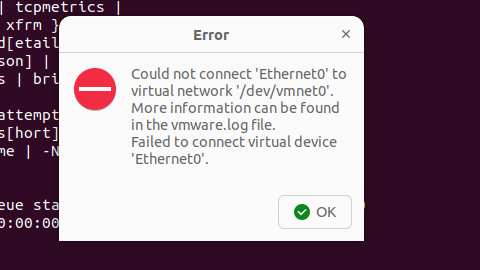
解决Ubuntu22.04 VMware失败的问题 ubuntu入门之二十八
现象1 打开VMware失败 Ubuntu升级之后打开VMware上报需要安装vmmon和vmnet,点击确认后如下提示 最终上报fail 解决方法 内核升级导致,需要在新内核下重新下载编译安装 查看版本 $ vmware -v VMware Workstation 17.5.1 build-23298084$ lsb_release…...

VTK如何让部分单位不可见
最近遇到一个需求,需要让一个vtkDataSet中的部分单元不可见,查阅了一些资料大概有以下几种方式 1.通过颜色映射表来进行,是最正规的做法 vtkNew<vtkLookupTable> lut; //值为0不显示,主要是最后一个参数,透明度…...

C# SqlSugar:依赖注入与仓储模式实践
C# SqlSugar:依赖注入与仓储模式实践 在 C# 的应用开发中,数据库操作是必不可少的环节。为了让数据访问层更加简洁、高效且易于维护,许多开发者会选择成熟的 ORM(对象关系映射)框架,SqlSugar 就是其中备受…...

学习一下用鸿蒙DevEco Studio HarmonyOS5实现百度地图
在鸿蒙(HarmonyOS5)中集成百度地图,可以通过以下步骤和技术方案实现。结合鸿蒙的分布式能力和百度地图的API,可以构建跨设备的定位、导航和地图展示功能。 1. 鸿蒙环境准备 开发工具:下载安装 De…...
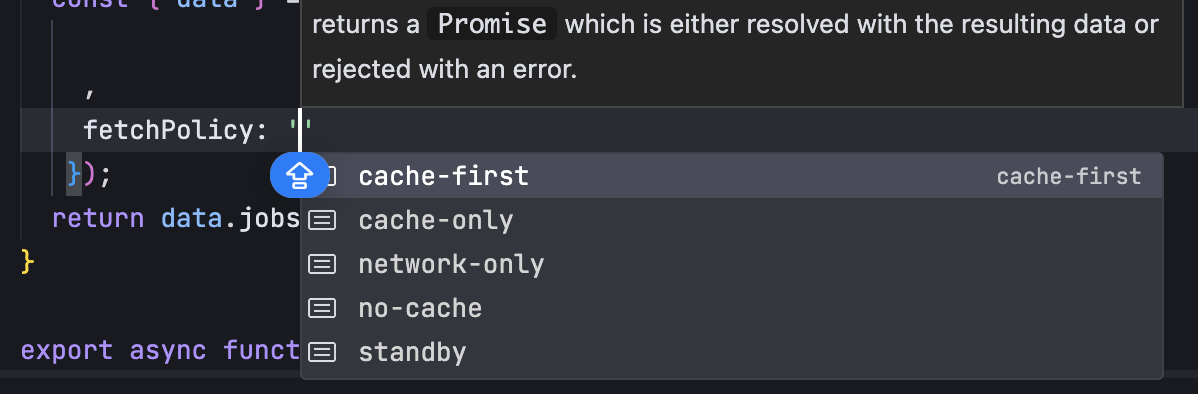
GraphQL 实战篇:Apollo Client 配置与缓存
GraphQL 实战篇:Apollo Client 配置与缓存 上一篇:GraphQL 入门篇:基础查询语法 依旧和上一篇的笔记一样,主实操,没啥过多的细节讲解,代码具体在: https://github.com/GoldenaArcher/graphql…...

【WebSocket】SpringBoot项目中使用WebSocket
1. 导入坐标 如果springboot父工程没有加入websocket的起步依赖,添加它的坐标的时候需要带上版本号。 <dependency><groupId>org.springframework.boot</groupId><artifactId>spring-boot-starter-websocket</artifactId> </dep…...
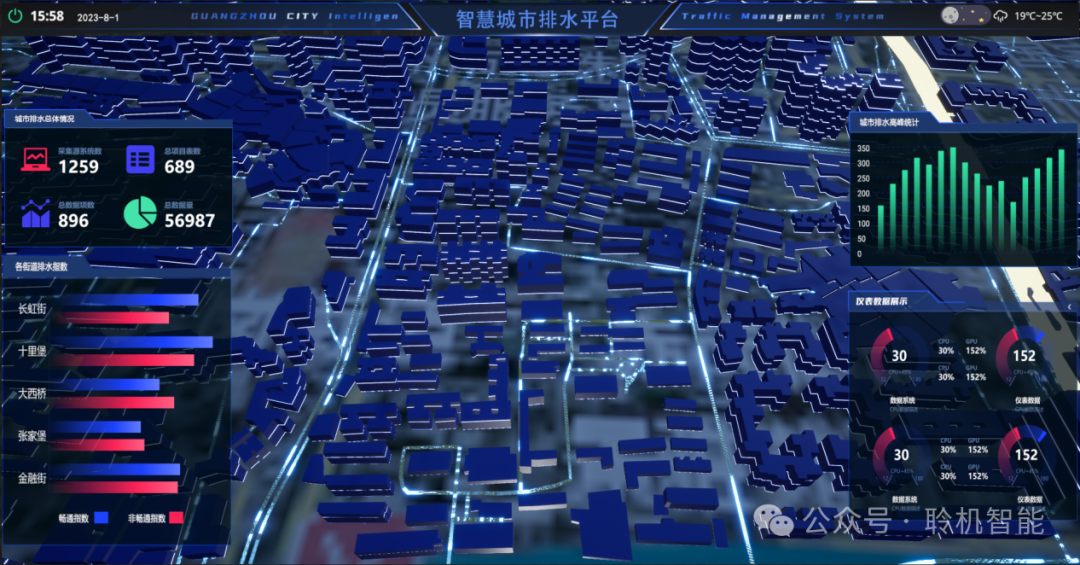
从零开始了解数据采集(二十八)——制造业数字孪生
近年来,我国的工业领域正经历一场前所未有的数字化变革,从“双碳目标”到工业互联网平台的推广,国家政策和市场需求共同推动了制造业的升级。在这场变革中,数字孪生技术成为备受关注的关键工具,它不仅让企业“看见”设…...