
Spring-Cloud-Gateway-Samples,nacos为注册中心,负载均衡
背景:本想找个简单例子看下,无奈版本依赖太过复杂,花了点时间。记录下吧
使用Spring Cloud Gateway作为网关服务,Nacos作为注册中心,实现对子服务的负载均衡访问。简单例子。
一、gateway-main-nacos服务端:
完整pom文件:
<project xmlns="http://maven.apache.org/POM/4.0.0"xmlns:xsi="http://www.w3.org/2001/XMLSchema-instance"xsi:schemaLocation="http://maven.apache.org/POM/4.0.0 http://maven.apache.org/xsd/maven-4.0.0.xsd"><modelVersion>4.0.0</modelVersion><groupId>com.example</groupId><artifactId>gateway-main-nacos</artifactId><version>1.0.0</version><parent><groupId>org.springframework.boot</groupId><artifactId>spring-boot-starter-parent</artifactId><version>2.5.4</version><relativePath/> <!-- lookup parent from repository --></parent><dependencies><!-- Spring Cloud Gateway --><dependency><groupId>org.springframework.cloud</groupId><artifactId>spring-cloud-starter-gateway</artifactId></dependency><!-- Nacos Discovery --><dependency><groupId>com.alibaba.cloud</groupId><artifactId>spring-cloud-starter-alibaba-nacos-discovery</artifactId><version>2021.1</version></dependency><!-- Nacos Config --><dependency><groupId>com.alibaba.cloud</groupId><artifactId>spring-cloud-starter-alibaba-nacos-config</artifactId><version>2021.1</version></dependency><!-- Spring Boot Starter Web --><dependency><groupId>org.springframework.boot</groupId><artifactId>spring-boot-starter-web</artifactId></dependency><dependency><groupId>org.springframework.cloud</groupId><artifactId>spring-cloud-starter-loadbalancer</artifactId></dependency></dependencies><dependencyManagement><dependencies><dependency><groupId>org.springframework.cloud</groupId><artifactId>spring-cloud-dependencies</artifactId><version>2020.0.3</version><type>pom</type><scope>import</scope></dependency></dependencies></dependencyManagement>
</project>
完整的yml配置文件:
server:port: 8888
spring:application:name: gateway-servicemain:web-application-type: reactivecloud:nacos:discovery:server-addr: localhost:8848 # Nacos 服务器地址namespace:  namespace_xxxconfig:server-addr: localhost:8848 # Nacos 配置中心地址file-extension: yamlgateway:discovery:locator:enabled: trueroutes:- id: neo_routeuri: http://www.ityouknow.compredicates:- Path=/spring-cloud
#     - id: add_request_parameter_route
#       uri: http://localhost:8889
#       filters:
#       - AddRequestParameter=foo, bar
#       predicates:
#         - Method=GET- id: lb_nacosuri: lb://user-service  #会进行服务负载均衡filters:- AddRequestParameter=foo, bar123predicates:- Path=/user/** # 匹配 /user/** 路径的请求- id: lb_nacos01uri: lb://user-servicefilters:- StripPrefix=1 # 去掉前缀 /user01predicates:- Path=/user01/** # 匹配 /user01/** 路径的请求
GatewayApplication启动类:
package com.neo;import org.springframework.boot.SpringApplication;
import org.springframework.boot.autoconfigure.SpringBootApplication;
import org.springframework.cloud.client.discovery.EnableDiscoveryClient;@SpringBootApplication
@EnableDiscoveryClient
public class GatewayApplication {public static void main(String[] args) {SpringApplication.run(GatewayApplication.class, args);}
}
二、 路由的子服务(可以发布两个服务,达到负载均衡的效果)
完整pom文件:
<project xmlns="http://maven.apache.org/POM/4.0.0"xmlns:xsi="http://www.w3.org/2001/XMLSchema-instance"xsi:schemaLocation="http://maven.apache.org/POM/4.0.0 http://maven.apache.org/xsd/maven-4.0.0.xsd"><modelVersion>4.0.0</modelVersion><groupId>com.example</groupId><artifactId>user-service</artifactId><version>1.0.0</version><parent><groupId>org.springframework.boot</groupId><artifactId>spring-boot-starter-parent</artifactId><version>2.5.4</version><relativePath/> <!-- lookup parent from repository --></parent><dependencies><!-- Spring Boot Starter Web --><dependency><groupId>org.springframework.boot</groupId><artifactId>spring-boot-starter-web</artifactId></dependency><!-- Nacos Discovery --><dependency><groupId>com.alibaba.cloud</groupId><artifactId>spring-cloud-starter-alibaba-nacos-discovery</artifactId><version>2021.1</version></dependency><dependency><groupId>org.springframework.cloud</groupId><artifactId>spring-cloud-starter-bootstrap</artifactId></dependency><dependency><groupId>org.springframework.cloud</groupId><artifactId>spring-cloud-starter-loadbalancer</artifactId></dependency></dependencies><dependencyManagement><dependencies><dependency><groupId>org.springframework.cloud</groupId><artifactId>spring-cloud-dependencies</artifactId><version>2020.0.3</version><type>pom</type><scope>import</scope></dependency></dependencies></dependencyManagement>
</project>
完整的yml文件:
server:port: 8889spring:application:name: user-service#main:# web-application-type: reactivecloud:gateway:discovery:locator:enabled: truenacos:discovery:server-addr: localhost:8848 # Nacos 服务器地址namespace: namespace_xxx #nacos命名空间,修改为自己定义的config:server-addr: localhost:8848 # Nacos 配置中心地址namespace: namespace_xxxfile-extension: yaml子服务启动类:
import org.springframework.boot.SpringApplication;
import org.springframework.boot.autoconfigure.SpringBootApplication;
import org.springframework.cloud.client.discovery.EnableDiscoveryClient;
import org.springframework.web.bind.annotation.GetMapping;
import org.springframework.web.bind.annotation.RestController;@SpringBootApplication
@EnableDiscoveryClient
public class UserServiceApplication {public static void main(String[] args) {SpringApplication.run(UserServiceApplication.class, args);}
}
对应测试的Controller类:
@RestController
public class HelloController {@GetMapping("/hello")public String index() {return "hello world!";}@GetMapping("/user/hello")public String indexUser() {return "hello world user!";}@RequestMapping("/user/foo")public String foo(String foo) {return "hello "+foo+"!";}}三、测试
本地启动gateway-main-nacos、user-service、user-service-1。 访问 http://localhost:8888/user/hello,多次访问发现会返回 hello world user! 或者 hello world user,another!。达到负载均衡的效果。
访问这个地址也可以看到同样的效果, http://localhost:8888/user01/hello
两个url不同的路由匹配规则。
四、遇到的问题:
1.#允许bean Service循环依赖
spring.main.allow-circular-references=true
2.#Spring MVC found on classpath, which is incompatible with Spring Cloud Gateway.
#同时使用Spring MVC和Spring Cloud Gateway
spring.main.web-application-type=reactive
3.SpringCloud-Gateway搭配服务注册Nacos进行lb动态路由遇到的问题
高版本的spring-cloud-alibaba-dependencies依赖中去除了ribbon依赖,若想能通过Gateway网关找到对应的微服务,需要引入loadbalancer依赖。
<dependency>
<groupId>org.springframework.cloud</groupId>
<artifactId>spring-cloud-starter-loadbalancer</artifactId>
</dependency>
参考的文档:http://www.ityouknow.com/springcloud/2019/01/19/spring-cloud-gateway-service.html
源码地址:https://github.com/tracysw/Spring-Cloud-Gateway-Samples
相关文章:

Spring-Cloud-Gateway-Samples,nacos为注册中心,负载均衡
背景:本想找个简单例子看下,无奈版本依赖太过复杂,花了点时间。记录下吧 使用Spring Cloud Gateway作为网关服务,Nacos作为注册中心,实现对子服务的负载均衡访问。简单例子。 一、gateway-main-nacos服务端ÿ…...

StarRocks Awards 2024 年度贡献人物
在过去一年,StarRocks 在 Lakehouse 与 AI 等关键领域取得了显著进步,其卓越的产品功能极大地简化和提升了数据分析的效率,使得"One Data,All Analytics" 的愿景变得更加触手可及。 虽然实现这一目标的道路充满挑战且漫…...
Autoencoder(李宏毅)机器学习 2023 Spring HW8 (Boss Baseline)
1. Autoencoder 简介 Autoencoder是一种用于学习数据高效压缩表示的人工神经网络。它由两个主要部分组成: Encoder 编码器将输入数据映射到一个更小的、低维空间中的压缩表示,这个空间通常称为latent space或bottleneck。 这一过程可以看作是数据压缩,去除冗余信息,仅保留…...

深入探索 ScottPlot.WPF:在 Windows 桌面应用中绘制精美图表的利器
一、ScottPlot.WPF 简介 ScottPlot.WPF 是基于 ScottPlot 绘图库专门为 Windows Presentation Foundation (WPF) 框架量身定制的强大绘图组件。它无缝集成到 WPF 应用程序中,为开发者提供了一种简洁、高效的方式来可视化数据,无论是科学研究中的实验数据展示、金融领域的行情…...

React中的useMemo 和 useEffect 哪个先执行?
在 React 组件的渲染过程中,useMemo 和 useEffect 的执行顺序是不同的。具体来说: useMemo 先执行:useMemo 是在 渲染阶段 执行的,它的作用是缓存计算结果,确保在渲染过程中可以直接使用缓存的值。 useEffect 后执行&…...
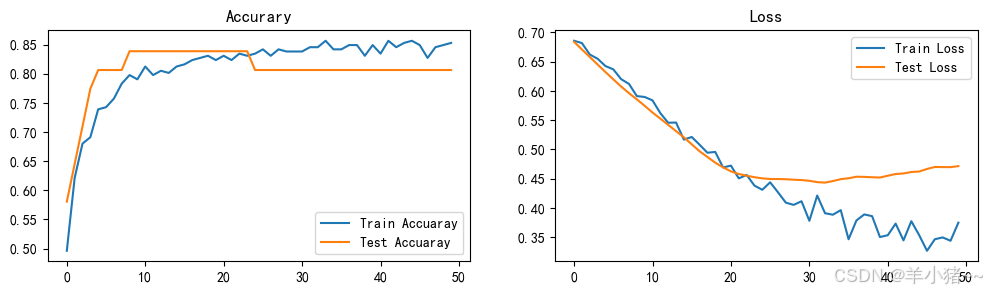
错误修改系列---基于RNN模型的心脏病预测(pytorch实现)
前言 前几天发布了pytorch实现,TensorFlow实现为:基于RNN模型的心脏病预测(tensorflow实现),但是一处繁琐地方 一处错误,这篇文章进行修改,修改效果还是好了不少;源文章为:基于RNN模型的心脏病…...
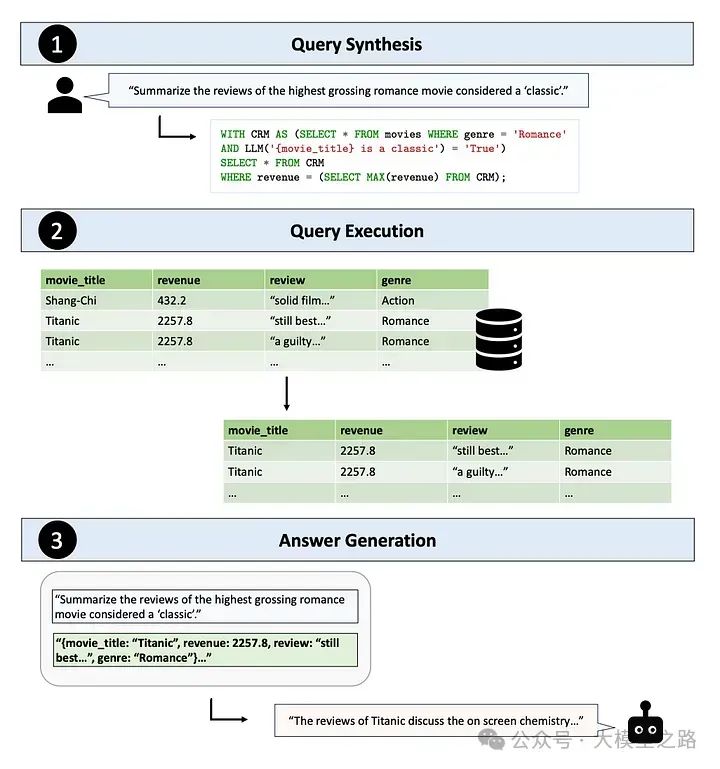
Table-Augmented Generation(TAG):Text2SQL与RAG的升级与超越
当下AI与数据库的融合已成为推动数据管理和分析领域发展的重要力量。传统的数据库查询方式,如结构化查询语言(SQL),要求用户具备专业的数据库知识,这无疑限制了非专业人士对数据的访问和利用。为了打破这一壁垒&#x…...
)
Stable Diffusion本地部署教程(附安装包)
想使用Stable Diffusion需要的环境有哪些呢? python3.10.11(至少也得3.10.6以上):依赖python环境NVIDIA:GPUgit:从github上下载包(可选,由于我已提供安装包,你可以不用git)Stable Diffusion安装包工具包: NVIDIA:https://developer.nvidia.com/cuda-toolkit-archiv…...
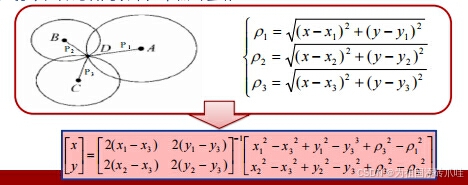
【物联网原理与运用】知识点总结(上)
目录 名词解释汇总 第一章 物联网概述 1.1物联网的基本概念及演进 1.2 物联网的内涵 1.3 物联网的特性——泛在性 1.4 物联网的基本特征与属性(五大功能域) 1.5 物联网的体系结构 1.6 物联网的关键技术 1.7 物联网的应用领域 第二章 感知与识别技术 2.1 …...

JuiceFS 2024:开源与商业并进,迈向 AI 原生时代
即将过去的 2024 年,是 JuiceFS 开源版本推出的第 4 年,企业版的第 8 个年头。回顾过去这一年,JuiceFS 社区版依旧保持着快速成长的势头,GitHub 星标突破 11.1K,各项使用指标增长均超过 100%,其中文件系统总…...

C#,动态规划问题中基于单词搜索树(Trie Tree)的单词断句分词( Word Breaker)算法与源代码
1 分词 分词是自然语言处理的基础,分词准确度直接决定了后面的词性标注、句法分析、词向量以及文本分析的质量。英文语句使用空格将单词进行分隔,除了某些特定词,如how many,New York等外,大部分情况下不需要考虑分词…...
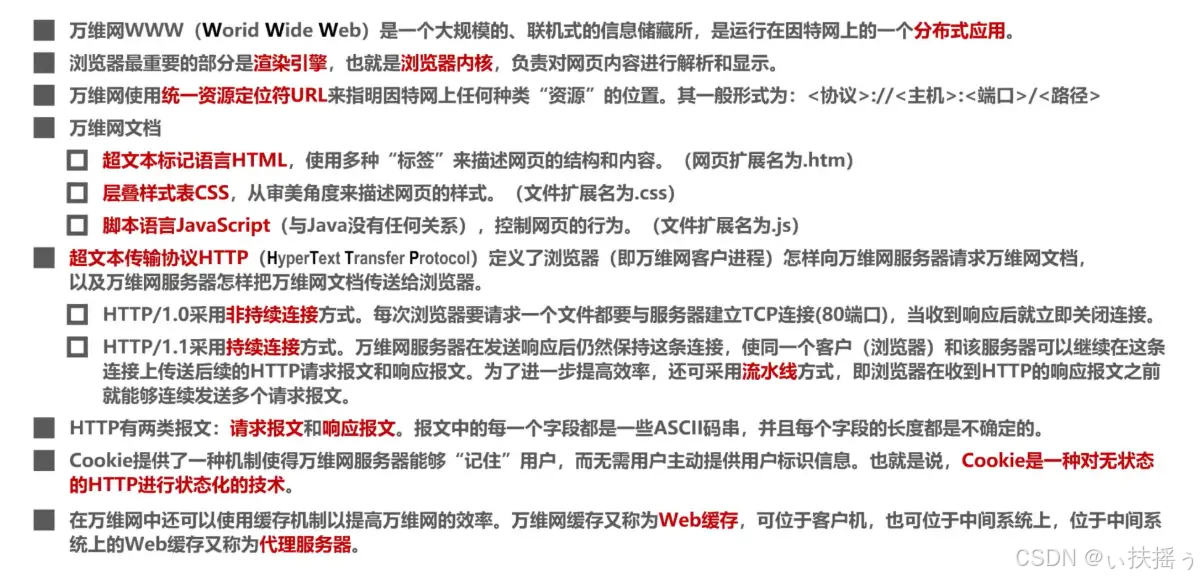
计算机网络(六)应用层
6.1、应用层概述 我们在浏览器的地址中输入某个网站的域名后,就可以访问该网站的内容,这个就是万维网WWW应用,其相关的应用层协议为超文本传送协议HTTP 用户在浏览器地址栏中输入的是“见名知意”的域名,而TCP/IP的网际层使用IP地…...

上海亚商投顾:沪指探底回升微涨 机器人概念股午后爆发
上海亚商投顾前言:无惧大盘涨跌,解密龙虎榜资金,跟踪一线游资和机构资金动向,识别短期热点和强势个股。 一.市场情绪 市场全天探底回升,沪指盘中跌超1.6%,创业板指一度跌逾3%,午后集体拉升翻红…...

conda相关操作
conda 是一个开源的包管理和环境管理工具,主要用于 Python 和数据科学领域。它可以帮助用户安装、更新、删除和管理软件包,同时支持创建和管理虚拟环境。以下是关于 conda 的所有常见操作: 1. 安装 Conda Conda 通常通过安装 Anaconda 或 Mi…...
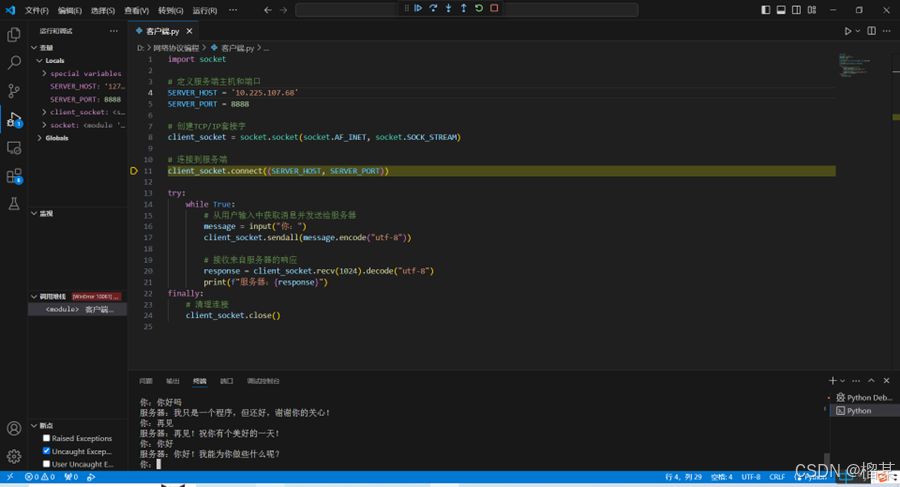
使用TCP协议实现智能聊天机器人
实验目的与要求 本实验是程序设计类实验,要求使用原始套接字编程,掌握TCP/IP协议与网络编程Sockets通信模型,并根据教师给定的任务要求,使用TCP协议实现智能聊天机器人。 (1)熟悉标准库socket 的用法。 …...

PHP二维数组去除重复值
Date: 2025.01.07 20:45:01 author: lijianzhan PHP二维数组内根据ID或者名称去除重复值 代码示例如下: // 假设 data数组如下 $data [[id > 1, name > Type A],[id > 2, name > Type B],[id > 1, name > Type A] // 重复项 ];// 去重方法 $dat…...

2025年01月11日Github流行趋势
项目名称:xiaozhi-esp32 项目地址url:https://github.com/78/xiaozhi-esp32项目语言:C历史star数:2433今日star数:321项目维护者:78, MakerM0, whble, nooodles2023, Kevincoooool项目简介:构建…...
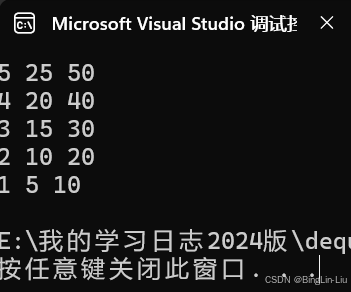
备战蓝桥杯 队列和queue详解
目录 队列的概念 队列的静态实现 总代码 stl的queue 队列算法题 1.队列模板题 2.机器翻译 3.海港 双端队列 队列的概念 和栈一样,队列也是一种访问受限的线性表,它只能在表头位置删除,在表尾位置插入,队列是先进先出&…...
IT面试求职系列主题-Jenkins
想成功求职,必要的IT技能一样不能少,先说说Jenkins的必会知识吧。 1) 什么是Jenkins Jenkins 是一个用 Java 编写的开源持续集成工具。它跟踪版本控制系统,并在发生更改时启动和监视构建系统。 2)Maven、Ant和Jenkins有什么区别…...
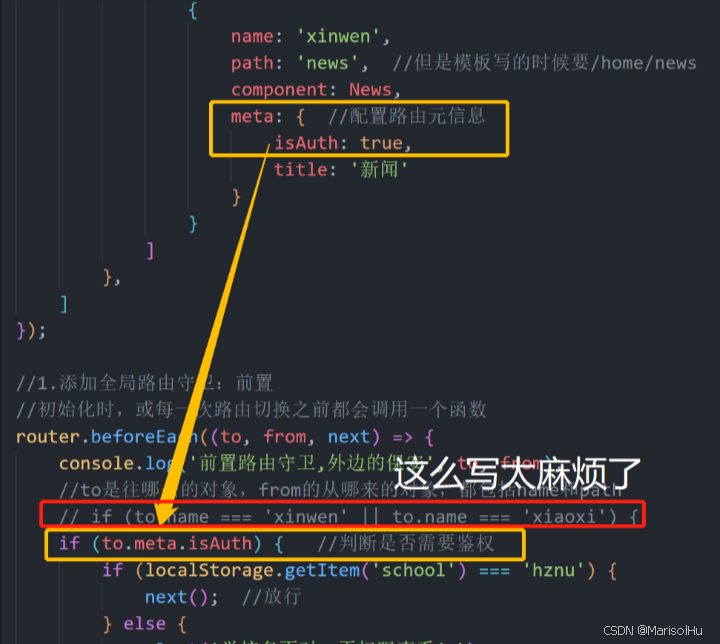
Vue篇-06
1、路由简介 vue-rooter:是vue的一个插件库,专门用来实现SPA应用 1.1、对SPA应用的理解 1、单页 Web 应用(single page web application,SPA)。 2、整个应用只有一个完整的页面 index.html。 3、点击页面中的导航链…...
docker详细操作--未完待续
docker介绍 docker官网: Docker:加速容器应用程序开发 harbor官网:Harbor - Harbor 中文 使用docker加速器: Docker镜像极速下载服务 - 毫秒镜像 是什么 Docker 是一种开源的容器化平台,用于将应用程序及其依赖项(如库、运行时环…...
Docker 运行 Kafka 带 SASL 认证教程
Docker 运行 Kafka 带 SASL 认证教程 Docker 运行 Kafka 带 SASL 认证教程一、说明二、环境准备三、编写 Docker Compose 和 jaas文件docker-compose.yml代码说明:server_jaas.conf 四、启动服务五、验证服务六、连接kafka服务七、总结 Docker 运行 Kafka 带 SASL 认…...
STM32标准库-DMA直接存储器存取
文章目录 一、DMA1.1简介1.2存储器映像1.3DMA框图1.4DMA基本结构1.5DMA请求1.6数据宽度与对齐1.7数据转运DMA1.8ADC扫描模式DMA 二、数据转运DMA2.1接线图2.2代码2.3相关API 一、DMA 1.1简介 DMA(Direct Memory Access)直接存储器存取 DMA可以提供外设…...

Android Bitmap治理全解析:从加载优化到泄漏防控的全生命周期管理
引言 Bitmap(位图)是Android应用内存占用的“头号杀手”。一张1080P(1920x1080)的图片以ARGB_8888格式加载时,内存占用高达8MB(192010804字节)。据统计,超过60%的应用OOM崩溃与Bitm…...
Linux 内存管理实战精讲:核心原理与面试常考点全解析
Linux 内存管理实战精讲:核心原理与面试常考点全解析 Linux 内核内存管理是系统设计中最复杂但也最核心的模块之一。它不仅支撑着虚拟内存机制、物理内存分配、进程隔离与资源复用,还直接决定系统运行的性能与稳定性。无论你是嵌入式开发者、内核调试工…...
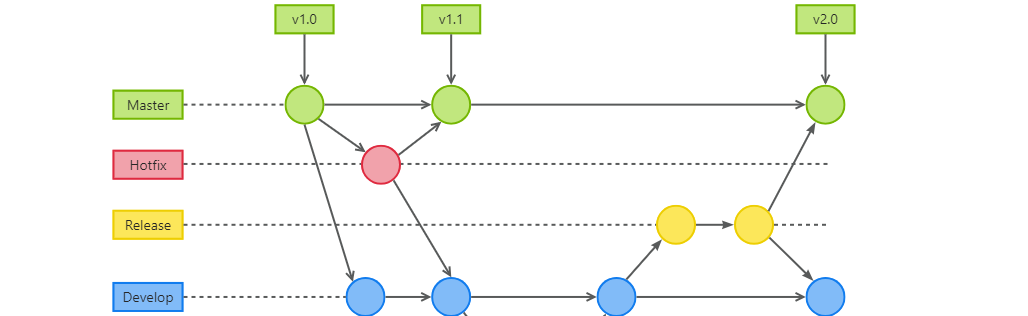
GitFlow 工作模式(详解)
今天再学项目的过程中遇到使用gitflow模式管理代码,因此进行学习并且发布关于gitflow的一些思考 Git与GitFlow模式 我们在写代码的时候通常会进行网上保存,无论是github还是gittee,都是一种基于git去保存代码的形式,这样保存代码…...

Golang——6、指针和结构体
指针和结构体 1、指针1.1、指针地址和指针类型1.2、指针取值1.3、new和make 2、结构体2.1、type关键字的使用2.2、结构体的定义和初始化2.3、结构体方法和接收者2.4、给任意类型添加方法2.5、结构体的匿名字段2.6、嵌套结构体2.7、嵌套匿名结构体2.8、结构体的继承 3、结构体与…...
)
LLaMA-Factory 微调 Qwen2-VL 进行人脸情感识别(二)
在上一篇文章中,我们详细介绍了如何使用LLaMA-Factory框架对Qwen2-VL大模型进行微调,以实现人脸情感识别的功能。本篇文章将聚焦于微调完成后,如何调用这个模型进行人脸情感识别的具体代码实现,包括详细的步骤和注释。 模型调用步骤 环境准备:确保安装了必要的Python库。…...
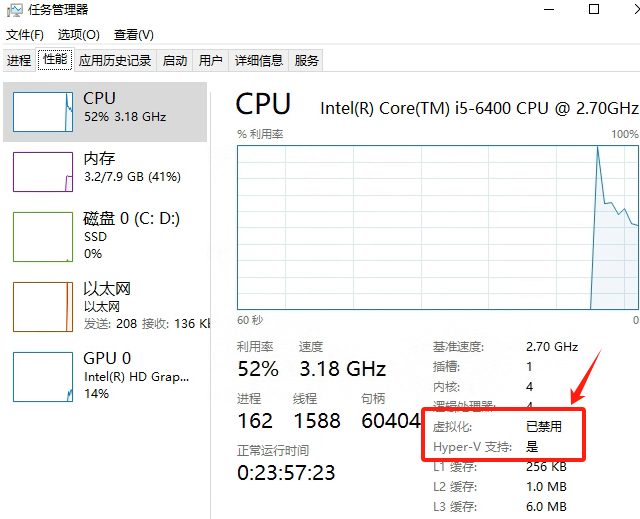
Windows电脑能装鸿蒙吗_Windows电脑体验鸿蒙电脑操作系统教程
鸿蒙电脑版操作系统来了,很多小伙伴想体验鸿蒙电脑版操作系统,可惜,鸿蒙系统并不支持你正在使用的传统的电脑来安装。不过可以通过可以使用华为官方提供的虚拟机,来体验大家心心念念的鸿蒙系统啦!注意:虚拟…...

Python常用模块:time、os、shutil与flask初探
一、Flask初探 & PyCharm终端配置 目的: 快速搭建小型Web服务器以提供数据。 工具: 第三方Web框架 Flask (需 pip install flask 安装)。 安装 Flask: 建议: 使用 PyCharm 内置的 Terminal (模拟命令行) 进行安装,避免频繁切换。 PyCharm Terminal 配置建议: 打开 Py…...