
Blackbox-Exporter对服务进行探活
前言
blackbox-exporter会对HTTP、HTTPS、DNS、TCP、ICMP和gRPC上的端点进行黑盒探测。
Blackbox-Exporter
blackbox-exporter暴露两个Metrics指标接口,分别是 /metrics、/probe,两个接口返回不同监控目标的指标
Metrics接口
返回exporter的构建信息和exporter当前的运行状态:
# HELP blackbox_exporter_build_info A metric with a constant '1' value labeled by version, revision, branch, and goversion from which blackbox_exporter was built.
# TYPE blackbox_exporter_build_info gauge
blackbox_exporter_build_info{branch="HEAD",goversion="go1.10",revision="4a22506cf0cf139d9b2f9cde099f0012d9fcabde",version="0.12.0"} 1
# HELP go_gc_duration_seconds A summary of the GC invocation durations.
# TYPE go_gc_duration_seconds summary
go_gc_duration_seconds{quantile="0"} 0
go_gc_duration_seconds{quantile="0.25"} 0
go_gc_duration_seconds{quantile="0.5"} 0
go_gc_duration_seconds{quantile="0.75"} 0
go_gc_duration_seconds{quantile="1"} 0
go_gc_duration_seconds_sum 0
go_gc_duration_seconds_count 0
# HELP go_goroutines Number of goroutines that currently exist.
# TYPE go_goroutines gauge
go_goroutines 9[…]# HELP process_cpu_seconds_total Total user and system CPU time spent in seconds.
# TYPE process_cpu_seconds_total counter
process_cpu_seconds_total 0.05
# HELP process_max_fds Maximum number of open file descriptors.
# TYPE process_max_fds gauge
process_max_fds 1.048576e+06
# HELP process_open_fds Number of open file descriptors.
# TYPE process_open_fds gauge
process_open_fds 7
# HELP process_resident_memory_bytes Resident memory size in bytes.
# TYPE process_resident_memory_bytes gauge
process_resident_memory_bytes 7.8848e+06
# HELP process_start_time_seconds Start time of the process since unix epoch in seconds.
# TYPE process_start_time_seconds gauge
process_start_time_seconds 1.54115492874e+09
# HELP process_virtual_memory_bytes Virtual memory size in bytes.
# TYPE process_virtual_memory_bytes gauge
process_virtual_memory_bytes 1.5609856e+07
Probe接口
Prometheus抓取Probe接口比较特殊,利用了Prometheus的 MULTI-TARGET EXPORTER PATTERN
文档原理归纳:Prometheus抓取/probe接口时会带上target和module等参数,blackbox-exporter在收到请求后不会直接返回metrics指标,而是利用module类型去target探活,把探活结果通过metrics指标返回。
实例
我们将使用 target prometheus.io和预定义 module http_2xx。它告诉blackbox-exporter发出GET请求,就像浏览器访问prometheus.io希望得到200 ok的返回一样。
curl 'localhost:9115/probe?target=prometheus.io&module=http_2xx'
返回的metrics:
# HELP probe_dns_lookup_time_seconds Returns the time taken for probe dns lookup in seconds
# TYPE probe_dns_lookup_time_seconds gauge
probe_dns_lookup_time_seconds 0.02679421
# HELP probe_duration_seconds Returns how long the probe took to complete in seconds
# TYPE probe_duration_seconds gauge
probe_duration_seconds 0.461619124
# HELP probe_failed_due_to_regex Indicates if probe failed due to regex
# TYPE probe_failed_due_to_regex gauge
probe_failed_due_to_regex 0
# HELP probe_http_content_length Length of http content response
# TYPE probe_http_content_length gauge
probe_http_content_length -1
# HELP probe_http_duration_seconds Duration of http request by phase, summed over all redirects
# TYPE probe_http_duration_seconds gauge
probe_http_duration_seconds{phase="connect"} 0.062076202999999996
probe_http_duration_seconds{phase="processing"} 0.23481845699999998
probe_http_duration_seconds{phase="resolve"} 0.029594103
probe_http_duration_seconds{phase="tls"} 0.163420078
probe_http_duration_seconds{phase="transfer"} 0.002243199
# HELP probe_http_redirects The number of redirects
# TYPE probe_http_redirects gauge
probe_http_redirects 1
# HELP probe_http_ssl Indicates if SSL was used for the final redirect
# TYPE probe_http_ssl gauge
probe_http_ssl 1
# HELP probe_http_status_code Response HTTP status code
# TYPE probe_http_status_code gauge
probe_http_status_code 200
# HELP probe_http_uncompressed_body_length Length of uncompressed response body
# TYPE probe_http_uncompressed_body_length gauge
probe_http_uncompressed_body_length 14516
# HELP probe_http_version Returns the version of HTTP of the probe response
# TYPE probe_http_version gauge
probe_http_version 1.1
# HELP probe_ip_protocol Specifies whether probe ip protocol is IP4 or IP6
# TYPE probe_ip_protocol gauge
probe_ip_protocol 4
# HELP probe_ssl_earliest_cert_expiry Returns earliest SSL cert expiry in unixtime
# TYPE probe_ssl_earliest_cert_expiry gauge
probe_ssl_earliest_cert_expiry 1.581897599e+09
# HELP probe_success Displays whether or not the probe was a success
# TYPE probe_success gauge
probe_success 1
# HELP probe_tls_version_info Contains the TLS version used
# TYPE probe_tls_version_info gauge
probe_tls_version_info{version="TLS 1.3"} 1
module
module配置说明文档
module配置示例文档
blackbox-exporter的默认请求是IPV6,docker网络默认采用IPV4,这里需要注意。
web界面
blackbox-exporter在9115端口提供了一个web界面来检查最后几个探测,加载的配置和调试信息。
Prometheus
增加Prometheus的配置,告诉blackbox-exporter应该去哪些目标,通过什么方式探活。下面有两种方式增加blackbox-exporter的探活目标:
配置文件方式
修改prometheus.yaml
global:scrape_interval: 5sscrape_configs:
- job_name: blackbox # To get metrics about the exporter itselfmetrics_path: /metricsstatic_configs:- targets:- localhost:9115   # For Windows and macOS replace with - host.docker.internal:9115- job_name: blackbox-http # To get metrics about the exporter’s targetsmetrics_path: /probeparams:module: [http_2xx]static_configs:- targets:- http://prometheus.io    # Target to probe with http- https://prometheus.io   # Target to probe with https- http://example.com:8080 # Target to probe with http on port 8080relabel_configs:- source_labels: [__address__]target_label: __param_target- source_labels: [__param_target]target_label: instance- target_label: __address__replacement: localhost:9115  # The blackbox exporter’s real hostname:port. For Windows and macOS replace with - host.docker.internal:9115
其中最后的relabel_configs的含义是,把 “http://prometheus.io/probe?module=http_2xx” 转化为 “http://localhost:9115/probe?target=http://prometheus.io&module=http_2xx”。同时为每个指标新增一个instance的label,值为 http://prometheus.io
Probe方式
利用Probe这种CRD完成探测目标的添加。
具体参考:Probe撰写规范
相关文章:

Blackbox-Exporter对服务进行探活
前言 blackbox-exporter会对HTTP、HTTPS、DNS、TCP、ICMP和gRPC上的端点进行黑盒探测。 Blackbox-Exporter blackbox-exporter暴露两个Metrics指标接口,分别是 /metrics、/probe,两个接口返回不同监控目标的指标 Metrics接口 返回exporter的构建信息…...
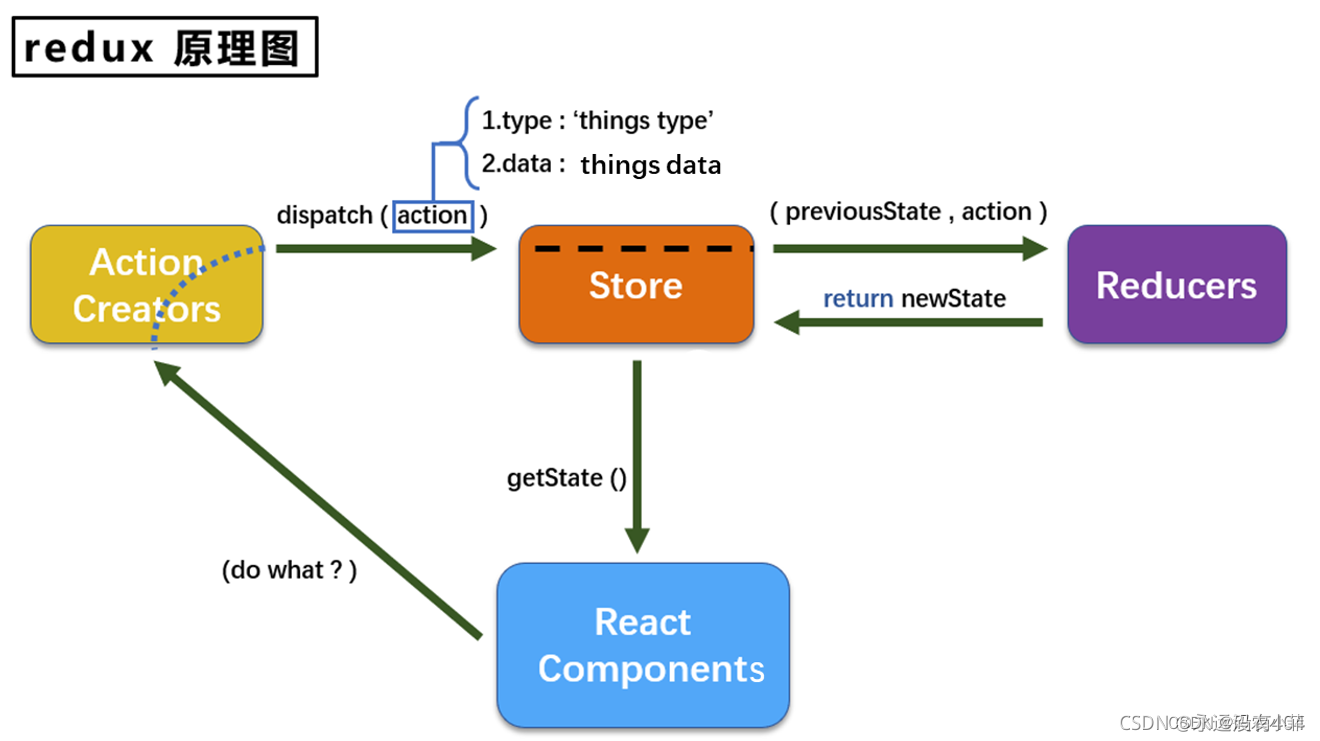
react-redux
Redux 是js容器,用于进行全局的 状态管理它可以用在react, angular, vue等项目中, 但基本与react配合使用三大核心: 单一数据源 整个应用的state被存储在一棵 object tree中,并且这个 object tree只存在于一个唯一的 store 中 State是只读的…...

算法刷刷刷| 回溯篇| 子集问题大集合
78.子集 给你一个整数数组 nums ,数组中的元素 互不相同 。返回该数组所有可能的子集(幂集)。 解集 不能 包含重复的子集。你可以按 任意顺序 返回解集。 示例 1: 输入:nums [1,2,3] 输出:[[],[1],[2],[1…...
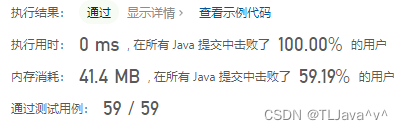
合并两个有序数组-力扣88-java
一、题目描述给你两个按 非递减顺序 排列的整数数组 nums1 和 nums2,另有两个整数 m 和 n ,分别表示 nums1 和 nums2 中的元素数目。请你 合并 nums2 到 nums1 中,使合并后的数组同样按 非递减顺序 排列。注意:最终,合…...

2022「大厂可观测」重磅回顾,12场直播,15位技术大咖洞见可观测
回首2022年,注定是意义非凡的一年。新冠疫情继续肆虐全球,中国疫情全面放开,神舟十四号与神舟十五号成功会师,俄乌冲突带来深远影响,阿根廷再次问鼎世界杯梅西圆梦,英国女王逝世......件件事都备受关注。 …...
)
CMMI-配置管理(CM)
一、概述配置管理(Configuration Management, CM)的目的在于使用配置识别、配置控制、配置状态记录与报告以及配置审计,来建立并维护工作产品的完整性。1、简介“配置管理”过程域涉及以下活动:• 识别所选工作产品的配…...
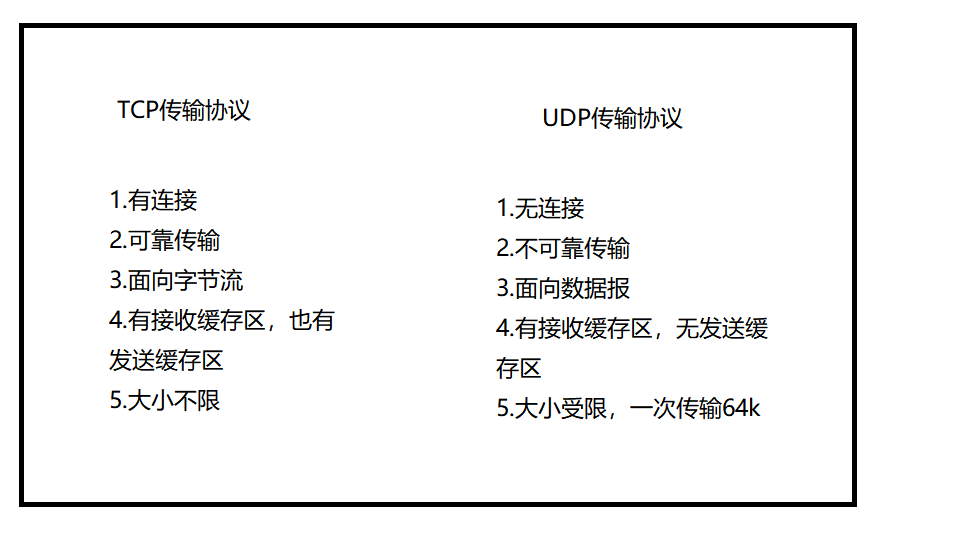
网络编程套接字Socket
一.什么是网络编程网络编程,指网络上的主机,通过不同的进程,以编程的方式实现网络通信(或称为网络数据传输)。二.为什么要实现网络编程我们通过网络编程可以在网络中获取资源,实质是通过网络,获…...
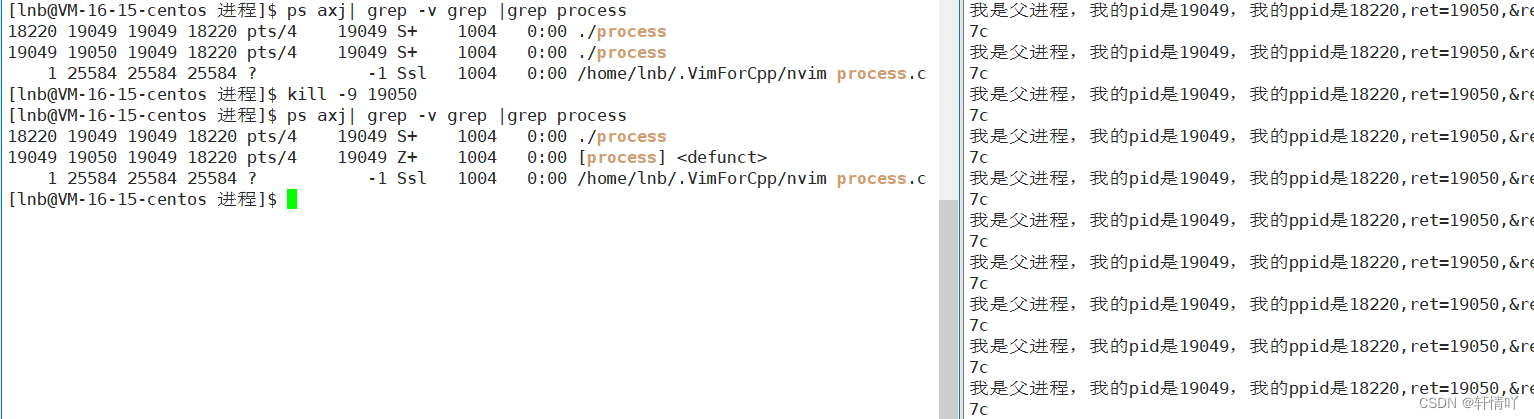
Linux进程概念(二)
进程状态1.阻塞和挂起2.R运行状态和S睡眠状态3.T停止状态4.X死亡状态和Z僵尸状态🌟🌟hello,各位读者大大们你们好呀🌟🌟 🚀🚀系列专栏:【Linux的学习】 📝📝本…...

墨天轮【第二届数据库掌门人论坛】圆满收官 | 含嘉宾精彩观点回顾
2月10日上午,墨天轮【2023春季发布会暨第二届数据库掌门人论坛】盛大开启,本次活动的主题为“新征程,向未来”,共包含2022年度中国数据库颁奖盛典、2022年度行业发展报告发布以及第二届数据库掌门人论坛三项议程。华为云数据库服务…...

Redis之集群搭建
redis的集群模式简介: redis的集群模式中可以实现多个节点同时提供写操作,redis集群模式采用无中心结构,每个节点都保存数据,节点之间互相连接从而知道整个集群状态。 集群搭建步骤如下 (一台服务器模拟多台服务器) 1.创建6个配置…...
31-Golang中的二维数组
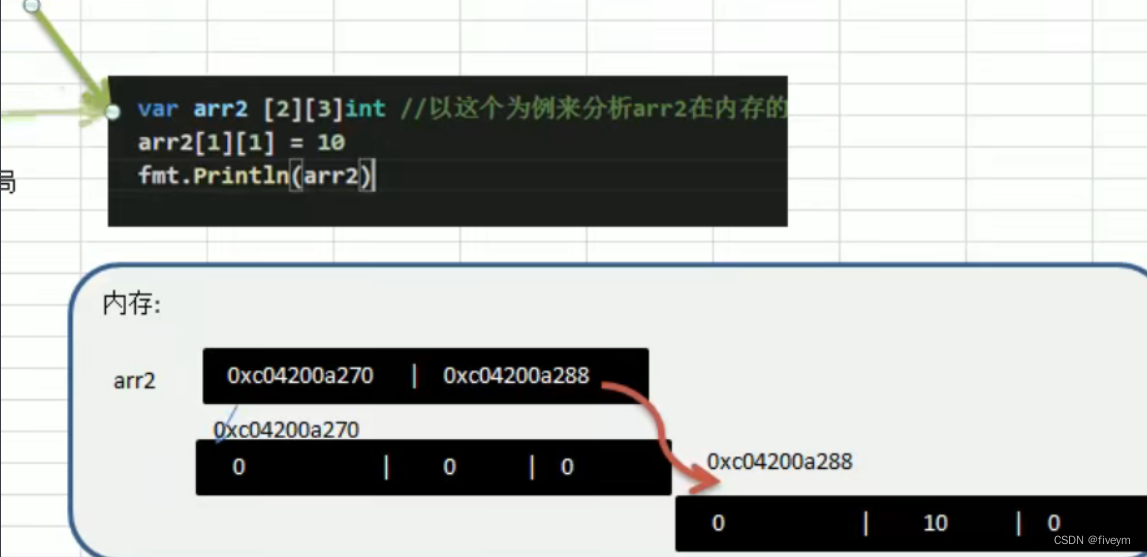
二维数组的使用方式 使用方式一:先声明/定义再赋值 1.语法:var数组名 [大小] [大小]类型2.比如:var arr [2] [3]int,再赋值 package main import ("fmt" )func main() {//定义/声明数组var arr [4][6]int//赋初值arr[1][2] 1ar…...
<<Java开发环境配置>>6-SQLyog安装教程
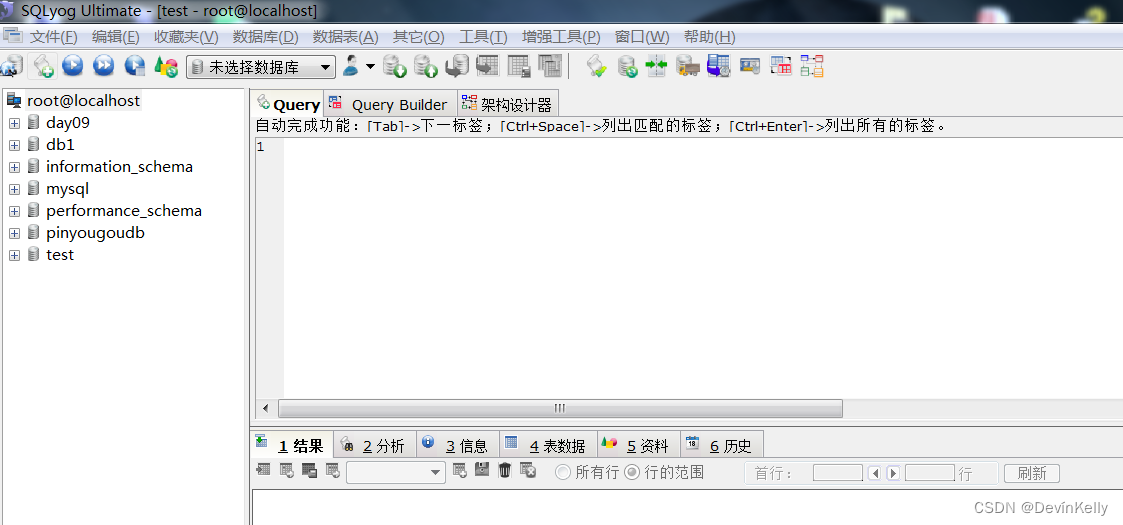
一.SQLyog简介: SQLyog 是一个快速而简洁的图形化管理MySQL数据库的工具,它能够在任何地点有效地管理你的数据库,由业界著名的Webyog公司出品。使用SQLyog可以快速直观地让您从世界的任何角落通过网络来维护远端的MySQL数据库。 二.SQLyog下载: 下载地址…...

MySQL 中的 distinct 和 group by 哪个效率更高
先说大致的结论(完整结论在文末):在语义相同,有索引的情况下:group by和distinct都能使用索引,效率相同。在语义相同,无索引的情况下:distinct效率高于group by。原因是distinct 和 …...

计算机相关专业毕业论文选题推荐
计算机科学以下是我推荐的20个计算机科学专业的本科论文选题:基于机器学习的推荐算法研究与实现基于区块链技术的数字身份认证方案设计与实现基于深度学习的图像识别技术研究与应用基于虚拟现实技术的教育培训平台设计与实现基于物联网技术的智能家居系统研究与开发…...
网络编程套接字之TCP
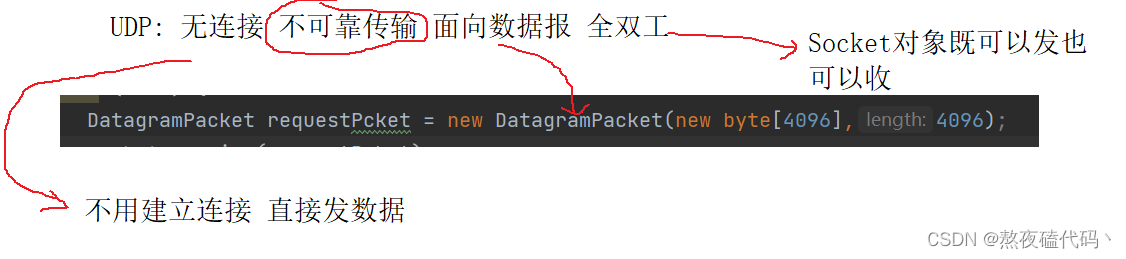
文章目录一、TCP流套接字编程ServerSocketSocketTCP长短连接二、TCP回显服务器客户端服务器客户端并发服务器UDP与TCP一、TCP流套接字编程 我们来一起学习一下TCP socket api的使用,这个api与我们之前学习的IO流操作紧密相关,如果对IO流还不太熟悉的&am…...

网络与串口调试工具TCPCOM
TCPCOM,网络与串口二合一调试助手,将网络调试助手与串口调试助手合二为一,绿色软件,简单高效。【软件特色】 1. 支持中英文双语言,自动根据操作系统环境选择系统语言类型; 2. 支持ASCII/Hex发送,发送和接收…...
数据库常用命令
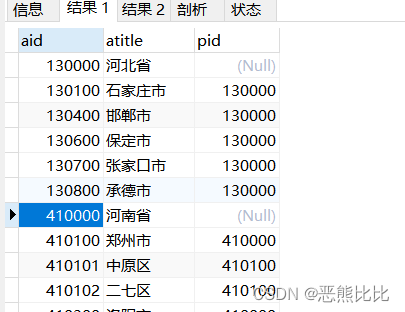
文章目录1. 数据库操作命令1.进入数据库2.查看数据库列表信息3.查看数据库中的数据表信息2.SQL语句命令1. 创建数据表2. 基本查询语句3. SQL排序4. SQL分组统计5. 分页查询6. 多表查询7.自关联查询8.子查询1. 数据库操作命令 1.进入数据库 mysql -uroot -p2.查看数据库列表信…...

PTA复习
函数 6-1 学生类的构造与析构 #include<bits/stdc.h> using namespace std; class Student {int num;string name;char sex; public:Student(int n,string nam,char s):num(n),name(nam),sex(s){cout<<"Constructor called."<<endl;}void display…...

TypeScript 学习之接口
接口:对值所具有的结构进行类型检查,称为“鸭式变型法”或“结构性子类型化” 基本使用 interface LabelledValue {label: string; }function printLabel(labelledObj: LabelledValue) {console.log(labelledObj.label); }let myObj {size: 10, label:…...

原码反码补码
在计算机中,负数都是以补码的形式存放的, 正数的原码、反码、补码完全一致。 原码:指的是正数的二进制或负数的二进制, 负数的二进制(原码),其实就是在正数的二进制的最高位前面加一个符号位 1。…...

PPTist完全手册:零成本打造专业演示文稿的终极方案
PPTist完全手册:零成本打造专业演示文稿的终极方案 【免费下载链接】PPTist PowerPoint-ist(/pauəpɔintist/), An online presentation application that replicates most of the commonly used features of MS PowerPoint, allowing for t…...

智能硬件适配引擎:92%成功率重构OpenCore EFI配置标准
智能硬件适配引擎:92%成功率重构OpenCore EFI配置标准 【免费下载链接】OpCore-Simplify A tool designed to simplify the creation of OpenCore EFI 项目地址: https://gitcode.com/GitHub_Trending/op/OpCore-Simplify 在开源系统定制领域,硬件…...

终极密码学工具箱ToolsFx:30+编码转换与一键解码的完整解决方案
终极密码学工具箱ToolsFx:30编码转换与一键解码的完整解决方案 【免费下载链接】ToolsFx 跨平台密码学工具箱。包含编解码,编码转换,加解密, 哈希,MAC,签名,大数运算,压缩࿰…...

Midjourney V6色调分离失效?3步修复色相断层、5类常见错误代码级诊断指南
更多请点击: https://kaifayun.com 第一章:Midjourney V6色调分离失效的本质归因 Midjourney V6 引入了更严格的色彩空间一致性约束与隐式色彩嵌入机制,导致传统依赖 HSV/HSL 分量操控的“色调分离”(Color Separation࿰…...

3步解锁专业级HDR画质:MPC Video Renderer完全使用指南
3步解锁专业级HDR画质:MPC Video Renderer完全使用指南 【免费下载链接】VideoRenderer Внешний видео-рендерер 项目地址: https://gitcode.com/gh_mirrors/vi/VideoRenderer 还在为Windows播放HDR视频效果不佳而烦恼吗?MPC…...

如何用QKeyMapper在5分钟内搞定Windows设备按键映射:终极免费解决方案
如何用QKeyMapper在5分钟内搞定Windows设备按键映射:终极免费解决方案 【免费下载链接】QKeyMapper [按键映射工具] QKeyMapper,Qt开发Win10&Win11可用,不修改注册表、不需重新启动系统,可立即生效和停止。支持游戏手柄映射到…...

3大功能让Mac永不停歇:自动鼠标移动器的终极指南
3大功能让Mac永不停歇:自动鼠标移动器的终极指南 【免费下载链接】automatic-mouse-mover a minimalistic go library/app to keep your mac active and alive 项目地址: https://gitcode.com/gh_mirrors/au/automatic-mouse-mover 你是否曾在重要视频会议中…...

如何将Scrapeless MCP服务器集成到ZeroClaw中:逐步指南
关键要点: 一个TOML块将云浏览器连接到本地Rust代理。 ZeroClaw是一个单一二进制AI代理运行时,它与LLM提供者通信,监听30多个频道,并通过工具进行操作。只需在~/.zeroclaw/config.toml中添加四行[mcp]块即可添加Scrapeless MCP服…...

10分钟快速上手:VSCode Cortex-Debug调试插件终极指南
10分钟快速上手:VSCode Cortex-Debug调试插件终极指南 【免费下载链接】cortex-debug Visual Studio Code extension for enhancing debug capabilities for Cortex-M Microcontrollers 项目地址: https://gitcode.com/gh_mirrors/co/cortex-debug 还在为嵌入…...

CIO与CHRO携手合作,共同留住企业AI核心人才
Gartner上周发布的一项研究显示,到2027年,缺乏完善AI人才战略的企业,将有半数面临顶尖AI人才流失至竞争对手的风险。为完成这份报告,Gartner在今年第一季度对逾12000名企业员工和管理者进行了调研,重点了解AI对工作的影…...