
SpringSecurity 核心过滤器——SecurityContextPersistenceFilter
文章目录
- 前言
- 过滤器介绍
- 用户信息的存储
- 获取用户信息
- 存储用户信息
- 获取用户信息
- 处理逻辑
- 总结
前言
SecurityContextHolder,这个是一个非常基础的对象,存储了当前应用的上下文SecurityContext,而在SecurityContext可以获取Authentication对象。也就是当前认证的相关信息会存储在Authentication对象中。

默认情况下,SecurityContextHolder是通过 ThreadLocal来存储对应的信息的。也就是在一个线程中我们可以通过这种方式来获取当前登录的用户的相关信息。而在SecurityContext中就只提供了对Authentication对象操作的方法。
在项目中可以通过以下方式获取当前登录的用户信息
public String hello(){Authentication authentication = SecurityContextHolder.getContext().getAuthentication();Object principal = authentication.getPrincipal();if(principal instanceof UserDetails){UserDetails userDetails = (UserDetails) principal;System.out.println(userDetails.getUsername());return "当前登录的账号是:" + userDetails.getUsername();}return "当前登录的账号-->" + principal.toString();}
调用 getContext()返回的对象是 SecurityContext接口的一个实例,这个对象就是保存在线程中的。接下来将看到,Spring Security中的认证大都返回一个 UserDetails的实例作为principa。
过滤器介绍
在Session中维护一个用户的安全信息就是这个过滤器处理的。从request中获取session,从Session中取出已认证用户的信息保存在SecurityContext中,提高效率,避免每一次请求都要解析用户认证信息,方便接下来的filter直接获取当前的用户信息。
用户信息的存储
用户信息的存储是通过SecutiryContextRepository接口操作的,定义了对SecurityContext的存储操作,在该接口中定义了如下的几个方法
public interface SecurityContextRepository {/*** 获取SecurityContext对象*/SecurityContext loadContext(HttpRequestResponseHolder requestResponseHolder);/*** 存储SecurityContext*/void saveContext(SecurityContext context, HttpServletRequest request, HttpServletResponse response);/*** 判断是否存在SecurityContext对象*/boolean containsContext(HttpServletRequest request);}
默认的实现是HttpSessionSecurityContextRepository。也就是把SecurityContext存储在了HttpSession中。对应的抽象方法实现如下:
获取用户信息
public SecurityContext loadContext(HttpRequestResponseHolder requestResponseHolder) {// 获取对有的Request和Response对象HttpServletRequest request = requestResponseHolder.getRequest();HttpServletResponse response = requestResponseHolder.getResponse();// 获取HttpSession对象HttpSession httpSession = request.getSession(false);// 从HttpSession中获取SecurityContext对象SecurityContext context = readSecurityContextFromSession(httpSession);if (context == null) {// 如果HttpSession中不存在SecurityContext对象就创建一个// SecurityContextHolder.createEmptyContext();// 默认是ThreadLocalSecurityContextHolderStrategy存储在本地线程中context = generateNewContext();if (this.logger.isTraceEnabled()) {this.logger.trace(LogMessage.format("Created %s", context));}}// 包装Request和Response对象SaveToSessionResponseWrapper wrappedResponse = new SaveToSessionResponseWrapper(response, request,httpSession != null, context);requestResponseHolder.setResponse(wrappedResponse);requestResponseHolder.setRequest(new SaveToSessionRequestWrapper(request, wrappedResponse));return context;}
存储用户信息
@Overridepublic void saveContext(SecurityContext context, HttpServletRequest request, HttpServletResponse response) {SaveContextOnUpdateOrErrorResponseWrapper responseWrapper = WebUtils.getNativeResponse(response,SaveContextOnUpdateOrErrorResponseWrapper.class);Assert.state(responseWrapper != null, () -> "Cannot invoke saveContext on response " + response+ ". You must use the HttpRequestResponseHolder.response after invoking loadContext");responseWrapper.saveContext(context);}
@Overrideprotected void saveContext(SecurityContext context) {// 获取Authentication对象final Authentication authentication = context.getAuthentication();// 获取HttpSession对象HttpSession httpSession = this.request.getSession(false);// String springSecurityContextKey = HttpSessionSecurityContextRepository.this.springSecurityContextKey;// See SEC-776if (authentication == null|| HttpSessionSecurityContextRepository.this.trustResolver.isAnonymous(authentication)) {if (httpSession != null && this.authBeforeExecution != null) {// SEC-1587 A non-anonymous context may still be in the session// SEC-1735 remove if the contextBeforeExecution was not anonymoushttpSession.removeAttribute(springSecurityContextKey);this.isSaveContextInvoked = true;}if (this.logger.isDebugEnabled()) {if (authentication == null) {this.logger.debug("Did not store empty SecurityContext");}else {this.logger.debug("Did not store anonymous SecurityContext");}}return;}httpSession = (httpSession != null) ? httpSession : createNewSessionIfAllowed(context, authentication);// If HttpSession exists, store current SecurityContext but only if it has// actually changed in this thread (see SEC-37, SEC-1307, SEC-1528)if (httpSession != null) {// We may have a new session, so check also whether the context attribute// is set SEC-1561if (contextChanged(context) || httpSession.getAttribute(springSecurityContextKey) == null) {// HttpSession 中存储SecurityContexthttpSession.setAttribute(springSecurityContextKey, context);this.isSaveContextInvoked = true;if (this.logger.isDebugEnabled()) {this.logger.debug(LogMessage.format("Stored %s to HttpSession [%s]", context, httpSession));}}}}
获取用户信息
@Overridepublic boolean containsContext(HttpServletRequest request) {// 获取HttpSessionHttpSession session = request.getSession(false);if (session == null) {return false;}// 从session中能获取就返回true否则falsereturn session.getAttribute(this.springSecurityContextKey) != null;}
处理逻辑
在请求到达时,SecurityContextPersistenceFilter会从HTTP请求中读取用户凭证,并使用这些信息来恢复用户的安全上下文。在请求完成后,它会在HTTP响应中写入用户凭证,以便在下一次请求时可以恢复用户的安全上下文。具体处理逻辑:
private void doFilter(HttpServletRequest request, HttpServletResponse response, FilterChain chain)throws IOException, ServletException {// 同一个请求之处理一次if (request.getAttribute(FILTER_APPLIED) != null) {chain.doFilter(request, response);return;}// 更新状态request.setAttribute(FILTER_APPLIED, Boolean.TRUE);// 是否提前创建 HttpSessionif (this.forceEagerSessionCreation) {// 创建HttpSessionHttpSession session = request.getSession();if (this.logger.isDebugEnabled() && session.isNew()) {this.logger.debug(LogMessage.format("Created session %s eagerly", session.getId()));}}// 把Request和Response对象封装为HttpRequestResponseHolder对象HttpRequestResponseHolder holder = new HttpRequestResponseHolder(request, response);// 获取SecurityContext对象SecurityContext contextBeforeChainExecution = this.repo.loadContext(holder);try {// SecurityContextHolder绑定SecurityContext对象SecurityContextHolder.setContext(contextBeforeChainExecution);if (contextBeforeChainExecution.getAuthentication() == null) {logger.debug("Set SecurityContextHolder to empty SecurityContext");}else {if (this.logger.isDebugEnabled()) {this.logger.debug(LogMessage.format("Set SecurityContextHolder to %s", contextBeforeChainExecution));}}// 结束交给下一个过滤器处理chain.doFilter(holder.getRequest(), holder.getResponse());}finally {// 当其他过滤器都处理完成后SecurityContext contextAfterChainExecution = SecurityContextHolder.getContext();// 移除SecurityContextHolder中的SecuritySecurityContextHolder.clearContext();// 把this.repo.saveContext(contextAfterChainExecution, holder.getRequest(), holder.getResponse());// 存储Context在HttpSession中request.removeAttribute(FILTER_APPLIED);this.logger.debug("Cleared SecurityContextHolder to complete request");}}
通过上面的代码逻辑其实就清楚了在SpringSecurity中的认证信息的流转方式了。首先用户的认证状态Authentication是存储在SecurityContext中的,而每个用户的SecurityContext是统一存储在HttpSession中的。一次请求流转中我们需要获取当前的认证信息是通过SecurityContextHolder来获取的,默认是在ThreadLocal中存储的。
总结
SecurityContextPersistenceFilter是Spring Security框架中一个重要的过滤器,用于处理与用户安全上下文相关的操作,通常位于Spring Security过滤器链的最前面,因为需要在其他过滤器执行之前恢复用户的安全上下文。在Spring Security的过滤器链中,SecurityContextPersistenceFilter之后的过滤器可能会改变用户的身份或安全上下文,例如AuthenticationFilter可能会对用户的身份进行认证。
相关文章:
SpringSecurity 核心过滤器——SecurityContextPersistenceFilter
文章目录 前言过滤器介绍用户信息的存储获取用户信息存储用户信息获取用户信息 处理逻辑总结 前言 SecurityContextHolder,这个是一个非常基础的对象,存储了当前应用的上下文SecurityContext,而在SecurityContext可以获取Authentication对象…...
反转单链表
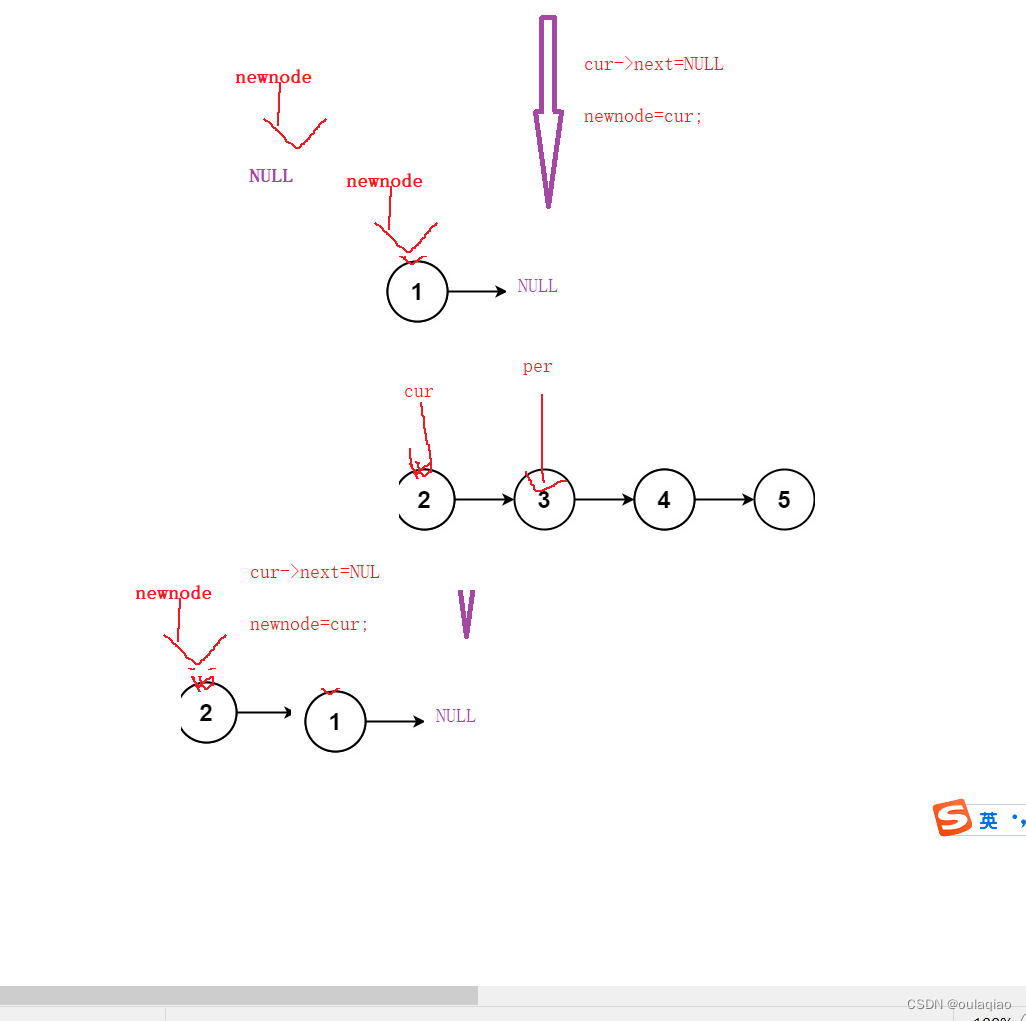
思路图1: 代码: struct ListNode* reverseList(struct ListNode* head){if(headNULL)//当head是空链表时 {return head; }struct ListNode* n1NULL;struct ListNode* n2head;struct ListNode* n3head->next;if(head->nextNULL)//当链表只有一个节…...
加速新药问世,药企如何利用云+网的优势?
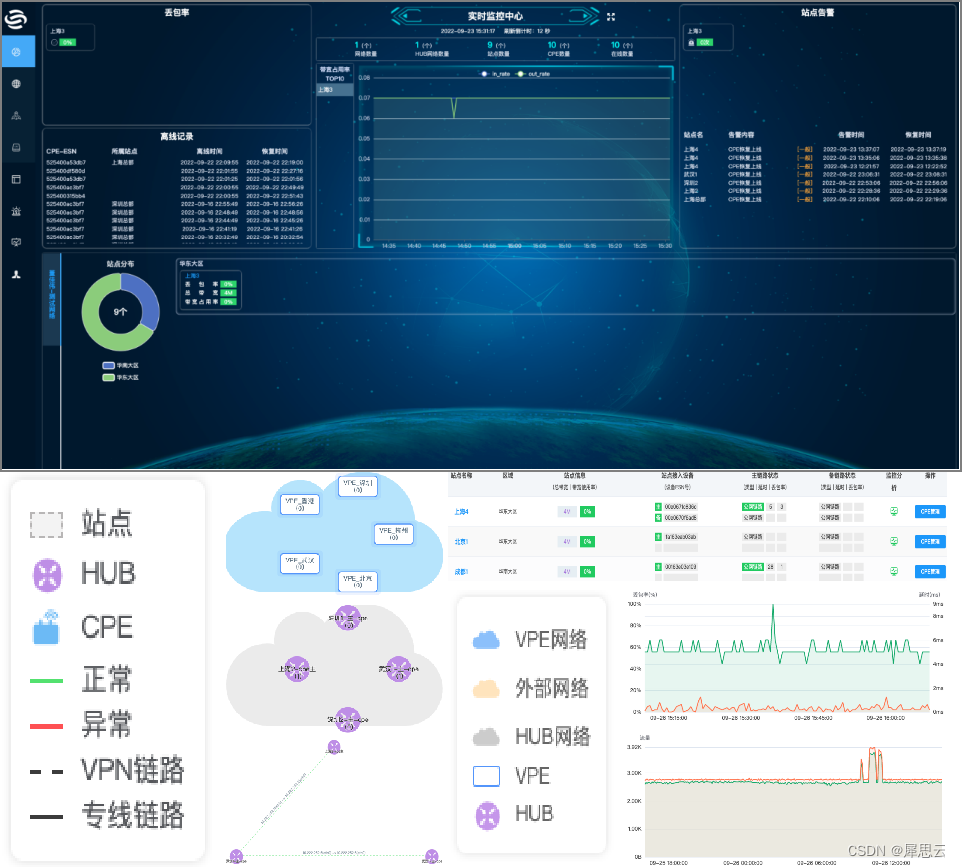
随着计算能力的不断提高和人工智能技术的迅速发展,药物研发领域正迎来一场革命。云端强大的智能算法正成为药物研发企业的得力助手,推动着药物的精确设计和固相筛选。这使得药物设计、固相筛选以及药物制剂开发的时间大幅缩短,有望加速新药物…...

C++中string对象之间比较、char*之间比较
#include <cstring> //char* 使用strcmp #include <string> //string 使用compare #include <iostream> using namespace std; int main() {string stringStr1 "42";string stringStr2 "42";string stringStr3 "213";cout …...

MVVM模式理解
链接: MVVM框架理解及其原理实现 - 知乎 (zhihu.com) 重点: 1.将展示的界面窗口和创建的构件是数据进行分离 2.利用一个中间商进行数据的处理,所有的数据通过中间商进行处理...

js常用的数组处理方法
some 方法 用于检查数组中是否至少有一个元素满足指定条件。如果有满足条件的元素,返回值为 true,否则返回 false。 const numbers [1, 2, 3, 4, 5];const hasEvenNumber numbers.some((number) > number % 2 0); console.log(hasEvenNumber); /…...

[Document]VectoreStoreToDocument开发
该document是用来检索文档的。 第一步:定义组件对象,该组件返回有两种类型:document和text。 第二步:获取需要的信息,向量存储库,这里我使用的是内存向量存储(用该组件拿到文档,并检…...
【LeetCode-简单题】225. 用队列实现栈
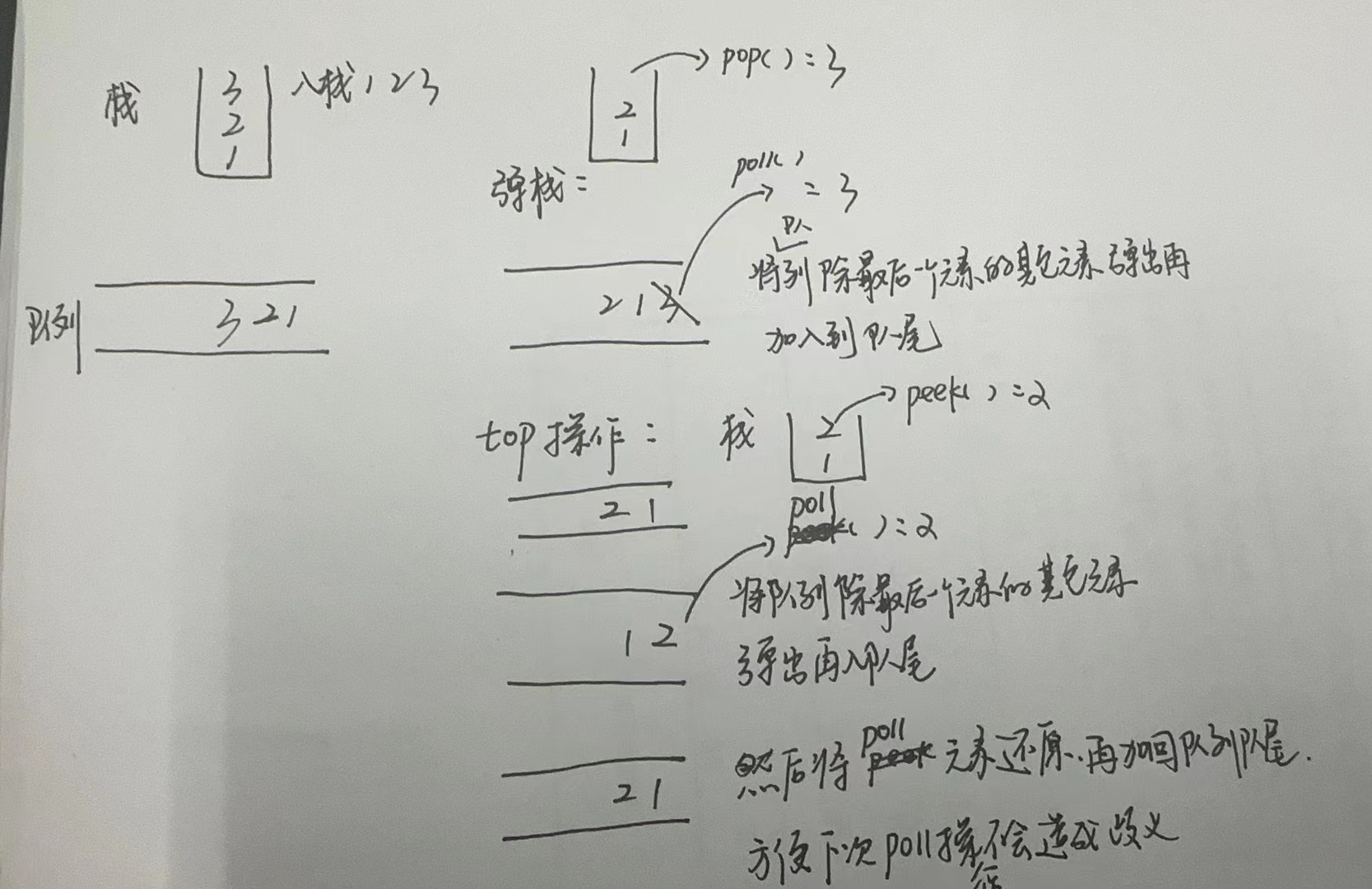
文章目录 题目方法一:单个队列实现 题目 方法一:单个队列实现 入栈 和入队正常进行出栈的元素其实就是队列的尾部元素,所以直接将尾部元素弹出即可,其实就可以将除了最后一个元素的其他元素出队再加入队,然后弹出队首元…...
数据预处理方式合集
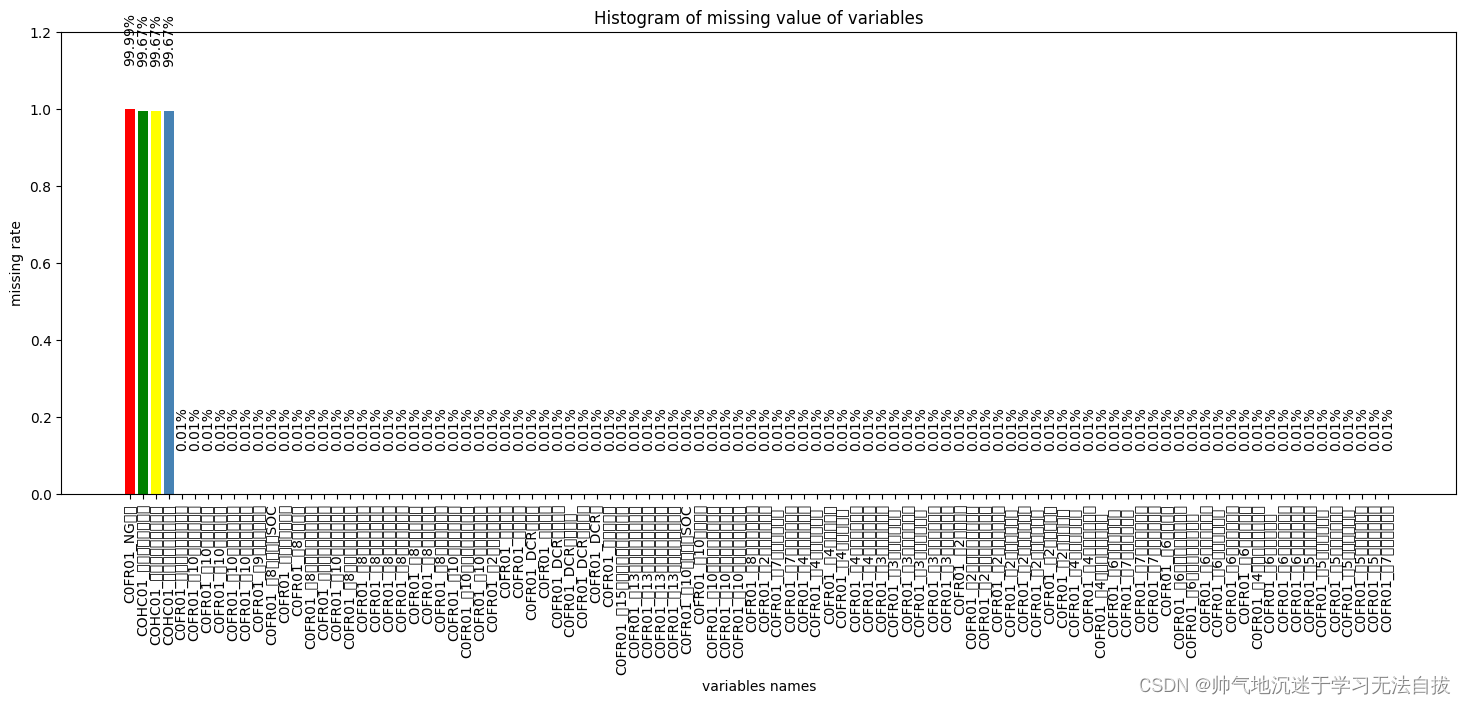
删除空行 #del all None value data_all.dropna(axis1, howall, inplaceTrue) 删除空列 #del all None value data_all.dropna(axis0, howall, inplaceTrue) 缺失值处理 观测缺失值 观测数据缺失值有一个比较好用的工具包——missingno,直接传入DataFrame&…...

【前端】jquery获取data-*的属性值
通过jquery获取下面data-id的值 <div id"getId" data-id"122" >获取id</div> 方法一:dataset()方法 //data-前缀属性可以在JS中通过dataset取值,更加方便 console.log(getId.dataset.id);//112//赋值 getId.dataset.…...
GB28181学习(五)——实时视音频点播(信令传输部分)
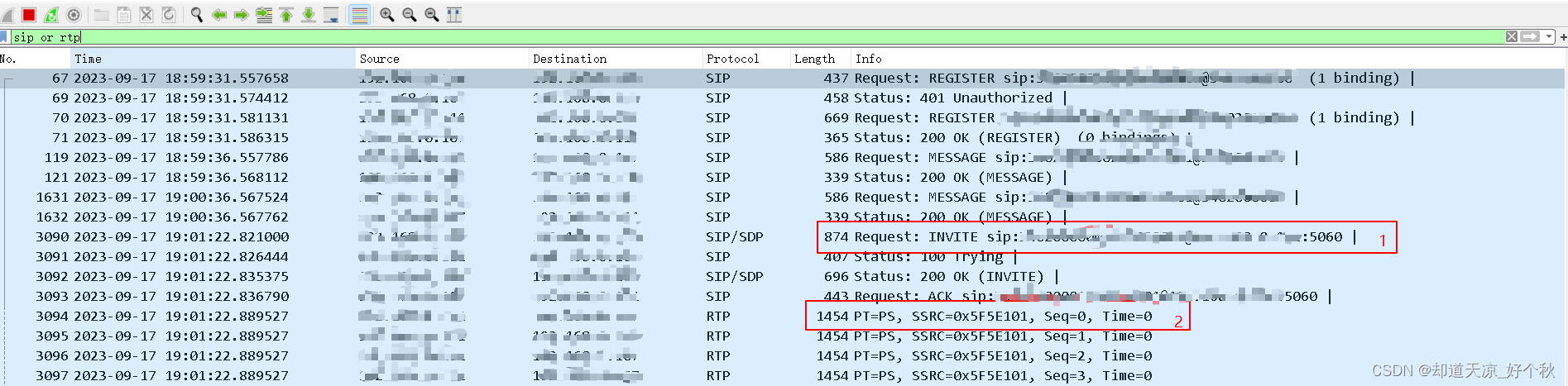
要求 实时视音频点播的SIP消息应通过本域或其他域的SIP服务器进行路由、转发,目标设备的实时视音频流宜通过本域的媒体服务器进行转发;采用INVITE方法实现会话连接,采用RTP/RTCP协议实现媒体传输;信令流程分为客户端主动发起和第…...

单例模式(饿汉模式 懒汉模式)与一些特殊类设计
文章目录 一、不能被拷贝的类 二、只能在堆上创建类对象 三、只能在栈上创建类对象 四、不能被继承的类 五、单例模式 5、1 什么是单例模式 5、2 什么是设计模式 5、3 单例模式的实现 5、3、1 饿汉模式 5、3、1 懒汉模式 🙋♂️ 作者:Ggggggtm &#x…...
133. 克隆图
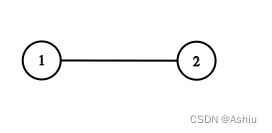
133. 克隆图 题目-中等难度示例1. bfs 题目-中等难度 给你无向 连通 图中一个节点的引用,请你返回该图的 深拷贝(克隆)。 图中的每个节点都包含它的值 val(int) 和其邻居的列表(list[Node])。…...

交流耐压试验目的
试验目的 交流耐压试验是鉴定电力设备绝缘强度最有效和最直接的方法。 电力设备在运行中, 绝缘长期受着电场、 温度和机械振动的作用会逐渐发生劣化, 其中包括整体劣化和部分劣化,形成缺陷, 例如由于局部地方电场比较集中或者局部…...
使用 YCSB 和 PE 进行 HBase 性能压力测试
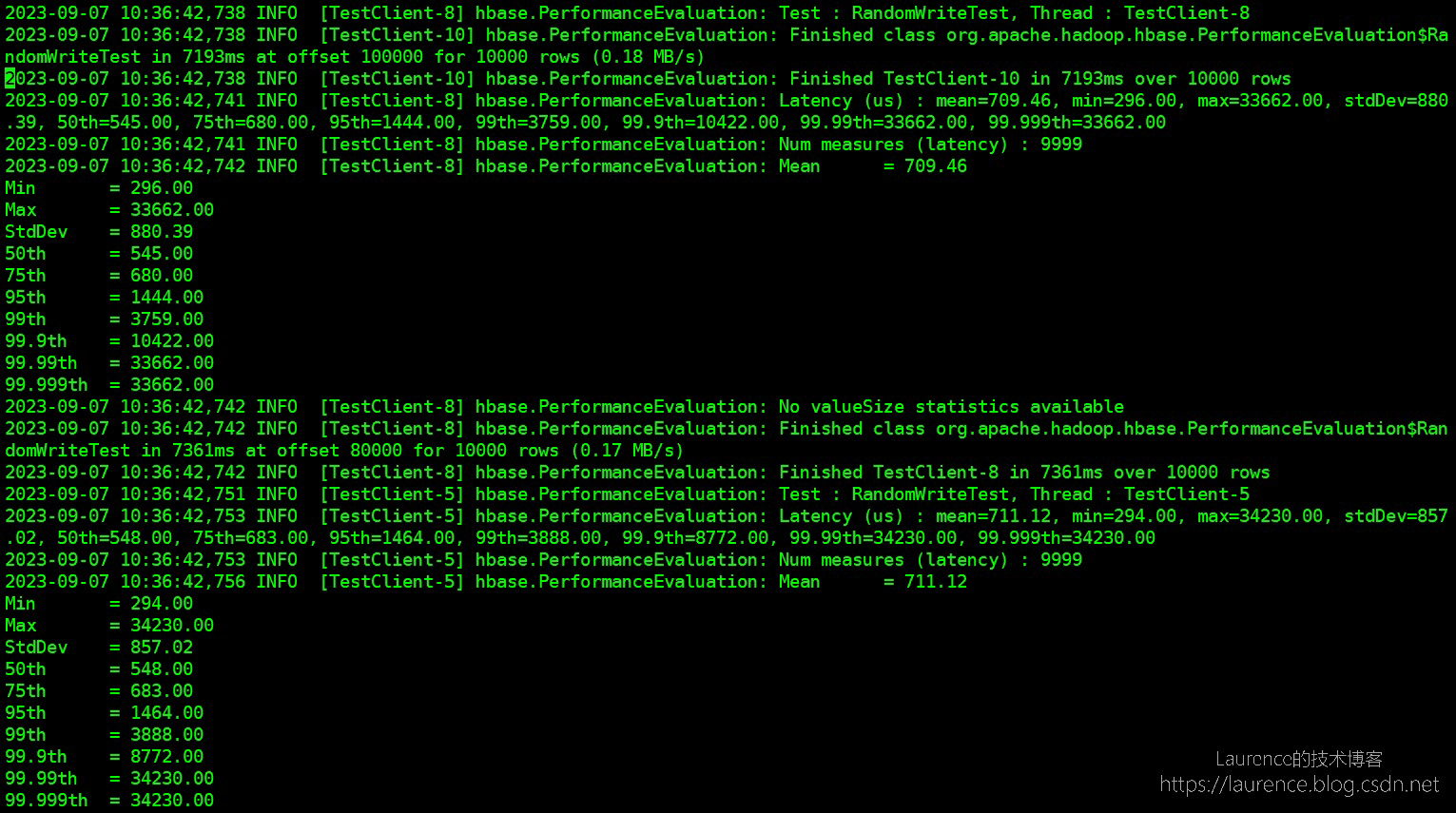
HBase主要性能压力测试有两个,一个是 HBase 自带的 PE,另一个是 YCSB,先简单说一个两者的区别。PE 是 HBase 自带的工具,开箱即用,使用起来非常简单,但是 PE 只能按单个线程统计压测结果,不能汇…...

正则表达式相关概念及不可见高度页面的获取
12.正则 概念:匹配有规律的字符串,匹配上则正确 1.正则的创建方式 构造函数创建 // 修饰符 igm// i 忽视 ignore// g global 全球 全局// m 换行 var regnew RegExp("匹配的内容","修饰符")var str "this is a Box";var reg new RegExp(&qu…...

深入学习 Redis - 分布式锁底层实现原理,以及实际应用
目录 一、Redis 分布式锁 1.1、什么是分布式锁 1.2、分布式锁的基础实现 1.2.1、引入场景 1.2.2、基础实现思想 1.2.3、引入 setnx 1.3、引入过期时间 1.4、引入校验 id 1.5、引入 lua 脚本 1.5.1、引入 lua 脚本的原因 1.5.2、lua 脚本介绍 1.6、过期时间续约问题&…...
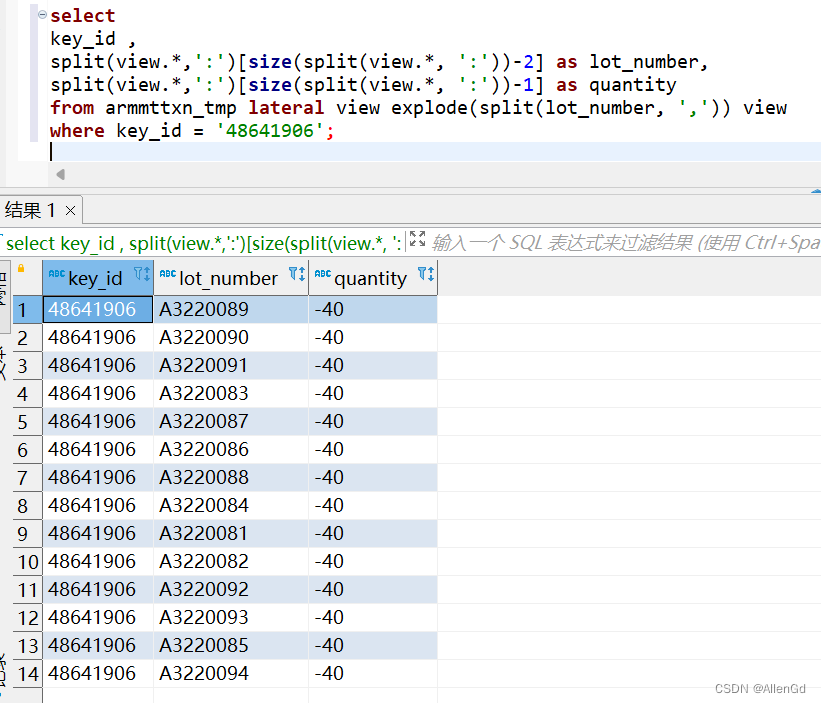
Hive行转列[一行拆分成多行/一列拆分成多列]
场景: hive有张表armmttxn_tmp,其中有一个字段lot_number,该字段以逗号分隔开多个值,每个值又以冒号来分割料号和数量,如:A3220089:-40,A3220090:-40,A3220091:-40,A3220083:-40,A3220087:-40,A3220086:-4…...

TypeScript系列之类型 string
文章の目录 背景写在最后 背景 与JavaScript不同的是,TypeScript使用的是静态类型,比如说它指定了变量可以保存的数据类型。如下面代码所示,如果在JavaScript中,指定变量可以保存的数据类型,会报错:类型注…...
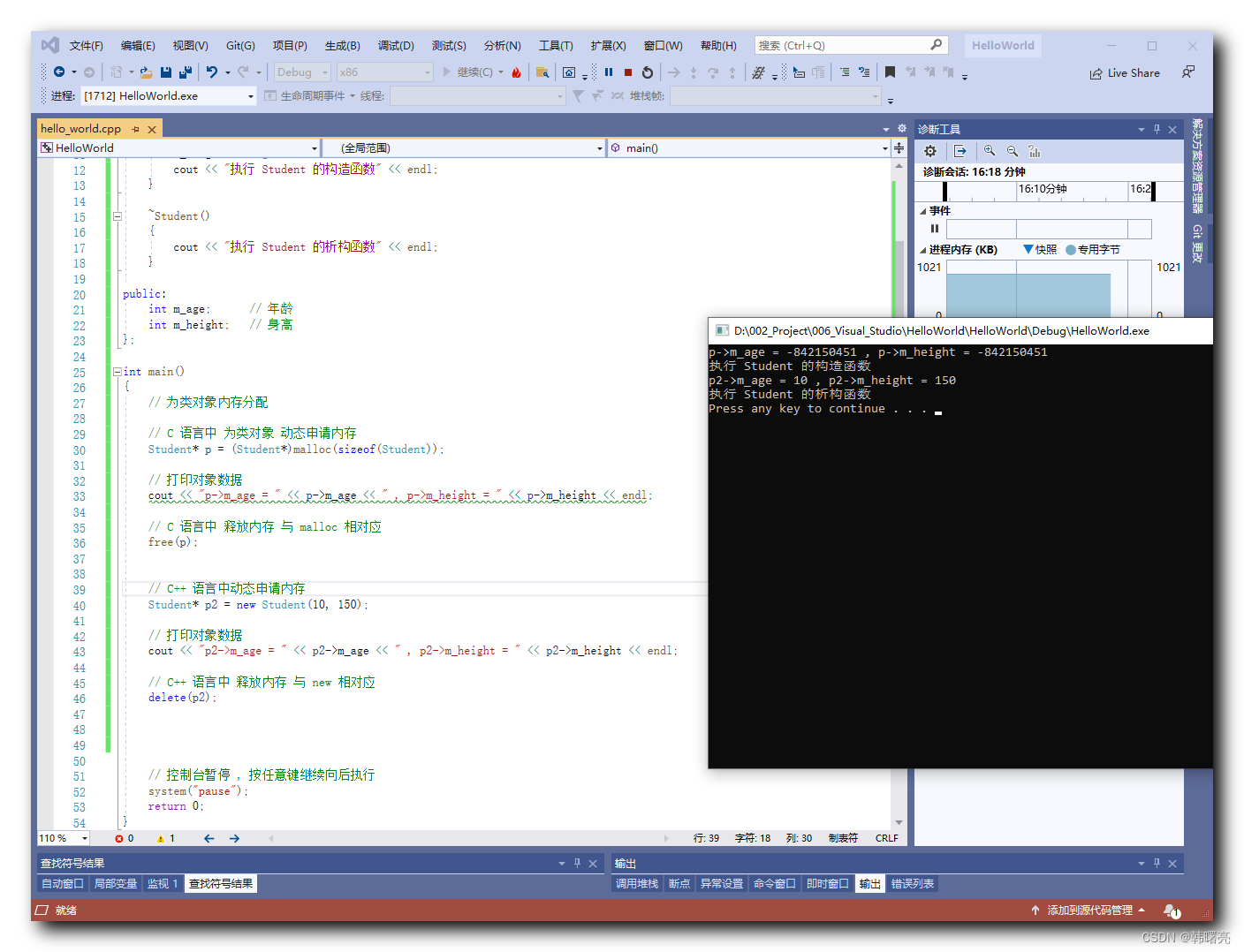
【C++】动态内存管理 ③ ( C++ 对象的动态创建和释放 | new 运算符 为类对象 分配内存 | delete 运算符 释放对象内存 )
文章目录 一、C 对象的动态创建和释放1、C 语言 对象的动态创建和释放 的方式2、C 语言 对象的动态创建和释放 的方式 二、代码示例 - 对象的动态创建和释放 一、C 对象的动态创建和释放 使用 C 语言中的 malloc 函数 可以为 类对象 分配内存 ; 使用 free 函数可以释放上述分配…...

Ultimate SD Upscale终极指南:三步掌握AI图像高清放大技术
Ultimate SD Upscale终极指南:三步掌握AI图像高清放大技术 【免费下载链接】ultimate-upscale-for-automatic1111 项目地址: https://gitcode.com/gh_mirrors/ul/ultimate-upscale-for-automatic1111 Ultimate SD Upscale是AUTOMATIC1111 Stable Diffusion …...

用沁恒CH582F核心板做个蓝牙RGB氛围灯:从硬件连接到手机App控制全流程
用沁恒CH582F核心板打造智能蓝牙RGB氛围灯:从电路设计到App交互全解析 在智能家居和个性化照明日益普及的今天,DIY一个属于自己的蓝牙RGB氛围灯不仅充满乐趣,更能让你深入理解物联网设备的完整开发流程。沁恒CH582F这款集成了BLE 5.3的RISC-V…...

HS2-HF Patch:终极HoneySelect2汉化与MOD整合指南
HS2-HF Patch:终极HoneySelect2汉化与MOD整合指南 【免费下载链接】HS2-HF_Patch Automatically translate, uncensor and update HoneySelect2! 项目地址: https://gitcode.com/gh_mirrors/hs/HS2-HF_Patch HS2-HF Patch是HoneySelect2玩家的终极解决方案&a…...

Dism++:让Windows系统维护变得像整理房间一样简单
Dism:让Windows系统维护变得像整理房间一样简单 【免费下载链接】Dism-Multi-language Dism Multi-language Support & BUG Report 项目地址: https://gitcode.com/gh_mirrors/di/Dism-Multi-language 你是否曾经面对Windows系统越来越臃肿、启动越来越慢…...

3步完成Windows上的Android应用安装:APK安装器终极指南
3步完成Windows上的Android应用安装:APK安装器终极指南 【免费下载链接】APK-Installer An Android Application Installer for Windows 项目地址: https://gitcode.com/GitHub_Trending/ap/APK-Installer APK安装器(APK Installer)是…...
)
【国家级等保2.0强制要求】:Python Web应用未启用国密TLS 1.3?3行代码检测+5步热替换方案(已通过中国网安实验室验证)
更多请点击: https://intelliparadigm.com 第一章:国密TLS 1.3在Python Web应用中的合规性定位 国密TLS 1.3(即基于SM2/SM3/SM4算法并符合GM/T 0024-2021标准的TLS协议实现)已正式纳入《商用密码应用安全性评估管理办法》核心要求…...

开源数据标注平台Label Studio深度解析:企业级多模态标注实战指南
开源数据标注平台Label Studio深度解析:企业级多模态标注实战指南 【免费下载链接】label-studio Label Studio is a multi-type data labeling and annotation tool with standardized output format 项目地址: https://gitcode.com/GitHub_Trending/la/label-st…...

waimai-crawler:多平台外卖订单数据聚合架构与自动化采集技术方案
waimai-crawler:多平台外卖订单数据聚合架构与自动化采集技术方案 【免费下载链接】waimai-crawler 外卖爬虫,定时自动抓取三大外卖平台上商家订单,平台目前包括:美团,饿了么,百度外卖 项目地址: https:/…...

WindowsCleaner开源磁盘清理工具:5分钟快速解决C盘爆红终极指南
WindowsCleaner开源磁盘清理工具:5分钟快速解决C盘爆红终极指南 【免费下载链接】WindowsCleaner Windows Cleaner——专治C盘爆红及各种不服! 项目地址: https://gitcode.com/gh_mirrors/wi/WindowsCleaner 你的C盘又变红了吗?每次看…...

还在为Windows窗口无法调整大小而烦恼吗?试试这个免费工具吧!
还在为Windows窗口无法调整大小而烦恼吗?试试这个免费工具吧! 【免费下载链接】WindowResizer 一个可以强制调整应用程序窗口大小的工具 项目地址: https://gitcode.com/gh_mirrors/wi/WindowResizer 你是否遇到过这样的情况:某个应用…...