
Android Studio的笔记--HttpURLConnection使用GET下载zip文件
HttpURLConnection使用GET下载zip文件
- http get下载zip文件
- MainActivity.java
- AndroidMainfest.xml
- activity_main.xml
- log
http get下载zip文件
MainActivity.java
用HttpURLConnection GET方法进行需注意:
1、Android 9及以上版本需要设置这个,否则会有警告
if (Build.VERSION.SDK_INT >= Build.VERSION_CODES.P) {
StrictMode.ThreadPolicy policy = new StrictMode.ThreadPolicy.Builder().permitAll().build();
StrictMode.setThreadPolicy(policy);
}
2、清单中要申请网络权限写入权限
< uses-permission android:name=“android.permission.INTERNET” />
< uses-permission android:name=“android.permission.WRITE_EXTERNAL_STORAGE” />
3、要在application中添加android:usesCleartextTraffic=“true”。否则会有警告,好像加这个有风险,没有细研究
4、关于下载的位置Environment.getExternalStorageDirectory()的路径在/storage/emulated/0
5、关于下载的测试地址http://nginx.org/download/nginx-1.23.4.zip
6、关于下载的两种方式
package com.lxh.romupgrade;
import androidx.appcompat.app.AppCompatActivity;
import android.content.Context;
import android.os.Build;
import android.os.Bundle;
import android.os.Environment;
import android.os.StrictMode;
import android.util.Log;
import android.view.View;
import android.widget.Button;
import java.io.FileOutputStream;
import java.io.InputStream;
import java.net.HttpURLConnection;
import java.net.URL;
public class MainActivity extends AppCompatActivity {Button bt_post;Button bt_post2;Context mcontext;private static final String TAG = "MainActivity3 lxh";@Overrideprotected void onCreate(Bundle savedInstanceState) {super.onCreate(savedInstanceState);setContentView(R.layout.activity_main);bt_post = findViewById(R.id.bt_post);bt_post2 = findViewById(R.id.bt_post2);mcontext = MainActivity.this;bt_post.setOnClickListener(new View.OnClickListener() {@Overridepublic void onClick(View view) {Log.i(TAG, "onClick");download_2();}});bt_post2.setOnClickListener(new View.OnClickListener() {@Overridepublic void onClick(View view) {Log.i(TAG, "onClick");// Android 9及以上版本需要设置这个,否则会有警告if (Build.VERSION.SDK_INT >= Build.VERSION_CODES.P) {StrictMode.ThreadPolicy policy = new StrictMode.ThreadPolicy.Builder().permitAll().build();StrictMode.setThreadPolicy(policy);}download_3();}});}private void download_2() {new DownloadZipFileTask().execute();}public static void download_3() {Log.i(TAG, "download_3");String url = "http://nginx.org/download/nginx-1.23.4.zip";FileOutputStream fos = null;InputStream in = null;try {URL u = new URL(url);HttpURLConnection conn = (HttpURLConnection) u.openConnection();conn.setRequestMethod("GET");int responseCode = conn.getResponseCode();Log.i(TAG, "responseCode=" + responseCode);if (responseCode == HttpURLConnection.HTTP_OK) {fos = new FileOutputStream(Environment.getExternalStorageDirectory() + "/file3.zip");byte[] buffer = new byte[1024];int len;while ((len = conn.getInputStream().read(buffer)) != -1) {fos.write(buffer, 0, len);}fos.close();conn.getInputStream().close();Log.i(TAG, "download ok");} else {Log.i(TAG, "Handle error case here");}} catch (Exception e) {e.printStackTrace();} finally {if (fos != null) {try {fos.close();} catch (Exception e) {e.printStackTrace();}}if (in != null) {try {in.close();} catch (Exception e) {e.printStackTrace();}}}}
}
package com.lxh.romupgrade;
import android.os.AsyncTask;
import android.os.Environment;
import android.util.Log;
import java.io.FileOutputStream;
import java.io.IOException;
import java.io.InputStream;
import java.net.HttpURLConnection;
import java.net.URL;/*** create by lxh on 2023/10/10 Time:20:21* tip:HTTP 下载*/
public class DownloadZipFileTask extends AsyncTask<Void, Integer, Void> {@Overrideprotected Void doInBackground(Void... params) {Log.i("lxh", "doInBackground");try {URL url = new URL("http://nginx.org/download/nginx-1.23.4.zip");HttpURLConnection connection = (HttpURLConnection) url.openConnection();connection.setRequestMethod("GET");connection.connect();int fileSize = connection.getContentLength();InputStream inputStream = connection.getInputStream();FileOutputStream outputStream = new FileOutputStream(Environment.getExternalStorageDirectory() + "/file2.zip");byte[] buffer = new byte[4096];int bytesRead;int totalBytesRead = 0;while ((bytesRead = inputStream.read(buffer)) != -1) {outputStream.write(buffer, 0, bytesRead);totalBytesRead += bytesRead;int progress = (int) (totalBytesRead * 100 / fileSize);publishProgress(progress);}Log.i("lxh", "download ok");outputStream.close();inputStream.close();connection.disconnect();} catch (IOException e) {e.printStackTrace();}return null;}
}
AndroidMainfest.xml
需要在清单添加
<?xml version="1.0" encoding="utf-8"?>
<manifest xmlns:android="http://schemas.android.com/apk/res/android"package="com.lxh.romupgrade"><uses-permission android:name="android.permission.INTERNET" /><uses-permission android:name="android.permission.WRITE_EXTERNAL_STORAGE" /><applicationandroid:allowBackup="true"android:icon="@mipmap/ic_launcher"android:label="@string/app_name"android:roundIcon="@mipmap/ic_launcher_round"android:supportsRtl="true"android:usesCleartextTraffic="true"android:theme="@style/Theme.Romupgrade"><activity android:name=".MainActivity"><intent-filter><action android:name="android.intent.action.MAIN" /><category android:name="android.intent.category.LAUNCHER" /></intent-filter></activity></application>
</manifest>
activity_main.xml
布局如下
<?xml version="1.0" encoding="utf-8"?>
<LinearLayout xmlns:android="http://schemas.android.com/apk/res/android"android:layout_width="match_parent"android:layout_height="match_parent"><Buttonandroid:id="@+id/bt_post"android:layout_width="wrap_content"android:layout_height="wrap_content"android:layout_weight="1"android:text="POST" /><Buttonandroid:id="@+id/bt_post2"android:layout_width="wrap_content"android:layout_height="wrap_content"android:layout_weight="1"android:text="POST2" />
</LinearLayout>
log
点击按钮回显如下
I/MainActivity3 lxh: onClick
I/lxh: doInBackground
D/NetworkSecurityConfig: No Network Security Config specified, using platform default
I/lxh: download okI/MainActivity3 lxh: onClick
I/MainActivity3 lxh: download_3
I/MainActivity3 lxh: responseCode=200
I/MainActivity3 lxh: download ok
待补充
欢迎指错,一起学习
相关文章:

Android Studio的笔记--HttpURLConnection使用GET下载zip文件
HttpURLConnection使用GET下载zip文件 http get下载zip文件MainActivity.javaAndroidMainfest.xmlactivity_main.xmllog http get下载zip文件 MainActivity.java 用HttpURLConnection GET方法进行需注意: 1、Android 9及以上版本需要设置这个,否则会有…...

phantom3D模体
phantom是人头模型,分为2D和3D两种,matlab中可直接调用phantom(size)生成2D数据,如图1,而三维需要对应函数文件,下载:3D 图1 2D phantom 3D模体为一个椭球体,只能生成xyz三个方向相同维度的模…...

贪心算法解决批量开票限额的问题
具体问题:批量订单开票 限制:1.开最少的张数 2.每张限额10w # 贪心算法 def split_invoice_by_item(items):items_sorted sorted(items, keylambda x: x.price, reverseTrue)invoices []for item in items_sorted:# 尝试将商品加入已有的发票中added …...

Unity后台登录/获取数据——BestHTTP的使用Get/Post
一、使用BestHTTP实现登录功能(Post) 登录具体的步骤如下: 1:传入你的用户名和密码,这是一条包括链接和用户名密码的链接 2:使用BestHTTP的Post功能将链接传到服务器后台 3:后台拿到了你传送…...
【Windows日志】记录系统事件的日志
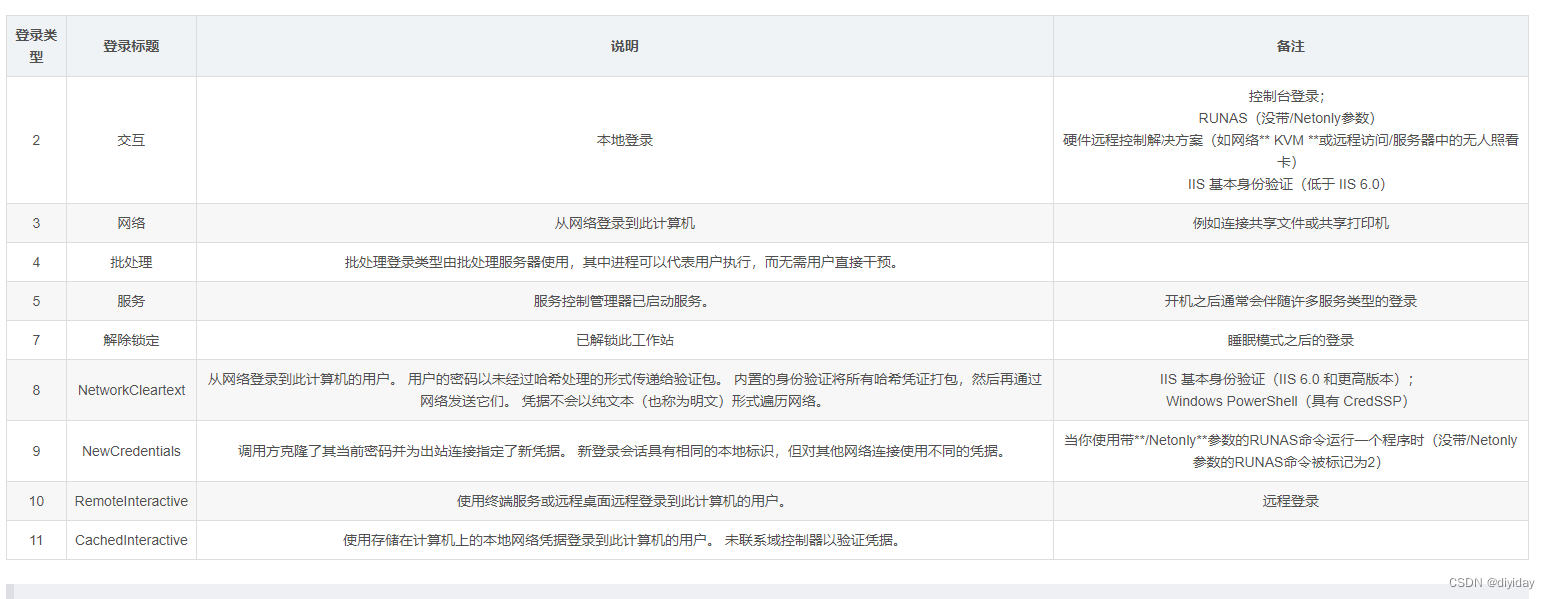
文章目录 一、概要二、Windows日志介绍 2.1 应用程序日志2.2 系统日志2.3 安全日志 三、查看与分析日志四、常见事件ID 4.1 登录事件 4.1.1 4624登陆成功4.1.2 4625登陆失败 4.2 特权使用4.3 账户管理事件4.4 账户登录事件5.2 事件ID汇总 一、概要 Windows主要有以下三类日…...

物联网开发学习笔记——目录索引
什么是物联网? 物联网的英文名称是Internet of Things。IoT则是Internet of Things的缩写。 通俗地说,就是把设备与互联网连接起来,进行信息交互。 目录 一、开发环境配置 工欲善其事必先利其器,首先是开发环境配置。 开发环…...

Prometheus:优秀和强大的监控报警工具
文章目录 概述Prometheus的底层技术和原理数据模型数据采集数据存储查询语言数据可视化 Prometheus的部署Prometheus的使用配置数据采集目标查询监控数据设置警报规则 查看数据可视化总结 概述 Prometheus是一款开源的监控和警报工具,用于收集和存储系统和应用程序…...

Appium
# 获取元素和屏幕截图 echo on adb shell uiautomator dump /sdcard/app.uix adb pull /sdcard/app.uix F:\APP\app.uixadb shell screencap -p /sdcard/app.png adb pull /sdcard/app.png F:\APP\app.png卸载appium npm uninstall appium -g 重新安装appium npm install -g a…...

自动驾驶学习笔记(五)——绕行距离调试
#Apollo开发者# 学习课程的传送门如下,当您也准备学习自动驾驶时,可以和我一同前往: 《自动驾驶新人之旅》免费课程—> 传送门 《2023星火培训【感知专项营】》免费课程—>传送门 文章目录 前言 调试内容 打开在线编辑器 打开pl…...
【Android】VirtualDisplay创建流程及原理
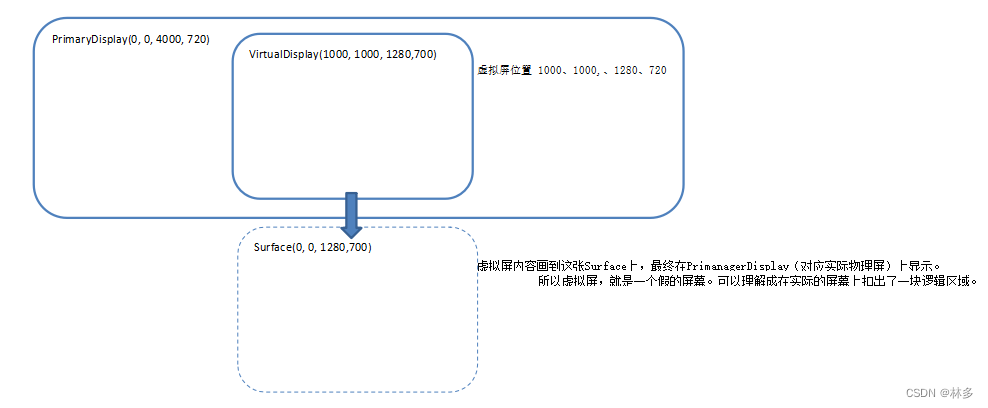
Android VirtualDisplay创建流程及原理 Android DisplayManager提供了createVirtualDisplay接口,用于创建虚拟屏。虚拟屏可用于录屏(网上很多资料说这个功能),分屏幕(比如一块很长的屏幕,通过虚拟屏分出不…...
Linux服务器快速搭建pytorch
Linux服务器搭建pytorch 文章目录 Linux服务器搭建pytorch一、使用FileZilla传输Anaconda二、激活Anaconda环境1.创建一个虚拟环境2.使用已有项目生成requirements.txt3.在虚拟环境中使用requirements.txt安装其他项目相关库 总结 一、使用FileZilla传输Anaconda 提示…...
声音克隆,定制自己的声音,使用最新版Bert-VITS2的云端训练+推理记录
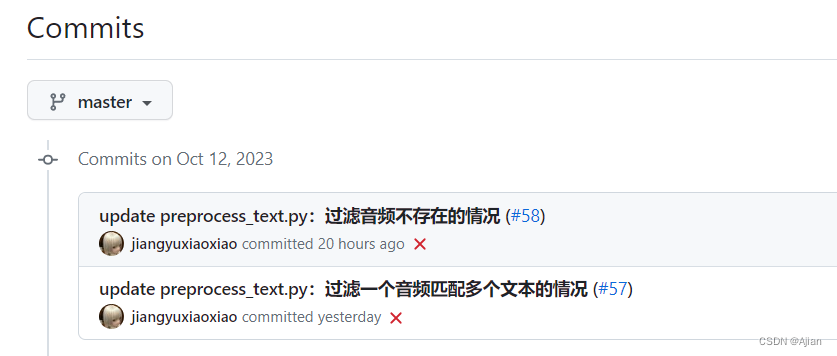
说明 本次训练服务器使用Google Colab T4 GPUBert-VITS2库为:https://github.com/fishaudio/Bert-VITS2,其更新较为频繁,使用其2023.10.12的commit版本:主要参考:B站诸多大佬视频,CSDN:https://blog.csdn.…...
LeetCode讲解篇之198. 打家劫舍
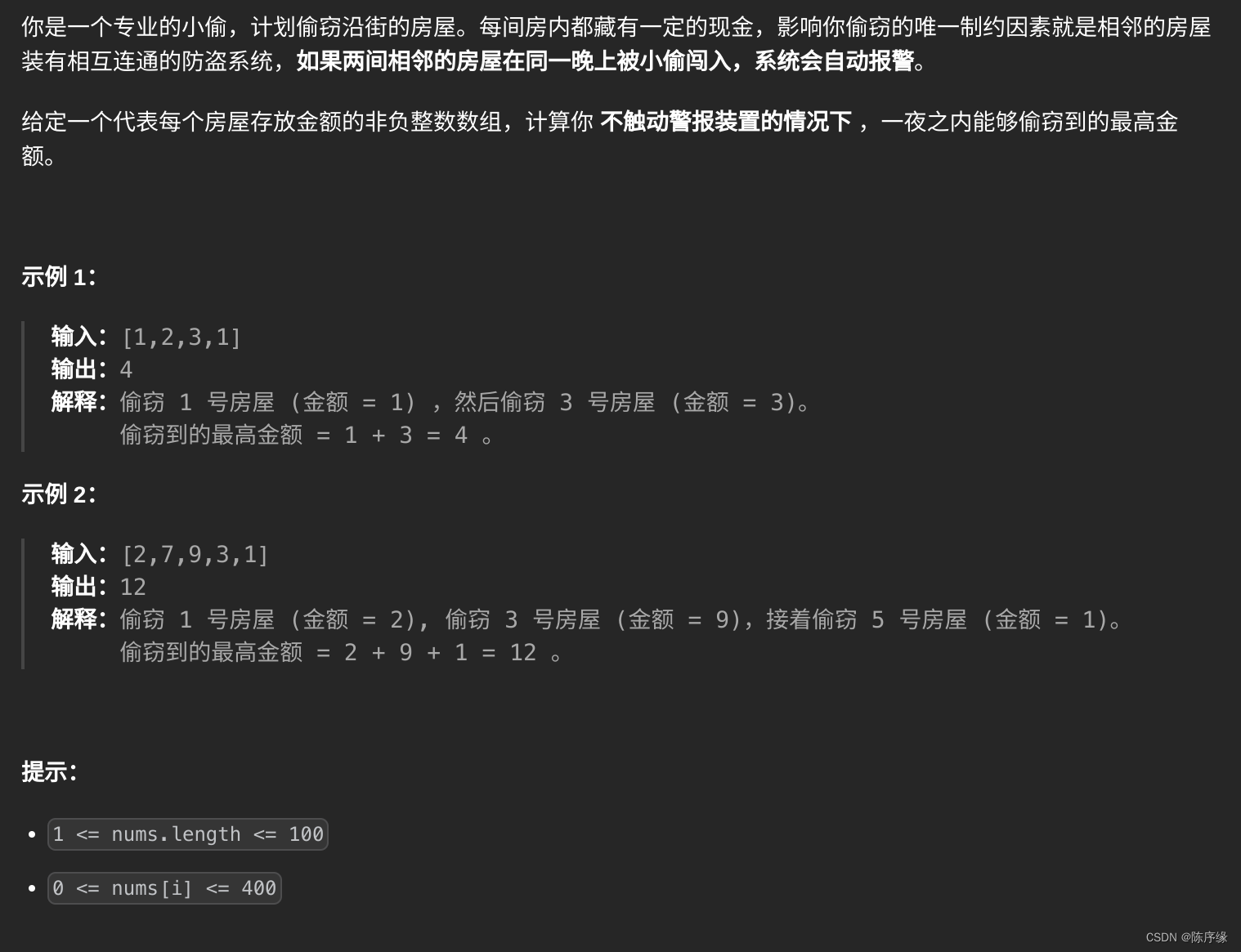
LeetCode讲解篇之198. 打家劫舍 文章目录 LeetCode讲解篇之198. 打家劫舍题目描述题解思路题解代码 题目描述 题解思路 该问题可以通过递推来完成 递推公式: 前n间房的最大金额 max(前n-1间房的最大金额, 前n-2间房的最大金额第n-1间房的最…...
)
【下载共享文件】Java基于SMB协议 + JCIFS依赖下载Windows共享文件(亲测可用)
这篇文章,主要介绍如何使用JCIFS依赖库,基于SMB协议下载Windows共享文件。 目录 一、搭建Windows共享文件服务 1.1、创建共享文件目录 1.2、添加文件...

【评分卡实现】应用Python中的toad.ScoreCard函数实现评分卡
逻辑回归已经在各大银行和公司都实际运用于业务。之前的文章已经阐述了逻辑回归三部曲——逻辑回归和sigmod函数的由来、...
【数据结构】双链表的相关操作(声明结构体成员、初始化、判空、增、删、查)
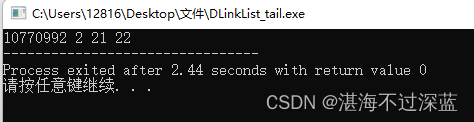
双链表 双链表的特点声明双链表的结构体成员双链表的初始化带头结点的双链表初始化不带头结点的双链表初始化调用双链表的初始化 双链表的判空带头结点的双链表判空不带头结点的双链表判空 双链表的插入(按值插入)头插法建立双链表带头结点的头插法每次调…...
解析找不到msvcp140.dll的5个解决方法,快速修复dll丢失问题
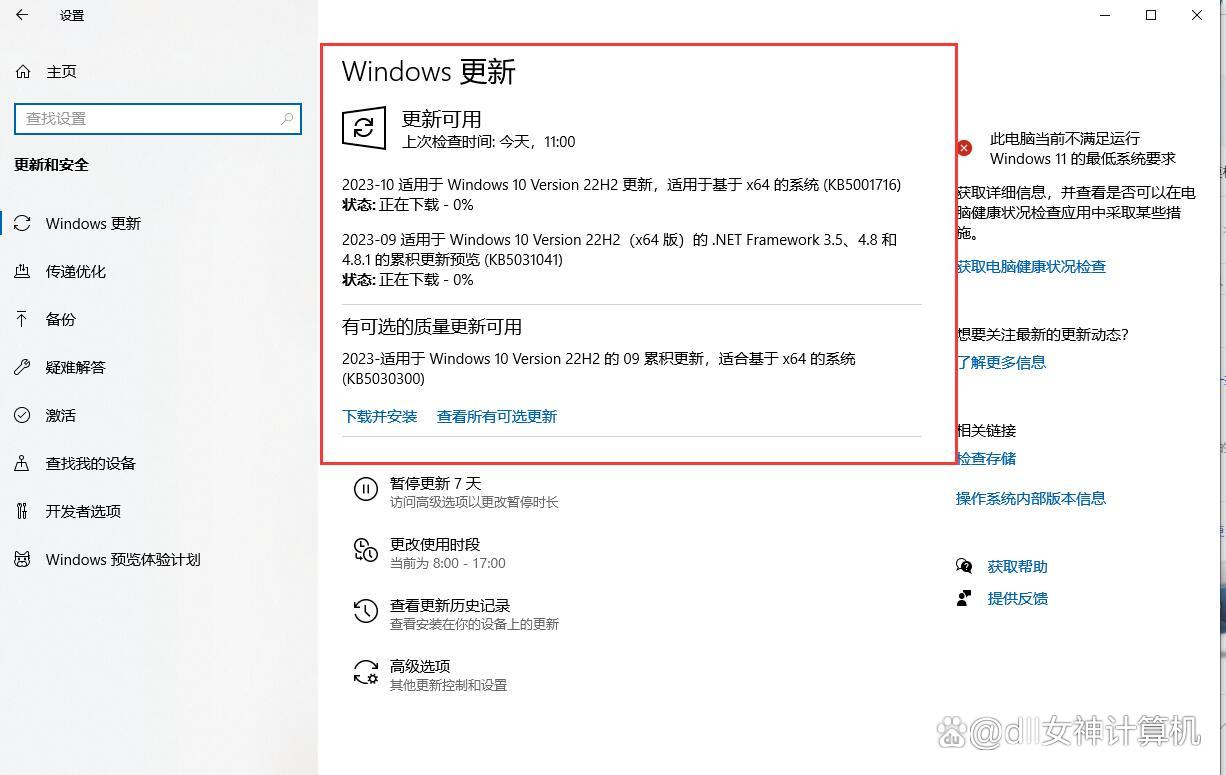
在使用计算机过程中,我们也会遇到各种各样的问题。其中,找不到msvcp140.dll修复方法是一个非常普遍的问题。msvcp140.dll是一个动态链接库文件,它是Microsoft Visual C 2015 Redistributable的一部分。这个文件包含了许多用于运行C程序的函…...

代码管理工具 gitlab实战应用
系列文章目录 第一章 Java线程池技术应用 第二章 CountDownLatch和Semaphone的应用 第三章 Spring Cloud 简介 第四章 Spring Cloud Netflix 之 Eureka 第五章 Spring Cloud Netflix 之 Ribbon 第六章 Spring Cloud 之 OpenFeign 第七章 Spring Cloud 之 GateWay 第八章 Sprin…...
小谈设计模式(27)—享元模式
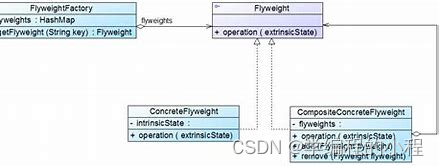
小谈设计模式(27)—享元模式 专栏介绍专栏地址专栏介绍 享元模式模式结构分析享元工厂(FlyweightFactory)享元接口(Flyweight)具体享元(ConcreteFlyweight)非共享具体享元࿰…...

网络代理技术:隐私保护与安全加固的利器
随着数字化时代的不断演进,网络安全和个人隐私保护变得愈发重要。在这个背景下,网络代理技术崭露头角,成为网络工程师和普通用户的得力助手。本文将深入探讨Socks5代理、IP代理,以及它们在网络安全、爬虫开发和HTTP协议中的关键应…...
【WiFi帧结构】
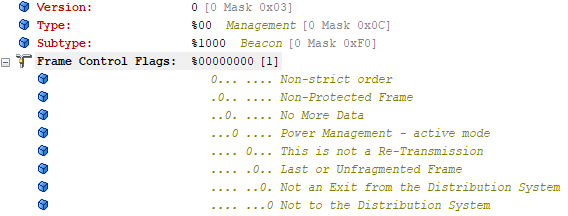
文章目录 帧结构MAC头部管理帧 帧结构 Wi-Fi的帧分为三部分组成:MAC头部frame bodyFCS,其中MAC是固定格式的,frame body是可变长度。 MAC头部有frame control,duration,address1,address2,addre…...

在HarmonyOS ArkTS ArkUI-X 5.0及以上版本中,手势开发全攻略:
在 HarmonyOS 应用开发中,手势交互是连接用户与设备的核心纽带。ArkTS 框架提供了丰富的手势处理能力,既支持点击、长按、拖拽等基础单一手势的精细控制,也能通过多种绑定策略解决父子组件的手势竞争问题。本文将结合官方开发文档,…...

工程地质软件市场:发展现状、趋势与策略建议
一、引言 在工程建设领域,准确把握地质条件是确保项目顺利推进和安全运营的关键。工程地质软件作为处理、分析、模拟和展示工程地质数据的重要工具,正发挥着日益重要的作用。它凭借强大的数据处理能力、三维建模功能、空间分析工具和可视化展示手段&…...

页面渲染流程与性能优化
页面渲染流程与性能优化详解(完整版) 一、现代浏览器渲染流程(详细说明) 1. 构建DOM树 浏览器接收到HTML文档后,会逐步解析并构建DOM(Document Object Model)树。具体过程如下: (…...
用docker来安装部署freeswitch记录
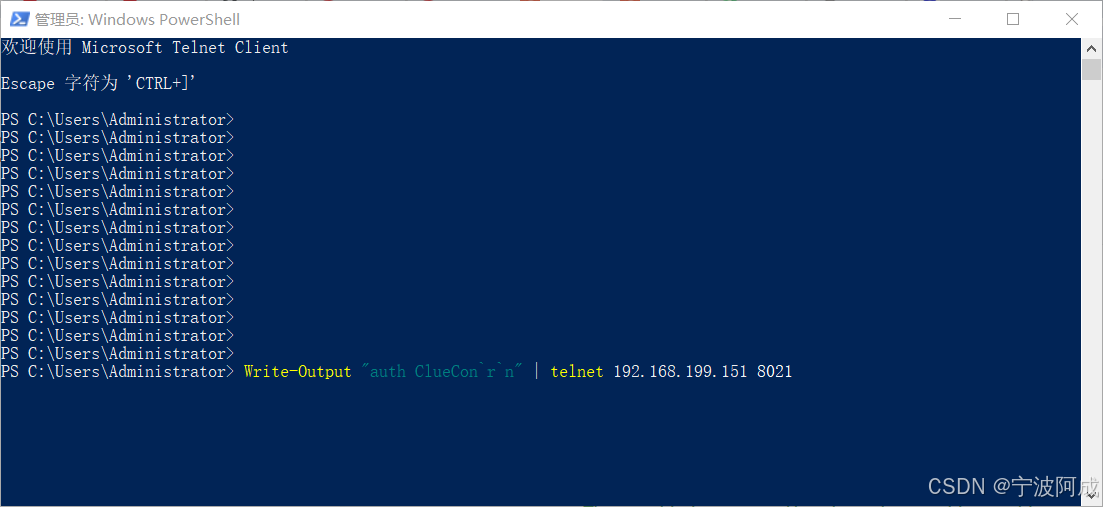
今天刚才测试一个callcenter的项目,所以尝试安装freeswitch 1、使用轩辕镜像 - 中国开发者首选的专业 Docker 镜像加速服务平台 编辑下面/etc/docker/daemon.json文件为 {"registry-mirrors": ["https://docker.xuanyuan.me"] }同时可以进入轩…...
pikachu靶场通关笔记22-1 SQL注入05-1-insert注入(报错法)
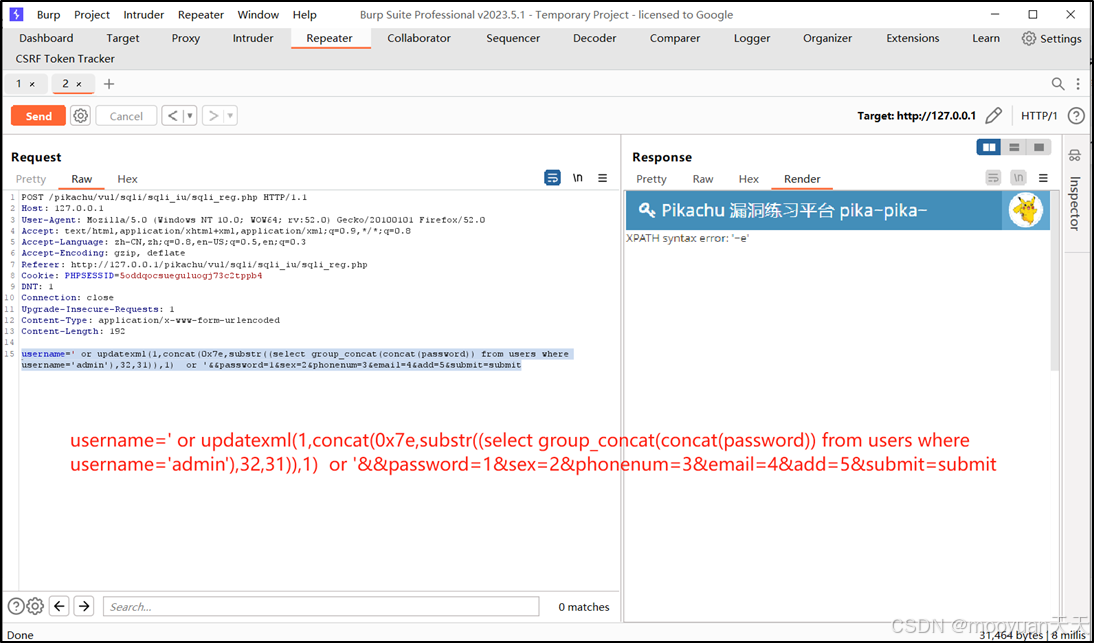
目录 一、SQL注入 二、insert注入 三、报错型注入 四、updatexml函数 五、源码审计 六、insert渗透实战 1、渗透准备 2、获取数据库名database 3、获取表名table 4、获取列名column 5、获取字段 本系列为通过《pikachu靶场通关笔记》的SQL注入关卡(共10关࿰…...

学校时钟系统,标准考场时钟系统,AI亮相2025高考,赛思时钟系统为教育公平筑起“精准防线”
2025年#高考 将在近日拉开帷幕,#AI 监考一度冲上热搜。当AI深度融入高考,#时间同步 不再是辅助功能,而是决定AI监考系统成败的“生命线”。 AI亮相2025高考,40种异常行为0.5秒精准识别 2025年高考即将拉开帷幕,江西、…...
Selenium常用函数介绍
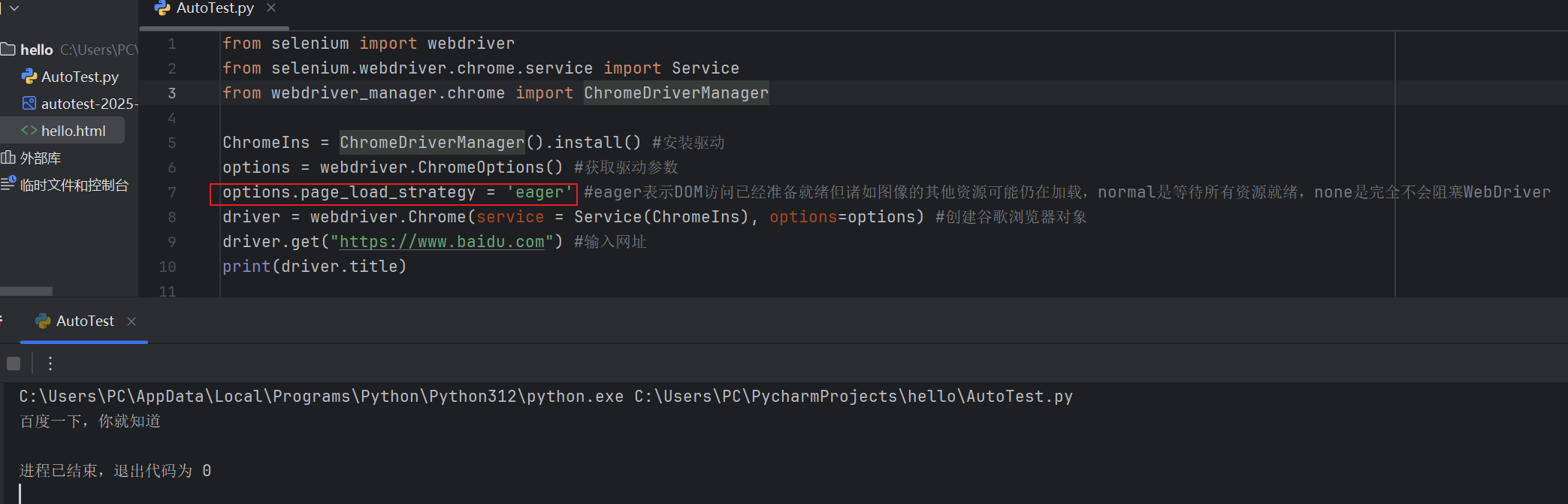
目录 一,元素定位 1.1 cssSeector 1.2 xpath 二,操作测试对象 三,窗口 3.1 案例 3.2 窗口切换 3.3 窗口大小 3.4 屏幕截图 3.5 关闭窗口 四,弹窗 五,等待 六,导航 七,文件上传 …...

【Linux】Linux 系统默认的目录及作用说明
博主介绍:✌全网粉丝23W,CSDN博客专家、Java领域优质创作者,掘金/华为云/阿里云/InfoQ等平台优质作者、专注于Java技术领域✌ 技术范围:SpringBoot、SpringCloud、Vue、SSM、HTML、Nodejs、Python、MySQL、PostgreSQL、大数据、物…...
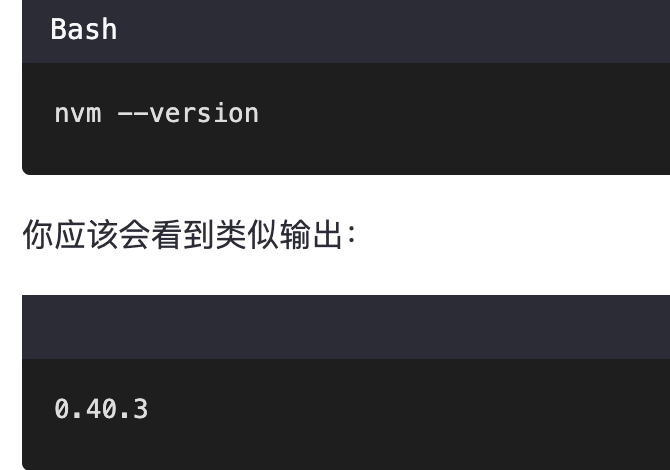
mac 安装homebrew (nvm 及git)
mac 安装nvm 及git 万恶之源 mac 安装这些东西离不开Xcode。及homebrew 一、先说安装git步骤 通用: 方法一:使用 Homebrew 安装 Git(推荐) 步骤如下:打开终端(Terminal.app) 1.安装 Homebrew…...