
Flink 中kafka broker缩容导致Task一直重启
背景
Flink版本 1.12.2
Kafka 客户端 2.4.1
在公司的Flink平台运行了一个读Kafka计算DAU的流程序,由于公司Kafka的缩容,直接导致了该程序一直在重启,重启了一个小时都还没恢复(具体的所容操作是下掉了四台kafka broker,而当时flink配置了12台kafka broker),当时具体的现场如下:
JobManaer上的日志如下:
2023-10-07 10:02:52.975 INFO  org.apache.flink.runtime.executiongraph.ExecutionGraph - Source: TableSourceScan(table=[[default_catalog, default_database, ubt_start, watermark=[-(LOCALTIMESTAMP, 1000:INTERVAL SECOND)]]]) (34/64) (e33d9ad0196a71e8eb551c181eb779b5) switched from RUNNING to FAILED on container_e08_1690538387235_2599_01_000010 @ task-xxxx-shanghai.emr.aliyuncs.com (dataPort=xxxx).
org.apache.flink.streaming.connectors.kafka.internals.Handover$ClosedException: nullat org.apache.flink.streaming.connectors.kafka.internals.Handover.close(Handover.java:177)at org.apache.flink.streaming.connectors.kafka.internals.KafkaFetcher.cancel(KafkaFetcher.java:164)at org.apache.flink.streaming.connectors.kafka.FlinkKafkaConsumerBase.cancel(FlinkKafkaConsumerBase.java:945)at org.apache.flink.streaming.connectors.kafka.FlinkKafkaConsumerBase.lambda$createAndStartDiscoveryLoop$2(FlinkKafkaConsumerBase.java:913)at java.lang.Thread.run(Thread.java:750)对应的 TaskManager(task-xxxx-shanghai.emr.aliyuncs.com)上的日志如下:2023-10-07 10:02:24.604 WARN  org.apache.kafka.clients.NetworkClient - [Consumer clientId=xxxx] Connection to node 46129 (sh-bs-b1-303-i14-kafka-129-46.ximalaya.local/192.168.129.46:9092) could not be established. Broker may not be available.2023-10-07 10:02:52.939 WARN  org.apache.flink.runtime.taskmanager.Task - Source: TableSourceScan(t) (34/64)#0 (e33d9ad0196a71e8eb551c181eb779b5) switched from RUNNING to FAILED.
org.apache.flink.streaming.connectors.kafka.internals.Handover$ClosedException: nullat org.apache.flink.streaming.connectors.kafka.internals.Handover.close(Handover.java:177)at org.apache.flink.streaming.connectors.kafka.internals.KafkaFetcher.cancel(KafkaFetcher.java:164)at org.apache.flink.streaming.connectors.kafka.FlinkKafkaConsumerBase.cancel(FlinkKafkaConsumerBase.java:945)at org.apache.flink.streaming.connectors.kafka.FlinkKafkaConsumerBase.lambda$createAndStartDiscoveryLoop$2(FlinkKafkaConsumerBase.java:913)at java.lang.Thread.run(Thread.java:750)2023-10-07 10:04:58.205 WARN  org.apache.kafka.clients.NetworkClient - [Consumer clientId=xxx, groupId=xxxx] Connection to node -4 (xxxx:909) could not be established. Broker may not be available.
2023-10-07 10:04:58.205 WARN  org.apache.kafka.clients.NetworkClient - [Consumer clientId=xxx, groupId=xxxx] Bootstrap broker sxxxx:909 (id: -4 rack: null) disconnected
2023-10-07 10:04:58.206 WARN  org.apache.kafka.clients.NetworkClient - [Consumer clientId=xxx, groupId=xxxxu] Connection to node -5 (xxxx:9092) could not be established. Broker may not be available.
2023-10-07 10:04:58.206 WARN  org.apache.kafka.clients.NetworkClient - [Consumer clientId=xxx, groupId=xxxxu] Bootstrap broker xxxx:9092 (id: -5 rack: null) disconnected2023-10-07 10:08:15.541 WARN  org.apache.flink.runtime.taskmanager.Task - Source: TableSourceScan(xxx) switched from RUNNING to FAILED.
org.apache.kafka.common.errors.TimeoutException: Timeout expired while fetching topic metadata
当时Flink中kafka source的相关配置如下:
scan.topic-partition-discovery.interval  300000
restart-strategy.type fixed-delay
restart-strategy.fixed-delay.attempts 50000000
jobmanager.execution.failover-strategy region
结论以及解决
目前在kafka 消费端有两个参数default.api.timeout.ms(默认60000),request.timeout.ms(默认30000),这两个参数来控制kakfa的客户端从服务端请求超时,也就是说每次请求的超时时间是30s,超时之后可以再重试,如果在60s内请求没有得到任何回应,则会报TimeOutException,具体的见如下分析,
我们在flink kafka connector中通过设置如下参数来解决:
`properties.default.api.timeout.ms` = '600000',
`properties.request.timeout.ms` = '5000',
// max.block.ms是设置kafka producer的超时
`properties.max.block.ms` = '600000',
分析
在Flink中对于Kafka的Connector的DynamicTableSourceFactory是KafkaDynamicTableFactory,这里我们只讨论kafka作为source的情况,
而该类的方法createDynamicTableSource最终会被调用,至于具体的调用链可以参考Apache Hudi初探(四)(与flink的结合)–Flink Sql中hudi的createDynamicTableSource/createDynamicTableSink/是怎么被调用–只不过把Sink改成Source就可以了,所以最终会到KafkaDynamicSource类:
@Overridepublic ScanRuntimeProvider getScanRuntimeProvider(ScanContext context) {final DeserializationSchema<RowData> keyDeserialization =createDeserialization(context, keyDecodingFormat, keyProjection, keyPrefix);final DeserializationSchema<RowData> valueDeserialization =createDeserialization(context, valueDecodingFormat, valueProjection, null);final TypeInformation<RowData> producedTypeInfo =context.createTypeInformation(producedDataType);final FlinkKafkaConsumer<RowData> kafkaConsumer =createKafkaConsumer(keyDeserialization, valueDeserialization, producedTypeInfo);return SourceFunctionProvider.of(kafkaConsumer, false);}
该类的getScanRuntimeProvider方法会被调用,所有kafka相关的操作都可以追溯到FlinkKafkaConsumer类(继承FlinkKafkaConsumerBase)中,对于该类重点的方法如下:
@Overridepublic final void initializeState(FunctionInitializationContext context) throws Exception {OperatorStateStore stateStore = context.getOperatorStateStore();this.unionOffsetStates =stateStore.getUnionListState(new ListStateDescriptor<>(OFFSETS_STATE_NAME,createStateSerializer(getRuntimeContext().getExecutionConfig())));... }@Overridepublic void open(Configuration configuration) throws Exception {// determine the offset commit modethis.offsetCommitMode =OffsetCommitModes.fromConfiguration(getIsAutoCommitEnabled(),enableCommitOnCheckpoints,((StreamingRuntimeContext) getRuntimeContext()).isCheckpointingEnabled());// create the partition discovererthis.partitionDiscoverer =createPartitionDiscoverer(topicsDescriptor,getRuntimeContext().getIndexOfThisSubtask(),getRuntimeContext().getNumberOfParallelSubtasks());this.partitionDiscoverer.open();subscribedPartitionsToStartOffsets = new HashMap<>();final List<KafkaTopicPartition> allPartitions = partitionDiscoverer.discoverPartitions();if (restoredState != null) {...} else {// use the partition discoverer to fetch the initial seed partitions,// and set their initial offsets depending on the startup mode.// for SPECIFIC_OFFSETS and TIMESTAMP modes, we set the specific offsets now;// for other modes (EARLIEST, LATEST, and GROUP_OFFSETS), the offset is lazily// determined// when the partition is actually read.switch (startupMode) {。。。default:for (KafkaTopicPartition seedPartition : allPartitions) {subscribedPartitionsToStartOffsets.put(seedPartition, startupMode.getStateSentinel());}}if (!subscribedPartitionsToStartOffsets.isEmpty()) {switch (startupMode) {...case GROUP_OFFSETS:LOG.info("Consumer subtask {} will start reading the following {} partitions from the committed group offsets in Kafka: {}",getRuntimeContext().getIndexOfThisSubtask(),subscribedPartitionsToStartOffsets.size(),subscribedPartitionsToStartOffsets.keySet());}} else {LOG.info("Consumer subtask {} initially has no partitions to read from.",getRuntimeContext().getIndexOfThisSubtask());}}this.deserializer.open(RuntimeContextInitializationContextAdapters.deserializationAdapter(getRuntimeContext(), metricGroup -> metricGroup.addGroup("user")));}@Overridepublic void run(SourceContext<T> sourceContext) throws Exception {if (subscribedPartitionsToStartOffsets == null) {throw new Exception("The partitions were not set for the consumer");}// initialize commit metrics and default offset callback methodthis.successfulCommits =this.getRuntimeContext().getMetricGroup().counter(COMMITS_SUCCEEDED_METRICS_COUNTER);this.failedCommits =this.getRuntimeContext().getMetricGroup().counter(COMMITS_FAILED_METRICS_COUNTER);final int subtaskIndex = this.getRuntimeContext().getIndexOfThisSubtask();this.offsetCommitCallback =new KafkaCommitCallback() {@Overridepublic void onSuccess() {successfulCommits.inc();}@Overridepublic void onException(Throwable cause) {LOG.warn(String.format("Consumer subtask %d failed async Kafka commit.",subtaskIndex),cause);failedCommits.inc();}};// mark the subtask as temporarily idle if there are no initial seed partitions;// once this subtask discovers some partitions and starts collecting records, the subtask's// status will automatically be triggered back to be active.if (subscribedPartitionsToStartOffsets.isEmpty()) {sourceContext.markAsTemporarilyIdle();}LOG.info("Consumer subtask {} creating fetcher with offsets {}.",getRuntimeContext().getIndexOfThisSubtask(),subscribedPartitionsToStartOffsets);// from this point forward:// - 'snapshotState' will draw offsets from the fetcher,// instead of being built from `subscribedPartitionsToStartOffsets`// - 'notifyCheckpointComplete' will start to do work (i.e. commit offsets to// Kafka through the fetcher, if configured to do so)this.kafkaFetcher =createFetcher(sourceContext,subscribedPartitionsToStartOffsets,watermarkStrategy,(StreamingRuntimeContext) getRuntimeContext(),offsetCommitMode,getRuntimeContext().getMetricGroup().addGroup(KAFKA_CONSUMER_METRICS_GROUP),useMetrics);if (!running) {return;}if (discoveryIntervalMillis == PARTITION_DISCOVERY_DISABLED) {kafkaFetcher.runFetchLoop();} else {runWithPartitionDiscovery();}}@Overridepublic final void snapshotState(FunctionSnapshotContext context) throws Exception {...HashMap<KafkaTopicPartition, Long> currentOffsets = fetcher.snapshotCurrentState();if (offsetCommitMode == OffsetCommitMode.ON_CHECKPOINTS) {// the map cannot be asynchronously updated, because only one checkpoint call// can happen// on this function at a time: either snapshotState() or// notifyCheckpointComplete()pendingOffsetsToCommit.put(context.getCheckpointId(), currentOffsets);}for (Map.Entry<KafkaTopicPartition, Long> kafkaTopicPartitionLongEntry :currentOffsets.entrySet()) {unionOffsetStates.add(Tuple2.of(kafkaTopicPartitionLongEntry.getKey(),kafkaTopicPartitionLongEntry.getValue()));}... }}@Overridepublic final void notifyCheckpointComplete(long checkpointId) throws Exception {...fetcher.commitInternalOffsetsToKafka(offsets, offsetCommitCallback);...}
主要是initializeState,open,run,snapshotState,notifyCheckpointComplete这四个方法,下面带着问题逐一介绍一下:
注意:对于initializeState和open方法的先后顺序,可以参考StreamTask类,其中如下的调用链:
invoke()||\/
beforeInvoke()||\/
operatorChain.initializeStateAndOpenOperators||\/
FlinkKafkaConsumerBase.initializeState||\/
FlinkKafkaConsumerBase.open
就可以知道 initializeState方法的调用是在open之前的
initializeState方法
这里做的事情就是从持久化的State中恢复kafkaTopicOffset信息,我们这里假设是第一次启动
open方法
- offsetCommitMode
offsetCommitMode = OffsetCommitModes.fromConfiguration这里获取设置的kafka offset的提交模式,这里会综合enable.auto.commit的配置(默认是true),enableCommitOnCheckpoints默认是true,checkpointing设置为true(默认是false),综合以上得到的值为OffsetCommitMode.ON_CHECKPOINTS - partitionDiscoverer
这里主要是进行kafka的topic的分区发现,主要路程是partitionDiscoverer.discoverPartitions,这里的涉及的流程如下:
综上所述,discoverPartitions做的就是根据某种策略选择配置的broker节点,对每个节点进行请求,request.timeout.ms超时后,再根据策略选择broker,直至总的时间达到了配置的default.api.timeout.ms,这里默认AbstractPartitionDiscoverer.discoverPartitions||\/ AbstractPartitionDiscoverer.getAllPartitionsForTopics ||\/ KafkaPartitionDiscoverer.kafkaConsumer.partitionsFor||\/ KafkaConsumer.partitionsFor(topic, Duration.ofMillis(defaultApiTimeoutMs)) //这里的defaultApiTimeoutMs 来自于*default.api.timeout.ms*||\/ Fetcher.getTopicMetadata //这里面最后抛出 new TimeoutException("Timeout expired while fetching topic metadata");||\/ Fetcher.sendMetadataRequest => NetworkClient.leastLoadedNode //这里会根据某种策略选择配置的broker的节点||\/ client.poll(future, timer) => NetworkClient.poll => selector.poll(Utils.min(timeout, metadataTimeout, defaultRequestTimeoutMs)); // 这里的 *defaultRequestTimeoutMs* 来自配置*request.timeout.ms*default.api.timeout.ms为60秒,request.timeout.ms为30秒 - subscribedPartitionsToStartOffsets
根据startupMode模式,默认是StartupMode.GROUP_OFFSETS(默认从上次消费的offset开始消费),设置开启的kafka offset,这在kafkaFetcher中会用到
run方法
- 设置一些指标successfulCommits/failedCommits
- KafkaFetcher
这里主要是从kafka获取数据以及如果有分区发现则循环进kafka的topic分区发现,这里会根据配置scan.topic-partition-discovery.interval默认配置为0,实际中设置的为300000,即5分钟。该主要的流程为在方法runWithPartitionDiscovery:private void runWithPartitionDiscovery() throws Exception {final AtomicReference<Exception> discoveryLoopErrorRef = new AtomicReference<>();createAndStartDiscoveryLoop(discoveryLoopErrorRef);kafkaFetcher.runFetchLoop();// make sure that the partition discoverer is waked up so that// the discoveryLoopThread exitspartitionDiscoverer.wakeup();joinDiscoveryLoopThread();// rethrow any fetcher errorsfinal Exception discoveryLoopError = discoveryLoopErrorRef.get();if (discoveryLoopError != null) {throw new RuntimeException(discoveryLoopError);}}-
createAndStartDiscoveryLoop 这个会启动单个线程以while sleep方式实现以scan.topic-partition-discovery.interval为间隔来轮询进行Kafka的分区发现,注意这里会吞没Execption,并不会抛出异常
private void createAndStartDiscoveryLoop(AtomicReference<Exception> discoveryLoopErrorRef) {discoveryLoopThread =new Thread(...while (running) {...try {discoveredPartitions =partitionDiscoverer.discoverPartitions();} catch (AbstractPartitionDiscoverer.WakeupException| AbstractPartitionDiscoverer.ClosedException e) {break;}if (running && !discoveredPartitions.isEmpty()) {kafkaFetcher.addDiscoveredPartitions(discoveredPartitions);}if (running && discoveryIntervalMillis != 0) {try {Thread.sleep(discoveryIntervalMillis);} catch (InterruptedException iex) {break;}}}} catch (Exception e) {discoveryLoopErrorRef.set(e);} finally {// calling cancel will also let the fetcher loop escape// (if not running, cancel() was already called)if (running) {cancel();}}},"Kafka Partition Discovery for "+ getRuntimeContext().getTaskNameWithSubtasks());discoveryLoopThread.start(); }这里的kafkaFetcher.addDiscoveredPartitions(discoveredPartitions);中subscribedPartitionStates变量会把发现分区信息保存起来,这在kafkaFetcher.runFetchLoop中会设置已经提交的offset信息,并且会在snapshotState会用到
-
kafkaFetcher.runFetchLoop 这里会从kafka拉取数据,并设置kafka的offset,具体的流程如下:
runFetchLoop ||\/subscribedPartitionStates 这里会获取*subscribedPartitionStates*变量||\/partitionConsumerRecordsHandler||\/emitRecordsWithTimestamps||\/emitRecordsWithTimestamps||\/partitionState.setOffset(offset);这里的offset就是从消费的kafka记录中获取的
-
snapshotState方法
这里会对subscribedPartitionStates中的信息进行处理,主要是加到pendingOffsetsToCommit变量中
- offsetCommitMode
这里上面说到是OffsetCommitMode.ON_CHECKPOINTS,如果是ON_CHECKPOINTS,则会从fetcher.snapshotCurrentState获取subscribedPartitionStates
并加到pendingOffsetsToCommit,并持久化到unionOffsetStates中,这实际的kafka offset commit操作在notifyCheckpointComplete中,
notifyCheckpointComplete方法
获取到要提交的kafka offset信息,并持久化保存kafka中
参考
- open 和 initailizeState的初始化顺序
- A single failing Kafka broker may cause jobs to fail indefinitely with TimeoutException: Timeout expired while fetching topic metadata
相关文章:

Flink 中kafka broker缩容导致Task一直重启
背景 Flink版本 1.12.2 Kafka 客户端 2.4.1 在公司的Flink平台运行了一个读Kafka计算DAU的流程序,由于公司Kafka的缩容,直接导致了该程序一直在重启,重启了一个小时都还没恢复(具体的所容操作是下掉了四台kafka broker࿰…...

纯前端js中使用sheetjs导出excel,并且合并标题
先定义变量----用的是Vue2 ,以下在vue的data:{}中定义--------------//空格占位符 headerTopTitle: [患者信息, , , , , , , , , 入出院信息, , , , , , , 病案首页中的出院主要诊断, ,出院其他诊断(病案首页中原始信息), , , , ,…...

猫眼 校园招聘_1面
(1)打包和构建工具 vite 和 webpack 功能 1. 构建原理: Webpack 是一个静态模块打包器,通过对项目中的JavaScript、css、Image 等文件进行分析,生成对应的静态资源,并且通过一些插件和加载器来实现各种功…...
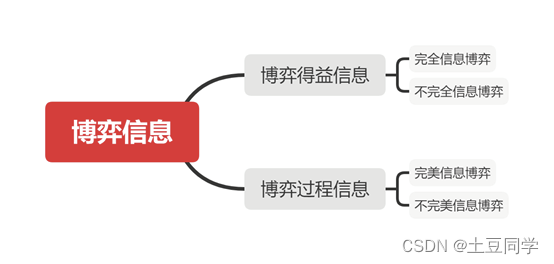
博弈论——博弈信息结构
博弈信息结构 0 引言 在一个博弈构成中,博弈信息结构是不可或缺要素。博弈信息,顾名思义,就是在博弈中,博弈方对于信息的了解。知己知彼,百战不殆。和短兵相接的战争一样,只有充分了解自己的优劣势&#x…...
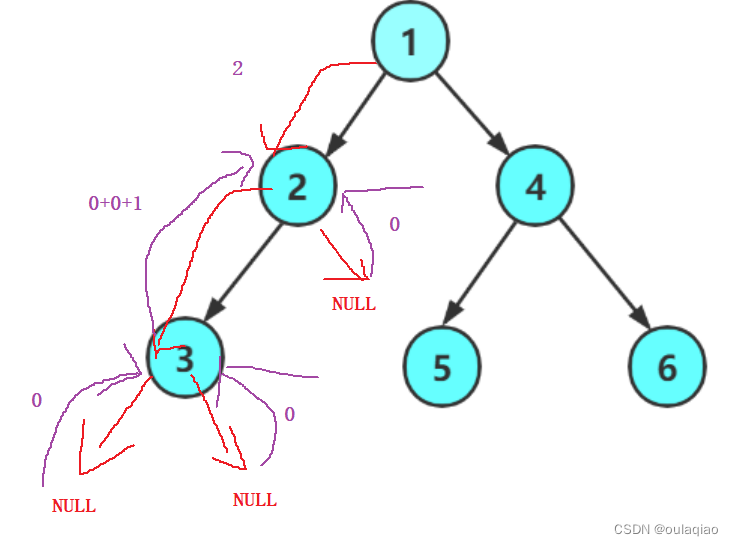
求二叉树的高度——函数递归的思想
二叉树的高度:左右两个数最高的那个的1 int TreeHight(BTNode* root) {if (root NULL){return 0;}int lefhightTreeHight(root->left);int righthight TreeHight(root->right);return lefhight > righthight ? TreeHight(root->left) 1 : TreeHight…...
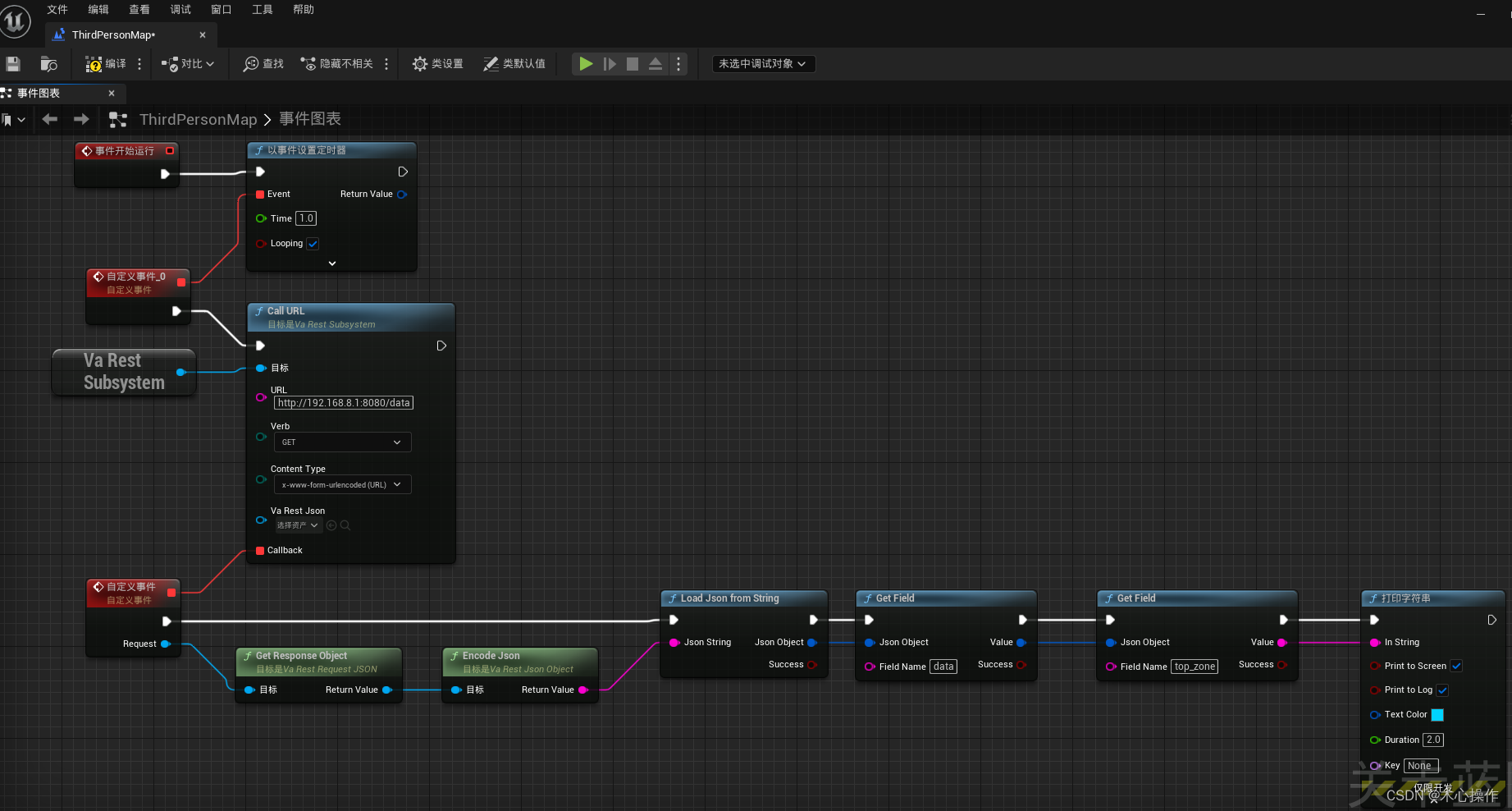
ue5蓝图请求接口
安装与使用 1、在虚幻商城搜索 VaRest 插件 2、选择自己项目的对应版本安装 3、查看是否安装成功 4、进入项目后,分别启动VaRest、JSON Blueprint Utilities两个插件(勾选后会提示重启项目) 5、基本用法:打开关卡蓝图使用…...
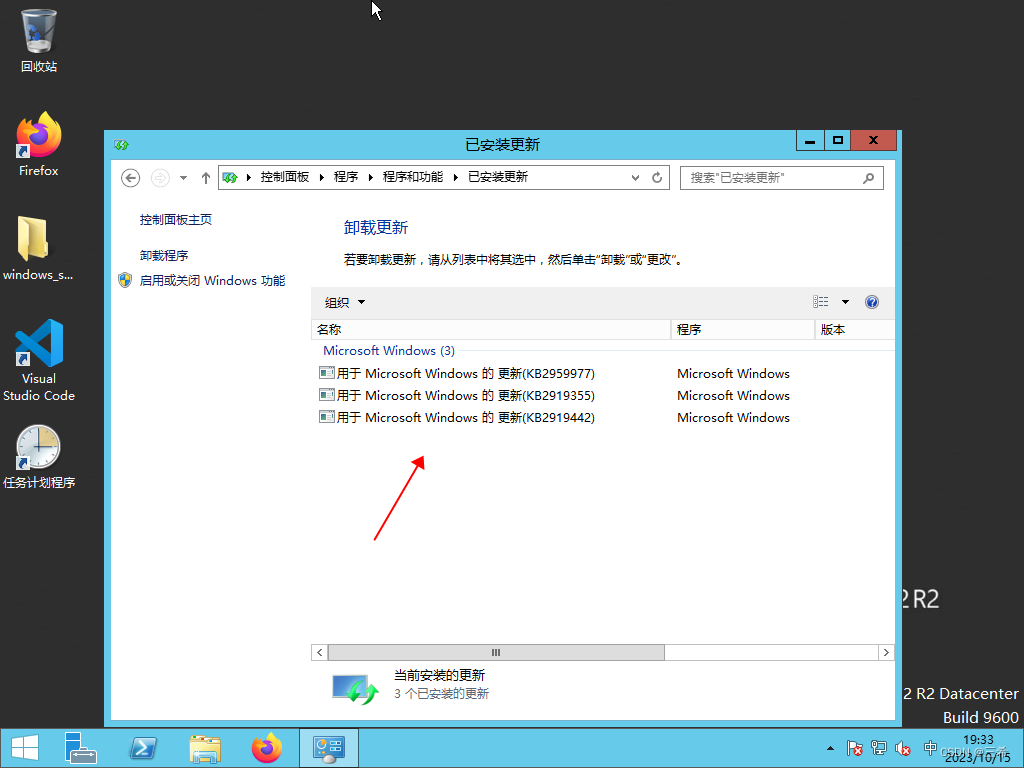
windows server 2012 查看已打了哪些补丁
打开控制面板 点击卸载程序 点击 查看已安装的更新 下图是已安装的补丁...

参加CSP-J第一轮后的感受
本人现在初二。作为一名学了4年多c的人,我一直都挺想考过CSP。于是,去年我就去考了。 当时初一,感觉自己实力不够,就只报了J组的。果不其然,63分,没过。 经过1年的苦练,今年又去考了。 J组78分&…...

rust 智能指针
智能指针 Box Box 的使用场景 由于 Box 是简单的封装,除了将值存储在堆上外,并没有其它性能上的损耗。而性能和功能往往是鱼和熊掌,因此 Box 相比其它智能指针,功能较为单一,可以在以下场景中使用它: 特…...
CentOS 7系统安装配置Zabbix 5.0LTS 步骤
目录 一、查看Zabbix官方教程(重点) 二、安装 Docker 创建 Mysql 容器 安装 Docker 依赖包 添加 Docker 官方仓库 安装 Docker 引擎 启动 Docker 服务并设置开机自启 验证 Docker 是否成功安装 拉取 MySQL 镜像 查看本地镜像 运行容器 停止和启…...
【学习之路】Multi Agent Reinforcement Learning框架与代码
【学习之路】Multi Agent Reiforcement Learning框架与代码 Introduction 国庆期间,有个客户找我写个代码,是强化学习相关的,但我没学过,心里那是一个慌,不过好在经过详细的调研以及自身的实力,最后还是解…...
)
android 13.0 SystemUI导航栏添加虚拟按键功能(二)
1.概述 在13.0的系统产品开发中,对于在SystemUI的原生系统中默认只有三键导航,想添加其他虚拟按键就需要先在构建导航栏的相关布局 中分析结构,然后添加相关的图标xml就可以了,然后添加对应的点击事件,就可以了,接下来先分析第二步关于导航栏的相关布局情况 然后实现功能…...
-- Stream的中间操作)
Java8 新特性之Stream(二)-- Stream的中间操作
目录 1.filter(Predicate) 2.map(Function) 3.flatMap(Function) 4.distinct() 5.sorted([Comparator]) 6.limit(n) 7.skip(n) 8.peek(Consumer)...
CA与区块链之数字签名详解
CA与区块链验证本质上都是数字签名,首先,我们看一下什么是数字签名! 数字签名 数字签名是公钥密码学中的一种技术,用于验证信息的完整性和发送者的身份。简而言之,数字签名是一种确认信息来源和信息完整性的手段。它通…...

一文解读如何应用 REST 对资源进行访问?
文章目录 一、REST 简介二、涉及注解2.1 RequestMapping2.2 PathVariable2.3 RestController2.4 GetMapping、PostMapping、PutMapping、DeleteMapping补充:PathVariable、RequestBody、RequestParam 区别与应用 三、REST风格案例 一、REST 简介 REST (Representat…...

使用JAVA发送邮件
这里用java代码编写发送邮件我采用jar包,需要先点击这里下载三个jar包:这三个包分别为:additionnal.jar;activation.jar;mail.jar。这三个包缺一不可,如果少添加或未添加均会报下面这个错误: C…...
【JavaEE】_servlet程序的编写方法
目录 1. 创建项目 2. 引入依赖 3. 创建目录结构 3.1 在main目录下创建一个webapp目录 3.2 在webapp目录下创建一个WEB-INF目录 3.3 在WEB-INF目录下创建一个web.xml文件 3.4 在web.xml中进行代码编写 4. 编写代码 4.1 在java目录下创建类 4.2 打印"hello world&…...
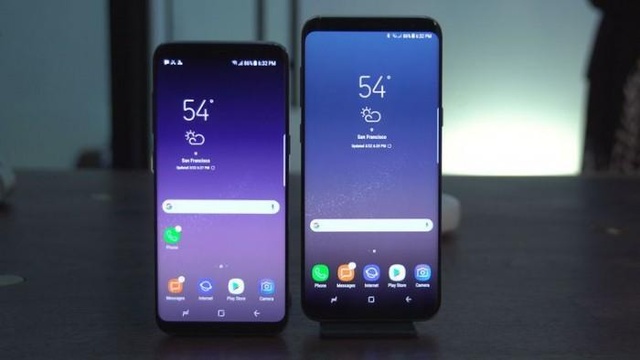
美国市场三星手机超苹果 中国第一属华为
报告显示,截至5月份的三个月,iOS系统在美国、澳大利亚以及日本表现不俗。Android系统份额则在英国、德国以及法国实现增长。在中国城市地区,iOS份额同比基本持平,而Android份额则达到80.5%,同比增长1个百分点。 三星在…...
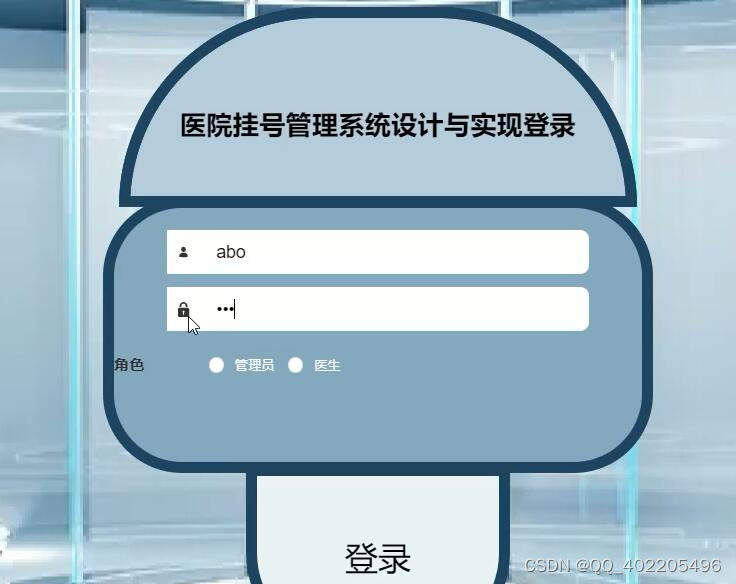
nodejs+vue+elementui医院挂号预约管理系统4n9w0
前端技术:nodejsvueelementui 前端:HTML5,CSS3、JavaScript、VUE 1、 node_modules文件夹(有npn install Express 框架于Node运行环境的Web框架, 开发语言 node.js 框架:Express 前端:Vue.js 数据库:mysql 数据库工具ÿ…...
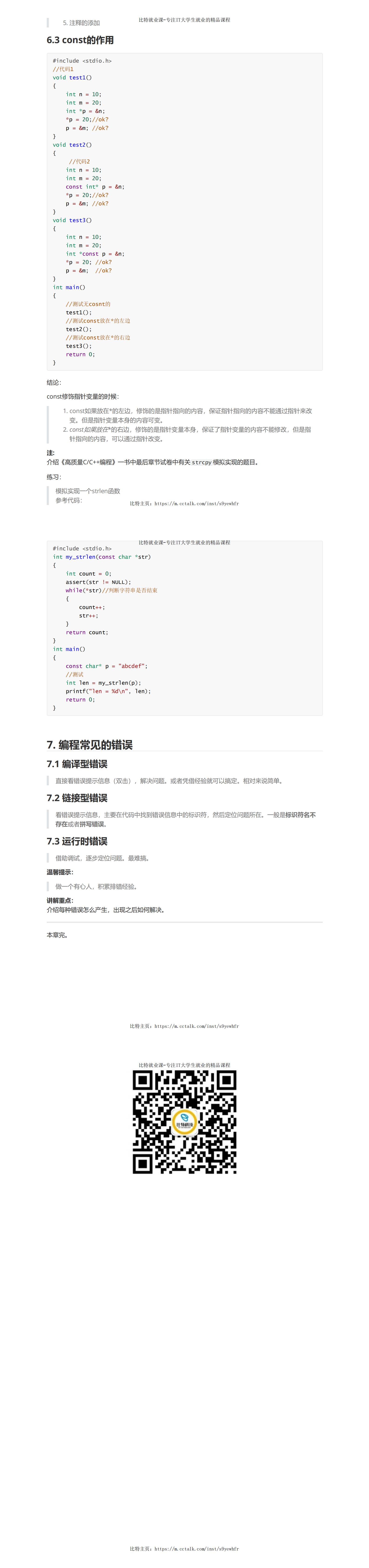
调试技巧(课件图解)
...
)
浏览器访问 AWS ECS 上部署的 Docker 容器(监听 80 端口)
✅ 一、ECS 服务配置 Dockerfile 确保监听 80 端口 EXPOSE 80 CMD ["nginx", "-g", "daemon off;"]或 EXPOSE 80 CMD ["python3", "-m", "http.server", "80"]任务定义(Task Definition&…...
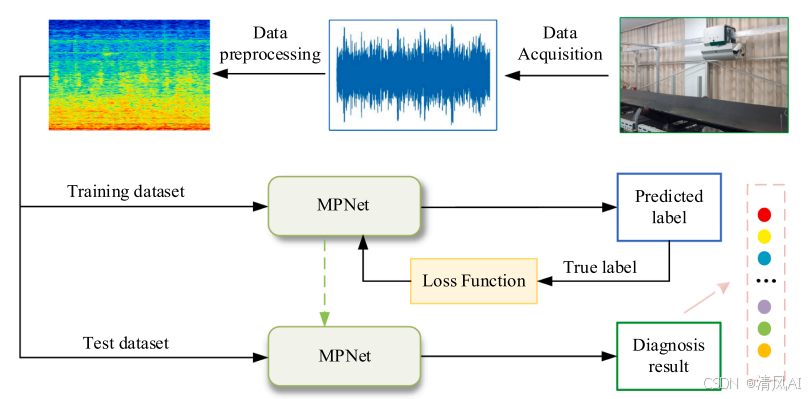
MPNet:旋转机械轻量化故障诊断模型详解python代码复现
目录 一、问题背景与挑战 二、MPNet核心架构 2.1 多分支特征融合模块(MBFM) 2.2 残差注意力金字塔模块(RAPM) 2.2.1 空间金字塔注意力(SPA) 2.2.2 金字塔残差块(PRBlock) 2.3 分类器设计 三、关键技术突破 3.1 多尺度特征融合 3.2 轻量化设计策略 3.3 抗噪声…...

手游刚开服就被攻击怎么办?如何防御DDoS?
开服初期是手游最脆弱的阶段,极易成为DDoS攻击的目标。一旦遭遇攻击,可能导致服务器瘫痪、玩家流失,甚至造成巨大经济损失。本文为开发者提供一套简洁有效的应急与防御方案,帮助快速应对并构建长期防护体系。 一、遭遇攻击的紧急应…...
Appium+python自动化(十六)- ADB命令
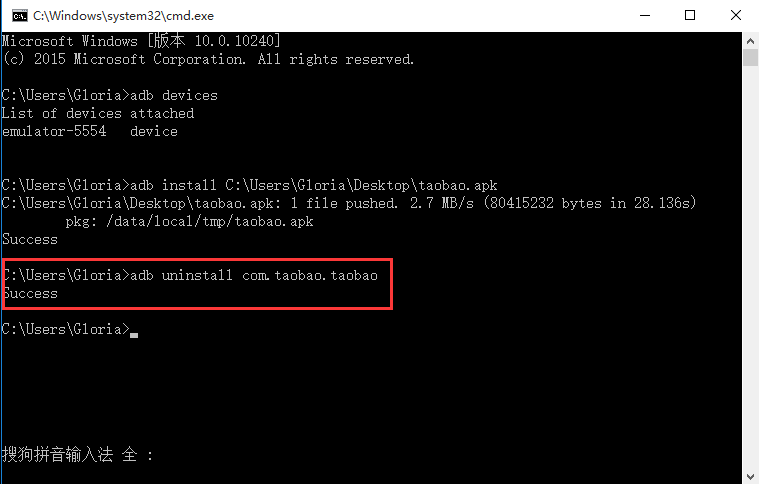
简介 Android 调试桥(adb)是多种用途的工具,该工具可以帮助你你管理设备或模拟器 的状态。 adb ( Android Debug Bridge)是一个通用命令行工具,其允许您与模拟器实例或连接的 Android 设备进行通信。它可为各种设备操作提供便利,如安装和调试…...
)
Spring Boot 实现流式响应(兼容 2.7.x)
在实际开发中,我们可能会遇到一些流式数据处理的场景,比如接收来自上游接口的 Server-Sent Events(SSE) 或 流式 JSON 内容,并将其原样中转给前端页面或客户端。这种情况下,传统的 RestTemplate 缓存机制会…...
visual studio 2022更改主题为深色
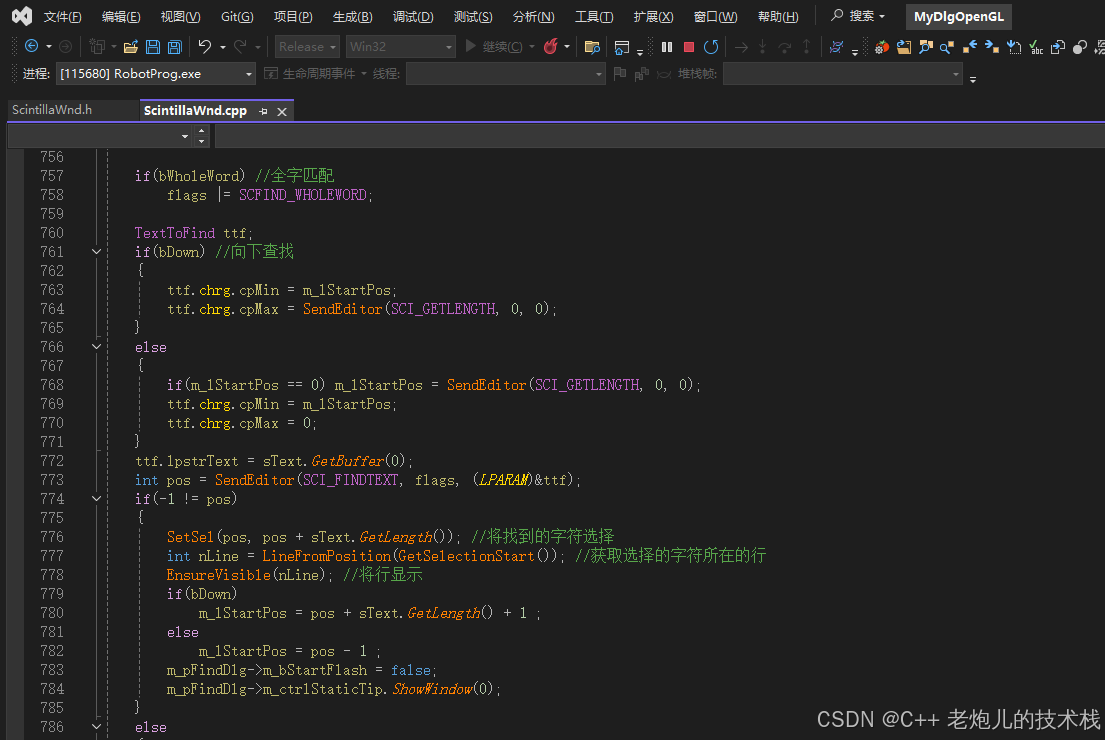
visual studio 2022更改主题为深色 点击visual studio 上方的 工具-> 选项 在选项窗口中,选择 环境 -> 常规 ,将其中的颜色主题改成深色 点击确定,更改完成...

Psychopy音频的使用
Psychopy音频的使用 本文主要解决以下问题: 指定音频引擎与设备;播放音频文件 本文所使用的环境: Python3.10 numpy2.2.6 psychopy2025.1.1 psychtoolbox3.0.19.14 一、音频配置 Psychopy文档链接为Sound - for audio playback — Psy…...
现代密码学 | 椭圆曲线密码学—附py代码
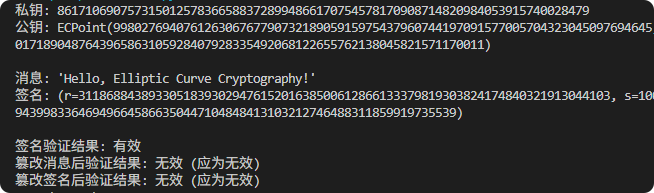
Elliptic Curve Cryptography 椭圆曲线密码学(ECC)是一种基于有限域上椭圆曲线数学特性的公钥加密技术。其核心原理涉及椭圆曲线的代数性质、离散对数问题以及有限域上的运算。 椭圆曲线密码学是多种数字签名算法的基础,例如椭圆曲线数字签…...
C# 类和继承(抽象类)
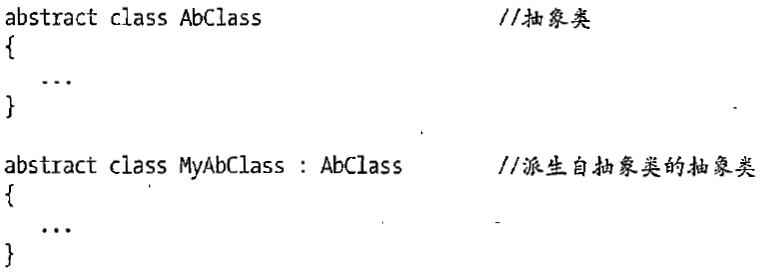
抽象类 抽象类是指设计为被继承的类。抽象类只能被用作其他类的基类。 不能创建抽象类的实例。抽象类使用abstract修饰符声明。 抽象类可以包含抽象成员或普通的非抽象成员。抽象类的成员可以是抽象成员和普通带 实现的成员的任意组合。抽象类自己可以派生自另一个抽象类。例…...

【学习笔记】erase 删除顺序迭代器后迭代器失效的解决方案
目录 使用 erase 返回值继续迭代使用索引进行遍历 我们知道类似 vector 的顺序迭代器被删除后,迭代器会失效,因为顺序迭代器在内存中是连续存储的,元素删除后,后续元素会前移。 但一些场景中,我们又需要在执行删除操作…...