
编译和使用WPS-ghrsst-to-intermediate生成SST
一、下载
V1.0
https://github.com/bbrashers/WPS-ghrsst-to-intermediate/tree/master
V1.5(使用过程报错,原因不详,能正常使用的麻烦告知一下方法)
https://github.com/dmitryale/WPS-ghrsst-to-intermediate
二、修改makefile
注意:使用什么编译器,那么NETCDF和HDF5也需要使用该编译器编译的版本。
主要修改编译器和NETCDF和HDF5路径
2.1原始文件(PGI)
原始makefile使用PGI编译器编译
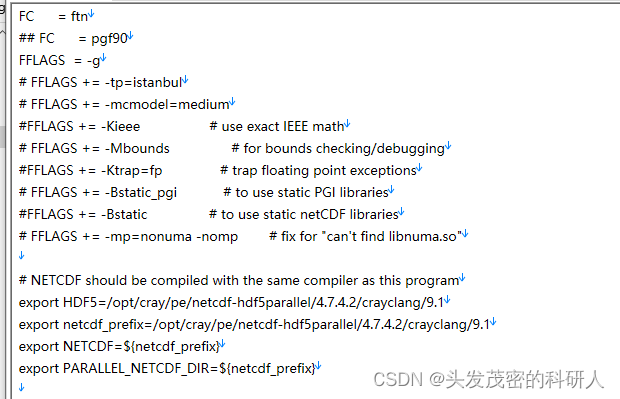
2.2 Gfortran
修改如下
FC      = gfortran
FFLAGS  = -g -std=legacy
#FFLAGS += -tp=istanbul
FFLAGS += -mcmodel=medium
#FFLAGS += -Kieee                  # use exact IEEE math
#FFLAGS += -Mbounds                # for bounds checking/debugging
#FFLAGS += -Ktrap=fp               # trap floating point exceptions
#FFLAGS += -Bstatic_pgi            # to use static PGI libraries
FFLAGS += -Bstatic                # to use static netCDF libraries
#FFLAGS += -mp=nonuma -nomp        # fix for "can't find libnuma.so"
2.3 Intel
FC      = ifort
FFLAGS  = -g
FFLAGS += -m64                   # Ensure 64-bit compilation
FFLAGS += -check bounds          # Bounds checking/debugging
# FFLAGS += -fp-model precise    # Use precise floating point model
# FFLAGS += -ftrapuv              # Trap undefined values
FFLAGS += -static-intel          # Use static Intel libraries
# FFLAGS += -Bstatic              # Use static netCDF libraries
FFLAGS += -qopenmp                # Enable OpenMP parallelization
三.编译
make  #生成在自己的路径下
sudo make install  #将生成的ghrsst-to-intermediate复制到/usr/local/bin
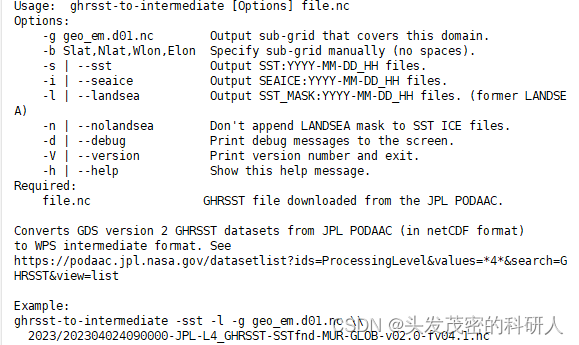
四、测试
ghrsst-to-intermediate -h
五、下载GHRSST数据
使用python进行下载
import os
import requests
from datetime import datetime, timedelta
from urllib.parse import urlparse
import concurrent.futures
import logging
from tqdm import tqdm
from urllib3.util.retry import Retry
from requests.adapters import HTTPAdapterdef setup_logging():logging.basicConfig(level=logging.INFO, format='%(asctime)s - %(levelname)s - %(message)s')def download_file_for_date(custom_date, output_folder):url_template = "https://coastwatch.pfeg.noaa.gov/erddap/files/jplMURSST41/{}090000-JPL-L4_GHRSST-SSTfnd-MUR-GLOB-v02.0-fv04.1.nc"url = url_template.format(custom_date)# 创建年/月文件夹year_folder = os.path.join(output_folder, custom_date[:4])month_folder = os.path.join(year_folder, custom_date[4:6])os.makedirs(month_folder, exist_ok=True)parsed_url = urlparse(url)output_file = os.path.join(month_folder, os.path.basename(parsed_url.path))# 检查文件是否已存在,如果存在则跳过下载if os.path.exists(output_file):logging.info(f"File for {custom_date} already exists. Skipping download.")returntry:session = requests.Session()retry = Retry(total=5, backoff_factor=1, status_forcelist=[429, 500, 502, 503, 504])adapter = HTTPAdapter(max_retries=retry)session.mount('https://', adapter)response = session.get(url, stream=True)response.raise_for_status()  # 检查请求是否成功# 获取文件大小file_size = int(response.headers.get('content-length', 0))# 显示进度条with open(output_file, 'wb') as f, tqdm(desc=f"Downloading {custom_date}", total=file_size,unit="B",unit_scale=True,unit_divisor=1024,dynamic_ncols=True,leave=False) as progress_bar:for data in response.iter_content(chunk_size=1024):f.write(data)progress_bar.update(len(data))logging.info(f"File for {custom_date} downloaded successfully as {output_file}")except requests.exceptions.RequestException as e:logging.error(f"Failed to download file for {custom_date}. {e}")if __name__ == "__main__":setup_logging()# 设置开始和结束日期start_date = datetime(2019, 1, 1)end_date = datetime(2020, 1, 1)# 设置输出文件夹output_folder = ""# 设置线程池大小max_threads = 5# 循环下载文件with concurrent.futures.ThreadPoolExecutor(max_threads) as executor:futures = []current_date = start_datewhile current_date <= end_date:formatted_date = current_date.strftime("%Y%m%d")future = executor.submit(download_file_for_date, formatted_date, output_folder)futures.append(future)current_date += timedelta(days=1)# 等待所有线程完成concurrent.futures.wait(futures)
六、将GHRSST转换为SST文件
import subprocess
from datetime import datetime, timedelta
import os
import shutil
import re
import resourcedef set_stack_size_unlimited():# Set the stack size limit to unlimitedresource.setrlimit(resource.RLIMIT_STACK, (resource.RLIM_INFINITY, resource.RLIM_INFINITY))def process_sst_files(current_date, source_directory):current_day = current_date.strftime("%Y%m%d")year = current_date.strftime("%Y")month = current_date.strftime("%m")# Perform some action for each daycommand = ["ghrsst-to-intermediate","--sst","-g","geo_em.d01.nc",#geo_em.d01.nc文件路径f"{source_directory}/{year}/{month}/{current_day}090000-JPL-L4_GHRSST-SSTfnd-MUR-GLOB-v02.0-fv04.1.nc"]subprocess.run(command)def move_sst_files(source_directory, destination_directory):for filename in os.listdir(source_directory):if filename.startswith("SST"):source_path = os.path.join(source_directory, filename)# Extract year and month from the filename using regular expressionsmatch = re.match(r"SST:(\d{4}-\d{2}-\d{2})_(\d{2})", filename)if match:year, month = match.groups()# Create the destination directory if it doesn't existdestination_year_month_directory = os.path.join(destination_directory, year[:4], month)os.makedirs(destination_year_month_directory, exist_ok=True)# Construct the destination pathdestination_path = os.path.join(destination_year_month_directory, filename)# Move the file to the destination directoryshutil.copyfile(source_path, destination_path)def organize_and_copy_files(SST_path, WPS_path):for root, dirs, files in os.walk(SST_path):for file in files:if 'SST:' in file:origin_file = os.path.join(root, file)for hour in range(1,24,1):#时间间隔调整,跟interval_seconds相同(单位为小时)hour_str = str(hour).rjust(2, '0')copy_file = os.path.join(WPS_path, file.split('_')[0]+'_'+hour_str)if not os.path.exists(copy_file):print(copy_file)shutil.copy(origin_file, copy_file)def main():set_stack_size_unlimited()# Set the start and end dates for the loopstart_date = datetime.strptime("20191231", "%Y%m%d")end_date = datetime.strptime("20200108", "%Y%m%d")source_directory = ""#python代码路径,SST生成在该路径下destination_directory = ""#另存为SST的文件路径WPS_path=""#WPS文件路径#逐一运行ghrsst-to-intermediate,生成当天的SST文件for current_date in (start_date + timedelta(n) for n in range((end_date - start_date).days + 1)):process_sst_files(current_date, source_directory)#将生存的SST文件复制到另外的文件夹中保存move_sst_files(source_directory, destination_directory)#将SST文件按照需要的时间间隔复制organize_and_copy_files(source_directory, WPS_path)if __name__ == "__main__":main()
相关文章:
编译和使用WPS-ghrsst-to-intermediate生成SST
一、下载 V1.0 https://github.com/bbrashers/WPS-ghrsst-to-intermediate/tree/masterV1.5(使用过程报错,原因不详,能正常使用的麻烦告知一下方法) https://github.com/dmitryale/WPS-ghrsst-to-intermediate二、修改makefile…...

通过静态HTTP实现负载均衡
在当今的互联网环境中,随着用户数量的不断增加和业务需求的不断扩大,单台服务器往往无法承受所有的访问压力。为了确保网站的可用性和性能,负载均衡成为了一种常见的解决方案。本文将探讨如何通过静态HTTP实现负载均衡,以提升网站…...
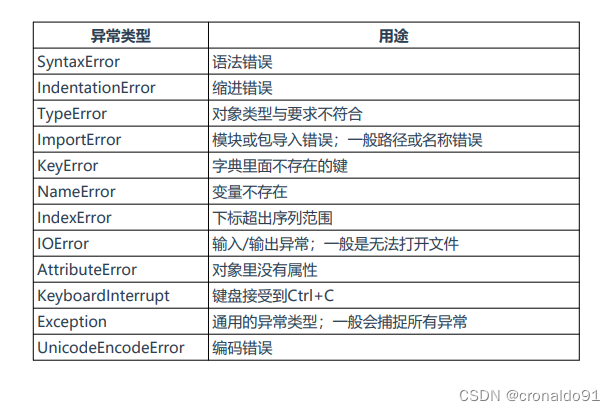
Python开发运维:Python常见异常类型
目录 一、理论 1.异常 一、理论 1.异常 (1)概念 异常是程序因为某种原因无法正常工作了,比如缩进错误、缺少软件包、环境 错误、连接超时等都会引发异常。 一个健壮的程序应该把所能预知的异常都应做相应的处理,保障程序长期运…...
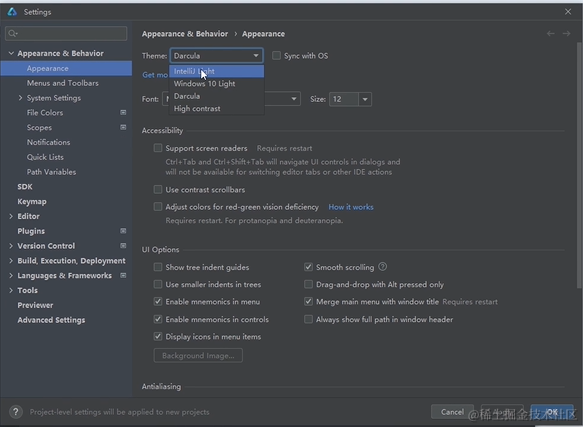
HarmonyOS学习 第1节 DevEco Studio配置
俗话说的好,工欲善其事,必先利其器。我们先下载官方的开发工具DevEco Studio. 下载完成后,进行安装。 双击DevEco Studio,点击Next按照指引完成安装 重新启动DevEco,点击 Agree 进入环境配置,安装Node.js和ohpm 点击Ne…...

WordPress 注册/重置密码/更改密码钩子
wordpress在提供邮件提醒的地方都留了hook,方便让开发者自定义。最新在添加第三方登录时遇到虚拟邮箱发信问题,为了防止给指定邮件地址后缀发信,可以利用如下wordpress提供的钩子来实现。 //https://www.wwttl.com/101.html //禁止用户注册时…...

LabVIEW开发远程结构健康监测系统
LabVIEW开发远程结构健康监测系统 工程师依赖于振动监测来评估建筑物、桥梁和其他大型结构的完整性。传统的振动监测工具在数据收集上存在限制,无法长时间收集高保真波形。随着内存存储、处理器速度和宽带无线通信技术的进步,出现了对能够长时间收集并实…...
多段图问题-动态规划解法
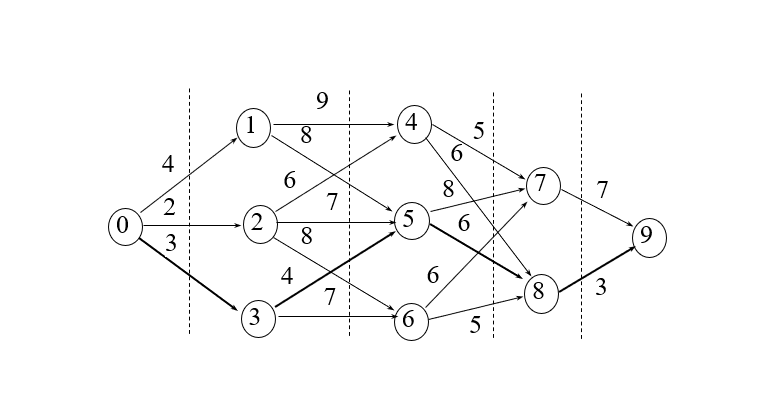
一、多段图问题 问题描述:设图G(V, E)是一个带权有向图,如果把顶点集合V划分成k个互不相交的子集Vi (2≤k≤n, 1≤i≤k),使得对于E中的任何一条边(u, v),必有u∈Vi,v∈Vim (1≤i≤k, 1<im≤k),…...
Android实验:绑定service实验
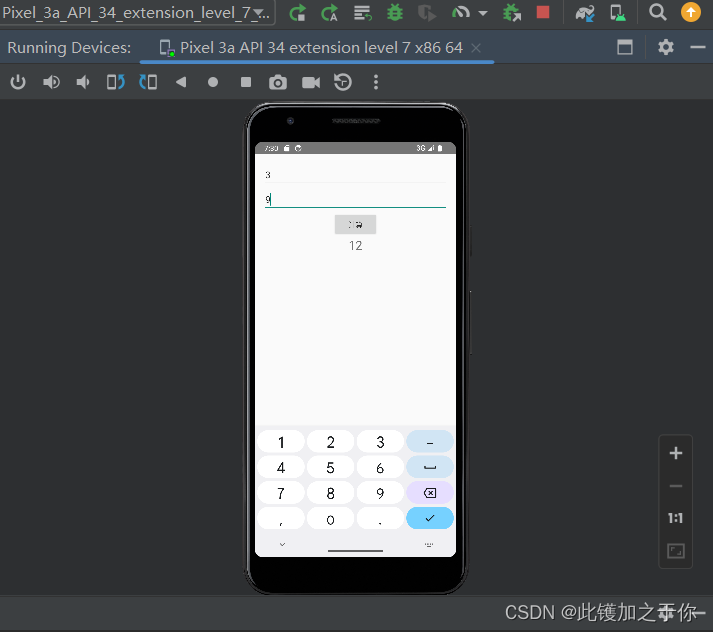
目录 实验目的实验内容实验要求项目结构代码实现代码解释结果展示 实验目的 充分理解Service的作用,与Activity之间的区别,掌握Service的生命周期以及对应函数,了解Service的主线程性质;掌握主线程的界面刷新的设计原则ÿ…...

K8S集群优化的可执行优化
目录 前期环境优化 1.永久关闭交换分区 2.#加载 ip_vs 模块 3.调整内核参数 4.#使用Systemd管理的Cgroup来进行资源控制与管理 5.开机自启kubelet 6.内核参数优化方案 7.etcd优化 默认etcd空间配额大小为 2G,超过 2G 将不再写入数据。通过给etcd配置 --quo…...

Remix IDE 快速开始Starknet
文章目录 一、Remix 项目二、基于Web的开发环境Remix 在线 IDE三、Starknet Remix 插件如何使用使用 Remix【重要】通过 Starknet by Example 学习一、Remix 项目 Remix 项目网站 在以太坊合约开发领域,Remix 项目享有很高的声誉,为各个级别的开发人员提供功能丰富的工具集…...

SQL中limit与分页的结合
select * from test limit 2,10; 这条语句的含义:从第3条语句开始查询,共显示10条语句。 select * from test limit a,b; a0,第一条记录。 a1,第二条记录。 a2,第三条记录。 这条语句的含义:从第a1条语句开始查询,共显示b条…...

KALI LINUX信息收集
预计更新 第一章 入门 1.1 什么是Kali Linux? 1.2 安装Kali Linux 1.3 Kali Linux桌面环境介绍 1.4 基本命令和工具 第二章 信息收集 1.1 网络扫描 1.2 端口扫描 1.3 漏洞扫描 1.4 社交工程学 第三章 攻击和渗透测试 1.1 密码破解 1.2 暴力破解 1.3 漏洞利用 1.4 …...

联想电脑重装系统Win10步骤和详细教程
联想电脑拥有强大的性能,很多用户办公都喜欢用联想电脑。有使用联想电脑的用户反映系统出现问题了,想重新安装一个正常的系统,但是不知道重新系统的具体步骤。接下来小编详细介绍给联想电脑重新安装Win10系统系统的方法步骤。 推荐下载 系统之…...

PET(Point-Query Quadtree for Crowd Counting, Localization, and More)
PET(Point-Query Quadtree for Crowd Counting, Localization, and More) 介绍实验记录训练阶段推断阶段 介绍 论文:Point-Query Quadtree for Crowd Counting, Localization, and More 实验记录 训练阶段 TODO 推断阶段 下面是以一张输…...

NgRx中dynamic reducer的原理和用法?
在 Angular 应用中,使用 NgRx 状态管理库时,动态 reducer 的概念通常是指在运行时动态添加或移除 reducer。这样的需求可能源于一些特殊的场景,比如按需加载模块时,你可能需要添加相应的 reducer。 以下是动态 reducer 的一般原理…...

麒麟V10服务器安装Apache+PHP
安装PHP yum install php yum install php-curl php-gd php-json php-mbstring php-exif php-mysqlnd php-pgsql php-pdo php-xml 配置文件 /etc/php.ini 修改参数 date.timezone Asia/Shanghai max_execution_time 60 memory_limit 1280M post_max_size 200M file_upload…...

DOS 批处理 (一)
DOS 批处理 1. 批处理是什么?2. DOS和MS-DOS3. 各种操作系统shell的区别Shell 介绍图形用户界面(GUI)shell命令行界面(CLI)的 shell命令区别 1. 批处理是什么? 批处理(Batch),也称为批处理脚本…...

P1047 [NOIP2005 普及组] 校门外的树题解
题目 某校大门外长度为 l 的马路上有一排树,每两棵相邻的树之间的间隔都是1 米。我们可以把马路看成一个数轴,马路的一端在数轴 00 的位置,另一端在l 的位置;数轴上的每个整数点,即0,1,2,…,l,都种有一棵树…...

pip的常用命令
安装、卸载、更新包:pip install [package-name],pip uninstall [package-name],pip install --upgrade [package-name]。升级pip:pip install --upgrade pip。查看已安装的包:pip list,pip list --outdate…...
力扣面试题 08.12. 八皇后(java回溯解法)
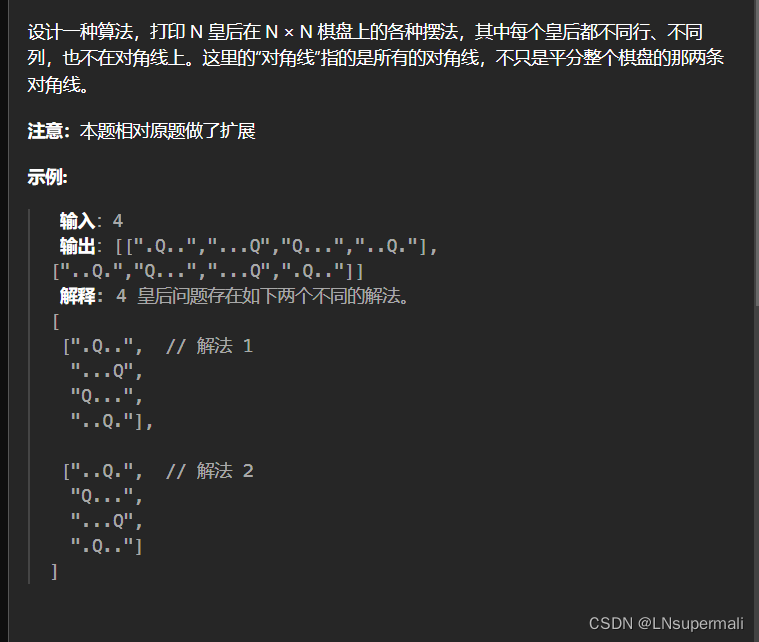
Problem: 面试题 08.12. 八皇后 文章目录 题目描述思路解题方法复杂度Code 题目描述 思路 八皇后问题的性质可以利用回溯来解决,将大问题具体分解成如下待解决问题: 1.以棋盘的每一行为回溯的决策阶段,判断当前棋盘位置能否放置棋子 2.如何判…...

SpringBoot+uniapp 的 Champion 俱乐部微信小程序设计与实现,论文初版实现
摘要 本论文旨在设计并实现基于 SpringBoot 和 uniapp 的 Champion 俱乐部微信小程序,以满足俱乐部线上活动推广、会员管理、社交互动等需求。通过 SpringBoot 搭建后端服务,提供稳定高效的数据处理与业务逻辑支持;利用 uniapp 实现跨平台前…...
第一篇:Agent2Agent (A2A) 协议——协作式人工智能的黎明
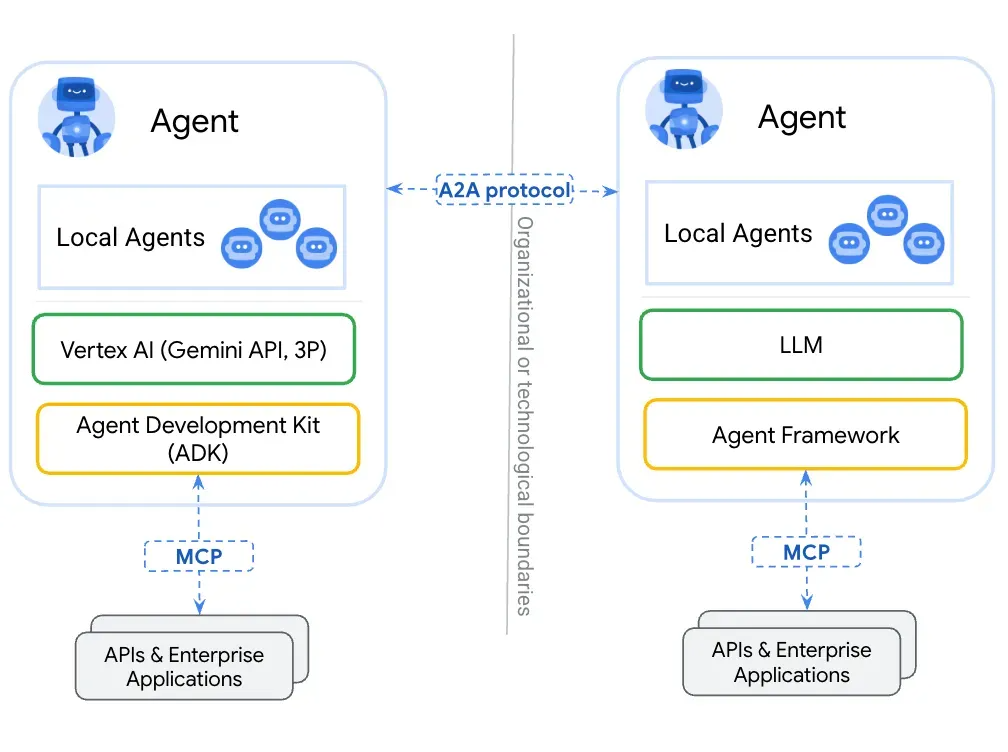
AI 领域的快速发展正在催生一个新时代,智能代理(agents)不再是孤立的个体,而是能够像一个数字团队一样协作。然而,当前 AI 生态系统的碎片化阻碍了这一愿景的实现,导致了“AI 巴别塔问题”——不同代理之间…...

Java 二维码
Java 二维码 **技术:**谷歌 ZXing 实现 首先添加依赖 <!-- 二维码依赖 --><dependency><groupId>com.google.zxing</groupId><artifactId>core</artifactId><version>3.5.1</version></dependency><de…...

Monorepo架构: Nx Cloud 扩展能力与缓存加速
借助 Nx Cloud 实现项目协同与加速构建 1 ) 缓存工作原理分析 在了解了本地缓存和远程缓存之后,我们来探究缓存是如何工作的。以计算文件的哈希串为例,若后续运行任务时文件哈希串未变,系统会直接使用对应的输出和制品文件。 2 …...

欢乐熊大话蓝牙知识17:多连接 BLE 怎么设计服务不会乱?分层思维来救场!
多连接 BLE 怎么设计服务不会乱?分层思维来救场! 作者按: 你是不是也遇到过 BLE 多连接时,调试现场像网吧“掉线风暴”? 温度传感器连上了,心率带丢了;一边 OTA 更新,一边通知卡壳。…...

Cursor AI 账号纯净度维护与高效注册指南
Cursor AI 账号纯净度维护与高效注册指南:解决限制问题的实战方案 风车无限免费邮箱系统网页端使用说明|快速获取邮箱|cursor|windsurf|augment 问题背景 在成功解决 Cursor 环境配置问题后,许多开发者仍面临账号纯净度不足导致的限制问题。无论使用 16…...
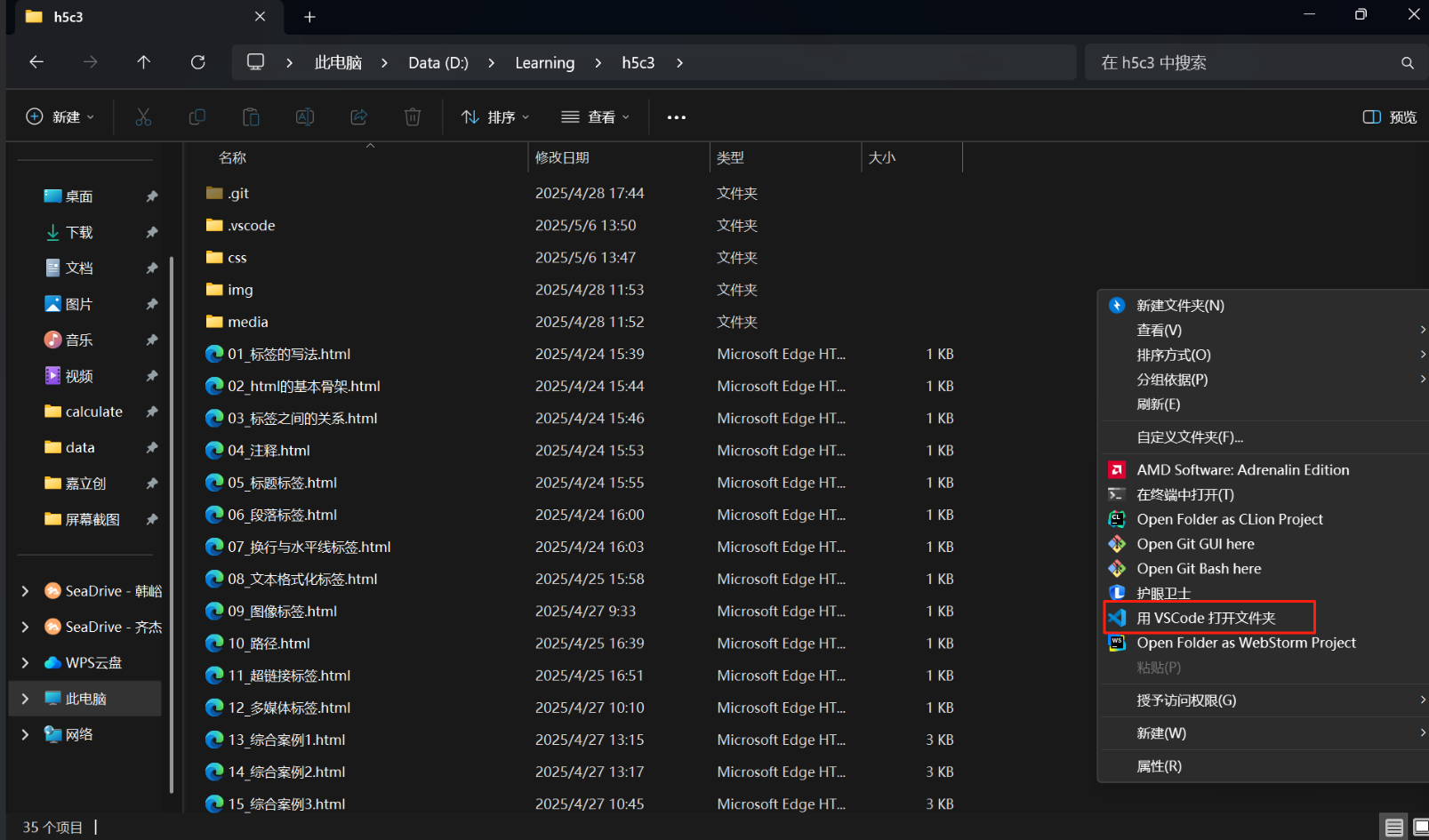
VSCode 没有添加Windows右键菜单
关键字:VSCode;Windows右键菜单;注册表。 文章目录 前言一、工程环境二、配置流程1.右键文件打开2.右键文件夹打开3.右键空白处打开文件夹 三、测试总结 前言 安装 VSCode 时没有注意,实际使用的时候发现 VSCode 在 Windows 菜单栏…...

RKNN开发环境搭建2-RKNN Model Zoo 环境搭建
目录 1.简介2.环境搭建2.1 启动 docker 环境2.2 安装依赖工具2.3 下载 RKNN Model Zoo2.4 RKNN模型转化2.5编译C++1.简介 RKNN Model Zoo基于 RKNPU SDK 工具链开发, 提供了目前主流算法的部署例程. 例程包含导出RKNN模型, 使用 Python API, CAPI 推理 RKNN 模型的流程. 本…...
SOC-ESP32S3部分:30-I2S音频-麦克风扬声器驱动
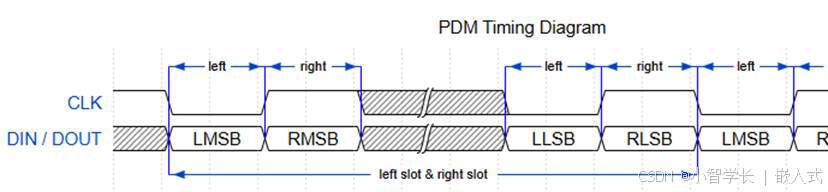
飞书文档https://x509p6c8to.feishu.cn/wiki/SKZzwIRH3i7lsckUOlzcuJsdnVf I2S简介 I2S(Inter-Integrated Circuit Sound)是一种用于传输数字音频数据的通信协议,广泛应用于音频设备中。 ESP32-S3 包含 2 个 I2S 外设,通过配置…...
使用homeassistant 插件将tasmota 接入到米家
我写一个一个 将本地tasmoat的的设备同通过ha集成到小爱同学的功能,利用了巴法接入小爱的功能,将本地mqtt转发给巴法以实现小爱控制的功能,前提条件。1需要tasmota 设备, 2.在本地搭建了mqtt服务可, 3.搭建了ha 4.在h…...