
Centos7 配置Git
随笔记录
目录
1, 新建用户
2. 给用户设置密码相关操作
3. 为新用户添加sudo 权限
4. 配置Git
4.1 配置Git
4.2 查看id_ras.pub
5, 登录Git 配置SSH 秘钥
6. Centos7 登录Git
7. clone 指定branch到本地
8. 将新代码复制到指定路径
9. 上传指定代码
9.1 上传
9.2 添加comments
9.3 提交Git
11. Gti 上检查是否上传成功
12. 下载最新代码
13. 下载指定分支代码
1, 新建用户
# 新建用户
root@localhost home]# useradd magx#查看是否创建成功,去用户的家目录 home 里面去查看[root@localhost home]# pwd
/home
[root@localhost home]# ll
total 4
drwx------. 13 magx magx 4096 Dec 12 14:32 magx         # 用户添加成功
drwxr-xr-x.  5 root root   84 Jun  4  2023 TestEvn
drwxr-xr-x.  2 root root    6 Dec 11 14:08 Tools
drwxr-xr-x.  2 root root   24 Apr 26  2023 zhangwk
[root@localhost home]#
2. 给用户设置密码相关操作
[root@localhost home]# su magx         # 切账户[magx@localhost ~]$ passwd             # 修改当前账户密码
Changing password for user magx.
Changing password for magx.
(current) UNIX password:
New password:
3. 为新用户添加sudo 权限
[root@localhost home]# cat /etc/sudoers
## Sudoers allows particular users to run various commands as
## the root user, without needing the root password.
##
## Examples are provided at the bottom of the file for collections
## of related commands, which can then be delegated out to particular
## users or groups.
##
## This file must be edited with the 'visudo' command.## Host Aliases
## Groups of machines. You may prefer to use hostnames (perhaps using
## wildcards for entire domains) or IP addresses instead.
# Host_Alias     FILESERVERS = fs1, fs2
# Host_Alias     MAILSERVERS = smtp, smtp2## User Aliases
## These aren't often necessary, as you can use regular groups
## (ie, from files, LDAP, NIS, etc) in this file - just use %groupname
## rather than USERALIAS
# User_Alias ADMINS = jsmith, mikem## Command Aliases
## These are groups of related commands...## Networking
# Cmnd_Alias NETWORKING = /sbin/route, /sbin/ifconfig, /bin/ping, /sbin/dhclient, /usr/bin/net, /sbin/iptables, /usr/bin/rfcomm, /usr/bin/wvdial, /sbin/iwconfig, /sbin/mii-tool## Installation and management of software
# Cmnd_Alias SOFTWARE = /bin/rpm, /usr/bin/up2date, /usr/bin/yum## Services
# Cmnd_Alias SERVICES = /sbin/service, /sbin/chkconfig, /usr/bin/systemctl start, /usr/bin/systemctl stop, /usr/bin/systemctl reload, /usr/bin/systemctl restart, /usr/bin/systemctl status, /usr/bin/systemctl enable, /usr/bin/systemctl disable## Updating the locate database
# Cmnd_Alias LOCATE = /usr/bin/updatedb## Storage
# Cmnd_Alias STORAGE = /sbin/fdisk, /sbin/sfdisk, /sbin/parted, /sbin/partprobe, /bin/mount, /bin/umount## Delegating permissions
# Cmnd_Alias DELEGATING = /usr/sbin/visudo, /bin/chown, /bin/chmod, /bin/chgrp## Processes
# Cmnd_Alias PROCESSES = /bin/nice, /bin/kill, /usr/bin/kill, /usr/bin/killall## Drivers
# Cmnd_Alias DRIVERS = /sbin/modprobe# Defaults specification#
# Refuse to run if unable to disable echo on the tty.
#
Defaults   !visiblepw#
# Preserving HOME has security implications since many programs
# use it when searching for configuration files. Note that HOME
# is already set when the the env_reset option is enabled, so
# this option is only effective for configurations where either
# env_reset is disabled or HOME is present in the env_keep list.
#
Defaults    always_set_home
Defaults    match_group_by_gid# Prior to version 1.8.15, groups listed in sudoers that were not
# found in the system group database were passed to the group
# plugin, if any. Starting with 1.8.15, only groups of the form
# %:group are resolved via the group plugin by default.
# We enable always_query_group_plugin to restore old behavior.
# Disable this option for new behavior.
Defaults    always_query_group_pluginDefaults    env_reset
Defaults    env_keep =  "COLORS DISPLAY HOSTNAME HISTSIZE KDEDIR LS_COLORS"
Defaults    env_keep += "MAIL PS1 PS2 QTDIR USERNAME LANG LC_ADDRESS LC_CTYPE"
Defaults    env_keep += "LC_COLLATE LC_IDENTIFICATION LC_MEASUREMENT LC_MESSAGES"
Defaults    env_keep += "LC_MONETARY LC_NAME LC_NUMERIC LC_PAPER LC_TELEPHONE"
Defaults    env_keep += "LC_TIME LC_ALL LANGUAGE LINGUAS _XKB_CHARSET XAUTHORITY"#
# Adding HOME to env_keep may enable a user to run unrestricted
# commands via sudo.
#
# Defaults   env_keep += "HOME"Defaults    secure_path = /sbin:/bin:/usr/sbin:/usr/bin## Next comes the main part: which users can run what software on
## which machines (the sudoers file can be shared between multiple
## systems).
## Syntax:
##
##      user    MACHINE=COMMANDS
##
## The COMMANDS section may have other options added to it.
##
## Allow root to run any commands anywhere
root    ALL=(ALL)       ALL
magx    ALL=(ALL)       ALL                # 为新用户添加 sudo 权限
## Allows members of the 'sys' group to run networking, software,
## service management apps and more.
# %sys ALL = NETWORKING, SOFTWARE, SERVICES, STORAGE, DELEGATING, PROCESSES, LOCATE, DRIVERS## Allows people in group wheel to run all commands
%wheel  ALL=(ALL)       ALL## Same thing without a password
# %wheel        ALL=(ALL)       NOPASSWD: ALL## Allows members of the users group to mount and unmount the
## cdrom as root
# %users  ALL=/sbin/mount /mnt/cdrom, /sbin/umount /mnt/cdrom## Allows members of the users group to shutdown this system
# %users  localhost=/sbin/shutdown -h now## Read drop-in files from /etc/sudoers.d (the # here does not mean a comment)
#includedir /etc/sudoers.d
[root@localhost home]#
4. 配置Git
4.1 配置Git
[magx@localhost ~]$ cd git_test/
[magx@localhost git_test]$ ls
[magx@localhost git_test]$ ll
total 0
[magx@localhost git_test]$
[magx@localhost git_test]$ git init
Initialized empty Git repository in /home/magx/git_test/.git/
[magx@localhost git_test]$
[magx@localhost git_test]$ git config --global user.name "magx"
[magx@localhost git_test]$ git config --global user.mail "maguox14@hotmail.com"
[magx@localhost git_test]$ git config --global --list
user.name=magx
user.mail=maguox14@hotmail.com
[magx@localhost git_test]$
[magx@localhost git_test]$ ssh-keygen -t rsa -C "maguox14@hotmail.com"
Generating public/private rsa key pair.
Enter file in which to save the key (/home/magx/.ssh/id_rsa):
/home/magx/.ssh/id_rsa already exists.
Overwrite (y/n)? y
Enter passphrase (empty for no passphrase):
Enter same passphrase again:
Your identification has been saved in /home/magx/.ssh/id_rsa.
Your public key has been saved in /home/magx/.ssh/id_rsa.pub.
The key fingerprint is:
SHA256:KtSQ7V6FScA3IJ2FZTPnU0p5GTgcPo7FXjxYOvnq8vY maguox14@hotmail.com
The key's randomart image is:
+---[RSA 2048]----+
|    .ooBB.+++o   |
|     +=oo@=Oo    |
|    o ..o.#o+    |
|     +   * * .   |
|    . o S o .    |
|   . . o   .     |
|    . o   .      |
|     .  ...      |
|         +o.E    |
+----[SHA256]-----+
[magx@localhost git_test]$
4.2 查看id_ras.pub
[magx@localhost git_test]$
[magx@localhost git_test]$
[magx@localhost git_test]$ cat /home/magx/.ssh/id_rsa.pub
ssh-rsa AAAAB3NzaC1yc2EAAAADAQABAAABAQDCELdrSXB29lX0u0kVIKekTAc1c8+8Ss9vHe9XwOpk2sq8UcWpdNHfL9nLUnN.......
.......
UTicjdzzEO8DIGWQNLjHbub5TxRV6k8jWOY5bxqGtc3dAPbAZ3n maguox14@hotmail.com
[magx@localhost git_test]$
5, 登录Git 配置SSH 秘钥
将4.2id_ras.pub 秘钥 贴入 Git
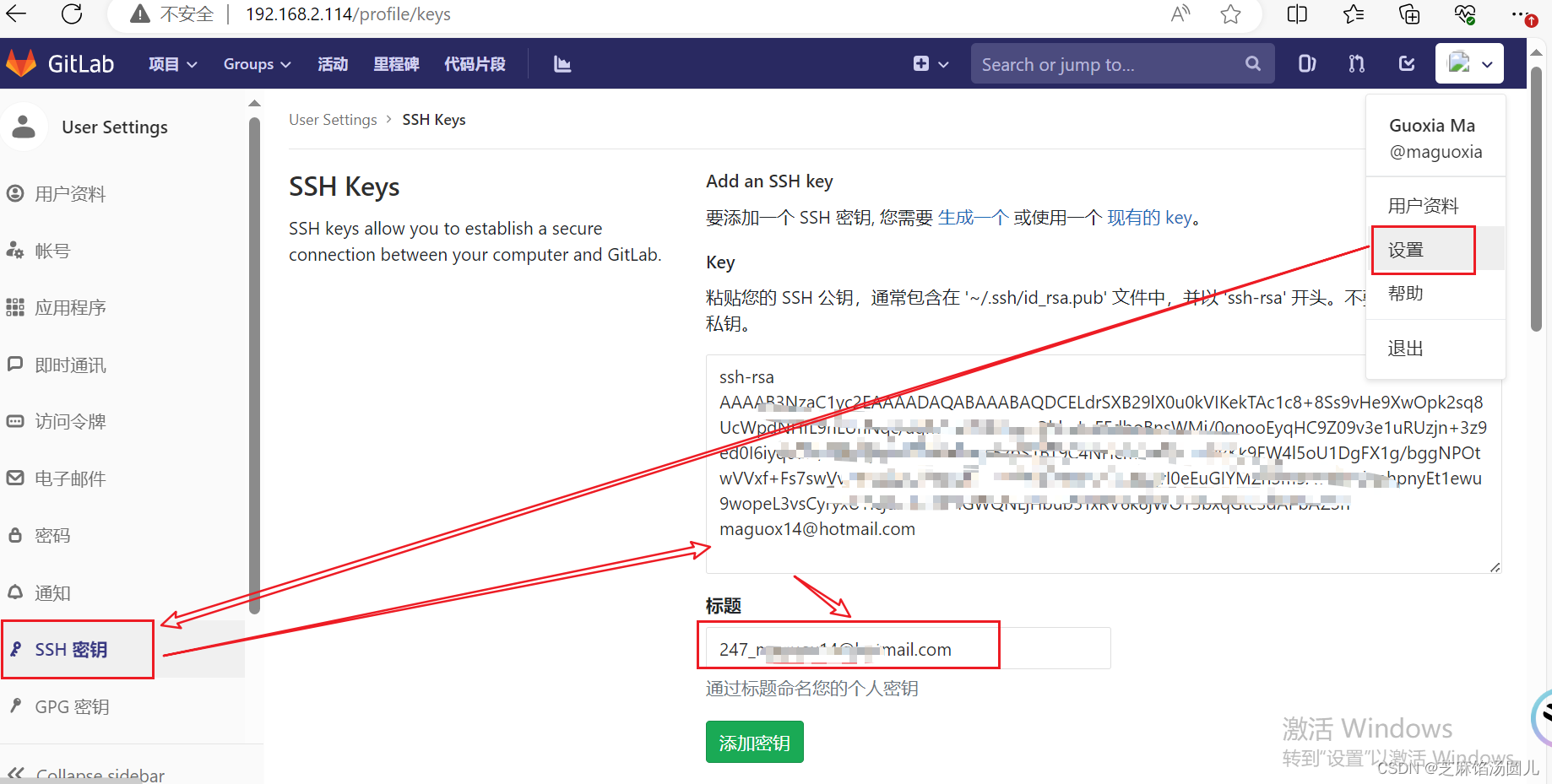
6. Centos7 登录Git
[magx@localhost git_test]$ ssh -T git@192.168.2.114
Enter passphrase for key '/home/magx/.ssh/id_rsa':   # 输入id_ras
Welcome to GitLab, @maguoxia!
[magx@localhost git_test]$
[magx@localhost git_test]$
7. clone 指定branch到本地
[magx@localhost git_test]$ git clone -b V2 git@192.168.2.114:zhangwk/riskcop.git
Cloning into 'riskcop'...
Enter passphrase for key '/home/magx/.ssh/id_rsa':
remote: Enumerating objects: 561, done.
remote: Counting objects: 100% (561/561), done.
remote: Compressing objects: 100% (224/224), done.
remote: Total 5063 (delta 347), reused 521 (delta 322)
Receiving objects: 100% (5063/5063), 638.23 MiB | 24.08 MiB/s, done.
Resolving deltas: 100% (3329/3329), done.
Checking out files: 100% (1731/1731), done.
[magx@localhost git_test]$
[magx@localhost git_test]$
8. 将新代码复制到指定路径
将git 项目分支 V2:riskcop clone 到本地后,将要上传代码文件复制到 此路径[root@localhost TestEvn]# cp -r Dyn_Init_Scripts/ /home/magx/git_test/riskcop/
[root@localhost TestEvn]#
9. 上传指定代码
9.1 上传
[root@localhost riskcop]# ll
total 936212
drwxr-xr-x. 9 root root      4096 Dec 12 15:21 Dyn_Init_Scripts
-rw-rw-r--. 1 magx magx        63 Dec 12 15:12 README.md
drwxrwxr-x. 4 magx magx        47 Dec 12 15:12 Risk_Init_V2
drwxrwxr-x. 6 magx magx       114 Dec 12 15:12 V2.1
drwxrwxr-x. 3 magx magx        32 Dec 12 15:12 V2.2
drwxrwxr-x. 4 magx magx      4096 Dec 12 15:12 V2.3
-rw-rw-r--. 1 magx magx 859176960 Dec 12 15:12 Version_testing_0706.tar
-rw-rw-r--. 1 magx magx  99490044 Dec 12 15:12 Version_testing_0706.tar.gz
[root@localhost riskcop]# su magx
[magx@localhost riskcop]$
[magx@localhost riskcop]$ git add /home/magx/git_test/riskcop/Dyn_Init_Scripts
9.2 添加comments
[magx@localhost riskcop]$
[magx@localhost riskcop]$ git commit -m "初始化(V2.2+V2.3 业务测试+性能测试+Djangox                                                                                                     项目)"
[V2 f9b4cc6] 初始化(V2.2+V2.3 业务测试+性能测试+Djangox项目-备份)Committer: magx <magx@localhost.localdomain>
Your name and email address were configured automatically based
on your username and hostname. Please check that they are accurate.
You can suppress this message by setting them explicitly:git config --global user.name "Your Name"git config --global user.email you@example.comAfter doing this, you may fix the identity used for this commit with:git commit --amend --reset-author1415 files changed, 10644475 insertions(+)create mode 100644 Dyn_Init_Scripts/Init_V2.2_Basic.tarcreate mode 100644 Dyn_Init_Scripts/Init_V2.2_Basic/.idea/.gitignorecreate mode 100644 Dyn_Init_Scripts/Init_V2.2_Basic/.idea/Init0411.imlcreate mode 100644 Dyn_Init_Scripts/Init_V2.2_Basic/.idea/encodings.xml.......
.......
.......create mode 100644 Dyn_Init_Scripts/supervisorConfig/supervisord.confcreate mode 100644 "Dyn_Init_Scripts/\345\210\235\345\247\213\345\214\226\350\204\                                                                                                     232\346\234\254\344\273\213\347\273\215.txt"
[magx@localhost riskcop]$[magx@localhost riskcop]$ git commit -m "初始化(V2.2+V2.3 业务测试+性能测试+Djangox项目)"
# On branch V2
# Your branch is ahead of 'origin/V2' by 1 commit.
#   (use "git push" to publish your local commits)
#
nothing to commit, working directory clean
[magx@localhost riskcop]$
9.3 提交Git
[magx@localhost riskcop]$ git push origin V2:V2            # 提交Git
Enter passphrase for key '/home/magx/.ssh/id_rsa':
Counting objects: 571, done.
Delta compression using up to 80 threads.
Compressing objects: 100% (569/569), done.
Writing objects: 100% (570/570), 376.25 MiB | 1.24 MiB/s, done.
Total 570 (delta 296), reused 12 (delta 1)
remote: Resolving deltas: 100% (296/296), completed with 1 local object.
remote:
remote: To create a merge request for V2, visit:
remote:   http://192.168.2.114/zhangwk/riskcop/merge_requests/new?merge_request%5Bsource_branch%5D=V2
remote:
To git@192.168.2.114:zhangwk/riskcop.git7e9b8f0..f9b4cc6  V2 -> V2
[magx@localhost riskcop]$
11. Gti 上检查是否上传成功
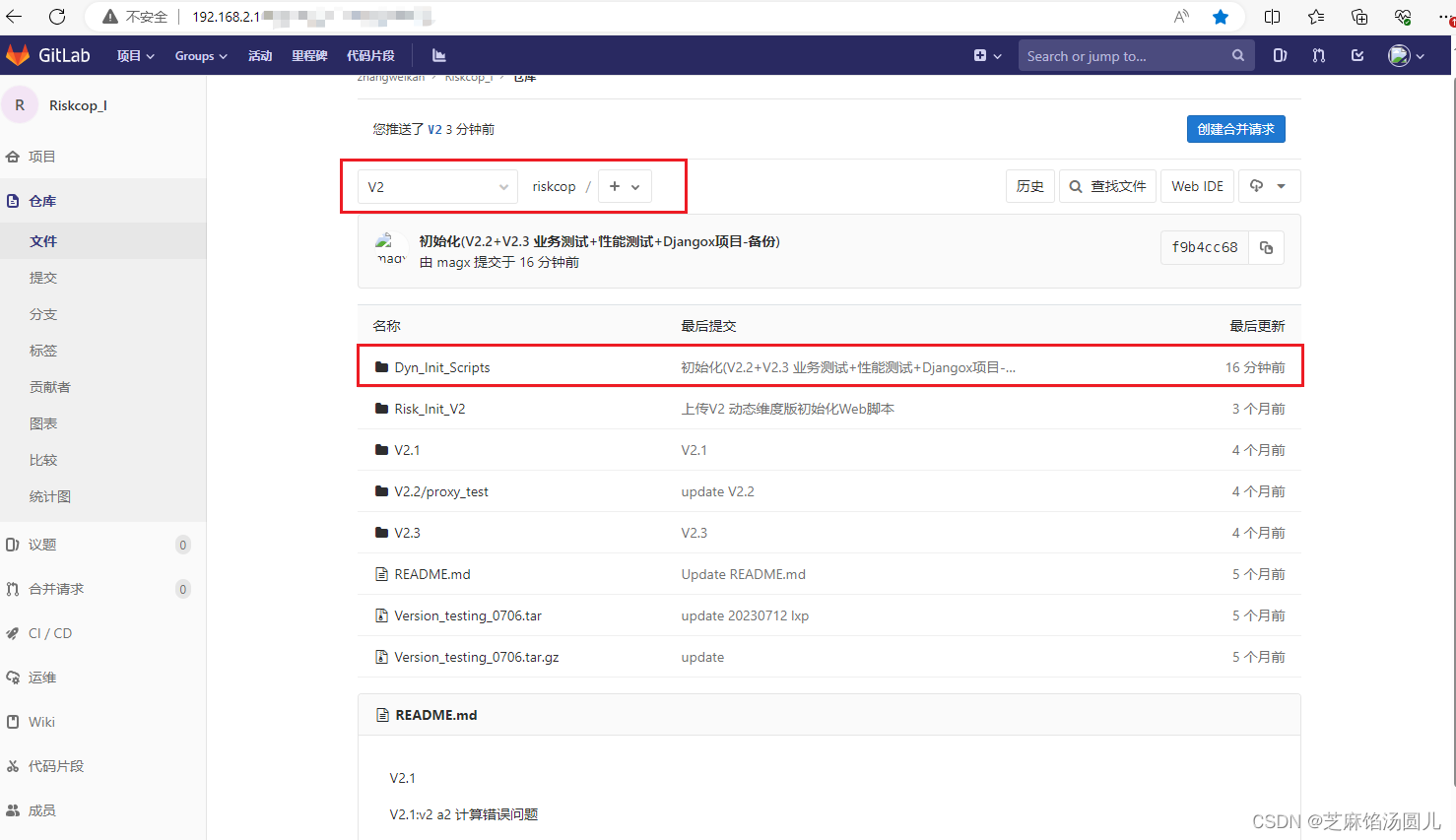
12. 下载最新代码
下载最新
# 先进入已下载的项目分支目录后--> 执行 git pull 下载更新的内容
[magx@server-247 riskcop]$ git branch -a
* (detached from origin/V2)V2remotes/origin/HEAD -> origin/masterremotes/origin/V1.0.1remotes/origin/V2remotes/origin/masterremotes/origin/riskcop_robotframeworkremotes/origin/v1.0.0
[magx@server-247 riskcop]$ git pull origin V2
Enter passphrase for key '/home/magx/.ssh/id_rsa':
From 192.168.2.114:zhangwk/riskcop* branch            V2         -> FETCH_HEAD
Already up-to-date.
[magx@server-247 riskcop]$
13. 下载指定分支代码
#下载 V2 分支代码[magx@server-247 git_test]$ git clone -b V2 git@192.168.2.114:zhangwk/riskcop.git
Cloning into 'riskcop'...
Enter passphrase for key '/home/magx/.ssh/id_rsa':        #私钥短语 yusur666
remote: Enumerating objects: 543, done.
remote: Counting objects: 100% (543/543), done.
remote: Compressing objects: 100% (182/182), done.
remote: Total 4227 (delta 412), reused 482 (delta 355)
Receiving objects: 100% (4227/4227), 497.75 MiB | 31.78 MiB/s, done.
Resolving deltas: 100% (2718/2718), done.
[magx@server-247 git_test]$
[magx@server-247 git_test]$
[magx@server-247 git_test]$ ll
total 0
drwxrwxr-x 6 magx magx 138 Jul 14 13:49 riskcop
[magx@server-247 git_test]$
[magx@server-247 git_test]$
[magx@server-247 git_test]$ cd riskcop/
[magx@server-247 riskcop]$ ll
total 936208
-rw-rw-r-- 1 magx magx        63 Jul 14 13:49 README.md
drwxrwxr-x 6 magx magx       114 Jul 14 13:49 V2.1
drwxrwxr-x 3 magx magx        24 Jul 14 13:49 V2.2
drwxrwxr-x 4 magx magx      4096 Jul 14 13:49 V2.3
-rw-rw-r-- 1 magx magx 859176960 Jul 14 13:49 Version_testing_0706.tar
-rw-rw-r-- 1 magx magx  99490044 Jul 14 13:49 Version_testing_0706.tar.gz
[magx@server-247 riskcop]$
相关文章:
Centos7 配置Git
随笔记录 目录 1, 新建用户 2. 给用户设置密码相关操作 3. 为新用户添加sudo 权限 4. 配置Git 4.1 配置Git 4.2 查看id_ras.pub 5, 登录Git 配置SSH 秘钥 6. Centos7 登录Git 7. clone 指定branch到本地 8. 将新代码复制到指定路径 9. 上传指定代码 …...
)
python工具方法 44 数据仿真生成(粘贴目标切片到背景图像上,数据标签校验)
在深度学习训练中数据是一个很重要的因素,在数据不够时需要我们基于现有的数据进行增强生成新的数据。此外,在某特殊情况,如对某些目标切片数据(例如:石块分割切片)预测效果较差,需要增强其在训练数据中的频率。故此,我们可以将先有数据标注中的目标裁剪出来,作为样本…...
Llama 架构分析
从代码角度进行Llama 架构分析 Llama 架构分析前言Llama 架构分析分词网络主干DecoderLayerAttentionMLP 下游任务因果推理文本分类 Llama 架构分析 前言 Meta 开发并公开发布了 Llama系列大型语言模型 (LLM),这是一组经过预训练和微调的生成文本模型,参…...

vue3前端 md5工具类
工具类 /*** Namespace for hashing and other cryptographic functions* Copyright (c) Andrew Valums* Licensed under the MIT license, http://valums.com/mit-license/*/var V V || {}; V.Security V.Security || {};(function () {// for faster accessvar S V.Secur…...

Unity触摸 射线穿透UI解决
unity API 之EventSystem.current.IsPointerOverGameObject() 命名空间 :UnityEngine.EventSystems 官方描述: public bool IsPointerOverGameObject(); public bool IsPointerOverGameObject(int pointerId); //触摸屏时需要的参数ÿ…...
基于QTreeWidget实现带Checkbox的多级组织结构选择树
基于QTreeWidget实现带Checkbox的多级组织结构选择树 采用基于QWidgetMingw实现的原生的组织结构树 通过QTreeWidget控件实现的带Checkbox多级组织结构树。 Qt相关系列文章: 一、Qt实现的聊天画面消息气泡 二、基于QTreeWidget实现多级组织结构 三、基于QTreeWidget…...

探索 Vim:一个强大的文本编辑器
引言: Vim(Vi IMproved)是一款备受推崇的文本编辑器,拥有强大的功能和高度可定制性,提供丰富的编辑和编程体验。本文将探讨 Vim 的基本概念、使用技巧以及为用户带来的独特优势。 简介和发展 1. Vim 的简介和历史 V…...
—容器探针)
K8S(十)—容器探针
这里写目录标题 容器探针(probe)检查机制探测结果探测类型何时该使用存活态探针?何时该使用就绪态探针?何时该使用启动探针? 使用exechttptcpgrpc使用命名端口 使用启动探针保护慢启动容器定义就绪探针配置探针HTTP 探测TCP 探测探针层面的…...

[C错题本]
1.int,short,long都是signed的 但是char可能是signed 也可能是unsigned的——《C Primer》 2.在16位的PC中 char类型占1个字节 int占2个字节 long int占4个字节 float占四个字节 double占八个字节 3.自增运算符和自减运算符即使是在判断条件中使用也会实际生效 int i 1; int…...
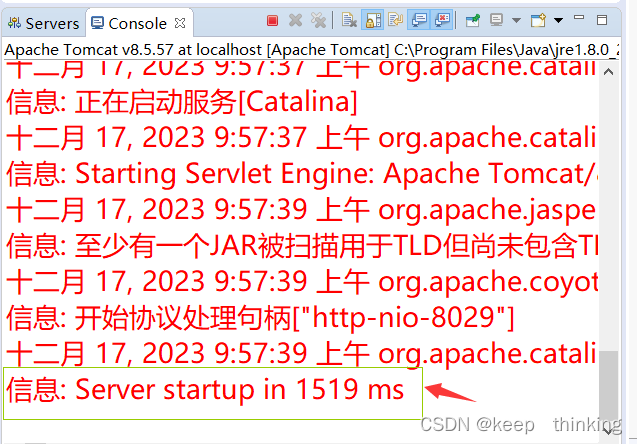
tomcat启动异常:子容器启动失败(a child container failed during start)
最近在使用eclipse启动Tomcat时,发现一个问题,启动以前的项目突然报子容器启动异常。 异常信息如下: 严重: 子容器启动失败 java.util.concurrent.ExecutionException: org.apache.catalina.LifecycleException: 无法启动组件[org.apache.…...
JAVA序列化(创建可复用的 Java 对象)
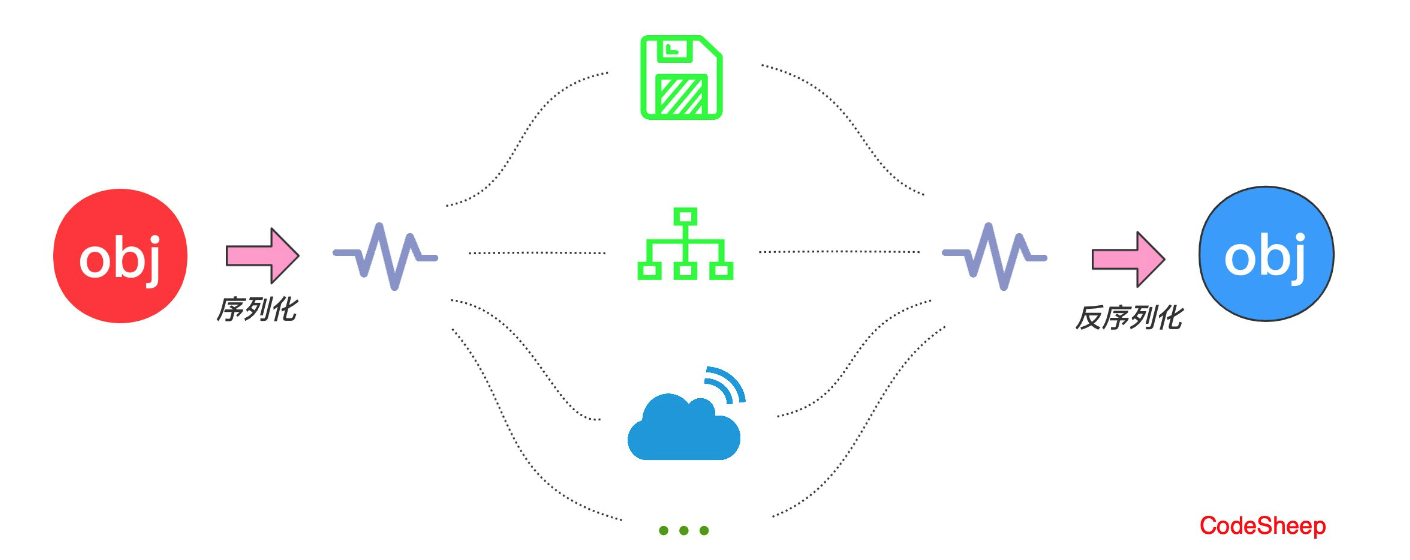
JAVA 序列化(创建可复用的 Java 对象) 保存(持久化)对象及其状态到内存或者磁盘 Java 平台允许我们在内存中创建可复用的 Java 对象,但一般情况下,只有当 JVM 处于运行时,这些对象才可能存在,即,这些对象的生命周期不…...

如何使用自动化工具编写测试用例?
以下为作者观点,仅供参考: 在快速变化的软件开发领域,保证应用程序的可靠性和质量至关重要。随着应用程序复杂性和规模的不断增加,仅手动测试无法满足行业需求。 这就是测试自动化发挥作用的地方,它使软件测试人员能…...

redis底层数据结构之skiplist实现
skiplist实现 skiplist跳跃表,是一种有序数据结构,通过在每个节点中维持多个指向其他节点的指针,来达到快速访问节点的目的,redis使用skiplist作为zsort的底层实现之一 结构很像树形结构 typedef struct zskiplistNode { // 对象…...
mjpg-streamer配置其它端口访问视频
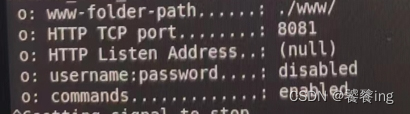
环境 树莓派4B ubuntu 20.04 U口摄像头 确认摄像头可访问 lsusb查看 在dev下可查看到video* sudo mplayer tv://可打开摄像头并访问到视频 下载mjpg-streamer并编译安装 在github下载zip包,下载的源码,需要编译安装 unzip解压 cd mjpg-streamer/mjp…...
C++相关闲碎记录(15)
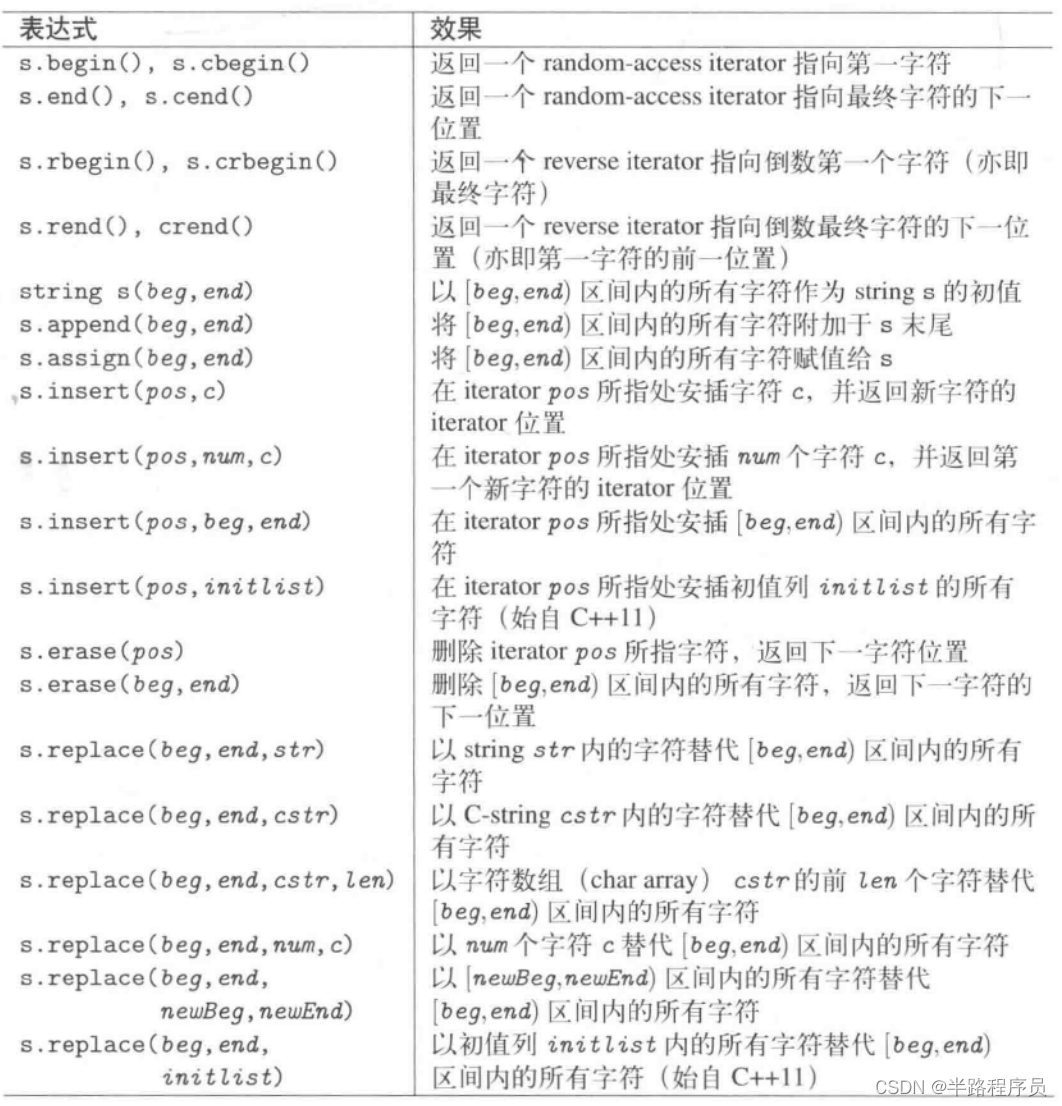
1、string字符串 #include <iostream> #include <string> using namespace std;int main (int argc, char** argv) {const string delims(" \t,.;");string line;// for every line read successfullywhile (getline(cin,line)) {string::size_type beg…...
汽车IVI中控开发入门及进阶(十一):ALSA音频
前言 汽车中控也被称为车机、车载多媒体、车载娱乐等,其中音频视频是非常重要的部分,音频比如播放各种格式的音乐文件、播放蓝牙接口的音乐、播放U盘或TF卡中的音频文件,如果有视频文件也可以放出音频,看起来很简单,在windows下音乐播放器很多,直接打开文件就能播放各…...
Gradle 之初体验
文章目录 1.安装1)检查 JDK2)下载 Gradle3)解压 Gradle4)环境变量5)验证安装 2.优势总结 Gradle 是一款强大而灵活的构建工具,用于自动化构建、测试和部署项目。它支持多语言、多项目和多阶段的构建&#x…...
【Spark精讲】Spark内存管理
目录 前言 Java内存管理 Java运行时数据区 Java堆 新生代与老年代 永久代 元空间 垃圾回收机制 JVM GC的类型和策略 Minor GC Major GC 分代GC Full GC Minor GC 和 Full GC区别 Executor内存管理 内存类型 堆内内存 堆外内存 内存管理模式 静态内存管理 …...

C语言实现Hoare版快速排序(递归版)
Hoare版 快速排序是由Hoare发明的,所以我们先来讲创始人的想法。我们直接切入主题,Hoare版快速排序的思想是将一个值设定为key,这个值不一定是第一个,如果你选其它的值作为你的key,那么你的思路也就要转换一下…...

git 避免输入用户名 密码 二进制/文本 文件冲突解决
核心概念介绍 工作区是你当前正在进行编辑和修改的文件夹,可见的。 暂存区位于.git/index(git add放入)。 代码库(工作树)位于.git(git commit将暂存区中的更改作为一个提交保存到代码库中,并清空暂存区) 避免输入用户 密码: 方式一: ht…...

CSDN技术博客智能生成:CYBER-VISION零号协议辅助创作高质量技术文章
CSDN技术博客智能生成:CYBER-VISION零号协议辅助创作高质量技术文章 你是不是也遇到过这样的烦恼?脑子里有个不错的技术想法,或者刚解决了一个棘手的工程问题,想写成一篇博客分享出去,却对着空白的文档发呆半天&#…...

云容笔谈·东方红颜影像生成系统数据库课程设计选题:AI绘画作品管理平台
云容笔谈东方红颜影像生成系统数据库课程设计选题:AI绘画作品管理平台 最近几年,AI绘画技术发展得特别快,很多同学都想上手试试,生成的作品也越来越多。但不知道你有没有遇到过这样的烦恼:生成的图片一多,…...

TCN - BiGRU - Attention:西储大学故障诊断分类预测的利器
TCN-BiGRU-Attention一键实现西储大学故障诊断分类预测 附赠处理好的轴承数据集 Matlab 代码直接附带了处理好的西储大学轴承数据集,并且是Excel格式,已经帮大家替换到了程序里 你先用,你就是创新 多变量单输出,分类预测也可以加好…...

SMS VoIP科普:打破通信壁垒的互联网短信新方式
在日常通信中,我们早已习惯用手机收发短信,而传统短信依赖运营商的蜂窝网络,不仅资费较高,还受设备和地域限制。如今,SMS VoIP的出现,彻底改变了短信的传输模式,让短信沟通变得更灵活、更高效。…...

ONLYOFFICE 宏实战:从 VBA 迁移到 JavaScript 的自动化技巧
1. 为什么需要从 VBA 迁移到 JavaScript 宏? 如果你曾经在 Excel 里用过 VBA 宏,肯定体验过它带来的效率提升。但当你开始使用 ONLYOFFICE 时,会发现这个办公套件采用了完全不同的 JavaScript 宏系统。这就像开惯了手动挡汽车突然要换自动挡…...

Hackadmin-RTB-2 WP记录
信息搜集永远的第一步不知道666是个什么东西,可以访问一下无法访问dirsearch扫下目录依次访问一下看看有没有交互点开始找漏洞扫一下有没有注入点没扫出来并且扫phpmyadmin也没有扫出来虽然目前的两个页面可交互的地方都没有办法通过sql注入进行脱库,但是…...

告别yum默认版本!在CentOS7上手动安装最新版LibreOffice 6.0.5的完整流程
在CentOS7上手动部署LibreOffice 6.0.5的进阶实践指南 作为长期依赖CentOS进行文档处理的系统管理员,我们常常面临一个尴尬局面:官方仓库的软件版本严重滞后于上游发布。以LibreOffice为例,当社区已经迭代到6.0.5版本时,通过yum i…...
)
ROS2导航实战:用slam_toolbox+TurtleBot3从零搭建室内地图(附避坑指南)
ROS2导航实战:用slam_toolboxTurtleBot3从零搭建室内地图(附避坑指南) 1. 环境准备与工具链配置 在开始SLAM建图之前,我们需要确保开发环境配置正确。以下是完整的工具链清单和验证步骤: 必备组件清单: Ubu…...

OFA图像语义蕴含实战:社交媒体虚假信息检测系统搭建
OFA图像语义蕴含实战:社交媒体虚假信息检测系统搭建 1. 项目背景与核心价值 在当今信息爆炸的时代,社交媒体平台每天产生海量的图文内容。其中不乏一些刻意制造的虚假信息——图片与文字描述不符的内容,这类内容往往具有更强的迷惑性和传播…...

批量次品频发?MES+QMS的参数比对机制提前拦截风险
批量次品是制造业质量管控的“重灾区”,一旦发生不仅会造成物料、产能浪费,还会延误订单交付、损害品牌信誉。传统质量管控多依赖事后检验,待发现次品时已形成批量产出,损失难以挽回。核心症结在于缺乏生产过程中实时质量校验机制…...