
js实现翻盘抽奖
<!DOCTYPE html>
<html lang="en">
<head><meta charset="UTF-8"><title>礼物编辑</title><style>* {margin: 0;padding: 0;box-sizing: border-box;list-style-type: none;text-decoration: none;}.container {display: flex;padding: 20px;}.handle {margin: 100px;width: 340px;}.tit {padding: 16px;text-align: center;font-size: 20px;}.input-item {display: flex;align-items: center;}.input-item + .input-item {margin-top: 20px;}label {width: 50px;}input {-webkit-appearance: none;background-color: #fff;background-image: none;border-radius: 4px;border: 1px solid #dcdfe6;box-sizing: border-box;color: #606266;display: inline-block;font-size: inherit;height: 40px;line-height: 40px;outline: none;padding: 0 15px;transition: border-color .2s cubic-bezier(.645,.045,.355,1);width: 240px;cursor: pointer;}input:hover {border-color: #c0c4cc;}input:focus {outline: none;border-color: #409eff;}.btn {color: #fff;margin: 20px 0 0 0;background-color: #409eff;font-size:12px;cursor: pointer;text-align: center;font-weight: 500;border-color: #409eff;border-radius: 3px;padding: 9px 15px;width: 100px;}.btn-group {display: flex;}.btn-group .btn + .btn{margin-left: 24px;background-color: #e73d3d;}.confirm {margin-left: 50px;}.gift-list {margin: 100px;width: calc(100% - 240px);height: 100%;}.list {border: 2px solid rgb(200, 173, 196);border-radius: 8px;cursor: pointer;padding: 20px;min-height: 200px;max-height: 440px;overflow-y: auto;}.list ul li {display: flex;justify-content: space-between;padding: 8px;}.list ul li:hover {background-color: #f5f7fa;;}.del {color: #e73d3d;}.pop-box{display: none;position: fixed;top: 0;bottom: 0;left: 0;right: 0;text-align: center;z-index: 999;}.pop-box:after{content: "";display: inline-block;height: 100%;width: 0;vertical-align: middle;}.pop {width: 420px;text-align: left;display: inline-block;backface-visibility: hidden;overflow: hidden;box-shadow: 0 2px 12px 0 rgb(0 0 0/10%);z-index: 999;color: #333;border-radius:4px ;background-color: #fff;border: 1px solid #ebeef5;padding-bottom: 15px;vertical-align: middle;}.model{display: none;position: fixed;top: 0;left: 0;right: 0;bottom: 0;height: 100%;width: 100%;background-color: #000;opacity: 0.5;z-index: 50;}.model-tit{color: #303133;font-size: 18px;padding: 15px 15px 10px;}.model-btn{text-align: right;padding: 5px 15px 0;}.back {color: #fff;margin-top: 20px;background-color: #409eff;font-size:12px;cursor: pointer;text-align: center;font-weight: 500;border-color: #409eff;border-radius: 3px;padding: 9px 15px;}.back + .back {margin-left: 16px;}.content{padding: 10px 15px;color: #606266;font-size: 14px;}</style>
</head>
<body>
<div class="container"><div class="handle"><div class="tit">添加奖品</div><div class="input-item"><label for="gift">名称:</label><input type="text" autocomplete="off" maxlength="12" class="ipt" name="gift" value="" id="gift"></div><div class="input-item"><label for="num">数量:</label><input type="number" autocomplete="off" maxlength="12" class="ipt num" name="num" value="1" id="num" min="1"></div><div class="btn confirm">确定</div></div><div class="gift-list"><div class="tit">奖品列表</div><div class="list"><ul><!--  <li><div class="value">1.11111</div><div class="del">删除</div></li>--></ul></div><div class="btn-group"><div class="btn save">保存</div><div class="btn reset">清空</div></div></div>
</div>
<div class="pop-box"><div class="pop"><div class="model-tit">提示</div><div class="model-content">确认重置吗!</div><div class="model-btn"><a href="#" class="back" id="confirm">确认</a><a href="#" class="back" id="cancel">取消</a></div></div>
</div>
<div class="model"></div>
<script>const giftIpt = document.querySelectorAll('[name="gift"]')[0]const numIpt = document.querySelectorAll('[name="num"]')[0]const confirm = document.querySelectorAll('.confirm')[0]const ulBox = document.querySelectorAll('ul')[0]const reset = document.querySelectorAll('.reset')[0]const save = document.querySelectorAll('.save')[0]let delList = document.querySelectorAll('.del')let value = ''let num = 1giftIpt.oninput = function() {value = giftIpt.value}numIpt.oninput = function() {num = numIpt.value}confirm.onclick = function() {if  (value === '') {alert('名称不能为空!')return}// 判断新添加的是否在奖品列表中包含,包含则数量相加const liList = document.querySelectorAll('li')const len = liList.lengthlet flag = falseif (len >= 1) {for (let i = 0; i < len; i++) {let giftName = liList[i].querySelectorAll('.value .giftName')[0].innerHTMLlet giftNum = liList[i].querySelectorAll('.value .num')[0].innerHTMLif (value === giftName) {liList[i].querySelectorAll('.value .num')[0].innerHTML = giftNum / 1 + num / 1flag = truebreak}}if (!flag) {add(len)}} else {add(len)}value = ''num = 1giftIpt.value = ''numIpt.value = 1delList = document.querySelectorAll('.del')del(delList)}function add(len) {let li = document.createElement('li')li.innerHTML = `<div class="value"><span class="giftName">${value}</span>×<span class="num"> ${num}</span></div><div class="del" data-index= "${len + 1}">删除</div>`ulBox.appendChild(li)}function del (nodeList) {for (let i = 0; i < nodeList.length; i++) {nodeList[i].onclick = function() {ulBox.removeChild(this.parentNode)}}// 删除后重新排列}reset.onclick = function () {ulBox.innerHTML = ''}save.onclick = function() {window.localStorage.setItem('giftList', '')const liList = document.querySelectorAll('li')if (liList.length === 0) {alert('奖品不能为空!')return}let giftList = []for (let i = 0; i < liList.length; i++) {let giftName = liList[i].querySelectorAll('.value .giftName')[0].innerHTMLlet giftNum = liList[i].querySelectorAll('.value .num')[0].innerHTML / 1for (let j = 0; j < giftNum; j++) {giftList.push(giftName)}}localStorage.setItem('giftList', giftList.toString())setTimeout(()=> {alert('保存成功!')window.location.href = './index.html'}, 500)}
</script>
</body>
</html><!DOCTYPE html>
<html lang="en">
<head><meta charset="UTF-8"><title>辛运抽奖</title><style>* {margin: 0;padding: 0;box-sizing: border-box;list-style-type: none;user-select: none;text-decoration: none;}.container {position: fixed;width: 100%;height: 100%;overflow-y: scroll;background-image: url('./images/texture.png');transition: background-color 2s ease-in;background-color: rgb(200, 173, 196);}.title {padding: 40px 40px 0 40px;text-align: center;font-size: 36px;color: rgb(237, 47, 106);}.screen {position: fixed;right: 180px;top: 20px;color: #333;font-weight: bold;font-size: 16px;cursor: pointer;}.reset {position: fixed;right: 120px;top: 20px;color: #333;font-weight: bold;font-size: 16px;cursor: pointer;}.edit-gift {position: fixed;right: 30px;top: 20px;color: #333;font-weight: bold;font-size: 16px;cursor: pointer;}ul {display: flex;flex-wrap: wrap;}li {position: relative;padding: 80px 100px;width: 100px;}.front {position: absolute;width: 100px;height: 140px;cursor: pointer;z-index: 2;transition: 0.6s;background-image: url("./images/front.png");background-size: 100% 100%;}.end {position: absolute;width: 100px;height: 140px;cursor: pointer;transition: 0.6s;transform: rotateY(180deg);background-image: url("./images/end.png");background-size: 100% 100%;text-align: center;color: #333;font-size: 20px;font-weight: bold;padding: 18px;}.text {display: flex;align-items: center;height: 100%;width: 100%;}.pop-box{display: none;position: fixed;top: 0;bottom: 0;left: 0;right: 0;text-align: center;z-index: 999;}.pop-box:after{content: "";display: inline-block;height: 100%;width: 0;vertical-align: middle;}.pop{width: 420px;text-align: left;display: inline-block;backface-visibility: hidden;overflow: hidden;box-shadow: 0 2px 12px 0 rgb(0 0 0/10%);z-index: 999;color: #333;border-radius:4px ;background-color: #fff;border: 1px solid #ebeef5;padding-bottom: 15px;vertical-align: middle;}.model{display: none;position: fixed;top: 0;left: 0;right: 0;bottom: 0;height: 100%;width: 100%;background-color: #000;opacity: 0.5;z-index: 50;}.tit{color: #303133;font-size: 18px;padding: 15px 15px 10px;}.btn{text-align: right;padding: 5px 15px 0;}.back {color: #fff;margin-top: 20px;background-color: #409eff;font-size:12px;cursor: pointer;text-align: center;font-weight: 500;border-color: #409eff;border-radius: 3px;padding: 9px 15px;}.back + .back {margin-left: 16px;}.content{padding: 10px 15px;color: #606266;font-size: 14px;}</style>
</head>
<body><div class="container"><span class="screen">全屏</span><span class="reset">重置</span><span class="edit-gift">编辑奖品</span><div class="title">幸运抽奖</div><div class="content"><ul>
<!--<li><div class="front"></div><div class="end"><div class="text">钢笔一支</div></div></li>
--></ul></div></div><div class="pop-box"><div class="pop"><div class="tit">提示</div><div class="content">确认重置吗!</div><div class="btn"><a href="#" class="back" id="confirm">确认</a><a href="#" class="back" id="cancel">取消</a></div></div></div><div class="model"></div><script>let gift = localStorage.getItem('giftList').split(',') || []gift.sort(function () {return Math.random() - 0.5})// const gift = [// '钢笔一支',// '练习册一本',// '一杯奶茶',// '一包零食',// '钢笔一支',// '练习册一本',// '一杯奶茶',// '一包零食',// '钢笔一支',// '练习册一本',// '一杯奶茶',// '一包零食',// '钢笔一支',// '练习册一本',// '一杯奶茶',// '一包零食'// ]const ulBox = document.querySelectorAll('ul')[0]let liList = ''for (let i = 0; i < gift.length; i++) {liList += `<li><div class="front"></div><div class="end"><div class="text">${gift[i]}</div></div></li>`}ulBox.innerHTML = liListconst frontList = document.querySelectorAll('.front')const backList = document.querySelectorAll('.end')const screenBox = document.querySelectorAll('.screen')[0]const resetBtn = document.querySelectorAll('.reset')[0]const popBox = document.querySelectorAll('.pop-box')[0]const model = document.querySelectorAll('.model')[0]const confirmBtn = document.querySelector('#confirm')const cancelBtn = document.querySelector('#cancel')const editGiftBtn = document.querySelectorAll('.edit-gift')[0]for( let i = 0; i < frontList.length; i++) {frontList[i].onclick = function () {this.style.transform = 'rotateY(180deg)'this.style.zIndex = '-1'backList[i].style.transform = 'rotateY(0deg)'}}function fullScreen() {let de = document.documentElementif (de.requestFullscreen) {de.requestFullscreen()} else if (de.mozRequestFullScreen) {de.mozRequestFullScreen();} else if (de.webkitRequestFullScreen) {de.webkitRequestFullScreen()}}function exitFullscreen() {if (document.exitFullscreen) {document.exitFullscreen();} else if (document.mozCancelFullScreen) {document.mozCancelFullScreen();} else if (document.webkitExitFullscreen) {document.webkitExitFullscreen();}}let flag = falsescreenBox.onclick = function () {flag = !flagif (flag) {this.innerText = '退出全屏'fullScreen()} else {this.innerText = '全屏'exitFullscreen()}}resetBtn.onclick = function () {model.style.display = 'block'popBox.style.display = 'block'}confirmBtn.addEventListener('click', function () {model.style.display = 'none'popBox.style.display = 'none'for( let i = 0; i < frontList.length; i++) {frontList[i].style.transform = 'rotateY(0deg)'frontList[i].style.zIndex = '2'backList[i].style.transform = 'rotateY(180deg)'}})cancelBtn.addEventListener('click', function () {model.style.display = 'none'popBox.style.display = 'none'})editGiftBtn.addEventListener('click', function () {window.location.href = './editGiftList.html'})</script>
</body>
</html>相关文章:

js实现翻盘抽奖
<!DOCTYPE html> <html lang"en"> <head><meta charset"UTF-8"><title>礼物编辑</title><style>* {margin: 0;padding: 0;box-sizing: border-box;list-style-type: none;text-decoration: none;}.container {d…...
Qt QtCreator 安卓开发环境搭建
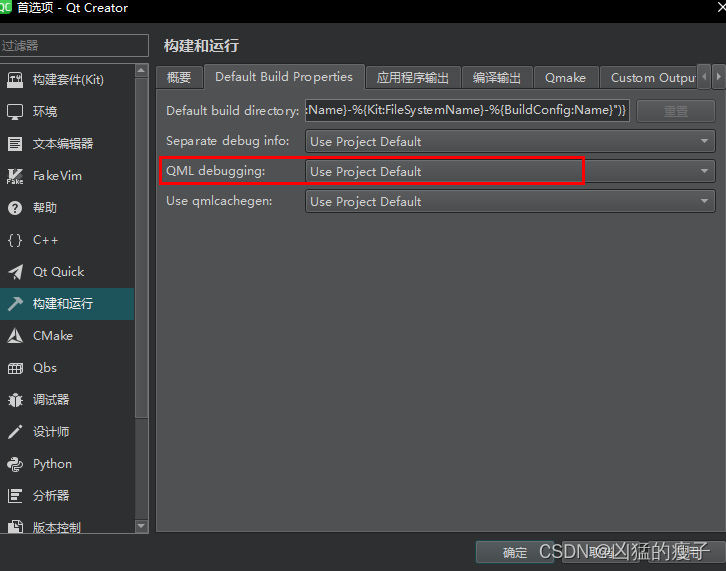
踩坑 我的qt是使用在线安装工具安装的,Qt版本使用的是5.15.2,QtCreator版本9.0.2 在网上很多教程都是如下步骤 1.安装qt 2.安装jdk 3.安装android-sdk 4.安装android-ndk 5.配置android设置 例如: https://blog.csdn.net/weixin_51363326/…...
Flutter知识点(二)处理Json
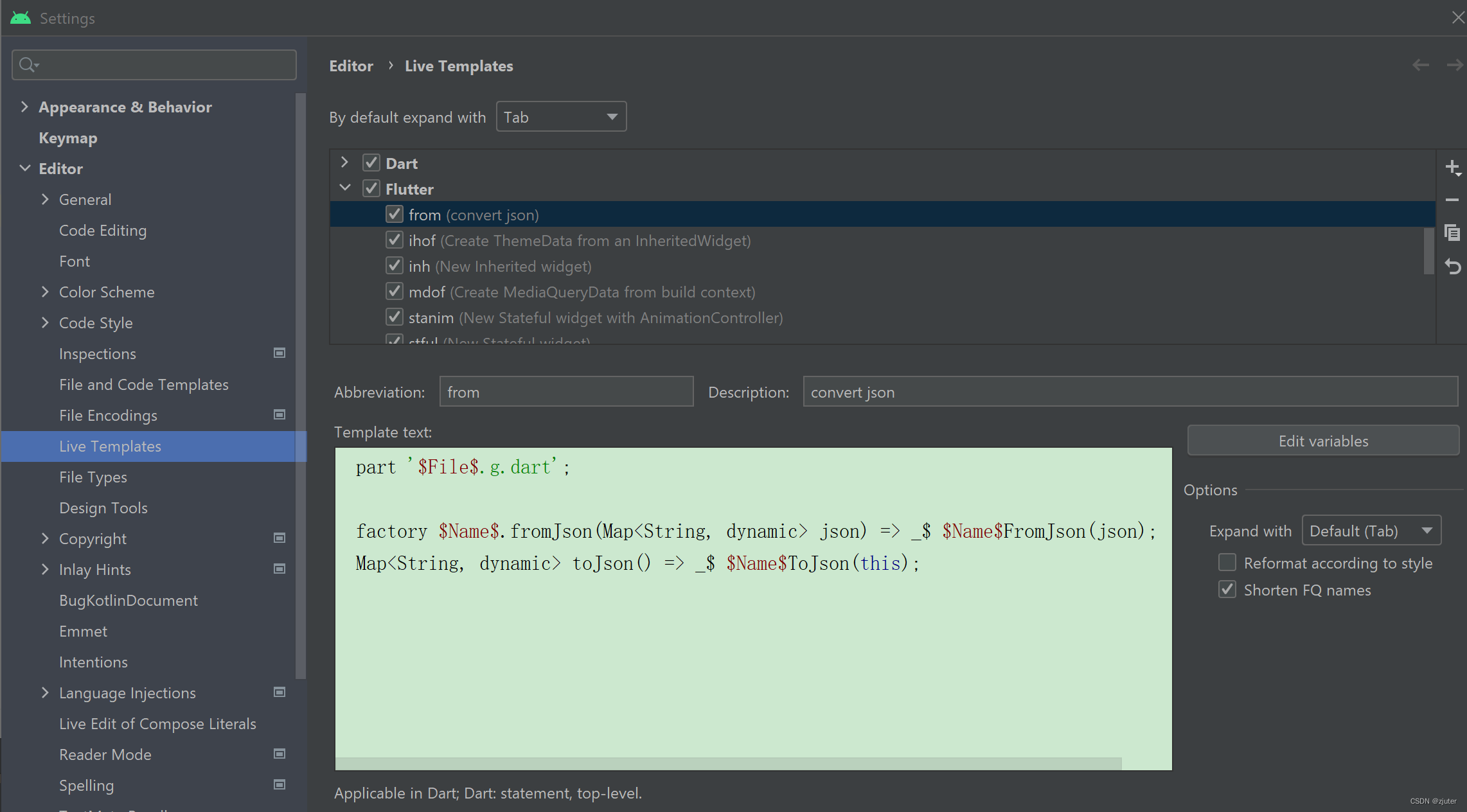
flutter不支持反射,所以本来很简单的事情,一下子变复杂了。当然官方也提供了一些工具来方便开发者。 由于Dart的map和array的数据结构和json一样,所以在flutter中,变成了json string与Map,array之间的砖换。 &#x…...
,分辨率,RTMP协议)等的介绍)
基本概念简介(码率,FPS(帧数),分辨率,RTMP协议)等的介绍
基本概念 为了了解视频的码率、帧率、分辨率。我们先来看看视频编码的基本原理:视频图像数据有极强的相关性,也就是说有大量的冗余信息。压缩技术就是将数据中的冗余信息去掉(去除数据之间的相关性),压缩技术包含帧内图像数据压缩技术、帧间图像数据压缩技术和熵编码压缩技…...
黑盒测试重点复习内容
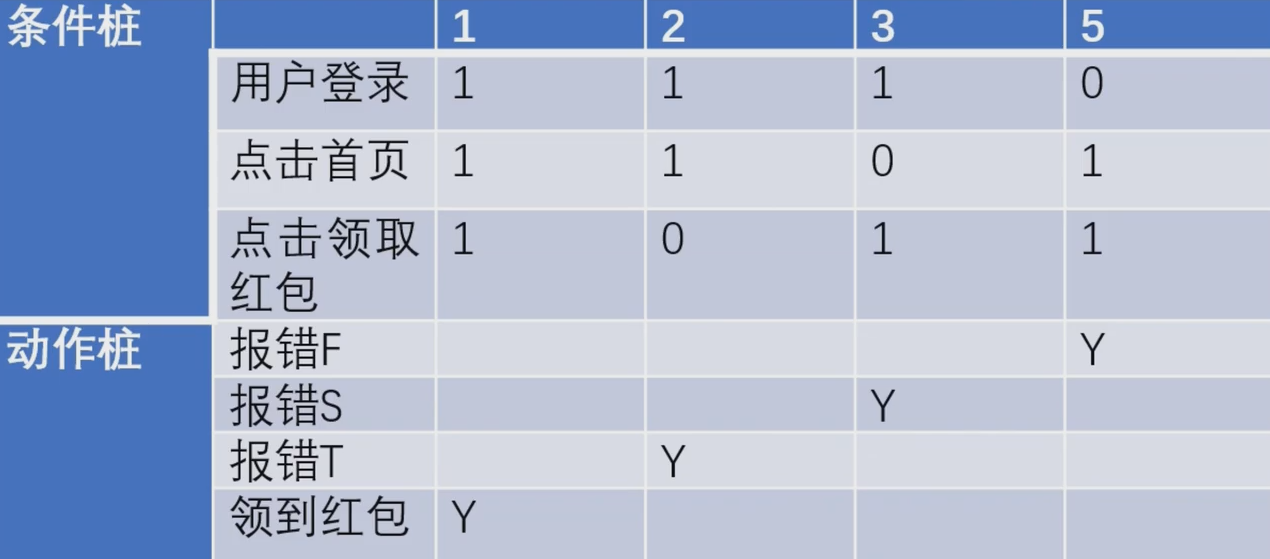
黑盒测试一、等价类划分边界值分析法二、判定表法一、等价类划分边界值分析法 对于各种输入或者输出,必须考虑等价类和边界值,并补充一些特殊值,如空值、空格、0、异常格式等特殊值。 基本概念: 有效等价类:满足需求…...
Python每日一练(20230303)
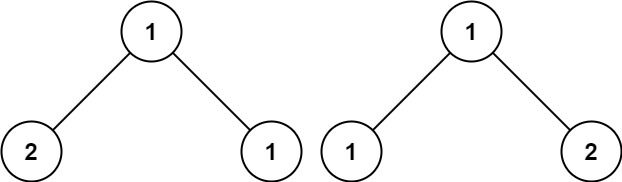
1. 两数之和 给定一个整数数组 nums 和一个整数目标值 target,请你在该数组中找出 和为目标值 的那 两个 整数,并返回它们的数组下标。 你可以假设每种输入只会对应一个答案。但是,数组中同一个元素在答案里不能重复出现。 你可以按任意顺…...
基于Cortex-M7内核STM32F767NIH6,STM32F767VGT6,STM32F767VIT6嵌入式技术资料
STM32F7 32 位 MCUFPU 基于高性能的 ARMCortex-M7 32 位 RISC 内核,工作频率高达 216MHz。Cortex-M7 内核具有单浮点单元(SFPU)精度,支持所有 ARM 单精度数据处理指令与数据类型。同时执行全套 DSP 指令和存储保护单元(MPU)&#…...
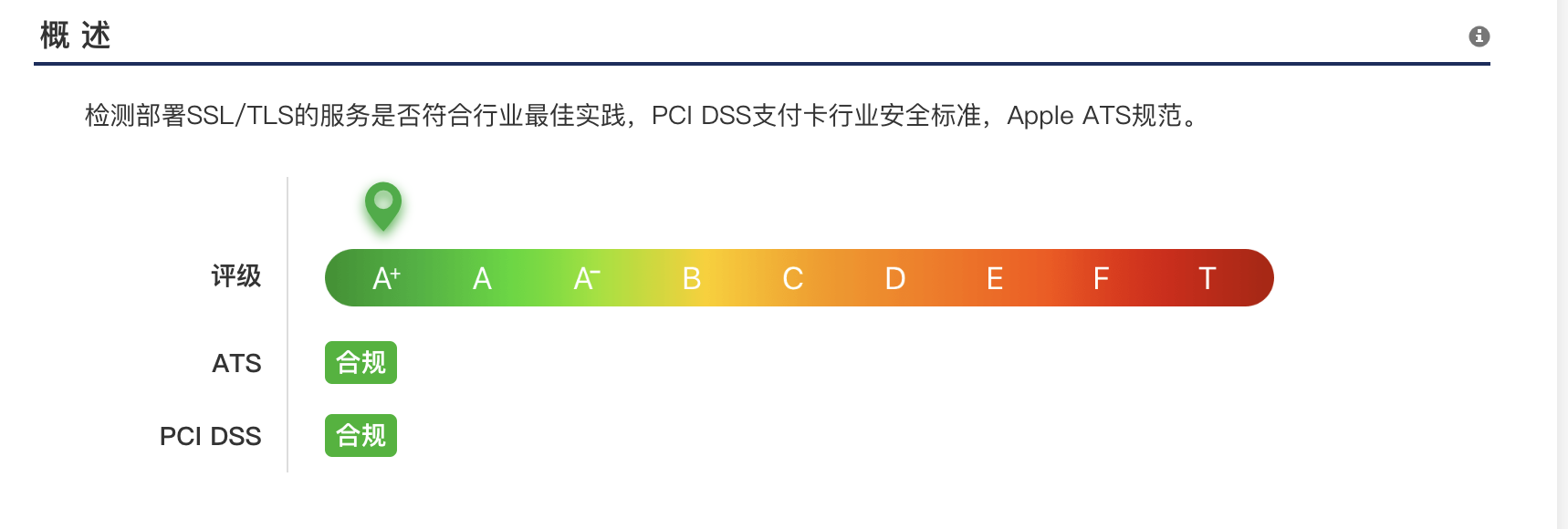
Nginx SSL证书A+之路
问题 myssl是常见的SSL/TLS在线免费检测网站。期望能够达到A级别。 步骤 nignx worker_processes auto;http {ssl_session_cache shared:SSL:10m;ssl_session_timeout 10m;server {listen 443 ssl;server_name xxxx.xxxx.com;keepalive_timeout 70;ssl_certific…...
周期性温度和压力波的PID自动控制解决方法
摘要:目前各种PID控制器仪表常用于简单的设定点(Set Point)和斜坡(Ramp)程序控制,但对于复杂的正弦波等周期性变量的控制则无能为力。为了采用标准PID控制器便捷和低成本的实现对正弦波等周期性变量的自动控…...
从头开始搭建一个SpringBoot项目--SpringBoot文件的上传与下载
从头开始搭建一个SpringBoot项目--SpringBoot文件的上传前言流程分析代码结构代码详情UploadFileInfo.classUploadController.classUploadDao.classUploadDao.xmlUploadServices.classUploadServicesImpl.class测试下载示例前言 文件的上传和下载是很多系统必备的功能…...

It做形式主语和宾语
主谓宾,主宾能被名词性的sth,替换,如动名词,不定式,从句等等 而且,不能出现前面或者中间,很长,一大推的在开头或者中间,就产生了it做形式主宾。 一、It用作形式主语当不…...
做测试一定要知道的——软件测试流程和测试规范标准文档
目录 1、目的 2、工作范围 3、工作职责 4、测试的流程 5、测试准备阶段 6、测试方法制定阶段 7、测试执行阶段 8、bug管理 9、标准文档 总结感谢每一个认真阅读我文章的人!!! 重点:配套学习资料和视频教学 1、目的 通…...

Linux下将一个文件压缩分包成多个小文件
压缩分包 将文件test分包压缩成1G 的文件: tar czf - 文件名字 | split -b 10 - 文件名.tar.gz解压 将第一步分拆的多个包解压: cat 文件名.tar.gz* | tar -xzv...

分享5款用了一段时间,个人觉得非常nice的软件
大家在使用Windows办公、学习的时候,有没有觉得自己的电脑差了点意思?比如:电脑桌面上太杂乱、装满了各类五花八门的软件、桌面壁纸不美观等。今天,给大家分享五款个人用了段时间后,觉得非常nice的软件。 1.鼠标可视化…...
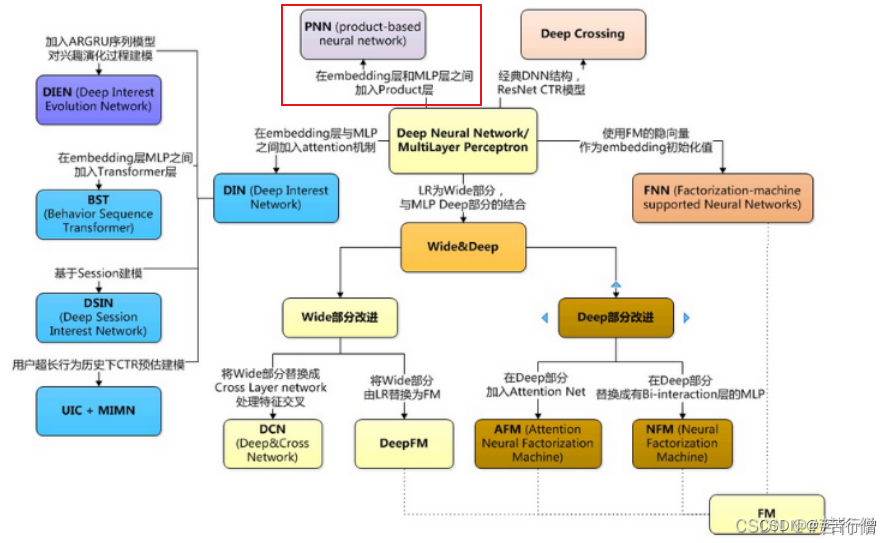
搜广推 Product-based Neural Networks (PNN) - 改进特征交叉的方式
😄 PNN:2016年上海交通大学提出。 文章目录 1、PNN1.1、原理1.2、创新点:product层1.3、product层z部分的输出:l~z~ 的计算方式:1.4、product层z部分的输出:l~p~ 的计算方式:1.4.1、IPNN1.4.2、OPNN1.5、优点1.6、缺点Reference1、PNN PNN:Product-based Neural Netwo…...
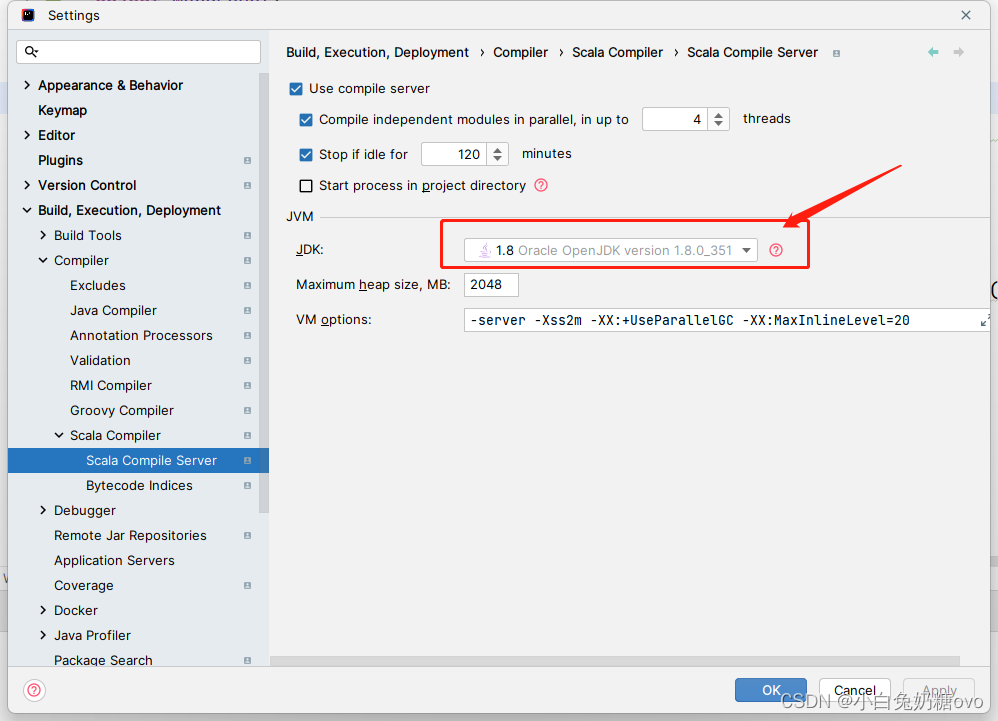
IDEA2022 配置spark开发环境
本人强烈建议在 linux环境下 学习 spark!!! Introduction Apache Spark是一个快速且通用的分布式计算引擎,可以在大规模数据集上进行高效的数据处理,包括数据转换、数据清洗、机器学习等。在本文中,我们将…...

趣味答题竞赛小程序开发功能的详细介绍
随着人们对知识学习的要求越来越高,答题已经成为了一项重要的学习和考核方式。而为了让答题变得更加有趣和富有挑战性,我们推出了趣味答题竞赛小程序。下面,我们将详细介绍这个小程序的开发功能。 1.个人淘汰赛 在个人淘汰赛中,…...

【独家】华为OD机试提供C语言题解 - 获取最大软件版本号
最近更新的博客 华为od 2023 | 什么是华为od,od 薪资待遇,od机试题清单华为OD机试真题大全,用 Python 解华为机试题 | 机试宝典【华为OD机试】全流程解析+经验分享,题型分享,防作弊指南)华为od机试,独家整理 已参加机试人员的实战技巧文章目录 最近更新的博客使用说明获取…...
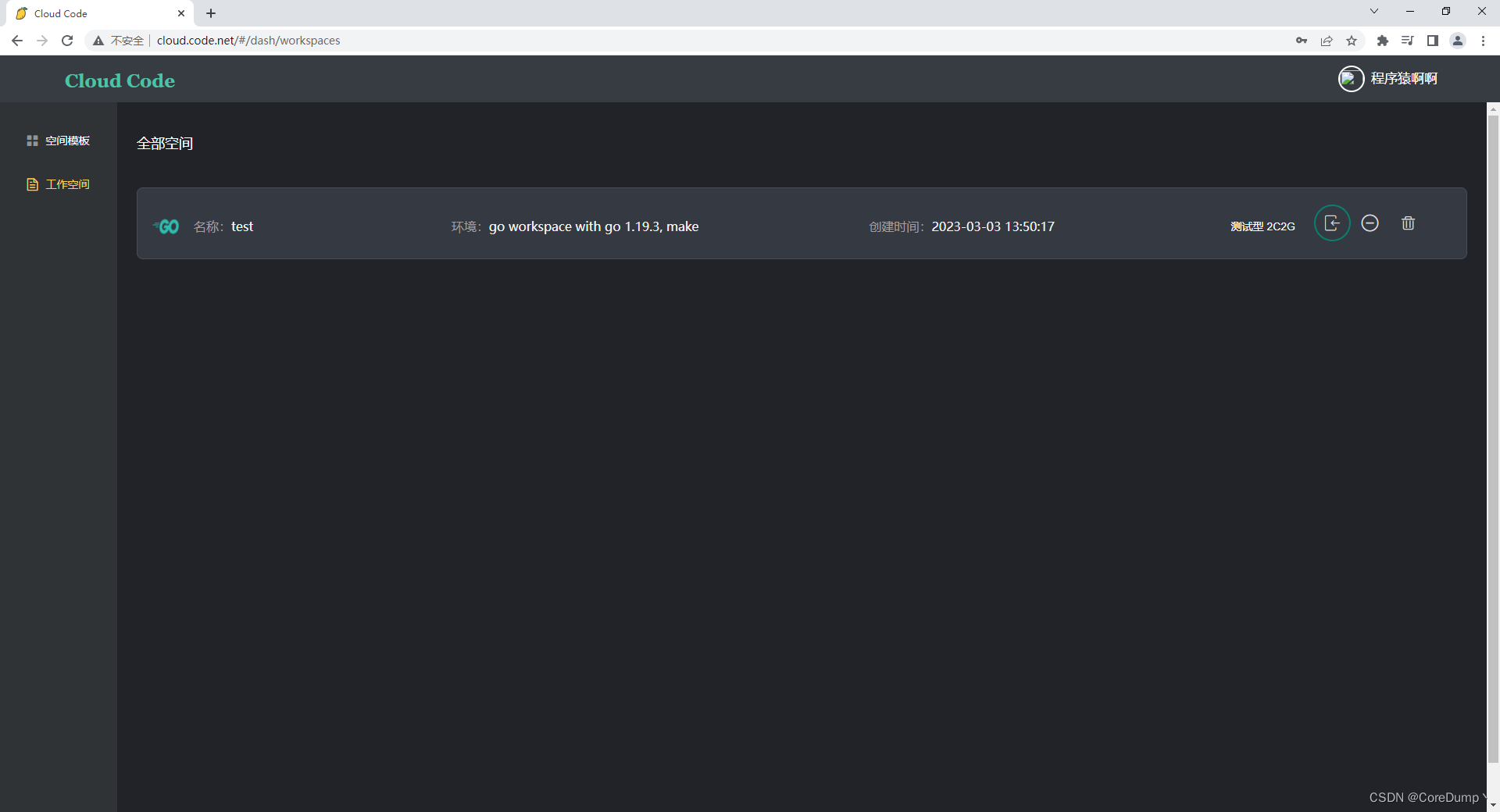
k8s编程operator实战之云编码平台——⑤项目完成、部署
文章目录1、效果展示2、保存用户状态和访问用户服务实现方案2.1 如何保存用户的状态2.1.1 解决保留安装的插件问题2.2 如何访问到用户在工作空间中启动的http服务2.2.1 code-server如何帮我们实现了用户程序的代理3、Operator功能实现3.1 使用KubeBuilder创建项目3.1.1 完善kin…...
C语言杂记(指针篇)
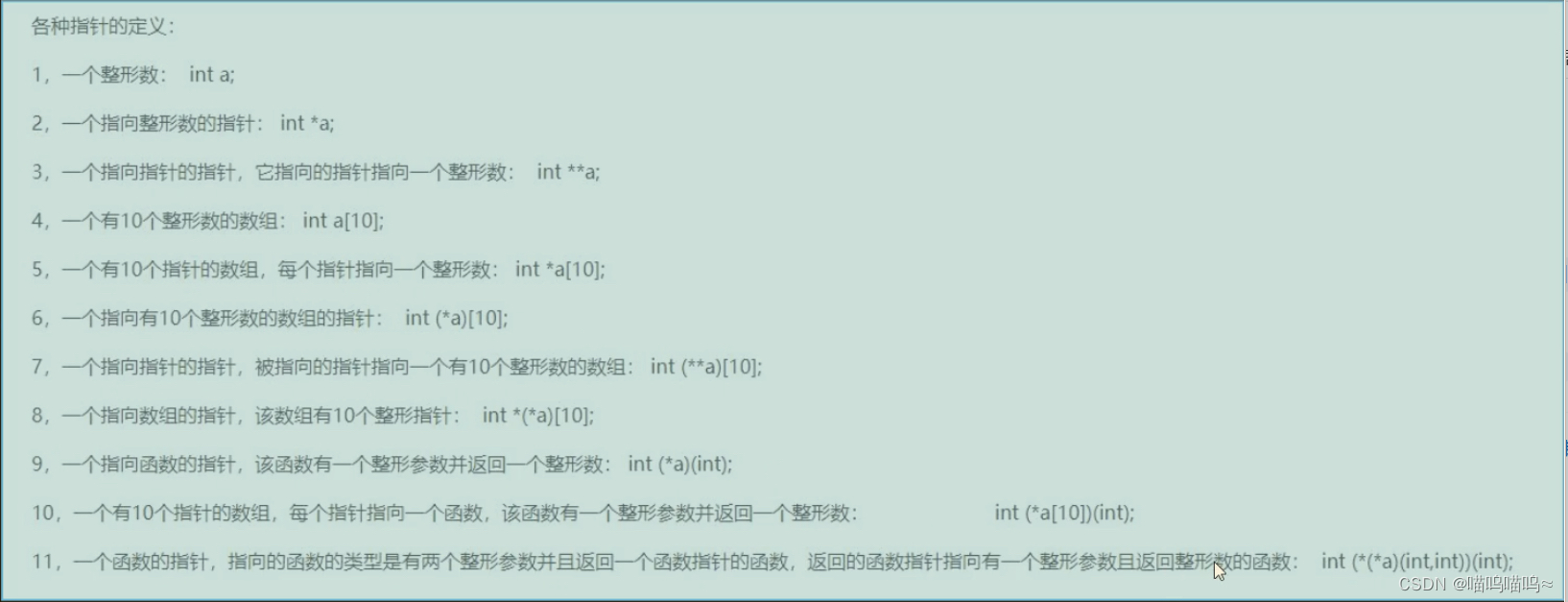
指针篇 指针就是地址,地址就是指针 指针变量就是存放地址的变量 *号只有定义的时候表示定义指针变量,其他表示从地址里面取内容 通过指针的方法使main函数中的data1和data2发生数据交换。 #include <stdio.h> void chang_data(int *data1,int *da…...
VB.net复制Ntag213卡写入UID
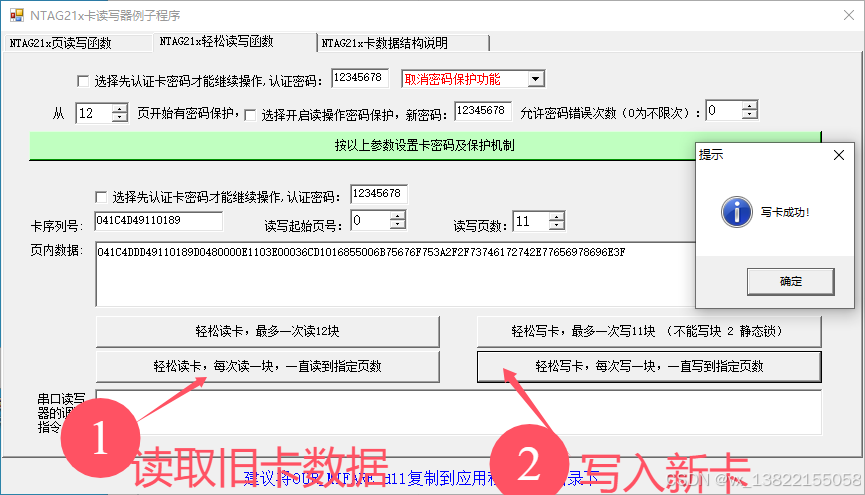
本示例使用的发卡器:https://item.taobao.com/item.htm?ftt&id615391857885 一、读取旧Ntag卡的UID和数据 Private Sub Button15_Click(sender As Object, e As EventArgs) Handles Button15.Click轻松读卡技术支持:网站:Dim i, j As IntegerDim cardidhex, …...

sqlserver 根据指定字符 解析拼接字符串
DECLARE LotNo NVARCHAR(50)A,B,C DECLARE xml XML ( SELECT <x> REPLACE(LotNo, ,, </x><x>) </x> ) DECLARE ErrorCode NVARCHAR(50) -- 提取 XML 中的值 SELECT value x.value(., VARCHAR(MAX))…...

LLM基础1_语言模型如何处理文本
基于GitHub项目:https://github.com/datawhalechina/llms-from-scratch-cn 工具介绍 tiktoken:OpenAI开发的专业"分词器" torch:Facebook开发的强力计算引擎,相当于超级计算器 理解词嵌入:给词语画"…...
-HIve数据分析)
大数据学习(132)-HIve数据分析
🍋🍋大数据学习🍋🍋 🔥系列专栏: 👑哲学语录: 用力所能及,改变世界。 💖如果觉得博主的文章还不错的话,请点赞👍收藏⭐️留言Ǵ…...

稳定币的深度剖析与展望
一、引言 在当今数字化浪潮席卷全球的时代,加密货币作为一种新兴的金融现象,正以前所未有的速度改变着我们对传统货币和金融体系的认知。然而,加密货币市场的高度波动性却成为了其广泛应用和普及的一大障碍。在这样的背景下,稳定…...
)
C#学习第29天:表达式树(Expression Trees)
目录 什么是表达式树? 核心概念 1.表达式树的构建 2. 表达式树与Lambda表达式 3.解析和访问表达式树 4.动态条件查询 表达式树的优势 1.动态构建查询 2.LINQ 提供程序支持: 3.性能优化 4.元数据处理 5.代码转换和重写 适用场景 代码复杂性…...
tauri项目,如何在rust端读取电脑环境变量
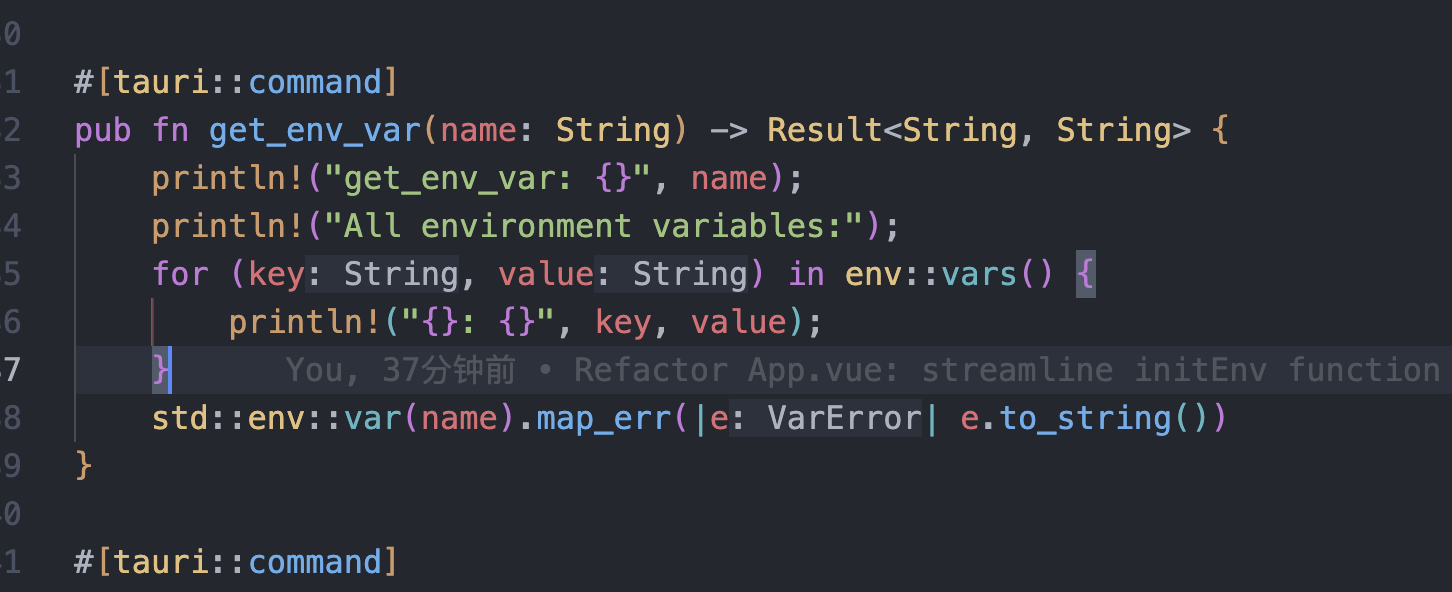
如果想在前端通过调用来获取环境变量的值,可以通过标准的依赖: std::env::var(name).ok() 想在前端通过调用来获取,可以写一个command函数: #[tauri::command] pub fn get_env_var(name: String) -> Result<String, Stri…...
)
Leetcode33( 搜索旋转排序数组)
题目表述 整数数组 nums 按升序排列,数组中的值 互不相同 。 在传递给函数之前,nums 在预先未知的某个下标 k(0 < k < nums.length)上进行了 旋转,使数组变为 [nums[k], nums[k1], …, nums[n-1], nums[0], nu…...

API网关Kong的鉴权与限流:高并发场景下的核心实践
🔥「炎码工坊」技术弹药已装填! 点击关注 → 解锁工业级干货【工具实测|项目避坑|源码燃烧指南】 引言 在微服务架构中,API网关承担着流量调度、安全防护和协议转换的核心职责。作为云原生时代的代表性网关,Kong凭借其插件化架构…...
自然语言处理——文本分类
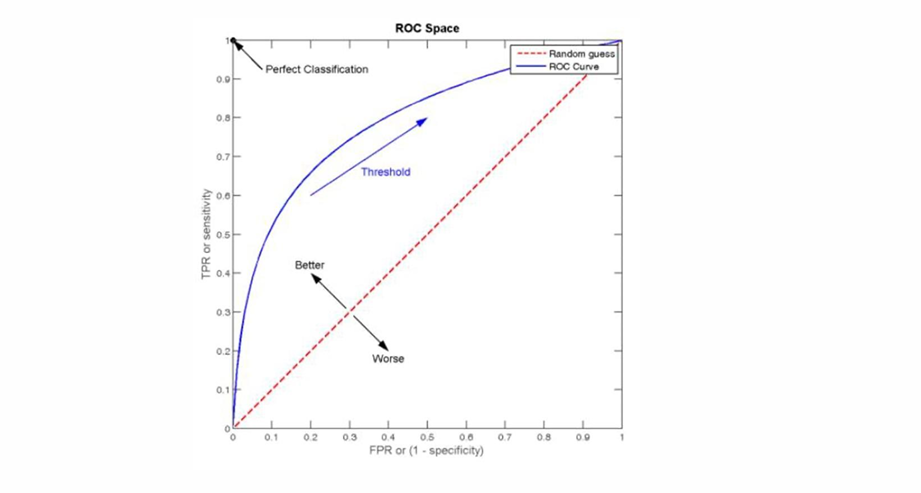
文本分类 传统机器学习方法文本表示向量空间模型 特征选择文档频率互信息信息增益(IG) 分类器设计贝叶斯理论:线性判别函数 文本分类性能评估P-R曲线ROC曲线 将文本文档或句子分类为预定义的类或类别, 有单标签多类别文本分类和多…...