
treeview
QML自定义一个TreeView,使用ListView递归
在 Qt5 的 QtQuick.Controls 2.x 中还没有 TreeView 这个控件(在 Qt6 中出了一个继承自 TableView 的 TreeView),而且 QtQuick.Controls 1.x 中的也需要配合 C++ model 来自定义,对于一些简单的需求还要写 C++ model 就显得费事儿。
参照别人的自定义 TreeView 实现,我也使用 ListView 嵌套的方式做了一个简易的 TreeView,主要功能就是根据 json 结构来生成一个树状列表。
(2022-05-28)在最初的版本没考虑 ListView 超过 cache 范围自动销毁的问题,改版后勾选等状态放到外部数组中,释放后重新创建 delegate item 时,会从外部数组中取值进行判断该 item 是否勾选。
1.展示
先看看ui效果图-1和自己的demo图-2。三级目录,其中最后一级是勾选框。我用黑色表示无子项,白色有子项已展开,灰色有子项未展开,绿色已勾选,红色未勾选。实际使用时会替换为image。


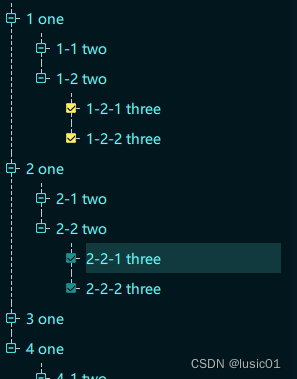
//PS.后面完善了下,效果如下图
代码github:https://github.com/gongjianbo/QmlTreeView
主要代码:
//TreeView.qml
import QtQuick 2.7
import QtQuick.Controls 2.7
//代码仅供参考,很多地方都不完善
//还有一些样式没有导出,可以根据需求自己定义
//因为ListView有回收策略,除非cacheBuffer设置很大,所以状态不能保存在delegate.item中
//需要用外部变量或者model来存储delegate.item的状态
Rectangle {
id: control
property string currentItem //当前选中item
property int spacing: 10 //项之间距离
property int indent: 5 //子项缩进距离,注意实际还有icon的距离
property string onSrc: "qrc:/img/on.png"
property string offSrc: "qrc:/img/off.png"
property string checkedSrc: "qrc:/img/check.png"
property string uncheckSrc: "qrc:/img/uncheck.png"
property var checkedArray: [] //当前已勾选的items
property bool autoExpand: true
//背景
color: Qt.rgba(2/255,19/255,23/255,128/255)
border.color: "darkCyan"
property alias model: list_view.model
ListView {
id: list_view
anchors.fill: parent
anchors.margins: 10
//model: //model由外部设置,通过解析json
property string viewFlag: ""
delegate: list_delegate
clip: true
onModelChanged: {
console.log('model change')
checkedArray=[]; //model切换的时候把之前的选中列表清空
}
}
Component {
id: list_delegate
Row{
id: list_itemgroup
spacing: 5
property string parentFlag: ListView.view.viewFlag
//以字符串来标记item
//字符串内容为parent.itemFlag+model.index
property string itemFlag: parentFlag+"-"+(model.index+1)
//canvas 画项之间的连接线
Canvas {
id: list_canvas
width: item_titleicon.width+10
height: list_itemcol.height
//开了反走样,线会模糊看起来加粗了
antialiasing: false
//最后一项的连接线没有尾巴
property bool isLastItem: (model.index===list_itemgroup.ListView.view.count-1)
onPaint: {
var ctx = getContext("2d")
var i=0
//ctx.setLineDash([4,2]); 遇到个大问题,不能画虚线
// setup the stroke
ctx.strokeStyle = Qt.rgba(201/255,202/255,202/255,1)
ctx.lineWidth=1
// create a path
ctx.beginPath()
//用短线段来实现虚线效果,判断里-3是防止width(4)超过判断长度
//此外还有5的偏移是因为我image是透明背景的,为了不污染到图标
//这里我是虚线长4,间隔2,加起来就是6一次循环
//效果勉强
ctx.moveTo(width/2,0) //如果第一个item虚线是从左侧拉过来,要改很多
for(i=0;i<list_itemrow.height/2-5-3;i+=6){
ctx.lineTo(width/2,i+4);
ctx.moveTo(width/2,i+6);
}
ctx.moveTo(width/2+5,list_itemrow.height/2)
for(i=width/2+5;i<width-3;i+=6){
ctx.lineTo(i+4,list_itemrow.height/2);
ctx.moveTo(i+6,list_itemrow.height/2);
}
if(!isLastItem){
ctx.moveTo(width/2,list_itemrow.height/2+5)
for(i=list_itemrow.height/2+5;i<height-3;i+=6){
ctx.lineTo(width/2,i+4);
ctx.moveTo(width/2,i+6);
}
//ctx.lineTo(10,height)
}
// stroke path
ctx.stroke()
}
//项图标框--可以是ractangle或者image
Image {
id: item_titleicon
visible: false
//如果是centerIn的话展开之后就跑到中间去了
anchors.left: parent.left
anchors.top: parent.top
anchors.leftMargin: list_canvas.width/2-width/2
anchors.topMargin: list_itemrow.height/2-width/2
//根据是否有子项/是否展开加载不同的图片/颜色
//color: item_repeater.count
// ?item_sub.visible?"white":"gray"
//:"black"
//这里没子项或者子项未展开未off,展开了为on
source: item_repeater.count?item_sub.visible?offSrc:onSrc:offSrc
MouseArea{
anchors.fill: parent
onClicked: {
if(item_repeater.count)
item_sub.visible=!item_sub.visible;
}
}
}
//项勾选框--可以是ractangle或者image
Image {
id: item_optionicon
visible: false
width: 10
height: 10
anchors.left: parent.left
anchors.top: parent.top
anchors.leftMargin: list_canvas.width/2-width/2
anchors.topMargin: list_itemrow.height/2-width/2
property bool checked: isChecked(itemFlag)
//勾选框
//color: checked
// ?"lightgreen"
// :"red"
source: checked?checkedSrc:uncheckSrc
MouseArea {
anchors.fill: parent
onClicked: {
item_optionicon.checked=!item_optionicon.checked;
if(item_optionicon.checked){
check(itemFlag);
}else{
uncheck(itemFlag);
}
var str="checked ";
for(var i in checkedArray)
str+=String(checkedArray[i])+" ";
console.log(str)
}
}
}
}
//项内容:包含一行item和子项的listview
Column {
id: list_itemcol
//这一项的内容,这里只加了一个text
Row {
id: list_itemrow
width: control.width
height: item_text.contentHeight+control.spacing
spacing: 5
Rectangle {
height: item_text.contentHeight+control.spacing
width: parent.width
anchors.verticalCenter: parent.verticalCenter
color: (control.currentItem===itemFlag)
?Qt.rgba(101/255,255/255,255/255,38/255)
:"transparent"
Text {
id: item_text
anchors.left: parent.left
anchors.verticalCenter: parent.verticalCenter
text: modelData.text
font.pixelSize: 14
font.family: "Microsoft YaHei UI"
color: Qt.rgba(101/255,1,1,1)
}
MouseArea {
anchors.fill: parent
onClicked: {
control.currentItem=itemFlag;
console.log("selected",itemFlag)
}
}
}
Component.onCompleted: {
if(modelData.istitle){
item_titleicon.visible=true;
}else if(modelData.isoption){
item_optionicon.visible=true;
}
}
}
//放子项
Column {
id: item_sub
//也可以像check一样用一个expand数组保存展开状态
visible: control.autoExpand
//上级左侧距离=小图标宽+x偏移
x: control.indent
Item {
width: 10
height: item_repeater.contentHeight
//需要加个item来撑开,如果用Repeator获取不到count
ListView {
id: item_repeater
anchors.fill: parent
delegate: list_delegate
model: modelData.subnodes
property string viewFlag: itemFlag
}
}
}
}
}//end list_itemgroup
}//end list_delegate
//勾选时放入arr中
function check(itemFlag){
checkedArray.push(itemFlag);
}
//取消勾选时从arr移除
function uncheck(itemFlag){
var i = checkedArray.length;
while (i--) {
if (checkedArray[i] === itemFlag) {
checkedArray.splice(i,1);
break;
}
}
}
//判断是否check
function isChecked(itemFlag){
var i = checkedArray.length;
while (i--) {
if (checkedArray[i] === itemFlag) {
return true;
}
}
return false;
}
}
//main.qml
import QtQuick 2.7
import QtQuick.Controls 2.7
import QtQuick.Window 2.7
Window {
id: root_window
visible: true
width: 640
height: 480
title: qsTr("QmlTreeView By GongJianBo")
color: Qt.rgba(3/255,26/255,35/255,1)
//滚动条可以自己设置
//ListView横向滚动条需要设置如下两个参数(如果是竖向的ListView)
//contentWidth: 500
//flickableDirection: Flickable.AutoFlickIfNeeded
TreeView{
id: item_tree
width: parent.width/2
anchors{
left: parent.left
top: parent.top
bottom: parent.bottom
margins: 10
}
//model: []
//set model data
Component.onCompleted: {
console.log(1)
root_window.setTestDataA();
console.log(2)
}
}
Column{
anchors{
right: parent.right
top: parent.top
margins: 10
}
spacing: 10
Button{
text: "ChangeModel"
checkable: true
//changed model data
onClicked: {
if(checked){
root_window.setTestDataB();
}else{
root_window.setTestDataA();
}
}
}
Button{
text: "AutoExpand"
onClicked: item_tree.autoExpand=!item_tree.autoExpand
}
}
function setTestDataA(){
item_tree.model=JSON.parse('[
{
"text":"1 one",
"istitle":true,
"subnodes":[
{"text":"1-1 two","istitle":true},
{
"text":"1-2 two",
"istitle":true,
"subnodes":[
{"text":"1-2-1 three","isoption":true},
{"text":"1-2-2 three","isoption":true}
]
}
]
},
{
"text":"2 one",
"istitle":true,
"subnodes":[
{"text":"2-1 two","istitle":true},
{
"text":"2-2 two",
"istitle":true,
"subnodes":[
{"text":"2-2-1 three","isoption":true},
{"text":"2-2-2 three","isoption":true}
]
}
]
},
{
"text":"3 one",
"istitle":true,
"subnodes":[
{"text":"3-1 two","istitle":true},
{"text":"3-2 two","istitle":true}
]
},
{
"text":"4 one",
"istitle":true,
"subnodes":[
{"text":"4-1 two","istitle":true},
{
"text":"4-2 two",
"istitle":true,
"subnodes":[
{"text":"4-2-1 three","isoption":true},
{"text":"4-2-2 three","isoption":true}
]
}
]
},
{
"text":"5 one",
"istitle":true,
"subnodes":[
{"text":"5-1 two","istitle":true},
{
"text":"5-2 two",
"istitle":true,
"subnodes":[
{"text":"5-2-1 three","isoption":true},
{"text":"5-2-2 three","isoption":true}
]
}
]
},
{
"text":"6 one",
"istitle":true,
"subnodes":[
{"text":"6-1 two","istitle":true},
{"text":"6-2 two","istitle":true}
]
}
]')
}
function setTestDataB(){
item_tree.model=JSON.parse('[
{
"text":"1 one",
"istitle":true,
"subnodes":[
{
"text":"1-1 two",
"istitle":true,
"subnodes":[
{"text":"1-1-1 three","isoption":true},
{"text":"1-1-2 three","isoption":true}
]
},
{
"text":"1-2 two",
"istitle":true,
"subnodes":[
{"text":"1-2-1 three","isoption":true},
{"text":"1-2-2 three","isoption":true}
]
}
]
},
{
"text":"2 one",
"istitle":true,
"subnodes":[
{"text":"2-1 two","istitle":true},
{
"text":"2-2 two",
"istitle":true,
"subnodes":[
{"text":"2-2-1 three","isoption":true},
{"text":"2-2-2 three","isoption":true}
]
}
]
},
{"text":"3 one","istitle":true},
{
"text":"4 one",
"istitle":true,
"subnodes":[
{"text":"4-1 two","istitle":true},
{"text":"4-2 two","istitle":true}
]
}
]')
}
}
2.参考
思路参考:https://github.com/peihaowang/QmlTreeWidget
ListView 文档:https://doc.qt.io/qt-5/qml-qtquick-listview.html
相关文章:
treeview
QML自定义一个TreeView,使用ListView递归 在 Qt5 的 QtQuick.Controls 2.x 中还没有 TreeView 这个控件(在 Qt6 中出了一个继承自 TableView 的 TreeView),而且 QtQuick.Controls 1.x 中的也需要配合 C model 来自定义,…...

Android开发中自定义View实现RecyclerView下划线
本篇文章主要讲解的是有关RecyclerView下划线的使用,主要有几个方法,具体如下: 第一种方式:网格分割线 public class GridDivider extends RecyclerView.ItemDecoration { private Drawable mDividerDarwable; private i…...
MySQL前百分之N问题--percent_rank()函数
PERCENT_RANK()函数 PERCENT_RANK()函数用于将每行按照(rank - 1) / (rows - 1)进行计算,用以求MySQL中前百分之N问题。其中,rank为RANK()函数产生的序号,rows为当前窗口的记录总行数 PERCENT_RANK()函数返回介于 0 和 1 之间的小数值 selectstudent_…...
【高效开发工具系列】Wolfram Alpha
💝💝💝欢迎来到我的博客,很高兴能够在这里和您见面!希望您在这里可以感受到一份轻松愉快的氛围,不仅可以获得有趣的内容和知识,也可以畅所欲言、分享您的想法和见解。 推荐:kwan 的首页,持续学…...

分享7种SQL的进阶用法
推荐一款ChatGPT4.0国内站点,每日有免费使用额度,支持PC、APP、VScode插件同步使用 SQL(Structured Query Language)是一种强大的数据库查询和操作语言,它用于与关系数据库进行交互。随着数据的不断增长和应用需求的日益复杂,掌握SQL的进阶用法对于数据库管理员、数据分析…...

protobuf-go pragma.go 文件介绍
pragma.go 文件 文件位于: https://github.com/protocolbuffers/protobuf-go/blob/master/internal/pragma/pragma.go 该文件核心思想: 利用 Golang 语法机制,扩展 Golang 语言特性 目前,该文件提供以下 4 个功能: …...

C#设置程序开机启动
1:获取当前用户: System.Security.Principal.WindowsIdentity identity System.Security.Principal.WindowsIdentity.GetCurrent();System.Security.Principal.WindowsPrincipal principal new System.Security.Principal.WindowsPrincipal(identity);…...
爱可声助听器参与南湖区价值百万公益助残捐赠活动成功举行
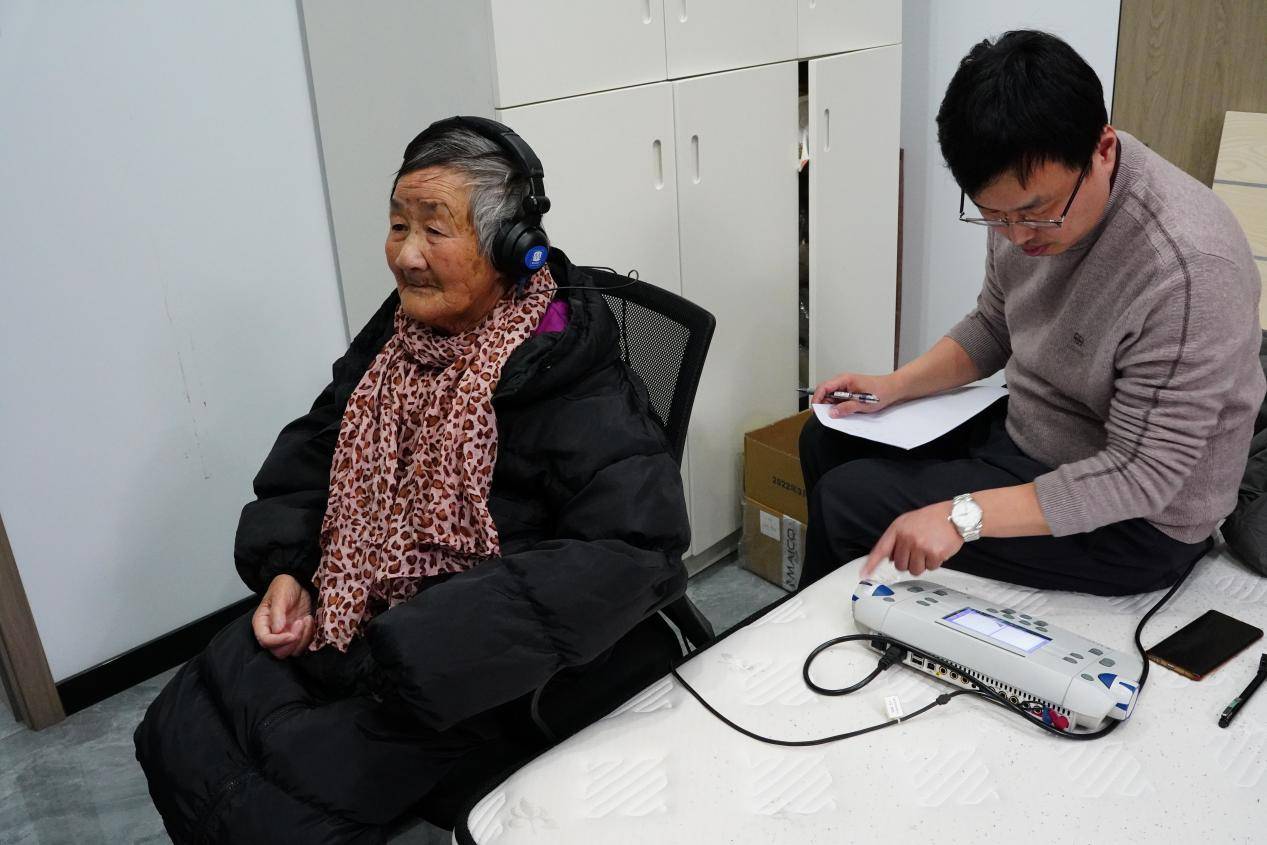
“声音大小合适吗?能听清楚吗?”今天下午,一场助残捐赠活动在南湖区凤桥镇悄然举行,杭州爱听科技有限公司带着验配团队和听力检测设备来到活动现场,为南湖区听障残疾人和老人适配助听器。 家住余新镇的75岁的周奶奶身体…...

SpringBoot 实现定时任务
在项目我们会有很多需要在某一特定时刻自动触发某一时间的需求,例如我们提交订单但未支付的超过一定时间后需要自动取消订单。 定时任务实现的几种方式: Timer:java自带的java.util.Timer类,使用这种方式允许你调度一个java.util…...

将Vue2中的console.log调试信息移除
前端项目构建生产环境下的package时,咱们肯定要去掉development环境下的console.log,如果挨个注释可就太费劲了,本文介绍怎么使用 babel-plugin-transform-remove-console 移除前端项目中所有的console.log. 1. 安装依赖 npm install babel-…...
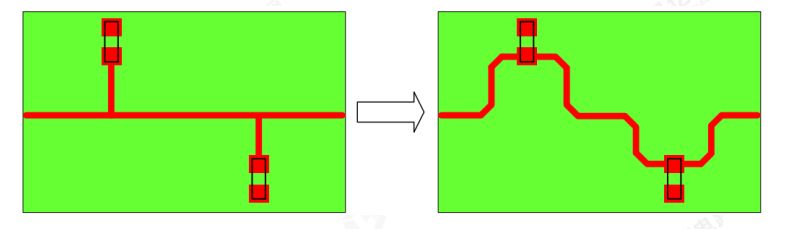
EMC设计检查建议,让PCB layout达到最佳性能
EMC:Electro Magnetic Compatibility的简称,也称电磁兼容,各种电气或电子设备在电磁环境复杂的共同空间中,以规定的安全系数满足设计要求的正常工作能力。 本章对于 RK3588产品设计中的 ESD/EMI防护设计及EMC的设计检查给出了建议…...
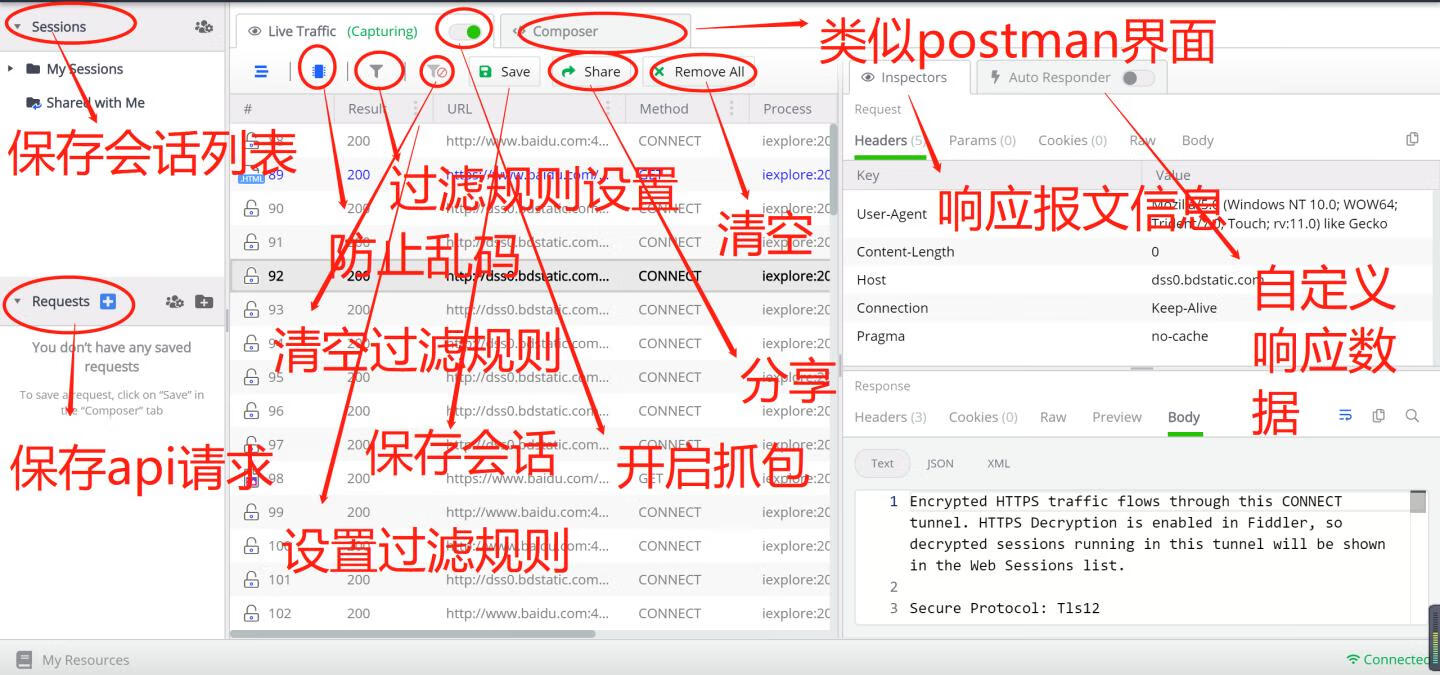
常用抓包软件集合(Fiddler、Charles)
1. Fiddler 介绍:Fiddler是一个免费的HTTP和HTTPS调试工具,支持Windows平台。它可以捕获HTTP和HTTPS流量,并提供了丰富的调试和分析功能。优点:易于安装、易于使用、支持多种扩展、可以提高开发效率。缺点:只支持Wind…...
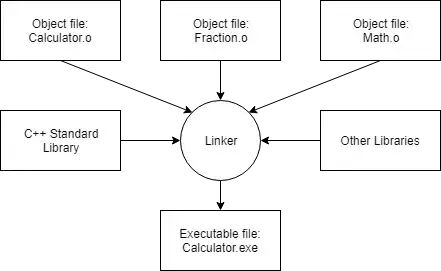
C++入门(一)— 使用VScode开发简介
文章目录 C 介绍C 擅长领域C 程序是如何开发编译器、链接器和库编译预处理编译阶段汇编阶段链接阶段 安装集成开发环境 (IDE)配置编译器:构建配置配置编译器:编译器扩展配置编译器:警告和错误级别配置编译器࿱…...

PeakCAN连接到WSL2 Debian
操作步骤 按照以下步骤进行操作: 在Windows下安装PeakCAN驱动并安装,地址是https://www.peak-system.com/PCAN-USB.199.0.html?&L1 在Windows下安装usbipd,地址是https://github.com/dorssel/usbipd-win/releases,最新版是…...

Spring Boot导出EXCEL 文件
主要功能:实现java导出excel到本地 JDK版本:openJDK 20.0.1 依赖pom.xml <?xml version"1.0" encoding"UTF-8"?> <project xmlns"http://maven.apache.org/POM/4.0.0" xmlns:xsi"http://www.w3.org/2001/XMLSchem…...

编程笔记 html5cssjs 060 css响应式布局
编程笔记 html5&css&js 060 css响应式布局 一、响应式布局二、Bootstrap简介总结 CSS响应式布局是一种可以在不同设备(例如桌面电脑、平板电脑、手机等)上自动调整页面布局和样式的技术。 一、响应式布局 使用CSS响应式布局的关键是媒体查询&am…...

建筑行业如何应用3D开发工具HOOPS提升实时设计体验?
建筑行业一直在迅速发展,技术的不断创新也为其带来了新的机遇与挑战。在这一领域,三维图形技术的应用变得尤为重要。HOOPS技术,作为一套用于开发三维图形应用程序的工具和库,为建筑行业带来了深刻的变革。本文将探讨HOOPS技术在建…...
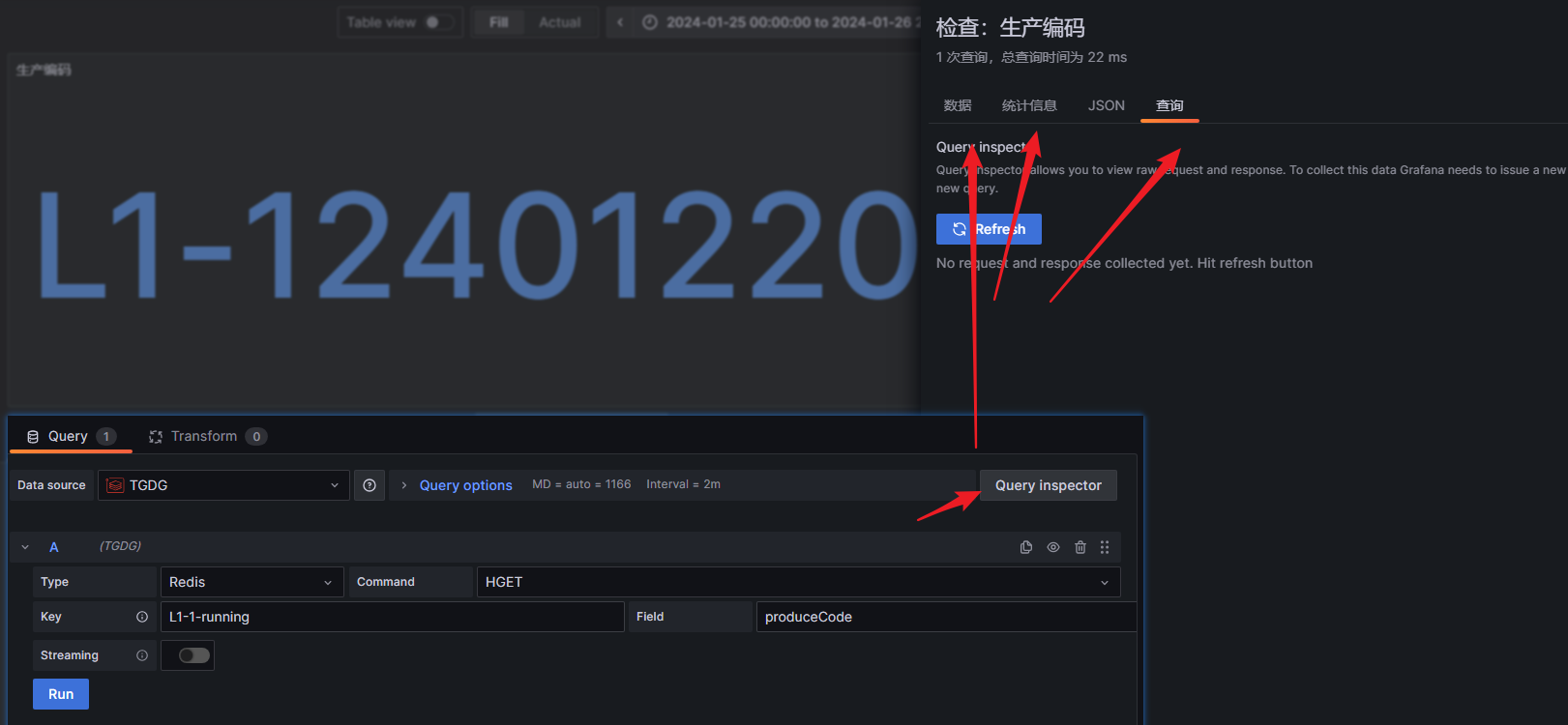
【grafana】使用教程
【grafana】使用教程 一、简介二、下载及安装及配置三、基本概念3.1 数据源(Data Source)3.2 仪表盘(Dashboard)3.3 Panel(面板)3.4 ROW(行)3.5 共享及自定义 四、常用可视化示例4.1…...
seata 分布式
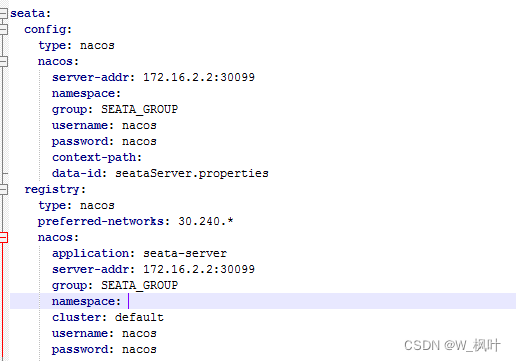
一、下载安装seata 已经下载好的朋友可以跳过这个步骤。这里下载的是seata1.6.1这个版本。 1、进入seata官网 地址: https://seata.io/zh-cn/index.html 2、进入下载 3、点击下载地址 下载地址: https://github.com/seata/seata 二、配置seata 进入c…...
)
前端面试题-说说你了解的js数据结构?(2024.1.29)
1、数组 (Array) 数组是一组有序的值的集合,可以通过索引访问。JavaScript 数组可以包含不同的数据类型,并且长度是动态的。 let myArray [1, hello, true, [2, 3]];2、对象 (Object) 对象是无序的键值对的集合。每个键都是字符串或符号,…...
DBAPI如何优雅的获取单条数据
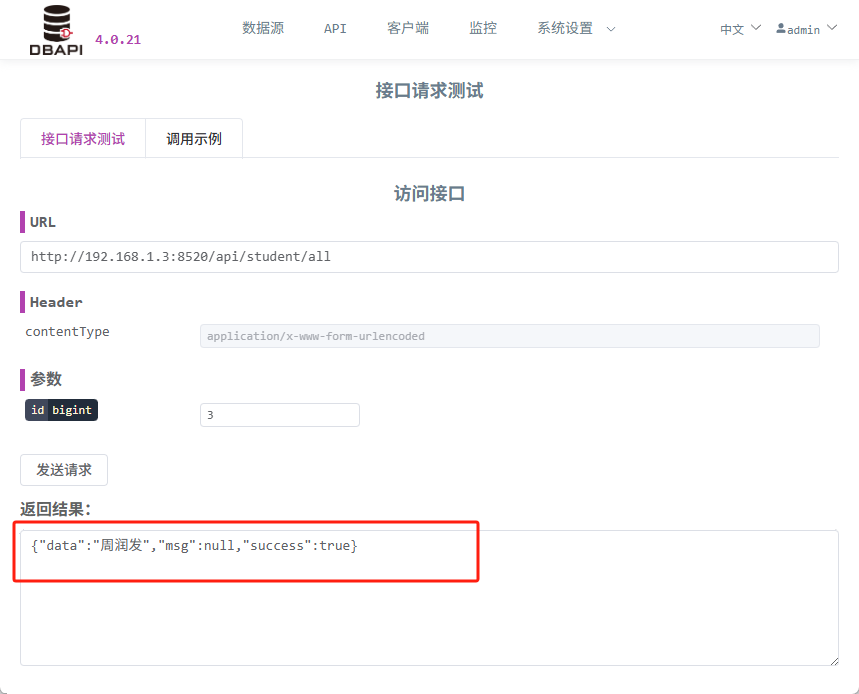
API如何优雅的获取单条数据 案例一 对于查询类API,查询的是单条数据,比如根据主键ID查询用户信息,sql如下: select id, name, age from user where id #{id}API默认返回的数据格式是多条的,如下: {&qu…...

docker 部署发现spring.profiles.active 问题
报错: org.springframework.boot.context.config.InvalidConfigDataPropertyException: Property spring.profiles.active imported from location class path resource [application-test.yml] is invalid in a profile specific resource [origin: class path re…...
技术栈RabbitMq的介绍和使用
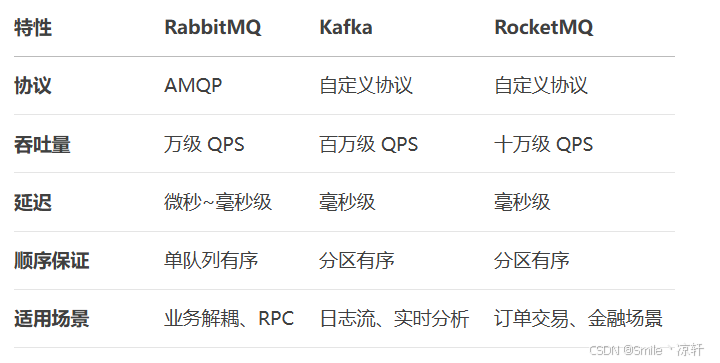
目录 1. 什么是消息队列?2. 消息队列的优点3. RabbitMQ 消息队列概述4. RabbitMQ 安装5. Exchange 四种类型5.1 direct 精准匹配5.2 fanout 广播5.3 topic 正则匹配 6. RabbitMQ 队列模式6.1 简单队列模式6.2 工作队列模式6.3 发布/订阅模式6.4 路由模式6.5 主题模式…...

AirSim/Cosys-AirSim 游戏开发(四)外部固定位置监控相机
这个博客介绍了如何通过 settings.json 文件添加一个无人机外的 固定位置监控相机,因为在使用过程中发现 Airsim 对外部监控相机的描述模糊,而 Cosys-Airsim 在官方文档中没有提供外部监控相机设置,最后在源码示例中找到了,所以感…...

CSS | transition 和 transform的用处和区别
省流总结: transform用于变换/变形,transition是动画控制器 transform 用来对元素进行变形,常见的操作如下,它是立即生效的样式变形属性。 旋转 rotate(角度deg)、平移 translateX(像素px)、缩放 scale(倍数)、倾斜 skewX(角度…...
代码规范和架构【立芯理论一】(2025.06.08)
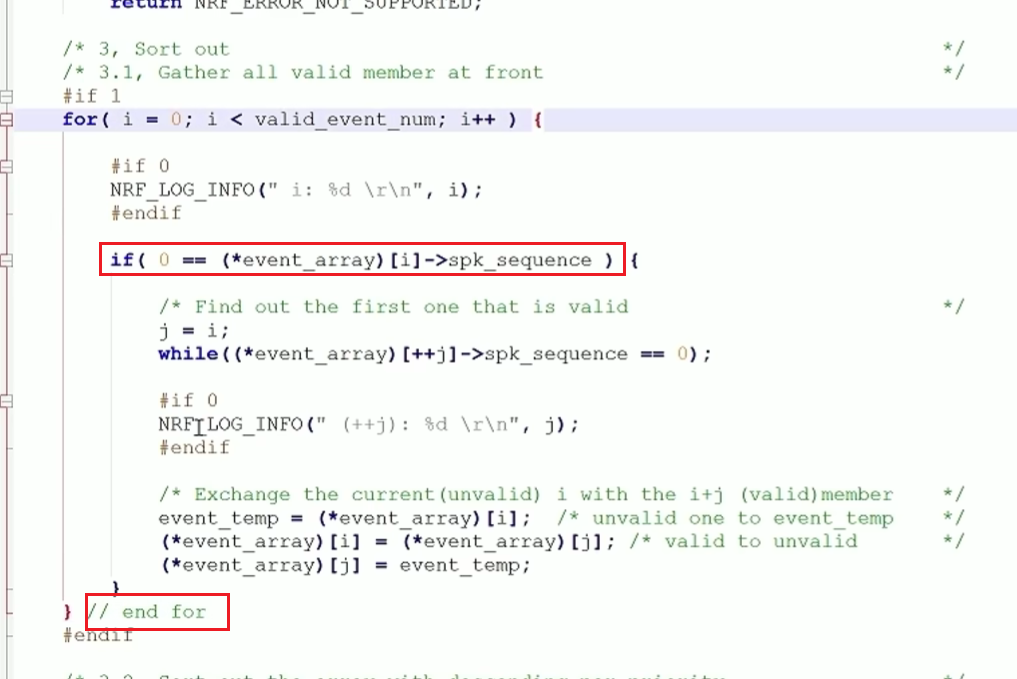
1、代码规范的目标 代码简洁精炼、美观,可持续性好高效率高复用,可移植性好高内聚,低耦合没有冗余规范性,代码有规可循,可以看出自己当时的思考过程特殊排版,特殊语法,特殊指令,必须…...

Python 高级应用10:在python 大型项目中 FastAPI 和 Django 的相互配合
无论是python,或者java 的大型项目中,都会涉及到 自身平台微服务之间的相互调用,以及和第三发平台的 接口对接,那在python 中是怎么实现的呢? 在 Python Web 开发中,FastAPI 和 Django 是两个重要但定位不…...
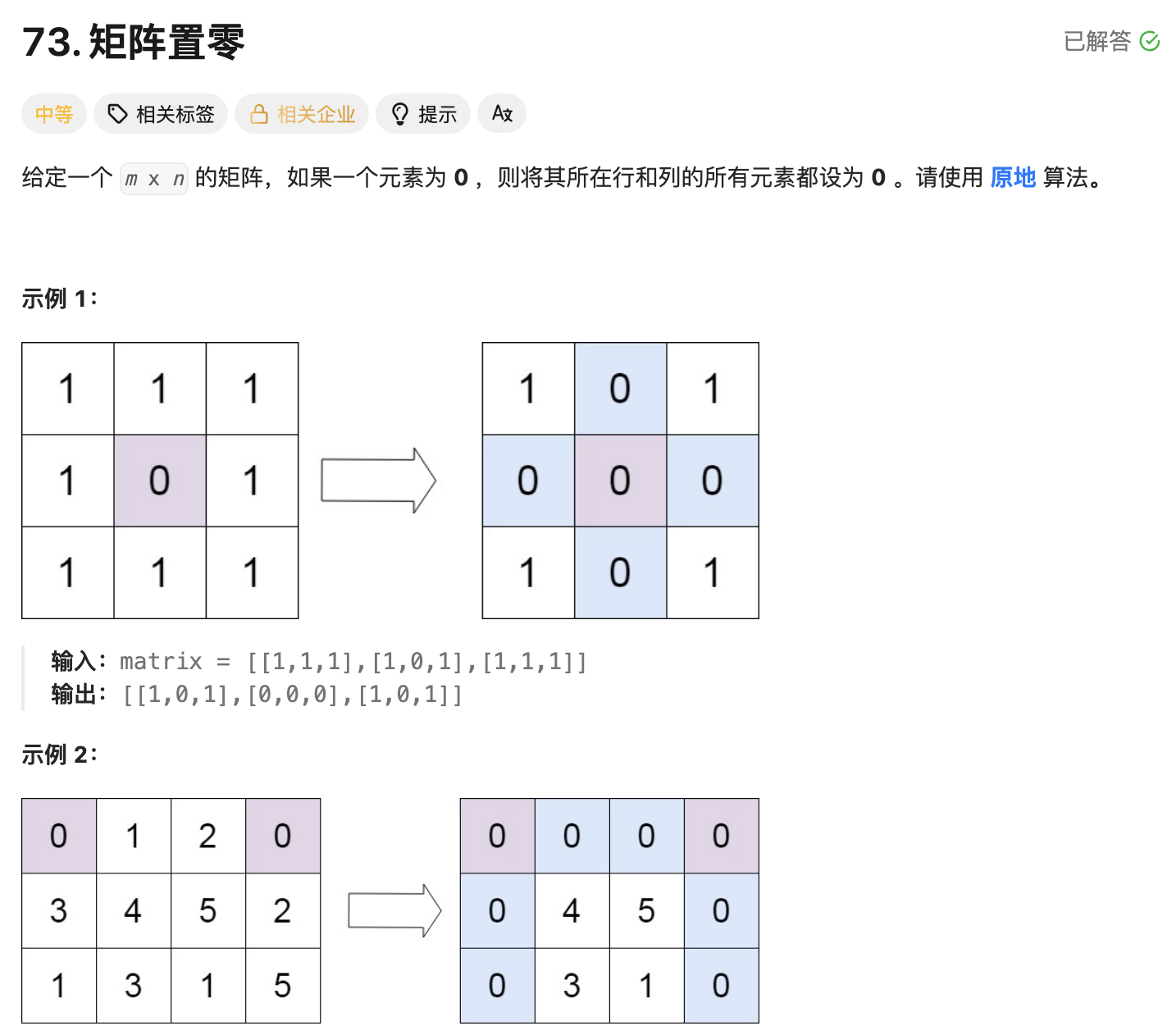
leetcode73-矩阵置零
leetcode 73 思路 记录 0 元素的位置:遍历整个矩阵,找出所有值为 0 的元素,并将它们的坐标记录在数组zeroPosition中置零操作:遍历记录的所有 0 元素位置,将每个位置对应的行和列的所有元素置为 0 具体步骤 初始化…...

Java并发编程实战 Day 11:并发设计模式
【Java并发编程实战 Day 11】并发设计模式 开篇 这是"Java并发编程实战"系列的第11天,今天我们聚焦于并发设计模式。并发设计模式是解决多线程环境下常见问题的经典解决方案,它们不仅提供了优雅的设计思路,还能显著提升系统的性能…...

boost::filesystem::path文件路径使用详解和示例
boost::filesystem::path 是 Boost 库中用于跨平台操作文件路径的类,封装了路径的拼接、分割、提取、判断等常用功能。下面是对它的使用详解,包括常用接口与完整示例。 1. 引入头文件与命名空间 #include <boost/filesystem.hpp> namespace fs b…...