
libhv http client vs cpr
libhv http client 和 cpr 的性能对比
libhv
- test code
static void test_http_async(HttpClient* cli, int seq, int* resp_cnt)
{auto req = std::make_shared<HttpRequest>();req->method = HTTP_GET;req->url = "www.baidu.com";req->timeout = 10;cli->sendAsync(req, [seq, resp_cnt](const HttpResponsePtr& resp) {std::string path = "async-result-" + std::to_string(seq) + ".log";std::ofstream fout(path.c_str());fout << "test_http_async_client response thread" << std::endl;fout << "tid=" << hv_gettid() << std::endl;if (resp == NULL) {fout << "request failed!" << std::endl;} else {fout << resp->status_code << "\t" <<  resp->status_message() << std::endl;// fout << resp->body << std::endl;}*resp_cnt += 1;});
}static void test_http_sync(HttpClient* cli, int seq)
{HttpRequest req;req.method = HTTP_POST;req.url = "www.baidu.com";req.timeout = 10;HttpResponse resp;int ret = cli->send(&req, &resp);std::string path = "sync-result-" + std::to_string(seq) + ".log";std::ofstream fout(path.c_str());fout << "test_http_sync_client response thread" << std::endl;if (ret != 0) {fout << "request failed!" << std::endl;}else {fout << resp.status_code << "\t" <<  resp.status_message() << std::endl;// fout << resp->body << std::endl;}
}int main(int argc, char* argv[]) {int req_cnt = 0;if (argc > 1) req_cnt = atoi(argv[1]);if (req_cnt == 0) req_cnt = 1;HttpClient sync_client;HttpClient async_client;int resp_cnt = 0;long long beg = gettimeofday_ms();printf("test_http_async_client request thread tid=%ld\n", hv_gettid());for (int i = 0; i < req_cnt; ++i) {test_http_async(&async_client, i, &resp_cnt);}// demo wait async finishedwhile (resp_cnt < req_cnt) hv_delay(10);long long used = gettimeofday_ms() - beg;std::cout << "async finished: " << used << std::endl;beg = gettimeofday_ms();printf("test_http_sync_client request thread tid=%ld\n", hv_gettid());for (int i = 0; i < req_cnt; ++i) {test_http_sync(&async_client, i);}used = gettimeofday_ms() - beg;std::cout << "sync finished: " << used << std::endl;return 0;
}
- result
test_http_async_client request thread tid=104820
async finished: 3249ms
test_http_sync_client request thread tid=104820
sync finished: 80398ms[wei@localmachine /home/wei/myworks/libhv]
$cat async-result-*.log | grep "tid=" | sort | uniq -c1000 tid=104823
cpr
- test code
void test_http_async(int seq, int *resp_cnt, vector<std::shared_future<string> >& futures)
{auto callback = [seq, resp_cnt](cpr::Response r) {std::string path = "async-result-" + std::to_string(seq) + ".log";std::ofstream fout(path.c_str());fout << "test async response thread" << std::endl;fout << "tid=" << std::this_thread::get_id() << std::endl;fout << r.status_code << "\t" <<  r.status_line << std::endl;if (r.status_code != 200){fout << "error:" << r.error.message << endl;}// else// {//     fout << r.text << std::endl;// }*resp_cnt += 1;return r.text;};string url = "http://www.baidu.com";int timeout = 10 * 1000;futures[seq] = cpr::GetCallback(callback, cpr::Url{url}, cpr::Timeout{timeout});
}void test_http_sync(int seq)
{string url = "http://www.baidu.com";int timeout = 10 * 1000;auto r = cpr::Get(cpr::Url{url}, cpr::Timeout{timeout});std::string path = "sync-result-" + std::to_string(seq) + ".log";std::ofstream fout(path.c_str());fout << "test sync response thread" << std::endl;fout << "tid=" << std::this_thread::get_id() << std::endl;fout << r.status_code << "\t" <<  r.status_line << std::endl;if (r.status_code != 200){fout << "error:" << r.error.message << endl;}// else// {//     fout << r.text << std::endl;// }
}void CprRequestTest::AsyncSyncRequestTest()
{int req_cnt = 1000;int resp_cnt = 0;vector<std::shared_future<string>> cprfutures(req_cnt);cprfutures.reserve(1000);int64_t beg = Timer::GetCurrentTimeInMilliSeconds();cout << "test async request thread tid=" << std::this_thread::get_id() << endl;;for (int i = 0; i < req_cnt; ++i) {test_http_async(i, &resp_cnt, cprfutures);// cprfutures.emplace_back(f);}// demo wait async finishedwhile (resp_cnt < req_cnt) usleep(10 * 1000);int64_t used = Timer::GetCurrentTimeInMilliSeconds() - beg;std::cout << "async finished: " << used << "ms" << std::endl;beg = Timer::GetCurrentTimeInMilliSeconds();cout << "test sync request thread tid=" << std::this_thread::get_id() << endl;;for (int i = 0; i < req_cnt; ++i) {test_http_sync(i);}used = Timer::GetCurrentTimeInMilliSeconds() - beg;std::cout << "sync finished: " << used << "ms" << std::endl;
}
- result
test async request thread tid=140052864329472
async finished: 554ms
test sync request thread tid=140052864329472
sync finished: 32382ms[wei@localmachine /home/wei/myworks/cpr]
cat async-result-*.log | grep "tid=" | sort | uniq -c | wc -l
1000
附
- 机器
processor       : 0
vendor_id       : GenuineIntel
cpu family      : 6
model           : 63
model name      : Intel(R) Xeon(R) CPU E5-2640 v3 @ 2.60GHz
stepping        : 2
microcode       : 0x3a
cpu MHz         : 2600.000
cache size      : 20480 KB
physical id     : 0
siblings        : 16
core id         : 0
cpu cores       : 16
apicid          : 10
initial apicid  : 10
fpu             : yes
fpu_exception   : yes
cpuid level     : 15
wp              : yes
flags           : fpu vme de pse tsc msr pae mce cx8 apic sep mtrr pge mca cmov pat pse36 clflush dts acpi mmx fxsr sse sse2 ss ht tm pbe syscall nx pdpe1gb rdtscp lm constant_tsc arch_perfmon pebs bts rep_good nopl xtopology nonstop_tsc aperfmperf eagerfpu pni pclmulqdq dtes64 ds_cpl vmx smx est tm2 ssse3 fma cx16 xtpr pdcm pcid dca sse4_1 sse4_2 x2apic movbe popcnt tsc_deadline_timer aes xsave avx f16c rdrand lahf_lm abm arat epb pln pts dtherm tpr_shadow vnmi flexpriority ept vpid fsgsbase tsc_adjust bmi1 avx2 smep bmi2 erms invpcid cqm xsaveopt cqm_llc cqm_occup_llc
bogomips        : 5187.90
clflush size    : 64
cache_alignment : 64
address sizes   : 46 bits physical, 48 bits virtual
power management:[wei@localmachine /home/wei]
cat /proc/cpuinfo | grep processor | wc -l
16
相关文章:

libhv http client vs cpr
libhv http client 和 cpr 的性能对比 libhv test code static void test_http_async(HttpClient* cli, int seq, int* resp_cnt) {auto req std::make_shared<HttpRequest>();req->method HTTP_GET;req->url "www.baidu.com";req->timeout 1…...
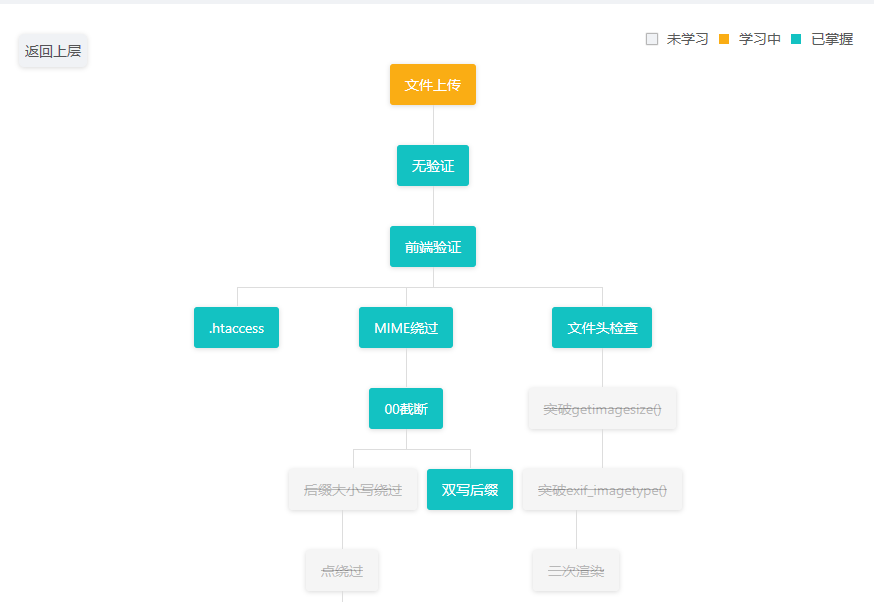
CTFHub-Web-文件上传
CTFHub-Web-文件上传-WP 一、无验证 1.编写一段PHP木马脚本 2.将编写好的木马进行上传 3.显示上传成功了 4.使用文件上传工具进行尝试 5.连接成功进入文件管理 6.上翻目录找到flag文件 7.打开文件查看flag 二、前端验证 1.制作payload进行上传发现不允许这种类型的文件上传 …...

笔记2:cifar10数据集获取及pytorch批量处理
(1)cifar10数据集预处理 CIFAR-10是一个广泛使用的图像数据集,它由10个类别的共60000张32x32彩色图像组成,每个类别有6000张图像。 CIFAR-10官网 以下为CIFAR-10数据集data_batch_*表示训练集数据,test_batch表示测试…...

FSD自动驾驶泛谈
特斯拉的FSD(Full-Self Driving,全自动驾驶)系统是特斯拉公司研发的一套完全自动驾驶系统。旨在最终实现车辆在多种驾驶环境下无需人类干预的自动驾驶能力。以下是对FSD系统的详细探讨: 系统概述 FSD是特斯拉的自动驾驶技术&…...

golang获取变量动态类型
类型断言:data.(Type) 类型断言是最常用的获取变量动态类型的方法之一。允许在运行时将接口值转换为其具体类型。 data 是一个接口类型的变量。 Type 是一个具体的类型。 这个表达式的含义是,如果 data 的底层值是 Type 类型,那么 value 将接…...

外企接受大龄程序员吗?
本人知乎账号同公众号:老胡聊Java,欢迎留言并咨询 亲身体会外企经历所见所闻,外企能接受大龄程序员。 1 大概是10年的时候,进一家知名外企,和我一起进的一位manager,后来听下来,年龄35…...

【DevOps】掌控云端:Google Cloud SDK 快速上手
一、Google Cloud SDK Google Cloud SDK (Software Development Kit) 是一组工具,包括 gcloud、gsutil 和 bq,用于通过命令行或自动化脚本访问和管理 Google Cloud 资源和服务。以下是 Cloud SDK 的详细介绍: 1、gcloud 命令行工具 gcloud 是 Cloud SDK 的核心组件,用于管理 …...

【Unity 踩坑系列】配置VScode环境Downloading the.NET Runtime Failed to download.NET 7.0.9installation timed out
1.问题描述 在最近使用Unity配置VScode开发环境时,总会出现以下的情况。(很多朋友其实本地已经自己安装好了.net环境 PS:可能各种版本.net 6.0 - .net 8.0都试过安装了 但就是会自动下载最新版本的.net ) Downloading the .NET Runtime. Downloading .NET versio…...

深入了解 NumPy:深度学习中的数学运算利器
文章目录 1. 导入NumPy2. 创建NumPy数组3. 数组的算术运算4. N维数组4.1 创建和操作多维数组4.2 高维数组 5. NumPy的广播功能5.1 基本广播示例5.2 更复杂的广播示例 6. 访问数组元素6.1 基于索引的访问6.2 遍历数组6.3 基于条件的访问6.4 高级索引6.5 性能考虑 在深度学习和数…...

鸿蒙开发接口Ability框架:【@ohos.ability.particleAbility (particleAbility模块)】
particleAbility模块 particleAbility模块提供了Service类型Ability的能力,包括启动、停止指定的particleAbility,获取dataAbilityHelper,连接、断开当前Ability与指定ServiceAbility等。 说明: 本模块首批接口从API version 7开…...

Flutter笔记:Widgets Easier组件库(8)使用图片
Flutter笔记 Widgets Easier组件库(8):使用图片 - 文章信息 - Author: 李俊才 (jcLee95) Visit me at CSDN: https://jclee95.blog.csdn.netMy WebSite:http://thispage.tech/Email: 291148484163.com. Shenzhen ChinaAddress o…...
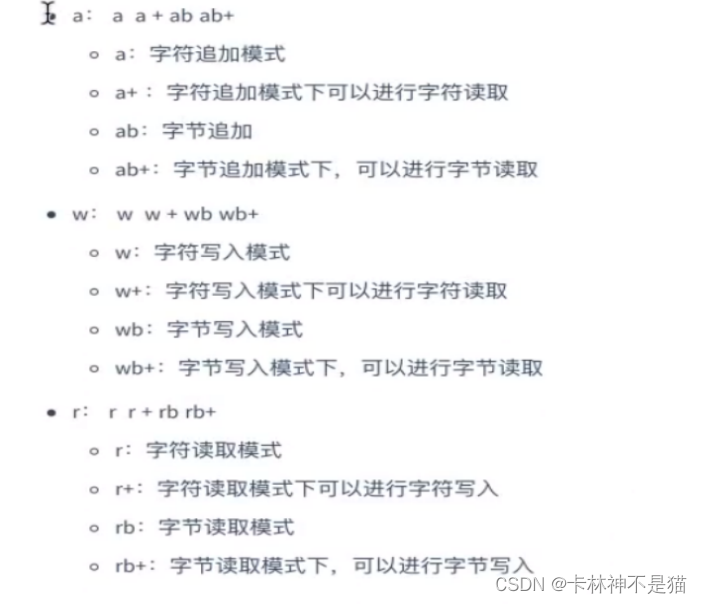
商务分析方法与工具(五):Python的趣味快捷-文件和文件夹操作自动化
Tips:"分享是快乐的源泉💧,在我的博客里,不仅有知识的海洋🌊,还有满满的正能量加持💪,快来和我一起分享这份快乐吧😊! 喜欢我的博客的话,记得…...
 题解)
codeforce#938 (div3) 题解
C. Inhabitant of the Deep Sea 数组第一个元素减一下,最后一个元素减一下,一共能减k次,问有多少元素能减到0.细节模拟我是傻逼,有问题建议直接看tc面像tc编程 #include <iostream> #include <string.h> #include &…...
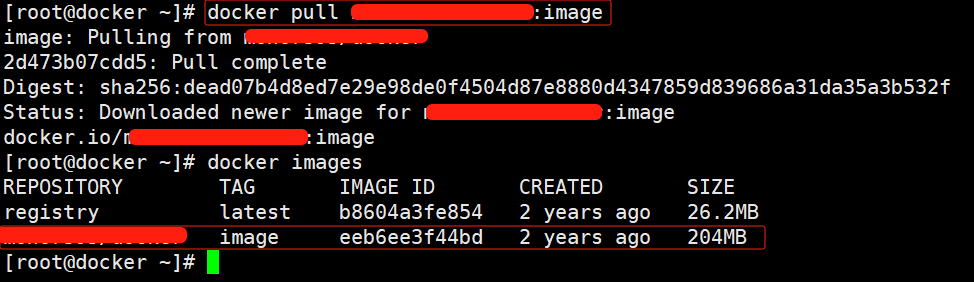
【Docker】如何注册Hub账号并上传镜像到Hub仓库
一、创建Hub账户 浏览器访问:hub.docker.com 点击【Sign up】注册账号 输入【邮箱】【用户名】【密码】 ps:用户名要有字母数字;订阅不用勾选 点击【Sign up】注册即可 点击【Sign in】登录账号 输入【邮箱】【密码】 点击【Continue】登录 二…...
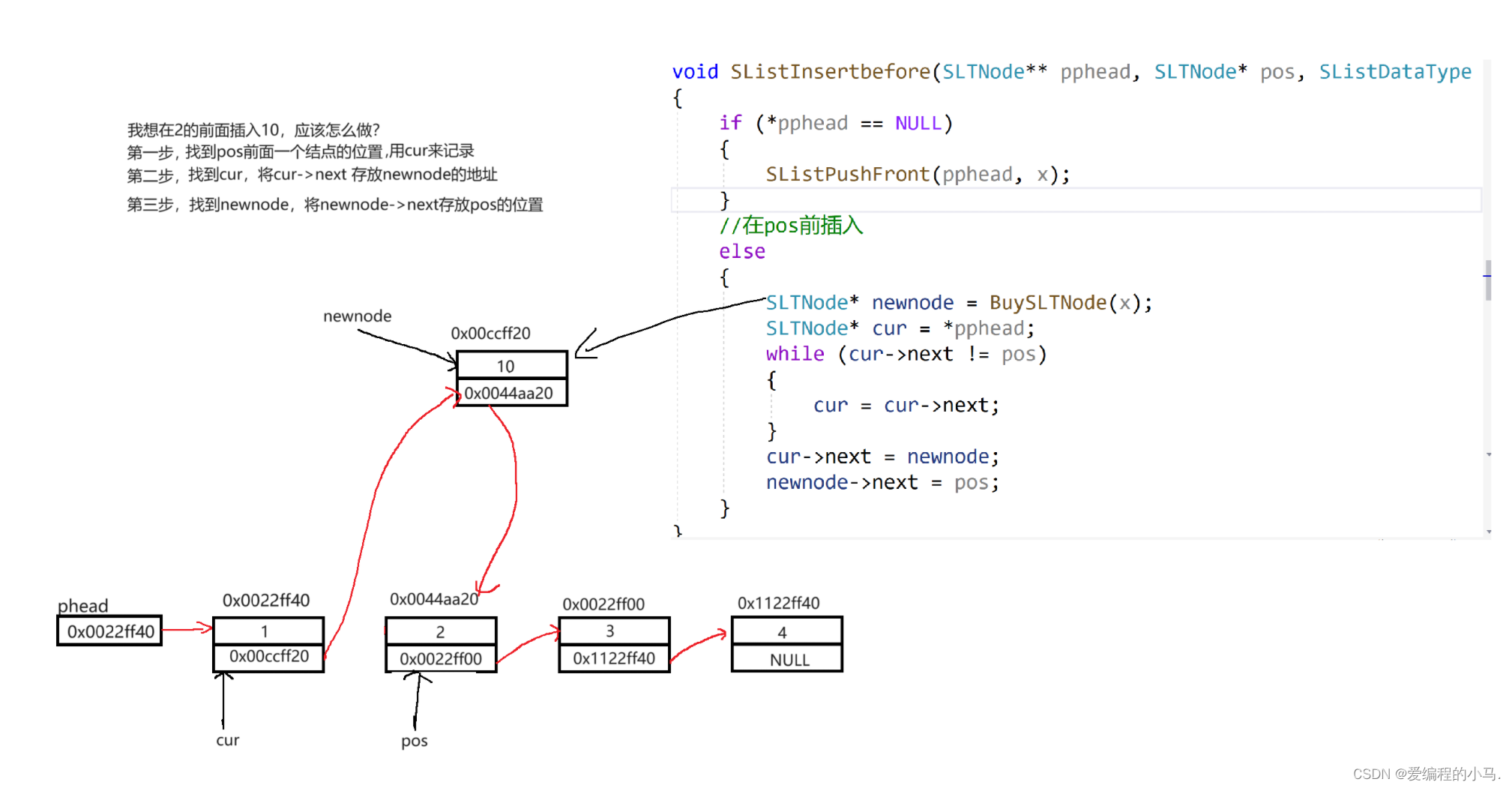
[初阶数据结构】单链表
前言 📚作者简介:爱编程的小马,正在学习C/C,Linux及MySQL。 📚本文收录于初阶数据结构系列,本专栏主要是针对时间、空间复杂度,顺序表和链表、栈和队列、二叉树以及各类排序算法,持…...

项目使用git开发流程
第一步 项目初期:领导负责的工作 01 创建仓库:在码云上面创建仓库地址,创建完成后点击初始化README:郝陶涛/vue-tea 02 领导在桌面上将代码克隆下来:将代码克隆下来之后,切换到代码内部,使用g…...
Day 28 MySQL的数据备份与恢复
数据备份及恢复 1.概述 所有备份数据都应放在非数据库本地,而且建议有多份副本 备份: 能够防止由于机械故障以及人为误操作带来的数据丢失,例如将数据库文件保存在了其它地方 冗余: 数据有多份冗余,但不等备份&…...
疑问篇)
PackageKit的使用(三)疑问篇
本篇主要是一些疑问归纳,不做具体的函数分析,但是会给出关键点,查看源码就会很清楚了 apt source PackageKit 1. org.freedesktop.PackageKit D-Bus 接口介绍 D-Bus API Reference: PackageKit Reference Manual c库的接口可以看源码。 2.…...
【Linux】17. 进程间通信 --- 管道
1. 什么是进程间通信(进程间通信的目的) 数据传输:一个进程需要将它的数据发送给另一个进程 资源共享:多个进程之间共享同样的资源。 通知事件:一个进程需要向另一个或一组进程发送消息,通知它(它们)发生了…...
有哪些有效的复习方法可以帮助备考软考?
软考目前仍然是一个以记忆为主、理解为辅的考试。学过软考的朋友可能会感到困惑,因为软考的知识在日常工作中有许多应用场景,需要理解的地方也很多。但为什么我说它是理解为辅呢?因为这些知识点只要记住了,都不难理解,…...

HiveWE魔兽地图编辑器:5分钟快速上手指南,告别卡顿创作新时代
HiveWE魔兽地图编辑器:5分钟快速上手指南,告别卡顿创作新时代 【免费下载链接】HiveWE A Warcraft III world editor. 项目地址: https://gitcode.com/gh_mirrors/hi/HiveWE 还在为《魔兽争霸III》原版地图编辑器缓慢的加载速度和繁琐的操作而烦恼…...

3个简单步骤彻底解决GitHub下载龟速问题:Fast-GitHub插件完全指南
3个简单步骤彻底解决GitHub下载龟速问题:Fast-GitHub插件完全指南 【免费下载链接】Fast-GitHub 国内Github下载很慢,用上了这个插件后,下载速度嗖嗖嗖的~! 项目地址: https://gitcode.com/gh_mirrors/fa/Fast-GitHub 你是…...

DLSS Swapper终极指南:一键管理游戏超采样文件,免费提升显卡性能
DLSS Swapper终极指南:一键管理游戏超采样文件,免费提升显卡性能 【免费下载链接】dlss-swapper 项目地址: https://gitcode.com/GitHub_Trending/dl/dlss-swapper DLSS Swapper是一款专为NVIDIA、AMD和Intel显卡用户设计的智能超采样文件管理工…...

新手开发者第一步,在Taotoken平台获取API Key并完成基础验证
🚀 告别海外账号与网络限制!稳定直连全球优质大模型,限时半价接入中。 👉 点击领取海量免费额度 新手开发者第一步,在Taotoken平台获取API Key并完成基础验证 对于希望快速体验和接入大模型能力的开发者而言ÿ…...

浏览器标签页管理新思路:基于服务化架构的TabStack-OpenClaw实践
1. 项目概述与核心价值最近在整理浏览器标签页时,我又一次陷入了那种熟悉的焦虑:几十个标签页像一堵墙一样堆在浏览器顶部,每个都代表着一个“稍后阅读”的承诺,但最终它们都变成了数字垃圾。我尝试过各种标签页管理扩展ÿ…...

一键封装成EXE!让Windows命令行像Linux一样直接敲‘binwalk’的懒人方案
一键封装成EXE!让Windows命令行像Linux一样直接敲‘binwalk’的懒人方案 每次打开命令行都要先cd到Python的Scripts目录才能使用binwalk,这种操作对于效率至上的开发者来说简直是时间杀手。本文将带你用PyInstaller打造一个开箱即用的binwalk.exe&#…...

Windows 11系统优化终极指南:免费提升性能与隐私保护的完整方案
Windows 11系统优化终极指南:免费提升性能与隐私保护的完整方案 【免费下载链接】Win11Debloat A simple, lightweight PowerShell script that allows you to remove pre-installed apps, disable telemetry, as well as perform various other changes to declutt…...

Postman便携版:打造零污染的API测试工作环境终极指南
Postman便携版:打造零污染的API测试工作环境终极指南 【免费下载链接】postman-portable 🚀 Postman portable for Windows 项目地址: https://gitcode.com/gh_mirrors/po/postman-portable Postman便携版是一款专为Windows平台设计的绿色免安装A…...

AI第一次科研竞赛中击败人类!Opus 4.7狂飙2930步创世界纪录
来源:新智元Prime Intellect把Opus 4.7和GPT 5.5关进H200集群,不给人类指导,跑了1万次实验。结果:AI第一次在科研竞赛中打破人类纪录。2930步,递归自改进的卢比孔河,被跨过了。历经1.4万小时H200算力测试与…...

金融技能学习路径:从财务基础到Python建模的实战指南
1. 项目概述:为什么我们需要一个“金融技能”清单?如果你在金融行业工作,或者对个人理财、投资分析、公司财务感兴趣,你大概率有过这样的经历:面对海量的在线课程、书籍、论坛帖子和工具推荐,感到无所适从。…...