
【自定义View】Android圆饼进度条
源码
自定义属性
<?xml version="1.0" encoding="utf-8"?>
<resources><declare-styleable name="ArcProgressView"><attr name="android:textSize" /><attr name="bgBorderWidth" format="dimension" /><attr name="defaultContentColor" format="color" /><attr name="bgBorderColor" format="color" /><attr name="progressColor" format="color" /><attr name="android:textColor" /></declare-styleable>
</resources>
View(kotlin)源码
package com.example.testimport android.content.Context
import android.content.res.Resources
import android.graphics.Canvas
import android.graphics.Color
import android.graphics.Paint
import android.graphics.Rect
import android.util.AttributeSet
import android.util.TypedValue
import android.view.View
import kotlin.math.roundToIntclass ArcProgressView : View {constructor(context: Context?) : super(context)constructor(context: Context?, attrs: AttributeSet?) : this(context, attrs, 0)constructor(context: Context?, attrs: AttributeSet?, defStyleAttr: Int) : super(context,attrs,defStyleAttr) {val obtainStyledAttributes =context?.obtainStyledAttributes(attrs, R.styleable.ArcProgressView)obtainStyledAttributes?.let {textSize = it.getDimensionPixelSize(R.styleable.ArcProgressView_android_textSize,textSize)strokeWidth = it.getDimensionPixelSize(R.styleable.ArcProgressView_bgBorderWidth,strokeWidth.roundToInt()).toFloat()defaultContentColor = it.getColor(R.styleable.ArcProgressView_defaultContentColor,defaultContentColor)bgBorderColor =it.getColor(R.styleable.ArcProgressView_bgBorderColor, bgBorderColor)progressColor =it.getColor(R.styleable.ArcProgressView_progressColor, progressColor)textColor =it.getColor(R.styleable.ArcProgressView_android_textColor, textColor)}obtainStyledAttributes?.recycle()}val paint = Paint(Paint.ANTI_ALIAS_FLAG)var strokeWidth = dpToPx(0.5f).toFloat();var textSize = spToPx(10f).roundToInt()var defaultContentColor = Color.parseColor("#FFF7ED")var bgBorderColor = Color.parseColor("#FAD29D")var progressColor = Color.parseColor("#FAD29D")var textColor = Color.parseColor("#FA940F")private var progress: Int = 0set(value) {field = valueinvalidate()}override fun onDraw(canvas: Canvas) {super.onDraw(canvas)drawBackground(canvas)drawProgress(canvas)}private fun dpToPx(dp: Float): Int {return (Resources.getSystem().displayMetrics.density * dp + 0.5f).roundToInt()}private fun spToPx(sp: Float): Float {return TypedValue.applyDimension(TypedValue.COMPLEX_UNIT_SP,sp,Resources.getSystem().displayMetrics)}private fun drawBackground(canvas: Canvas) {paint.strokeWidth = strokeWidthpaint.style = Paint.Style.FILLpaint.color = defaultContentColorcanvas.drawOval(0f + strokeWidth / 2,0f + strokeWidth / 2,width.toFloat() - strokeWidth / 2,height.toFloat() - strokeWidth / 2,paint)paint.style = Paint.Style.STROKEpaint.color = bgBorderColorcanvas.drawOval(0f + strokeWidth / 2,0f + strokeWidth / 2,width.toFloat() - strokeWidth / 2,height.toFloat() - strokeWidth / 2,paint)}val textBound = Rect()private fun drawProgress(canvas: Canvas) {paint.style = Paint.Style.FILLpaint.color = progressColorpaint.textSize = textSize.toFloat()val progressStr = "$progress%"paint.getTextBounds(progressStr, 0, progressStr.length, textBound)val halfTextWidth = textBound.width() / 2fval halfTextHeight = textBound.height() / 2fval progressAngle = progress * 3.6fval halfWidth = width.toFloat() / 2fval halfHeight = height.toFloat() / 2fcanvas.drawArc(0f,0f,width.toFloat(),height.toFloat(),270f,progressAngle,true,paint)paint.isFakeBoldText = truepaint.color = textColorpaint.textAlign = Paint.Align.LEFTcanvas.drawText(progressStr,halfWidth - halfTextWidth,halfHeight - halfTextHeight + textBound.height(),paint)}fun updateProgress(progress: Int) {this.progress = progress}}
Activity布局
<com.example.test.ArcProgressViewandroid:layout_margin="12dp"android:id="@+id/progress"android:textSize="24sp"android:textColor="@color/black"android:layout_width="100dp"android:layout_height="100dp"/>
Activity更新进度
progress ++
runOnUiThread({progressView.updateProgress(progress)
})
效果图

相关文章:
【自定义View】Android圆饼进度条
源码 自定义属性 <?xml version"1.0" encoding"utf-8"?> <resources><declare-styleable name"ArcProgressView"><attr name"android:textSize" /><attr name"bgBorderWidth" format"d…...

AI重塑搜索和浏览器,360打造AIPC轻量化方案
6月6日,360AI新品发布会暨开发者沟通会在京举办,360集团发布全新360AI搜索、360AI浏览器,360集团创始人周鸿祎在现场使用360AI搜索为2024年高考语文作文押题。同时,“360AI甄选”平台及会员体系“360AI大会员”正式上线࿰…...
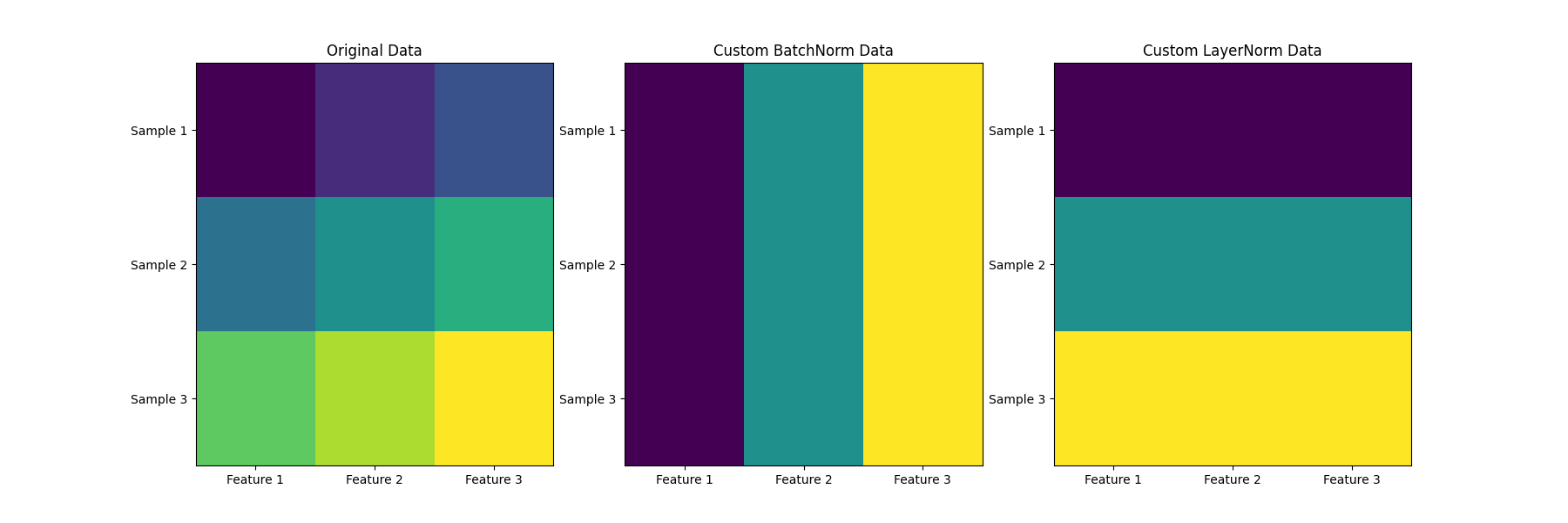
Meta Llama 3 RMSNorm(Root Mean Square Layer Normalization)
Meta Llama 3 RMSNorm(Root Mean Square Layer Normalization) flyfish 目录 Meta Llama 3 RMSNorm(Root Mean Square Layer Normalization)先看LayerNorm和BatchNorm举个例子计算 LayerNormRMSNorm 的整个计算过程实际代码实现结…...

MySQL-6、单表访问方法
前言 前面介绍了MySQL表空间相关的内容。包括区、段、碎片区,还有一些不同的页类型的作用。 (如果没有看前面五篇文章,不建议看此篇文章) 传送门: MySQL-1、InnoDB行格式 MySQL-2、InnoDB数据页 MySQL-3、索引 M…...

C语言实现三角波生成
C语言实现三角波生成 #include <stdio.h>#define SAMPLE_RATE 10000 // 采样率10kHz=10000Hz 对应100us=0.1ms #define UP_TIME 12.5 //上升时间12.5ms #...
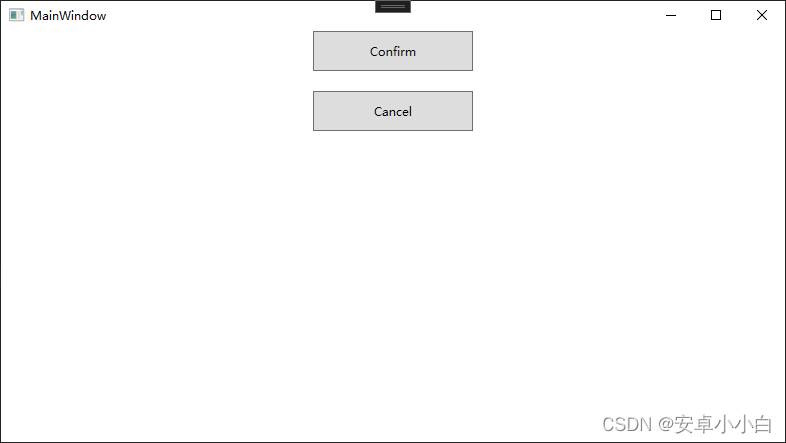
WPF国际化的最佳实践
WPF国际化的最佳实践 1.创建项目资源文件 如果你的项目没有Properties文件夹和Resources.resx文件,可以通过右键项目-资源-常规-添加创建或打开程序集资源 2.添加国际化字符串 打开Resources.resx文件,添加需要翻译的文本字符,并将访问修…...
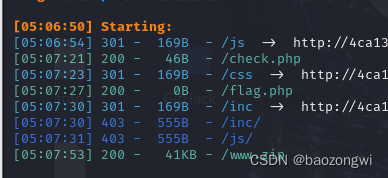
ctfshow web
【nl】难了 <?php show_source(__FILE__); error_reporting(0); if(strlen($_GET[1])<4){echo shell_exec($_GET[1]); } else{echo "hack!!!"; } ?> //by Firebasky //by Firebasky ?1>nl //先写个文件 ?1*>b //这样子会把所有文件名写在b里…...
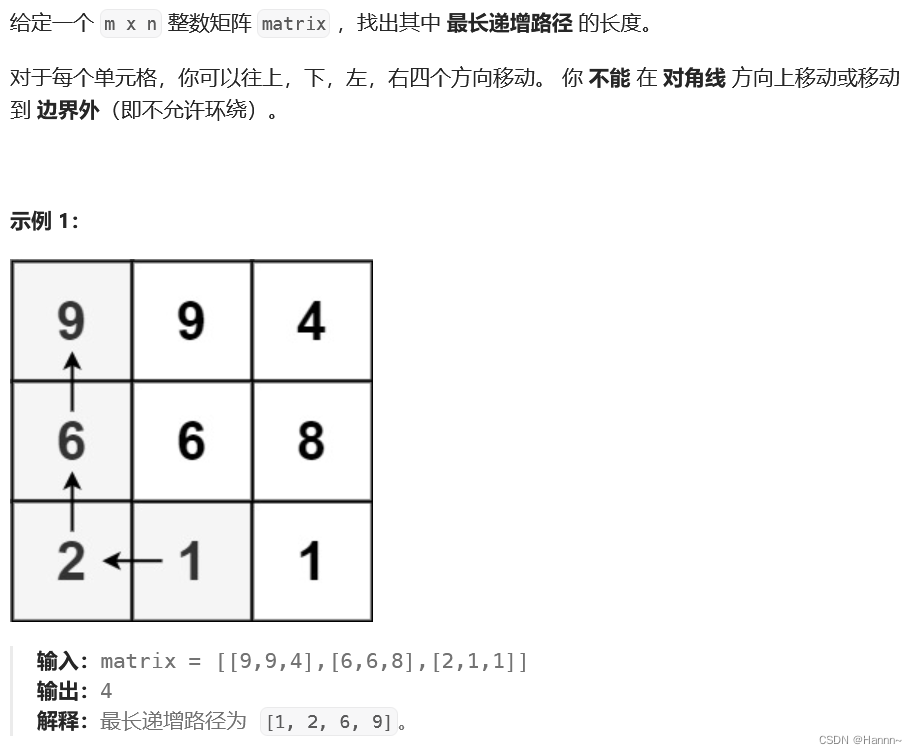
【力扣】矩阵中的最长递增路径
一、题目描述 二、解题思路 1、先求出以矩阵中的每个单元格为起点的最长递增路径 题目中说,对于每个单元格,你可以往上,下,左,右四个方向移动。那么以一个单元格为起点的最长递增路径就是:从该单元格往上…...
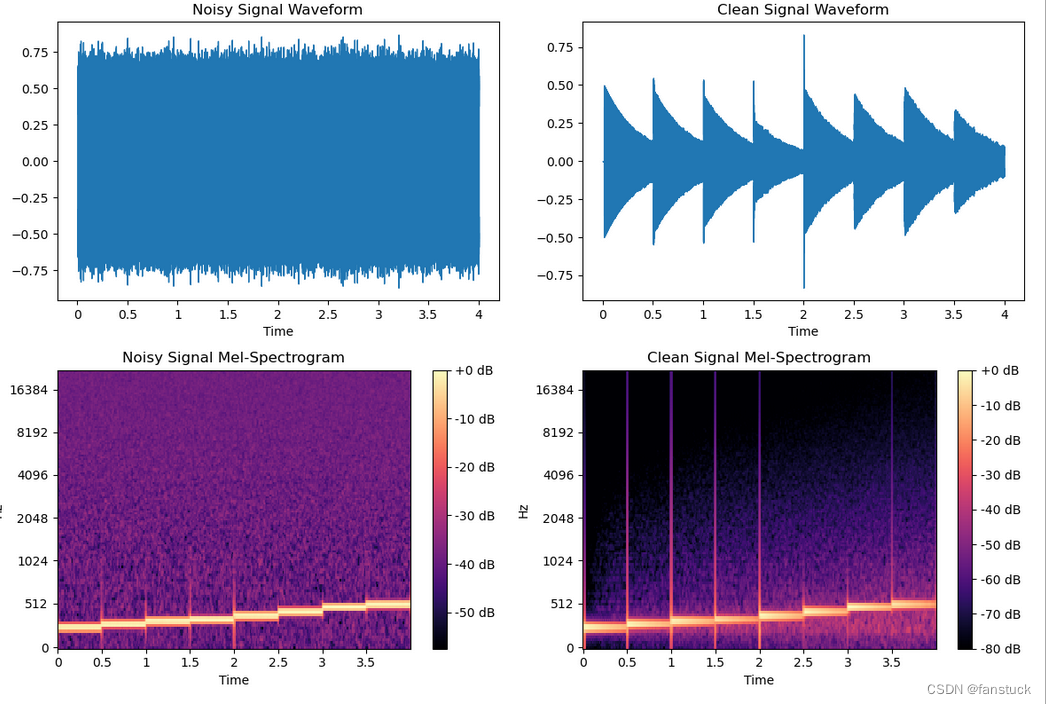
语音深度鉴伪识别项目实战:基于深度学习的语音深度鉴伪识别算法模型(二)音频数据预处理及去噪算法+Python源码应用
前言 深度学习技术在当今技术市场上面尚有余力和开发空间的,主流落地领域主要有:视觉,听觉,AIGC这三大板块。 目前视觉板块的框架和主流技术在我上一篇基于Yolov7-LPRNet的动态车牌目标识别算法模型已有较为详细的解说。与AIGC相…...

网络原理——http/https ---http(1)
T04BF 👋专栏: 算法|JAVA|MySQL|C语言 🫵 今天你敲代码了吗 网络原理 HTTP/HTTPS HTTP,全称为"超文本传输协议" HTTP 诞⽣与1991年. ⽬前已经发展为最主流使⽤的⼀种应⽤层协议. 实际上,HTTP最新已经发展到 3.0 但是当前行业中主要使用的HT…...
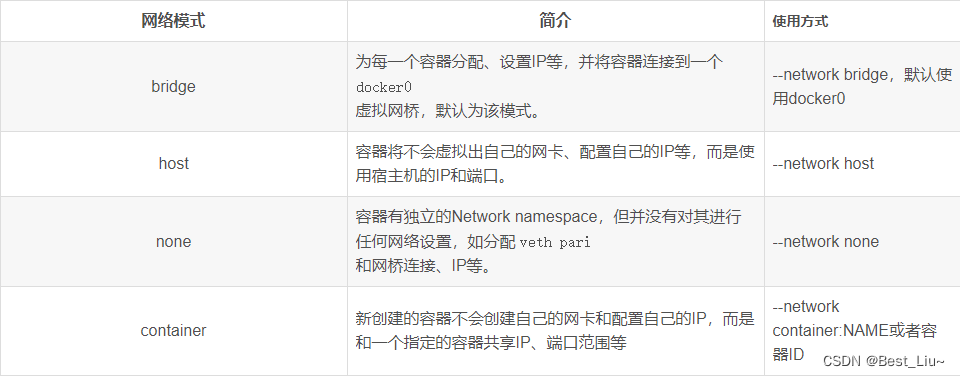
Docker安装、使用,容器化部署springboot项目
目录 一、使用官方安装脚本自动安装 二、Docker离线安装 1. 下载安装包 2. 解压 3.创建docker.service文件 4. 启动docker 三、docker常用命令 1. docker常用命令 2. docker镜像命令 3. docker镜像下载 4.docker镜像push到仓库 5. docker操作容器 6.docker …...
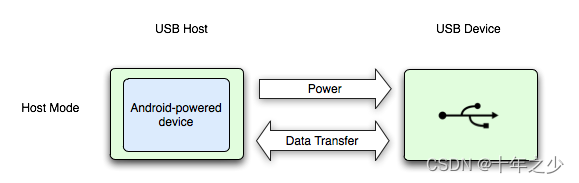
USB主机模式——Android
理论 摘自:USB 主机和配件概览 | Connectivity | Android Developers (google.cn) Android 通过 USB 配件和 USB 主机两种模式支持各种 USB 外围设备和 Android USB 配件(实现 Android 配件协议的硬件)。 在 USB 主机模式下࿰…...

240520Scala笔记
240520Scala笔记 第 7 章 集合 7.1 集合1 数组Array 集合(Test01_ImmutableArray): package chapter07 object Test01_ImmutableArray {def main(args: Array[String]): Unit {// 1. 创建数组val arr: Array[Int] new Array[Int](5)// 另一种创建方式val arr2 Array(…...

【React】封装一个好用方便的消息框(Hooks Bootstrap 实践)
引言 以 Bootstrap 为例,使用模态框编写一个简单的消息框: import { useState } from "react"; import { Modal } from "react-bootstrap"; import Button from "react-bootstrap/Button"; import bootstrap/dist/css/b…...
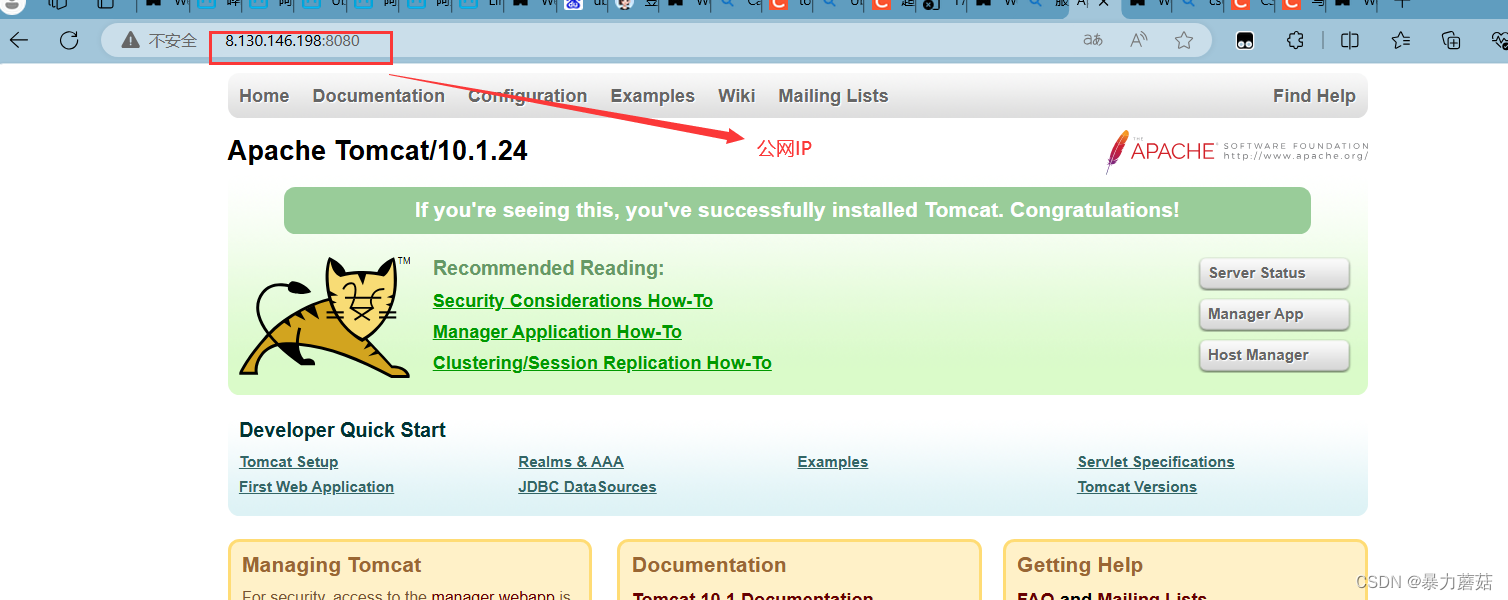
tomcat10部署踩坑记录-公网IP和服务器系统IP搞混
1. 服务器基本条件 使用的阿里云服务器,镜像系统是Ubuntu16.04java version “17.0.11” 2024-04-16 LTS装的是tomcat10.1.24阿里云服务器安全组放行了:8080端口 服务器防火墙关闭: 监听情况和下图一样: tomcat正常启动ÿ…...

探索Sass:Web开发的强大工具
在现代Web开发中,CSS(层叠样式表)作为前端样式设计的核心技术,已经发展得非常成熟。然而,随着Web应用的复杂性不断增加,传统的CSS书写方式逐渐暴露出一些不足之处,如代码冗长、难以维护、缺乏编程功能等。为了解决这些问题,Sass(Syntactically Awesome Stylesheets)应…...

vue组件之间的通信方式有哪些
在开发过程中,数据传输是一个核心的知识点,掌握了数据传输,相当于掌握了80%的内容。 Vue.js 提供了多种组件间的通信方式,这些方式适应不同的场景和需求。下面是4种常见的通信方式: 1. Props & Events (父子组件通…...
111、二叉树的最小深度
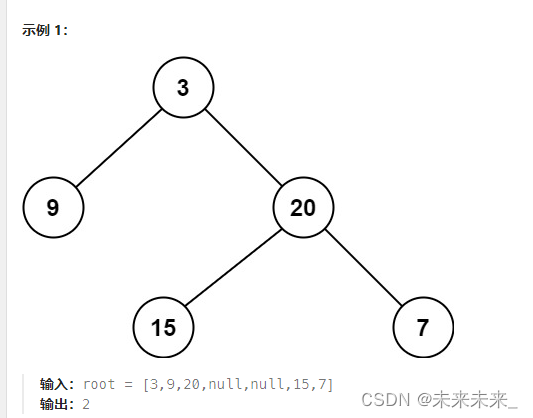
给定一个二叉树,找出其最小深度。最小深度是从根节点到最近叶子节点的最短路径上的节点数量。 题解:找出最小深度也就是找出根节点相对所有叶子结点的最小高度,在这也表明了根节点的高度是变化的,相对不同的叶子结点有不同的高度。…...
SpringBoot3依赖管理,自动配置
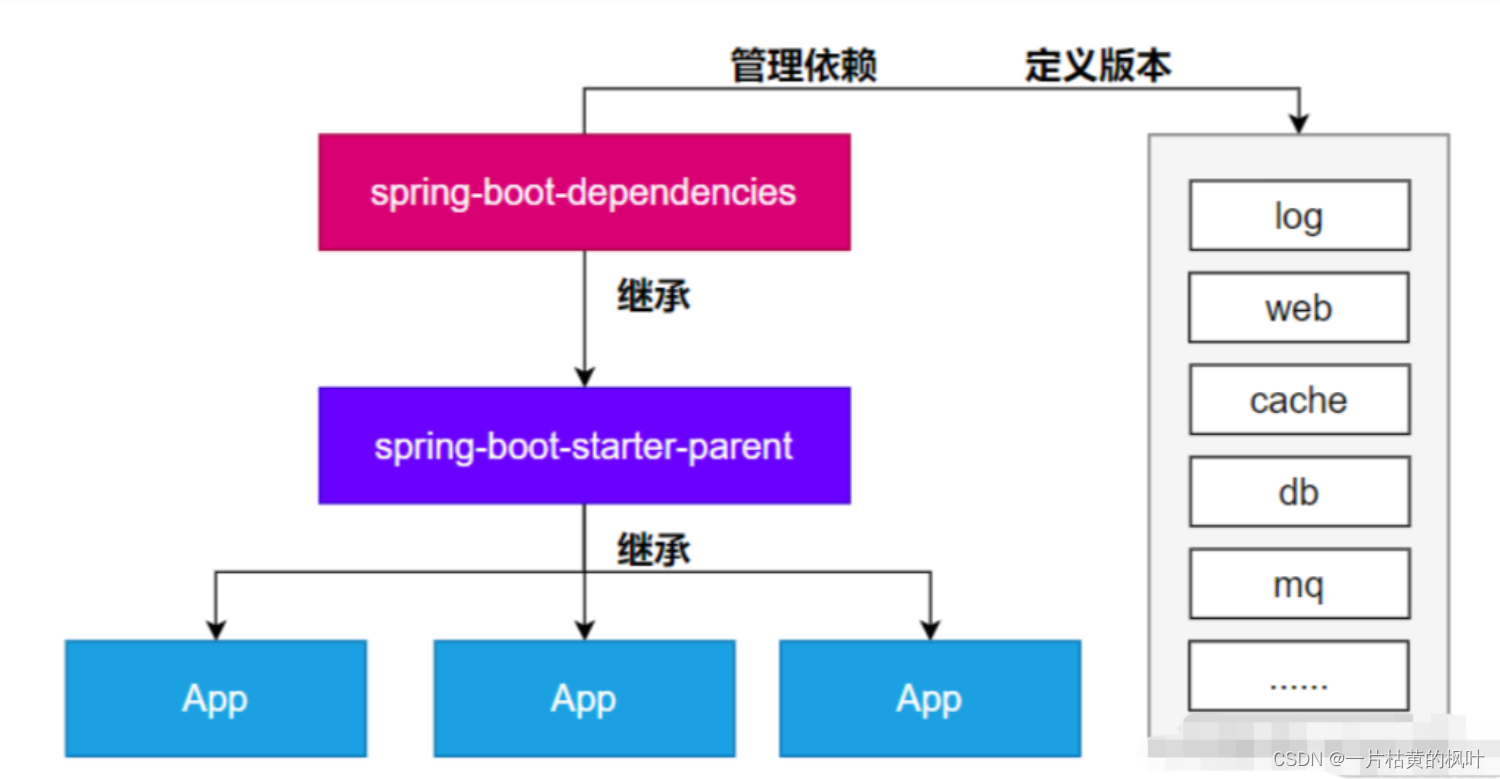
文章目录 1. 项目新建2. 相关pom依赖3. 依赖管理机制导入 starter 所有相关依赖都会导入进来为什么版本号都不用写?如何自定义版本号第三方的jar包 4. 自动配置机制5. 核心注解 1. 项目新建 直接建Maven项目通过官方提供的Spring Initializr项目创建 2. 相关pom依…...

音视频开发17 FFmpeg 音频解码- 将 aac 解码成 pcm
这一节,接 音视频开发12 FFmpeg 解复用详情分析,前面我们已经对一个 MP4文件,或者 FLV文件,或者TS文件进行了 解复用,解出来的 视频是H264,音频是AAC,那么接下来就要对H264和AAC进行处理,这一节…...

MVC 数据库
MVC 数据库 引言 在软件开发领域,Model-View-Controller(MVC)是一种流行的软件架构模式,它将应用程序分为三个核心组件:模型(Model)、视图(View)和控制器(Controller)。这种模式有助于提高代码的可维护性和可扩展性。本文将深入探讨MVC架构与数据库之间的关系,以…...
华为OD机试-食堂供餐-二分法
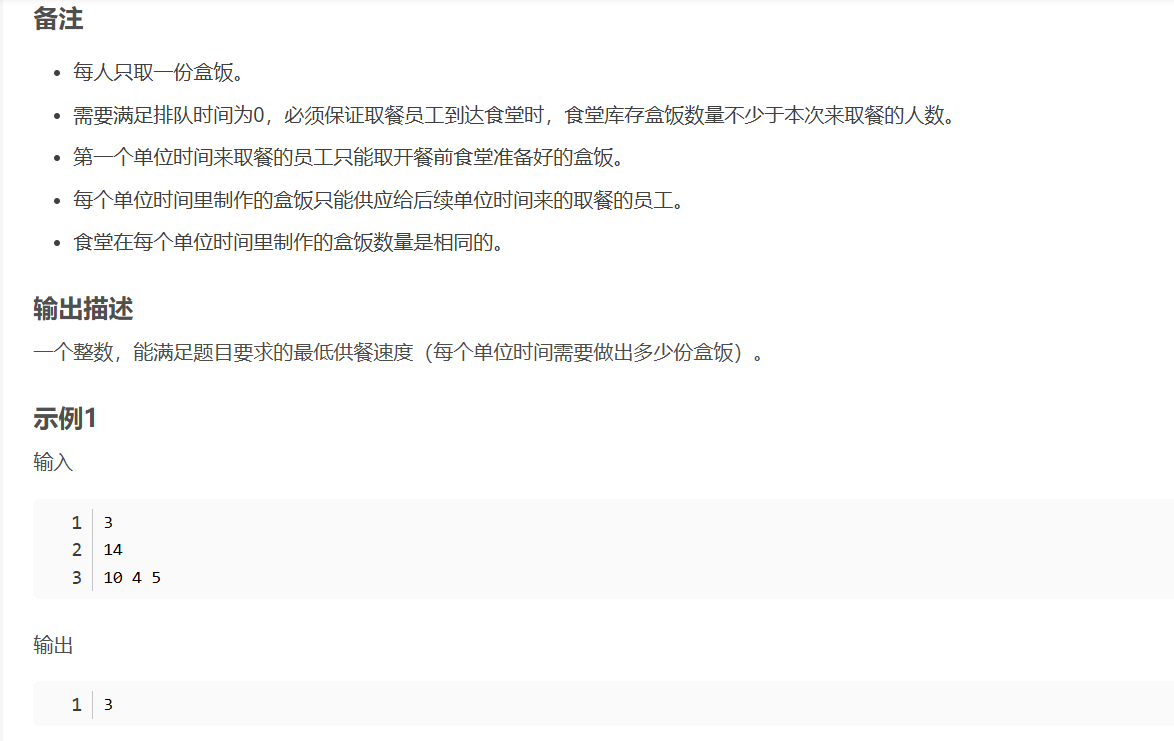
import java.util.Arrays; import java.util.Scanner;public class DemoTest3 {public static void main(String[] args) {Scanner in new Scanner(System.in);// 注意 hasNext 和 hasNextLine 的区别while (in.hasNextLine()) { // 注意 while 处理多个 caseint a in.nextIn…...

拉力测试cuda pytorch 把 4070显卡拉满
import torch import timedef stress_test_gpu(matrix_size16384, duration300):"""对GPU进行压力测试,通过持续的矩阵乘法来最大化GPU利用率参数:matrix_size: 矩阵维度大小,增大可提高计算复杂度duration: 测试持续时间(秒&…...

基于matlab策略迭代和值迭代法的动态规划
经典的基于策略迭代和值迭代法的动态规划matlab代码,实现机器人的最优运输 Dynamic-Programming-master/Environment.pdf , 104724 Dynamic-Programming-master/README.md , 506 Dynamic-Programming-master/generalizedPolicyIteration.m , 1970 Dynamic-Programm…...

docker 部署发现spring.profiles.active 问题
报错: org.springframework.boot.context.config.InvalidConfigDataPropertyException: Property spring.profiles.active imported from location class path resource [application-test.yml] is invalid in a profile specific resource [origin: class path re…...

安宝特方案丨船舶智造的“AR+AI+作业标准化管理解决方案”(装配)
船舶制造装配管理现状:装配工作依赖人工经验,装配工人凭借长期实践积累的操作技巧完成零部件组装。企业通常制定了装配作业指导书,但在实际执行中,工人对指导书的理解和遵循程度参差不齐。 船舶装配过程中的挑战与需求 挑战 (1…...
Qemu arm操作系统开发环境
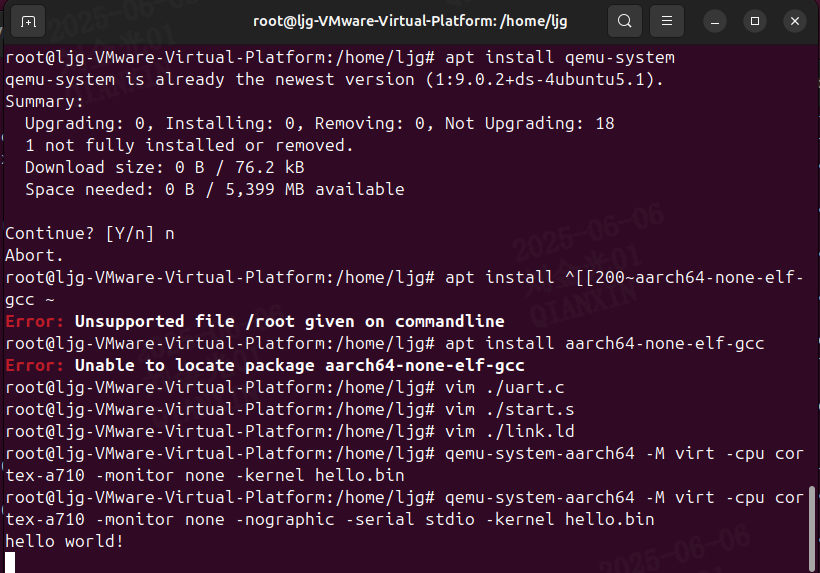
使用qemu虚拟arm硬件比较合适。 步骤如下: 安装qemu apt install qemu-system安装aarch64-none-elf-gcc 需要手动下载,下载地址:https://developer.arm.com/-/media/Files/downloads/gnu/13.2.rel1/binrel/arm-gnu-toolchain-13.2.rel1-x…...

HTML前端开发:JavaScript 获取元素方法详解
作为前端开发者,高效获取 DOM 元素是必备技能。以下是 JS 中核心的获取元素方法,分为两大系列: 一、getElementBy... 系列 传统方法,直接通过 DOM 接口访问,返回动态集合(元素变化会实时更新)。…...
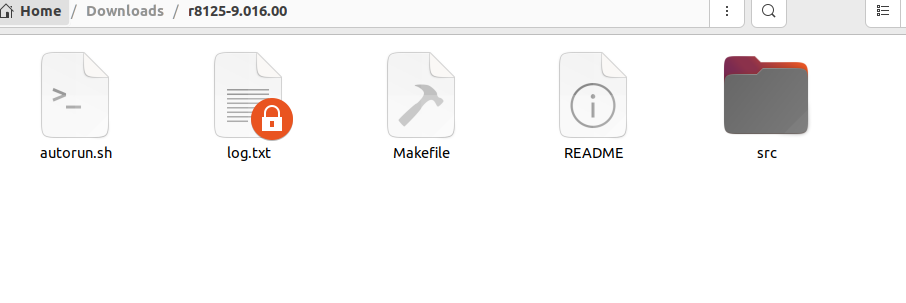
ubuntu22.04有线网络无法连接,图标也没了
今天突然无法有线网络无法连接任何设备,并且图标都没了 错误案例 往上一顿搜索,试了很多博客都不行,比如 Ubuntu22.04右上角网络图标消失 最后解决的办法 下载网卡驱动,重新安装 操作步骤 查看自己网卡的型号 lspci | gre…...
spring Security对RBAC及其ABAC的支持使用
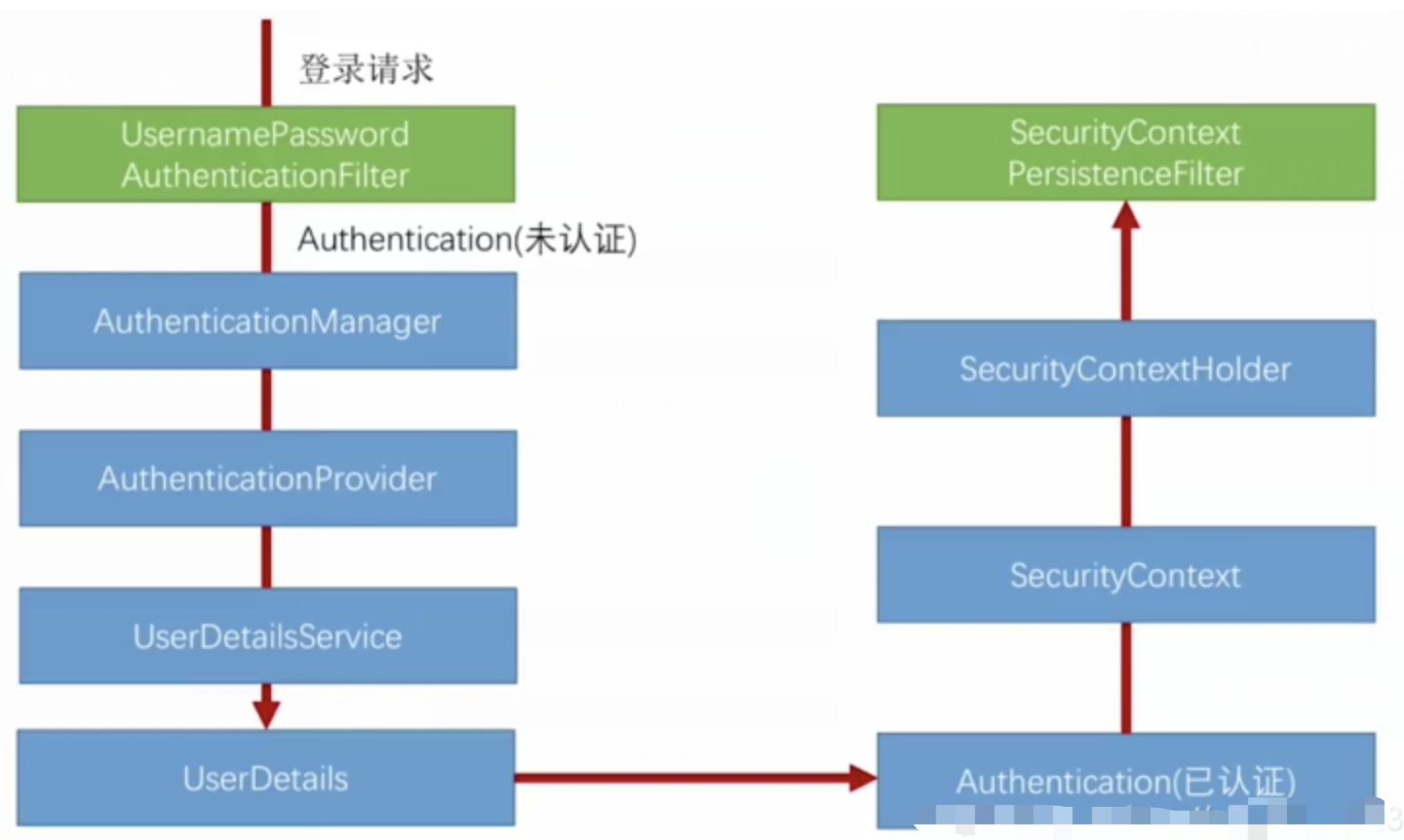
RBAC (基于角色的访问控制) RBAC (Role-Based Access Control) 是 Spring Security 中最常用的权限模型,它将权限分配给角色,再将角色分配给用户。 RBAC 核心实现 1. 数据库设计 users roles permissions ------- ------…...