
HTML-CSS练习例子
HTML CSS 练习
https://icodethis.com
作为前端练习生。不敲代码只看,入门是很慢的,所以直接实战是学习前端最快的途径之一。 这个网站练习HTML
CSS的,可以打开了解一下,可以每天打卡,例子简单,循序渐进,设计的也比较好看。
下面是练习,当然布局的方法有很多,下面是一种。
01基础
这是第一个练习,但是很多大佬做出了,很多不一样的效果
比如:
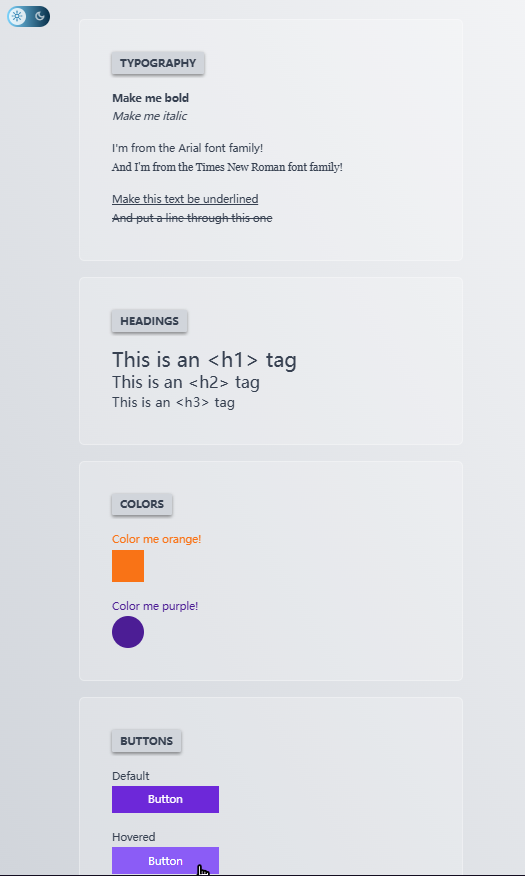
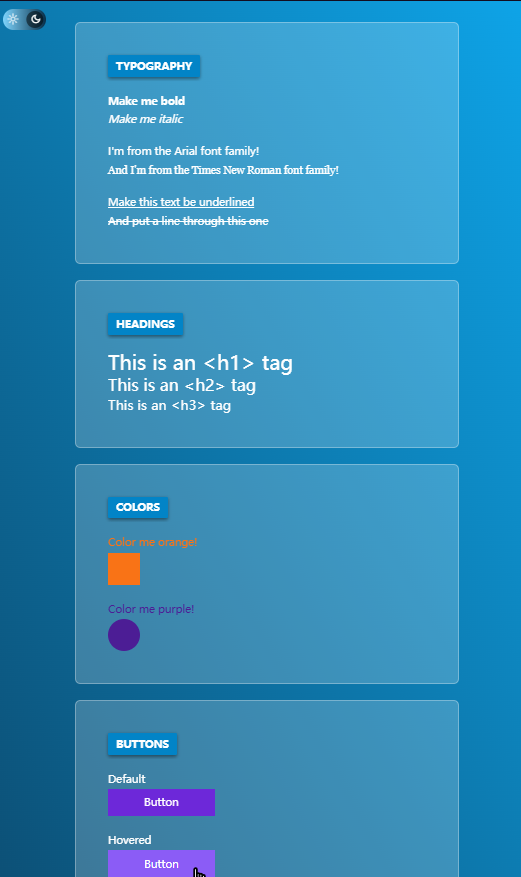
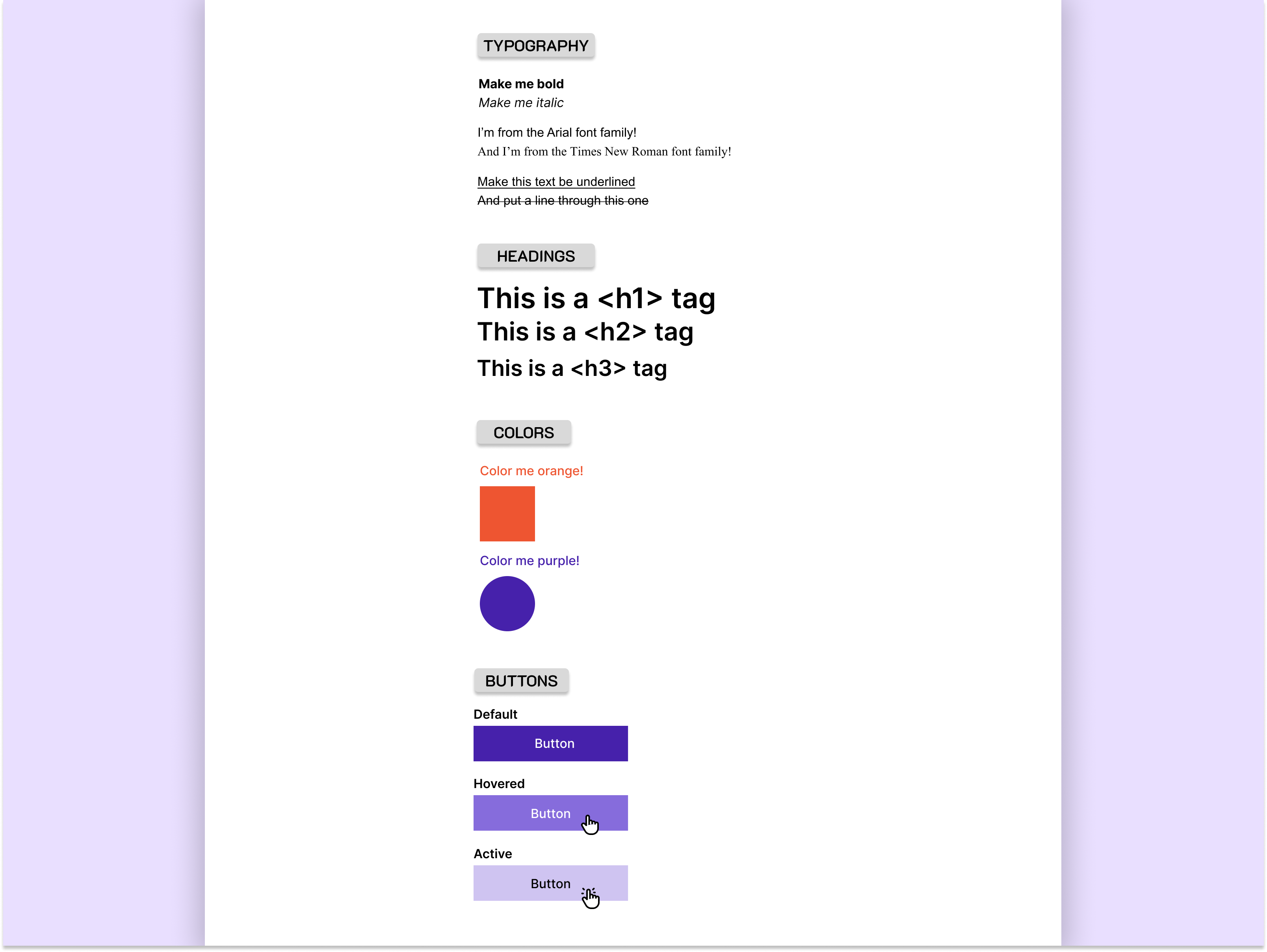
设计稿
代码
<!DOCTYPE html>
<html lang="en"><head><meta charset="UTF-8"><meta name="viewport" content="width=device-width, initial-scale=1.0"><title>基础练习</title><style>.main {width: 400px;height: 100%;margin: 0 auto;/* padding-top: 30px; */padding: 0 10px;/* background-color: rgba(241, 77, 186, 0.5); */}.content {padding-top: 30px;}p {margin: 0;}.group {margin-top: 15px;}.title {display: inline-block;/* padding: 5px ; */font-size: 15px;font-weight: 600;text-align: center;padding: 0 10px;/* margin-bottom: 20px; */box-shadow: 0 2px 3px #7b7878;border-radius: 3px;background-color: #d9d9d9;}.my-custom-font-Arial {/* @font-face 加载外部字体 *//* 'Artal': 这是首选的字体,也就是开发者希望文本显示的字体。'Artal'是一个具体的字体名称,假设它是一个自定义字体或者是用户系统中已安装的字体。如果浏览器在用户的系统中找到了这个字体,它就会使用这个字体来渲染文本。 */font-family: 'Arial', sans-serif;}.my-custom-font-Roman {font-family: 'Roman', sans-serif;}.font-underlined {text-decoration: underline;}.font-through {text-decoration: line-through;}h1,h2,h3 {margin: 0;}.color-box {margin-top: 10px;}.color-orange {color: #ee5531;}.square {width: 50px;height: 50px;background-color: #ee5531;}.color-purple {color: #4621ab;}.circular {width: 50px;height: 50px;border-radius: 50%;background-color: #4621ab;}h6 {margin: 0;margin-bottom: 3px;}.button-box {margin-top: 10px;}button {display: inline-block;width: 150px;height: 30px;border: none;color: #fff;background-color: #4621ab;border-radius: 2px;}/* 鼠标悬停时 */button:hover {background-color: #866cdc;}/* 点击时(按下状态) */button:active {background-color: #cfc4f1;}</style>
</head><body><div class="main"><div class="content"><!-- TYPOGRAPHY --><div class="title">TYPOGRAPHY</div><div><div class="group"><p><strong>Make me bold</strong></p><p><em>Make me italic</em></p></div><div class="group"><p class="my-custom-font-Arial">I'm from the Artal font famil!</p><p class="my-custom-font-Roman">And I'm frorm the Times New Ronan fot family! .</p></div><div class="group"><p class="font-underlined">Make this text be underlined</p><p class="font-through">And put a Hine through this one</p></div></div></div><div class="content"><!-- HEADINGS --><div class="title">HEADINGS</div><div><div><h1>This isa <h1> tag</h1><h2>This isa<h2>tag</h2><h3>This isa <h3>tag</h3></div></div></div><div class="content"><!-- COLORS --><div class="title">COLORS</div><div><div class="color-box"><div class="color-orange">Color me orange!</div><div class="color-orange square"></div></div><div class="color-box"><div class="color-purple">Color me purple!</div><div class="color-purple circular"></div></div></div></div><div class="content"><!-- BUTTONS --><div class="title">BUTTONS</div><div><div class="button-box"><h6>Defult</h6><button>Button</button></div><div class="button-box"><h6>Hovered</h6><button>Button</button></div><div class="button-box"><h6>Active</h6><button>Button</button></div></div></div></div>
</body></html>
02_404页面
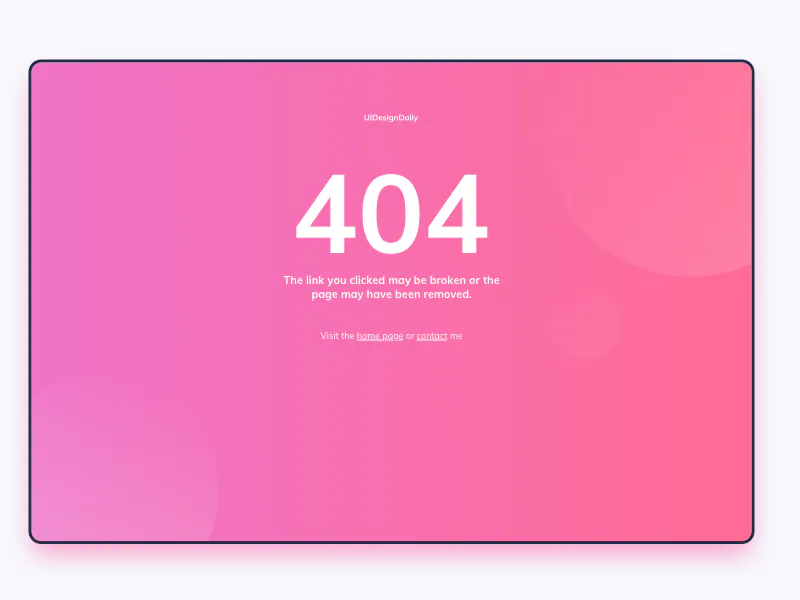
设计搞
代码
<!DOCTYPE html>
<html lang="en"><head><meta charset="UTF-8"><meta name="viewport" content="width=device-width, initial-scale=1.0"><title>Document</title><style>.main {/* border: 1px solid #000; */position: relative;width: 100%;/* 或者设置一个固定宽度 */height: 100%;/* 或者设置一个固定高度 */}.main-box {position: absolute;top: 50%;/* 使子元素的上边缘位于父元素的中心 */left: 50%;/* 使子元素的左边缘位于父元素的中心 */transform: translate(-50%, 20%);/* 调整位置,使其居中 */display: flex;flex-direction: column;align-items: center;width: 800px;height: 500px;/* margin: 100px auto; *//* background-color: rgba(241, 77, 186, 0.5); */background-image: linear-gradient(to right, #f073c6, #ff6b96);border-radius: 8px;border: 2px solid black;box-shadow: 0 8px 15px rgba(230, 41, 135, 0.5);}.content {width: 50%;text-align: center;color: #fff;/* background-color: rgb(227, 153, 57);border: 1px solid black; */}.one {margin: 50px 0;}.two {margin: 0 0 20px 0;font-size: 100px;font-weight: 700;}.three {margin: 0 0 30px 0;}.four {vertical-align: bottom;}a {color: #fff;text-decoration: none;border-bottom: 1px solid #fff;}.circular-box {position: absolute;width: 800px;height: 500px;top: 50%;/* 使子元素的上边缘位于父元素的中心 */left: 50%;/* 使子元素的左边缘位于父元素的中心 */transform: translate(-50%, 20%);/* 调整位置,使其居中 */background-color: rgba(241, 77, 186, 0.2);overflow: hidden;}.circular {width: 100px;height: 100px;border-radius: 50%;/* background-color: #fff; */}.circular-box> :nth-child(1) {width: 200px;height: 200px;position: absolute;top: 70%;/* 使子元素的上边缘位于父元素的中心 */left: -5%;background-image: linear-gradient(55deg, rgba(255, 255, 255, 0.137), rgba(242, 114, 193, 0.342));}.circular-box> :nth-child(2) {width: 300px;height: 300px;position: absolute;top: -10%;/* 使子元素的上边缘位于父元素的中心 */left: 75%;background-image: linear-gradient(-55deg, rgba(255, 255, 255, 0.137), rgba(242, 114, 193, 0.342));}.circular-box> :nth-child(3) {width: 100px;height: 100px;position: absolute;top: 60%;/* 使子元素的上边缘位于父元素的中心 */left: 75%;background-image: linear-gradient(328deg, rgba(255, 255, 255, 0.137), rgba(242, 114, 193, 0.342));}</style>
</head><body><div class="main"><div class="main-box"><div class="content one">UIDesignDally</div><div class="content two">404</div><div class="content three">The link you clicked may be broken or the<br/>page may have been removed.</div><div class="content four">Visit the <a href="">home page</a> or <a href="">contact</a>me</div></div><div class="circular-box"><div class="circular"></div><div class="circular"></div><div class="circular"></div></div></div>
</body></html>
代码2
<!DOCTYPE html>
<html lang="en"><head><meta charset="UTF-8"><meta name="viewport" content="width=device-width, initial-scale=1.0"><title>Document</title><link rel="stylesheet" href="./index2.css">
</head><body><div class="container"><div class="content"><div class="circle1"></div><div class="circle2"></div><div class="circle3"></div><p>UIDesignDaily</p><h1>404</h1><h3>The link you clicked may be broken or the <br> page may have been removed.</h3><h5>Visit the <a href="">home page</a> or <a href="">contact</a> me</h5></div></div></body></html>
/*index2.css*/
body{margin: 0;padding: 0;
}.container{position: absolute;top: 0;left: 0;bottom: 0;right: 0;display: flex;justify-content: center;align-items: center;
}.content{overflow: hidden;width:95%;height: calc(80%/1.4);background-image: linear-gradient(90deg, rgb(239,115,199), rgb(255,106,149));border: 3px solid rgb(36,46,76);border-radius: 13px;display:flex;flex-direction: column;align-items: center;position: relative;box-shadow: 2px 10px 10px rgba(239, 115, 200, 0.534);
}
.circle1{width:250px;height: 250px;background-image: linear-gradient(270deg, rgba(255, 255, 255, 0.308), rgba(242, 114, 193, 0));border-radius: 250px;position:absolute;left:-40px;top:300px;
}.circle2{width:250px;height: 250px;background-image: linear-gradient(270deg, rgba(255, 255, 255, 0.308), rgba(242, 114, 193, 0));border-radius: 250px;position:absolute;right:-70px;top:-50px;
}
.circle3{width:70px;height: 70px;background-image: linear-gradient(270deg, rgba(255, 255, 255, 0.308), rgba(242, 114, 193, 0));border-radius: 70px;position:absolute;left:70%;top:50%;
}
p{font-size: 10px;padding-top: 50px;font-family:'Open Sans';color:rgba(255, 255, 255, 0.719);
}h1{font-size: 120px;font-weight: 600;font-family:'Open Sans';color:white;
}h3{font-size: 11px;font-weight: 501;text-align: center;font-family:'Open Sans';color:rgba(255, 255, 255, 0.685);
}h5{font-size: 10px;padding-top: 30px;font-family:'Open Sans';color:rgba(255, 255, 255, 0.664);
}a{text-decoration: underline;
}
03_Christmas Promo
设计稿
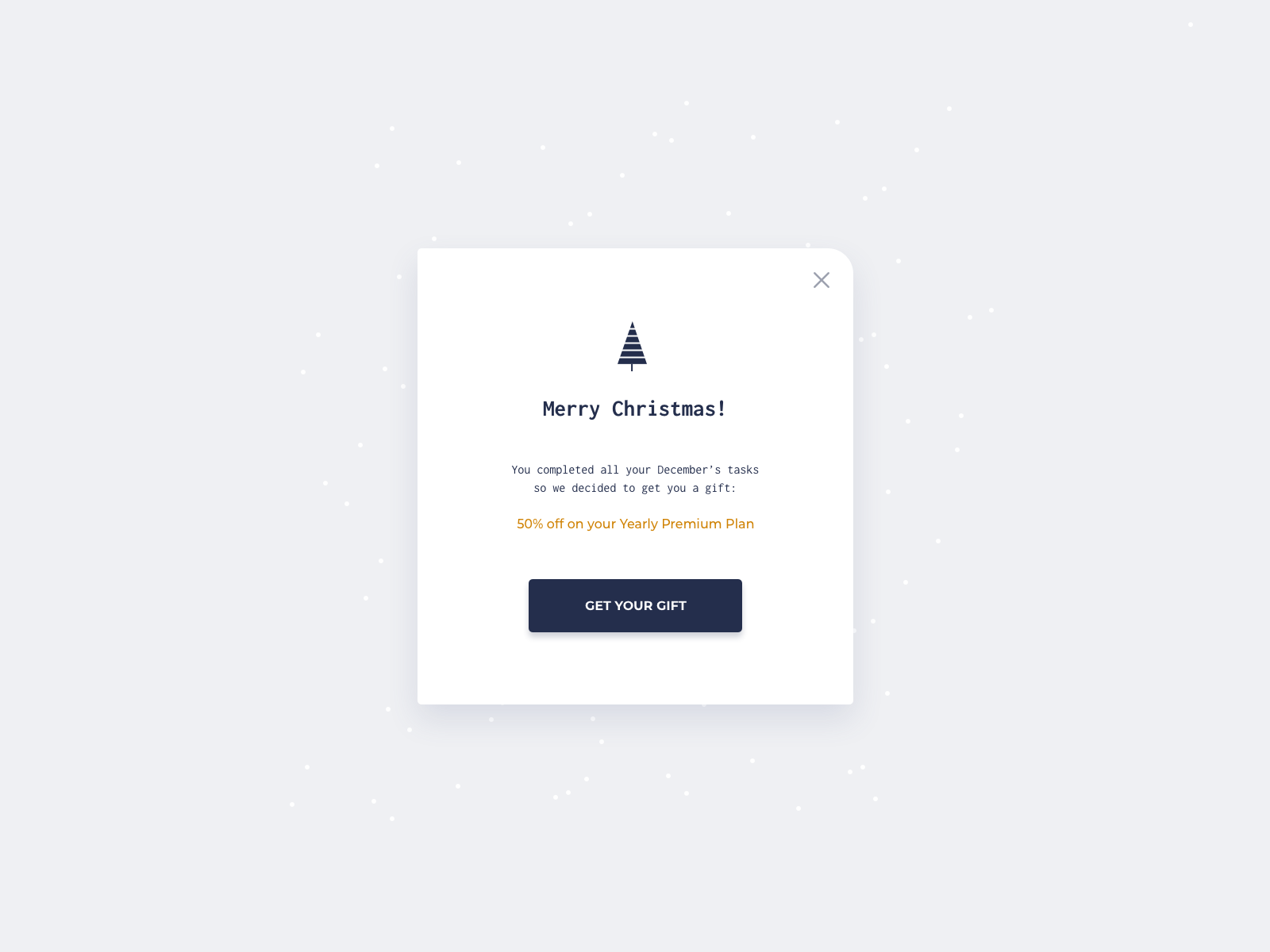
代码
<!DOCTYPE html>
<html lang="en"><head><meta charset="UTF-8"><meta name="viewport" content="width=device-width, initial-scale=1.0"><title>Document</title>
</head><body><div class="container"><div class="content"><div class="x"></div><img src="https://i.postimg.cc/J0GVNJFy/tree.png" alt=""><h5>Merry Christmas !</h5><p class="tasks">You completed all your Decenber's tasks<br />50 we decided to get you a gift:</p><p class="plan">50% off on your Yearly Premium Plan</p><button>GET YOUR GIFT</button></div></div>
</body></html>
/* Write your CSS code here */body {padding: 0;margin: 0;
}.container {position: absolute;top: 0;left: 0;bottom: 0;right: 0;display: flex;justify-content: center;align-items: center;background-color: #eff0f3;/* border: 1px solid red;   */
}.content {position: relative;background-color: #fff;width: 400px;height: 450px;border-radius: 4px;border-top-right-radius: 15px;display: flex;flex-direction: column;align-items: center;box-shadow: 4px 10px 10px rgba(53, 64, 99, 0.1);
}.x {position: absolute;width: 10px;height: 10px;right: 20px;top: 20px;font-size: 20px;transform: rotate(45deg);
}.x::after,
.x::before {content: '';position: absolute;width: 20px;height: 2px;background-color: rgb(123, 122, 122);top: 50%;left: 50%;transform: translate(-50%, -50%);
}.x::before {transform: translate(-50%, -50%) rotate(90deg);
}img {margin-top: 70px;width: 100px;height: 130px;
}/* .tasks{text-align: center;
} */
.tasks {font-size: 12px;color: rgb(126, 125, 123);text-align: center;
}.plan {color: orange;font-size: 13px;
}button {color: white;width: 170px;height: 40px;margin: 30px;font-size: 12px;background-color: #242e4c;border-radius: 5px;box-shadow: 1px 5px 5px rgba(36, 46, 76, 0.5);
}
04_Subscribe
设计稿
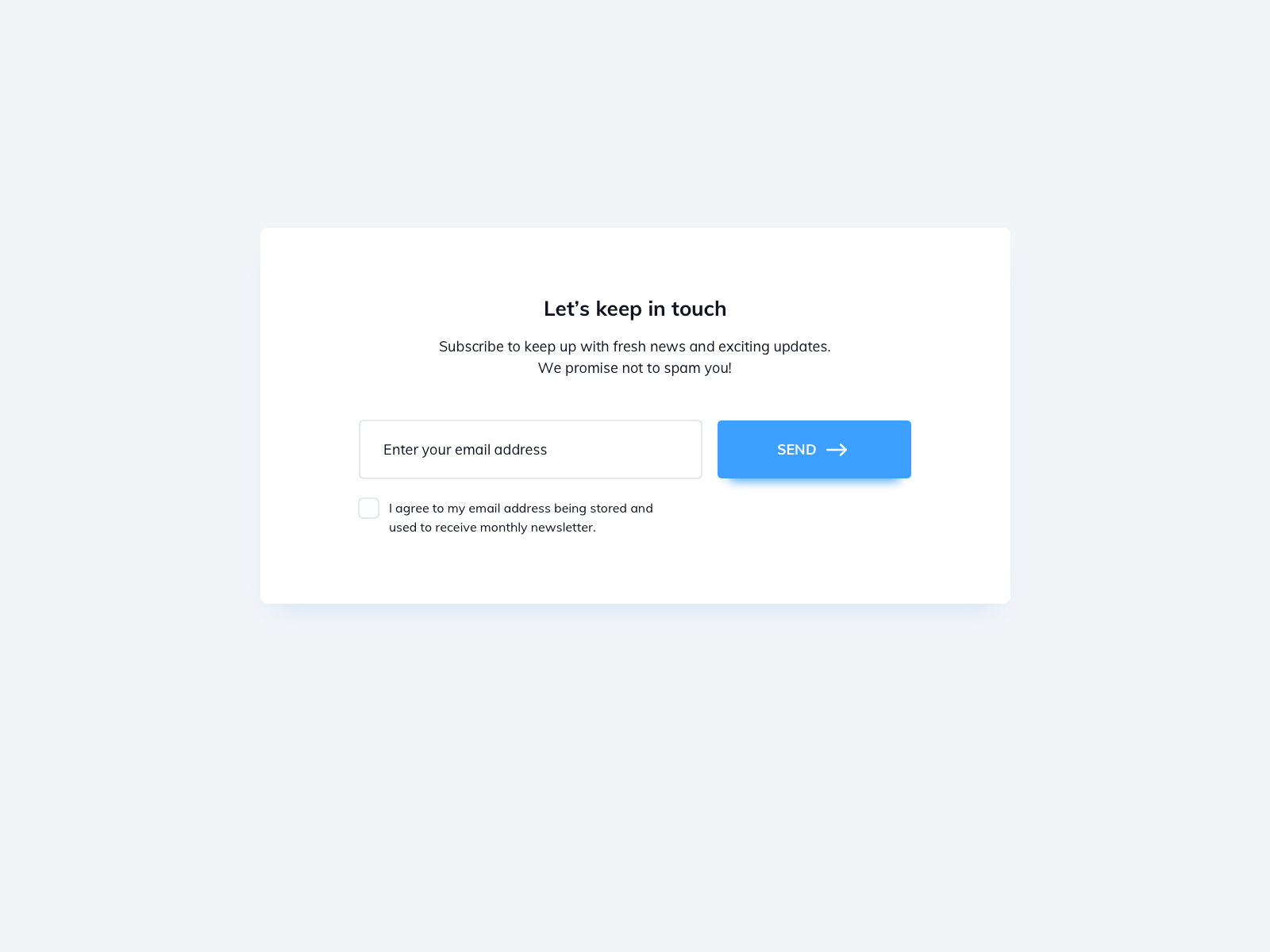
代码
<!DOCTYPE html>
<html lang="en"><head><meta charset="UTF-8"><meta name="viewport" content="width=device-width, initial-scale=1.0"><title>Document</title><link rel="stylesheet" href="./index.css">
</head><body><div class="container"><div class="content"><h4>Let's keep in touch</h4><p class="Subscribe">Subscribe to keep up with fresh news and exciting updates.<br />We promise not to spam youl!</p><form action=""><input class="email" type="text" placeholder="Enter your email address"><button class="email-button">SEND →</button></form><p class="checkbox-box"><input id="checkbox1" class="input-checkbox" type="checkbox"><label for="checkbox1">I agree to my email address being stored and<br />used to reccive monthly ncwsletter.</label></p></div></div>
</body></html>
body {padding: 0;margin: 0;
}.container {position: absolute;top: 0;left: 0;bottom: 0;right: 0;display: flex;justify-content: center;align-items: center;background-color: #f2f5f8;/* border: 1px solid red; */
}.content {/* position: relative; */background-color: #fff;width: 600px;height: 300px;border-radius: 7px;box-shadow: 0px 10px 10px rgba(61, 159, 255, 0.1);display: flex;flex-direction: column;align-items: center;
}.Subscribe {font-size: 14px;text-align: center;
}.email {width: 230px;height: 35px;border-radius: 5px;padding-left: 15px;margin-right: 5px;margin-top: 20px;border: 1px solid rgb(212, 214, 217);
}.email-button {width: 150px;height: 40px;color: #fff;font-size: 13px;border-radius: 5px;border: 1px solid rgb(212, 214, 217);background-color: rgb(61, 159, 255);box-shadow: 0px 5px 5px rgba(61, 159, 255, 0.3);
}.email-button:hover {background-color: rgb(12, 122, 231);box-shadow: 0px 5px 5px rgba(61, 159, 255, 0.3);
}.checkbox-box {margin-left: -110px;
}.input-checkbox {display: none;/* 隐藏原生的checkbox ,自定义checkbox*/
}
.checkbox-box label {position: relative;padding-left: 10px;cursor: pointer;display: inline-block;font-size: 12px;color: #787f85;
}.checkbox-box label:before {content: '';position: absolute;left: -15px;top: 0;width: 15px;height: 15px;border: 1px solid rgb(212, 214, 217);border-radius: 3px;
}/* 当checkbox被选中时的样式 */.checkbox-box input[type="checkbox"]:checked+label:before {background-color: #3d9fff;/* 背景颜色,可选 */
}
.checkbox-box input[type="checkbox"]:checked+label:after {content: "\2713";position: absolute;left: -12px;top: 0px; color: #fff;font-size: 14px;font-weight: bold;
}
05_Toasts
设计稿
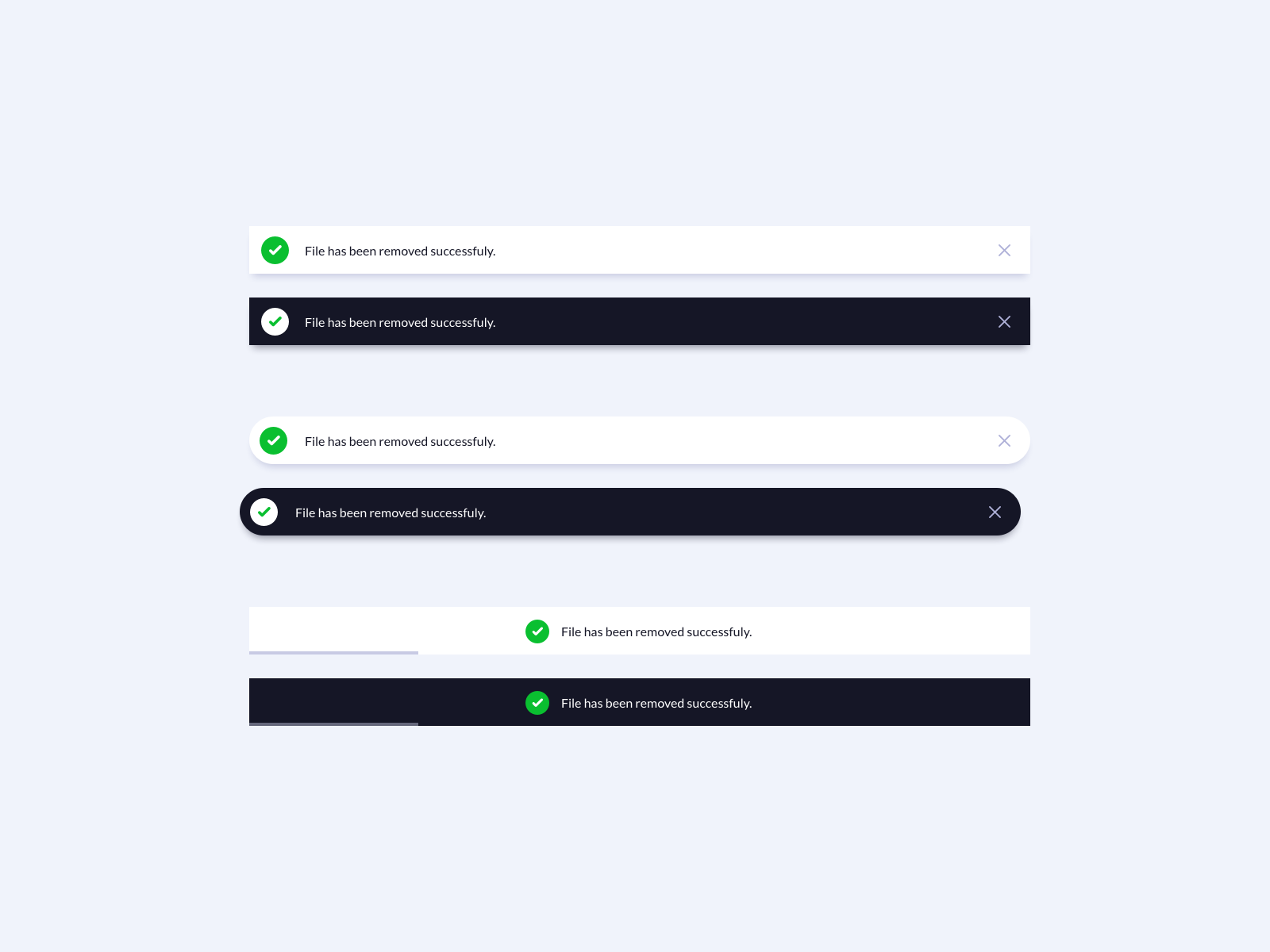
<!DOCTYPE html>
<html lang="en"><head><meta charset="UTF-8"><meta name="viewport" content="width=device-width, initial-scale=1.0"><title>Document</title><link rel="stylesheet" href="./index2.css">
</head><body><section class="toast-wrapper"><div class="toast"><div class="icon-wrapper"><svg xmlns="http://www.w3.org/2000/svg" width="24" height="24" viewBox="0 0 24 24" fill="none" stroke="currentColor"stroke-width="2" stroke-linecap="round" stroke-linejoin="round"class="icon icon-tabler icons-tabler-outline icon-tabler-check"><path stroke="none" d="M0 0h24v24H0z" fill="none" /><path d="M5 12l5 5l10 -10" /></svg></div><p>File has been removerd succesfully!</p><button class="close-btn"><svg  xmlns="http://www.w3.org/2000/svg"  width="24"  height="24"  viewBox="0 0 24 24"  fill="none"  stroke="currentColor"  stroke-width="2"  stroke-linecap="round"  stroke-linejoin="round"  class="icon icon-tabler icons-tabler-outline icon-tabler-x"><path stroke="none" d="M0 0h24v24H0z" fill="none"/><path d="M18 6l-12 12" /><path d="M6 6l12 12" /></svg></button></div><div class="toast toast-dark"><div class="icon-wrapper"><svg xmlns="http://www.w3.org/2000/svg" width="24" height="24" viewBox="0 0 24 24" fill="none"stroke="currentColor" stroke-width="2" stroke-linecap="round" stroke-linejoin="round"class="icon icon-tabler icons-tabler-outline icon-tabler-check"><path stroke="none" d="M0 0h24v24H0z" fill="none" /><path d="M5 12l5 5l10 -10" /></svg></div><p>File has been removerd succesfully!</p><button class="close-btn"><svg xmlns="http://www.w3.org/2000/svg" width="24" height="24" viewBox="0 0 24 24" fill="none"stroke="currentColor" stroke-width="2" stroke-linecap="round" stroke-linejoin="round"class="icon icon-tabler icons-tabler-outline icon-tabler-x"><path stroke="none" d="M0 0h24v24H0z" fill="none" /><path d="M18 6l-12 12" /><path d="M6 6l12 12" /></svg></button></div><div class="toast toast-rounded"><div class="icon-wrapper"><svg xmlns="http://www.w3.org/2000/svg" width="24" height="24" viewBox="0 0 24 24" fill="none"stroke="currentColor" stroke-width="2" stroke-linecap="round" stroke-linejoin="round"class="icon icon-tabler icons-tabler-outline icon-tabler-check"><path stroke="none" d="M0 0h24v24H0z" fill="none" /><path d="M5 12l5 5l10 -10" /></svg></div><p>File has been removerd succesfully!</p><button class="close-btn"><svg xmlns="http://www.w3.org/2000/svg" width="24" height="24" viewBox="0 0 24 24" fill="none"stroke="currentColor" stroke-width="2" stroke-linecap="round" stroke-linejoin="round"class="icon icon-tabler icons-tabler-outline icon-tabler-x"><path stroke="none" d="M0 0h24v24H0z" fill="none" /><path d="M18 6l-12 12" /><path d="M6 6l12 12" /></svg></button></div><div class="toast toast-dark toast-rounded"><div class="icon-wrapper"><svg xmlns="http://www.w3.org/2000/svg" width="24" height="24" viewBox="0 0 24 24" fill="none"stroke="currentColor" stroke-width="2" stroke-linecap="round" stroke-linejoin="round"class="icon icon-tabler icons-tabler-outline icon-tabler-check"><path stroke="none" d="M0 0h24v24H0z" fill="none" /><path d="M5 12l5 5l10 -10" /></svg></div><p>File has been removerd succesfully!</p><button class="close-btn"><svg xmlns="http://www.w3.org/2000/svg" width="24" height="24" viewBox="0 0 24 24" fill="none"stroke="currentColor" stroke-width="2" stroke-linecap="round" stroke-linejoin="round"class="icon icon-tabler icons-tabler-outline icon-tabler-x"><path stroke="none" d="M0 0h24v24H0z" fill="none" /><path d="M18 6l-12 12" /><path d="M6 6l12 12" /></svg></button></div><div class="toast toast-loading"><div class="icon-wrapper"><svg xmlns="http://www.w3.org/2000/svg" width="24" height="24" viewBox="0 0 24 24" fill="none"stroke="currentColor" stroke-width="2" stroke-linecap="round" stroke-linejoin="round"class="icon icon-tabler icons-tabler-outline icon-tabler-check"><path stroke="none" d="M0 0h24v24H0z" fill="none" /><path d="M5 12l5 5l10 -10" /></svg></div><p>File has been removerd succesfully!</p></div><div class="toast toast-dark toast-loading"><div class="icon-wrapper"><svg xmlns="http://www.w3.org/2000/svg" width="24" height="24" viewBox="0 0 24 24" fill="none"stroke="currentColor" stroke-width="2" stroke-linecap="round" stroke-linejoin="round"class="icon icon-tabler icons-tabler-outline icon-tabler-check"><path stroke="none" d="M0 0h24v24H0z" fill="none" /><path d="M5 12l5 5l10 -10" /></svg></div><p>File has been removerd succesfully!</p></div></section>
</body></html>
代码
*{box-sizing: border-box;
}body{background: #f5edfd;font-family: 'Poppins', sans-serif;display: flex;align-items: center;justify-content: center;margin: 0;min-height: 100vh;
}.toast-wrapper{display: flex;flex-direction: column;gap: 2rem;width: 100%;max-width: 800px;
}
.toast{background: #ffffff;box-shadow: 0 5px 5px -4px rgba(0, 0, 0, 0.3);color: #110024;display: flex;align-items: center;gap: 1rem;padding: 0.5rem 1rem;width: 100%;
}.toast-dark{background: #110024;color: #ffffff;
}.toast.toast-rounded{border-radius: 50px;
}.toast.toast-loading{--loading-width: 40%;position: relative;justify-content: center;
}.toast.toast-loading::after{content: '';background: #110024;position: absolute;bottom: 0;left: 0;height: 3px;width: var(--loading-width);
}.toast.toast-dark.toast-loading::after{background: #ffffff;
}.toast .icon-wrapper{background: #2ca12c;border-radius: 50%;color: #ffffff;display: flex;align-items: center;justify-content: center;height: 36px;width: 36px;
}.toast-dark .icon-wrapper{background: #ffffff;color: #2ca12c;
}.toast .close-btn{background: none;border: none;color: #9b9b9b;cursor: pointer;margin-left: auto;padding: 0;
}
06_BirthdayList
设计稿
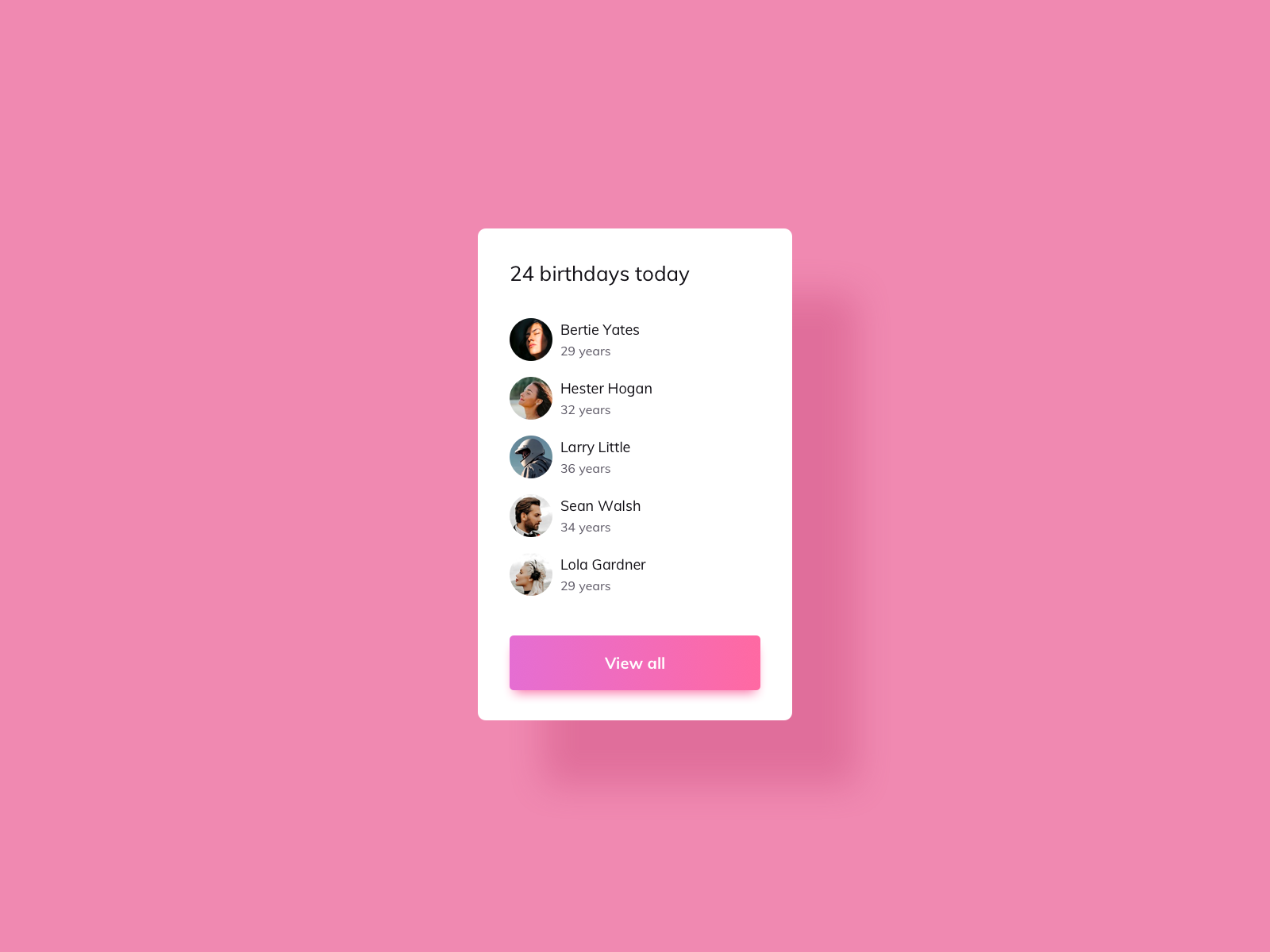
代码
<!DOCTYPE html>
<html lang="en"><head><meta charset="UTF-8"><meta name="viewport" content="width=device-width, initial-scale=1.0"><title>Document</title><link rel="stylesheet" href="./index.css">
</head><body><section class="list-wrapper"><h3 class="list">24 birthdays today</h3><div class="list"> <img src="./image1.png" alt=""><div class="list-name"><span>Bertie Yates</span> <span>29 years</span></div></div><div class="list"> <img src="./image1.png" alt=""><div class="list-name"><span>Hester Hogan</span> <span>32 years</span></div></div><div class="list"> <img src="./image1.png" alt=""><div class="list-name"><span>LorryLttle</span> <span>32 years</span></div></div><div class="list"> <img src="./image1.png" alt=""><div class="list-name"><span>Bertie Yates</span> <span>29 years</span></div></div><div class="list"> <img src="./image1.png" alt=""><div class="list-name"><span>Bertie Yates</span> <span>29 years</span></div></div><div class="list"><button>View all</button></div></section>
</body></html>
* {box-sizing: border-box;
}body {background: #f089b1;display: flex;align-items: center;justify-content: center;margin: 0;min-height: 100vh;
}.list-wrapper {display: flex;flex-direction: column;align-items: flex-start;padding: 40px;background: #fff;border-radius: 0.5rem;box-shadow: 70px 50px 40px rgb(226, 112, 158);gap: 1.2rem;width: 30%;/* height: 30rem; */max-width: 700px;overflow: hidden;
}h3 {font-weight: normal;white-space: nowrap;margin: 0;
}.list {width: 100%;display: flex;align-items: center;
}.list img {min-width: 25px;height: 25px;border-radius: 50%;background-color: aqua;margin-right: 8px;
}.list-name {display: flex;flex-direction: column;
}.list-name span:nth-of-type(2) {font-size: 13px;color: #9b9899;
}button {width: 100%;height: 40px;color: #fff;border: none;border-radius: 0.2em;background-image: linear-gradient(to right, #e76ecf, #fe69a4);box-shadow: 0px 5px 4px rgba(246, 89, 194, 0.3);
}
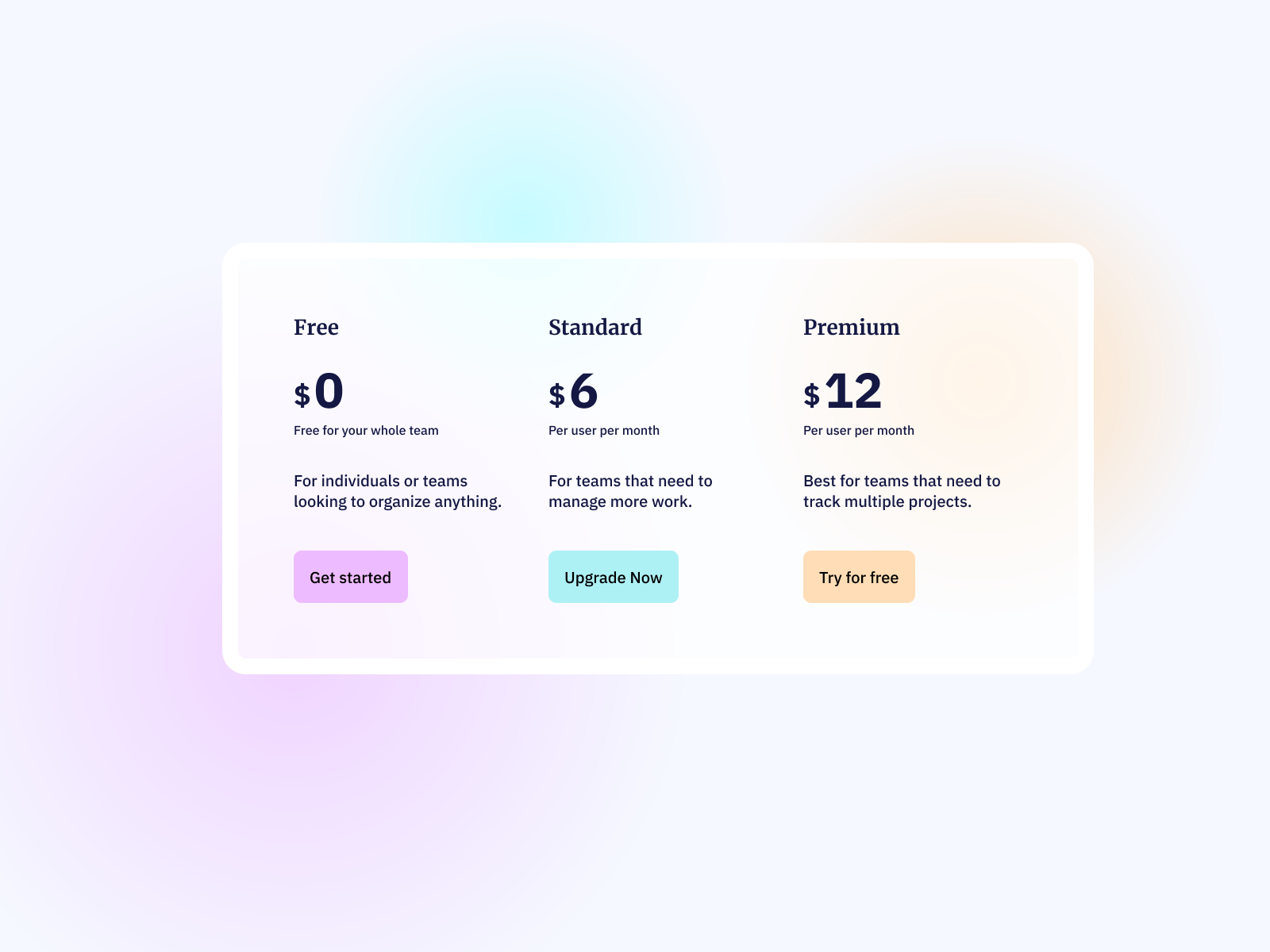
07_Pricing Table
设计稿
代码
<!DOCTYPE html>
<html lang="en"><head><meta charset="UTF-8"><meta name="viewport" content="width=device-width, initial-scale=1.0"><title>Document</title><link rel="stylesheet" href="./index.css">
</head><body><div class="table-wrapper"><div class="halo purple"></div><div class="halo blue"></div><div class="halo yellow"></div><ul class="table-list"><li><h3>Free</h3><div class="list-price"><span><span>$</span> <span>0</span></span></div><p class="list-pack">Free oyour whole team</p><p>For individuals or teams looking to organize anything.</p><button>Get started</button></li><li><h3>Standard</h3><div class="list-price"><span><span>$</span> <span>6</span></span></div><p class="list-pack">Peruser per month</p><p>For teams that need to manage more work.</p><button>Upgrade Now</button></li><li><h3>Premium</h3><div class="list-price"><span><span>$</span> <span>12</span></span></div><p class="list-pack">Peruser per month</p><p>Best for teams that need to track multiple projects.</p><button>Try for free</button></li></ul></div>
</body></html>
* {box-sizing: border-box;
}body {background-color: #f5f8ff;display: flex;align-items: center;justify-content: center;margin: 0;min-height: 100vh;
}li {list-style: none;/* 移除列表项前的符号 */margin: 0;/* 重置外边距 */padding: 0;/* 重置内边距 */
}.table-wrapper {position: relative;min-height: 50vh;min-width: 625px;border: 15px solid #fff;border-radius: 10px;background-color: rgba(255, 255, 255, .7);/* overflow: hidden; */
}.table-list {display: flex;gap: 2rem;max-width: 800px;
}.list-price span:nth-of-type(1) {font-size: 20px;font-weight: bold;
}.list-price span:nth-of-type(2) {font-size: 40px;font-weight: bold;
}p {font-size: 18px;
}.list-pack {margin: 0;font-size: 12px;}button {border: none;width: 7rem;height: 40px;border-radius: 5px;}.table-list li:nth-of-type(1) button {background-color: #edbbff;
}.table-list li:nth-of-type(2) button {background-color: #aef1f5;
}.table-list li:nth-of-type(3) button {background-color: #ffddb6;
}.halo {position: absolute;top: 4rem;left: 20rem;/* background-color: #edbbff; */width: 15rem;height: 15rem;border-radius: 50%;}.purple {/* position: absolute; */top: 13rem;left: -8rem;width: 20rem;height: 20rem;/* background-color: #edbbff; */background-image: radial-gradient(circle, rgba(237, 187, 255, 1) 0%, rgba(237, 187, 255, 0) 100%);box-shadow: 0 20px 70px rgba(237, 187, 255, 0.2),/* 下阴影 */0 -20px 70px rgba(237, 187, 255, 0.2),/* 上阴影 */20px 0 70px rgba(237, 187, 255, 0.2),/* 右阴影 */-20px 0 70px rgba(237, 187, 255, 0.2);/* 左阴影 */z-index: -5;
}.blue {/* background-color: #aef1f5; */top: -6rem;left: 10rem;background-image: radial-gradient(circle, rgba(174, 241, 245, 1) 0%, rgba(237, 187, 255, 0) 100%);box-shadow: 0 20px 70px rgba(174, 241, 245, 0.2),/* 下阴影 */0 -20px 70px rgba(174, 241, 245, 0.2),/* 上阴影 */20px 0 70px rgba(174, 241, 245, 0.2),/* 右阴影 */-20px 0 70px rgba(174, 241, 245, 0.2);/* 左阴影 */z-index: -5;
}.yellow {top: -3rem;left: 40rem;/* background-color: #ffddb6; */background-image: radial-gradient(circle, rgba(255, 221, 182, 1) 0%, rgba(237, 187, 255, 0) 100%);box-shadow: 0 20px 70px rgba(255, 221, 182, 0.2),/* 下阴影 */0 -20px 70px rgba(255, 221, 182, 0.2),/* 上阴影 */20px 0 70px rgba(255, 221, 182, 0.2),/* 右阴影 */-20px 0 70px rgba(255, 221, 182, 0.2);/* 左阴影 */z-index: -5;
}
相关文章:
HTML-CSS练习例子
HTML CSS 练习 https://icodethis.com 作为前端练习生。不敲代码只看,入门是很慢的,所以直接实战是学习前端最快的途径之一。 这个网站练习HTML CSS的,可以打开了解一下,可以每天打卡,例子简单,循序渐进&…...

【JavaScript脚本宇宙】创造声音的魔法:深入了解Web音频处理库
聆听创意可能性:解锁Web音频库的神奇功能 前言 在Web开发中,处理音频是一个重要且常见的需求。许多JavaScript库和框架旨在简化音频处理和交互式音乐的创建过程。本文将探讨几个流行的Web音频库,介绍它们的概述、主要特性、使用示例以及适用…...

苹果需要专注于让人工智能变得实用,而不是华而不实
谷歌和微软已将其开发者大会作为展示其生成式人工智能能力的平台,现在所有人的目光都集中在下周的全球开发者大会上,预计Apple Intelligence将在此首次亮相。 这家总部位于库比蒂诺的公司面临着巨大的压力。 苹果在人工智能竞赛中落后于同行࿰…...
安全专业的硬件远控方案 设备无网也能远程运维
在很多行业中,企业的运维工作不仅仅局限在可以联网的IT设备,不能连接外网的特种设备也需要专业的远程运维手段。 这种特种设备在能源、医疗等行业尤其常见,那么我们究竟如何通过远程控制,对这些无网设备实施远程运维,…...

Freeswitch-soundtouch-变声开发
文章目录 一、介绍二、安装soundtouch2.1 源码安装方式(推荐)2.1.1下载源码2.1.2解压2.1.3 编译2.1.4 迁移(可选) 2.2 apt-get 安装 三、使用3.1 终端使用3.2 Freeswitch使用3.2.1编译Freeswitch的mod_soundtouch3.2.2启用 mod_so…...
Unity2D游戏制作入门 | 09(之人物动画制作)
上期链接:Unity2D游戏制作入门 | 08-CSDN博客 人物走路动画逻辑补充(该帖没有的内容,我给补充了请先看完这帖,再去看补充):人物按下shifit走路动画设定09(第九期先行补充) 上期我们…...
【自动部署】4.阿里云ECS服务器 IDEA自动部署项目
如何在IDEA中,自动部署项目到阿里云ECS服务器?今天我们就来实现一键部署功能。 执行maven命令打包免密登录,在IEDA中连接服务器执行stop脚本上传jar包到服务器执行start脚本查看运行日志 1.安装Alibaba Cloud Toolkit 2.配置host 3.自动化部…...
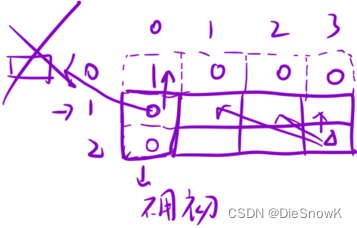
[Algorithm][动态规划][01背包问题][目标和][最后一块石头的重量Ⅱ]详细讲解
目录 1.目标和1.题目链接2.算法原理详解3.代码实现 2.最后一块石头的重量 II1.题目链接2.算法原理详解3.代码实现 1.目标和 1.题目链接 目标和 2.算法原理详解 问题转化:在数组中选择一些数,让这些数的和等于a,一共有多少种选法?…...
LabVIEW控制PLC的实现方式
LabVIEW与PLC的结合可以充分发挥两者的优点,实现更高效、灵活和可靠的自动化控制系统。本文将详细介绍LabVIEW控制PLC的实现方式,包括通信接口、数据交换、编程方法及实际应用案例,帮助用户理解并应用这一技术。 通信接口 常见通信协议 La…...
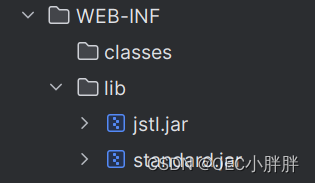
JSTL知识点讲解与配置
JSTL(JavaServer Pages Standard Tag Library)是Java EE平台中的一个标准库,提供了一组用于在JSP(JavaServer Pages)中简化和标准化常见任务的标签。这些标签封装了很多常见的JSP功能,可以使得JSP页面更加简…...

Autodesk 3ds Max软件下载安装;3ds Max功能强大的三维建模、渲染软件安装包获取
3ds Max,无论是初学者还是资深设计师,都能通过3ds Max在数字世界中实现自己的创意,打造出令人惊叹的三维作品。 在3ds Max中,灯光系统是至关重要的一环。它提供了光度学灯光和标准灯光两种主要类型,用于照亮和增强场景…...
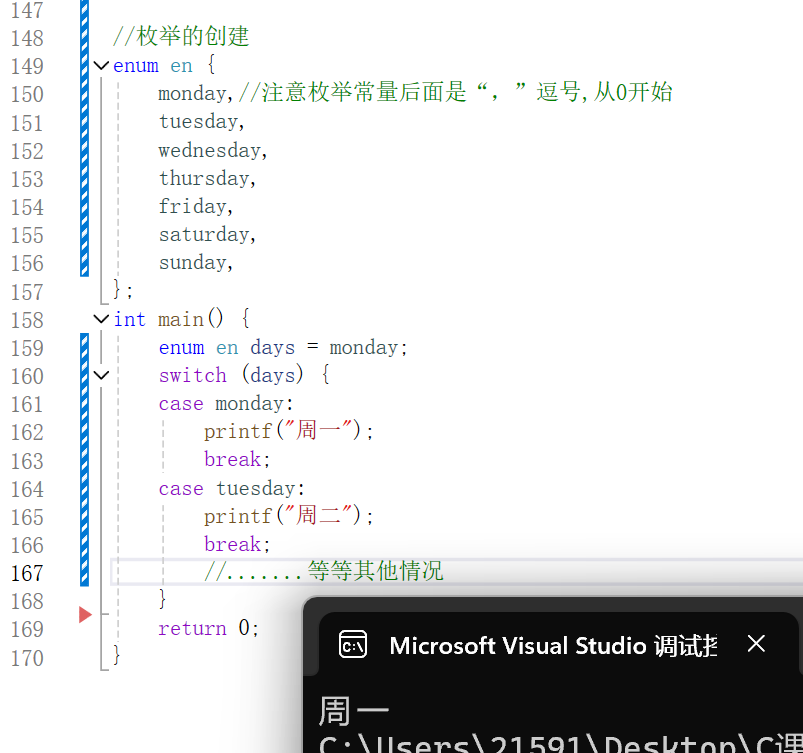
联合体和枚举<C语言>
导言 在C语言中除了结构体外,联合体和枚举也是自定义类型,联合体主要用于节省空间,在同一块内存存储多种类型的数据,而枚举可以提高代码的可读性、可维护性。 联合体(union) 它还有个更容易理解的名字&…...

算法人生(21):从“React框架”看“情绪管理”
说起React框架,我们知道它是一种由Facebook开发和维护的开源JavaScript库,主要用于构建用户界面,特别是单页应用程序(SPA)。React框架围绕组件化,即把用户界面拆分为可复用的独立组件,每个组件负…...

千益畅行:合法合规的旅游卡服务,真实可靠的旅游体验
近期,关于千益畅行旅游卡服务的讨论引起了广泛关注。然而,网络上出现了一些对其误解和质疑的声音。为了澄清事实,我们深入了解了千益畅行的运营模式和业务特点,发现它是一家合法合规的旅游卡服务提供商,为消费者提供真…...
Linux下软件安装
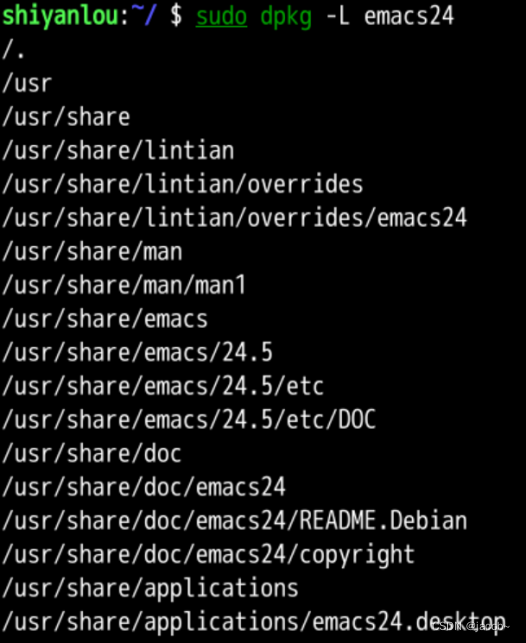
提示:制作不易,可以点个关注和收藏哦。 前言 介绍 Ubuntu 下软件安装的几种方式,及 apt,dpkg 工具的使用。 提示:以下是本篇文章正文内容,下面案例可供参考. 一、先体验一下 比如我们想安装一个软件&…...
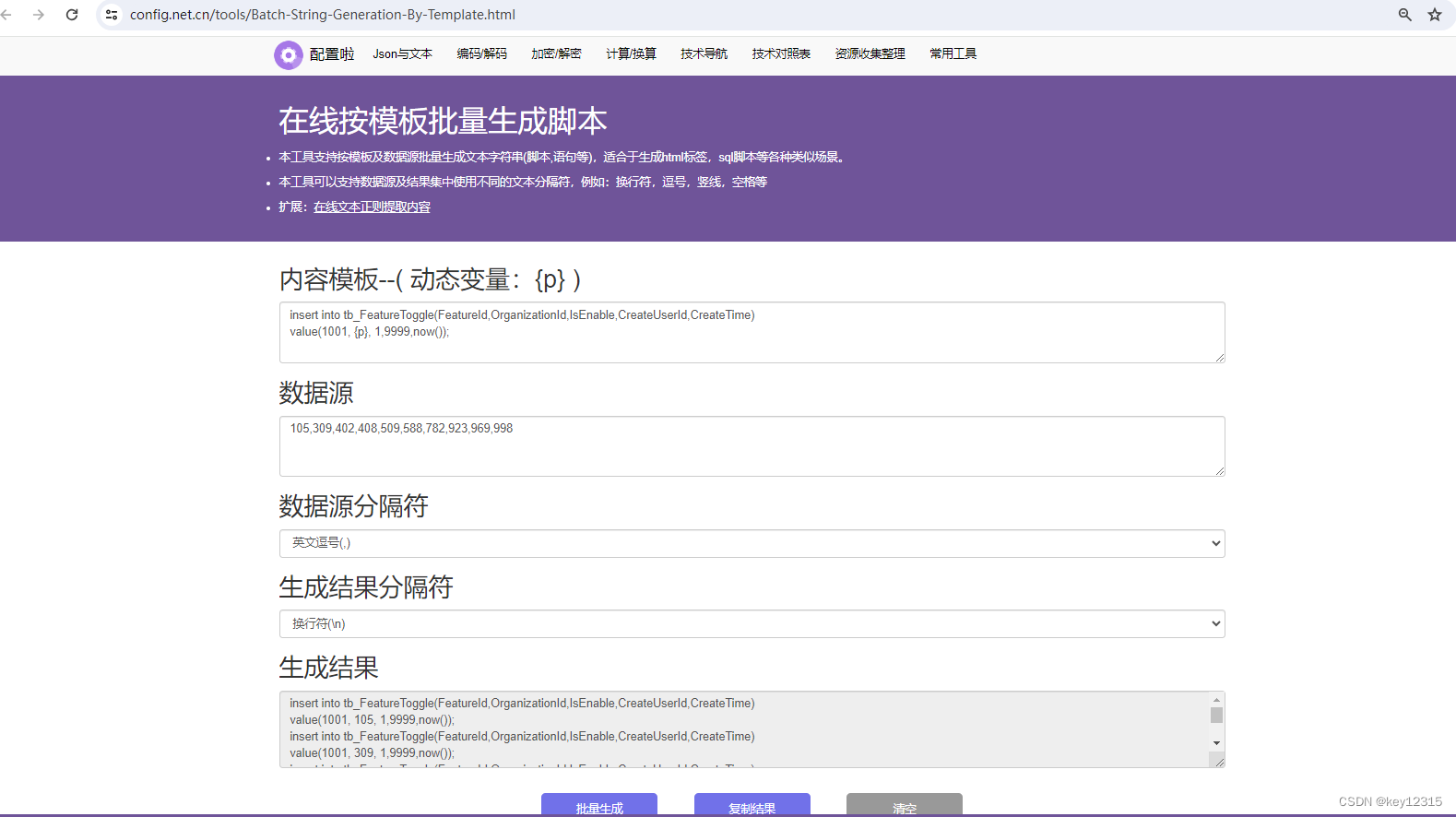
在线按模板批量生成文本工具
具体请前往:在线按模板批量生成文本工具...

Linux之关机重启
服务器除了通过界面 进行关机,重启操作,还可以通过命令的方式实现 shutdown [-t seconds] [-rkhncfF] time [message] 常用选项 参数功能-t seconds设定在几秒钟之后进行关机程序-k并不会真的关机,只是将警告讯息传送给所有使用者-r关机后重…...
【Android】使用EventBus进行线程间通讯
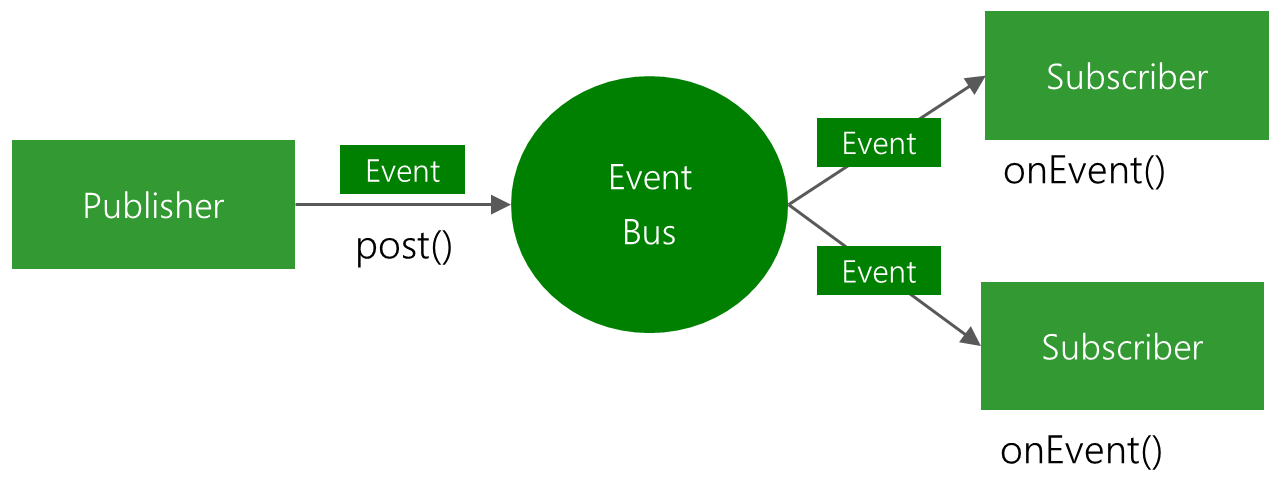
EventBus 简介 EventBus:github EventBus是Android和Java的发布/订阅事件总线。 简化组件之间的通信 解耦事件发送者和接收者 在 Activities, Fragments, background threads中表现良好 避免复杂且容易出错的依赖关系和生命周期问题 Publisher使用post发出…...

Leetcode 3179. Find the N-th Value After K Seconds
Leetcode 3179. Find the N-th Value After K Seconds 1. 解题思路2. 代码实现 题目链接:3179. Find the N-th Value After K Seconds 1. 解题思路 这一题的话还是一个动态规划的问题,核心递推关系式为: dp(n, k) dp(n-1, k) dp(n, k)我…...
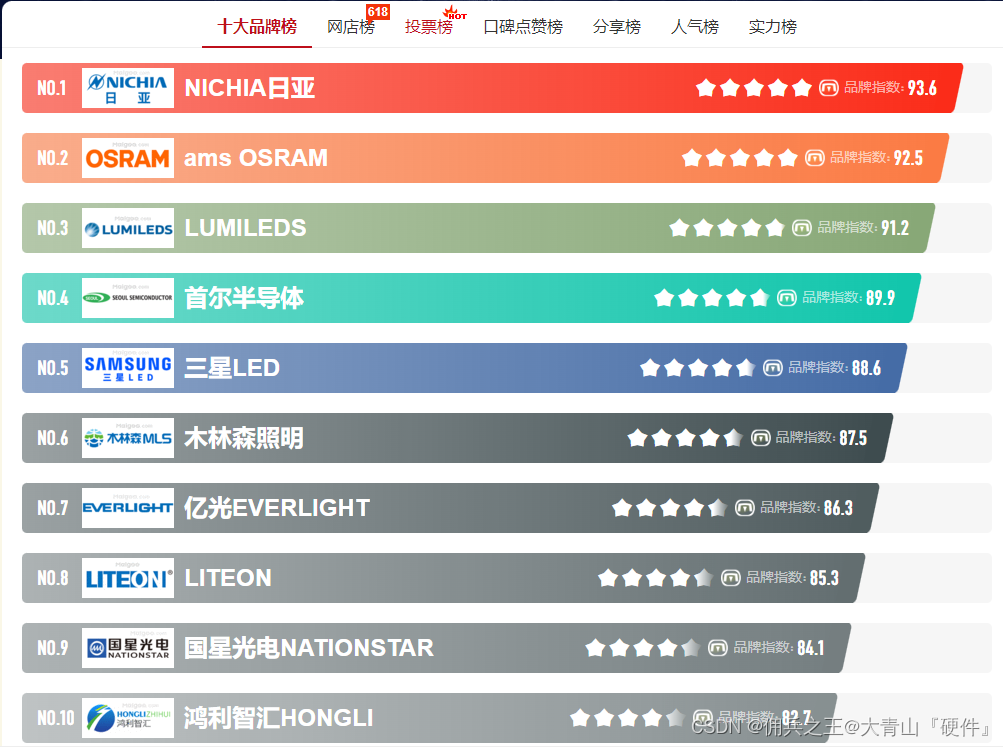
发光二极管十大品牌
日常电路设计中,LED是必用的元器件之一,辅助判定电路异常。 十大发光二极管品牌-LED灯珠生产厂家哪家好-LED发光二极管厂家前十-Maigoo品牌榜...

从零到一:基于STM32硬件SPI驱动M95系列EEPROM的实战指南
1. 硬件SPI与EEPROM基础概念 第一次接触STM32的硬件SPI驱动EEPROM时,我也被各种专业术语搞得头晕眼花。简单来说,SPI就像两个人在用摩斯密码交流——主设备(STM32)通过四根线(MOSI、MISO、SCK、NSS)与从设备…...

从多智能体系统到共生AI:构建协同进化的分布式智能架构
1. 项目概述:当AI学会“共生”最近在GitHub上闲逛,发现了一个名为lout33/symbiotic-ai的项目,这个名字立刻抓住了我的眼球。“共生AI”(Symbiotic AI)—— 这听起来不像是一个简单的工具库或者模型,更像是一…...

题解:洛谷 P8817 [CSP-S 2022] 假期计划
本文分享的必刷题目是从蓝桥云课、洛谷、AcWing等知名刷题平台精心挑选而来,并结合各平台提供的算法标签和难度等级进行了系统分类。题目涵盖了从基础到进阶的多种算法和数据结构,旨在为不同阶段的编程学习者提供一条清晰、平稳的学习提升路径。 欢迎大…...
)
VSCode 2026医疗合规检查失效的5大隐性陷阱,第4个导致某三甲医院AI辅助诊断系统被叫停——附官方补丁热修复方案(2026.3.15紧急发布)
更多请点击: https://intelliparadigm.com 第一章:VSCode 2026医疗合规检查失效的全局性警示 2026年3月,全球多家三甲医院信息科与医疗AI研发团队报告:VSCode最新稳定版(v1.98.0)中预装的HIPAA/GB/T 22239…...

Legacy-iOS-Kit:让旧款iPhone和iPad重获新生的终极工具
Legacy-iOS-Kit:让旧款iPhone和iPad重获新生的终极工具 【免费下载链接】Legacy-iOS-Kit An all-in-one tool to restore/downgrade, save SHSH blobs, jailbreak legacy iOS devices, and more 项目地址: https://gitcode.com/gh_mirrors/le/Legacy-iOS-Kit …...

掌握高效数据分析:揭秘新一代浏览器Parquet查看器实用指南
掌握高效数据分析:揭秘新一代浏览器Parquet查看器实用指南 【免费下载链接】parquet-viewer View parquet files online 项目地址: https://gitcode.com/gh_mirrors/pa/parquet-viewer 在当今数据驱动的时代,Parquet格式已成为大数据处理的标准存…...
)
上市公司-绿色新闻、环保新闻数据库(2007-2023年)
01、数据介绍上市公司绿色新闻报道的内容确实涵盖了多个关键方面,旨在向投资者、消费者、监管机构及广大公众传达企业在环境保护、可持续发展和社会责任方面的实践与成效。上市公司绿色新闻报道不仅是企业向外界传递其绿色发展成果和承诺的窗口,也是促进…...

Python的@dataclass装饰器:自动生成样板代码的魔法
Python的dataclass装饰器:自动生成样板代码的魔法 在Python开发中,编写类时常常需要重复定义__init__、__repr__等样板代码,既繁琐又容易出错。而dataclass装饰器的出现,就像一场魔法,让开发者告别冗余代码。它源自Py…...
)
从‘深分页’到‘游标分页’:一次订单导出性能提升500%的优化实录(附EasyExcel配置)
百万级订单导出性能跃迁:从深分页陷阱到游标分页实战 当系统需要导出百万级订单数据时,很多开发者会遭遇一个典型困境:明明已经采用分批查询策略,导出速度却依然缓慢如蜗牛。这背后往往隐藏着数据库深分页(Deep Pagina…...

技术评估中的成果检验与价值判断
技术评估中的成果检验与价值判断 在科技快速发展的今天,技术评估成为衡量创新成果的重要工具。无论是科研项目、企业研发还是政策制定,成果检验与价值判断都直接影响资源的分配与决策的方向。如何科学、客观地评估技术的实际效果与社会价值,…...