
js 图片放大镜

写购物项目的时候,需要放大图片,这里用js写了一个方法,鼠标悬浮的时候放大当前图片
这个是class写法
<!--* @Descripttion: * @Author: 苍狼一啸八荒惊* @LastEditTime: 2024-07-10 09:41:34* @LastEditors: 夜空苍狼啸
--><!DOCTYPE html>
<html lang="en"><head><meta charset="UTF-8"><meta http-equiv="X-UA-Compatible" content="IE=edge"><meta name="viewport" content="width=device-width, initial-scale=1.0"><title>商品详情</title><!-- <link rel="stylesheet" href="./css/detail.css"> --><style>.product_wrapper {width: 1200px;margin: 0 auto;font: 12px "Hiragino Sans GB", "Verdana", "Simsun";background-color: #fff;}.product_wrapper .detail {overflow: hidden;}.product_wrapper .detail .list_detail {width: 320px;height: 320px;float: left;padding: 0 20px 30px 0;position: relative;}.product_wrapper .detail .list_detail .list_detail_1 {width: 280px;height: 280px;position: relative;}.product_wrapper .detail .list_detail .list_detail_1>img {width: 100%;height: 100%;}.product_wrapper .detail .list_detail .list_detail_1 .mask {width: 150px;height: 150px;background: url(../img/zoom_pup.png);opacity: 0.5;position: absolute;left: 30px;top: 40px;pointer-events: none;display: none;}.product_wrapper .detail .list_detail .list_detail_2 {position: absolute;left: 0;bottom: 0;display: flex;justify-content: space-evenly;align-items: center;}.product_wrapper .detail .list_detail .list_detail_2>img {width: 54px;height: 54px;margin-right: 50px;cursor: pointer;}.product_wrapper .detail .list_detail .list_detail_2 .active {box-shadow: 0 0 8px rgb(255, 255, 255) inset, 0 0 8px red;}.product_wrapper .detail .list_detail .list_detail_enlarge {width: 480px;height: 480px;position: absolute;position: absolute;left: 90%;top: 0;overflow: hidden;display: none;z-index: 999;}.product_wrapper .detail .list_detail .list_detail_enlarge>img {display: block;width: 800px;height: 800px;position: absolute;left: 0;top: 0;}</style>
</head><body><div class="product_wrapper"><div class="detail hover"><div class="list_detail" id="box"><!-- 放大镜 --><div class="list_detail_1"><img src="./img/lx1.jpg" alt=""><div class="mask"></div></div><div class="list_detail_2"><img src="./img/lx1.jpg" class="active" alt="" data-show="./img/lx1.jpg" data-bg="./img/lx1.jpg"><img src="./img/lx2.jpg" alt="" data-show="./img/lx2.jpg" data-bg="./img/lx2.jpg"><img src="./img/lx3.jpg" alt="" data-show="./img/lx3.jpg" data-bg="./img/lx3.jpg"></div><div class="list_detail_enlarge enlarge"><!-- <img src="./img/lx1.jpg" alt=""> --><img src="http://img3m2.ddimg.cn/27/17/25583112-1_u_11.jpg" alt=""></div></div></div></div><!-- 引入放大镜 --><!-- <script src="./js/detail.js"></script> --><script>// 放大镜class Enlarge {constructor(select) {// 0-1. 获取到范围元素, 目的是为了让所有内容都出现在这里面this.ele = document.querySelector(select)this.show = this.ele.querySelector('.list_detail_1')this.mask = this.ele.querySelector('.mask')this.list = this.ele.querySelector('.list_detail_2')this.enlarge = this.ele.querySelector('.enlarge')this.bg = this.enlarge.firstElementChild// 需要一些尺寸数据this.show_w = this.show.clientWidththis.show_h = this.show.clientHeight// 非行内样式获取this.mask_w = parseInt(window.getComputedStyle(this.mask).width)this.mask_h = parseInt(window.getComputedStyle(this.mask).height)this.bg_w = parseInt(window.getComputedStyle(this.bg).width)this.bg_h = parseInt(window.getComputedStyle(this.bg).height)// 在这里调用函数来启动this.setScale()this.overOut()this.listChange()this.move()}// 计算数值setScale() {// 1. 计算数值this.enlarge_w = this.mask_w * this.bg_w / this.show_wthis.enlarge_h = this.mask_h * this.bg_h / this.show_h// 2. 给 this.enlarge 赋值this.enlarge.style.width = this.enlarge_w + 'px'this.enlarge.style.height = this.enlarge_h + 'px'}// 鼠标经过显示遮罩层, 图片放大overOut() {this.show.addEventListener('mouseover', () => {this.mask.style.display = 'block'this.enlarge.style.display = 'block'})this.show.addEventListener('mouseout', () => {this.mask.style.display = 'none'this.enlarge.style.display = 'none'})}// tab 切换listChange() {this.list.addEventListener('click', e => {// 处理事件对象兼容e = e || window.event// 处理事件目标兼容const target = e.target || e.srcElement// 判断点击的是 img 标签if (target.nodeName !== 'IMG') return// 1. 切换 img 类名for (let i = 0; i < this.list.children.length; i++) {this.list.children[i].classList.remove('active')}target.classList.add('active')// 2. 切换 show里面img 和 bg 的 srcconst showUrl = target.dataset.showconst bgUrl = target.dataset.bgthis.show.firstElementChild.src = showUrlthis.bg.src = bgUrl})}// 鼠标移动move() {// 1. 绑定事件this.show.addEventListener('mousemove', e => {e = e || window.event// 2. 获取光标坐标点let x = e.offsetX - this.mask_w / 2let y = e.offsetY - this.mask_h / 2// 3. 边界值判断if (x <= 0) x = 0if (y <= 0) y = 0if (x >= this.show_w - this.mask_w) x = this.show_w - this.mask_wif (y >= this.show_h - this.mask_h) y = this.show_h - this.mask_hthis.mask.style.left = x + 'px'this.mask.style.top = y + 'px'const bg_x = x * this.enlarge_w / this.mask_w * -1const bg_y = y * this.enlarge_h / this.mask_h * -1this.bg.style.left = bg_x + 'px'this.bg.style.top = bg_y + 'px'})}}const enlarge = new Enlarge('#box')</script></body></html>
这个是函数写法
<!--* @Descripttion: * @Author: 苍狼一啸八荒惊* @LastEditTime: 2024-07-10 09:41:34* @LastEditors: 夜空苍狼啸
--><!DOCTYPE html>
<html lang="en"><head><meta charset="UTF-8"><meta http-equiv="X-UA-Compatible" content="IE=edge"><meta name="viewport" content="width=device-width, initial-scale=1.0"><title>商品详情</title><!-- <link rel="stylesheet" href="./css/detail.css"> --><style>.product_wrapper {width: 1200px;margin: 0 auto;font: 12px "Hiragino Sans GB", "Verdana", "Simsun";background-color: #fff;}.product_wrapper .detail {overflow: hidden;}.product_wrapper .detail .list_detail {width: 320px;height: 320px;float: left;padding: 0 20px 30px 0;position: relative;}.product_wrapper .detail .list_detail .list_detail_1 {width: 280px;height: 280px;position: relative;}.product_wrapper .detail .list_detail .list_detail_1>img {width: 100%;height: 100%;}.product_wrapper .detail .list_detail .list_detail_1 .mask {width: 150px;height: 150px;background: url(../img/zoom_pup.png);opacity: 0.5;position: absolute;left: 30px;top: 40px;pointer-events: none;display: none;}.product_wrapper .detail .list_detail .list_detail_2 {position: absolute;left: 0;bottom: 0;display: flex;justify-content: space-evenly;align-items: center;}.product_wrapper .detail .list_detail .list_detail_2>img {width: 54px;height: 54px;margin-right: 50px;cursor: pointer;}.product_wrapper .detail .list_detail .list_detail_2 .active {box-shadow: 0 0 8px rgb(255, 255, 255) inset, 0 0 8px red;}.product_wrapper .detail .list_detail .list_detail_enlarge {width: 480px;height: 480px;position: absolute;position: absolute;left: 90%;top: 0;overflow: hidden;display: none;z-index: 999;}.product_wrapper .detail .list_detail .list_detail_enlarge>img {display: block;width: 800px;height: 800px;position: absolute;left: 0;top: 0;}</style>
</head><body><div class="product_wrapper"><div class="detail hover"><div class="list_detail" id="box"><!-- 放大镜 --><div class="list_detail_1"><img src="./img/lx1.jpg" alt=""><div class="mask"></div></div><div class="list_detail_2"><img src="./img/lx1.jpg" class="active" alt="" data-show="./img/lx1.jpg" data-bg="./img/lx1.jpg"><img src="./img/lx2.jpg" alt="" data-show="./img/lx2.jpg" data-bg="./img/lx2.jpg"><img src="./img/lx3.jpg" alt="" data-show="./img/lx3.jpg" data-bg="./img/lx3.jpg"></div><div class="list_detail_enlarge enlarge"><img src="./img/lx1.jpg" alt=""></div></div></div></div><!-- 引入放大镜 --><!-- <script src="./js/detail.js"></script> --><script>/** @Descripttion: * @Author: 苍狼一啸八荒惊* @LastEditTime: 2024-07-10 10:18:57* @LastEditors: 夜空苍狼啸*/// 放大镜// 0-1. 获取到范围元素, 目的是为了让所有内容都出现在这里面
let ele = document.querySelector('#box')
let show = ele.querySelector('.list_detail_1')
let mask = ele.querySelector('.mask')
let list = ele.querySelector('.list_detail_2')
let enlarge = ele.querySelector('.enlarge')
let bg = enlarge.firstElementChild
// 需要一些尺寸数据
let show_w = show.clientWidth
let show_h = show.clientHeight
// 非行内样式获取
let mask_w = parseInt(window.getComputedStyle(mask).width)
let mask_h = parseInt(window.getComputedStyle(mask).height)
let bg_w = parseInt(window.getComputedStyle(bg).width)
let bg_h = parseInt(window.getComputedStyle(bg).height)// 计算数值
// 1. 计算数值
enlarge_w = mask_w * bg_w / show_w
enlarge_h = mask_h * bg_h / show_h// 2. 给 enlarge 赋值
enlarge.style.width = enlarge_w + 'px'
enlarge.style.height = enlarge_h + 'px'// 鼠标经过显示遮罩层, 图片放大show.addEventListener('mouseover', () => {mask.style.display = 'block'enlarge.style.display = 'block'
})show.addEventListener('mouseout', () => {mask.style.display = 'none'enlarge.style.display = 'none'
})// tab 切换list.addEventListener('click', e => {// 处理事件对象兼容e = e || window.event// 处理事件目标兼容const target = e.target || e.srcElement// 判断点击的是 img 标签if (target.nodeName !== 'IMG') return// 1. 切换 img 类名for (let i = 0; i < list.children.length; i++) {list.children[i].classList.remove('active')}target.classList.add('active')// 2. 切换 show里面img 和 bg 的 srcconst showUrl = target.dataset.showconst bgUrl = target.dataset.bgshow.firstElementChild.src = showUrlbg.src = bgUrl
})// 鼠标移动// 1. 绑定事件
show.addEventListener('mousemove', e => {e = e || window.event// 2. 获取光标坐标点let x = e.offsetX - mask_w / 2let y = e.offsetY - mask_h / 2// 3. 边界值判断if (x <= 0) x = 0if (y <= 0) y = 0if (x >= show_w - mask_w) x = show_w - mask_wif (y >= show_h - mask_h) y = show_h - mask_hmask.style.left = x + 'px'mask.style.top = y + 'px'const bg_x = x * enlarge_w / mask_w * -1const bg_y = y * enlarge_h / mask_h * -1bg.style.left = bg_x + 'px'bg.style.top = bg_y + 'px'
})</script></body></html>
相关文章:
js 图片放大镜
写购物项目的时候,需要放大图片,这里用js写了一个方法,鼠标悬浮的时候放大当前图片 这个是class写法 <!--* Descripttion: * Author: 苍狼一啸八荒惊* LastEditTime: 2024-07-10 09:41:34* LastEditors: 夜空苍狼啸 --><!DOCTYPE …...

数据模型-ER图在数据模型设计中的应用
ER图在数据模型设计中的应用 1. ER图概述:起源与发展 实体-关系图(Entity Relationship Diagram,简称ER图)起源于1970年代,由Peter Chen首次提出,作为描述数据和信息间关系的图形化语言。随着数据库技术…...

C++ //练习 14.46 你认为应该为Sales_data类定义上面两种类型转换运算符吗?应该把它们声明成explicit的吗?为什么?
C Primer(第5版) 练习 14.46 练习 14.46 你认为应该为Sales_data类定义上面两种类型转换运算符吗?应该把它们声明成explicit的吗?为什么? 环境:Linux Ubuntu(云服务器) 工具&…...

tensorflow张量生成以及常用函数
张量tensor:多维数组(列表) 阶:张量的维数 维数 阶 名字 例子 0-D 0 标量 scalar s 1, 2, 3 1-D 1 向量 vector…...

如何在 Windows 10 上恢复未保存的 Word 文档
您是否整晚都在处理一个重要的 word 文件,但忘记保存它了?本文适合您。在这里,我们将解释如何恢复未保存的 word 文档。除此之外,您还将学习如何恢复已删除的 word 文档。 从专业人士到高中生,每个人都了解丢失重要 W…...

Rust入门实战 编写Minecraft启动器#3解析资源配置
首发于Enaium的个人博客 在上一篇文章中,我们已经建立了资源模型,接下来我们需要解析游戏的配置文件。 首先我们添加serde_json依赖和model依赖。 model { path "../model" } serde_json "1.0"之后我们在lib.rs中添加解析的tra…...

openFileInput 内部保持的数据如何删除
在Android中,openFileInput 是用于从设备内部存储中读取文件的API,但它本身并不提供直接删除文件的功能。要删除通过 openFileInput 读取的文件,你需要使用其他方法。以下是如何删除内部存储中文件的步骤和说明: 步骤 获取文件路…...

Python编写的俄罗斯方块小游戏
文章目录 游戏页面实现代码 游戏页面 左右键移动方块位置,上键切换方块形态。 实现代码 import pygame import random# 初始化 Pygame pygame.init()# 定义颜色 colors [(0, 0, 0), # 黑色(255, 0, 0), # 红色(0, 255, 0), # 绿色(0, 0, 255), # 蓝色(255,…...

前端直连小票打印机,前端静默打印,js静默打印解决方案
最近公司开发了一个vue3收银系统,需要使用小票打印机打印小票,但是又不想结账的时候弹出打印预览,找了很多方案,解决不了js打印弹出的打印预览窗口! 没办法,自己写了一个winform版本的静默打印软件…...

python批量读取Excel数据写入word
from docx import Document from docx.shared import Pt from docx.enum.table import WD_TABLE_ALIGNMENT, WD_ROW_HEIGHT_RULE import os import pandas as pd from docx import Document from docx.oxml.ns import qn from docx.shared import Pt # ... 其他代码 ... work…...

Unity 常用取整方法
向下取整:Mathf.FloorToInt() 向上取整:Math.Ceiling 截断取整:(int) 四舍五入:Mathf.RoundToInt e.NewValues.value.ToString(“F0”) 百分比: int i 400; int j 200; string p ((double)i…...
Apache Seata Mac下的Seata Demo环境搭建
本文来自 Apache Seata官方文档,欢迎访问官网,查看更多深度文章。 本文来自 Apache Seata官方文档,欢迎访问官网,查看更多深度文章。 Mac下的Seata Demo环境搭建(AT模式) 前言 最近因为工作需要…...

记录|C#安装+HslCommunication安装
记录线索 前言一、C#安装1.社区版下载2.VS2022界面设置 二、HslCommunication安装1.前提2.安装3.相关文件【重点】 更新记录 前言 初心是为了下次到新的电脑上安装VS2022做C#上机位项目时能快速安装成功。 一、C#安装 1.社区版下载 Step1. 直接点击VS2022,跳转下…...
Settings介绍)
Android 12系统源码_设备设置(一)Settings介绍
前言 Settings 类是一个用于访问和管理设备设置的关键类,而作为系统开发人员,经常需要用这个类来做一些系统设备设置,而Settings里面存在着好几个处理不同领域的设备设置类,那么如何才能结合自己的业务场景正确选择使用这些设备设…...

如何查看GD32 Keil和IAR工程的map文件
我们在设计调试程序时,往往需要知道一个函数或一个变量它在MCU中具体所在的地址以及所占用的空间大小,这时候就需要查看map文件。 那么什么是map文件呢?map文件是编译器编译工程后生成的一个文件,文件会有很多信息,比…...

1Panel安装命令脚本大全,多Linux操作系统版本
1Panel安装命令脚本大全,包括RedHat、CentOS、Ubuntu、Debian和openEuler等linux操作系统,码笔记整理1Panel安装命令脚本清单: RedHat/CentOS安装命令: curl -sSL https://resource.fit2cloud.com/1panel/package/quick_start.sh…...

校园电动车安全监控和调度系统-计算机毕业设计源码13028
摘要 校园电动车安全监控和调度系统是为了确保校园内电动车的安全和高效运行而设计的。该系统通过安装在电动车上的监控设备,实时监测电动车的运行状态,包括速度、位置、电池电量等,一旦发现异常情况,系统会立即发出警报并通知相关…...

【LLM之Agent】ReAct论文阅读笔记
研究背景 论文介绍了 “ReAct” 范式,该范式旨在融合推理和行动的功能,通过让大型语言模型(LLMs)生成既包括言语推理轨迹又包括行动序列的输出,解决多种语言推理和决策任务。这种方法允许模型在与外部环境(…...

LeetCode 125. 验证回文串
更多题解尽在 https://sugar.matrixlab.dev/algorithm 每日更新。 组队打卡,更多解法等你一起来参与哦! LeetCode 125. 验证回文串,难度简单。 双指针 解题思路: 遍历字符串,将所有大写字符转换为小写字符、并移除所…...

IT审计必看!对比旧版,CISA考试改版升级亮点和重点内容是什么?
官方通知,今年8月1日,CISA新版考纲正式上线,旧版在7月23日后就无法约考了。 艾威培训邀请了国内知名的IT审计CISA授课老师吴老师来为大家详细讲解CISA新版考纲的变化 目前第28th版教材只有英文版,中文版尚未发布。我们艾威经验丰…...

k8s从入门到放弃之Ingress七层负载
k8s从入门到放弃之Ingress七层负载 在Kubernetes(简称K8s)中,Ingress是一个API对象,它允许你定义如何从集群外部访问集群内部的服务。Ingress可以提供负载均衡、SSL终结和基于名称的虚拟主机等功能。通过Ingress,你可…...

Admin.Net中的消息通信SignalR解释
定义集线器接口 IOnlineUserHub public interface IOnlineUserHub {/// 在线用户列表Task OnlineUserList(OnlineUserList context);/// 强制下线Task ForceOffline(object context);/// 发布站内消息Task PublicNotice(SysNotice context);/// 接收消息Task ReceiveMessage(…...

【决胜公务员考试】求职OMG——见面课测验1
2025最新版!!!6.8截至答题,大家注意呀! 博主码字不易点个关注吧,祝期末顺利~~ 1.单选题(2分) 下列说法错误的是:( B ) A.选调生属于公务员系统 B.公务员属于事业编 C.选调生有基层锻炼的要求 D…...
)
【服务器压力测试】本地PC电脑作为服务器运行时出现卡顿和资源紧张(Windows/Linux)
要让本地PC电脑作为服务器运行时出现卡顿和资源紧张的情况,可以通过以下几种方式模拟或触发: 1. 增加CPU负载 运行大量计算密集型任务,例如: 使用多线程循环执行复杂计算(如数学运算、加密解密等)。运行图…...

学习STC51单片机32(芯片为STC89C52RCRC)OLED显示屏2
每日一言 今天的每一份坚持,都是在为未来积攒底气。 案例:OLED显示一个A 这边观察到一个点,怎么雪花了就是都是乱七八糟的占满了屏幕。。 解释 : 如果代码里信号切换太快(比如 SDA 刚变,SCL 立刻变&#…...

【Go语言基础【13】】函数、闭包、方法
文章目录 零、概述一、函数基础1、函数基础概念2、参数传递机制3、返回值特性3.1. 多返回值3.2. 命名返回值3.3. 错误处理 二、函数类型与高阶函数1. 函数类型定义2. 高阶函数(函数作为参数、返回值) 三、匿名函数与闭包1. 匿名函数(Lambda函…...
【Linux】自动化构建-Make/Makefile
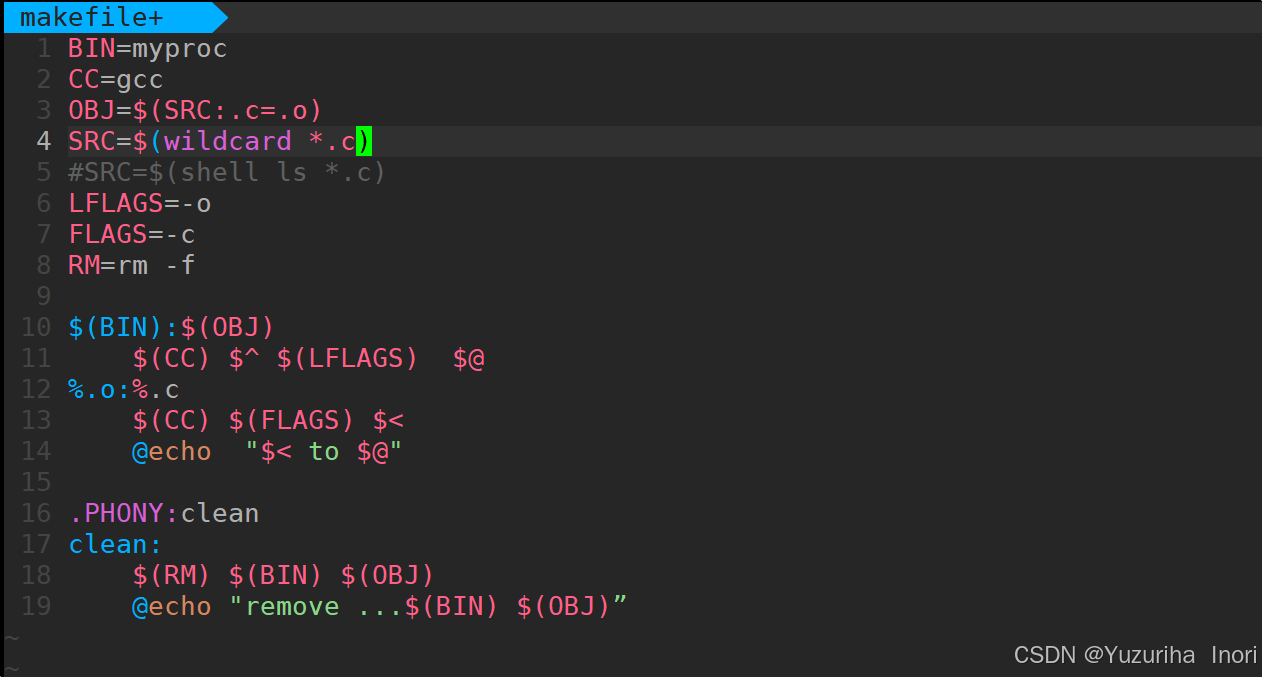
前言 上文我们讲到了Linux中的编译器gcc/g 【Linux】编译器gcc/g及其库的详细介绍-CSDN博客 本来我们将一个对于编译来说很重要的工具:make/makfile 1.背景 在一个工程中源文件不计其数,其按类型、功能、模块分别放在若干个目录中,mak…...
欢乐熊大话蓝牙知识17:多连接 BLE 怎么设计服务不会乱?分层思维来救场!
多连接 BLE 怎么设计服务不会乱?分层思维来救场! 作者按: 你是不是也遇到过 BLE 多连接时,调试现场像网吧“掉线风暴”? 温度传感器连上了,心率带丢了;一边 OTA 更新,一边通知卡壳。…...

自定义线程池1.2
自定义线程池 1.2 1. 简介 上次我们实现了 1.1 版本,将线程池中的线程数量交给使用者决定,并且将线程的创建延迟到任务提交的时候,在本文中我们将对这个版本进行如下的优化: 在新建线程时交给线程一个任务。让线程在某种情况下…...
从0开始学习R语言--Day17--Cox回归
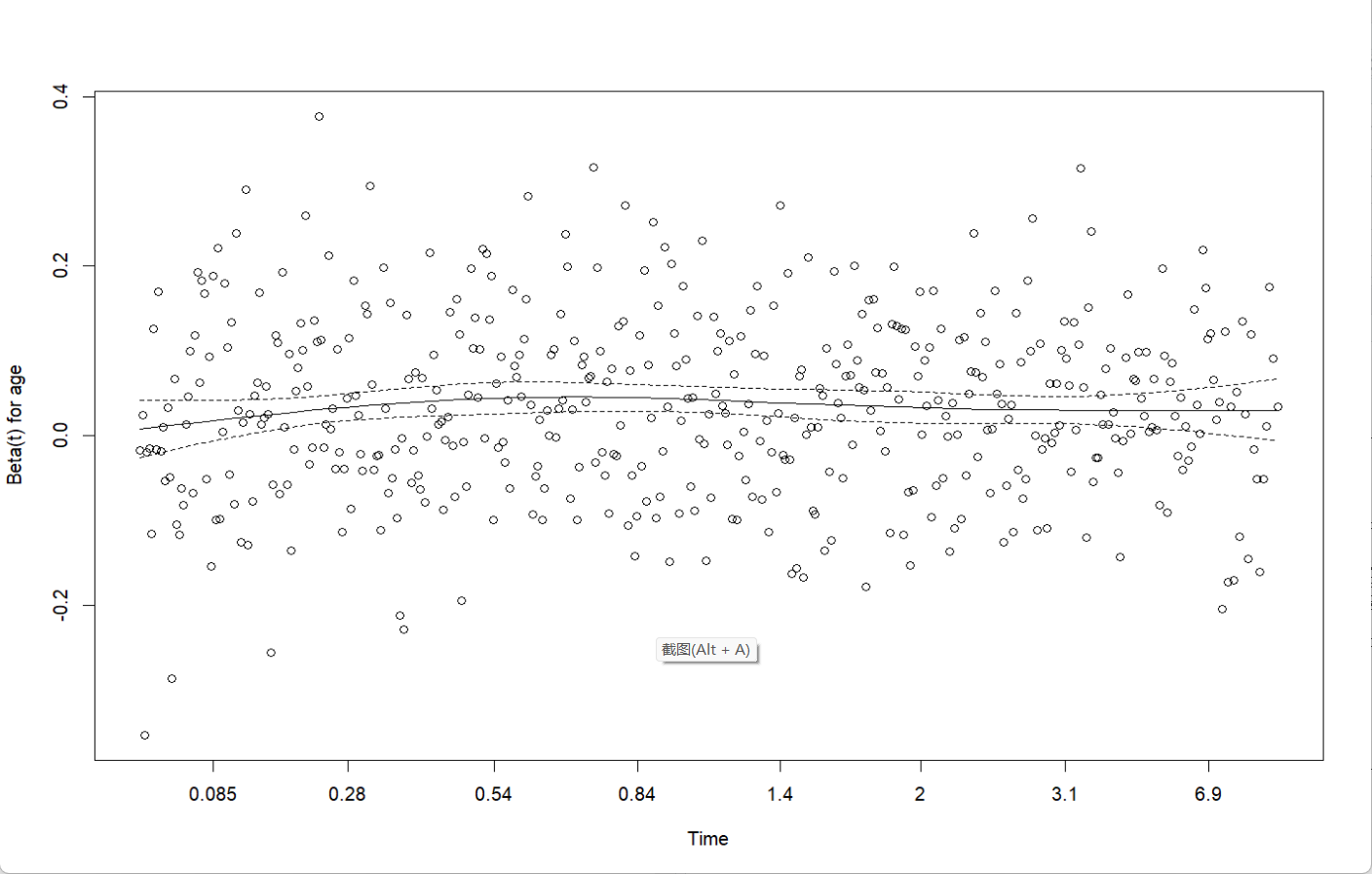
Cox回归 在用医疗数据作分析时,最常见的是去预测某类病的患者的死亡率或预测他们的结局。但是我们得到的病人数据,往往会有很多的协变量,即使我们通过计算来减少指标对结果的影响,我们的数据中依然会有很多的协变量,且…...