
SpringBoot开发中如何缓存数据, 减少数据库的访问频率?
一:自定义是否开启缓存
方法一:
在不同环境的配置文件中如application-dev.yml、application-test.yml、application-prod.yml,修改 spring.cache.type = none;
spring:cache:type: none
方法二:
自定义配置
application.yml:
## 开启数据缓存
caching:enabled: true
com.scaffold.test.config.CacheConfig
缓存配置文件
@Configuration
@EnableCaching
//配置文件读取是否启用此配置
@ConditionalOnProperty(prefix = "caching", name = "enabled", havingValue = "true")
public class CacheConfig {}
二:simpleCacheManage
simpleCacheManage 基于ConcurrentHashMap 实现,不依赖其他库,如果增加了注解@EnableCaching,默认开启缓存,可以通过设置cache-names限制缓存列表
1.设置缓存列表
application.yml
spring:cache:type: simplecache-names: cache1,cache2
2.添加maven依赖:
<!-- cache 依赖 -->
<dependency><groupId>org.springframework.boot</groupId><artifactId>spring-boot-starter-cache</artifactId>
</dependency>
3.使用注解
注意:所有的注解是加到实现类serviceImpl方法上的
| 注解 | 描述 |
| @Cacheable | 在方法执行前 Spring 先查看缓存中是否有数据,若有,则直接返回缓存数据;若无数据,调用方法将方法返回值放入缓存中 |
| @CachePut | 无论怎样,都会将方法的返回值放到缓存中。 |
| @CacheEvict | 将一条或多条数据从缓存中删除 |
| @Caching | 可以通过 @Caching 注解组合多个注解策略在一个方法 |
@Cacheable、@CachePut、@CacheEvict 都有 value 属性,指定的是要使用的缓存名称;key 属性指定的是数据在缓存中存储的键。
4.代码实现:
4.1配置类
package com.scaffold.test.config;import org.springframework.boot.autoconfigure.condition.ConditionalOnProperty;
import org.springframework.cache.CacheManager;
import org.springframework.cache.annotation.EnableCaching;
import org.springframework.cache.concurrent.ConcurrentMapCacheManager;
import org.springframework.context.annotation.Bean;
import org.springframework.context.annotation.Configuration;import java.time.Duration;/*** 缓存配置文件* 配置文件读取是否启用此配置* @author alex*/
@Configuration
@EnableCaching
@ConditionalOnProperty(prefix = "caching", name = "enabled", havingValue = "true")
public class CacheConfig {@Beanpublic CacheManager cacheManager() {return new ConcurrentMapCacheManager("cacheData");}}
4.2实体类
package com.scaffold.test.entity;import lombok.Data;
import lombok.EqualsAndHashCode;import java.io.Serializable;/*** @author alex wong*/
@Data
@EqualsAndHashCode(callSuper = false)
public class Student implements Serializable {private static final long serialVersionUID=1L;private int id;private String name;private Integer age;}
4.3service层
package com.scaffold.test.service;import com.scaffold.test.entity.Student;
import com.baomidou.mybatisplus.extension.service.IService;import java.util.List;/*** <p>* 服务类* </p>** @author alex wong*/
public interface StudentService extends IService<Student> {List<Student> findAll();Student findStudent(Student student);Student testStudent(String text);void deleteStudent(Student student);void saveStudent(Student student);}
4.4service实现类
package com.scaffold.test.service.impl;import com.baomidou.mybatisplus.extension.service.impl.ServiceImpl;
import com.scaffold.test.entity.Student;
import com.scaffold.test.mapper.StudentMapper;
import com.scaffold.test.service.StudentService;
import lombok.extern.slf4j.Slf4j;
import org.springframework.cache.annotation.CacheEvict;
import org.springframework.cache.annotation.CachePut;
import org.springframework.cache.annotation.Cacheable;
import org.springframework.stereotype.Service;import javax.annotation.Resource;
import java.util.List;/*** <p>*  服务实现类* </p>** @author alex wong*/@Slf4j
@Service
public class StudentServiceImpl extends ServiceImpl<StudentMapper, Student> implements StudentService {@Resourceprivate StudentMapper studentMapper;@Override@Cacheable(value = "cacheData")public List<Student> findAll(){return studentMapper.selectAll();}/*** 缓存查询数据* @Cacheable 缓存数据到缓存 student 中* 其中缓存名称为 student 数据的 key 是 student 的 id* @param student s* @return*/@Override@Cacheable(value = "cacheData", key = "#student.id")public Student findStudent(Student student) {log.warn("增加了student为{}的数据缓存", student);int id = student.getId();if(id == 0){return null;}return studentMapper.findStudent(student);}/*** 删除缓存* @CacheEvict 从缓存 student 中删除* 其中缓存名称为 student 数据的 key 是 student 的 id* @param student s*/@Override@CacheEvict(value = "cacheData", key = "#student.id")public void deleteStudent(Student student) {log.warn("删除了student为{}的数据缓存", student);}/*** @CachePut 缓存新增的或更新的数据到缓存* 其中缓存名称为 student 数据的 key 是 student 的 id* @param student*/@Override@CachePut(value = "cacheData", key = "#student.id")public void saveStudent(Student student) {log.warn("保存了id、key 为{}的数据缓存", student);studentMapper.insertStudent(student);}@Override@Cacheable(value = "cacheData", key = "#text")public Student testStudent(String text) {System.out.println("test" + text);Student student = new Student();student.setName(text);return student;}
}
4.5dao层接口:
package com.scaffold.test.mapper;import com.baomidou.mybatisplus.core.mapper.BaseMapper;
import com.scaffold.test.entity.Student;import java.util.List;/*** <p>* Mapper 接口* </p>** @author alex wong*/
public interface StudentMapper extends BaseMapper<Student> {List<Student> selectAll();Student findStudent(Student student);int insertStudent(Student student);
}
4.6Mapper。xml文件
<?xml version="1.0" encoding="UTF-8"?>
<!DOCTYPE mapper PUBLIC "-//mybatis.org//DTD Mapper 3.0//EN" "http://mybatis.org/dtd/mybatis-3-mapper.dtd">
<mapper namespace="com.scaffold.test.mapper.StudentMapper"><!-- 通用查询映射结果 --><resultMap id="BaseResultMap" type="com.scaffold.test.entity.Student"><result column="id" property="id"/><result column="name" property="name"/><result column="age" property="age"/></resultMap><!-- 通用查询结果列 --><sql id="Base_Column_List">id,name, age</sql><sql id="Where_Condition"><where><if test="id != null and id != ''">id=#{id}</if><if test="name != null and name != ''">and name=#{name}</if><if test="age != null and age != ''">and age=#{age}</if></where></sql><insert id="insertStudent">insert student(id, name, age)values(#{id}, #{name}, #{age})</insert><select id="selectAll" resultMap="BaseResultMap">select * from student</select><select id="findStudent" resultType="com.scaffold.test.entity.Student">select * from student<include refid="Where_Condition"></include></select>
</mapper>
4.7sql
SET NAMES utf8mb4;
SET FOREIGN_KEY_CHECKS = 0;-- ----------------------------
-- Table structure for student
-- ----------------------------
DROP TABLE IF EXISTS `student`;
CREATE TABLE `student` (`id` int(11) NOT NULL,`name` varchar(255) CHARACTER SET utf8mb4 COLLATE utf8mb4_0900_ai_ci NOT NULL,`age` int(11) DEFAULT NULL,PRIMARY KEY (`id`)
) ENGINE=InnoDB DEFAULT CHARSET=utf8mb4 COLLATE=utf8mb4_0900_ai_ci;-- ----------------------------
-- Records of student
-- ----------------------------
INSERT INTO `student` VALUES (1, '1', 2323);
INSERT INTO `student` VALUES (2, '2', 2323);
INSERT INTO `student` VALUES (3, '3', 2323);SET FOREIGN_KEY_CHECKS = 1;
4.8Controller层
package com.scaffold.test.controller;import com.scaffold.test.entity.Student;
import com.scaffold.test.service.StudentService;
import org.springframework.beans.factory.annotation.Autowired;
import org.springframework.web.bind.annotation.GetMapping;
import org.springframework.web.bind.annotation.RequestMapping;
import org.springframework.web.bind.annotation.RequestParam;
import org.springframework.web.bind.annotation.RestController;import java.util.List;/*** <p>*  前端控制器* </p>** @author alex wong*/
@RestController
@RequestMapping("/student")
public class StudentController {@Autowiredprivate StudentService studentService;@GetMapping("list")public List<Student> getAll(){return studentService.findAll();}@GetMapping("add")public void addStudent(Student student){studentService.saveStudent(student);}@GetMapping("find")public Student findStudent(Student student){return studentService.findStudent(student);}@GetMapping("delete")public void deleteStudent(Student student){studentService.deleteStudent(student);}@GetMapping("test")public Student test(@RequestParam String text){return studentService.testStudent(text);}
}
相关文章:

SpringBoot开发中如何缓存数据, 减少数据库的访问频率?
一:自定义是否开启缓存 方法一: 在不同环境的配置文件中如application-dev.yml、application-test.yml、application-prod.yml,修改 spring.cache.type none; spring:cache:type: none 方法二: 自定义配置 application.yml&…...

PostgreSQL如何在windows/linux开启归档
linux开启归档: archive_mode onarchive_command test ! -f /mnt/pg12/archivedir/%f && cp %p /mnt/pg12/archivedir/%fwindows开启归档: archive_mode onarchive_command copy "%p" "C:\\server\\pg12\\archivedir\\%f&q…...

【启明智显分享】基于国产Model3芯片的7寸触摸屏助力智慧医疗,电子床头屏提升护理交互
未来医院必然是以信息化为基础,以物联网为特征,以医疗为核心的服务型医院。病房作为医院的重要服务场所,成为智慧医院建设的重要一环。 为提高医护人员与患者的互动交流,给医疗注入智慧元素,让患者享受智能服务&#…...

从理论到实践:如何用 TDengine 打造完美数据模型
在用 TDengine 进行数据建模之前,我们需要回答两个关键问题:建模的目标用户是谁?他们的具体需求是什么?在一个典型的时序数据管理方案中,数据采集和数据应用是两个主要环节。如下图所示: 对于数据采集工程师…...

可以免费合并pdf的软件 合并pdf文件的软件免费 合并pdf的软件免费
在数字化办公的今天,pdf格式因其稳定性和跨平台兼容性被广泛使用。然而,当我们需要将多个 pdf 文件合并为一个时,却往往感到力不从心。本文将为你介绍几款强大的pdf文件合并软件,让你轻松管理文档。 方法一、使用pdf转换器 步骤1…...

【排序 滑动窗口 】1498. 满足条件的子序列数目
本文涉及至知识点 排序 C算法:滑动窗口总结 LeetCode1498. 满足条件的子序列数目 给你一个整数数组 nums 和一个整数 target 。 请你统计并返回 nums 中能满足其最小元素与最大元素的 和 小于或等于 target 的 非空 子序列的数目。 由于答案可能很大,…...

RabbitMQ普通集群搭建指南
RabbitMQ普通集群搭建指南 本文已经完全迁移至,www.geekery.cn 后续不在此更新 目标架构 本次搭建的目标是构建一个由三个节点组成的RabbitMQ集群,节点信息如下: rabbit02: IP地址 192.168.10.132rabbit03: IP地址 192.168.10.133rabbit04:…...
AGV平面坐标系变换公式及实例
1、AGV坐标系简介 如上图,小车前后对角是有激光雷达的,其坐标系称为激光坐标系,采用极坐标系体现。中间为车体坐标系,激光坐标系相对于车体坐标系关系不变;左下角是地图坐标系,小车扫图后,建立的…...

es切片和集群
解决单点故障 支持高并发 解决海量数据 1.cluster 集群:包含多个节点,每个节点属于哪个集群是通过一个集群名称(集群名称,默认是elasticsearch)来决定的,对于中小型应用来说,刚开始一个集群就…...

IEEE官方列表会议 | 第三届能源与环境工程国际会议(CFEEE 2024)
会议简介 Brief Introduction 2024年第三届能源与环境工程国际会议(CFEEE 2024) 会议时间:2024年12月2日-4日 召开地点:澳大利亚凯恩斯 大会官网:CFEEE 2024-2024 International Conference on Frontiers of Energy and Environment Engineer…...

深度学习中的正则化技术 - Dropout篇
序言 在深度学习的浩瀚领域中,模型过拟合一直是研究者们面临的挑战之一。当模型在训练集上表现得近乎完美,却难以在未见过的数据(测试集)上保持同样优异的性能时,过拟合现象便悄然发生。为了有效缓解这一问题…...
 》)
《昇思 25 天学习打卡营第 18 天 | 扩散模型(Diffusion Models) 》
《昇思 25 天学习打卡营第 18 天 | 扩散模型(Diffusion Models) 》 活动地址:https://xihe.mindspore.cn/events/mindspore-training-camp 签名:Sam9029 扩散模型(Diffusion Models) 扩散模型概述 扩散模…...

【Django+Vue3 线上教育平台项目实战】Elasticsearch实战指南:从基础到构建课程搜索与数据同步接口
文章目录 前言一、Elasticsearch倒排索引 二、Docker 搭建 ESDocker 安装Docker 搭建 ES 三、ES基础语法创建索引查看索引删除索引添加数据查询数据修改数据删除数据条件查询分页查询排序 多条件查询andor 范围查询 四、ES在项目中的应用示例 前言 在数据驱动的时代,…...

libtins初探-抓包嗅探
libtin 一、概述1. 可移植性2. 特性 二、基础知识1. PDU2. 地址类3. 地址范围类4. 网络接口5. 写pcap文件 三、嗅探1.嗅探基础2. 嗅探器配置3. 循环嗅探4. 使用迭代器嗅探6. 包对象7. 读取pcap文件8. 包的解析 四、发送包1. 发送网络层pdu2. 发送链路层pdu3. 发送和接收响应校验…...

大语言模型-Bert-Bidirectional Encoder Representation from Transformers
一、背景信息: Bert是2018年10月由Google AI研究院提出的一种预训练模型。 主要用于自然语言处理(NLP)任务,特别是机器阅读理、文本分类、序列标注等任务。 BERT的网络架构使用的是多层Transformer结构,有效的解决了长…...

bug诞生记——动态库加载错乱导致程序执行异常
大纲 背景问题发生问题猜测和分析过程是不是编译了本工程中的其他代码是不是有缓存是不是编译了非本工程的文件是不是调用了其他可执行文件查看CMakefiles分析源码检查正在运行程序的动态库 解决方案 这个案例发生在我研究ROS 2的测试Demo时发生的。 整体现象是:修改…...

Matlab演示三维坐标系旋转
function showTwo3DCoordinateSystemsWithAngleDifference() clear all close all % 第一个三维坐标系 origin1 [0 0 0]; x_axis1 [1 0 0]; y_axis1 [0 1 0]; z_axis1 [0 0 1];% 绕 x 轴旋转 30 度的旋转矩阵 theta_x 30 * pi / 180; rotation_matrix_x [1 0 0; 0 cos(th…...

redis的持久化机制以及集群模式
1.redis的持久化机制 内存数据库具有高速读写的优势,但由于数据存储在内存中,一旦服务器停止或崩溃,所有数据将会丢失。持久化机制的引入旨在将内存中的数据持久化到磁盘上,从而在服务器重启后能够恢复数据,提供更好的…...

【论文解读】大模型算法发展
一、简要介绍 论文研究了自深度学习出现以来,预训练语言模型的算法的改进速度。使用Wikitext和Penn Treebank上超过200个语言模型评估的数据集(2012-2023年),论文发现达到设定性能阈值所需的计算大约每8个月减半一次,95%置信区间约为5到14个月…...

WebApi配置Swagger、Serilog、NewtonsoftJson、Sqlsugar、依赖注入框架Autofac、MD5加密
文章目录 项目准备1、创建WebApi项目配置Swagger、Serilog、NewtonsoftJsonNewtonsoftJsonSwaggerSerilog 使用ORM框架SqlSugar创建Service类库构成MVC框架使用AutoFac进行依赖注入 创建用户登录接口添加用户时进行安全防护 项目准备 1、创建WebApi项目 配置Swagger、Serilog…...
)
云计算——弹性云计算器(ECS)
弹性云服务器:ECS 概述 云计算重构了ICT系统,云计算平台厂商推出使得厂家能够主要关注应用管理而非平台管理的云平台,包含如下主要概念。 ECS(Elastic Cloud Server):即弹性云服务器,是云计算…...

反向工程与模型迁移:打造未来商品详情API的可持续创新体系
在电商行业蓬勃发展的当下,商品详情API作为连接电商平台与开发者、商家及用户的关键纽带,其重要性日益凸显。传统商品详情API主要聚焦于商品基本信息(如名称、价格、库存等)的获取与展示,已难以满足市场对个性化、智能…...
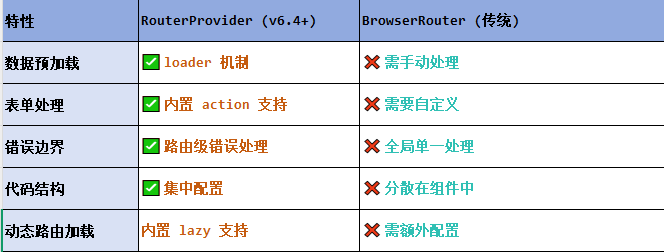
React第五十七节 Router中RouterProvider使用详解及注意事项
前言 在 React Router v6.4 中,RouterProvider 是一个核心组件,用于提供基于数据路由(data routers)的新型路由方案。 它替代了传统的 <BrowserRouter>,支持更强大的数据加载和操作功能(如 loader 和…...

使用van-uploader 的UI组件,结合vue2如何实现图片上传组件的封装
以下是基于 vant-ui(适配 Vue2 版本 )实现截图中照片上传预览、删除功能,并封装成可复用组件的完整代码,包含样式和逻辑实现,可直接在 Vue2 项目中使用: 1. 封装的图片上传组件 ImageUploader.vue <te…...
:爬虫完整流程)
Python爬虫(二):爬虫完整流程
爬虫完整流程详解(7大核心步骤实战技巧) 一、爬虫完整工作流程 以下是爬虫开发的完整流程,我将结合具体技术点和实战经验展开说明: 1. 目标分析与前期准备 网站技术分析: 使用浏览器开发者工具(F12&…...
)
python爬虫:Newspaper3k 的详细使用(好用的新闻网站文章抓取和解析的Python库)
更多内容请见: 爬虫和逆向教程-专栏介绍和目录 文章目录 一、Newspaper3k 概述1.1 Newspaper3k 介绍1.2 主要功能1.3 典型应用场景1.4 安装二、基本用法2.2 提取单篇文章的内容2.2 处理多篇文档三、高级选项3.1 自定义配置3.2 分析文章情感四、实战案例4.1 构建新闻摘要聚合器…...
)
Java入门学习详细版(一)
大家好,Java 学习是一个系统学习的过程,核心原则就是“理论 实践 坚持”,并且需循序渐进,不可过于着急,本篇文章推出的这份详细入门学习资料将带大家从零基础开始,逐步掌握 Java 的核心概念和编程技能。 …...
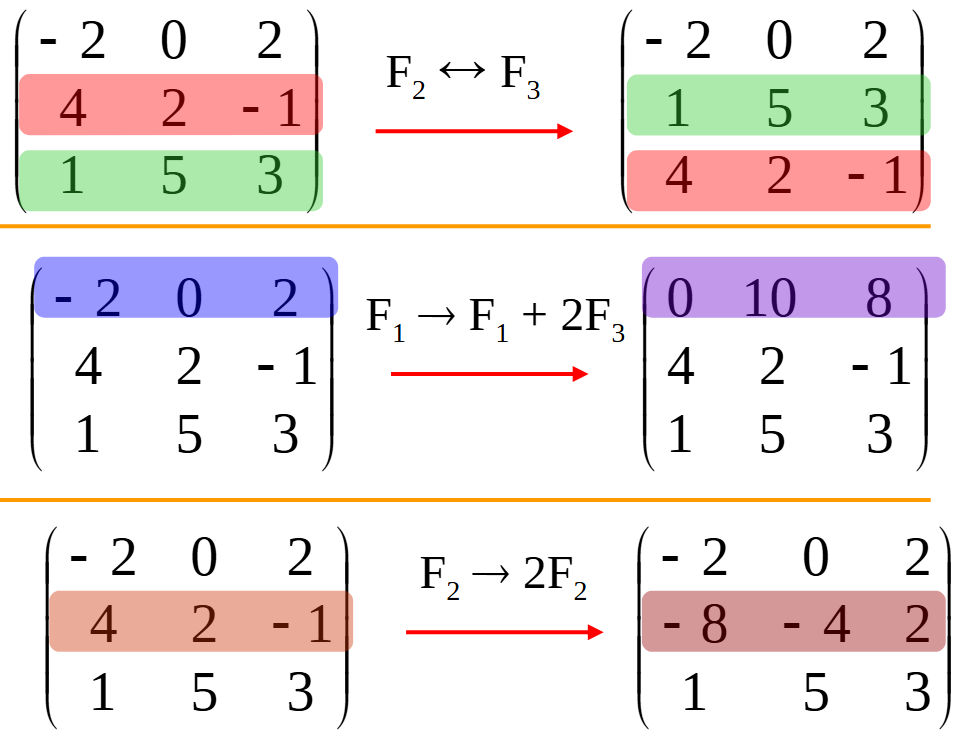
使用 SymPy 进行向量和矩阵的高级操作
在科学计算和工程领域,向量和矩阵操作是解决问题的核心技能之一。Python 的 SymPy 库提供了强大的符号计算功能,能够高效地处理向量和矩阵的各种操作。本文将深入探讨如何使用 SymPy 进行向量和矩阵的创建、合并以及维度拓展等操作,并通过具体…...
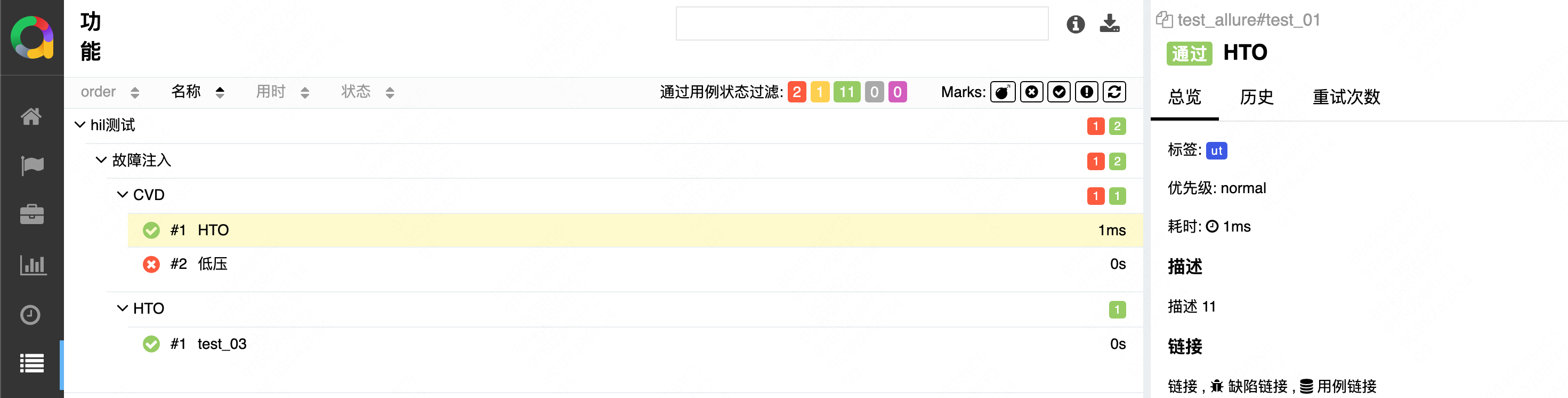
初学 pytest 记录
安装 pip install pytest用例可以是函数也可以是类中的方法 def test_func():print()class TestAdd: # def __init__(self): 在 pytest 中不可以使用__init__方法 # self.cc 12345 pytest.mark.api def test_str(self):res add(1, 2)assert res 12def test_int(self):r…...

华硕a豆14 Air香氛版,美学与科技的馨香融合
在快节奏的现代生活中,我们渴望一个能激发创想、愉悦感官的工作与生活伙伴,它不仅是冰冷的科技工具,更能触动我们内心深处的细腻情感。正是在这样的期许下,华硕a豆14 Air香氛版翩然而至,它以一种前所未有的方式&#x…...