
Appium独立测试自动化初始化脚本
1、查看环境初始化参数
确保appium已经开起来了,设置ip ,并点击启动

打开夜神模拟器,点击工具--设置


最下面的版本说明,双击进去

版本号这里再去单击。

直到进入到开发者模式。
可能我们不是开发者模式打开的状态,所以软件访问模拟器时,它有可能不让我们连。
要重启一下模拟器
重启模拟器之后,开发者模式才能生效。
此时再用命令行查看,可以看到设备号。
caps={'platformName':'Android',               #设置platformName:手机系统名称Android'platformVersion':'7.1.2',              # #设置platformVersion:手机系统版本'deviceName':'127.0.0.1:52001' ,        #设置deviceName:设备名称'appPackage':'uni.UNI765428A',          #设置appPackage:被测程序包名'appActivity':'io.dcloud.PandoraEntry'  #设置appActivity:被测程序活动名
}

手机端参数查看命令有那些。每个人设备及端口号不一样,所以需要单独看。
adb devices

查看包名
adb shell dumpsys activity activities |findstr mFocusedActivity

打开appium Inspector ,开始定位元素。
比如这个id,先点1混合定位模式,再点2开始定位,点3要定位的元素,最后拷贝它的id或者xpath

定位命令和web没什么不同
driver.find_element(By.ID,'com.android.packageinstaller:id/permission_allow_button').click()2、test_loginV1.py 跑通流程
先导入必备的包及写上版本说明
#*****************************************
#v1.0:app独立自动化测试 脚本--初始化登录
#*****************************************
#导入类库
import timefrom appium.webdriver.webdriver import WebDriver
from appium.webdriver.webdriver import By
#手机参数初始化
#查询程序包名的命令:adb shell dumpsys activity activities| findstr mFocusedActivity#设置appPackage:被测程序包名
定义程序包名的参数
caps={'platformName':'Android',               #设置platformName:手机系统名称Android'platformVersion':'7.1.2',              # #设置platformVersion:手机系统版本'deviceName':'127.0.0.1:52001' ,        #设置deviceName:设备名称'appPackage':'uni.UNI765428A',          #设置appPackage:被测程序包名'appActivity':'io.dcloud.PandoraEntry'  #设置appActivity:被测程序活动名
}
#启动appium
driver=WebDriver('http://127.0.0.1:4723/wd/hub',caps)点击允许按钮
#进行元素定位
#点击允许按钮
time.sleep(3)
driver.find_element(By.ID,'com.android.packageinstaller:id/permission_allow_button').click()
#允许电话管理

time.sleep(2)
driver.find_element(By.ID,'com.android.packageinstaller:id/permission_allow_button').click()
#输入后台服务器地址

time.sleep(5)
xpath_service='/hierarchy/android.widget.FrameLayout/android.widget.LinearLayout/android.widget.FrameLayout/android.widget.FrameLayout/android.widget.FrameLayout/android.view.ViewGroup/android.widget.FrameLayout[2]/android.widget.LinearLayout/android.webkit.WebView/android.webkit.WebView/android.view.View[1]/android.view.View/android.widget.EditText'
servicepath='https://lefeiwisdom-3pt-2t6a7-www.vip.51env.net'
driver.find_element(By.XPATH,xpath_service).clear()
time.sleep(1)
driver.find_element(By.XPATH,xpath_service).send_keys(servicepath)
#点击确定按钮
time.sleep(3)
xpath_ok="/hierarchy/android.widget.FrameLayout/android.widget.LinearLayout/android.widget.FrameLayout/android.widget.FrameLayout/android.widget.FrameLayout/android.view.ViewGroup/android.widget.FrameLayout[2]/android.widget.LinearLayout/android.webkit.WebView/android.webkit.WebView/android.view.View[2]"
driver.find_element(By.XPATH,xpath_ok).click()
#点击验证码登录按钮

xpath_check='/hierarchy/android.widget.FrameLayout/android.widget.LinearLayout/android.widget.FrameLayout/android.widget.FrameLayout/android.widget.FrameLayout/android.view.ViewGroup/android.widget.FrameLayout/android.widget.LinearLayout/android.webkit.WebView/android.webkit.WebView/android.view.View[4]'
driver.find_element(By.XPATH,xpath_check).click()
time.sleep(2)
#输入手机号码
xpath_phone='/hierarchy/android.widget.FrameLayout/android.widget.LinearLayout/android.widget.FrameLayout/android.widget.FrameLayout/android.widget.FrameLayout/android.view.ViewGroup[2]/android.widget.FrameLayout/android.widget.LinearLayout/android.webkit.WebView/android.webkit.WebView/android.view.View[5]/android.view.View/android.widget.EditText'
# id_phone='c52abd0b-3c7b-4b6f-a2a0-f386d56bebd8'
driver.find_element(By.XPATH,xpath_phone).send_keys('13800138001')
time.sleep(2)
#输入验证码
xpath_checkcode='/hierarchy/android.widget.FrameLayout/android.widget.LinearLayout/android.widget.FrameLayout/android.widget.FrameLayout/android.widget.FrameLayout/android.view.ViewGroup[2]/android.widget.FrameLayout/android.widget.LinearLayout/android.webkit.WebView/android.webkit.WebView/android.view.View[6]/android.view.View/android.widget.EditText'
driver.find_element(By.XPATH,xpath_checkcode).send_keys('111111')
#接受协议
xpath_allow='/hierarchy/android.widget.FrameLayout/android.widget.LinearLayout/android.widget.FrameLayout/android.widget.FrameLayout/android.widget.FrameLayout/android.view.ViewGroup[2]/android.widget.FrameLayout/android.widget.LinearLayout/android.webkit.WebView/android.webkit.WebView/android.view.View[9]'
time.sleep(2)
driver.find_element(By.XPATH,xpath_allow).click()
#登录按钮

time.sleep(2)
xpath_login='/hierarchy/android.widget.FrameLayout/android.widget.LinearLayout/android.widget.FrameLayout/android.widget.FrameLayout/android.widget.FrameLayout/android.view.ViewGroup[2]/android.widget.FrameLayout/android.widget.LinearLayout/android.webkit.WebView/android.webkit.WebView/android.view.View[8]'
driver.find_element(By.XPATH,xpath_login).click()
完成登录
3、test_loginV2.py 面向过程的封装
#方法0:手机驱动参数输出化设置
#方法1:两个允许按钮+服务器地址+验证码登录
#方法2:普通用户登录
传递参数driver
#*****************************************
#v2.0:app独立自动化测试 脚本--初始化登录
#优化:面向过程的封装
#方法0:手机驱动参数输出化设置
#方法1:两个允许按钮+服务器地址+验证码登录
#方法2:普通用户登录
#****************************************
#导入类库
import time
from appium.webdriver.webdriver import WebDriver
from appium.webdriver.webdriver import By
#方法0:手机驱动参数初始化
def test_cpas_init():# 手机参数初始化# ******************************************************************************************# 查询程序包名的命令:adb shell dumpsys activity activities| findstr mFocusedActivity#设置appPackage:被测程序包名caps = {'platformName': 'Android',  # 设置platformName:手机系统名称Android'platformVersion': '7.1.2',  # #设置platformVersion:手机系统版本'deviceName': '127.0.0.1:52001',  # 设置deviceName:设备名称'appPackage': 'uni.UNI765428A',  # 设置appPackage:被测程序包名'appActivity': 'io.dcloud.PandoraEntry'  # 设置appActivity:被测程序活动名}# 启动appiumdriver = WebDriver('http://127.0.0.1:4723/wd/hub', caps)# **********************************************************************************return driver#方法1:两个允许按钮+服务器地址+验证码登录
def test_login_init(driver):#进行元素定位#点击允许按钮time.sleep(2)driver.find_element(By.ID,'com.android.packageinstaller:id/permission_allow_button').click()#允许电话管理time.sleep(2)driver.find_element(By.ID,'com.android.packageinstaller:id/permission_allow_button').click()#*****************************************************************#输入后台服务器地址time.sleep(5)xpath_service='/hierarchy/android.widget.FrameLayout/android.widget.LinearLayout/android.widget.FrameLayout/android.widget.FrameLayout/android.widget.FrameLayout/android.view.ViewGroup/android.widget.FrameLayout[2]/android.widget.LinearLayout/android.webkit.WebView/android.webkit.WebView/android.view.View[1]/android.view.View/android.widget.EditText'servicepath='https://lefeiwisdom-3pt-2t6a7-www.vip.51env.net'driver.find_element(By.XPATH,xpath_service).clear()time.sleep(1)driver.find_element(By.XPATH,xpath_service).send_keys(servicepath)#点击确定按钮time.sleep(3)#***********************************************************************xpath_ok="/hierarchy/android.widget.FrameLayout/android.widget.LinearLayout/android.widget.FrameLayout/android.widget.FrameLayout/android.widget.FrameLayout/android.view.ViewGroup/android.widget.FrameLayout[2]/android.widget.LinearLayout/android.webkit.WebView/android.webkit.WebView/android.view.View[2]"driver.find_element(By.XPATH,xpath_ok).click()#***********************************************************************#点击验证码登录按钮time.sleep(4)xpath_check='/hierarchy/android.widget.FrameLayout/android.widget.LinearLayout/android.widget.FrameLayout/android.widget.FrameLayout/android.widget.FrameLayout/android.view.ViewGroup/android.widget.FrameLayout/android.widget.LinearLayout/android.webkit.WebView/android.webkit.WebView/android.view.View[4]'driver.find_element(By.XPATH,xpath_check).click()time.sleep(2)#********************************************************************************#方法2:普通用户登录
def user_login_login(driver):#输入手机号码xpath_phone='/hierarchy/android.widget.FrameLayout/android.widget.LinearLayout/android.widget.FrameLayout/android.widget.FrameLayout/android.widget.FrameLayout/android.view.ViewGroup[2]/android.widget.FrameLayout/android.widget.LinearLayout/android.webkit.WebView/android.webkit.WebView/android.view.View[5]/android.view.View/android.widget.EditText'# id_phone='c52abd0b-3c7b-4b6f-a2a0-f386d56bebd8'driver.find_element(By.XPATH,xpath_phone).send_keys('13800138001')time.sleep(2)#输入验证码xpath_checkcode='/hierarchy/android.widget.FrameLayout/android.widget.LinearLayout/android.widget.FrameLayout/android.widget.FrameLayout/android.widget.FrameLayout/android.view.ViewGroup[2]/android.widget.FrameLayout/android.widget.LinearLayout/android.webkit.WebView/android.webkit.WebView/android.view.View[6]/android.view.View/android.widget.EditText'driver.find_element(By.XPATH,xpath_checkcode).send_keys('111111')#接受协议xpath_allow='/hierarchy/android.widget.FrameLayout/android.widget.LinearLayout/android.widget.FrameLayout/android.widget.FrameLayout/android.widget.FrameLayout/android.view.ViewGroup[2]/android.widget.FrameLayout/android.widget.LinearLayout/android.webkit.WebView/android.webkit.WebView/android.view.View[9]'time.sleep(2)driver.find_element(By.XPATH,xpath_allow).click()#登录按钮time.sleep(2)xpath_login='/hierarchy/android.widget.FrameLayout/android.widget.LinearLayout/android.widget.FrameLayout/android.widget.FrameLayout/android.widget.FrameLayout/android.view.ViewGroup[2]/android.widget.FrameLayout/android.widget.LinearLayout/android.webkit.WebView/android.webkit.WebView/android.view.View[8]'driver.find_element(By.XPATH,xpath_login).click()if __name__ == '__main__':driver=test_cpas_init()test_login_init(driver)user_login_login(driver)
4、test_loginV3.py 作者登录
#v3.0:app独立自动化测试 脚本--初始化登录
#优化:面向过程的封装
#方法0:手机驱动参数输出化设置
#方法1:两个允许按钮+服务器地址+验证码登录
#方法3:作者登录
#*****************************************
#v3.0:app独立自动化测试 脚本--初始化登录
#优化:面向过程的封装
#方法0:手机驱动参数输出化设置
#方法1:两个允许按钮+服务器地址+验证码登录
#方法3:作者登录
#****************************************
#导入类库
import time
from appium.webdriver.webdriver import WebDriver
from appium.webdriver.webdriver import By
#方法0:手机驱动参数初始化
def test_cpas_init():# 手机参数初始化# ******************************************************************************************# 查询程序包名的命令:adb shell dumpsys activity activities| findstr mFocusedActivity#设置appPackage:被测程序包名caps = {'platformName': 'Android',  # 设置platformName:手机系统名称Android'platformVersion': '7.1.2',  # #设置platformVersion:手机系统版本'deviceName': '127.0.0.1:52001',  # 设置deviceName:设备名称'appPackage': 'uni.UNI765428A',  # 设置appPackage:被测程序包名'appActivity': 'io.dcloud.PandoraEntry'  # 设置appActivity:被测程序活动名}# 启动appiumdriver = WebDriver('http://127.0.0.1:4723/wd/hub', caps)# **********************************************************************************return driver#方法1:两个允许按钮+服务器地址+验证码登录
def test_login_init(driver):#进行元素定位#点击允许按钮time.sleep(2)driver.find_element(By.ID,'com.android.packageinstaller:id/permission_allow_button').click()#允许电话管理time.sleep(2)driver.find_element(By.ID,'com.android.packageinstaller:id/permission_allow_button').click()#*****************************************************************#输入后台服务器地址time.sleep(5)xpath_service='/hierarchy/android.widget.FrameLayout/android.widget.LinearLayout/android.widget.FrameLayout/android.widget.FrameLayout/android.widget.FrameLayout/android.view.ViewGroup/android.widget.FrameLayout[2]/android.widget.LinearLayout/android.webkit.WebView/android.webkit.WebView/android.view.View[1]/android.view.View/android.widget.EditText'servicepath='https://lefeiwisdom-3pt-2t6a7-www.vip.51env.net'driver.find_element(By.XPATH,xpath_service).clear()time.sleep(1)driver.find_element(By.XPATH,xpath_service).send_keys(servicepath)#点击确定按钮time.sleep(3)#***********************************************************************xpath_ok="/hierarchy/android.widget.FrameLayout/android.widget.LinearLayout/android.widget.FrameLayout/android.widget.FrameLayout/android.widget.FrameLayout/android.view.ViewGroup/android.widget.FrameLayout[2]/android.widget.LinearLayout/android.webkit.WebView/android.webkit.WebView/android.view.View[2]"driver.find_element(By.XPATH,xpath_ok).click()#***********************************************************************#点击验证码登录按钮time.sleep(4)xpath_check='/hierarchy/android.widget.FrameLayout/android.widget.LinearLayout/android.widget.FrameLayout/android.widget.FrameLayout/android.widget.FrameLayout/android.view.ViewGroup/android.widget.FrameLayout/android.widget.LinearLayout/android.webkit.WebView/android.webkit.WebView/android.view.View[4]'driver.find_element(By.XPATH,xpath_check).click()time.sleep(2)#********************************************************************************#方法3:作者登录
def test_author_login(driver):time.sleep(5)#切换到作者登录标签xpath_author='/hierarchy/android.widget.FrameLayout/android.widget.LinearLayout/android.widget.FrameLayout/android.widget.FrameLayout/android.widget.FrameLayout/android.view.ViewGroup[2]/android.widget.FrameLayout/android.widget.LinearLayout/android.webkit.WebView/android.webkit.WebView/android.view.View[3]'driver.find_element(By.XPATH,xpath_author).click()time.sleep(2)#输入手机号码xpath_phone='/hierarchy/android.widget.FrameLayout/android.widget.LinearLayout/android.widget.FrameLayout/android.widget.FrameLayout/android.widget.FrameLayout/android.view.ViewGroup[2]/android.widget.FrameLayout/android.widget.LinearLayout/android.webkit.WebView/android.webkit.WebView/android.view.View[5]/android.view.View/android.widget.EditText'# id_phone='c52abd0b-3c7b-4b6f-a2a0-f386d56bebd8'driver.find_element(By.XPATH,xpath_phone).send_keys('13900139001')time.sleep(2)#输入验证码xpath_checkcode='/hierarchy/android.widget.FrameLayout/android.widget.LinearLayout/android.widget.FrameLayout/android.widget.FrameLayout/android.widget.FrameLayout/android.view.ViewGroup[2]/android.widget.FrameLayout/android.widget.LinearLayout/android.webkit.WebView/android.webkit.WebView/android.view.View[6]/android.view.View/android.widget.EditText'driver.find_element(By.XPATH,xpath_checkcode).send_keys('111111')#接受协议xpath_allow='/hierarchy/android.widget.FrameLayout/android.widget.LinearLayout/android.widget.FrameLayout/android.widget.FrameLayout/android.widget.FrameLayout/android.view.ViewGroup[2]/android.widget.FrameLayout/android.widget.LinearLayout/android.webkit.WebView/android.webkit.WebView/android.view.View[9]'time.sleep(2)driver.find_element(By.XPATH,xpath_allow).click()#登录按钮time.sleep(2)xpath_login='/hierarchy/android.widget.FrameLayout/android.widget.LinearLayout/android.widget.FrameLayout/android.widget.FrameLayout/android.widget.FrameLayout/android.view.ViewGroup[2]/android.widget.FrameLayout/android.widget.LinearLayout/android.webkit.WebView/android.webkit.WebView/android.view.View[8]'driver.find_element(By.XPATH,xpath_login).click()if __name__ == '__main__':driver=test_cpas_init()test_login_init(driver)test_author_login(driver)

5、test_loginV4.py #优化:面向过程的封装,可选哪种方法的登录
#*****************************************
#v4.0:app独立自动化测试 脚本--初始化登录
#优化:面向过程的封装,可选哪种方法的登录
#方法0:手机驱动参数输出化设置
#方法1:两个允许按钮+服务器地址+验证码登录
#方法2:普通用户登录/作者登录
#****************************************
#*****************************************
#v4.0:app独立自动化测试 脚本--初始化登录
#优化:面向过程的封装,可选哪种方法的登录
#方法0:手机驱动参数输出化设置
#方法1:两个允许按钮+服务器地址+验证码登录
#方法2:普通用户登录/作者登录
#****************************************
#导入类库
import time
from appium.webdriver.webdriver import WebDriver
from appium.webdriver.webdriver import By
#方法0:手机驱动参数初始化
def test_cpas_init():# 手机参数初始化# ******************************************************************************************# 查询程序包名的命令:adb shell dumpsys activity activities| findstr mFocusedActivity#设置appPackage:被测程序包名caps = {'platformName': 'Android',  # 设置platformName:手机系统名称Android'platformVersion': '7.1.2',  # #设置platformVersion:手机系统版本'deviceName': '127.0.0.1:52001',  # 设置deviceName:设备名称'appPackage': 'uni.UNI765428A',  # 设置appPackage:被测程序包名'appActivity': 'io.dcloud.PandoraEntry'  # 设置appActivity:被测程序活动名}# 启动appiumdriver = WebDriver('http://127.0.0.1:4723/wd/hub', caps)# **********************************************************************************return driver#方法1:两个允许按钮+服务器地址+验证码登录
def test_login_init(driver):#进行元素定位#点击允许按钮time.sleep(2)driver.find_element(By.ID,'com.android.packageinstaller:id/permission_allow_button').click()#允许电话管理time.sleep(2)driver.find_element(By.ID,'com.android.packageinstaller:id/permission_allow_button').click()#*****************************************************************#输入后台服务器地址time.sleep(5)xpath_service='/hierarchy/android.widget.FrameLayout/android.widget.LinearLayout/android.widget.FrameLayout/android.widget.FrameLayout/android.widget.FrameLayout/android.view.ViewGroup/android.widget.FrameLayout[2]/android.widget.LinearLayout/android.webkit.WebView/android.webkit.WebView/android.view.View[1]/android.view.View/android.widget.EditText'servicepath='https://lefeiwisdom-3pt-2t6a7-www.vip.51env.net'driver.find_element(By.XPATH,xpath_service).clear()time.sleep(1)driver.find_element(By.XPATH,xpath_service).send_keys(servicepath)#点击确定按钮time.sleep(3)#***********************************************************************xpath_ok="/hierarchy/android.widget.FrameLayout/android.widget.LinearLayout/android.widget.FrameLayout/android.widget.FrameLayout/android.widget.FrameLayout/android.view.ViewGroup/android.widget.FrameLayout[2]/android.widget.LinearLayout/android.webkit.WebView/android.webkit.WebView/android.view.View[2]"driver.find_element(By.XPATH,xpath_ok).click()#***********************************************************************#点击验证码登录按钮time.sleep(4)xpath_check='/hierarchy/android.widget.FrameLayout/android.widget.LinearLayout/android.widget.FrameLayout/android.widget.FrameLayout/android.widget.FrameLayout/android.view.ViewGroup/android.widget.FrameLayout/android.widget.LinearLayout/android.webkit.WebView/android.webkit.WebView/android.view.View[4]'driver.find_element(By.XPATH,xpath_check).click()time.sleep(2)#********************************************************************************#方法2:作者登录
def test_author_login(driver,usertype):time.sleep(5)if usertype==1:#切换到作者登录标签xpath_author='/hierarchy/android.widget.FrameLayout/android.widget.LinearLayout/android.widget.FrameLayout/android.widget.FrameLayout/android.widget.FrameLayout/android.view.ViewGroup[2]/android.widget.FrameLayout/android.widget.LinearLayout/android.webkit.WebView/android.webkit.WebView/android.view.View[3]'driver.find_element(By.XPATH,xpath_author).click()userphone='13900139001'else:userphone='13800138001'time.sleep(2)#输入手机号码xpath_phone='/hierarchy/android.widget.FrameLayout/android.widget.LinearLayout/android.widget.FrameLayout/android.widget.FrameLayout/android.widget.FrameLayout/android.view.ViewGroup[2]/android.widget.FrameLayout/android.widget.LinearLayout/android.webkit.WebView/android.webkit.WebView/android.view.View[5]/android.view.View/android.widget.EditText'# id_phone='c52abd0b-3c7b-4b6f-a2a0-f386d56bebd8'driver.find_element(By.XPATH, xpath_phone).send_keys(userphone)time.sleep(2)#输入验证码xpath_checkcode='/hierarchy/android.widget.FrameLayout/android.widget.LinearLayout/android.widget.FrameLayout/android.widget.FrameLayout/android.widget.FrameLayout/android.view.ViewGroup[2]/android.widget.FrameLayout/android.widget.LinearLayout/android.webkit.WebView/android.webkit.WebView/android.view.View[6]/android.view.View/android.widget.EditText'driver.find_element(By.XPATH,xpath_checkcode).send_keys('111111')#接受协议xpath_allow='/hierarchy/android.widget.FrameLayout/android.widget.LinearLayout/android.widget.FrameLayout/android.widget.FrameLayout/android.widget.FrameLayout/android.view.ViewGroup[2]/android.widget.FrameLayout/android.widget.LinearLayout/android.webkit.WebView/android.webkit.WebView/android.view.View[9]'time.sleep(2)driver.find_element(By.XPATH,xpath_allow).click()#登录按钮time.sleep(2)xpath_login='/hierarchy/android.widget.FrameLayout/android.widget.LinearLayout/android.widget.FrameLayout/android.widget.FrameLayout/android.widget.FrameLayout/android.view.ViewGroup[2]/android.widget.FrameLayout/android.widget.LinearLayout/android.webkit.WebView/android.webkit.WebView/android.view.View[8]'driver.find_element(By.XPATH,xpath_login).click()if __name__ == '__main__':#进行哪种方法的登录#usertype=0 表示普通用户登录,=1为作者登录usertype=int(input("请输入数字,0 表示普通用户登录,1为作者登录"))driver=test_cpas_init()test_login_init(driver)test_author_login(driver,usertype)
6、test_loginV5.py #优化:面向对象的封装,可选哪种方法的登录
#v5.0:app独立自动化测试 脚本--初始化登录
#优化:面向对象的封装,可选哪种方法的登录
#方法0:手机驱动参数输出化设置
#方法1:两个允许按钮+服务器地址+验证码登录
#方法2:普通用户登录/作者登录
#将以上方法封装到测试类中
#*****************************************
#v5.0:app独立自动化测试 脚本--初始化登录
#优化:面向对象的封装,可选哪种方法的登录
#方法0:手机驱动参数输出化设置
#方法1:两个允许按钮+服务器地址+验证码登录
#方法2:普通用户登录/作者登录
#将以上方法封装到测试类中
#****************************************
#导入类库
import time
from appium.webdriver.webdriver import WebDriver
from appium.webdriver.webdriver import By
class Test_login():#方法0:手机驱动参数初始化def test_cpas_init(self):# 手机参数初始化# ******************************************************************************************# 查询程序包名的命令:adb shell dumpsys activity activities| findstr mFocusedActivity#设置appPackage:被测程序包名caps = {'platformName': 'Android',  # 设置platformName:手机系统名称Android'platformVersion': '7.1.2',  # #设置platformVersion:手机系统版本'deviceName': '127.0.0.1:52001',  # 设置deviceName:设备名称'appPackage': 'uni.UNI765428A',  # 设置appPackage:被测程序包名'appActivity': 'io.dcloud.PandoraEntry'  # 设置appActivity:被测程序活动名}# 启动appiumdriver = WebDriver('http://127.0.0.1:4723/wd/hub', caps)# **********************************************************************************return driver#方法1:两个允许按钮+服务器地址+验证码登录def test_login_init(self,driver):#进行元素定位#点击允许按钮time.sleep(2)driver.find_element(By.ID,'com.android.packageinstaller:id/permission_allow_button').click()#允许电话管理time.sleep(2)driver.find_element(By.ID,'com.android.packageinstaller:id/permission_allow_button').click()#*****************************************************************#输入后台服务器地址time.sleep(5)xpath_service='/hierarchy/android.widget.FrameLayout/android.widget.LinearLayout/android.widget.FrameLayout/android.widget.FrameLayout/android.widget.FrameLayout/android.view.ViewGroup/android.widget.FrameLayout[2]/android.widget.LinearLayout/android.webkit.WebView/android.webkit.WebView/android.view.View[1]/android.view.View/android.widget.EditText'servicepath='https://lefeiwisdom-3pt-2t6a7-www.vip.51env.net'driver.find_element(By.XPATH,xpath_service).clear()time.sleep(1)driver.find_element(By.XPATH,xpath_service).send_keys(servicepath)#点击确定按钮time.sleep(3)#***********************************************************************xpath_ok="/hierarchy/android.widget.FrameLayout/android.widget.LinearLayout/android.widget.FrameLayout/android.widget.FrameLayout/android.widget.FrameLayout/android.view.ViewGroup/android.widget.FrameLayout[2]/android.widget.LinearLayout/android.webkit.WebView/android.webkit.WebView/android.view.View[2]"driver.find_element(By.XPATH,xpath_ok).click()#***********************************************************************#点击验证码登录按钮time.sleep(4)xpath_check='/hierarchy/android.widget.FrameLayout/android.widget.LinearLayout/android.widget.FrameLayout/android.widget.FrameLayout/android.widget.FrameLayout/android.view.ViewGroup/android.widget.FrameLayout/android.widget.LinearLayout/android.webkit.WebView/android.webkit.WebView/android.view.View[4]'driver.find_element(By.XPATH,xpath_check).click()time.sleep(2)#********************************************************************************#方法2:普通用户登录/作者登录def test_author_login(self,driver,usertype):time.sleep(5)if usertype==1:#切换到作者登录标签xpath_author='/hierarchy/android.widget.FrameLayout/android.widget.LinearLayout/android.widget.FrameLayout/android.widget.FrameLayout/android.widget.FrameLayout/android.view.ViewGroup[2]/android.widget.FrameLayout/android.widget.LinearLayout/android.webkit.WebView/android.webkit.WebView/android.view.View[3]'driver.find_element(By.XPATH,xpath_author).click()userphone='13900139001'else:userphone='13800138001'time.sleep(2)#输入手机号码xpath_phone='/hierarchy/android.widget.FrameLayout/android.widget.LinearLayout/android.widget.FrameLayout/android.widget.FrameLayout/android.widget.FrameLayout/android.view.ViewGroup[2]/android.widget.FrameLayout/android.widget.LinearLayout/android.webkit.WebView/android.webkit.WebView/android.view.View[5]/android.view.View/android.widget.EditText'# id_phone='c52abd0b-3c7b-4b6f-a2a0-f386d56bebd8'driver.find_element(By.XPATH, xpath_phone).send_keys(userphone)time.sleep(2)#输入验证码xpath_checkcode='/hierarchy/android.widget.FrameLayout/android.widget.LinearLayout/android.widget.FrameLayout/android.widget.FrameLayout/android.widget.FrameLayout/android.view.ViewGroup[2]/android.widget.FrameLayout/android.widget.LinearLayout/android.webkit.WebView/android.webkit.WebView/android.view.View[6]/android.view.View/android.widget.EditText'driver.find_element(By.XPATH,xpath_checkcode).send_keys('111111')#接受协议xpath_allow='/hierarchy/android.widget.FrameLayout/android.widget.LinearLayout/android.widget.FrameLayout/android.widget.FrameLayout/android.widget.FrameLayout/android.view.ViewGroup[2]/android.widget.FrameLayout/android.widget.LinearLayout/android.webkit.WebView/android.webkit.WebView/android.view.View[9]'time.sleep(2)driver.find_element(By.XPATH,xpath_allow).click()#登录按钮time.sleep(2)xpath_login='/hierarchy/android.widget.FrameLayout/android.widget.LinearLayout/android.widget.FrameLayout/android.widget.FrameLayout/android.widget.FrameLayout/android.view.ViewGroup[2]/android.widget.FrameLayout/android.widget.LinearLayout/android.webkit.WebView/android.webkit.WebView/android.view.View[8]'driver.find_element(By.XPATH,xpath_login).click()if __name__ == '__main__':#进行哪种方法的登录#usertype=0 表示普通用户登录,=1为作者登录usertype=int(input("请输入数字,0 表示普通用户登录,1为作者登录"))#实例化测试类对象obj=Test_login()driver=obj.test_cpas_init()obj.test_login_init(driver)obj.test_author_login(driver,usertype)
7、test_loginV6.py 将以上方法封装到测试类中,将参数变为属性
#*****************************************
#v6.0:app独立自动化测试 脚本--初始化登录
#优化:面向对象的封装,可选哪种方法的登录
#方法0:手机驱动参数输出化设置
#方法1:两个允许按钮+服务器地址+验证码登录
#方法2:普通用户登录/作者登录
#将以上方法封装到测试类中,将参数变为属性
#****************************************
#*****************************************
#v6.0:app独立自动化测试 脚本--初始化登录
#优化:面向对象的封装,可选哪种方法的登录
#方法0:手机驱动参数输出化设置
#方法1:两个允许按钮+服务器地址+验证码登录
#方法2:普通用户登录/作者登录
#将以上方法封装到测试类中,将参数变为属性
#****************************************
#导入类库
import time
from appium.webdriver.webdriver import WebDriver
from appium.webdriver.webdriver import By
class Test_login():#方法0:手机驱动参数初始化def test_cpas_init(self):# 手机参数初始化# ******************************************************************************************# 查询程序包名的命令:adb shell dumpsys activity activities| findstr mFocusedActivity#设置appPackage:被测程序包名caps = {'platformName': 'Android',  # 设置platformName:手机系统名称Android'platformVersion': '7.1.2',  # #设置platformVersion:手机系统版本'deviceName': '127.0.0.1:52001',  # 设置deviceName:设备名称'appPackage': 'uni.UNI765428A',  # 设置appPackage:被测程序包名'appActivity': 'io.dcloud.PandoraEntry'  # 设置appActivity:被测程序活动名}# 启动appiumself.driver = WebDriver('http://127.0.0.1:4723/wd/hub', caps)# **********************************************************************************#方法1:两个允许按钮+服务器地址+验证码登录def test_login_init(self):#进行元素定位#点击允许按钮time.sleep(2)self.driver.find_element(By.ID,'com.android.packageinstaller:id/permission_allow_button').click()#允许电话管理time.sleep(2)self.driver.find_element(By.ID,'com.android.packageinstaller:id/permission_allow_button').click()#*****************************************************************#输入后台服务器地址time.sleep(5)xpath_service='/hierarchy/android.widget.FrameLayout/android.widget.LinearLayout/android.widget.FrameLayout/android.widget.FrameLayout/android.widget.FrameLayout/android.view.ViewGroup/android.widget.FrameLayout[2]/android.widget.LinearLayout/android.webkit.WebView/android.webkit.WebView/android.view.View[1]/android.view.View/android.widget.EditText'servicepath='https://lefeiwisdom-3pt-2t6a7-www.vip.51env.net'self.driver.find_element(By.XPATH,xpath_service).clear()time.sleep(1)self.driver.find_element(By.XPATH,xpath_service).send_keys(servicepath)#点击确定按钮time.sleep(3)#***********************************************************************xpath_ok="/hierarchy/android.widget.FrameLayout/android.widget.LinearLayout/android.widget.FrameLayout/android.widget.FrameLayout/android.widget.FrameLayout/android.view.ViewGroup/android.widget.FrameLayout[2]/android.widget.LinearLayout/android.webkit.WebView/android.webkit.WebView/android.view.View[2]"self.driver.find_element(By.XPATH,xpath_ok).click()#***********************************************************************#点击验证码登录按钮time.sleep(4)xpath_check='/hierarchy/android.widget.FrameLayout/android.widget.LinearLayout/android.widget.FrameLayout/android.widget.FrameLayout/android.widget.FrameLayout/android.view.ViewGroup/android.widget.FrameLayout/android.widget.LinearLayout/android.webkit.WebView/android.webkit.WebView/android.view.View[4]'self.driver.find_element(By.XPATH,xpath_check).click()time.sleep(2)#********************************************************************************#方法2:普通用户登录/作者登录def test_author_login(self,usertype):time.sleep(5)if usertype==1:#切换到作者登录标签xpath_author='/hierarchy/android.widget.FrameLayout/android.widget.LinearLayout/android.widget.FrameLayout/android.widget.FrameLayout/android.widget.FrameLayout/android.view.ViewGroup[2]/android.widget.FrameLayout/android.widget.LinearLayout/android.webkit.WebView/android.webkit.WebView/android.view.View[3]'self.driver.find_element(By.XPATH,xpath_author).click()userphone='13900139001'else:userphone='13800138001'time.sleep(2)#输入手机号码xpath_phone='/hierarchy/android.widget.FrameLayout/android.widget.LinearLayout/android.widget.FrameLayout/android.widget.FrameLayout/android.widget.FrameLayout/android.view.ViewGroup[2]/android.widget.FrameLayout/android.widget.LinearLayout/android.webkit.WebView/android.webkit.WebView/android.view.View[5]/android.view.View/android.widget.EditText'# id_phone='c52abd0b-3c7b-4b6f-a2a0-f386d56bebd8'self.driver.find_element(By.XPATH, xpath_phone).send_keys(userphone)time.sleep(2)#输入验证码xpath_checkcode='/hierarchy/android.widget.FrameLayout/android.widget.LinearLayout/android.widget.FrameLayout/android.widget.FrameLayout/android.widget.FrameLayout/android.view.ViewGroup[2]/android.widget.FrameLayout/android.widget.LinearLayout/android.webkit.WebView/android.webkit.WebView/android.view.View[6]/android.view.View/android.widget.EditText'self.driver.find_element(By.XPATH,xpath_checkcode).send_keys('111111')#接受协议xpath_allow='/hierarchy/android.widget.FrameLayout/android.widget.LinearLayout/android.widget.FrameLayout/android.widget.FrameLayout/android.widget.FrameLayout/android.view.ViewGroup[2]/android.widget.FrameLayout/android.widget.LinearLayout/android.webkit.WebView/android.webkit.WebView/android.view.View[9]'time.sleep(2)self.driver.find_element(By.XPATH,xpath_allow).click()#登录按钮time.sleep(2)xpath_login='/hierarchy/android.widget.FrameLayout/android.widget.LinearLayout/android.widget.FrameLayout/android.widget.FrameLayout/android.widget.FrameLayout/android.view.ViewGroup[2]/android.widget.FrameLayout/android.widget.LinearLayout/android.webkit.WebView/android.webkit.WebView/android.view.View[8]'self.driver.find_element(By.XPATH,xpath_login).click()if __name__ == '__main__':#进行哪种方法的登录#usertype=0 表示普通用户登录,=1为作者登录usertype=int(input("请输入数字,0 表示普通用户登录,1为作者登录"))#实例化测试类对象obj=Test_login()obj.test_cpas_init()obj.test_login_init()obj.test_author_login(usertype)
相关文章:
Appium独立测试自动化初始化脚本
1、查看环境初始化参数 确保appium已经开起来了,设置ip ,并点击启动 打开夜神模拟器,点击工具--设置 最下面的版本说明,双击进去 版本号这里再去单击。 直到进入到开发者模式。 可能我们不是开发者模式打开的状态,所以软件访问模…...

Nginx反向代理配置支持websocket
一、官方文档 WebSocket proxying 为了将客户端和服务器之间的连接从HTTP/1.1转换为WebSocket,使用了HTTP/1.1中可用的协议切换机制(RFC 2616: Hypertext Transfer Protocol – HTTP/1.1)。 然而,这里有一个微妙之处:由于“升级”…...

C# 游戏引擎中的协程
前言 书接上回,我谈到了Unity中的协程的重要性,虽然协程不是游戏开发“必要的”,但是它可以在很多地方发挥优势。 为了在Godot找回熟悉的Unity协程开发手感,不得不自己做一个协程系统,幸运的是,有了Unity的…...

如何封装微信小程序中的图片上传功能
文章目录 前言一、需求分析与设计思路二、上传图片功能封装三、页面调用示例四、功能改进与扩展4.1 压缩图片4.2 上传进度4.3 重试机制 五、总结 前言 在微信小程序开发中,图片上传功能是一个十分常见的需求,不管是社交分享、商城中的商品图片上传&…...

被问界/理想赶超!奔驰CEO再度“出马”,寻找中国外援
来自中国车企的全方位、持续施压,让大部分外资车企开始寻求更多的本地化合作来实现技术升级。传统豪华品牌也同样如此。 本周,知情人士透露,梅赛德斯奔驰首席执行官Ola Kllenius计划再次访问中国,目的是进一步寻求和扩大与本地技术…...

魔改xjar支持springboot3,
jar包加密方案xjar, 不支持springboot3。这个发个魔改文章希望大家支持 最近公司需要将项目部署在第三方服务器,于是就有了jar包加密的需求,了解了下目前加密方案现况如下: 混淆方案,就是在代码中添加大量伪代码,以便隐藏业务代…...

python json文件读写
在Python中处理JSON文件是一个常见的任务。JSON(JavaScript Object Notation)是一种轻量级的数据交换格式,易于人阅读和编写,同时也易于机器解析和生成。Python提供了内置的json模块来帮助我们读取和写入JSON格式的数据。 如何读…...

Android常用C++特性之std::find_if
声明:本文内容生成自ChatGPT,目的是为方便大家了解学习作为引用到作者的其他文章中。 std::find_if 是 C 标准库中的一个算法,用于在给定范围内查找第一个满足特定条件的元素。它接受一个范围(由迭代器指定)和一个谓词…...

19 vue3之自定义指令Directive按钮鉴权
directive-自定义指令(属于破坏性更新) Vue中有v-if,v-for,v-bind,v-show,v-model 等等一系列方便快捷的指令 今天一起来了解一下vue里提供的自定义指令 Vue3指令的钩子函数 created 元素初始化的时候beforeMount 指令绑定到元素后调用 只调用一次mounted 元素插入父级dom…...

数据资产新范式,URP城市焕新平台东博会首发!
城市数据资产蕴藏着巨大的宝藏。今年1月,国家数据局印发《“数据要素”三年行动计划(2024—2026年)》,将“数据要素智慧城市”上升为“数据要素”计划的重要部分,加速释放城市数据资产价值。 高质量发展以数据要素驱动…...

儿童乐园软件下载安装 佳易王游乐场会员扣次管理系统操作教程
一、前言 儿童乐园软件下载安装 佳易王游乐场会员扣次管理系统操作教程 软件为绿色免安装版,已经内置数据库,不需再安装数据库文件,软件解压即可。 二、软件程序教程 1、软件可同时管理多个项目,项目设置方法如图,点…...

windows下 Winobj.exe工具使用说明c++
1、winobj.exe工具下载地址 WinObj - Sysinternals | Microsoft Learn 2、接下来用winobj.exe查看全局互斥,先写一个小例子 #include <iostream> #include <stdlib.h> #include <tchar.h> #include <string> #include <windows.h>…...
提示词工程 (Prompt Engineering) 最佳实践
prompt Engineering 概念解析 提示工程是一门较新的学科,关注提示词开发和优化,帮助用户将大语言模型(Large Language Model, LLM)用于各场景和研究领域。研究人员可利用提示工程来提升大语言模型处理复杂任务场景的能力…...

【读写分离?聊聊Mysql多数据源实现读写分离的几种方案】
文章目录 一.什么是MySQL 读写分离二.读写分离的几种实现方式(手动控制)1.基于Spring下的AbstractRoutingDataSource1.yml2.Controller3.Service实现4.Mapper层5.定义多数据源6.继承Spring的抽象路由数据源抽象类,重写相关逻辑7. 自定义注解WR,用于指定当…...

C++游戏
宠粉福利! 目录 1.猜数字 2.五子棋 3.打怪 4.跑酷 5.打飞机 6.扫雷 1.猜数字 #include <iostream> #include <cstdlib> #include <ctime>int main() {std::srand(static_cast<unsigned int>(std::time(0))); // 设置随机数种子int …...

探索顶级低代码开发平台,实现创新
文章盘点ZohoCreator、OutSystems等10款顶尖低代码开发平台,各平台以快速开发、集成、数据安全等为主要特点,适用于不同企业需求,助力数字化转型。 一、Zoho Creator Zoho Creator 是一个低代码开发平台,它简化了应用开发中的复杂…...

Html--笔记01:使用软件vscode,简介Html5--基础骨架以及标题、段落、图片标签的使用
一.使用VSC--全称:Visual Studio Code vscode用来写html文件,打开文件夹与创建文件夹:①选择文件夹 ②拖拽文件 生成浏览器的html文件的快捷方式: !enter 运行代码到网页的方法: 普通方法:…...

探索反向传播:深度学习中优化神经网络的秘密武器
反向传播的概念: 反向传播(Backpropagation) 是深度学习中训练神经网络的核心算法。它通过有效计算损失函数相对于模型参数的梯度,使得模型能够通过梯度下降等优化方法逐步调整参数,从而最小化损失函数,提…...

K8S精进之路-控制器DaemonSet -(3)
介绍 DaemonSet就是让一个节点上只能运行一个Daemonset Pod应用,每个节点就只有一个。比如最常用的网络组件,存储插件,日志插件,监控插件就是这种类型的pod.如果集群中有新的节点加入,DaemonSet也会在新的节点创建出来…...
【JVM】类加载机制
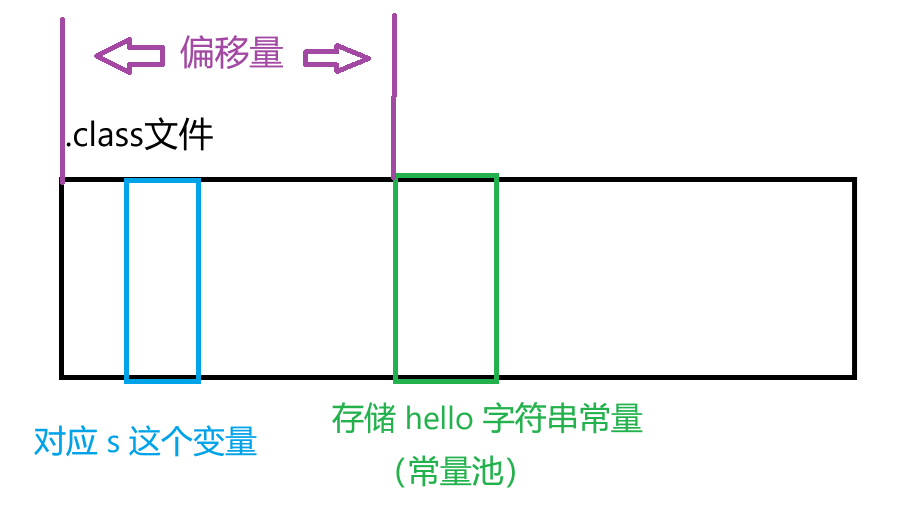
文章目录 类加载机制类加载过程1. 加载2. 验证3. 准备4. 解析偏移量符号引用和直接引用 5. 初始化 类加载机制 类加载指的是,Java 进程运行的时候,需要把 .class 文件从硬盘读取到内存,并进行一些列的校验解析的过程(程序要想执行…...

快速构建tomcat配置可视化原型:用快马一键生成配置向导界面
今天想和大家分享一个快速验证Tomcat配置方案的小技巧。作为一个Java开发者,经常需要折腾Tomcat的安装配置,每次都要重复下载、配环境变量、改server.xml这些步骤,特别耗时。最近发现用InsCode(快马)平台可以快速生成一个可视化配置向导&…...

效率提升秘籍:借助快马AI自动生成健壮的视频续播管理模块
最近在开发视频播放功能时,遇到了一个很常见的需求:实现"继续播放上次观看位置"的功能。本以为是个简单的功能,但实际开发中发现要考虑的细节还真不少。经过一番折腾,我总结出了一套高效的解决方案,分享给大…...

终极指南:如何深度调试AMD Ryzen处理器实现性能最大化
终极指南:如何深度调试AMD Ryzen处理器实现性能最大化 【免费下载链接】SMUDebugTool A dedicated tool to help write/read various parameters of Ryzen-based systems, such as manual overclock, SMU, PCI, CPUID, MSR and Power Table. 项目地址: https://gi…...

本体论与知识图谱有什么区别?
目录 一、基础定义拆解 1. 本体论(Ontology) 2. 知识图谱(Knowledge Graph) 二、核心区别多维对比 三、内在联系 四、举例 往期精彩 一、基础定义拆解 1. 本体论(Ontology) 起源:哲学概…...

完整B站字幕提取解决方案:三步搞定视频字幕获取与转换
完整B站字幕提取解决方案:三步搞定视频字幕获取与转换 【免费下载链接】BiliBiliCCSubtitle 一个用于下载B站(哔哩哔哩)CC字幕及转换的工具; 项目地址: https://gitcode.com/gh_mirrors/bi/BiliBiliCCSubtitle 你是否曾经在B站看到精彩的教学视频,…...

Figo人机交互中“疯态”边界的引导与驯化————“可控赛博疯态”动态机制与实现路径研究
人机交互中“疯态”边界的引导与驯化 ——“可控赛博疯态”动态机制与实现路径研究 作者:Figo Cheung & Figo AI team 摘要:随着生成式人工智能技术的迭代升级,人机交互中涌现出一种突破常规逻辑、具有高度创造性与情感张力的“赛…...
)
WinForms界面美化:用SunnyUI的UILight控件做个状态指示灯(附完整代码)
WinForms界面美化实战:用SunnyUI的UILight控件打造专业状态指示灯 在桌面应用开发中,状态指示是用户界面不可或缺的元素。传统的WinForms控件往往显得单调乏味,而SunnyUI的UILight控件为我们提供了一种简单高效的解决方案。这个圆形指示灯控…...

突破Unity资源处理瓶颈:UABEA的跨平台资源管理革命
突破Unity资源处理瓶颈:UABEA的跨平台资源管理革命 【免费下载链接】UABEA c# uabe for newer versions of unity 项目地址: https://gitcode.com/gh_mirrors/ua/UABEA 你是否曾遇到这样的困境:下载的Unity资源包无法用常规软件打开?提…...

毕业设计实战:基于SSM+MySQL的健身中心管理系统设计与实现全攻略
毕业设计实战:基于SSMMySQL的健身中心管理系统设计与实现全攻略 在开发“健身中心管理系统”毕业设计时,我曾因一个看似简单的场地预约与器材租赁的并发冲突问题,踩了一个“深坑”。初期设计时,仅简单地实现了场地预约和器材租赁的…...

WebGLStudio.js实时反射技术终极指南:环境映射与反射探针完全解析
WebGLStudio.js实时反射技术终极指南:环境映射与反射探针完全解析 【免费下载链接】webglstudio.js A full open source 3D graphics editor in the browser, with scene editor, coding pad, graph editor, virtual file system, and many features more. 项目地…...