
React Native 全栈开发实战班 - 图片加载与优化
在移动应用中,图片加载与优化 是提升用户体验和减少资源消耗的重要环节。图片加载不当可能导致应用卡顿、内存泄漏甚至崩溃。本章节将介绍 React Native 中常用的图片加载方法,包括 Image 组件的使用、第三方图片加载库(如 react-native-fast-image)以及图片优化的最佳实践。
3.1 图片加载基础
React Native 提供了内置的 Image 组件,用于加载和显示图片。Image 组件支持多种图片资源,包括本地图片、网络图片以及 Base64 编码的图片。
3.1.1 基本用法
加载网络图片:
import React from 'react';
import { View, Image, StyleSheet } from 'react-native';const NetworkImageExample = () => {return (<View style={styles.container}><Imagesource={{ uri: 'https://example.com/image.png' }}style={styles.image}resizeMode="cover"/></View>);
};const styles = StyleSheet.create({container: {flex: 1,justifyContent: 'center',alignItems: 'center',},image: {width: 200,height: 200,borderRadius: 10,},
});export default NetworkImageExample;
加载本地图片:
import React from 'react';
import { View, Image, StyleSheet } from 'react-native';const LocalImageExample = () => {return (<View style={styles.container}><Imagesource={require('./assets/images/local-image.png')}style={styles.image}resizeMode="contain"/></View>);
};const styles = StyleSheet.create({container: {flex: 1,justifyContent: 'center',alignItems: 'center',},image: {width: 200,height: 200,borderRadius: 10,},
});export default LocalImageExample;
加载 Base64 图片:
import React from 'react';
import { View, Image, StyleSheet } from 'react-native';const Base64ImageExample = () => {const base64Image = 'data:image/png;base64,iVBORw0KGgoAAAANSUhEUgAA...';return (<View style={styles.container}><Imagesource={{ uri: base64Image }}style={styles.image}resizeMode="stretch"/></View>);
};const styles = StyleSheet.create({container: {flex: 1,justifyContent: 'center',alignItems: 'center',},image: {width: 200,height: 200,borderRadius: 10,},
});export default Base64ImageExample;
3.1.2 常用属性
source: 图片资源,可以是网络地址、本地路径或 Base64 编码。style: 图片样式,包括宽度、高度、边框圆角等。resizeMode: 图片缩放模式,包括cover,contain,stretch,repeat,center。defaultSource: 占位图,在图片加载完成前显示。onLoad/onError/onLoadStart/onLoadEnd: 图片加载事件。
示例:
import React from 'react';
import { View, Image, StyleSheet } from 'react-native';const ImageEventsExample = () => {return (<View style={styles.container}><Imagesource={{ uri: 'https://example.com/image.png' }}style={styles.image}resizeMode="cover"defaultSource={require('./assets/images/placeholder.png')}onLoad={() => console.log('Image loaded')}onError={(error) => console.error('Image loading failed:', error)}/></View>);
};const styles = StyleSheet.create({container: {flex: 1,justifyContent: 'center',alignItems: 'center',},image: {width: 200,height: 200,borderRadius: 10,},
});export default ImageEventsExample;
3.2 使用第三方图片加载库
虽然 React Native 的 Image 组件可以满足基本的图片加载需求,但在处理大量图片或需要更高级的功能时,使用第三方图片加载库可以提供更好的性能和用户体验。
3.2.1 react-native-fast-image
react-native-fast-image 是一个高性能的图片加载库,支持图片缓存、占位图、错误处理等功能。
安装:
npm install react-native-fast-image
使用示例:
import React from 'react';
import { View, StyleSheet } from 'react-native';
import FastImage from 'react-native-fast-image';const FastImageExample = () => {return (<View style={styles.container}><FastImagestyle={styles.image}source={{uri: 'https://example.com/image.png',priority: FastImage.priority.normal,}}resizeMode={FastImage.resizeMode.cover}defaultSource={require('./assets/images/placeholder.png')}onLoadStart={() => console.log('Image loading started')}onLoadEnd={() => console.log('Image loading ended')}onError={(error) => console.error('Image loading failed:', error)}/></View>);
};const styles = StyleSheet.create({container: {flex: 1,justifyContent: 'center',alignItems: 'center',},image: {width: 200,height: 200,borderRadius: 10,},
});export default FastImageExample;
主要特点:
- 高性能: 使用原生代码实现,性能优于
Image组件。 - 缓存管理: 支持内存缓存和磁盘缓存。
- 占位图: 支持设置占位图。
- 错误处理: 支持错误回调。
- 优先级控制: 支持设置图片加载优先级。
3.2.2 react-native-svg
如果需要加载 SVG 图片,可以使用 react-native-svg 库。
安装:
npm install react-native-svg
使用示例:
import React from 'react';
import { View, StyleSheet } from 'react-native';
import Svg, { Image } from 'react-native-svg';const SvgImageExample = () => {return (<View style={styles.container}><Svg height="200" width="200"><Imagehref="https://example.com/image.svg"width="200"height="200"/></Svg></View>);
};const styles = StyleSheet.create({container: {flex: 1,justifyContent: 'center',alignItems: 'center',},
});export default SvgImageExample;
3.3 图片优化
优化图片加载可以显著提升应用性能,减少资源消耗。以下是一些常见的图片优化策略:
3.3.1 图片压缩
压缩图片可以减少图片大小,从而加快加载速度。可以使用图像压缩工具(如 ImageOptim, TinyPNG)进行压缩。
示例:
-
使用 ImageOptim 压缩图片: 打开 ImageOptim,将需要压缩的图片拖入应用,ImageOptim 会自动压缩图片并删除不必要的元数据。
-
使用 TinyPNG 压缩图片: 上传图片到 TinyPNG 网站,TinyPNG 会自动压缩图片并提供下载链接。
3.3.2 图片格式
选择合适的图片格式可以减少图片大小:
- JPEG: 适用于照片,压缩率高,但不支持透明背景。
- PNG: 适用于需要透明背景的图片,但文件大小较大。
- WebP: 压缩率高,支持有损和无损压缩,但需要原生支持。
示例:使用 WebP 格式的图片
import React from 'react';
import { View, Image, StyleSheet } from 'react-native';const WebPImageExample = () => {return (<View style={styles.container}><Imagesource={{ uri: 'https://example.com/image.webp' }}style={styles.image}resizeMode="cover"/></View>);
};const styles = StyleSheet.create({container: {flex: 1,justifyContent: 'center',alignItems: 'center',},image: {width: 200,height: 200,borderRadius: 10,},
});export default WebPImageExample;
注意: 确保目标平台支持 WebP 格式。React Native 默认支持 WebP,但某些旧版本可能需要额外配置。
3.3.3 图片尺寸
根据设备屏幕尺寸和分辨率加载不同尺寸的图片,避免加载过大的图片。
示例:响应式图片加载
import React from 'react';
import { View, Image, StyleSheet, Dimensions } from 'react-native';const { width } = Dimensions.get('window');const ResponsiveImageExample = () => {return (<View style={styles.container}><Imagesource={{ uri: `https://example.com/image-${width}w.jpg` }}style={styles.image}resizeMode="cover"/></View>);
};const styles = StyleSheet.create({container: {flex: 1,justifyContent: 'center',alignItems: 'center',},image: {width: width,height: 200,},
});export default ResponsiveImageExample;
解释:
- 根据设备的宽度动态加载不同尺寸的图片,例如
image-320w.jpg,image-480w.jpg等。
3.3.4 图片懒加载
对于长列表中的图片,可以使用懒加载技术,避免一次性加载所有图片,从而提高应用性能。
示例:使用 react-native-lazyload 实现图片懒加载
-
安装
react-native-lazyloadnpm install react-native-lazyload -
使用示例
import React from 'react';
import { View, Image, StyleSheet, FlatList, Dimensions } from 'react-native';
import { LazyloadImage } from 'react-native-lazyload';const images = ['https://example.com/image1.jpg','https://example.com/image2.jpg','https://example.com/image3.jpg',// 更多图片
];const LazyLoadImageExample = () => {return (<FlatListdata={images}renderItem={({ item }) => (<LazyloadImagestyle={styles.image}source={{ uri: item }}resizeMode="cover"defaultSource={require('./assets/images/placeholder.png')}/>)}keyExtractor={(item, index) => index.toString()}// 其他 FlatList 属性/>);
};const styles = StyleSheet.create({image: {width: Dimensions.get('window').width,height: 200,marginBottom: 10,},
});export default LazyLoadImageExample;
解释:
LazyloadImage组件会在图片进入可视区域时加载图片。defaultSource属性用于设置占位图。
3.3.5 图片缓存
合理使用图片缓存可以减少网络请求次数,提高图片加载速度。
示例:使用 react-native-fast-image 的缓存功能
import React from 'react';
import { View, StyleSheet } from 'react-native';
import FastImage from 'react-native-fast-image';const CachedImageExample = () => {return (<View style={styles.container}><FastImagestyle={styles.image}source={{uri: 'https://example.com/image.png',priority: FastImage.priority.normal,cache: FastImage.cacheControl.web,}}resizeMode={FastImage.resizeMode.cover}/></View>);
};const styles = StyleSheet.create({container: {flex: 1,justifyContent: 'center',alignItems: 'center',},image: {width: 200,height: 200,borderRadius: 10,},
});export default CachedImageExample;
解释:
cache: FastImage.cacheControl.web设置图片缓存策略为 Web 缓存(默认)。react-native-fast-image支持内存缓存和磁盘缓存,可以根据需要调整缓存策略。
3.3.6 图片预加载
对于需要快速显示的图片,可以使用预加载技术,提前加载图片到缓存中。
示例:使用 react-native-fast-image 的预加载功能
import React from 'react';
import { View, StyleSheet, Text } from 'react-native';
import FastImage from 'react-native-fast-image';const PreloadImageExample = () => {React.useEffect(() => {FastImage.preload([{ uri: 'https://example.com/image1.png' },{ uri: 'https://example.com/image2.png' },{ uri: 'https://example.com/image3.png' },// 更多图片]);}, []);return (<View style={styles.container}><Text>Preloading images...</Text></View>);
};const styles = StyleSheet.create({container: {flex: 1,justifyContent: 'center',alignItems: 'center',},
});export default PreloadImageExample;
解释:
FastImage.preload方法可以预加载多张图片到缓存中。
3.4 总结
本章节介绍了 React Native 中的图片加载与优化方法,包括 Image 组件的使用、第三方图片加载库(如 react-native-fast-image)以及图片优化的最佳实践。通过合理选择图片加载方案和优化策略,可以显著提升应用性能,提高用户体验。
课后作业
- 使用
react-native-fast-image实现图片懒加载和预加载。 - 优化应用中的图片资源,使用合适的图片格式和
作者简介
前腾讯电子签的前端负责人,现 whentimes tech CTO,专注于前端技术的大咖一枚!一路走来,从小屏到大屏,从 Web 到移动,什么前端难题都见过。热衷于用技术打磨产品,带领团队把复杂的事情做到极简,体验做到极致。喜欢探索新技术,也爱分享一些实战经验,帮助大家少走弯路!
温馨提示:可搜老码小张公号联系导师
相关文章:

React Native 全栈开发实战班 - 图片加载与优化
在移动应用中,图片加载与优化 是提升用户体验和减少资源消耗的重要环节。图片加载不当可能导致应用卡顿、内存泄漏甚至崩溃。本章节将介绍 React Native 中常用的图片加载方法,包括 Image 组件的使用、第三方图片加载库(如 react-native-fast…...

Golang云原生项目:—实现ping操作
熟悉报文结构 ICMP校验和算法: 报文内容,相邻两个字节拼接到一起组成一个16bit数,将这些数累加求和若长度为奇数,则将剩余一个字节,也累加求和得出总和之后,将和值的高16位与低16位不断求和,直…...

mysql如何查看当前事务的事务id
-- 开启一个事务,但不执行写操作 START TRANSACTION; -- 查询 InnoDB 事务信息 SELECT * FROM information_schema.innodb_trx;在 MySQL 的 MVCC (多版本并发控制) 中,事务 ID (Transaction ID) 是由 InnoDB 存储引擎分配的,它的分配机制与事…...

在linux里如何利用vim对比两个文档不同的行数
在Linux中,可以使用vimdiff命令来对比两个文档中不同的行。首先确保你的系统中安装了vim编辑器。 打开终端,使用以下命令来启动vimdiff: vimdiff file1 file2 这里file1和file2是你想要对比的两个文件的路径。 vimdiff会以并排方式打开两…...

深入解析Python中的逻辑回归:从入门到精通
引言 在数据科学领域,逻辑回归(Logistic Regression)是一个非常重要的算法,它不仅用于二分类问题,还可以通过一些技巧扩展到多分类问题。逻辑回归因其简单、高效且易于解释的特点,在金融、医疗、广告等多个…...

【数据库】mysql数据库迁移前应如何备份数据?
MySQL 数据库的备份是确保数据安全的重要措施之一。在进行数据库迁移之前,备份现有数据可以防止数据丢失或损坏。以下是一套详细的 MySQL 数据库备份步骤,适用于大多数情况。请注意,具体的命令和工具可能因 MySQL 版本的不同而有所差异。整个…...

C语言——鸡兔同笼问题
没注释的源代码 #include <stdio.h> #include <stdlib.h> /* run this program using the console pauser or add your own getch, system("pause") or input loop */ int main(int argc, char *argv[]) { int tou 10; i…...

数据结构王道P234第二题
#include<iostream> using namespace std; int visit[MAxsize]; int color[MaxSize];//1表示红,2表示白; bool dfs(Graph G, int i){visit[i]1;ArcNode *p;bool flag1;for(pG.vertices[i].firsrarc; p ; pp->next){int jp->adjvex;if(!visi…...

层归一化和批归一化
层归一化是针对某一样本的所有特征,批归一化是针对所有样本的某一特征。 计算公式:(当前值 - 均值)/ 标准差。 作用:缓解梯度消失和梯度爆炸的问题,并提高网络的泛化性能。 为什么Transform和BERT中使用层归…...
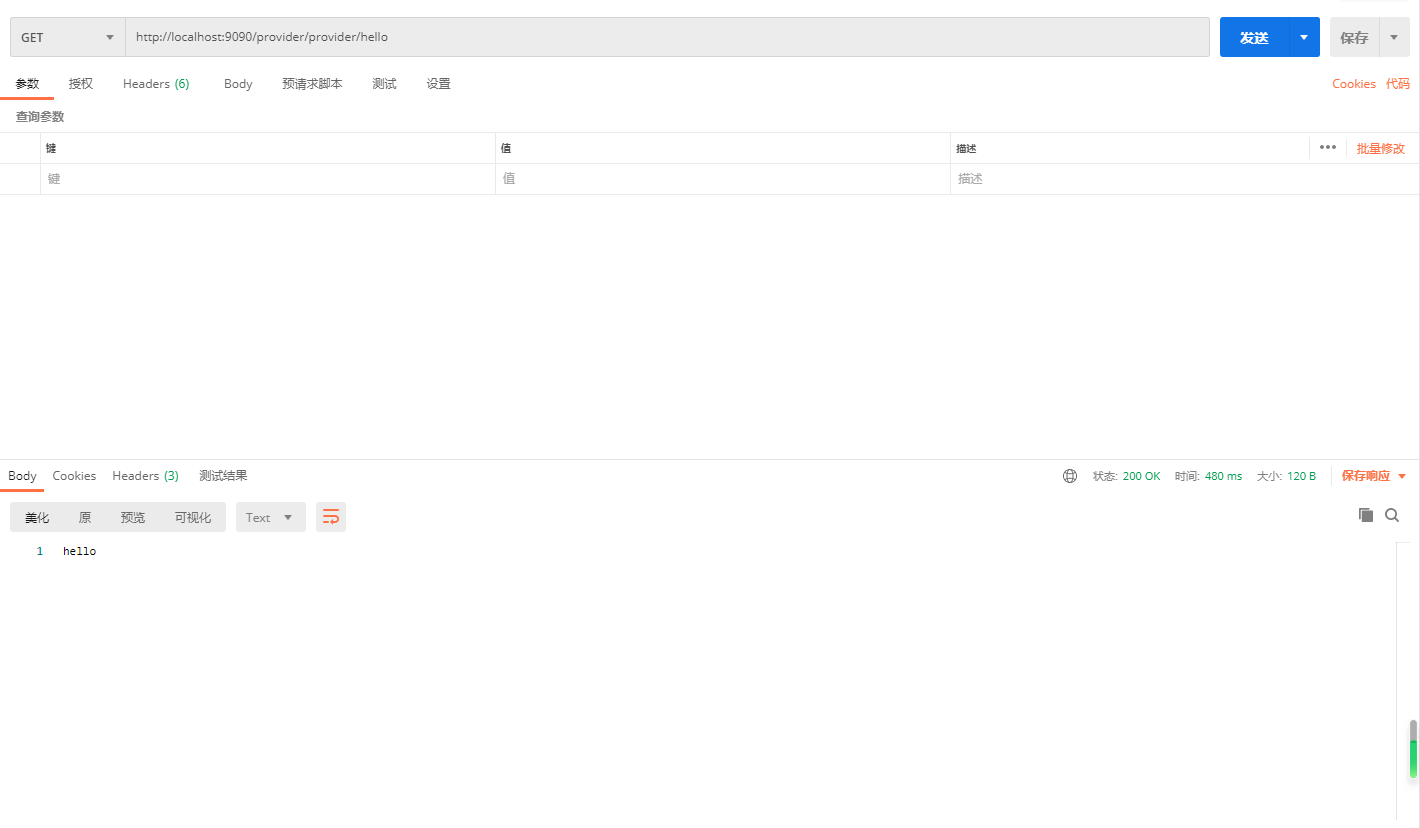
Spring Cloud Gateway 网关
微服务网关 Spring Cloud Gateway https://docs.spring.io/spring-cloud-gateway/docs/current/reference/html/#gateway-request-predicates-factories Spring Cloud 在版本 2020.0.0 开始,去除了 Zuul 网关的使用,改用 Spring Cloud Gateway 作为网关…...

LabVIEW中的UDP与TCP比较
在LabVIEW中,UDP和TCP可以用于不同的网络通信场景,开发者可以根据需求选择合适的协议。以下是结合LabVIEW开发时的一些比较和应用场景: 1.TCP在LabVIEW中的应用: 可靠性高的场景:当开发一个对数据传输的准确性和完整…...

半导体器件与物理篇3 P-N结
热平衡时的PN结 pn结的定义:由p型半导体和n型半导体接触形成的结 pn结的特性和关键变量包括:整流性(即电流单向导通的特性)、平衡费米能级(费米能级 E F E_F EF为常数, d E F d x 0 )、内建电势 \frac…...

深入剖析String类的底层实现原理
嘿嘿,家人们,今天咱们来模拟实现string,好啦,废话不多讲,开干! 1:string.h 1.1:构造函数与拷贝构造函数 1.1.1:写法一 1.1.2:写法二(给缺省值) 1.2:赋值运算符重载与operatror[]获取元素 1.3:容量与迭代器 1.4:reserve与resize 1.5:清空与判断是否为空 1.6:push_back与…...

#其它:面试题
第一面试官提问如下: 1、自我介绍 2、根据项目提问:混合开发调取api的通讯方式 3、技术提问:如何隐藏div,但是div需要存在 使用 visibility 隐藏: 1.visibility: hidden2.display: none 3.opcity: 04、css塌陷问题…...

计算机视觉中的双边滤波:经典案例与Python代码解析
🌟 计算机视觉中的双边滤波:经典案例与Python代码解析 🚀 Hey小伙伴们!今天我们要聊的是计算机视觉中的一个重要技术——双边滤波。双边滤波是一种非线性滤波方法,主要用于图像去噪和平滑,同时保留图像的边…...

【AI日记】24.11.17 看 GraphRAG 论文,了解月之暗面
【AI论文解读】【AI知识点】【AI小项目】【AI战略思考】【AI日记】 核心工作 内容:看 GraphRAG 论文时间:4 小时评估:不错,继续 非核心工作 内容:了解国内大模型方向,重点了解了创业独角兽-月之暗面&…...
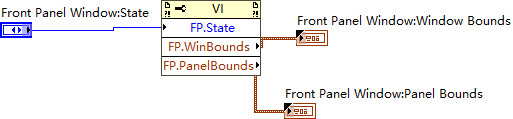
Front Panel Window Bounds 与 Front Panel Window Bounds 的区别与应用
在LabVIEW中,Front Panel Window Bounds 和 Front Panel WindowBounds 是两个不同的属性节点,用于描述前面板窗口的位置和大小。它们的区别主要体现在它们表示的是窗口的不同部分,具体如下: 1 Window Bounds:调整整个…...

比较TCP/IP和OSI/RM的区别
一、结构不同 1、OSI:OSI划分为7层结构:物理层、数据链路层、网络层、传输层、会话层、表示层和应用层。 2、TCP/IP:TCP/IP划分为4层结构:应用层、传输层、互联网络层和主机-网络层。 二、性质不同 1、OSI:OSI是制定…...

【Java项目】基于SpringBoot的【招聘信息管理系统】
技术简介:系统软件架构选择B/S模式、SpringBoot框架、java技术和MySQL数据库等,总体功能模块运用自顶向下的分层思想。 系统简介:招聘信息管理系统的功能分为管理员,用户和企业三个部分,系统的主要功能包括首页、个人中…...

【论文笔记】LLaMA-VID: An Image is Worth 2 Tokens in Large Language Models
🍎个人主页:小嗷犬的个人主页 🍊个人网站:小嗷犬的技术小站 🥭个人信条:为天地立心,为生民立命,为往圣继绝学,为万世开太平。 基本信息 标题: LLaMA-VID: An Image is W…...
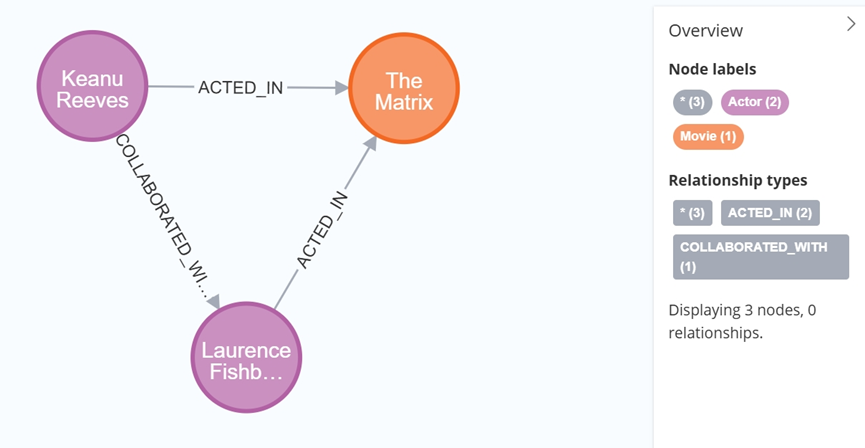
大数据学习栈记——Neo4j的安装与使用
本文介绍图数据库Neofj的安装与使用,操作系统:Ubuntu24.04,Neofj版本:2025.04.0。 Apt安装 Neofj可以进行官网安装:Neo4j Deployment Center - Graph Database & Analytics 我这里安装是添加软件源的方法 最新版…...

模型参数、模型存储精度、参数与显存
模型参数量衡量单位 M:百万(Million) B:十亿(Billion) 1 B 1000 M 1B 1000M 1B1000M 参数存储精度 模型参数是固定的,但是一个参数所表示多少字节不一定,需要看这个参数以什么…...

基于服务器使用 apt 安装、配置 Nginx
🧾 一、查看可安装的 Nginx 版本 首先,你可以运行以下命令查看可用版本: apt-cache madison nginx-core输出示例: nginx-core | 1.18.0-6ubuntu14.6 | http://archive.ubuntu.com/ubuntu focal-updates/main amd64 Packages ng…...

unix/linux,sudo,其发展历程详细时间线、由来、历史背景
sudo 的诞生和演化,本身就是一部 Unix/Linux 系统管理哲学变迁的微缩史。来,让我们拨开时间的迷雾,一同探寻 sudo 那波澜壮阔(也颇为实用主义)的发展历程。 历史背景:su的时代与困境 ( 20 世纪 70 年代 - 80 年代初) 在 sudo 出现之前,Unix 系统管理员和需要特权操作的…...

JDK 17 新特性
#JDK 17 新特性 /**************** 文本块 *****************/ python/scala中早就支持,不稀奇 String json “”" { “name”: “Java”, “version”: 17 } “”"; /**************** Switch 语句 -> 表达式 *****************/ 挺好的ÿ…...
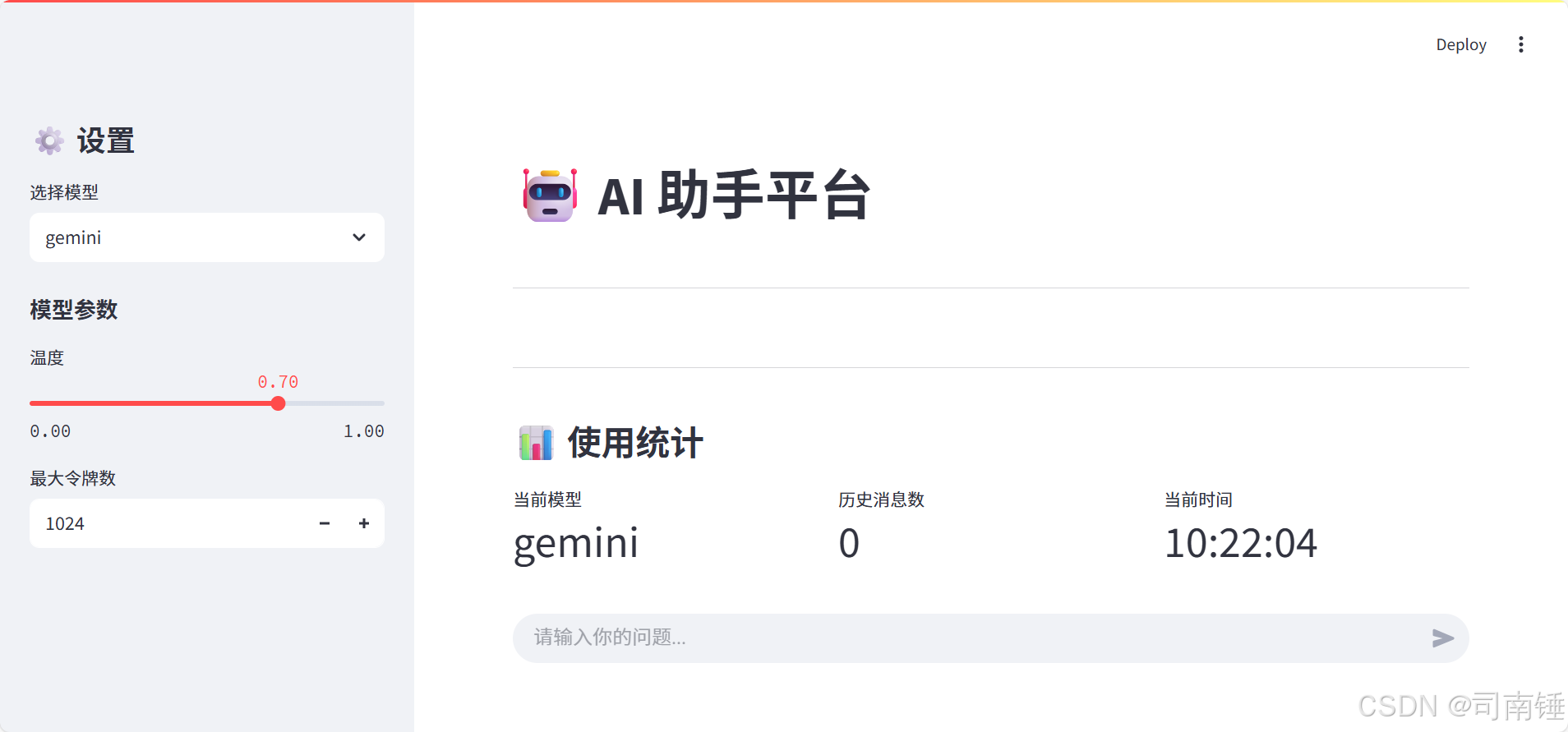
使用 Streamlit 构建支持主流大模型与 Ollama 的轻量级统一平台
🎯 使用 Streamlit 构建支持主流大模型与 Ollama 的轻量级统一平台 📌 项目背景 随着大语言模型(LLM)的广泛应用,开发者常面临多个挑战: 各大模型(OpenAI、Claude、Gemini、Ollama)接口风格不统一;缺乏一个统一平台进行模型调用与测试;本地模型 Ollama 的集成与前…...

docker 部署发现spring.profiles.active 问题
报错: org.springframework.boot.context.config.InvalidConfigDataPropertyException: Property spring.profiles.active imported from location class path resource [application-test.yml] is invalid in a profile specific resource [origin: class path re…...
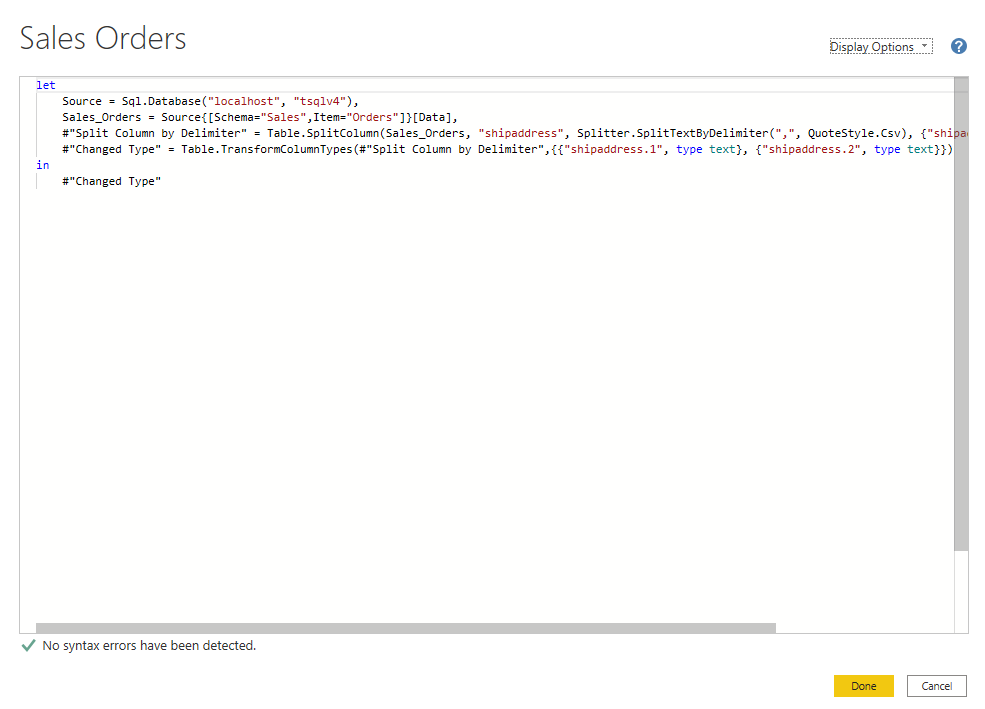
微软PowerBI考试 PL300-在 Power BI 中清理、转换和加载数据
微软PowerBI考试 PL300-在 Power BI 中清理、转换和加载数据 Power Query 具有大量专门帮助您清理和准备数据以供分析的功能。 您将了解如何简化复杂模型、更改数据类型、重命名对象和透视数据。 您还将了解如何分析列,以便知晓哪些列包含有价值的数据,…...
多光源(Multiple Lights))
C++.OpenGL (14/64)多光源(Multiple Lights)
多光源(Multiple Lights) 多光源渲染技术概览 #mermaid-svg-3L5e5gGn76TNh7Lq {font-family:"trebuchet ms",verdana,arial,sans-serif;font-size:16px;fill:#333;}#mermaid-svg-3L5e5gGn76TNh7Lq .error-icon{fill:#552222;}#mermaid-svg-3L5e5gGn76TNh7Lq .erro…...
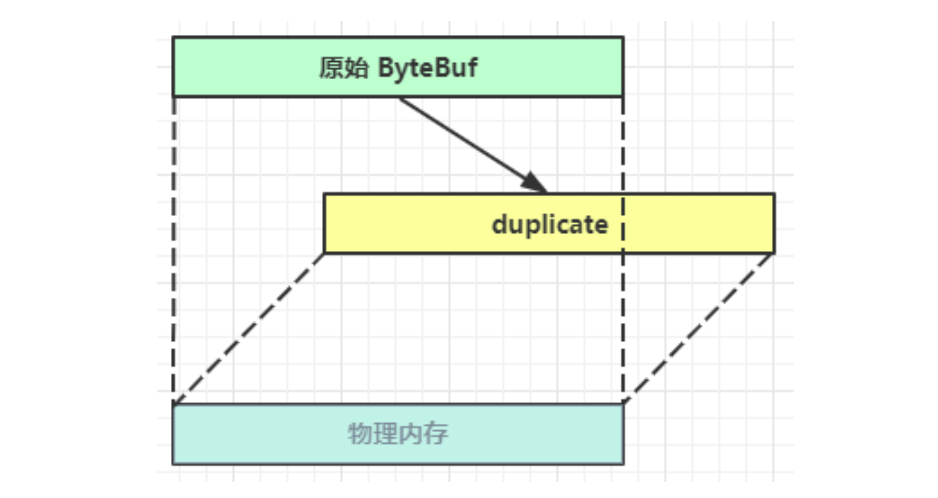
Netty从入门到进阶(二)
二、Netty入门 1. 概述 1.1 Netty是什么 Netty is an asynchronous event-driven network application framework for rapid development of maintainable high performance protocol servers & clients. Netty是一个异步的、基于事件驱动的网络应用框架,用于…...