
接口上传视频和oss直传视频到阿里云组件

接口视频上传
<template><div class="component-upload-video"><el-uploadclass="avatar-uploader":action="uploadImgUrl":on-progress="uploadVideoProcess":on-success="handleUploadSuccess":limit="limit":file-list="fileList":before-upload="handleBeforeUpload":show-file-list="false":headers="headers"ref="uploadRef"><videov-if="videoForm.showVideoPath && !videoFlag":src="videoForm.showVideoPath"class="avatar video-avatar"controls="controls">您的浏览器不支持视频播放</video><!-- //i标签是上传前的那个+上传后隐藏 --><iv-else-if="!videoForm.showVideoPath && !videoFlag"class="el-icon-plus avatar-uploader-icon"></i><el-progressv-if="videoFlag == true"type="circle":percentage="videoUploadPercent"style="margin-top: 7px"></el-progress></el-upload><el-buttonv-if="isShowBtn && videoForm.showVideoPath"class="mt-20"plainround@click="handleDelete"size="small"type="primary">重新上传<i class="el-icon-upload el-icon--right"></i></el-button></div>
</template><script>
import { getToken } from "@/utils/auth";export default {props: {value: [String, Object, Array],// 图片数量限制limit: {type: Number,default: 5,},// 大小限制(MB)fileSize: {type: Number,default: 50,},// 序号indexValue: {type: Number,default: null,},// 文件类型, 例如['video/avi', 'video/wmv', 'video/rmvb']fileType: {type: Array,default: () => ["video/mp4", "video/ogg", "video/flv"],},// 是否显示提示isShowTip: {type: Boolean,default: false,},// 是否显示进度条isShowUploadVideo: {type: Boolean,default: false,},// 是否显示重新上传按钮isShowBtn: {type: Boolean,default: true,},},data() {return {number: 0,dialogVisible: false,hideUpload: false,uploadImgUrl: process.env.VUE_APP_BASE_API + "/file/upload", // 上传的服务器地址headers: {Authorization: "Bearer " + getToken(),},fileList: [],videoForm: {showVideoPath: "", //回显的变量},duration: 0, //时长秒videoFlag: false,videoUploadPercent: 0,};},watch: {value: {handler(val) {if (val) {this.videoForm.showVideoPath = val;// 首先将值转为数组const list = Array.isArray(val) ? val : this.value.split(",");// 然后将数组转为对象数组this.fileList = list.map((item) => {if (typeof item === "string") {item = { name: item, url: item };}return item;});} else {this.fileList = [];return [];}},deep: true,immediate: true,},},computed: {// 是否显示提示showTip() {return this.isShowTip && (this.fileType || this.fileSize);},},methods: {// 上传成功回调handleUploadSuccess(res) {this.isShowUploadVideo = true;this.videoFlag = false;// this.videoUploadPercent = 0;console.log("handleUploadSuccess");//后台上传数据if (res.code == 200) {this.videoForm.showVideoPath = res.data.url; //上传成功后端返回视频地址 回显// var audioElement = new Audio(url);this.$emit("input", res.data.url, this.duration);this.$modal.msgSuccess("上传成功!");} else {this.$message.error("上传失败!");}},// 上传前loading加载handleBeforeUpload(file) {var url = URL.createObjectURL(file);var audioElement = new Audio(url);var time;var that = this;audioElement.addEventListener("loadedmetadata", function () {time = audioElement.duration; //时长为秒that.duration = time;});var fileSize = file.size / 1024 / 1024 < this.fileSize; //控制大小  修改50的值即可if (["video/mp4"].indexOf(file.type) == -1 //控制格式) {this.$modal.msgError(`文件格式不正确, 请上传${this.fileType.join("/")}视频格式文件!`);return false;}if (!fileSize) {this.$modal.msgError(`上传视频大小不能超过 ${this.fileSize} MB!`);return false;}},//进度条--------uploadVideoProcess(event, file, fileList) {//注意在data中添加对应的变量名this.videoFlag = true;console.log(file, "file", file.percentage);this.videoUploadPercent = file.percentage.toFixed(0) * 1;},// 文件个数超出handleExceed() {this.$modal.msgError(`上传视频数量不能超过 ${this.limit} 个!`);},// 上传失败handleUploadError() {this.$modal.msgError("上传视频失败,请重试");this.$modal.closeLoading();},handleDelete() {this.videoFlag = false;// 清除已上传的文件this.$refs.uploadRef.clearFiles();// 在这里可以执行其他删除操作,例如将视频地址重置为nullthis.videoForm.showVideoPath = "";},},
};
</script><style scoped lang="scss">
// .el-upload--picture-card 控制加号部分
::v-deep.hideUpload .el-upload--picture-card {display: none;
}::v-deep .el-upload--picture-card {width: 104px;height: 104px;line-height: 104px;
}::v-deep .el-upload-list--picture-card .el-upload-list__item {width: 104px;height: 104px;
}.avatar-uploader-icon {border: 1px dashed #d9d9d9 !important;
}.avatar-uploader .el-upload {border: 1px dashed #d9d9d9 !important;border-radius: 6px !important;position: relative !important;overflow: hidden !important;
}.avatar-uploader .el-upload:hover {border: 1px dashed #d9d9d9 !important;border-color: #409eff;
}.avatar-uploader-icon {font-size: 28px;color: #8c939d;width: 300px;height: 178px;line-height: 178px;text-align: center;
}.avatar {width: 300px;height: 178px;display: block;
}
</style>
oss直传视频到阿里云组件
<template><div class="component-upload-image"><el-uploadaction="":http-request="beforeUpload"class="avatar-uploader":limit="limit":on-error="handleUploadError":on-exceed="handleExceed"name="file":show-file-list="false":file-list="fileList"ref="uploadRef"><videov-if="videoForm.showVideoPath && !videoFlag":src="videoForm.showVideoPath"class="avatar video-avatar"controls="controls">您的浏览器不支持视频播放</video><!-- //i标签是上传前的那个+上传后隐藏 --><iv-else-if="!videoForm.showVideoPath && !videoFlag"class="el-icon-plus avatar-uploader-icon"></i><el-progressv-if="videoFlag == true"type="circle":percentage="videoUploadPercent"style="margin-top: 7px"></el-progress></el-upload><el-buttonv-if="isShowBtn && videoForm.showVideoPath"class="mt-20"plainround@click="handleDelete"size="small"type="primary">重新上传<i class="el-icon-upload el-icon--right"></i></el-button></div>
</template><script>
import { getOssParameter } from "./oss";export default {props: {value: [String, Object, Array],// 图片数量限制limit: {type: Number,default: 1,},// 大小限制(MB)fileSize: {type: Number,default: 5120,},fileType: {type: Array,default: () => ["video/*"],},// 是否显示提示isShowTip: {type: Boolean,default: true,},// 是否显示进度条isShowUploadVideo: {type: Boolean,default: false,},// 是否显示重新上传按钮isShowBtn: {type: Boolean,default: true,},},data() {return {dialogImageUrl: "",dialogVisible: false,hideUpload: false,baseUrl: process.env.VUE_APP_BASE_API,uploadImgUrl: process.env.VUE_APP_BASE_API + "/file/upload", // 上传的图片服务器地址fileList: [],videoForm: {showVideoPath: "", //回显的变量},videoFlag: false,videoUploadPercent: 0,isCancel: false,};},watch: {value: {handler(val) {if (val) {this.videoForm.showVideoPath = val;// 首先将值转为数组const list = Array.isArray(val) ? val : this.value.split(",");// 然后将数组转为对象数组this.fileList = list.map((item) => {if (typeof item === "string") {item = { name: item, url: item };}return item;});} else {this.fileList = [];return [];}},deep: true,immediate: true,},},computed: {// 是否显示提示showTip() {return this.isShowTip && (this.fileType || this.fileSize);},},methods: {//自定义上传方法..Upload(file, data) {let OSS = require("ali-oss");let client = new OSS({region: data.region,accessKeyId: data.accessKeyId,accessKeySecret: data.accessKeySecret,bucket: data.bucket,});// let cdnUrl = data.cdnUrl;let cdnUrl = "https://cdn-learning.cscec83.cn/";this.isCancel = false;//判断扩展名const tmpcnt = file.file.name.lastIndexOf(".");const exname = file.file.name.substring(tmpcnt + 1);//  配置路径以及文件名称const fileName = file.file.uid + "." + exname;const progress = (p, _checkpoint) => {this.videoFlag = true;this.videoUploadPercent = Number((Number(p) * 100).toFixed(1));console.log(this.isCancel);if (this.isCancel) {client.cancel();}};client.multipartUpload(fileName, file.file, {progress,// 设置并发上传的分片数量。// parallel: 4,// 设置分片大小。默认值为1 MB,最小值为100 KB。partSize: 5 * 1024 * 1024,}).then((res) => {console.log(res, "res");this.videoFlag = false;if (res.name) {this.videoForm.showVideoPath = cdnUrl + res.name;console.log(this.videoForm.showVideoPath, "fileUrl");this.$emit("input", this.videoForm.showVideoPath, this.duration);// this.loading.close();} else {this.$modal.msgError("上传视频失败,请重试");// this.loading.close();this.handleDelete();}}).catch((err) => {console.log(err);if (err.name == "cancel") {this.$message("上传取消");} else {this.$modal.msgError(err);}this.handleDelete();});},handleDelete() {this.isCancel = true;this.videoFlag = false;this.$refs.uploadRef.clearFiles();this.duration = 0;this.videoForm.showVideoPath = "";this.$emit("input", this.videoForm.showVideoPath, this.duration);// 清除已上传的文件},// 上传前loading加载beforeUpload(file) {var fileSize = file.file.size / 1024 / 1024 < this.fileSize; //控制大小  修改50的值即可console.log(file.file.type);if (this.fileType.indexOf(file.file.type) == -1 //控制格式) {this.$modal.msgError(`文件格式不正确, 请上传${this.fileType.join("/")}视频格式文件!`);return false;}if (!fileSize) {this.$modal.msgError(`上传视频大小不能超过 ${this.fileSize} MB!`);return false;}var url = URL.createObjectURL(file.file);var audioElement = new Audio(url);var time;var that = this;audioElement.addEventListener("loadedmetadata", function () {time = audioElement.duration; //时长为秒that.duration = time;});// this.loading = this.$loading({//   lock: true,//   text: "上传中",//   background: "rgba(0, 0, 0, 0.7)",// });getOssParameter().then((res) => {if (res.code == 200) {this.Upload(file, res.data);}});},// 文件个数超出handleExceed() {this.$message.error(`上传文件数量不能超过 ${this.limit} 个!`);},// 上传失败handleUploadError() {this.$modal.msgError("上传失败,请重试");// this.loading.close();},uploadCancel() {this.isCancel = true;},},
};
</script>
<style scoped lang="scss">
// .el-upload--picture-card 控制加号部分
::v-deep.hideUpload .el-upload--picture-card {display: none;
}::v-deep .el-upload--picture-card {width: 104px;height: 104px;line-height: 104px;
}::v-deep .el-upload-list--picture-card .el-upload-list__item {width: 104px;height: 104px;
}.avatar-uploader-icon {border: 1px dashed #d9d9d9 !important;
}.avatar-uploader .el-upload {border: 1px dashed #d9d9d9 !important;border-radius: 6px !important;position: relative !important;overflow: hidden !important;
}.avatar-uploader .el-upload:hover {border: 1px dashed #d9d9d9 !important;border-color: #409eff;
}.avatar-uploader-icon {font-size: 28px;color: #8c939d;width: 300px;height: 178px;line-height: 178px;text-align: center;
}.avatar {width: 300px;height: 178px;display: block;
}
</style>
相关文章:
接口上传视频和oss直传视频到阿里云组件
接口视频上传 <template><div class"component-upload-video"><el-uploadclass"avatar-uploader":action"uploadImgUrl":on-progress"uploadVideoProcess":on-success"handleUploadSuccess":limit"lim…...

Arcgis 地图制作
地图如下,不同历史时期:...

【每日一题1121】python校招笔试题、面试题
1、Python字符串不是通过NUL或者’\0’来结束的 C语言中字符串使用’\0’作为结束符,以防止越界。但是在python中,字符串值只包含所定义的东西。 2、执行以下程序,输出结果为() class Base(object):count 0def __in…...

Spring Boot + Vue 基于 RSA 的用户身份认证加密机制实现
Spring Boot Vue 基于 RSA 的用户身份认证加密机制实现 什么是RSA?安全需求介绍前后端交互流程前端使用 RSA 加密密码安装 jsencrypt库实现敏感信息加密 服务器端生成RSA的公私钥文件Windows环境 生成rsa的公私钥文件Linux环境 生成rsa的公私钥文件 后端代码实现返…...

Docker搭建有UI的私有镜像仓库
Docker搭建有UI的私有镜像仓库 一、使用这个docker-compose.yml文件: version: 3services:registry-ui:image: joxit/docker-registry-ui:2.5.7-debianrestart: alwaysports:- 81:80environment:- SINGLE_REGISTRYtrue- REGISTRY_TITLEAtt Docker Registry UI- DE…...

Qt打开文件对话框选择文件之后弹出两次
项目场景: 在 Qt 中,使用 ui 自动生成的 UI 文件会为每个控件自动生成一些默认的槽函数。如果您手动创建的槽函数名称与这些自动生成的槽函数名称相同,就会导致信号被多次连接,从而引发多次弹出文件对话框的问题。 原因分析&…...

【JAVA】正则表达式中的正向肯定预查
在Java中,正向肯定预查(Positive Lookahead)是一种正则表达式的高级特性,用于在匹配某个模式之前检查某个条件是否满足。正向肯定预查不会消耗字符,也就是说,它不会将匹配的字符从剩余的字符串中移除&#…...
——路由的编写规则与使用)
django从入门到实战(一)——路由的编写规则与使用
Django 路由的编写规则与使用 在 Django 中,路由(URLconf)是将 URL 映射到视图函数的机制。它允许我们定义网站的 URL 结构,并将请求分发到相应的处理函数。以下是关于 Django 路由的定义规则及使用的详细介绍。 1. Django 的路…...

vue框架开发的前端项目,build和package的区别
在使用 Vue 框架开发前端项目时,build 和 package 是两个常见的操作,它们有不同的目的和作用。下面是它们的区别: 1. Build(构建) build 是将前端源代码(如 Vue 组件、JavaScript 文件、CSS 样式等&#…...

视频智能分析软件LiteAIServer摄像机实时接入分析平台噪声监测算法介绍
在视频监控领域,噪声问题一直是一个令人头疼的难题。无论是低光环境、摄像机传感器的高灵敏度,还是编码压缩过程中的失真,都可能导致视频中出现噪声,从而影响监控画面的清晰度和准确性。这些噪声不仅降低了视频的可读性࿰…...
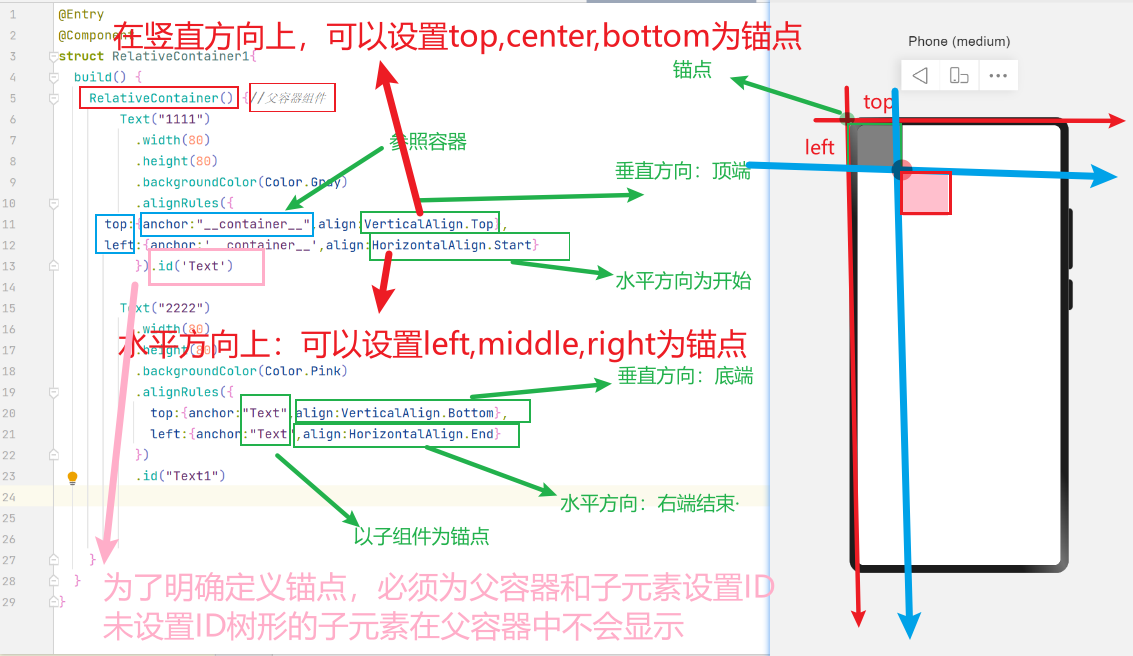
鸿蒙UI开发与部分布局
UI开发 1. 布局概述 1.1 开发流程 1.先确定开发流程 -> 2.分析页面元素构成 ->3.选用合适的布局容器组件 1.3 布局元素组成:盒模型 2.1 布局分类 2.1 线性布局 线性布局是开发中最常用、最基础的布局,通过线性容器Row和Column构建 2.1.1 线性布…...
和压缩列表(ZipList))
redis的map底层数据结构 分别什么时候使用哈希表(Hash Table)和压缩列表(ZipList)
在Redis中,Hash数据类型的底层数据结构可以是压缩列表(ZipList)或者哈希表(HashTable)。这两种结构的使用取决于特定的条件: 1. **使用ZipList的条件**: - 当Hash中的数据项(即f…...

css水平居中+垂直居中
display:“flex”,position: “absolute”,top:“50%”,left:“50%”,transform: ‘translate(-50%, -50%)’...

设计模式之 组合模式
组合模式(Composite Pattern)是一种结构型设计模式,它通过将对象组合成树形结构来表示“部分-整体”层次。组合模式允许客户端统一处理单个对象和对象集合。换句话说,组合模式让客户端可以像处理单个对象一样处理对象的集合&#…...

LCR 001 两数相除
一.题目: . - 力扣(LeetCode) 二.原始解法-超时: class Solution: def divide(self, a: int, b: int) -> int: # 1)分析: # 除法计算,不能使用除法符号,可以理解为实现除法 # 除法…...

数据库、数据仓库、数据湖、数据中台、湖仓一体的概念和区别
数据库、数据仓库、数据湖、数据中台和湖仓一体是数据管理和分析领域的不同概念,各自有不同的特点和应用场景。以下是它们的主要区别: 1. 数据库(Database) 定义:结构化的数据存储系统,用于高效地存储、检…...

vue 的生命周期函数
Vue 生命周期函数(生命周期钩子)是 Vue 实例从创建到销毁过程中,不同阶段所触发的特定函数。理解这些生命周期函数对于开发 Vue 应用至关重要,因为它们让你在不同的生命周期阶段执行代码,比如数据初始化、DOM 渲染完成…...

单片机UART协议相关知识
概念 UART(Universal Asynchronous Receiver/Transmitter,通用异步收发传输器) 是一种 异步 串行 全双工 通信协议,用于设备一对一进行数据传输,只需要两根线(TX,RX)。 异步&…...
>选择题(带答案与解析))
【操作系统不挂科】<CPU调度(13)>选择题(带答案与解析)
前言 大家好吖,欢迎来到 YY 滴 操作系统不挂科 系列 ,热烈欢迎! 本章主要内容面向接触过C的老铁 本博客主要内容,收纳了一部门基本的操作系统题目,供yy应对期中考试复习。大家可以参考 本章为选择题题库,试…...

OpenCV笔记:图像去噪对比
图像去噪对比 1. 均值滤波(Mean Filtering) 方法:用像素周围的像素平均值替换每个像素值。适用场景:适用于去除随机噪声,如在不强调图像细节的场景中,如果图像细节较多时,可能会导致图像模糊。…...
)
机器学习期末实战:从线性回归到SVM的考题详解(附答案推导)
机器学习期末实战:从线性回归到SVM的考题详解(附答案推导) 期末考试临近,不少同学对机器学习中的核心算法仍存在理解盲区。本文将以典型考题为切入点,深入剖析线性回归、高斯朴素贝叶斯和软间隔SVM的解题逻辑ÿ…...
)
Debian 12上彻底卸载TigerVNC的5个隐藏步骤(附残留文件清理技巧)
Debian 12上彻底卸载TigerVNC的5个隐藏步骤(附残留文件清理技巧) 作为Linux系统管理员,你是否遇到过TigerVNC卸载后仍然出现端口占用或配置冲突的情况?常规的apt remove往往无法彻底清除所有痕迹。本文将揭示那些鲜为人知的清理技…...

基于ChatGPT的文字冒险游戏开发实战:从对话引擎到状态管理
背景痛点:当传统文字游戏遇上AI叙事革命 文字冒险游戏(Interactive Fiction, IF)有着悠久的历史,从早期的《巨洞冒险》到后来的《80天》,其核心魅力在于通过文字构建一个充满想象力的世界,让玩家通过输入指…...

browser-use爆火:AI Agent接管浏览器,测试自动化正在被重构
导读 最近在实际项目和工具演进中,可以明显看到一个变化: AI 不再只是写代码,而是开始“直接干活”。 这款 browser-use开源工具非常厉害。它能让AI Agent🚀直接操控浏览器。实现网页任务自动化简单高效 (๑•̀ㅂ•́)و✧。该…...
)
Matlab 2024b 新变化:手把手教你搞定TI C2000代码生成环境(含CCS避坑指南)
Matlab 2024b与TI C2000代码生成环境配置全指南:从版本差异到实战避坑 如果你是一位长期使用Matlab进行TI C2000系列芯片开发的嵌入式工程师,升级到2024b版本后可能会发现:熟悉的配置界面不见了,命令行里输入的命令也不一样了。这…...

HCIA复习作业
一、 实验拓扑二、 实验需求1.学校内HTTP客户端可以正常通过域名www.baidu.com访问百度的服务器 2.学校网络内部基于192.168.1.0/24划分,PC1可以访问3.3.3.0/24网段,PC2不允许 3.学校内部使用静态路由,R1和R2之间浮动静态路由 4.运营商使用动…...

30分钟零基础入门:DJI Cloud API Demo实现无人机云平台集成的完整指南
30分钟零基础入门:DJI Cloud API Demo实现无人机云平台集成的完整指南 【免费下载链接】DJI-Cloud-API-Demo 项目地址: https://gitcode.com/gh_mirrors/dj/DJI-Cloud-API-Demo DJI Cloud API Demo是一个开源项目,主要功能是帮助开发者快速实现无…...

如何在3分钟内为Axure RP配置中文界面:终极汉化指南
如何在3分钟内为Axure RP配置中文界面:终极汉化指南 【免费下载链接】axure-cn Chinese language file for Axure RP. Axure RP 简体中文语言包,不定期更新。支持 Axure 9、Axure 10。 项目地址: https://gitcode.com/gh_mirrors/ax/axure-cn 你是…...

从希腊字母到优化问题:用Overleaf搞定LaTeX数学公式的20个高阶技巧
从希腊字母到优化问题:用Overleaf搞定LaTeX数学公式的20个高阶技巧 数学公式排版是LaTeX最强大的功能之一,但对于需要处理复杂数学内容的研究者和工程师来说,仅掌握基础语法远远不够。本文将分享20个经过实战验证的高阶技巧,帮助你…...

Win11虚拟机密码重置保姆教程:VirtualBox+系统备份双保险
Win11虚拟机密码重置与系统防护全指南:VirtualBox实战策略 在数字化工作环境中,虚拟机已成为隔离测试环境、保障系统安全的标配工具。当我们因各种原因遗忘Windows 11虚拟机密码时,传统物理机的解决方案往往无法直接套用。本文将深入探讨基于…...