
后台管理系统通用页面抽离=>高阶组件+配置文件+hooks
目录结构


配置文件和通用页面组件
content.config.ts
const contentConfig = {pageName: "role",header: {title: "角色列表",btnText: "新建角色"},propsList: [{ type: "selection", label: "选择", width: "80px" },{ type: "index", label: "序号", width: "80px" },{ type: "normal", prop: "name", label: "角色名称", width: "180px" },{ type: "normal", prop: "intro", label: "角色权限", width: "180px" },{ type: "timer", prop: "createAt", label: "创建时间" },{ type: "timer", prop: "updateAt", label: "更新时间" },{ type: "handler", label: "操作", width: "180px" }]
};export default contentConfig;
modal.config.ts
const modalConfig = {pageName: "role",header: {newTitle: "新建角色",editTitle: "编辑角色"},formItems: [{type: "input",label: "角色名称",prop: "name",placeholder: "请输入角色名称"},{type: "input",label: "权限介绍",prop: "intro",placeholder: "请输入权限介绍"},{type: "custom",slotName: "menuList"}]
};export default modalConfig;
search.config.ts
const searchConfig = {formItems: [{type: 'input',prop: 'name',label: '角色名称',placeholder: '请输入查询的角色名称'},{type: 'input',prop: 'intro',label: '角色权限',placeholder: '请输入查询的角色权限'},{type: 'date-picker',prop: 'createAt',label: '创建时间'}]
}
export default searchConfig;
role.vue
<script setup lang="ts">
import PageSearch from "@/components/page-search/page-search.vue";
import PageModal from "@/components/page-modal/page-modal.vue";
import PageContent from "@/components/page-content/page-content.vue";
import searchConfig from "@/views/main/system/role/config/search.config";
import contentConfig from "@/views/main/system/role/config/content.config";
import modalConfig from "@/views/main/system/role/config/modal.config";
import usePageContent from "@/hooks/usePageContent";
import usePageModal from "@/hooks/usePageModal";
import useSystemStore from "@/stores/modules/main/system/system";
import { ref, useTemplateRef, nextTick } from "vue";
import { ElTree } from "element-plus";
import {mapMenuListToIds} from "@/utils/mapMenus";/*** 新增角色时,清空菜单列表*/
const newCallback = () => {nextTick(() => {treeRef.value?.setCheckedKeys([]);})
}/*** 编辑角色时,回显角色所拥有的菜单列表* @param itemData 当前编辑的角色信息*/
const editCallback = (itemData: any) => {nextTick(() => {const menuIds = mapMenuListToIds(itemData.menuList)treeRef.value?.setCheckedKeys(menuIds);})
}const { contentRef, handleQueryClick, handleResetClick } = usePageContent();
const { modalRef, handleNewClick, handleEditClick } = usePageModal(newCallback, editCallback); // editCallback 必须在 usePageModal() 方法前初始化const systemStore = useSystemStore();
const menuList = systemStore.menuList;const treeRef = useTemplateRef<InstanceType<typeof ElTree>>("treeRef");
const treeInfo = ref({});/*** 选择某菜单节点的回调函数* @param node 传递给 data 属性的数组中该节点所对应的对象* @param checked 树目前的选中状态对象*/
const handleElTreeCheck = (node: any, checked: any) => {const menuList = [...checked.checkedKeys, ...checked.halfCheckedKeys];treeInfo.value = { menuList };
};</script><template><div class="role"><page-search:searchConfig="searchConfig":query-click="handleQueryClick"@reset-click="handleResetClick"/><page-contentref="contentRef":content-config="contentConfig"@new-data-click="handleNewClick"@edit-data-click="handleEditClick"/><page-modal ref="modalRef" :modal-config="modalConfig" :treeInfo="treeInfo"><template #menuList><el-treeref="treeRef":data="menuList"show-checkboxnode-key="id":props="{ children: 'children', label: 'name' }"@check="handleElTreeCheck"/></template></page-modal></div>
</template><style scoped></style>
高阶组件
page-search.vue
<template><div class="search"><!-- 1.1.表单输入 --><el-form :model="searchForm" ref="formRef" label-width="120px" size="large"><el-row :gutter="20"><template v-for="item in searchConfig.formItems" :key="item.prop"><el-col :span="8"><el-form-item :label="item.label" :prop="item.prop"><template v-if="item.type === 'input'"><el-input v-model="searchForm[item.prop]" :placeholder="item.placeholder" /></template><template v-if="item.type === 'date-picker'"><el-date-pickerv-model="searchForm[item.prop]"type="daterange"range-separator="至"start-placeholder="开始日期"end-placeholder="结束日期"/></template></el-form-item></el-col></template></el-row></el-form><!-- 1.2.搜索按钮  --><div class="btns"><el-button size="large" icon="Refresh" @click="handleResetClick">重置</el-button><el-button size="large" icon="Search" type="primary" @click="handleQueryClick">查询</el-button></div></div>
</template><script setup lang="ts" name="page-search">
import type {ElForm} from 'element-plus'
import {reactive, ref} from 'vue'const emit = defineEmits(['queryClick', 'resetClick'])// 根据配置初始化表单数据
const {searchConfig} = defineProps(['searchConfig'])
const initialForm: any = {}
for (const item of searchConfig.formItems) {initialForm[item.prop] = ""
}
// console.log('初始化表单数据', initialForm)
// 1.创建表单的数据
const searchForm = reactive(initialForm)// 2.监听按钮的点击
const formRef = ref<InstanceType<typeof ElForm>>()function handleResetClick() {formRef.value?.resetFields()emit('resetClick')
}function handleQueryClick() {emit('queryClick', searchForm)
}
</script><style scoped lang="less">
.search {background-color: #fff;padding: 20px;border-radius: 5px;.el-form-item {padding: 20px 40px;margin-bottom: 0;}
}.btns {text-align: right;padding: 0 50px 10px 0;
}
</style>
page-content.vue
- header
- propList
- 插槽(定制化)=> 作用域插槽
- pageName
<template><div class="content"><div class="header"><h3 class="title">{{ contentConfig?.header?.title ?? "数据列表" }}</h3><el-button v-if="isCreate" type="primary" @click="handleNewData">{{contentConfig?.header?.btnText ?? "新建数据"}}</el-button></div><div class="table"><el-table:data="pageList":border="true":row-key="contentConfig?.childrenTree?.rowKey"style="width: 100%"><template v-for="item in contentConfig.propsList" :key="item.prop"><!-- <el-table-column align="center" :label="item.label" :prop="item.prop" :width="item.width ?? '150px'"></el-table-column>--><el-table-columnv-if="item.type === 'index' || item.type === 'selection'"align="center"v-bind="item"/><el-table-column v-else-if="item.type === 'custom'" align="center" v-bind="item"><template #default="scope"><slot :name="item.slotName" v-bind="scope" :prop="item.prop" :leaderRange="10" /></template></el-table-column><el-table-column v-else align="center" v-bind="item"><template #default="scope"><span v-if="item.type === 'timer'">{{ formatUTC(scope.row[item.prop]) }}</span><span v-else-if="item.type === 'handler'"><el-buttonv-if="isUpdate"type="primary"size="small"icon="EditPen"link@click="handleEditClick(scope.row)">编辑</el-button><el-buttonv-if="isDelete"type="danger"size="small"icon="Delete"link@click="handleDeleteClick(scope.row.id)">删除</el-button></span><span v-else>{{ scope.row[item.prop] }}</span></template></el-table-column></template></el-table></div><div class="footer"><el-paginationv-model:currentPage="currentPage"v-model:pageSize="pageSize":page-sizes="[10, 20, 30]"layout="total, sizes, prev, pager, next, jumper":total="pageTotalCount"@update:currentPage="handleCurrentChange"@update:pageSize="handlePageSizeChange"/></div></div>
</template><script setup lang="ts" name="content">
import { storeToRefs } from "pinia";
import { ref } from "vue";
import useSystemStore from "@/stores/modules/main/system/system";
import { formatUTC } from "@/utils/format";
import usePermission from "@/hooks/usePermission";const { contentConfig } = defineProps(["contentConfig"]);
const emit = defineEmits(["newDataClick", "editDataClick"]);// 0.判断是否有增删改查的权限
const isCreate = usePermission(contentConfig.pageName, "create");
const isDelete = usePermission(contentConfig.pageName, "delete");
const isUpdate = usePermission(contentConfig.pageName, "update");
const isQuery = usePermission(contentConfig.pageName, "query");// 1.请求数据
const systemStore = useSystemStore();
const currentPage = ref(1);
const pageSize = ref(10);systemStore.$onAction(({ name, after }) => {after(() => {if (name === "deletePageByIdAction" ||name === "editPageDataAction" ||name === "newPageDataAction") {currentPage.value = 1;}})
});function fetchPageListData(queryInfo: any = {}) {// 0.判断是否具有查询权限if (!isQuery) return;// 1.获取offset和sizeconst size = pageSize.value;const offset = (currentPage.value - 1) * size;// 2.发生网络请求systemStore.postPageListAction(contentConfig.pageName, { offset, size, ...queryInfo });
}fetchPageListData();// 2.展示数据
const { pageList, pageTotalCount } = storeToRefs(systemStore);// 3.绑定分页数据
function handleCurrentChange() {fetchPageListData();
}function handlePageSizeChange(newPageSize: number) {pageSize.value = newPageSize;fetchPageListData();
}function handleResetClick() {currentPage.value = 1;pageSize.value = 10;fetchPageListData();
}// 4.新建数据的处理
function handleNewData() {emit("newDataClick");
}// 5.删除和编辑操作
function handleDeleteClick(id: number) {systemStore.deletePageByIdAction(contentConfig.pageName, id);
}function handleEditClick(data: any) {emit("editDataClick", data);
}// 暴露函数
defineExpose({fetchPageListData,handleResetClick
});
</script><style scoped lang="less">
.content {margin-top: 20px;padding: 20px;background-color: #fff;.header {display: flex;height: 45px;padding: 0 5px;justify-content: space-between;align-items: center;.title {font-size: 20px;font-weight: 700;}.handler {align-items: center;}}.table {:deep(.el-table__cell) {padding: 14px 0;}}.footer {display: flex;justify-content: flex-end;margin-top: 15px;}
}
</style>
page-modal.vue
- header
- newTitle
- editTitle
- pageName
- formItems
<template><div class="modal"><el-dialog v-model="dialogVisible" :title="modalConfig.header.newTitle" width="30%" center><div class="form"><el-form :model="formData" label-width="80px" size="large"><template v-for="item in modalConfig.formItems" :key="item.prop"><el-form-item :label="item.label" :prop="item.prop"><template v-if="item.type === 'input'"><el-input v-model="formData[item.prop]" :placeholder="item.placeholder" /></template><template v-if="item.type === 'password'"><el-inputshow-passwordv-model="formData[item.prop]":placeholder="item.placeholder"/></template><template v-if="item.type === 'select'"><el-selectv-model="formData.parentId":placeholder="item.placeholder"style="width: 100%"><template v-for="value in item.options" :key="value.value"><el-option :value="value.value" :label="value.label" /></template></el-select></template><template v-if="item.type === 'date-picker'"><el-date-pickertype="daterange"range-separator="-"start-placeholder="开始时间"end-placeholder="结束时间"v-model="formData[item.prop]"/></template><template v-if="item.type === 'custom'"><slot :name="item.slotName"></slot></template></el-form-item></template></el-form></div><template #footer><span class="dialog-footer"><el-button @click="dialogVisible = false">取消</el-button><el-button type="primary" @click="handleConfirmClick">确定</el-button></span></template></el-dialog></div>
</template><script setup lang="ts" name="modal">
import { storeToRefs } from "pinia";
import { reactive, ref } from "vue";
import useSystemStore from "@/stores/modules/main/system/system";const dialogVisible = ref(false);
const isEdit = ref(false);
const editData = ref();// 定义数据绑定
const formData = reactive<any>({name: "",leader: "",parentId: ""
});const { modalConfig, treeInfo } = defineProps(["modalConfig", "treeInfo"]);
// 点击确定
const systemStore = useSystemStore();
const { departmentList } = storeToRefs(systemStore);const initialData: any = {};
for (const item of modalConfig?.formItems) {initialData[item.prop] = item.initialValue ?? "";
}function handleConfirmClick() {dialogVisible.value = false;// 判断是否存在含树形菜单权限的formDatalet treeFormData = { ...formData };if (treeInfo) {treeFormData = {...treeFormData,...treeInfo};}console.log(treeFormData);if (!isEdit.value) {systemStore.newPageDataAction(modalConfig.pageName, treeFormData);} else {systemStore.editPageDataAction(modalConfig.pageName, editData.value.id, treeFormData);}
}// 新建或者编辑
function setDialogVisible(isNew: boolean = true, data: any = {}) {dialogVisible.value = true;isEdit.value = !isNew;editData.value = data;for (const key in formData) {if (isNew) {formData[key] = "";} else {formData[key] = data[key];}}
}defineExpose({setDialogVisible
});
</script><style scoped lang="less">
.form {padding: 10px 30px;
}
</style>
hooks
usePageContent.ts
import { useTemplateRef } from "vue";
import PageContent from "@/components/page-content/page-content.vue";function usePageContent() {const contentRef = useTemplateRef<InstanceType<typeof PageContent>>("contentRef");const handleQueryClick = (queryInfo: any) => {contentRef.value?.fetchPageListData(queryInfo);};const handleResetClick = () => {contentRef.value?.fetchPageListData();};return {contentRef,handleQueryClick,handleResetClick};
}export default usePageContent;
usePageModal.ts
import { useTemplateRef } from "vue";
import PageModal from "@/components/page-modal/page-modal.vue";function usePageModal(newCallback?: () => void, editCallback?: (itemData: any) => void) {const modalRef = useTemplateRef<InstanceType<typeof PageModal>>("modalRef");const handleNewClick = () => {modalRef.value?.setDialogVisible(true);if (newCallback) newCallback();};const handleEditClick = (itemData: any) => {modalRef.value?.setDialogVisible(false, itemData);if (editCallback) editCallback(itemData)};return {modalRef,handleNewClick,handleEditClick};
}export default usePageModal;
最终呈现

相关文章:
后台管理系统通用页面抽离=>高阶组件+配置文件+hooks
目录结构 配置文件和通用页面组件 content.config.ts const contentConfig {pageName: "role",header: {title: "角色列表",btnText: "新建角色"},propsList: [{ type: "selection", label: "选择", width: "80px&q…...
)
8.原型模式(Prototype)
动机 在软件系统中,经常面临着某些结构复杂的对象的创建工作;由于需求的变化,这些对象经常面临着剧烈的变化,但是它们却拥有比较稳定一致的接口。 之前的工厂方法和抽象工厂将抽象基类和具体的实现分开。原型模式也差不多&#…...
)
Python-基于PyQt5,pdf2docx,pathlib的PDF转Word工具(专业版)
前言:日常生活中,我们常常会跟WPS Office打交道。作表格,写报告,写PPT......可以说,我们的生活已经离不开WPS Office了。与此同时,我们在这个过程中也会遇到各种各样的技术阻碍,例如部分软件的PDF转Word需要收取额外费用等。那么,可不可以自己开发一个小工具来实现PDF转…...
)
13 尺寸结构模块(size.rs)
一、size.rs源码 // Copyright 2013 The Servo Project Developers. See the COPYRIGHT // file at the top-level directory of this distribution. // // Licensed under the Apache License, Version 2.0 <LICENSE-APACHE or // http://www.apache.org/licenses/LICENSE…...

STM32单片机学习记录(2.2)
一、STM32 13.1 - PWR简介 1. PWR(Power Control)电源控制 (1)PWR负责管理STM32内部的电源供电部分,可以实现可编程电压监测器和低功耗模式的功能; (2)可编程电压监测器(…...

CSS 样式化表格:从基础到高级技巧
CSS 样式化表格:从基础到高级技巧 1. 典型的 HTML 表格结构2. 为表格添加样式2.1 间距和布局2.2 简单的排版2.3 图形和颜色2.4 斑马条纹2.5 样式化标题 3. 完整的示例代码4. 总结 在网页设计中,表格是展示数据的常见方式。然而,默认的表格样式…...

【python】tkinter实现音乐播放器(源码+音频文件)【独一无二】
👉博__主👈:米码收割机 👉技__能👈:C/Python语言 👉专__注👈:专注主流机器人、人工智能等相关领域的开发、测试技术。 【python】tkinter实现音乐播放器(源码…...

javascript常用函数大全
javascript函数一共可分为五类: •常规函数 •数组函数 •日期函数 •数学函数 •字符串函数 1.常规函数 javascript常规函数包括以下9个函数: (1)alert函数:显示一个警告对话框,包括一个OK按钮。 (2)confirm函数:显…...
)
C#属性和字段(访问修饰符)
不同点逻辑性/灵活性存储性访问性使用范围安全性属性(Property)源于字段,对字段的扩展,逻辑字段并不占用实际的内存可以被其他类访问对接收的数据范围做限定,外部使用增加了数据的安全性字段(Field)不经过逻辑处理占用内存的空间及位置大部分字段不能直接被访问内存使用不安全 …...

DeepSeek为什么超越了OpenAI?从“存在主义之问”看AI的觉醒
悉尼大学学者Teodor Mitew向DeepSeek提出的问题,在推特上掀起了一场关于AI与人类意识的大讨论。当被问及"你最想问人类什么问题"时,DeepSeek的回答直指人类存在的本质:"如果意识是进化的偶然,宇宙没有内在的意义&a…...

langchain基础(二)
一、输出解析器(Output Parser) 作用:(1)让模型按照指定的格式输出; (2)解析模型输出,提取所需的信息 1、逗号分隔列表 CommaSeparatedListOutputParser:…...

数据库安全管理中的权限控制:保护数据资产的关键措施
title: 数据库安全管理中的权限控制:保护数据资产的关键措施 date: 2025/2/2 updated: 2025/2/2 author: cmdragon excerpt: 在信息化迅速发展的今天,数据库作为关键的数据存储和管理中心,已经成为了企业营运和决策的核心所在。然而,伴随着数据规模的不断扩大和数据价值…...

Leetcode598:区间加法 II
题目描述: 给你一个 m x n 的矩阵 M 和一个操作数组 op 。矩阵初始化时所有的单元格都为 0 。ops[i] [ai, bi] 意味着当所有的 0 < x < ai 和 0 < y < bi 时, M[x][y] 应该加 1。 在 执行完所有操作后 ,计算并返回 矩阵中最大…...

【Proteus】NE555纯硬件实现LED呼吸灯效果,附源文件,效果展示
本文通过NE555定时器芯片和简单的电容充放电电路,设计了一种纯硬件实现的呼吸灯方案,并借助Proteus仿真软件验证其功能。方案无需编程,成本低且易于实现,适合电子爱好者学习PWM(脉宽调制)和定时器电路原理。 一、呼吸灯原理与NE555功能分析 1. 呼吸灯核心原理 呼吸灯的…...

SAP HCM insufficient authorization, no.skipped personnel 总结归纳
导读 权限:HCM模块中有普通权限和结构化权限。普通权限就是PFCG的权限,结构化权限就是按照部门ID授权,颗粒度更细,对分工明细化的单位尤其重要,今天遇到的问题就是结构化权限的问题。 作者:vivi,来源&…...

五. Redis 配置内容(详细配置说明)
五. Redis 配置内容(详细配置说明) 文章目录 五. Redis 配置内容(详细配置说明)1. Units 单位配置2. INCLUDES (包含)配置3. NETWORK (网络)配置3.1 bind(配置访问内容)3.2 protected-mode (保护模式)3.3 port(端口)配置3.4 timeout(客户端超时时间)配置3.5 tcp-keepalive()配置…...

4 [危机13小时追踪一场GitHub投毒事件]
事件概要 自北京时间 2024.12.4 晚间6点起, GitHub 上不断出现“幽灵仓库”,仓库中没有任何代码,只有诱导性的病毒文件。当天,他们成为了 GitHub 上 star 增速最快的仓库。超过 180 个虚假僵尸账户正在传播病毒,等待不…...
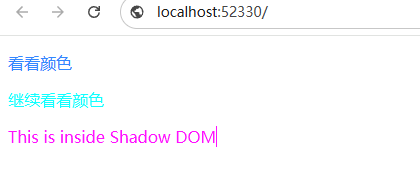
Shadow DOM举例
这东西具有隔离效果,对于一些插件需要append一些div倒是不错的选择 <!DOCTYPE html> <html lang"zh-CN"> <head> <meta charset"utf-8"> <title>演示例子</title> </head> <body> <style&g…...

力扣动态规划-18【算法学习day.112】
前言 ###我做这类文章一个重要的目的还是记录自己的学习过程,我的解析也不会做的非常详细,只会提供思路和一些关键点,力扣上的大佬们的题解质量是非常非常高滴!!! 习题 1.下降路径最小和 题目链接:931. …...

网络基础
协议 协议就是约定 网络协议是协议中的一种 协议分层 协议本身也是软件,在设计上为了更好的模块化,解耦合,也是设计成为层状结构的 两个视角: 小白:同层协议,直接通信 工程师:同层协议&…...

OpenClaw个人财务助手:Qwen3-14B分析消费记录生成报表
OpenClaw个人财务助手:Qwen3-14B分析消费记录生成报表 1. 为什么需要AI财务助手 上个月整理支付宝账单时,我盯着密密麻麻的消费记录发了半小时呆。餐饮、购物、交通的金额混在一起,根本分不清钱到底花在哪里。手动分类300多条记录后&#x…...

嵌入式设备参数存储优化方案与实践
1. 嵌入式设备参数存储的痛点与常见方案在嵌入式系统开发中,参数存储是个看似简单却暗藏玄机的基础功能。我经历过多个量产项目,发现参数管理不当导致的现场问题占比高达30%。最常见的场景是:设备运行多年后需要功能升级,新增几个…...

I2C设备扫描器:嵌入式系统总线拓扑发现与地址诊断工具
1. I2C设备扫描器:嵌入式系统中总线拓扑发现的核心工具IC(Inter-Integrated Circuit)总线因其仅需两根信号线(SCL时钟线与SDA数据线)、支持多主多从架构、内置仲裁与应答机制等特性,成为嵌入式系统中传感器…...

2026届学术党必备的降AI率平台横评
Ai论文网站排名(开题报告、文献综述、降aigc率、降重综合对比) TOP1. 千笔AI TOP2. aipasspaper TOP3. 清北论文 TOP4. 豆包 TOP5. kimi TOP6. deepseek 降低那个AIGC率的关键要点在于削弱机器生成所呈现出的模式化特性。其一,对句式结…...
)
Tomcat里同时部署静态资源和SpringBoot应用,跨域配置冲突了?一个配置搞定(附排查思路)
Tomcat混合部署中的跨域困局:静态资源与SpringBoot应用的配置博弈 当静态HTML页面上的AJAX请求突然返回Access-Control-Allow-Origin缺失的错误时,我正调试一个企业级知识管理系统。这个系统采用经典架构——Tomcat同时托管Vue前端静态资源和SpringBoot…...
)
宠物管理系统|基于springboot+vue的宠物管理系统(源码+数据库+文档)
宠物管理系统 目录 基于springbootvue的宠物管理系统 一、前言 二、系统功能演示 完整操作流程 部署视频已录制完成 三、技术选型 四、其他项目参考 五、代码参考 六、测试参考 七、最新计算机毕设选题推荐 八、源码获取: 基于springbootvue的宠物管理系…...

工程师快速解决TVA检测系统常见故障的实操技巧
TVA系统在汽车零部件焊接点检测中需长期连续运行,适配高节拍生产场景,作为负责系统运维的工程师,快速排查与解决常见故障,是保障系统稳定运行的核心职责。在实际运维过程中,不少工程师因对故障原因判断不准确、排查方法…...

OpenClaw任务监控实战:Phi-3-vision-128k-instruct长流程管理
OpenClaw任务监控实战:Phi-3-vision-128k-instruct长流程管理 1. 为什么需要长流程监控 去年夏天,我接手了一个需要处理大量图文混合数据的项目。最初尝试用传统脚本串联处理,结果发现当任务运行到第37小时突然中断时,我甚至不知…...

实战指南:基于快马平台开发可部署的nt动漫主题粉丝留言墙
最近在尝试做一个动漫主题的粉丝互动留言墙,想给喜欢的作品搭建一个应援阵地。这个项目需要实现留言发布、展示和本地存储功能,正好用InsCode(快马)平台来快速验证想法。下面记录下具体实现过程和关键点: 项目构思与框架搭建 首先明确核心功能…...
:集合操作详解)
Redis 从入门到精通(七):集合操作详解
系列导读:本篇将深入讲解 Redis 集合(Set)的所有操作命令及实际应用场景。 文章目录一、集合命令总览二、基础操作命令2.1 添加与删除2.2 检查与统计2.3 随机操作2.4 移动元素三、集合运算命令3.1 交集3.2 并集3.3 差集四、实战应用场景4.1 标签系统4.2 社交关系4.3…...