
Java Email 发HTML邮件工具 采用 freemarker模板引擎渲染
Java Email 发HTML邮件工具 采用 freemarker模板引擎
1.常用方式对比
Java发送邮件有很多的实现方式
-
第一种:Java 原生发邮件
mail.jar和activation.jar<!-- https://mvnrepository.com/artifact/javax.mail/mail --> <dependency><groupId>javax.mail</groupId><artifactId>mail</artifactId><version>1.4.7</version> </dependency> <!-- https://mvnrepository.com/artifact/javax.activation/activation --> <dependency><groupId>javax.activation</groupId><artifactId>activation</artifactId><version>1.1.1</version> </dependency>原生的java可以发送普通文本和HTML邮件,同时也可以发送带附件的邮件,但是缺点也很明显,配置非常繁琐,不同的邮件需要不同的实现类去完成,不适合项目中使用。
-
第二种:使用框架提供的去实现,在SpringBoot中有实现这个功能的组件
spring-boot-starter-mail<!-- https://mvnrepository.com/artifact/org.springframework.boot/spring-boot-starter-mail --> <dependency><groupId>org.springframework.boot</groupId><artifactId>spring-boot-starter-mail</artifactId> </dependency>这种实现起来特别方便,仅仅只要在SpringBoot项目中引入组件,在配置文件中配置好各种参数,就可以实现依赖注入,调用接口完成发送邮件,同时支持普通文本、HTML邮件、以及携带附件的邮件。同时缺点就是和框架集成太高了,如果项目中没有使用SpringBoot就不是那么好用了。
-
第三种:采用Apache提供的邮件工具
commons-email,项目中已经封装好了一些常用的发邮件的接口供开发者使用,并且配置起来也比较简单,和其他技术耦合低是比较好的解决问题的方案。<dependency><groupId>org.apache.commons</groupId><artifactId>commons-email</artifactId><version>1.5</version> </dependency>
2.项目中使用
项目使用的jar包,采用maven工程。
<dependency><groupId>org.apache.commons</groupId><artifactId>commons-email</artifactId><version>1.5</version> </dependency>第三方jar包引入时下载:https://mvnrepository.com/artifact/org.apache.commons/commons-email
(1)创建配置文件email.properties
- 建议将配置文件统一放置在
resources文件夹中
# 邮件服务器的地址
host=smtp.exmail.qq.com
# 邮件服务器的端口(百度上有,或者邮件提供商开发文档有)
port=456
# 发件人邮箱
username=
# 密码或授权码
password=
# 发件人名称,如果不提供会使用发件人邮件作为发件人
formName=
(2)发邮件的核心代码
package com.zhongcode.demo.email;import org.apache.commons.mail.*;import java.util.Collections;
import java.util.List;
import java.util.Properties;/*** 邮件发送实例*/
public class SendEmail {/*** 邮件服务器 host*/private String host;/*** 邮件服务器端口 port*/private int port;/*** 用户名*/private String username;/*** 密码(授权码)*/private String password;/*** 发件人名称*/private String formName;/*** 是否开启debug*/private boolean debug;public SendEmail() {}public SendEmail(Properties pro) {this.host = pro.getProperty("host");this.port = Integer.parseInt(pro.getProperty("port", "0"));this.username = pro.getProperty("username");this.password = pro.getProperty("password");this.formName = pro.getProperty("formName");}public SendEmail(String host, int port, String username, String password, String formName, boolean debug) {this.host = host;this.port = port;this.username = username;this.password = password;this.formName = formName;this.debug = debug;}public SendEmail(String host, int port, String username, String password, String formName) {this.host = host;this.port = port;this.username = username;this.password = password;this.formName = formName;}public SendEmail(String host, int port, String username, String password) {this.host = host;this.port = port;this.username = username;this.password = password;}public String getHost() {return host;}public void setHost(String host) {this.host = host;}public int getPort() {return port;}public void setPort(int port) {this.port = port;}public String getUsername() {return username;}public void setUsername(String username) {this.username = username;}public String getPassword() {return password;}public void setPassword(String password) {this.password = password;}public String getFormName() {return formName;}public void setFormName(String formName) {this.formName = formName;}public boolean isDebug() {return debug;}public void setDebug(boolean debug) {this.debug = debug;}/*** 发邮件** @param to      收件件人* @param subject 主题* @param msg     消息* @throws EmailException 邮件异常*/public synchronized void sendEmail(String to, String subject, String msg) throws EmailException {sendEmail(Collections.singletonList(to), subject, msg, null, null);}/*** 发邮件** @param toEmails 发送列表* @param subject  主题* @param msg      内容支持html* @param attaches 附件* @param fromName 发送名称* @throws EmailException 邮件异常*/public synchronized void sendEmail(List<String> toEmails, String subject, String msg, List<String> attaches, String fromName) throws EmailException {// 创建邮件对象MultiPartEmail email;// 当附件不为空时,使用MultiPartEmail添加附件if (attaches != null) {email = new MultiPartEmail();for (String att : attaches) {EmailAttachment attachment = new EmailAttachment();attachment.setPath(att);// 截取文件名attachment.setName(att.substring(att.lastIndexOf("/") + 1));email.attach(attachment);}// 当使用MultiPartEmail时渲染html要使用Part进行添加email.addPart(msg, "text/html; charset=UTF-8");} else {// 默认使用HtmlEmail创建email = new HtmlEmail();email.setMsg(msg);}// 设置主机email.setHostName(host);// 设置端口email.setSmtpPort(port);email.setDebug(debug);email.setAuthenticator(new DefaultAuthenticator(username, password));email.setCharset("UTF-8");email.setSSLOnConnect(true);email.setFrom(username, fromName == null ? (this.formName == null ? username : this.formName) : fromName);email.setSubject(subject);for (String to : toEmails) {email.addTo(to);}email.send();}
}
(3)程序发邮件测试
public static void main(String[] args) throws EmailException, IOException, TemplateException {// 加载配置文件InputStream is = Main.class.getClassLoader().getResourceAsStream("email.properties");Properties pro = new Properties();pro.load(is);// 创建邮件SendEmail sendEmail = new SendEmail(pro);sendEmail.sendEmail("收件人", "test", "测试邮件");
}
3.发送HTML模板邮件
当我们想发送模板HTML时,需要发送HTML格式的代码,主要是纯文本的邮件并不好看,而且项目中经常使用的是好看的模板,比如系统用户注册时需要发送验证码,很多情况下都要发邮件。
这里我们采用的freemarker模板引擎来渲染我们的HTML模板,下面是以发送邮箱验证码为例。
(1)引入freemarker模板引擎
<dependency><groupId>org.freemarker</groupId><artifactId>freemarker</artifactId><version>2.3.32</version>
</dependency>
(2)创建HTML模板
文件名:code.ftl
<meta charset="utf-8"><table width="100%"><tr><td style="width: 100%;"><center><table class="content-wrap" style="margin: 0px auto; width: 600px;"><tr><td style="margin: 0px auto; overflow: hidden; padding: 0px; border: 0px dotted rgb(238, 238, 238);"><!----><div class="full" tindex="1" style="margin: 0px auto; max-width: 600px;"><table align="center" border="0" cellpadding="0" cellspacing="0" class="fullTable" style="width: 600px;"><tbody><tr><td class="fullTd" style="direction: ltr; width: 600px; font-size: 0px; padding-bottom: 0px; text-align: center; vertical-align: top; background-color: rgb(170, 0, 170); background-image: url(""); background-repeat: no-repeat; background-size: 100px; background-position: 10% 50%;"><table border="0" cellpadding="0" cellspacing="0" width="100%" style="vertical-align: top;"><tr><td align="left" style="font-size: 0px; padding: 20px;"><div class="text" style="font-family: 微软雅黑, "Microsoft YaHei"; overflow-wrap: break-word; margin: 0px; text-align: center; line-height: 1.6; color: rgb(255, 255, 255); font-size: 18px; font-weight: normal;"><div><p style="text-size-adjust: none; word-break: break-word; line-height: 1.6; font-size: 18px; margin: 0px;"><strong>系统提示</strong></p></div></div></td></tr></table></td></tr></tbody></table></div><div class="full" tindex="2" style="margin: 0px auto; max-width: 600px;"><table align="center" border="0" cellpadding="0" cellspacing="0" class="fullTable" style="width: 600px;"><tbody><tr><td class="fullTd" style="direction: ltr; width: 600px; font-size: 0px; padding-bottom: 0px; text-align: center; vertical-align: top; background-image: url(""); background-repeat: no-repeat; background-size: 100px; background-position: 10% 50%;"><table border="0" cellpadding="0" cellspacing="0" width="100%" style="vertical-align: top;"><tr><td align="left" style="font-size: 0px; padding: 20px 20px 5px;"><div class="text" style="font-family: 微软雅黑, "Microsoft YaHei"; overflow-wrap: break-word; margin: 0px; text-align: left; line-height: 20px; color: rgb(102, 102, 102); font-size: 14px; font-weight: normal;"><div><p style="text-size-adjust: none; word-break: break-word; line-height: 20px; font-size: 14px; margin: 0px;">您的验证码为:</p></div></div></td></tr></table></td></tr></tbody></table></div><div class="full" tindex="3" style="margin: 0px auto; max-width: 600px;"><table align="center" border="0" cellpadding="0" cellspacing="0" class="fullTable" style="width: 600px;"><tbody><tr><td class="fullTd" style="direction: ltr; width: 600px; font-size: 0px; padding-bottom: 0px; text-align: center; vertical-align: top; background-image: url(""); background-repeat: no-repeat; background-size: 100px; background-position: 10% 50%;"><table border="0" cellpadding="0" cellspacing="0" width="100%" style="vertical-align: top;"><tr><td align="left" style="font-size: 0px; padding: 20px;"><div class="text" style="font-family: 微软雅黑, "Microsoft YaHei"; overflow-wrap: break-word; margin: 0px; text-align: center; line-height: 20px; color: rgb(0, 0, 0); font-size: 24px; font-weight: normal;"><div><p style="text-size-adjust: none; word-break: break-word; line-height: 20px; font-size: 24px; margin: 0px;"><strong>${code}</strong></p></div></div></td></tr></table></td></tr></tbody></table></div><div class="full" tindex="4" style="margin: 0px auto; max-width: 600px;"><table align="center" border="0" cellpadding="0" cellspacing="0" class="fullTable" style="width: 600px;"><tbody><tr><td class="fullTd" style="direction: ltr; width: 600px; font-size: 0px; padding-bottom: 0px; text-align: center; vertical-align: top; background-image: url(""); background-repeat: no-repeat; background-size: 100px; background-position: 10% 50%;"><table border="0" cellpadding="0" cellspacing="0" width="100%" style="vertical-align: top;"><tr><td align="left" style="font-size: 0px; padding: 8px 20px 20px;"><div class="text" style="font-family: 微软雅黑, "Microsoft YaHei"; overflow-wrap: break-word; margin: 0px; text-align: left; line-height: 20px; color: rgb(102, 102, 102); font-size: 12px; font-weight: normal;"><div><p style="text-size-adjust: none; word-break: break-word; line-height: 20px; font-size: 12px; margin: 0px;"><span style="color: #333333;">验证码10分钟内有效。</span></p></div></div></td></tr></table></td></tr></tbody></table></div><div class="full" tindex="5" style="margin: 0px auto; line-height: 0px; max-width: 600px;"><table align="center" border="0" cellpadding="0" cellspacing="0" class="fullTable" style="width: 600px;"><tbody><tr><td align="center" class="fullTd" style="direction: ltr; font-size: 0px; padding: 10px 20px; text-align: center; vertical-align: top; word-break: break-word; width: 600px; background-image: url(""); background-repeat: no-repeat; background-size: 100px; background-position: 10% 50%;"><table align="center" border="0" cellpadding="0" cellspacing="0" style="border-collapse: collapse; border-spacing: 0px;"><tbody><tr><td style="width: 600px; border-top: 1px solid rgb(204, 204, 204);"></td></tr></tbody></table></td></tr></tbody></table></div><div class="full" tindex="6" style="margin: 0px auto; max-width: 600px;"><table align="center" border="0" cellpadding="0" cellspacing="0" class="fullTable" style="width: 600px;"><tbody><tr><td class="fullTd" style="direction: ltr; width: 600px; font-size: 0px; padding-bottom: 0px; text-align: center; vertical-align: top; background-image: url(""); background-repeat: no-repeat; background-size: 100px; background-position: 10% 50%;"><table border="0" cellpadding="0" cellspacing="0" width="100%" style="vertical-align: top;"><tr><td align="left" style="font-size: 0px; padding: 10px 20px 0px;"><div class="text" style="font-family: 微软雅黑, "Microsoft YaHei"; overflow-wrap: break-word; margin: 0px; text-align: left; line-height: 20px; color: rgb(170, 170, 170); font-size: 12px; font-weight: normal;"><div><p style="text-size-adjust: none; word-break: break-word; line-height: 20px; font-size: 12px; margin: 0px;">此为系统邮件请勿回复</p></div></div></td></tr></table></td></tr></tbody></table></div><div class="full" tindex="7" style="margin: 0px auto; max-width: 600px;"><table align="center" border="0" cellpadding="0" cellspacing="0" class="fullTable" style="width: 600px;"><tbody><tr><td class="fullTd" style="direction: ltr; width: 600px; font-size: 0px; padding-bottom: 0px; text-align: center; vertical-align: top; background-image: url(""); background-repeat: no-repeat; background-size: 100px; background-position: 10% 50%;"><table border="0" cellpadding="0" cellspacing="0" width="100%" style="vertical-align: top;"><tr><td align="left" style="font-size: 0px; padding: 20px;"><div class="text" style="font-family: 微软雅黑, "Microsoft YaHei"; overflow-wrap: break-word; margin: 0px; text-align: center; line-height: 20px; color: rgb(170, 170, 170); font-size: 12px; font-weight: normal;"><div><p style="text-size-adjust: none; word-break: break-word; line-height: 20px; font-size: 12px; margin: 0px;">Copyright © zhongcode 2020 All Right Reserved</p></div></div></td></tr></table></td></tr></tbody></table></div></td></tr></table></center></td></tr></table>
(3)代码测试
public class Main {public static void main(String[] args) throws EmailException, IOException, TemplateException {//1.创建配置类Configuration configuration = new Configuration(Configuration.DEFAULT_INCOMPATIBLE_IMPROVEMENTS);//2.设置模板所在的目录configuration.setDirectoryForTemplateLoading(new File("E:\\tmp\\ftl"));//3.设置字符集configuration.setDefaultEncoding("utf-8");//4.加载模板//模板名自动在模板所在目录寻找Template template = configuration.getTemplate("code.ftl");Map<String, String> data = new HashMap<>();data.put("code", "999999");StringWriter out = new StringWriter();template.process(data, out);// 加载配置文件InputStream is = Main.class.getClassLoader().getResourceAsStream("email.properties");Properties pro = new Properties();pro.load(is);// 创建邮件SendEmail sendEmail = new SendEmail(pro);sendEmail.sendEmail("收件人", "验证码", out.toString());}}
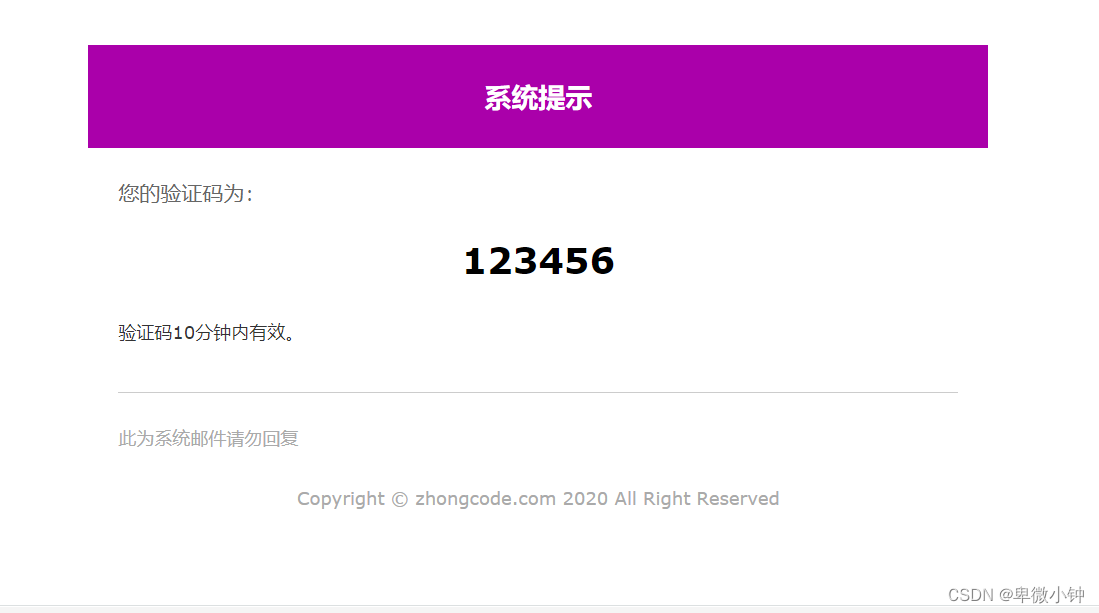
就这样,一封好看的HTML邮件就完成了,任何问题都可以私信我哦
相关文章:
Java Email 发HTML邮件工具 采用 freemarker模板引擎渲染
Java Email 发HTML邮件工具 采用 freemarker模板引擎 1.常用方式对比 Java发送邮件有很多的实现方式 第一种:Java 原生发邮件mail.jar和activation.jar <!-- https://mvnrepository.com/artifact/javax.mail/mail --> <dependency><groupId>jav…...
Calico 介绍与原理(二))
CNI 网络流量分析(六)Calico 介绍与原理(二)
文章目录CNI 网络流量分析(六)Calico 介绍与原理(二)CNIIPAM指定 IP指定非 IPAM IPCNI 网络流量分析(六)Calico 介绍与原理(二) CNI 支持多种 datapath,默认是 linuxDa…...

短视频标题的几种类型和闭坑注意事项
目录 短视频标题的几种类型 1、悬念式 2、蹭热门式 3、干货式 4、对比式方法 5、总分/分总式方法 6、挑战式方式 7、启发激励式 8、讲故事式 02注意事项 1、避免使用冷门、生僻词汇 标题是点睛之笔,核心是视频内容 短视频标题的几种类型 1、悬念式 通过…...
操作系统——1.操作系统的概念、定义和目标
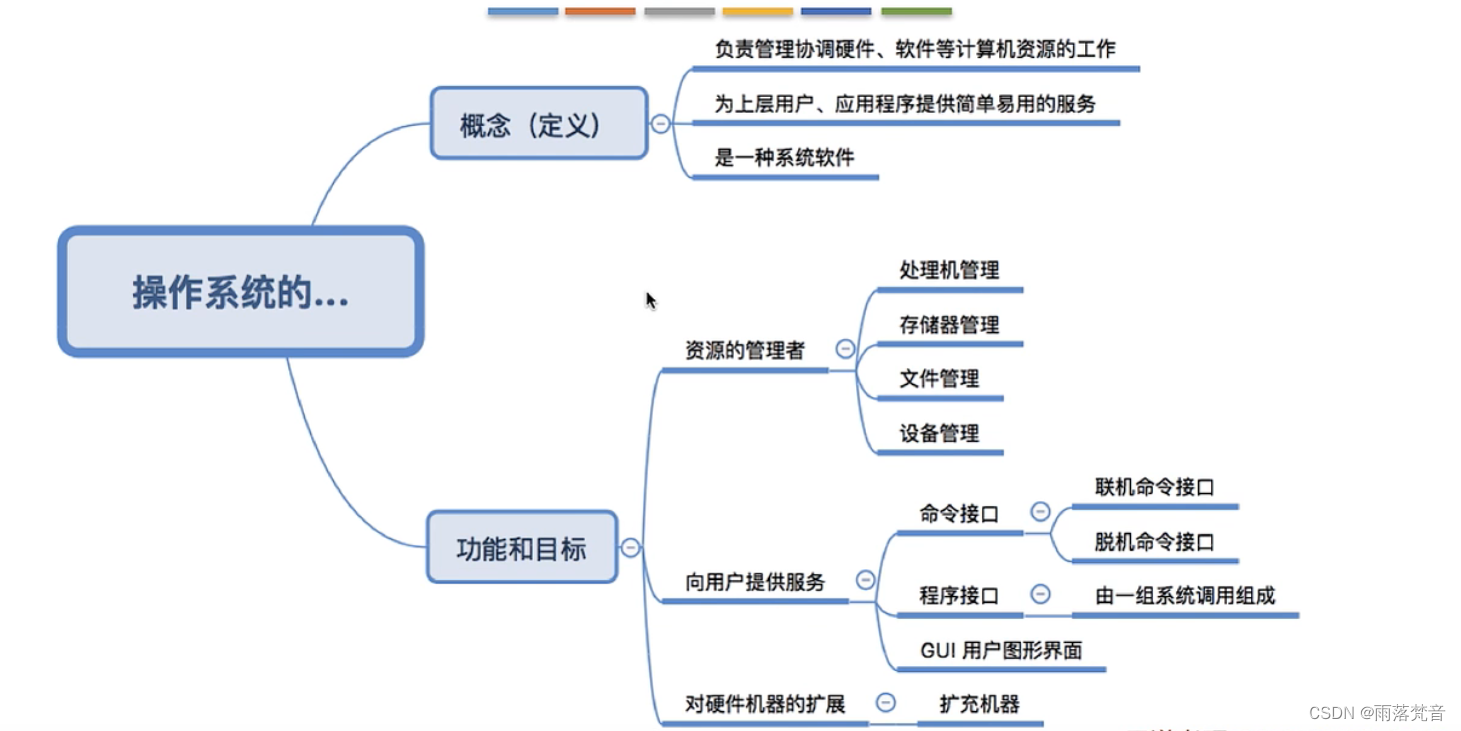
目录 1.概念 1.1 操作系统的种类 1.2电脑的组成 1.3电脑组成的介绍 1.4操作系统的概念(定义) 2.操作系统的功能和目标 2.1概述 2.2 操作系统作为系统资源的管理者 2.3 操作系统作为用户和计算机硬件间的接口 2.3.1用户接口的解释 2.3.2 GUI 2.3.3接…...
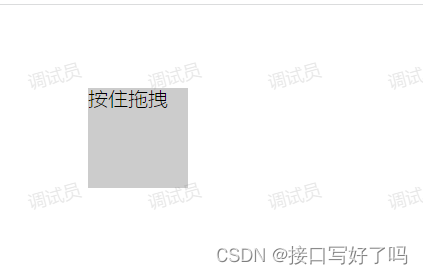
【html弹框拖拽和div拖拽功能】原生html页面引入vue语法后通过自定义指令简单实现div和弹框拖拽功能
前言 这是html版本的。只是引用了vue的语法。 这是很多公司会出现的一种情况,就是原生的页面,引入vue的语法开发 这就导致有些vue上很简单的功能。放到这里需要转换一下 以前写过一个vue版本的帖子,现在再加一个html版本的。 另一个vue版本…...
 | 刷完必过)
2023新华为OD机试题 - 计算网络信号(JavaScript) | 刷完必过
计算网络信号 题目 网络信号经过传递会逐层衰减,且遇到阻隔物无法直接穿透,在此情况下需要计算某个位置的网络信号值。 注意:网络信号可以绕过阻隔物 array[m][n] 的二维数组代表网格地图,array[i][j] = 0代表 i 行 j 列是空旷位置;array[i][j] = x(x 为正整数)代表 i 行 …...

27.边缘系统的架构
文章目录27 Architecures for the Edge 边缘系统的架构27.1 The Ecosystem of Edge-Dominant Systems 边缘主导系统的生态系统27.2 Changes to the Software Development Life Cycle 软件开发生命周期的变化27.3 Implications for Architecture 对架构的影响27.4 Implications …...
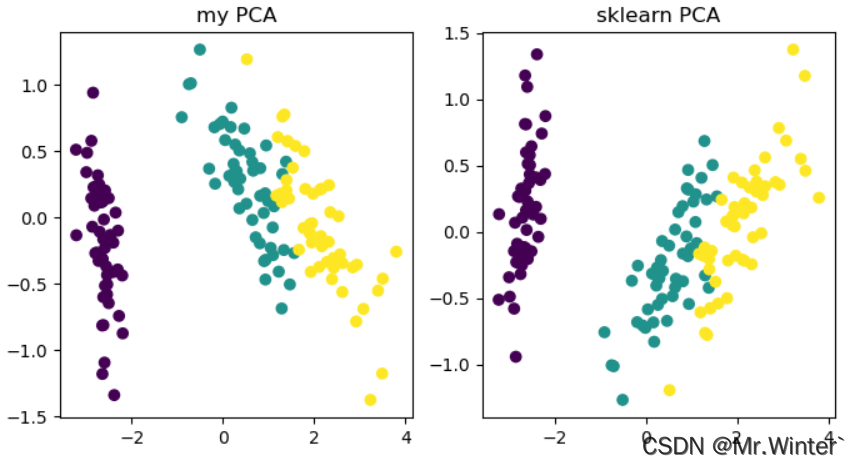
机器学习强基计划8-1:图解主成分分析PCA算法(附Python实现)
目录0 写在前面1 为什么要降维?2 主成分分析原理3 PCA与SVD的联系4 Python实现0 写在前面 机器学习强基计划聚焦深度和广度,加深对机器学习模型的理解与应用。“深”在详细推导算法模型背后的数学原理;“广”在分析多个机器学习模型…...
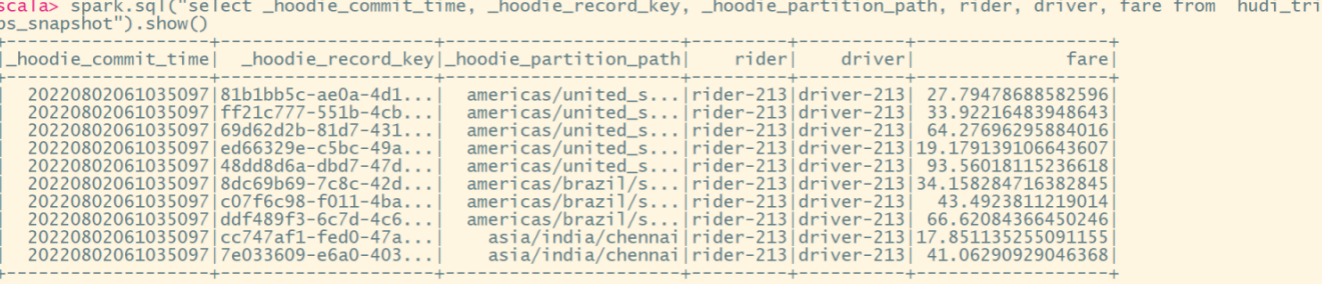
Hudi-集成Spark之spark-shell 方式
Hudi集成Spark之spark-shell 方式 启动 spark-shell (1)启动命令 #针对Spark 3.2 spark-shell \--conf spark.serializerorg.apache.spark.serializer.KryoSerializer \--conf spark.sql.catalog.spark_catalogorg.apache.spark.sql.hudi.catalog.Hoo…...

Python爬虫:从js逆向了解西瓜视频的下载链接的生成
前言 最近花费了几天时间,想获取西瓜视频这个平台上某个视频的下载链接,运用js逆向进行获取。其实,如果小编一开始就注意到这一点(就是在做js逆向时,打了断点之后,然后执行相关代码,查看相关变量的值,结果一下子就蹦出很多视频相关的数据,查看了网站下的相关api链接,也…...

Numpy-如何对数组进行切割
前言 本文是该专栏的第24篇,后面会持续分享python的数据分析知识,记得关注。 继上篇文章,详细介绍了使用numpy对数组进行叠加。本文再详细来介绍,使用numpy如何对数组进行切割。说句题外话,前面有重点介绍numpy的各个知识点。 感兴趣的同学,可查看笔者之前写的详细内容…...
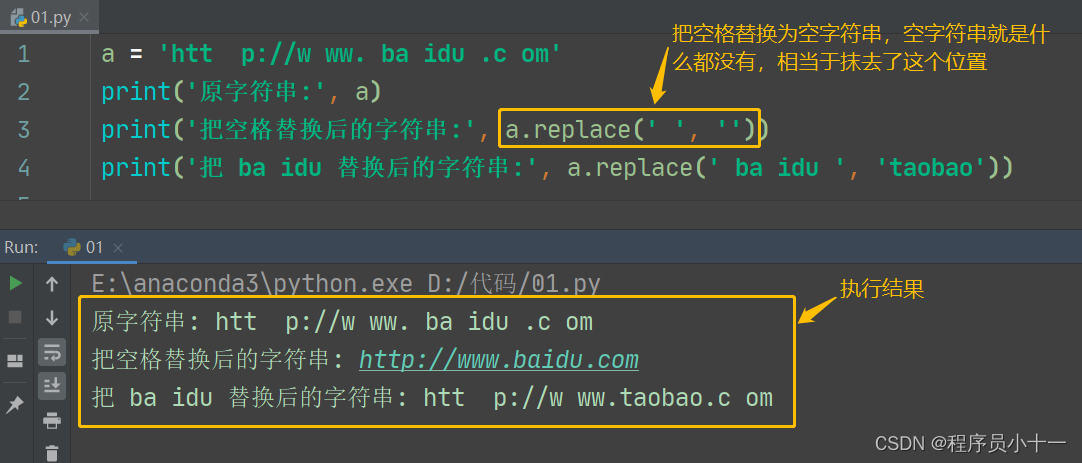
Python之字符串精讲(下)
前言 今天继续讲解字符串下半部分,内容包括字符串的检索、大小写转换、去除字符串中空格和特殊字符。 一、检索字符串 在Python中,字符串对象提供了很多用于字符串查找的方法,主要给大家介绍以下几种方法。 1. count() 方法 count() 方法…...

Python图像卡通化animegan2-pytorch实例演示
先看下效果图: 左边是原图,右边是处理后的图片,使用的 face_paint_512_v2 模型。 项目获取: animegan2-pytorch 下载解压后 cmd 可进入项目地址的命令界面。 其中 img 是我自己建的,用于存放图片。 需要 torch 版本 …...
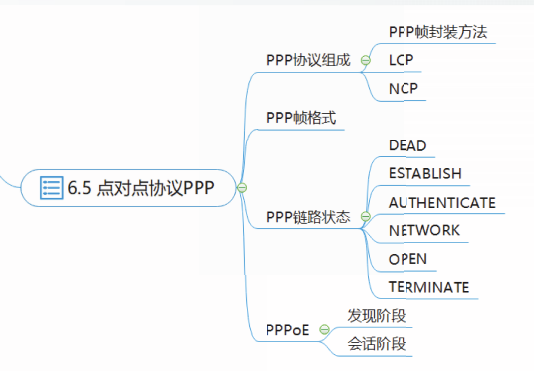
谢希仁版《计算机网络》期末总复习【完结】
文章目录说明第一章 计算机网络概述计算机网络和互联网网络边缘网络核心分组交换网的性能网络体系结构控制平面和数据平面第二章 IP地址分类编址子网划分无分类编址特殊用途的IP地址IP地址规划和分配第三章 应用层应用层协议原理万维网【URL / HTML / HTTP】域名系统DNS动态主机…...

问:React的useState和setState到底是同步还是异步呢?
先来思考一个老生常谈的问题,setState是同步还是异步? 再深入思考一下,useState是同步还是异步呢? 我们来写几个 demo 试验一下。 先看 useState 同步和异步情况下,连续执行两个 useState 示例 function Component() {const…...
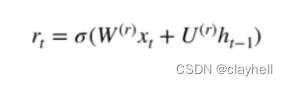
深度理解机器学习16-门控循环单元
评估简单循环神经网络的缺点。 描述门控循环单元(Gated Recurrent Unit,GRU)的架构。 使用GRU进行情绪分析。 将GRU应用于文本生成。 基本RNN通常由输入层、输出层和几个互连的隐藏层组成。最简单的RNN有一个缺点,那就是它们不…...

Python中Generators教程
要想创建一个iterator,必须实现一个有__iter__()和__next__()方法的类,类要能够跟踪内部状态并且在没有元素返回的时候引发StopIteration异常. 这个过程很繁琐而且违反直觉.Generator能够解决这个问题. python generator是一个简单的创建iterator的途径…...

数据结构与算法基础-学习-10-线性表之栈的清理、销毁、压栈、弹栈
一、函数实现1、ClearSqStack(1)用途清理栈的空间。只需要栈顶指针和栈底指针相等,就说明栈已经清空,后续新入栈的数据可以直接覆盖,不用实际清理数据,提升了清理效率。(2)源码Statu…...
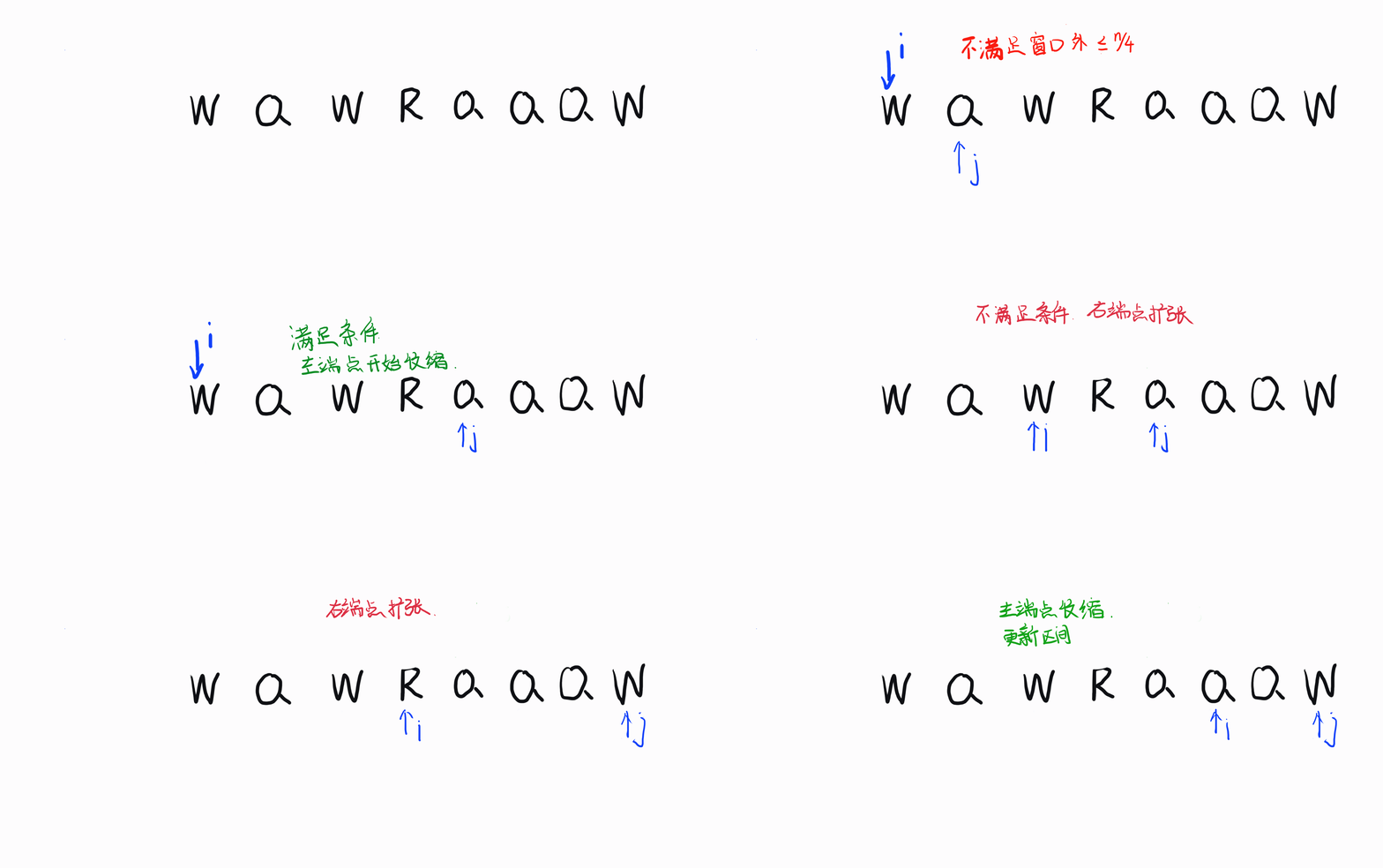
Leetcode 每日一题 1234. 替换子串得到平衡字符串
Halo,这里是Ppeua。平时主要更新C语言,C,数据结构算法......感兴趣就关注我吧!你定不会失望。 🌈个人主页:主页链接 🌈算法专栏:专栏链接 我会一直往里填充内容哒! &…...

【MYSQL中级篇】数据库数据查询学习
🍁博主简介 🏅云计算领域优质创作者 🏅华为云开发者社区专家博主 🏅阿里云开发者社区专家博主 💊交流社区:运维交流社区 欢迎大家的加入! 相关文章 文章名文章地址【MYSQL初级篇】入门…...
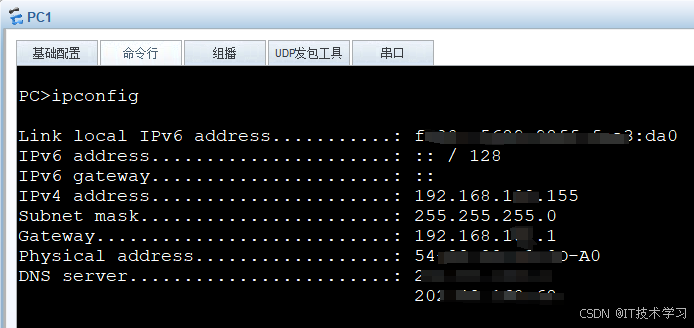
eNSP-Cloud(实现本地电脑与eNSP内设备之间通信)
说明: 想象一下,你正在用eNSP搭建一个虚拟的网络世界,里面有虚拟的路由器、交换机、电脑(PC)等等。这些设备都在你的电脑里面“运行”,它们之间可以互相通信,就像一个封闭的小王国。 但是&#…...
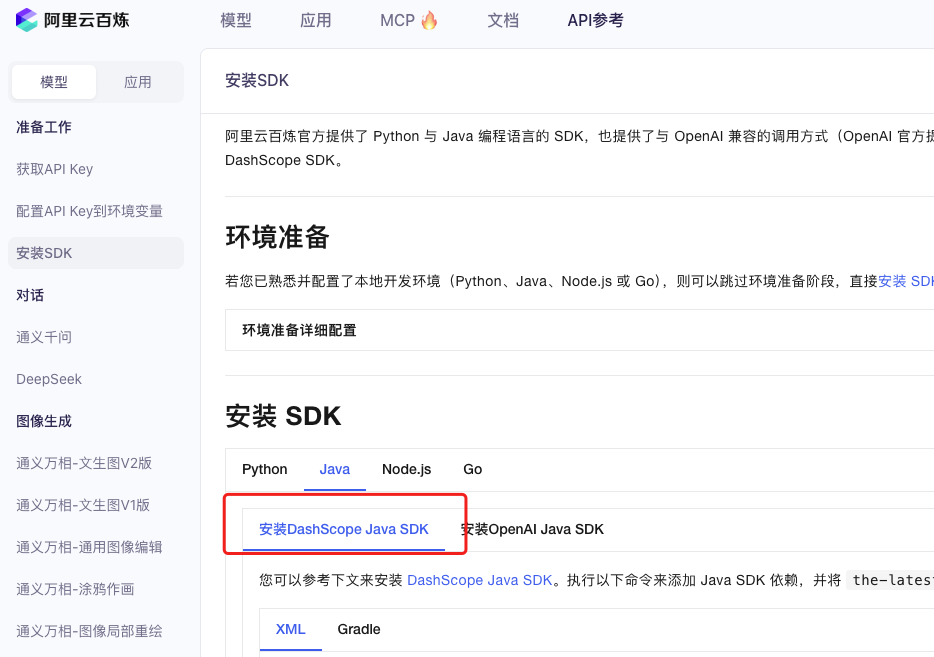
业务系统对接大模型的基础方案:架构设计与关键步骤
业务系统对接大模型:架构设计与关键步骤 在当今数字化转型的浪潮中,大语言模型(LLM)已成为企业提升业务效率和创新能力的关键技术之一。将大模型集成到业务系统中,不仅可以优化用户体验,还能为业务决策提供…...
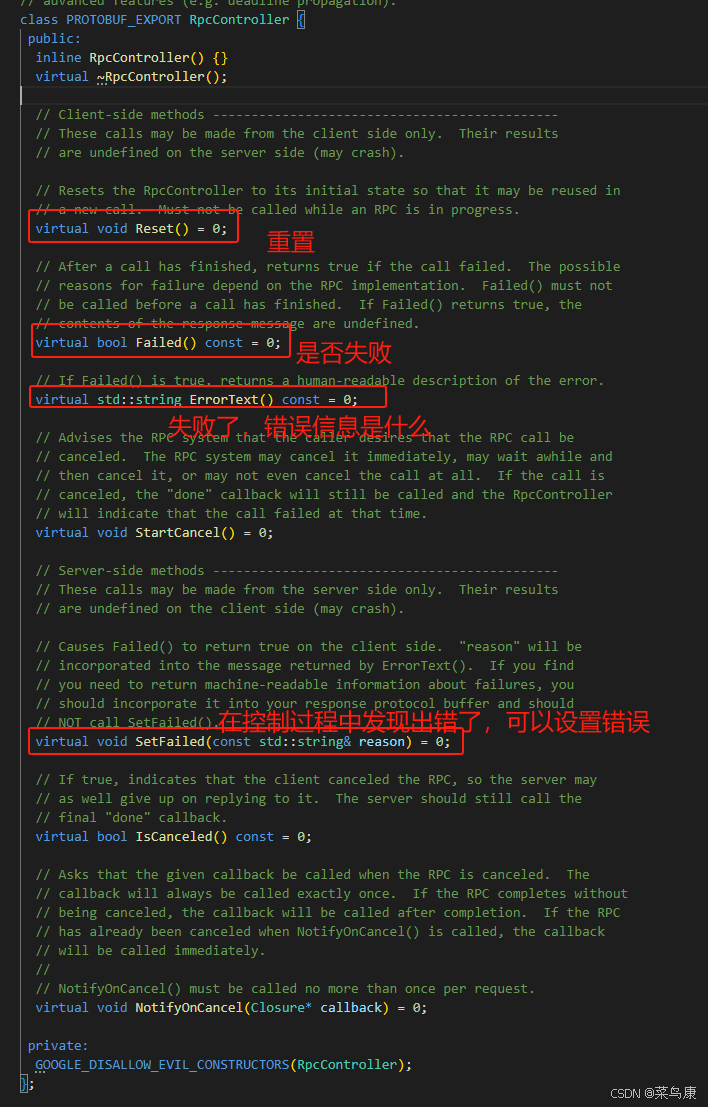
C++实现分布式网络通信框架RPC(3)--rpc调用端
目录 一、前言 二、UserServiceRpc_Stub 三、 CallMethod方法的重写 头文件 实现 四、rpc调用端的调用 实现 五、 google::protobuf::RpcController *controller 头文件 实现 六、总结 一、前言 在前边的文章中,我们已经大致实现了rpc服务端的各项功能代…...
:滤镜命令)
ffmpeg(四):滤镜命令
FFmpeg 的滤镜命令是用于音视频处理中的强大工具,可以完成剪裁、缩放、加水印、调色、合成、旋转、模糊、叠加字幕等复杂的操作。其核心语法格式一般如下: ffmpeg -i input.mp4 -vf "滤镜参数" output.mp4或者带音频滤镜: ffmpeg…...
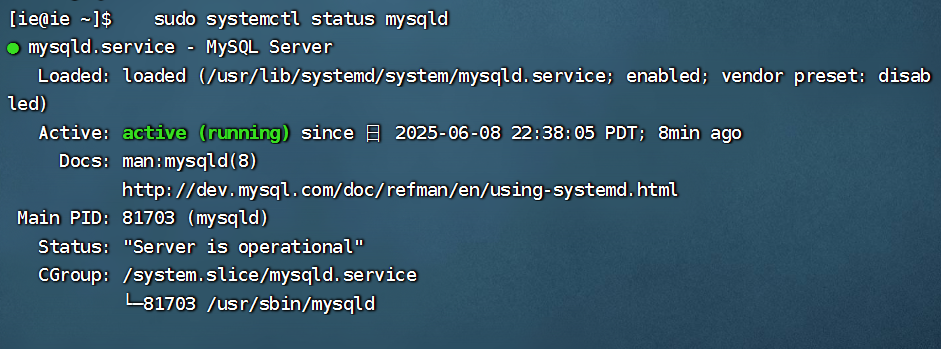
项目部署到Linux上时遇到的错误(Redis,MySQL,无法正确连接,地址占用问题)
Redis无法正确连接 在运行jar包时出现了这样的错误 查询得知问题核心在于Redis连接失败,具体原因是客户端发送了密码认证请求,但Redis服务器未设置密码 1.为Redis设置密码(匹配客户端配置) 步骤: 1).修…...
安装docker)
Linux离线(zip方式)安装docker
目录 基础信息操作系统信息docker信息 安装实例安装步骤示例 遇到的问题问题1:修改默认工作路径启动失败问题2 找不到对应组 基础信息 操作系统信息 OS版本:CentOS 7 64位 内核版本:3.10.0 相关命令: uname -rcat /etc/os-rele…...

智能AI电话机器人系统的识别能力现状与发展水平
一、引言 随着人工智能技术的飞速发展,AI电话机器人系统已经从简单的自动应答工具演变为具备复杂交互能力的智能助手。这类系统结合了语音识别、自然语言处理、情感计算和机器学习等多项前沿技术,在客户服务、营销推广、信息查询等领域发挥着越来越重要…...

A2A JS SDK 完整教程:快速入门指南
目录 什么是 A2A JS SDK?A2A JS 安装与设置A2A JS 核心概念创建你的第一个 A2A JS 代理A2A JS 服务端开发A2A JS 客户端使用A2A JS 高级特性A2A JS 最佳实践A2A JS 故障排除 什么是 A2A JS SDK? A2A JS SDK 是一个专为 JavaScript/TypeScript 开发者设计的强大库ÿ…...
的使用)
Go 并发编程基础:通道(Channel)的使用
在 Go 中,Channel 是 Goroutine 之间通信的核心机制。它提供了一个线程安全的通信方式,用于在多个 Goroutine 之间传递数据,从而实现高效的并发编程。 本章将介绍 Channel 的基本概念、用法、缓冲、关闭机制以及 select 的使用。 一、Channel…...
)
C#学习第29天:表达式树(Expression Trees)
目录 什么是表达式树? 核心概念 1.表达式树的构建 2. 表达式树与Lambda表达式 3.解析和访问表达式树 4.动态条件查询 表达式树的优势 1.动态构建查询 2.LINQ 提供程序支持: 3.性能优化 4.元数据处理 5.代码转换和重写 适用场景 代码复杂性…...