
SpringBoot集成ElasticSearch
文章目录
- 前言
- 一、ElasticSearch本地环境搭建
- 二、SpringBoot整合ElasticSearch
- 1.pom中引入ES依赖
- 2.application.yaml配置elasticsearch
- 3.ElasticSearchClientConnect连接ES客户端工具类
- 4.ElasticSearchResult封装响应结果
- 5.Person实体类
- 6.Person实体类
- 7.ElasticsearchController增删改查控制层
- 8.ElasticsearchDocumentController文档操作控制层
- 三、测试
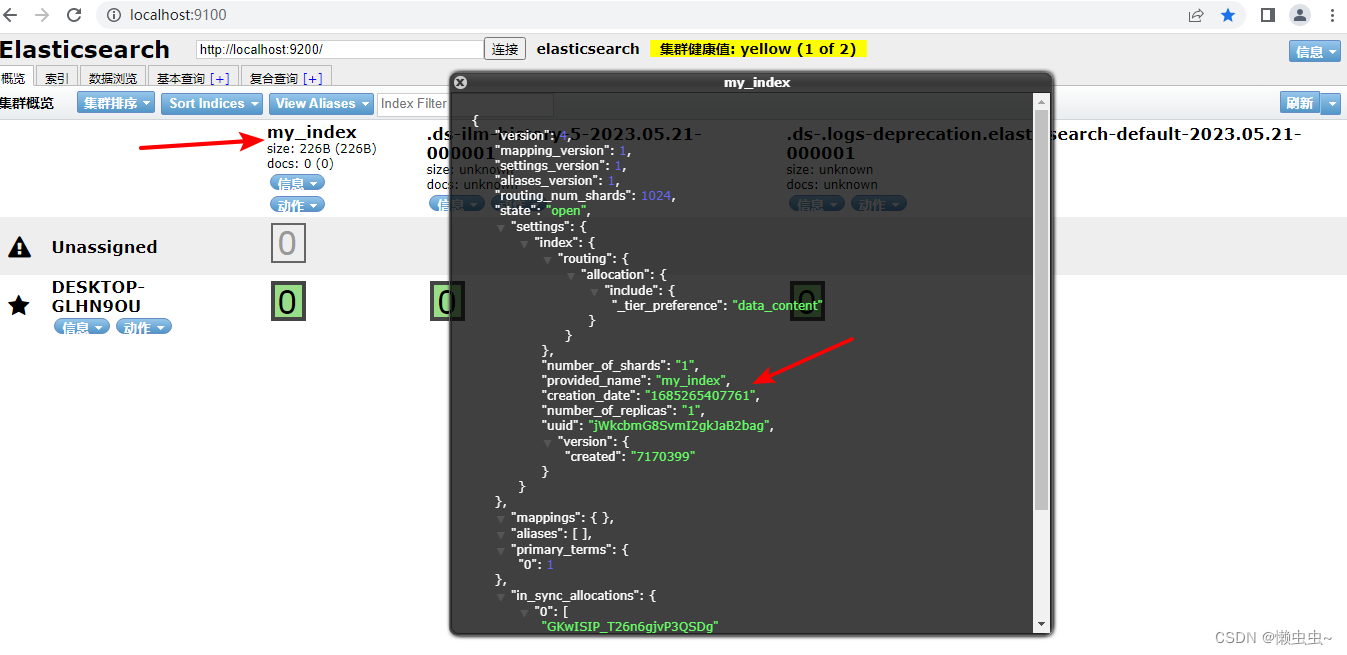
- 1.创建索引,名为my_index
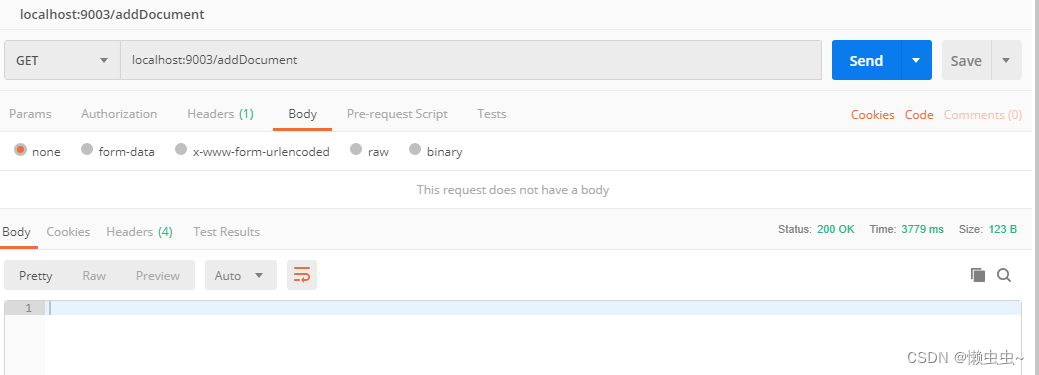
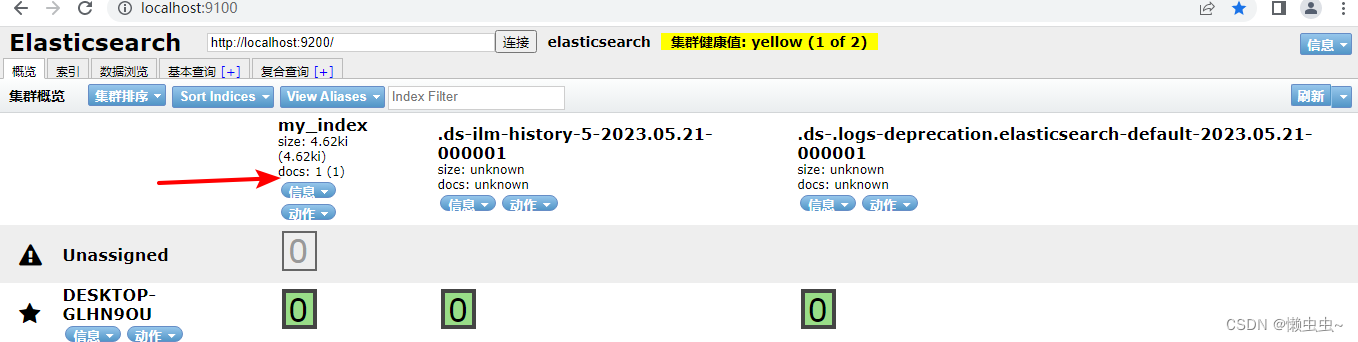
- 2.创建文档,给名为my_index的索引创建文档
- 四、项目结构及代码下载
- 参考资料
前言
被逼无奈,各行各业都在卷,给自己充电学习了Elasticsearch,在学完基础知识后(其实就是CRUD😂),就去Springboot中尝试整合ES。终于抽出时间,将学习的东西整理分享在此,欢迎大家批评指正哈~
一、ElasticSearch本地环境搭建
详细安装步骤参考此资料windows 安装 Elasticsearch
二、SpringBoot整合ElasticSearch
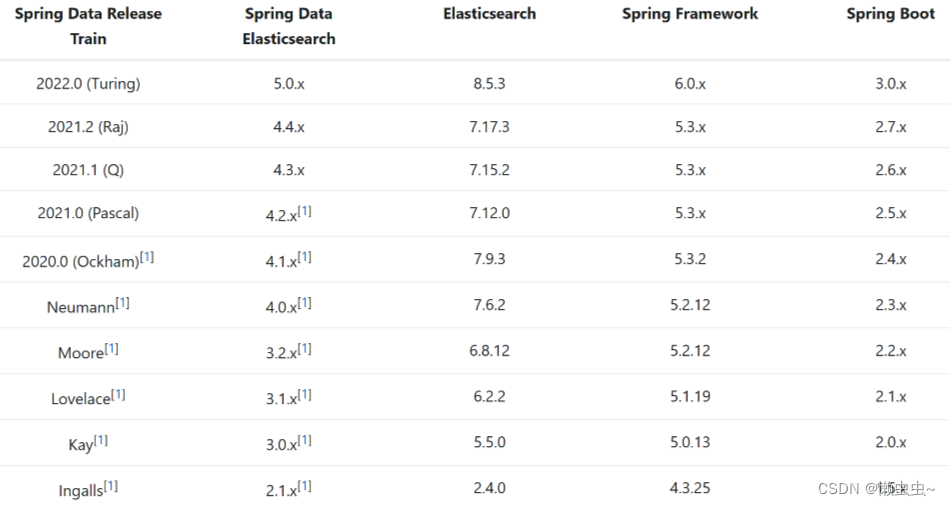
我这里Spring Boot版本2.7.5,ElasticSearch版本7.17.3。版本一定要对应上,否则会报一堆错误问题。
SpringBoot官方推荐对应Elasticsearch版本。
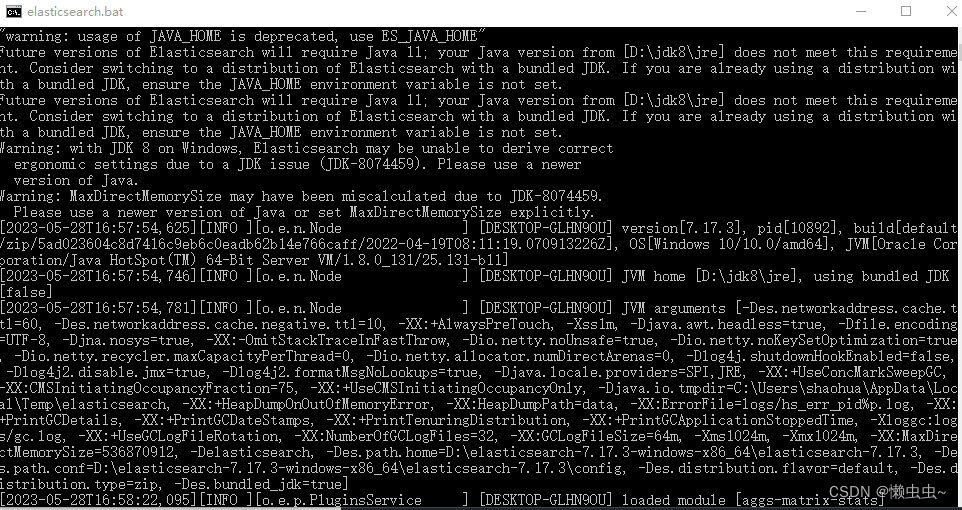
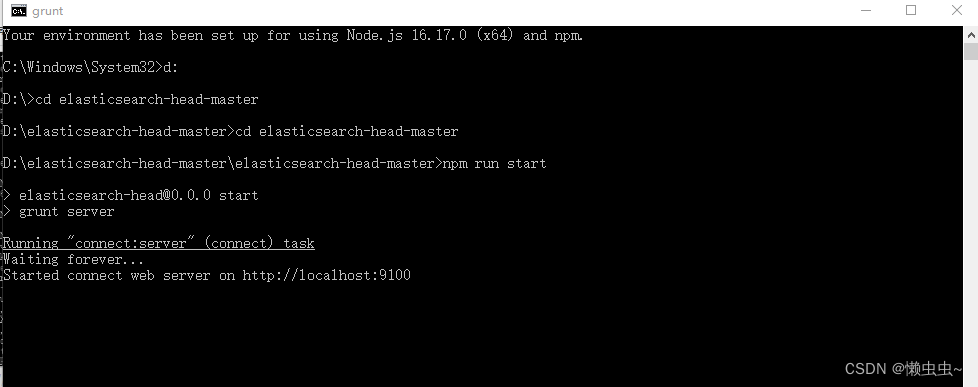
先启动ES本地服务(双击elasticsearch.bat启动服务),然后在elasticsearch-head可视化插件目录中执行npm start run启动可视化插件。
1.pom中引入ES依赖
<!-- ElasticSearch --><dependency><groupId>org.springframework.boot</groupId><artifactId>spring-boot-starter-data-elasticsearch</artifactId><exclusions><exclusion><artifactId>elasticsearch-java</artifactId><groupId>co.elastic.clients</groupId></exclusion></exclusions></dependency><dependency><groupId>co.elastic.clients</groupId><artifactId>elasticsearch-java</artifactId><version>8.0.1</version><exclusions><exclusion><artifactId>jakarta.json-api</artifactId><groupId>jakarta.json</groupId></exclusion></exclusions></dependency><dependency><groupId>jakarta.json</groupId><artifactId>jakarta.json-api</artifactId><version>2.0.1</version></dependency>
2.application.yaml配置elasticsearch
elasticsearch:port: 9200ip: 127.0.0.1username: elasticpassword: 123456
3.ElasticSearchClientConnect连接ES客户端工具类
@Configuration
public class ElasticSearchClientConnect {@Value("${elasticsearch.port}")private int port;@Value("${elasticsearch.ip}")private String ip;@Value("${elasticsearch.username}")private String username;@Value("${elasticsearch.password}")private String password;/*** 创建rest客户端*/@Beanpublic ElasticSearchResult restClient(){RestClient restClient = RestClient.builder(new HttpHost(ip, port,"http")).build();ElasticsearchTransport transport = new RestClientTransport(restClient, new JacksonJsonpMapper());ElasticsearchClient client = new ElasticsearchClient(transport);return new ElasticSearchResult(restClient,transport,client);}
}
4.ElasticSearchResult封装响应结果
@Data
public class ElasticSearchResult {private RestClient restClient;private ElasticsearchTransport elasticsearchTransport;private ElasticsearchClient elasticsearchClient;public ElasticSearchResult(RestClient restClient, ElasticsearchTransport elasticsearchTransport, ElasticsearchClient elasticsearchClient) {this.restClient = restClient;this.elasticsearchTransport = elasticsearchTransport;this.elasticsearchClient = elasticsearchClient;}
}
5.Person实体类
@Data
@AllArgsConstructor
@NoArgsConstructor
public class Person {private String name;private String sex;private Integer age;
}
6.Person实体类
@Data
@AllArgsConstructor
@NoArgsConstructor
public class Person {private String name;private String sex;private Integer age;
}
7.ElasticsearchController增删改查控制层
/*** ES增删改查*/
@RestController
public class ElasticsearchController {@Autowiredprivate ElasticSearchClientConnect elasticSearchClientConfig;/*** 新建my_index索引* @return* @throws IOException*/@GetMapping("/createIndex")public Boolean createIndex() throws IOException {CreateIndexResponse createIndexResponse = elasticSearchClientConfig.restClient().getElasticsearchClient().indices().create(c -> c.index("my_index"));// 打印结果System.out.println(createIndexResponse.acknowledged());// 关闭连接elasticSearchClientConfig.restClient().getElasticsearchTransport().close();elasticSearchClientConfig.restClient().getRestClient().close();return createIndexResponse.acknowledged();}/*** 查询索引* @throws IOException*/@GetMapping("/selectIndex")public void selectIndex() throws IOException {GetIndexResponse getIndexResponse = elasticSearchClientConfig.restClient().getElasticsearchClient().indices().get(e -> e.index("jing_index"));// 打印结果System.out.println("getIndexResponse.result() = " + getIndexResponse.result());System.out.println("getIndexResponse.result().keySet() = " + getIndexResponse.result().keySet());// 关闭连接elasticSearchClientConfig.restClient().getElasticsearchTransport().close();elasticSearchClientConfig.restClient().getRestClient().close();}/*** 删除索引* @return* @throws IOException*/@GetMapping("/deleteIndex")public Boolean deleteIndex() throws IOException {// 删除索引DeleteIndexResponse deleteIndexResponse = elasticSearchClientConfig.restClient().getElasticsearchClient().indices().delete(e -> e.index("jing_index"));System.out.println("删除操作 = " + deleteIndexResponse.acknowledged());// 关闭连接elasticSearchClientConfig.restClient().getElasticsearchTransport().close();elasticSearchClientConfig.restClient().getRestClient().close();return deleteIndexResponse.acknowledged();}}
8.ElasticsearchDocumentController文档操作控制层
/*** ES文档操作*/
@RestController
public class ElasticsearchDocumentController {@Autowiredprivate ElasticSearchClientConnect elasticSearchClientConfig;/*** 添加document* @throws IOException*/@GetMapping("/addDocument")public void addDocument() throws IOException {// 向Person对象中添加数据Person Person = new Person("java客户端", "男", 18);// 向索引中添加数据CreateResponse createResponse = elasticSearchClientConfig.restClient().getElasticsearchClient().create(e -> e.index("jing_index").id("1001").document(Person));System.out.println("createResponse.result() = " + createResponse.result());elasticSearchClientConfig.restClient().getElasticsearchTransport().close();elasticSearchClientConfig.restClient().getRestClient().close();}/*** 查询document* @throws IOException*/@GetMapping("/queryDocument")public void queryDocument() throws IOException {// 构建请求GetResponse<Person> getResponse = elasticSearchClientConfig.restClient().getElasticsearchClient().get(e -> e.index("jing_index").id("1001"), Person.class);System.out.println("getResponse.source().toString() = " + getResponse.source().toString());elasticSearchClientConfig.restClient().getElasticsearchTransport().close();elasticSearchClientConfig.restClient().getRestClient().close();}/*** 修改document* @throws IOException*/@GetMapping("/modifyDocument")public void modifyDocument() throws IOException {// 使用map集合封装需要修改的内容Map<String, Object> map = new HashMap<>();map.put("name", "java客户端aaa");// 构建请求UpdateResponse<Person> updateResponse = elasticSearchClientConfig.restClient().getElasticsearchClient().update(e -> e.index("jing_index").id("1001").doc(map), Person.class);System.out.println("updateResponse.result() = " + updateResponse.result());elasticSearchClientConfig.restClient().getElasticsearchTransport().close();elasticSearchClientConfig.restClient().getRestClient().close();}/*** 删除document* @throws IOException*/@GetMapping("/removeDocument")public void removeDocument() throws  IOException {// 构建请求DeleteResponse deleteResponse = elasticSearchClientConfig.restClient().getElasticsearchClient().delete(e -> e.index("jing_index").id("1001"));System.out.println("deleteResponse.result() = " + deleteResponse.result());elasticSearchClientConfig.restClient().getElasticsearchTransport().close();elasticSearchClientConfig.restClient().getRestClient().close();}/*** 批量添加document* @throws IOException*/@GetMapping("/batchAddDocument")public void batchAddDocument() throws IOException {// 构建一个批量数据集合List<BulkOperation> list = new ArrayList<>();list.add(new BulkOperation.Builder().create(d -> d.document(new Person("test2", "男", 19)).id("1002").index("Person_test")).build());list.add(new BulkOperation.Builder().create(d -> d.document(new Person("test3", "男", 20)).id("1003").index("Person_test")).build());list.add(new BulkOperation.Builder().create(d -> d.document(new Person("test4", "女", 21)).id("1004").index("Person_test")).build());// 调用bulk方法执行批量插入操作BulkResponse bulkResponse = elasticSearchClientConfig.restClient().getElasticsearchClient().bulk(e -> e.index("Person_test").operations(list));System.out.println("bulkResponse.items() = " + bulkResponse.items());elasticSearchClientConfig.restClient().getElasticsearchTransport().close();elasticSearchClientConfig.restClient().getRestClient().close();}/*** 批量删除document* @throws IOException*/@GetMapping("/batchDeleteDocument")public void batchDeleteDocument() throws IOException {// 构建一个批量数据集合List<BulkOperation> list = new ArrayList<>();list.add(new BulkOperation.Builder().delete(d -> d.id("1002").index("Person_test")).build());list.add(new BulkOperation.Builder().delete(d -> d.id("1003").index("Person_test")).build());// 调用bulk方法执行批量插入操作BulkResponse bulkResponse = elasticSearchClientConfig.restClient().getElasticsearchClient().bulk(e -> e.index("Person_test").operations(list));System.out.println("bulkResponse.items() = " + bulkResponse.items());elasticSearchClientConfig.restClient().getElasticsearchTransport().close();elasticSearchClientConfig.restClient().getRestClient().close();}/*** 全量查询document* @throws IOException*/@GetMapping("/queryAllDocument")public void queryAllDocument() throws IOException {// 全量查询SearchResponse<Person> searchResponse = elasticSearchClientConfig.restClient().getElasticsearchClient().search(e -> e.index("Person_test").query(q -> q.matchAll(m -> m)), Person.class);HitsMetadata<Person> hits = searchResponse.hits();for (Hit<Person> hit : hits.hits()) {System.out.println("Person = " + hit.source().toString());}System.out.println("searchResponse.hits().total().value() = " + searchResponse.hits().total().value());elasticSearchClientConfig.restClient().getElasticsearchTransport().close();elasticSearchClientConfig.restClient().getRestClient().close();}/*** 分页查询document* @throws IOException*/@GetMapping("/pagingQueryDocument")public void pagingQueryDocument() throws IOException {// 分页查询SearchResponse<Person> searchResponse = elasticSearchClientConfig.restClient().getElasticsearchClient().search(s -> s.index("Person_test").query(q -> q.matchAll(m -> m)).from(0).size(2), Person.class);searchResponse.hits().hits().forEach(h -> System.out.println(h.source().toString()));elasticSearchClientConfig.restClient().getElasticsearchTransport().close();elasticSearchClientConfig.restClient().getRestClient().close();}/*** 排序查询document* @throws IOException*/@GetMapping("/sortQueryDocument")public void sortQueryDocument() throws IOException {// 排序查询SearchResponse<Person> searchResponse = elasticSearchClientConfig.restClient().getElasticsearchClient().search(s -> s.index("Person_test").query(q -> q.matchAll(m -> m)).sort(o -> o.field(f -> f.field("age").order(SortOrder.Asc))), Person.class);searchResponse.hits().hits().forEach(h -> System.out.println(h.source().toString()));elasticSearchClientConfig.restClient().getElasticsearchTransport().close();elasticSearchClientConfig.restClient().getRestClient().close();}/*** 条件查询document* @throws IOException*/@GetMapping("/conditionQueryDocument")public void conditionQueryDocument() throws IOException {// 条件查询SearchResponse<Person> searchResponse = elasticSearchClientConfig.restClient().getElasticsearchClient().search(s -> s.index("Person_test").query(q -> q.matchAll(m -> m)).sort(o -> o.field(f -> f.field("age").order(SortOrder.Asc))).source(r -> r.filter(f -> f.includes("name", "age").excludes(""))), Person.class);searchResponse.hits().hits().forEach(h -> System.out.println(h.source().toString()));elasticSearchClientConfig.restClient().getElasticsearchTransport().close();elasticSearchClientConfig.restClient().getRestClient().close();}/*** 组合查询  must是必须满足所有条件,should只要满足一个就行* @throws IOException*/@GetMapping("/combinationQueryDocument")public void combinationQueryDocument() throws IOException {// 组合查询SearchResponse<Person> searchResponse = elasticSearchClientConfig.restClient().getElasticsearchClient().search(s -> s.index("Person_test").query(q -> q.bool(b -> b.must(m -> m.match(u -> u.field("age").query(21))).must(m -> m.match(u -> u.field("sex").query("男"))).mustNot(m -> m.match(u -> u.field("sex").query("女"))))), Person.class);//SearchResponse<Person> searchResponse = elasticSearchClientConfig.restClient().getElasticsearchClient().search(//                s -> s.index("Person_test").query(q -> q.bool(b -> b//                        .should(h -> h.match(u -> u.field("age").query(19)))//                        .should(h -> h.match(u -> u.field("sex").query("男")))//                ))//                , Person.class);searchResponse.hits().hits().forEach(h -> System.out.println(h.source().toString()));elasticSearchClientConfig.restClient().getElasticsearchTransport().close();elasticSearchClientConfig.restClient().getRestClient().close();}/*** 范围查询* @throws IOException*/@GetMapping("/scopeQueryDocument2")public void scopeQueryDocument2() throws IOException {// 范围查询,gte()表示取大于等于,gt()表示大于,lte()表示小于等于SearchResponse<Person> searchResponse = elasticSearchClientConfig.restClient().getElasticsearchClient().search(s -> s.index("Person_test").query(q -> q.range(r -> r.field("age").gte(JsonData.of(20)).lt(JsonData.of(21)))), Person.class);searchResponse.hits().hits().forEach(h -> System.out.println(h.source().toString()));elasticSearchClientConfig.restClient().getElasticsearchTransport().close();elasticSearchClientConfig.restClient().getRestClient().close();}/*** 模糊查询* @throws IOException*/@GetMapping("/fuzzyQueryDocument2")public void fuzzyQueryDocument2() throws IOException {// 模糊查询,fuzziness表示差几个可以查询出来SearchResponse<Person> searchResponse = elasticSearchClientConfig.restClient().getElasticsearchClient().search(s -> s.index("Person_test").query(q -> q.fuzzy(f -> f.field("name").value("tst").fuzziness("2"))), Person.class);searchResponse.hits().hits().forEach(h -> System.out.println(h.source().toString()));elasticSearchClientConfig.restClient().getElasticsearchTransport().close();elasticSearchClientConfig.restClient().getRestClient().close();}/*** 高亮查询* @throws IOException*/@GetMapping("/highlightQueryDocument2")public void highlightQueryDocument2() throws IOException {// 高亮查询SearchResponse<Person> searchResponse = elasticSearchClientConfig.restClient().getElasticsearchClient().search(s -> s.index("Person_test").query(q -> q.term(t -> t.field("name").value("test4"))).highlight(h -> h.fields("name", f -> f.preTags("<font color='red'>").postTags("</font>"))), Person.class);searchResponse.hits().hits().forEach(h -> System.out.println(h.source().toString()));elasticSearchClientConfig.restClient().getElasticsearchTransport().close();elasticSearchClientConfig.restClient().getRestClient().close();}/*** 聚合查询* @throws IOException*/@GetMapping("/aggregateQueryDocument2")public void aggregateQueryDocument2() throws IOException {// 聚合查询,取最大年龄SearchResponse<Person> searchResponse = elasticSearchClientConfig.restClient().getElasticsearchClient().search(s -> s.index("Person_test").aggregations("maxAge", a ->a.max(m -> m.field("age"))), Person.class);searchResponse.aggregations().entrySet().forEach(f -> System.out.println(f.getKey() + ":" + f.getValue().max().value()));elasticSearchClientConfig.restClient().getElasticsearchTransport().close();elasticSearchClientConfig.restClient().getRestClient().close();}/*** 分组查询* @throws IOException*/@GetMapping("/groupQueryDocument2")public void groupQueryDocument2() throws IOException {// 分组查询SearchResponse<Person> searchResponse = elasticSearchClientConfig.restClient().getElasticsearchClient().search(s -> s.index("Person_test").aggregations("ageGroup", a ->a.terms(t -> t.field("age"))), Person.class);searchResponse.aggregations().get("ageGroup").lterms().buckets().array().forEach(f -> System.out.println(f.key() + ":" + f.docCount()));elasticSearchClientConfig.restClient().getElasticsearchTransport().close();elasticSearchClientConfig.restClient().getRestClient().close();}
}
三、测试
1.创建索引,名为my_index

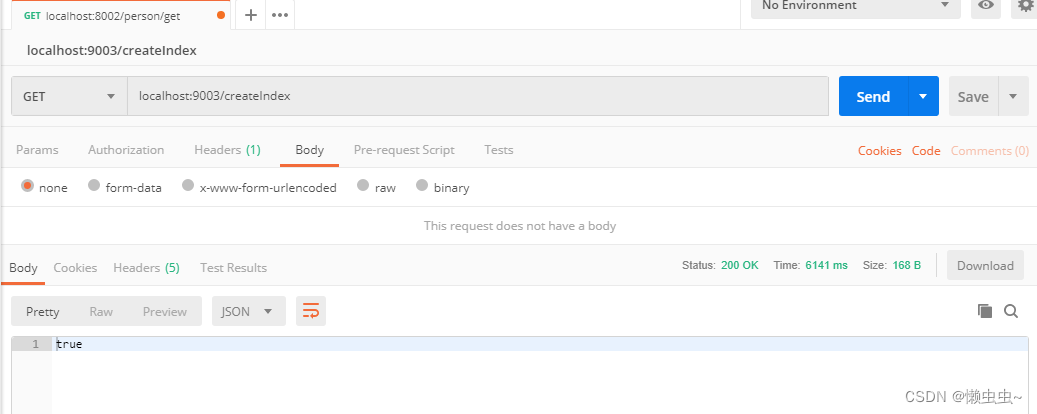
查询结果显示创建成功
2.创建文档,给名为my_index的索引创建文档

查询结果显示创建文档成功
四、项目结构及代码下载
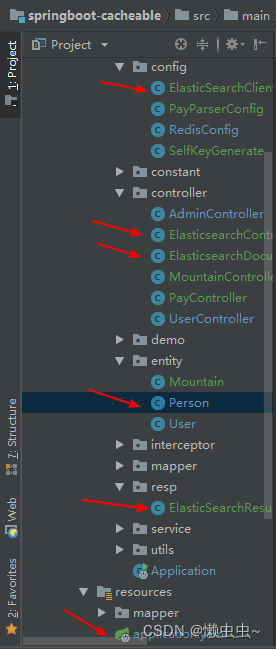
源码下载地址,欢迎Star哦~~
springboot-cacheable
参考资料
SpringBoot官方推荐对应Elasticsearch版本
SpringBoot集成elasticsearch 7.17.3及常规应用
Elasticsearch8.x版本中RestHighLevelClient被弃用
SpringBoot 整合ElasticSearch实现模糊查询,批量CRUD,排序,分页,高亮
windows 安装 Elasticsearch
相关文章:
SpringBoot集成ElasticSearch
文章目录 前言一、ElasticSearch本地环境搭建二、SpringBoot整合ElasticSearch1.pom中引入ES依赖2.application.yaml配置elasticsearch3.ElasticSearchClientConnect连接ES客户端工具类4.ElasticSearchResult封装响应结果5.Person实体类6.Person实体类7.ElasticsearchControlle…...
分治入门+例题
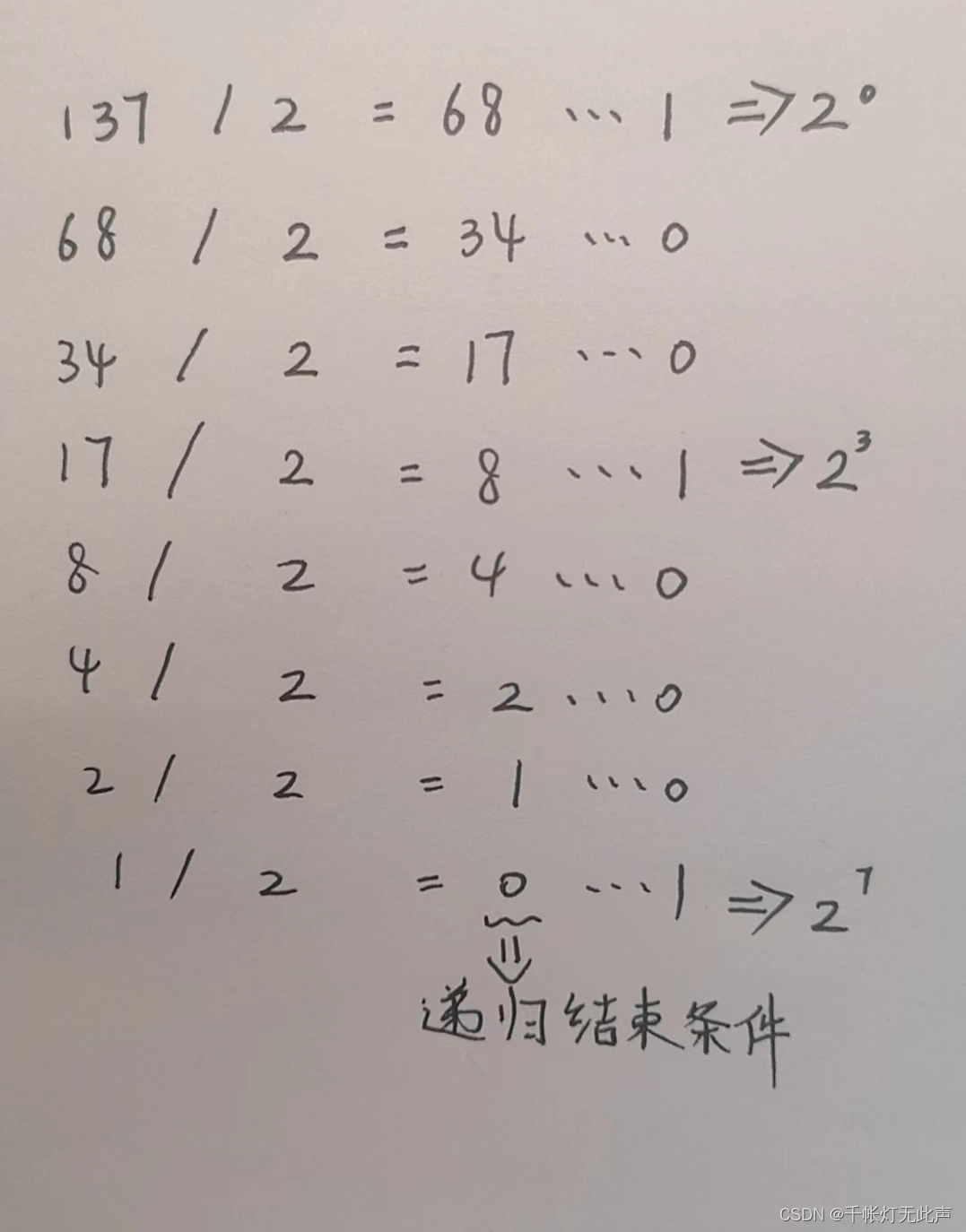
目录 🥇2.3.2 合并排序 🥇2.3.3 快速排序 🌼P1010 [NOIP1998 普及组] 幂次方 🌳总结 形象点,分治正如“凡治众如治寡,分数是也”,管理少数几个人,即可统领全军 本质ÿ…...
剑指offer打卡
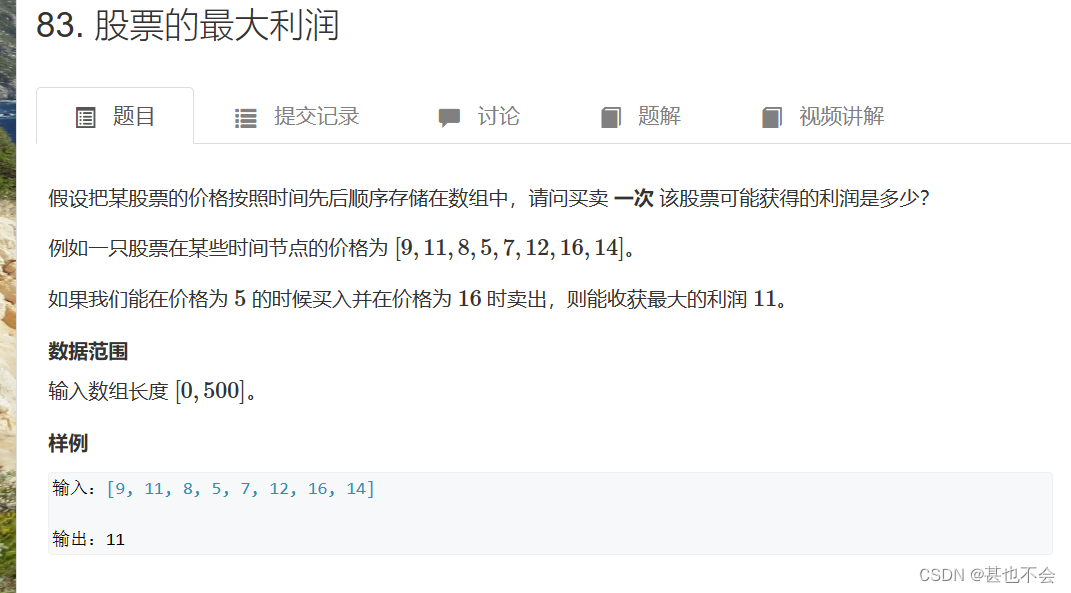
这里写目录标题 day1 二叉树和为某一路径day2复杂链表的复刻day3二叉搜索树与双向链表day4数字排列day5找出出现次数超过一半的次数day6 二进制中1的个数day7 二叉树的最近公共祖先day8 字符串转换为整数day9 构建乘积数组day10不用加减乘除的加法day11求12....nday11 股票的最…...
运维实用脚本整理
运维实用脚本整理 本文脚本仅供参考运维排查问题思路运维排查问题的方法和命令(1)尽可能搞清楚问题的前因后果(2)有谁在?(3)之前发生了什么?(4) 现在在运行的进程是啥?࿰…...
INT8 中的稀疏性:加速的训练工作流程和NVIDIA TensorRT 最佳实践
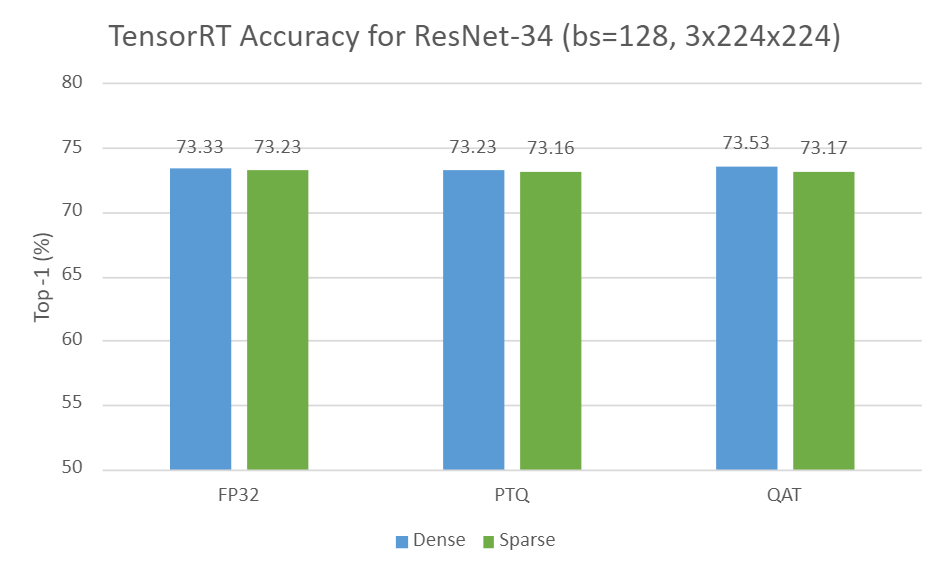
INT8 中的稀疏性:加速的训练工作流程和NVIDIA TensorRT 最佳实践 文章目录 INT8 中的稀疏性:加速的训练工作流程和NVIDIA TensorRT 最佳实践结构稀疏量化在 TensorRT 中部署稀疏量化模型的工作流程案例研究:ResNet-34要求第 1 步:…...

隧道模式HTTP代理使用代码示例
以下是使用Python实现隧道模式HTTP代理的代码示例: python import socket def handle_client(client_socket): # 接收客户端请求 request client_socket.recv(4096) # 解析请求头,获取目标主机和端口号 host request.split(b\r\n)[1].sp…...
翻筋斗觅食海鸥优化算法-附代码
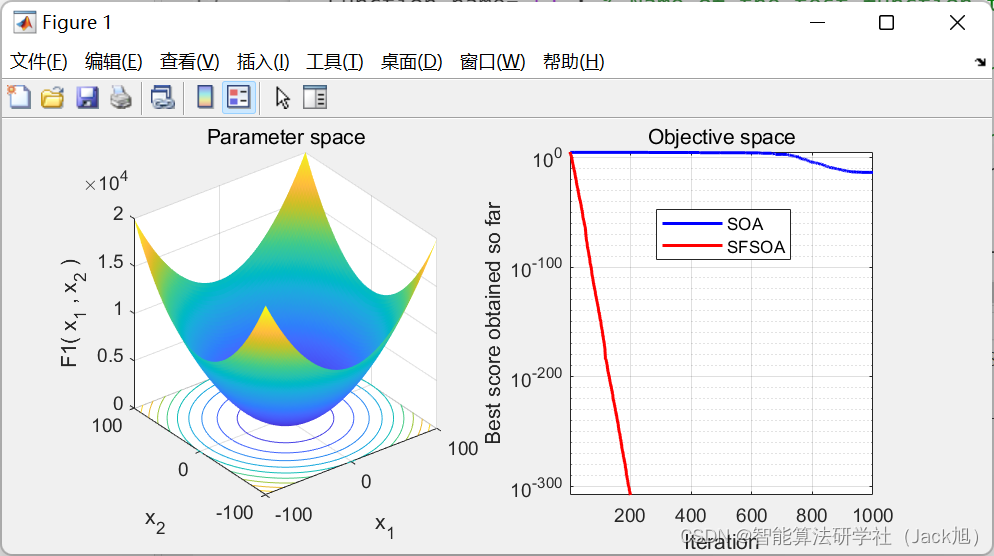
翻筋斗觅食海鸥优化算法 文章目录 翻筋斗觅食海鸥优化算法1.海鸥优化算法2. 改进海鸥优化算法2.1 非线性参数 A 策略2.2 翻筋斗觅食策略 3.实验结果4.参考文献5.Matlab代码6.python代码 摘要:针对基本海鸥优化算法(SOA)在处理复杂优化问题中存在低精度、…...
K8S常见应用场景(六)
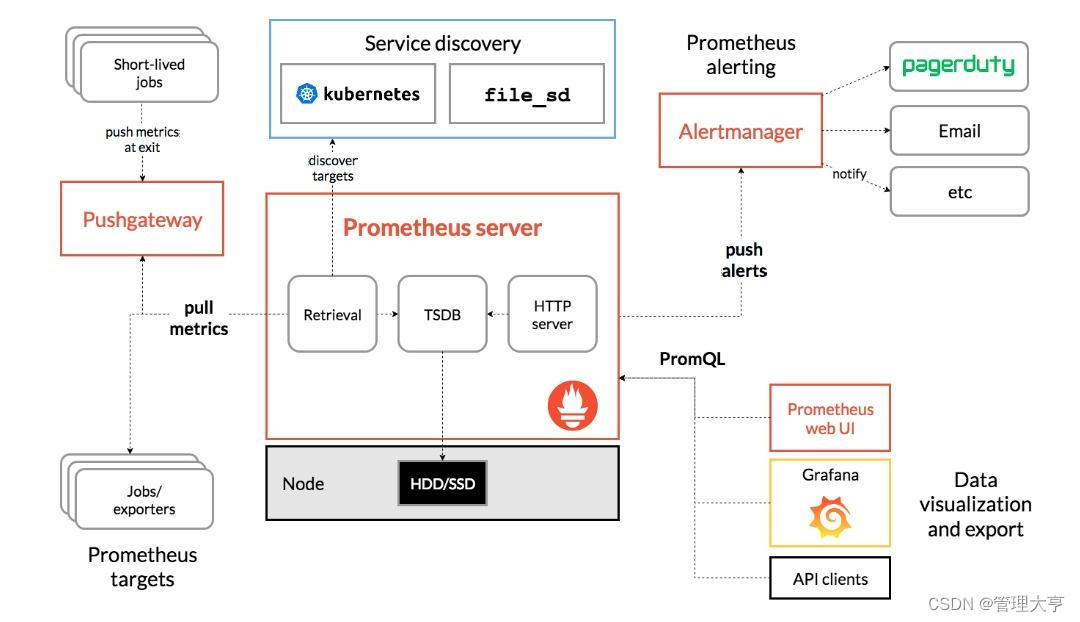
Kubernetes 是一个可移植的、可扩展的开源平台,用于管理容器化的工作负载和服务,可促进声明式配置和自动化。 Kubernetes 拥有一个庞大且快速增长的生态系统。Kubernetes 的服务、支持和工具广泛可用。 Kubernetes 这个名字源于希腊语,意为“…...

《不抱怨的世界》随记
*不抱怨的世界 * 1.天才只有三件事:我的事,他的事,老天的事。抱怨自己的的人,应该试着学习接纳自己;抱怨他人的人,应该试着把抱怨转成请求;抱怨老天的人么,请试着用祈祷的方式来诉求…...
2.2 利用MyBatis实现CRUD操作
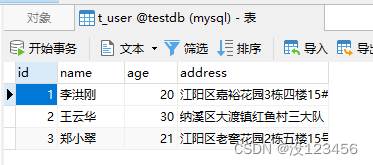
一、准备工作 打开MyBatisDemo项目 二、查询表记录 1、在映射器配置文件里引入结果映射元素 在UserMapper.xml文件里创建结果映射元素 将UserMapper接口里抽象方法上的注解暂时注释掉 运行TestUserMapper测试类里的testFindAll()测试方法,查看结果 2、添加…...
自动缩放Kubernetes上的Kinesis Data Streams应用程序
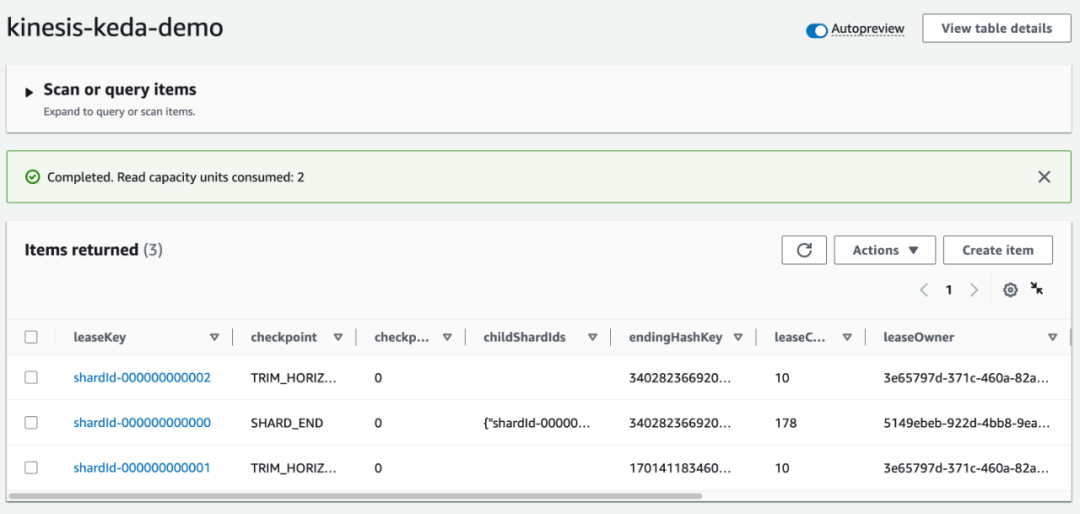
想要学习如何在Kubernetes上自动缩放您的Kinesis Data Streams消费者应用程序,以便节省成本并提高资源效率吗?本文提供了一个逐步指南,教您如何实现这一目标。 通过利用Kubernetes对Kinesis消费者应用程序进行自动缩放,您可以从其…...

介绍js各种事件
目录 一、点击事件 二、鼠标移动事件 三、键盘事件 四、滚轮事件 五、拖放事件 六、窗口大小改变事件 一、点击事件 点击事件是指当用户单击页面上的某个元素时触发的事件。这是最常见和基础的事件之一,也是Web应用程序中最常用的交互之一。 以下是如何使用…...

Python 将 CSV 分割成多个文件
文章目录 使用 Pandas 在 Python 中创建 CSV 文件在 Python 中将 CSV 文件拆分为多个文件根据行拆分 CSV 文件根据列拆分 CSV 文件 总结 在本文中,我们将学习如何在 Python 中将一个 CSV 文件拆分为多个文件。 我们将使用 Pandas 创建一个 CSV 文件并将其拆分为多个…...
S32K144开发板
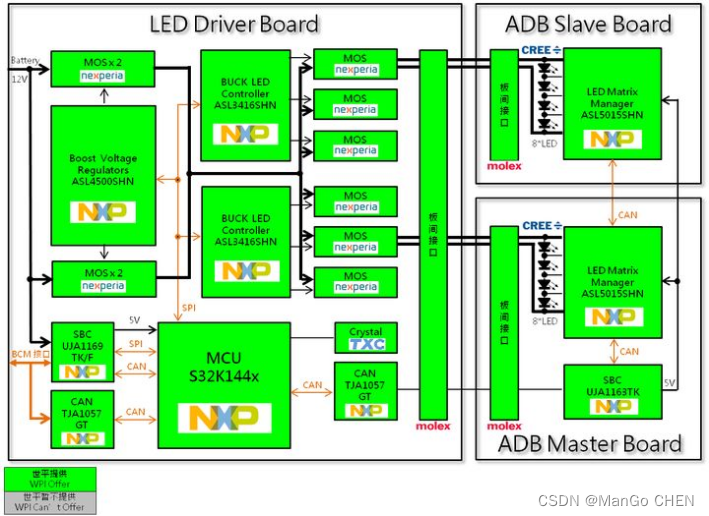
目录 一.S32K144开发板概述 二.产品技术和功能规格 三.开发环境 1.S32K144的开发环境主流是这么三种: 2.开发板Demo工程 四.S32K144开发板实物图 五、汽车大灯硬件架构 一.S32K144开发板概述 S32K14…...
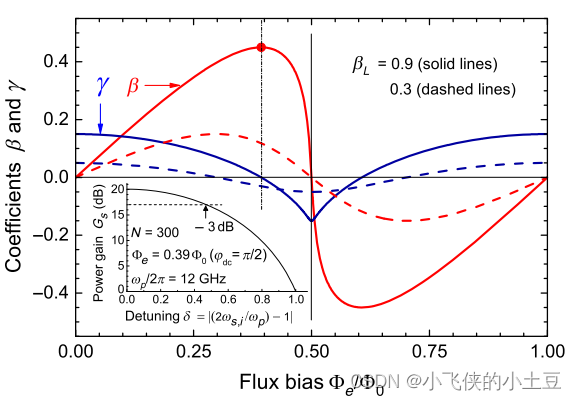
三波混频下的相位失配原理
原理推导 在四波混频情况下,实现零相位失配是一件很困难的事情。因为在四波混频中,相位调制和增益都依赖于相同的参数,即克尔非线性 γ \gamma γ。这个问题可以用嵌入在传输线上的辅助共振元件的复杂色散工程来部分解决。 但是在三波混频中…...

软考A计划-试题模拟含答案解析-卷一
点击跳转专栏>Unity3D特效百例点击跳转专栏>案例项目实战源码点击跳转专栏>游戏脚本-辅助自动化点击跳转专栏>Android控件全解手册点击跳转专栏>Scratch编程案例 👉关于作者 专注于Android/Unity和各种游戏开发技巧,以及各种资源分享&am…...
Ubuntu下编译运行MicroPython Unix版本
文章目录 github拉取源码更新模块编译运行 github拉取源码 到Github(https://github.com/micropython/micropython)上下载源码 终端输入,如果提示识别不到gh命令,就sudo apt-get install gc安装一下。 再根据提示在终端里登录自己的github账号。 再次…...

实现用QCustomPlot封装的插件,放到绘图软件中可以点击和移动
首先,我们需要在绘图软件中创建一个插件,并将QCustomPlot控件添加到插件中。QCustomPlot是一个功能强大的绘图控件,可以轻松创建各种类型的图表,包括折线图、散点图、柱状图等等。 接下来,我们需要为QCustomPlot控件添加鼠标事件处理函数,以实现点击和移动的功能。QCust…...

【源码解析】Nacos配置热更新的实现原理
使用入门 使用RefreshScopeValue,实现动态刷新 RestController RefreshScope public class TestController {Value("${cls.name}")private String clsName;}使用ConfigurationProperties,通过Autowired注入使用 Data ConfigurationProperti…...

界面组件DevExpress ASP.NET Core v22.2 - UI组件升级
DevExpress ASP.NET Core Controls使用强大的混合方法,结合现代企业Web开发工具所期望的所有功能。该套件通过ASP.NET Razor标记和服务器端ASP.NET Core Web API的生产力和简便性,提供客户端JavaScript的性能和灵活性。ThemeBuilder工具和集成的Material…...

长期使用Taotoken Token Plan套餐的成本节省实际感受
🚀 告别海外账号与网络限制!稳定直连全球优质大模型,限时半价接入中。 👉 点击领取海量免费额度 长期使用Taotoken Token Plan套餐的成本节省实际感受 1. 从按量付费到套餐订阅的转变 我们团队在接入大模型API进行日常开发与内容…...

初次使用Taotoken模型广场进行选型与测试的直观感受
🚀 告别海外账号与网络限制!稳定直连全球优质大模型,限时半价接入中。 👉 点击领取海量免费额度 初次使用Taotoken模型广场进行选型与测试的直观感受 作为一名需要接入大模型能力的开发者,面对市场上众多的模型提供商…...

如何在Windows系统中创建虚拟游戏手柄?vJoy开源项目完全指南
如何在Windows系统中创建虚拟游戏手柄?vJoy开源项目完全指南 【免费下载链接】vJoy Virtual Joystick 项目地址: https://gitcode.com/gh_mirrors/vj/vJoy 你是否曾因缺少物理游戏手柄而无法体验某些经典游戏?或者需要为专业软件创建自定义控制方…...

程序员会被产品经理替代吗?——当AI让“全栈”成为常态,我们的价值在哪里?
程序员会被产品经理替代吗?——当AI让“全栈”成为常态,我们的价值在哪里? 最近,V2EX上一个帖子引发了激烈讨论:随着AI能力的指数级增长,一个人就能完成从前需要整个团队才能做到的全栈开发。如果产品经理借…...

Co-IP/MS:蛋白免疫共沉淀质谱分析服务
免疫共沉淀质谱法(Co-IP/MS)是一种由免疫共沉淀技术联用质谱技术的蛋白互作研究技术,具备高分辨率鉴定和精确定量蛋白质复合物中每个组分的优势。Co-IP/MS使用靶向目标蛋白的特异性抗体,选择性地捕获目标蛋白质与其相互作用的分子…...

突破禾本科转化壁垒:农杆菌介导谷子基因编辑的关键参数解析 伯远生物
摘要:谷子(Setaria italica)作为C4禾谷类模式作物,其CRISPR基因编辑效率高度依赖稳定的遗传转化体系。针对谷子基因型依赖性强、愈伤再生困难等痛点,本文系统梳理了以胚性愈伤组织为核心的农杆菌转化流程,详…...

技术驱动财税革新,用友小畅 AI 以大模型重构行业生态
人工智能技术的快速发展,正在深刻改变各个行业的面貌,财税行业也不例外。大模型技术的应用,让财务软件从传统的工具型产品向智能型产品转变,彻底重构了传统的财税工作流。作为行业龙头,用友集团率先将大模型技术应用于…...

如何用AntiMicroX解决PC游戏手柄兼容问题:5分钟快速上手终极手柄映射工具
如何用AntiMicroX解决PC游戏手柄兼容问题:5分钟快速上手终极手柄映射工具 【免费下载链接】antimicrox Graphical program used to map keyboard buttons and mouse controls to a gamepad. Useful for playing games with no gamepad support. 项目地址: https:/…...

5分钟极速上手:bili2text - B站视频转文字终极指南
5分钟极速上手:bili2text - B站视频转文字终极指南 【免费下载链接】bili2text Bilibili视频转文字,一步到位,输入链接即可使用 项目地址: https://gitcode.com/gh_mirrors/bi/bili2text 还在为B站视频内容整理而烦恼吗?想…...

【职场】职场“贵人“的真相:他们从不随机出现,也从不无缘无故消失
职场"贵人"的真相:他们从不随机出现,也从不无缘无故消失每个在职场里走得还不错的人,回头看,都能说出一两个名字。 那个在你最迷茫的时候,把你带进了某个重要的圈子;那个在关键会议上,…...