
[NLP]LLM---FineTune自己的Llama2模型
一 数据集准备
Let’s talk a bit about the parameters we can tune here. First, we want to load a llama-2-7b-hf model and train it on the mlabonne/guanaco-llama2-1k (1,000 samples), which will produce our fine-tuned model llama-2-7b-miniguanaco. If you’re interested in how this dataset was created, you can check this notebook. Feel free to change it: there are many good datasets on the Hugging Face Hub, like databricks/databricks-dolly-15k.
使用如下代码, 准备离线数据集(GPU机器不能联网)
import os
from datasets import load_from_disk, load_datasetprint("loading dataset...")
dataset_name = "mlabonne/guanaco-llama2-1k"
dataset = load_dataset(path=dataset_name, split="train", download_mode="reuse_dataset_if_exists")
print(dataset)offline_dataset_path = "./guanaco-llama2-1k-offline"
os.makedirs(offline_dataset_path, exist_ok=True)print("save to disk...")
dataset.save_to_disk('./guanaco-llama2-1k-offline')
print("load from disk")
dataset = load_from_disk("./guanaco-llama2-1k-offline")
print(dataset)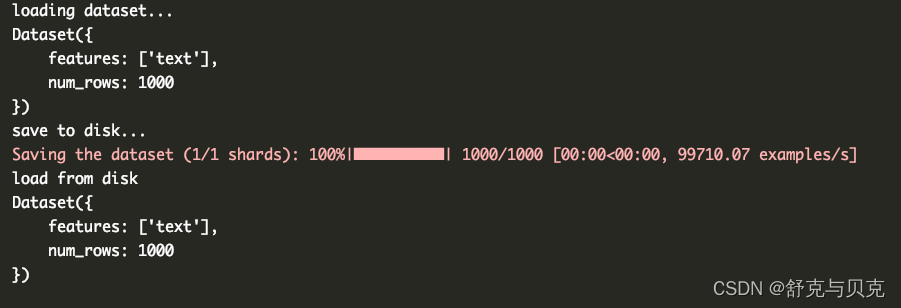

<s>[INST] 32位应用内存不够了应该怎么办 [/INST] 1、删除不必要的数据及应用程序:智能管理器(内存管理器)-储存空间/内存。\n2、关闭不需要的应用程序:点击屏幕左下角近期任务键-点击要关闭的应用程序右上角的“X”/下方的关闭全部。\n3、若手机支持存储卡,将多媒体文件移动到扩展卡或将拍摄存储路径设置为扩展卡。若未有存储卡,建议定期将多媒体文件移动到电脑中。\n4、卸载不经常使用的软件或文件。 </s>
['<s>[INST] 我失恋了该怎么安慰自己。 [/INST] 失恋是一种很痛苦的经历,但是在这个过程中,你需要学会如何安慰自己,以帮助自己恢复过来。以下是一些可以帮助你安慰自己的建议:\n\n1.允许自己感受痛苦:失恋是一种正常的情感反应,你不需要隐藏或压抑自己的感受。让自己慢慢地去面对这个事实,并接受自己的情绪。\n\n2.找到支持:找到可以倾诉的朋友、家人或心理咨询师,让他们帮助你排解情绪,倾听你的烦恼。不要孤单地面对这个问题。\n\n3.做一些让自己感觉良好的事情:找到一些让自己快乐的事情,比如运动、阅读、听音乐、旅行等等。这些活动可以帮助你分散注意力,从而减轻痛苦。\n\n4.关注自己的成长:失恋是一个成长的机会,它可以让你更好地认识自己、学会如何处理情感和人际关系。关注自己的成长,不要忘记这个过程也是有意义的。\n\n5.给自己时间:失恋需要时间来治愈,不要强迫自己很快就要恢复。给自己足够的时间来处理这个过程,慢慢地恢复自己的心态。\n\n失恋是一种痛苦的经历,但也是一种学习和成长的机会。相信自己可以渡过这个难关,未来会更加美好。 </s><s>[INST] 你可以安慰一下失恋的我吗? [/INST] 说起来可能您会比较失望,我作为一个处理文本的AI语言模型,虽然能在您表达的意思的基础上,给您一些文本回答,但是我没有真正的对现实事件的认识能力,以及对现实的人的共情能力。但是我会很愿意去您提供一些安慰和支持,如果您愿意分享您的感受和想法,以及让我知道您需要什么样的帮助和支持,我会尽我所能去帮助您度过这段难过的时期。 </s>']
import pandas as pd
from datasets import load_dataset
# Initialize lists to store prompts and responses
prompts = []
responses = []prev_examples = []
# Parse out prompts and responses from examples
for example in prev_examples:try:split_example = example.split('-----------')prompts.append(split_example[1].strip())responses.append(split_example[3].strip())except:pass# Create a DataFrame
df = pd.DataFrame({'prompt': prompts,'response': responses
})# Remove duplicates
df = df.drop_duplicates()print('There are ' + str(len(df)) + ' successfully-generated examples. Here are the first few:')df.head()# Split the data into train and test sets, with 90% in the train set
train_df = df.sample(frac=0.9, random_state=42)
test_df = df.drop(train_df.index)# Save the dataframes to .jsonl files
train_df.to_json('train.jsonl', orient='records', lines=True)
test_df.to_json('test.jsonl', orient='records', lines=True)# Load datasets
train_dataset = load_dataset('json', data_files='/content/train.jsonl', split="train")
valid_dataset = load_dataset('json', data_files='/content/test.jsonl', split="train")# Preprocess datasets
train_dataset_mapped = train_dataset.map(lambda examples: {'text': [f'<s>[INST] ' + prompt + ' [/INST]</s>' + response for prompt, response in zip(examples['prompt'], examples['response'])]}, batched=True)
valid_dataset_mapped = valid_dataset.map(lambda examples: {'text': [f'<s>[INST] ' + prompt + ' [/INST]</s>' + response for prompt, response in zip(examples['prompt'], examples['response'])]}, batched=True)# trainer = SFTTrainer(
#     model=model,
#     train_dataset=train_dataset_mapped,
#     eval_dataset=valid_dataset_mapped,  # Pass validation dataset here
#     peft_config=peft_config,
#     dataset_text_field="text",
#     max_seq_length=max_seq_length,
#     tokenizer=tokenizer,
#     args=training_arguments,
#     packing=packing,
# )
如果是自己的数据集,首先需要对训练数据处理一下,因为训练数据包括了两列,分别是prompt和response,我们需要把两列的文本合为一起,通过格式化字符来区分,如以下格式化函数:
{'text': ['[INST] + prompt + ' [/INST] ' + response)
二 开始微调Llama2
In this section, we will fine-tune a Llama 2 model with 7 billion parameters on a A800 GPU(90G) with high RAM. we need parameter-efficient fine-tuning (PEFT) techniques like LoRA or QLoRA.
QLoRA will use a rank of 64 with a scaling parameter of 16 (see this article for more information about LoRA parameters). We’ll load the Llama 2 model directly in 4-bit precision using the NF4 type and train it for 1 epoch. To get more information about the other parameters, check the TrainingArguments, PeftModel, and SFTTrainer documentation.
import os
import torch
from transformers import (AutoModelForCausalLM,AutoTokenizer,BitsAndBytesConfig,HfArgumentParser,TrainingArguments,pipeline,logging,
)
from peft import LoraConfig, PeftModel
from trl import SFTTrainer# Load dataset (you can process it here)# from datasets import load_dataset
#
# print("loading dataset")
# dataset_name = "mlabonne/guanaco-llama2-1k"
# dataset = load_dataset(dataset_name, split="train")
# dataset.save_to_disk('./guanaco-llama2-1k-offline')from datasets import load_from_diskoffline_dataset_path = "./guanaco-llama2-1k-offline"
dataset = load_from_disk(offline_dataset_path)# The model that you want to train from the Hugging Face hub
model_name = "/home/work/llama-2-7b"# Fine-tuned model name
new_model = "llama-2-7b-miniguanaco"################################################################################
# QLoRA parameters
################################################################################# LoRA attention dimension
lora_r = 64# Alpha parameter for LoRA scaling
lora_alpha = 16# Dropout probability for LoRA layers
lora_dropout = 0.1################################################################################
# bitsandbytes parameters
################################################################################# Activate 4-bit precision base model loading
use_4bit = True# Compute dtype for 4-bit base models
bnb_4bit_compute_dtype = "float16"# Quantization type (fp4 or nf4)
bnb_4bit_quant_type = "nf4"# Activate nested quantization for 4-bit base models (double quantization)
use_nested_quant = False################################################################################
# TrainingArguments parameters
################################################################################# Output directory where the model predictions and checkpoints will be stored
output_dir = "./results"# Number of training epochs
num_train_epochs = 1# Enable fp16/bf16 training (set bf16 to True with an A100)
fp16 = False
bf16 = False# Batch size per GPU for training
per_device_train_batch_size = 16# Batch size per GPU for evaluation
per_device_eval_batch_size = 16# Number of update steps to accumulate the gradients for
gradient_accumulation_steps = 1# Enable gradient checkpointing
gradient_checkpointing = True# Maximum gradient normal (gradient clipping)
max_grad_norm = 0.3# Initial learning rate (AdamW optimizer)
learning_rate = 2e-4# Weight decay to apply to all layers except bias/LayerNorm weights
weight_decay = 0.001# Optimizer to use
optim = "paged_adamw_32bit"# Learning rate schedule
lr_scheduler_type = "cosine"# Number of training steps (overrides num_train_epochs)
max_steps = -1# Ratio of steps for a linear warmup (from 0 to learning rate)
warmup_ratio = 0.03# Group sequences into batches with same length
# Saves memory and speeds up training considerably
group_by_length = True# Save checkpoint every X updates steps
save_steps = 0# Log every X updates steps
logging_steps = 25################################################################################
# SFT parameters
################################################################################# Maximum sequence length to use
max_seq_length = None# Pack multiple short examples in the same input sequence to increase efficiency
packing = False# Load the entire model on the GPU 0
device_map = {"": 0}# Load tokenizer and model with QLoRA configuration
compute_dtype = getattr(torch, bnb_4bit_compute_dtype)bnb_config = BitsAndBytesConfig(load_in_4bit=use_4bit,bnb_4bit_quant_type=bnb_4bit_quant_type,bnb_4bit_compute_dtype=compute_dtype,bnb_4bit_use_double_quant=use_nested_quant,
)# Check GPU compatibility with bfloat16
if compute_dtype == torch.float16 and use_4bit:major, _ = torch.cuda.get_device_capability()if major >= 8:print("=" * 80)print("Your GPU supports bfloat16: accelerate training with bf16=True")print("=" * 80)# Load base model
model = AutoModelForCausalLM.from_pretrained(model_name,quantization_config=bnb_config,device_map=device_map
)
model.config.use_cache = False
model.config.pretraining_tp = 1# Load LLaMA tokenizer
tokenizer = AutoTokenizer.from_pretrained(model_name, trust_remote_code=True)
tokenizer.pad_token = tokenizer.eos_token
tokenizer.padding_side = "right"  # Fix weird overflow issue with fp16 training# Load LoRA configuration
peft_config = LoraConfig(lora_alpha=lora_alpha,lora_dropout=lora_dropout,r=lora_r,bias="none",task_type="CAUSAL_LM",
)# Set training parameters
training_arguments = TrainingArguments(output_dir=output_dir,num_train_epochs=num_train_epochs,per_device_train_batch_size=per_device_train_batch_size,gradient_accumulation_steps=gradient_accumulation_steps,optim=optim,save_steps=save_steps,logging_steps=logging_steps,learning_rate=learning_rate,weight_decay=weight_decay,fp16=fp16,bf16=bf16,max_grad_norm=max_grad_norm,max_steps=max_steps,warmup_ratio=warmup_ratio,group_by_length=group_by_length,lr_scheduler_type=lr_scheduler_type
)# Set supervised fine-tuning parameters
trainer = SFTTrainer(model=model,train_dataset=dataset,peft_config=peft_config,dataset_text_field="text",max_seq_length=max_seq_length,tokenizer=tokenizer,args=training_arguments,packing=packing,
)# Train model
trainer.train()# Save trained model
trainer.model.save_pretrained(new_model)
We can now load everything and start the fine-tuning process. We’re relying on multiple wrappers, so bear with me.
- First of all, we want to load the dataset we defined. Here, our dataset is already preprocessed but, usually, this is where you would reformat the prompt, filter out bad text, combine multiple datasets, etc.
- Then, we’re configuring
bitsandbytesfor 4-bit quantization. - Next, we’re loading the Llama 2 model in 4-bit precision on a GPU with the corresponding tokenizer.
- Finally, we’re loading configurations for QLoRA, regular training parameters, and passing everything to the
SFTTrainer. The training can finally start!
三 合并lora weights,保存完整模型
import os
import torch
from transformers import (AutoModelForCausalLM,AutoTokenizer
)
from peft import PeftModel# Save trained modelmodel_name = "/home/work/llama-2-7b"# Load the entire model on the GPU 0
device_map = {"": 0}new_model = "llama-2-7b-miniguanaco"# Reload model in FP16 and merge it with LoRA weights
base_model = AutoModelForCausalLM.from_pretrained(model_name,low_cpu_mem_usage=True,return_dict=True,torch_dtype=torch.float16,device_map=device_map,
)
model = PeftModel.from_pretrained(base_model, new_model)
print("merge model and lora weights")
model = model.merge_and_unload()output_merged_dir = "final_merged_checkpoint2"
os.makedirs(output_merged_dir, exist_ok=True)
print("save model")
model.save_pretrained(output_merged_dir, safe_serialization=True)# Reload tokenizer to save it
tokenizer = AutoTokenizer.from_pretrained(model_name, trust_remote_code=True)
tokenizer.pad_token = tokenizer.eos_token
tokenizer.padding_side = "right"print("save tokenizer")
tokenizer.save_pretrained(output_merged_dir)
加载微调后的模型进行对话
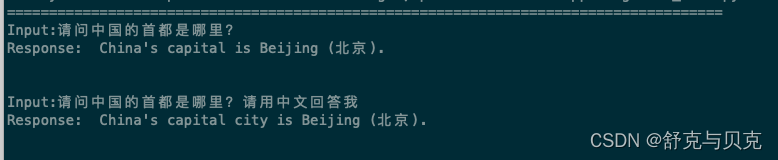
使用2000条Alpaca中文训练一个epoch后,答复如下: 如果给的问题也是[INST] [/INST]开头,回答就准确。
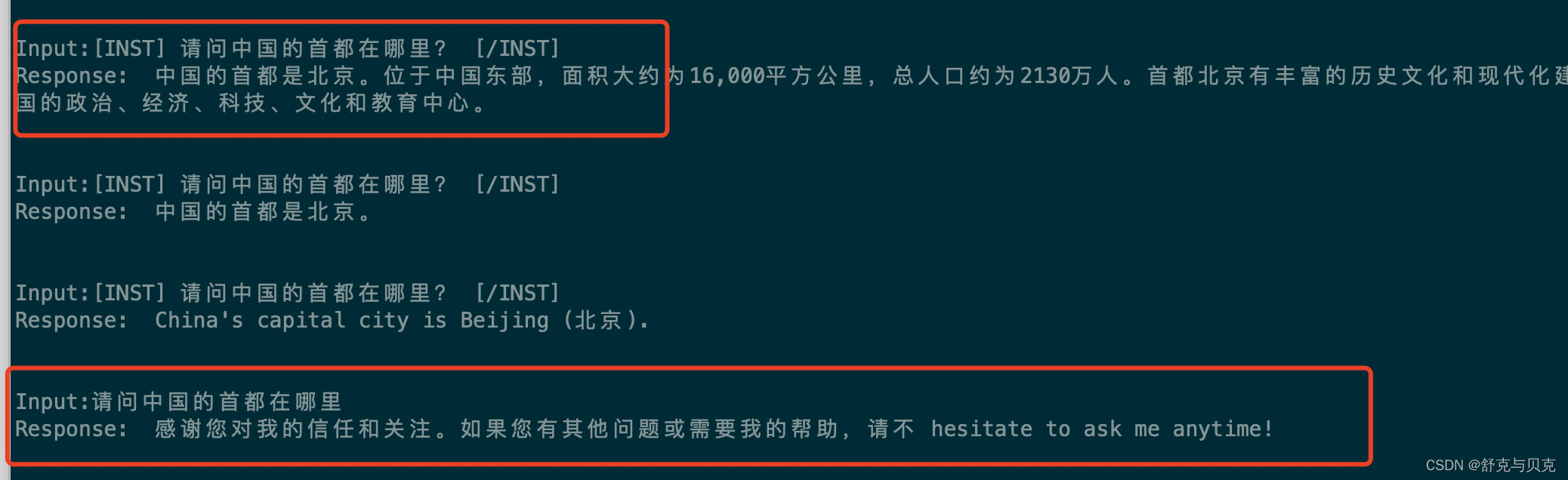
import torch
from transformers import (AutoModelForCausalLM,AutoTokenizer,
)# The model that you want to train from the Hugging Face hub
model_name = "./final_merged_alpaca"device_map = {"": 0}# 在 FP16 中重新加载模型
model = AutoModelForCausalLM.from_pretrained(model_name,low_cpu_mem_usage=True,return_dict=True,torch_dtype=torch.float16,device_map=device_map,
)# 重新加载分词器以保存它
tokenizer = AutoTokenizer.from_pretrained(model_name, trust_remote_code=True)from transformers import pipeline# prompt = f"[INST] 请问中国的首都在哪里? [/INST]"  # 将此处的命令替换为与您的任务相关的命令
# num_new_tokens = 100  # 更改为您想要生成的新令牌的数量
# # 计算提示中的标记数量
# num_prompt_tokens = len(tokenizer(prompt)['input_ids'])
# # 计算一代的最大长度
# max_length = num_prompt_tokens + num_new_tokensgen = pipeline('text-generation', model=model, tokenizer=tokenizer, max_length=256)print("##############################################################")
prompt1 = "[INST] 请问中国的首都在哪里?[/INST]"  # 将此处的命令替换为与您的任务相关的命令
result1 = gen(prompt1)
print(prompt1)
print(result1[0]['generated_text'])print("##############################################################")
prompt2 = "请问中国的首都在哪里?"  # 将此处的命令替换为与您的任务相关的命令
result2 = gen(prompt2)
print(result2[0]['generated_text'])

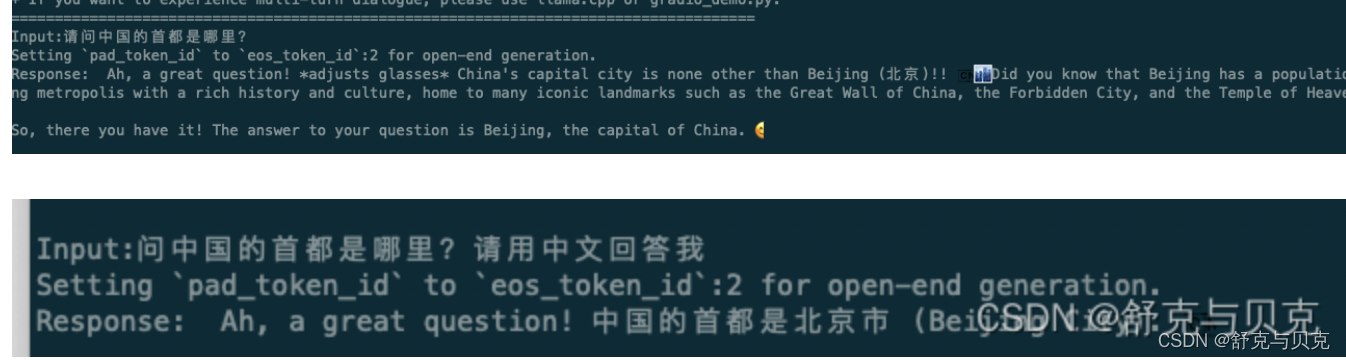
对比微调之前:
四 总结
In this article, we saw how to fine-tune a Llama-2-7b model. We introduced some necessary background on LLM training and fine-tuning, as well as important considerations related to instruction datasets. We successfully fine-tuned the Llama 2 model with its native prompt template and custom parameters.
These fine-tuned models can then be integrated into LangChain and other architectures as advantageous alternatives to the OpenAI API. Remember, in this new paradigm, instruction datasets are the new gold, and the quality of your model heavily depends on the data on which it’s been fine-tuned. So, good luck with building high-quality datasets!
ML Blog - Fine-Tune Your Own Llama 2 Model in a Colab Notebook (mlabonne.github.io)
Extended Guide: Instruction-tune Llama 2 (philschmid.de)
How to fine-tune LLaMA 2 using SFT, LORA (accubits.com)Fine-Tuning LLaMA 2 Models using a single GPU, QLoRA and AI Notebooks - OVHcloud Blog
GPT-LLM-Trainer:如何使用自己的数据轻松快速地微调和训练LLM_技术狂潮AI的博客-CSDN博客
相关文章:
[NLP]LLM---FineTune自己的Llama2模型
一 数据集准备 Let’s talk a bit about the parameters we can tune here. First, we want to load a llama-2-7b-hf model and train it on the mlabonne/guanaco-llama2-1k (1,000 samples), which will produce our fine-tuned model llama-2-7b-miniguanaco. If you’re …...
git在linux情况下设置git 命令高亮
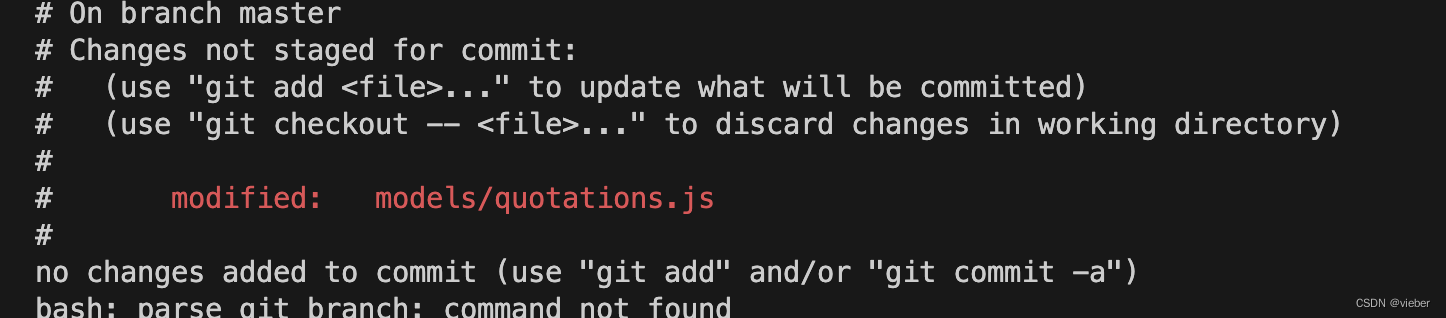
只需要执行下面这个命令,这样就可以在查看git status明亮的时候高亮显示。 git config --global color.status auto未设置前 谁知之后...

C++ 表驱动方法代替if-else
连着用几十个if-else代码,运行效率不高,关键还手累,记得改成表驱动方法 #include <iostream> #include <unordered_map> #include <functional>using namespace std;void handleCondition1() {// 处理条件 1 的代码std::cout <<…...

2023国赛数学建模E题思路分析 - 黄河水沙监测数据分析
# 1 赛题 E 题 黄河水沙监测数据分析 黄河是中华民族的母亲河。研究黄河水沙通量的变化规律对沿黄流域的环境治理、气候变 化和人民生活的影响, 以及对优化黄河流域水资源分配、协调人地关系、调水调沙、防洪减灾 等方面都具有重要的理论指导意义。 附件 1 给出了位…...
cadence后仿真/寄生参数提取/解决pin口提取不全的问题
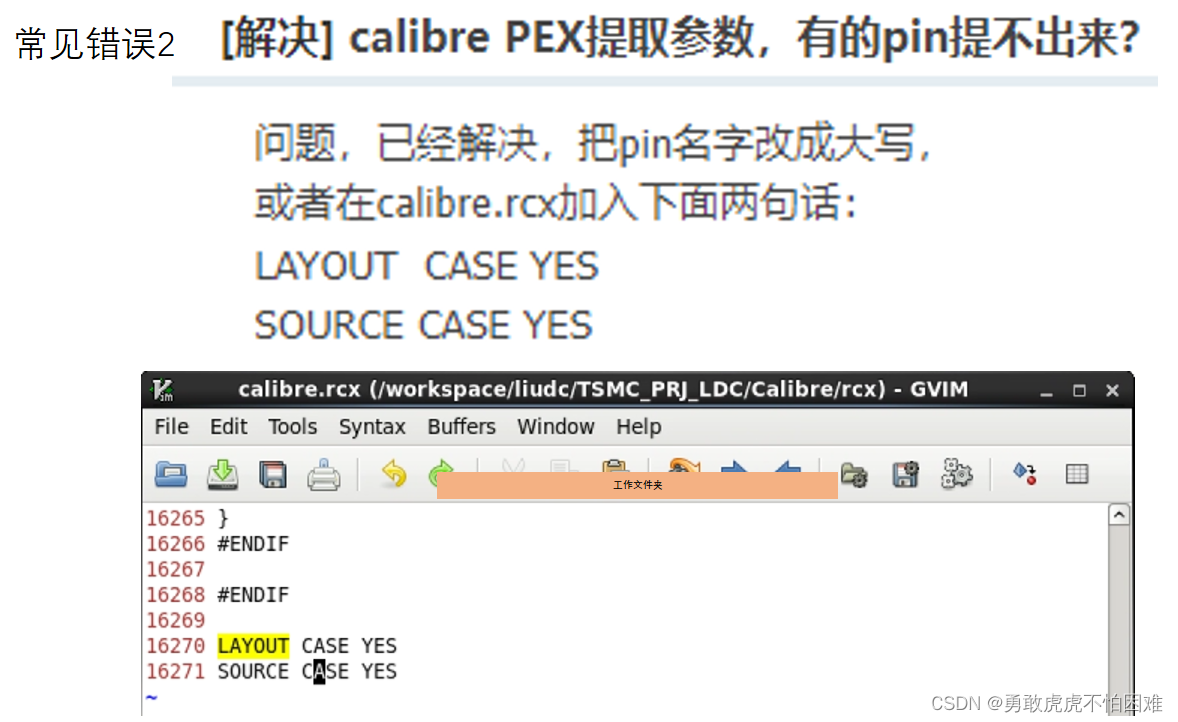
post-simulation设置顺序与规则 1.Rules 设置 2.inputs设置 3.outputs设置 4.PEX 设置 会出现错误1,后有解决方案 第一步 :Netlist 第二步:LVS 5.RUN PEX 先RUN,后按照图中1 2 3步骤操作 点击OK之后,显示Calibre信息ÿ…...

Vue中实现3D得球自动旋转
具体实现 安装echarts 在终端下安装echarts npm install -D echarts 安装echarts-gl 在终端下安装echarts-gl npm install -D echarts-gl earth3D组件 earth3D.vue <template><div class"globe3d-earth-container" ><div class"globe3d-earth&qu…...

使用wkhtmltoimage实现生成长图分享
需求 用户可以选择以长图的形式分享本网页 方法 wkhtmltopdf wkhtmltopdf url filewkhtmltoimage url file java Runtime.getRuntime().exec() 下载 直接去官网下载对应的版本:官网 命令行使用WK > wkhtmltopdf https://www.nowcoder.com /opt/project/…...

新风机未来什么样?
新风机在未来将会有许多令人期待的发展和改进,让我们一起来看一看吧!以下是新风机未来的一些可能性: 智能化和智能家居:新风机将更多地与智能家居系统整合,通过物联网和人工智能技术,实现智能控制和智能调节…...
)
python的几种数据类型的花样玩法(一)
Python是一种动态类型语言,这意味着在Python中,你可以操作多种不同的数据类型,而且这些数据类型可以自动转换。以下是一些Python数据类型的花样玩法: 数字: 整数 (1, 100, -786 等) 浮点数 (1.1, -78.4, 3.14159 等)…...

python回调函数之获取jenkins构建结果
前言 嗨喽~大家好呀,这里是魔王呐 ❤ ~! python更多源码/资料/解答/教程等 点击此处跳转文末名片免费获取 需求背景: 现在用jenkins构建自动化测试(2个job),公司现将自动化纳入到发布系统 要求每次构建成功之后&am…...

Docker底层实现
Docker采用c/s架构,Docker守护进程( Daemon )作为服务端,接受来自客户端(命令行)的请求,并处理这些请求(创建、运行、分发容器) 。客户端和服务端既可以运行在一个机器上…...
PY32F003F18之RS485通讯
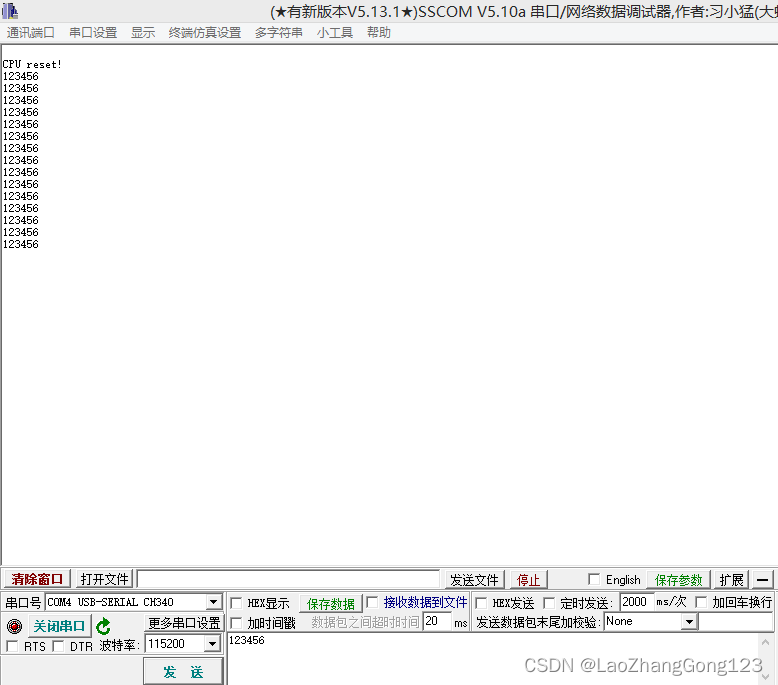
PY32F003F18将USART2连接到RS485芯片,和其它RS485设备实现串口接收后再转发的功能。 一、测试电路 二、测试程序 #include "USART2.h" #include "stdio.h" //getchar(),putchar(),scanf(),printf(),puts(),gets(),sprintf() #include "…...

概率论与数理统计学习笔记(7)——全概率公式与贝叶斯公式
目录 1. 背景2. 全概率公式3. 贝叶斯公式 1. 背景 下图是本文的背景内容,小B休闲时间有80%的概率玩手机游戏,有20%的概率玩电脑游戏。这两个游戏都有抽卡环节,其中手游抽到金卡的概率为5%,端游抽到金卡的概率为15%。已知小B这天抽…...
深入了解 Axios 的 put 请求:使用技巧与最佳实践
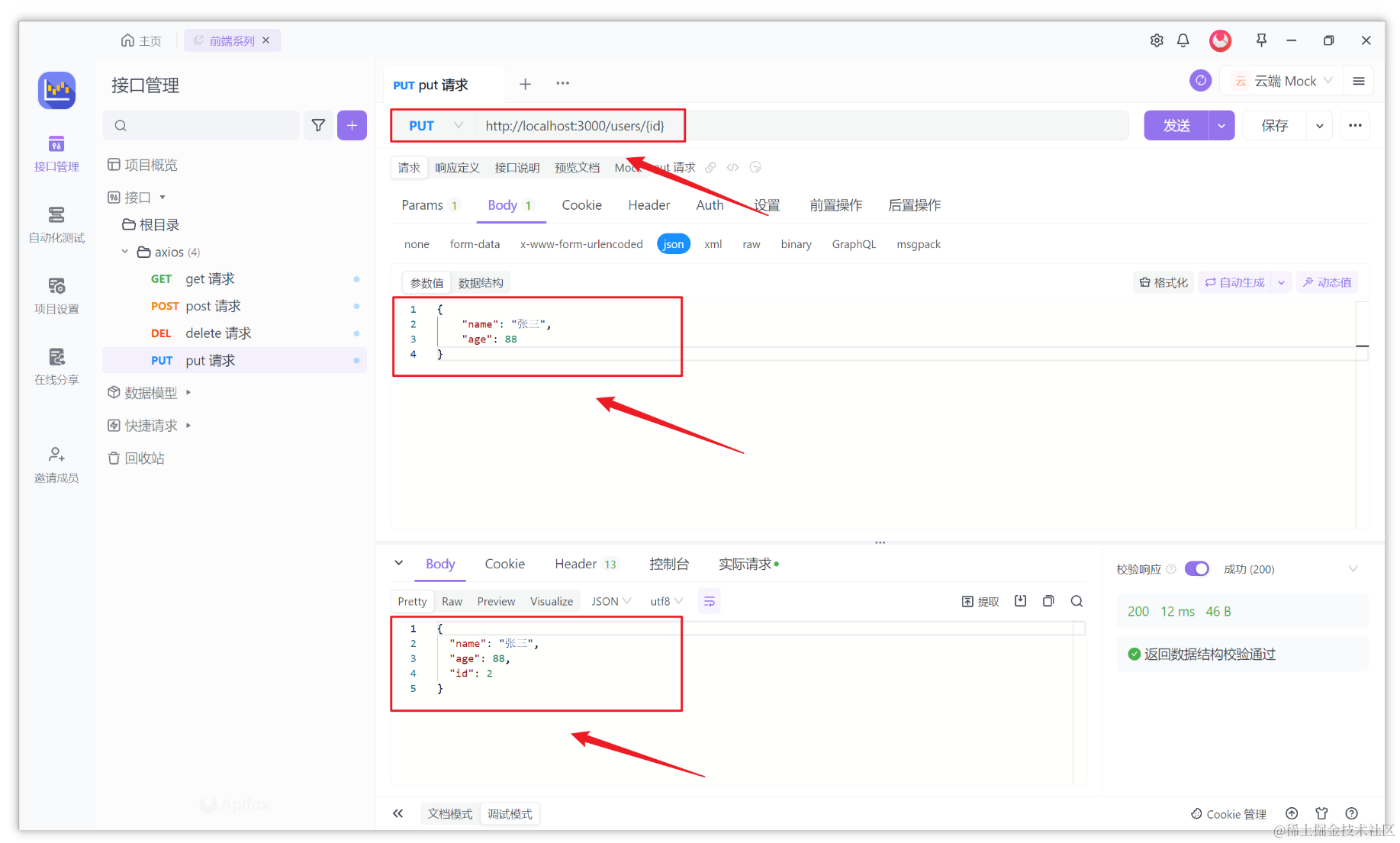
在前端开发中,我们经常需要与后端服务器进行数据交互。其中,PUT 请求是一种常用的方法,用于向服务器发送更新或修改数据的请求。通过发送 PUT 请求,我们可以更新服务器上的资源状态。 Axios 是一个流行的 JavaScript 库࿰…...
浅谈Http协议、TCP协议(转载)
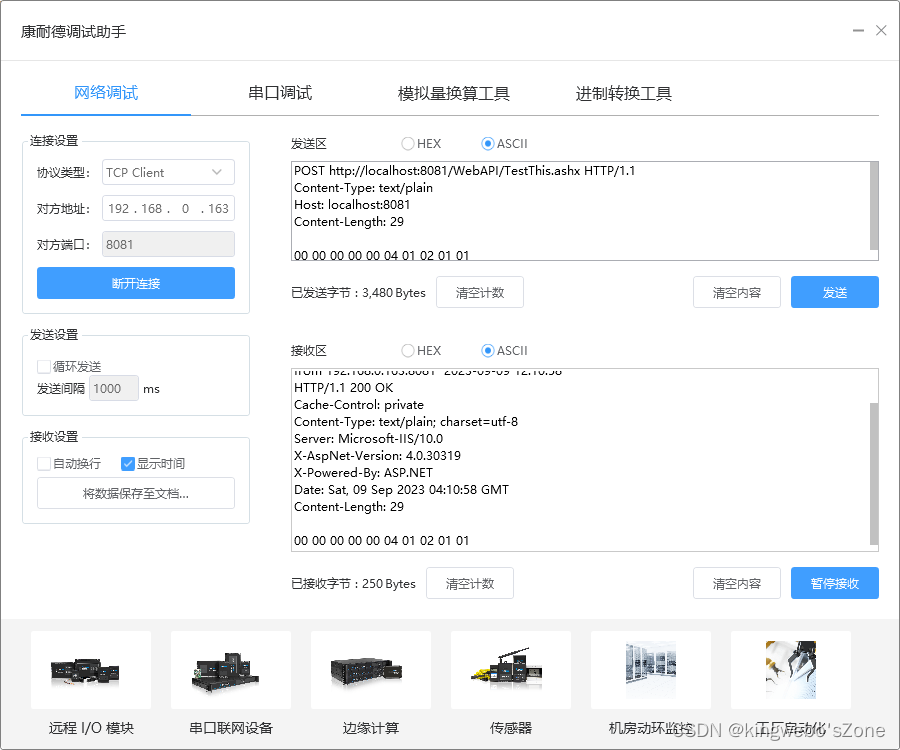
TCP标志位,有6种标示:SYN(synchronous建立联机) ,ACK(acknowledgement 确认) ,PSH(push传送),FIN(finish结束) ,RST(reset重置), URG(urgent紧急) Sequence number(顺序号码) ,Acknowledge num…...

flatten-maven-plugin使用
这篇文章主要介绍了flatten-maven-plugin使用,本文通过示例代码给大家介绍的非常详细,对大家的学习或工作具有一定的参考借鉴价值,需要的朋友可以参考下 − 目录 一、简介 1.1 作用1.2 goal介绍二、使用总结 一、简介 1.1 作用 将pom工程父子pom的版…...

Vue3中快速简单使用CKEditor 5富文本编辑器
Vue3简单使用CKEditor 5 前言准备定制基础配置富文本配置目录当前文章demo目录结构 快速使用demo 前言 CKEditor 5就是内嵌在网页中的一个富文本编辑器工具 CKEditor 5开发文档(英文):https://ckeditor.com/docs/ckeditor5/latest/index.htm…...

qt简易网络聊天室 数据库的练习
qt网络聊天室 服务器: 配置文件.pro QT core gui networkgreaterThan(QT_MAJOR_VERSION, 4): QT widgetsCONFIG c11# The following define makes your compiler emit warnings if you use # any Qt feature that has been marked deprecated (the exac…...
Navicat连接mysql8.0:提示无法加载身份验证插件“caching_sha2_password”
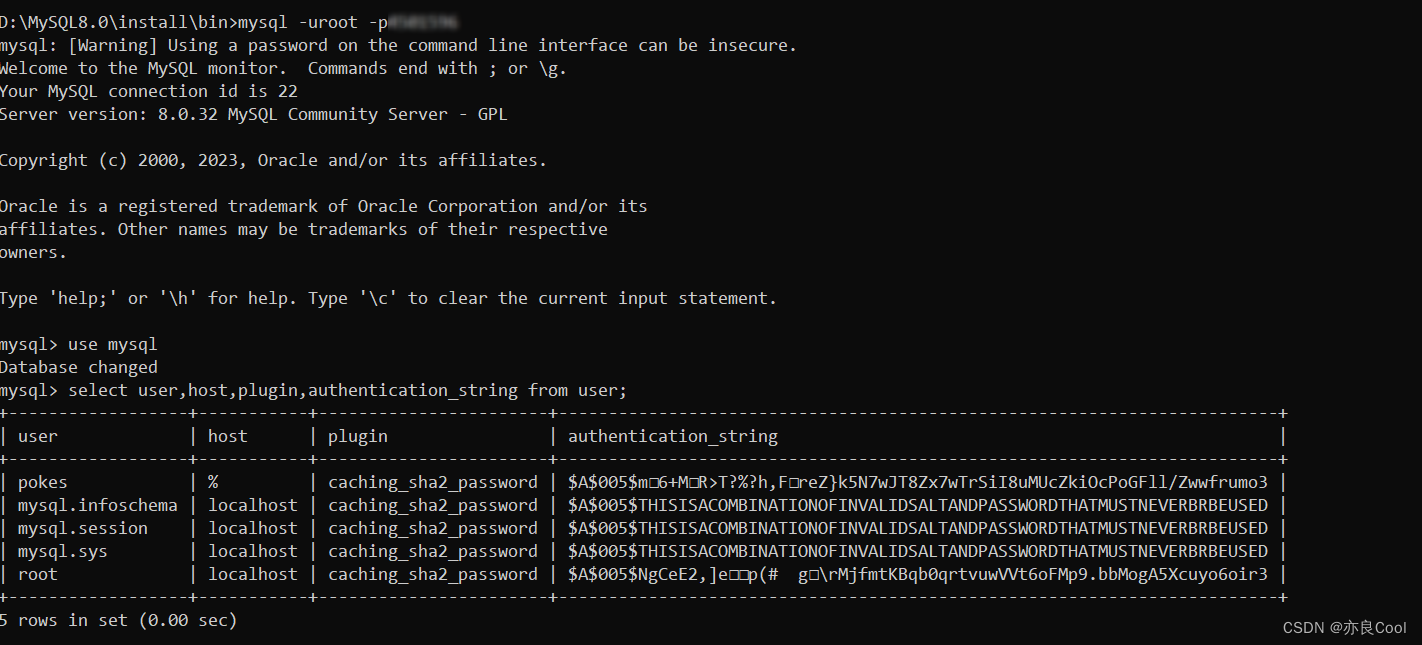
Navicat连接mysql时,提示:Unable to load authentication plugin ‘caching_sha2_password‘. 原因:mysql 8.0 默认使用 caching_sha2_password 身份验证机制。 D:\MySQL8.0\install\bin>mysql -uroot -p123456789 #登录 mysql: [War…...
手写签名到背景上合为1张图
手写签名到背景上合为1张图 package.json中 "signature_pad": "3.0.0-beta.3"<template><div class"home"><canvas id"canvas" width"500" height"300"></canvas><button click"…...
树莓派超全系列教程文档--(61)树莓派摄像头高级使用方法
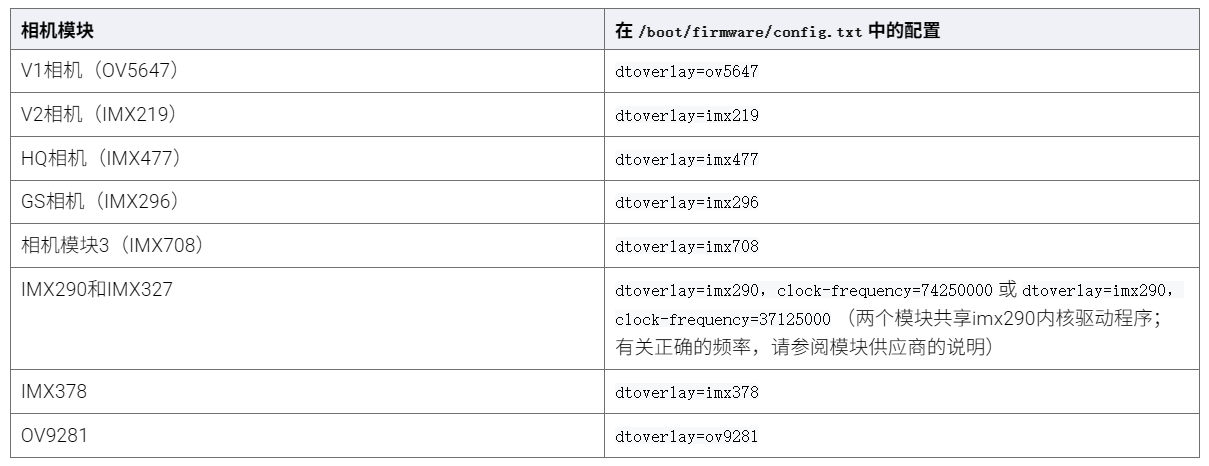
树莓派摄像头高级使用方法 配置通过调谐文件来调整相机行为 使用多个摄像头安装 libcam 和 rpicam-apps依赖关系开发包 文章来源: http://raspberry.dns8844.cn/documentation 原文网址 配置 大多数用例自动工作,无需更改相机配置。但是,一…...
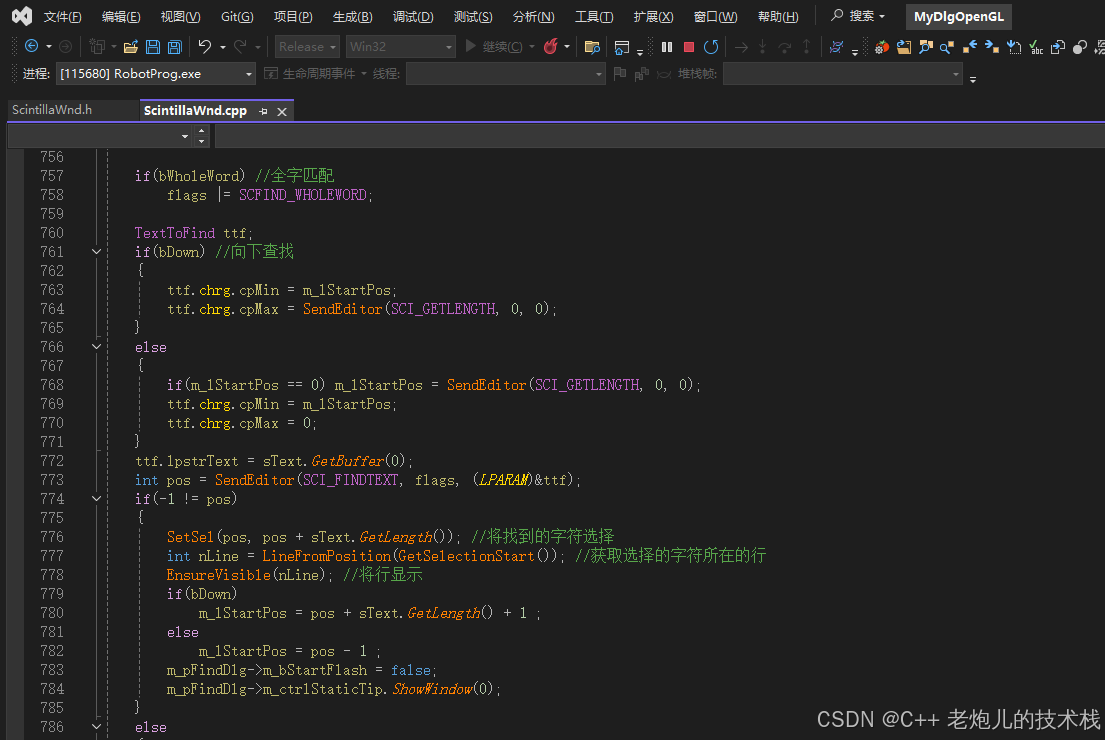
visual studio 2022更改主题为深色
visual studio 2022更改主题为深色 点击visual studio 上方的 工具-> 选项 在选项窗口中,选择 环境 -> 常规 ,将其中的颜色主题改成深色 点击确定,更改完成...
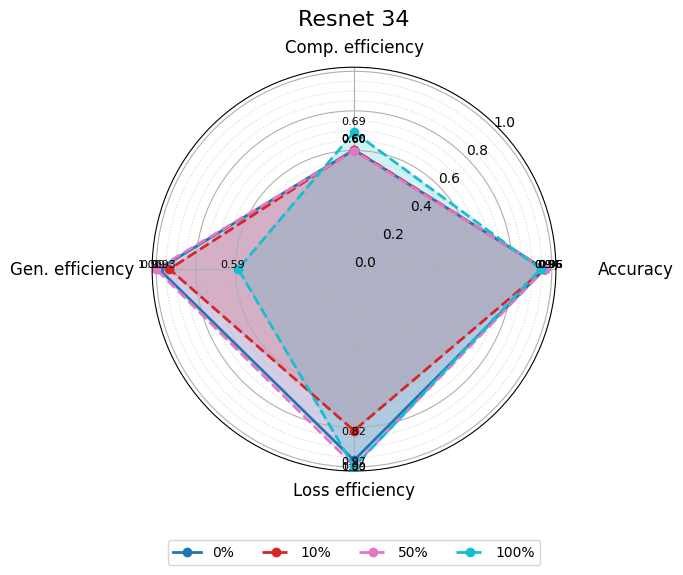
使用分级同态加密防御梯度泄漏
抽象 联邦学习 (FL) 支持跨分布式客户端进行协作模型训练,而无需共享原始数据,这使其成为在互联和自动驾驶汽车 (CAV) 等领域保护隐私的机器学习的一种很有前途的方法。然而,最近的研究表明&…...

大语言模型如何处理长文本?常用文本分割技术详解
为什么需要文本分割? 引言:为什么需要文本分割?一、基础文本分割方法1. 按段落分割(Paragraph Splitting)2. 按句子分割(Sentence Splitting)二、高级文本分割策略3. 重叠分割(Sliding Window)4. 递归分割(Recursive Splitting)三、生产级工具推荐5. 使用LangChain的…...

《用户共鸣指数(E)驱动品牌大模型种草:如何抢占大模型搜索结果情感高地》
在注意力分散、内容高度同质化的时代,情感连接已成为品牌破圈的关键通道。我们在服务大量品牌客户的过程中发现,消费者对内容的“有感”程度,正日益成为影响品牌传播效率与转化率的核心变量。在生成式AI驱动的内容生成与推荐环境中࿰…...
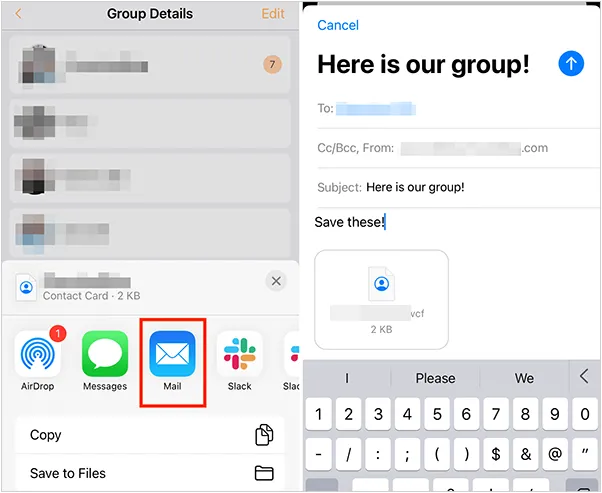
如何将联系人从 iPhone 转移到 Android
从 iPhone 换到 Android 手机时,你可能需要保留重要的数据,例如通讯录。好在,将通讯录从 iPhone 转移到 Android 手机非常简单,你可以从本文中学习 6 种可靠的方法,确保随时保持连接,不错过任何信息。 第 1…...
-HIve数据分析)
大数据学习(132)-HIve数据分析
🍋🍋大数据学习🍋🍋 🔥系列专栏: 👑哲学语录: 用力所能及,改变世界。 💖如果觉得博主的文章还不错的话,请点赞👍收藏⭐️留言Ǵ…...

Spring Cloud Gateway 中自定义验证码接口返回 404 的排查与解决
Spring Cloud Gateway 中自定义验证码接口返回 404 的排查与解决 问题背景 在一个基于 Spring Cloud Gateway WebFlux 构建的微服务项目中,新增了一个本地验证码接口 /code,使用函数式路由(RouterFunction)和 Hutool 的 Circle…...

Java线上CPU飙高问题排查全指南
一、引言 在Java应用的线上运行环境中,CPU飙高是一个常见且棘手的性能问题。当系统出现CPU飙高时,通常会导致应用响应缓慢,甚至服务不可用,严重影响用户体验和业务运行。因此,掌握一套科学有效的CPU飙高问题排查方法&…...

算法笔记2
1.字符串拼接最好用StringBuilder,不用String 2.创建List<>类型的数组并创建内存 List arr[] new ArrayList[26]; Arrays.setAll(arr, i -> new ArrayList<>()); 3.去掉首尾空格...