
React 全栈体系(七)
第四章 React ajax
一、理解
1. 前置说明
- React本身只关注于界面, 并不包含发送ajax请求的代码
- 前端应用需要通过ajax请求与后台进行交互(json数据)
- react应用中需要集成第三方ajax库(或自己封装)
2. 常用的ajax请求库
- jQuery: 比较重, 如果需要另外引入不建议使用
- axios: 轻量级, 建议使用
- 封装XmlHttpRequest对象的ajax
- promise风格
- 可以用在浏览器端和node服务器端
二、axios
1. 文档
- https://github.com/axios/axios
2. 相关API
2.1 GET请求
axios.get('/user?ID=12345').then(function (response) {console.log(response.data);}).catch(function (error) {console.log(error);});axios.get('/user', {params: {ID: 12345}}).then(function (response) {console.log(response);}).catch(function (error) {console.log(error);});
2.2 POST请求
axios.post('/user', {firstName: 'Fred',lastName: 'Flintstone'
})
.then(function (response) {
console.log(response);
})
.catch(function (error) {
console.log(error);
});
3. 代码(配置代理)
/* src/App.jsx */
import React, { Component } from 'react'
import axios from 'axios'export default class App extends Component {getStudentData = ()=>{axios.get('http://localhost:3000/api1/students').then(response => {console.log('成功了',response.data);},error => {console.log('失败了',error);})}getCarData = ()=>{axios.get('http://localhost:3000/api2/cars').then(response => {console.log('成功了',response.data);},error => {console.log('失败了',error);})}render() {return (<div><button onClick={this.getStudentData}>点我获取学生数据</button><button onClick={this.getCarData}>点我获取汽车数据</button></div>)}
}
/* src/index.js */
//引入react核心库
import React from 'react'
//引入ReactDOM
import ReactDOM from 'react-dom'
//引入App
import App from './App'ReactDOM.render(<App/>,document.getElementById('root'))
/* src/setupProxy.js */
const proxy = require('http-proxy-middleware')module.exports = function(app){app.use(proxy('/api1',{ //遇见/api1前缀的请求,就会触发该代理配置target:'http://localhost:5000', //请求转发给谁changeOrigin:true,//控制服务器收到的请求头中Host的值pathRewrite:{'^/api1':''} //重写请求路径(必须)}),proxy('/api2',{target:'http://localhost:5001',changeOrigin:true,pathRewrite:{'^/api2':''}}),)
}
3.1 方法一
在package.json中追加如下配置
"proxy":"http://localhost:5000"
- 说明:
- 优点:配置简单,前端请求资源时可以不加任何前缀。
- 缺点:不能配置多个代理。
- 工作方式:上述方式配置代理,当请求了3000不存在的资源时,那么该请求会转发给5000 (优先匹配前端资源)
3.2 方法二
- 第一步:创建代理配置文件
在src下创建配置文件:src/setupProxy.js
- 编写setupProxy.js配置具体代理规则:
const proxy = require('http-proxy-middleware')module.exports = function(app) {app.use(proxy('/api1', {  //api1是需要转发的请求(所有带有/api1前缀的请求都会转发给5000)target: 'http://localhost:5000', //配置转发目标地址(能返回数据的服务器地址)changeOrigin: true, //控制服务器接收到的请求头中host字段的值/*changeOrigin设置为true时,服务器收到的请求头中的host为:localhost:5000changeOrigin设置为false时,服务器收到的请求头中的host为:localhost:3000changeOrigin默认值为false,但我们一般将changeOrigin值设为true*/pathRewrite: {'^/api1': ''} //去除请求前缀,保证交给后台服务器的是正常请求地址(必须配置)}),proxy('/api2', { target: 'http://localhost:5001',changeOrigin: true,pathRewrite: {'^/api2': ''}}))
}
- 说明:
- 优点:可以配置多个代理,可以灵活的控制请求是否走代理。
- 缺点:配置繁琐,前端请求资源时必须加前缀。
三、案例 – github用户搜索
1. 效果
- 请求地址: https://api.github.com/search/users?q=xxxxxx
2. 代码实现
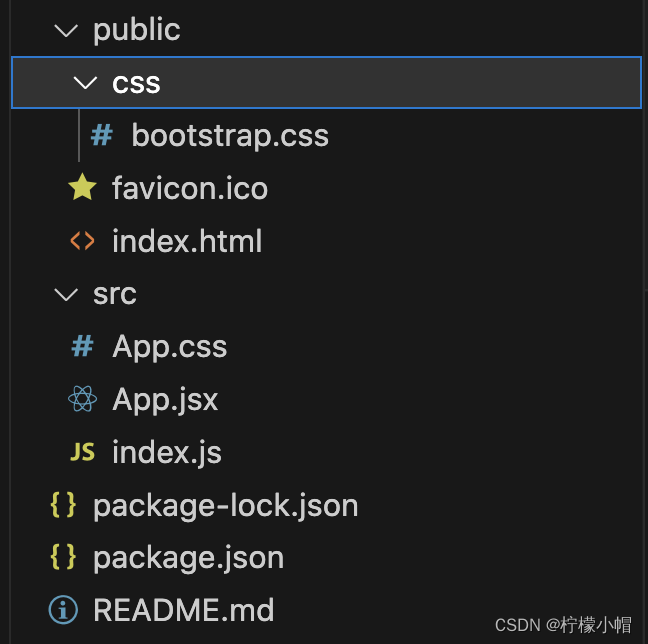
2.1 静态页面
/* public/css/bootstrap.css */
...
<!-- public/index.html -->
<!DOCTYPE html>
<html lang="en"><head><meta charset="utf-8" /><link rel="icon" href="%PUBLIC_URL%/favicon.ico" /><meta name="viewport" content="width=device-width, initial-scale=1" /><meta name="theme-color" content="#000000" /><metaname="description"content="Web site created using create-react-app"/><link rel="apple-touch-icon" href="%PUBLIC_URL%/logo192.png" /><link rel="manifest" href="%PUBLIC_URL%/manifest.json" /><link rel="stylesheet" href="./css/bootstrap.css"><title>React App</title></head><body><div id="root"></div></body>
</html>
/* src/App.css */
.album {min-height: 50rem; /* Can be removed; just added for demo purposes */padding-top: 3rem;padding-bottom: 3rem;background-color: #f7f7f7;}.card {float: left;width: 33.333%;padding: .75rem;margin-bottom: 2rem;border: 1px solid #efefef;text-align: center;}.card > img {margin-bottom: .75rem;border-radius: 100px;}.card-text {font-size: 85%;}
/* src/App.jsx */
import React, { Component } from 'react'
import './App.css'export default class App extends Component {render() {return (<div className="container"><section className="jumbotron"><h3 className="jumbotron-heading">Search Github Users</h3><div><input type="text" placeholder="enter the name you search"/> <button>Search</button></div></section><div className="row"><div className="card"><a href="https://github.com/reactjs" target="_blank"><img src="https://avatars.githubusercontent.com/u/6412038?v=3" style={{width:'100px'}}/></a><p className="card-text">reactjs</p></div><div className="card"><a href="https://github.com/reactjs" target="_blank"><img src="https://avatars.githubusercontent.com/u/6412038?v=3" style={{width:'100px'}}/></a><p className="card-text">reactjs</p></div><div className="card"><a href="https://github.com/reactjs" target="_blank"><img src="https://avatars.githubusercontent.com/u/6412038?v=3" style={{width:'100px'}}/></a><p className="card-text">reactjs</p></div><div className="card"><a href="https://github.com/reactjs" target="_blank"><img src="https://avatars.githubusercontent.com/u/6412038?v=3" style={{width:'100px'}}/></a><p className="card-text">reactjs</p></div><div className="card"><a href="https://github.com/reactjs" target="_blank"><img src="https://avatars.githubusercontent.com/u/6412038?v=3" style={{width:'100px'}}/></a><p className="card-text">reactjs</p></div></div></div>)}
}
/* src/index.js */
//引入react核心库
import React from 'react'
//引入ReactDOM
import ReactDOM from 'react-dom'
//引入App组件
import App from './App'//渲染App到页面
ReactDOM.render(<App/>,document.getElementById('root'))
2.2 静态组件
2.2.1 List
/* src/components/List/index.jsx */
import React, { Component } from "react";
import "./index.css";export default class List extends Component {render() {return (<div className="row"><div className="card"><a rel="noreferrer" href="https://github.com/reactjs" target="_blank"><imgalt="head_portrait"src="https://avatars.githubusercontent.com/u/6412038?v=3"style={{ width: "100px" }}/></a><p className="card-text">reactjs</p></div><div className="card"><a rel="noreferrer" href="https://github.com/reactjs" target="_blank"><imgalt="head_portrait"src="https://avatars.githubusercontent.com/u/6412038?v=3"style={{ width: "100px" }}/></a><p className="card-text">reactjs</p></div><div className="card"><a rel="noreferrer" href="https://github.com/reactjs" target="_blank"><imgalt="head_portrait"src="https://avatars.githubusercontent.com/u/6412038?v=3"style={{ width: "100px" }}/></a><p className="card-text">reactjs</p></div><div className="card"><a rel="noreferrer" href="https://github.com/reactjs" target="_blank"><imgalt="head_portrait"src="https://avatars.githubusercontent.com/u/6412038?v=3"style={{ width: "100px" }}/></a><p className="card-text">reactjs</p></div><div className="card"><a rel="noreferrer" href="https://github.com/reactjs" target="_blank"><imgalt="head_portrait"src="https://avatars.githubusercontent.com/u/6412038?v=3"style={{ width: "100px" }}/></a><p className="card-text">reactjs</p></div></div>);}
}
/* src/components/List/index.css */
.album {min-height: 50rem; /* Can be removed; just added for demo purposes */padding-top: 3rem;padding-bottom: 3rem;background-color: #f7f7f7;
}.card {float: left;width: 33.333%;padding: 0.75rem;margin-bottom: 2rem;border: 1px solid #efefef;text-align: center;
}.card > img {margin-bottom: 0.75rem;border-radius: 100px;
}.card-text {font-size: 85%;
}
2.2.2 Search
/* src/components/Search/index.jsx */
import React, { Component } from "react";export default class Search extends Component {render() {return (<section className="jumbotron"><h3 className="jumbotron-heading">Search Github Users</h3><div><input type="text" placeholder="enter the name you search" /> <button>Search</button></div></section>);}
}
2.2.3 App
/* src/App.jsx */
import React, { Component } from "react";
import Search from "./components/Search";
import List from "./components/List";export default class App extends Component {render() {return (<div className="container"><Search /><List /></div>);}
}
相关文章:
React 全栈体系(七)
第四章 React ajax 一、理解 1. 前置说明 React本身只关注于界面, 并不包含发送ajax请求的代码前端应用需要通过ajax请求与后台进行交互(json数据)react应用中需要集成第三方ajax库(或自己封装) 2. 常用的ajax请求库 jQuery: 比较重, 如果需要另外引入不建议使用axios: 轻…...

NVIDIA 显卡硬件支持的精度模式
很多炼丹师不知道自己英伟达显卡支持哪些精度模式,本文整理了NVIDIA官网的数据,为你解开疑惑。 1. 首先了解CUDA计算能力及其支持的精度模式; 2. 查看自己显卡(或其它NVIDIA硬件)的计算能力值为多少。 表1 CUDA计算…...

【Java|golang】210. 课程表 II---拓扑排序
一、拓扑排序的定义: 先引用一段百度百科上对于拓扑排序的定义: 对一个有向无环图 ( Directed Acyclic Graph 简称 DAG ) G 进行拓扑排序,是将 G 中所有顶点排成一个线性序列,使得图中任意一对顶点 u 和 v ,若边 <…...

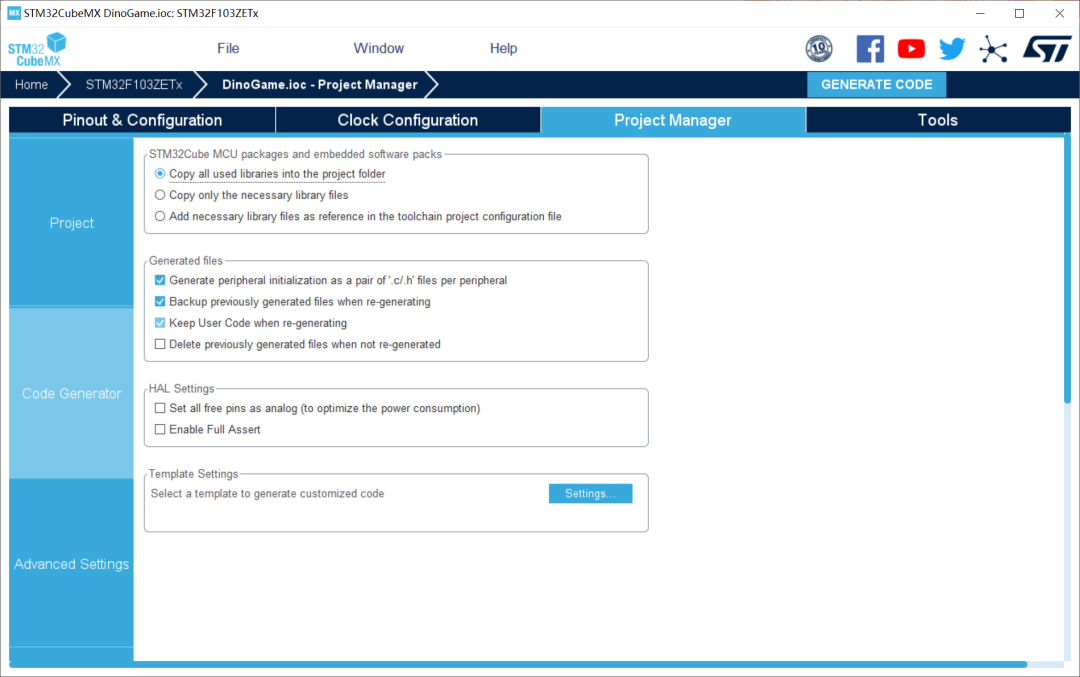
STM32CubeMX systick bug?
发觉用新版(V6.9.1)的它生成代码,会有问题。可能是 BUG。具体如下: 一个简单的点灯程序,用 Keil MDK 5.38a(compiler version 6)编译。 如果在变量前,不加上关键字“volatile”&am…...
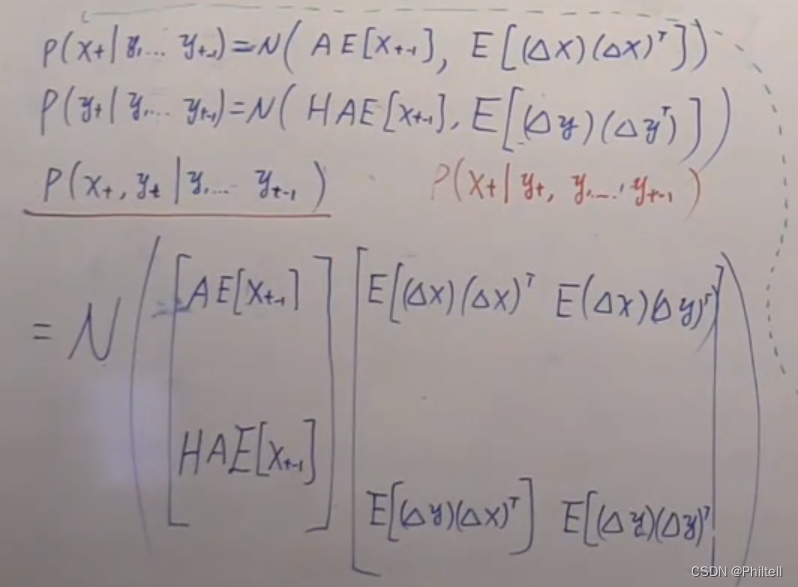
徐亦达机器学习:Kalman Filter 卡尔曼滤波笔记 (一)
P ( x t P(x_t P(xt| x t − 1 ) x_{t-1}) xt−1) P ( y t P(y_t P(yt| x t ) x_t) xt) P ( x 1 ) P(x_1) P(x1)Discrete State DM A X t − 1 , X t A_{X_{t-1},X_t} AXt−1,XtAny π \pi πLinear Gassian Kalman DM N ( A X t − 1 B , Q ) N(AX_{t-1}B,Q)…...

Java和vue的包含数组组件contains、includes
List<String> tempList Arrays.asList("10018","1007","10017","1012"); if(tempList.contains(initMap.get("asset_type_id").toString())){// todo 计算运营终点桩号-起点桩号BigDecimal diffSum collectNum(col…...
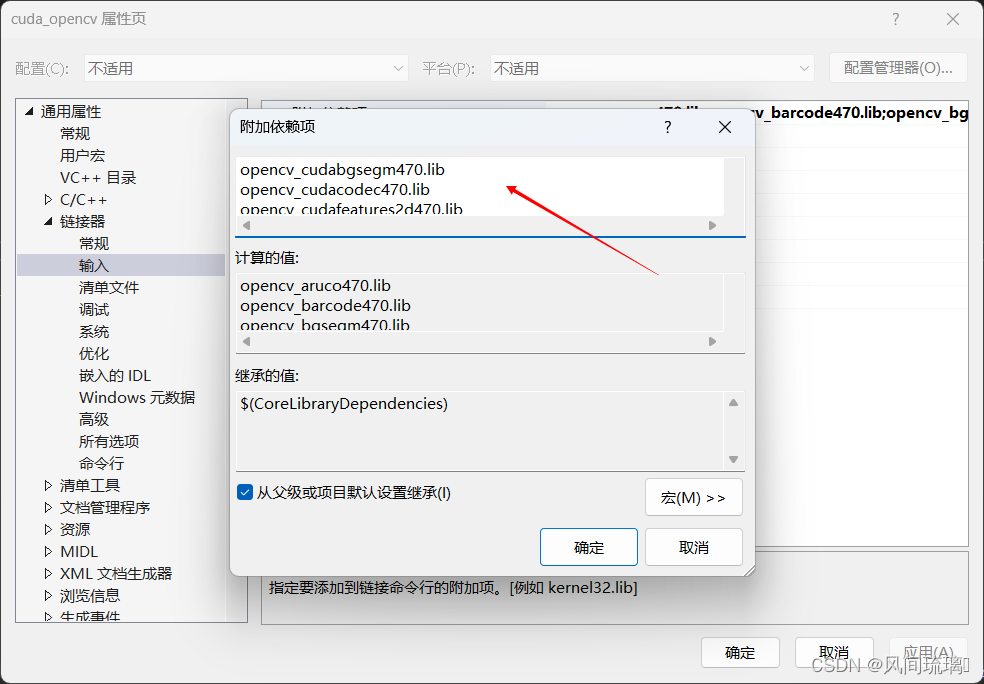
OpenCV_CUDA_VS编译安装
一、OpenCV 我这里是下载的OpenCV4.5.4,但是不知道到在vs里面build时一直报错,后面换了4.7.0的版本测试,安装成功。 Release OpenCV 4.5.4 opencv/opencv GitHub 这个里面有官方预编译好的OpenCV库,可以直接食用。 扩展包&am…...
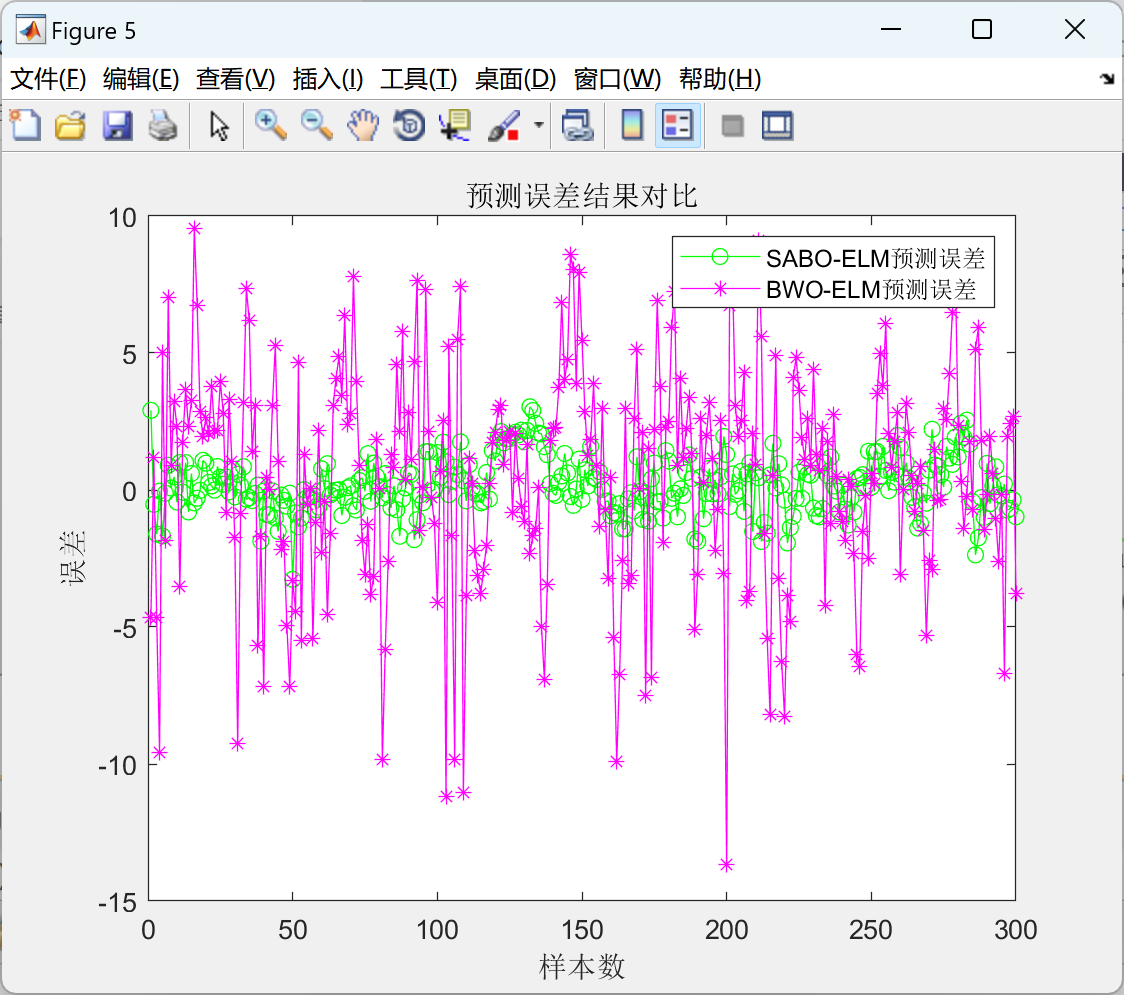
基于减法优化SABO优化ELM(SABO-ELM)负荷预测(Matlab代码实现)
💥💥💞💞欢迎来到本博客❤️❤️💥💥 🏆博主优势:🌞🌞🌞博客内容尽量做到思维缜密,逻辑清晰,为了方便读者。 ⛳️座右铭&a…...

记录第一个启动代码的诞生
核使用R52,参考汇编模板,一步一步来实现。 首先是ld文件,这个没啥好说的,主要是关注给vector_table划一块地址、stack地址,如下: .text.intvec :{_vectors_start .;KEEP(*(.text.intvec))_vectors_end .;…...
基于STM32的简化版智能手表
一、前言 本文的OLED多级菜单UI为一个综合性的STM32小项目,使用多传感器与OLED显示屏实现智能终端的效果。项目中的多级菜单UI使用了较为常见的结构体索引法去实现功能与功能之间的来回切换,搭配DHT11,RTC,LED,KEY等器…...

揭秘弹幕游戏制作
最近好多人问弹幕游戏,甚至是招人的也要DOTS做弹幕游戏... 实际上目前的弹幕游戏绝大多数应该和DOTS没有半点关系,别忘了DOTS这项技术渲染问题还没能够被合理解决呢 所以目前用的全都是GPU Instance这项技术,于是乎我决定下场写这篇帖子&am…...
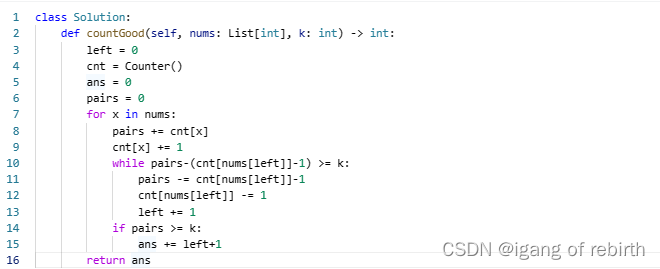
2327. 知道秘密的人数;1722. 执行交换操作后的最小汉明距离;2537. 统计好子数组的数目
2327. 知道秘密的人数 核心思想:动态规划,每天的人可以分为三种,可分享秘密的人,不可分享秘密的人,忘记秘密的人。定义f[i]为第i天可分享秘密的人,那么第(idelay ,iforget)天,会增加f[i]个可分…...
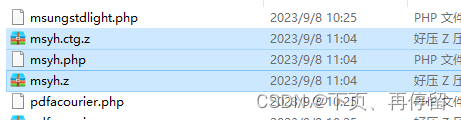
【TCPDF】使用TCPDF导出PDF文件
目录 一、安装TCPDF类库 二、安装字体 三、使用TCPDF导出PDF文件 目的:PHP通过TCPDF类库导出文件为PDF。 开发语言及类库:ThinkPHP、TCPDF 效果图如下 一、安装TCPDF类库 在项目根目录使用composer安装TCPDF,安装完成后会在vendor目录下…...

MacBook苹果电脑重装、降级系统
1、下载balenaEtcher镜像启动盘制作工具 https://tails.net/etcher/balenaEtcher-portable.exe 2、选择从文件烧录选择下载好的Mac 镜像文件 百度网盘 请输入提取码(Mac OS 10.10-12版本镜像文件) 第二步选择目标磁盘,这里需要准备一块1…...

Java 解决long类型数据在前后端传递失真问题
问题:雪花算法的id长度为19位,前端能够接收的数字最多只能是16位的,因此就会造成精度丢失,得到的ID不是真正的ID。 解决: 在拦截器中加入Long类型转换,返回给前端string package io.global.iot.common.c…...
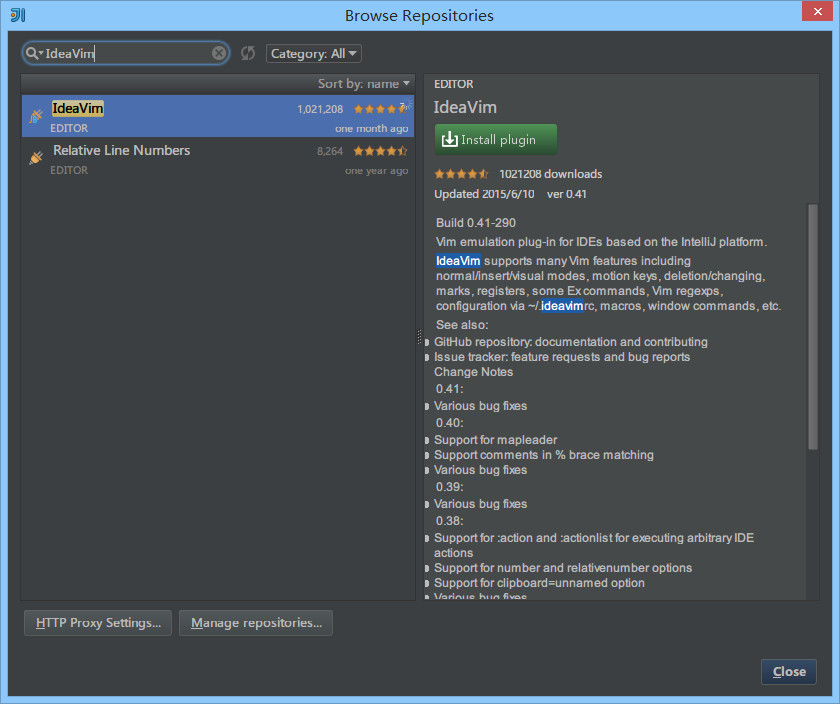
IDEA的快捷键大全
快捷键 说明 IntelliJ IDEA 的便捷操作性,快捷键的功劳占了一大半,对于各个快捷键组合请认真对待。IntelliJ IDEA 本身的设计思维是提倡键盘优先于鼠标的,所以各种快捷键组合层出不穷,对于快捷键设置也有各种支持,对…...

简单记一下Vue router 路由中使用 vue-i18n 进行标题国际化
引入状态管理和国际化文件 import store from ../store import i18n from /configs/i18n使用状态管理设置路由当前国际化选项 // 使用状态管理 i18n.locale store.state.setStore.i18n??zh路由中使用i18n { path: /login, name: login, component: LoginPage, meta: { ti…...

【Gitea】 Post “http://localhost:3000/api/internal/hook/pre-receive/aa/bbb“ 异常
引 使用 JGit 做了一个发布代码到 Gitea 的接口,使用该接口发布代码到 http://xxx-local/{name}/{project} ,报了 Post "http://localhost:3000/api/internal/hook/pre-receive/{name}/{project} 相关的异常。具体内容如下: Gitea: In…...

如何使用element-ui相关组件如:el-select,el-table,el-switch,el-pagination,el-dialog
element-ui 官方链接: 组件 | Elementhttps://element.eleme.cn/#/zh-CN/component/installation el-select <!-- 用户类型选择框<template> 看情况使用value选择框绑定的值 命名必须是value不能改v-for"item in Options" options数据源来自于…...

微信小程序+echart实现点亮旅游地图
背景 最近看抖音有个很火的特效就是点亮地图,去过哪些地方,于是乎自己也想做一个,结合自己之前做的以家庭为单位的小程序,可以考虑做一个家庭一起点亮地图的功能。 效果图 过程 1,首先就是得去下微信小程序适配的ec…...
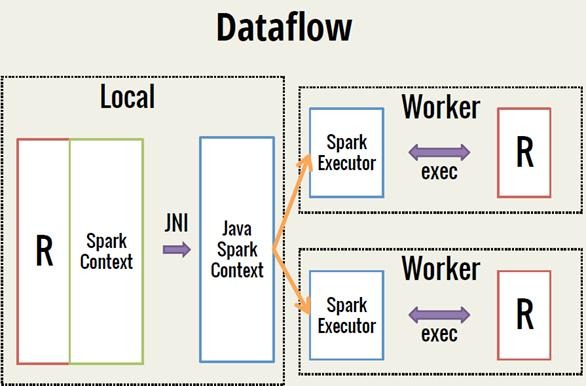
Spark 之 入门讲解详细版(1)
1、简介 1.1 Spark简介 Spark是加州大学伯克利分校AMP实验室(Algorithms, Machines, and People Lab)开发通用内存并行计算框架。Spark在2013年6月进入Apache成为孵化项目,8个月后成为Apache顶级项目,速度之快足见过人之处&…...
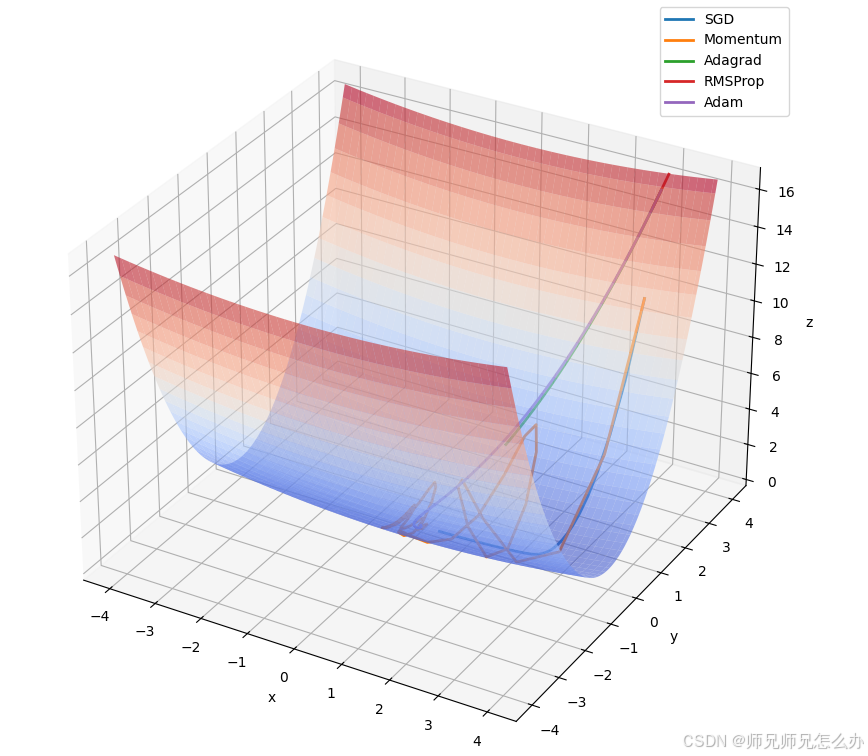
【人工智能】神经网络的优化器optimizer(二):Adagrad自适应学习率优化器
一.自适应梯度算法Adagrad概述 Adagrad(Adaptive Gradient Algorithm)是一种自适应学习率的优化算法,由Duchi等人在2011年提出。其核心思想是针对不同参数自动调整学习率,适合处理稀疏数据和不同参数梯度差异较大的场景。Adagrad通…...

ssc377d修改flash分区大小
1、flash的分区默认分配16M、 / # df -h Filesystem Size Used Available Use% Mounted on /dev/root 1.9M 1.9M 0 100% / /dev/mtdblock4 3.0M...
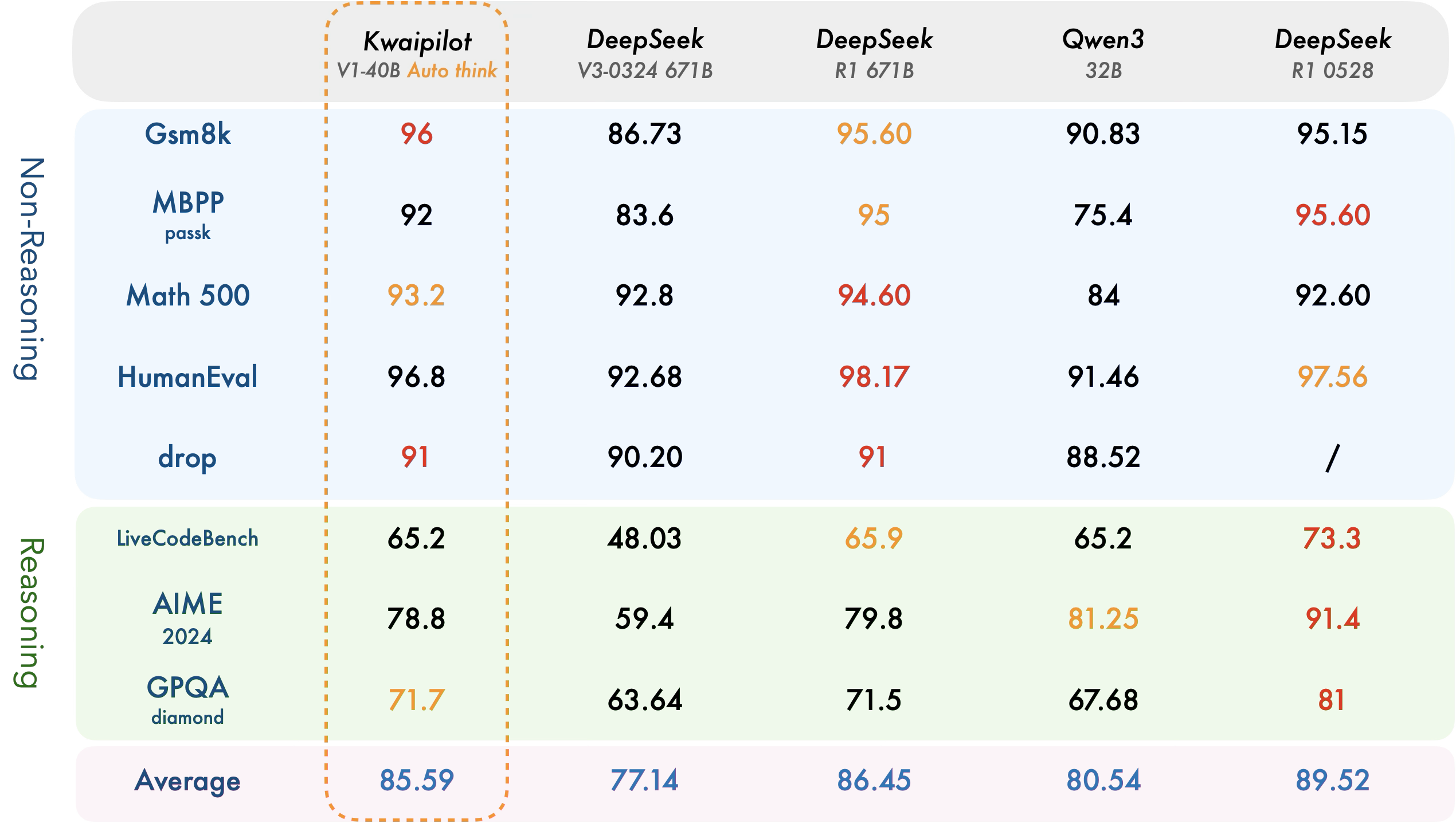
【快手拥抱开源】通过快手团队开源的 KwaiCoder-AutoThink-preview 解锁大语言模型的潜力
引言: 在人工智能快速发展的浪潮中,快手Kwaipilot团队推出的 KwaiCoder-AutoThink-preview 具有里程碑意义——这是首个公开的AutoThink大语言模型(LLM)。该模型代表着该领域的重大突破,通过独特方式融合思考与非思考…...

JDK 17 新特性
#JDK 17 新特性 /**************** 文本块 *****************/ python/scala中早就支持,不稀奇 String json “”" { “name”: “Java”, “version”: 17 } “”"; /**************** Switch 语句 -> 表达式 *****************/ 挺好的ÿ…...

服务器--宝塔命令
一、宝塔面板安装命令 ⚠️ 必须使用 root 用户 或 sudo 权限执行! sudo su - 1. CentOS 系统: yum install -y wget && wget -O install.sh http://download.bt.cn/install/install_6.0.sh && sh install.sh2. Ubuntu / Debian 系统…...

Linux C语言网络编程详细入门教程:如何一步步实现TCP服务端与客户端通信
文章目录 Linux C语言网络编程详细入门教程:如何一步步实现TCP服务端与客户端通信前言一、网络通信基础概念二、服务端与客户端的完整流程图解三、每一步的详细讲解和代码示例1. 创建Socket(服务端和客户端都要)2. 绑定本地地址和端口&#x…...
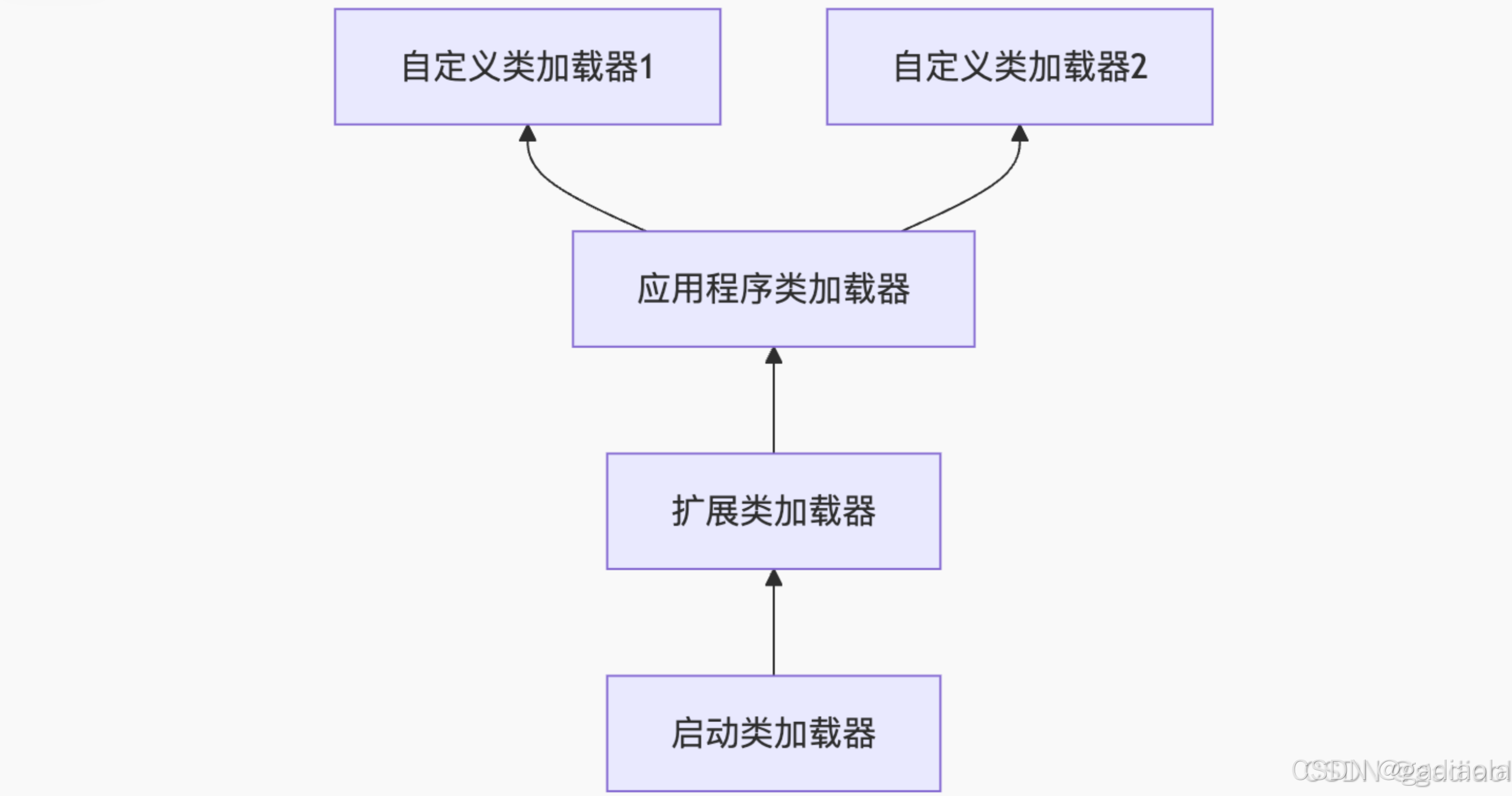
【JVM面试篇】高频八股汇总——类加载和类加载器
目录 1. 讲一下类加载过程? 2. Java创建对象的过程? 3. 对象的生命周期? 4. 类加载器有哪些? 5. 双亲委派模型的作用(好处)? 6. 讲一下类的加载和双亲委派原则? 7. 双亲委派模…...
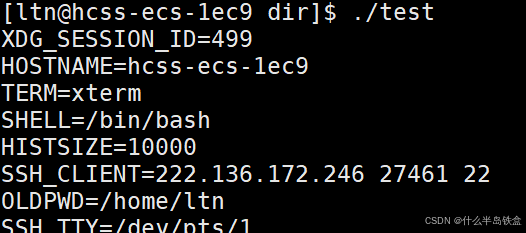
【Linux系统】Linux环境变量:系统配置的隐形指挥官
。# Linux系列 文章目录 前言一、环境变量的概念二、常见的环境变量三、环境变量特点及其相关指令3.1 环境变量的全局性3.2、环境变量的生命周期 四、环境变量的组织方式五、C语言对环境变量的操作5.1 设置环境变量:setenv5.2 删除环境变量:unsetenv5.3 遍历所有环境…...

用鸿蒙HarmonyOS5实现中国象棋小游戏的过程
下面是一个基于鸿蒙OS (HarmonyOS) 的中国象棋小游戏的实现代码。这个实现使用Java语言和鸿蒙的Ability框架。 1. 项目结构 /src/main/java/com/example/chinesechess/├── MainAbilitySlice.java // 主界面逻辑├── ChessView.java // 游戏视图和逻辑├──…...