
iText实战--根据绝对位置添加内容
3.1 direct content 概念简介
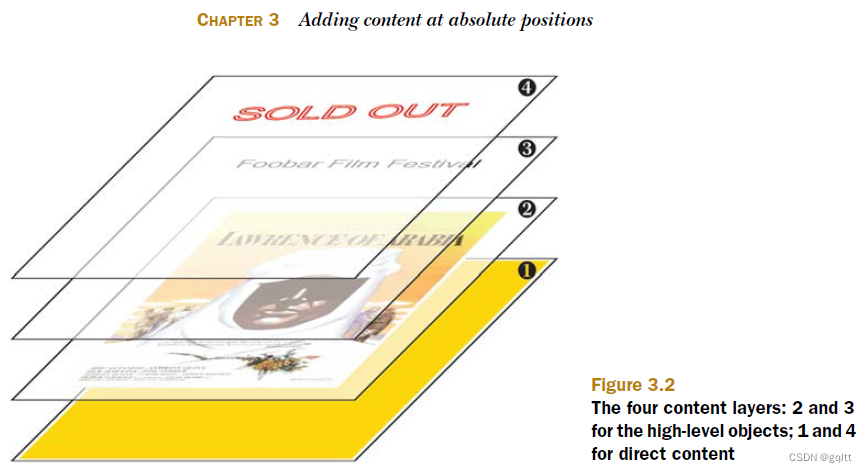
pdf内容的4个层级
层级1:在text和graphics底下,PdfWriter.getDirectContentUnder()
层级2:graphics层,Chunk, Images背景,PdfPCell的边界等
层级3:text层,Chunks, Phrases, Paragraphs 内容等
层级4:在text和graphics顶上,PdfWriter.getDirectContent()
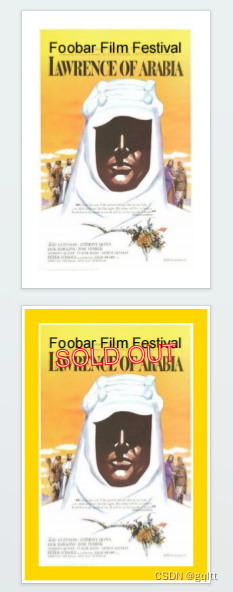
import java.io.FileOutputStream;
import java.io.IOException;import com.itextpdf.text.Document;
import com.itextpdf.text.DocumentException;
import com.itextpdf.text.Element;
import com.itextpdf.text.Font;
import com.itextpdf.text.Image;
import com.itextpdf.text.PageSize;
import com.itextpdf.text.Paragraph;
import com.itextpdf.text.Font.FontFamily;
import com.itextpdf.text.pdf.BaseFont;
import com.itextpdf.text.pdf.PdfContentByte;
import com.itextpdf.text.pdf.PdfWriter;public class FestivalOpening {/** The resulting PDF. */public static final String RESULT= "D:/data/iText/inAction/chapter03/festival_opening.pdf";/** The movie poster. */public static final String RESOURCE = "E:/study/PDF/SourceCodeiText/itext-book/book/resources/img/loa.jpg";/*** Main method.* @param    args    no arguments needed* @throws DocumentException * @throws IOException*/public static void main(String[] args)throws IOException, DocumentException {// step 1Document document = new Document(PageSize.POSTCARD, 30, 30, 30, 30);// step 2PdfWriter writer= PdfWriter.getInstance(document, new FileOutputStream(RESULT));// step 3document.open();// step 4// Create and add a ParagraphParagraph p= new Paragraph("Foobar Film Festival", new Font(FontFamily.HELVETICA, 22));p.setAlignment(Element.ALIGN_CENTER);document.add(p);// Create and add an ImageImage img = Image.getInstance(RESOURCE);img.setAbsolutePosition((PageSize.POSTCARD.getWidth() - img.getScaledWidth()) / 2,(PageSize.POSTCARD.getHeight() - img.getScaledHeight()) / 2);document.add(img);// Now we go to the next pagedocument.newPage();document.add(p);document.add(img);// Add text on top of the imagePdfContentByte over = writer.getDirectContent();over.saveState();float sinus = (float)Math.sin(Math.PI / 60);float cosinus = (float)Math.cos(Math.PI / 60);BaseFont bf = BaseFont.createFont();over.beginText();over.setTextRenderingMode(PdfContentByte.TEXT_RENDER_MODE_FILL_STROKE);over.setLineWidth(1.5f);over.setRGBColorStroke(0xFF, 0x00, 0x00);over.setRGBColorFill(0xFF, 0xFF, 0xFF);over.setFontAndSize(bf, 36);over.setTextMatrix(cosinus, sinus, -sinus, cosinus, 50, 324);over.showText("SOLD OUT");over.endText();over.restoreState();// Add a rectangle under the imagePdfContentByte under = writer.getDirectContentUnder();under.saveState();under.setRGBColorFill(0xFF, 0xD7, 0x00);under.rectangle(5, 5,PageSize.POSTCARD.getWidth() - 10, PageSize.POSTCARD.getHeight() - 10);under.fill();under.restoreState();// step 5document.close();}
}
Graphics 状态
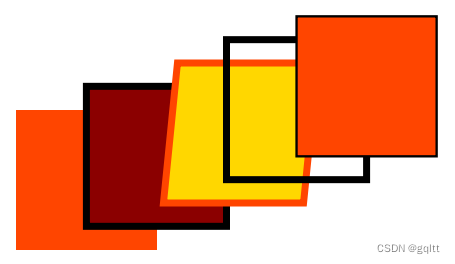
1、fill()填充四方形,并根据setRGBColorFill()填充,默认无边框
2、fillStroke()填充四方形,并根据setLineWidth()和默认black画边框
3、setRGBColorStroke() 设置边框颜色
4、current transformation matrix(CTM)当前转换矩阵
5、stroke() 仅画边框
6、saveState/rrestoreState 对应入栈、出栈

import java.io.FileOutputStream;
import java.io.IOException;import com.itextpdf.text.Document;
import com.itextpdf.text.DocumentException;
import com.itextpdf.text.Rectangle;
import com.itextpdf.text.pdf.PdfContentByte;
import com.itextpdf.text.pdf.PdfWriter;public class GraphicsStateStack {/** The resulting PDF. */public static final String RESULT= "D:/data/iText/inAction/chapter03/graphics_state.pdf";/*** Main method.** @param    args    no arguments needed* @throws DocumentException * @throws IOException*/public static void main(String[] args)throws IOException, DocumentException {// step 1Document document = new Document(new Rectangle(200, 120));// step 2PdfWriter writer= PdfWriter.getInstance(document, new FileOutputStream(RESULT));// step 3document.open();// step 4PdfContentByte canvas = writer.getDirectContent();// state 1:canvas.setRGBColorFill(0xFF, 0x45, 0x00);// fill a rectangle in state 1canvas.rectangle(10, 10, 60, 60);canvas.fill();canvas.saveState();// state 2;canvas.setLineWidth(3);canvas.setRGBColorFill(0x8B, 0x00, 0x00);// fill and stroke a rectangle in state 2canvas.rectangle(40, 20, 60, 60);canvas.fillStroke();canvas.saveState();// state 3:canvas.concatCTM(1, 0, 0.1f, 1, 0, 0);canvas.setRGBColorStroke(0xFF, 0x45, 0x00);canvas.setRGBColorFill(0xFF, 0xD7, 0x00);// fill and stroke a rectangle in state 3canvas.rectangle(70, 30, 60, 60);canvas.fillStroke();canvas.restoreState();// stroke a rectangle in state 2canvas.rectangle(100, 40, 60, 60);canvas.stroke();canvas.restoreState();// fill and stroke a rectangle in state 1canvas.rectangle(130, 50, 60, 60);canvas.fillStroke();// step 5document.close();}
}
Text 状态
1、showText(),设置显示的文本
2、setTextRenderingMode()设置边框模式,setLineWidth()设置边框宽度,默认无边框
3、setFontAndSize() 设置字体和大小
4、setTextMatrix() 设置字体矩阵
5、setRGBColorStoke() 设置边框颜色
6、setRGBColorFill() 设置填充颜色
3.2 根据绝对定位添加Text
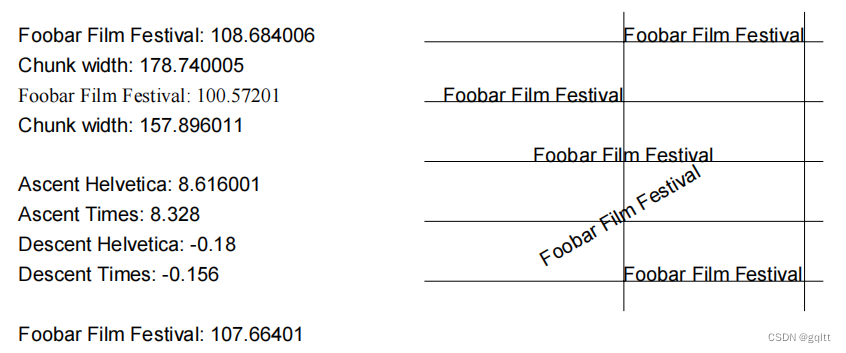
PdfContentByte.showTextAligned()
测量字符串
Chunk c;String foobar = "Foobar Film Festival";// Measuring a String in HelveticaFont helvetica = new Font(FontFamily.HELVETICA, 12);BaseFont bf_helv = helvetica.getCalculatedBaseFont(false);float width_helv = bf_helv.getWidthPoint(foobar, 12);c = new Chunk(foobar + ": " + width_helv, helvetica);document.add(new Paragraph(c));document.add(new Paragraph(String.format("Chunk width: %f", c.getWidthPoint())));// Measuring a String in TimesBaseFont bf_times = BaseFont.createFont("c:/windows/fonts/times.ttf", BaseFont.WINANSI, BaseFont.EMBEDDED);Font times = new Font(bf_times, 12);float width_times = bf_times.getWidthPoint(foobar, 12);c = new Chunk(foobar + ": " + width_times, times);document.add(new Paragraph(c));document.add(new Paragraph(String.format("Chunk width: %f", c.getWidthPoint())));document.add(Chunk.NEWLINE);字符串上行空间和下行空间
注意:字体大小不是某个字符的高度,而是一行的垂直空间
// Ascent and descent of the Stringdocument.add(new Paragraph("Ascent Helvetica: "+ bf_helv.getAscentPoint(foobar, 12)));document.add(new Paragraph("Ascent Times: "+ bf_times.getAscentPoint(foobar, 12)));document.add(new Paragraph("Descent Helvetica: "+ bf_helv.getDescentPoint(foobar, 12)));document.add(new Paragraph("Descent Times: "+ bf_times.getDescentPoint(foobar, 12)));字符串定位
PdfContentByte canvas = writer.getDirectContent(); // Adding text with PdfContentByte.showTextAligned()canvas.beginText();canvas.setFontAndSize(bf_helv, 12);canvas.showTextAligned(Element.ALIGN_LEFT, foobar, 400, 788, 0);canvas.showTextAligned(Element.ALIGN_RIGHT, foobar, 400, 752, 0);canvas.showTextAligned(Element.ALIGN_CENTER, foobar, 400, 716, 0);canvas.showTextAligned(Element.ALIGN_CENTER, foobar, 400, 680, 30);canvas.showTextAlignedKerned(Element.ALIGN_LEFT, foobar, 400, 644, 0);canvas.endText();字距调整(KERNING )
// Kerned textwidth_helv = bf_helv.getWidthPointKerned(foobar, 12);c = new Chunk(foobar + ": " + width_helv, helvetica);document.add(new Paragraph(c));ColumnText.showTextAligned()
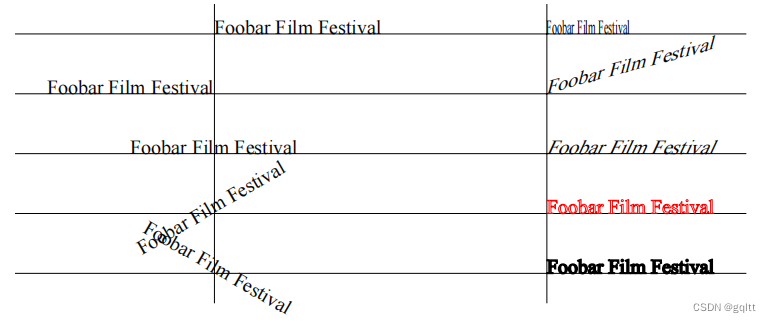
// Adding text with ColumnText.showTextAligned()Phrase phrase = new Phrase(foobar, times);ColumnText.showTextAligned(canvas, Element.ALIGN_LEFT, phrase, 200, 572, 0);ColumnText.showTextAligned(canvas, Element.ALIGN_RIGHT, phrase, 200, 536, 0);ColumnText.showTextAligned(canvas, Element.ALIGN_CENTER, phrase, 200, 500, 0);ColumnText.showTextAligned(canvas, Element.ALIGN_CENTER, phrase, 200, 464, 30);ColumnText.showTextAligned(canvas, Element.ALIGN_CENTER, phrase, 200, 428, -30);短句(Phrase)定位
一个短句(Phrase)能够包含一系列的块(Chunk)。添加短句(Phrase)到绝对定位,可以方便地选择字体、字号和颜色,iText会自动计算短句(Phrase)内每个块(Chunk)的间距。
块:缩放、倾斜、渲染模式(Chunks: Scaling、Skewing、Rendering Mode)
1、setScaling(float scale) 设置缩放比例
2、setSkew(float arg1, float arg2) 设置倾斜,arg1:基线的角度,arg2:字符对基线的角度
3、setTextRenderMode() 设置文本渲染模式
// Chunk attributesc = new Chunk(foobar, times);c.setHorizontalScaling(0.5f);phrase = new Phrase(c);ColumnText.showTextAligned(canvas, Element.ALIGN_LEFT, phrase, 400, 572, 0);c = new Chunk(foobar, times);c.setSkew(15, 15);phrase = new Phrase(c);ColumnText.showTextAligned(canvas, Element.ALIGN_LEFT, phrase, 400, 536, 0);c = new Chunk(foobar, times);c.setSkew(0, 25);phrase = new Phrase(c);ColumnText.showTextAligned(canvas, Element.ALIGN_LEFT, phrase, 400, 500, 0);c = new Chunk(foobar, times);c.setTextRenderMode(PdfContentByte.TEXT_RENDER_MODE_STROKE, 0.1f, BaseColor.RED);phrase = new Phrase(c);ColumnText.showTextAligned(canvas, Element.ALIGN_LEFT, phrase, 400, 464, 0);c = new Chunk(foobar, times);c.setTextRenderMode(PdfContentByte.TEXT_RENDER_MODE_FILL_STROKE, 1, null);phrase = new Phrase(c);ColumnText.showTextAligned(canvas, Element.ALIGN_LEFT, phrase, 400, 428, -0);完整示例
import java.io.FileOutputStream;
import java.io.IOException;import com.itextpdf.text.Chunk;
import com.itextpdf.text.Document;
import com.itextpdf.text.DocumentException;
import com.itextpdf.text.Element;
import com.itextpdf.text.Font;
import com.itextpdf.text.Paragraph;
import com.itextpdf.text.Phrase;
import com.itextpdf.text.Font.FontFamily;
import com.itextpdf.text.pdf.BaseFont;
import com.itextpdf.text.pdf.ColumnText;
import com.itextpdf.text.pdf.PdfContentByte;
import com.itextpdf.text.pdf.PdfWriter;
import com.itextpdf.text.BaseColor;public class FoobarFilmFestival {public static final String RESULT= "D:/data/iText/inAction/chapter03/foobar_film_festival.pdf";/*** Main method.** @param    args    no arguments needed* @throws DocumentException * @throws IOException*/public static void main(String[] args)throws IOException, DocumentException {// step 1Document document = new Document();// step 2PdfWriter writer= PdfWriter.getInstance(document, new FileOutputStream(RESULT));// step 3document.open();// step 4Chunk c;String foobar = "Foobar Film Festival";// Measuring a String in HelveticaFont helvetica = new Font(FontFamily.HELVETICA, 12);BaseFont bf_helv = helvetica.getCalculatedBaseFont(false);float width_helv = bf_helv.getWidthPoint(foobar, 12);c = new Chunk(foobar + ": " + width_helv, helvetica);document.add(new Paragraph(c));document.add(new Paragraph(String.format("Chunk width: %f", c.getWidthPoint())));// Measuring a String in TimesBaseFont bf_times = BaseFont.createFont("c:/windows/fonts/times.ttf", BaseFont.WINANSI, BaseFont.EMBEDDED);Font times = new Font(bf_times, 12);float width_times = bf_times.getWidthPoint(foobar, 12);c = new Chunk(foobar + ": " + width_times, times);document.add(new Paragraph(c));document.add(new Paragraph(String.format("Chunk width: %f", c.getWidthPoint())));document.add(Chunk.NEWLINE);// Ascent and descent of the Stringdocument.add(new Paragraph("Ascent Helvetica: "+ bf_helv.getAscentPoint(foobar, 12)));document.add(new Paragraph("Ascent Times: "+ bf_times.getAscentPoint(foobar, 12)));document.add(new Paragraph("Descent Helvetica: "+ bf_helv.getDescentPoint(foobar, 12)));document.add(new Paragraph("Descent Times: "+ bf_times.getDescentPoint(foobar, 12)));document.add(Chunk.NEWLINE);// Kerned textwidth_helv = bf_helv.getWidthPointKerned(foobar, 12);c = new Chunk(foobar + ": " + width_helv, helvetica);document.add(new Paragraph(c));// Drawing lines to see where the text is addedPdfContentByte canvas = writer.getDirectContent();canvas.saveState();canvas.setLineWidth(0.05f);canvas.moveTo(400, 806);canvas.lineTo(400, 626);canvas.moveTo(508.7f, 806);canvas.lineTo(508.7f, 626);canvas.moveTo(280, 788);canvas.lineTo(520, 788);canvas.moveTo(280, 752);canvas.lineTo(520, 752);canvas.moveTo(280, 716);canvas.lineTo(520, 716);canvas.moveTo(280, 680);canvas.lineTo(520, 680);canvas.moveTo(280, 644);canvas.lineTo(520, 644);canvas.stroke();canvas.restoreState();// Adding text with PdfContentByte.showTextAligned()canvas.beginText();canvas.setFontAndSize(bf_helv, 12);canvas.showTextAligned(Element.ALIGN_LEFT, foobar, 400, 788, 0);canvas.showTextAligned(Element.ALIGN_RIGHT, foobar, 400, 752, 0);canvas.showTextAligned(Element.ALIGN_CENTER, foobar, 400, 716, 0);canvas.showTextAligned(Element.ALIGN_CENTER, foobar, 400, 680, 30);canvas.showTextAlignedKerned(Element.ALIGN_LEFT, foobar, 400, 644, 0);canvas.endText();// More lines to see where the text is addedcanvas.saveState();canvas.setLineWidth(0.05f);canvas.moveTo(200, 590);canvas.lineTo(200, 410);canvas.moveTo(400, 590);canvas.lineTo(400, 410);canvas.moveTo(80, 572);canvas.lineTo(520, 572);canvas.moveTo(80, 536);canvas.lineTo(520, 536);canvas.moveTo(80, 500);canvas.lineTo(520, 500);canvas.moveTo(80, 464);canvas.lineTo(520, 464);canvas.moveTo(80, 428);canvas.lineTo(520, 428);canvas.stroke();canvas.restoreState();// Adding text with ColumnText.showTextAligned()Phrase phrase = new Phrase(foobar, times);ColumnText.showTextAligned(canvas, Element.ALIGN_LEFT, phrase, 200, 572, 0);ColumnText.showTextAligned(canvas, Element.ALIGN_RIGHT, phrase, 200, 536, 0);ColumnText.showTextAligned(canvas, Element.ALIGN_CENTER, phrase, 200, 500, 0);ColumnText.showTextAligned(canvas, Element.ALIGN_CENTER, phrase, 200, 464, 30);ColumnText.showTextAligned(canvas, Element.ALIGN_CENTER, phrase, 200, 428, -30);// Chunk attributesc = new Chunk(foobar, times);c.setHorizontalScaling(0.5f);phrase = new Phrase(c);ColumnText.showTextAligned(canvas, Element.ALIGN_LEFT, phrase, 400, 572, 0);c = new Chunk(foobar, times);c.setSkew(15, 15);phrase = new Phrase(c);ColumnText.showTextAligned(canvas, Element.ALIGN_LEFT, phrase, 400, 536, 0);c = new Chunk(foobar, times);c.setSkew(0, 25);phrase = new Phrase(c);ColumnText.showTextAligned(canvas, Element.ALIGN_LEFT, phrase, 400, 500, 0);c = new Chunk(foobar, times);c.setTextRenderMode(PdfContentByte.TEXT_RENDER_MODE_STROKE, 0.1f, BaseColor.RED);phrase = new Phrase(c);ColumnText.showTextAligned(canvas, Element.ALIGN_LEFT, phrase, 400, 464, 0);c = new Chunk(foobar, times);c.setTextRenderMode(PdfContentByte.TEXT_RENDER_MODE_FILL_STROKE, 1, null);phrase = new Phrase(c);ColumnText.showTextAligned(canvas, Element.ALIGN_LEFT, phrase, 400, 428, -0);// step 5document.close();}
}
3.3 使用ColumnText对象
在文本模式下使用ColumnText
在复合模式中使用ColumnText
3.4 创建可重复使用的内容
如何在文档重复添加image?PDF图片的字节存储在单独区域,页面包含一个图片的引用,指向external object(XObject)
Image XObjects
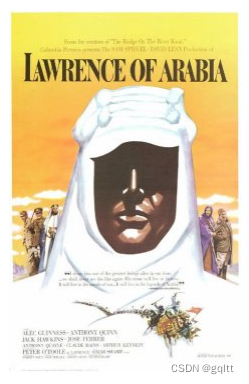
添加图片到顶层
顶层的图片遮盖住文本:Foobar Film Festival
import java.io.FileOutputStream;
import java.io.IOException;import com.itextpdf.text.Document;
import com.itextpdf.text.DocumentException;
import com.itextpdf.text.Element;
import com.itextpdf.text.Font;
import com.itextpdf.text.Image;
import com.itextpdf.text.PageSize;
import com.itextpdf.text.Paragraph;
import com.itextpdf.text.Font.FontFamily;
import com.itextpdf.text.pdf.PdfWriter;public class ImageDirect {/** The resulting PDF. */public static final String RESULT= "D:/data/iText/inAction/chapter03/image_direct.pdf";/** The movie poster. */public static final String RESOURCE= "E:/study/PDF/SourceCodeiText/itext-book/book/resources/img/loa.jpg";public static void main(String[] args)throws IOException, DocumentException {// step 1Document document= new Document(PageSize.POSTCARD, 30, 30, 30, 30);// step 2PdfWriter writer= PdfWriter.getInstance(document, new FileOutputStream(RESULT));writer.setCompressionLevel(0);// step 3document.open();// step 4Image img = Image.getInstance(RESOURCE);img.setAbsolutePosition((PageSize.POSTCARD.getWidth() - img.getScaledWidth()) / 2,(PageSize.POSTCARD.getHeight() - img.getScaledHeight()) / 2);writer.getDirectContent().addImage(img);Paragraph p = new Paragraph("Foobar Film Festival", new Font(FontFamily.HELVETICA, 22));p.setAlignment(Element.ALIGN_CENTER);document.add(p);// step 5document.close();}
}
倾斜图片

import java.io.FileOutputStream;
import java.io.IOException;import com.itextpdf.text.Document;
import com.itextpdf.text.DocumentException;
import com.itextpdf.text.Image;
import com.itextpdf.text.PageSize;
import com.itextpdf.text.pdf.PdfWriter;public class ImageSkew {/** The resulting PDF. */public static final String RESULT = "D:/data/iText/inAction/chapter03/image_skew.pdf";/** The movie poster. */public static final String RESOURCE = "E:/study/PDF/SourceCodeiText/itext-book/book/resources/img/loa.jpg";/*** Main method.** @param    args    no arguments needed* @throws DocumentException * @throws IOException*/public static void main(String[] args)throws IOException, DocumentException {// step 1Document document = new Document(PageSize.POSTCARD.rotate());// step 2PdfWriter writer = PdfWriter.getInstance(document,new FileOutputStream(RESULT));writer.setCompressionLevel(0);// step 3document.open();// step 4Image img = Image.getInstance(RESOURCE);// Add the image to the upper layerwriter.getDirectContent().addImage(img,img.getWidth(), 0, 0.35f * img.getHeight(),0.65f * img.getHeight(), 30, 30);// step 5document.close();}
}
内嵌图片
PdfWriter.getDirectContent().addImage(img, true)
import java.io.FileOutputStream;
import java.io.IOException;import com.itextpdf.text.Document;
import com.itextpdf.text.DocumentException;
import com.itextpdf.text.Image;
import com.itextpdf.text.PageSize;
import com.itextpdf.text.pdf.PdfWriter;public class ImageInline {/** The resulting PDF. */public static final String RESULT= "D:/data/iText/inAction/chapter03/image_inline.pdf";/** The movie poster. */public static final String RESOURCE= "E:/study/PDF/SourceCodeiText/itext-book/book/resources/img/loa.jpg";/*** Main method.** @param    args    no arguments needed* @throws DocumentException * @throws IOException*/public static void main(String[] args)throws IOException, DocumentException {// step 1Document document = new Document(PageSize.POSTCARD, 30, 30, 30, 30);// step 2PdfWriter writer = PdfWriter.getInstance(document,new FileOutputStream(RESULT));writer.setCompressionLevel(0);// step 3document.open();// step 4Image img = Image.getInstance(RESOURCE);img.setAbsolutePosition((PageSize.POSTCARD.getWidth() - img.getScaledWidth()) / 2,(PageSize.POSTCARD.getHeight() - img.getScaledHeight()) / 2);writer.getDirectContent().addImage(img, true);// step 5document.close();}
}
PdfTemplate 对象
PdfTemplate:XObject的别称
PdfTemplate是一个PDF内容流,它是任何图形对象的序列。PdfTemplate扩展PdfContentByte并继承所有其方法。

PdfContentByte canvas = writer.getDirectContent();// Create the XObjectPdfTemplate celluloid = canvas.createTemplate(595, 84.2f);celluloid.rectangle(8, 8, 579, 68);for (float f = 8.25f; f < 581; f+= 6.5f) {celluloid.roundRectangle(f, 8.5f, 6, 3, 1.5f);celluloid.roundRectangle(f, 72.5f, 6, 3, 1.5f);}celluloid.setGrayFill(0.1f);celluloid.eoFill();// Write the XObject to the OutputStreamwriter.releaseTemplate(celluloid);// Add the XObject 10 timesfor (int i = 0; i < 10; i++) {canvas.addTemplate(celluloid, 0, i * 84.2f);}// Go to the next pagedocument.newPage();// Add the XObject 10 timesfor (int i = 0; i < 10; i++) {canvas.addTemplate(celluloid, 0, i * 84.2f);}相关文章:
iText实战--根据绝对位置添加内容
3.1 direct content 概念简介 pdf内容的4个层级 层级1:在text和graphics底下,PdfWriter.getDirectContentUnder() 层级2:graphics层,Chunk, Images背景,PdfPCell的边界等 层级3:text层,Chun…...
使用navicat for mongodb连接mongodb
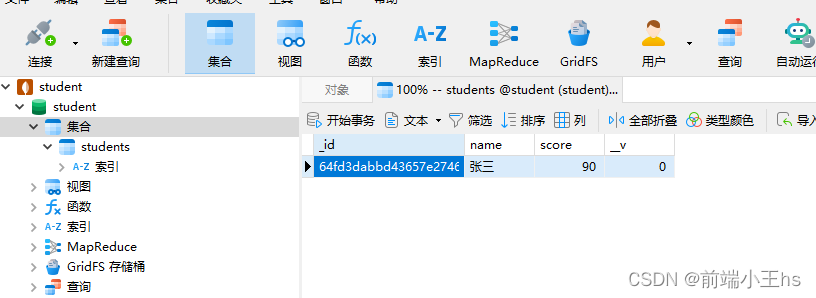
使用navicat for mongodb连接mongodb 安装navicat for mongodb连接mongodb 安装navicat for mongodb 上文mongodb7.0安装全过程详解我们说过,在安装的时候并没有勾选install mongodb compass 我们使用navicat去进行可视化的数据库管理 navicat for mongodb下载地址…...
Qt ffmpeg音视频转换工具
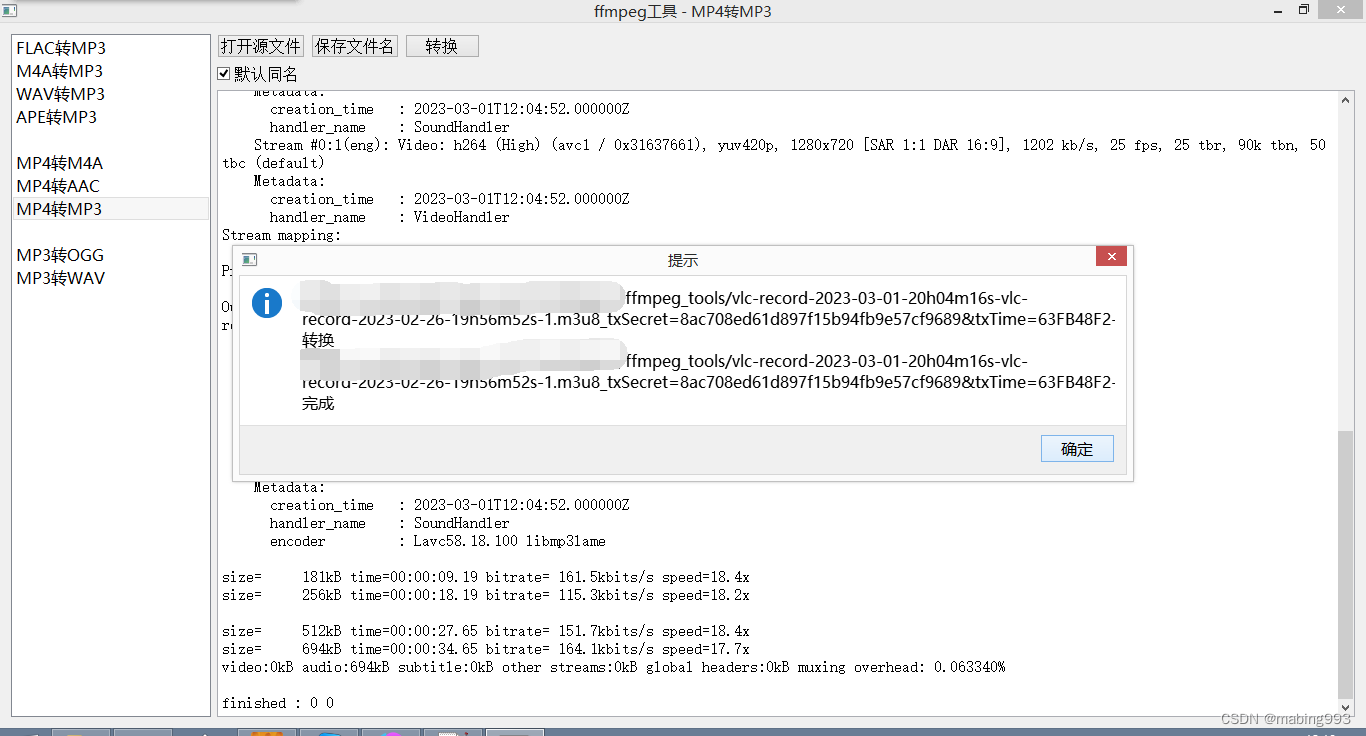
Qt ffmpeg音视频转换工具,QProcess方式调用ffmpeg,对音视频文件进行格式转换,支持常见的音视频格式,主要在于QProcess的输出处理以及转换的文件名和后缀的处理,可以进一步加上音视频剪切合并和音视频文件属性查询修改的…...

机器学习笔记 - 视频分析和人类活动识别技术路线简述
一、理解人类活动识别 首先了解什么是人类活动识别,简而言之,是对某人正在执行的活动/动作进行分类或预测的任务称为活动识别。 我们可能会有一个问题:这与普通的分类任务有什么不同?这里的问题是,在人类活动识别中,您实际上需要一系列数据点来预测正确执行的动作。 看看…...
)
Redis从入门到精通(三:常用指令)
前边我们介绍了redis存储的四种基本数据类型,并纵向介绍了这四种数据类型的各种指令操作,现在我们这个章节从横向来总结一下关于key的常用指令和数据库常用指令 key常用指令 删除指定key del key 获取key是否存在 exists key 获取key的类型 type …...

代码随想录day39 || 动态规划 || 不同路径
62.不同路径 ● 力扣题目链接 ● 一个机器人位于一个 m x n 网格的左上角 (起始点在下图中标记为 “Start” )。 ● 机器人每次只能向下或者向右移动一步。机器人试图达到网格的右下角(在下图中标记为 “Finish” )。 ● 问总共有…...

电商平台API接口采集电商平台淘宝天猫京东拼多多数据获取产品详情信息,销量,价格,sku案例
淘宝SKU详情接口是指,获取指定商品的SKU(Stock Keeping Unit,即库存量单位)的详细信息。SKU是指提供不同的商品参数组合的一个机制,通过不同的SKU来标识商品的不同组合形式,如颜色、尺寸等。SKU详情接口可以…...

The ‘<‘ operator is reserved for future use. 错误解决
The < operator is reserved for future use. 错误解决 在 PowerShell 终端执行 python learnstock.py < ldata.txt 发生错误, The < operator is reserved for future use.解决方法, cmd /c python learnstock.py < ldata.txt完结&#x…...
vulnhub靶机Thoth-Tech
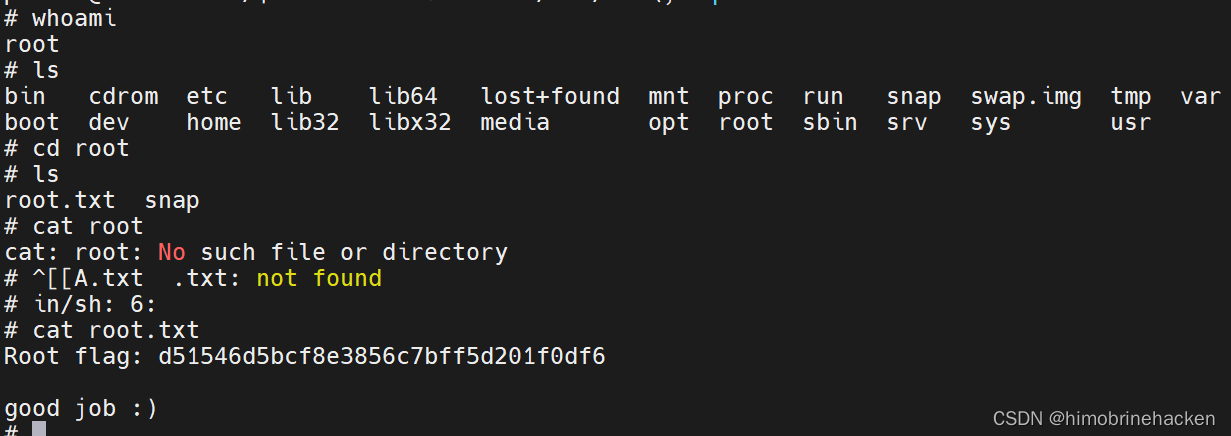
下载地址:https://download.vulnhub.com/thothtech/Thoth-Tech.ova 主机发现 arp-scan -l 目标:192.168.21.148 端口扫描 nmap --min-rate 10000 -p- 192.168.21.148 服务扫描 nmap -sV -sT -O -p21,22,80 192.168.21.148 漏洞扫描 nmap --scriptvu…...
不可思议,无密码登录所有网站!
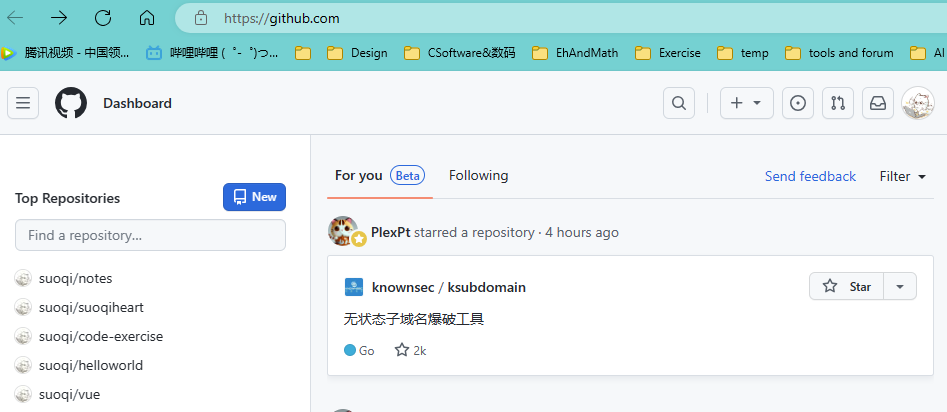
hello,我是小索奇 居然可以免密码登录你的网站?听起来是不是很恐怖 确实如此,Cookie可以用于保持用户在网站上的登录状态,从而实现 免密码登录,学会了不要做坏事哈 这里仅做免密码登录的实操,就不介绍Cooki…...

深度学习编译器关键组件
1 高层中间代码 为了克服传统编译器中采用的IR限制DL模型中复杂计算的表达的局限性,现有的DL编译器利用高层IR(称为图IR)进行高效的代码优化设计。 1.1 图表示 基于DAG的IR:基于DAG的IR是编译器构建计算图的最传统方法之一&…...
【C++】string类模拟实现下篇(附完整源码)
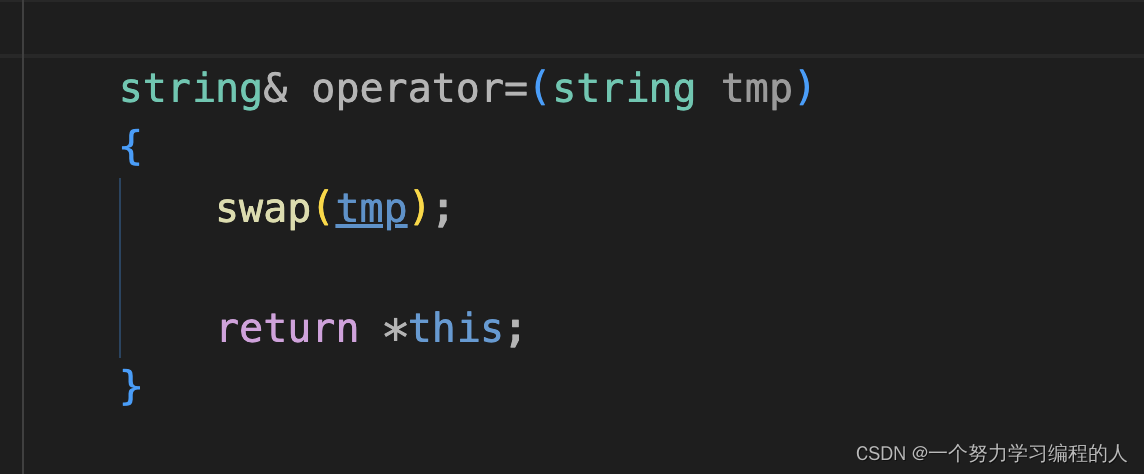
目录 1. resize2. 流插入<<和流提取>>重载2.1 流插入<<重载2.2 流提取 << 3. 常见关系运算符重载4. 赋值重载4.1浅拷贝的默认赋值重载4.2 深拷贝赋值重载实现4.3 赋值重载现代写法 5. 写时拷贝(了解)6.源码6.1 string.h6.2 test.cpp 1. res…...

Android高级开发-APK极致优化
九道工序 1. SVG(Scalable Vector Graphics)可缩放矢量图 使用矢量图代替位图可以减小 APK 的尺寸,因为可以针对不同屏幕密度调整同一文件的大小,而不会降低图像质量。 矢量图首次加载时可能消耗更多的 CPU 资源。之后,二者的内存使用率和…...
Rocketmq--消息驱动
1 MQ简介 1.1 什么是MQ MQ(Message Queue)是一种跨进程的通信机制,用于传递消息。通俗点说,就是一个先进先出的数据结构。 1.2 MQ的应用场景 1.2.1 异步解耦 最常见的一个场景是用户注册后,需要发送注册邮件和短信通…...

华为云云耀云服务器L实例评测|centos系统搭建git私服
搭建git私服 前言一、华为云云耀云服务器L实例租用二、华为云云耀云服务器L实例安装git三、华为云云耀云服务器L实例git配置1.创建文件用于存放公钥2.设置文件权限3.配置本地公钥 四、华为云云耀云服务器L实例部署git仓库四、git仓库到本地总结 前言 之前一直想搭建一个属于自…...

苹果CMS主题 MXonePro二开优化修复开源版影视网站源码
MXPro模板主题(又名:mxonepro)是一款基于苹果cms程序的一款全新的简洁好看UI的影视站模板类似于西瓜视频,不过同对比MxoneV10魔改模板来说功能没有那么多,也没有那么大气,但是比较且可视化功能较多简洁且有周更记录样式等多功能后台设置&…...

【新版】系统架构设计师 - 软件架构设计<轻量级架构>
个人总结,仅供参考,欢迎加好友一起讨论 文章目录 架构 - 软件架构设计<轻量级架构>考点摘要轻量级架构表示层业务逻辑层持久层数据库 SSH与SSMORMHibernate与Mybatis 架构 - 软件架构设计<轻量级架构> 考点…...
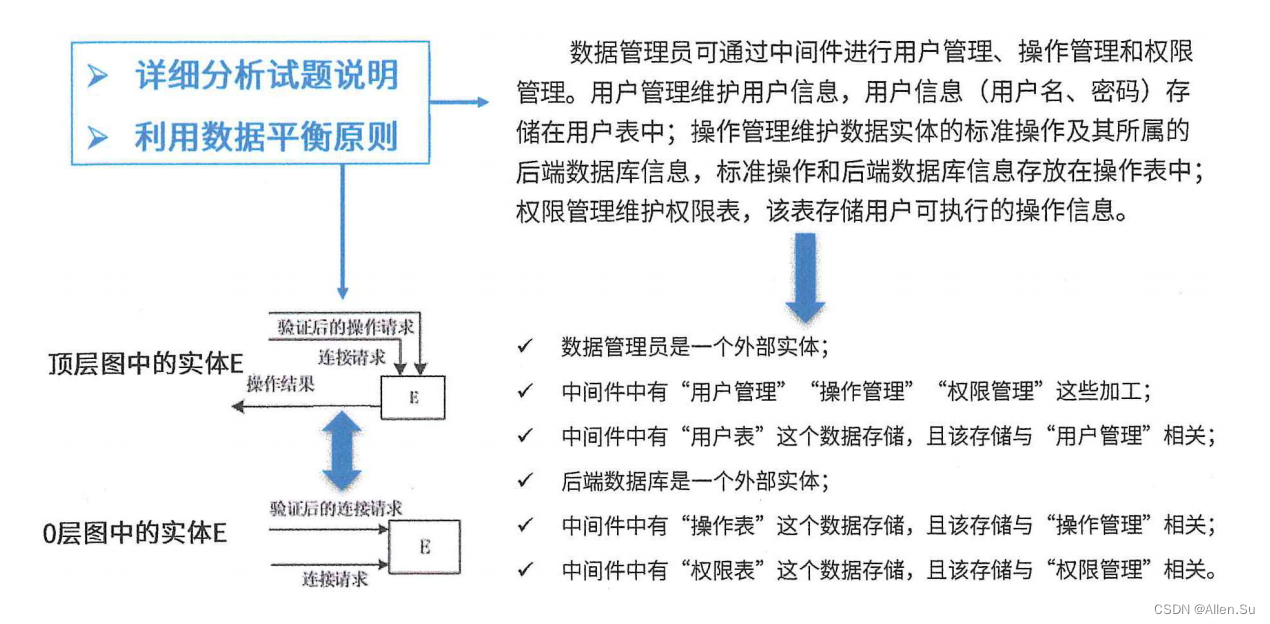
系统架构设计专业技能 ·结构化需求分析 - 数据流图
现在的一切都是为将来的梦想编织翅膀,让梦想在现实中展翅高飞。 Now everything is for the future of dream weaving wings, let the dream fly in reality. 点击进入系列文章目录 系统架构设计高级技能 结构化需求分析 - 数据流图 一、数据流图的基本概念二、需…...
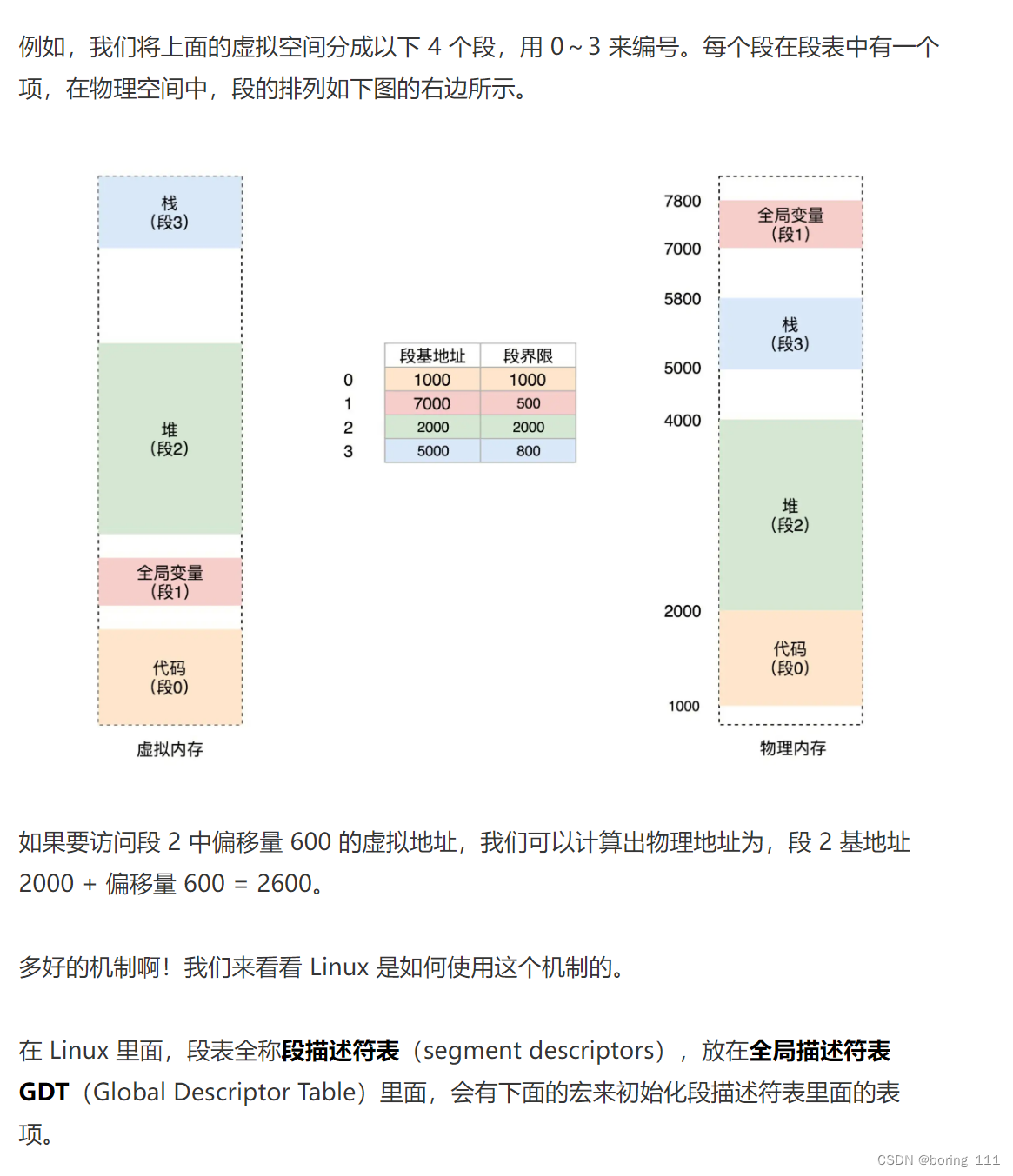
linux内核分析:线程和进程创建,内存管理
lec18-19:进程与线程创建 lec20-21虚拟内存管理 内核代码,全局变量这些只有一份,但是内核栈有多份,这可能就是linux线程模型1对1模式的由来。通过栈来做的 x86 CPU支持分段和分页(平坦内存模式)两种 分段,选择子那里就有特权标记了...

SpringMvc根据返回值类型不同处理响应
目录 一、介绍 二、返回值为void (1)控制层方法 三、返回值为String (1)控制层 四、返回值为ModelAndView (1)控制层方法 (2)jsp页面 一、介绍 我们可以通过控制器方法的返回…...

服务器硬防的应用场景都有哪些?
服务器硬防是指一种通过硬件设备层面的安全措施来防御服务器系统受到网络攻击的方式,避免服务器受到各种恶意攻击和网络威胁,那么,服务器硬防通常都会应用在哪些场景当中呢? 硬防服务器中一般会配备入侵检测系统和预防系统&#x…...

基础测试工具使用经验
背景 vtune,perf, nsight system等基础测试工具,都是用过的,但是没有记录,都逐渐忘了。所以写这篇博客总结记录一下,只要以后发现新的用法,就记得来编辑补充一下 perf 比较基础的用法: 先改这…...

Nginx server_name 配置说明
Nginx 是一个高性能的反向代理和负载均衡服务器,其核心配置之一是 server 块中的 server_name 指令。server_name 决定了 Nginx 如何根据客户端请求的 Host 头匹配对应的虚拟主机(Virtual Host)。 1. 简介 Nginx 使用 server_name 指令来确定…...

Axios请求超时重发机制
Axios 超时重新请求实现方案 在 Axios 中实现超时重新请求可以通过以下几种方式: 1. 使用拦截器实现自动重试 import axios from axios;// 创建axios实例 const instance axios.create();// 设置超时时间 instance.defaults.timeout 5000;// 最大重试次数 cons…...
智能分布式爬虫的数据处理流水线优化:基于深度强化学习的数据质量控制
在数字化浪潮席卷全球的今天,数据已成为企业和研究机构的核心资产。智能分布式爬虫作为高效的数据采集工具,在大规模数据获取中发挥着关键作用。然而,传统的数据处理流水线在面对复杂多变的网络环境和海量异构数据时,常出现数据质…...
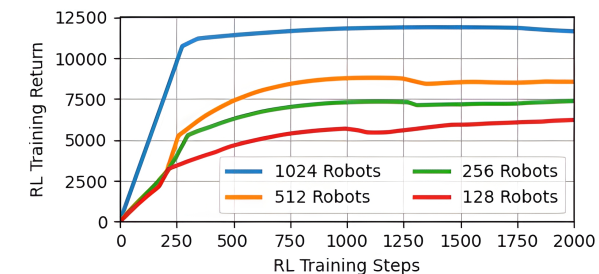
【VLNs篇】07:NavRL—在动态环境中学习安全飞行
项目内容论文标题NavRL: 在动态环境中学习安全飞行 (NavRL: Learning Safe Flight in Dynamic Environments)核心问题解决无人机在包含静态和动态障碍物的复杂环境中进行安全、高效自主导航的挑战,克服传统方法和现有强化学习方法的局限性。核心算法基于近端策略优化…...
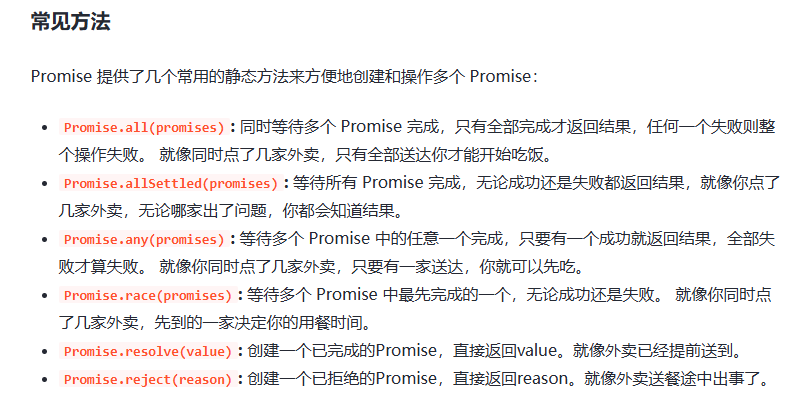
处理vxe-table 表尾数据是单独一个接口,表格tableData数据更新后,需要点击两下,表尾才是正确的
修改bug思路: 分别把 tabledata 和 表尾相关数据 console.log() 发现 更新数据先后顺序不对 settimeout延迟查询表格接口 ——测试可行 升级↑:async await 等接口返回后再开始下一个接口查询 ________________________________________________________…...
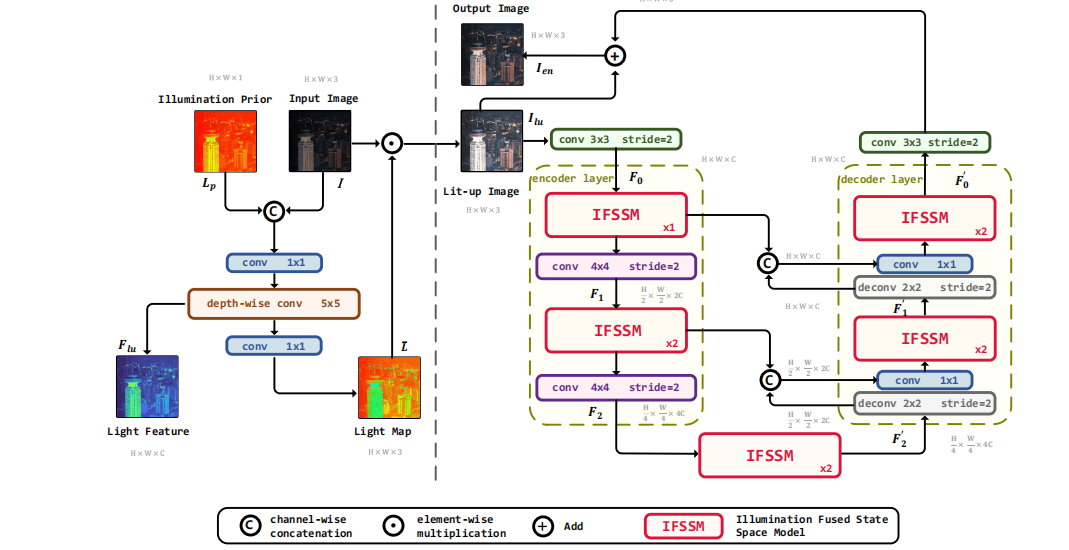
深度学习水论文:mamba+图像增强
🧀当前视觉领域对高效长序列建模需求激增,对Mamba图像增强这方向的研究自然也逐渐火热。原因在于其高效长程建模,以及动态计算优势,在图像质量提升和细节恢复方面有难以替代的作用。 🧀因此短时间内,就有不…...

Kubernetes 网络模型深度解析:Pod IP 与 Service 的负载均衡机制,Service到底是什么?
Pod IP 的本质与特性 Pod IP 的定位 纯端点地址:Pod IP 是分配给 Pod 网络命名空间的真实 IP 地址(如 10.244.1.2)无特殊名称:在 Kubernetes 中,它通常被称为 “Pod IP” 或 “容器 IP”生命周期:与 Pod …...

pycharm 设置环境出错
pycharm 设置环境出错 pycharm 新建项目,设置虚拟环境,出错 pycharm 出错 Cannot open Local Failed to start [powershell.exe, -NoExit, -ExecutionPolicy, Bypass, -File, C:\Program Files\JetBrains\PyCharm 2024.1.3\plugins\terminal\shell-int…...